air condition TOYOTA RAV4 2019 (in English) User Guide
[x] Cancel search | Manufacturer: TOYOTA, Model Year: 2019, Model line: RAV4, Model: TOYOTA RAV4 2019Pages: 728, PDF Size: 21.09 MB
Page 130 of 728
1303-2. Opening, closing and locking the doors
●When an exterior alarm sounds
once for 5 seconds
●When an interior alarm pings con-
tinuously
■Battery-saving function
The battery-saving function will be
activated in order to prevent the
electronic key battery and the bat-
tery from being discharged while the
vehicle is not in op eration for a long
time.
●In the following situations, the
smart key system may take some
time to unlock the doors.
• The electronic key has been left in an area of approximately 6 ft. (2
m) of the outside of the vehicle for
10 minutes or longer.
• The smart key system has not been used for 5 days or longer.
●If the smart key system has not
been used for 14 days or longer,
the doors canno t be unlocked at
any doors except the driver’s door.
In this case, take hold of the
driver’s door handle, or use the
wireless remote control or the mechanical key, to unlock the
doors.
■Turning an electronic key to
battery-saving mode
●When battery-saving mode is set,
battery depletion is minimized by
stopping the electronic key from
receiving radio waves.
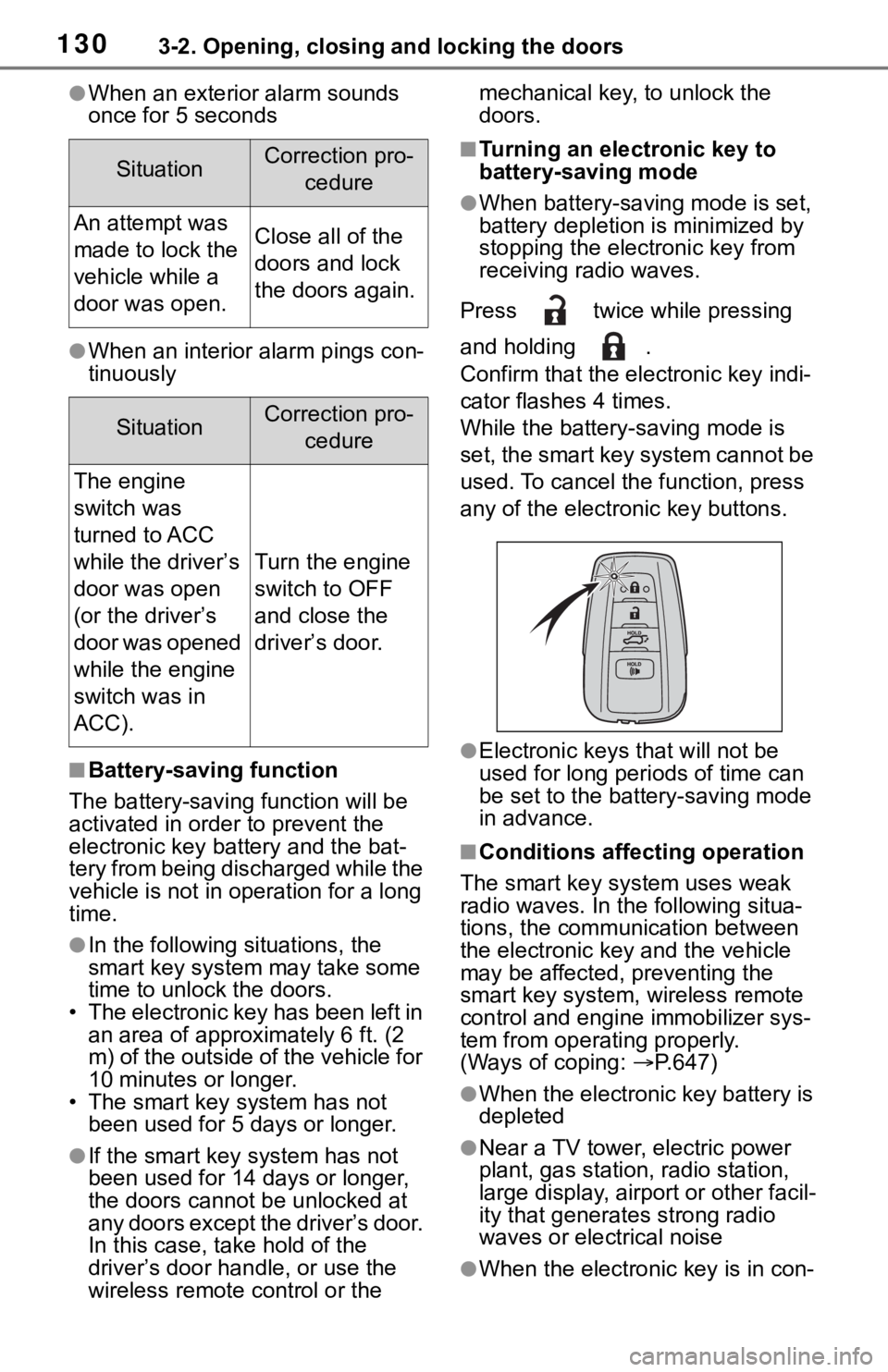
Press twice while pressing
and holding .
Confirm that the ele ctronic key indi-
cator flashes 4 times.
While the battery-saving mode is
set, the smart key system cannot be
used. To cancel the function, press
any of the electronic key buttons.
●Electronic keys that will not be
used for long periods of time can
be set to the battery-saving mode
in advance.
■Conditions affecting operation
The smart key system uses weak
radio waves. In the following situa-
tions, the communication between
the electronic key and the vehicle
may be affected, preventing the
smart key system, wireless remote
control and engi ne immobilizer sys-
tem from operating properly.
(Ways of coping: P.647)
●When the electronic key battery is
depleted
●Near a TV tower, electric power
plant, gas station, radio station,
large display, airpo rt or other facil-
ity that generates strong radio
waves or electrical noise
●When the electronic key is in con-
SituationCorrection pro-
cedure
An attempt was
made to lock the
vehicle while a
door was open.Close all of the
doors and lock
the doors again.
SituationCorrection pro-cedure
The engine
switch was
turned to ACC
while the driver’s
door was open
(or the driver’s
door was opened
while the engine
switch was in
ACC).
Turn the engine
switch to OFF
and close the
driver’s door.
Page 229 of 728
2294-5. Using the driving support systems
4
Driving
■If a warning message is dis-
played on the multi-information
display
A system may be temporarily
unavailable or there may be a mal-
function in the system.
●In the following situations, perform
the actions specif ied in the table.
When the normal operating condi-
tions are detecte d, the message
will disappear and the system will
become operational.
If the message does not disappear,
contact your Toyota dealer.
SituationActions
When the area
around a sensor
is covered with
dirt, moisture
(fogged up, cov-
ered with con-
densation, ice,
etc.), or other
foreign matter
To clean the part
of the wind-
shield in front of
the front camera,
use the wind-
shield wipers or
the windshield
defogger of the
air conditioning
system ( P.505,
512).When the tem-
perature around
the front camera
is outside of the
operational
range, such as
when the vehi-
cle is in the sun
or in an
extremely cold
environment
If the front cam-
era is hot, such
as after the vehi-
cle had been
parked in the
sun, use the air
conditioning sys-
tem to decrease
the temperature
around the front
camera.
If a sunshade
was used when
the vehicle was
parked, depend-
ing on its type,
the sunlight
reflected from
the surface of
the sunshade
may cause the
temperature of
the front camera
to become
excessively high.
If the front cam-
era is cold, such
as after the vehi-
cle is parked in
an extremely
cold environ-
ment, use the air
conditioning sys-
tem to increase
the temperature
around the front
camera.
SituationActions
Page 239 of 728
2394-5. Using the driving support systems
4
Driving
WA R N I N G
■Before using LTA system
●Do not rely solely upon the LTA
system. The LTA system does
not automatically drive the vehi-
cle or reduce the amount of
attention that must be paid to
the area in front of the vehicle.
The driver must always assume
full responsibility for driving
safely by paying careful atten-
tion to the surrounding condi-
tions and operating the steering
wheel to correct the path of the
vehicle. Also, the driver must
take adequate breaks when
fatigued, such as from driving
for a long period of time.
●Failure to perform appropriate
driving operations and pay care-
ful attention may lead to an
accident, resulting in death or
serious injury.
●When not using the LTA system,
use the LTA switch to turn the
system off.
■Situations unsuitable for LTA
system
In the following situations, use the
LTA switch to turn the system off.
Failure to do so may lead to an
accident, resulting in death or
serious injury.
●Vehicle is driven on a road sur-
face which is slippery due to
rainy weather, fallen snow,
freezing, etc.
●Vehicle is driven on a snow-cov-
ered road.
●White (yellow) lin es are difficult
to see due to rain, snow, fog,
dust, etc.
●Vehicle is driven in a temporary
lane or restricted lane due to
construction work.
●Vehicle is driven in a construc-
tion zone.
●A spare tire, tire chains, etc. are
equipped.
●When the tires have been
excessively worn, or when the
tire inflation p ressure is low.
●When tires of a size other than
specified are installed.
●Vehicle is driven in traffic lanes
other than that highways and
freeways.
●When your vehicle is towing a
trailer or during emergency tow-
ing
■Preventing LTA system mal-
functions and operations per-
formed by mistake
●Do not modify the headlights or
place stickers, etc. on the sur-
face of the lights.
●Do not modify the suspension
etc. If the suspension etc. needs
to be replaced, contact your
Toyota dealer.
●Do not install or place anything
on the hood or grille. Also, do
not install a gr ille guard (bull
bars, kangaroo bar, etc.).
●If your windshield needs
repairs, contact your Toyota
dealer.
■Conditions in which functions
may not operate properly
In the following situations, the
functions may not operate prop-
erly and the vehicle may depart
from its lane. Drive safely by
always paying careful attention to
your surroundings and operate
the steering whee l to correct the
path of the vehicle without relying
solely on the functions.
Page 275 of 728

2754-5. Using the driving support systems
4
Driving
dealer.
■Sensor detection information
●The sensor’s detection areas are
limited to the areas around the
vehicle’ front and rear bumpers.
●The following situations may occur
during use.
• Depending on the shape of the object and other factors, the
detection distance may shorten, or
detection may be impossible.
• Detection may be impossible if
static objects draw too close to the
sensor.
• There will be a short delay
between static object detection
and display (warning buzzer
sounds). Even at low speeds,
there is a possibilit y that the object
will come within 30 cm before the
display is shown and the warning
buzzer sounds.
• It might be difficult to hear the buzzer due to the volume of the
audio system or air flow noise of
the air conditioning system.
• It may be difficult to hear the sound of this system due to the
buzzers of other systems.
■Conditions under which the
function may not function cor-
rectly
Certain vehicle conditions and the
surrounding environment may affect
the ability of a sensor to correctly
detect objects. Particular instances
where this may occur are listed
below.
●There is dirt, snow or ice on a sen-
sor. (Cleaning the sensors will
resolve this problem.)
●A sensor is frozen. (Thawing the
area will resolve this problem.)
In especially cold weather, if a
sensor is frozen the sensor dis-
play may be displayed abnormally,
or objects, such as a wall, may not
be detected.
●A sensor is covered in any way.
●When a sensor or the area around a sensor is extremely hot or cold.
●On an extremely bumpy road, on
an incline, on gravel, or on grass.
●The vicinity of the vehicle is noisy
due to vehicle horns, motorcycle
engines, air brakes of large vehi-
cles, or other lou
d noises produc-
ing ultrasonic waves.
●There is another vehicle equipped
with parking assist sensors in the
vicinity.
●A sensor is coated with a sheet of
spray or heavy rain.
●If a sensor is hit by a large amount
of water, such as when driving on
a flooded road.
●If the vehicle is significantly tilted.
●The vehicle is approaching a tall
or curved curb.
●If objects draw too close to the
sensor.
■Objects which may not be prop-
erly detected
The shape of the object may pre-
vent the sensor from detecting it.
Pay particular attent ion to the follow-
ing objects:
●Wires, fences, ropes, etc.
●Cotton, snow and other materials
that absorb sound waves
●Sharply-angled objects
●Low objects
●Tall objects with upper sections
projecting outwards in the direc-
tion of your vehicle
People may not be detected if they
are wearing certain types of cloth-
ing.
■Certification (Canada only)
This ISM device complies with
Canadian ICES-001.
Page 292 of 728
2924-5. Using the driving support systems
●When there are spinning objects
near your vehicle such as the fan
of an air conditioning unit
●When water is splashed or
sprayed toward the rear bumper,
such as from a sprinkler
■Situations in which the Parking
Support Brake function (rear-
crossing vehicles) may not
operate properly
In some situations, such as the fol-
lowing, the radar sensors may not
detect an object and this function
may not operate properly
●Stationary objects
●When a sensor or the area around
a sensor is extremely hot or cold
●If the rear bumper is covered with
ice, snow, dirt, etc.
●When it is raining heavily or water
strikes the vehicle
●When the detecti on area of a
radar sensor is obstructed by an
adjacent vehicle
●If the vehicle is s ignificantly tilted
●When equipment that may
obstruct a sensor is installed, such
as a towing eyelet, bumper pro-
tector (an additional trim strip,
etc.), bicycle carrier, or snow plow
●If the suspension has been modi-
fied or tires of a size other than
specified are installed
●If the front of the vehicle is raised
or lowered due to the carried load
●If a sticker or an electronic compo-
nent, such as a backlit license
plate (especially fluorescent type),
fog lights, fender pole or wireless antenna is installed near a radar
sensor
●If the orientation of a radar sensor
has been changed
●When multiple vehicles are
approaching with only a small gap
between each vehicle
●If a vehicle is approaching the rear
of your vehicle rapidly
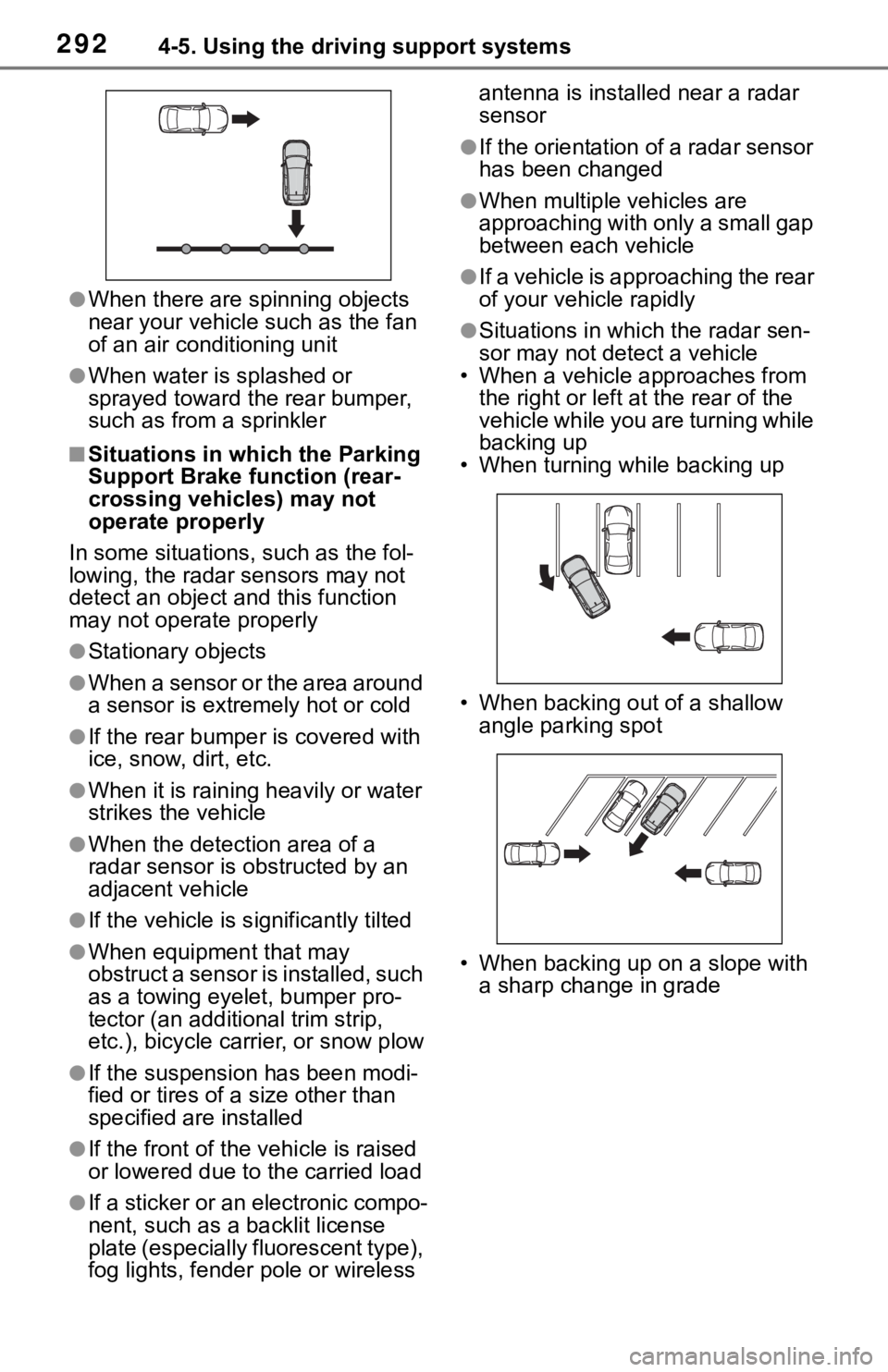
●Situations in which the radar sen-
sor may not detect a vehicle
• When a vehicle approaches from
the right or left at the rear of the
vehicle while you are turning while
backing up
• When turning while backing up
• When backing out of a shallow angle parking spot
• When backing up on a slope with a sharp change in grade
Page 348 of 728

3484-5. Using the driving support systems
ing wheel may temporarily feel
heavy.
■Operating conditions
●The Stop & Start system is opera-
tional when all of the following
conditions are met:
• The vehicle has been driven a cer-
tain amount of time.
• The brake pedal is being depressed firmly. (except when
the vehicle is stopped by the
dynamic radar cruise control with
full-speed range when in vehicle-
to-vehicle distanc e control mode)
• The D shift position is selected.
• The driver’s seat belt is fastened.
• The driver’s door is closed.
• The selected driv ing mode is nor-
mal or Eco drive mode.
• The selected driv ing mode is not
snow mode (if equipped).
• Mud & Sand or Rock & Dirt mode is not selected for Multi-terrain
Select (AWD models).
• The windshield defogger is off. (vehicles without a manual air
conditioning system)
• The accelerator pedal is not being depressed.
• The engine is adequately warmed up.
• The outside temperature is -5°C
(23°F) or higher.
• The hood is closed. ( P.349)
●In the following situations the
engine may not be stopped by the
Stop & Start system. This is not a
malfunction of the Stop & Start
system.
• When the air conditioning system
is being used.
• When the battery is undergoing a periodic recharge.
• When the battery is not sufficiently charged, such as if the vehicle
has been parked for a long time
and the battery charge has
decreased, the e lectric load is
large, the battery fluid tempera-
ture is excessively low or the bat-
tery has deteriorated.
• When the brake booster vacuum
is low. • When the elapsed time since the
engine was restarted is short.
• When the vehicle is stopped fre- quently, such as when in a traffic
jam.
• When the engine coolant tem- perature or transm ission fluid tem-
perature is extremely low or high.
• When the vehicle is stopped on a
steep incline.
• When the steering wheel is being operated.
• When the vehicle is being driven
in a high altitude area.
• When the battery fluid tempera- ture is extremely low or high.
• For a while after the battery termi- nals have been disconnected and
reconnected.
●When the engine is stopped by
the Stop & Star t system, the
engine will be restarted automati-
cally if any of the following condi-
tions are met:
(To enable the engine to be
stopped by the Stop & Start sys-
tem again, drive the vehicle.)
• The air conditioning system is
turned on. (vehicles without a
manual air conditioning system)
• The windshield defogger is turned
on. (vehicles without a manual air
conditioning system)
• The shift lever is shifted from D.
• The driver’s seat belt is unfas-
tened.
• The driver’s door is opened.
• The driving mode is changed from
normal or Eco drive mode to
another mode.
• The driving mode is changed to snow mode (if equipped).
• Mud & Sand or Rock & Dirt mode
is selected for Mult i-terrain Select
(AWD models).
• The Stop & Start cancel switch is
pressed.
• The steering wheel is operated.
• The accelerator pedal is depressed.
• The vehicle starts to roll on an incline.
●When the engine is stopped by
Page 349 of 728

3494-5. Using the driving support systems
4
Driving
the Stop & Start system, the
engine may restart automatically
in the following situations: (To
enable the engine to be stopped
by the Stop & Start system again,
drive the vehicle.)
• When the brake pedal is pumped
or strongly depressed.
• When the air conditioning system is being used.
• When a switch of the air condition- ing system is operated (windshield
defogger switch, etc.).
• The battery is not sufficiently charged.
■When the hood is opened
●If the hood is opened while the
engine is stopped by the Stop &
Start system, the engine will stall
and will not be able to be restarted
by the automatic engine start
function. In this case, restart the
engine using the normal engine
starting procedure. ( P.194, 195)
●If the hood is closed after the
engine is started with the hood
open, the Stop & Start system will
not operate. Close the hood, turn
the engine switch off, wait 30 sec-
onds or more, and then start the
engine.
■Air conditioning system opera-
tion while the engine is stopped
by the Stop & Start system
Vehicles with an automatic air con-
ditioning system: When the air con-
ditioning is in automatic mode and
the engine is stopped by the Stop &
Start system, the fan may operate at
a low speed in order to prevent the
temperature in the cabin from
increasing or decreasing or may be
stopped.
To prioritize air conditioning system
performance when the vehicle is
stopped, disable the Stop & Start
system by pressing the Stop & Start
cancel switch.
●If the windshield is fogged up
Turn the windshield defogger on. (
P.505, 505)
If the windshield fogs up frequently,
press the Stop & Start cancel switch
to disable the Stop & Start system.
●If an odor is emitted from the air
conditioning system
• Vehicles with a manual air condi-
tioning system:
If the idling stop time setting is set
to “Extended”, change it to “Stan-
dard”. If an odor is emitted when
the idling stop time setting is set to
“Standard”, press the Stop & Start
cancel switch to deactivate the
Stop & Start system.
• Vehicles with a n automatic air
conditioning system:
Press the Stop & Start cancel
switch to deactivate the Stop &
Start system.
■Changing the idling stop time
with the air conditioning system
on
The length of time the Stop & Start
system will operate when the air
conditioning system is on can be
changed in of the multi-informa-
tion display ( P.94). (The length of
time the Stop & Start system will
operate when the a ir conditioning
system is off cann ot be changed.)
■Displaying the Stop & Start sys-
tem status
After Start:
Displays the cumulative time that
the engine is stopped by the Stop &
Start system from when the engine
is started until the engine is
stopped.
This item is reset each time the
engine stops.
■Multi-information display mes-
sages
If the following situations,
and a message may be displayed
on the multi-information display.
Page 350 of 728

3504-5. Using the driving support systems
●When the engine cannot be
stopped by the Stop & Start sys-
tem “Press Brake More to Acti-
vate”
• The brake pedal is not sufficiently depressed.
If the brake pedal is depressed
further, the system will operate.
“Non-Dedicated Battery”
• A battery not designed for use with a Stop & Start system may
have been installed.
Have the vehicl e inspected by
your Toyota dealer.
“Battery Charging”
• The battery charge may be low.
Stopping of the engine is tempo-
rarily prohibited to prioritize charging
of the battery. After the engine runs
for a certain amount of time, the sys-
tem will be enabled.
• A refresh charge may be occur- ring (Examples: For a while after
the battery terminals have been
disconnected and reconnected.
For a while after the battery has
been replaced. etc.)
After a refresh charge of approxi-
mately 5 to 60 minutes completes,
the system can be operated.
• If displayed continuously for a long time (more than 60 minutes)
The battery may b e deteriorated.
Contact your Toyota dealer for
details.
“Stop & Start System
Unavailable”
• The Stop & Start system is tempo- rarily disabled.
Allow the engine to run for some
time.
• The engine may have been started with the hood open.
Close the hood, turn the engine
switch off, wait f or 30 seconds or
more, and then start the engine.
“In Preparation”
• The vehicle is being driven in a high altitude area.
• The brake booster vacuum is low.
When the brake booster vacuum
reaches a predeter mined level, the
system will be enabled.
“For Climate Control”
• The air conditioning system is being used when the ambient
temperature is high or low.
If the difference between the set
temperature and cabin temperature
becomes small, the system will be
enabled.
• The windshield defogger is on.
●When the engine automatically
restarts while stopped by the Stop
& Start system
“In Preparation”
• The brake pedal has been depressed further or pumped.
The system will be enabled after
the engine runs and the brake
booster vacuum reaches a predeter-
mined level.
“For Climate Control”
• The air conditioning system has been turned on o r is being used.
• The windshield defogger has been turned on.
Page 352 of 728
3524-5. Using the driving support systems
■FF vehicles/Dynamic
Torque Control AWD vehi-
cles
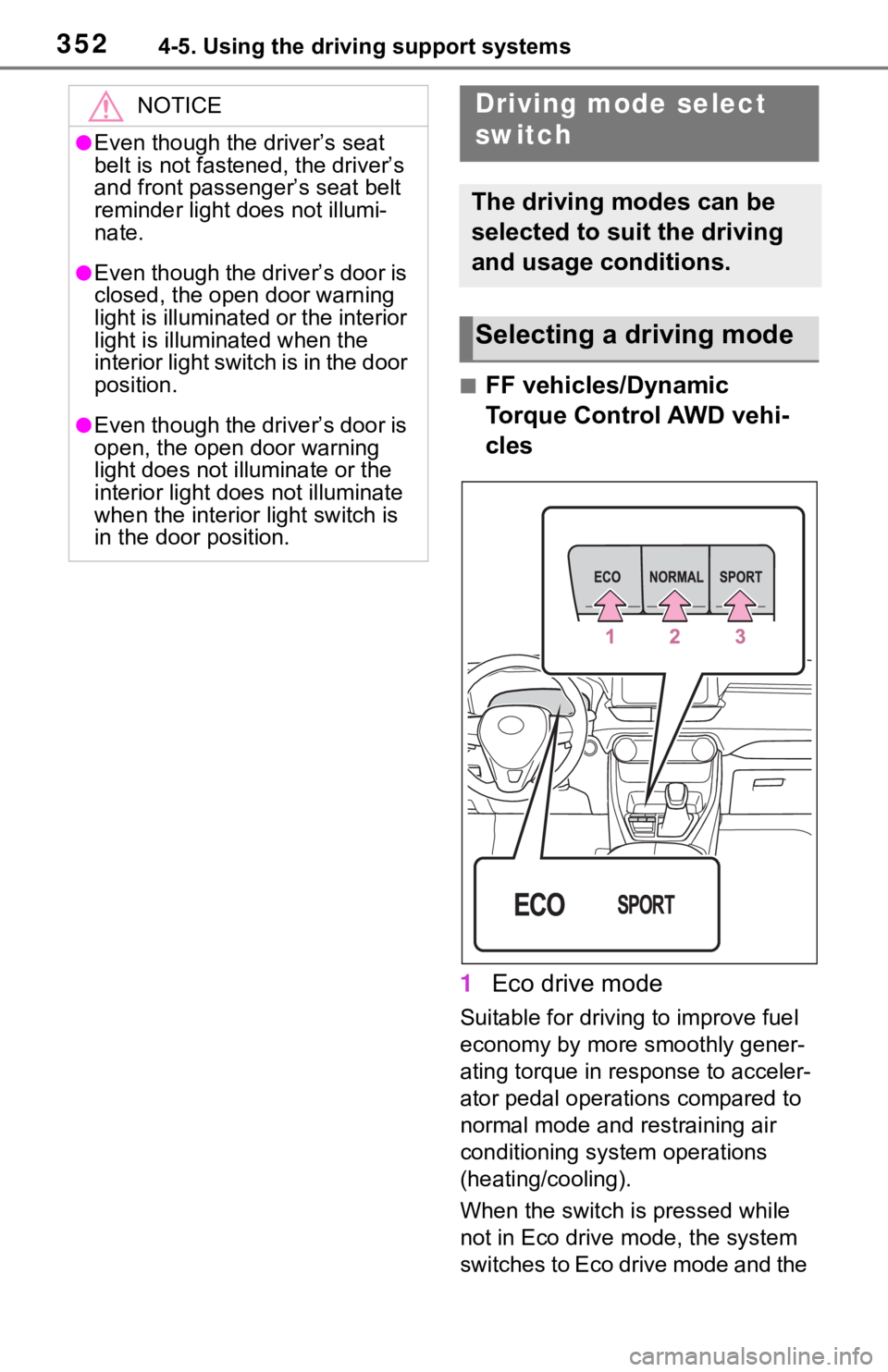
1 Eco drive mode
Suitable for drivi ng to improve fuel
economy by more smoothly gener-
ating torque in response to acceler-
ator pedal operations compared to
normal mode and restraining air
conditioning system operations
(heating/cooling).
When the switch is pressed while
not in Eco drive mode, the system
switches to Eco drive mode and the
NOTICE
●Even though the driver’s seat
belt is not fastened, the driver’s
and front passenger’s seat belt
reminder light does not illumi-
nate.
●Even though the driver’s door is
closed, the open door warning
light is illuminated or the interior
light is illuminated when the
interior light switch is in the door
position.
●Even though the driver’s door is
open, the open door warning
light does not illuminate or the
interior light does not illuminate
when the interior light switch is
in the door position.
Driving mode select
switch
The driving modes can be
selected to suit the driving
and usage conditions.
Selecting a driving mode
Page 353 of 728
3534-5. Using the driving support systems
4
Driving
Eco drive mode indicator illumi-
nates on the multi-information dis-
play.
2Normal mode
Suitable for normal driving.
The driving mode returns to normal
mode if the switch is pressed while
in Eco drive mode or sport mode.
3Sport mode
Controls the steering feeling and
engine to create an acceleration
response that is su itable for sporty
driving. Suitable for when crisp
handling is desired, such as when
driving on mountainous roads.
When the switch is pressed while
not in sport mode, the system
switches to sport mode and the
sport mode indicator illuminates on
the multi-information display.
■Dynamic Torque Vectoring
AWD vehicles
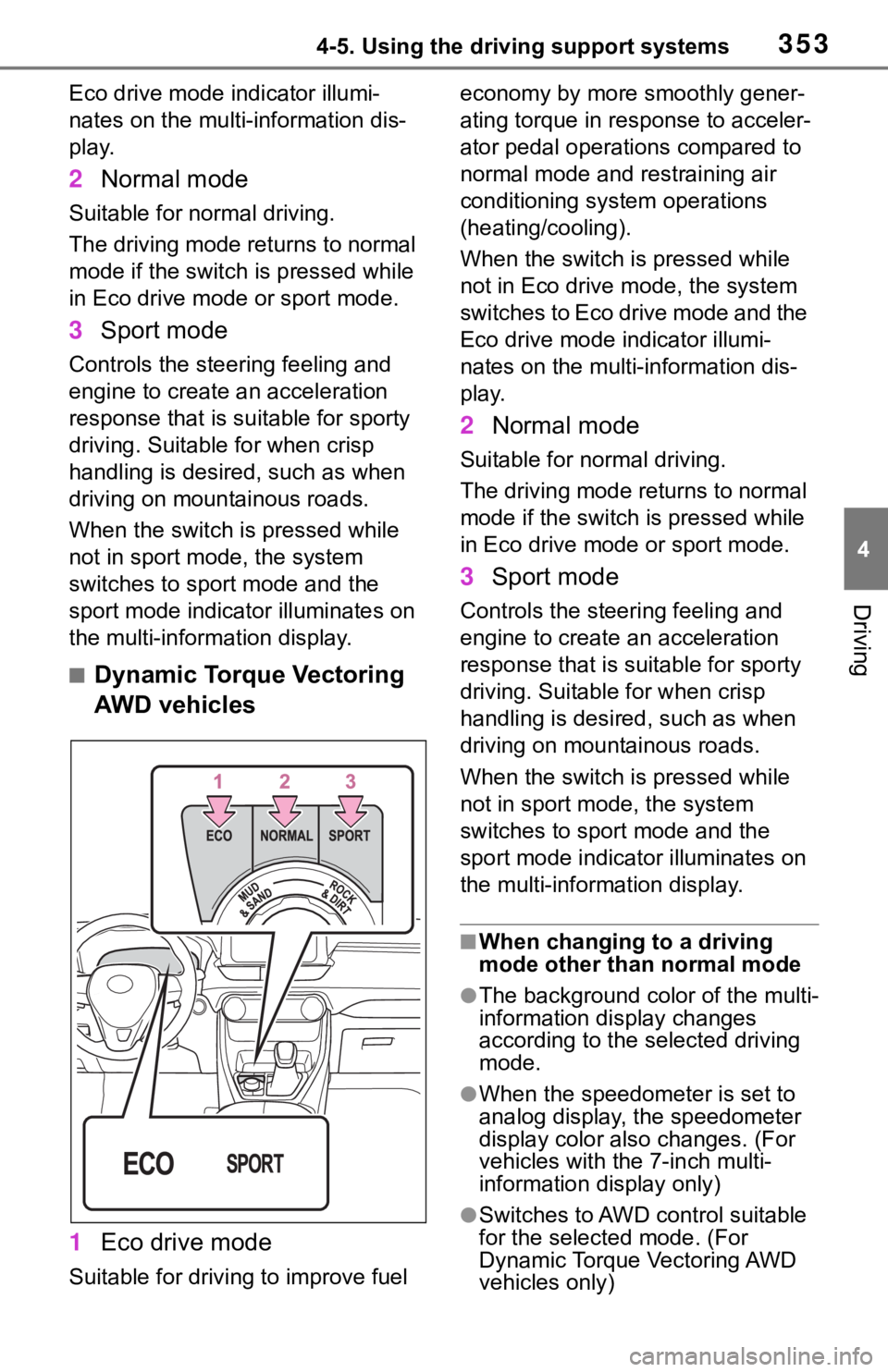
1 Eco drive mode
Suitable for driving to improve fuel economy by more
smoothly gener-
ating torque in response to acceler-
ator pedal operations compared to
normal mode and restraining air
conditioning system operations
(heating/cooling).
When the switch is pressed while
not in Eco drive mode, the system
switches to Eco drive mode and the
Eco drive mode i ndicator illumi-
nates on the multi-information dis-
play.
2 Normal mode
Suitable for n ormal driving.
The driving mode returns to normal
mode if the switch i s pressed while
in Eco drive mode or sport mode.
3 Sport mode
Controls the steering feeling and
engine to create an acceleration
response that is suitable for sporty
driving. Suitable for when crisp
handling is desired, such as when
driving on mountainous roads.
When the switch is pressed while
not in sport mode, the system
switches to sport mode and the
sport mode indicat or illuminates on
the multi-information display.
■When changing to a driving
mode other than normal mode
●The background color of the multi-
information display changes
according to the selected driving
mode.
●When the speedometer is set to
analog display, the speedometer
display color also changes. (For
vehicles with the 7-inch multi-
information di splay only)
●Switches to AWD control suitable
for the selected mode. (For
Dynamic Torque Vectoring AWD
vehicles only)