ECO mode TOYOTA RAV4 2019 (in English) Owner's Guide
[x] Cancel search | Manufacturer: TOYOTA, Model Year: 2019, Model line: RAV4, Model: TOYOTA RAV4 2019Pages: 728, PDF Size: 21.09 MB
Page 254 of 728
2544-5. Using the driving support systems
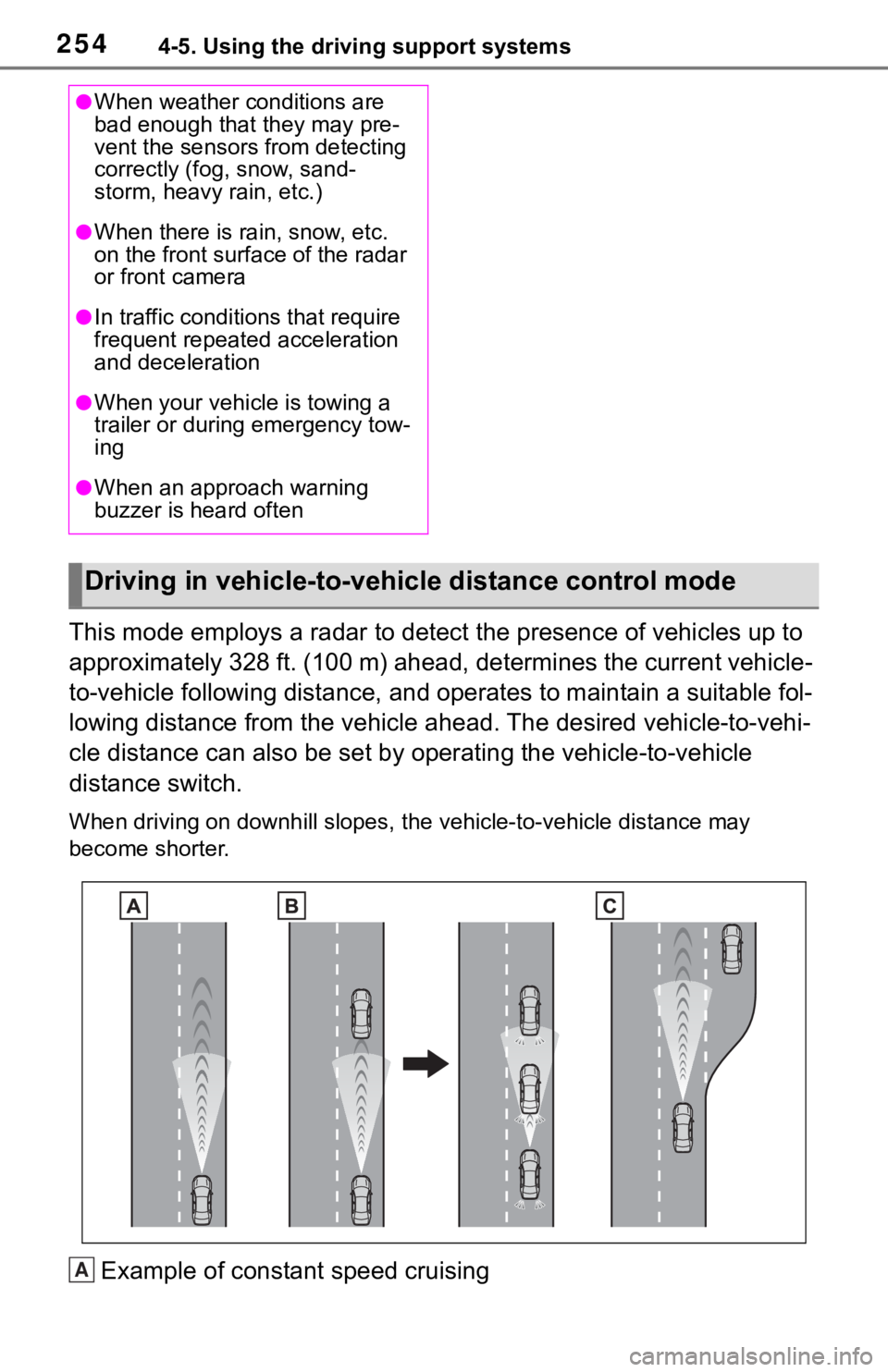
This mode employs a radar to detect the presence of vehicles up to
approximately 328 ft. (100 m) ahead, determines the current vehicle-
to-vehicle following distance, and operates to maintain a suitable fol-
lowing distance from the vehicle ahead. The desired vehicle-to- vehi-
cle distance can also be set by operating the vehicle-to-vehicl e
distance switch.
When driving on downhill slopes, t he vehicle-to-vehicle distance may
become shorter.
Example of constant speed cruising
●When weather conditions are
bad enough that they may pre-
vent the sensors from detecting
correctly (fog, snow, sand-
storm, heavy rain, etc.)
●When there is rain, snow, etc.
on the front surface of the radar
or front camera
●In traffic conditions that require
frequent repeated acceleration
and deceleration
●When your vehicle is towing a
trailer or during emergency tow-
ing
●When an approach warning
buzzer is heard often
Driving in vehicle-to-vehicle distance control mode
A
Page 255 of 728
2554-5. Using the driving support systems
4
Driving
When there are no vehicles ahead
The vehicle travels at the speed set by the driver.
Example of deceleration crui sing and follow-up cruising
When a preceding vehicle driving slower than the set speed
appears
When a vehicle is detected runni ng ahead of you, the system automatically
decelerates your vehicle. When a greater reduction in vehicle s peed is nec-
essary, the system applies the brakes (the stop lights will come on at this
time). The system will respond to changes in the speed of the vehicle
ahead in order to maintain the vehicle-to-vehicle distance set by the driver.
Approach warning warns you when the system cannot decelerate suffi-
ciently to prevent your vehicle from closing in on the vehicle ahead.
When the vehicle ahead of you st ops, your vehicle will also stop (vehicle is
stopped by system control). Afte r the vehicle ahead starts off, pressing the
“+RES” switch or depressing the accelerator pedal (start-off operation) will
resume follow-up cruising. If the start-off operation is not pe rformed, system
control continues to keep your vehicle stopped.
When the turn signal lever is operated and your vehicle moves t o a left lane
while driving at 50 mph (80 km/h ) or more, the vehicle will quickly acceler-
ate to help to overtake a passing vehicle.
Example of acceleration
When there are no longer any preceding vehicles driving slower
than the set speed
The system accelerates until the set speed is reached. The system then
returns to constan t speed cruising.
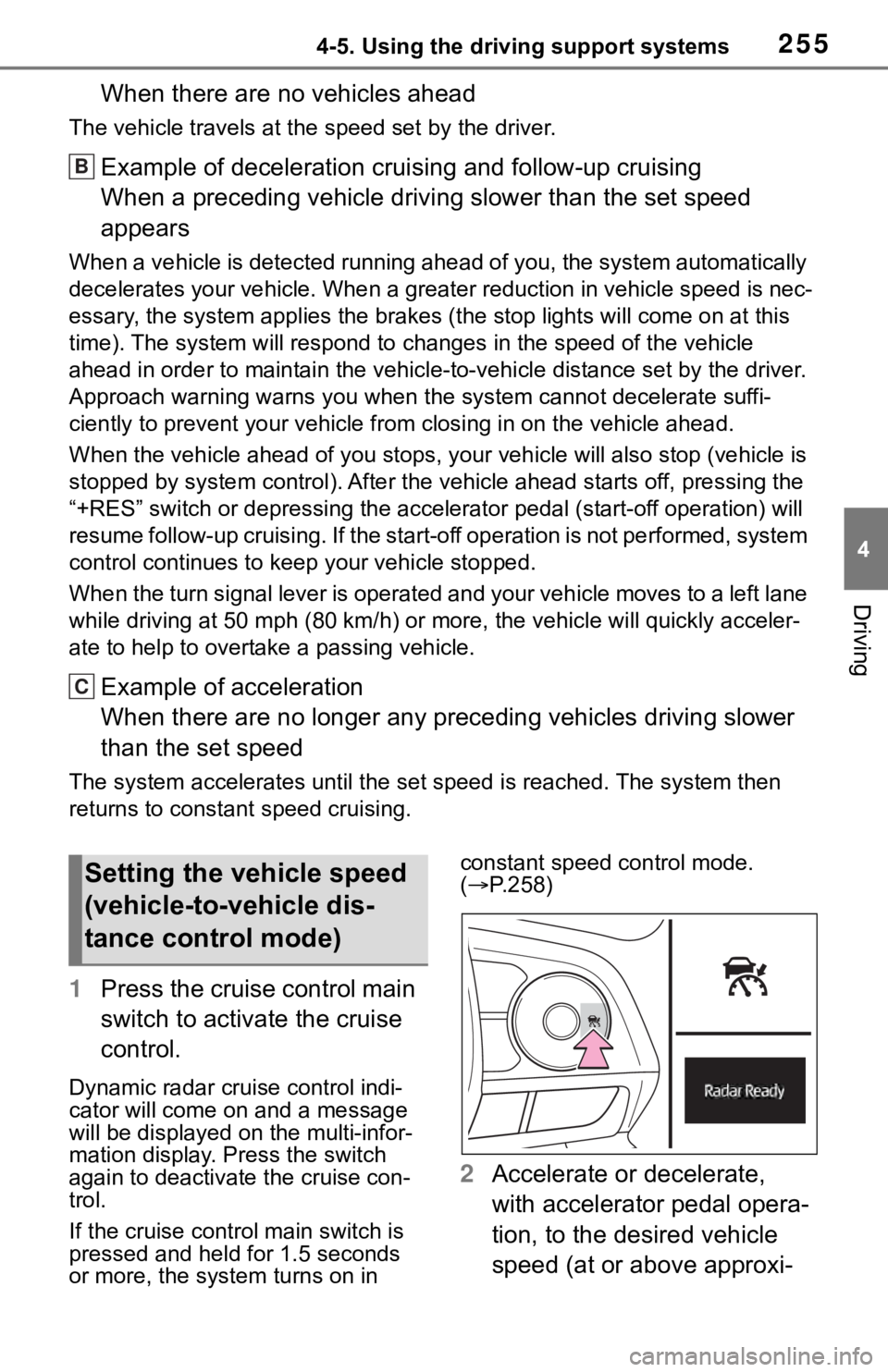
1Press the cruise control main
switch to activate the cruise
control.
Dynamic radar cruise control indi-
cator will come on and a message
will be displayed on the multi-infor-
mation display. Press the switch
again to deactivate the cruise con-
trol.
If the cruise cont rol main switch is
pressed and held for 1.5 seconds
or more, the syste m turns on in constant speed control mode.
(
P.258)
2 Accelerate or decelerate,
with accelerator pedal opera-
tion, to the desired vehicle
speed (at or above approxi-
B
C
Setting the vehicle speed
(vehicle-to-vehicle dis-
tance control mode)
Page 256 of 728
![TOYOTA RAV4 2019 (in English) Owners Guide 2564-5. Using the driving support systems
mately 20 mph [30 km/h])
and press the “-SET” switch
to set the speed.
Cruise control “SET” indicator will
come on.
The vehicle speed at the moment](/img/14/42737/w960_42737-255.png "TOYOTA RAV4 2019 (in English) Owners Guide 2564-5. Using the driving support systems
mately 20 mph [30 km/h])
and press the “-SET” switch
to set the speed.
Cruise control “SET” indicator will
come on.
The vehicle speed at the moment")
2564-5. Using the driving support systems
mately 20 mph [30 km/h])
and press the “-SET” switch
to set the speed.
Cruise control “SET” indicator will
come on.
The vehicle speed at the moment
the switch is released becomes the
set speed.
To change the set speed, press
the “+RES” or “-SET” switch
until the desired set speed is
displayed.
1Increases the speed (Except
when the vehicle has been
stopped by system control in
vehicle-to-vehicle distance
control mode)
2 Decreases the speed
Fine adjustment: Press the switch.
Large adjustment: Press and hold
the switch to change the speed, and release when the desired
speed is reached.
In the vehicle-to-vehicle dis-
tance control mode, the set
speed will be increased or
decreased as follows:
For the U.S. mainland and
Hawaii
Fine adjustment: By 1 mph (1.6
km/h)
*1 or 1 km/h (0.6 mph)*2 each
time the switch is pressed
Large adjustment: Increases or
decreases in 1 mph (1.6 km/h)
*1 or
1 km/h (0.6 mph)
*2 increments for
as long as the switch is held
Except for the U.S. mainland
and Hawaii
Fine adjustment: By 1 mph (1.6
km/h)
*1 or 1 km/h (0.6 mph)*2 each
time the switch is pressed
Large adjustment: Increases or
decreases in 5 mph (8 km/h)
*1 or 5
km/h (3.1 mph)
*2 increments for as
long as the switch is held
In the constant speed control
mode ( P.258), the set speed
will be increased or decreased
as follows:
Fine adjustment: By 1 mph (1.6
km/h)
*1 or 1 km/h (0.6 mph)*2 each
time the switch is pressed
Large adjustmen t: The speed will
continue to change while the switch
is held.
*1: When the set speed is shown in “MPH”
*2: When the set speed is shown in “km/h”
Adjusting the set speed
Page 259 of 728
2594-5. Using the driving support systems
4
Driving
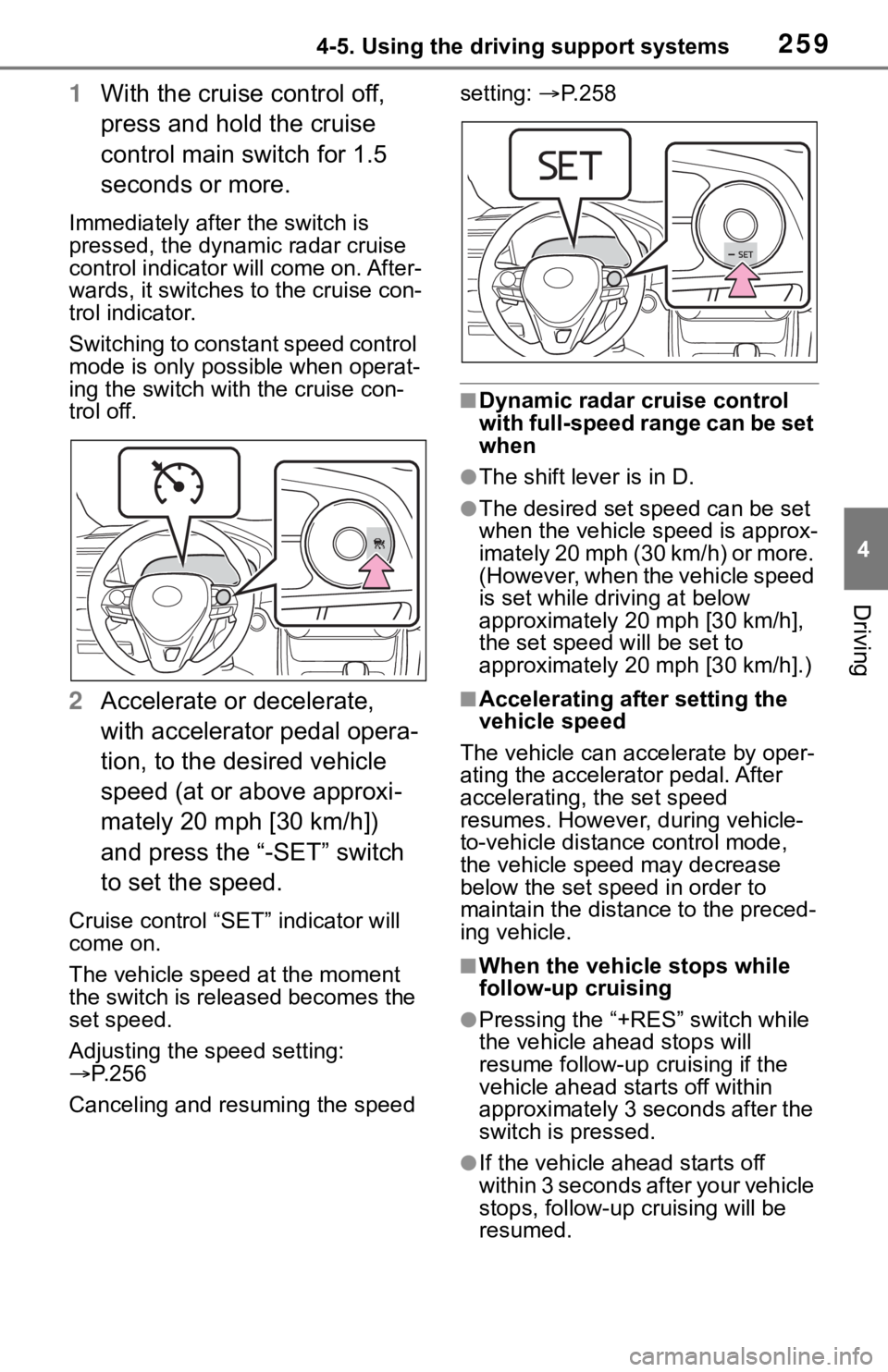
1With the cruise control off,
press and hold the cruise
control main switch for 1.5
seconds or more.
Immediately after the switch is
pressed, the dynamic radar cruise
control indicator will come on. After-
wards, it switches to the cruise con-
trol indicator.
Switching to constant speed control
mode is only possible when operat-
ing the switch wit h the cruise con-
trol off.
2 Accelerate or decelerate,
with accelerator pedal opera-
tion, to the desired vehicle
speed (at or above approxi-
mately 20 mph [30 km/h])
and press the “-SET” switch
to set the speed.
Cruise control “SET” indicator will
come on.
The vehicle speed at the moment
the switch is released becomes the
set speed.
Adjusting the speed setting:
P. 2 5 6
Canceling and resuming the speed setting:
P. 2 5 8
■Dynamic radar cruise control
with full-speed range can be set
when
●The shift lever is in D.
●The desired set speed can be set
when the vehicle speed is approx-
imately 20 mph (30 km/h) or more.
(However, when the vehicle speed
is set while driving at below
approximately 20 mph [30 km/h],
the set speed w ill be set to
approximately 20 mph [30 km/h].)
■Accelerating after setting the
vehicle speed
The vehicle can a ccelerate by oper-
ating the accelera tor pedal. After
accelerating, the set speed
resumes. However, during vehicle-
to-vehicle distance control mode,
the vehicle speed may decrease
below the set speed in order to
maintain the distance to the preced-
ing vehicle.
■When the vehicle stops while
follow-up cruising
●Pressing the “+RES” switch while
the vehicle ahead stops will
resume follow-up cruising if the
vehicle ahead starts off within
approximately 3 seconds after the
switch is pressed.
●If the vehicle ahead starts off
within 3 seconds after your vehicle
stops, follow-up c ruising will be
resumed.
Page 302 of 728
3024-5. Using the driving support systems
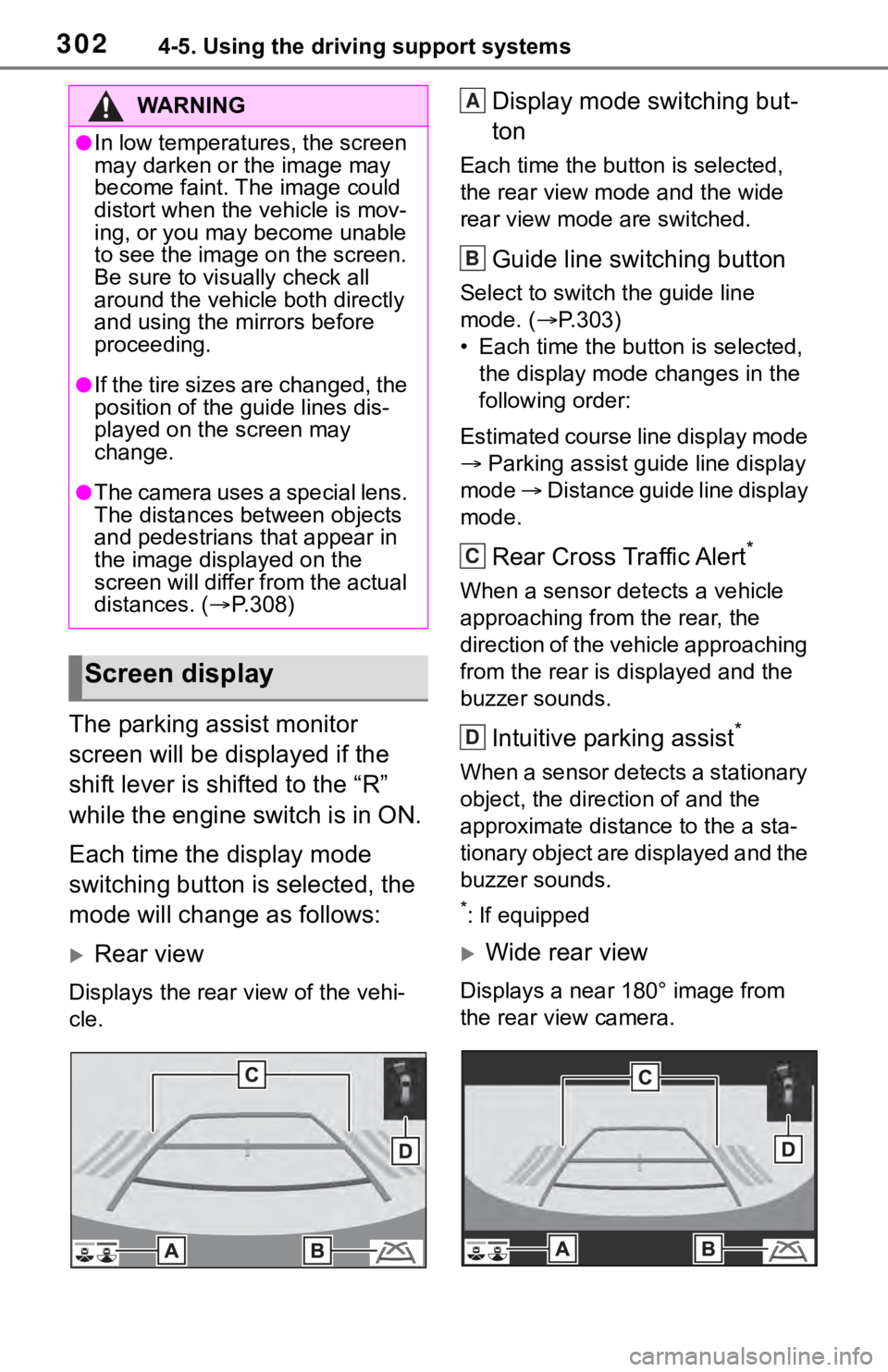
The parking assist monitor
screen will be displayed if the
shift lever is shifted to the “R”
while the engine switch is in ON.
Each time the display mode
switching button is selected, the
mode will change as follows:
Rear view
Displays the rear view of the vehi-
cle.
Display mode switching but-
ton
Each time the button is selected,
the rear view mode and the wide
rear view mode are switched.
Guide line switching button
Select to switch the guide line
mode. ( P.303)
• Each time the bu tton is selected,
the display mode changes in the
following order:
Estimated course line display mode
Parking assist guide line display
mode Distance guide line display
mode.
Rear Cross Traffic Alert*
When a sensor detects a vehicle
approaching from the rear, the
direction of the vehicle approaching
from the rear is d isplayed and the
buzzer sounds.
Intuitive parking assist*
When a sensor detects a stationary
object, the direction of and the
approximate distan ce to the a sta-
tionary object are displayed and the
buzzer sounds.
*: If equipped
Wide rear view
Displays a near 180° image from
the rear view camera.
WA R N I N G
●In low temperatures, the screen
may darken or the image may
become faint. The image could
distort when the vehicle is mov-
ing, or you may become unable
to see the image on the screen.
Be sure to visually check all
around the vehicle both directly
and using the mirrors before
proceeding.
●If the tire sizes are changed, the
position of the guide lines dis-
played on the screen may
change.
●The camera uses a special lens.
The distances between objects
and pedestrians that appear in
the image displayed on the
screen will differ from the actual
distances. ( P.308)
Screen display
A
B
C
D
Page 303 of 728
3034-5. Using the driving support systems
4
Driving
Display mode switching but-
ton
Each time the button is selected,
the rear view mode and the wide
rear view mode are switched.
Guide line switching button
Select to switch the guide line
mode. ( P.303)
• Each time the button is selected, the display mode changes in the
following order:
Estimated course line display mode
Parking assist guide line display
mode Distance guide line display
mode.
Rear Cross Traffic Alert*
When a sensor detects a stationary
object, the direction of stationary
object is displayed and the buzzer
sounds.
Intuitive parking assist*
When a sensor detects an obstacle,
the direction of and the approxi-
mate distance to the obstacle are
displayed and the buzzer sounds.
*: If equipped
●For details about the Rear Cross
Traffic Alert function ( P.268) and
intuitive parking assist. ( P.271)
The parking assist monitor is
canceled when the shift lever is
shifted into any position other
than the “R”.
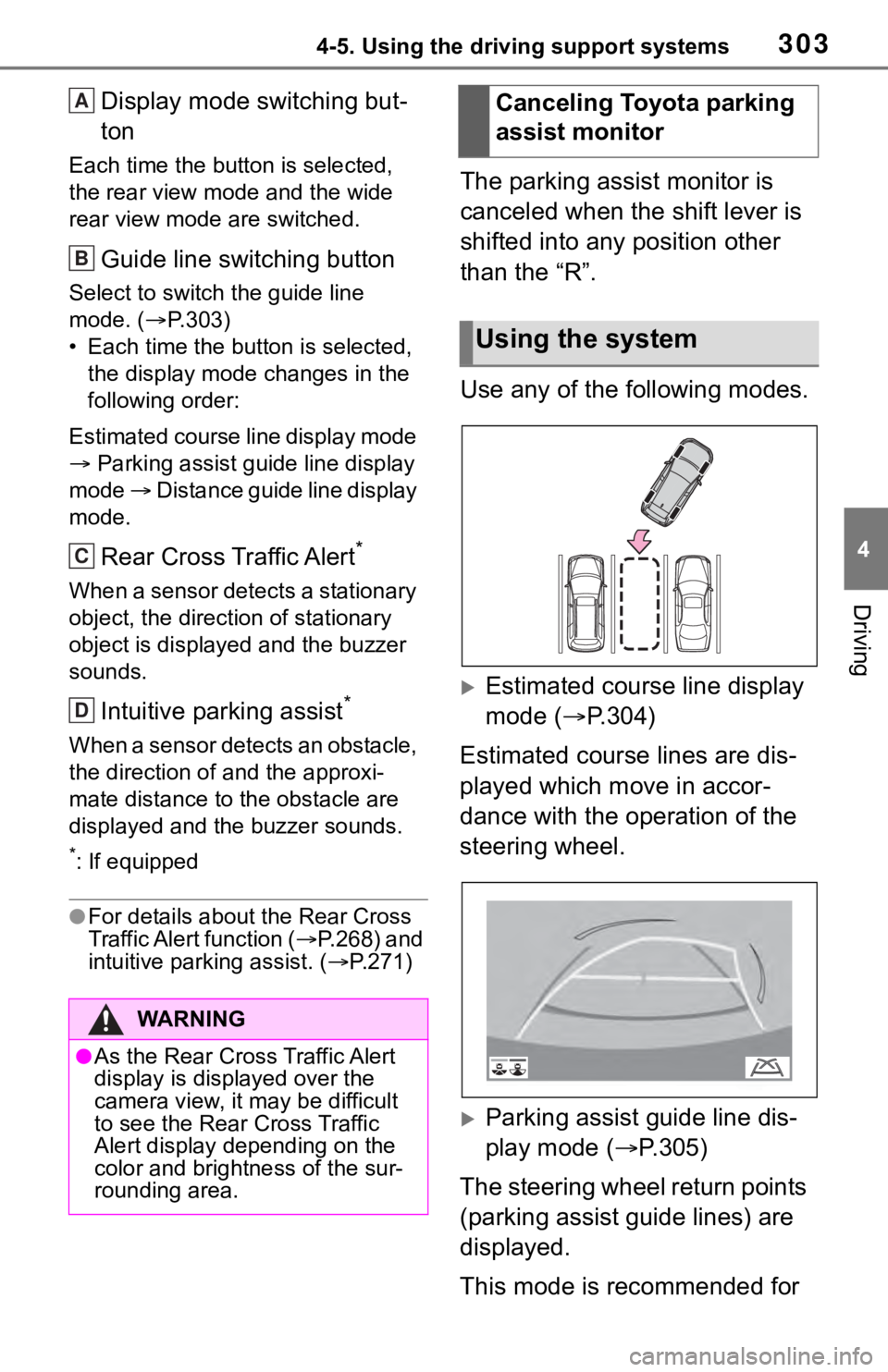
Use any of the following modes.
Estimated course line display
mode ( P.304)
Estimated course lines are dis-
played which move in accor-
dance with the operation of the
steering wheel.
Parking assist guide line dis-
play mode ( P.305)
The steering wheel return points
(parking assist guide lines) are
displayed.
This mode is recommended for
WA R N I N G
●As the Rear Cross Traffic Alert
display is displayed over the
camera view, it may be difficult
to see the Rear Cross Traffic
Alert display depending on the
color and brightness of the sur-
rounding area.
A
B
C
D
Canceling Toyota parking
assist monitor
Using the system
Page 304 of 728
3044-5. Using the driving support systems
those who are comfortable with
parking the vehicle without the
aid of the estimated course
lines.
Distance guide line display
mode (P.306)
Distance guide lines only are
displayed.
This mode is recommended for
those who are comfortable with
parking the vehicle without the
aid of the guide lines.
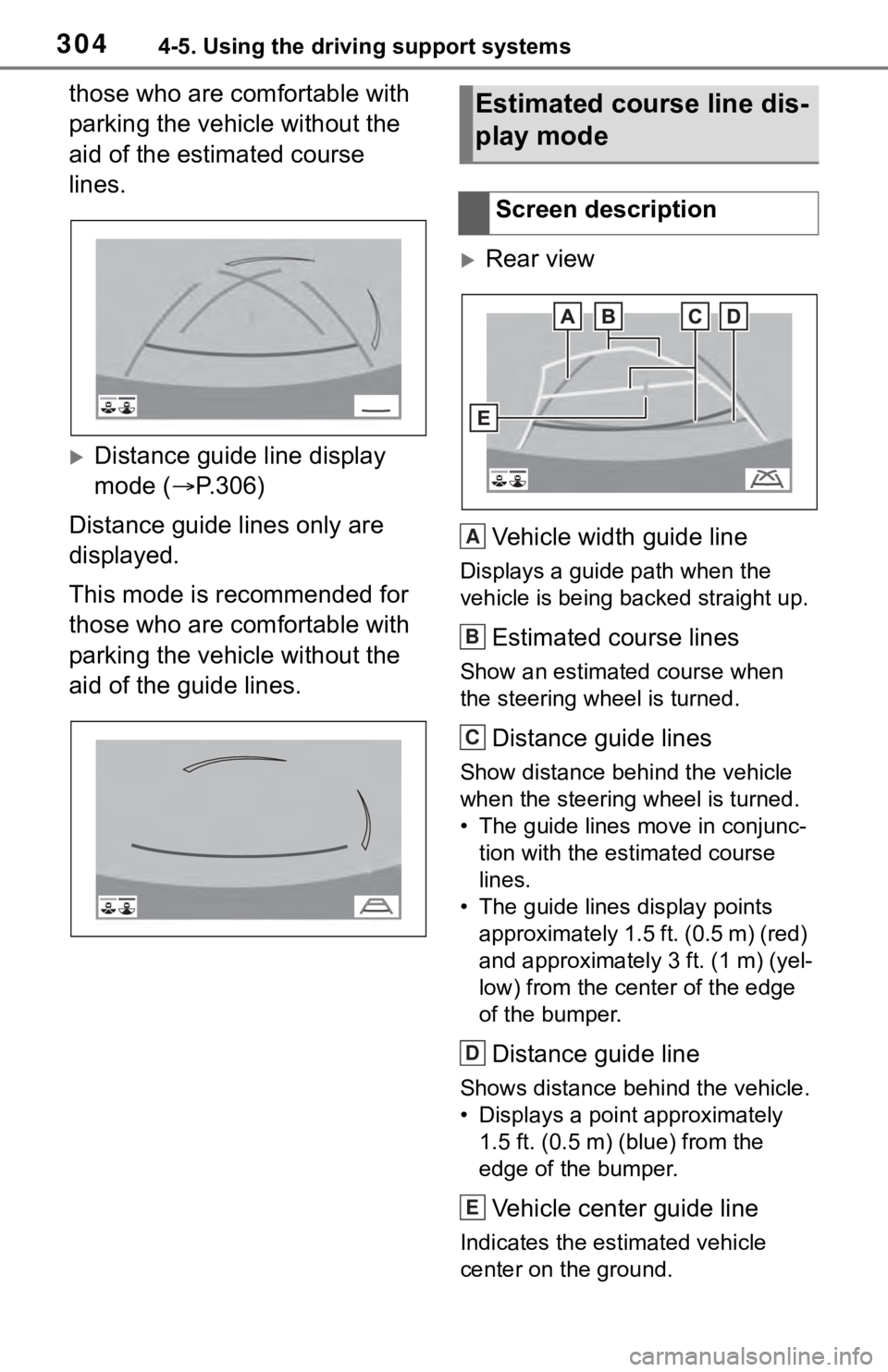
Rear view
Vehicle width guide line
Displays a guide path when the
vehicle is being backed straight up.
Estimated course lines
Show an estimated course when
the steering wheel is turned.
Distance guide lines
Show distance behind the vehicle
when the steering wheel is turned.
• The guide lines move in conjunc- tion with the estimated course
lines.
• The guide lines display points approximately 1.5 ft. (0.5 m) (red)
and approximately 3 ft. (1 m) (yel-
low) from the ce nter of the edge
of the bumper.
Distance guide line
Shows distance behind the vehicle.
• Displays a point approximately 1.5 ft. (0.5 m) (blue) from the
edge of the bumper.
Vehicle center guide line
Indicates the es timated vehicle
center on the ground.
Estimated course line dis-
play mode
Screen description
A
B
C
D
E
Page 329 of 728
3294-5. Using the driving support systems
4
Driving
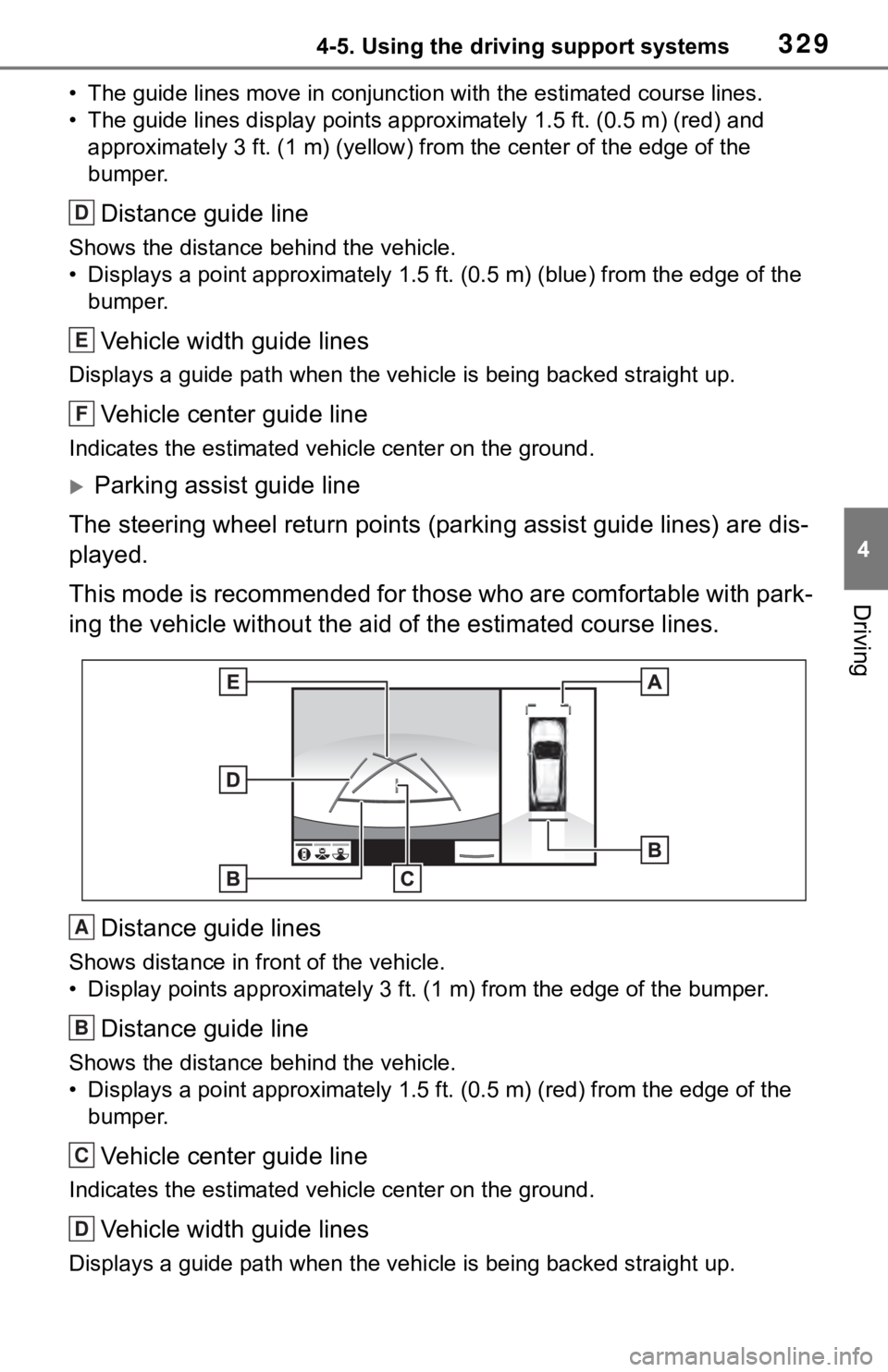
• The guide lines move in conjunction with the estimated course lines.
• The guide lines display points approximately 1.5 ft. (0.5 m) (red) and
approximately 3 ft. (1 m) (yello w) from the center of the edge of the
bumper.
Distance guide line
Shows the distance behind the vehicle.
• Displays a point approximately 1.5 ft. (0.5 m) (blue) from the edge of the
bumper.
Vehicle width guide lines
Displays a guide path w hen the vehicle is being backed straight up.
Vehicle center guide line
Indicates the estimated vehicle center on the ground.
Parking assist guide line
The steering wheel return points (parking assist guide lines) are dis-
played.
This mode is recommended for those who are comfortable with par k-
ing the vehicle without the aid of the estimated course lines.
Distance guide lines
Shows distance in front of the vehicle.
• Display points approximately 3 ft. (1 m) from the edge of the bumper.
Distance guide line
Shows the distance behind the vehicle.
• Displays a point approximately 1.5 ft. (0.5 m) (red) from the edge of the
bumper.
Vehicle center guide line
Indicates the estimated ve hicle center on the ground.
Vehicle width guide lines
Displays a guide path when the vehicle is being backed straight up.
D
E
F
A
B
C
D
Page 330 of 728
3304-5. Using the driving support systems
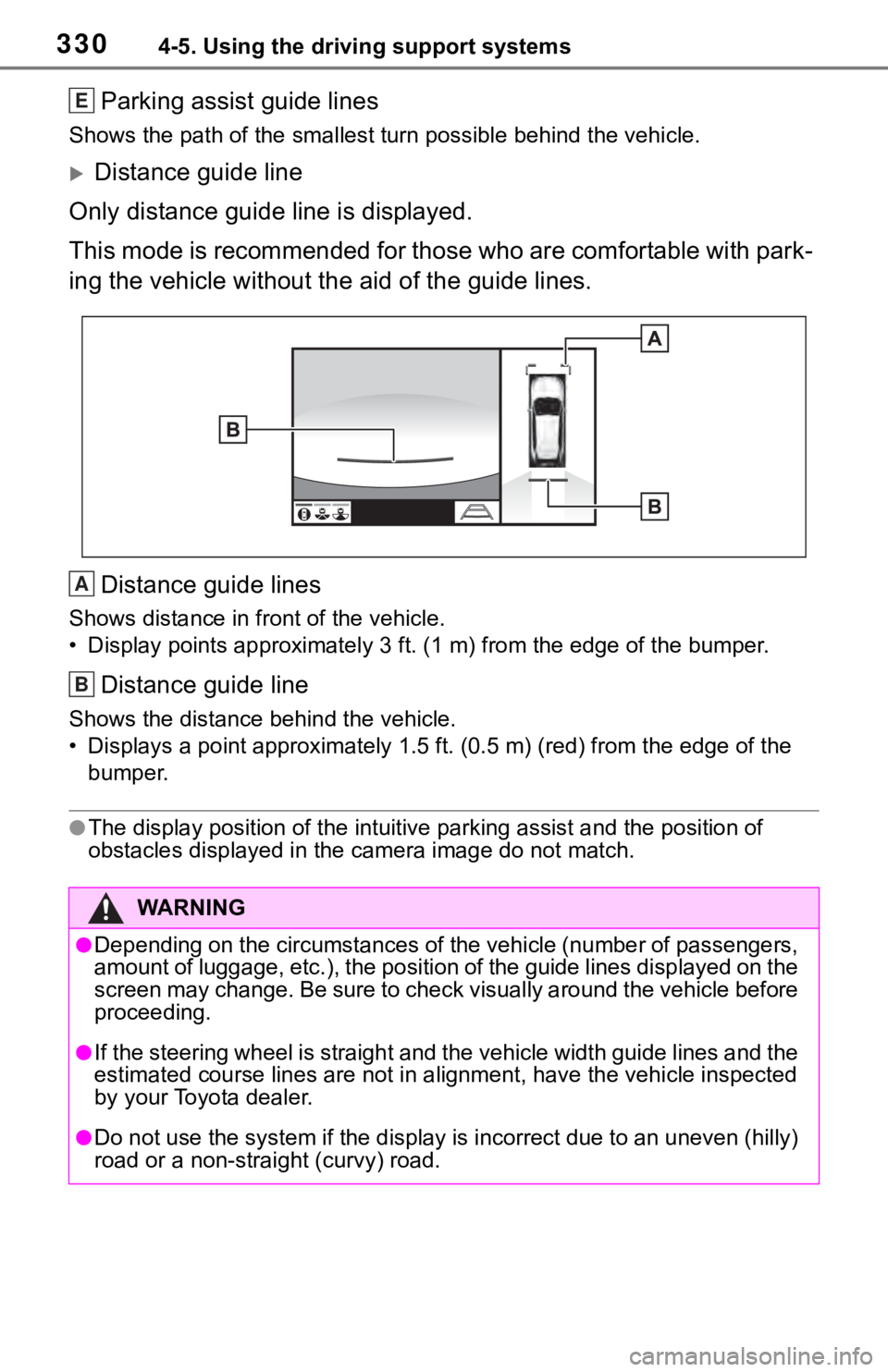
Parking assist guide lines
Shows the path of the smallest turn possible behind the vehicle .
Distance guide line
Only distance guide line is displayed.
This mode is recommended for those who are comfortable with par k-
ing the vehicle without the aid of the guide lines.
Distance guide lines
Shows distance in front of the vehicle.
• Display points approximately 3 ft. (1 m) from the edge of the bumper.
Distance guide line
Shows the distance behind the vehicle.
• Displays a point approximately 1.5 ft. (0.5 m) (red) from the edge of the
bumper.
●The display position of the intuitive parking assist and the po sition of
obstacles displayed in the camera image do not match.
WA R N I N G
●Depending on the circumstances of the vehicle (number of passen gers,
amount of luggage, etc.), the position of the guide lines displ ayed on the
screen may change. Be sure to check visually around the vehicle before
proceeding.
●If the steering wheel is straight and the vehicle width guide l ines and the
estimated course lines are not in alignment, have the vehicle i nspected
by your Toyota dealer.
●Do not use the system if the display is incorrect due to an une ven (hilly)
road or a non-straight (curvy) road.
E
A
B
Page 348 of 728

3484-5. Using the driving support systems
ing wheel may temporarily feel
heavy.
■Operating conditions
●The Stop & Start system is opera-
tional when all of the following
conditions are met:
• The vehicle has been driven a cer-
tain amount of time.
• The brake pedal is being depressed firmly. (except when
the vehicle is stopped by the
dynamic radar cruise control with
full-speed range when in vehicle-
to-vehicle distanc e control mode)
• The D shift position is selected.
• The driver’s seat belt is fastened.
• The driver’s door is closed.
• The selected driv ing mode is nor-
mal or Eco drive mode.
• The selected driv ing mode is not
snow mode (if equipped).
• Mud & Sand or Rock & Dirt mode is not selected for Multi-terrain
Select (AWD models).
• The windshield defogger is off. (vehicles without a manual air
conditioning system)
• The accelerator pedal is not being depressed.
• The engine is adequately warmed up.
• The outside temperature is -5°C
(23°F) or higher.
• The hood is closed. ( P.349)
●In the following situations the
engine may not be stopped by the
Stop & Start system. This is not a
malfunction of the Stop & Start
system.
• When the air conditioning system
is being used.
• When the battery is undergoing a periodic recharge.
• When the battery is not sufficiently charged, such as if the vehicle
has been parked for a long time
and the battery charge has
decreased, the e lectric load is
large, the battery fluid tempera-
ture is excessively low or the bat-
tery has deteriorated.
• When the brake booster vacuum
is low. • When the elapsed time since the
engine was restarted is short.
• When the vehicle is stopped fre- quently, such as when in a traffic
jam.
• When the engine coolant tem- perature or transm ission fluid tem-
perature is extremely low or high.
• When the vehicle is stopped on a
steep incline.
• When the steering wheel is being operated.
• When the vehicle is being driven
in a high altitude area.
• When the battery fluid tempera- ture is extremely low or high.
• For a while after the battery termi- nals have been disconnected and
reconnected.
●When the engine is stopped by
the Stop & Star t system, the
engine will be restarted automati-
cally if any of the following condi-
tions are met:
(To enable the engine to be
stopped by the Stop & Start sys-
tem again, drive the vehicle.)
• The air conditioning system is
turned on. (vehicles without a
manual air conditioning system)
• The windshield defogger is turned
on. (vehicles without a manual air
conditioning system)
• The shift lever is shifted from D.
• The driver’s seat belt is unfas-
tened.
• The driver’s door is opened.
• The driving mode is changed from
normal or Eco drive mode to
another mode.
• The driving mode is changed to snow mode (if equipped).
• Mud & Sand or Rock & Dirt mode
is selected for Mult i-terrain Select
(AWD models).
• The Stop & Start cancel switch is
pressed.
• The steering wheel is operated.
• The accelerator pedal is depressed.
• The vehicle starts to roll on an incline.
●When the engine is stopped by