Specifications TOYOTA RAV4 2019 Owners Manual (in English)
[x] Cancel search | Manufacturer: TOYOTA, Model Year: 2019, Model line: RAV4, Model: TOYOTA RAV4 2019Pages: 728, PDF Size: 21.09 MB
Page 1 of 728
1
2
3
4
5
6
7
8
9
10
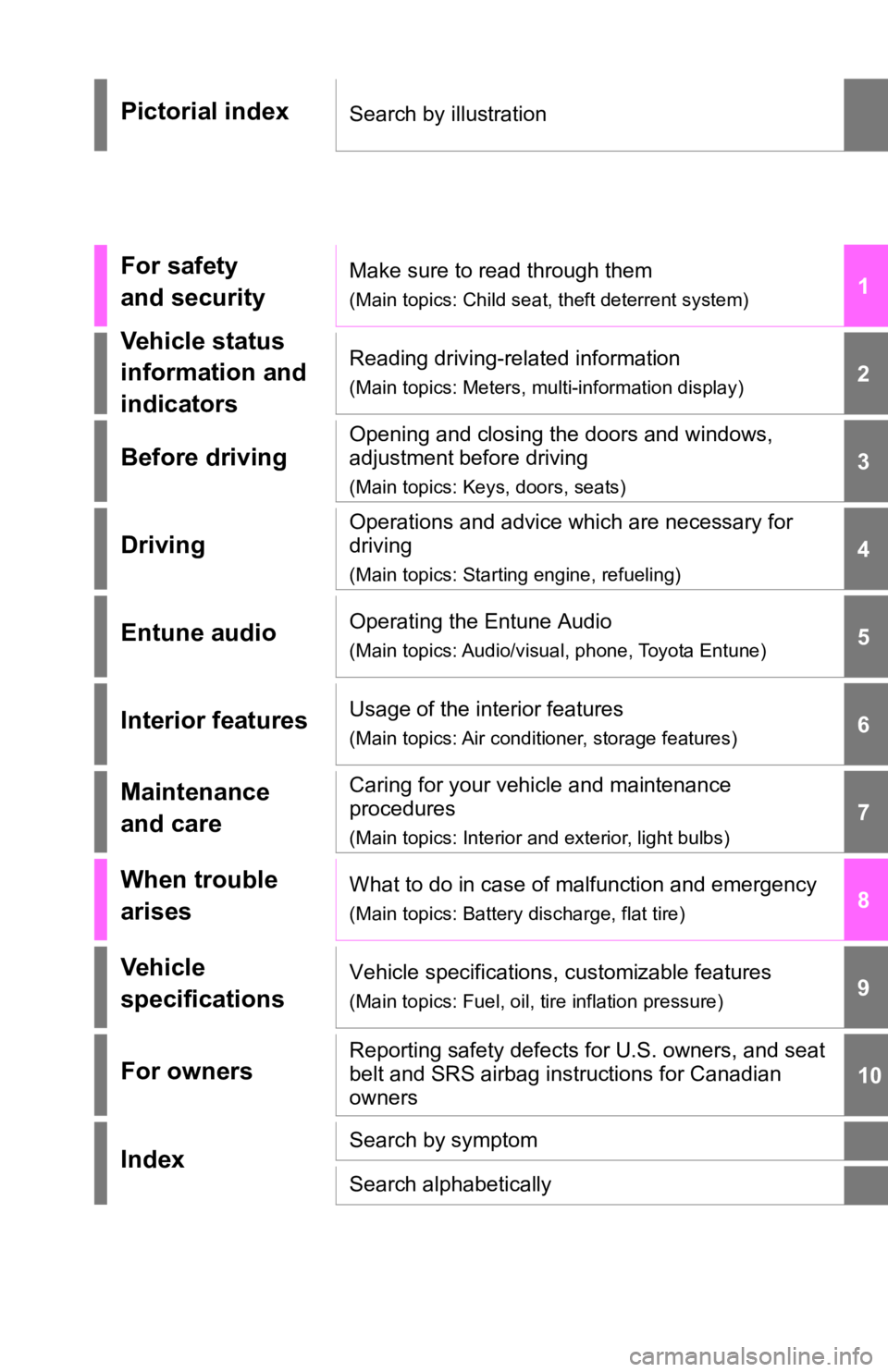
Pictorial indexSearch by illustration
For safety
and securityMake sure to read through them
(Main topics: Child seat, theft deterrent system)
Vehicle status
information and
indicatorsReading driving-related information
(Main topics: Meters, multi-information display)
Before driving
Opening and closing the doors and windows,
adjustment before driving
(Main topics: Keys, doors, seats)
Driving
Operations and advice which are necessary for
driving
(Main topics: Starting engine, refueling)
Entune audioOperating the Entune Audio
(Main topics: Audio/visual, phone, Toyota Entune)
Interior featuresUsage of the interior features
(Main topics: Air conditioner, storage features)
Maintenance
and careCaring for your vehicle and maintenance
procedures
(Main topics: Interior and exterior, light bulbs)
When trouble
arisesWhat to do in case of malfunction and emergency
(Main topics: Battery discharge, flat tire)
Vehicle
specificationsVehicle specifications, customizable features
(Main topics: Fuel, oil, tire inflation pressure)
For ownersReporting safety defects for U.S. owners, and seat
belt and SRS airbag instructions for Canadian
owners
IndexSearch by symptom
Search alphabetically
Page 6 of 728
6TABLE OF CONTENTS
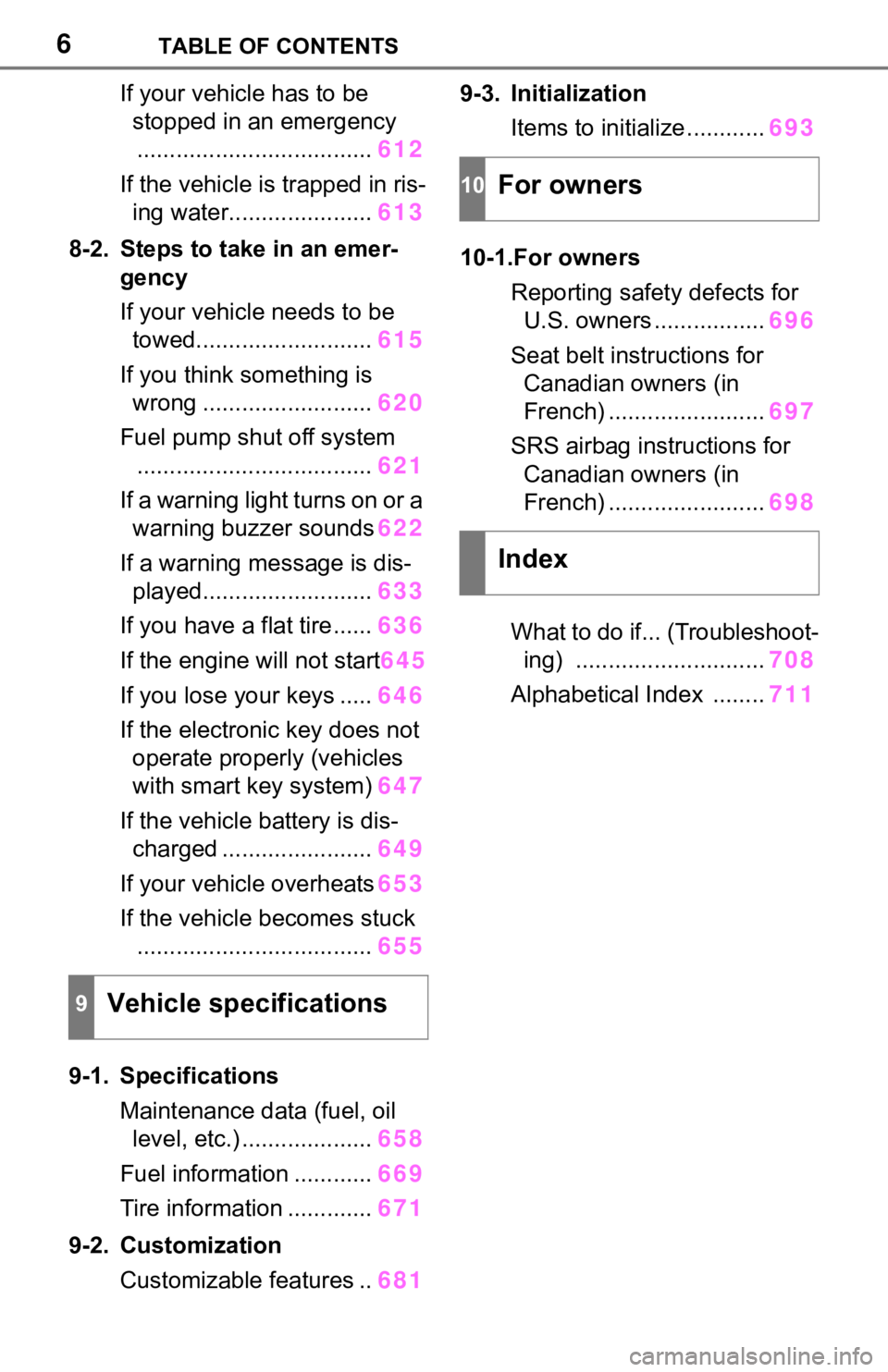
If your vehicle has to be stopped in an emergency
.................................... 612
If the vehicle is trapped in ris- ing water...................... 613
8-2. Steps to take in an emer- gency
If your vehicle needs to be towed........................... 615
If you think something is wrong .......................... 620
Fuel pump shut off system .................................... 621
If a warning light turns on or a warning buzzer sounds 622
If a warning message is dis- played.......................... 633
If you have a flat tire...... 636
If the engine will not start 645
If you lose your keys ..... 646
If the electronic key does not operate properly (vehicles
with smart key system) 647
If the vehicle battery is dis- charged ....................... 649
If your vehicle overheats 653
If the vehicle becomes stuck .................................... 655
9-1. Specifications Maintenance data (fuel, oil level, etc.) .................... 658
Fuel information ............ 669
Tire information ............. 671
9-2. Customization Customizable features .. 6819-3. Initialization
Items to initialize ............ 693
10-1.For owners Reporting safet y defects for
U.S. owners ................. 696
Seat belt instructions for Canadian owners (in
French) ........................ 697
SRS airbag instructions for Canadian owners (in
French) ........................ 698
What to do if... (Troubleshoot- ing) ............................. 708
Alphabetical Index ........ 711
9Vehicle specifications
10For owners
Index
Page 8 of 728
8
Please note that this manual
applies to all models and
explains all equipment, including
options. Therefore, you may find
some explanations for equip-
ment not installed on your vehi-
cle.
All specifications provided in this
manual are current at the time of
printing. However, because of
the Toyota policy of continual
product improvement, we
reserve the right to make
changes at any time without
notice.
Depending on specifications,
the vehicle shown in the illustra-
tions may differ from your vehi-
cle in terms of equipment.
Approximately five hours after
the engine is turned off, you
may hear sound coming from
under the vehicle for several
minutes. This is the sound of a
fuel evaporation leakage check
and, it does not indicate a mal-
function.A wide variety of non-genuine
spare parts and accessories for
Toyota vehicles are currently
available in the market. You
should know that Toyota does
not warrant these products and
is not responsible for their per-
formance, repair, or replace-
ment, or for any damage they
may cause to, or adverse effect
they may have on, your Toyota
vehicle.
This vehicle should not be modi-
fied with non-genuine Toyota
products. Modification with non-
genuine Toyota products could
affect its performance, safety or
durability, and may even violate
governmental regulations. In
addition, damage or perfor-
mance problems resulting from
the modification may not be cov-
ered under warranty.
The installation of a mobile two-
way radio system in your vehicle
could affect electronic systems
such as:
Multiport fuel injection sys-
tem/sequential multiport fuel
injection system
Toyota Safety Sense 2.0
For your information
Main Owner’s Manual
Noise from under vehicle
after turning off the engine
Accessories, spare parts
and modification of your
To y o t a
Installation of a mobile
two-way radio system
Page 9 of 728
9
Anti-lock brake system
SRS airbag system
Seat belt pretensioner system
Be sure to check with your Toy-
ota dealer for precautionary
measures or special instructions
regarding installation of a mobile
two-way radio system.
The vehicle is equipped with
sophisticated computers that will
record certain data, such as:
The recorded data varies
according to the vehicle grade
level and options with which it is
equipped. These computers do
not record conversations or
sounds, and only record images
outside of the vehicle in certain
situations.
• Engine speed/ Electric motor speed (traction motor speed)
• Accelerator status
• Brake status
• Vehicle speed
• Operation status of the driving assist systems, such as the
ABS and pre-collision system
• Images from the front camera (available only when certain
safety systems are activated,
which varies depending on
the vehicle specifications).
Data Transmission
Your vehicle may transmit the data
recorded in these computers to
Toyota without notification to you.
Data usage
Toyota may use the data recorded
in this computer to diagnose mal-
functions, conduct research and
development, and improve quality.
Toyota will not disclose the
recorded data to a third party
except:
• With the consen t of the vehicle
owner or with the consent of the
lessee if the vehicle is leased
• In response to an official request by the police, a court of law or a
government agency
• For use by Toyota in a lawsuit
• For research purposes where the data is not tied to a specific vehi-
cle or vehicle owner
Recorded image information
can be erased by your Toyota
dealer.
The image recording function can
be disabled.
However, if the function is disabled,
data from when t he pre-collision
system operates will not be avail-
able.
To learn more about the vehi-
cle data collected, used and
shared by Toyota, please visit
www.toyota.com/privacyvts/
.
If your Toyota has Safety Con-
nect and if you have subscribed
to those services, please refer to
the Safety Connect Telematics
Vehicle data recordings
Usage of data collected
through Safety Connect
(U.S.mainland only)
Page 407 of 728
4075-3. Connectivity settings
5
Entune audio
via the Wi-Fi® Hotspot will not be
possible.
●If a Bluetooth® device is used
while a device is connected using
the Wi-Fi
® Hotspot function, the
communication speed may
decrease.
●If the vehicle is near a radio
antenna, radio station or other
source of strong radio waves and
electrical noise, communication
may be slow or impossible.
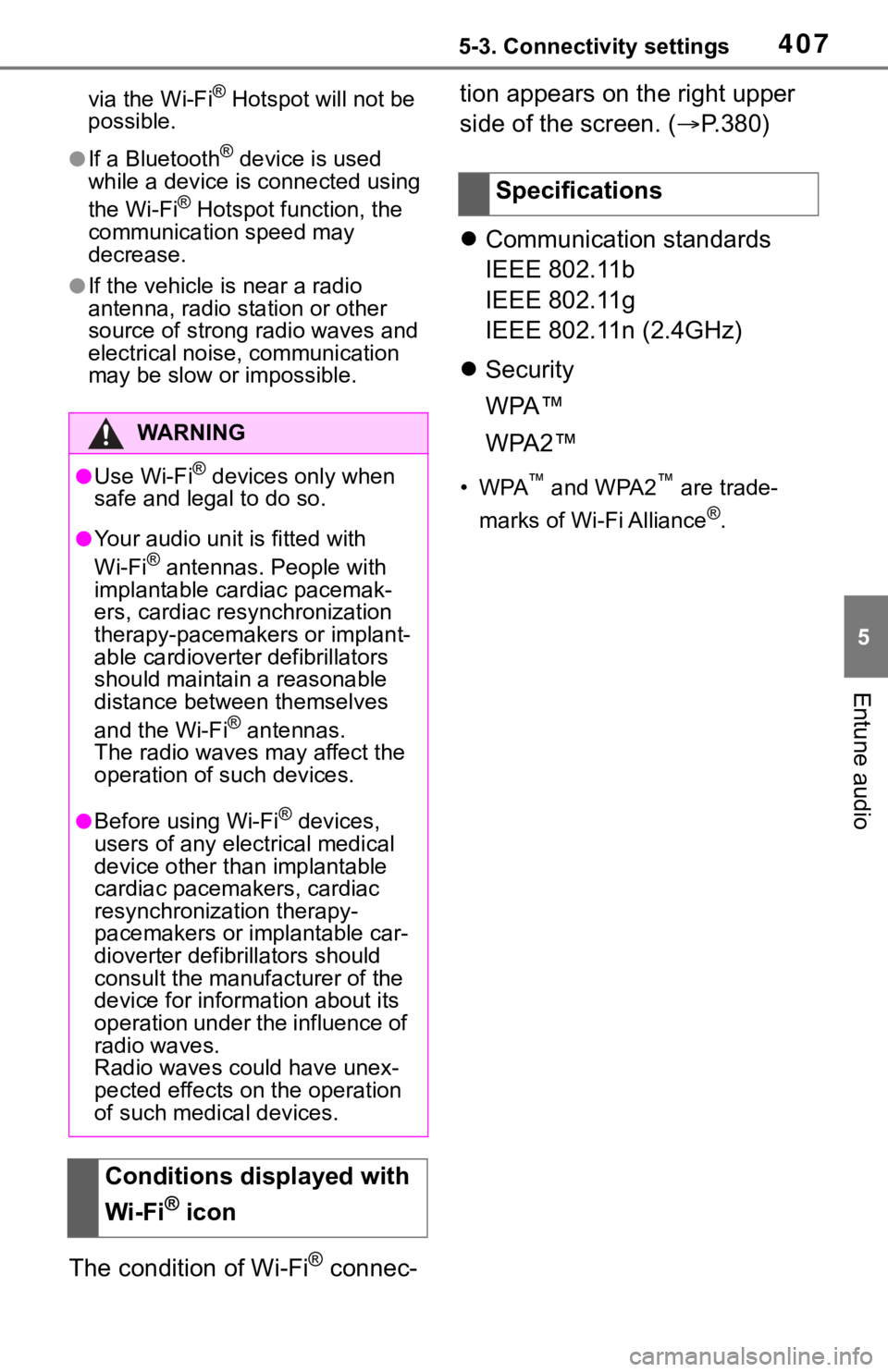
The condition of Wi-Fi® connec- tion appears on the right upper
side of the screen. (
P.380)
Communication standards
IEEE 802.11b
IEEE 802.11g
IEEE 802.11n (2.4GHz)
Security
WPA™
WPA2™
•WPA™ and WPA2™ are trade-
marks of Wi-Fi Alliance
®.
WA R N I N G
●Use Wi-Fi® devices only when
safe and legal to do so.
●Your audio unit is fitted with
Wi-Fi® antennas. People with
implantable cardiac pacemak-
ers, cardiac resynchronization
therapy-pacemakers or implant-
able cardioverter defibrillators
should maintain a reasonable
distance between themselves
and the Wi-Fi
® antennas.
The radio waves may affect the
operation of such devices.
●Before using Wi-Fi® devices,
users of any electrical medical
device other than implantable
cardiac pacemakers, cardiac
resynchronization therapy-
pacemakers or implantable car-
dioverter defibrillators should
consult the manufacturer of the
device for information about its
operation under the influence of
radio waves.
Radio waves could have unex-
pected effects on the operation
of such medical devices.
Conditions displayed with
Wi-Fi
® icon
Specifications
Page 632 of 728

6328-2. Steps to take in an emergency
WA R N I N G
As an added safety feature, your
vehicle has been equipped with a
tire pressure m onitoring system
(TPMS-tire pressure warning sys-
tem) that illumina tes a low tire
pressure telltale (tire pressure
warning light) when one or more
of your tires is significantly under-
inflated. Accordingly, when the
low tire pressure telltale (tire pres-
sure warning light) illuminates,
you should stop and check your
tires as soon as possible, and
inflate them to the proper pres-
sure. Driving on a significantly
under-inflated tire causes the tire
to overheat and can lead to tire
failure. Under-inflation also
reduces fuel efficiency and tire
tread life, and may affect the vehi-
cle’s handling and stopping ability.
Please note that the TPMS (tire
pressure warning system) is not a
substitute for pro per tire mainte-
nance, and it is the driver’s
responsibility to m aintain correct
tire pressure, eve n if under-infla-
tion has not reach ed the level to
trigger illuminatio n of the TPMS
low tire pressure telltale (tire pres-
sure warning light).
Your vehicle has also been
equipped with a TPMS (tire pres-
sure warning system) malfunc-
tion indicator to indicate when the
system is not operating properly.
The TPMS (tire pressure warning
system) malfunction indicator is
combined with the low tire pres-
sure telltale (tire pressure warning
light). When the system detects a
malfunction, the te lltale will flash
for approximately one minute and
then remain continuously illumi-
nated. This sequence will con-
tinue upon subsequent vehicle
start-ups as long as the malfunc-
tion exists. When the malfunction
indicator is illu minated, the sys-
tem may not be ab le to detect or
signal low tire pressure as
intended.
TPMS (tire pressure warning sys-
t em ) m alf un ctio n s m a y o cc ur f or a
variety of reasons, including the
installation of replacement or
alternate tires or wheels on the
vehicle that prevent the TPMS
(tire pressure warning system)
from functioning properly. Always
check the TPMS (tire pressure
warning system) malfunction tell-
tale after replacing one or more
tires or wheels on your vehicle to
ensure that the replacement or
alternate tires and wheels allow
the TPMS (tire pressure warning
system) to continue to function
properly.
NOTICE
■To ensure the tire pressure
warning system operates
properly (vehicles with tire
pressure warning system)
Do not install tires with different
specifications or manufacturers
as the tire pressure warning sys-
tem may not operate properly.
Page 651 of 728

6518-2. Steps to take in an emergency
8
When trouble arises
sible to unlock the doors using the
smart key system when the bat-
tery is discharged. Use the wire-
less remote control or the
mechanical key to lock or unlock
the doors.
●The engine may not start on the
first attempt after the battery has
recharged but will start normally
after the se cond attempt. This is
not a malfunction.
●The engine switch mode is memo-
rized by the vehicle. When the
battery is reconnected, the system
will return to the mode it was in
before the battery was dis-
charged. Before disconnecting the
battery, turn the engine switch off.
If you are unsure what mode the
engine switch was in before the
battery discharged, be especially
careful when reconnecting the
battery.
■When the battery is removed or
discharged (vehicles with Stop
& Start system)
After the battery terminals have
been disconnecte d and recon-
nected or the battery has been
replaced, the Stop & Start system
may not automatically stop the
engine for approximately 5 to 60
minutes.
■When replacing the battery
●Vehicles with Stop & Start system:
Use a genuine batt ery specifically
designed for use with the Stop &
Start system or a ba ttery with equiv-
alent specifications to a genuine
battery. If an unsupported battery is
used, Stop & Start system functions
may be restricted to protect the bat-
tery. Also, battery performance may
decrease and the engine may not
be able to restart. Contact your Toy-
ota dealer for details.
●Use a battery tha t conforms to
European regulations.
●Ty p e A :
Use a battery that the case size is same as the previous one (LN3), 20
hours rate capacity (20HR) is equiv-
alent (65Ah) or greater, and perfor-
mance rating (CCA) is equivalent
(603A) or greater.
Ty p e B :
Use a battery that the case size is
same as the previous one (LN2), 20
hours rate capacity (20HR) is equiv-
alent (60Ah) or greater, and perfor-
mance rating (CCA) is equivalent
(560A) or greater.
Ty p e C :
Use a battery that the case size is
same as the previous one (LN2), 20
hours rate capacity (20HR) is equiv-
alent (60Ah) or greater, and perfor-
mance rating (CCA) is equivalent
(563A) or greater.
• If the sizes differ, the battery can-
not be properly secured.
• If the 20 hour rate capacity is low,
even if the time p eriod where the
vehicle is not used is a short time,
the battery may discharge and
engine may not be able to start.
WA R N I N G
■When removing the battery
terminals
Always remove the negative (-)
terminal first. If the positive (+) ter-
minal contacts any metal in the
surrounding area when the posi-
tive (+) terminal is removed, a
spark may occur, leading to a fire
in addition to ele ctrical shocks
and death or serious injury.
■Avoiding battery fires or
explosions
Observe the following precautions
to prevent accidentally igniting the
flammable gas that may be emit-
ted from the battery:
●Make sure each jumper cable is
connected to the correct termi-
nal and that it is not unintention-
ally in contact with any other
than the intended terminal.
Page 657 of 728

657
9
9
Vehicle specifications
Vehicle specifications
9-1. SpecificationsMaintenance data (fuel, oil level, etc.) .................. 658
Fuel information .......... 669
Tire information ........... 671
9-2. Customization Customizable features 681
9-3. Initialization Items to initialize ......... 693
Page 658 of 728
6589-1. Specifications
9-1.Specifications
Maintenance data (fuel, oil level, etc.)
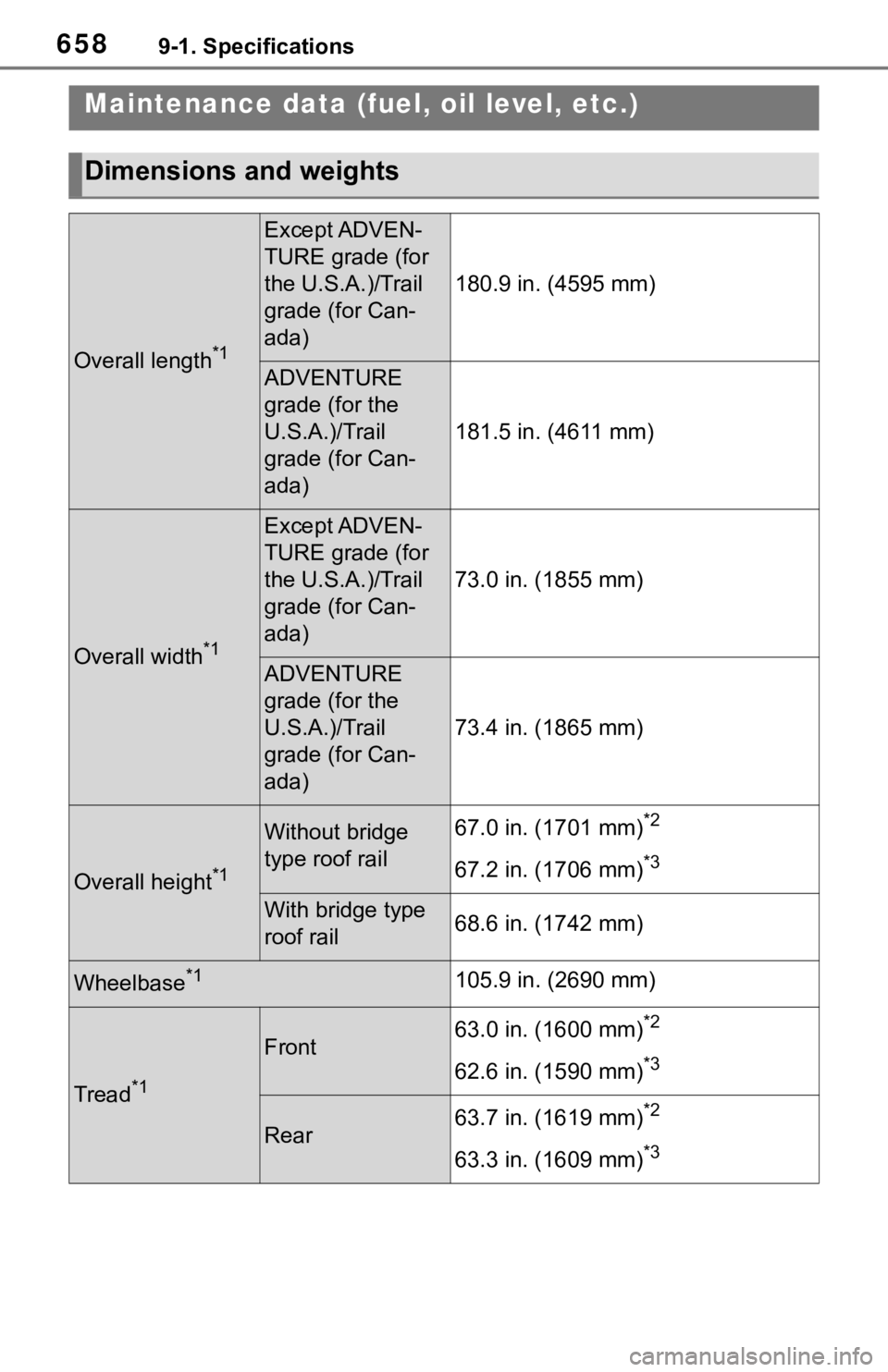
Dimensions and weights
Overall length*1
Except ADVEN-
TURE grade (for
the U.S.A.)/Trail
grade (for Can-
ada)
180.9 in. (4595 mm)
ADVENTURE
grade (for the
U.S.A.)/Trail
grade (for Can-
ada)
181.5 in. (4611 mm)
Overall width*1
Except ADVEN-
TURE grade (for
the U.S.A.)/Trail
grade (for Can-
ada)
73.0 in. (1855 mm)
ADVENTURE
grade (for the
U.S.A.)/Trail
grade (for Can-
ada)
73.4 in. (1865 mm)
Overall height*1
Without bridge
type roof rail 67.0 in. (1701 mm)*2
67.2 in. (1706 mm)*3
With bridge type
roof rail 68.6 in. (1742 mm)
Wheelbase*1105.9 in. (2690 mm)
Tread*1
Front63.0 in. (1600 mm)*2
62.6 in. (1590 mm)*3
Rear63.7 in. (1619 mm)*2
63.3 in. (1609 mm)*3
Page 659 of 728
6599-1. Specifications
9
Vehicle specifications
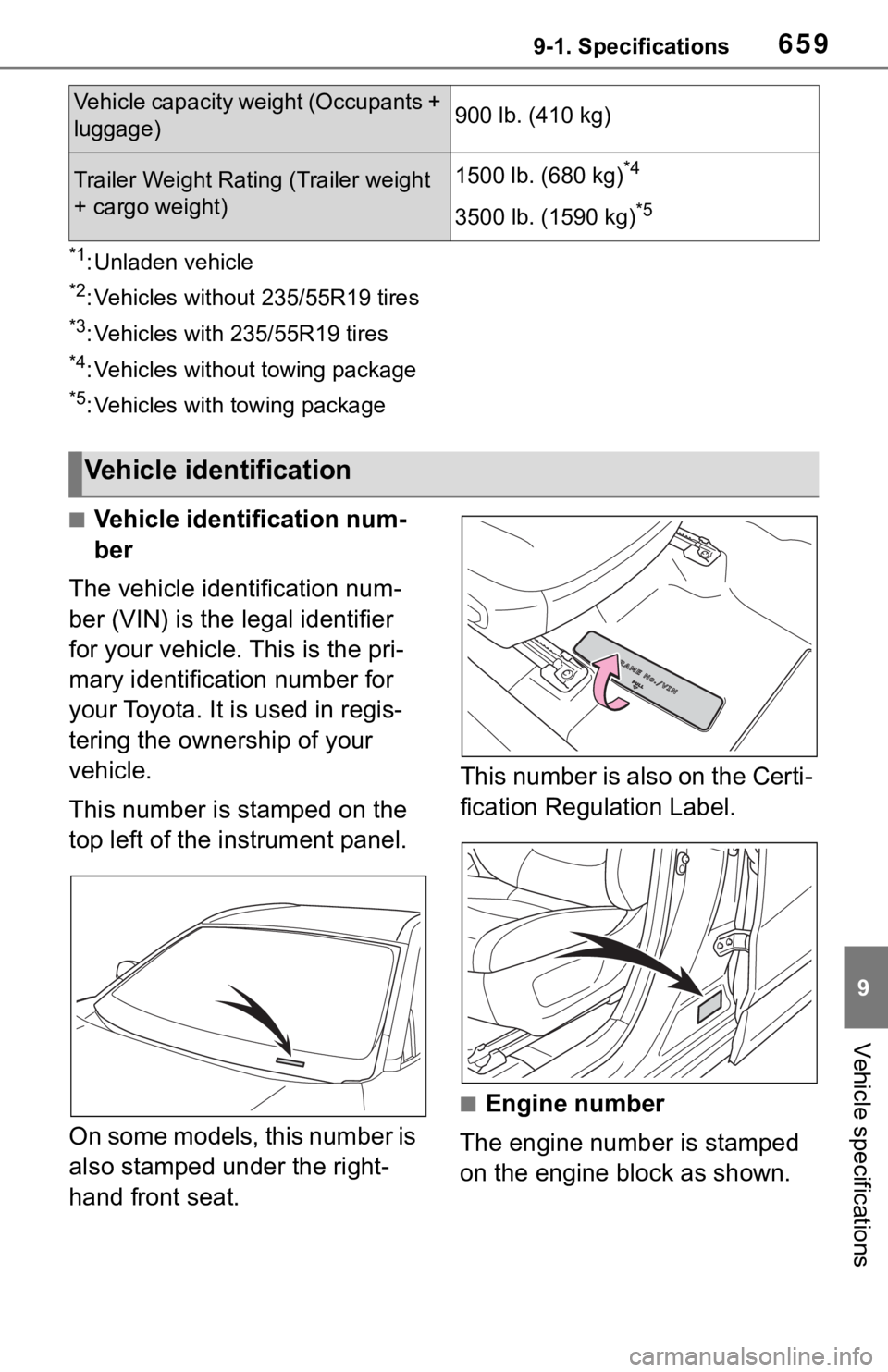
*1: Unladen vehicle
*2: Vehicles without 235/55R19 tires
*3: Vehicles with 235/55R19 tires
*4: Vehicles without towing package
*5: Vehicles with towing package
■Vehicle identification num-
ber
The vehicle identification num-
ber (VIN) is the legal identifier
for your vehicle. This is the pri-
mary identification number for
your Toyota. It is used in regis-
tering the ownership of your
vehicle.
This number is stamped on the
top left of the instrument panel.
On some models, this number is
also stamped under the right-
hand front seat. This number is also on the Certi-
fication Regulation Label.
■Engine number
The engine number is stamped
on the engine block as shown.
Vehicle capacity we ight (Occupants +
luggage)900 lb. (410 kg)
Trailer Weight Rating (Trailer weight
+ cargo weight)1500 lb. (680 kg)*4
3500 lb. (1590 kg)*5
Vehicle identification