engine oil TOYOTA RAV4 2019 Owners Manual (in English)
[x] Cancel search | Manufacturer: TOYOTA, Model Year: 2019, Model line: RAV4, Model: TOYOTA RAV4 2019Pages: 728, PDF Size: 21.09 MB
Page 1 of 728
1
2
3
4
5
6
7
8
9
10
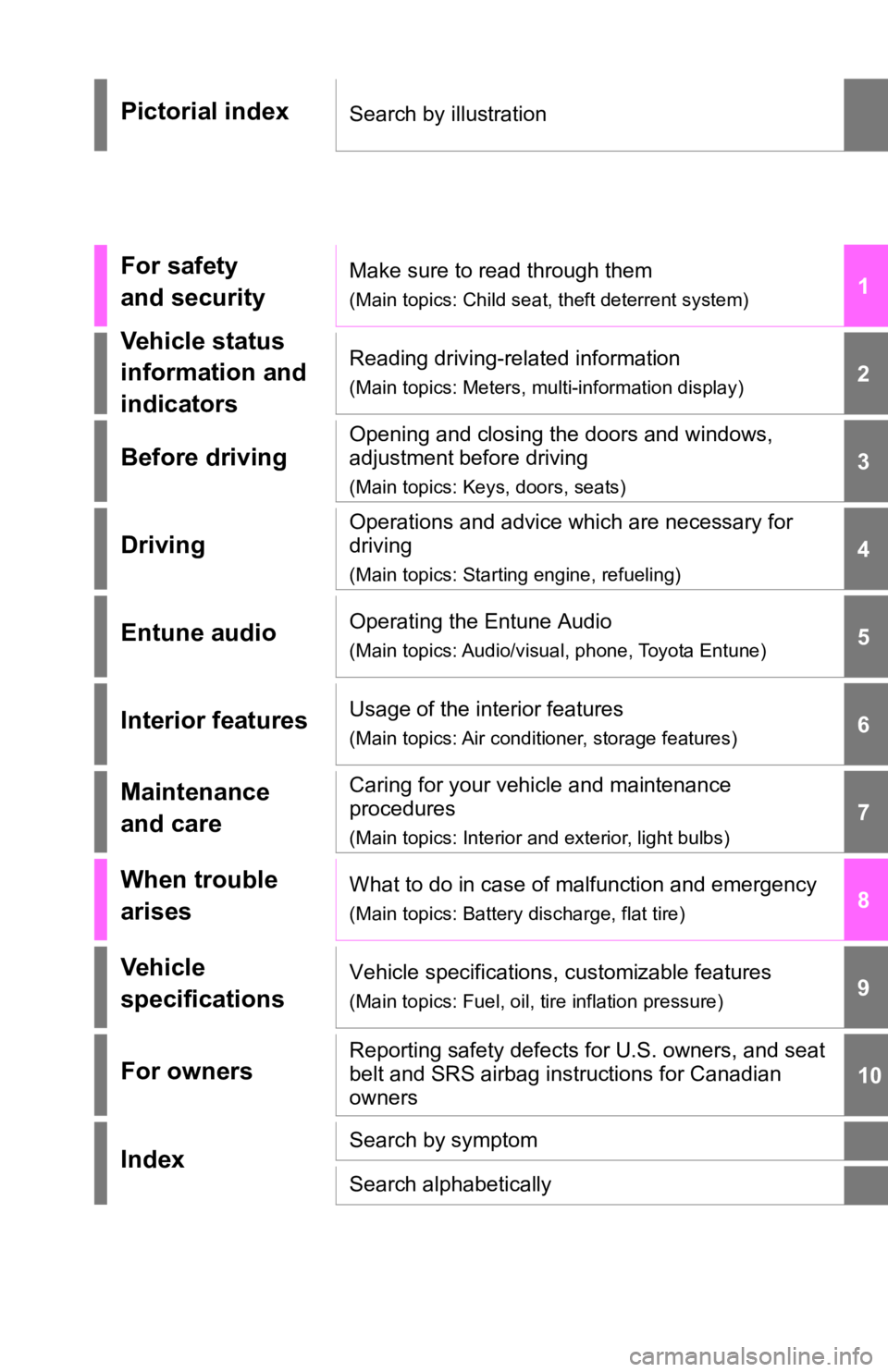
Pictorial indexSearch by illustration
For safety
and securityMake sure to read through them
(Main topics: Child seat, theft deterrent system)
Vehicle status
information and
indicatorsReading driving-related information
(Main topics: Meters, multi-information display)
Before driving
Opening and closing the doors and windows,
adjustment before driving
(Main topics: Keys, doors, seats)
Driving
Operations and advice which are necessary for
driving
(Main topics: Starting engine, refueling)
Entune audioOperating the Entune Audio
(Main topics: Audio/visual, phone, Toyota Entune)
Interior featuresUsage of the interior features
(Main topics: Air conditioner, storage features)
Maintenance
and careCaring for your vehicle and maintenance
procedures
(Main topics: Interior and exterior, light bulbs)
When trouble
arisesWhat to do in case of malfunction and emergency
(Main topics: Battery discharge, flat tire)
Vehicle
specificationsVehicle specifications, customizable features
(Main topics: Fuel, oil, tire inflation pressure)
For ownersReporting safety defects for U.S. owners, and seat
belt and SRS airbag instructions for Canadian
owners
IndexSearch by symptom
Search alphabetically
Page 6 of 728
6TABLE OF CONTENTS
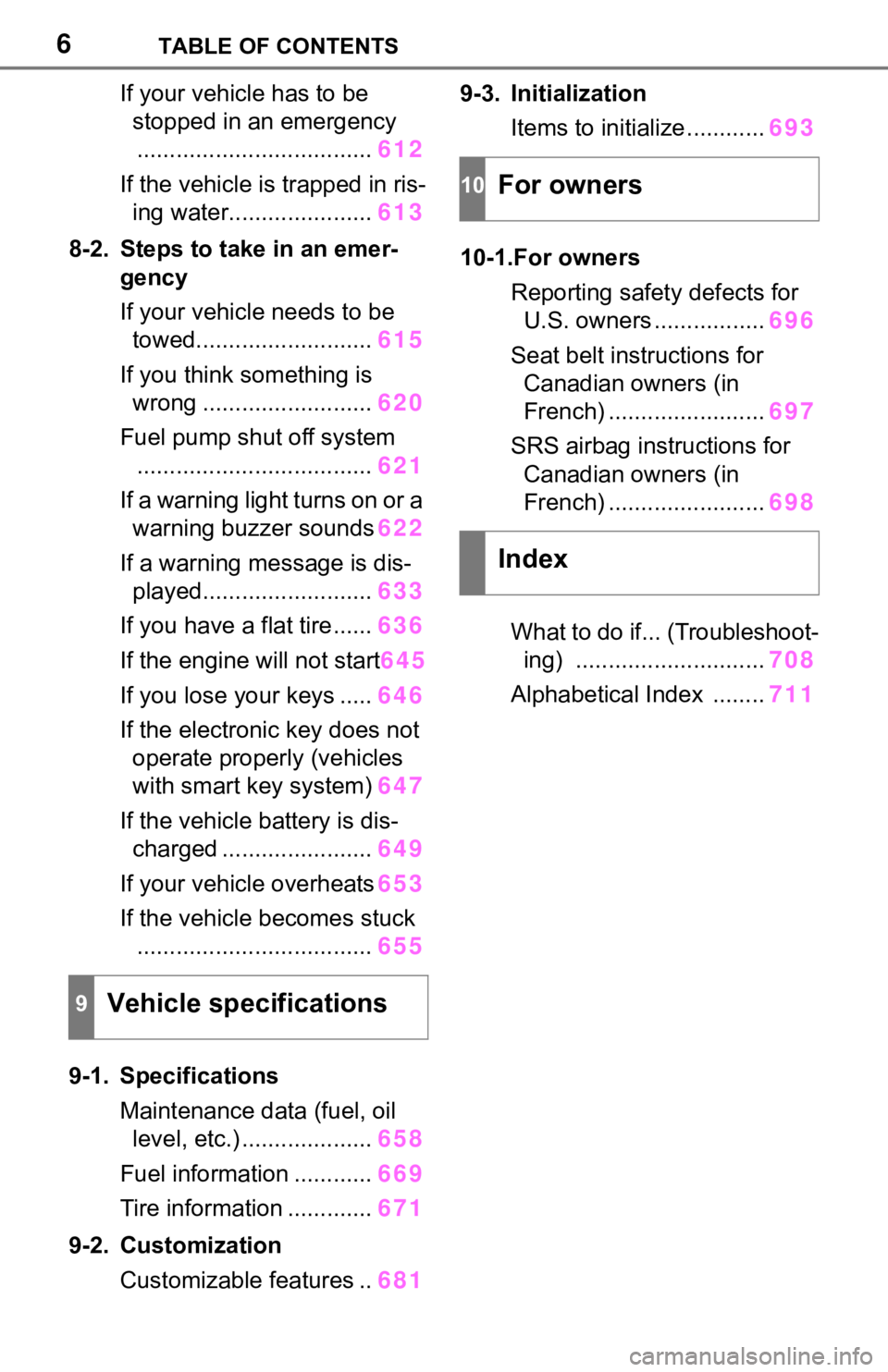
If your vehicle has to be stopped in an emergency
.................................... 612
If the vehicle is trapped in ris- ing water...................... 613
8-2. Steps to take in an emer- gency
If your vehicle needs to be towed........................... 615
If you think something is wrong .......................... 620
Fuel pump shut off system .................................... 621
If a warning light turns on or a warning buzzer sounds 622
If a warning message is dis- played.......................... 633
If you have a flat tire...... 636
If the engine will not start 645
If you lose your keys ..... 646
If the electronic key does not operate properly (vehicles
with smart key system) 647
If the vehicle battery is dis- charged ....................... 649
If your vehicle overheats 653
If the vehicle becomes stuck .................................... 655
9-1. Specifications Maintenance data (fuel, oil level, etc.) .................... 658
Fuel information ............ 669
Tire information ............. 671
9-2. Customization Customizable features .. 6819-3. Initialization
Items to initialize ............ 693
10-1.For owners Reporting safet y defects for
U.S. owners ................. 696
Seat belt instructions for Canadian owners (in
French) ........................ 697
SRS airbag instructions for Canadian owners (in
French) ........................ 698
What to do if... (Troubleshoot- ing) ............................. 708
Alphabetical Index ........ 711
9Vehicle specifications
10For owners
Index
Page 15 of 728
15Pictorial index
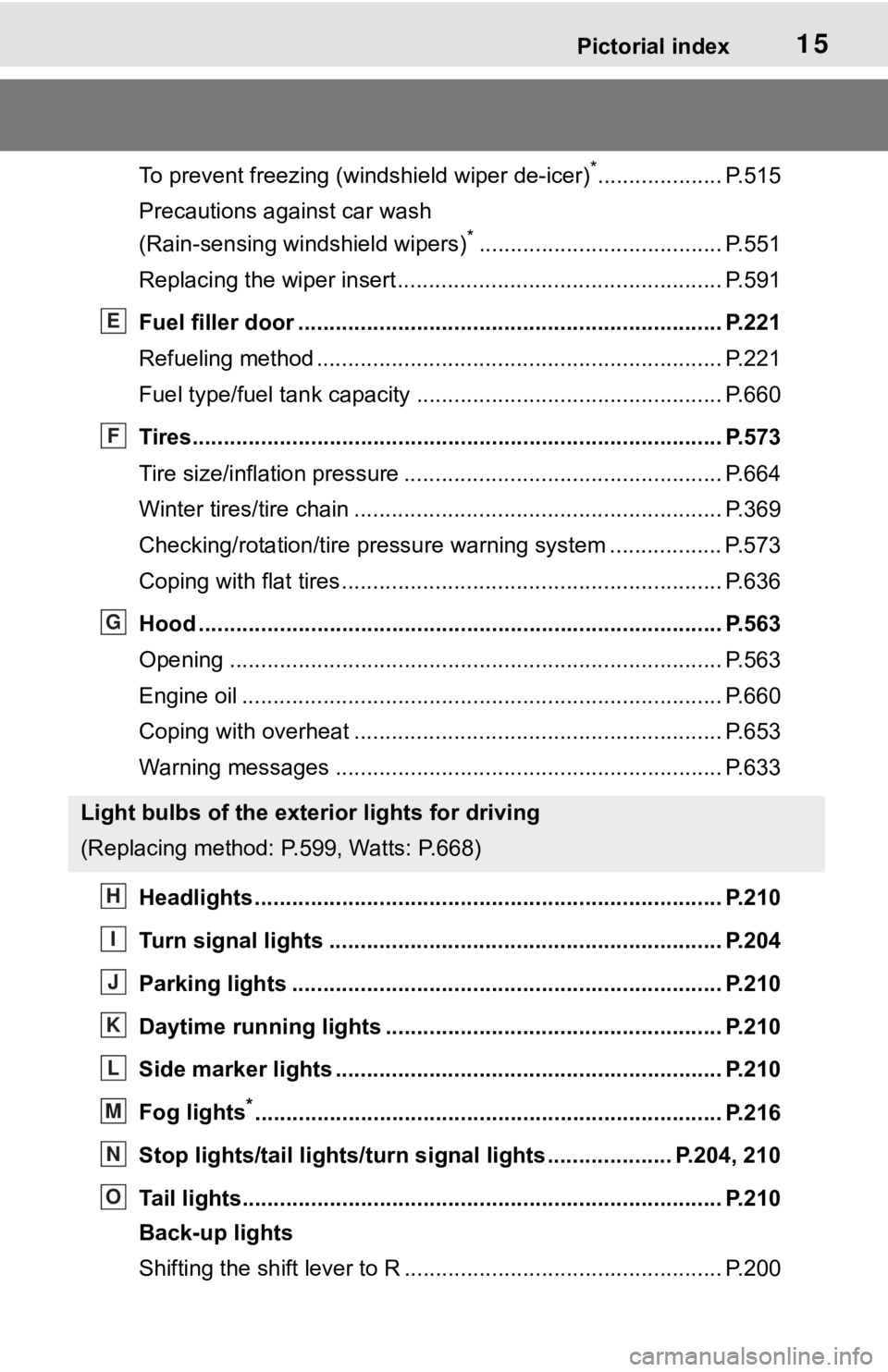
To prevent freezing (windshield wiper de-icer)*.................... P.515
Precautions against car wash
(Rain-sensing windshield wipers)
*....................................... P.551
Replacing the wiper insert ..................................... ............... P.591
Fuel filler door ............................................... ..................... P.221
Refueling method ............................................... .................. P.221
Fuel type/fuel tan k capacity ................................... .............. P.660
Tires.......................................................... ........................... P.573
Tire size/inflation pressure ................................... ................ P.664
Winter tires/tire chain ........................................ ................... P.369
Checking/rotation/tire pressur e warning system ..................P.573
Coping with flat tires......................................... .................... P.636
Hood ........................................................... ......................... P.563
Opening ............................................................................... P.563
Engine oil ..................................................... ........................ P.660
Coping with overheat ........................................... ................ P.653
Warning messages ............................................... ............... P.633
Headlights..................................................... ...................... P.210
Turn signal lights ............................................. .................. P.204
Parking lights ................................................. .................... P.210
Daytime running lights .. .................................................... P.210
Side marker lights ............................................. ................. P.210
Fog lights
*............................................................... ............ P.216
Stop lights/tail lights/turn s ignal lights .................... P.204, 210
Tail lights.................................................... ......................... P.210
Back-up lights
Shifting the shift lever to R ................................................... P.200
Light bulbs of the exterior lights for driving
(Replacing method: P.599, Watts: P.668)
E
F
G
H
I
J
K
L
M
N
O
Page 78 of 728
782-1. Instrument cluster
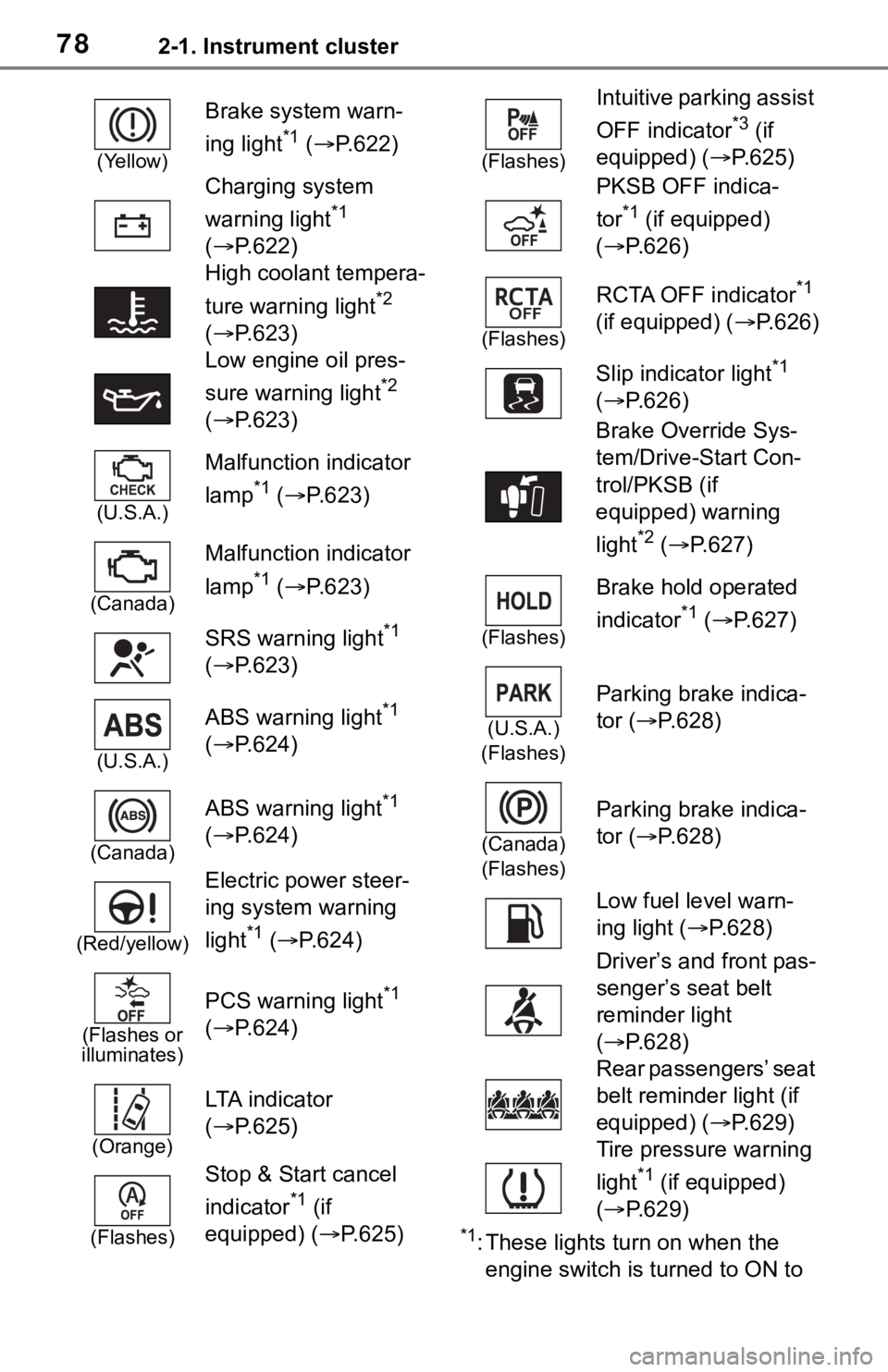
*1: These lights turn on when the
engine switch is turned to ON to
(Yellow)
Brake system warn-
ing light
*1 ( P.622)
Charging system
warning light
*1
( P.622)
High coolant tempera-
ture warning light
*2
( P.623)
Low engine oil pres-
sure warning light
*2
( P.623)
(U.S.A.)
Malfunction indicator
lamp
*1 ( P.623)
(Canada)
Malfunction indicator
lamp
*1 ( P.623)
SRS warning light
*1
( P.623)
(U.S.A.)
ABS warning light*1
( P.624)
(Canada)
ABS warning light*1
( P.624)
(Red/yellow)
Electric power steer-
ing system warning
light
*1 ( P.624)
(Flashes or
illuminates)
PCS warning light*1
( P.624)
(Orange)
LTA i n d i c a t o r
( P.625)
(Flashes)
Stop & Start cancel
indicator
*1 (if
equipped) (P.625)
(Flashes)
Intuitive parking assist
OFF indicator
*3 (if
equipped) ( P.625)
PKSB OFF indica-
tor
*1 (if equipped)
( P.626)
(Flashes)
RCTA OFF indicator*1
(if equipped) ( P.626)
Slip indicator light
*1
( P.626)
Brake Override Sys-
tem/Drive-Start Con-
trol/PKSB (if
equipped) warning
light
*2 ( P.627)
(Flashes)
Brake hold operated
indicator
*1 ( P.627)
(U.S.A.)
(Flashes)
Parking brake indica-
tor ( P.628)
(Canada)
(Flashes)
Parking brake indica-
tor ( P.628)
Low fuel level warn-
ing light ( P.628)
Driver’s and front pas-
senger’s seat belt
reminder light
( P.628)
Rear passengers’ seat
belt reminder light (if
equipped) ( P.629)
Tire pressure warning
light
*1 (if equipped)
( P.629)
Page 131 of 728

1313-2. Opening, closing and locking the doors
3
Before driving
tact with, or is covered by the fol-
lowing metallic objects
• Cards to which al uminum foil is
attached
• Cigarette boxes that have alumi- num foil inside
• Metallic wallets or bags
• Coins
• Hand warmers made of metal
• Media such as CDs and DVDs
●When other wireless key (that
emits radio waves) is being used
nearby
●When carrying the electronic key
together with the following devices
that emit radio waves
• Portable radio, cellular phone,
cordless phone or other wireless
communication devices
• Another vehicle’s electronic key or a wireless key that emits radio
waves
• Personal computers or personal digital assistants (PDAs)
• Digital audio players
• Portable game systems
●If window tint with a metallic con-
tent or metallic objects are
attached to the rear window
●When the electronic key is placed
near a battery charger or elec-
tronic devices
●When parking in a coin-operated
parking lot (Radio waves used to
detect vehicles may affect the
smart key system.)
■Note for the entry function
●Even when the electronic key is
within the effective range (detec-
tion areas), the system may not
operate properly in the following
cases:
• The electronic key is too close to the window or outside door han-
dle, near the ground, or in a high
place when the doors are locked
or unlocked.
• The electronic key is on the instru-
ment panel, luggage cover or
floor, or in the door pockets or
glove box when the engine is started or engine switch modes
are changed.
●Do not leave the electronic key on
top of the instrument panel or near
the door pockets when exiting the
vehicle. Depending on the radio
wave reception conditions, it may
be detected by the antenna out-
side the cabin and the door will
become lockable from the outside,
possibly trapping the electronic
key inside the vehicle.
●As long as the electronic key is
within the effective range, the
doors may be locked or unlocked
by anyone. However, only the
doors detecting the electronic key
can be used to unlock the vehicle.
●Even if the electro
nic key is not
inside the vehicle, it may be possi-
ble to start the engine if the elec-
tronic key is near the window.
●The doors may unlock if a large
amount of water splashes on the
door handle, such as in the rain or
in a car wash when the electronic
key is within the effective range.
(The doors will au tomatically be
locked after approximately 60 sec-
onds if the doors are not opened
and closed.)
●If the wireless remote control is
used to lock the doors when the
electronic key is near the vehicle,
there is a possib ility that the door
may not be unlocked by the entry
function. (Use the wireless remote
control to unlock the doors.)
●Touching the door lock sensor
while wearing gloves may delay or
prevent lock operation. Remove
the gloves and touch the lock sen-
sor again.
●When the lock operation is per-
formed using the lock sensor, rec-
ognition signals will be shown up
to two consecutive times. After
this, no recognition signals will be
given.
●If the door handle becomes wet
while the electronic key is within
Page 177 of 728
1774-1. Before driving
4
Driving
NOTICE
■Avoiding damage to vehicle
parts
●Do not turn the steering wheel
fully in either direction and hold
it there for an extended period
of time.
Doing so may damage the
power steering motor.
●When driving over bumps in the
road, drive as slowly as possible
to avoid damaging the wheels,
underside of the vehicle, etc.
■If you get a flat tire while driv-
ing
A flat or damaged tire may cause
the following situations.
●It may be difficult to control your
vehicle.
●The vehicle will make abnormal
sounds or vibrations.
●The vehicle will lean abnor-
mally.
Hold the steering wheel firmly and
gradually depress the brake pedal
to slow down the vehicle.
Information on what to do in case
of a flat tire ( P.636)
■When encountering flooded
roads
Do not drive on a road that has
flooded after heavy rain, etc.
Doing so may cause the following
serious damage to the vehicle:
●Engine stalling
●Short in electrical components
●Engine damage caused by
water immersion
In the event that you drive on a
flooded road and the vehicle is
flooded, be sure to have your Toy-
ota dealer check the following:
●Brake function
●Changes in quantity and quality
of oil and fluid used for the
engine, transaxle, transfer
(AWD vehicles), rear differen-
tial (AWD vehicles), etc.
●Lubricant condition for the pro-
peller shaft (AWD models),
bearings and suspension joints
(where possible), and the func-
tion of all joints, bearings, etc.
■When parking the vehicle
Always set the parking brake, and
shift the shift leve r to P. Failure to
do so may cause the vehicle to
move or the vehicle may acceler-
ate suddenly if t he accelerator
pedal is accidentally depressed.
Page 368 of 728
3684-6. Driving tips
4-6.Driving tips
Use fluids that are appropriate
to the prevailing outside tem-
peratures.
• Engine oil
• Engine coolant
• Washer fluid
Have a service technician
inspect the condition of the
battery.
Have the vehicle fitted with
four snow tires or purchase a
set of tire chains for the front
tires.
*
Ensure that all tires are the same
size and brand, and that chains
match the size of the tires.
*: Tire chains cannot be mounted on vehicles with 235/55R19 101V
tires.
Winter driving tips
Carry out the necessary
preparations and inspec-
tions before driving the
vehicle in winter. Always
drive the vehicle in a man-
ner appropriate to the pre-
vailing weather conditions.
Pre-winter preparations
WA R N I N G
■Driving with snow tires
Observe the following precautions
to reduce the risk of accidents.
Failure to do so may result in a
loss of vehicle control and cause
death or serious injury.
●Use tires of the specified size.
●Maintain the recommended
level of air pressure.
●Do not drive in excess of 75
mph (120 km/h), regardless of
the type of snow tires being
used.
●Use snow tires on all, not just
some wheels.
■Driving with tire chains
(except 235/55R19 101V tires)
Observe the following precautions
to reduce the risk of accidents.
Failure to do so may result in the
vehicle being unable to be driven
safely, and may cause death or
serious injury.
●Do not drive in excess of the
speed limit specifi ed for the tire
chains being used, or 30 mph
(50 km/h), whichever is lower.
●Avoid driving on bumpy road
surfaces or over potholes.
●Avoid sudden acceleration,
abrupt steering, sudden brak-
ing and shifting operations that
cause sudden engine braking.
●Slow down sufficiently before
entering a curve to ensure that
vehicle control is maintained.
●Do not use LTA (Lane Tracing
Assist) system.
Page 373 of 728
3734-6. Driving tips
4
Driving
WA R N I N G
●When driving off-road or in rug-
ged terrain, do not drive at
excessive speeds, jump, make
sharp turns, strike objects, etc.
This may cause loss of control
or vehicle rollover causing
death or serious injury. You are
also risking expensive damage
to your vehicle’s suspension
and chassis.
NOTICE
■To prevent the water damage
Take all necessary safety mea-
sures to ensure that water dam-
age to the engine or other
components does not occur.
●Water entering the engine air
intake will cause severe engine
damage.
●Water entering the automatic
transmission will cause deterio-
ration in shift quality, locking up
of your transmission accompa-
nied by vibration, and ultimately
damage.
●Water can wash the grease
from wheel bearings, causing
rusting and premature failure,
and may also enter the differen-
tials, transmission and transfer
case (AWD models), reducing
the gear oil’s lub ricating quali-
ties.
■When you drive through
water
If driving through water, such as
when crossing shallow streams,
first check the depth of the water
and the bottom of the riverbed for
firmness. Drive slowly and avoid
deep water.
■Inspection after off-road driv-
ing
●Sand and mud that has accu-
mulated around brake discs
may affect braking efficiency
and may damage brake system
components.
●Always perform a maintenance
inspection after each day of off-
road driving that has taken you
through rough terrain, sand,
mud, or water. For scheduled
maintenance information, refer
to the “Scheduled Maintenance
Guide” or “Owner’s Manual
Supplement”.
Page 386 of 728
3865-2. Basic information before operation
ate properly:
• Magnetic isolation cards
• Metallic foil, such as the inner
packaging of a cigarette box
• Metallic wallets or bags
• Coins
• Discs, such as a CD or DVD
If the operable part of a
capacitive touch screen but-
ton is wiped, it may operate
unintentionally.
If the capacitive touch screen
button is being touched when
the engine switch is changed
to ACC or ON, the button may
not operate properly. In this
case, remove anything touch-
ing the button, turn the engine
switch off and then turn it to
ACC or ON, or restart the sys-
tem by press and hold the
“POWER VOLUME” knob for
3 seconds or more.
●Capacitive touch screen button
sensor sensitivity can be adjusted.
( P.411)
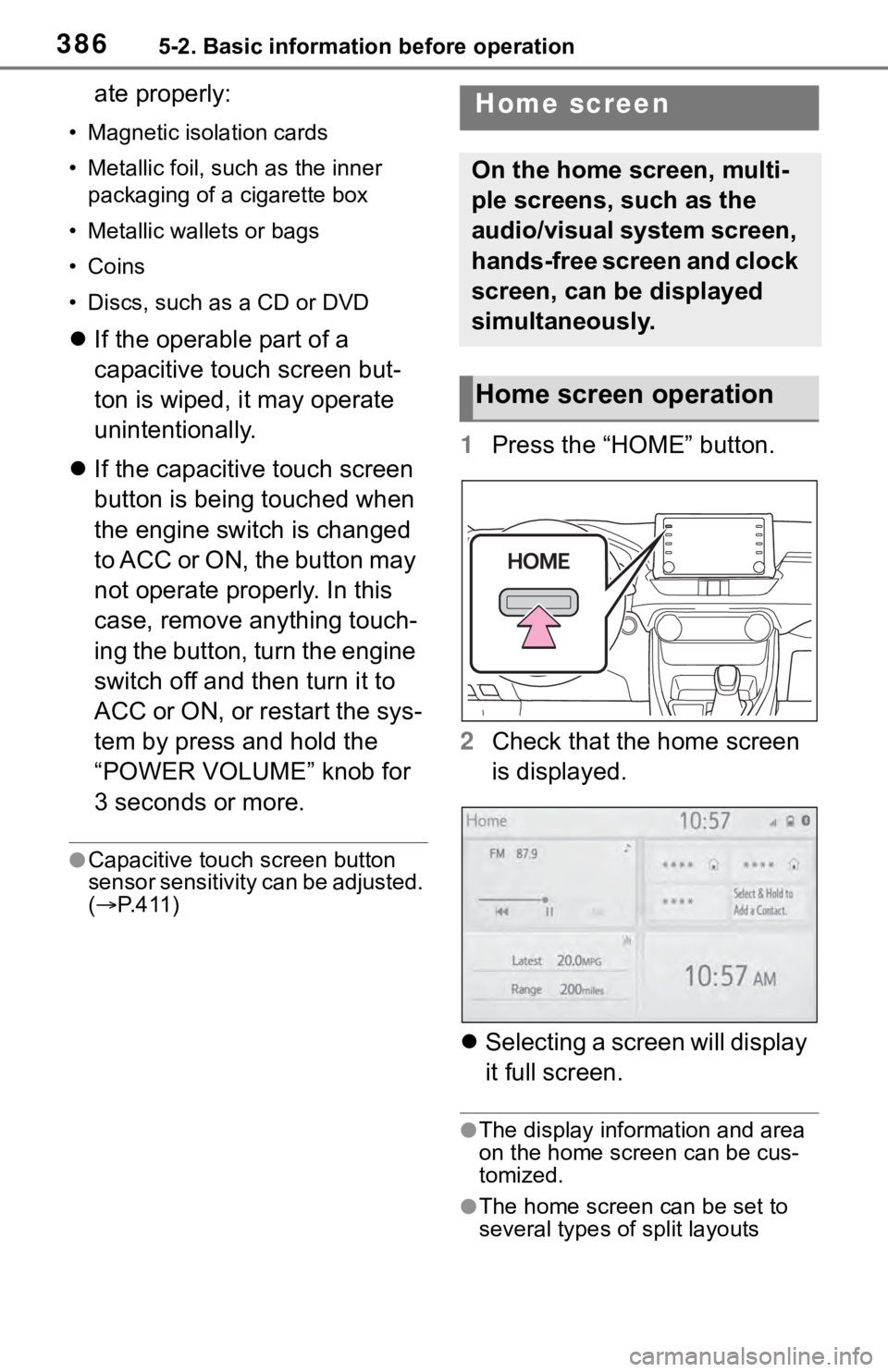
1 Press the “HOME” button.
2 Check that the home screen
is displayed.
Selecting a screen will display
it full screen.
●The display information and area
on the home screen can be cus-
tomized.
●The home screen can be set to
several types of split layouts
Home screen
On the home screen, multi-
ple screens, such as the
audio/visual system screen,
hands-free screen and clock
screen, can be displayed
simultaneously.
Home screen operation
Page 556 of 728
5567-2. Maintenance
7-2.Maintenance
■Repair and replacement
It is recommended that genuine
Toyota parts be used for repairs to
ensure performanc e of each sys-
tem. If non-Toyota parts are used in
replacement or if a repair shop other
than a Toyota dealer performs
repairs, confirm the warranty cover-
age.
■Allow inspection and repairs to
be performed by a Toyota
dealer
●Toyota technicians are well-
trained specialists and are kept up
to date with the latest service
information. They are well
informed about the operations of
all systems on your vehicle.
●Keep a copy of the repair order. It
proves that the maintenance that
has been performed is under war-
ranty coverage. If any problem
should arise while your vehicle is
under warranty, your Toyota
dealer will promptly take care of it.
General maintenance should be
performed on a daily basis. This
can be done by yourself or by a
Toyota dealer.
Scheduled maintenance should
be performed at specified inter-
vals according to the mainte-
nance schedule.
For details about maintenance
items and schedules, refer to the
“Scheduled Maintenance Guide” or
“Owner’s Manual Supplement”.
Maintenance require-
ments
To ensure safe and econom-
ical driving, day-to-day care
and regular maintenance
are essential. It is the
owner’s responsibility to
perform regular checks.
Toyota recommends the fol-
lowing maintenance:
WA R N I N G
■If your vehicle is not properly
maintained
Improper maintenance could
result in serious damage to the
vehicle and possible death or seri-
ous injury.
■Handling of the battery
●Engine exhaust, some of its
constituents, and a wide variety
of automobile components con-
tain or emit chemicals known to
the State of California to cause
cancer and birth defects and
other reproductive harm. Work
in a well ventilated area.
●Oils, fuels and fluids contained
in vehicles as well as waste pro-
duced by component wear con-
tain or emit chemicals known to
the State of California to cause
cancer and birth defects or
other reproductive harm. Avoid
exposure and wash any
affected area immediately.
●Battery posts, terminals and
related accessories contain lead
and lead compounds which are
known to cause brain damage.
Wash your hands after han-
dling. ( P.571)
General maintenance
Scheduled maintenance