park assist TOYOTA RAV4 2019 Owners Manual (in English)
[x] Cancel search | Manufacturer: TOYOTA, Model Year: 2019, Model line: RAV4, Model: TOYOTA RAV4 2019Pages: 728, PDF Size: 21.09 MB
Page 3 of 728
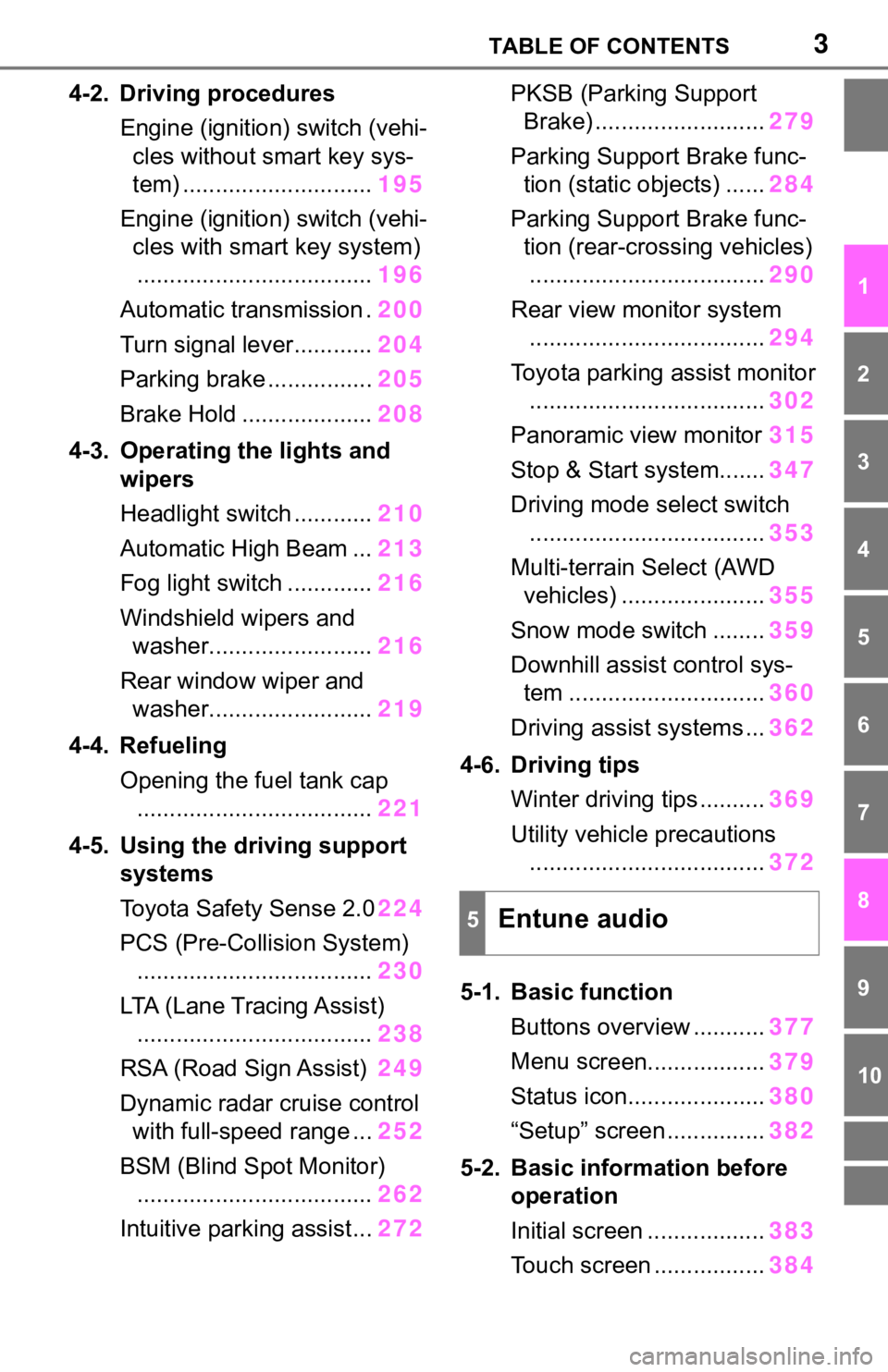
3TABLE OF CONTENTS
1
2
3
4
5
6
7
8
9
10
4-2. Driving proceduresEngine (ignition) switch (vehi-cles without smart key sys-
tem) ............................. 195
Engine (ignition) switch (vehi- cles with smart key system).................................... 196
Automatic transmission . 200
Turn signal lever............ 204
Parking brake ................ 205
Brake Hold .................... 208
4-3. Operating the lights and wipers
Headlight switch ............ 210
Automatic High Beam ... 213
Fog light switch ............. 216
Windshield wipers and washer......................... 216
Rear window wiper and washer......................... 219
4-4. Refueling Opening the fuel tank cap.................................... 221
4-5. Using the driving support
systems
Toyota Safety Sense 2.0 224
PCS (Pre-Collision System) .................................... 230
LTA (Lane Tracing Assist) .................................... 238
RSA (Road Sign Assist) 249
Dynamic radar cruise control with full-speed range ... 252
BSM (Blind Spot Monitor) .................................... 262
Intuitive parking assist... 272PKSB (Parking Support
Brake) .......................... 279
Parking Support Brake func- tion (static objects) ...... 284
Parking Support Brake func- tion (rear-crossing vehicles).................................... 290
Rear view monitor system .................................... 294
Toyota parking assist monitor .................................... 302
Panoramic view monitor 315
Stop & Start system....... 347
Driving mode s elect switch
.................................... 353
Multi-terrain Select (AWD vehicles) ...................... 355
Snow mode switch ........ 359
Downhill assist control sys- tem .............................. 360
Driving assist systems ... 362
4-6. Driving tips Winter driving tips .......... 369
Utility vehicle precautions .................................... 372
5-1. Basic function Buttons overview ........... 377
Menu sc
reen.................. 379
Status icon..................... 380
“Setup” screen ............... 382
5-2. Basic inform ation before
operation
Initial screen .................. 383
Touch screen ................. 384
5Entune audio
Page 78 of 728
782-1. Instrument cluster
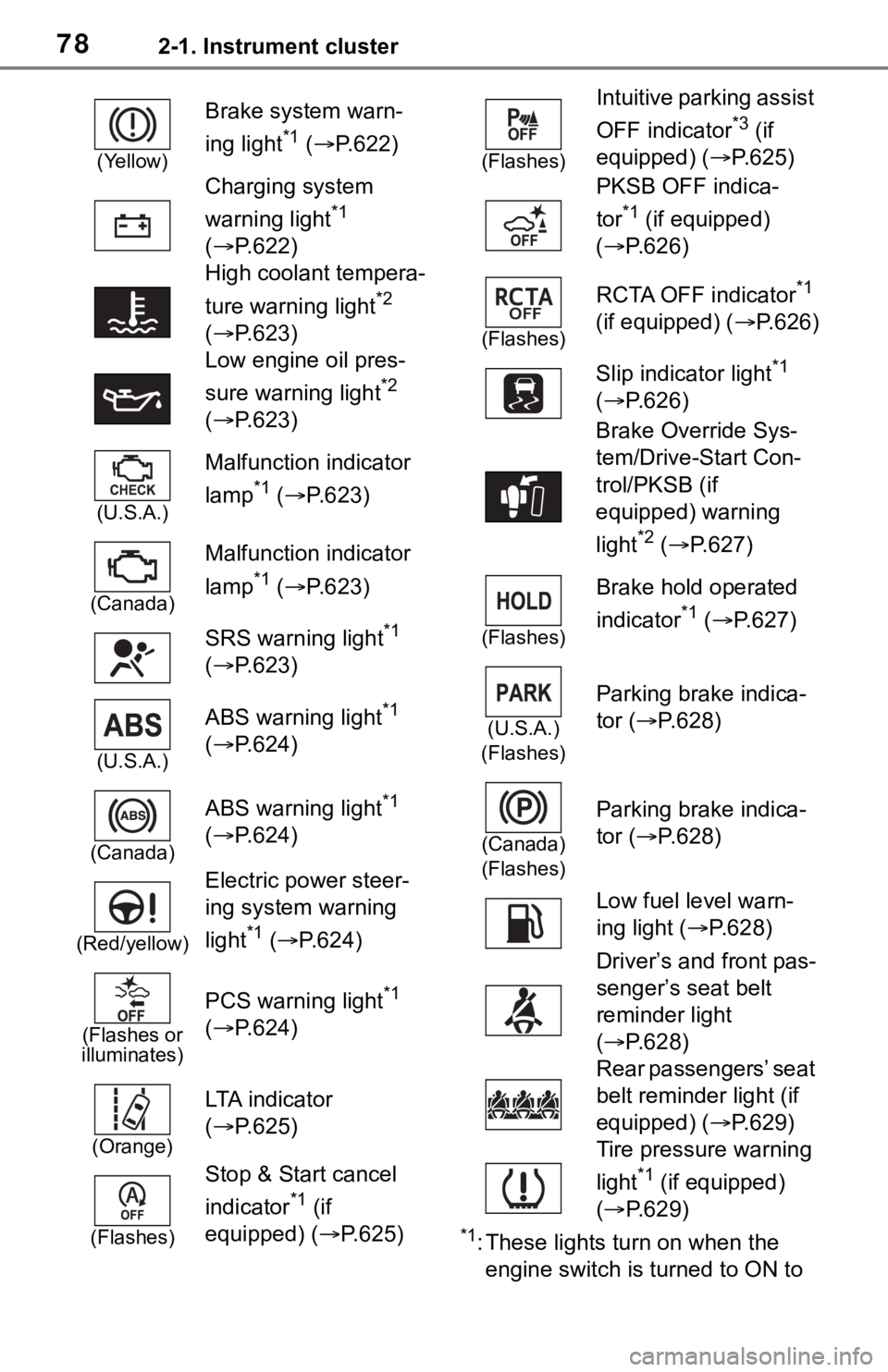
*1: These lights turn on when the
engine switch is turned to ON to
(Yellow)
Brake system warn-
ing light
*1 ( P.622)
Charging system
warning light
*1
( P.622)
High coolant tempera-
ture warning light
*2
( P.623)
Low engine oil pres-
sure warning light
*2
( P.623)
(U.S.A.)
Malfunction indicator
lamp
*1 ( P.623)
(Canada)
Malfunction indicator
lamp
*1 ( P.623)
SRS warning light
*1
( P.623)
(U.S.A.)
ABS warning light*1
( P.624)
(Canada)
ABS warning light*1
( P.624)
(Red/yellow)
Electric power steer-
ing system warning
light
*1 ( P.624)
(Flashes or
illuminates)
PCS warning light*1
( P.624)
(Orange)
LTA i n d i c a t o r
( P.625)
(Flashes)
Stop & Start cancel
indicator
*1 (if
equipped) (P.625)
(Flashes)
Intuitive parking assist
OFF indicator
*3 (if
equipped) ( P.625)
PKSB OFF indica-
tor
*1 (if equipped)
( P.626)
(Flashes)
RCTA OFF indicator*1
(if equipped) ( P.626)
Slip indicator light
*1
( P.626)
Brake Override Sys-
tem/Drive-Start Con-
trol/PKSB (if
equipped) warning
light
*2 ( P.627)
(Flashes)
Brake hold operated
indicator
*1 ( P.627)
(U.S.A.)
(Flashes)
Parking brake indica-
tor ( P.628)
(Canada)
(Flashes)
Parking brake indica-
tor ( P.628)
Low fuel level warn-
ing light ( P.628)
Driver’s and front pas-
senger’s seat belt
reminder light
( P.628)
Rear passengers’ seat
belt reminder light (if
equipped) ( P.629)
Tire pressure warning
light
*1 (if equipped)
( P.629)
Page 79 of 728
792-1. Instrument cluster
2
Vehicle status information and indicators
indicate that a system check is
being performed. They will turn
off after the engine is started, or
after a few seconds. There may
be a malfunction in a system if
the light does not come on, or
turn off. Have the vehicle
inspected by your Toyota dealer.
*2: This light illuminates on the
multi-informatio n display with a
message.
*3: Intuitive parking assist OFF indi- cator turns on when the engine
switch is turned to ON while the
Intuitive parking assist function is
on. It will turn off a fter a few sec-
onds.
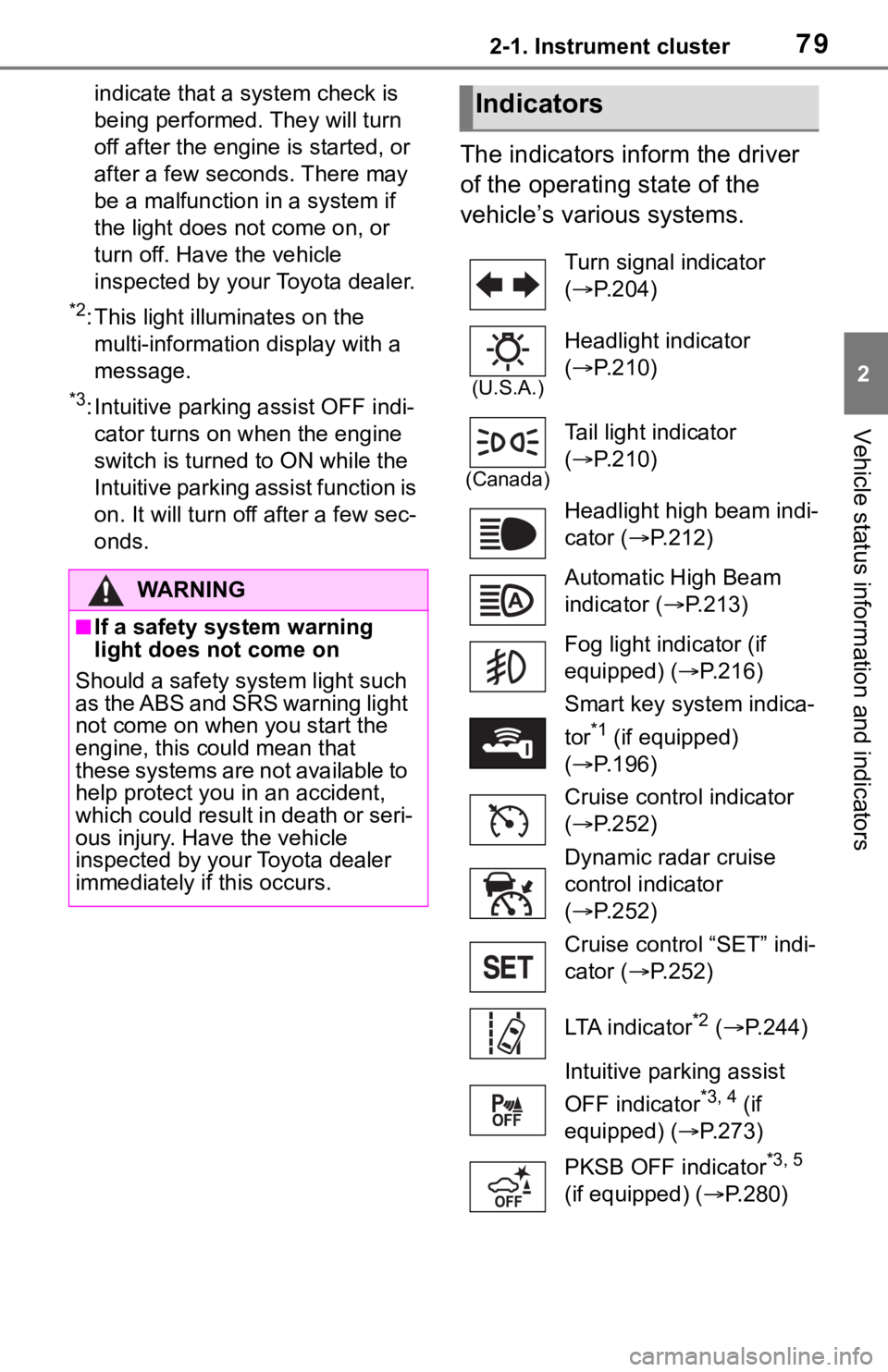
The indicators inform the driver
of the operating state of the
vehicle’s various systems.
WA R N I N G
■If a safety system warning
light does not come on
Should a safety system light such
as the ABS and SRS warning light
not come on when you start the
engine, this could mean that
these systems are not available to
help protect you in an accident,
which could result in death or seri-
ous injury. Have the vehicle
inspected by your Toyota dealer
immediately if this occurs.
Indicators
Turn signal indicator
( P.204)
(U.S.A.)
Headlight indicator
( P.210)
(Canada)
Tail light indicator
( P.210)
Headlight high beam indi-
cator ( P.212)
Automatic High Beam
indicator ( P.213)
Fog light indicator (if
equipped) ( P.216)
Smart key system indica-
tor
*1 (if equipped)
( P.196)
Cruise control indicator
( P.252)
Dynamic radar cruise
control indicator
( P.252)
Cruise control “SET” indi-
cator ( P.252)
LTA indicator
*2 ( P.244)
Intuitive parking assist
OFF indicator
*3, 4 (if
equipped) ( P.273)
PKSB OFF indicator
*3, 5
(if equipped) ( P.280)
Page 80 of 728
802-1. Instrument cluster
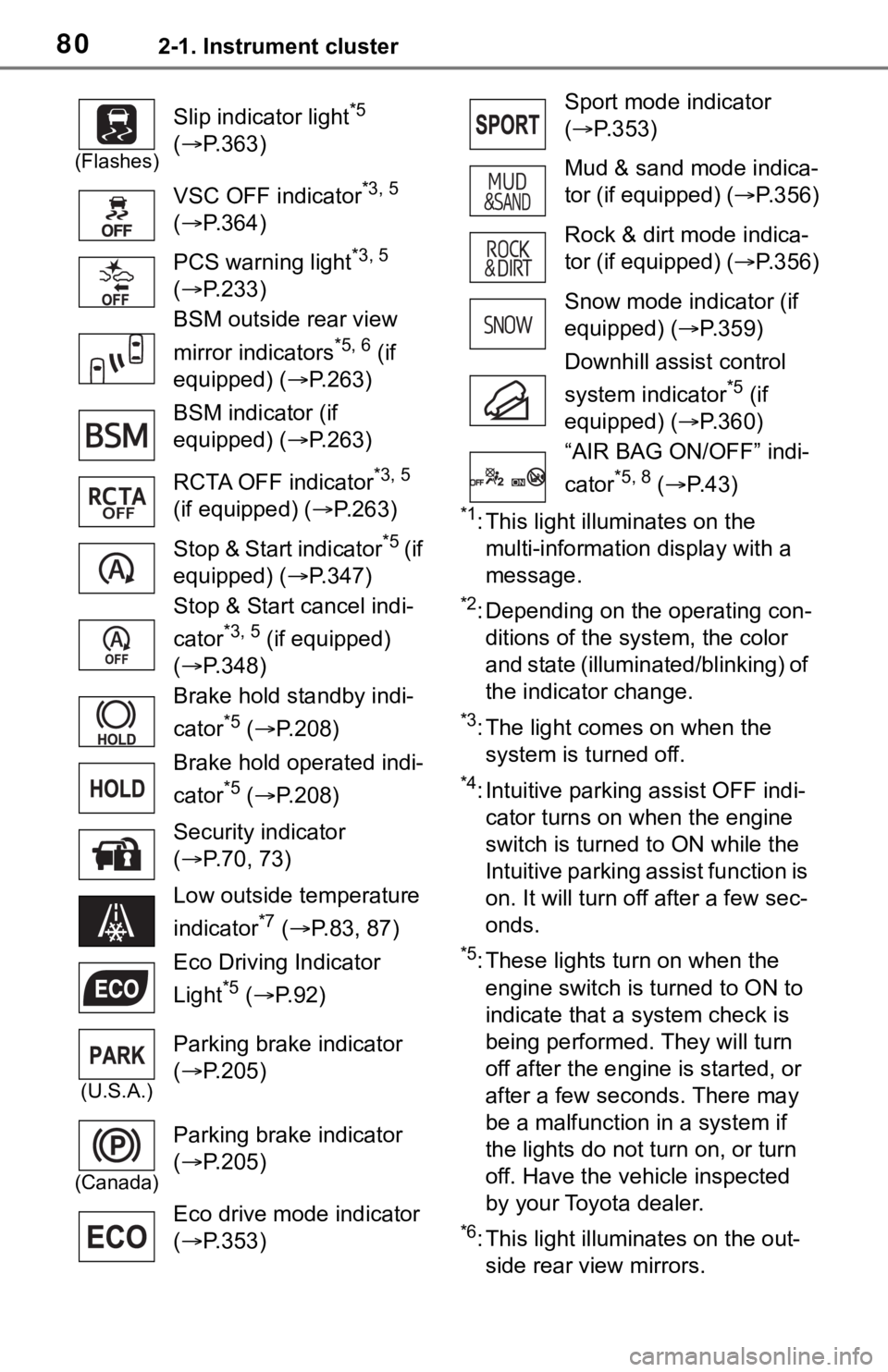
*1: This light illuminates on the multi-information display with a
message.
*2: Depending on the operating con-ditions of the system, the color
and state (illuminat ed/blinking) of
the indicator change.
*3: The light comes on when the system is turned off.
*4: Intuitive parking assist OFF indi-cator turns on wh en the engine
switch is turned t o ON while the
Intuitive parking assist function is
on. It will turn off after a few sec-
onds.
*5: These lights tu rn on when the
engine switch is turned to ON to
indicate that a system check is
being performed. They will turn
off after the engine is started, or
after a few seconds. There may
be a malfunction in a system if
the lights do not turn on, or turn
off. Have the vehicle inspected
by your Toyota dealer.
*6: This light illuminates on the out- side rear view mirrors.
(Flashes)
Slip indicator light*5
( P.363)
VSC OFF indicator
*3, 5
( P.364)
PCS warning light
*3, 5
( P.233)
BSM outside rear view
mirror indicators
*5, 6 (if
equipped) ( P.263)
BSM indicator (if
equipped) ( P.263)
RCTA OFF indicator
*3, 5
(if equipped) ( P.263)
Stop & Start indicator
*5 ( if
equipped) ( P.347)
Stop & Start cancel indi-
cator
*3, 5 (if equipped)
( P.348)
Brake hold standby indi-
cator
*5 ( P.208)
Brake hold operated indi-
cator
*5 ( P.208)
Security indicator
( P.70, 73)
Low outside temperature
indicator
*7 ( P.83, 87)
Eco Driving Indicator
Light
*5 ( P. 9 2 )
(U.S.A.)
Parking brake indicator
( P.205)
(Canada)
Parking brake indicator
( P.205)
Eco drive mode indicator
( P.353)
Sport mode indicator
( P.353)
Mud & sand mode indica-
tor (if equipped) ( P.356)
Rock & dirt mode indica-
tor (if equipped) ( P.356)
Snow mode indicator (if
equipped) ( P.359)
Downhill assist control
system indicator
*5 (if
equipped) ( P.360)
“AIR BAG ON/OFF” indi-
cator
*5, 8 ( P. 4 3 )
Page 95 of 728
952-1. Instrument cluster
2
Vehicle status information and indicators
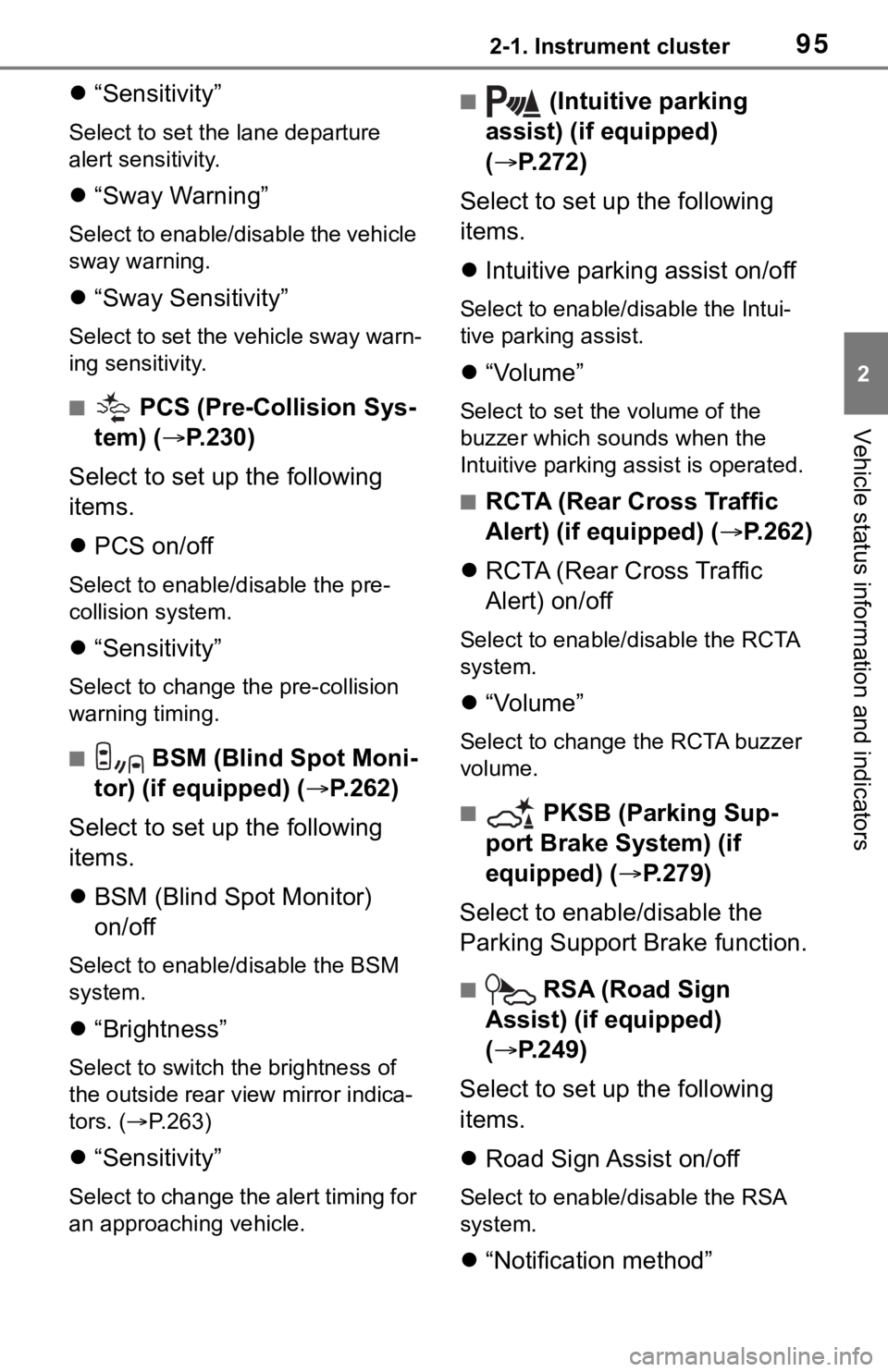
“Sensitivity”
Select to set the lane departure
alert sensitivity.
“Sway Warning”
Select to enable/disable the vehicle
sway warning.
“Sway Sensitivity”
Select to set the vehicle sway warn-
ing sensitivity.
■ PCS (Pre-Collision Sys-
tem) ( P.230)
Select to set up the following
items.
PCS on/off
Select to enable/disable the pre-
collision system.
“Sensitivity”
Select to change t he pre-collision
warning timing.
■ BSM (Blind Spot Moni-
tor) (if equipped) ( P.262)
Select to set up the following
items.
BSM (Blind Spot Monitor)
on/off
Select to enable/disable the BSM
system.
“Brightness”
Select to switch the brightness of
the outside rear view mirror indica-
tors. ( P.263)
“Sensitivity”
Select to change the alert timing for
an approaching vehicle.
■ (Intuitive parking
assist) (if equipped)
( P.272)
Select to set up the following
items.
Intuitive parking assist on/off
Select to enable/d isable the Intui-
tive parking assist.
“Volume”
Select to set the volume of the
buzzer which sounds when the
Intuitive parking assist is operated.
■RCTA (Rear Cross Traffic
Alert) (if equipped) ( P.262)
RCTA (Rear Cross Traffic
Alert) on/off
Select to enable /disable the RCTA
system.
“Volume”
Select to change the RCTA buzzer
volume.
■ PKSB (Parking Sup-
port Brake System) (if
equipped) ( P.279)
Select to enable/disable the
Parking Support Brake function.
■ RSA (Road Sign
Assist) (if equipped)
( P.249)
Select to set up the following
items.
Road Sign Assist on/off
Select to enable /disable the RSA
system.
“Notification method”
Page 122 of 728

1223-2. Opening, closing and locking the doors
1On
2 Off
■Back door closer
In the event that the back door is left
slightly open, the back door closer
will automatically close it to the fully
closed position.
Whatever the state of the engine
switch, the back door closer oper-
ates.
■Power back door operating con-
ditions
The power back door can automati-
cally open and close under the fol-
lowing conditions:
●When the power back door sys-
tem is enabled. ( P. 9 4 )
●When the engine switch is in ON,
in addition to the above for the
opening operations, the back door
operates for any of the following
conditions:
• Parking brake is engaged
• The brake pedal is depressed
• The shift lever is in P.
■Operation of the power back
door
●A buzzer sounds and the emer-
gency flashers flash twice to indi-
cate that the back door is
opening/closing.
●When the power back door sys-
tem is disabled, the power back
door does not ope rate but it can
be opened and closed by hand.
●When the power back door auto-
matically opens, if an abnormality
due to people or objects is
detected, oper ation will stop.
■Jam protection function
Sensors are equipped on both sides
of the power back door. If anything
obstructs the power back door while
it is closing, the b ack door will auto-
matically operate in the opposite
direction or stop.
■Fall-down protection function
While the power back door is open-
ing automatically, applying exces-
sive force to it will stop the opening
operation to prevent the power back
door from suddenly shutting.
■Back door closing assist
If the back door is lowered manually
when the back door is stopped at an
open position, the back door will
fully close automatically.
■Back door reserve lock function
This function is a function which
reserves locking of all doors, before-
hand, when the power back door is
open.
When the following procedure is
performed, all the doors except the
power back door are locked and
then power back door will also be
locked at the same time it is closed.
1 Close all doors, except the back
door.
2 During the power back door clos-
ing operation, lock the doors
using the smart key system from
the side doors ( P.109) or the
wireless remote control.
( P.109)
A buzzer sounds and the emer-
gency flashers flash to indicate that
all the doors have been closed and
locked.
●If the electronic key is placed
inside the vehicle after starting a
close operation via the door
reserve lock function, the elec-
tronic key may become locked
inside the vehicle.
●If the power back door does not
fully close due to the operation of
Page 131 of 728

1313-2. Opening, closing and locking the doors
3
Before driving
tact with, or is covered by the fol-
lowing metallic objects
• Cards to which al uminum foil is
attached
• Cigarette boxes that have alumi- num foil inside
• Metallic wallets or bags
• Coins
• Hand warmers made of metal
• Media such as CDs and DVDs
●When other wireless key (that
emits radio waves) is being used
nearby
●When carrying the electronic key
together with the following devices
that emit radio waves
• Portable radio, cellular phone,
cordless phone or other wireless
communication devices
• Another vehicle’s electronic key or a wireless key that emits radio
waves
• Personal computers or personal digital assistants (PDAs)
• Digital audio players
• Portable game systems
●If window tint with a metallic con-
tent or metallic objects are
attached to the rear window
●When the electronic key is placed
near a battery charger or elec-
tronic devices
●When parking in a coin-operated
parking lot (Radio waves used to
detect vehicles may affect the
smart key system.)
■Note for the entry function
●Even when the electronic key is
within the effective range (detec-
tion areas), the system may not
operate properly in the following
cases:
• The electronic key is too close to the window or outside door han-
dle, near the ground, or in a high
place when the doors are locked
or unlocked.
• The electronic key is on the instru-
ment panel, luggage cover or
floor, or in the door pockets or
glove box when the engine is started or engine switch modes
are changed.
●Do not leave the electronic key on
top of the instrument panel or near
the door pockets when exiting the
vehicle. Depending on the radio
wave reception conditions, it may
be detected by the antenna out-
side the cabin and the door will
become lockable from the outside,
possibly trapping the electronic
key inside the vehicle.
●As long as the electronic key is
within the effective range, the
doors may be locked or unlocked
by anyone. However, only the
doors detecting the electronic key
can be used to unlock the vehicle.
●Even if the electro
nic key is not
inside the vehicle, it may be possi-
ble to start the engine if the elec-
tronic key is near the window.
●The doors may unlock if a large
amount of water splashes on the
door handle, such as in the rain or
in a car wash when the electronic
key is within the effective range.
(The doors will au tomatically be
locked after approximately 60 sec-
onds if the doors are not opened
and closed.)
●If the wireless remote control is
used to lock the doors when the
electronic key is near the vehicle,
there is a possib ility that the door
may not be unlocked by the entry
function. (Use the wireless remote
control to unlock the doors.)
●Touching the door lock sensor
while wearing gloves may delay or
prevent lock operation. Remove
the gloves and touch the lock sen-
sor again.
●When the lock operation is per-
formed using the lock sensor, rec-
ognition signals will be shown up
to two consecutive times. After
this, no recognition signals will be
given.
●If the door handle becomes wet
while the electronic key is within
Page 169 of 728
169
4
4
Driving
Driving
4-1. Before drivingDriving the vehicle....... 171
Cargo and luggage ..... 177
Vehicle load limits ....... 180
Trailer towing............... 181
Dinghy towing ............. 193
4-2. Driving procedures Engine (ignition) switch (vehicles without smart key
system)...................... 194
Engine (ignition) switch (vehicles with smart key
system)...................... 195
Automatic transmission 199
Turn signal lever.......... 203
Parking brake .............. 204
Brake Hold .................. 207
4-3. Operating the lights and wipers
Headlight switch .......... 209
Automatic High Beam . 212
Fog light switch ........... 215
Windshield wipers and washer....................... 215
Rear window wiper and washer....................... 218
4-4. Refueling Opening the fuel tank cap.................................. 2204-5. Using the dr
iving support
systems
Toyota Safety Sense 2.0 .................................. 223
PCS (Pre-Collision System) .................................. 229
LTA (Lane Tracing Assist) .................................. 238
RSA (Road Sign Assist) .................................. 249
Dynamic radar cruise con- trol with full-speed range.................................. 251
BSM (Blind Spot Monitor) .................................. 262
Intuitive parking assist . 271
PKSB (Parking Support Brake) ........................ 278
Parking Support Brake func- tion (static objects) .... 283
Parking Support Brake func- tion (rear-crossing vehi-
cles) ........................... 289
Rear view monitor system .................................. 293
Toyota parking assist moni- tor .............................. 301
Panoramic view monitor .................................. 314
Stop & Start system .... 346
Driving mode select switch .................................. 352
Page 171 of 728
1714-1. Before driving
4
Driving
4-1.Before driving
■Starting the engine
P.194, 195
■Driving
1 With the brake pedal
depressed, shift the shift
lever to D. ( P.199)
2 Release the parking brake.
( P.204)
If the parking brake is in automatic
mode, the parking brake is
released automatically when shift-
ing the shift lever to any position
other than P. ( P.205)
3 Gradually release the brake
pedal and gently depress the
accelerator pedal to acceler-
ate the vehicle.
■Stopping
1 With the shift lever in D,
depress the brake pedal.
2 If necessary, set the parking
brake. ( P.204)
If the vehicle is to be stopped for an
extended period of time, shift the
shift lever to P. ( P.199)
■Parking the vehicle
1 With the shift lever in D,
depress the brake pedal. 2
Set the parking brake
( P.204), and shift the shift
lever to P ( P.199).
3 Turn the engine switch to
OFF to stop the engine.
4 Lock the door, making sure
that you have the key on your
person.
If parking on a hill, block the wheels
as needed.
■Starting off on a steep
uphill
1 With the brake pedal
depressed, shift the shift
lever to D. ( P.199)
2 Pull the parking brake switch
and parking brake is set man-
ually. ( P.204)
3 Release the brake pedal and
gently depress the accelera-
tor pedal to accelerate the
vehicle.
4 Press the parking brake
switch and parking brake is
released manually. ( P.204)
■When starting off on a uphill
The hill-start assist control will acti-
vate. ( P.362)
■Driving in the rain
●Drive carefully whe n it is raining,
because visibility will be reduced,
the windows may become fogged-
up, and the road could be slippery.
●Drive carefully whe n it starts to
rain, as the road surface could be
especially slippery.
●Refrain from hig h speeds when
driving on an expressway in the
rain, because there may be a
Driving the vehicle
The following procedures
should be observed to
ensure safe driving:
Driving procedure
Page 176 of 728
1764-1. Before driving
WA R N I N G
●Always apply the parking brake,
shift the shift lever to P, stop the
engine and lock the vehicle.
Do not leave the vehicle unat-
tended while the engine is run-
ning.
If the vehicle is parked with the
shift lever in P but the parking
brake is not set, the vehicle may
start to move, possibly leading
to an accident.
●Do not touch the exhaust pipes
while the engine is running or
immediately after turning the
engine off.
Doing so may cause burns.
■When taking a nap in the vehi-
cle
Always turn the engine off. Other-
wise, if you accidentally move the
shift lever or dep ress the acceler-
ator pedal, this could cause an
accident or fire due to engine
overheating. Additionally, if the
vehicle is parked in a poorly venti-
lated area, exhaust gases may
collect and enter the vehicle, lead-
ing to death or a serious health
hazard.
■When braking
●When the brakes a re wet, drive
more cautiously.
Braking distance increases
when the brakes are wet, and
this may cause one side of the
vehicle to brake differently than
the other side. Also, the parking
brake may not securely hold the
vehicle.
●If the brake booster device does
not operate, do not follow other
vehicles closely and avoid hills
or sharp turns t hat require brak-
ing.
In this case, braking is still pos-
sible, but the brake pedal
should be depressed more
firmly than usual. Also, the brak-
ing distance will increase. Have
your brakes fixed immediately.
●Do not pump the brake pedal if
the engine stalls.
Each push on the brake pedal
uses up the reserve for the
power-assisted brakes.
●The brake system consists of 2
individual hydraulic systems; if
one of the systems fails, the
other will still ope rate. In this
case, the brake pedal should be
depressed more firmly than
usual and the braking distance
will increase. Have your brakes
fixed immediately.
■If the vehicle becomes stuck
(AWD models)
Do not spin the wheels exces-
sively when any of the tires is up
in the air, or the vehicle is stuck in
sand, mud, etc. This may damage
the driveline components or pro-
pel the vehicle forward or back-
ward, causing an accident.
NOTICE
■When driving the vehicle
●Do not depress the accelerator
and brake pedals at the same
time during driving, as this may
restrain the engine output.
●Do not use the accelerator
pedal or depress the accelera-
tor and brake pedals at the
same time to hold the vehicle on
a hill.