light TOYOTA RAV4 PHEV 2021 Repair Manual
[x] Cancel search | Manufacturer: TOYOTA, Model Year: 2021, Model line: RAV4 PHEV, Model: TOYOTA RAV4 PHEV 2021Pages: 666, PDF Size: 161.28 MB
Page 221 of 666
219
4
4-2. Opening, closing and locking the doors
Before driving
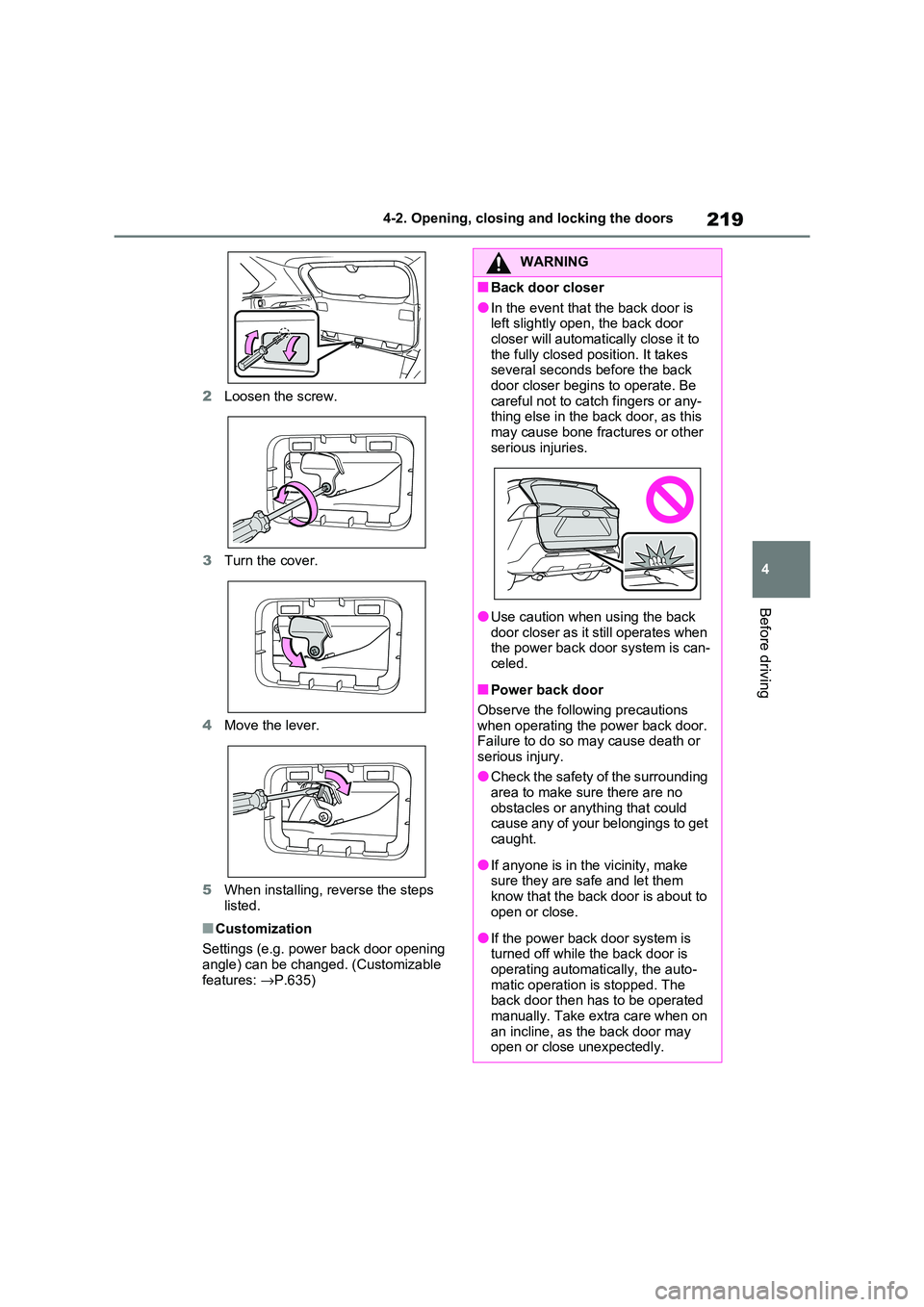
2 Loosen the screw.
3 Turn the cover.
4 Move the lever.
5 When installing, reverse the steps
listed.
■Customization
Settings (e.g. power back door opening
angle) can be changed. (Customizable
features: →P.635)
WARNING
■Back door closer
●In the event that the back door is
left slightly open, the back door closer will automatically close it to
the fully closed po sition. It takes
several seconds before the back door closer begins to operate. Be
careful not to catch fingers or any -
thing else in the back door, as this
may cause bone frac tures or other serious injuries.
●Use caution when using the back door closer as it still operates when
the power back d oor system is can-
celed.
■Power back door
Observe the following precautions when operating the power back door.
Failure to do so m ay cause death or
serious injury.
●Check the safety of the surrounding
area to make sur e there are no
obstacles or anything that could cause any of your belongings to get
caught.
●If anyone is in the vicinity, make
sure they are safe and let them
know that the back door is about to open or close.
●If the power back door system is turned off while the back door is
operating automatically, the auto -
matic operation is stopped. The back door then has to be operated
manually. Take extra care when on
an incline, as the back door may open or close unexpectedly.
Page 228 of 666
2264-2. Opening, closing and locking the doors
• The electronic key is too close to the
window or outside door handle, near the ground, or in a high place when
the doors are lo cked or unlocked.
• The electronic key is on the instru- ment panel, luggage co ver or floor, or
in the door pockets or glove box when
the hybrid system is started or power switch modes are changed.
●Do not leave the electronic key on top of the instrument panel or near the
door pockets when exiting the vehicle.
Depending on the radio wave recep - tion conditions, it m ay be detected by
the antenna outside the cabin and the
door will become lockable from the outside, possibly trapping the elec -
tronic key inside the vehicle.
●As long as the electronic key is within
the effective range , the doors may be
locked or unlocke d by anyone. How- ever, only the door s detecting the
electronic key can be used to lock or
unlock the vehicle.
●Even if the electronic key is not inside
the vehicle, it may be possible to start the hybrid system if the electronic key
is near the window.
●The doors may unlock if a large
amount of water splashes on the door
handle, such as in t he rain or in a car wash when the electronic key is within
the effective range . (The doors will
automatically be locked after approxi - mately 30 seconds if the doors are not
opened and closed.)
●If the wireless remote control is used
to lock the doors when the electronic
key is near the vehi cle, there is a pos- sibility that the door may not be
unlocked by the entry function. (Use
the wireless remote control to unlock
the doors.)
●Touching the door lock sensor while
wearing gloves may delay or prevent lock operation. Remove the gloves
and touch the lo ck sensor again.
●When the lock operation is performed
using the lock sens or, recognition sig-
nals will be shown up to two consecu -
tive times. After this, no recognition
signals will be given.
●If the door handle becomes wet while
the electronic key is within the effec - tive range, the door may lock and
unlock repeatedly. In that case, follow
the following correction procedures to wash the vehicle:
• Place the electronic key in a location 2
m (6 ft.) or more away from the vehi - cle. (Take care to ensure that the key
is not stolen.)
• Set the electronic key to battery-sav - ing mode to disable the smart entry &
start system. ( →P.225)
●If the electronic key is inside the vehi-
cle and a door handle becomes wet
during a car wash, a message may be shown on the multi-information dis -
play and a buzzer will sound outside
the vehicle. To turn off the alarm, lock all the doors.
●The lock sensor m ay not work prop- erly if it comes int o contact with ice,
snow, mud, etc. Clean the lock sensor
and attempt to operate it again, or use the lock sensor on the lower part of
the door handle.
●A sudden approach to the effective
range or door handle may prevent the
doors from being unlocked. In this case, return the door handle to the
original position and check that the
doors unlock before pulling the door handle again.
●If there is another electronic key in the detection area, it may take slightly lon -
ger to unlock the doors after the door
handle is gripped.
■When the vehicle is not driven for extended periods
●To prevent theft of the vehicle, do not
leave the electronic key within 2 m (6 ft.) of the vehicle.
●The smart entry & start system can be deactivated in advance. ( →P.633)
●Battery-saving mode can reduce the power consumption of electronic keys.
( →P.225)
Page 275 of 666
273
4
4-3. Adjusting the seats
Before driving
*: If equipped
■Recording procedure
1 Check that the shift lever is in P.
2 Turn the power switch to ON.
3 Adjust the driver’s seat to the
desired positions.
4 While pressing the “SET” but-
ton, or within 3 seconds after the
“SET” button is pressed, press
button “1” or “2” until the buzzer
sounds.
If the selected butt on has already been preset, the previously recorded position
WARNING
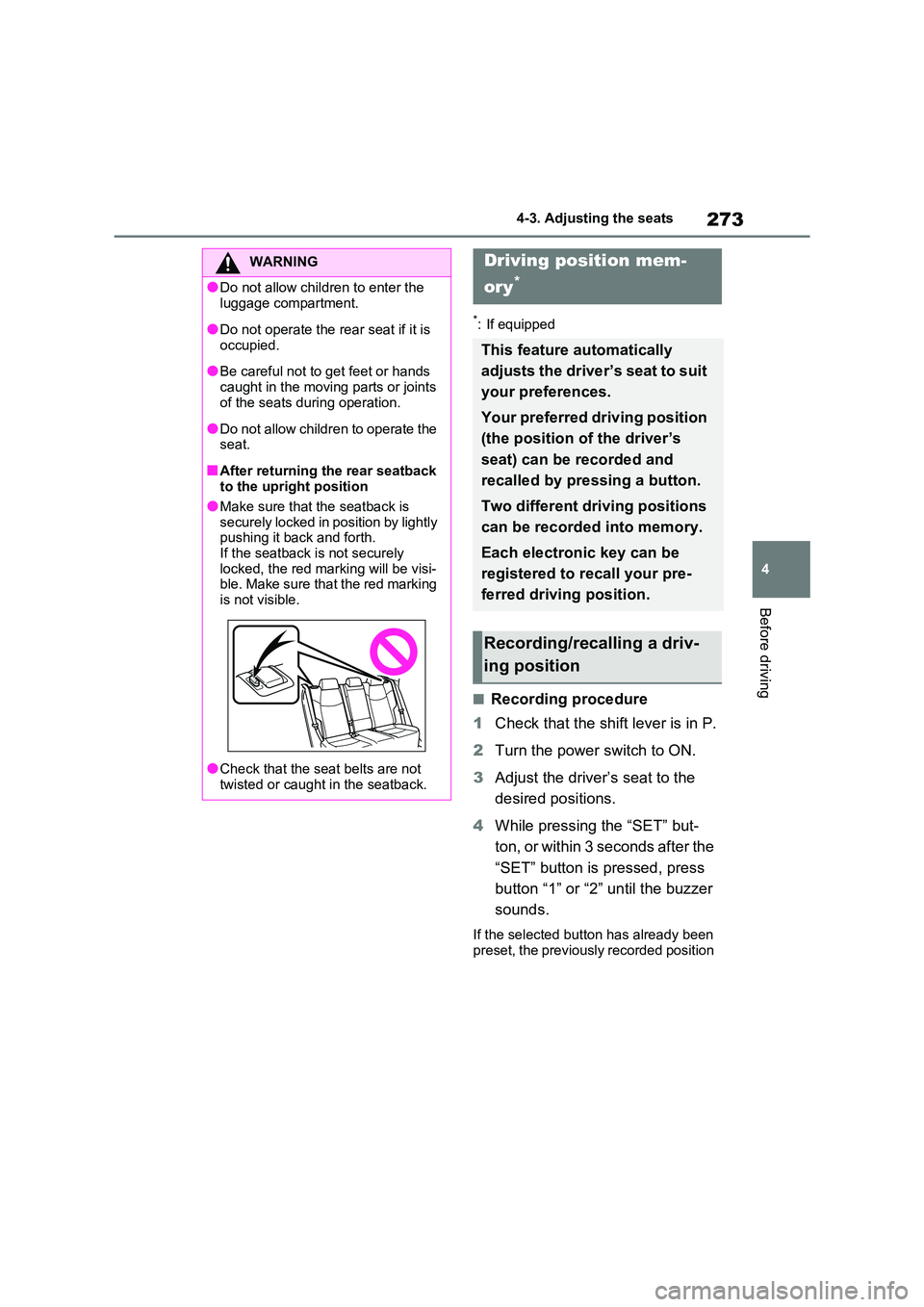
●Do not allow chil dren to enter the
luggage compartment.
●Do not operate the rear seat if it is
occupied.
●Be careful not to get feet or hands
caught in the moving parts or joints
of the seats dur ing operation.
●Do not allow children to operate the
seat.
■After returning the rear seatback
to the upright position
●Make sure that the seatback is securely locked in position by lightly
pushing it back and forth.
If the seatback is not securely locked, the red marking will be visi -
ble. Make sure that the red marking
is not visible.
●Check that the sea t belts are not
twisted or caught in the seatback.
Driving position mem-
ory*
This feature automatically
adjusts the driver’s seat to suit
your preferences.
Your preferred driving position
(the position of the driver’s
seat) can be recorded and
recalled by pr essing a button.
Two different driving positions
can be recorded into memory.
Each electronic key can be
registered to recall your pre -
ferred driving position.
Recording/recalling a driv -
ing position
Page 276 of 666
2744-3. Adjusting the seats
will be overwritten.
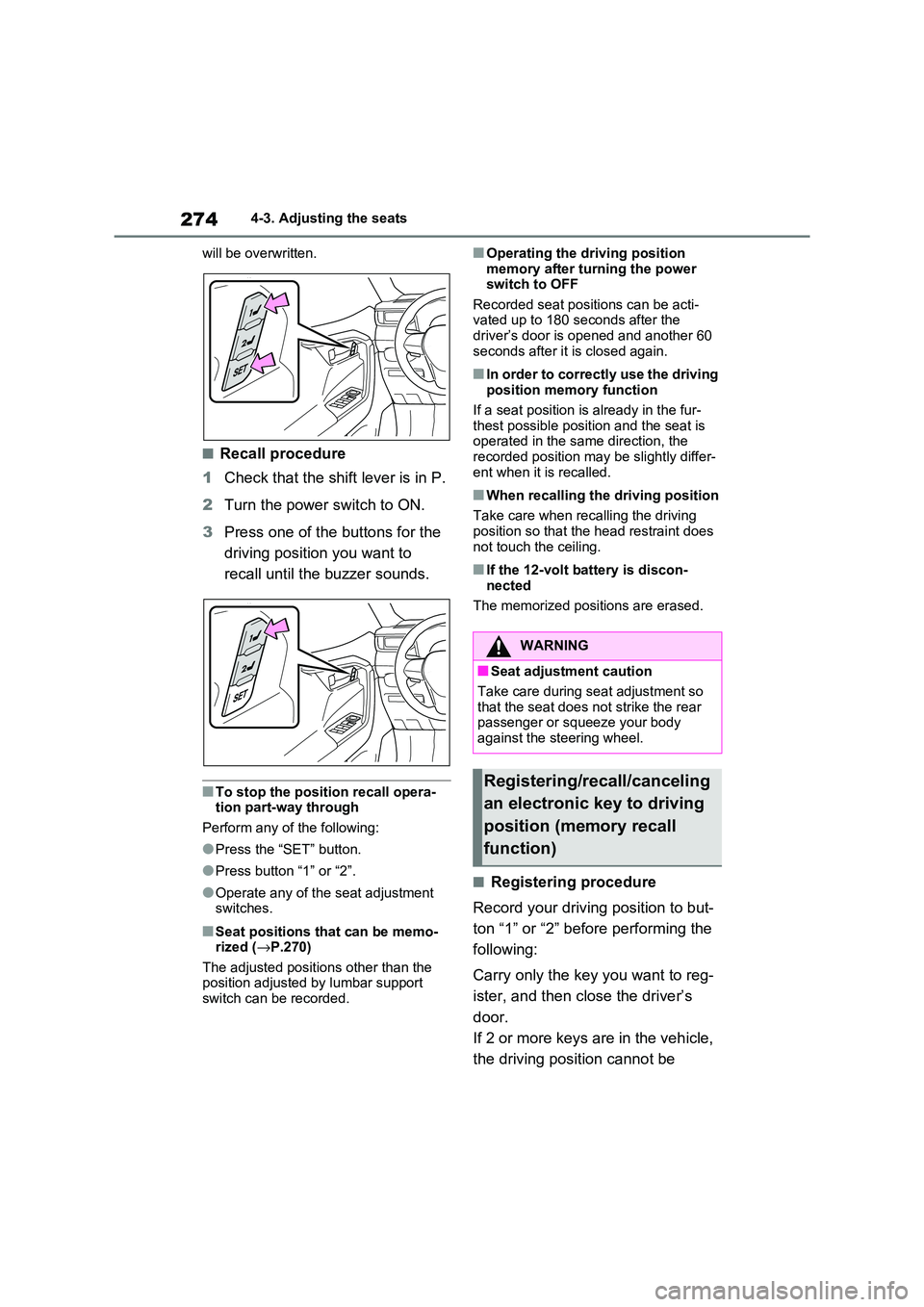
■Recall procedure
1 Check that the shift lever is in P.
2 Turn the power switch to ON.
3 Press one of the buttons for the
driving position you want to
recall until the buzzer sounds.
■To stop the position recall opera -
tion part-way through
Perform any of the following:
●Press the “SET” button.
●Press button “1” or “2”.
●Operate any of the seat adjustment switches.
■Seat positions that can be memo -
rized ( →P.270)
The adjusted positions other than the position adjusted by lumbar support
switch can be recorded.
■Operating the driving position
memory after turning the power switch to OFF
Recorded seat positions can be acti -
vated up to 180 s econds after the driver’s door is o pened and another 60
seconds after it is closed again.
■In order to correctly use the driving
position memory function
If a seat position is already in the fur-
thest possible position and the seat is
operated in the same direction, the recorded position may be slightly differ -
ent when it is recalled.
■When recalling the driving position
Take care when recalling the driving position so that the head restraint does
not touch the ceiling.
■If the 12-volt battery is discon -
nected
The memorized posi tions are erased.
■Registering procedure
Record your drivin g position to but-
ton “1” or “2” before performing the
following:
Carry only the key you want to reg -
ister, and then cl ose the driver’s
door.
If 2 or more keys are in the vehicle,
the driving posi tion cannot be
WARNING
■Seat adjustment caution
Take care during se at adjustment so
that the seat does not strike the rear passenger or squeeze your body
against the steering wheel.
Registering/recall/canceling
an electronic key to driving
position (memory recall
function)
Page 281 of 666
279
4
4-4. Adjusting the steering wheel and mirrors
Before driving
*: If equipped
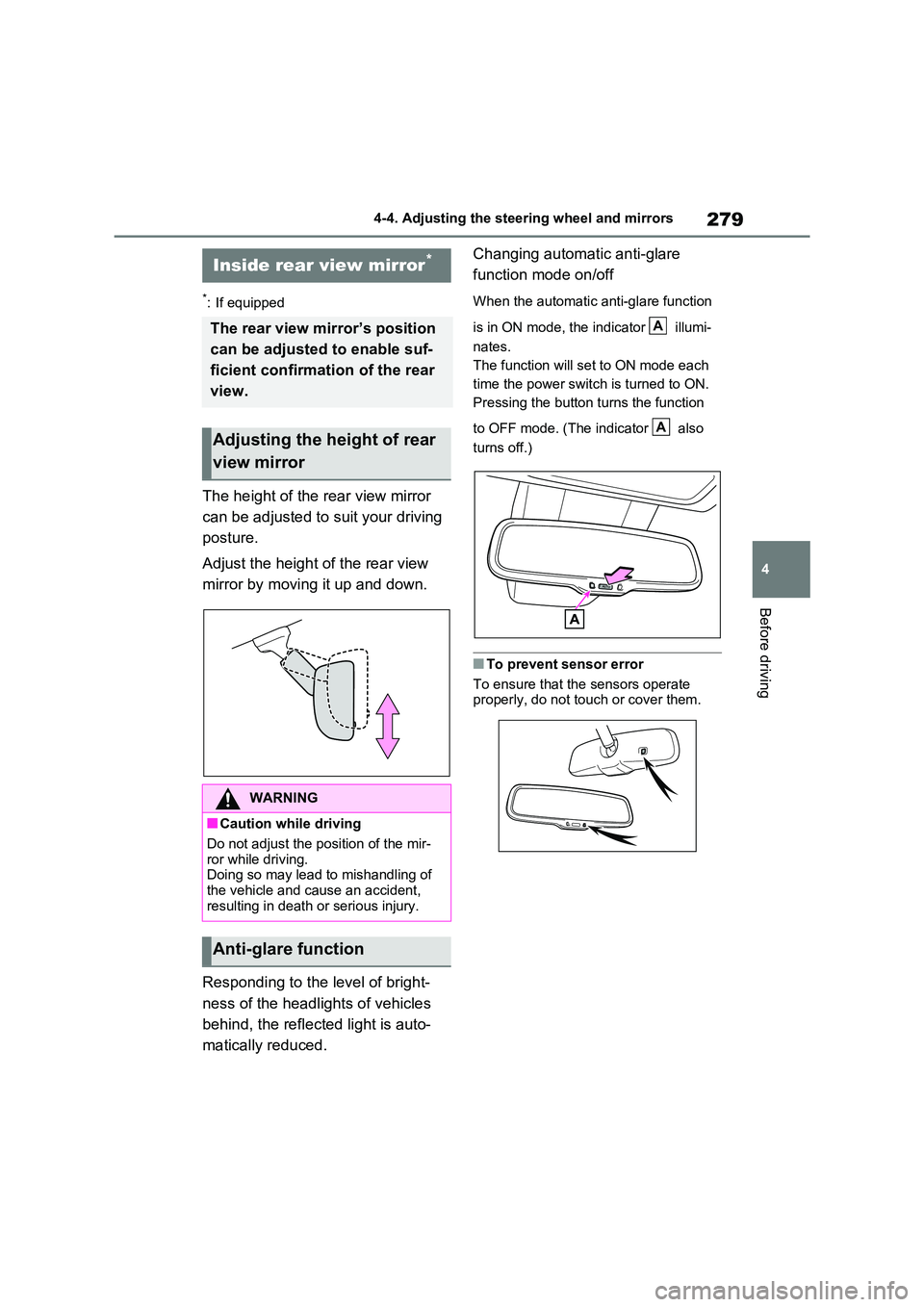
The height of the rear view mirror
can be adjusted to suit your driving
posture.
Adjust the height of the rear view
mirror by moving it up and down.
Responding to the level of bright -
ness of the headlights of vehicles
behind, the reflecte d light is auto-
matically reduced.
Changing automat ic anti-glare
function mode on/off
When the automatic anti-glare function
is in ON mode, the indicator illumi-
nates.
The function will set to ON mode each
time the power swit ch is turned to ON.
Pressing the button turns the function
to OFF mode. (The indicator also
turns off.)
■To prevent sensor error
To ensure that the sensors operate
properly, do not touch or cover them.
Inside rear view mirror*
The rear view mirror’s position
can be adjusted to enable suf -
ficient confirmation of the rear
view.
Adjusting the height of rear
view mirror
WARNING
■Caution while driving
Do not adjust the position of the mir-
ror while driving. Doing so may lead to mishandling of
the vehicle and c ause an accident,
resulting in death or serious injury.
Anti-glare function
A
A
Page 283 of 666
281
4
4-4. Adjusting the steering wheel and mirrors
Before driving
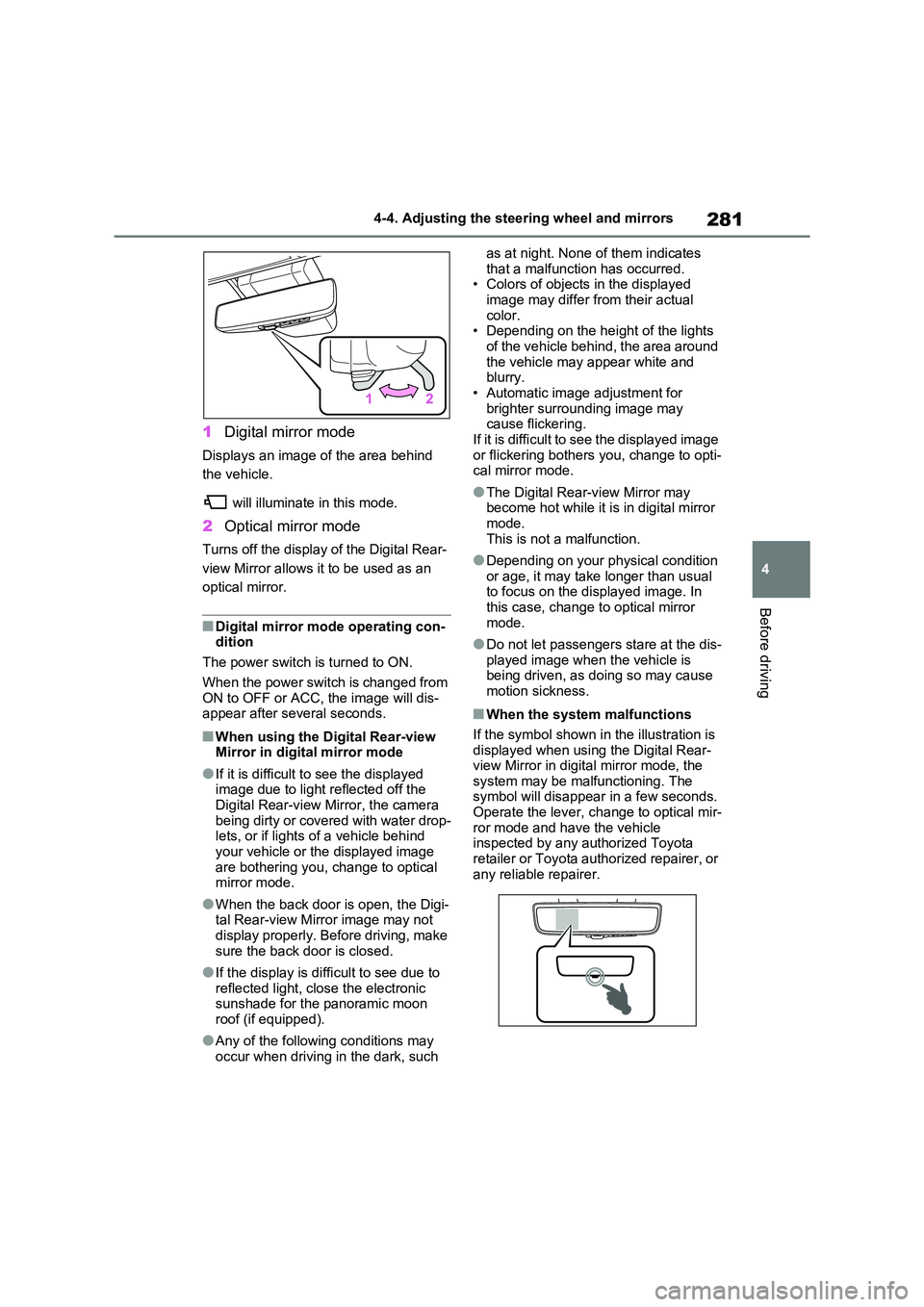
1 Digital mirror mode
Displays an image of the area behind
the vehicle.
will illuminate in this mode.
2 Optical mirror mode
Turns off the display of the Digital Rear-
view Mirror allows it to be used as an
optical mirror.
■Digital mirror mode operating con - dition
The power switch is turned to ON.
When the power switch is changed from ON to OFF or ACC, the image will dis -
appear after several seconds.
■When using the Digital Rear-view
Mirror in digit al mirror mode
●If it is difficult to see the displayed
image due to light r eflected off the Digital Rear-view Mirror, the camera
being dirty or covered with water drop -
lets, or if lights of a vehicle behind your vehicle or the displayed image
are bothering you, change to optical
mirror mode.
●When the back door is open, the Digi -
tal Rear-view Mirro r image may not display properly. Before driving, make
sure the back door is closed.
●If the display is diffi cult to see due to
reflected light, close the electronic
sunshade for the panoramic moon roof (if equipped).
●Any of the followin g conditions may occur when driving in the dark, such
as at night. None of them indicates
that a malfunction has occurred. • Colors of objects in the displayed
image may differ from their actual
color. • Depending on the hei ght of the lights
of the vehicle behind, the area around
the vehicle may appear white and blurry.
• Automatic image adjustment for
brighter surrounding image may cause flickering.
If it is difficult to see the displayed image
or flickering bothers you, change to opti- cal mirror mode.
●The Digital Rear-v iew Mirror may become hot while it is in digital mirror
mode.
This is not a malfunction.
●Depending on your physical condition
or age, it may take longer than usual to focus on the displayed image. In
this case, change t o optical mirror
mode.
●Do not let passengers stare at the dis -
played image when the vehicle is being driven, as doi ng so may cause
motion sickness.
■When the system malfunctions
If the symbol shown in the illustration is displayed when using the Digital Rear-
view Mirror in digit al mirror mode, the
system may be malf unctioning. The symbol will disappear in a few seconds.
Operate the lever, c hange to optical mir-
ror mode and ha ve the vehicle inspected by any a uthorized Toyota
retailer or Toyota authorized repairer, or
any reliable repairer.
Page 284 of 666
2824-4. Adjusting the steering wheel and mirrors
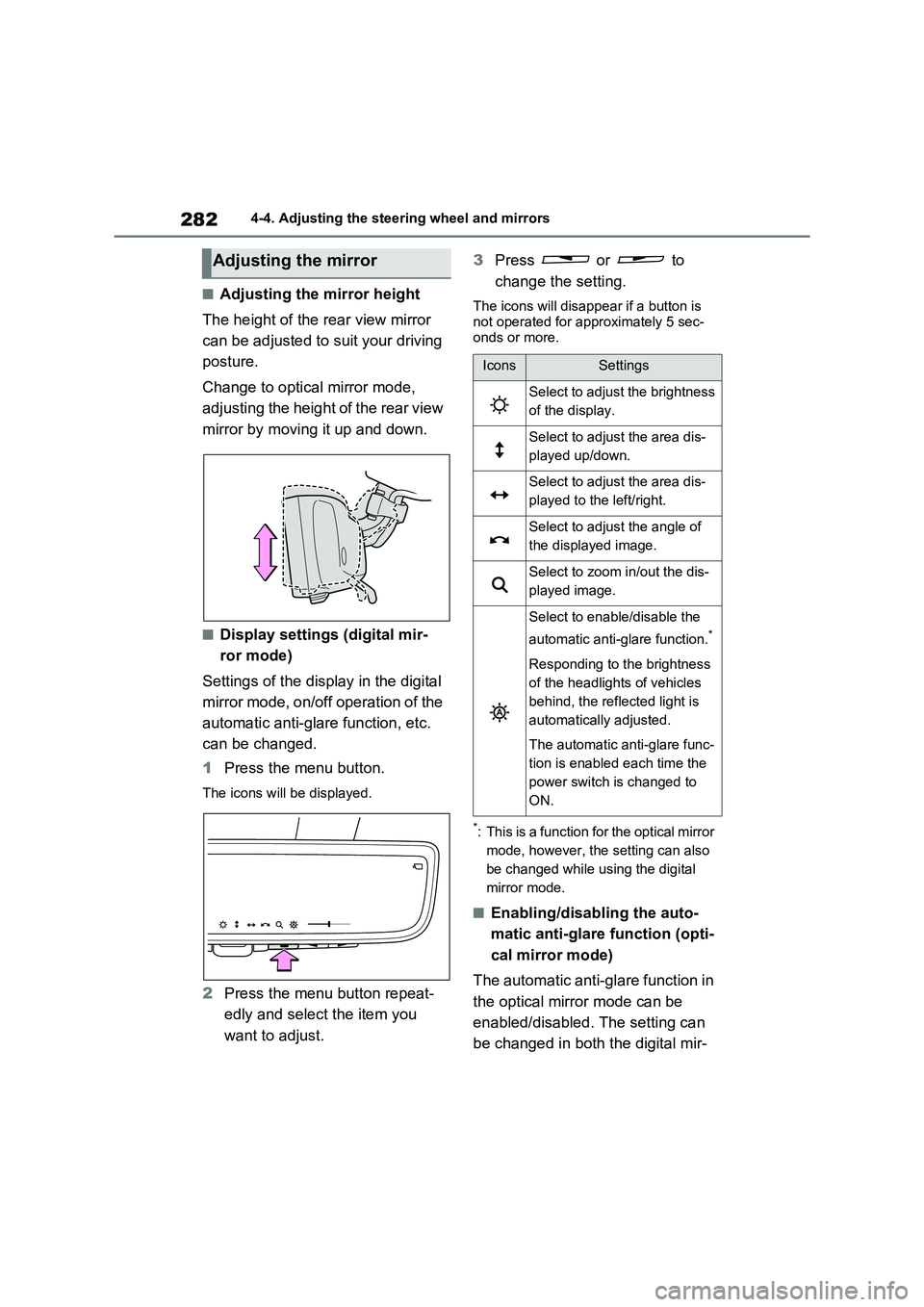
■Adjusting the mirror height
The height of the rear view mirror
can be adjusted to suit your driving
posture.
Change to optical mirror mode,
adjusting the height of the rear view
mirror by moving it up and down.
■Display settings (digital mir-
ror mode)
Settings of the display in the digital
mirror mode, on/off operation of the
automatic anti-glare function, etc.
can be changed.
1 Press the menu button.
The icons will be displayed.
2Press the menu button repeat-
edly and select the item you
want to adjust.
3 Press or to
change the setting.
The icons will disap pear if a button is
not operated for approximately 5 sec -
onds or more.
*: This is a function for the optical mirror
mode, however, the setting can also
be changed while using the digital
mirror mode.
■Enabling/disabling the auto -
matic anti-glare function (opti -
cal mirror mode)
The automatic anti-glare function in
the optical mirror mode can be
enabled/disabled. The setting can
be changed in both the digital mir -
Adjusting the mirror
IconsSettings
Select to adjust the brightness
of the display.
Select to adjus t the area dis-
played up/down.
Select to adjus t the area dis-
played to the left/right.
Select to adjust the angle of
the displayed image.
Select to zoom in/out the dis -
played image.
Select to enable/disable the
automatic anti-glare function.*
Responding to the brightness
of the headlights of vehicles
behind, the refl ected light is
automatically adjusted.
The automatic anti-glare func -
tion is enabled each time the
power switch is changed to
ON.
Page 285 of 666
283
4
4-4. Adjusting the steering wheel and mirrors
Before driving
ror mode and the optical mirror
mode.
When using the digital mirror
mode
→ P.282
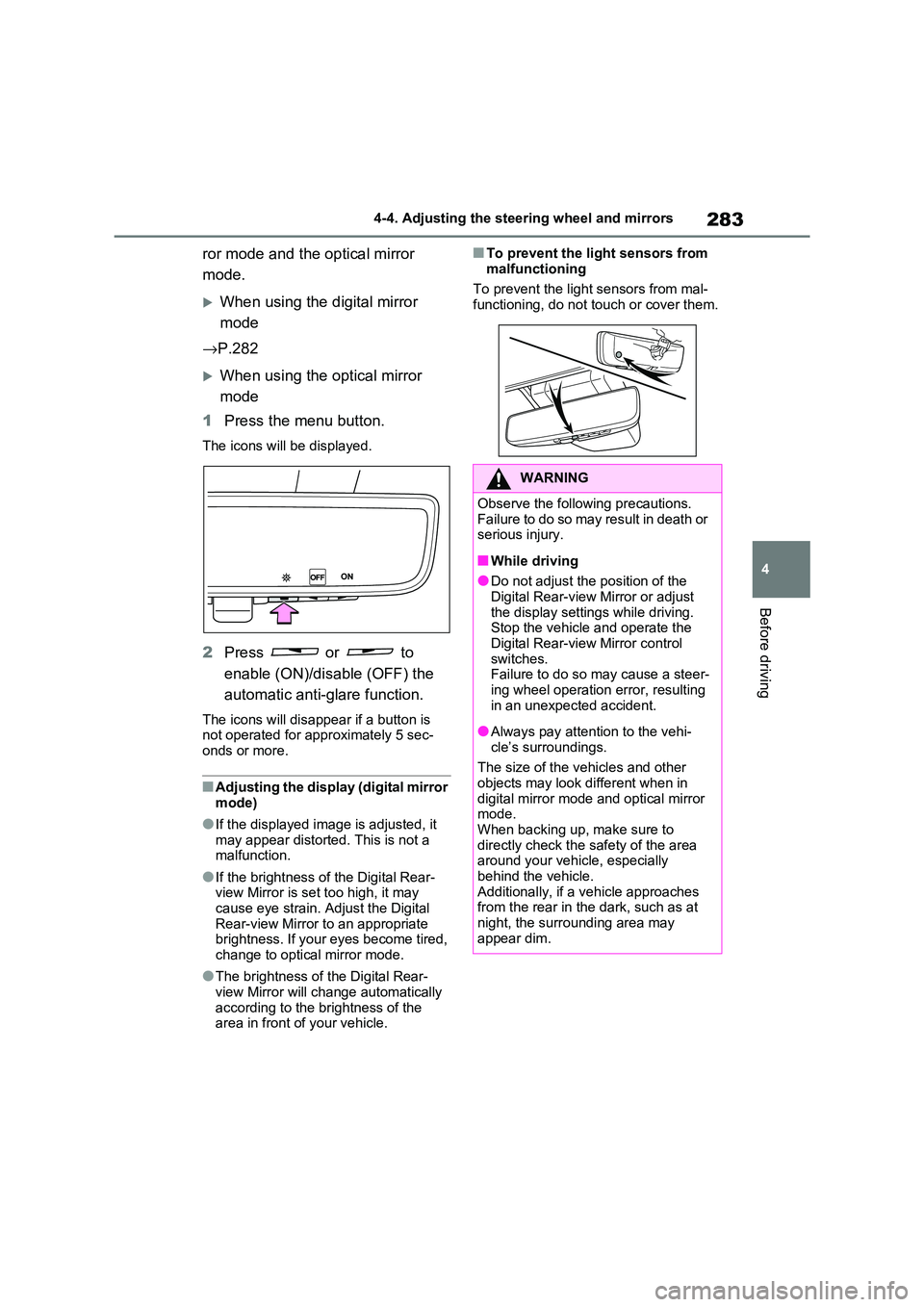
When using the optical mirror
mode
1 Press the menu button.
The icons will be displayed.
2Press or to
enable (ON)/disable (OFF) the
automatic anti-glare function.
The icons will disappe ar if a button is not operated for approximately 5 sec -
onds or more.
■Adjusting the display (digital mirror mode)
●If the displayed ima ge is adjusted, it may appear distorted. This is not a
malfunction.
●If the brightness of the Digital Rear-
view Mirror is set too high, it may
cause eye strain. Adjust the Digital Rear-view Mirror to an appropriate
brightness. If your eyes become tired,
change to optical mirror mode.
●The brightness of the Digital Rear-
view Mirror will ch ange automatically according to the b rightness of the
area in front of your vehicle.
■To prevent the light sensors from
malfunctioning
To prevent the light sensors from mal -
functioning, do not touch or cover them.
WARNING
Observe the following precautions.
Failure to do so may result in death or serious injury.
■While driving
●Do not adjust the position of the
Digital Rear-view Mirror or adjust
the display settings while driving. Stop the vehicle and operate the
Digital Rear-view Mirror control
switches. Failure to do so ma y cause a steer-
ing wheel operation error, resulting
in an unexpected accident.
●Always pay attention to the vehi -
cle’s surroundings.
The size of the vehicles and other
objects may look d ifferent when in
digital mirror mode a nd optical mirror mode.
When backing up, make sure to
directly check the safety of the area around your vehicle, especially
behind the vehicle.
Additionally, if a vehicle approaches from the rear in the dark, such as at
night, the surrounding area may
appear dim.
Page 286 of 666
2844-4. Adjusting the steering wheel and mirrors
■Cleaning the mirror surface
If the mirror surface is dirty, the
image on the display may be diffi -
cult to see.
Clean the mirror surface gently
using a soft dry cloth.
■Cleaning the camera
If the camera lens is dirty, the dis -
played image may not be clear. In
this case, clean i t with a soft cloth
dampened with water or a swab.
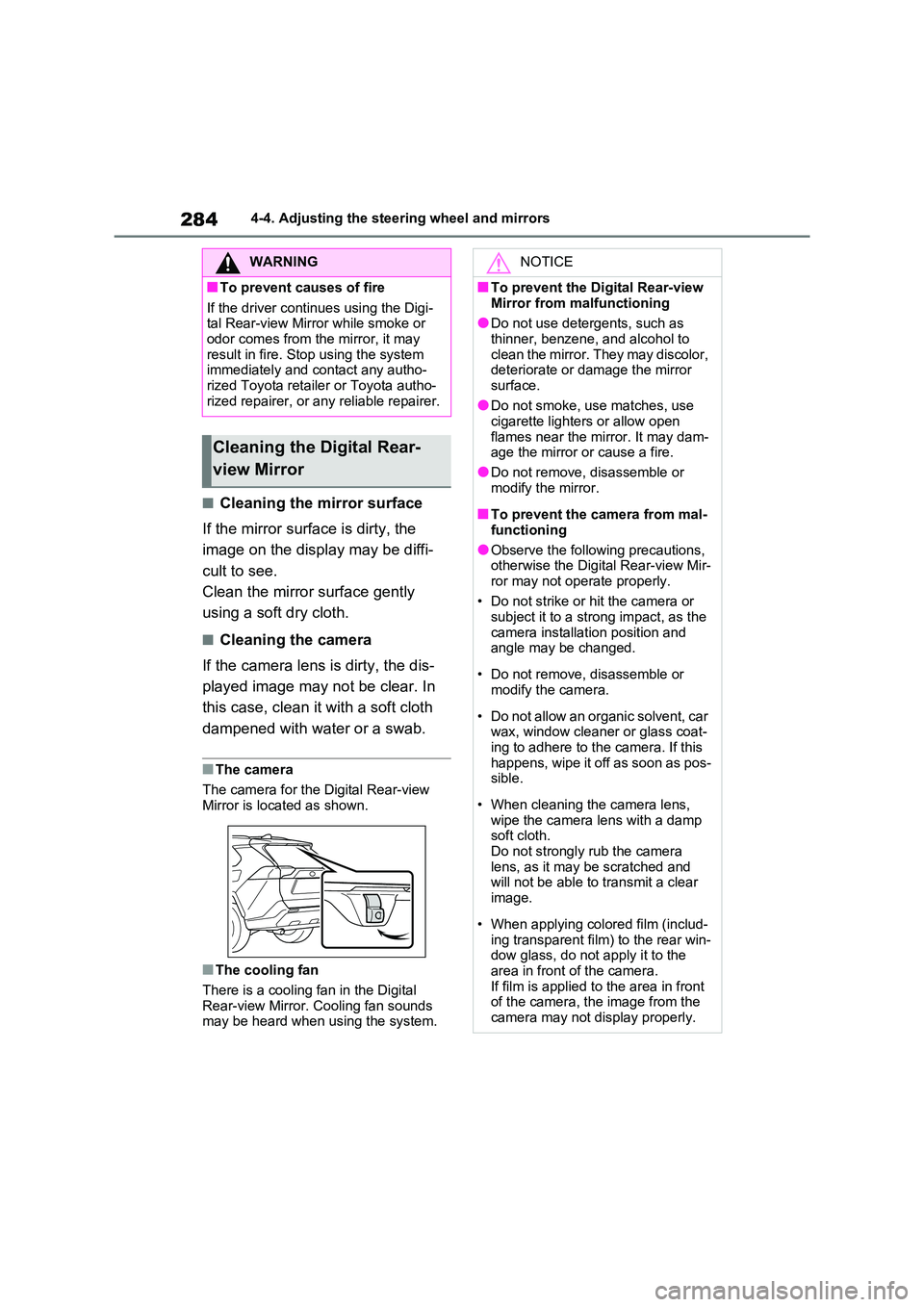
■The camera
The camera for the Digital Rear-view
Mirror is located as shown.
■The cooling fan
There is a cooling fan in the Digital
Rear-view Mirror. Cooling fan sounds may be heard when using the system.
WARNING
■To prevent causes of fire
If the driver continues using the Digi -
tal Rear-view Mirror while smoke or odor comes from the mirror, it may
result in fire. St op using the system
immediately and contact any autho - rized Toyota retailer or Toyota autho -
rized repairer, or any reliable repairer.
Cleaning the Digital Rear-
view Mirror
NOTICE
■To prevent the Digital Rear-view
Mirror from malfunctioning
●Do not use detergents, such as thinner, benzene, and alcohol to
clean the mirror. They may discolor,
deteriorate or damage the mirror surface.
●Do not smoke, use matches, use
cigarette lighters or allow open
flames near the mi rror. It may dam- age the mirror or cause a fire.
●Do not remove, disassemble or
modify the mirror.
■To prevent the camera from mal -
functioning
●Observe the following precautions,
otherwise the Digit al Rear-view Mir-
ror may not operate properly.
• Do not strike or hit the camera or
subject it to a strong impact, as the
camera installation position and angle may be changed.
• Do not remove, disassemble or modify the camera.
• Do not allow an organic solvent, car wax, window cleaner or glass coat -
ing to adhere to the camera. If this
happens, wipe it off as soon as pos - sible.
• When cleaning the camera lens, wipe the camera l ens with a damp
soft cloth.
Do not strongly rub the camera lens, as it may be scratched and
will not be able to transmit a clear
image.
• When applying colored film (includ -
ing transparent fi lm) to the rear win- dow glass, do not apply it to the
area in front of the camera.
If film is applied to the area in front of the camera, the image from the
camera may not display properly.
Page 288 of 666
2864-4. Adjusting the steering wheel and mirrors
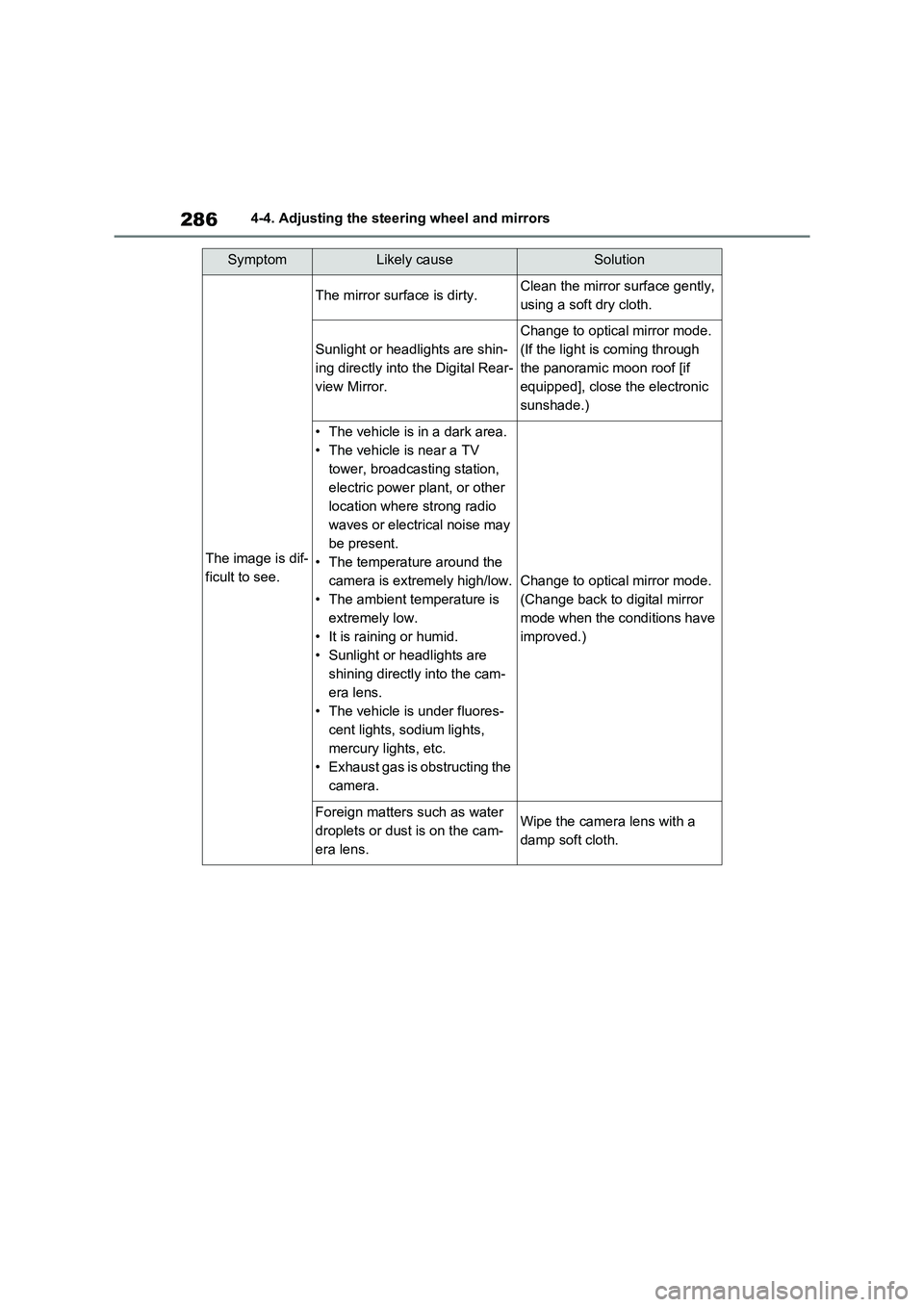
SymptomLikely causeSolution
The image is dif-
ficult to see.
The mirror surface is dirty.Clean the mirror surface gently,
using a soft dry cloth.
Sunlight or headlights are shin -
ing directly into the Digital Rear-
view Mirror.
Change to optical mirror mode.
(If the light is coming through
the panoramic moon roof [if
equipped], close the electronic
sunshade.)
• The vehicle is in a dark area.
• The vehicle is near a TV
tower, broadcasting station,
electric power plant, or other
location where strong radio
waves or electrical noise may
be present.
• The temperatu re around the
camera is extremely high/low.
• The ambient temperature is
extremely low.
• It is raining or humid.
• Sunlight or headlights are
shining directly into the cam -
era lens.
• The vehicle is under fluores -
cent lights, sodium lights,
mercury lights, etc.
• Exhaust gas is obstructing the
camera.
Change to optical mirror mode.
(Change back to digital mirror
mode when the conditions have
improved.)
Foreign matters such as water
droplets or dust is on the cam-
era lens.
Wipe the camer a lens with a
damp soft cloth.