ECU TOYOTA RAV4 PLUG-IN HYBRID 2021 Owner's Manual
[x] Cancel search | Manufacturer: TOYOTA, Model Year: 2021, Model line: RAV4 PLUG-IN HYBRID, Model: TOYOTA RAV4 PLUG-IN HYBRID 2021Pages: 666, PDF Size: 161.28 MB
Page 63 of 666
61
1
1-2. Child safety
For safety and security
■Installing child restraint sys -
tem using a seat belt
Install the child restraint system in
accordance to the operation man -
ual enclosed with the child restraint
system.
If the child restraint system on hand
is not within the “universal” cate -
gory (or the necessary information
is not in the tabl e), refer to the
“Vehicle List” provided by the child
restraint system maker for various
possible installation positions, or
check the compatibility after asking
the retailer of the child seat.
( →P.55, 56)
1 If installing the child restraint
system to the front passenger
seat is unavoidable, refer to
P.52 for the front passenger
seat adjustment.
2 Adjust the seatback angle to the
most upright position. When
installing a forward-facing child
seat, if there is a gap between
the child seat a nd the seatback,
adjust the seatback angle until
good contact is achieved.
3 If the head restraint interferes
with the child restraint system
installation and the head
restraint can be removed,
remove the head restraint. Oth-
erwise, put the head restraint in
the upper most position.
( →P.276)
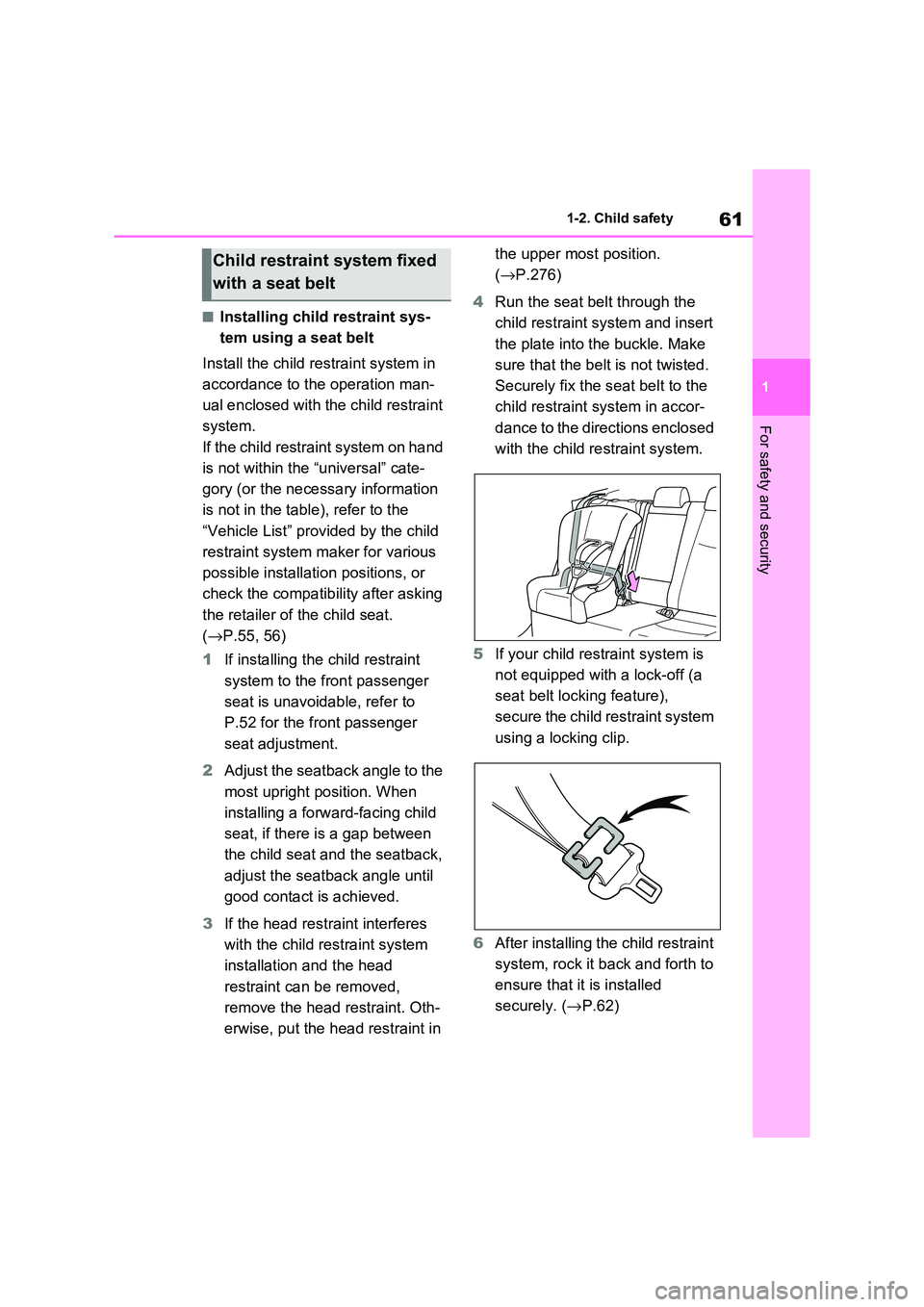
4 Run the seat belt through the
child restraint system and insert
the plate into the buckle. Make
sure that the belt is not twisted.
Securely fix the s eat belt to the
child restraint system in accor -
dance to the directions enclosed
with the child restraint system.
5 If your child restraint system is
not equipped with a lock-off (a
seat belt locking feature),
secure the child restraint system
using a locking clip.
6 After installing the child restraint
system, rock it back and forth to
ensure that it is installed
securely. ( →P.62)
Child restraint system fixed
with a seat belt
Page 64 of 666
621-2. Child safety
■Removing a child restraint
system installed with a seat
belt
Press the buckle release button
and fully retract the seat belt.
When releasing the buckle, the child
restraint system may spring up due to
the rebound of the seat cushion.
Release the buckle while holding down
the child restraint system.
Since the seat belt automatically reels
itself, slowly return it to the stowing
position.
■When installing a child restraint
system
You may need a locking clip to install the child restraint s ystem. Follow the
instructions provided by the manufac -
turer of the system. If your child restraint system does not provide a locking clip,
you can purchase the following item
from any authorized Toyota retailer or Toyota authorized repairer, or any reli -
able repairer: Locking clip for child
restraint system (Part No. 73119-22010)
■ISOFIX lower anchorages
(ISOFIX child restraint system)
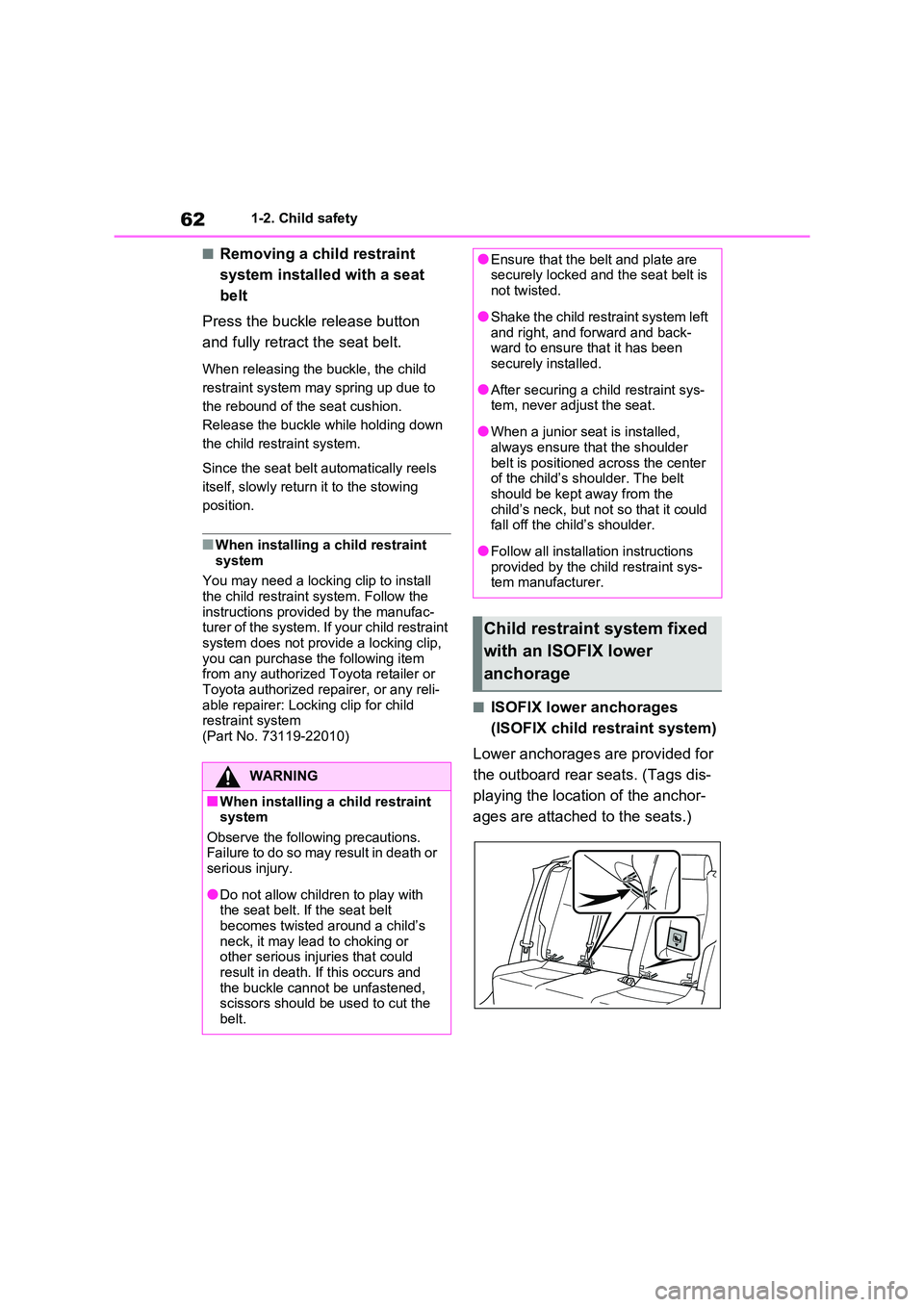
Lower anchorages are provided for
the outboard rear seats. (Tags dis -
playing the location of the anchor -
ages are attached to the seats.)
WARNING
■When installing a child restraint
system
Observe the following precautions. Failure to do so may result in death or
serious injury.
●Do not allow children to play with
the seat belt. I f the seat belt
becomes twisted around a child’s neck, it may lead to choking or
other serious injuries that could
result in death. If this occurs and the buckle cannot be unfastened,
scissors should be used to cut the
belt.
●Ensure that the bel t and plate are securely locked and the seat belt is
not twisted.
●Shake the child restraint system left
and right, and forward and back -
ward to ensure that it has been securely installed.
●After securing a ch ild restraint sys- tem, never adjust the seat.
●When a junior seat is installed, always ensure that the shoulder
belt is positioned a cross the center
of the child’s shoulder. The belt should be kept away from the
child’s neck, but not so that it could
fall off the chil d’s shoulder.
●Follow all installation instructions
provided by the child restraint sys - tem manufacturer.
Child restraint system fixed
with an ISOFIX lower
anchorage
Page 65 of 666
63
1
1-2. Child safety
For safety and security
■Installation with ISOFIX lower
anchorage (ISOFIX child
restraint system)
Install the child restraint system in
accordance to the operation man -
ual enclosed with the child restraint
system.
If the child restraint system on hand
is not within the “universal” cate -
gory (or the necessary information
is not in the tabl e), refer to the
“Vehicle List” provided by the child
restraint system maker for various
possible installation positions, or
check the compatibility after asking
the retailer of the child seat.
( →P.55, 56)
1 Adjust the seatback angle to the
most upright position. When
installing a forward-facing child
seat, if there is a gap between
the child seat a nd the seatback,
adjust the seatback angle until
good contact is achieved.
2 If the head restraint interferes
with the child restraint system
installation and the head
restraint can be removed,
remove the head restraint. Oth-
erwise, put the head restraint in
the upper most position.
( →P.276)
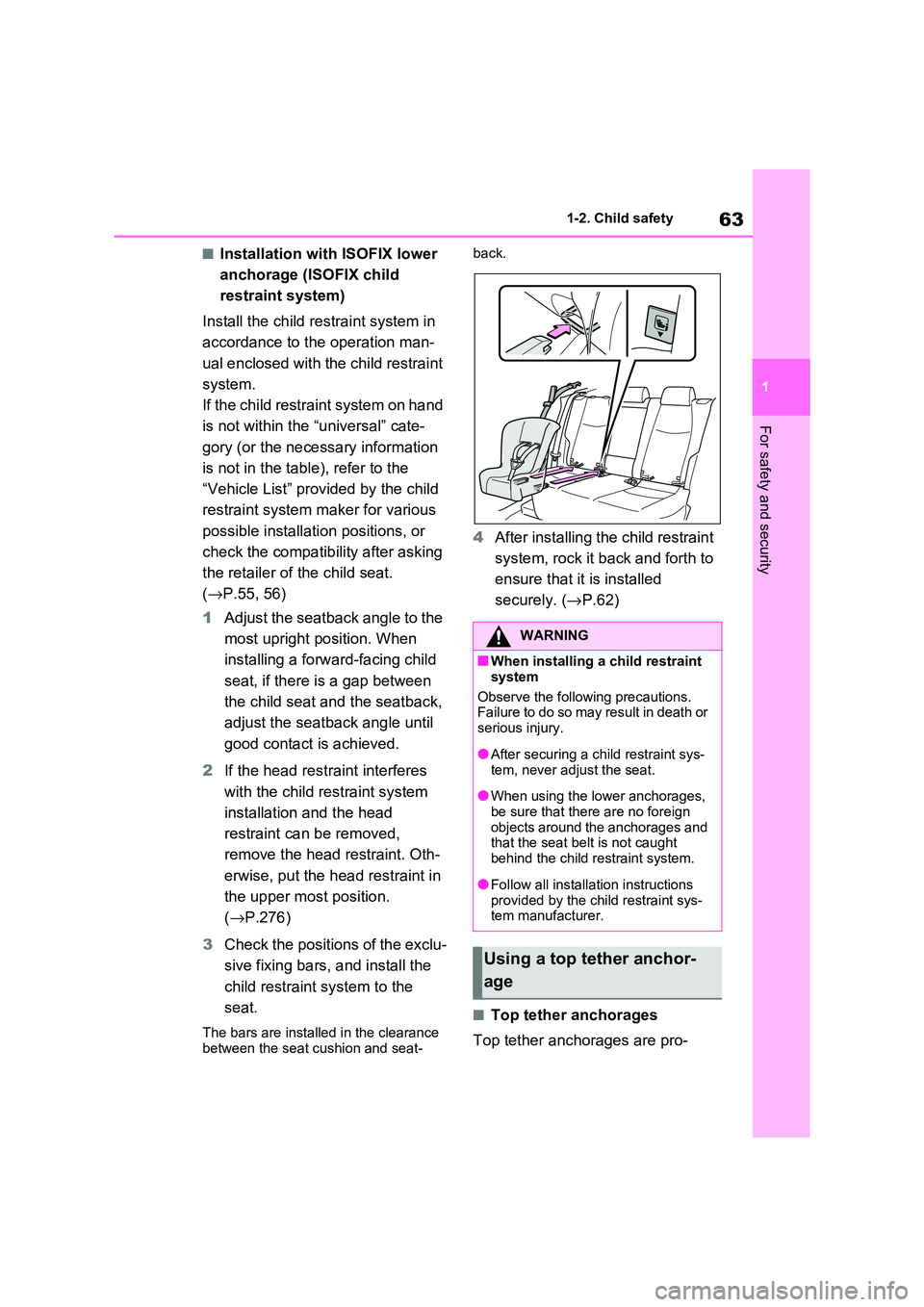
3 Check the positions of the exclu-
sive fixing bars, and install the
child restraint system to the
seat.
The bars are installed in the clearance
between the seat cushion and seat -
back.
4 After installing the child restraint
system, rock it back and forth to
ensure that it is installed
securely. ( →P.62)
■Top tether anchorages
Top tether anchorages are pro -
WARNING
■When installing a child restraint
system
Observe the following precautions. Failure to do so may result in death or
serious injury.
●After securing a ch ild restraint sys-
tem, never adjust the seat.
●When using the lower anchorages,
be sure that there are no foreign
objects around the anchorages and that the seat belt is not caught
behind the child restraint system.
●Follow all installation instructions
provided by the child restraint sys -
tem manufacturer.
Using a top tether anchor -
age
Page 66 of 666
641-2. Child safety
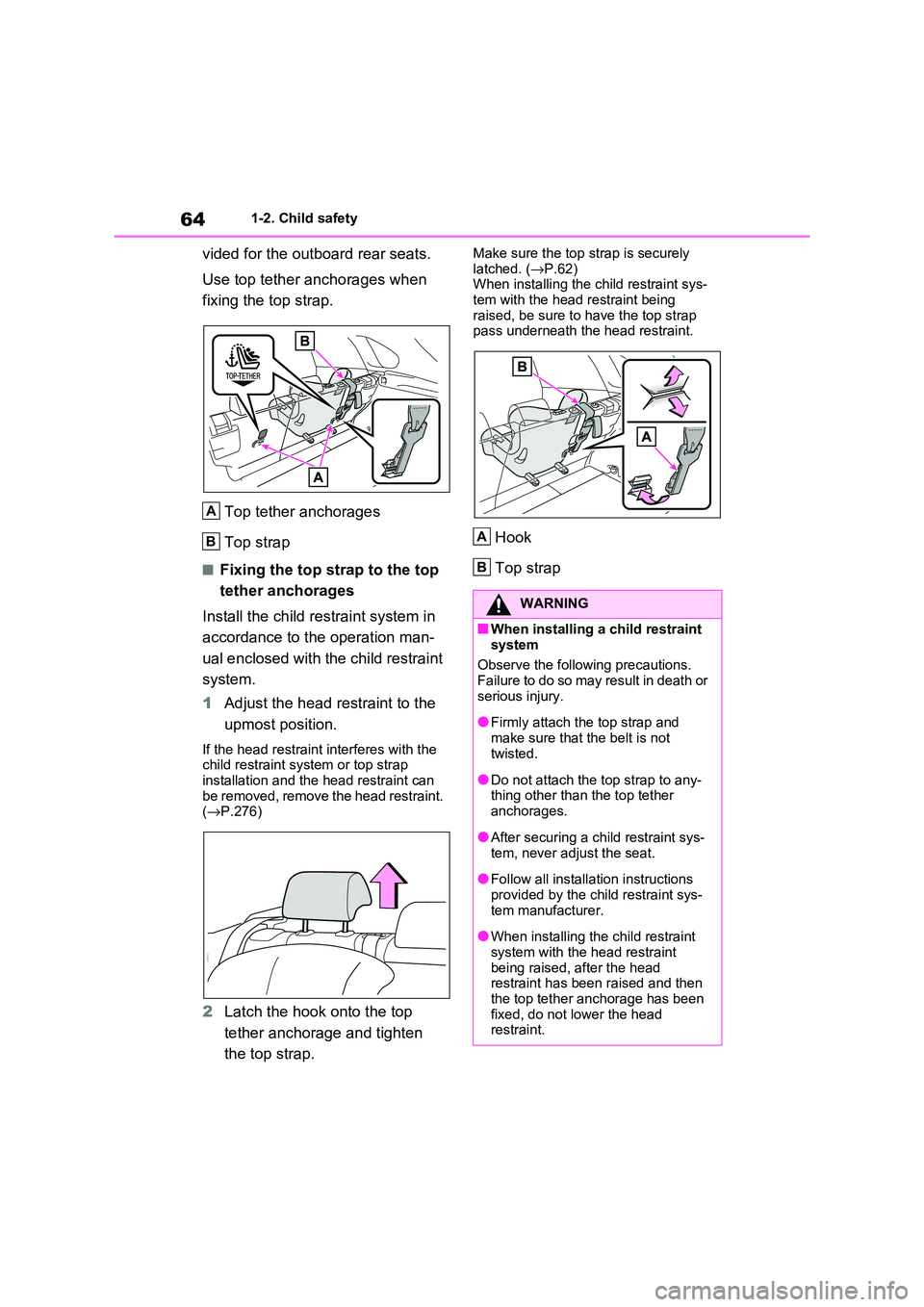
vided for the outboard rear seats.
Use top tether anchorages when
fixing the top strap.
Top tether anchorages
Top strap
■Fixing the top strap to the top
tether anchorages
Install the child restraint system in
accordance to the operation man -
ual enclosed with the child restraint
system.
1 Adjust the head restraint to the
upmost position.
If the head restraint interferes with the
child restraint system or top strap installation and the head restraint can
be removed, remove the head restraint.
( →P.276)
2Latch the hook onto the top
tether anchorage and tighten
the top strap.
Make sure the top strap is securely
latched. ( →P.62) When installing the child restraint sys-
tem with the head restraint being
raised, be sure to have the top strap pass underneath the head restraint.
Hook
Top strap
A
B
WARNING
■When installing a child restraint
system
Observe the following precautions. Failure to do so may result in death or
serious injury.
●Firmly attach the top strap and
make sure that the belt is not
twisted.
●Do not attach the top strap to any-
thing other than the top tether anchorages.
●After securing a ch ild restraint sys- tem, never adjust the seat.
●Follow all installation instructions provided by the child restraint sys -
tem manufacturer.
●When installing the child restraint
system with the head restraint
being raised, after the head restraint has been raised and then
the top tether anchorage has been
fixed, do not lower the head restraint.
A
B
Page 67 of 666
65
1
1-3. Emergency assistance
For safety and security
1-3.Emergency assistance
*: Operates within the eCall coverage.
The system name differs depending
on the country.
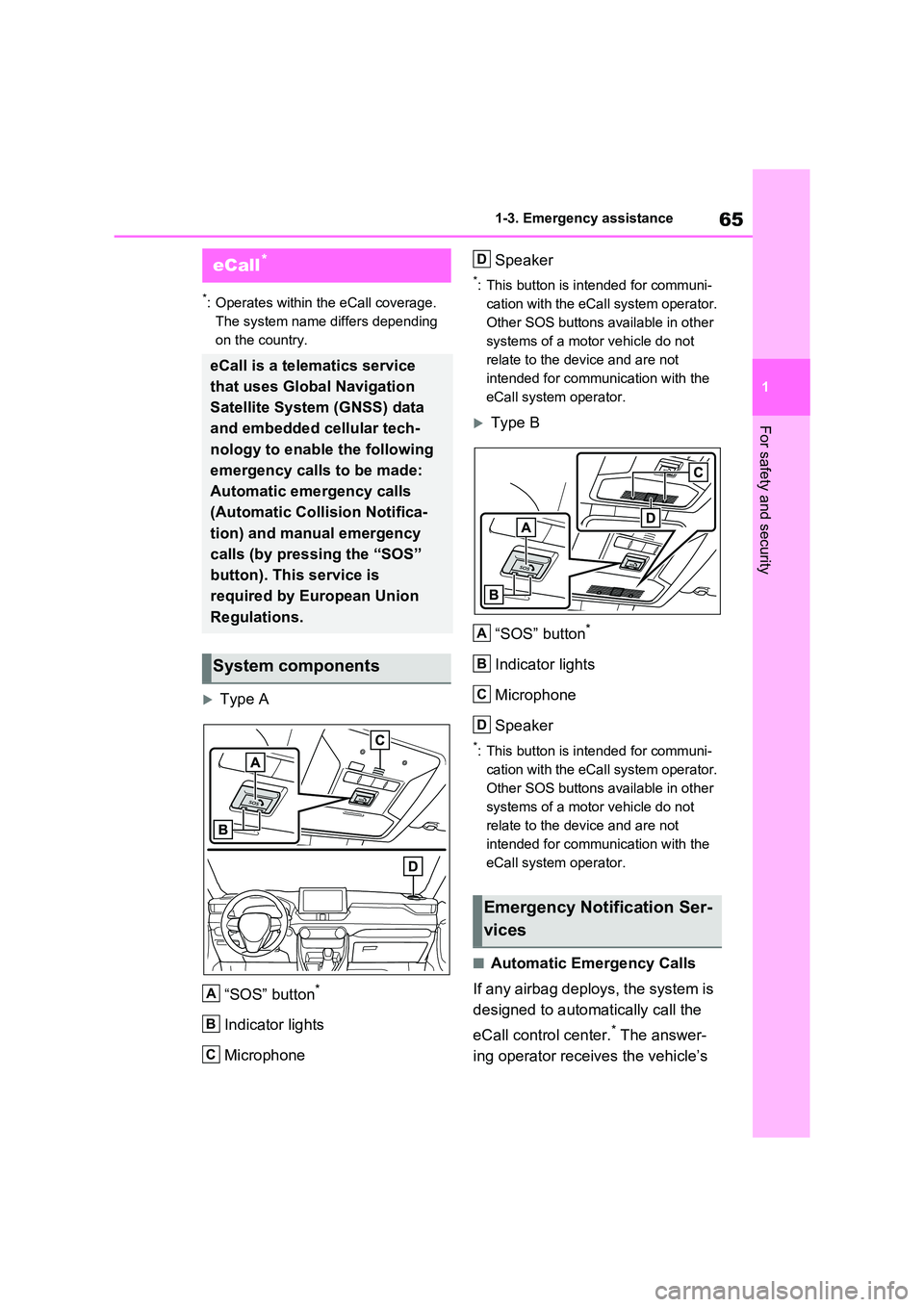
Type A
“SOS” button*
Indicator lights
Microphone
Speaker
*: This button is intended for communi -
cation with the eCal l system operator.
Other SOS buttons available in other
systems of a motor vehicle do not
relate to the dev ice and are not
intended for communication with the
eCall system operator.
Type B
“SOS” button*
Indicator lights
Microphone
Speaker
*: This button is intended for communi -
cation with the eCal l system operator.
Other SOS buttons available in other
systems of a motor vehicle do not
relate to the dev ice and are not
intended for communication with the
eCall system operator.
■Automatic Emergency Calls
If any airbag deploys, the system is
designed to automatically call the
eCall control center.* The answer -
ing operator receives the vehicle’s
eCall*
eCall is a telematics service
that uses Global Navigation
Satellite System (GNSS) data
and embedded cellular tech -
nology to enable the following
emergency calls to be made:
Automatic emergency calls
(Automatic Collision Notifica -
tion) and manual emergency
calls (by pressing the “SOS”
button). This service is
required by European Union
Regulations.
System components
A
B
C
Emergency Notification Ser -
vices
D
A
B
C
D
Page 69 of 666
67
1
1-3. Emergency assistance
For safety and security
at the following URL.
http://www.opensourceautomotive.com/dcm/toyota/
WARNING
■When the Emergency Call may
not be made
●It may not be possible to make
Emergency Calls in any of the fol-
lowing situations. In such cases,
report to emergen cy services pro- vider (112 system etc.) by other
means such as nearby public
phones.
• Even when the vehicle is in the cel -
lular phone service area, it may be
difficult to connec t to the eCall con- trol center if the reception is poor or
the line is busy. In such cases,
even though the system attempts to connect to the eCall control center,
you may not be able to connect to
the eCall control center to make Emergency Calls and contact emer -
gency services.
• When the vehicle is out of the cellu -
lar phone service area, the Emer -
gency Calls cannot be made.
• When any related equipment (such
as the “SOS” button panel, indicator lights, microphone, speaker, DCM,
antenna, or any wires connecting
the equipment) is malfunctioning, damaged or broken, the Emer -
gency Call cannot be made.
• During an Emergency Call, the sys -
tem makes repeated attempts to
connect to the eCall control center. However, if it cannot connect to the
eCall control center due to poor
radio wave reception, the system may not be able to connect to the
cellular network and the call may
finish without connecting. The red indicator light will blink for approxi -
mately 30 seconds to indicate this
disconnection.
●If the 12-volt battery’s voltage decreases or there is a disconnec -
tion, the system may not be able to
connect to the eCa ll control center.
■When the Emergency Call sys-
tem is replaced with a new one
The Emergency Call system should
be registered. Contact any authorized
Toyota retailer or Toyota authorized repairer, or any reliable repairer.
■For your safety
●Please drive safely.
The function of t his system is to
assist you in making the Emer - gency Call in case of accidents
such as traffic a ccidents or sudden
medical emergenc ies, and it does not protect the driver or passengers
in any way. Please drive safely and
fasten your seatbelts at all times for your safety.
●In case of an emergency, make lives the top priority.
●If you smell anything burning or other unusual smells, leave the
vehicle and evacuate to a safe area
immediately.
●If the airbags dep loy when the sys-
tem is operating normally, the sys- tem makes emerge ncy call. The
system also makes emergency call
when the vehicle is struck from the rear or rolls over , even if the air-
bags do not deploy.
●For safety, do not make the Emer -
gency Call while driving.
Making calls during driving may cause mishandling of the steering
wheel, which may lead to unex -
pected accidents.
Stop the vehicle and confirm the safety of your su rroundings before
making the Emergency Call.
Page 71 of 666
69
1
1-3. Emergency assistance
For safety and security
Processing
DCM
1 Customer activates service on Toyota Customer portal & accepts terms
of services according to GDPR.
2 Server activates the service in the DCM and defines which vehicle data
to collect.
3 Defined vehicle data is collected by the DCM.
4 Data is shared with the server.
5 Data is stored in the server.
6 Data is processed in the server for fulfilling the service.
7 Processed data is presented to the customer.
For a list of eligible service please visit the Toyota Customer portal.
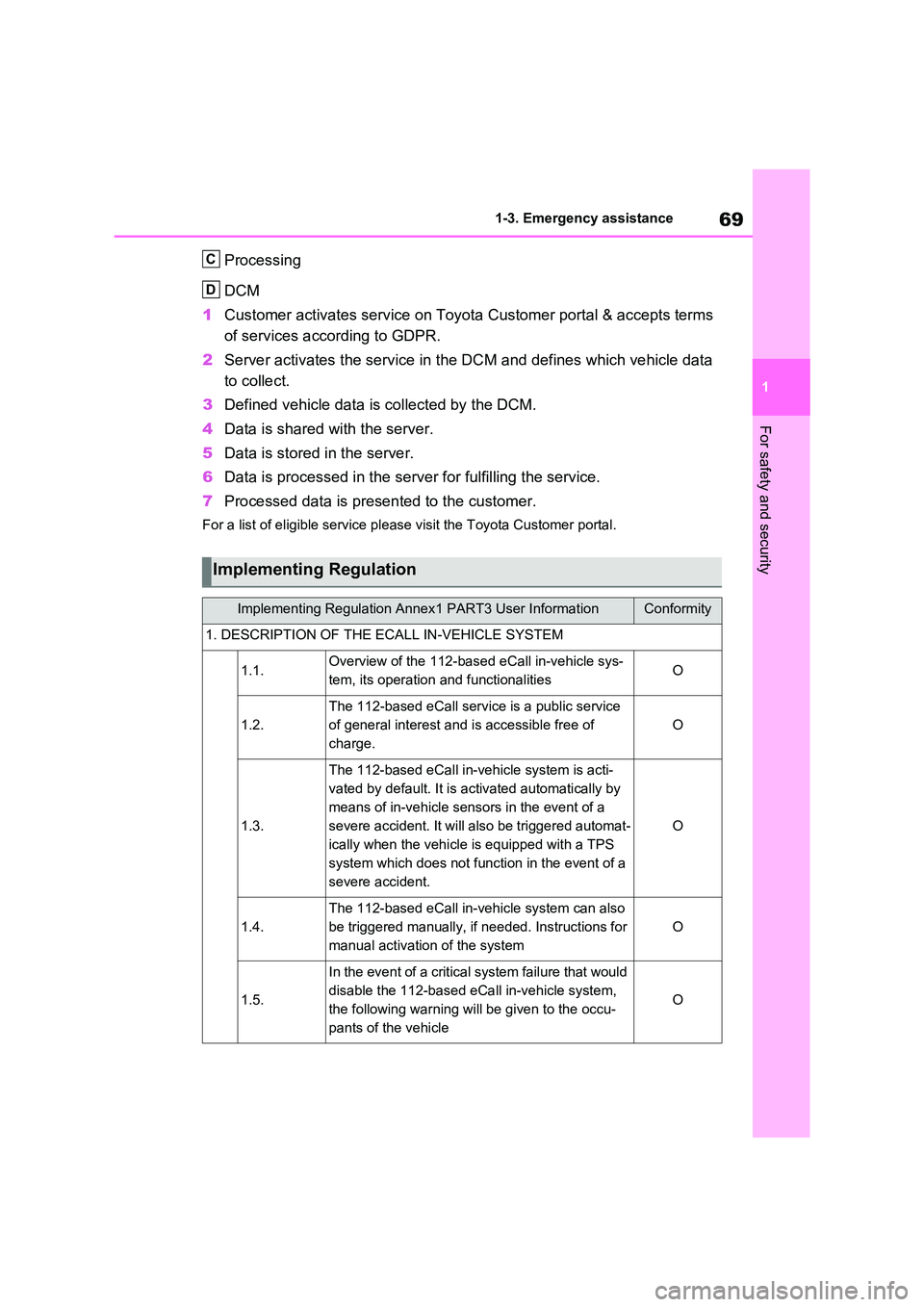
Implementing Regulation
Implementing Regulation Annex1 PART3 User InformationConformity
1. DESCRIPTION OF THE ECALL IN-VEHICLE SYSTEM
1.1.Overview of the 112-based eCall in-vehicle sys-
tem, its operation and functionalitiesO
1.2.
The 112-based eCall servic e is a public service
of general interest and is accessible free of
charge.
O
1.3.
The 112-based e Call in-vehicle system is acti-
vated by default. It is ac tivated automatically by
means of in-vehicle sensors in the event of a
severe accident. It will also be triggered automat -
ically when the vehicle is equipped with a TPS
system which does not function in the event of a
severe accident.
O
1.4.
The 112-based eCall in-vehicle system can also
be triggered manually, if needed. Instructions for
manual activation of the system
O
1.5.
In the event of a critical system failure that would
disable the 112-based eCa ll in-vehicle system,
the following warning wi ll be given to the occu-
pants of the vehicle
O
C
D
Page 73 of 666
71
1
1-3. Emergency assistance
For safety and security
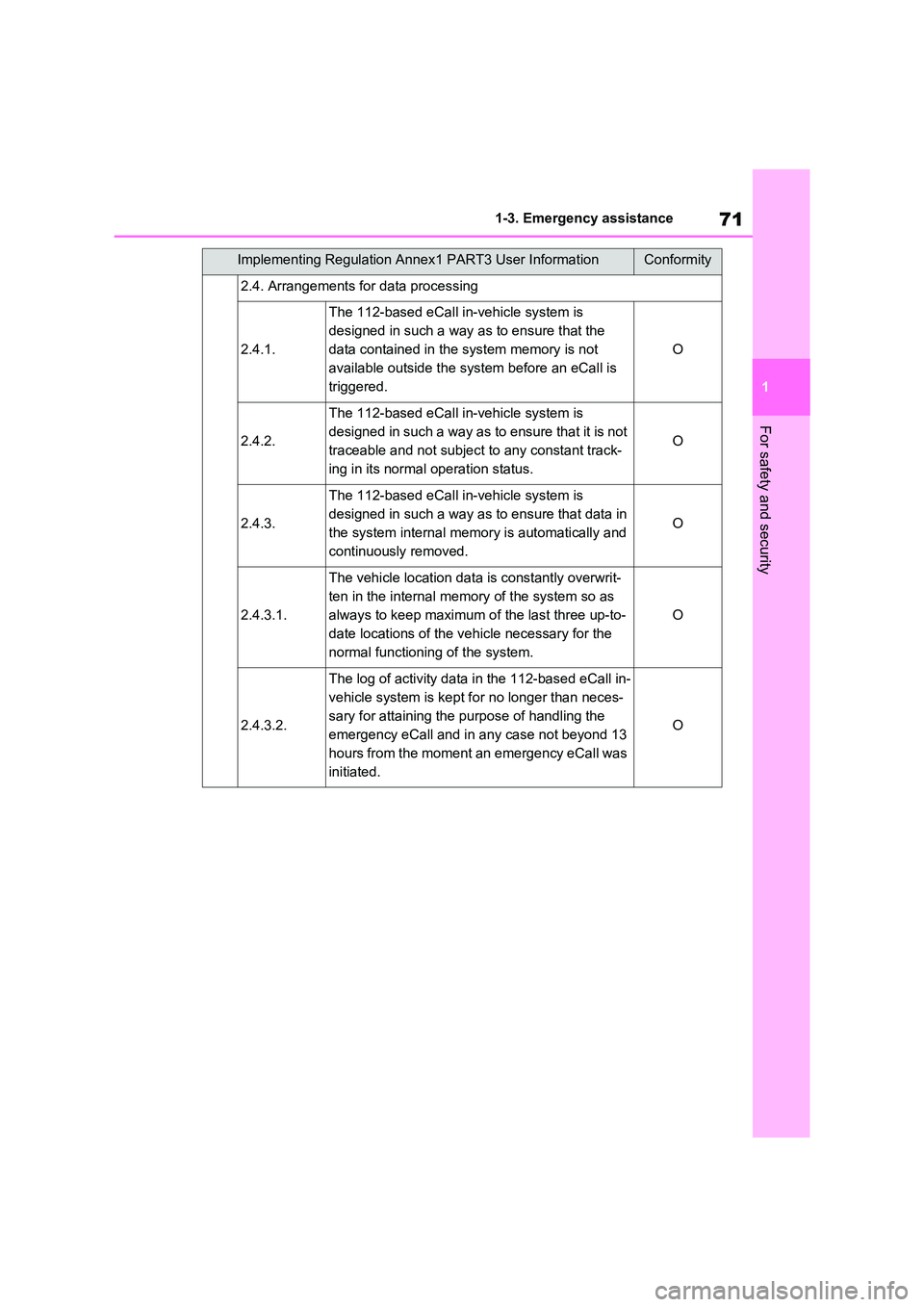
2.4. Arrangements for data processing
2.4.1.
The 112-based e Call in-vehicle system is
designed in such a way as to ensure that the
data contai ned in the system memory is not
available outside the system before an eCall is
triggered.
O
2.4.2.
The 112-based e Call in-vehicle system is
designed in such a way as to ensure that it is not
traceable and not subject to any constant track-
ing in its normal operation status.
O
2.4.3.
The 112-based e Call in-vehicle system is
designed in such a way as to ensure that data in
the system internal memory is automatically and
continuously removed.
O
2.4.3.1.
The vehicle location dat a is constantly overwrit-
ten in the internal mem ory of the system so as
always to keep maximum o f the last three up-to-
date locations of the veh icle necessary for the
normal functioni ng of the system.
O
2.4.3.2.
The log of activity data in the 112-based eCall in-
vehicle system is kept f or no longer than neces-
sary for attaining the purpose of handling the
emergency eCall and in any case not beyond 13
hours from the moment an emergency eCall was
initiated.
O
Implementing Regulation Anne x1 PART3 User InformationConformity
Page 75 of 666
73
1
1-3. Emergency assistance
For safety and security
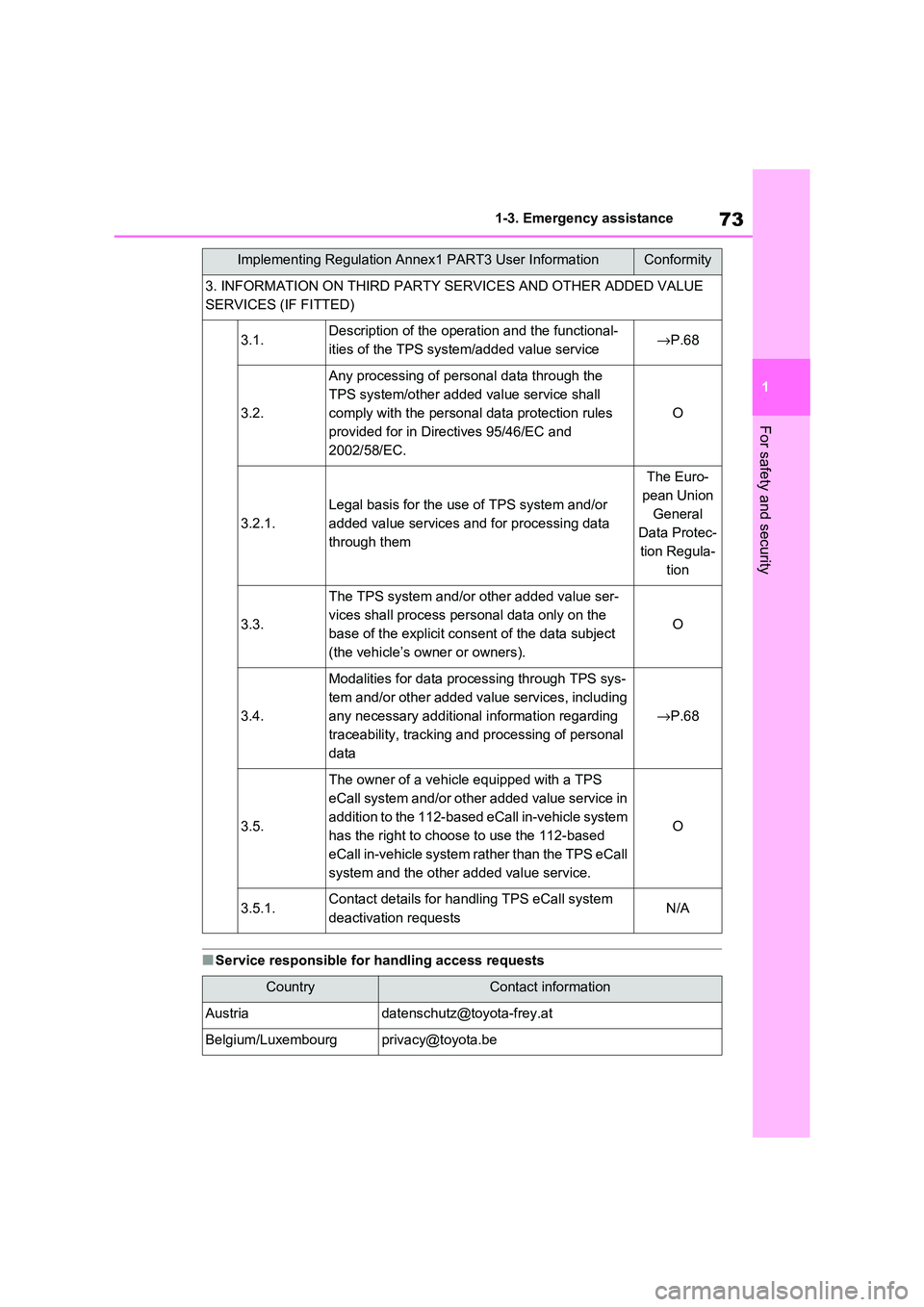
■Service responsible for handling access requests
3. INFORMATION ON TH IRD PARTY SERVICES AND OTHER ADDED VALUE
SERVICES (IF FITTED)
3.1.Description of the operat ion and the functional-
ities of the TPS system /added value service→P.68
3.2.
Any processing of personal data through the
TPS system/other added value service shall
comply with the personal data protection rules
provided for in Direc tives 95/46/EC and
2002/58/EC.
O
3.2.1.
Legal basis for the use of TPS system and/or
added value services and for processing data
through them
The Euro -
pean Union
General
Data Protec -
tion Regula -
tion
3.3.
The TPS system and/or other added value ser-
vices shall process per sonal data only on the
base of the explicit cons ent of the data subject
(the vehicle’s owner or owners).
O
3.4.
Modalities for data processing through TPS sys -
tem and/or other added value services, including
any necessary additional information regarding
traceability, tracking and processing of personal
data
→ P.68
3.5.
The owner of a vehicle equipped with a TPS
eCall system and/or other added value service in
addition to the 112-based eCall in-vehicle system
has the right to choose to use the 112-based
eCall in-vehicle system rather than the TPS eCall
system and the other a dded value service.
O
3.5.1.Contact details for handling TPS eCall system
deactivation requestsN/A
CountryContact information
Austriadatenschutz@to yota-frey.at
Belgium/[email protected]
Implementing Regulation Annex1 PART3 User InformationConformity
Page 76 of 666
741-3. Emergency assistance
[email protected]
Czech Republic
/Hungary/[email protected]
[email protected] og
[email protected]
[email protected]
[email protected]
[email protected]
Great [email protected]
[email protected]
[email protected]
[email protected]
[email protected]
Netherlandswww.toyota.nl/klantenservice
[email protected]
[email protected]
[email protected]
[email protected]
[email protected]
[email protected] / [email protected].
[email protected]
[email protected]
CountryContact information