air condition TOYOTA RAV4 PLUG-IN HYBRID 2021 Owner's Guide
[x] Cancel search | Manufacturer: TOYOTA, Model Year: 2021, Model line: RAV4 PLUG-IN HYBRID, Model: TOYOTA RAV4 PLUG-IN HYBRID 2021Pages: 666, PDF Size: 161.28 MB
Page 199 of 666
197
3
3-1. Instrument cluster
Vehicle status information and indicators
motor)
Front tire
Rear tire
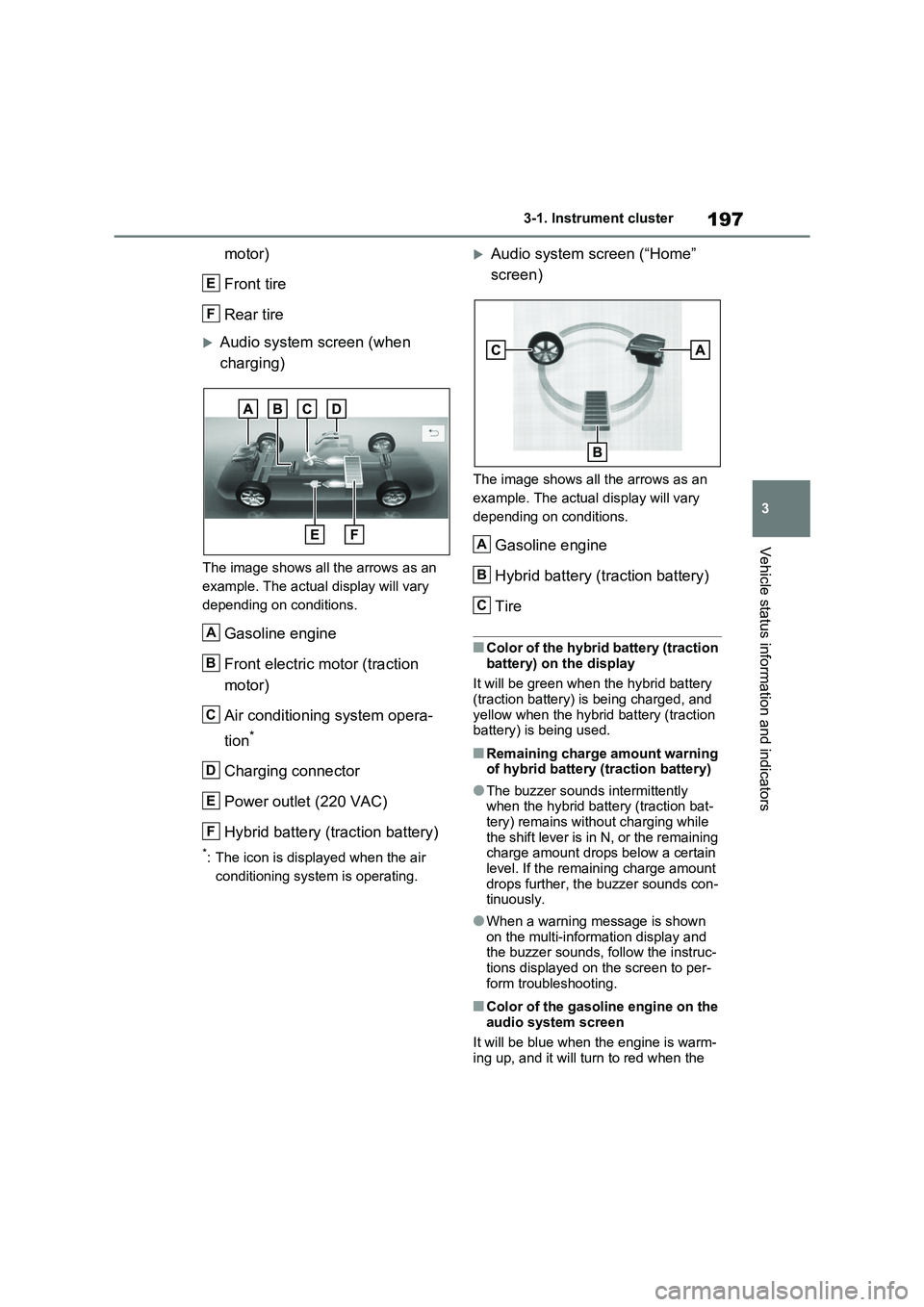
Audio system screen (when
charging)
The image shows all the arrows as an
example. The actual display will vary
depending on conditions.
Gasoline engine
Front electric motor (traction
motor)
Air conditioning system opera -
tion*
Charging connector
Power outlet (220 VAC)
Hybrid battery (traction battery)
*: The icon is displayed when the air
conditioning system is operating.
Audio system screen (“Home”
screen)
The image shows all the arrows as an
example. The actual display will vary
depending on conditions.
Gasoline engine
Hybrid battery (traction battery)
Tire
■Color of the hybrid battery (traction
battery) on the display
It will be green when the hybrid battery (traction battery) is being charged, and
yellow when the hybrid battery (traction
battery) is being used.
■Remaining charge amount warning of hybrid battery (traction battery)
●The buzzer sounds intermittently when the hybrid battery (traction bat -
tery) remains with out charging while
the shift lever is in N, or the remaining charge amount drops below a certain
level. If the remaining charge amount
drops further, the buzzer sounds con - tinuously.
●When a warning message is shown
on the multi-information display and the buzzer sounds, follow the instruc -
tions displayed on the screen to per -
form troubleshooting.
■Color of the gasoline engine on the audio system screen
It will be blue when the engine is warm -
ing up, and it will tu rn to red when the
E
F
A
B
C
D
E
F
A
B
C
Page 206 of 666
2044-1. Key information
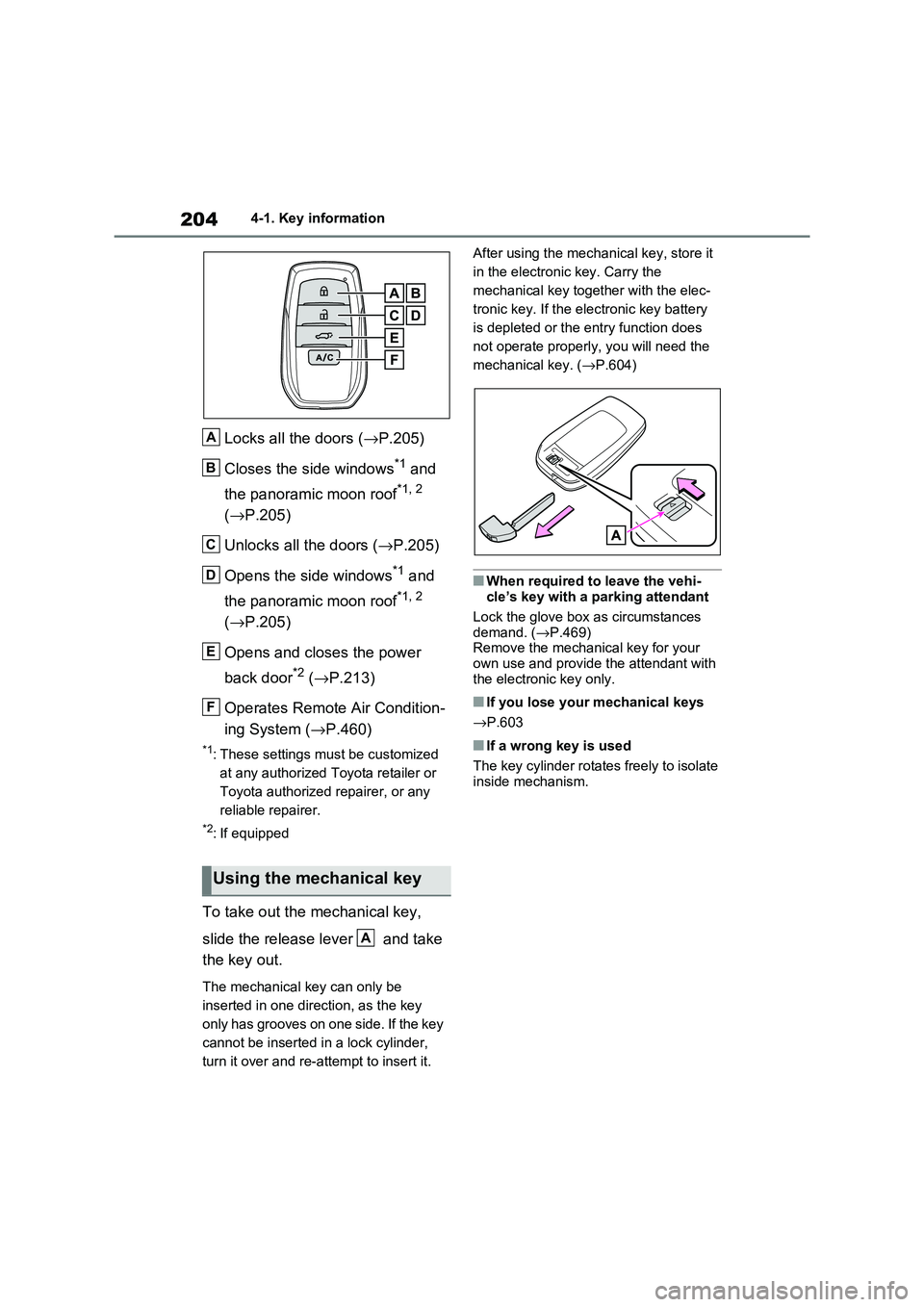
Locks all the doors (→P.205)
Closes the side windows*1 and
the panoramic moon roof*1, 2
( →P.205)
Unlocks all the doors ( →P.205)
Opens the side windows*1 and
the panoramic moon roof*1, 2
( →P.205)
Opens and closes the power
back door*2 ( →P.213)
Operates Remote Air Condition -
ing System ( →P.460)
*1: These settings must be customized
at any authorized Toyota retailer or
Toyota authorized repairer, or any
reliable repairer.
*2: If equipped
To take out the mechanical key,
slide the release lever and take
the key out.
The mechanical key can only be
inserted in one direction, as the key
only has grooves on one side. If the key
cannot be inserted i n a lock cylinder,
turn it over and re-at tempt to insert it.
After using the mec hanical key, store it
in the electronic key. Carry the
mechanical key together with the elec -
tronic key. If the elec tronic key battery
is depleted or the ent ry function does
not operate properly, you will need the
mechanical key. ( →P.604)
■When required to leave the vehi-
cle’s key with a parking attendant
Lock the glove box a s circumstances demand. ( →P.469)
Remove the mechani cal key for your
own use and provide the attendant with the electronic key only.
■If you lose your mechanical keys
→ P.603
■If a wrong key is used
The key cylinder rotate s freely to isolate inside mechanism.
Using the mechanical key
A
B
C
D
E
F
A
Page 227 of 666
225
4
4-2. Opening, closing and locking the doors
Before driving
■Turning an electronic key to bat -
tery-saving mode
●When battery-saving mode is set, bat -
tery depletion is minimized by stop - ping the electronic key from receiving
radio waves.
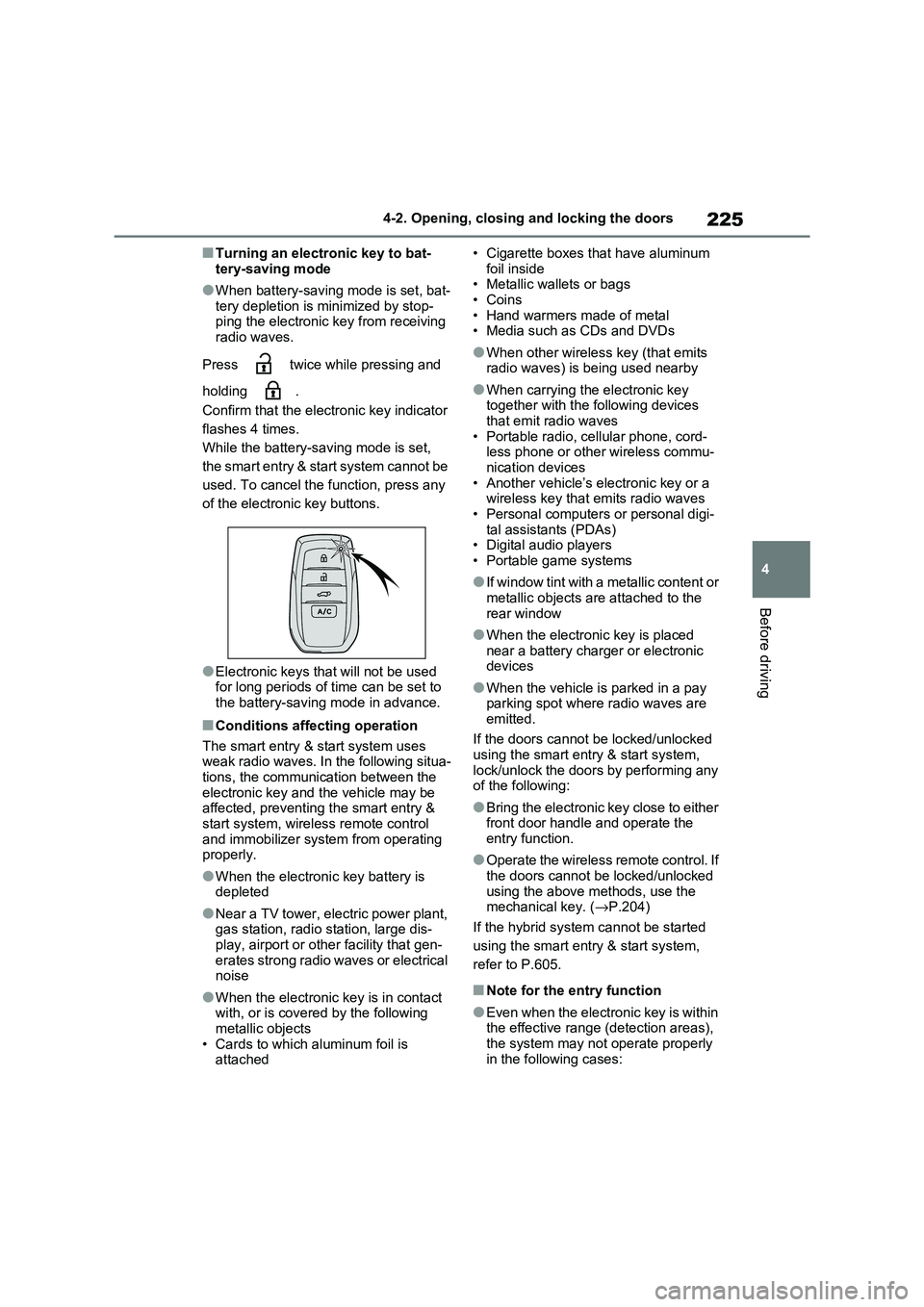
Press twice while pressing and
holding .
Confirm that the electronic key indicator
flashes 4 times.
While the battery- saving mode is set,
the smart entry & start system cannot be
used. To cancel the f unction, press any
of the electronic key buttons.
●Electronic keys t hat will not be used for long periods of time can be set to
the battery-saving mode in advance.
■Conditions affecting operation
The smart entry & start system uses
weak radio waves. In the following situa - tions, the communication between the
electronic key and t he vehicle may be
affected, preventing the smart entry & start system, wireless remote control
and immobilizer system from operating
properly.
●When the electronic key battery is
depleted
●Near a TV tower, electric power plant,
gas station, radio station, large dis- play, airport or oth er facility that gen-
erates strong radio waves or electrical
noise
●When the electronic key is in contact
with, or is covered by the following metallic objects
• Cards to which aluminum foil is
attached
• Cigarette boxes that have aluminum
foil inside • Metallic wallets or bags
•Coins
• Hand warmers made of metal • Media such as CDs and DVDs
●When other wirele ss key (that emits radio waves) is being used nearby
●When carrying the electronic key together with the following devices
that emit radio waves
• Portable radio, cellular phone, cord - less phone or other wireless commu -
nication devices
• Another vehicle’s el ectronic key or a wireless key that emits radio waves
• Personal computer s or personal digi-
tal assistants (PDAs) • Digital audio players
• Portable game systems
●If window tint with a metallic content or
metallic objects are attached to the
rear window
●When the electroni c key is placed
near a battery charger or electronic devices
●When the vehicle is parked in a pay parking spot where radio waves are
emitted.
If the doors cannot be locked/unlocked using the smart entry & start system,
lock/unlock the doors by performing any
of the following:
●Bring the electronic key close to either
front door handle and operate the entry function.
●Operate the wireless remote control. If the doors cannot be locked/unlocked
using the above methods, use the
mechanical key. ( →P.204)
If the hybrid system cannot be started
using the smart entry & start system,
refer to P.605.
■Note for the entry function
●Even when the electronic key is within
the effective range (detection areas),
the system may not operate properly in the following cases:
Page 283 of 666
281
4
4-4. Adjusting the steering wheel and mirrors
Before driving
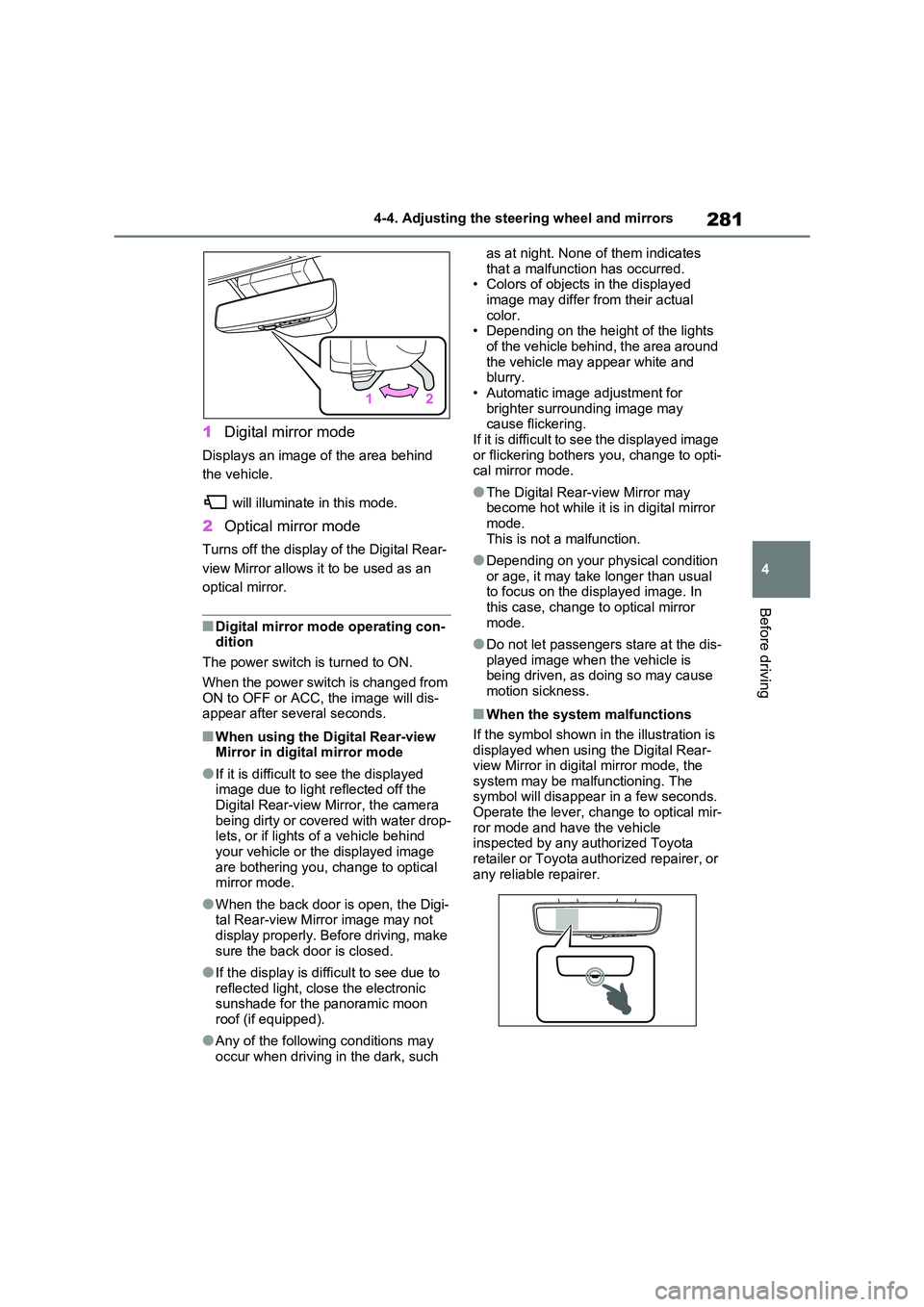
1 Digital mirror mode
Displays an image of the area behind
the vehicle.
will illuminate in this mode.
2 Optical mirror mode
Turns off the display of the Digital Rear-
view Mirror allows it to be used as an
optical mirror.
■Digital mirror mode operating con - dition
The power switch is turned to ON.
When the power switch is changed from ON to OFF or ACC, the image will dis -
appear after several seconds.
■When using the Digital Rear-view
Mirror in digit al mirror mode
●If it is difficult to see the displayed
image due to light r eflected off the Digital Rear-view Mirror, the camera
being dirty or covered with water drop -
lets, or if lights of a vehicle behind your vehicle or the displayed image
are bothering you, change to optical
mirror mode.
●When the back door is open, the Digi -
tal Rear-view Mirro r image may not display properly. Before driving, make
sure the back door is closed.
●If the display is diffi cult to see due to
reflected light, close the electronic
sunshade for the panoramic moon roof (if equipped).
●Any of the followin g conditions may occur when driving in the dark, such
as at night. None of them indicates
that a malfunction has occurred. • Colors of objects in the displayed
image may differ from their actual
color. • Depending on the hei ght of the lights
of the vehicle behind, the area around
the vehicle may appear white and blurry.
• Automatic image adjustment for
brighter surrounding image may cause flickering.
If it is difficult to see the displayed image
or flickering bothers you, change to opti- cal mirror mode.
●The Digital Rear-v iew Mirror may become hot while it is in digital mirror
mode.
This is not a malfunction.
●Depending on your physical condition
or age, it may take longer than usual to focus on the displayed image. In
this case, change t o optical mirror
mode.
●Do not let passengers stare at the dis -
played image when the vehicle is being driven, as doi ng so may cause
motion sickness.
■When the system malfunctions
If the symbol shown in the illustration is displayed when using the Digital Rear-
view Mirror in digit al mirror mode, the
system may be malf unctioning. The symbol will disappear in a few seconds.
Operate the lever, c hange to optical mir-
ror mode and ha ve the vehicle inspected by any a uthorized Toyota
retailer or Toyota authorized repairer, or
any reliable repairer.
Page 308 of 666
3065-1. Before driving
NOTICE
In the event that you drive on a
flooded road and the vehicle is
flooded, be sure t o have any autho- rized Toyota retailer or Toyota autho -
rized repairer, or any reliable repairer
check the following:
●Brake function
●Changes in quantity and quality of
oil and fluid used for the engine, hybrid transaxle (front and rear),
etc.
●Lubricant condition for the bearings
and suspension joints (where possi -
ble), and the function of all joints, bearings, etc.
■When parking the vehicle
Always set the park ing brake, and
shift the shift lever to P. Failure to do
so may cause the vehicle to move or the vehicle may accelerate suddenly
if the accelerator pedal is accidentally
depressed.
Cargo and luggage
Take notice of the following
information about storage pre -
cautions, cargo capacity and
load.
WARNING
■Things that must not be carried
in the luggage compartment
The following things may cause a fire if loaded in the luggage compartment:
●Receptacles containing gasoline
●Aerosol cans
■Storage precautions
Observe the following precautions.
Failure to do so m ay prevent the ped-
als from being depressed properly, may block the driver’s vision, or may
result in items hitting the driver or
passengers, possibly causing an acci - dent.
●Stow cargo and l uggage in the lug-
gage compartment whenever pos - sible.
●Do not stack anything in the lug - gage compartment higher than the
seatbacks.
●When you fold down the rear seats,
long items should not be placed
directly behind the front seats.
●Never allow anyone to ride in the
luggage compartment. It is not designed for passengers. They
should ride in their seats with their
seat belts properl y fastened. Other- wise, they are much more likely to
suffer death or serious bodily injury,
in the event of sudden braking, sud - den swerving or an accident.
Page 310 of 666
3085-1. Before driving
■Tire information
●Increase the tire inflation pressure to
20.0 kPa (0.2 kgf/cm2 or bar, 3 psi) greater than the recommended value
when towing. ( →P.624)
●Increase the air pressure of the trailer
tires in accordance with the total
trailer weight and according to the val - ues recommended by the manufac -
turer of your trailer.
■Safety checks before towing
●Check that the maximum load limit for
the towing hitch/bracket and hitch ball
is not exceeded. Bear in mind that the coupling weight of the trailer will add
to the load exerted on the vehicle.
Also make sure tha t the total load exerted on the vehi cle is within the
range of the weight limits. ( →P.309)
●Ensure that the trailer load is secure.
●Supplementary outside rear view mir- rors should be added to the vehicle if
the traffic behind c annot be clearly
seen with standard mirrors. Adjust the extending arms of these mirrors on
both sides of the vehicle so that they
always provide maxi mum visibility of the road behind.
Trailer towing
Your vehicle is designed pri -
marily as a passenger carry -
ing vehicle. Towing a trailer
will have an adverse effect on
handling, performance, brak -
ing, durability, and fuel con -
sumption. Your safety and
satisfaction depend on the
proper use of correct equip -
ment and cautious driving hab -
its. For your safety and the
safety of others, do not over -
load the vehicle or trailer.
To tow a trailer safely, use
extreme care and drive the
vehicle in accordance with the
trailer’s characteristics and
operating conditions.
Toyota warranties do not apply
to damage or malfunction
caused by towing a trailer for
commercial purposes.
Ask your local authorized
Toyota retailer or Toyota
authorized repairer, or any reli -
able repairer for further details
before towing, as there are
additional legal requirements
in some countries.
WARNING
Follow all the instructions described in
this section.
Failure to do so could cause an acci - dent resulting in death or serious
injury.
■Trailer towing precautions
When towing, make sure that none of
the weight limits are exceeded.
( →P.309)
■To avoid accident or injury
●Vehicles with compact spare tire: Do not tow a trailer when the com -
pact spare tire is installed on your
vehicle.
●Vehicles with emergency tire punc -
ture repair kit: Do not tow a traile r when the tire
installed is repa ired with the emer-
gency tire puncture repair kit.
Page 317 of 666
315
5
5-1. Before driving
Driving
■Sudden acceleration/steering
input/cornering
Executing sharp turns when towing
may result in the trailer colliding
with your vehicle. D ecelerate well in
advance when approaching turns
and take them slowly and carefully
to avoid sudden braking.
■Important points regarding
turning
The wheels of the tr ailer will travel
closer to the inside of the curve
than the wheels of the vehicle. To
make allowance for this, take the
turns wider than you would nor -
mally do.
■Important points regarding
stability
Vehicle movement resulting from
uneven road surfaces and strong
crosswinds will affect handling. The
vehicle may also be rocked by
passing buses or large trucks. Fre -
quently check behind when moving
alongside such vehicles. As soon
as such vehicle movement occurs,
immediately start to decelerate
smoothly by slowly applying the
brakes. Always steer the vehicle
straight ahead while braking.
■Passing other vehicles
Consider the total combined length
of your vehicle and trailer and
ensure that the vehicle-to-vehicle
distance is sufficient before execut -
ing lane changes.
■Transmission information
To maintain engine braking effi -
ciency, when using engine braking,
do not use the transmission in D.
( →P.321)
■If the hybrid system overheats
Towing a loaded trailer up a long,
steep incline in temperatures
exceeding 30°C (85°F) may result
in the hybrid system overheating. If
the high coolant temperature warn -
ing light indicates that the hybrid
system is overheating, turn the air
conditioning off immediately, leave
the road and stop the vehicle in a
safe place. ( →P.611)
■When parking the vehicle
Always place wheel chocks under
the wheels of both the vehicle and
trailer. Firmly set the parking brake
and shift the shift lever to P.
■Break-in schedule
Toyota recommends that vehicles fitted
with new power train components
should not be used for towing trailers for the first 800 km (500 miles).
■Maintenance
●Maintenance must be performed more frequently when using the vehicle for
towing due to the greater weight bur -
den placed on the vehicle compared to normal driving.
●Retighten all bolts securing the hitch - ing ball and bracket after towing for
approximately 1000 km (600 miles).
■If trailer sway occurs
One or more factor s (crosswinds, pass- ing vehicles, rough roads, etc.) can
adversely affect handling of your vehicle
and trailer, causing instability.
Page 320 of 666
3185-2. Driving procedures
■When the ambient temperature is
low, such as during winter driving conditions
●When starting the hy brid system, the flashing time of the “READY” indicator
may be long. Leave the vehicle as it is
until the “READY” indicator is steady on, as steady means the vehicle is
able to move.
●When the hybrid bat tery (traction bat-
tery) is extremely cold (below approxi -
mately -30°C [-22°F]) under the influence of the outside temperature, it
may not be possible to start the hybrid
system. In this case, try to start the hybrid system again after the tem -
perature of the hybrid battery
increases due to t he outside tempera- ture increase etc.
■Sounds and vibrations specific to a
hybrid vehicle
→ P.91
■If the 12-volt battery is discharged
The hybrid system cannot be started
using the smart en try & start system.
Refer to P.606 to res tart the hybrid sys- tem.
■Electronic key battery depletion
→ P.202
■Conditions affecting operation
→ P.225
■Note for the entry function
→ P.225
■Steering lock function
●After turning the power switch to OFF and opening and clos ing the doors,
the steering wheel will be locked due
to the steering lock function. Operat -
ing the power switch again automati- cally cancels the steering lock.
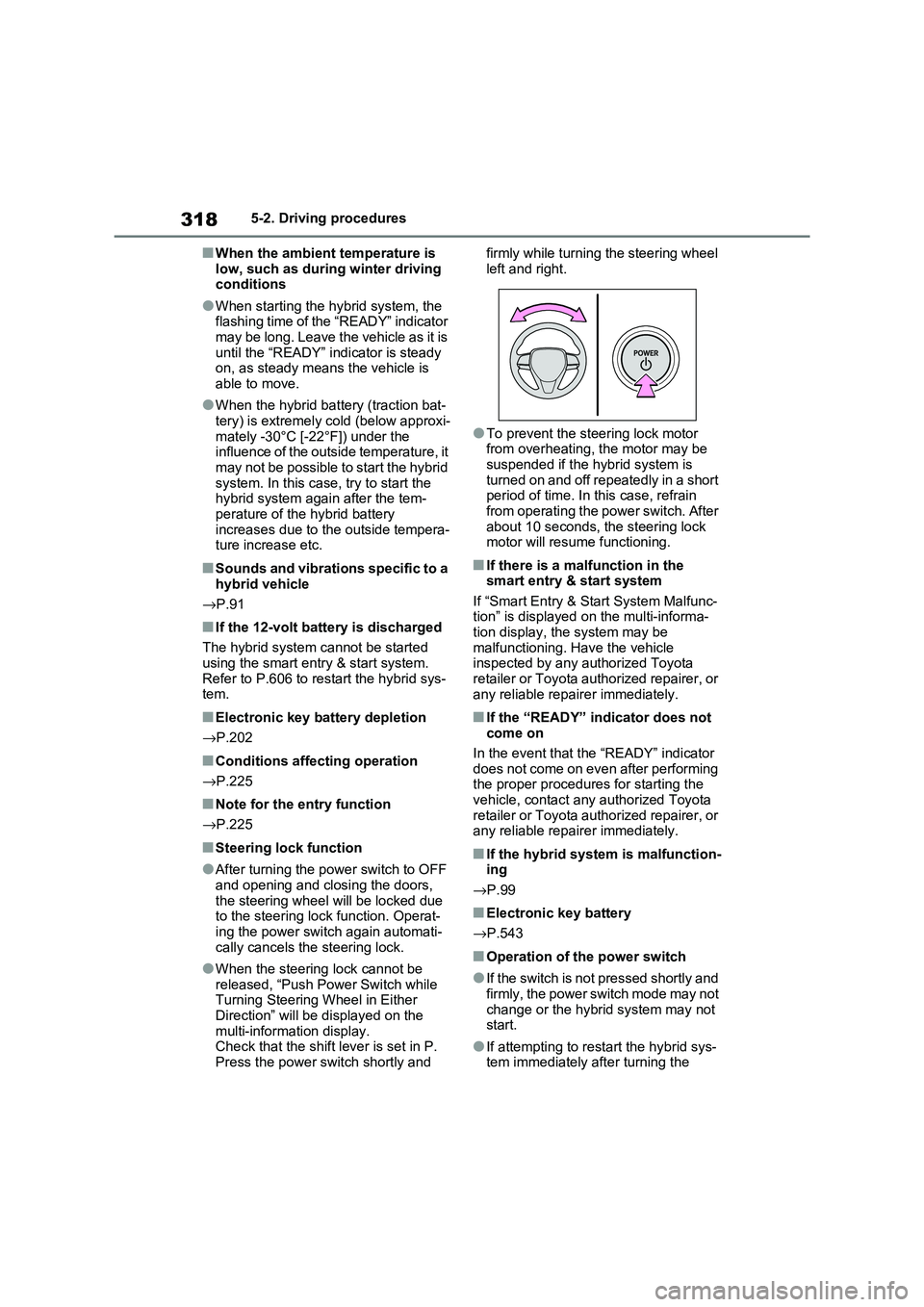
●When the steering lock cannot be released, “Push Power Switch while
Turning Steering Wheel in Either
Direction” will be displayed on the multi-information display.
Check that the shift lever is set in P.
Press the power switch shortly and
firmly while turning the steering wheel
left and right.
●To prevent the st eering lock motor
from overheating, the motor may be suspended if the hybrid system is
turned on and off repeatedly in a short
period of time. In this case, refrain from operating the power switch. After
about 10 seconds, the steering lock
motor will resume functioning.
■If there is a malfunction in the smart entry & start system
If “Smart Entry & St art System Malfunc-
tion” is displayed on the multi-informa - tion display, the system may be
malfunctioning. Have the vehicle
inspected by any a uthorized Toyota retailer or Toyota authorized repairer, or
any reliable repairer immediately.
■If the “READY” indicator does not
come on
In the event that the “READY” indicator
does not come on even after performing
the proper procedures for starting the vehicle, contact any authorized Toyota
retailer or Toyota authorized repairer, or
any reliable repairer immediately.
■If the hybrid system is malfunction - ing
→ P.99
■Electronic key battery
→ P.543
■Operation of the power switch
●If the switch is not pressed shortly and
firmly, the power switch mode may not
change or the hybri d system may not start.
●If attempting to restart the hybrid sys - tem immediately after turning the
Page 331 of 666
329
5
5-2. Driving procedures
Driving
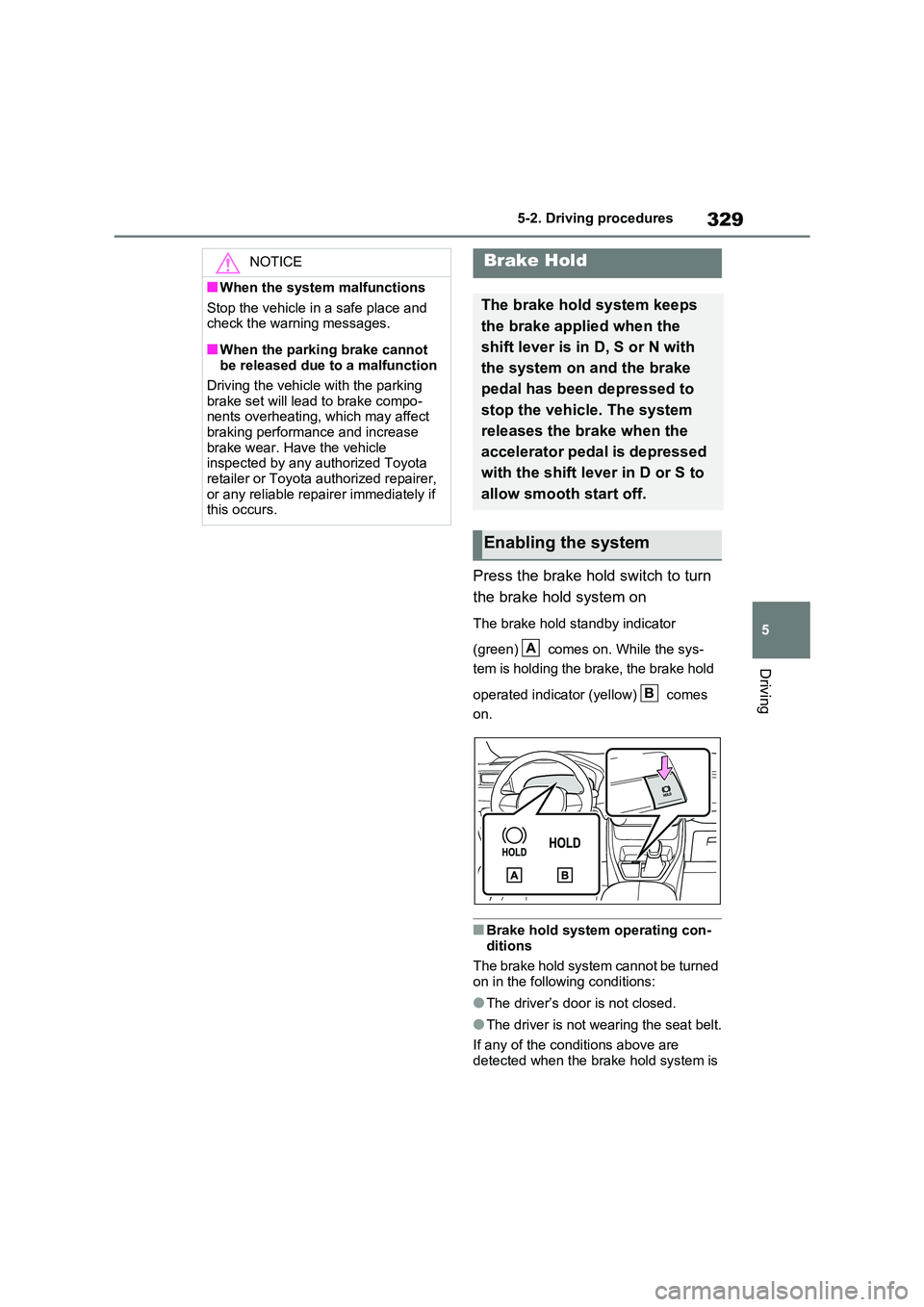
Press the brake hold switch to turn
the brake hold system on
The brake hold standby indicator
(green) comes on. While the sys -
tem is holding the brake, the brake hold
operated indicator (yellow) comes
on.
■Brake hold system operating con -
ditions
The brake hold system cannot be turned
on in the following conditions:
●The driver’s door is not closed.
●The driver is not wearing the seat belt.
If any of the conditions above are
detected when the brake hold system is
NOTICE
■When the system malfunctions
Stop the vehicle in a safe place and
check the warning messages.
■When the parking brake cannot
be released due to a malfunction
Driving the vehicle with the parking
brake set will lead to brake compo -
nents overheating, w hich may affect
braking performance and increase brake wear. Have the vehicle
inspected by any authorized Toyota
retailer or Toyota authorized repairer, or any reliable repairer immediately if
this occurs.
Brake Hold
The brake hold system keeps
the brake applied when the
shift lever is in D, S or N with
the system on and the brake
pedal has been depressed to
stop the vehicle. The system
releases the brake when the
accelerator pedal is depressed
with the shift lever in D or S to
allow smooth start off.
Enabling the system
A
B
Page 332 of 666
3305-2. Driving procedures
enabled, the system will turn off and the
brake hold standby indicator light will go off. In addition, if any of the conditions
are detected while th e system is holding
the brake, a warning buzzer will sound and a message wi ll be shown on the
multi-information display. The parking
brake will then be set automatically.
■Brake hold function
●If the brake pedal is left released for a
period of about 3 minutes after the system has started ho lding the brake,
the parking brake will be set automati -
cally. In this case, a warning buzzer sounds and a message is shown on
the multi-information display.
●To turn the system o ff while the sys-
tem is holding the brake, firmly
depress the brak e pedal and press the button again.
●The brake hold func tion may not hold the vehicle when the vehicle is on a
steep incline. In this situation, it may
be necessary for the driver to apply the brakes. A warning buzzer will
sound and the multi -information dis-
play will inform the dr iver of this situa- tion. If a warning message is shown
on the multi-informa tion display, read
the message and follow the instruc - tions.
■When the parking brake is set auto -
matically while the system is hold -
ing the brakes
Perform any of the following operations
to release the parking brake:
●Depress the accelerator pedal. (The
parking brake will not be released
automatically if the seat belt is not fas - tened.)
●Operate the parking brake switch with
the brake pedal depressed.
Make sure that the parking brake indica -
tor light goes off. ( →P.326)
■When an inspection at any autho-
rized Toyota retailer or Toyota authorized repairer, or any reliable
repairer is necessary
When the brake hold standby indicator (green) does not illuminate even when
the brake hold switch is pressed with the
brake hold system ope rating conditions met, the system may b e malfunctioning.
Have the vehicle i nspected at any
authorized Toyota r etailer or Toyota authorized repairer, or any reliable
repairer.
■If “Brake Hold Malfunction Press
Brake to Deactivate Visit Your Dealer” or “Brake Hold Malfunction
Visit Your Dealer” is displayed on
the multi-information display
The system may be malfunctioning.
Have the vehicle inspected by any
authorized Toyota r etailer or Toyota authorized repairer, or any reliable
repairer.
■Warning messages and buzzers
Warning messages and buzzers are used to indicate a system malfunction or
to inform the driver of the need for cau -
tion. If a warning message is shown on the multi-information display, read the
message and follow the instructions.
■If the brake hold operated indicator
flashes
→ P.574
WARNING
■When the vehicle is on a steep
incline
When using the brake hold system on a steep incline, exercise caution. The
brake hold function may not hold the
vehicle in such a situation.
■When stopped on a slippery road
The system cannot stop the vehicle when the gripping ab ility of the tires
has been exceeded. Do not use the
system when stopped on a slippery road.