air condition TOYOTA RAV4 PLUG-IN HYBRID 2021 User Guide
[x] Cancel search | Manufacturer: TOYOTA, Model Year: 2021, Model line: RAV4 PLUG-IN HYBRID, Model: TOYOTA RAV4 PLUG-IN HYBRID 2021Pages: 666, PDF Size: 161.28 MB
Page 102 of 666
1002-1. Plug-in hybrid system
Shift the shift lever to D when
stopped at a traffic light, or driving
in heavy traffic etc. Shift the shift
lever to P when parking. When
using the N, there is no positive
effect on fuel consumption. In the
N, the gasoline engine operates but
electricity canno t be generated.
Also, when using the air condition -
ing system, etc., the hybrid battery
(traction battery) power is con -
sumed.
Drive your vehicle smoothly.
Avoid abrupt acceleration and
deceleration. Gradual accelera -
tion and deceler ation will make
more effective use of the electric
motor (traction motor) without
having to use gasoline engine
power.
Avoid repeated acceleration.
Repeated acceleration con -
sumes hybrid battery (traction
battery) power, resulting in poor
fuel consumption. Battery power
can be restored by driving with
the accelerator pedal slightly
released.
Make sure to operate the brakes
gently and a ti mely manner. A
greater amount of electrical energy
can be regenerated when slowing
down.
Repeated acceler ation and decel-
eration, as well as long waits at traf -
fic lights, will lead to high fuel and
electricity consumption. Check traf -
fic reports before leaving and avoid
delays as much as possible. When
driving in a traffic jam, gently
release the brake pedal to allow the
vehicle to move forward slightly
while avoiding overuse of the accel -
erator pedal. Doing so can help
control excessive electricity and
fuel consumption.
Control and maintain the vehicle
at a constant speed. Before stop -
ping at a toll booth or similar,
allow plenty of time to release
the accelerator and gently apply
the brakes. A greater amount of
electrical energy can be regener -
ated when slowing down.
Electricity consumption will
increase significantly when driv -
ing at high speeds in EV mode or
AUTO EV/HV mode. If there will
be a long distance to the next
external charging point after
leaving a freewa y, it is recom-
mended to drive in HV mode
while on the freeway and change
Shift lever operation
Accelerator pedal/brake
pedal operation
When braking
Delays
Highway driving
Page 103 of 666
101
2
2-1. Plug-in hybrid system
Plug-in hybrid system
to EV mode or AUTO EV/HV
mode after leaving the freeway.
( →P.86)
Turn the “A/C” switch off when it
is not needed. Doing so can help
reduce excessive e lectricity and
fuel consumption.
In summer: When the ambient tem -
perature is high, use the recirculated air
mode. Doing so will help to reduce the
burden on the air co nditioning system
and reduce electricity and fuel con -
sumption as well.
In winter: Avoid excessive and unnec-
essary use of the heater. Usage of the
heated steering w heel (if equipped)
( →P.462) and seat heaters (→P.463)
are effective.
Using the Remote Air Condition-
ing System ( →P.460) while the
AC charging cable is connected
to the vehicle can reduce elec -
tricity consumption immediately
after starting off by operating air
conditioning mainly using elec -
tricity from an external power
source.
When setting the charging
schedule, setting the charging
mode to “Departure” and “Cli -
mate Prep” to on can reduce
electricity consumption immedi -
ately after starting off by operat -
ing air conditioning before
charging is completed. ( →P.144)
Make sure to check the tire inflation
pressure frequen tly. If there is
improper tire inflation pressure in
the tires, the EV driving range will
become shorter, and fuel consump-
tion when in HV mode will increase.
Also, as snow tires can cause large
amounts of friction, their use on dry
roads can lead to increased fuel
and electricity consumption.
Carrying heavy luggage will lead to
poor fuel economy. Avoid carrying
unnecessary lugga ge. Installing a
large roof rack will also cause poor
fuel economy.
Since the gasoline engine starts up
and cuts out automatically, warm -
ing up is not necessary.
Air conditioning
Checking tire inflation pres -
sure
Luggage
Warming up before driving
Page 104 of 666
1022-1. Plug-in hybrid system
The value displayed on the SOC
(State of Charge) gauge ( →P.174)
is estimated from the following
information.
The amount of hybrid battery
(traction battery) charge cur -
rently remaining
The electricity consumption (the
estimated distan ce that EV driv-
ing is possible pe r unit of electri-
cal energy) based on the
recorded value
Past air conditioning system
electricity consumption amount
The electricity co nsumption varies
depending on how the vehicle is
driven. The vehicle automatically
records the electricity consumption
when being charged and uses the
electricity consumption for estimat -
ing the EV driving range. Therefore,
the EV driving ra nge displayed
when the hybrid battery (traction
battery) is fully charged may differ
from the previous EV driving range
depending on how the vehicle was
driven.
The EV driving r ange may change
significantly with each charging
until the electricity consumption
based on the recorded value is sta -
ble (for approximately the first
month or two). However, this does
not indicate a malfunction.
When the air conditioning system is
turned on, the EV driving range
(with using the air conditioning sys -
tem) is estimated based on the past
air conditioning electricity con -
sumption amount considering that
the electricity consumption may
become higher.
The distance that EV driving is pos -
sible varies signi ficantly depending
on how the vehicle is driven, road
conditions, the weather, the outside
temperature, usage conditions of
electrical components and the num -
ber of occupants.
The distance that EV driving is pos -
sible can be extended if the follow -
ing is performed:
EV driving range
The EV driving range displayed
on the multi-information dis -
play shows the reference dis -
tance that EV driving (driving
using only the electric motor)
is possible, and the actual dis-
tance that can be driven may
differ from that displayed.
Even if the EV dr iving range is
displayed, EV driving may be
canceled and both gasoline
engine and electric motor are
used depending on the situation.
( →P.90)
Displayed value
Tips for extending the EV
driving range
Page 109 of 666
107
2
2-2. Charging
Plug-in hybrid system
*: Flashes for a certain period of time, and then turns off.
■Charging indicator of the charging port
When a system mal function occurs while charging or using the Remote Air Condi-
tioning System, the charging indicator rapidly flashes for a ce rtain period of time, and then turns off.
If this occurs, when a door is o pened with the power switch off, a message is dis-
played on the multi-information display. When a message is displayed, follow the instructions displ ayed on the screen.
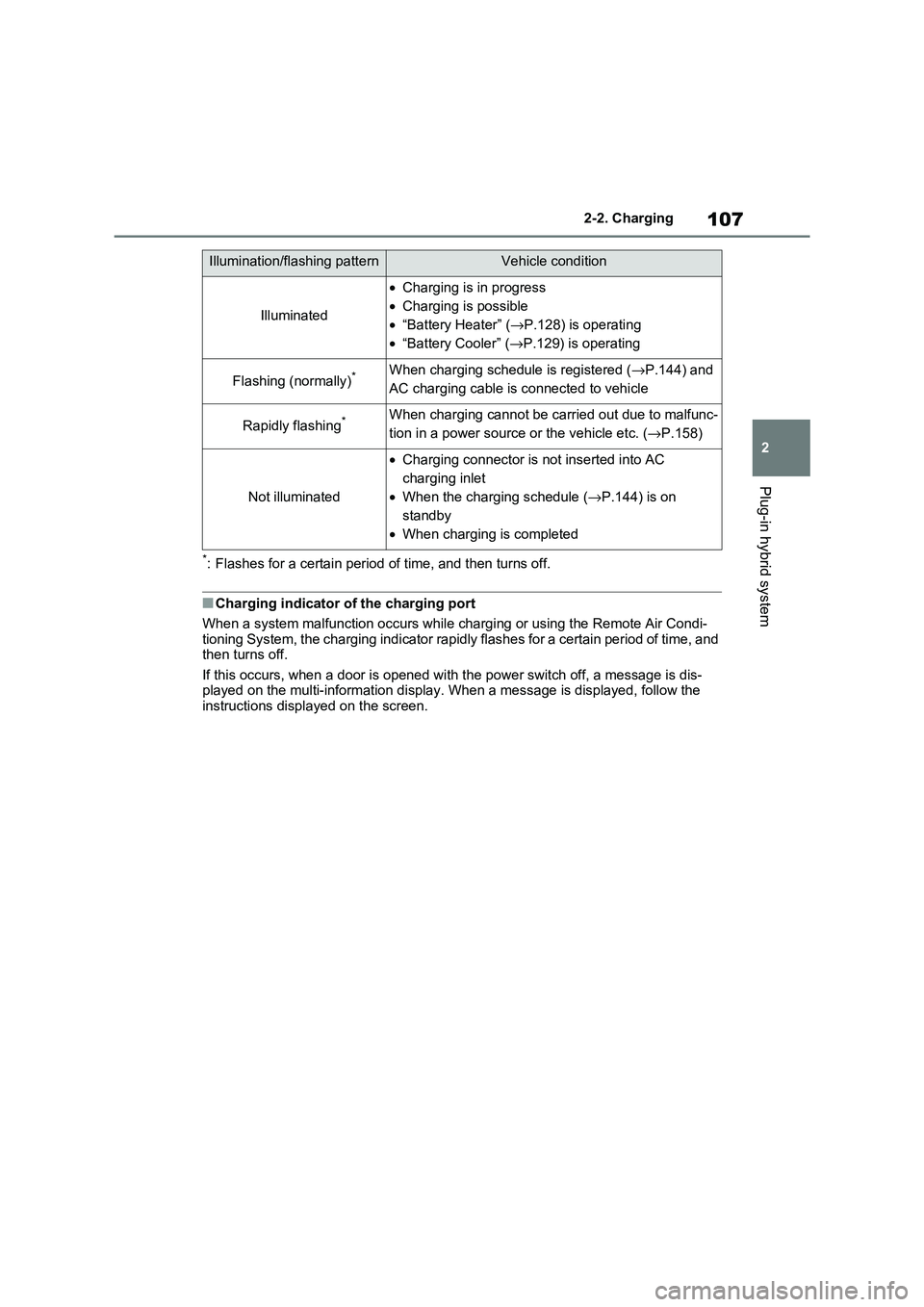
Illumination/flashing patternVehicle condition
Illuminated
•Charging is in progress
• Charging is possible
• “Battery Heater” (→P.128) is operating
• “Battery Cooler” (→P.129) is operating
Flashing (normally)*When charging schedule is registered (→P.144) and
AC charging cable is c onnected to vehicle
Rapidly flashing*When charging cannot be carried out due to malfunc-
tion in a power source or the vehicle etc. (→P.158)
Not illuminated
•Charging connector is not inserted into AC
charging inlet
• When the charging schedule (→P.144) is on
standby
• When charging is completed
Page 115 of 666
113
2
2-2. Charging
Plug-in hybrid system
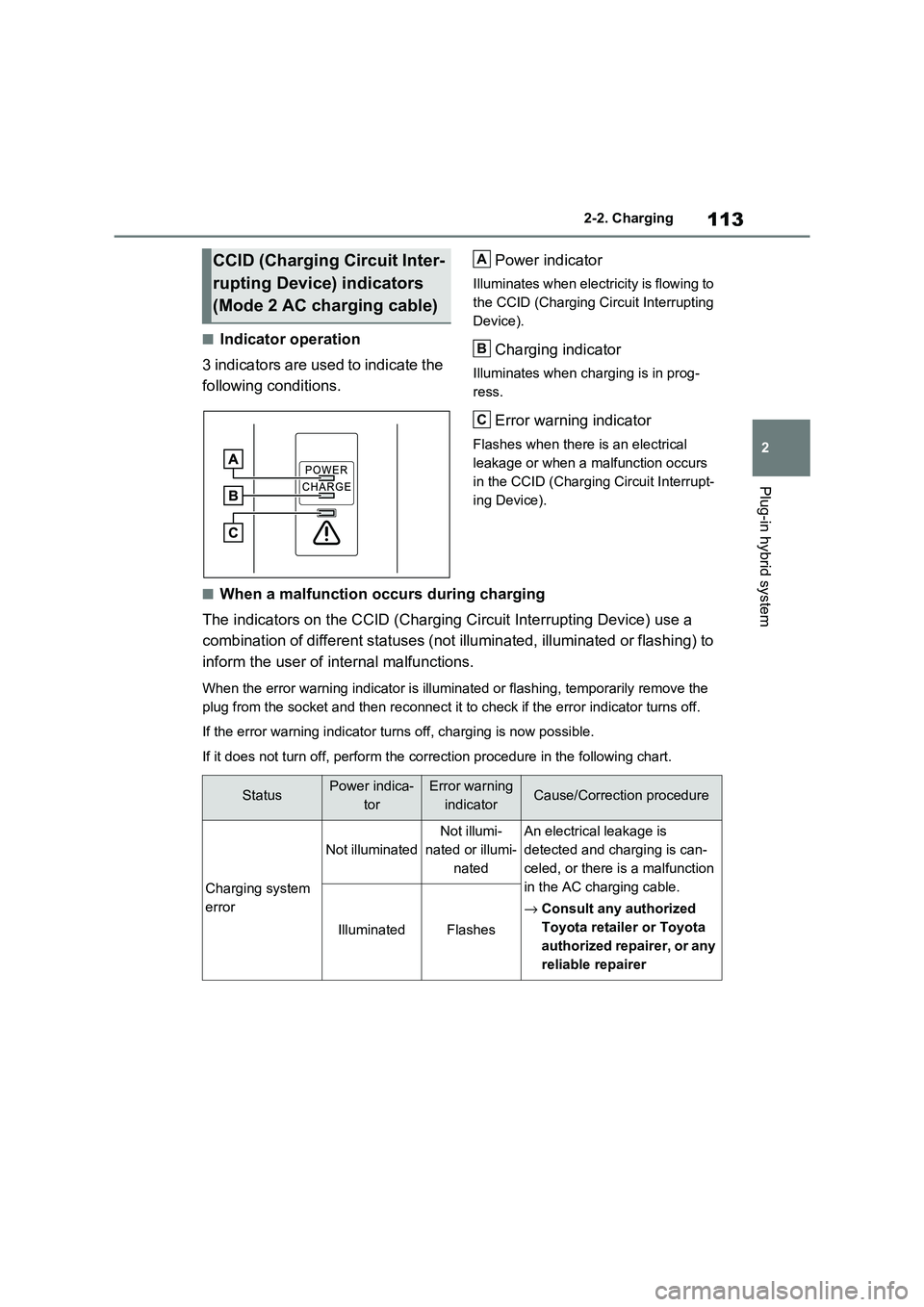
■Indicator operation
3 indicators are used to indicate the
following conditions.
Power indicator
Illuminates when electricity is flowing to
the CCID (Charging Cir cuit Interrupting
Device).
Charging indicator
Illuminates when charging is in prog -
ress.
Error warning indicator
Flashes when there is an electrical
leakage or when a malfunction occurs
in the CCID (Charging Circuit Interrupt-
ing Device).
■When a malfunction occurs during charging
The indicators on the CCID (Char ging Circuit Interrupting Device) use a
combination of different statu ses (not illuminated, illuminated or flashing) to
inform the user of internal malfunctions.
When the error warning indicato r is illuminated or flashing, temporarily remove the
plug from the socket and then re connect it to check if the error indicator turns off.
If the error warning indicator turns off, charging is now possible.
If it does not turn off, perform the correction procedure in the following chart.
CCID (Charging Circuit Inter-
rupting Device) indicators
(Mode 2 AC charging cable)
A
B
C
StatusPower indica -
tor
Error warning
indicatorCause/Correction procedure
Charging system
error
Not illuminated
Not illumi -
nated or illumi -
nated
An electrical leakage is
detected and charging is can -
celed, or there is a malfunction
in the AC charging cable.
→ Consult any authorized
Toyota retailer or Toyota
authorized repairer, or any
reliable repairer
IlluminatedFlashes
Page 131 of 666
129
2
2-2. Charging
Plug-in hybrid system
■Hybrid battery (traction bat -
tery) warming control (Green -
land only)
This control operates after the AC
charging cable remains connected
to the vehicle for 3 days and “Bat -
tery Heater” autom atically stops. It
automatically insulates the hybrid
battery (traction battery) in
extremely low temperatures.
This control stops 31 days after
the AC charging cable is con -
nected, even if it is still con -
nected to the vehicle.
When this control operates,
charging schedule settings are
ignored and charging starts.
■“Battery Cooler”
When the hybrid battery (traction
battery) is hot and the AC charging
cable is connected to the vehicle,
this function cools the hybrid bat -
tery (traction battery) before
charging is carried out.
“Battery Cooler” will operate when
the “Battery Cooler” of the
“Charging Settings” on the multi-
information di splay is on. (→P.187)
■Traction battery heating and cool-
ing system (“Battery Heater” and “Battery Cooler”)
●The system operates when the hybrid battery (traction battery) is below or
above a certain temperature.
●The system may operate when
charging is not being performed.
●When the charging schedule is used
( →P.144), this function will operate
according to the charging schedule.
■“Battery Heater”
●When “Battery Heat er” is operating,
the charging indi cator illuminates.
●When the AC charging cable is
removed from the v ehicle or remains
connected to the ve hicle for approxi- mately 3 days, t he system automati-
cally stops.
●When “Battery Heat er” is operating
during charging, the charging time
may be longer than normal.
●If the outside temperature becomes
high while “Batter y Heater” is operat- ing, charging may complete earlier
than the “Departure” time set.
( →P.144)
●When the traction battery is almost
completely charged , “Battery Cooler” may not be implemented.
●When the following operations are performed while “Battery Heater” is
operating, the hybrid battery (traction
battery) heating operation stops. • The shift lever is changed to any posi-
tion other than P
• The Remote Air Conditioning System is operated ( →P.460)
●“Battery Heater” may operate even when the hybrid battery (traction bat -
tery) is fully charged depending on the
temperature of the hybrid battery (traction battery).
• The remaining charge of the hybrid
battery (traction battery) decreases when “Battery Heater” operates. The
charging operation may start again to
charge the hybrid battery (traction bat - tery).
• “Charging Stopped Due to Pulled
Charging Connector” may be shown
when the charging connector is removed while recharging. ( →P.160)
■“Battery Cooler”
●The charging indicator is illuminated while “Battery Cooler” is on standby or
operating.
●“Battery Cooler” is i mplemented for a
Page 132 of 666
1302-2. Charging
maximum of approximately 30 min -
utes. However, when the “Departure” time is set ( →P.144) and there is not
sufficient time between the current
time and the time that charging will complete, “Battery Cooler” operation
time may become shorter.
●When there is a small amount of
remaining charge in the hybrid battery
(traction battery), even if the hybrid battery (traction battery) is hot, “Bat -
tery Cooler” may not be implemented.
●When the following operations are
performed while “Battery Cooler” is
operating, the hybrid battery (traction battery) cooling operation stops.
• The hood is opened
• The power switch is turned to any mode other than off
• The Remote Air Conditioning System
is operated ( →P.460) • “Charge Now” is implemented
( →P.145)
●“Battery Cooler” uses the power of the
hybrid battery (tr action battery) and
external power source. • While “Battery Cooler” is operating,
the amount of the remaining charge of
the hybrid battery (traction battery) increases and decreases in a certain
range, and does not increase as in
normal charging. • The operation of “Battery Cooler” is
recognized as charging by a charger.
The charger that calculates the fee according to charging time causes a
charging fee.
To enable the use of EV mode or
AUTO EV/HV mode, we recom -
mend systematically charging the
vehicle.
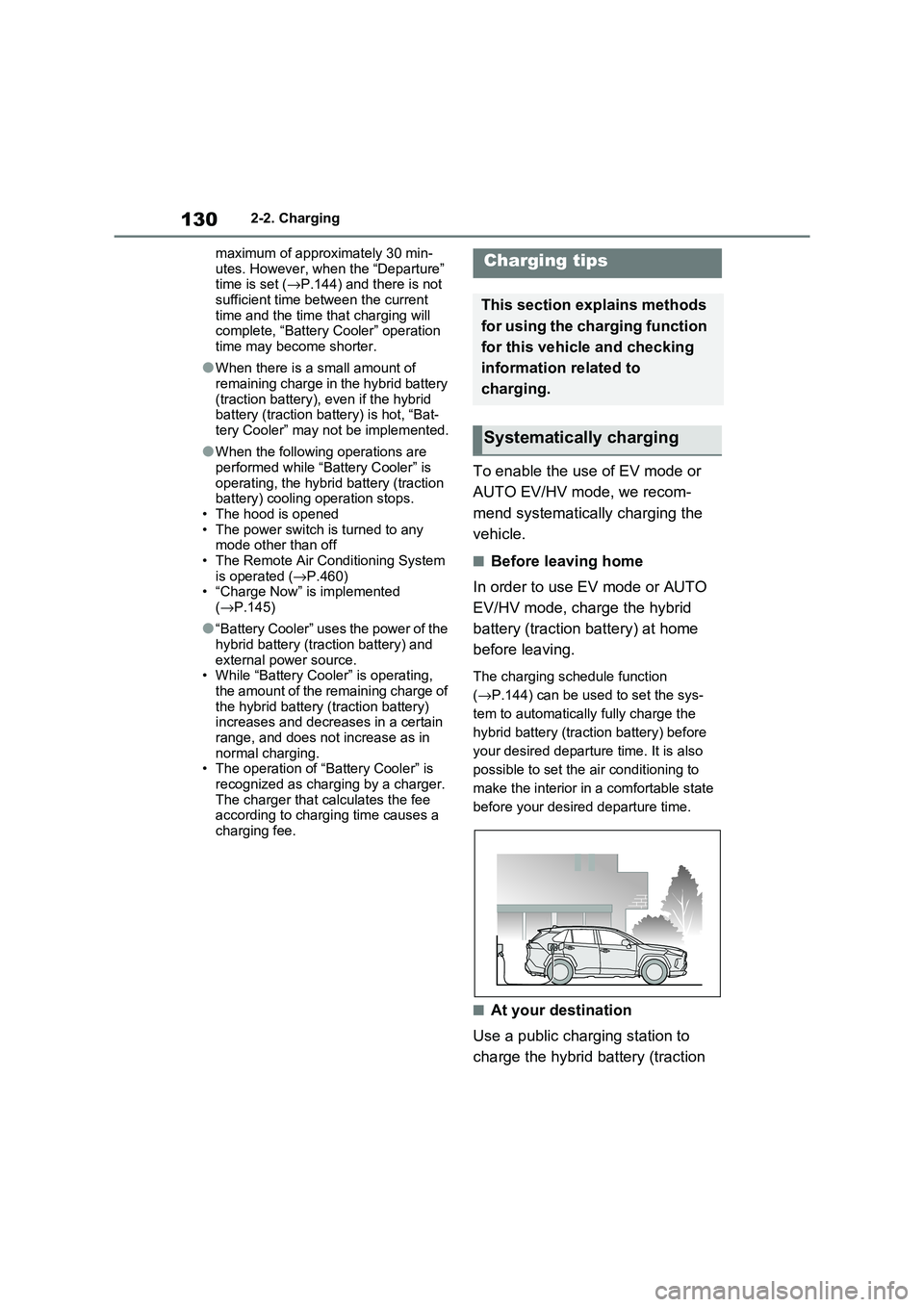
■Before leaving home
In order to use EV mode or AUTO
EV/HV mode, charge the hybrid
battery (traction battery) at home
before leaving.
The charging schedule function
( →P.144) can be used to set the sys-
tem to automatically fully charge the
hybrid battery (traction battery) before
your desired departu re time. It is also
possible to set the air conditioning to
make the interior in a comfortable state
before your desire d departure time.
■At your destination
Use a public charging station to
charge the hybrid battery (traction
Charging tips
This section explains methods
for using the charging function
for this vehicle and checking
information related to
charging.
Systematically charging
Page 136 of 666
1342-2. Charging
each part of the AC charging cable
is in good condition. ( →P.117)
■During charging
●The charging starting time may differ
depending on the state of the vehicle,
but this does not indicate a malfunc - tion.
●Cooling fan sounds may be heard from near the rear seat. ( →P.98)
●During charging, sounds may be heard from near the hybrid battery
(traction battery) in accordance with
the operation of the air conditioning system or “Battery Cooler” ( →P.129).
●During and after charging, the rear seat and its surrounding area in which
the onboard traction battery charger is
installed may get warm.
●The surface of the CCID (Charging
Circuit Interrupting Device) may become hot, but this does not indicate
a malfunction. ( When using Mode 2
AC charging cable.)
●Depending on radio wave conditions,
interference may be heard on the radio.
●The current chargi ng condition and the estimated time until charging will
complete can be checked on the
multi-information display.
■Capacity reduction of the hybrid
battery (tracti on battery)
The capacity of the hybrid battery (trac -
tion battery) will dec line gradually when
the hybrid battery (tr action battery) is in use. The rate at which it declines will dif -
fer in accordance with environmental
conditions and the way in which the vehicle is used. Observing the following
can help suppress battery capacity
decline.
●Avoid parking the vehicle in areas with
a high temperature under direct sun - light when the hybrid battery (traction
battery) is fully charged.
●Avoid accelerating and decelerating
frequently and suddenly when EV
driving.
●Avoid frequent driving near the top
speed for EV driving. ( →P.90)
●Leave a low level of charge in the
hybrid battery (trac tion battery) when leaving the vehicle undriven for a long
period of time.
After confirming that EV mode or AUTO EV/HV mode has switched to
HV mode, turn the power switch off.
●Use the charging schedule function as
much as possible in order to fully
charge the hybrid battery (traction bat - tery) immediately bef ore starting off.
( →P.144)
Also, if the hybrid battery (traction bat- tery) capacity reduces, the distance that
can be driven in EV mode or AUTO
EV/HV mode decreases. However, vehi - cle performance does not significantly
become worse.
■When the remaining charge of the
hybrid battery (trac tion battery) is low after charging
In the following situations, the remaining
charge of the hybrid battery (traction battery) after charging completes may
be less than normal in order to protect
the system (the EV dr iving range after the battery is fully charged may be
shorter).*
●Charging is carried out when the out -
side temperature is low or high.
●Charging is carried out immediately
after high-load driv ing or in extreme
heat.
When none of the above situations
apply and there is a drastic drop in the
remaining charge of the hybrid battery
(traction battery) after charging com - pletes, have the veh icle inspected by
any authorized Toyota retailer or Toyota
authorized repairer, or any reliable repairer.*: When this occurs, even if the remain -
ing charge display of the hybrid bat-
tery (traction battery) shows that it is
Page 142 of 666
1402-2. Charging
WARNING
●Do not let the wheels on the AC
charging cable, plug, charging con -
nector and CCID (C harging Circuit Interrupting Device).
●Firmly insert the plug into the socket.
●Do not use an ex tension cord and
converting adaptor.
●Close the hood bef ore using the
charging system. The cooling fan may start operating
suddenly. Touching or getting close
to rotating parts such as the fan may cause your hands or clothes
(especially a neckt ie or scarf) to
become caught and result in a seri - ous injury.
●After connecting the charging cable, confirm that it is not wound
around anything.
●If the power indica tor on the CCID
(Charging Circuit Interrupting
Device) does not illuminate after plugging the AC charging cable into
the socket-outlet, unplug it immedi -
ately.
■If the error warnin g indicator on the CCID (Charging Circuit Inter -
rupting Device) illuminates or
flashes during charging
There may be an electrical leakage in
the power source path, or there may
be a malfunction in the AC charging cable or CCID (Cha rging Circuit Inter-
rupting Device). Refer to P.112 and
follow the correcti on procedure. If the error warning indicator does not turn
off even after performing the correc -
tion procedure, immediately stop charging, remove the AC charging
cable and contact any authorized
Toyota retailer or Toyota authorized repairer, or any reliable repairer. Con -
tinuing to charge the vehicle in that
condition may le ad to unforeseen accidents or serious injury.
■Onboard traction battery charger
The onboard traction battery charger
is located under the rear seats. Make
sure to observe the following precau- tions regarding the onboard traction
battery charger. Failure to observe
these precautions may result in death or serious injury such as burns and
electric shocks.
●The onboard traction battery char - ger is hot during charging. Do not
touch the onboard traction battery
charger, as doing so may result in burns.
●Do not disassemble, repair or mod - ify the onboard traction battery
charger. When the onboard traction
battery charger needs to be repaired, consult any authorized
Toyota retailer or Toyota authorized
repairer, or any reliable repairer.
Page 146 of 666
1442-2. Charging
■Calendar settings
Current date and tim e information is
automatically set u sing GPS. However, if GPS calibration of clock is turned off in
the multimedia system s ettings, the date
needs to be set on t he multi-information display.
If the calendar settings check screen is
displayed when an attempt was made to register a charge schedule, check that
the correct date is set. If it is incorrect,
be sure to correct it.
If the calendar information is wrong, the
charging schedule function will not oper -
ate normally.
When registering the charging
schedule, the following settings can
be changed.
■Select the charging mode
One of the two following charging
modes can be selected.
“Start”
Starts charging at the set time*1 and fin -
ishes charging when fully charged.*2
“Departure”
Starts charging to finish at the set
time.*3, 4
When this setting is selected, the air
conditioning-linked function can be
used.
*1: Charging schedule function is per -
formed in accordance with the clock
in the multi-information display.
Before registering the charging
schedule, check the clock settings to
the proper time.
*2: There might be a slight error in the
timing when charging starts due to
the state of the hy brid battery (trac-
tion battery).
*3: When the system d etermines that
there is no time to finish charging by
the set scheduled departure time, it
starts charging. Check the charging
schedules.
*4: If sudden changes in temperature or
changes in the condition of the
power source occur while charging,
charging may not end exactly at the
time estimated by the system.
■Repeated setting
The periodic charging schedule can
be set by select ing your desired
day of the week. (If no days are
selected, charging is only carried
out once.)
■Air conditioning-linked set -
ting (“Climate Prep”)
When the charging mode is set to
“Departure”, the vehicle air condi -
tioning system ( →P.452) can be set
to automatically operate* according
Using the charging
schedule function
Charging can be carried out at
the desired time by registering
the charging schedule. Also, it
is possible to set the charging
schedule to one’s prefer -
ences, such as having
charging complete by a certain
departure time or be carried
out at the same time on certain
days.
Settings of the charging
schedule function