air condition TOYOTA RAV4 PLUG-IN HYBRID 2021 Owner's Manual
[x] Cancel search | Manufacturer: TOYOTA, Model Year: 2021, Model line: RAV4 PLUG-IN HYBRID, Model: TOYOTA RAV4 PLUG-IN HYBRID 2021Pages: 666, PDF Size: 161.28 MB
Page 148 of 666
1462-2. Charging
connected.
●After connecting the AC charging
cable, check that the charging indica -
tor of the charging port flashes ( →P.106)
●Do not use an socket that has a power cut off function (including a timer func -
tion)
Use an socket that constantly supplies electricity. For sockets where the
power is cut off due to a timer func -
tion, etc., charging may not be carried out according to plan if the power is
cut off during the set time.
■When the AC charging cable
remains connected to the vehicle
Even if multiple consecutive charging
schedules are registered, the next
charge will not be ca rried out according to the charging schedule until the AC
charging cable is removed and recon-
nected after charging completes. Also, when the hybrid battery (traction battery)
is fully charged, charging according to
the charging schedule will not be carried out.
■“Climate Prep”
●When the air condit ioning-linked set- ting is turned on, the air conditioning
operates until the se t departure time.
Therefore, the air conditioning will consume electricity and charging may
not complete by the set departure
time.
●If the hybrid battery (traction battery)
is fully charged, cha rging will not be carried out, even if the charging
schedule is set. However, if “Climate
Prep” is turned on, the air conditioning will operate only once when it nears
the time set in “De parture”. If this
occurs, the air conditioning will con -
sume electricity and the remaining charge of the hybrid battery (traction
battery) when departing may be
decreased.
●When the doors are unlocked, the air
conditioning system does not operate.
■When charging schedules are
ignored
When the following operations are per -
formed while the charging schedule is
on standby, charging schedule is tempo - rarily canceled and charging is started.
●When the Remote Air Conditioning System ( →P.460) is operated
●When turning “My Room Mode” on ( →P.153)
●When turning “Charge Now” on ( →P.150)
●When an operation that temporarily cancel charging using the charging
schedule ( →P.138)
■Effects of outside temperature
When the charging mode is set to “Departure”, chargin g schedule may be
ignored due to the outside temperature
and charging may start.
■“Battery Heater” ( →P.128) /“Battery Cooler” ( →P.129)
When charging is carried out using the
charging schedule, the hybrid battery (traction battery) heating or cooling func -
tion may operate according to the tem -
perature of the hybrid battery (traction battery).
●When the charging mode is set to “Start”, the function starts at the set
charging start time.
●“Battery Heater”: When the charging
mode is set to “Dep arture”, the func-
tion starts automatic ally to complete heating by the desired departure time.
●“Battery Cooler”: When the charging mode is set to “Dep arture”, cooling
starts approximately 30 minutes
before the charging start time. How -
ever, if there is no time to finish charging by the charging schedule,
the hybrid battery (traction battery)
cooling time may be shortened and “Battery Cooler” may not operate.
Page 150 of 666
1482-2. Charging
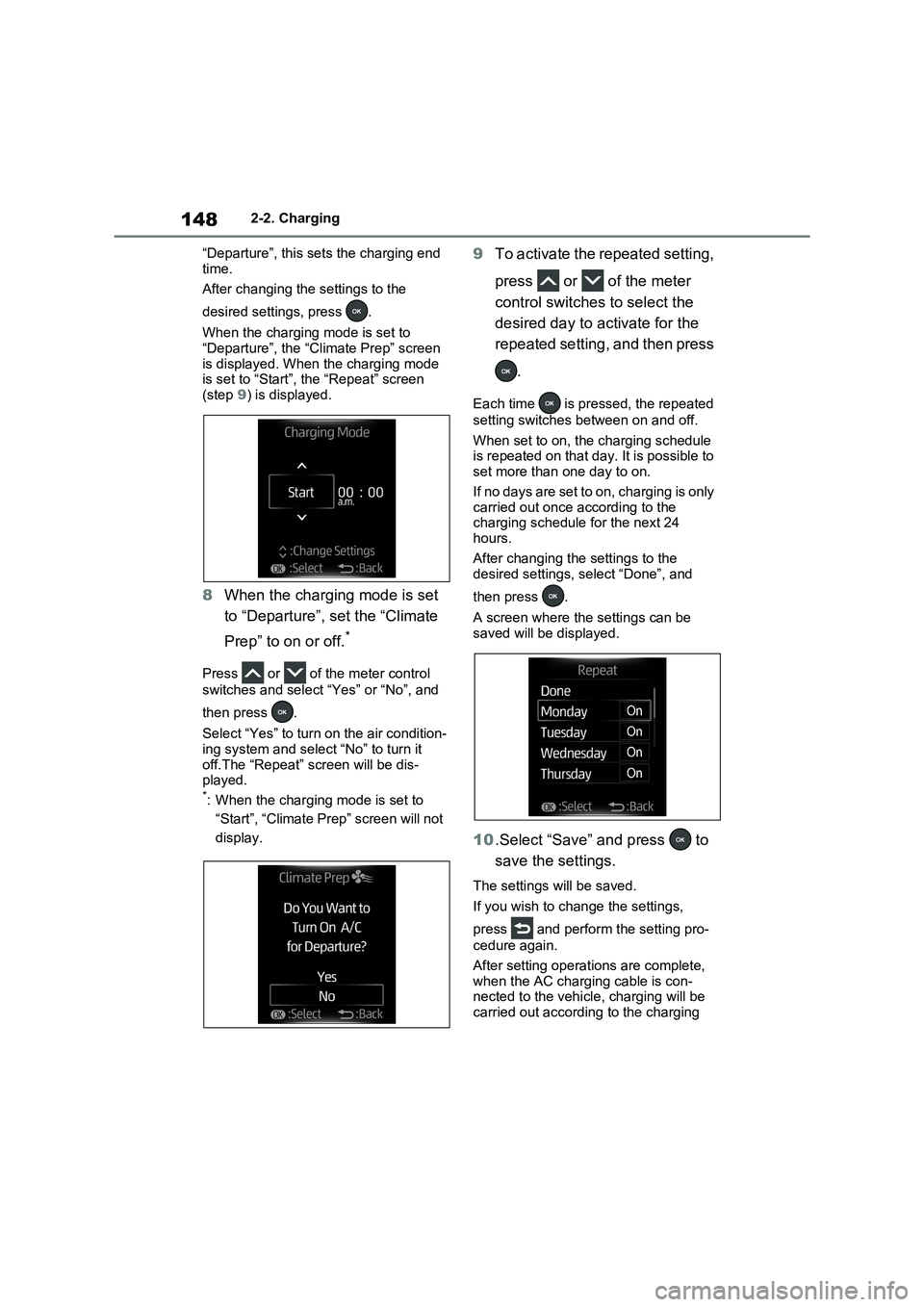
“Departure”, this sets the charging end
time.
After changing the settings to the
desired setti ngs, press .
When the charging mode is set to “Departure”, the “Cl imate Prep” screen
is displayed. When the charging mode
is set to “Start”, the “Repeat” screen (step 9) is displayed.
8When the charging mode is set
to “Departure”, set the “Climate
Prep” to on or off.*
Press or of the meter control
switches and select “Yes” or “No”, and
then press .
Select “Yes” to turn on the air condition - ing system and selec t “No” to turn it
off.The “Repeat” screen will be dis -
played.*: When the charging mode is set to
“Start”, “Climate Prep” screen will not
display.
9 To activate the repeated setting,
press or of the meter
control switches to select the
desired day to activate for the
repeated setting, and then press
.
Each time is pressed, the repeated
setting switches between on and off.
When set to on, th e charging schedule is repeated on that day. It is possible to
set more than one day to on.
If no days are set to on, charging is only carried out once according to the
charging schedule for the next 24
hours.
After changing the settings to the
desired settings, select “Done”, and
then press .
A screen where the settings can be saved will be displayed.
10 .Select “Save” and press to
save the settings.
The settings will be saved.
If you wish to chan ge the settings,
press and perform the setting pro -
cedure again.
After setting operatio ns are complete,
when the AC charging cable is con - nected to the vehicl e, charging will be
carried out according to the charging
Page 155 of 666
153
2
2-2. Charging
Plug-in hybrid system
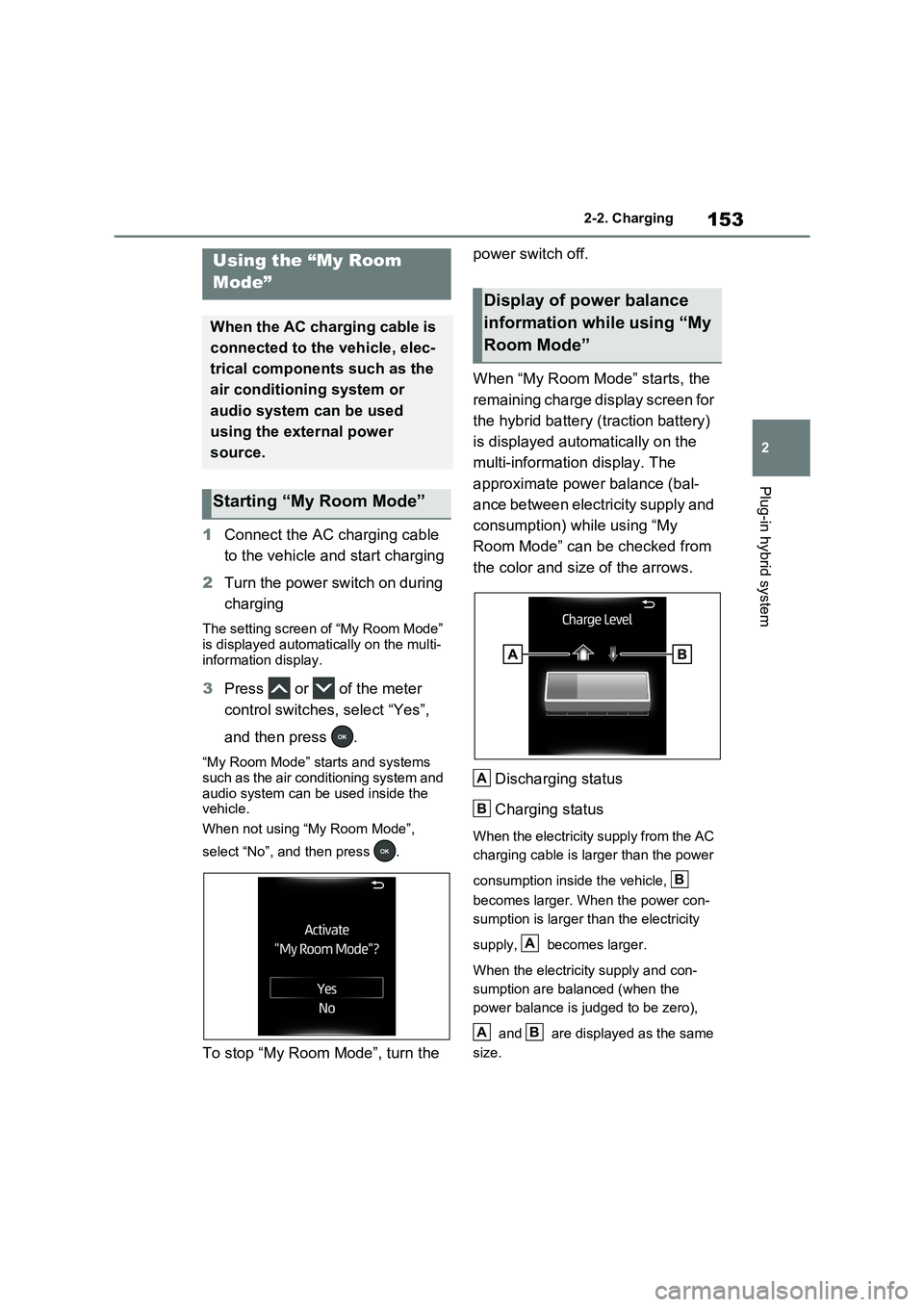
1 Connect the AC charging cable
to the vehicle and start charging
2 Turn the power switch on during
charging
The setting screen of “My Room Mode”
is displayed automat ically on the multi-
information display.
3 Press or of the meter
control switches, select “Yes”,
and then press .
“My Room Mode” starts and systems
such as the air conditioning system and
audio system can be used inside the vehicle.
When not using “My Room Mode”,
select “No”, and then press .
To stop “My Room Mode”, turn the
power switch off.
When “My Room Mode” starts, the
remaining charge display screen for
the hybrid battery (traction battery)
is displayed automatically on the
multi-information display. The
approximate power balance (bal -
ance between electricity supply and
consumption) while using “My
Room Mode” can be checked from
the color and size of the arrows.
Discharging status
Charging status
When the electricity supply from the AC
charging cable is larger than the power
consumption inside the vehicle,
becomes larger. When the power con -
sumption is larger than the electricity
supply, becomes larger.
When the electricity supply and con -
sumption are balanced (when the
power balance is judged to be zero),
and are displayed as the same
size.
Using the “My Room
Mode”
When the AC charging cable is
connected to the vehicle, elec -
trical components such as the
air conditioning system or
audio system can be used
using the external power
source.
Starting “My Room Mode”
Display of power balance
information while using “My
Room Mode”
A
B
B
A
AB
Page 156 of 666
1542-2. Charging
■When a door is unlocked while using “My Room Mode”
The charging connector unlocks,
charging stops and “My Room Mode” stops. In order to use “My Room Mode”
again, reconnect the AC charging cable
and start “My Room Mode” ( →P.153). When using “My Room Mode” with pub -
lic charging station, operation to start
charging using the charger may be required again before starting “My Room
Mode”.
■Meter display during charging
If “My Room Mode” is not turned on for approximately 100 seconds after the
power switch is turned on during
charging, the power switch will automat- ically turn off.
■While using “My Room Mode”
Any of the follo wing may occur.
●When the remaining charge of the
hybrid battery (traction battery)
reaches the lower l imit, the air condi- tioning system automat ically turns off.
In this situation, the air conditioning
system cannot be us ed until the remaining charge of the hybrid battery
(traction battery) increases. Turn the
power switch off and use “My Room Mode” after the remaining charge of
the hybrid battery ( traction battery) is
restored.
●When the outside te mperature is low,
the heater o utput may be limited due
to the air conditioning system opera - tion being restricted.
●Warning lights and indicators such as electric power steering system warn -
ing light (yellow) and malfunction indi -
cator lamp may turn on, but this is not a malfunction.
Also, when the surrounding area is
dark, the headlight s are turned on. ( →P.332)
■When a charging schedule is regis-
tered
When “My Room Mode” starts while the charging schedule is on standby,
charging schedules are ignored and
charging starts.
■When “My Room Mode” is used while the hybrid battery (traction
battery) is fully charged
When the power switch is turned on while the hybrid battery (traction battery)
is fully charged and the charging con -
nector that supplies power is connected, “Charging Port Lid i s Open” is displayed
on the multi-informati on display. In this
case, press of th e meter control
switches to display the setting screen of “My Room Mode”, and then select “My
Room Mode”.
When “My Room Mode ” is used while the hybrid battery ( traction battery) is
fully charged, the ele ctric power of the
hybrid battery (trac tion battery) may be consumed. In this case, charging may
be performed again.
■When a message related to “My
Room Mode” is displayed
When a message is displayed on the
multi-information display while using or
attempting to start “My Room Mode”, take the following correction proce -
dures.
●“Traction battery is too low for “My
Room Mode””
There is insufficient remaining charge in
the hybrid battery ( traction battery) for
starting “My Room Mode”.
Wait until the charge of the hybrid bat-
tery (traction batter y) increases, then
start “My Room Mode”.
●““My Room Mode” has stopped due to
low traction battery”
The remaining charge in the hybrid bat -
tery (traction battery) is insufficient.
Stop using “My Room Mode” and
charge the hybrid battery (traction bat -
tery).
●““My Room Mode” will stop when trac -
tion battery is too low Reduce power
usage to continue using “My Room
Page 157 of 666
155
2
2-2. Charging
Plug-in hybrid system
Mode””
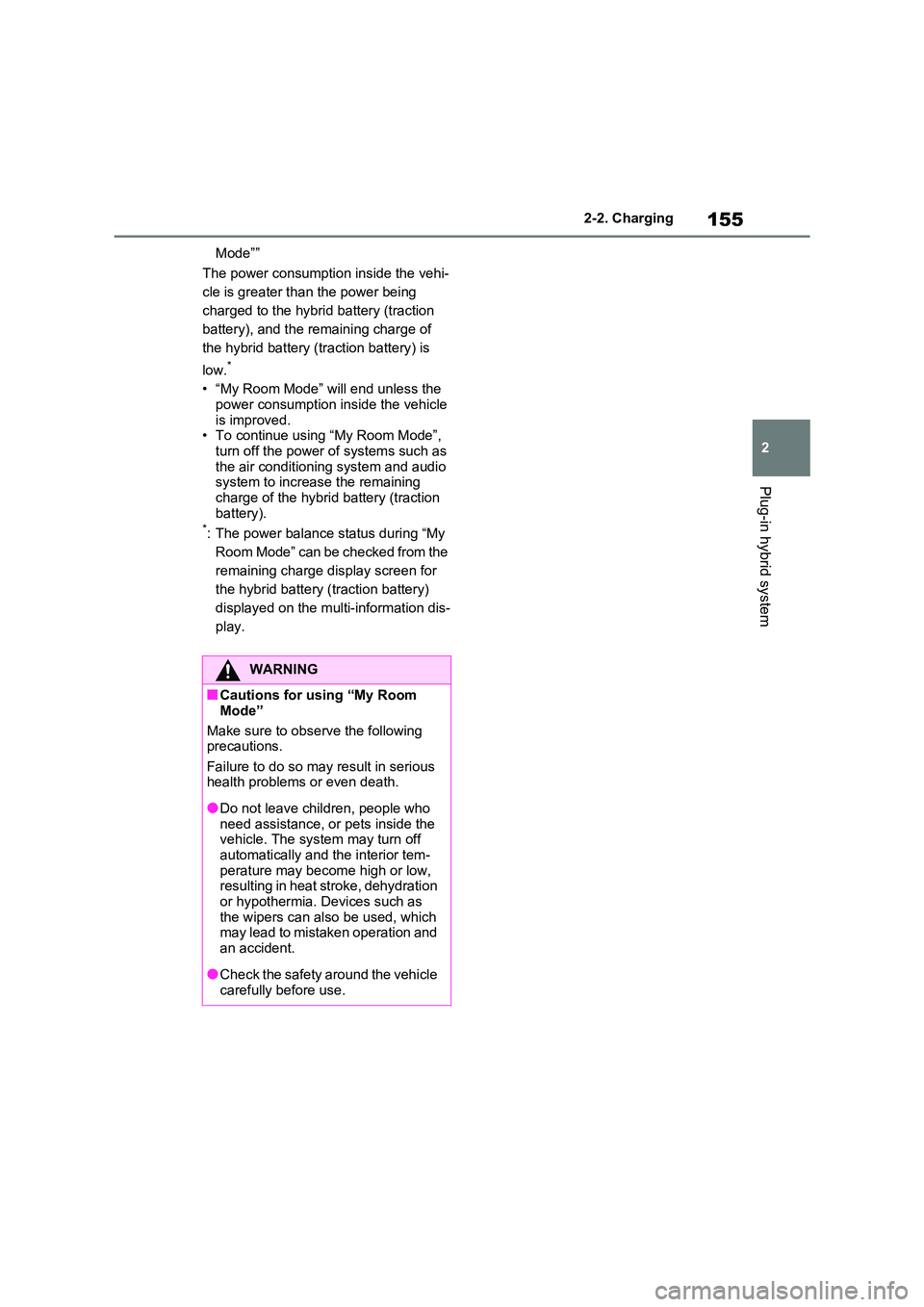
The power consumptio n inside the vehi-
cle is greater tha n the power being
charged to the hybrid battery (traction
battery), and the remaining charge of
the hybrid battery (traction battery) is
low.*
• “My Room Mode” will end unless the power consumption inside the vehicle
is improved.
• To continue using “My Room Mode”, turn off the power of systems such as
the air conditioni ng system and audio
system to increase the remaining charge of the hybrid battery (traction
battery).*: The power balance status during “My
Room Mode” can be checked from the
remaining charge display screen for
the hybrid battery (traction battery)
displayed on the multi-information dis -
play.
WARNING
■Cautions for using “My Room
Mode”
Make sure to observe the following
precautions.
Failure to do so may result in serious health problems or even death.
●Do not leave chil dren, people who need assistance, or pets inside the
vehicle. The sys tem may turn off
automatically and the interior tem- perature may become high or low,
resulting in heat stroke, dehydration
or hypothermia. Devices such as the wipers can also be used, which
may lead to mistaken operation and
an accident.
●Check the safety around the vehicle
carefully before use.
Page 161 of 666
159
2
2-2. Charging
Plug-in hybrid system
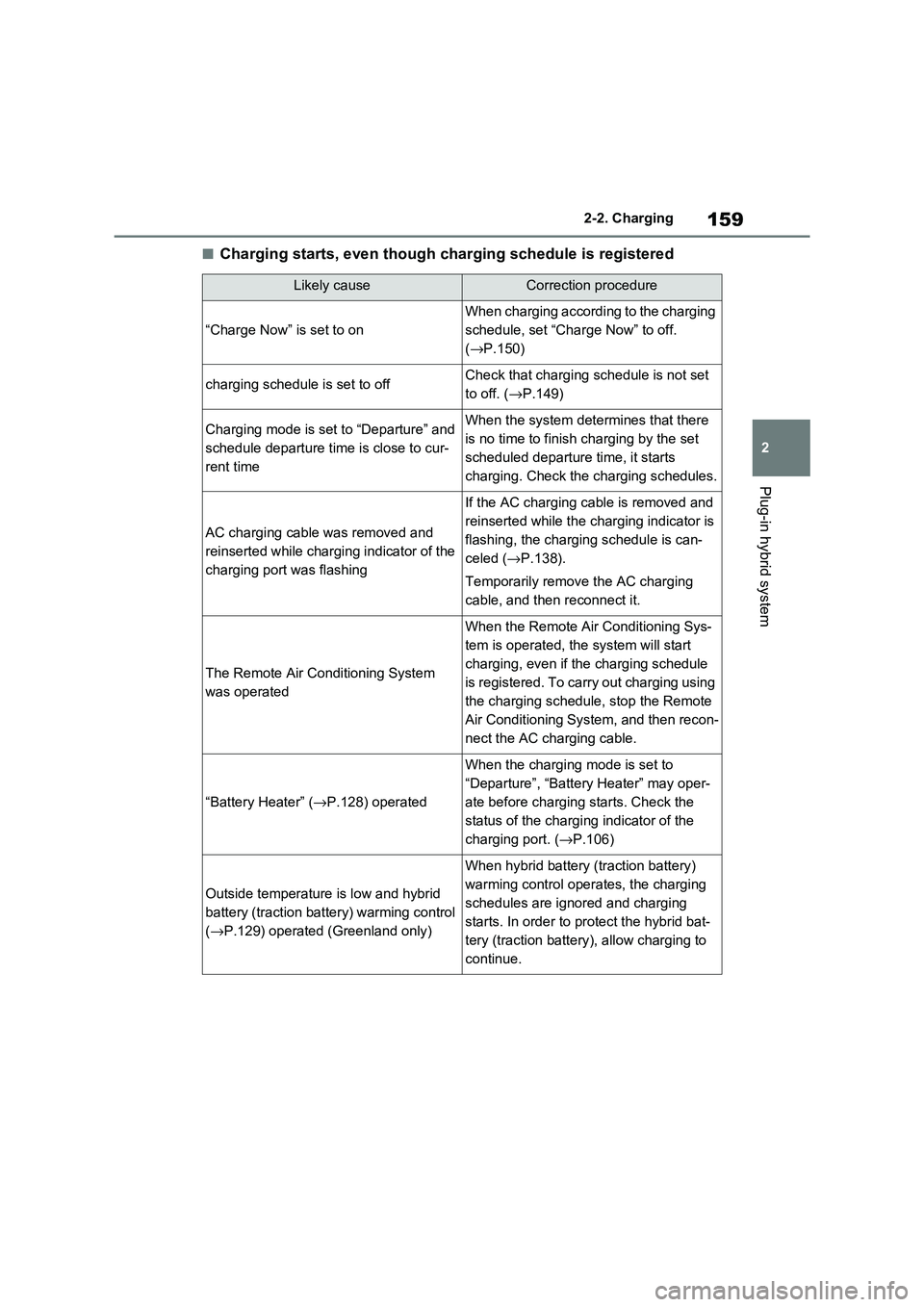
■Charging starts, even though charging schedule is registered
Likely causeCorrection procedure
“Charge Now” is set to on
When charging according to the charging
schedule, set “Char ge Now” to off.
( →P.150)
charging schedule is set to offCheck that charging schedule is not set
to off. ( →P.149)
Charging mode is set to “Departure” and
schedule departure time is close to cur -
rent time
When the system dete rmines that there
is no time to finish c harging by the set
scheduled departure time, it starts
charging. Check the charging schedules.
AC charging cable was removed and
reinserted while charging indicator of the
charging port was flashing
If the AC charging cable is removed and
reinserted while the charging indicator is
flashing, the charging schedule is can -
celed ( →P.138).
Temporarily remove the AC charging
cable, and then reconnect it.
The Remote Air Conditioning System
was operated
When the Remote Air Conditioning Sys -
tem is operated, the system will start
charging, even if the charging schedule
is registered. To carry out charging using
the charging schedule, stop the Remote
Air Conditioning System, and then recon -
nect the AC charging cable.
“Battery Heater” ( →P.128) operated
When the charging mode is set to
“Departure”, “Batter y Heater” may oper-
ate before charging starts. Check the
status of the chargi ng indicator of the
charging port. ( →P.106)
Outside temperature is low and hybrid
battery (traction ba ttery) warming control
( →P.129) operated (Greenland only)
When hybrid battery (traction battery)
warming control opera tes, the charging
schedules are ignored and charging
starts. In order to pro tect the hybrid bat-
tery (traction battery), allow charging to
continue.
Page 162 of 666
1602-2. Charging
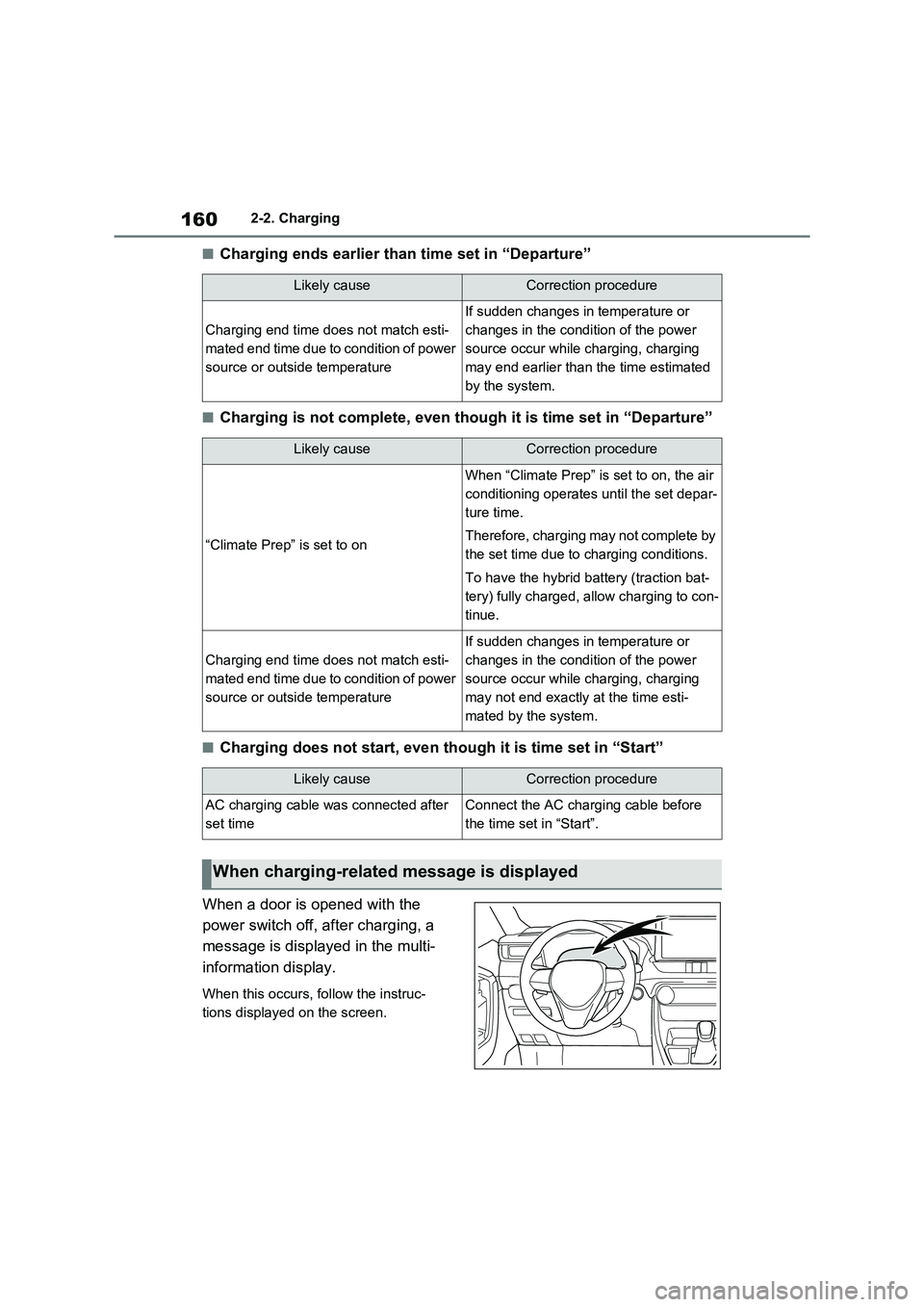
■Charging ends earlier than time set in “Departure”
■Charging is not complete, even though it is time set in “Departure”
■Charging does not start, even though it is time set in “Start”
When a door is opened with the
power switch off, after charging, a
message is displayed in the multi-
information display.
When this occurs, follow the instruc -
tions displayed on the screen.
Likely causeCorrection procedure
Charging end time doe s not match esti-
mated end time due to condition of power
source or outside temperature
If sudden changes in temperature or
changes in the condition of the power
source occur while charging, charging
may end earlier than t he time estimated
by the system.
Likely causeCorrection procedure
“Climate Prep” is set to on
When “Climate Prep” is set to on, the air
conditioning operates until the set depar-
ture time.
Therefore, charging may not complete by
the set time due to charging conditions.
To have the hybrid b attery (traction bat-
tery) fully charged, allow charging to con -
tinue.
Charging end time doe s not match esti-
mated end time due to condition of power
source or outside temperature
If sudden changes in temperature or
changes in the condition of the power
source occur while charging, charging
may not end exactly at the time esti-
mated by the system.
Likely causeCorrection procedure
AC charging cable wa s connected after
set time
Connect the AC charging cable before
the time set in “Start”.
When charging-related message is displayed
Page 163 of 666
161
2
2-2. Charging
Plug-in hybrid system
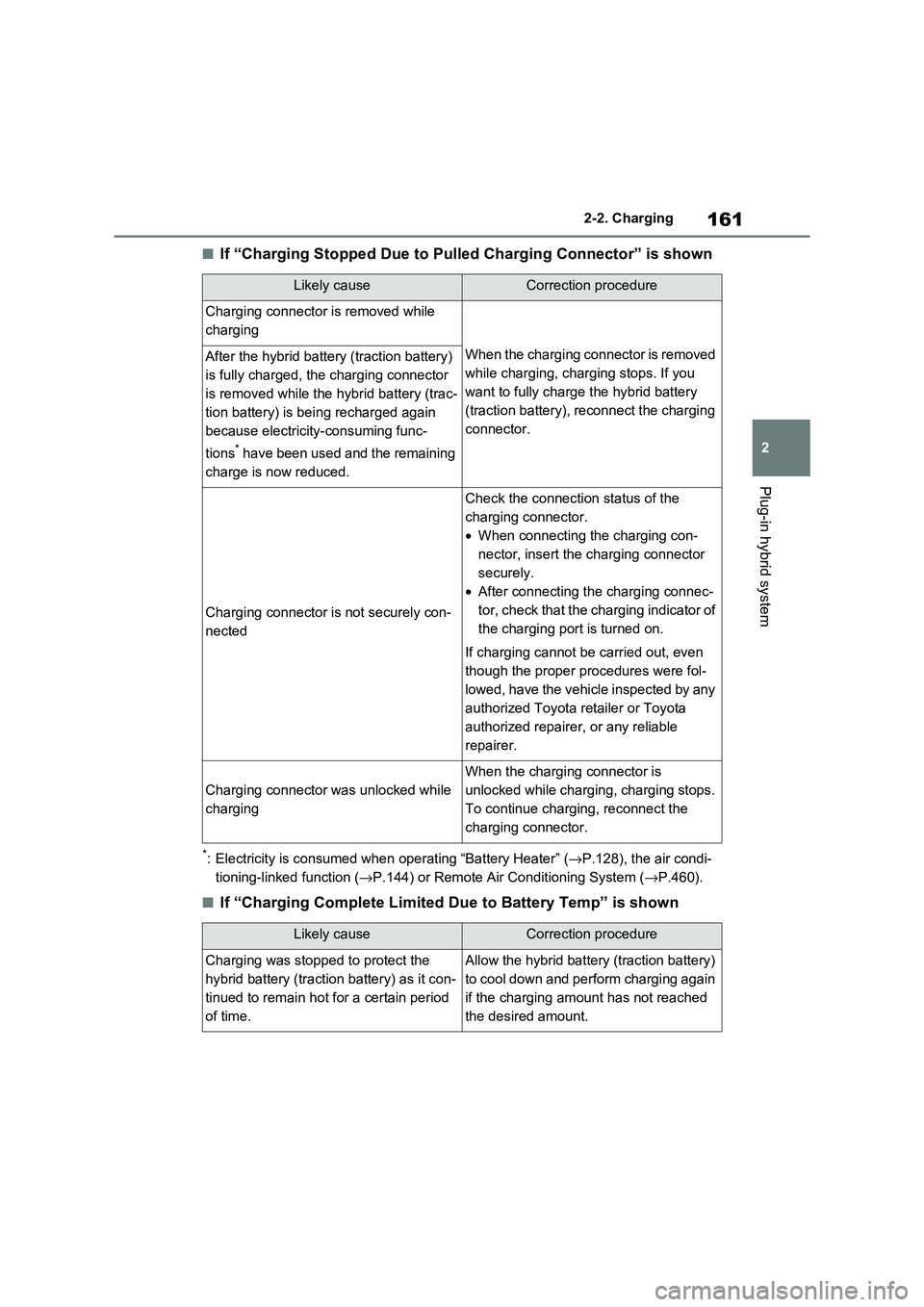
■If “Charging Stopped Due to Pul led Charging Connector” is shown
*: Electricity is consumed when operating “Battery Heater” (→P.128), the air condi-
tioning-linked function ( →P.144) or Remote Air Conditioning System (→P.460).
■If “Charging Complete Limited Due to Battery Temp” is shown
Likely causeCorrection procedure
Charging connector is removed while
charging
When the charging connector is removed
while charging, charging stops. If you
want to fully charge the hybrid battery
(traction battery), reconnect the charging
connector.
After the hybrid battery (traction battery)
is fully charged, the charging connector
is removed while the hybrid battery (trac -
tion battery) is bei ng recharged again
because electricity-consuming func -
tions* have been used and the remaining
charge is now reduced.
Charging connector is not securely con -
nected
Check the connection status of the
charging connector.
• When connecting the charging con-
nector, insert the charging connector
securely.
• After connecting the charging connec-
tor, check that the charging indicator of
the charging port is turned on.
If charging cannot be carried out, even
though the proper procedures were fol -
lowed, have the vehicle inspected by any
authorized Toyota retailer or Toyota
authorized repairer, or any reliable
repairer.
Charging connector was unlocked while
charging
When the charging connector is
unlocked while charging, charging stops.
To continue charging, reconnect the
charging connector.
Likely causeCorrection procedure
Charging was stopped to protect the
hybrid battery (traction battery) as it con -
tinued to remain hot for a certain period
of time.
Allow the hybrid battery (traction battery)
to cool down and perform charging again
if the charging amount has not reached
the desired amount.
Page 186 of 666
1843-1. Instrument cluster
Electricity consumption is the consump -
tion rate of the electricity when EV driv - ing is performed and equivalent to the
fuel consumption for the gasoline vehi -
cles. For this vehic le, electricity con- sumed per 100 km (“kWh/100 km”) is
displayed as electri city consumption on
each screen.
When the unit is set to “MPH” (if
equipped):
Electricity consumption is the consump - tion rate of the electricity when EV driv -
ing is performed and equivalent to the
fuel consumption for the gasoline vehi - cles. For this vehicle, driven distance
per kWh of electricity consumed
(“miles/kWh”) is displ ayed as electricity consumption on each screen.
■EV driving range
●When the air cond itioning system is
operating, is displayed next to
the EV driving range and the EV driv - ing range with the air conditioning sys -
tem on is displayed.
●The EV driving range may shorten
even when not driving due to power
consumption by the system.
●For details, refer to “EV driving range”
( →P.102)
■Distance to empty
●This distance is computed based on
your average fuel consumption. As a result, the actual di stance that can be
driven may differ from that displayed.
●When only a small amount of fuel is
added to the tank, the display may not
be updated. When refueling, turn the power switch off. If the vehicle is refu -
eled without turning the power switch
off, the display may not be updated.
●When “Refuel” is displayed, the
remaining fuel amount is low and the distance that can be driven with the
remaining fuel cannot be calculated.
Refuel immediately.
■ECO Accelerator G uidance/“Eco Score” will not operate when
The ECO Acce lerator Guidance/“Eco
Score” will not operate in the following
situations:
●The Hybrid System I ndicator is not
operating.
●The vehicle is being driven using the
dynamic radar cruise control with full- speed range.
■Driving support system infor -
mation display
Select to display the operational
status of the following systems:
LTA (Lane Tracing Assist)*
( →P.362)
Dynamic radar cruise control
with full-speed range* ( →P.376)
Cruise control* (→P.388)
Speed limiter* (→P.391)
*: If equipped
■Navigation system-linked dis-
play (if equipped)
Select to display the following navi-
gation system-linked information.
Route guidance
Compass display
Select to enable selection of an
audio source or track on the dis -
play.
Driving support system
information display
Audio system-linked display
Page 196 of 666
1943-1. Instrument cluster
Brake Override System
( →P.301)
Drive-Start Control (→P.301)
Parking Support Brake function
(static objects) (if equipped)
( →P.424)
Displayed content is the same as that
displayed on the meter. For details,
refer to the explanations of each sys -
tem.
■ / icons
Displays the following multi-infor -
mation display linked icons:
: Master warning icon
Displayed when a warning message is
displayed on the multi-information dis -
play.
: Information icon
Displayed when a suggestion/advice
pop-up display is displayed on the
multi-information display.
■Warning message
Some warning messages are dis -
played when necessary, according
to certain conditions.
Displayed content is the same as that
displayed on the multi-information dis -
play. For details, refer to the explana-
tions of e ach system.
■Audio system operation status
Displayed when an audio remote
control switch on the steering wheel
is operated.
■Hands-free system status (if
equipped)
Displayed when the hands-free
system is operated.
■Outside temperature display
Displayed when the power switch is
turned to ON or when the low out -
side temperature indicator is flash -
ing.
■When a pop-up display is displayed
When a pop-up display is displayed, a
current display may no longer be dis -
played. In this case, the display will return after the p op-up display disap-
pears.
■Outside temperature display
●When the ambient temperature is
approximately 3°C (37°F) or lower,
will flash for approximately 10
seconds and the out side temperature
display will turn off.
●In the following situ ations, the correct
outside temperature may not be dis - played, or the display may take longer
than normal to change:
• When stopped (including when using “My Room Mode”), o r driving at low
speeds (less than 2 0 km/h [12 mph])
• When the outside temperature has changed suddenly (at the
entrance/exit of a garage, tunnel, etc.)
●When “--” or “E” is displayed, the sys -
tem may be malfunctioning.
Take your vehicle to any authorized Toyota retailer or Toyota authorized
repairer, or any reliable repairer.
Display content selected by “HUD
Driving Support” on the screen
is displayed. ( →P.192)
Hybrid System Indica-
tor/Tachometer