key battery TOYOTA RAV4 PLUG-IN HYBRID 2021 Owners Manual
[x] Cancel search | Manufacturer: TOYOTA, Model Year: 2021, Model line: RAV4 PLUG-IN HYBRID, Model: TOYOTA RAV4 PLUG-IN HYBRID 2021Pages: 666, PDF Size: 161.28 MB
Page 3 of 666
RAV4 Plug-in Hybrid_OM_OM42E06E_(EE)
1
6
5
4
3
2
8
7
9
Pictorial indexSearch by illustration
For safety
and security
Make sure to read through them
(Main topics: Child seat, theft deterrent system)
Plug-in hybrid
system
Plug-in hybrid system features, charging method, etc.
(Main topics: Driving tips, charging methods)
Vehicle status
information and
indicators
Reading driving-related information
(Main topics: Meters, multi-information display)
Before driving
Opening and closing the doors and windows,
adjustment before driving
(Main topics: Keys, doors, seats, power windows)
Driving
Operations and advice which are necessary for
driving
(Main topics: Starting hybrid system, refueling)
Interior featuresUsage of the interior features
(Main topics: Air conditioner, storage features)
Maintenance
and care
Caring for your vehicle and maintenance procedures
(Main topics: Interior and exterior, light bulbs)
When trouble
arises
What to do in case of malfunction and emergency
(Main topics: 12-volt battery discharge, flat tire)
Vehicle
specifications
Vehicle specifications, customizable features
(Main topics: Fuel, oil, tire inflation pressure)
IndexSearch by symptom
Search alphabetically
Page 6 of 666
4TABLE OF CONTENTS
6-1. Using the air conditioning
system and defogger
Automatic air conditioning sys -
tem.................................... 452
Remote Air Conditioning System
.......................................... 460
Heated steering wheel/Front
seat heaters/Front seat heaters
and ventilators/Rear seat heat -
ers..................................... 462
6-2. Using the interior lights
Interior lights list .................. 465
6-3. Using the storage features
List of storage features ....... 468
Luggage compartment features
.......................................... 472
6-4. Using the other interior fea -
tures
Other interior features ......... 476
7-1. Maintenance and care
Cleaning and protecting the
vehicle exterior ................. 488
Cleaning and protecting the
vehicle interior .................. 491
7-2. Maintenance
Maintenance requirements . 494
7-3. Do-it-yourself maintenance
Do-it-yourself service precau -
tions .................................. 496
Hood ................................... 498
Positioning a floor jack ........ 499
Engine compartment........... 501
12-volt battery ..................... 506
Tires .................................... 509
Tire inflation pressure ......... 529
Wheels ................................ 530
Air conditioning filter ........... 532
Cleaning the DC/DC Converter
air intake vent and filter .... 536
Wiper insert replacement .... 539
Electronic key battery ......... 543
Checking and replacing fuses
.......................................... 545
Light bulbs .......................... 548
8-1. Essential information
Emergency flashers ............ 560
If your vehicle has to be stopped
in an emergency ............... 560
If the vehicle is trapped in rising
water ................................. 561
8-2. Steps to take in an emergency
If your vehicle needs to be towed
.......................................... 563
If you think something is wrong
.......................................... 566
If a warning light turns on or a
warning buzzer sounds..... 568
If a warning message is dis -
played ............................... 578
If you have a flat tire (vehicles
without spare tire) ............. 582
If you have a flat tire (vehicles
with spare tire) .................. 593
6Interior features
7Maintenance and care
8When trouble arises
Page 7 of 666
5TABLE OF CONTENTS
1
6
5
4
3
2
8
7
9
If the hybrid system will not start
.......................................... 601
If you lose your keys ........... 603
If the fuel filler door cannot be
opened.............................. 603
If the electronic key does not
operate properly ............... 604
If the 12-volt battery is dis -
charged............................. 606
If your vehicle overheats ..... 611
If the vehicle becomes stuck
.......................................... 615
9-1. Specifications
Maintenance data (fuel, oil level,
etc.)................................... 618
Fuel information .................. 627
9-2. Customization
Customizable features ........ 629
9-3. Initialization
Items to initialize ................. 643
What to do if... (Troubleshooting)
.......................................... 646
Alphabetical Index ............. 649
9Vehicle specifications
Index
Page 81 of 666
79
1
1-4. Theft dete rrent system
For safety and security
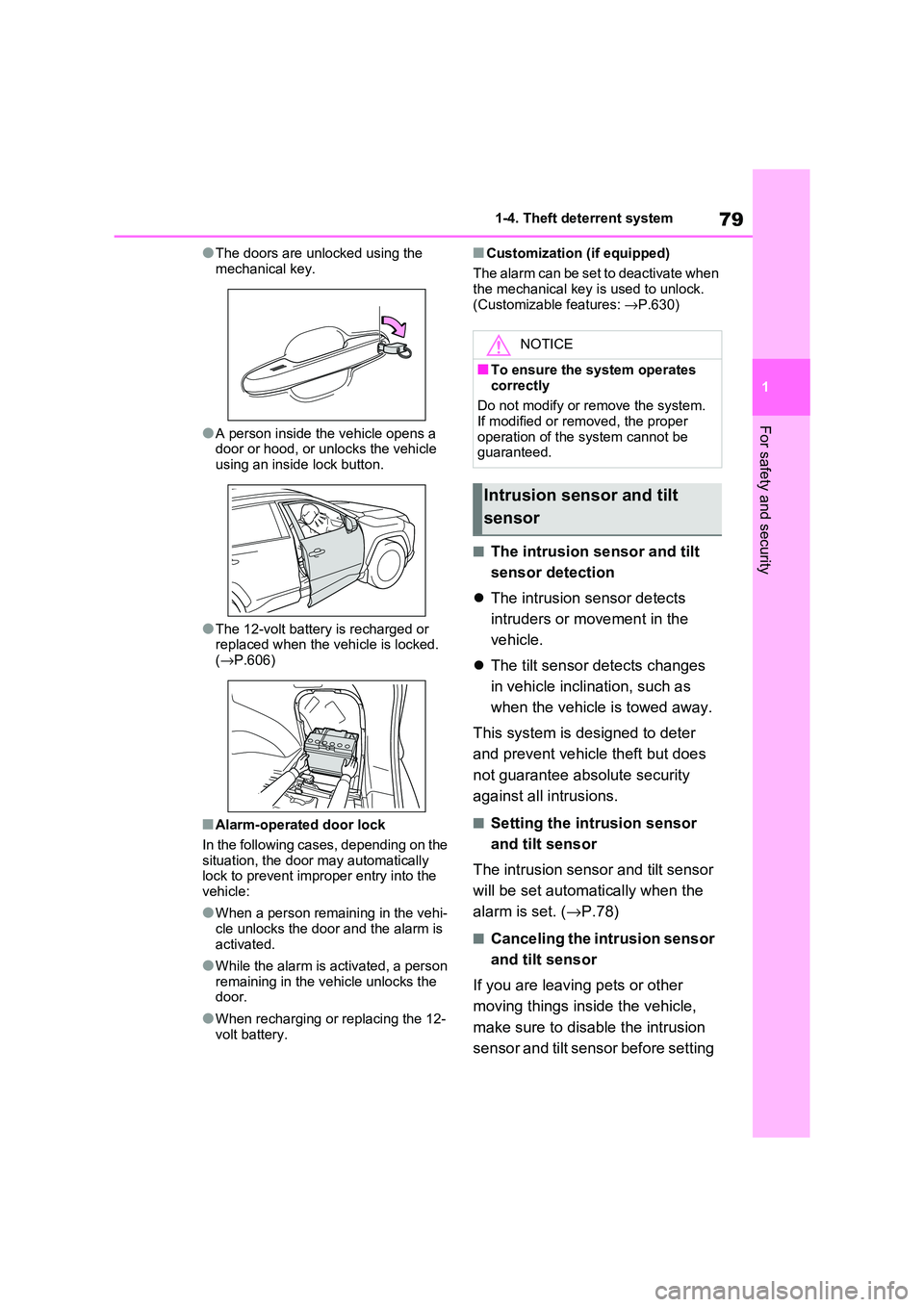
●The doors are unlocked using the
mechanical key.
●A person inside the vehicle opens a
door or hood, or unlocks the vehicle using an inside lock button.
●The 12-volt battery is recharged or replaced when the v ehicle is locked.
( →P.606)
■Alarm-operated door lock
In the following cases, depending on the
situation, the door may automatically lock to prevent impro per entry into the
vehicle:
●When a person rem aining in the vehi-
cle unlocks the door and the alarm is
activated.
●While the alarm is activated, a person
remaining in the v ehicle unlocks the door.
●When recharging or replacing the 12-
volt battery.
■Customization (if equipped)
The alarm can be set to deactivate when the mechanical key is used to unlock.
(Customizable features: →P.630)
■The intrusion sensor and tilt
sensor detection
The intrusion sensor detects
intruders or movement in the
vehicle.
The tilt sensor detects changes
in vehicle inclination, such as
when the vehicle is towed away.
This system is designed to deter
and prevent vehicle theft but does
not guarantee abs olute security
against all intrusions.
■Setting the intrusion sensor
and tilt sensor
The intrusion sensor and tilt sensor
will be set automa tically when the
alarm is set. ( →P.78)
■Canceling the intrusion sensor
and tilt sensor
If you are leaving pets or other
moving things inside the vehicle,
make sure to disable the intrusion
sensor and tilt sensor before setting
NOTICE
■To ensure the system operates correctly
Do not modify or r emove the system.
If modified or remo ved, the proper
operation of the system cannot be guaranteed.
Intrusion sensor and tilt
sensor
Page 204 of 666
2024-1. Key information
4-1.Key information
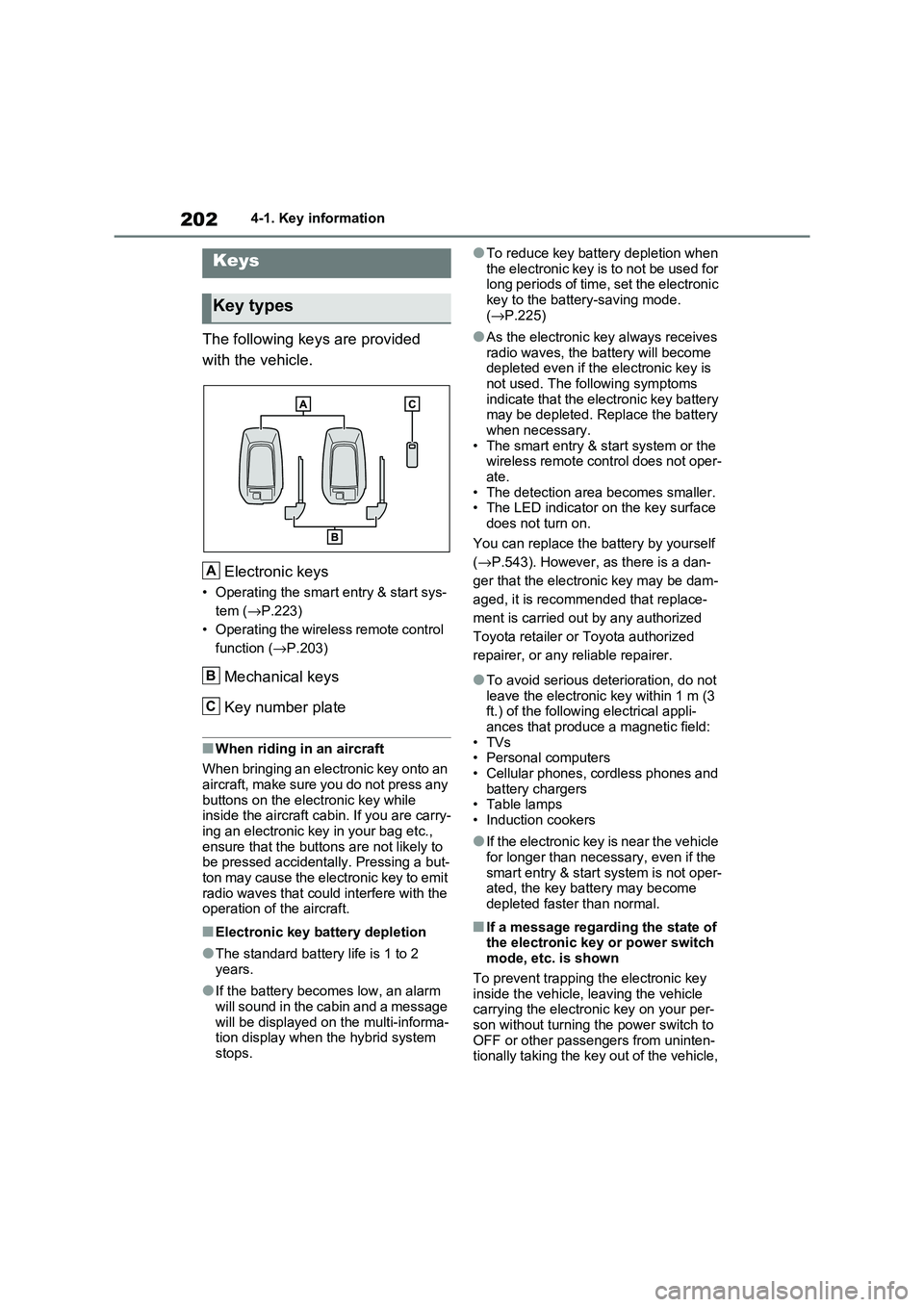
The following keys are provided
with the vehicle.
Electronic keys
• Operating the smart entry & start sys -
tem ( →P.223)
• Operating the wireless remote control
function ( →P.203)
Mechanical keys
Key number plate
■When riding in an aircraft
When bringing an electronic key onto an
aircraft, make sure you do not press any
buttons on the electronic key while inside the aircraft cabin. If you are carry -
ing an electronic key in your bag etc.,
ensure that the buttons are not likely to be pressed accidentally. Pressing a but -
ton may cause the electronic key to emit
radio waves that could interfere with the operation of t he aircraft.
■Electronic key battery depletion
●The standard battery life is 1 to 2
years.
●If the battery becom es low, an alarm
will sound in the cabin and a message will be displayed on the multi-informa -
tion display when the hybrid system
stops.
●To reduce key battery depletion when
the electronic key is to not be used for long periods of time, set the electronic
key to the batter y-saving mode.
( →P.225)
●As the electronic key always receives
radio waves, the ba ttery will become depleted even if the electronic key is
not used. The following symptoms
indicate that the electronic key battery may be depleted. Replace the battery
when necessary.
• The smart entry & start system or the wireless remote control does not oper -
ate.
• The detection area becomes smaller. • The LED indicator on the key surface
does not turn on.
You can replace the battery by yourself
( →P.543). However, as there is a dan-
ger that the electro nic key may be dam-
aged, it is recomm ended that replace-
ment is carried ou t by any authorized
Toyota retailer or Toyota authorized
repairer, or any reliable repairer.
●To avoid serious deterioration, do not
leave the electronic key within 1 m (3
ft.) of the followi ng electrical appli- ances that produce a magnetic field:
•TVs
• Personal computers • Cellular phones, cordless phones and
battery chargers
• Table lamps • Induction cookers
●If the electronic key is near the vehicle for longer than necessary, even if the
smart entry & star t system is not oper-
ated, the key battery may become depleted faster than normal.
■If a message regarding the state of the electronic key or power switch
mode, etc. is shown
To prevent trapping the electronic key inside the vehicle, leaving the vehicle
carrying the electronic key on your per -
son without turning t he power switch to OFF or other passengers from uninten -
tionally taking the key out of the vehicle,
Keys
Key types
A
B
C
Page 205 of 666
203
4
4-1. Key information
Before driving
etc., a message that prompts the user to
confirm the state of the electronic key or power switch mode may be shown on
the multi-information display. In those
cases, follow the inst ructions on the dis- play immediately.
■If “Key Battery Low Replace Key
Battery” is displayed on the multi-
information display
The electronic key has a low battery.
Replace the electronic key battery.
( →P.543)
■Replacing the battery
→ P.543
■Confirmation of the registered key
number
The number of keys already registered to the vehicle can be confirmed. Ask any
authorized Toyota retailer or Toyota
authorized repairer, or any reliable repairer for details.
■If “A New Key has been Registered
Contact Your Dealer for Details” is
displayed on the multi-information display
This message will be displayed each
time the driver’s door is opened when the doors are unlocked from the outside
for approximately 10 days after a new
electronic key has been registered. If this message is displayed but you
have not had a new electronic key regis -
tered, ask any authorized Toyota retailer or Toyota authorized repairer, or any
reliable repairer to check if an unknown
electronic key (other than those in your possession) has been registered.
The electronic keys are equipped
with the following wireless remote
control:
NOTICE
■To prevent key damage
●Do not drop the ke ys, subject them
to strong shocks or bend them.
●Do not expose the keys to high
temperatures for long periods of time.
●Do not get the k eys wet or wash them in an ultrasonic washer, etc.
●Do not attach metallic or magnetic materials to the k eys or place the
keys close to such materials.
●Do not disasse mble the keys.
●Do not attach a sticker or anything else to the surface of the electronic
key.
●Do not place the k eys near objects
that produce magnetic fields, such
as TVs, audio systems and induc - tion cookers.
●Do not place the keys near medical electrical equipment such as low-
frequency therapy equipment or
microwave therapy equipment, and do not receive medical attention
with the keys on your person.
■Carrying the electronic key on
your person
Carry the electronic key 10 cm (3.9 in.) or more away fr om electric appli-
ances that are turned on. Radio
waves emitted fr om electric appli- ances within 10 cm (3.9 in.) of the
electronic key may in terfere with the
key, causing the key to not function properly.
■In case of a smart entry & start system malfunction or other key-
related problems
→ P.604
■When an electronic key is lost
→ P.603
Wireless remote control
Page 206 of 666
2044-1. Key information
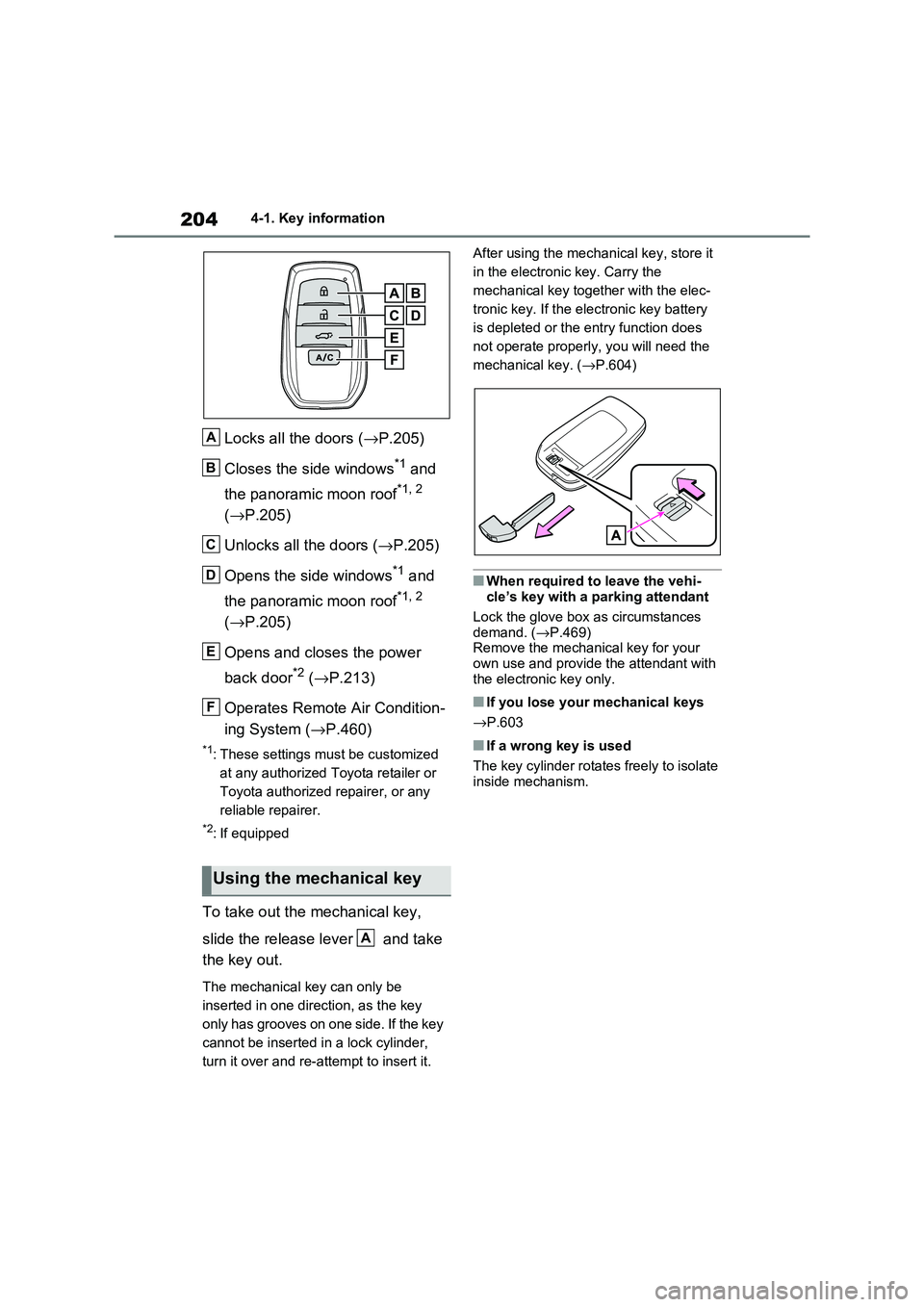
Locks all the doors (→P.205)
Closes the side windows*1 and
the panoramic moon roof*1, 2
( →P.205)
Unlocks all the doors ( →P.205)
Opens the side windows*1 and
the panoramic moon roof*1, 2
( →P.205)
Opens and closes the power
back door*2 ( →P.213)
Operates Remote Air Condition -
ing System ( →P.460)
*1: These settings must be customized
at any authorized Toyota retailer or
Toyota authorized repairer, or any
reliable repairer.
*2: If equipped
To take out the mechanical key,
slide the release lever and take
the key out.
The mechanical key can only be
inserted in one direction, as the key
only has grooves on one side. If the key
cannot be inserted i n a lock cylinder,
turn it over and re-at tempt to insert it.
After using the mec hanical key, store it
in the electronic key. Carry the
mechanical key together with the elec -
tronic key. If the elec tronic key battery
is depleted or the ent ry function does
not operate properly, you will need the
mechanical key. ( →P.604)
■When required to leave the vehi-
cle’s key with a parking attendant
Lock the glove box a s circumstances demand. ( →P.469)
Remove the mechani cal key for your
own use and provide the attendant with the electronic key only.
■If you lose your mechanical keys
→ P.603
■If a wrong key is used
The key cylinder rotate s freely to isolate inside mechanism.
Using the mechanical key
A
B
C
D
E
F
A
Page 209 of 666
207
4
4-2. Opening, closing and locking the doors
Before driving
■Setting the alarm (if equipped)
Locking the doors will set the alarm sys - tem. ( →P.78)
■Conditions affecting the operation
of the smart entry & start system or
wireless remote control
→ P.225
■If the smart entry & start system or
the wireless remote control does
not operate properly
●Use the mechanical key to lock and
unlock the doors. ( →P.604)
●Replace the key battery with a new
one if it is depleted. ( →P.543)
■If the 12-volt battery is discharged
The doors cannot be locked and
unlocked using the smart entry & start
system or wireless rem ote control. Lock or unlock the doors using the mechani -
cal key. ( →P.604)
■Rear seat reminder function
●In order to remind you not to forget
luggage, etc. in the rear seat, when
the power switch i s turned to OFF after any of the fo llowing conditions
are met, a buzzer will sound and a
message will be displayed on the multi-information di splay for approxi-
mately 6 seconds.
• The hybrid system is started within 10 minutes after opening and closing a
rear door.
• A rear door has been opened and closed after the hy brid system was
started.
However, if a rear door is opened and
then closed within approximately 2 sec-
onds, the rear seat reminder function
may not operate.
●The rear seat reminder function deter - mines that luggage, etc. has been
placed in a rear seat based on open -
ing and closing of a rear door. There - fore, depending on t he situation, the
rear seat reminder function may not
operate and you may still forget lug - gage, etc. in the rear seat, or it may
operate unnecessarily.
●The rear seat reminder function can
be enabled/disabled. ( →P.629)
■Customization
Settings (e.g. unlocking function using a key) can be changed.
(Customizable features: →P.633)
WARNING
■To prevent an accident
Observe the following precautions while driving the vehicle.
Failure to do so may result in a door
opening and an occupant could be thrown out of the v ehicle, resulting in
death or serious injury.
●Ensure that all doo rs are properly closed.
●Do not pull the in side handle of the doors while driving.
Be especially care ful for the front
doors, as the doors may be opened even if the inside lock buttons are in
locked position.
●Set the rear door child-protector
locks when childre n are seated in
the rear seats.
■When opening or closing a door
Check the surroundings of the vehicle such as whether the vehicle is on an
incline, whether there is enough
space for a door to open and whether a strong wind is blowing. When open -
ing or closing the door, hold the door
handle tightly to prepare for any unpredictable movement.
Page 222 of 666
2204-2. Opening, closing and locking the doors
WARNING
●If the operating conditions of the
power back door are no longer met,
a buzzer may sou nd and the back door may stop opening or closing.
The back door then has to be oper -
ated manually. Take extra care when on an inclin e, as the back
door may open or close abruptly.
●On an incline, the back door may suddenly shut after it opens. Make
sure the back door is fully open and
secure.
●In the following situations, the
power back door may detect an abnormality and automatic opera-
tion may be stopped. In this case,
the back door has to be operated manually. Take extra care when on
an incline, as the back door may
open or close abruptly.
• When the back door contacts an
obstacle
• When the 12-volt battery voltage suddenly drops, such as when the
power switch is turned to ON or the
hybrid system is started during automatic operation
●If a bicycle carrier o r similar heavy object is attached to the back door,
the power back door may not oper -
ate, causing itself to malfunction, or the back door may suddenly shut
again after being opened, causing
someone’s hands, head or neck to be caught and injured. When
installing an accessory part to the
back door, using a genuine Toyota part is recommended.
■Jam protection function
Observe the following precautions.
Failure to do so m ay cause death or
serious injury.
●Never use any part of your body to
intentionally activ ate the jam pro-
tection function.
●The jam protection function may not work if something gets caught just
before the back door fully closes.
Be careful not to catch fingers or anything else.
●The jam protection function may not work depending on the shape of the
object that is caught. Be careful not
to catch fingers or anything else.
■Hands Free Power Back Door (if
equipped)
Observe the following precautions
when operating the Hands Free
Power Back Door. Failure to do so m ay cause death or
serious injury.
●Check the safety of the surrounding area to make sur e there are no
obstacles or anything that could
cause any of your belongings to get caught.
●When putting your foot near the lower center part of the rear bumper
and moving it from the rear bumper,
be careful not to touch the exhaust pipes until they have cooled down
sufficiently, as touc hing hot exhaust
pipes can cause burns.
●Do not leave the electronic key
within the effectiv e range (detection area) of the luggage compartment.
Page 226 of 666
2244-2. Opening, closing and locking the doors
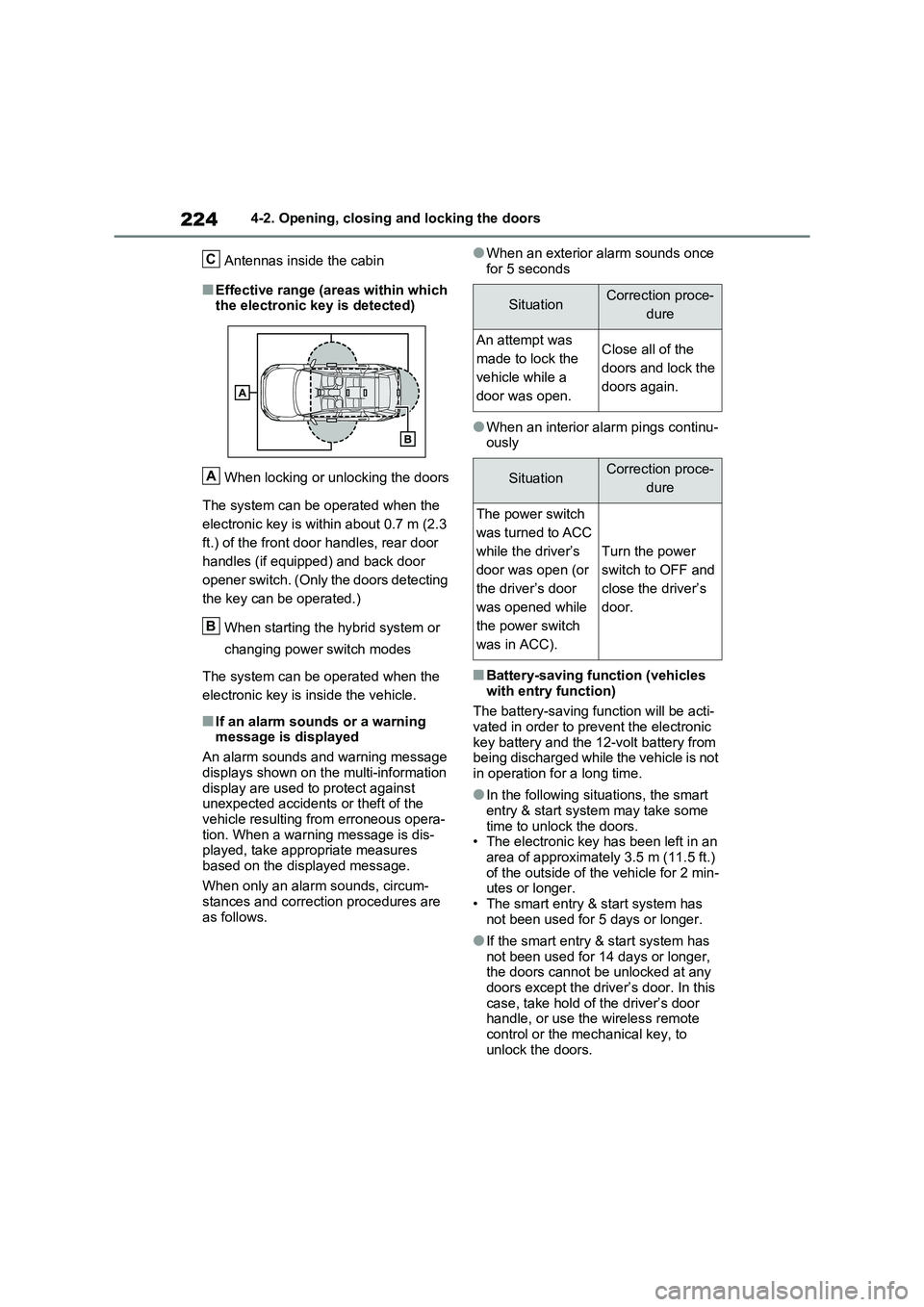
Antennas inside the cabin
■Effective range (areas within which
the electronic key is detected)
When locking or unlocking the doors
The system can be operated when the
electronic key is wit hin about 0.7 m (2.3
ft.) of the front doo r handles, rear door
handles (if equipped) and back door
opener switch. (Only the doors detecting
the key can be operated.)
When starting the hybrid system or
changing power switch modes
The system can be operated when the
electronic key is inside the vehicle.
■If an alarm sounds or a warning
message is displayed
An alarm sounds and warning message
displays shown on the multi-information
display are used to protect against unexpected accidents or theft of the
vehicle resulting from erroneous opera -
tion. When a warning message is dis - played, take appropriate measures
based on the displayed message.
When only an alarm sounds, circum - stances and correcti on procedures are
as follows.
●When an exterior alarm sounds once
for 5 seconds
●When an interior alarm pings continu - ously
■Battery-saving func tion (vehicles
with entry function)
The battery-saving f unction will be acti- vated in order to prevent the electronic
key battery and the 12-volt battery from
being discharged while the vehicle is not in operation for a long time.
●In the following situ ations, the smart entry & start system may take some
time to unlock the doors.
• The electronic key has been left in an area of approximately 3.5 m (11.5 ft.)
of the outside of the vehicle for 2 min -
utes or longer. • The smart entry & start system has
not been used for 5 days or longer.
●If the smart entry & start system has not been used for 14 days or longer,
the doors cannot be unlocked at any
doors except the driver ’s door. In this case, take hold o f the driver’s door
handle, or use the wireless remote
control or the mechanical key, to unlock the doors.
C
A
B
SituationCorrection proce -
dure
An attempt was
made to lock the
vehicle while a
door was open.
Close all of the
doors and lock the
doors again.
SituationCorrection proce -
dure
The power switch
was turned to ACC
while the driver’s
door was open (or
the driver’s door
was opened while
the power switch
was in ACC).
Turn the power
switch to OFF and
close the driver’s
door.