key battery TOYOTA RAV4 PLUG-IN HYBRID 2021 User Guide
[x] Cancel search | Manufacturer: TOYOTA, Model Year: 2021, Model line: RAV4 PLUG-IN HYBRID, Model: TOYOTA RAV4 PLUG-IN HYBRID 2021Pages: 666, PDF Size: 161.28 MB
Page 227 of 666
225
4
4-2. Opening, closing and locking the doors
Before driving
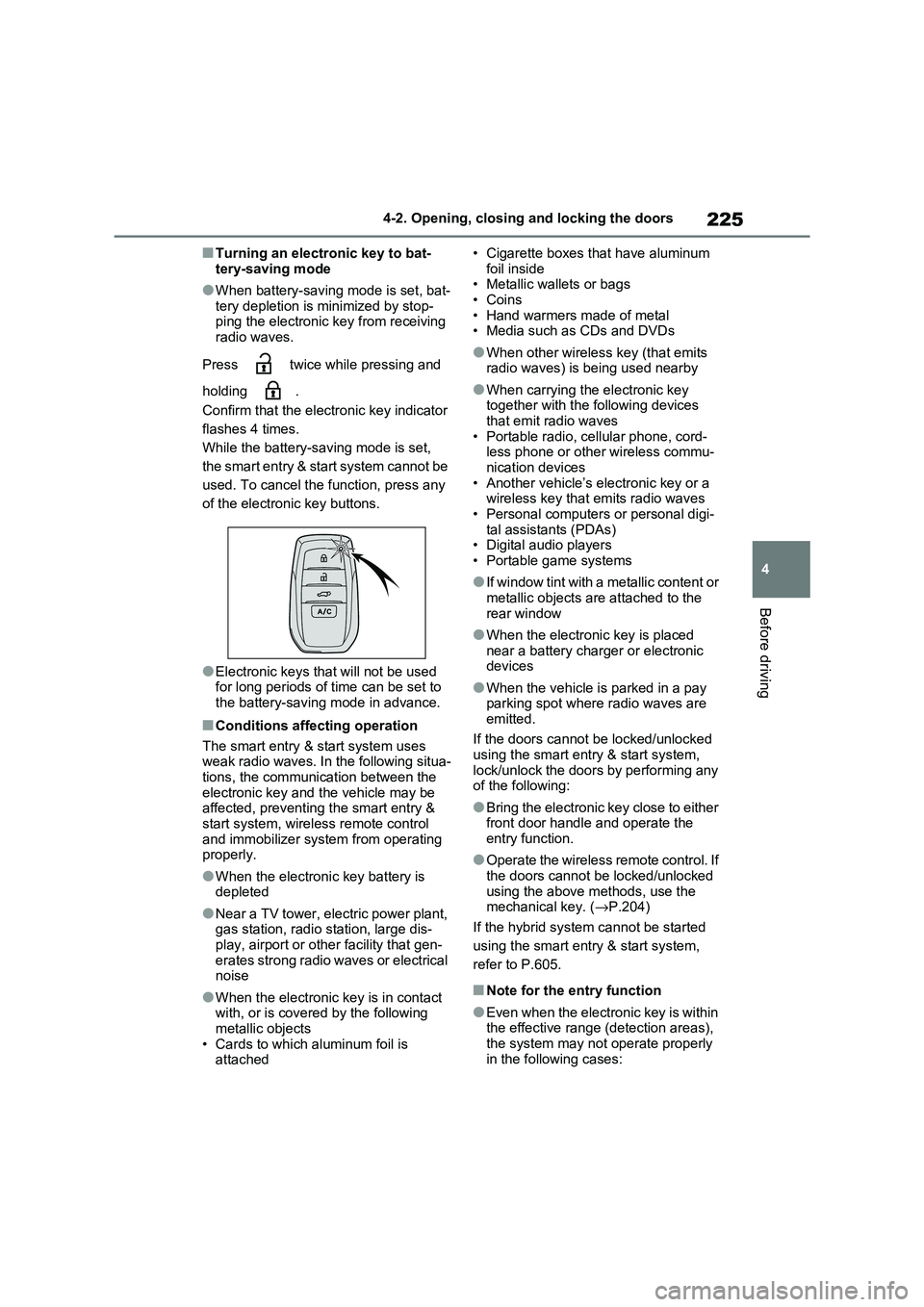
■Turning an electronic key to bat -
tery-saving mode
●When battery-saving mode is set, bat -
tery depletion is minimized by stop - ping the electronic key from receiving
radio waves.
Press twice while pressing and
holding .
Confirm that the electronic key indicator
flashes 4 times.
While the battery- saving mode is set,
the smart entry & start system cannot be
used. To cancel the f unction, press any
of the electronic key buttons.
●Electronic keys t hat will not be used for long periods of time can be set to
the battery-saving mode in advance.
■Conditions affecting operation
The smart entry & start system uses
weak radio waves. In the following situa - tions, the communication between the
electronic key and t he vehicle may be
affected, preventing the smart entry & start system, wireless remote control
and immobilizer system from operating
properly.
●When the electronic key battery is
depleted
●Near a TV tower, electric power plant,
gas station, radio station, large dis- play, airport or oth er facility that gen-
erates strong radio waves or electrical
noise
●When the electronic key is in contact
with, or is covered by the following metallic objects
• Cards to which aluminum foil is
attached
• Cigarette boxes that have aluminum
foil inside • Metallic wallets or bags
•Coins
• Hand warmers made of metal • Media such as CDs and DVDs
●When other wirele ss key (that emits radio waves) is being used nearby
●When carrying the electronic key together with the following devices
that emit radio waves
• Portable radio, cellular phone, cord - less phone or other wireless commu -
nication devices
• Another vehicle’s el ectronic key or a wireless key that emits radio waves
• Personal computer s or personal digi-
tal assistants (PDAs) • Digital audio players
• Portable game systems
●If window tint with a metallic content or
metallic objects are attached to the
rear window
●When the electroni c key is placed
near a battery charger or electronic devices
●When the vehicle is parked in a pay parking spot where radio waves are
emitted.
If the doors cannot be locked/unlocked using the smart entry & start system,
lock/unlock the doors by performing any
of the following:
●Bring the electronic key close to either
front door handle and operate the entry function.
●Operate the wireless remote control. If the doors cannot be locked/unlocked
using the above methods, use the
mechanical key. ( →P.204)
If the hybrid system cannot be started
using the smart entry & start system,
refer to P.605.
■Note for the entry function
●Even when the electronic key is within
the effective range (detection areas),
the system may not operate properly in the following cases:
Page 228 of 666
2264-2. Opening, closing and locking the doors
• The electronic key is too close to the
window or outside door handle, near the ground, or in a high place when
the doors are lo cked or unlocked.
• The electronic key is on the instru- ment panel, luggage co ver or floor, or
in the door pockets or glove box when
the hybrid system is started or power switch modes are changed.
●Do not leave the electronic key on top of the instrument panel or near the
door pockets when exiting the vehicle.
Depending on the radio wave recep - tion conditions, it m ay be detected by
the antenna outside the cabin and the
door will become lockable from the outside, possibly trapping the elec -
tronic key inside the vehicle.
●As long as the electronic key is within
the effective range , the doors may be
locked or unlocke d by anyone. How- ever, only the door s detecting the
electronic key can be used to lock or
unlock the vehicle.
●Even if the electronic key is not inside
the vehicle, it may be possible to start the hybrid system if the electronic key
is near the window.
●The doors may unlock if a large
amount of water splashes on the door
handle, such as in t he rain or in a car wash when the electronic key is within
the effective range . (The doors will
automatically be locked after approxi - mately 30 seconds if the doors are not
opened and closed.)
●If the wireless remote control is used
to lock the doors when the electronic
key is near the vehi cle, there is a pos- sibility that the door may not be
unlocked by the entry function. (Use
the wireless remote control to unlock
the doors.)
●Touching the door lock sensor while
wearing gloves may delay or prevent lock operation. Remove the gloves
and touch the lo ck sensor again.
●When the lock operation is performed
using the lock sens or, recognition sig-
nals will be shown up to two consecu -
tive times. After this, no recognition
signals will be given.
●If the door handle becomes wet while
the electronic key is within the effec - tive range, the door may lock and
unlock repeatedly. In that case, follow
the following correction procedures to wash the vehicle:
• Place the electronic key in a location 2
m (6 ft.) or more away from the vehi - cle. (Take care to ensure that the key
is not stolen.)
• Set the electronic key to battery-sav - ing mode to disable the smart entry &
start system. ( →P.225)
●If the electronic key is inside the vehi-
cle and a door handle becomes wet
during a car wash, a message may be shown on the multi-information dis -
play and a buzzer will sound outside
the vehicle. To turn off the alarm, lock all the doors.
●The lock sensor m ay not work prop- erly if it comes int o contact with ice,
snow, mud, etc. Clean the lock sensor
and attempt to operate it again, or use the lock sensor on the lower part of
the door handle.
●A sudden approach to the effective
range or door handle may prevent the
doors from being unlocked. In this case, return the door handle to the
original position and check that the
doors unlock before pulling the door handle again.
●If there is another electronic key in the detection area, it may take slightly lon -
ger to unlock the doors after the door
handle is gripped.
■When the vehicle is not driven for extended periods
●To prevent theft of the vehicle, do not
leave the electronic key within 2 m (6 ft.) of the vehicle.
●The smart entry & start system can be deactivated in advance. ( →P.633)
●Battery-saving mode can reduce the power consumption of electronic keys.
( →P.225)
Page 276 of 666
2744-3. Adjusting the seats
will be overwritten.
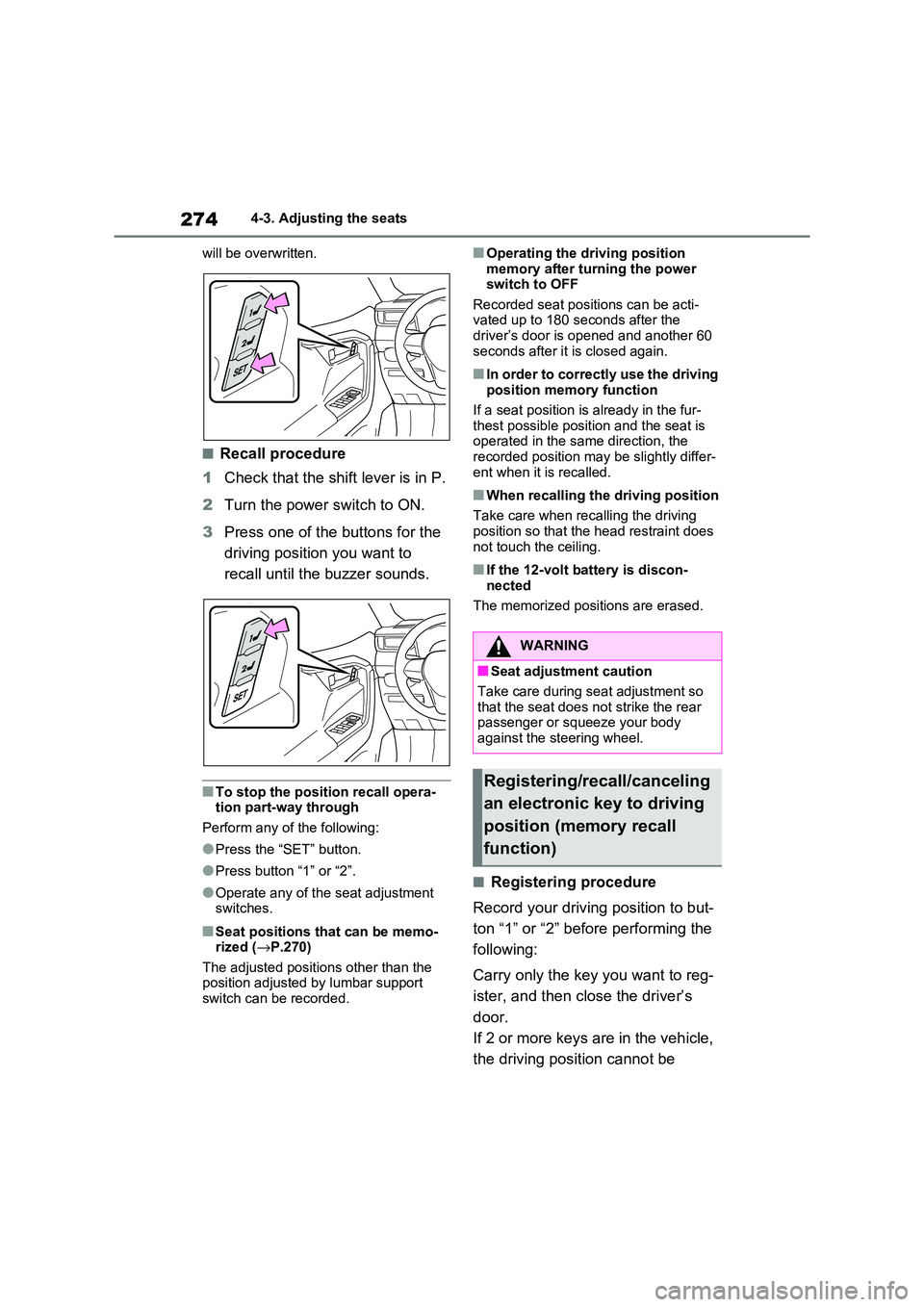
■Recall procedure
1 Check that the shift lever is in P.
2 Turn the power switch to ON.
3 Press one of the buttons for the
driving position you want to
recall until the buzzer sounds.
■To stop the position recall opera -
tion part-way through
Perform any of the following:
●Press the “SET” button.
●Press button “1” or “2”.
●Operate any of the seat adjustment switches.
■Seat positions that can be memo -
rized ( →P.270)
The adjusted positions other than the position adjusted by lumbar support
switch can be recorded.
■Operating the driving position
memory after turning the power switch to OFF
Recorded seat positions can be acti -
vated up to 180 s econds after the driver’s door is o pened and another 60
seconds after it is closed again.
■In order to correctly use the driving
position memory function
If a seat position is already in the fur-
thest possible position and the seat is
operated in the same direction, the recorded position may be slightly differ -
ent when it is recalled.
■When recalling the driving position
Take care when recalling the driving position so that the head restraint does
not touch the ceiling.
■If the 12-volt battery is discon -
nected
The memorized posi tions are erased.
■Registering procedure
Record your drivin g position to but-
ton “1” or “2” before performing the
following:
Carry only the key you want to reg -
ister, and then cl ose the driver’s
door.
If 2 or more keys are in the vehicle,
the driving posi tion cannot be
WARNING
■Seat adjustment caution
Take care during se at adjustment so
that the seat does not strike the rear passenger or squeeze your body
against the steering wheel.
Registering/recall/canceling
an electronic key to driving
position (memory recall
function)
Page 295 of 666
293
4
4-5. Opening, closing the windows and moon roof
Before driving
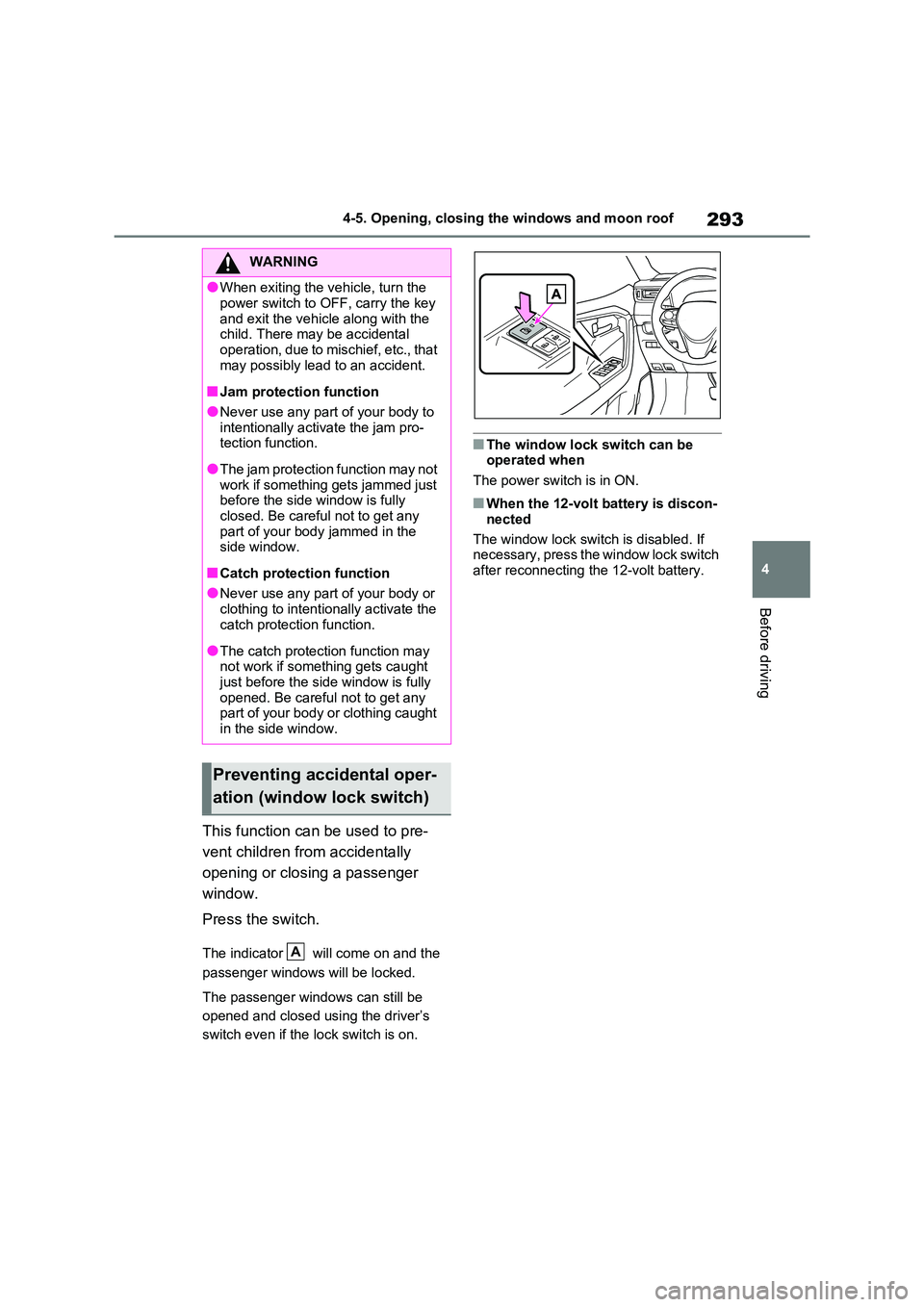
This function can be used to pre -
vent children from accidentally
opening or closing a passenger
window.
Press the switch.
The indicator will come on and the
passenger windows will be locked.
The passenger windows can still be
opened and closed us ing the driver’s
switch even if the lock switch is on.
■The window lock switch can be operated when
The power switch is in ON.
■When the 12-volt battery is discon -
nected
The window lock switch is disabled. If
necessary, press the window lock switch
after reconnecting the 12-volt battery.
WARNING
●When exiting the v ehicle, turn the
power switch to OFF, carry the key
and exit the vehicle along with the child. There may be accidental
operation, due to mischief, etc., that
may possibly lead to an accident.
■Jam protection function
●Never use any part of your body to
intentionally activ ate the jam pro- tection function.
●The jam protection function may not work if something gets jammed just
before the side window is fully
closed. Be careful not to get any part of your body jammed in the
side window.
■Catch protection function
●Never use any part of your body or
clothing to intentionally activate the catch protection function.
●The catch protection function may not work if something gets caught
just before the side window is fully
opened. Be careful not to get any part of your body or clothing caught
in the side window.
Preventing accidental oper -
ation (window lock switch)
A
Page 320 of 666
3185-2. Driving procedures
■When the ambient temperature is
low, such as during winter driving conditions
●When starting the hy brid system, the flashing time of the “READY” indicator
may be long. Leave the vehicle as it is
until the “READY” indicator is steady on, as steady means the vehicle is
able to move.
●When the hybrid bat tery (traction bat-
tery) is extremely cold (below approxi -
mately -30°C [-22°F]) under the influence of the outside temperature, it
may not be possible to start the hybrid
system. In this case, try to start the hybrid system again after the tem -
perature of the hybrid battery
increases due to t he outside tempera- ture increase etc.
■Sounds and vibrations specific to a
hybrid vehicle
→ P.91
■If the 12-volt battery is discharged
The hybrid system cannot be started
using the smart en try & start system.
Refer to P.606 to res tart the hybrid sys- tem.
■Electronic key battery depletion
→ P.202
■Conditions affecting operation
→ P.225
■Note for the entry function
→ P.225
■Steering lock function
●After turning the power switch to OFF and opening and clos ing the doors,
the steering wheel will be locked due
to the steering lock function. Operat -
ing the power switch again automati- cally cancels the steering lock.
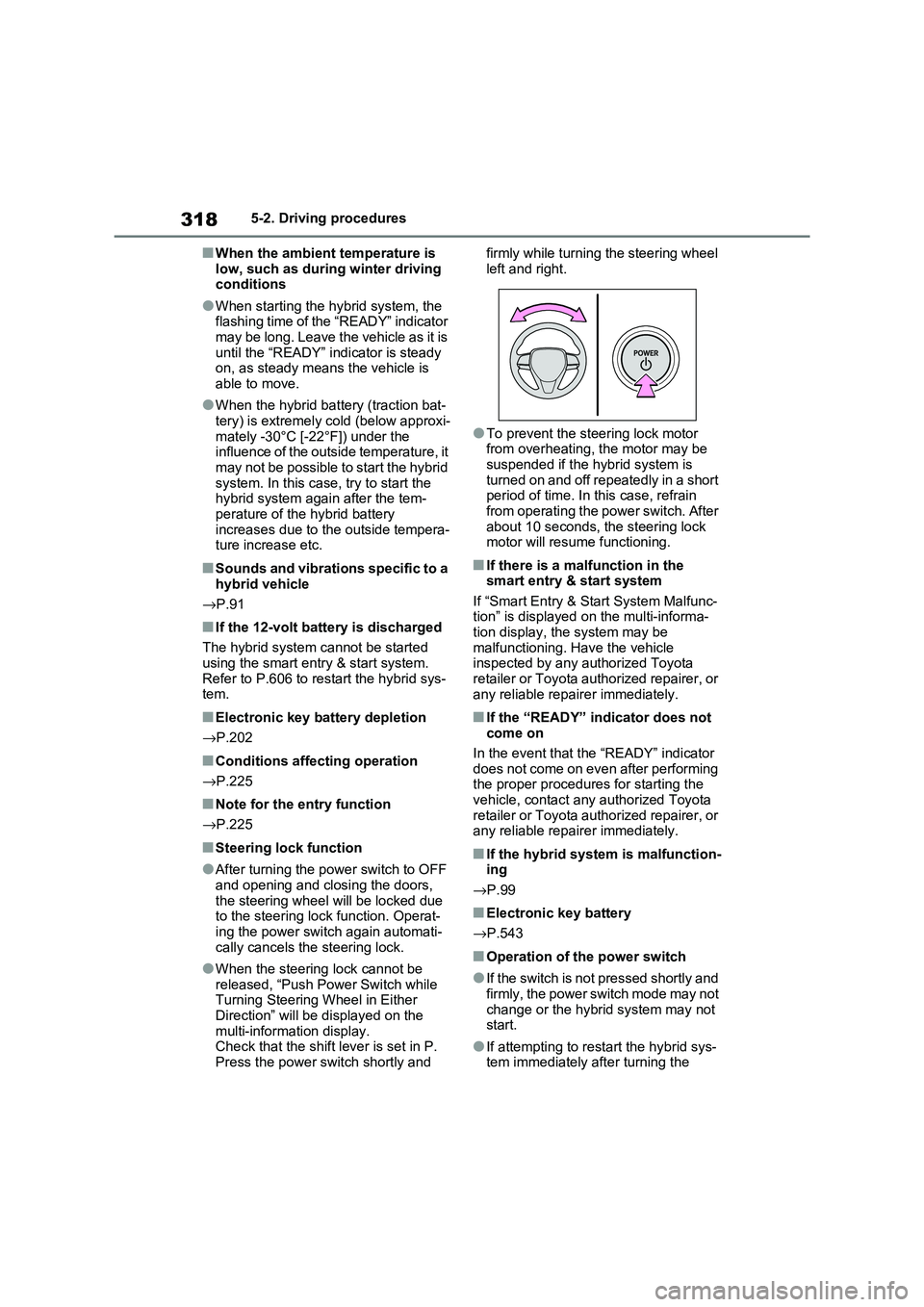
●When the steering lock cannot be released, “Push Power Switch while
Turning Steering Wheel in Either
Direction” will be displayed on the multi-information display.
Check that the shift lever is set in P.
Press the power switch shortly and
firmly while turning the steering wheel
left and right.
●To prevent the st eering lock motor
from overheating, the motor may be suspended if the hybrid system is
turned on and off repeatedly in a short
period of time. In this case, refrain from operating the power switch. After
about 10 seconds, the steering lock
motor will resume functioning.
■If there is a malfunction in the smart entry & start system
If “Smart Entry & St art System Malfunc-
tion” is displayed on the multi-informa - tion display, the system may be
malfunctioning. Have the vehicle
inspected by any a uthorized Toyota retailer or Toyota authorized repairer, or
any reliable repairer immediately.
■If the “READY” indicator does not
come on
In the event that the “READY” indicator
does not come on even after performing
the proper procedures for starting the vehicle, contact any authorized Toyota
retailer or Toyota authorized repairer, or
any reliable repairer immediately.
■If the hybrid system is malfunction - ing
→ P.99
■Electronic key battery
→ P.543
■Operation of the power switch
●If the switch is not pressed shortly and
firmly, the power switch mode may not
change or the hybri d system may not start.
●If attempting to restart the hybrid sys - tem immediately after turning the
Page 463 of 666
461
6
6-1. Using the air conditi oning system and defogger
Interior features
●The outside temperature is extremely
low
●When the hybrid syst em is cool (for
example, after being left for a long time in low temperatures)
■Windshield defogger
When defogging the windshield using
the Remote Air Conditioning System, defogging may be insufficient due to the
power being restricted more than during
normal air conditioning operation. Also, the outside of the windshield may fog up
due to the outside temperature, humidity
or air conditioning set temperature.
■Using the heater via the Remote Air Conditioning System
●When the outside te mperature is low, heating may feel insufficient due to
restricted operation of the air condi -
tioning.
●When the outside heat exchanger
becomes frosted ov er, heating perfor- mance may decline due to automati -
cally switchi ng to the frost removal
operation. ( →P.452)
■Security feature
Any unlocked doors will be automatically
locked when the system is operating.
The emergency flashers flash to indicate that the doors have been locked or the
system has been turned off.
■Conditions affecting operation
→ P.225
■While the Remote Air Conditioning System is operating
●Depending on the operating condition of the Remote Air Conditioning Sys -
tem, the air condit ioning compressor
or cooling fan may spin and an operat -
ing noise may be heard. However, this does not indicate a mal -
function.
●The air conditi oning operation
switches, etc. will not operate while
the Remote Air Conditioning System is operating.
■Electronic key battery depletion
→ P.202
■When the electronic key battery is fully depleted
→ P.543
■Customization
Setting (e.g. Operation using “A/C” on the wireless remote control) can be
changed. (Customizable features:
→ P.629)
WARNING
■Precautions for the Remote Air Conditioning System
●Do not use the system if people are
in the vehicle. Even when the system is in use, the
internal temperature may still reach
a high or low level due to features such as the automatic shut-off.
Children and pets left inside the
vehicle may suffer heatstroke dehy - dration or hypothermia, or could
result in death or serious injury.
●Depending on the surrounding envi -
ronment, signals from the wireless
switch may transmit further than expected. Pay appropriate attention
to the vehicle’s surroundings and
use the switch only when neces- sary.
●Do not operate “A/C” on the wire - less remote contro l if the hood is
open. The air conditioning may
operate unintentionally and objects may be drawn into the electrical
cooling fan.
NOTICE
■To prevent the hybrid battery (traction battery ) from being dis-
charged
Use “A/C” on the wireless remote control only when necessary.
Page 468 of 666
4666-2. Using the interior lights
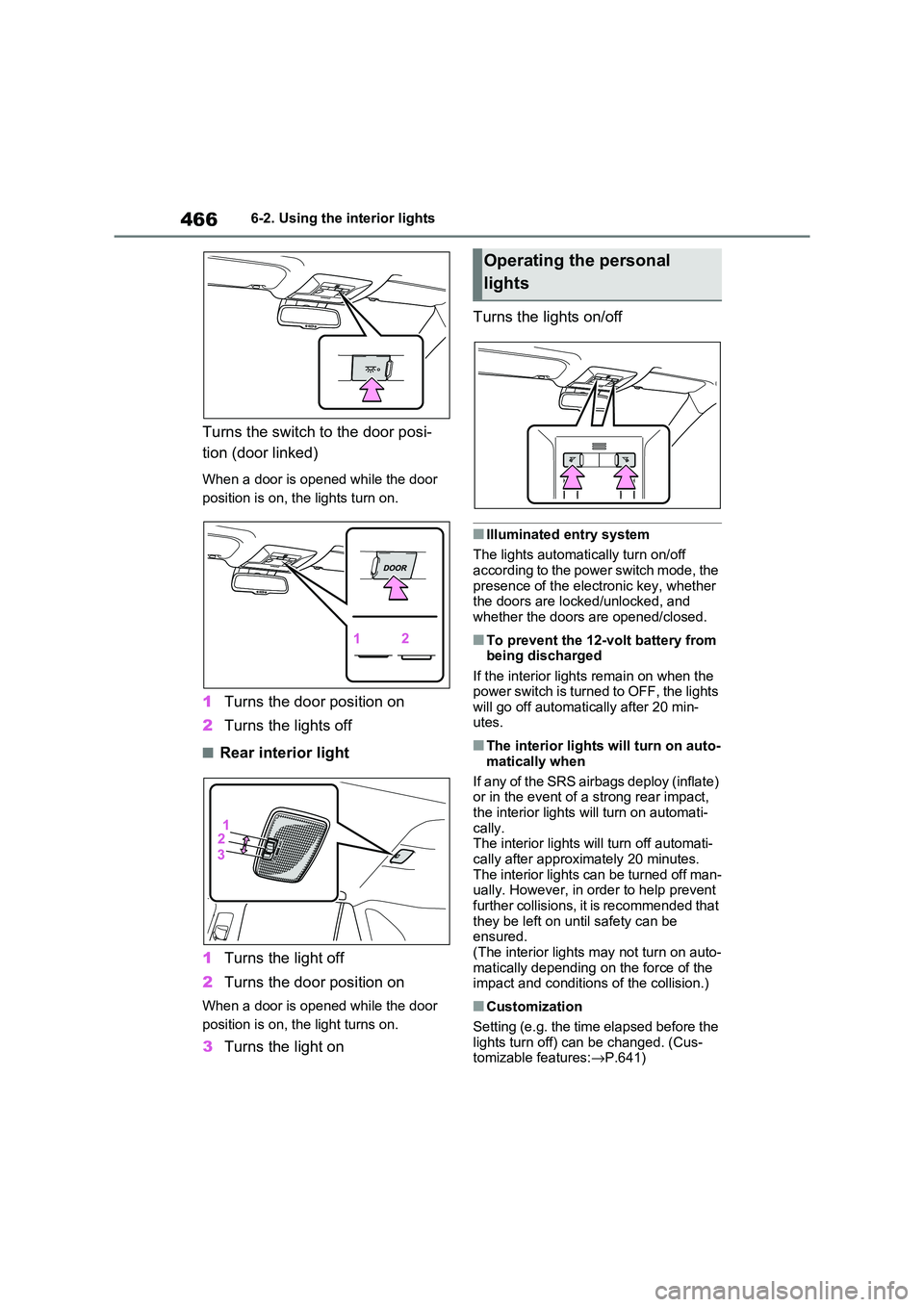
Turns the switch to the door posi-
tion (door linked)
When a door is opened while the door
position is on, the lights turn on.
1 Turns the door position on
2 Turns the lights off
■Rear interior light
1 Turns the light off
2 Turns the door position on
When a door is opened while the door
position is on, t he light turns on.
3Turns the light on
Turns the lights on/off
■Illuminated entry system
The lights automati cally turn on/off
according to the power switch mode, the presence of the electronic key, whether
the doors are locked/unlocked, and
whether the doors are opened/closed.
■To prevent the 12-volt battery from being discharged
If the interior lights remain on when the
power switch is turned to OFF, the lights will go off automati cally after 20 min-
utes.
■The interior lights will turn on auto -
matically when
If any of the SRS airbags deploy (inflate)
or in the event of a strong rear impact,
the interior lights will turn on automati- cally.
The interior lights w ill turn off automati-
cally after approximately 20 minutes. The interior lights can be turned off man -
ually. However, in order to help prevent
further collisions, it is recommended that
they be left on un til safety can be ensured.
(The interior lights may not turn on auto -
matically depending on the force of the impact and conditions of the collision.)
■Customization
Setting (e.g. the time elapsed before the
lights turn off) can be changed. (Cus - tomizable features: →P.641)
Operating the personal
lights
Page 489 of 666
7
487
7
Maintenance and care
Maintenance and care
7-1. Maintenance and care
Cleaning and protecting the
vehicle exterior ............... 488
Cleaning and protecting the
vehicle interior ................ 491
7-2. Maintenance
Maintenance requirements 494
7-3. Do-it-yourself maintenance
Do-it-yourself service precau -
tions ................................ 496
Hood ................................. 498
Positioning a floor jack ...... 499
Engine compartment ........ 501
12-volt battery ................... 506
Tires.................................. 509
Tire inflation pressure ....... 529
Wheels.............................. 530
Air conditioning filter ......... 532
Cleaning the DC/DC Con -
verter air intake vent and filter
....................................... 536
Wiper insert replacement .. 539
Electronic key battery ....... 543
Checking and replacing fuses
....................................... 545
Light bulbs ........................ 548
Page 490 of 666
4887-1. Maintenance and care
7-1.Maintenance and care
Working from top to bottom, lib-
erally apply water to the vehicle
body, wheel wells and underside
of the vehicle to remove any dirt
and dust.
Wash the vehicle body using a
sponge or soft cloth, such as a
chamois.
For hard-to-remove marks, use
car wash soap and rinse thor -
oughly with water.
Wipe away any water.
Wax the vehicle when the water-
proof coating deteriorates.
If water does not bead on a clean sur -
face, apply wax when the vehicle body
is cool.
■Before car washes
Check that the fuel filler door and charging port lid on your vehicle are
closed properly.
■Automatic car washes
●Before washing the vehicle:
• Fold the mirrors
• Turn off the power back door (if equipped)
Start washing from t he front of the vehi-
cle. Make sure to extend the mirrors
before driving.
●Brushes used in automatic car
washes may scratch the vehicle sur - face, parts (wheel, etc.) and harm
your vehicle’s paint.
●Rear spoiler may not be washable in
some automatic c ar washes. There
may also be an increased risk of dam - age to vehicle.
■High pressure car washes
As water may enter the cabin, do not
bring the nozzle tip near the gaps around the doors or perimeter of the
windows, or spray th ese areas continu-
ously.
■Note for a smart e ntry & start sys- tem
If the door handle becomes wet while
the electronic key is within the effective range, the door may lock and unlock
repeatedly. In that c ase, follow the fol-
lowing correction procedures to wash the vehicle:
●Place the key in a position 2 m (6 ft.) or more separate from the vehicle
while the vehicle is being washed.
(Take care to ensur e that the key is not stolen.)
●Set the electronic key to battery-sav - ing mode to disable the smart entry &
start system. ( →P.224)
■Wheels and wheel ornaments
●Remove any dirt immediately by using
a neutral detergent.
●Wash detergent of f with water imme-
diately after use.
●To protect the paint from damage,
make sure to observe the following
precautions. • Do not use acidic, alkaline or abrasive
detergent.
• Do not use hard brushes.
• Do not use deterg ent on the wheels when they are hot, such as after driv -
ing or parking in hot weather.
Cleaning and protecting
the vehicle exterior
Perform the following to pro -
tect the vehicle and maintain it
in prime condition:
Cleaning instructions
Page 508 of 666
5067-3. Do-it-yourself maintenance
The 12-volt battery is located in the
right-hand side of luggage compart -
ment.
■Before recharging
When recharging, the 12-volt battery produces hydrogen gas which is flam-
mable and explosive. Therefore,
observe the following precautions before recharging:
●If recharging with the 12-volt battery installed on the vehicle, be sure to dis -
connect the ground cable.
●Make sure the power switch on the
charger is off when connecting and
disconnecting the charger cables to the 12-volt battery.
■After recharging/reconnecting the
12-volt battery
The hybrid system may not start. Follow the procedure below to initialize the sys-
tem.
1 Shift the shift lever to P.
2 Open and close any of the doors.
3 Restart the hybrid system.
●Unlocking the doors using the smart entry & start system may not be possi -
ble immediately after reconnecting the
12-volt battery. If this happens, use the wireless remote control or the
mechanical key to lock/unlock the
NOTICE
■Do not use any fluid other than
washer fluid
Do not use soapy water or engine antifreeze instead of washer fluid.
Doing so may cause streaking on the
vehicle’s painted sur faces, as well as damaging the pump leading to prob -
lems of the washer fluid not spraying.
■Diluting washer fluid
Dilute washer fluid with water as nec-
essary.
Refer to the freezing temperatures listed on the label of the washer fluid
bottle.
12-volt battery
Location