trailer TOYOTA RAV4 PLUG-IN HYBRID 2022 User Guide
[x] Cancel search | Manufacturer: TOYOTA, Model Year: 2022, Model line: RAV4 PLUG-IN HYBRID, Model: TOYOTA RAV4 PLUG-IN HYBRID 2022Pages: 662, PDF Size: 163.06 MB
Page 294 of 662
2925-3. Operating the lights and wipers
equal to those of headlights, tail lights
or fog lights
• When headlights or tail lights of vehi-
cles ahead are turned off, dirty,
changing color, or not aimed properly
• When the vehicle is hit by water,
snow, dust, etc. from a preceding
vehicle
• When driving through an area of inter-
mittently changing brightness and
darkness
• When frequently and repeatedly driv-
ing ascending/descending roads, or
roads with rough, bumpy or uneven
surfaces (such as stone-paved roads,
gravel roads, etc.)
• When frequently and repeatedly tak-
ing curves or driving on a winding
road
• There is a highly reflective object
ahead of the vehicle, such as a sign or
mirror
• The back of a vehicle ahead is highly
reflective, such as a container on a
truck
• The vehicle’s headlights are damaged
or dirty, or are not aimed properly
• The vehicle is listing or titling due to a
flat tire, a trailer being towed, etc.
• The high beams and low beams are
repeatedly being switched between in
an abnormal manner
• The driver believes that the high
beams may be causing problems or
distress to other drivers or pedestrians
nearby
• The vehicle is used in a territory in
which vehicles travel on the opposite
side of the road of the country for
which the vehicle is approved, for
example using a vehicle designed for
right-hand traffic in a left-hand traffic
territory, or vice versa
• When going through the Straits of
Dover
QIf “Headlight System Malfunction
Visit Your Dealer” is displayed on
the multi-information display
The system may be malfunctioning.
Have the vehicle inspected by any
authorized Toyota retailer or Toyota
authorized repairer, or any reliable repairer.
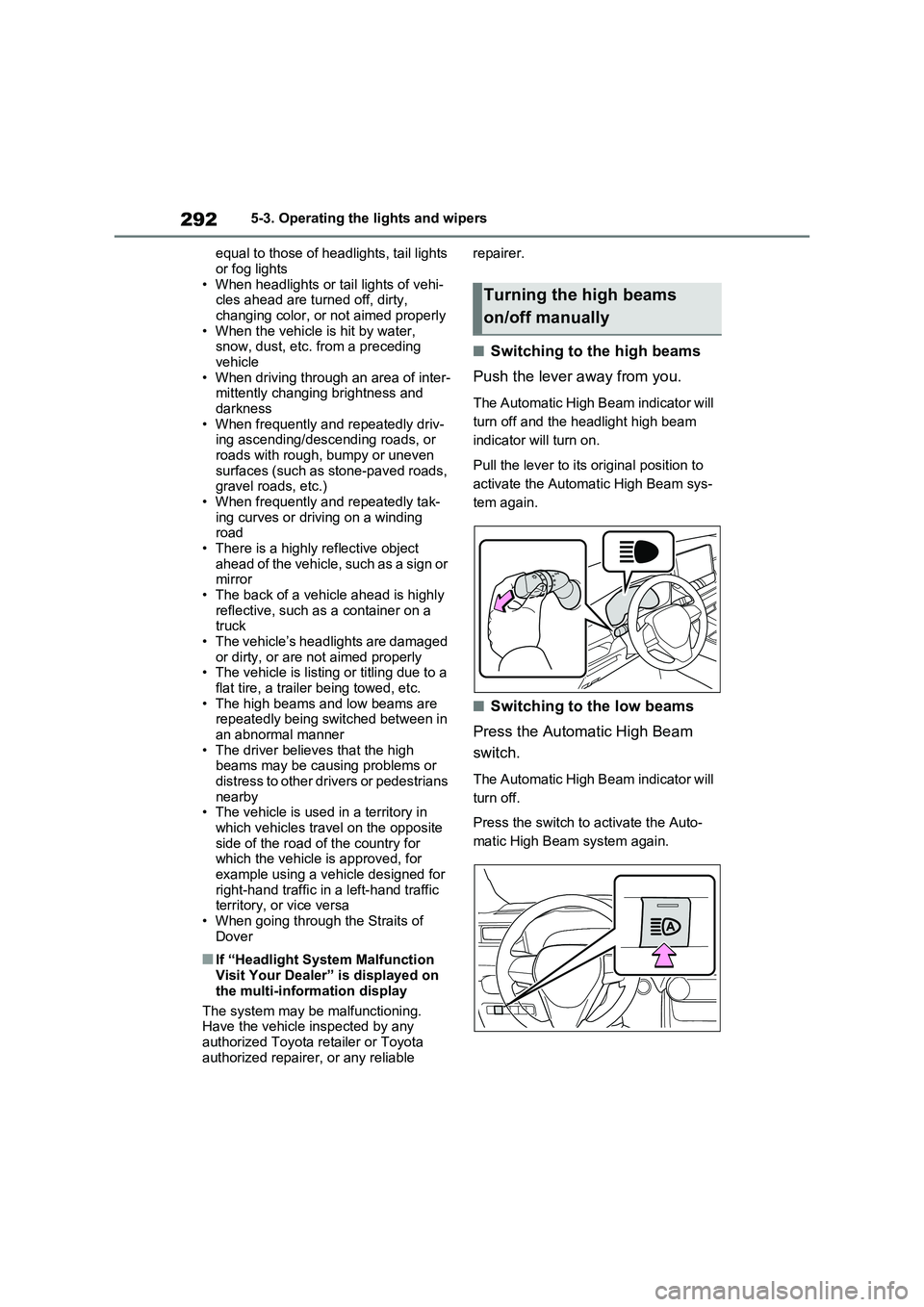
QSwitching to the high beams
Push the lever away from you.
The Automatic High Beam indicator will
turn off and the headlight high beam
indicator will turn on.
Pull the lever to its original position to
activate the Automatic High Beam sys-
tem again.
QSwitching to the low beams
Press the Automatic High Beam
switch.
The Automatic High Beam indicator will
turn off.
Press the switch to activate the Auto-
matic High Beam system again.
Turning the high beams
on/off manually
Page 318 of 662
3165-5. Using the driving support systems
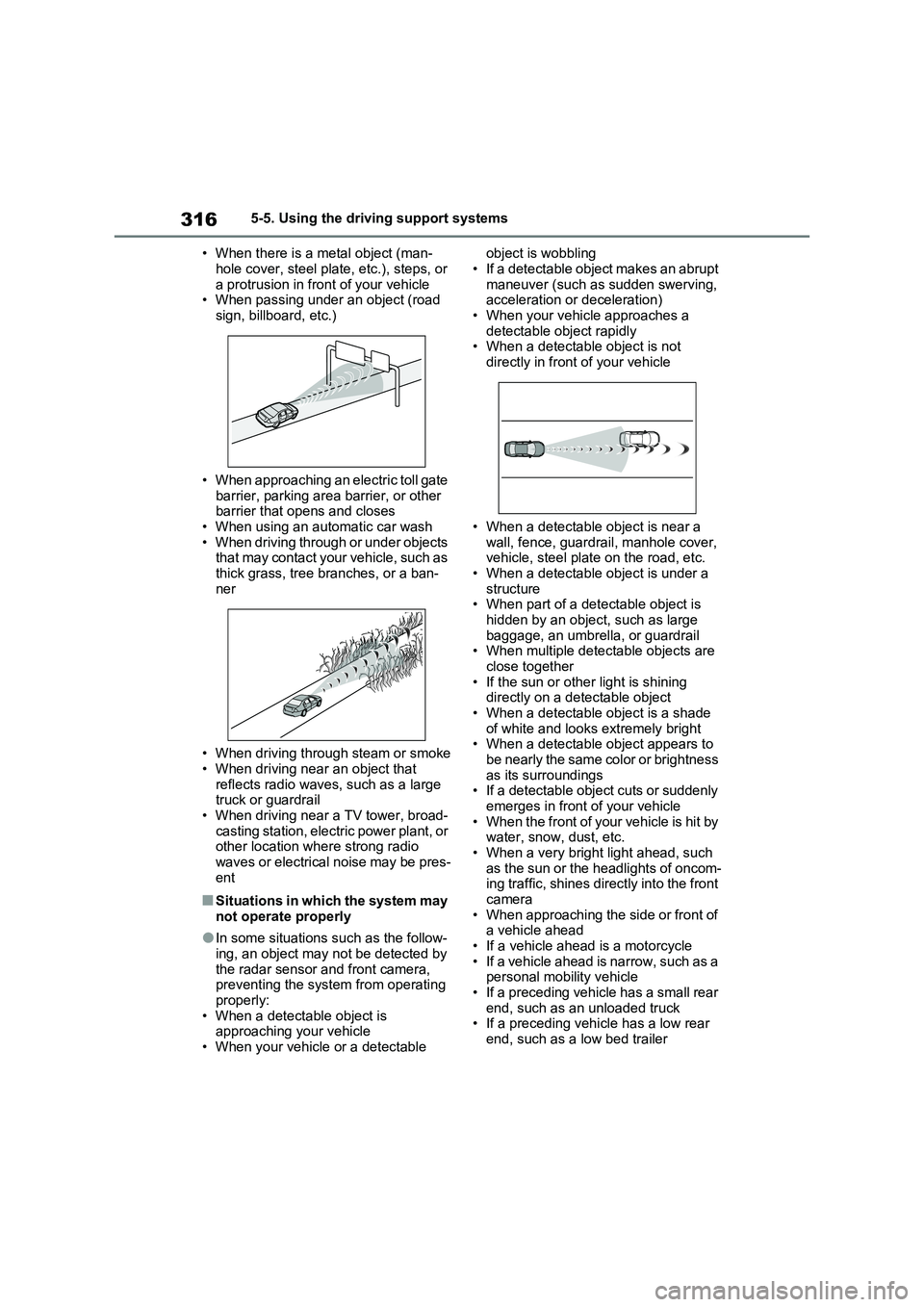
• When there is a metal object (man-
hole cover, steel plate, etc.), steps, or
a protrusion in front of your vehicle
• When passing under an object (road
sign, billboard, etc.)
• When approaching an electric toll gate
barrier, parking area barrier, or other
barrier that opens and closes
• When using an automatic car wash
• When driving through or under objects
that may contact your vehicle, such as
thick grass, tree branches, or a ban-
ner
• When driving through steam or smoke
• When driving near an object that
reflects radio waves, such as a large
truck or guardrail
• When driving near a TV tower, broad-
casting station, electric power plant, or
other location where strong radio
waves or electrical noise may be pres-
ent
QSituations in which the system may
not operate properly
OIn some situations such as the follow-
ing, an object may not be detected by
the radar sensor and front camera,
preventing the system from operating
properly:
• When a detectable object is
approaching your vehicle
• When your vehicle or a detectable object is wobbling
• If a detectable object makes an abrupt
maneuver (such as sudden swerving,
acceleration or deceleration)
• When your vehicle approaches a
detectable object rapidly
• When a detectable object is not
directly in front of your vehicle
• When a detectable object is near a
wall, fence, guardrail, manhole cover,
vehicle, steel plate on the road, etc.
• When a detectable object is under a
structure
• When part of a detectable object is
hidden by an object, such as large
baggage, an umbrella, or guardrail
• When multiple detectable objects are
close together
• If the sun or other light is shining
directly on a detectable object
• When a detectable object is a shade
of white and looks extremely bright
• When a detectable object appears to
be nearly the same color or brightness
as its surroundings
• If a detectable object cuts or suddenly
emerges in front of your vehicle
• When the front of your vehicle is hit by
water, snow, dust, etc.
• When a very bright light ahead, such
as the sun or the headlights of oncom-
ing traffic, shines directly into the front
camera
• When approaching the side or front of
a vehicle ahead
• If a vehicle ahead is a motorcycle
• If a vehicle ahead is narrow, such as a
personal mobility vehicle
• If a preceding vehicle has a small rear
end, such as an unloaded truck
• If a preceding vehicle has a low rear
end, such as a low bed trailer
Page 321 of 662
319
5
5-5. Using the driving support systems
Driving
WARNING
QBefore using LTA system
ODo not rely solely upon the LTA
system. The LTA system does not automatically drive the vehicle or reduce the amount of attention that
must be paid to the area in front of the vehicle. The driver must always assume full responsibility for driving
safely by paying careful attention to the surrounding conditions and operating the steering wheel to cor-
rect the path of the vehicle. Also, the driver must take adequate breaks when fatigued, such as from
driving for a long period of time.
OFailure to perform appropriate driv-
ing operations and pay careful attention may lead to an accident, resulting in death or serious injury.
OWhen not using the LTA system, use the LTA switch to turn the sys-
tem off.
QSituations unsuitable for LTA
system
In the following situations, use the LTA switch to turn the system off.
Failure to do so may lead to an acci- dent, resulting in death or serious injury.
OVehicle is driven on a road surface which is slippery due to rainy
weather, fallen snow, freezing, etc.
OVehicle is driven on a snow-cov-
ered road.
OWhite (yellow) lines are difficult to
see due to rain, snow, fog, dust, etc.
OVehicle is driven in a temporary lane or restricted lane due to con-struction work.
OVehicle is driven in a construction zone.
OA spare tire, tire chains, etc. are equipped.
OWhen the tires have been exces-sively worn, or when the tire infla-tion pressure is low.
OWhen your vehicle is towing a trailer or during emergency towing
QPreventing LTA system malfunc-tions and operations performed
by mistake
ODo not modify the headlights or place stickers, etc. on the surface of
the lights.
ODo not modify the suspension etc. If
the suspension etc. needs to be replaced, contact any authorized Toyota retailer or Toyota authorized
repairer, or any reliable repairer.
ODo not install or place anything on
the hood or grille. Also, do not install a grille guard (bull bars, kan-garoo bar, etc.).
OIf your windshield needs repairs, contact any authorized Toyota
retailer or Toyota authorized repairer, or any reliable repairer.
QConditions in which functions may not operate properly
In the following situations, the func-
tions may not operate properly and the vehicle may depart from its lane. Drive safely by always paying careful
attention to your surroundings and operate the steering wheel to correct the path of the vehicle without relying
solely on the functions.
Page 337 of 662
335
5
5-5. Using the driving support systems
Driving
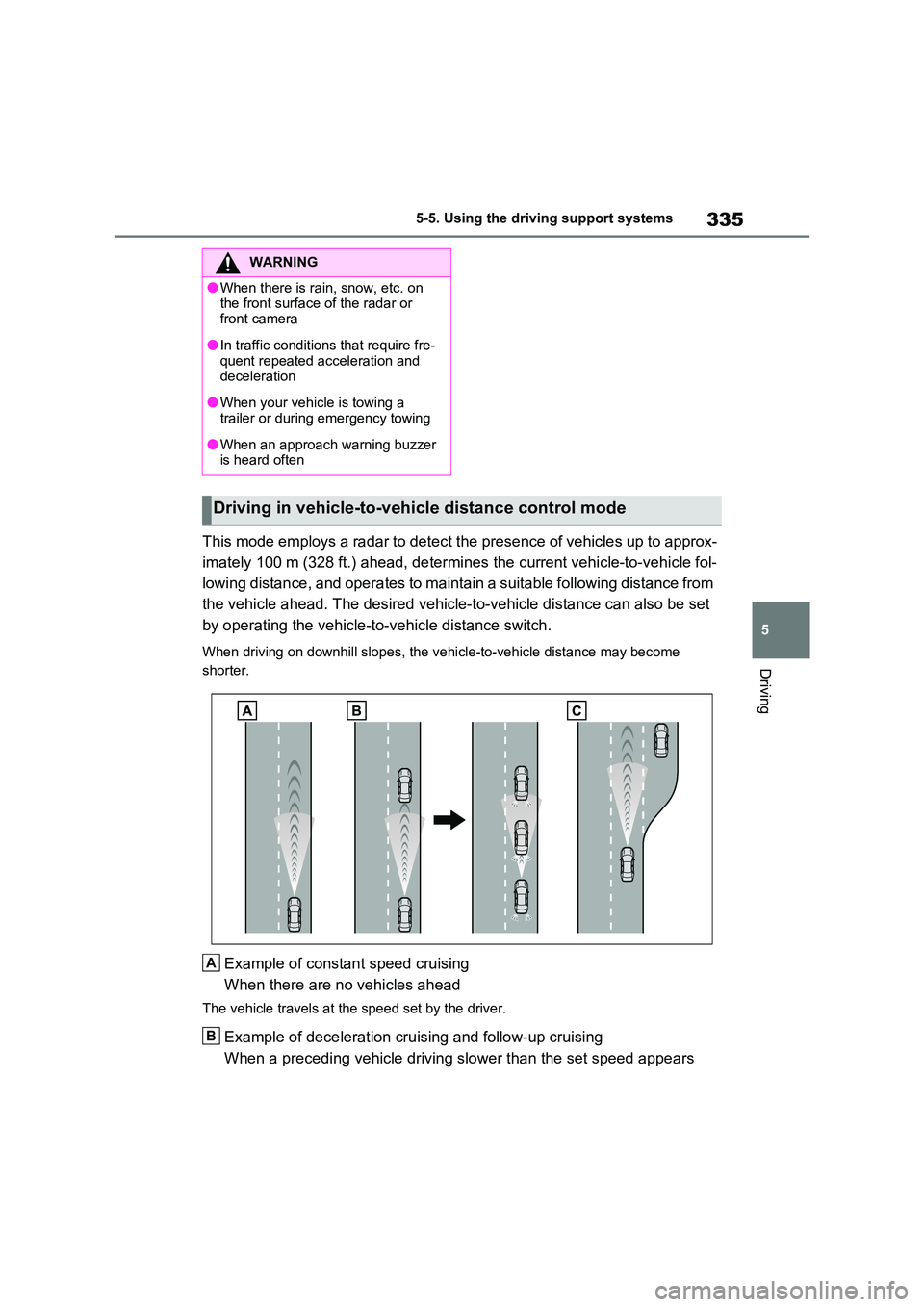
This mode employs a radar to detect the presence of vehicles up to approx-
imately 100 m (328 ft.) ahead, determines the current vehicle-to-vehicle fol-
lowing distance, and operates to maintain a suitable following distance from
the vehicle ahead. The desired vehicle-to-vehicle distance can also be set
by operating the vehicle-to-vehicle distance switch.
When driving on downhill slopes, the vehicle-to-vehicle distance may become
shorter.
Example of constant speed cruising
When there are no vehicles ahead
The vehicle travels at the speed set by the driver.
Example of deceleration cruising and follow-up cruising
When a preceding vehicle driving slower than the set speed appears
WARNING
OWhen there is rain, snow, etc. on the front surface of the radar or
front camera
OIn traffic conditions that require fre-
quent repeated acceleration and deceleration
OWhen your vehicle is towing a trailer or during emergency towing
OWhen an approach warning buzzer is heard often
Driving in vehicle-to-vehicle distance control mode
A
B
Page 344 of 662
3425-5. Using the driving support systems
If vehicle-to-vehicle distance control
mode is automatically canceled for any
reasons other than the above, there
may be a malfunction in the system.
Contact any authorized Toyota retailer
or Toyota authorized repairer, or any
reliable repairer.
QAutomatic cancelation of constant
speed control mode
Constant speed control mode is auto-
matically canceled in the following situa-
tions:
OActual vehicle speed is more than
approximately 16 km/h (10 mph)
below the set vehicle speed.
OActual vehicle speed falls below
approximately 30 km/h (20 mph).
OVSC is activated.
OTRC is activated for a period of time.
OWhen the VSC or TRC system is
turned off.
OWhen the brake control or output
restriction control of a driving support
system operates.
(For example: Pre-Collision System,
Drive-Start Control)
OThe parking brake is operated.
If constant speed control mode is auto-
matically canceled for any reasons other
than the above, there may be a malfunc-
tion in the system. Contact any autho-
rized Toyota retailer or Toyota
authorized repairer, or any reliable
repairer.
QThe Dynamic Radar Cruise Control
with Road Sign Assist may not
operate properly when (vehicles
with RSA)
As the Dynamic Radar Cruise Control
with Road Sign Assist may not operate
properly in conditions in which RSA may
not operate or detect correctly
(P.331), when using this function,
make sure to check the speed limit sign
displayed.In the following situations, the set speed
may not be changed to the recognized
speed limit by pressing and holding the
“+RES”/“-SET” switch.
OIf speed limit information is not avail-
able
OWhen the recognized speed limit is
the same as the set speed
OWhen the recognized speed limit is
outside of the speed range that the
dynamic radar cruise control system
can operate
QBrake operation
A brake operation sound may be heard
and the brake pedal response may
change, but these are not malfunctions.
QWarning messages and buzzers for
dynamic radar cruise control with
full-speed range
Warning messages and buzzers are
used to indicate a system malfunction or
to inform the driver of the need for cau-
tion while driving. If a warning message
is shown on the multi-information dis-
play, read the message and follow the
instructions. (P.309, 518)
QWhen the sensor may not be cor-
rectly detecting the vehicle ahead
In the case of the following and depend-
ing on the conditions, operate the brake
pedal when deceleration of the system
is insufficient or operate the accelerator
pedal when acceleration is required.
As the sensor may not be able to cor-
rectly detect these types of vehicles, the
approach warning (P.339) may not be
activated.
OVehicles that cut in suddenly
OVehicles traveling at low speeds
OVehicles that are not moving in the
same lane
OVehicles with small rear ends (trailers
with no load on board, etc.)
Page 346 of 662
3445-5. Using the driving support systems
*: If equipped
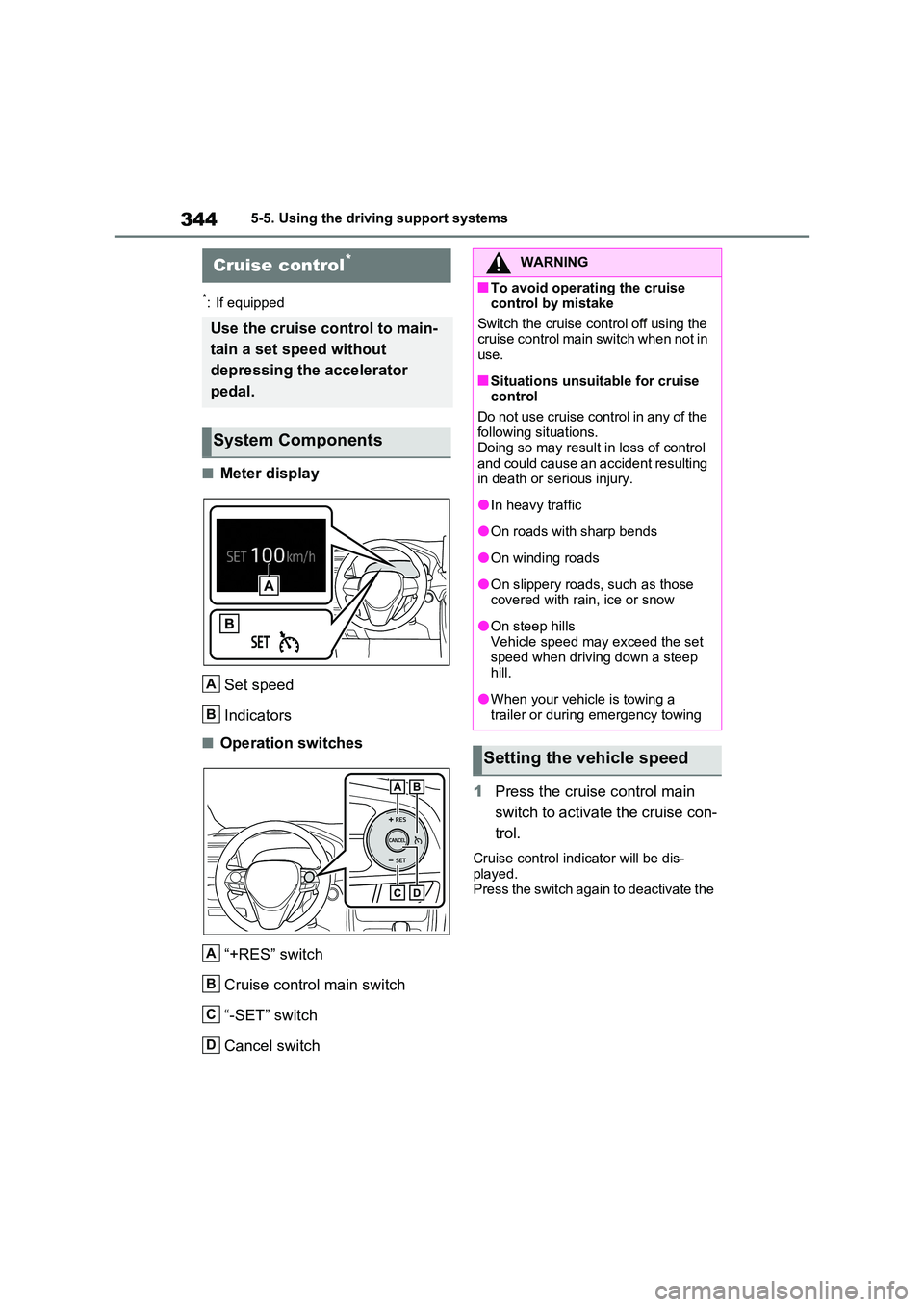
QMeter display
Set speed
Indicators
QOperation switches
“+RES” switch
Cruise control main switch
“-SET” switch
Cancel switch
1 Press the cruise control main
switch to activate the cruise con-
trol.
Cruise control indicator will be dis- played.Press the switch again to deactivate the
Cruise control*
Use the cruise control to main-
tain a set speed without
depressing the accelerator
pedal.
System Components
A
B
A
B
C
D
WARNING
QTo avoid operating the cruise control by mistake
Switch the cruise control off using the cruise control main switch when not in use.
QSituations unsuitable for cruise control
Do not use cruise control in any of the following situations.Doing so may result in loss of control
and could cause an accident resulting in death or serious injury.
OIn heavy traffic
OOn roads with sharp bends
OOn winding roads
OOn slippery roads, such as those covered with rain, ice or snow
OOn steep hillsVehicle speed may exceed the set speed when driving down a steep
hill.
OWhen your vehicle is towing a
trailer or during emergency towing
Setting the vehicle speed
Page 349 of 662
347
5
5-5. Using the driving support systems
Driving
*: If equipped
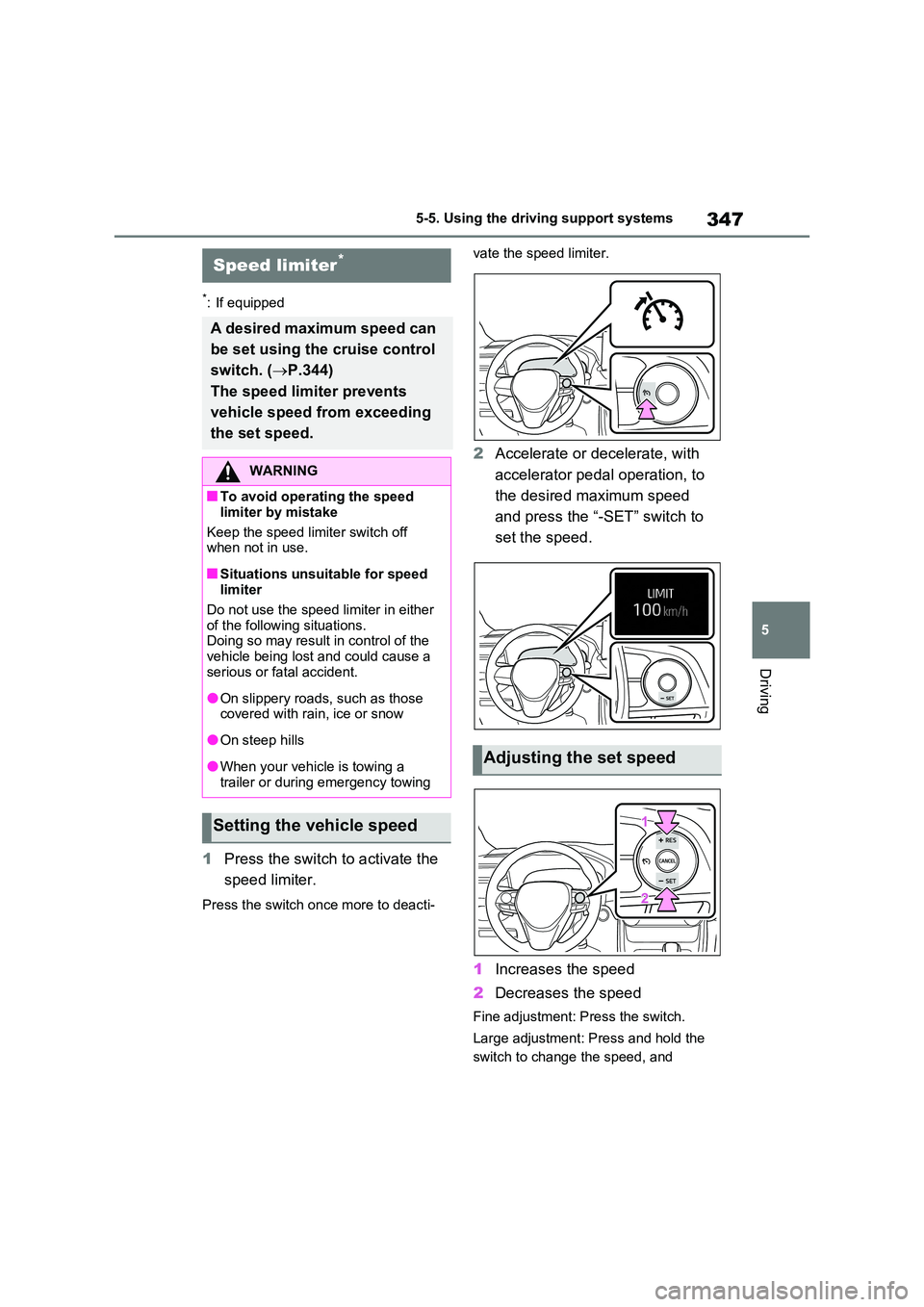
1 Press the switch to activate the
speed limiter.
Press the switch once more to deacti-
vate the speed limiter.
2 Accelerate or decelerate, with
accelerator pedal operation, to
the desired maximum speed
and press the “-SET” switch to
set the speed.
1 Increases the speed
2 Decreases the speed
Fine adjustment: Press the switch.
Large adjustment: Press and hold the
switch to change the speed, and
Speed limiter*
A desired maximum speed can
be set using the cruise control
switch. ( P.344)
The speed limiter prevents
vehicle speed from exceeding
the set speed.
WARNING
QTo avoid operating the speed
limiter by mistake
Keep the speed limiter switch off when not in use.
QSituations unsuitable for speed limiter
Do not use the speed limiter in either of the following situations. Doing so may result in control of the
vehicle being lost and could cause a serious or fatal accident.
OOn slippery roads, such as those covered with rain, ice or snow
OOn steep hills
OWhen your vehicle is towing a
trailer or during emergency towing
Setting the vehicle speed
Adjusting the set speed
Page 368 of 662
3665-5. Using the driving support systems
QThe BSM function is operational
when
The BSM function is operational when
all of the following conditions are met:
OThe BSM function is on.
OThe shift lever is in a position other
than R.
OThe vehicle speed is greater than
approximately 16 km/h (10 mph).
QThe BSM function will detect a
vehicle when
The BSM function will detect a vehicle
present in the detection area in the fol-
lowing situations:
OA vehicle in an adjacent lane over-
takes your vehicle.
OYou overtake a vehicle in an adjacent
lane slowly.
OAnother vehicle enters the detection
area when it changes lanes.
QConditions under which the system
will not detect a vehicle
The BSM function is not designed to
detect the following types of vehicles
and/or objects:
OSmall motorcycles, bicycles, pedestri-
ans, etc.*
OVehicles traveling in the opposite
direction
OGuardrails, walls, signs, parked vehi-
cles and similar stationary objects*
OFollowing vehicles that are in the
same lane*
OVehicles traveling 2 lanes away from
your vehicle*
OVehicles which are being overtaken
rapidly by your vehicle
*: Depending on the conditions, detec-
tion of a vehicle and/or object may
occur.
QConditions under which the system
may not function correctly
OThe BSM function may not detect
vehicles correctly in the following situ-
ations:
• When the sensor is misaligned due to
a strong impact to the sensor or its
surrounding area
• When mud, snow, ice, a sticker, etc.,
is covering the sensor or surrounding
area on the rear bumper
• When driving on a road surface that is
wet with standing water during bad
weather, such as heavy rain, snow, or
fog
• When multiple vehicles are approach-
ing with only a small gap between
each vehicle
• When the distance between your vehi-
cle and a following vehicle is short
• When there is a significant difference
in speed between your vehicle and
the vehicle that enters the detection
area
• When the difference in speed
between your vehicle and another
vehicle is changing
• When a vehicle enters a detection
area traveling at about the same
speed as your vehicle
• As your vehicle starts from a stop, a
vehicle remains in the detection area
• When driving up and down consecu-
tive steep inclines, such as hills, dips
in the road, etc.
• When driving on roads with sharp
bends, consecutive curves, or uneven
surfaces
• When vehicle lanes are wide, or when
driving on the edge of a lane, and the
vehicle in an adjacent lane is far away
from your vehicle
• When an accessory (such as a bicycle
carrier) is installed to the rear of the
vehicle
• When there is a significant difference
in height between your vehicle and
the vehicle that enters the detection
area
• Immediately after the BSM func-
tion/RCTA function are turned on
• When towing a trailer
Page 371 of 662
369
5 5-5. Using the driving support systems
Driving
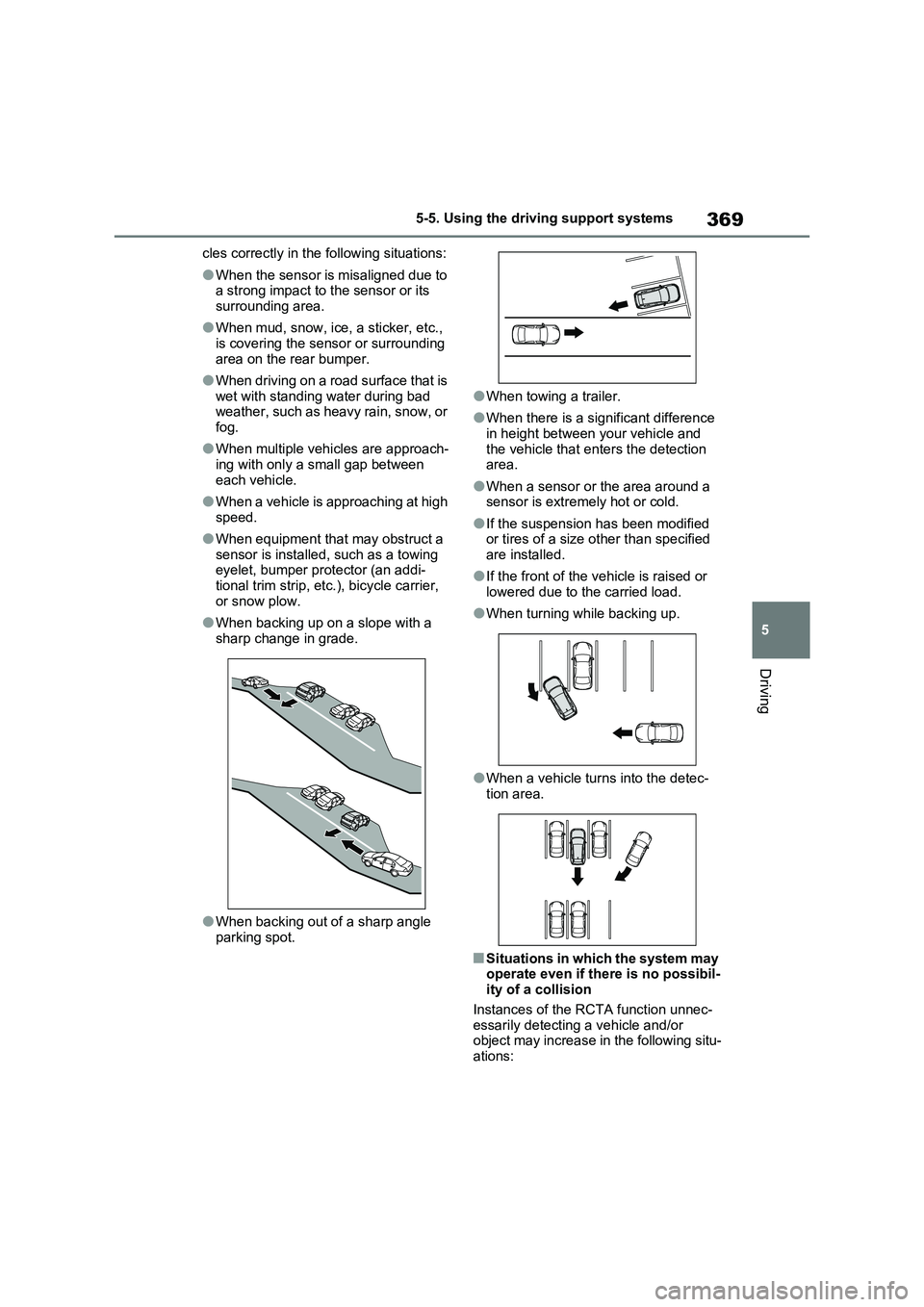
cles correctly in the following situations:
OWhen the sensor is misaligned due to
a strong impact to the sensor or its
surrounding area.
OWhen mud, snow, ice, a sticker, etc.,
is covering the sensor or surrounding
area on the rear bumper.
OWhen driving on a road surface that is
wet with standing water during bad
weather, such as heavy rain, snow, or
fog.
OWhen multiple vehicles are approach-
ing with only a small gap between
each vehicle.
OWhen a vehicle is approaching at high
speed.
OWhen equipment that may obstruct a
sensor is installed, such as a towing
eyelet, bumper protector (an addi-
tional trim strip, etc.), bicycle carrier,
or snow plow.
OWhen backing up on a slope with a
sharp change in grade.
OWhen backing out of a sharp angle
parking spot.
OWhen towing a trailer.
OWhen there is a significant difference
in height between your vehicle and
the vehicle that enters the detection
area.
OWhen a sensor or the area around a
sensor is extremely hot or cold.
OIf the suspension has been modified
or tires of a size other than specified
are installed.
OIf the front of the vehicle is raised or
lowered due to the carried load.
OWhen turning while backing up.
OWhen a vehicle turns into the detec-
tion area.
QSituations in which the system may
operate even if there is no possibil-
ity of a collision
Instances of the RCTA function unnec-
essarily detecting a vehicle and/or
object may increase in the following situ-
ations:
Page 394 of 662
3925-5. Using the driving support systems
QVSC+ (Vehicle Stability Con-
trol+)
Provides cooperative control of the
ABS, TRC, VSC and EPS.
Helps to maintain directional stabil-
ity when swerving on slippery road
surfaces by controlling steering per-
formance.
QTrailer Sway Control
Helps the driver to control trailer
sway by selectively applying brake
pressure for individual wheels and
reducing driving torque when trailer
sway is detected.
QTRC (Traction Control)
Helps to maintain drive power and
prevent the drive wheels from spin-
ning when starting the vehicle or
accelerating on slippery roads
QActive Cornering Assist (ACA)
Helps to prevent the vehicle from
drifting to the outer side by perform-
ing inner wheel brake control when
attempting to accelerate while turn-
ing
QHill-start assist control
Helps to reduce the backward
movement of the vehicle when
starting on an uphill
QEPS (Electric Power Steering)
Employs an electric motor to
reduce the amount of effort needed
to turn the steering wheel.
QE-Four (Electronic On-Demand
AWD system)
Automatically controls the drive
system such as to front-wheel drive
or AWD (all wheel drive) according
to various running conditions
including normal driving, during cor-
nering, on a uphill, when starting
off, during acceleration, on a slip-
pery roads due to snow or rain,
thus contributing to stable
operability and driving stability.
QEmergency brake signal
When the brakes are applied sud-
denly, the emergency flashers
automatically flash to alert the vehi-
cle behind.
QThe Secondary Collision
Brake (if equipped)
When the SRS airbag sensor
detects a collision and the system
operates, the brakes and brake
lights are automatically controlled
to reduce the vehicle speed and
help reduce the possibility of further
damage due to a secondary colli-
sion.
QWhen the TRC/VSC/ABS/Trail
Mode/Trailer Sway Control systems
are operating
The slip indicator light will flash while the
TRC/VSC/ABS/Trail Mode/Trailer Sway
Control systems are operating.