emergency towing TOYOTA RAV4 PLUG-IN HYBRID 2023 Owners Manual
[x] Cancel search | Manufacturer: TOYOTA, Model Year: 2023, Model line: RAV4 PLUG-IN HYBRID, Model: TOYOTA RAV4 PLUG-IN HYBRID 2023Pages: 718, PDF Size: 167.55 MB
Page 17 of 718
15Pictorial index
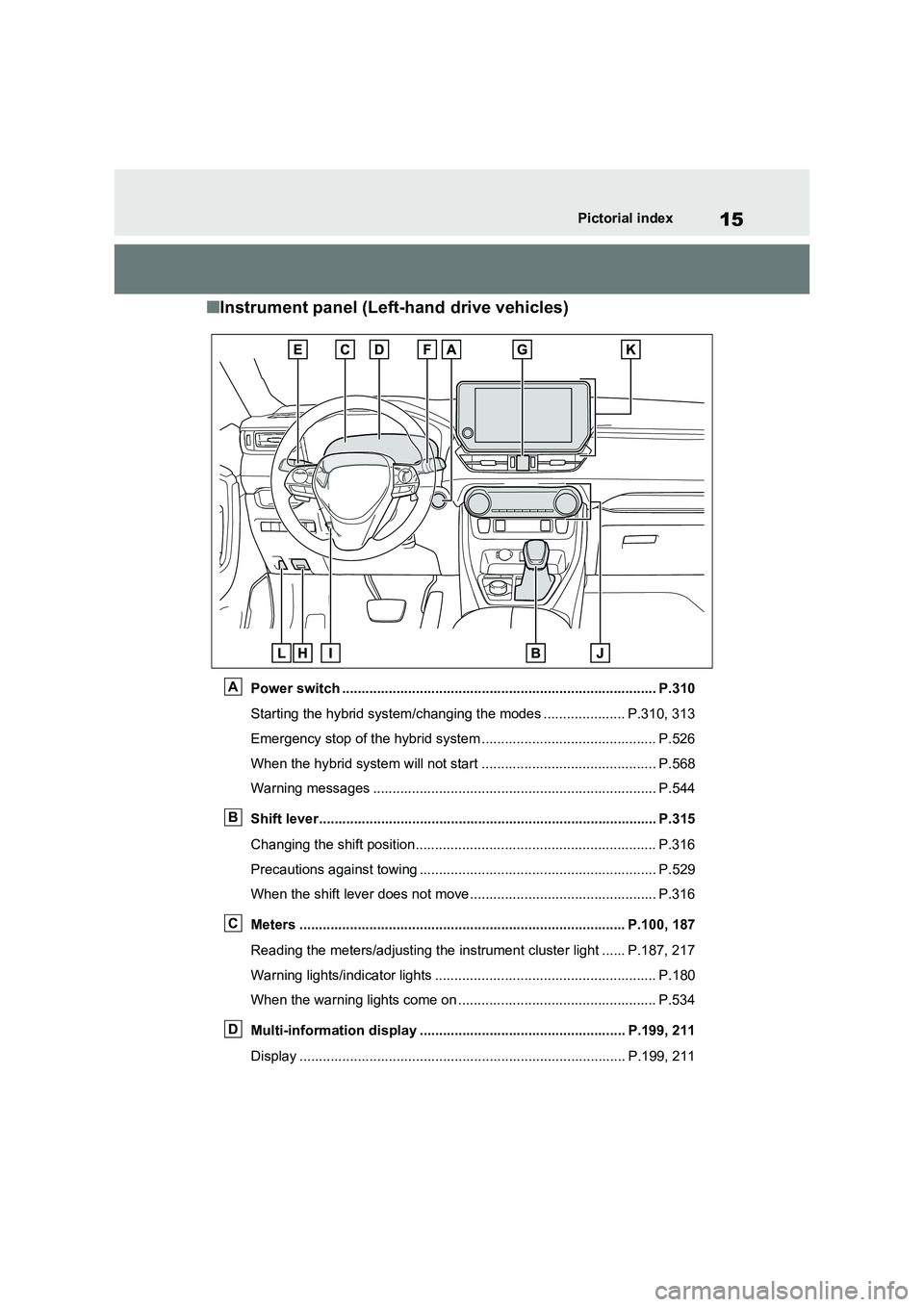
■Instrument panel (Left-hand drive vehicles)
Power switch ................................................................................. P.310
Starting the hybrid system/changing the modes ..................... P.310, 313
Emergency stop of the hybrid system ............................................. P.526
When the hybrid system will not start ............................................. P.568
Warning messages ......................................................................... P.544
Shift lever....................................................................................... P.315
Changing the shift position.............................................................. P.316
Precautions against towing ............................................................. P.529
When the shift lever does not move................................................ P.316
Meters .................................................................................... P.100, 187
Reading the meters/adjusting the instrument cluster light ...... P.187, 217
Warning lights/indicator lights ......................................................... P.180
When the warning lights come on ................................................... P.534
Multi-information display ..................................................... P.199, 211
Display .................................................................................... P.199, 211
A
B
C
D
Page 25 of 718
23Pictorial index
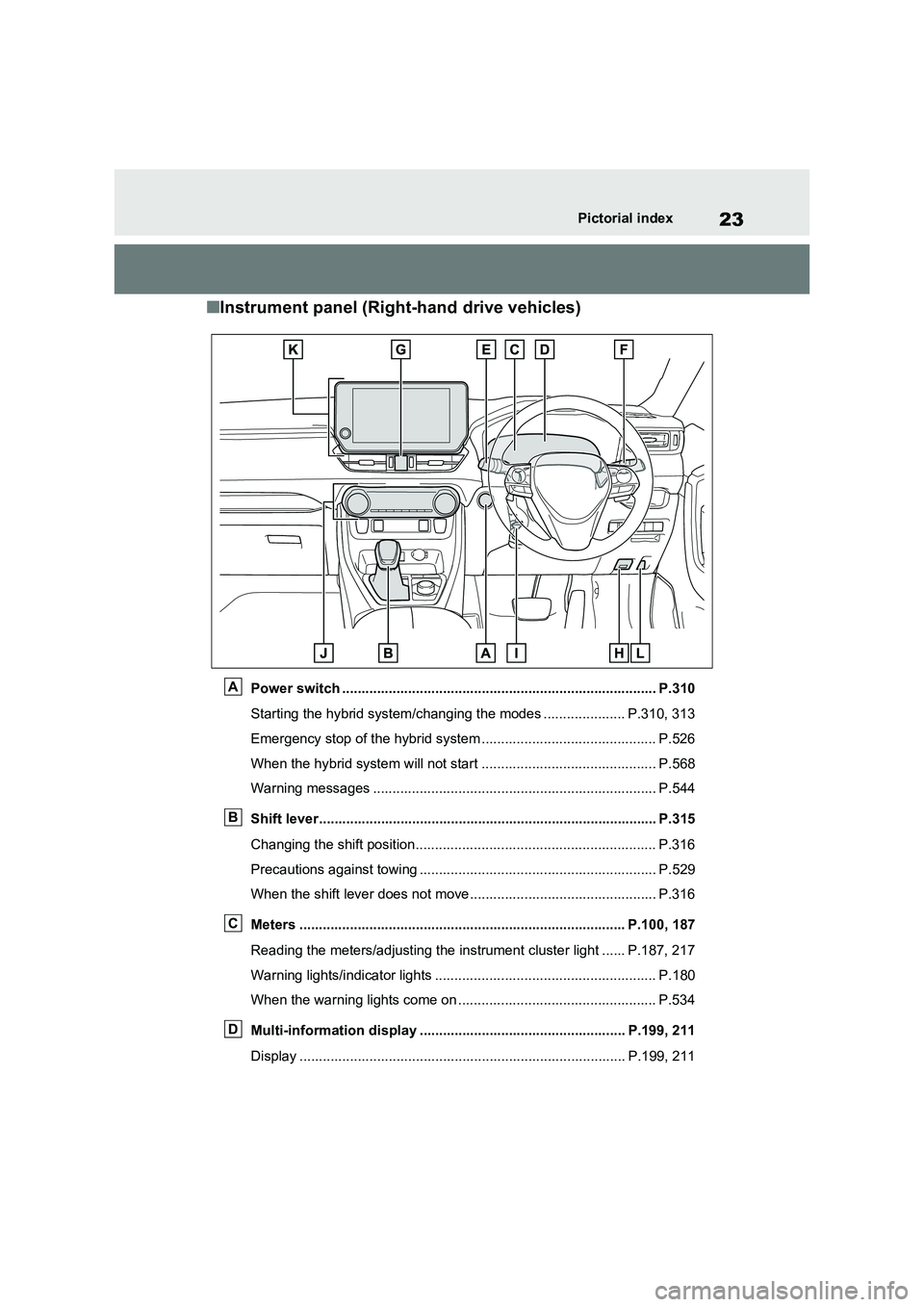
■Instrument panel (Right-hand drive vehicles)
Power switch ................................................................................. P.310
Starting the hybrid system/changing the modes ..................... P.310, 313
Emergency stop of the hybrid system ............................................. P.526
When the hybrid system will not start ............................................. P.568
Warning messages ......................................................................... P.544
Shift lever....................................................................................... P.315
Changing the shift position.............................................................. P.316
Precautions against towing ............................................................. P.529
When the shift lever does not move................................................ P.316
Meters .................................................................................... P.100, 187
Reading the meters/adjusting the instrument cluster light ...... P.187, 217
Warning lights/indicator lights ......................................................... P.180
When the warning lights come on ................................................... P.534
Multi-information display ..................................................... P.199, 211
Display .................................................................................... P.199, 211
A
B
C
D
Page 299 of 718
297
5
5-1. Before driving
Driving
Check the allowable towing capac-
ity, GVM (Gross Vehicle Mass),
MPAC (Maximum Permissible Axle
Capacity), and permissible drawbar
load before towing. ( P.584)
Toyota recommends the use of the
Toyota hitch/bracket for your vehi-
cle. Other products of a suitable
nature and comparable quality may
also be used.
For vehicles where the towing
device blocks any of the lights or
license plate, the following shall be
observed:
Do not use towing devices that
cannot be easily removed or
repositioned.
Towing devices must be
removed or repositioned when
not in use.
Please consult any authorized
Toyota retailer or Toyota authorized
repairer, or any reliable repairer
when installing trailer lights, as
incorrect installation may cause
damage to the vehicle’s lights.
Please take care to comply with
your state’s laws when installing
trailer lights.
WARNING
Follow all the instructions described in this section.
Failure to do so could cause an acci- dent resulting in death or serious injury.
■Trailer towing precautions
When towing, make sure that none of the weight limits are exceeded.
( P.298)
■To avoid accident or injury
●Vehicles with compact spare tire: Do not tow a trailer when the com-pact spare tire is installed on your
vehicle.
●Vehicles with emergency tire punc-
ture repair kit: Do not tow a trailer when the tire installed is repaired with the emer-
gency tire puncture repair kit.
●Do not use dynamic radar cruise
control with full-speed range (if equipped) or cruise control (if equipped) when trailer towing.
■Vehicle speed in towing
Observe the legal maximum speeds
for trailer towing.
■Before descending hills or long
declines
Reduce speed and downshift. How- ever, never downshift suddenly while
descending steep or long downhill grades.
■Operation of the brake pedal
Do not hold the brake pedal depressed often or for long periods of
time. Doing so may result in the brake over-heating or reduce braking effects.
Weight limits
Towing hitch/bracket
Connecting trailer lights
Page 348 of 718
3465-5. Using the driving support systems
■Enabling/disabling the pre-col-
lision system
The pre-collision system can be
enabled/disabled on the screen
( P.206, 217) of the multi-informa-
tion display.
The system is automatically enabled
each time the power switch is turned to
ON.
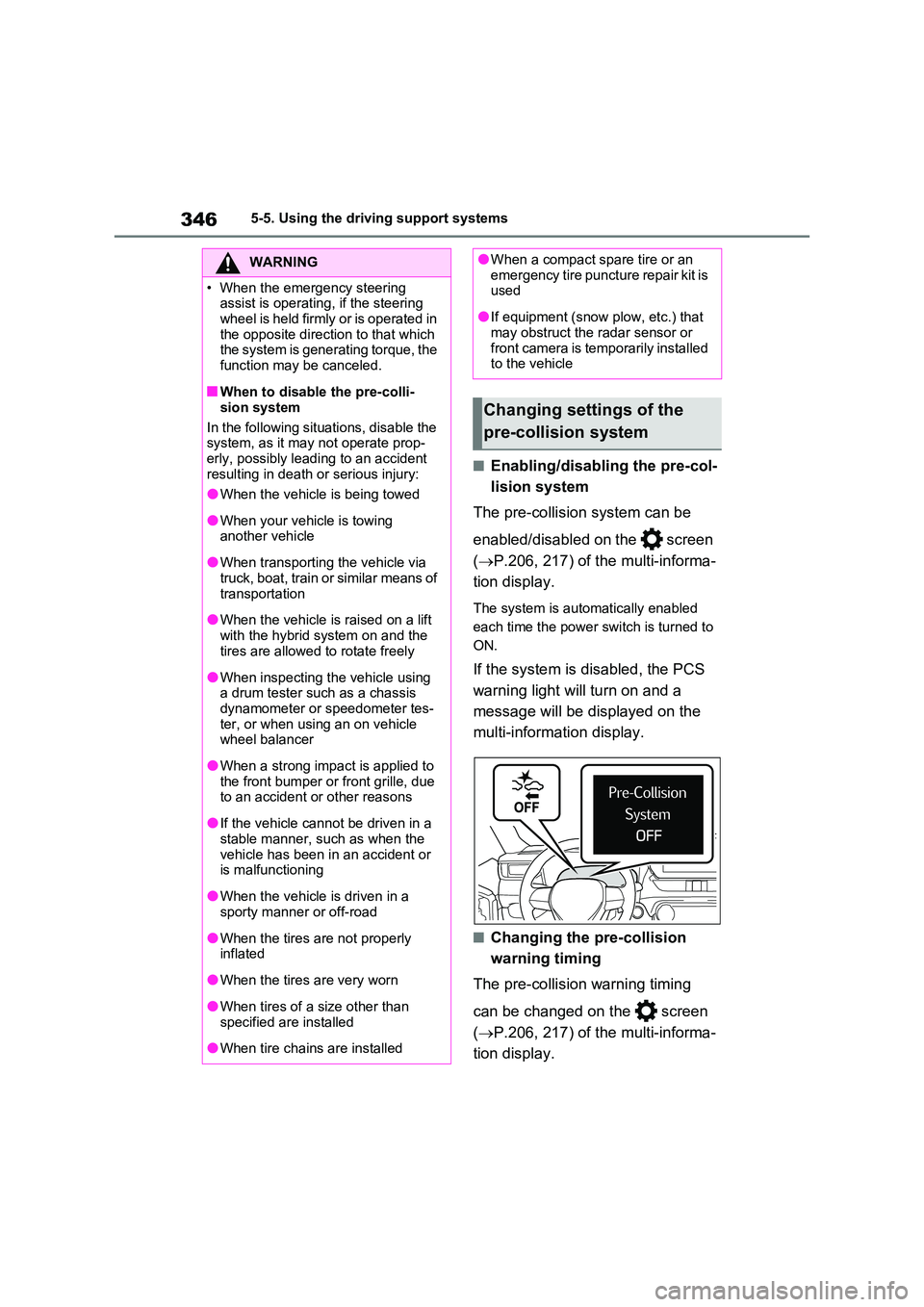
If the system is disabled, the PCS
warning light will turn on and a
message will be displayed on the
multi-information display.
■Changing the pre-collision
warning timing
The pre-collision warning timing
can be changed on the screen
( P.206, 217) of the multi-informa-
tion display.
WARNING
• When the emergency steering assist is operating, if the steering
wheel is held firmly or is operated in the opposite direction to that which the system is generating torque, the
function may be canceled.
■When to disable the pre-colli-
sion system
In the following situations, disable the system, as it may not operate prop-
erly, possibly leading to an accident resulting in death or serious injury:
●When the vehicle is being towed
●When your vehicle is towing another vehicle
●When transporting the vehicle via truck, boat, train or similar means of
transportation
●When the vehicle is raised on a lift
with the hybrid system on and the tires are allowed to rotate freely
●When inspecting the vehicle using a drum tester such as a chassis dynamometer or speedometer tes-
ter, or when using an on vehicle wheel balancer
●When a strong impact is applied to the front bumper or front grille, due to an accident or other reasons
●If the vehicle cannot be driven in a stable manner, such as when the
vehicle has been in an accident or is malfunctioning
●When the vehicle is driven in a sporty manner or off-road
●When the tires are not properly inflated
●When the tires are very worn
●When tires of a size other than
specified are installed
●When tire chains are installed
●When a compact spare tire or an emergency tire puncture repair kit is used
●If equipment (snow plow, etc.) that may obstruct the radar sensor or
front camera is temporarily installed to the vehicle
Changing settings of the
pre-collision system
Page 356 of 718
3545-5. Using the driving support systems
WARNING
■Before using LTA system
●Do not rely solely upon the LTA
system. The LTA system does not automatically drive the vehicle or reduce the amount of attention that
must be paid to the area in front of the vehicle. The driver must always assume full responsibility for driving
safely by paying careful attention to the surrounding conditions and operating the steering wheel to cor-
rect the path of the vehicle. Also, the driver must take adequate breaks when fatigued, such as from
driving for a long period of time.
●Failure to perform appropriate driv-
ing operations and pay careful attention may lead to an accident, resulting in death or serious injury.
■Situations unsuitable for LTA system
In the following situations, use the LTA switch to turn the system off. Failure to do so may lead to an acci-
dent, resulting in death or serious injury.
●Vehicle is driven on a road surface which is slippery due to rainy weather, fallen snow, freezing, etc.
●Vehicle is driven on a snow-cov-ered road.
●White (yellow) lines are difficult to see due to rain, snow, fog, dust,
etc.
●Vehicle is driven in a temporary
lane or restricted lane due to con- struction work.
●Vehicle is driven in a construction zone.
●A spare tire, tire chains, etc. are equipped.
●When the tires have been exces-sively worn, or when the tire infla-tion pressure is low.
●When your vehicle is towing a trailer or during emergency towing
■Preventing LTA system malfunc-tions and operations performed
by mistake
●Do not modify the headlights or place stickers, etc. on the surface of
the lights.
●Do not modify the suspension etc. If
the suspension etc. needs to be replaced, contact any authorized Toyota retailer or Toyota authorized
repairer, or any reliable repairer.
●Do not install or place anything on
the hood or grille. Also, do not install a grille guard (bull bars, kan-garoo bar, etc.).
●If your windshield needs repairs, contact any authorized Toyota
retailer or Toyota authorized repairer, or any reliable repairer.
■Conditions in which functions may not operate properly
In the following situations, the func-
tions may not operate properly and the vehicle may depart from its lane. Drive safely by always paying careful
attention to your surroundings and operate the steering wheel to correct the path of the vehicle without relying
solely on the functions.
Page 373 of 718
371
5
5-5. Using the driving support systems
Driving
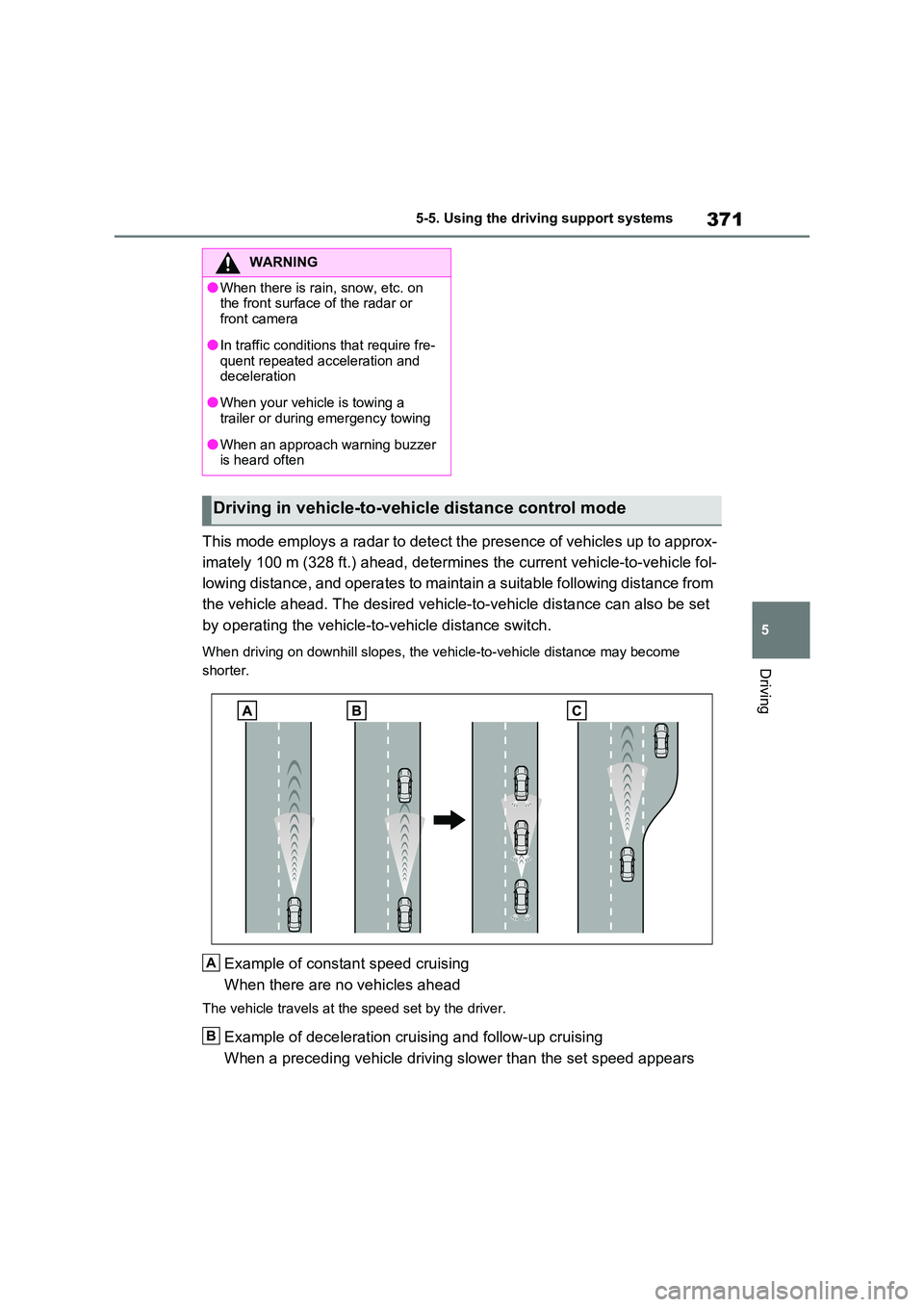
This mode employs a radar to detect the presence of vehicles up to approx-
imately 100 m (328 ft.) ahead, determines the current vehicle-to-vehicle fol-
lowing distance, and operates to maintain a suitable following distance from
the vehicle ahead. The desired vehicle-to-vehicle distance can also be set
by operating the vehicle-to-vehicle distance switch.
When driving on downhill slopes, the vehicle-to-vehicle distance may become
shorter.
Example of constant speed cruising
When there are no vehicles ahead
The vehicle travels at the speed set by the driver.
Example of deceleration cruising and follow-up cruising
When a preceding vehicle driving slower than the set speed appears
WARNING
●When there is rain, snow, etc. on the front surface of the radar or
front camera
●In traffic conditions that require fre-
quent repeated acceleration and deceleration
●When your vehicle is towing a trailer or during emergency towing
●When an approach warning buzzer is heard often
Driving in vehicle-to-vehicle distance control mode
A
B
Page 384 of 718
3825-5. Using the driving support systems
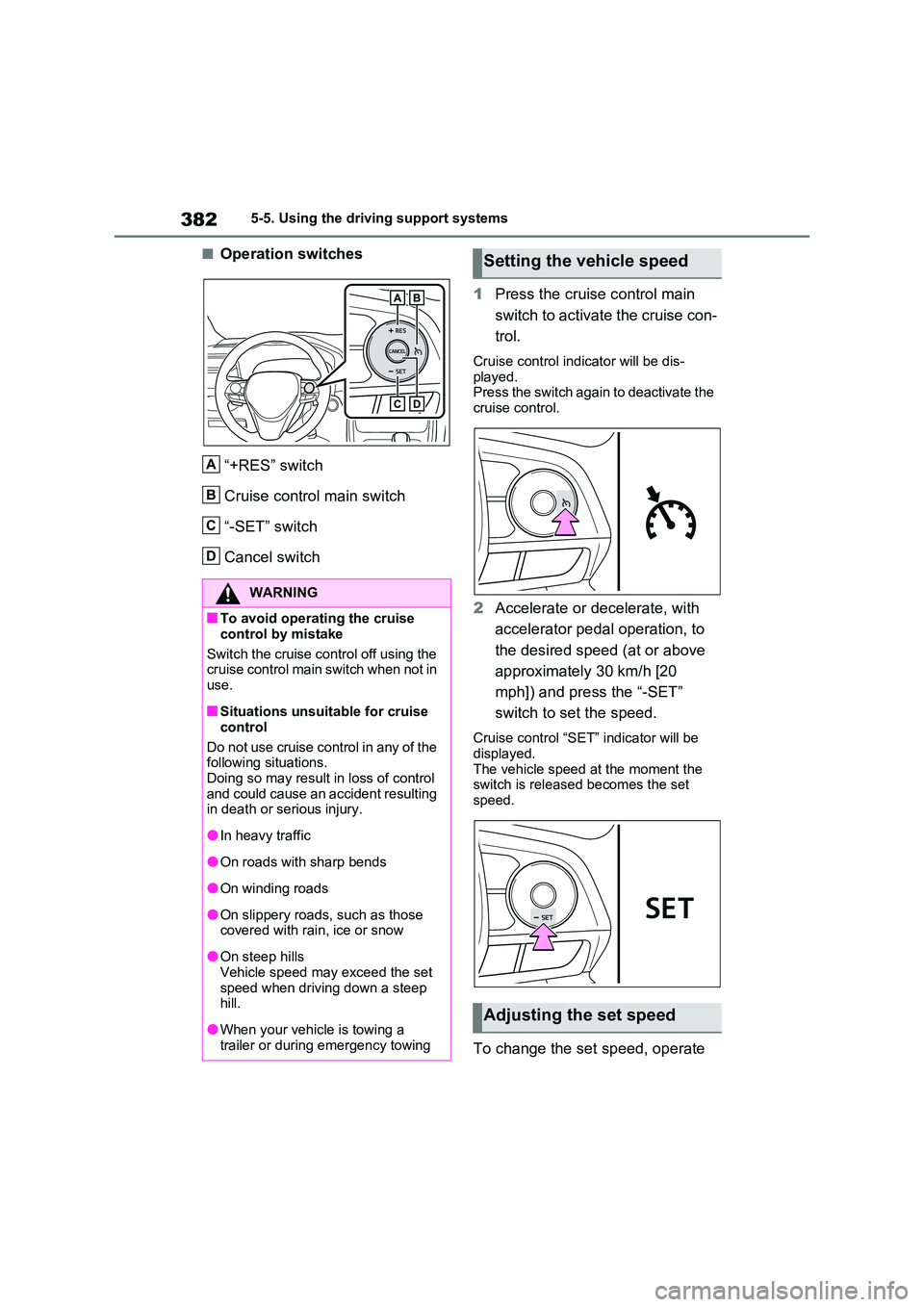
■Operation switches
“+RES” switch
Cruise control main switch
“-SET” switch
Cancel switch
1 Press the cruise control main
switch to activate the cruise con-
trol.
Cruise control indicator will be dis-
played. Press the switch again to deactivate the cruise control.
2 Accelerate or decelerate, with
accelerator pedal operation, to
the desired speed (at or above
approximately 30 km/h [20
mph]) and press the “-SET”
switch to set the speed.
Cruise control “SET” indicator will be displayed.
The vehicle speed at the moment the switch is released becomes the set speed.
To change the set speed, operate
WARNING
■To avoid operating the cruise
control by mistake
Switch the cruise control off using the cruise control main switch when not in
use.
■Situations unsuitable for cruise
control
Do not use cruise control in any of the following situations.
Doing so may result in loss of control and could cause an accident resulting in death or serious injury.
●In heavy traffic
●On roads with sharp bends
●On winding roads
●On slippery roads, such as those covered with rain, ice or snow
●On steep hillsVehicle speed may exceed the set
speed when driving down a steep hill.
●When your vehicle is towing a trailer or during emergency towing
A
B
C
D
Setting the vehicle speed
Adjusting the set speed
Page 386 of 718
3845-5. Using the driving support systems
uations.
●Actual vehicle speed falls more than approximately 16 km/h (10 mph)
below the preset vehicle speed.
●Actual vehicle speed is below approxi-
mately 30 km/h (20 mph).
●VSC is activated.
●TRC is activated for a period of time.
●When the VSC or TRC system is turned off.
●The parking brake is operated.
■If the warning message for the cruise control is shown on the multi-information display
Press the cruise control main switch once to deactivate the system, and then press the switch again to reactivate the
system. If the cruise control speed cannot be set or if the cruise control cancels immedi-
ately after being activated, there may be a malfunction in the cruise control sys-tem. Have the vehicle inspected by any
authorized Toyota retailer or Toyota authorized repairer, or any reliable repairer.
*: If equipped
1 Press the switch to activate the
speed limiter.
Press the switch once more to deacti-
Speed limiter*
A desired maximum speed can
be set using the cruise control
switch. ( P.381)
The speed limiter prevents
vehicle speed from exceeding
the set speed.
WARNING
■To avoid operating the speed
limiter by mistake
Keep the speed limiter switch off when not in use.
■Situations unsuitable for speed limiter
Do not use the speed limiter in either of the following situations. Doing so may result in control of the
vehicle being lost and could cause a serious or fatal accident.
●On slippery roads, such as those covered with rain, ice or snow
●On steep hills
●When your vehicle is towing a
trailer or during emergency towing
Setting the vehicle speed
Page 401 of 718

399
5 5-5. Using the driving support systems
Driving
tors, motorcycle engines, air brakes of
large vehicles, the clearance sonar of
other vehicles or other devices which
produce ultrasonic waves are near the
vehicle.
●A sensor is coated with a sheet of
spray or heavy rain.
●If objects draw too close to the sensor.
●When a pedestrian is wearing clothing
that does not reflect ultrasonic waves
(ex. skirts with gathers or frills).
●When objects that are not perpendicu-
lar to the ground, not perpendicular to
the vehicle traveling direction,
uneven, or waving are in the detection
range.
●Strong wind is blowing.
●When driving in inclement weather
such as fog, snow or a sandstorm.
●When an object that cannot be
detected is between the vehicle and a
detected object.
●If an object such as a vehicle, motor-
cycle, bicycle or pedestrian cuts in
front of the vehicle or runs out from
the side of the vehicle.
●If the orientation of a sensor has been
changed due to a collision or other
impact.
●When equipment that may obstruct a
sensor is installed, such as a towing
eyelet, bumper protector (an addi-
tional trim strip, etc.), bicycle carrier,
or snow plow.
●If the front of the vehicle is raised or
lowered due to the carried load.
●If the vehicle cannot be driven in a
stable manner, such as when the
vehicle has been in an accident or is
malfunctioning.
●When tire chains, a compact spare
tire or an emergency tire puncture
repair kit are used.
■Situations in which the system may
operate even if there is no possibil-
ity of a collision
In some situations, such as the follow-ing, the system may operate even
though there is no possibility of a colli-
sion.
●When driving on a narrow road.
●When driving toward a banner, flag,
low-hanging branch or boom barrier
(such as those used at railroad cross-
ings, toll gates and parking lots).
●When there is a rut or hole in the sur-
face of the road.
●When driving on a metal cover (grat-
ing), such as those used for drainage
ditches.
●When driving up or down a steep
slope.
●If a sensor is hit by a large amount of
water, such as when driving on a
flooded road.
●There is dirt, snow, water drops or ice
on a sensor. (Cleaning the sensors
will resolve this problem.)
●A sensor is coated with a sheet of
spray or heavy rain.
●When driving in inclement weather
such as fog, snow or a sandstorm.
●When strong winds are blowing.
●When vehicle horns, vehicle detec-
tors, motorcycle engines, air brakes of
large vehicles, the clearance sonar of
other vehicles or other devices which
Page 406 of 718
4045-5. Using the driving support systems
The Parking Support Brake can be
enabled/disabled on the screen
of the multi-information display. All
of the Parking Support Brake func-
tions (static objects and rear-cross-
ing vehicles) are enabled/disabled
simultaneously. ( P.206, 217)
When the Parking Support Brake is dis-
abled, the PKSB OFF indicator
( P.184) illuminates on the multi-infor-
mation display.
To re-enable the system, select on
the multi-information display, select
and turn it on.
If the system is disabled, it will remain
off even if the power switch is turned to
ON after the power switch has been
turned off.
WARNING
●When loading the vehicle onto a boat, truck or other transport ves-
sel.
●If the suspension has been modi-
fied or tires of a size other than specified are installed.
●If the front of the vehicle is raised or lowered due to the carried load.
●When equipment that may obstruct a sensor is installed, such as a tow-ing eyelet, bumper protector (an
additional trim strip, etc.), bicycle carrier, or snow plow.
●When using automatic car washing devices.
●If the vehicle cannot be driven in a stable manner, such as when the vehicle has been in an accident or
is malfunctioning.
●When the vehicle is driven in a
sporty manner or off-road.
●When the tires are not properly
inflated.
●When the tires are very worn.
●When tire chains, a compact spare tire or an emergency tire puncture
repair kit are used.
●When your vehicle is towing a
trailer or during emergency towing.
NOTICE
■If “Parking Support Brake Unavailable” is displayed on the
multi-information display and the PKSB OFF indicator illuminates
If this message is displayed immedi-
ately after the power switch is changed to ON, operate the vehicle carefully, paying attention to your sur-
roundings. It may be necessary to drive the vehicle for a certain amount of time before the system returns to
normal. (If the system does not return to normal after driving for a while, clean the sensors and their surround-
ing area on the bumpers.)
Enabling/Disabling the Park-
ing Support Brake