audio TOYOTA SEQUOIA 2010 2.G Service Manual
[x] Cancel search | Manufacturer: TOYOTA, Model Year: 2010, Model line: SEQUOIA, Model: TOYOTA SEQUOIA 2010 2.GPages: 660, PDF Size: 12.29 MB
Page 318 of 660
318 3-2. Using the audio system
Switching the displayPress .
Each time is pressed, the display changes in the following order:
Track title Track title/Artist name Track title/Album name Track
title/Elapsed time
■ About iPod®
iPod® is registered trademarks of Apple, Inc.
■ iPod
® player functions
● When an iPod
® player is connected and the audio source is changed to
iPod® player mode, the iPod® player will resume play from the same
point at which it was last used.
● Depending on the iPod
® player that is connected to the system, certain
functions may not be available. Disconnecting the device and reconnect-
ing it once again may resolve some malfunctions.
■ iPod
® player problems
To resolve most problems encountered when using your iPod
® player, dis-
connect your iPod® player from the vehicle iPod® player connection and
reset it.
For instructions on how to reset your iPod
® player, refer to your iPod® player
Owner’s Manual.
■ Error messages
“IPOD ERROR”:This indicates a problem in the iPod
® player, inside the USB
box or the connection between them.
“NO SONGS”:This indicates that there is no music data in the iPod
® player.
“UPDATE YOUR IPOD”:This indicates that the version of the iPod
® player is
not compatible.
Page 319 of 660
319
3-2. Using the audio system
3
Interior features
■
Compatible models
●iPod
® 5th generation Version 1.2 or later
● iPod
® nano 3rd generation Version 1.0 or later
● iPod
® nano 2nd generation Version 1.1.2 or later
● iPod
® nano Version 1.2 or later
● iPod
® touch Version 1.1 or later
● iPod
® classic Version 1.0 or later
iPhone
®, iPod® mini, iPod® shuffle, iPod® photo and 4th generation and ear-
lier models of iPod® are not compatible with this system.
Items related to standards and limitations are as follows:
● Maximum number of lists in device: 9999
● Maximum number of songs in device: 65,025
● Maximum number of songs per list: 65,025
CAUTION
■Caution while driving
Do not connect iPod
® players or operate the controls.
NOTICE
■To prevent damage to iPod® players
● Do not leave iPod
® players in the vehicle. The temperature inside the vehi-
cle may become high, resulting in damage to the player.
● Do not push down on or apply unnecessary pressure to the iPod
® player
while it is connected as this may damage the iPod® player or its terminal.
● Do not insert foreign objects into the port as this may damage the iPod
®
player or its terminal.
Page 320 of 660
320
3-2. Using the audio system
Operating a USB memor y player
: If equipped
Connecting a USB memory player enables you to enjoy music from
the vehicle speakers.
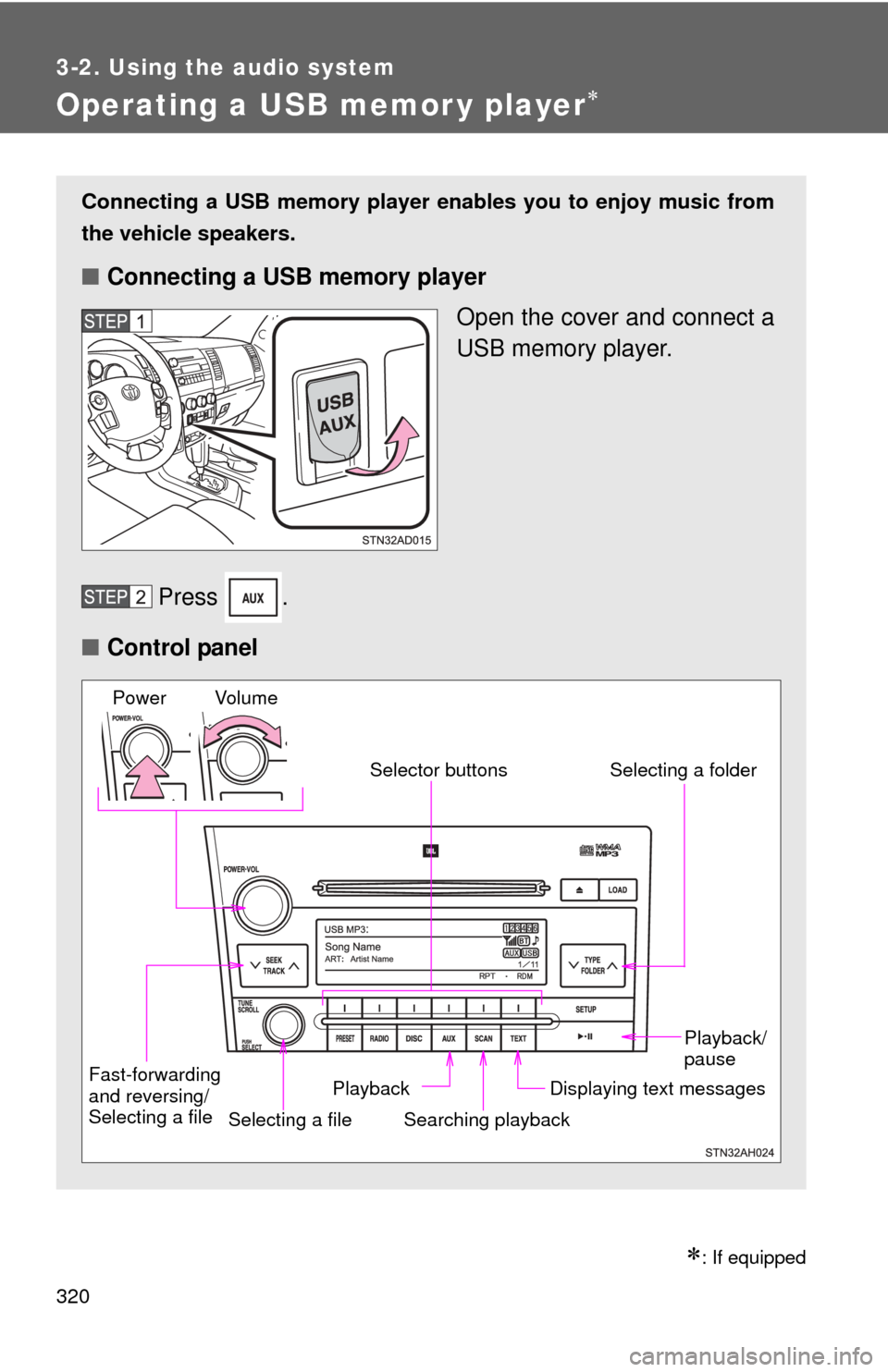
■ Connecting a USB memory player
Open the cover and connect a
USB memory player.
Press .
■ Control panel
Fast-forwarding
and reversing/
Selecting a file
Selecting a file
Playback/
pause
Searching playback Displaying text messages
Selector buttons
Selecting a folder
Playback
Vo l u m e
Power
Page 321 of 660
321
3-2. Using the audio system
3
Interior features
Selecting and scanning a folder
■ Selecting a folder
Press “ ” or “ ” on to select the desired folder.
■ Returning to the first file of the first folder
Press and hold “ ” on until you hear a beep.
■ Scanning the first file of all the folders
Press and hold until you hear a beep.
The first ten seconds of the first file in each folder will be played.
When the desired folder is reached, press again.
Selecting and scanning files
■ Selecting a file
Turn or press “ ” or “ ” on to select the desired
file.
■ Scanning the files in a folder
Press .
The first ten seconds of each file will be played.
To cancel, press again.
When the desired file is reached, press again.
Page 322 of 660
322 3-2. Using the audio system
Playing and pausing filesPress .
Fast-forwarding and reversing filesPress and hold “
” or “ ” on .
Random playback
■ Playing files from a folder in random order
Press that corresponds to “RDM”.
To cancel, press the button twice.
■Playing all the files from a USB memory player in random
order
Press that corresponds to “RDM” twice.
To cancel, press the button again.
Repeat play
■ Repeating a file
Press that corresponds to “RPT”.
To cancel, press the button twice.
■Repeating all the files in a folder
Press that corresponds to “RPT” twice.
To cancel, press the button again.
Page 323 of 660

323
3-2. Using the audio system
3
Interior features
Switching the display
Press .
Each time is pressed, the display changes in the following order:
Track title Track title/Artist name Track title/Album name Track
title/Elapsed time
■ USB memory player functions
Depending on the USB memory player that is connected to the system, cer-
tain functions may not be available. Disconnecting the device and recon-
necting it once again may resolve some malfunctions.
■ Error messages
“USB ERROR”:This indicates a problem in the USB memory player, in the
USB box or connection between them.
“NO MUSIC”: This indicates that no MP3/WMA files are included in the USB memory player.
Page 324 of 660
324 3-2. Using the audio system
■USB memory player
●Compatible device
USB memory players that can be used for MP3 and WMA playback.
Depending on the type of USB device, playback may not be possible.
● Compatible device formats
The following device formats can be used:
• USB communication formats: USB2.0 FS (12 mbps)
• File formats: FAT16/32 (Windows
®)
• Correspondence class: Mass storage class MP3 and WMA files written in any format other than those listed above
may not play correctly, and their file names and folder names may not
be displayed correctly.
Items related to standards and limitations are as follows:
• Maximum directory hierarchy: 8 levels
• Maximum number of folder in device: 999 (including the root)
• Maximum number of files in device: 65,025
• Maximum number of files per folder: 255
● MP3 and WMA files
MP3 (MPEG Audio LAYER 3) is a standard audio compression format.
Files can be compressed to approximately 1/10 of their original size using
MP3 compression.
WMA (Windows Media
® Audio) is a Microsoft® audio compression format.
This format compresses audio data to a size smaller than that of the MP3
format.
There is a limit to the MP3 and WMA file standards that can be used and to
the media/formats on which the files are recorded.
Page 325 of 660
325
3-2. Using the audio system
3
Interior features
●
MP3 file compatibility
• Compatible standards
MP3 (MPEG1 AUDIO LAYERII, III, MPEG2 AUDIO LAYERII, III,
MPEG2.5)
• Compatible sampling frequencies MPEG1 AUDIO LAYERII, III: 32, 44.1, 48 (kHz)
MPEG2 AUDIO LAYERII, III: 16, 22.05, 24 (kHz)
MPEG2.5: 8, 11.025, 12 (kHz)
• Compatible bit rates (compatible with VBR) MPEG1 AUDIO LAYERII, III: 32-320 (kbps)
MPEG2 AUDIO LAYERII, III: 32-160 (kbps)
MPEG2.5: 32-160 (kbps)
• Compatible channel modes: stereo, joint stereo, dual channel and monaural
● WMA file compatibility
• Compatible standards
WMA Ver. 9
• Compatible sampling frequencies HIGH PROFILE 32, 44.1, 48 (kHz)
• Compatible bit rates HIGH PROFILE 32-320 (kbps, VBR)
● File names
The only files that can be recognized as MP3/WMA and played are those
with the extension .mp3 or .wma.
● ID3 and WMA tags
ID3 tags can be added to MP3 files, making it possible to record the track
title, artist name, etc.
The system is compatible with ID3 Ver. 1.0, 1.1, and Ver. 2.2, 2.3, 2.4 ID3
tags. (The number of characters is based on ID3 Ver. 1.0 and 1.1.)
WMA tags can be added to WMA files, making it possible to record the
track title and artist name in the same way as with ID3 tags.
● MP3 and WMA playback
When a device containing MP3 or WMA files is plugged, all files in the
USB memory device are first checked. Once the file check is finished, the
first MP3 or WMA file is played. To make the file check finish more quickly,
we recommend you do not write in any files other than MP3 or WMA files
or create any unnecessary folders.
Page 326 of 660
326 3-2. Using the audio system
●Extensions
If the file extensions .mp3 and .wma are used for files other than MP3 and
WMA files, they will be mistakenly recognized and played as MP3 and
WMA files. This may result in large amounts of interference and damage
to the speakers.
● Playback
• To play MP3 files with steady sound quality, we recommend a fixed bit
rate of at least 128 kbps and a sampling frequency of 44.1 kHz.
• There is a wide variety of freeware and other encoding software for MP3 and WMA files on the market, and depending on the status of the
encoding and the file format, poor sound quality or noise at the start of
playback may result. In some cases, playback may not be possible at
all.
•Microsoft
®, Windows®, and Windows Media® are the registered trade-
marks of Microsoft Corporation in the U.S.A. and other countries.
CAUTION
■ Caution while driving
Do not connect a USB memory player or operate the controls.
NOTICE
■To prevent damage to a USB memory player
●Do not leave a USB memory player in the vehicle. The temperature inside
the vehicle may become high, resulting in damage to the player.
● Do not push down on or apply unnecessary pressure to the USB memory
player while it is connected as this may damage the USB memory player
or its terminal.
● Do not insert foreign objects into the port as this may damage the USB
memory player or its terminal.
Page 327 of 660
327
3-2. Using the audio system
3
Interior features
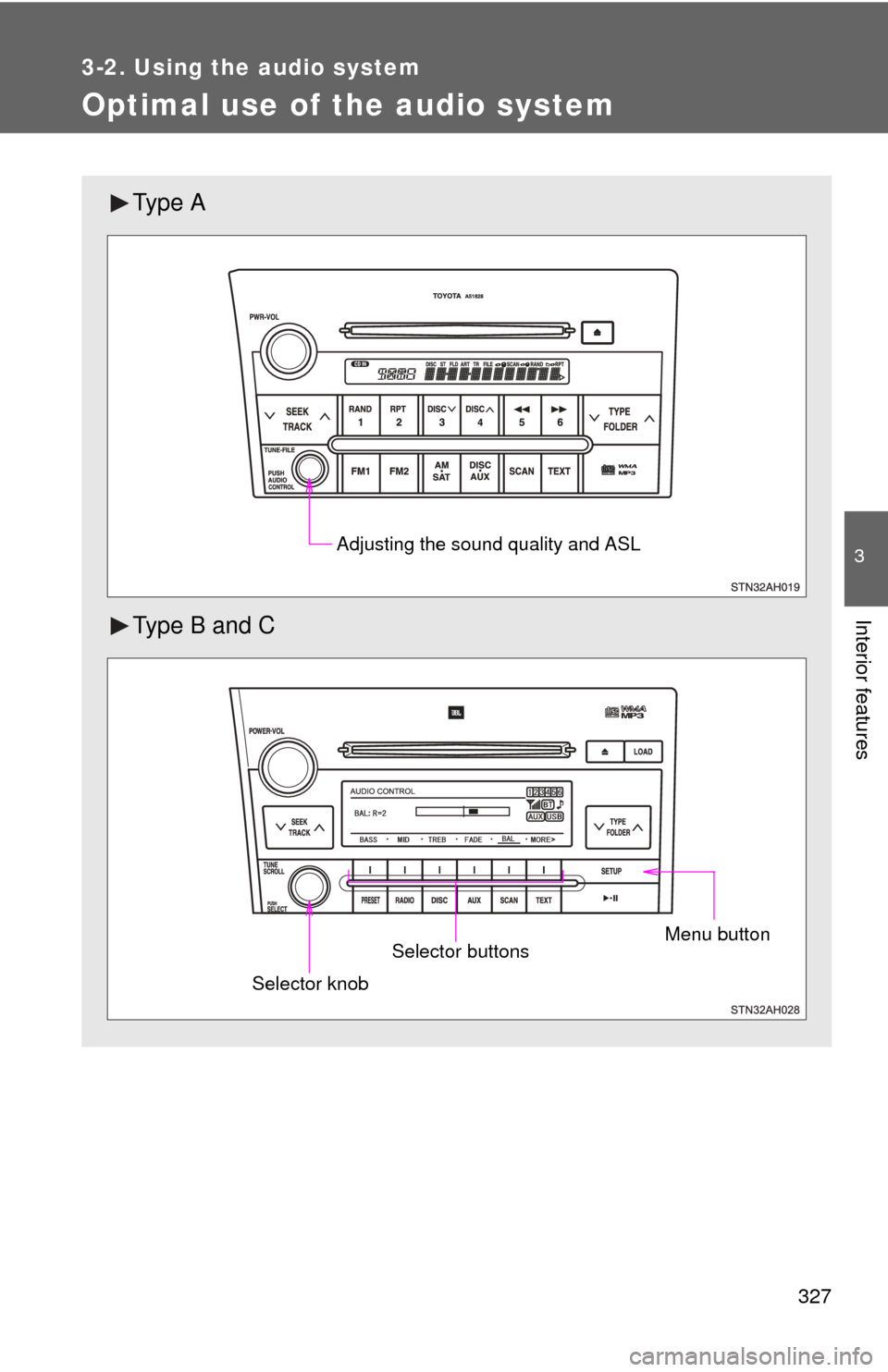
Optimal use of the audio system
Ty p e A
Type B and C
Adjusting the sound quality and ASL
Menu buttonSelector buttons
Selector knob