audio TOYOTA SEQUOIA 2010 2.G Workshop Manual
[x] Cancel search | Manufacturer: TOYOTA, Model Year: 2010, Model line: SEQUOIA, Model: TOYOTA SEQUOIA 2010 2.GPages: 660, PDF Size: 12.29 MB
Page 328 of 660
328 3-2. Using the audio system
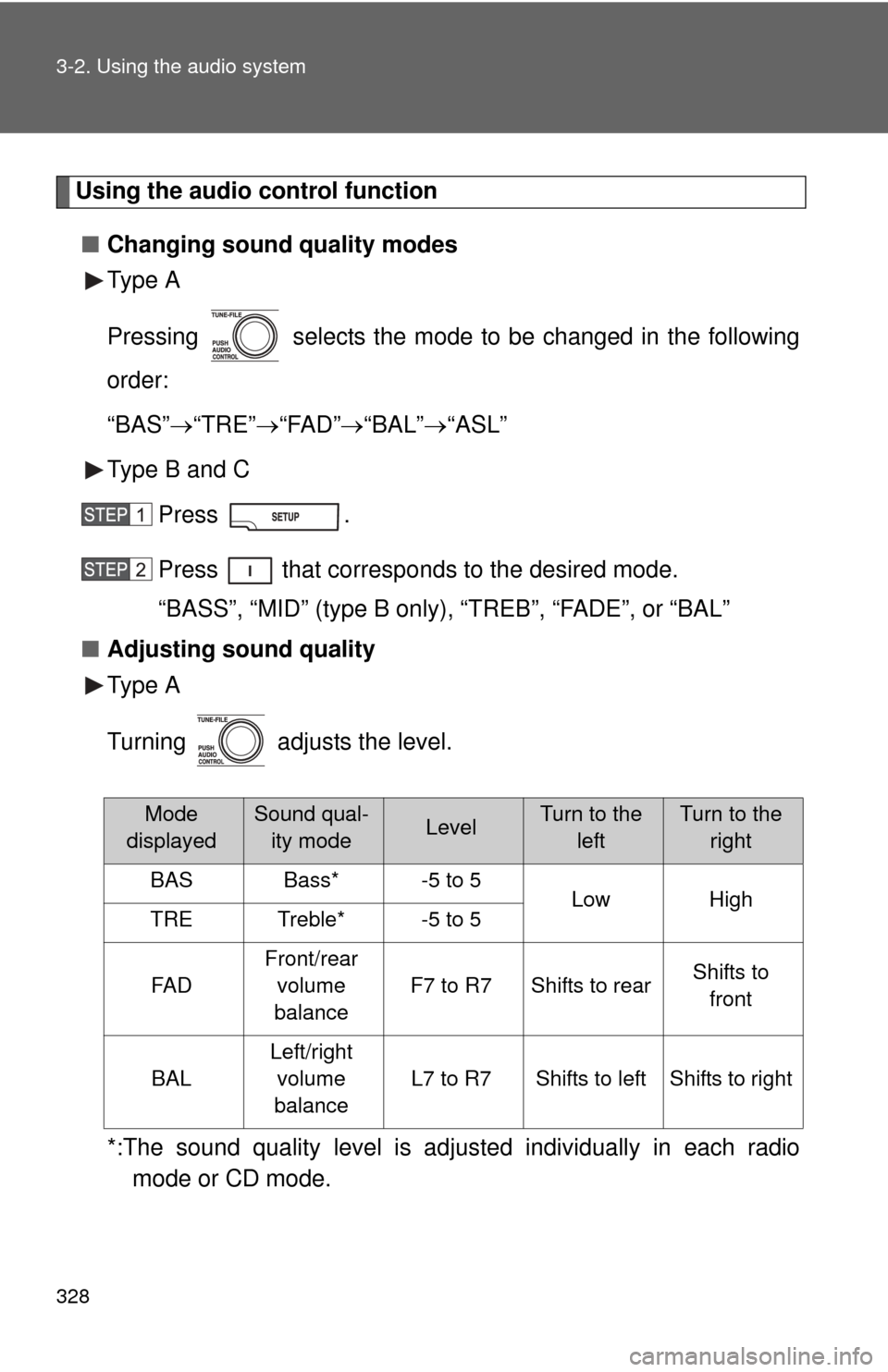
Using the audio control function■ Changing sound quality modes
Type A
Pressing selects the mode to be changed in the following
order:
“BAS” “TRE” “FAD” “BAL” “ASL”
Type B and C
Press .
Press that corresponds to the desired mode.
“BASS”, “MID” (type B only), “TREB”, “FADE”, or “BAL”
■ Adjusting sound quality
Type A
Turning adjusts the level.
*:The sound quality level is adjusted individually in each radio
mode or CD mode.
Mode
displayedSound qual- ity modeLevelTurn to the leftTurn to the right
BASBass*-5 to 5LowHighTRETreble*-5 to 5
FA D
Front/rear
volume
balance
F7 to R7Shifts to rearShifts to front
BAL
Left/right volume
balance
L7 to R7Shifts to leftShifts to right
Page 329 of 660
329
3-2. Using the audio system
3
Interior features
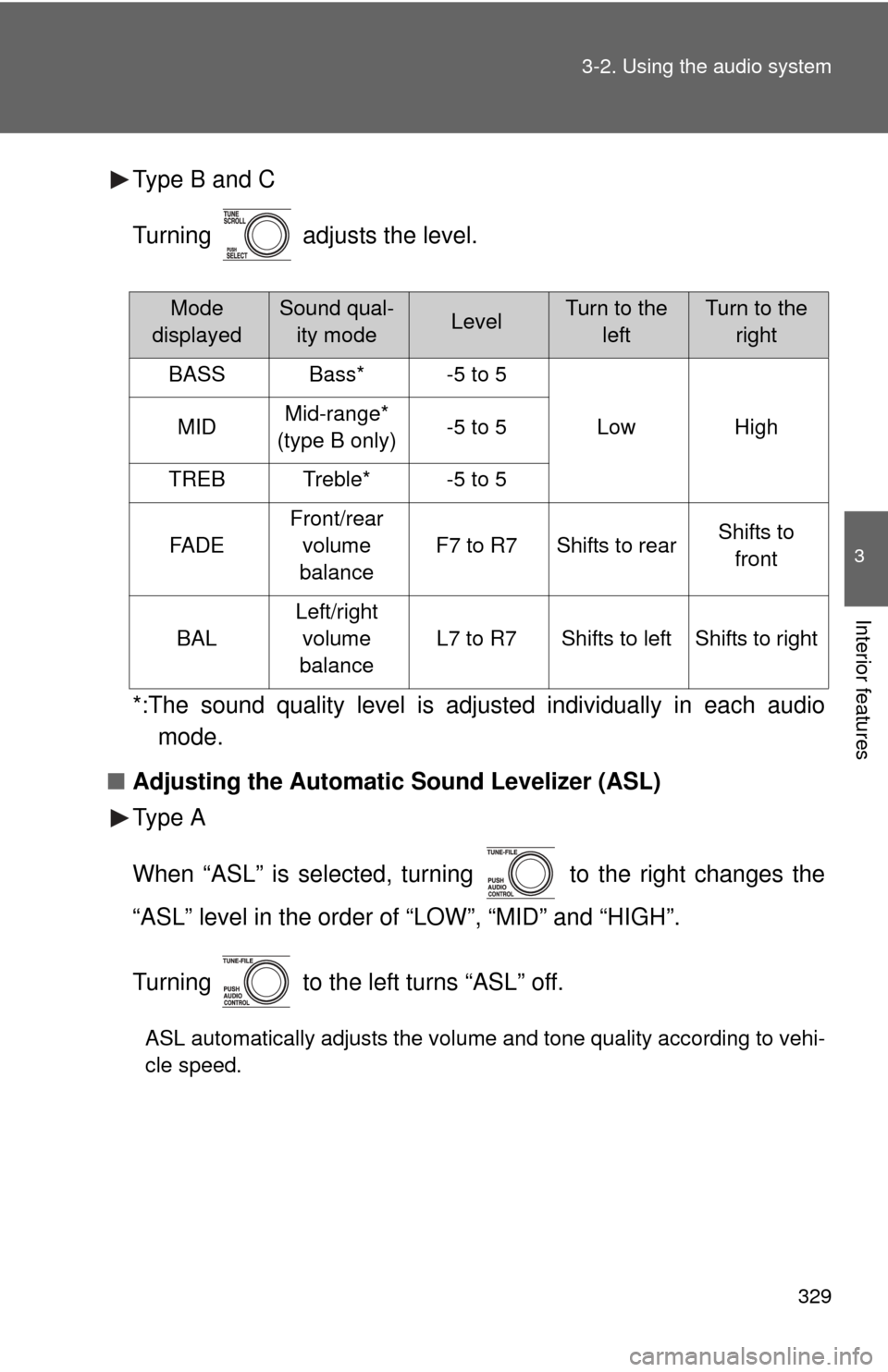
Type B and C
Turning adjusts the level.
*:The sound quality level is adjusted individually in each audio
mode.
■ Adjusting the Automatic Sound Levelizer (ASL)
Type A
When “ASL” is selected, turning to the right changes the
“ASL” level in the order of “LOW”, “MID” and “HIGH”.
Turning to the left turns “ASL” off.
ASL automatically adjusts the volume and tone quality according to vehi-
cle speed.
Mode
displayedSound qual- ity modeLevelTurn to the leftTurn to the right
BASSBass*-5 to 5
LowHighMIDMid-range*
(type B only)-5 to 5
TREBTreble*-5 to 5
FA D E
Front/rear volume
balance
F7 to R7Shifts to rearShifts to front
BAL
Left/right volume
balance
L7 to R7Shifts to leftShifts to right
Page 330 of 660
330 3-2. Using the audio system
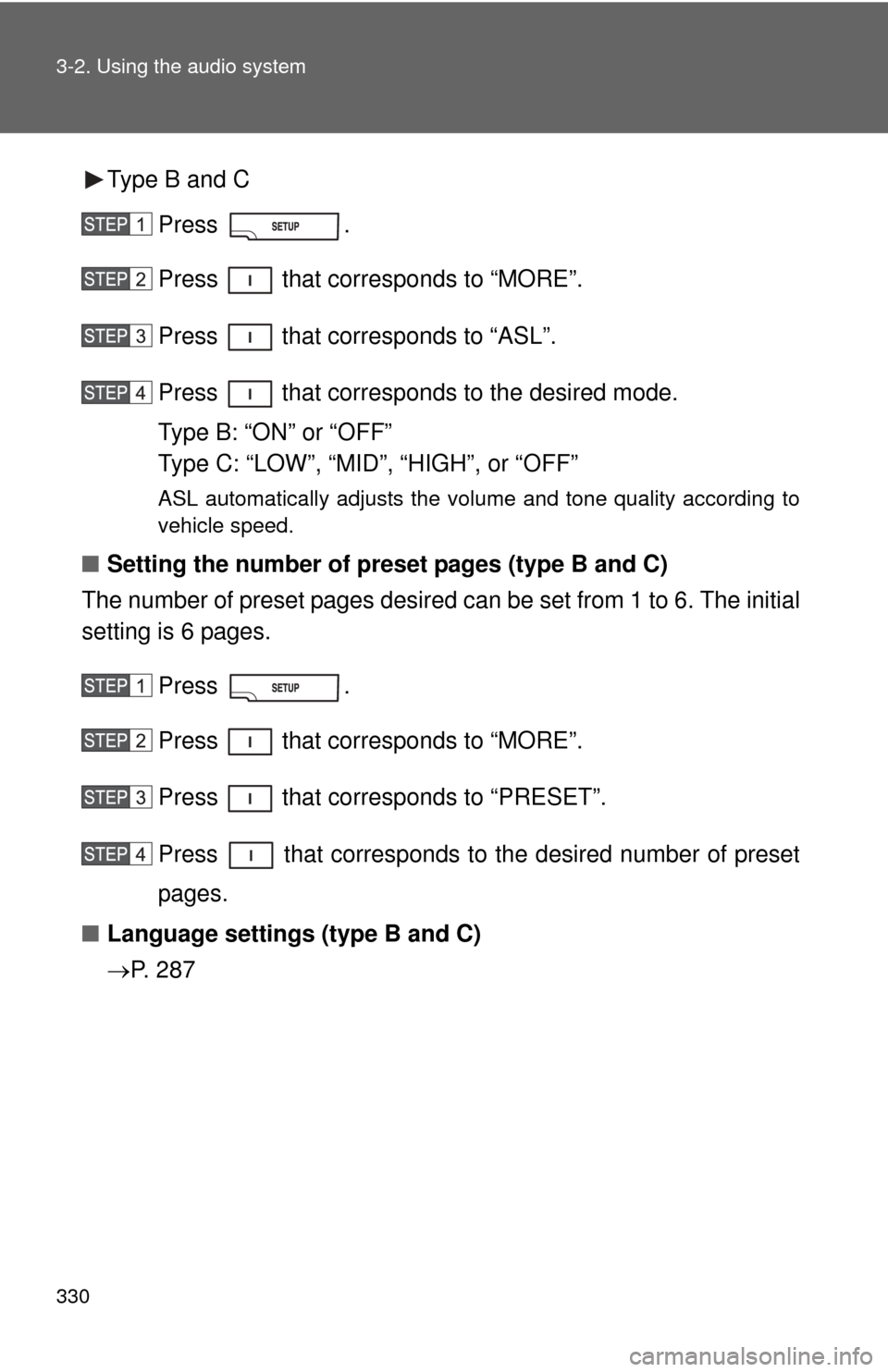
Type B and CPress .
Press that corresponds to “MORE”.
Press that corresponds to “ASL”.
Press that corresponds to the desired mode.
Type B: “ON” or “OFF”
Type C: “LOW”, “MID”, “HIGH”, or “OFF”
ASL automatically adjusts the volume and tone quality according to
vehicle speed.
■Setting the number of preset pages (type B and C)
The number of preset pages desired c an be set from 1 to 6. The initial
setting is 6 pages.
Press .
Press that corresponds to “MORE”.
Press that corresponds to “PRESET”.
Press that corresponds to the desired number of preset
pages.
■ Language settings (type B and C)
P. 2 8 7
Page 331 of 660
331
3-2. Using the audio system
3
Interior features
Using the AUX adapter
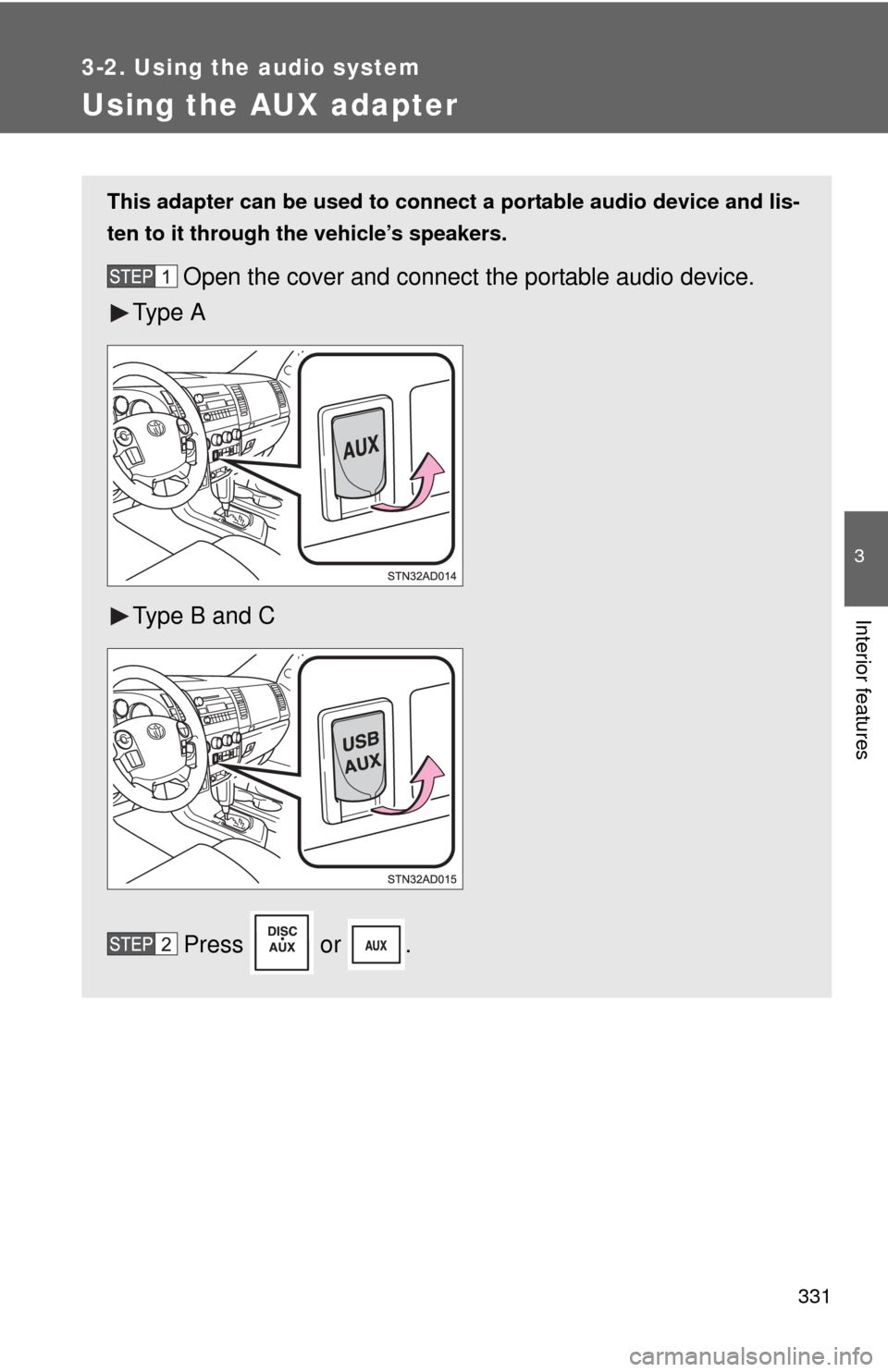
This adapter can be used to connect a portable audio device and lis-
ten to it through the vehicle’s speakers.
Open the cover and connect the portable audio device.
Ty p e A
Type B and C
Press or .
Page 332 of 660

332 3-2. Using the audio system
■Operating portable audio devices connected to the audio system
The volume can be adjusted using the vehicle’s audio controls. All other
adjustments must be made on the portable audio device itself.
■ When using a portable audio devi ce connected to the power outlet
Noise may occur during playback. Use the power source of the portable
audio device.
Page 333 of 660
333
3-2. Using the audio system
3
Interior features
Using the steering wheel audio switches
: If equipped
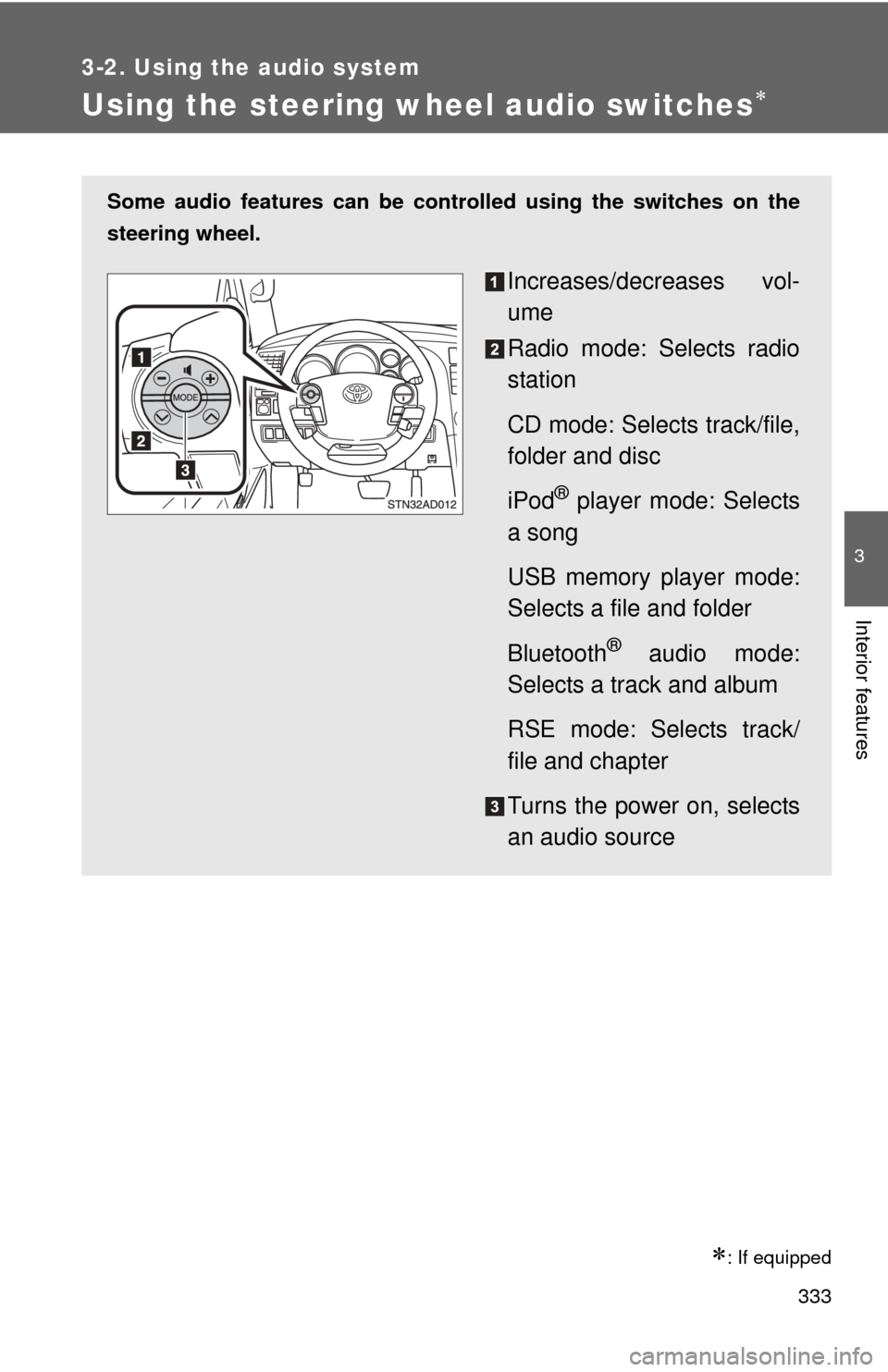
Some audio features can be controlled using the switches on the
steering wheel.
Increases/decreases vol-
ume
Radio mode: Selects radio
station
CD mode: Selects track/file,
folder and disc
iPod
® player mode: Selects
a song
USB memory player mode:
Selects a file and folder
Bluetooth
® audio mode:
Selects a track and album
RSE mode: Selects track/
file and chapter
Turns the power on, selects
an audio source
Page 334 of 660
334 3-2. Using the audio system
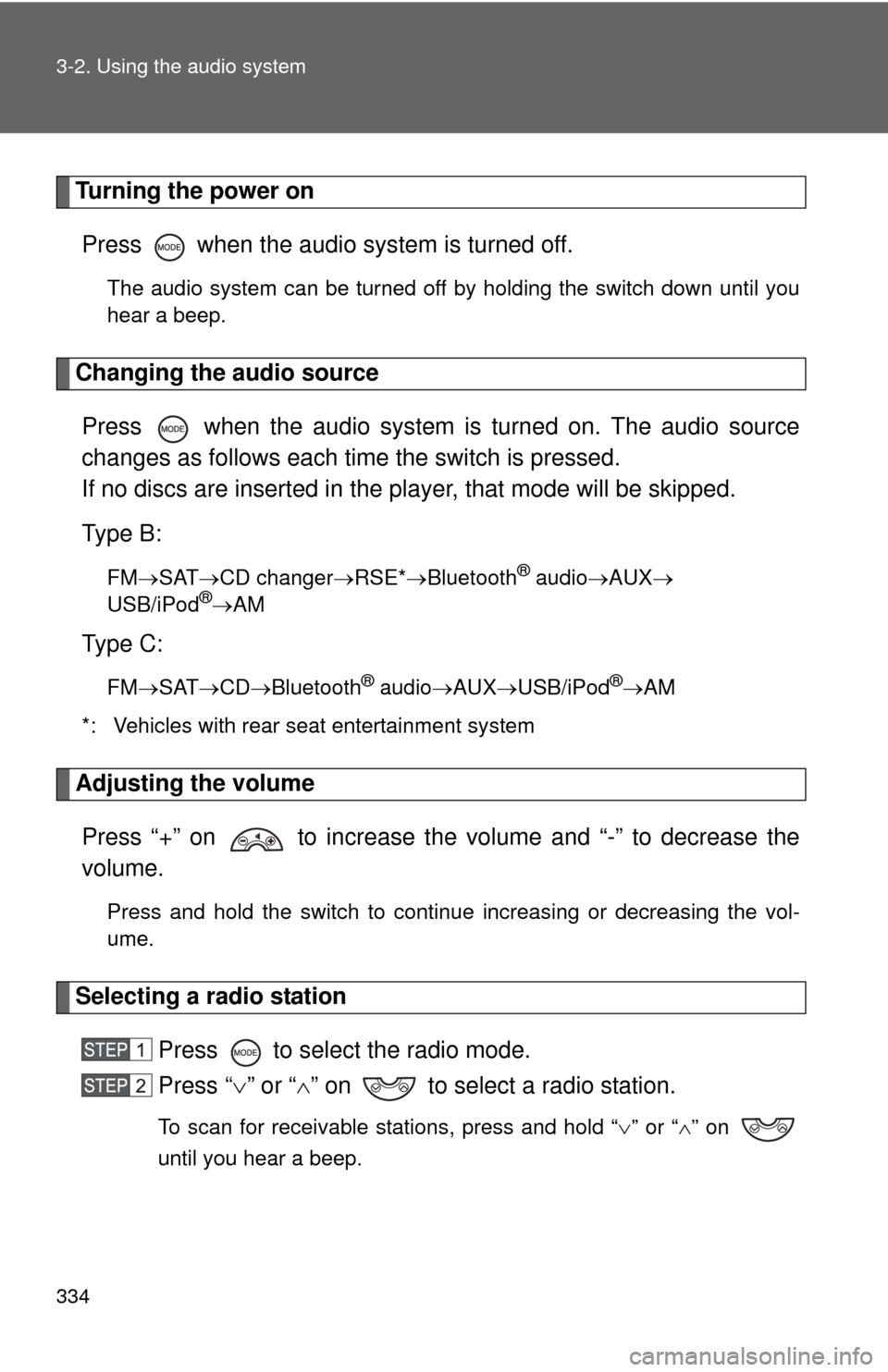
Turning the power onPress when the audio system is turned off.
The audio system can be turned off by holding the switch down until you
hear a beep.
Changing the audio sourcePress when the audio system is turned on. The audio source
changes as follows each time the switch is pressed.
If no discs are inserted in the player, that mode will be skipped.
Type B:
FM SAT CD changer RSE*Bluetooth® audio AUX
USB/iPod®AM
Type C:
FM SAT CDBluetooth® audio AUXUSB/iPod®AM
*: Vehicles with rear seat entertainment system
Adjusting the volume
Press “+” on to increase the volume and “-” to decrease the
volume.
Press and hold the switch to continue increasing or decreasing the vol-
ume.
Selecting a radio station Press to select the radio mode.
Press “” or “ ” on to select a radio station.
To scan for receivable stations, press and hold “ ” or “ ” on
until you hear a beep.
Page 335 of 660
335
3-2. Using the audio system
3
Interior features
Selecting a track/file or song
Press to select the CD, iPod
® player, USB memory
player, Bluetooth
® audio or RSE mode.
Press “ ” or “ ” on to select the desired track/file or
song.
Selecting a folder or album
Press to select the CD, USB memory player or
Bluetooth
® audio mode.
Press and hold “ ” or “ ” on until you hear a beep.
Selecting a disc in the CD player (type B only)
Press to select the CD mode.
Press and hold “ ” or “ ” on until you hear a beep.
Selecting a track/file or chapter (vehicles with rear seat entertainment system)
Press to select the RSE mode.
Press “” or “ ” on to select the desired track/file or
chapter.
CAUTION
■ To reduce the risk of an accident
Exercise care when operating the audio switches on the steering wheel.
Page 336 of 660
336
3-3. Using the Bluetooth® audio system
Bluetooth® audio system
: If equipped
■Conditions under which th e system will not operate
● If using a portable player that does not support Bluetooth
®
●If the portable player is switched off
● If the portable player is not connected
● If the portable player’s battery is low
● If the portable player is behind the seat or in the glove box or console box
● If metal is covering or touching the portable player
The Bluetooth® audio system enables you to enjoy music played on
a portable digital audio player (portable player) from the vehicle
speakers via wireless communication.
This audio system supports Bluetooth
®, a wireless data system
capable of playing portable audio music without cables. If your por-
table player does not support Bluetooth
®, the Bluetooth® audio sys-
tem will not function.
Owners of models equipped with a navigation system should refer to
the “Navigation System Owner’s Manual”.
TitlePage
Using the Bluetooth
® audio system P. 339
Operating a Bluetooth
® enabled portable player P. 344
Setting up a Bluetooth
® enabled portable player P. 346
Bluetooth
® audio system setup P. 351
Page 337 of 660
337
3-3. Using the Bluetooth® audio system
3
Interior features
■
When transferring ownership of the vehicle
Be sure to initialize the system to prevent personal data from being improp-
erly accessed. ( P. 410)
■ About Bluetooth
®
■Compatible models
●Bluetooth
® specifications:
Ve r. 1 . 2
● Following Profiles:
• A2DP (Advanced Audio Distribution Profile) Ver. 1.0
• AVRCP (Audio/Video Remote Control Profile) Ver. 1.0 or higher (Ver.
1.3 or higher recommended)
Portable players must correspond to the above specifications in order to be
connected to the Bluetooth
® audio system. However, please note that some
functions may be limited depending on the type of portable player.
■ Certification for the Bluetooth
® audio system
FCC ID: ACJ932C5ZZZ035
IC ID: 216J-C5ZZZ035
MADE IN JAPAN
This device complies with Part 15 of the FCC Rules and RSS-210 Rules.
Operation is subject to the following two conditions; (1) This device may not
cause harmful interference, and (2) This device must accept any interfer-
ence received, including interference that may cause undesired operation.
Bluetooth is a registered trademark of
Bluetooth SIG. Inc.