audio TOYOTA SEQUOIA 2010 2.G Manual PDF
[x] Cancel search | Manufacturer: TOYOTA, Model Year: 2010, Model line: SEQUOIA, Model: TOYOTA SEQUOIA 2010 2.GPages: 660, PDF Size: 12.29 MB
Page 348 of 660
348 3-3. Using the Bluetooth® audio system
Changing the registered name of a portable playerSelect “Change Name” using a voice command or .
Select the name of the portable player to be changed by
either of the following methods, and select “Confirm” using a
voice command or :
a. Press the talk switch and say the name of desired portableplayer.
b. Press the talk switch and say “List Audio Players”. When
the name of the desired portable player is read aloud, press
the talk switch.
Press the talk switch or se lect “Record Name” using ,
and say the new name.
Select “Confirm” using a voice command or .
Listing the registered portable players
Select “List Audio Players” using a voice command or . The
list of registered portable players will be read aloud.
When listing is complete, the sy stem returns to “BT•A Setup”.
Pressing the talk switch while the name of a portable player is being
read aloud selects the portable player, and the following functions will
become available:
● Selecting a portable player: “Select Audio Player”
● Changing a registered name: “Change Name”
● Deleting a portable player: “Del ete Audio Player (Delete Audio)”
Page 349 of 660
349
3-3. Using the Bluetooth® audio system
3
Interior features
Changing the passkey
Select “Set Passkey” using a voice command or .
Press the talk switch, say a 4 to 8-digit number, and select
“Confirm” using a voice command or .
When the entire number to be registered as a passkey has
been input, press again.
If the number to be registered has 8 digits, pressing of the knob is
not necessary.
Deleting a registered portable playerSelect “Delete Audio Player (Delete Audio)” using a voice
command or .
Select the portable player to be deleted by either of the follow-
ing methods and select “Confirm” using a voice command or
:
a. Press the talk switch and say the name of the desired por- table player.
b. Press the talk switch and say “List Audio Players”. When
the name of the desired portable player is read aloud, press
the talk switch.
If the portable player to be deleted is paired as a Bluetooth
® phone,
the registration of the mobile phone can be deleted at the same time.
A voice guidance instruction to delete a mobile phone is heard.
Select “Confirm” by using a voice command or .
Page 350 of 660
350 3-3. Using the Bluetooth® audio system
■The number of portable pl ayers that can be registered
Up to 2 portable players can be registered in the system.
Page 351 of 660

351
3-3. Using the Bluetooth® audio system
3
Interior features
Bluetooth® audio system setup
■System setup items and operation procedures
●Setting voice guidance volume
1. “Setup” 2. “System Setup” 3. “Guidance Volume”
( P. 409)
● Displaying the Bluetooth
® device address and name
1. “Setup” 2. “System Setup” 3. “Device Name”
( P. 410)
● Initialization
1. “Setup” 2. “System Setup” 3. “Initialize”
( P. 410)
Page 352 of 660
352
3-4. Using the rear audio/video system
Rear seat entertainment system
: If equipped
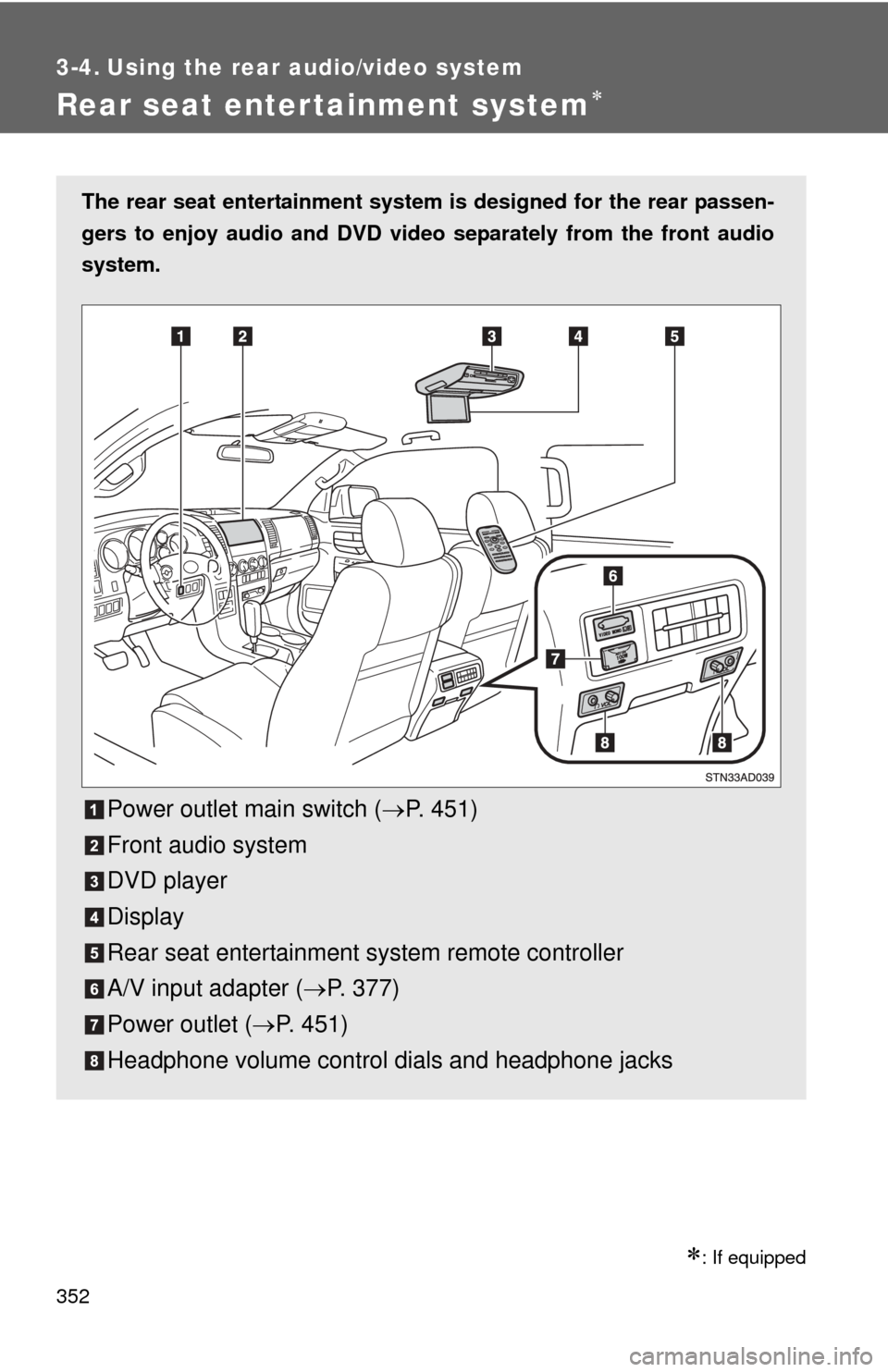
The rear seat entertainment system is designed for the rear passen-
gers to enjoy audio and DVD vide o separately from the front audio
system.
Power outlet main switch ( P. 451)
Front audio system
DVD player
Display
Rear seat entertainment system remote controller
A/V input adapter ( P. 377)
Power outlet ( P. 451)
Headphone volume control dials and headphone jacks
Page 353 of 660
353
3-4. Using the rear audio/video system
3
Interior features
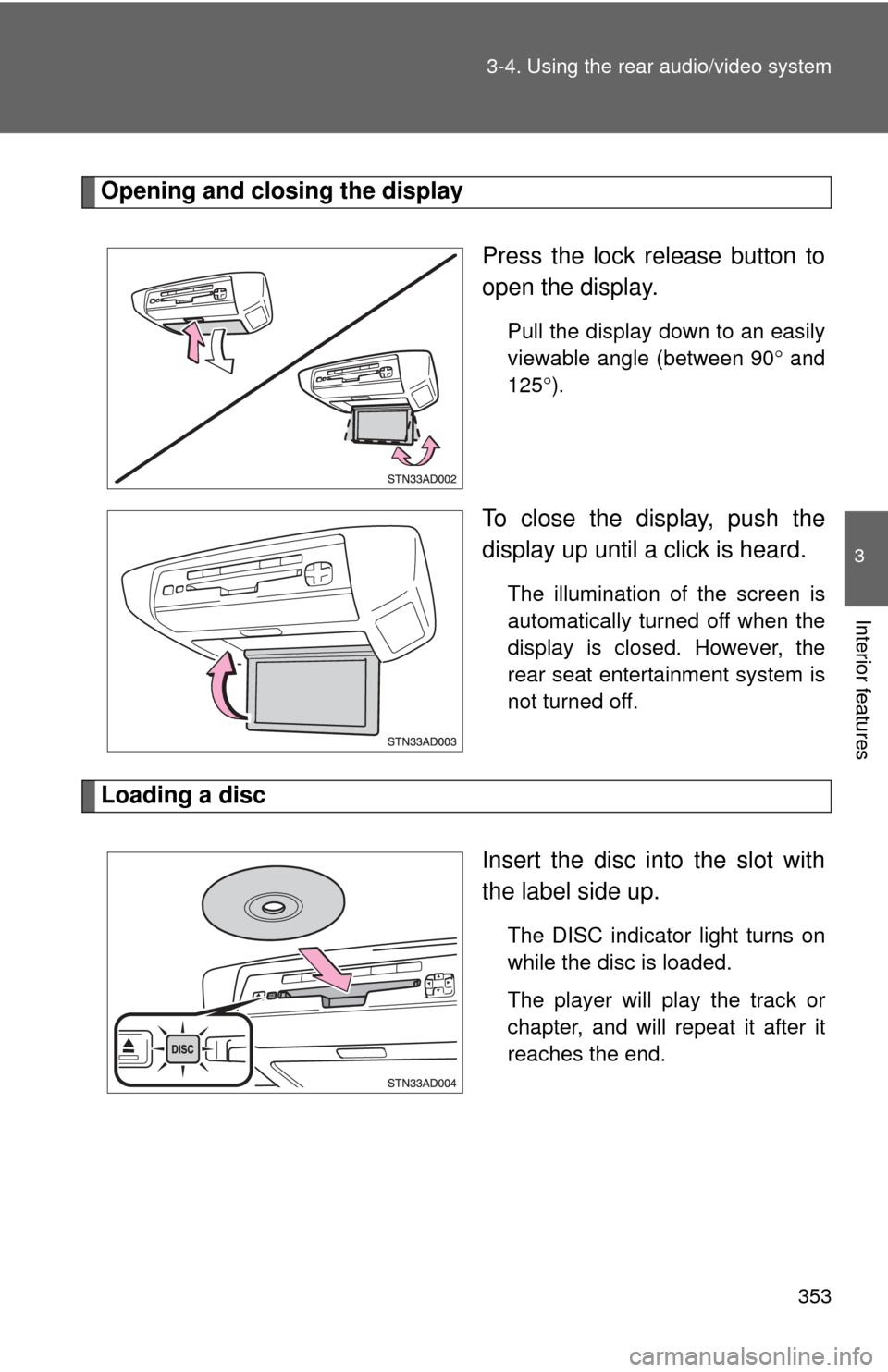
Opening and closing the display
Press the lock release button to
open the display.
Pull the display down to an easily
viewable angle (between 90 and
125 ).
To close the display, push the
display up until a click is heard.
The illumination of the screen is
automatically turned off when the
display is closed. However, the
rear seat entertainment system is
not turned off.
Loading a disc
Insert the disc into the slot with
the label side up.
The DISC indicator light turns on
while the disc is loaded.
The player will play the track or
chapter, and will repeat it after it
reaches the end.
Page 354 of 660
354 3-4. Using the rear audio/video system
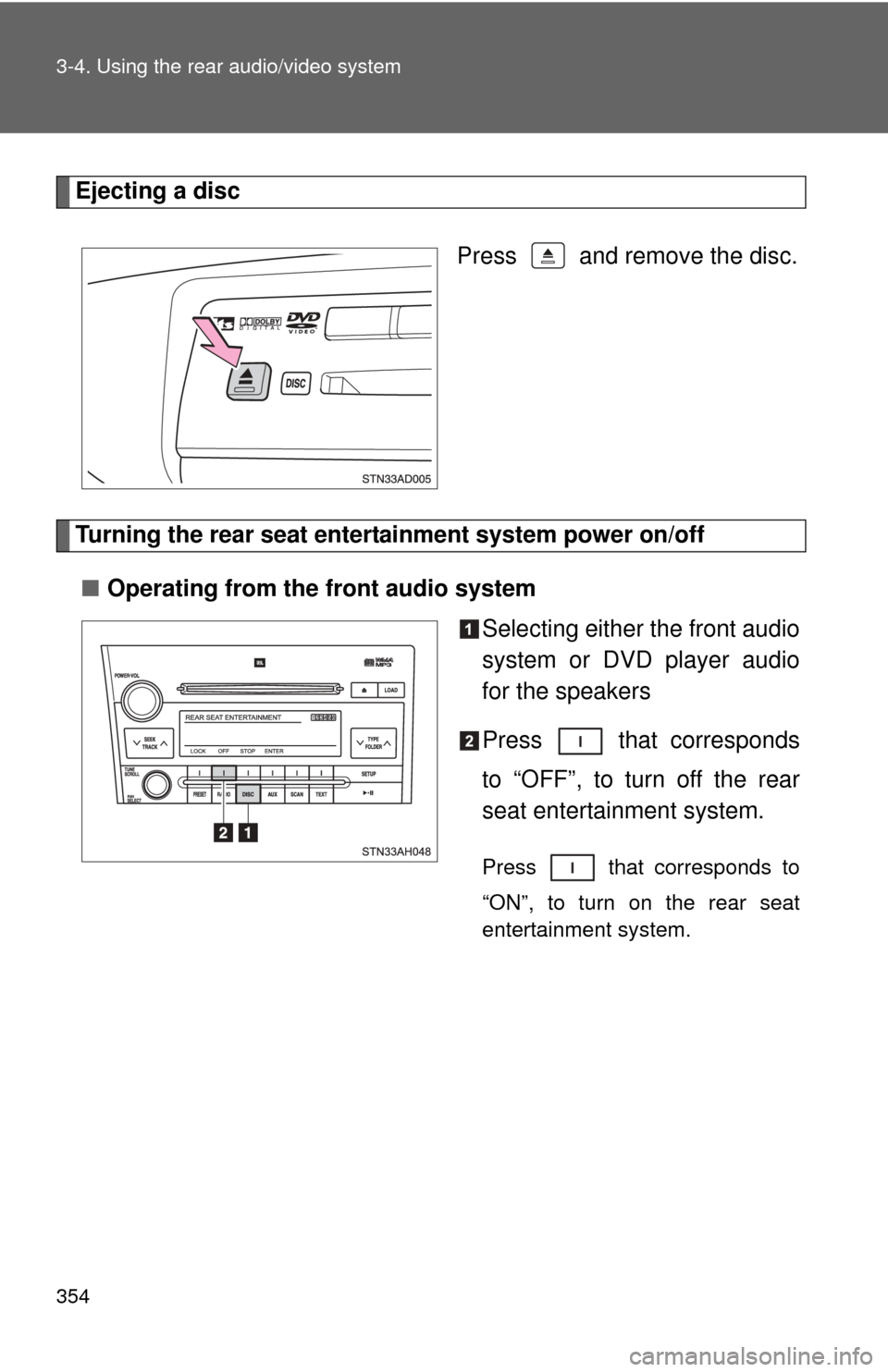
Ejecting a discPress and remove the disc.
Turning the rear seat entertainment system power on/off■ Operating from the front audio system
Selecting either the front audio
system or DVD player audio
for the speakers
Press that corresponds
to “OFF”, to turn off the rear
seat entertainment system.
Press that corresponds to
“ON”, to turn on the rear seat
entertainment system.
Page 355 of 660
355
3-4. Using the rear audio/video system
3
Interior features
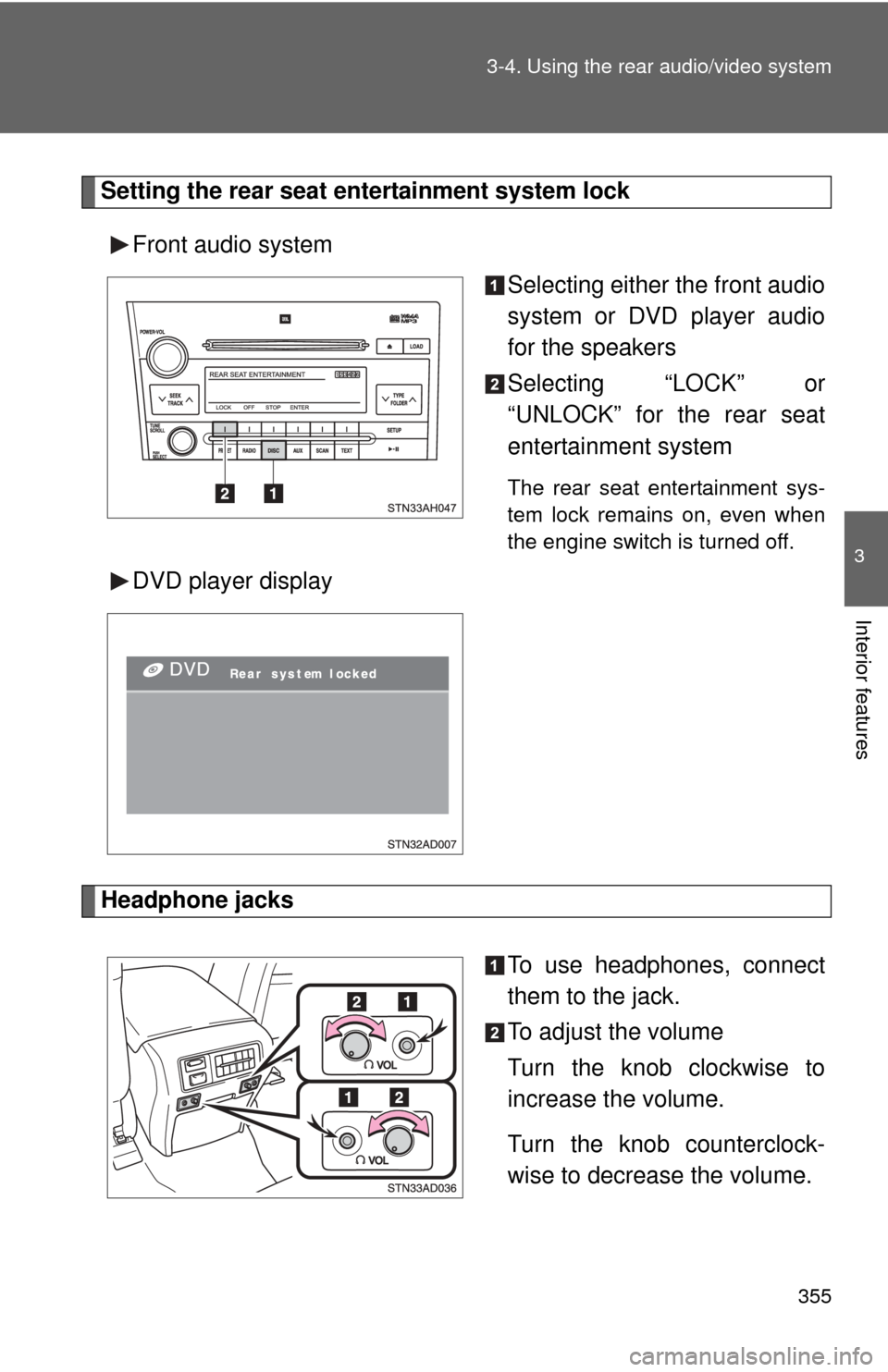
Setting the rear seat entertainment system lock
Front audio system Selecting either the front audio
system or DVD player audio
for the speakers
Selecting “LOCK” or
“UNLOCK” for the rear seat
entertainment system
The rear seat entertainment sys-
tem lock remains on, even when
the engine switch is turned off.
DVD player display
Headphone jacks
To use headphones, connect
them to the jack.
To adjust the volume
Turn the knob clockwise to
increase the volume.
Turn the knob counterclock-
wise to decrease the volume.
Page 356 of 660
356 3-4. Using the rear audio/video system
■The rear seat entertainmen t system can be used when
The engine switch is in the ACC or ON position.
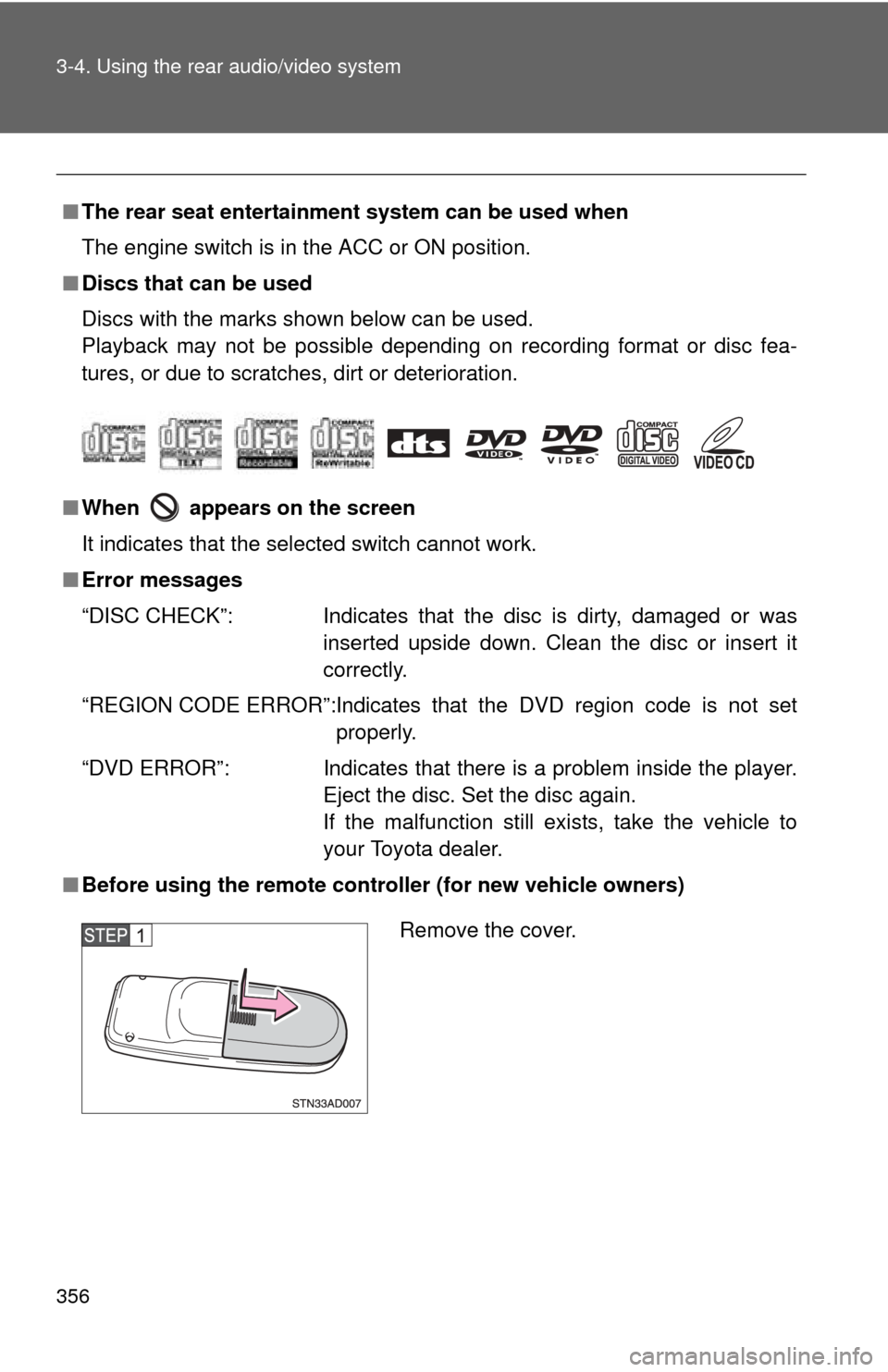
■ Discs that can be used
Discs with the marks shown below can be used.
Playback may not be possible depending on recording format or disc fea-
tures, or due to scratches, dirt or deterioration.
■ When appears on the screen
It indicates that the selected switch cannot work.
■ Error messages
“DISC CHECK”: Indicates that the disc is dirty, damaged or was
inserted upside down. Clean the disc or insert it
correctly.
“REGION CODE ERROR”:Indicates that the DVD region code is not set properly.
“DVD ERROR”: Indicates that there is a problem inside the player.
Eject the disc. Set the disc again.
If the malfunction still exists, take the vehicle to
your Toyota dealer.
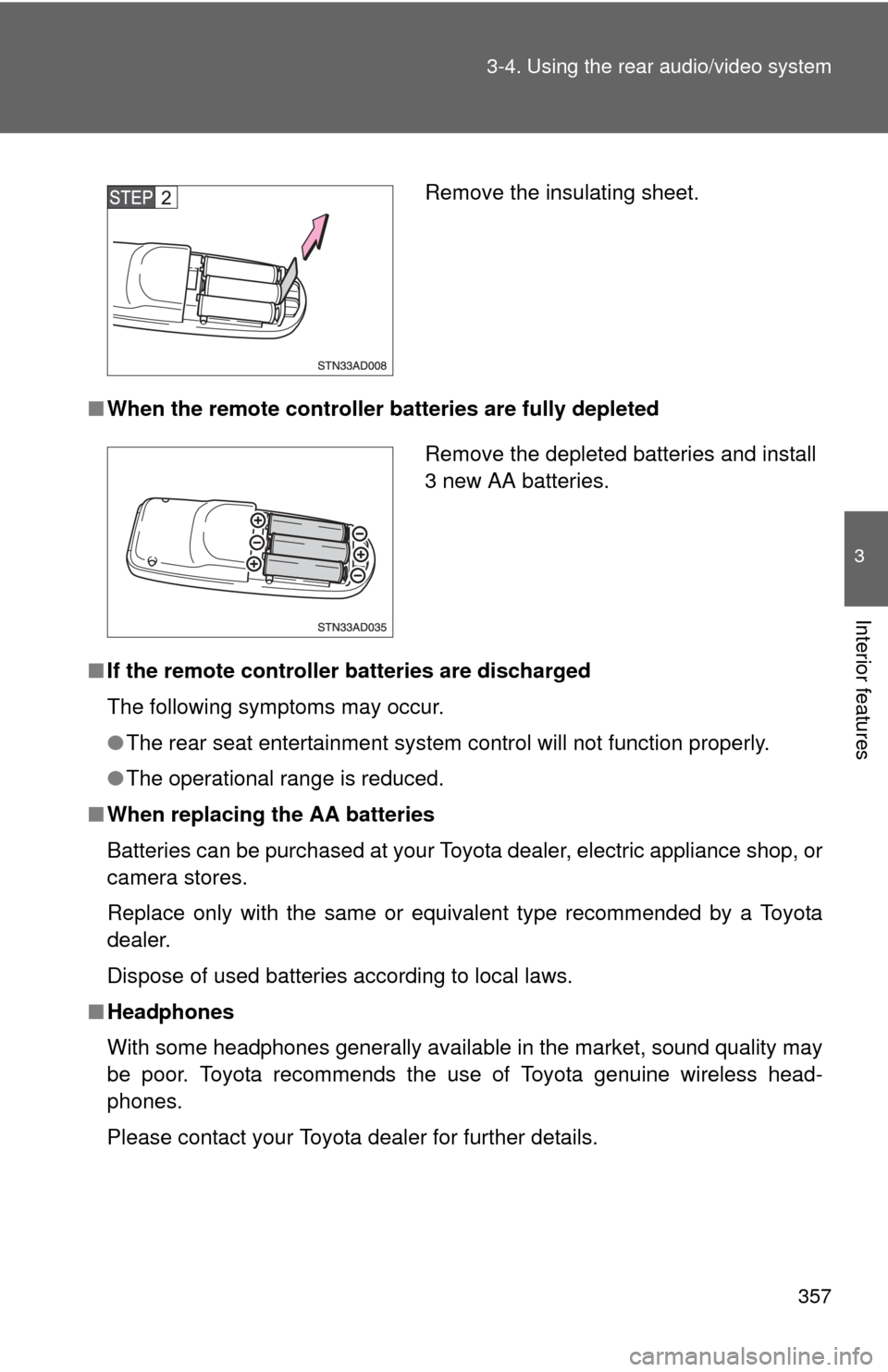
■ Before using the remote controller (for new vehicle owners)
Remove the cover.
Page 357 of 660
357
3-4. Using the rear audio/video system
3
Interior features
■
When the remote controller batteries are fully depleted
■ If the remote controller batteries are discharged
The following symptoms may occur.
●The rear seat entertainment system control will not function properly.
● The operational range is reduced.
■ When replacing the AA batteries
Batteries can be purchased at your Toyota dealer, electric appliance shop, or
camera stores.
Replace only with the same or equivalent type recommended by a Toyota
dealer.
Dispose of used batteries according to local laws.
■ Headphones
With some headphones generally available in the market, sound quality may
be poor. Toyota recommends the use of Toyota genuine wireless head-
phones.
Please contact your Toyota dealer for further details.
Remove the insulating sheet.
Remove the depleted batteries and install
3 new AA batteries.