display TOYOTA SEQUOIA 2013 2.G Owner's Guide
[x] Cancel search | Manufacturer: TOYOTA, Model Year: 2013, Model line: SEQUOIA, Model: TOYOTA SEQUOIA 2013 2.GPages: 740, PDF Size: 15.34 MB
Page 228 of 740
228
2-4. Using other driving systems
Rear view monitor system
: If equipped
The rear view monitor system assists the driver by displaying an
image of the area behind the vehicle. The image is displayed in
reverse on the screen. This reversed im age is a similar image to the
one on the inside rear view mirror.
Vehicles with a navigation system
Refer to the “Navigation System Owner’s Manual”.
Vehicles without a navigation system
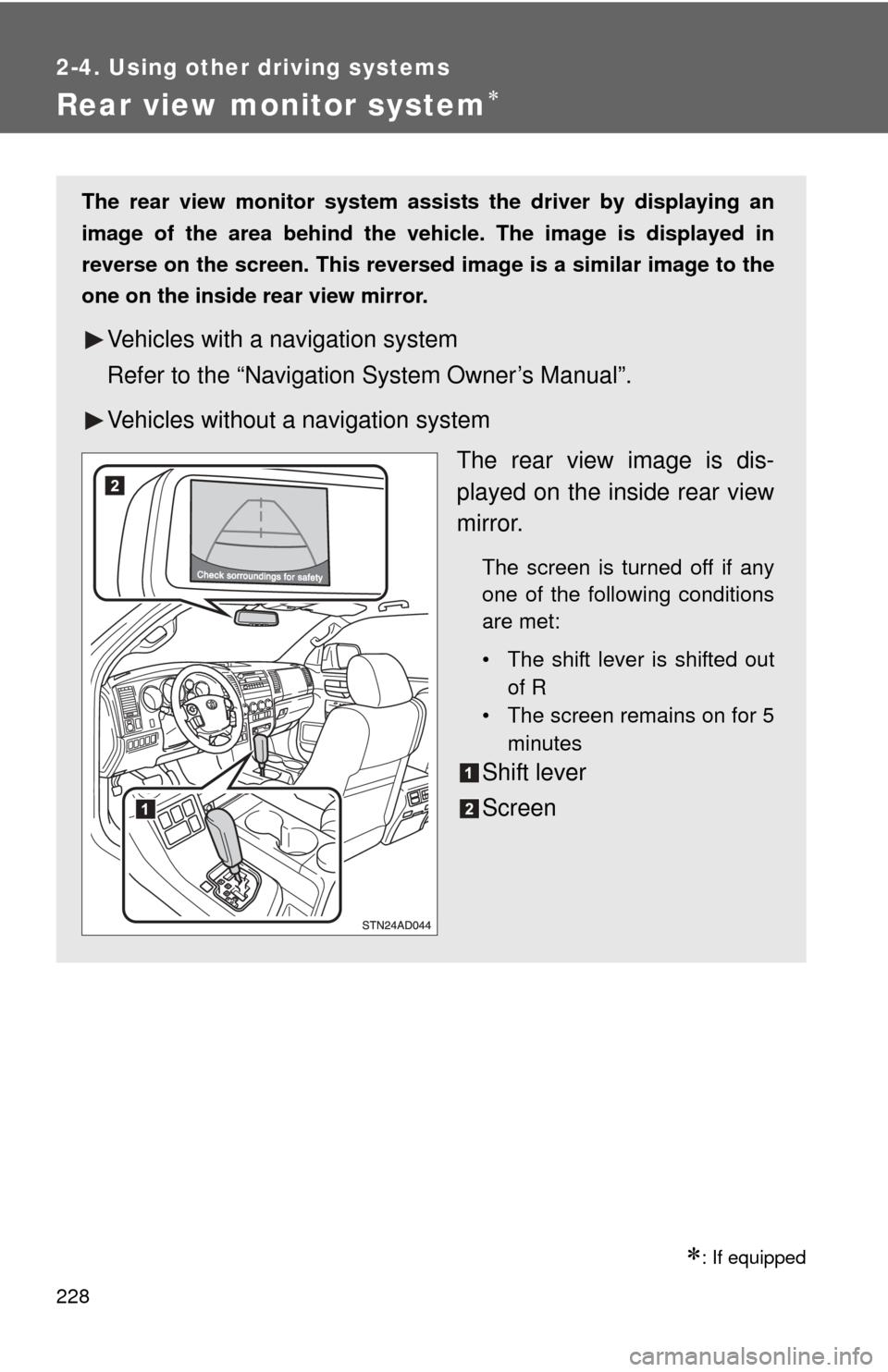
The rear view image is dis-
played on the inside rear view
mirror.
The screen is turned off if any
one of the following conditions
are met:
• The shift lever is shifted outof R
• The screen remains on for 5
minutes
Shift lever
Screen
Page 229 of 740
229
2-4. Using other
driving systems
2
When driving
■The rear view monitor system can be operated when
The shift lever is in R and the engine switch is ON.
■ Display mode
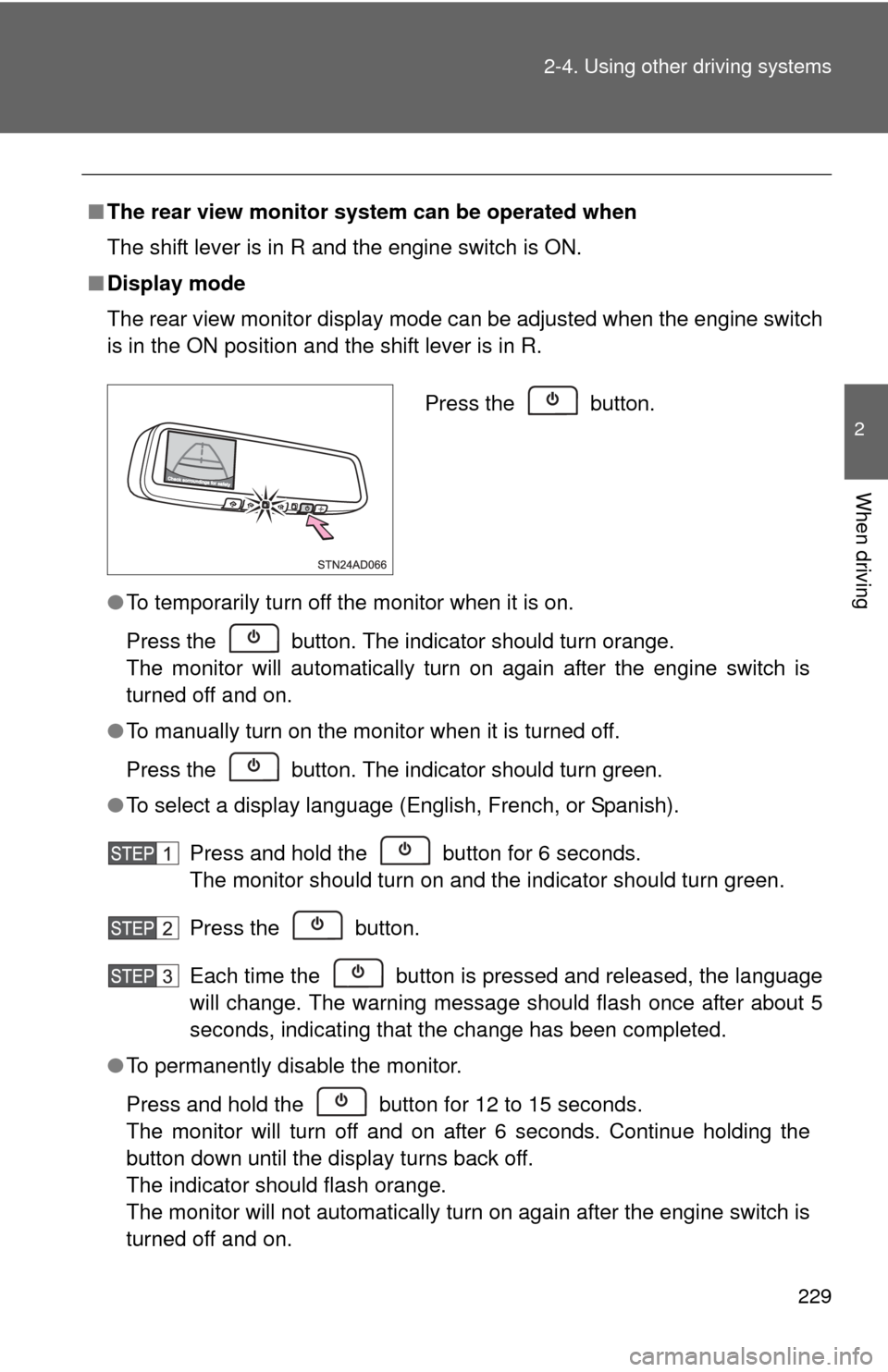
The rear view monitor display mode can be adjusted when the engine switch
is in the ON position and the shift lever is in R.
●To temporarily turn off the monitor when it is on.
Press the button. The indicator should turn orange.
The monitor will automatically turn on again after the engine switch is
turned off and on.
● To manually turn on the monitor when it is turned off.
Press the button. The indicator should turn green.
● To select a display language (English, French, or Spanish).
Press and hold the button for 6 seconds.
The monitor should turn on and the indicator should turn green.
Press the button.
Each time the button is pressed and released, the language
will change. The warning message should flash once after about 5
seconds, indicating that the change has been completed.
● To permanently disable the monitor.
Press and hold the button for 12 to 15 seconds.
The monitor will turn off and on after 6 seconds. Continue holding the
button down until the display turns back off.
The indicator should flash orange.
The monitor will not automatically turn on again after the engine switch is
turned off and on.
Press the button.
Page 230 of 740
230 2-4. Using other driving systems
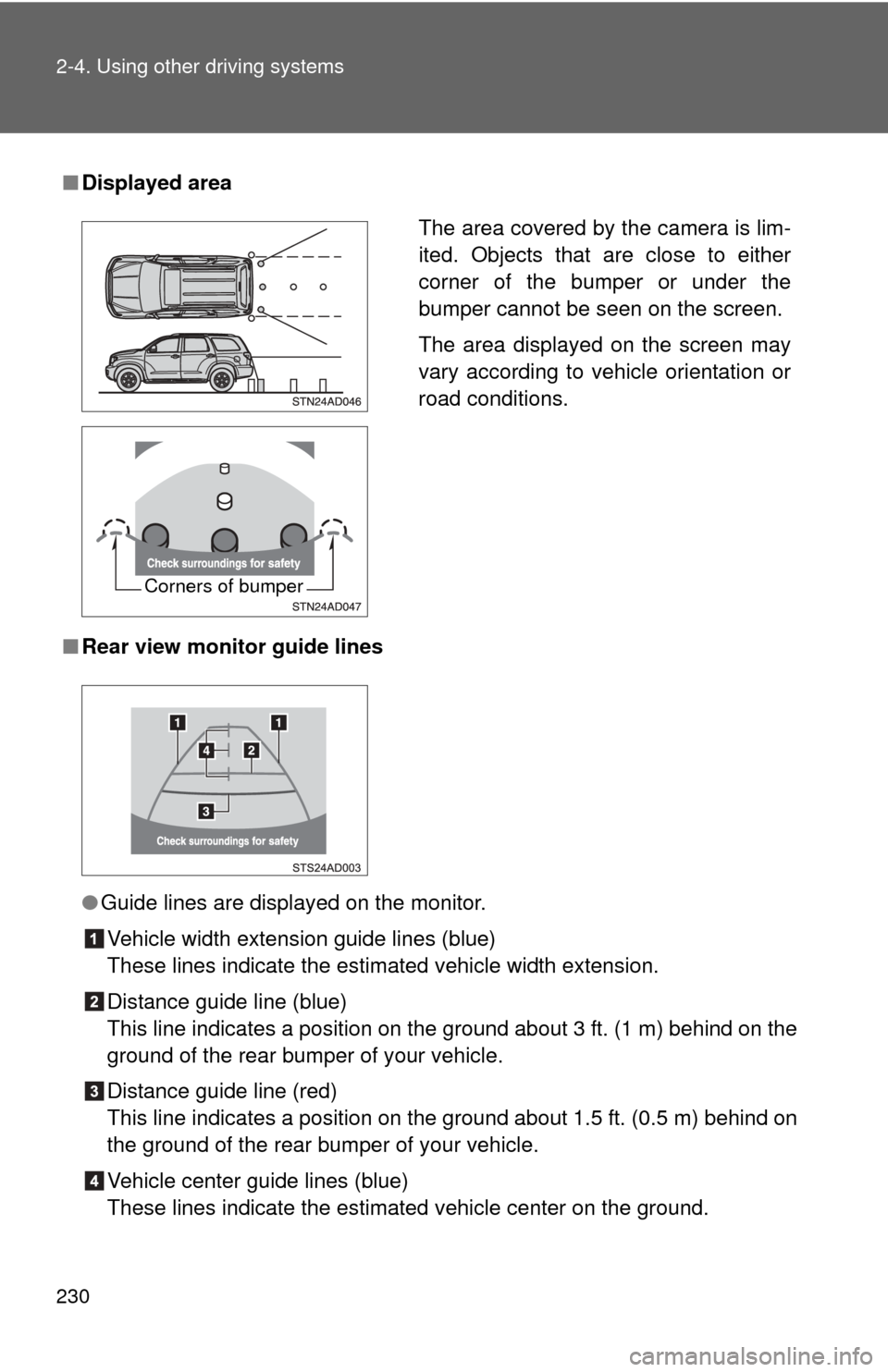
■Displayed area
■ Rear view monitor guide lines
●Guide lines are displayed on the monitor.
Vehicle width extension guide lines (blue)
These lines indicate the estimated vehicle width extension.
Distance guide line (blue)
This line indicates a position on the ground about 3 ft. (1 m) behind on the
ground of the rear bumper of your vehicle.
Distance guide line (red)
This line indicates a position on the ground about 1.5 ft. (0.5 m) behind on
the ground of the rear bumper of your vehicle.
Vehicle center guide lines (blue)
These lines indicate the estimated vehicle center on the ground.
The area covered by the camera is lim-
ited. Objects that are close to either
corner of the bumper or under the
bumper cannot be seen on the screen.
The area displayed on the screen may
vary according to vehicle orientation or
road conditions.
Corners of bumper
Page 234 of 740
234 2-4. Using other driving systems
CAUTION
■When using the rear view monitor system
Observe the following precautions to avoid an accident that could result in
death or serious injuries.
● Never depend solely on the rear view monitor system when reversing.
● Always check visually and with the mirrors to confirm your intended path is
clear.
● Always check the vehicle surroundi ng area, because the guide lines are
estimates of distance and location.
● The guide lines are assistant lines and do not change even if the steering
wheel is turned.
● Depicted distances between objects and flat surfaces differ from actual
distances.
● Do not use the system if back door is open.
■ Conditions which may affect the rear view monitor system
● If the back of the vehicle has been hit, the camera’s position and mounting
angle may have changed. Have the vehicle inspected by your Toyota
dealer.
● Rapid temperature changes, such as when hot water is poured on the
vehicle in cold weather, may cause the system to function abnormally.
● If the camera lens is dirty, it cannot transmit a clear image. Rinse with
water and wipe with a soft cloth. If extremely dirty, wash with a mild
cleanser and rinse.
● The displayed image may be darker and moving images may be slightly
distorted when the system is cold.
■ Caution while driving in reverse
Do not change modes while the vehicle is moving.
Page 235 of 740

235
2-4. Using other
driving systems
2
When driving
NOTICE
■Handling of the camera
●As the camera has a water proof construction, do not detach, disassemble
or modify it. This may cause incorrect operation.
● If the camera lens becomes dirty, it cannot transmit a clear image. If water
droplets, snow, or mud adhere to the lens, rinse with water and wipe with a
soft cloth. If the lens is extremely dirty, wash it with a mild cleanser and
rinse.
● Do not subject the camera to a strong impact.
● Do not allow organic solvent, car wax, window cleaner or glass coat to
adhere to the camera. If this happens, wipe it off as soon as possible.
● When washing the vehicle, do not apply intensive bursts of water to the
camera or camera area. Doing so may result in the camera malfunction-
ing.
● If the tire size is changed, the area displayed on the screen may change.
Page 239 of 740
239
2-4. Using other
driving systems
2
When driving
●Instances of the Blind Spot Monitor unnecessarily detecting a vehicle
and/or object may increase under the following conditions:
• When there is only a short distance between your vehicle and a guard-
rail, wall etc.
• When there is only a short distance between your vehicle and a follow- ing vehicle
• When vehicle lanes are narrow and a vehicle driving 2 lanes across from your vehicle enters the detection area
■ The outside rear view mirror indicators visibility
When under strong sunlight, the outside rear view mirror indicator may be
difficult to see.
■ When there is a malfunction in the system
If a system malfunction is detected due to any of the following reasons,
warning messages will be displayed: ( P. 644)
● There is a malfunction with the sensors
● The sensors have become dirty
● The outside temperature is extremely high or low
● The sensor voltage has become abnormal
■ Certification for the BSM
For vehicles sold in the U.S.A.
FCC ID: OAYBSDTX
This device complies with part 15 of the FCC Rules. Operation is subject to
the following three conditions:
(1) This device may not cause harmful interference.
(2) This device must accept any interference received, including interference that may cause undesired operation.
(3) This device may only work when the vehicle is in operation pursuant to § 15.252 (a) (4).
FCC WARNING
Changes or modifications not expressly approved by the party responsible
for compliance could void the user’s authority to operate the equipment.
Page 248 of 740
248
2-4. Using other driving systems
Four-wheel drive system
: If equipped
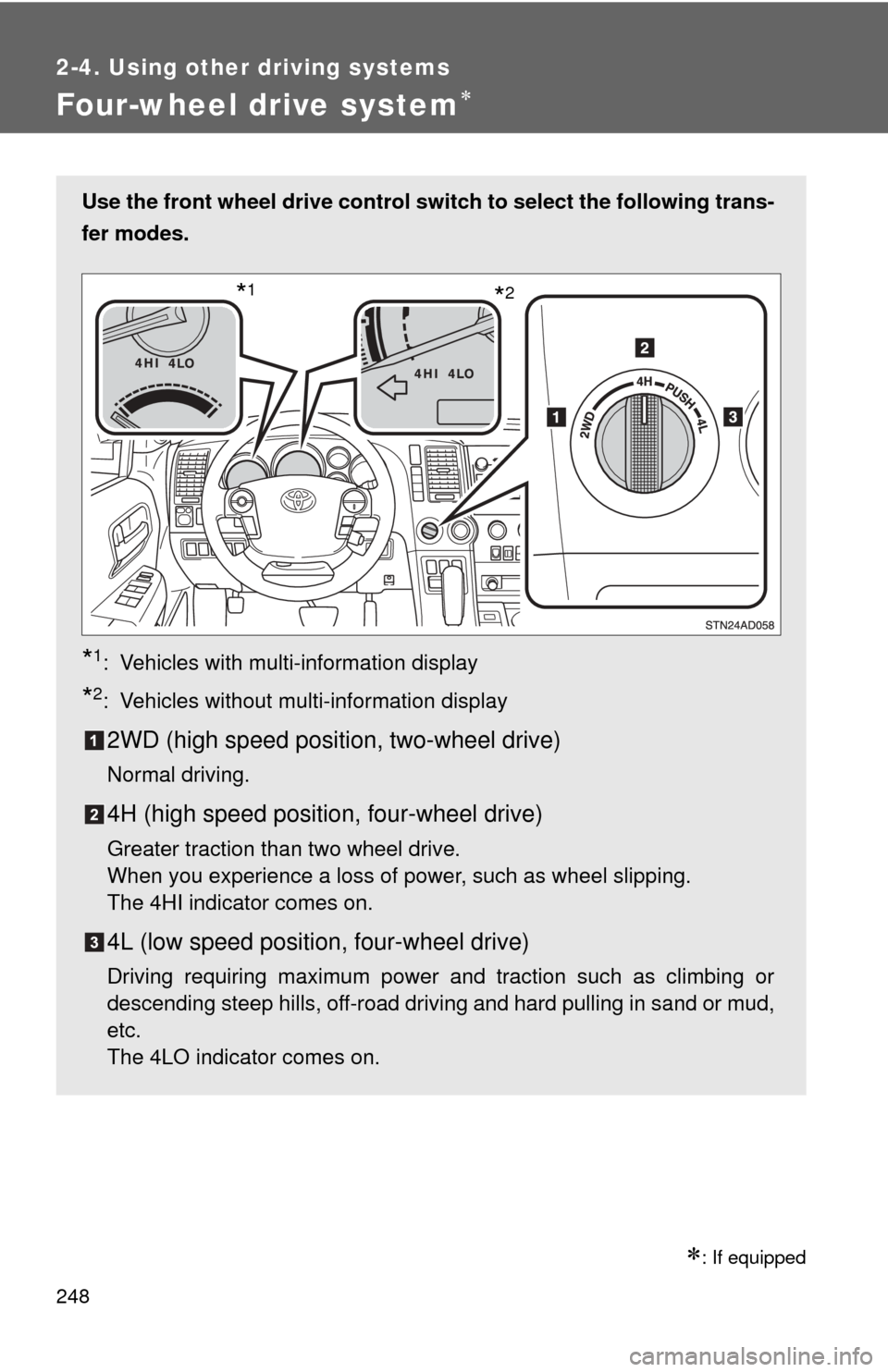
Use the front wheel drive control switch to select the following trans-
fer modes.
*1: Vehicles with multi-information display
*2: Vehicles without multi-information display
2WD (high speed position, two-wheel drive)
Normal driving.
4H (high speed position, four-wheel drive)
Greater traction than two wheel drive.
When you experience a loss of power, such as wheel slipping.
The 4HI indicator comes on.
4L (low speed position, four-wheel drive)
Driving requiring maximum power and traction such as climbing or
descending steep hills, off-road driving and hard pulling in sand or mud,
etc.
The 4LO indicator comes on.
*2*1
Page 301 of 740
Interior features3
301
3-5. Using the hands-free phone system (for cellular phone)
Hands-free phone system (for cellular phone)
features .......................... 448
Using the hands-free phone system ................ 452
Making a phone call ......... 461
Setting a cellular phone ... 465
Security and system setup .............................. 469
Using the phone book ...... 472
3-6. Using the interior lights Interior lights list ............... 478
• Personal/interior light main switch .................... 479
• Personal/interior lights ... 480
• Interior light .................... 481
3-7. Using the storage features List of storage features .... 482
• Glove boxes ................... 483
• Coin holder .................... 484
• Front console box .......... 485
• Card holder .................... 487
• Map holder ..................... 488
• Pen holder ..................... 490
• Tissue pocket................. 491
• Rear console box ........... 492 • Overhead console .......... 495
• Cup holders ................... 497
• Bottle holders ................. 501
• Auxiliary boxes ............... 502
3-8. Other interior features Sun visors ........................ 504
Vanity mirrors ................... 505
Clock ................................ 506
Outside temperature display............................ 507
Portable ashtray ............... 509
Cigarette lighter................ 510
Conversation mirror ......... 511
Power outlets ................... 512
Seat heaters..................... 518
Seat heaters and ventilators ...................... 521
Armrests........................... 523
Rear side sunshades ....... 524
Seatback table ................. 526
Assist grips....................... 527
Floor mat .......................... 528
Luggage compartment features .......................... 530
Garage door opener......... 535
Compass .......................... 541
Page 303 of 740
303
3-1. Using the air conditioning system
and defogger
3
Interior features
Using the automatic mode
Press .
The air conditioning system will begin to operate. Air outlets and fan
speed are automatically adjusted according to the temperature set-
ting.
Turn the temperature control dial clockwise (warm) or coun-
terclockwise (cool).
The temperature for the driver and passenger seat can be set sepa-
rately.
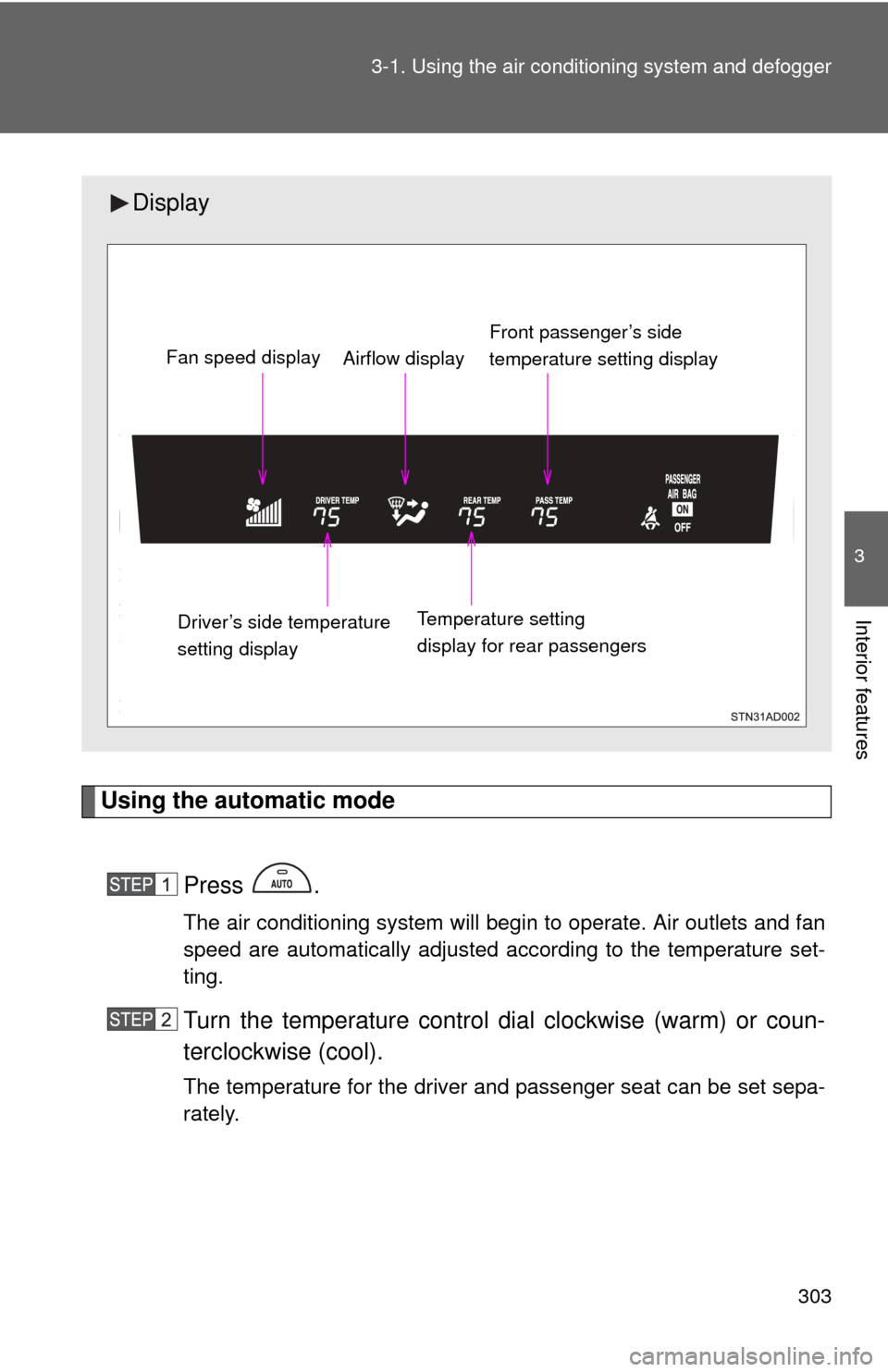
Display
Front passenger’s side
temperature setting display
Fan speed display
Airflow display
Driver’s side temperature
setting display Temperature setting
display for rear passengers
Page 304 of 740
304 3-1. Using the air conditioning system and defogger
Adjusting the settings
■ Adjusting the temperature setting
Turn the temperature control dial clockwise (warm) or counter-
clockwise (cool).
The air conditioning system sw itches between individual and
simultaneous modes each time is pressed.
● Simultaneous mode (the indicator on is on)
The driver’s side temperature control dial can be used to adjust
the temperature for all seats.
● Individual mode (the indicator on is off)
The temperature for the driver’s, front passenger’s and rear
seats ( P. 310) can be adjusted separately. Operate the pas-
senger’s side or rear temperature controls to enter individual
mode.
■ Adjusting the fan speed
Turn the fan speed control dial clockwise (increase) or counter-
clockwise (decrease).
The fan speed is shown on the display. (7 levels)
Press to turn the fan off.