display TOYOTA SEQUOIA 2013 2.G Manual PDF
[x] Cancel search | Manufacturer: TOYOTA, Model Year: 2013, Model line: SEQUOIA, Model: TOYOTA SEQUOIA 2013 2.GPages: 740, PDF Size: 15.34 MB
Page 394 of 740
394 3-4. Using the rear seat entertainment system
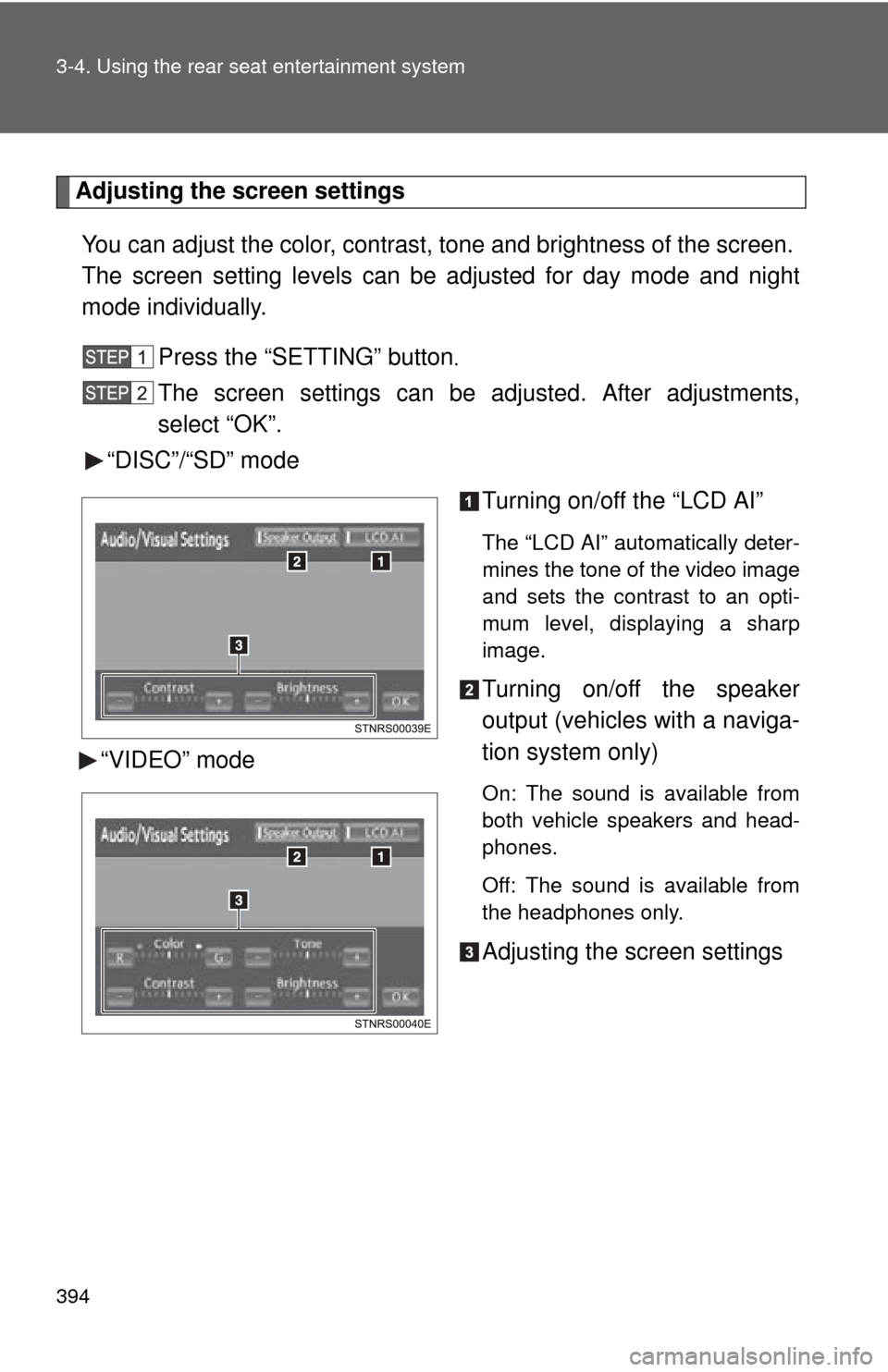
Adjusting the screen settingsYou can adjust the color, contrast, tone and brightness of the screen.
The screen setting le vels can be adjusted for day mode and night
mode individually.
Press the “SETTING” button
.
The screen settings can be adjusted. After adjustments,
select “OK”.
“DISC”/“SD” mode
Turning on/off the “LCD AI”
The “LCD AI” automatically deter-
mines the tone of the video image
and sets the contrast to an opti-
mum level, displaying a sharp
image.
Turning on/off the speaker
output (vehicles with a naviga-
tion system only)
On: The sound is available from
both vehicle speakers and head-
phones.
Off: The sound is available from
the headphones only.
Adjusting the screen settings
“VIDEO” mode
Page 401 of 740
401
3-4. Using the rear seat entertainment system
3
Interior features
●
This product is licensed under the AVC patent portfolio license and the
VC-1 patent portfolio license for the personal use of a consumer or other
uses in which it does not receive remuneration to (i) encode video in
compliance with the AVC Standard and the VC-1 Standard (“AVC/VC-1
Video”) and/or (ii) decode AVC/VC-1 Video that was encoded by a con-
sumer engaged in a personal activity and/or was obtained from a video
provider licensed to provide AVC/VC-1 Video. No license is granted or
shall be implied for any other use. Additional information may be
obtained from MPEG LA, LLC.
See http://www.mpegla.com.
● Cinavia Notice
This product uses Cinavia technology to limit the use of unauthorized cop-
ies of some commercially-produced film and videos and their soundtracks.
When a prohibited use of an unauthorized copy is detected, a message
will be displayed and playback or copying will be interrupted.
More information about Cinavia technology is provided at the Cinavia
Online Consumer Information Center at http://www.cinavia.com
. To
request additional information about Cinavia by mail, send a postcard with
your mailing address to: Cinavia Consumer Information Center, P.O. Box
86851, San Diego, CA, 92138, USA.
● This product incorporates proprietary technology under license from
Verance Corporation and is protected by U.S. Patent 7,369,677 and
other U.S. and worldwide patents issued and pending as well as
copyright and trade secret protection for certain aspects of such
technology. Cinavia is a trademark of Verance Corporation. Copyright
2004-2010 Verance Corporation. All rights reserved by Verance. Reverse
engineering or disassembly is prohibited.
● WMA (Windows Media Audio), Micros oft, Windows, and Windows Media
are the registered trademarks of Microsoft Corporation in the U.S. and
other countries.
● This item incorporates copy protection technology that is protected by
U.S. patents and other intellectual property rights of Rovi Corporation.
Reverse engineering and disassembly are prohibited.
Page 403 of 740
403
3-4. Using the rear seat entertainment system
3
Interior features
CAUTION
■
When the rear seat entertai nment system is not used
Keep the display closed. In the event of an accident or sudden braking, the
opened display may hit an occupant’s body, resulting in injury.
■ To prevent accidents and electric shock
Do not disassemble or modify the remote controller.
■ When the remote controller is not used
Stow the remote controller.
Injuries may result in the event of an accident or sudden braking.
■ Removed batteries and other parts
Keep away from children.
These parts are small and if swallowed by a child they can cause choking.
■ For vehicles sold in U.S.A. and Canada
●Part 15 of the FCC Rules
FCC Warning:
Changes or modifications not expressly approved by the party responsible
for compliance could void the user’s authority to operate the equipment.
● Laser products
• USE OF CONTROL OR ADJUSTMENT OR PERFORMANCE OF
PROCEDURES OTHER THAN TH OSE SPECIFIED HEREIN MAY
RESULT IN HAZARDOUS RADIATION EXPOSURE.
• THE USE OF OPTICAL INSTRUME NTS WITH THIS PRODUCT WILL
INCREASE EYE HAZARD.
Page 404 of 740
404 3-4. Using the rear seat entertainment system
NOTICE
■Cleaning the display
Wipe the display with a dry soft cloth. If the screen is wiped with a rough
cloth, the surface of the screen may be scratched.
■ Opening and closing the display
When opening or closing the display, hold the bottom center of the display
outer frame. Holding or pressing the LCD panel could result in display prob-
lems or LCD deterioration.
■ To prevent damage to the remote controller
●Keep the remote controller away from direct sunlight, heat and high
humidity.
● Do not drop or strike the remote controller against hard objects.
● Do not sit on or place heavy objects on the remote controller.
■ For normal operation after replacing the batteries
Observe the following precautions to prevent accidents.
●Always work with dry hands.
Moisture may cause the battery to rust.
● Do not touch or move any other components inside the remote controller.
● Do not bend any of the battery terminals.
Page 405 of 740
405
3-4. Using the rear seat entertainment system
3
Interior features
Playing a Blu-ray Disc™ (BD) and DVD disc
: If equipped
This system can play Blu-ray Disc™ (BD) videos with digital sound.
In addition to commercial BD and DVD titles, AVCHD and BDAV vid-
eos can be played on this system, so digital TV recorded by home
digital video recorders and BD/DV D home videos recorded by home
digital video cameras can also be played on this system.
Press the “DISC” button
if a disc has already been loaded in the disc
slot.
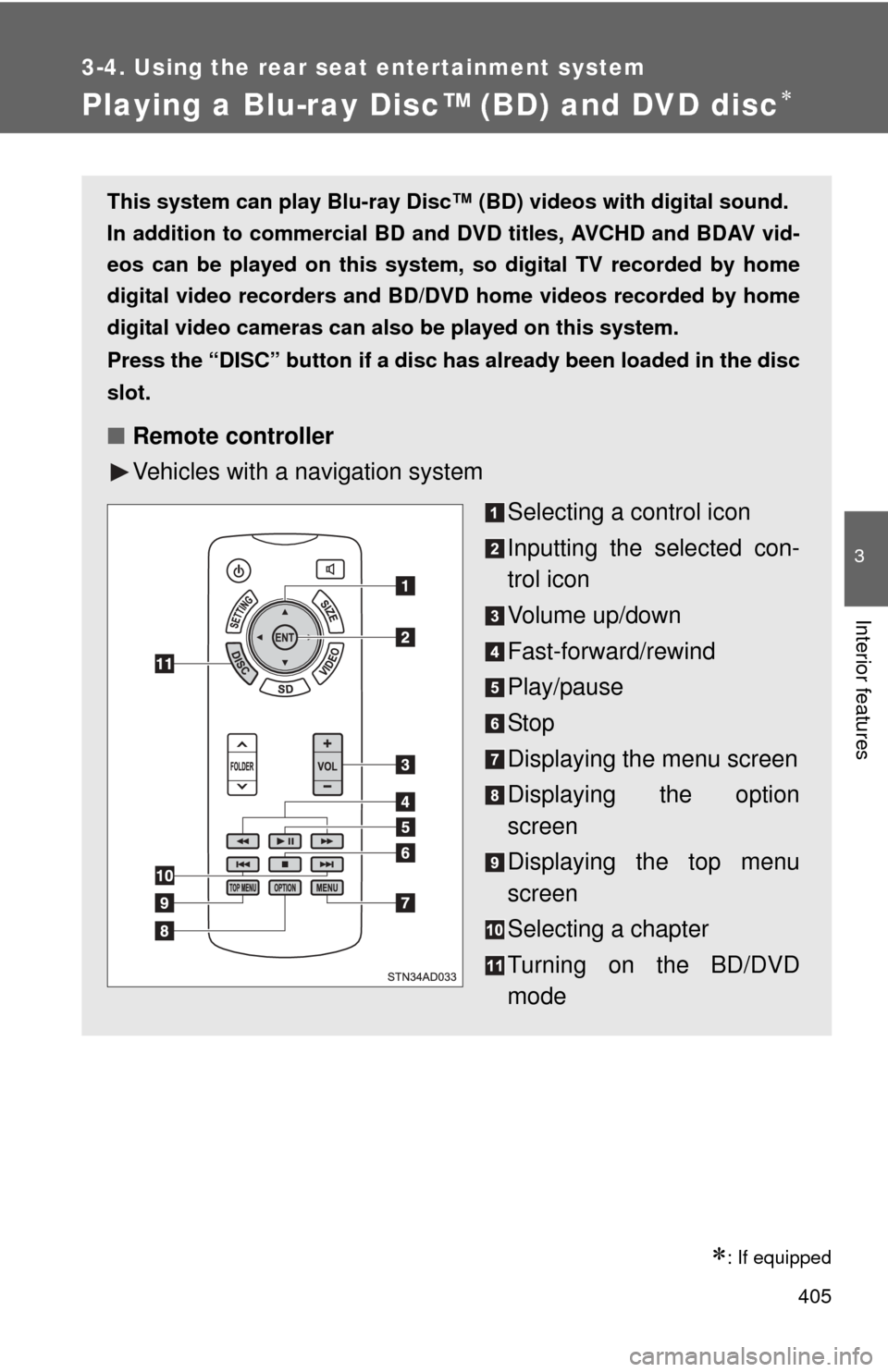
■ Remote controller
Vehicles with a navigation system
Selecting a control icon
Inputting the selected con-
trol icon
Volume up/down
Fast-forward/rewind
Play/pause
Stop
Displaying the menu screen
Displaying the option
screen
Displaying the top menu
screen
Selecting a chapter
Turning on the BD/DVD
mode
Page 406 of 740
406 3-4. Using the rear seat entertainment system
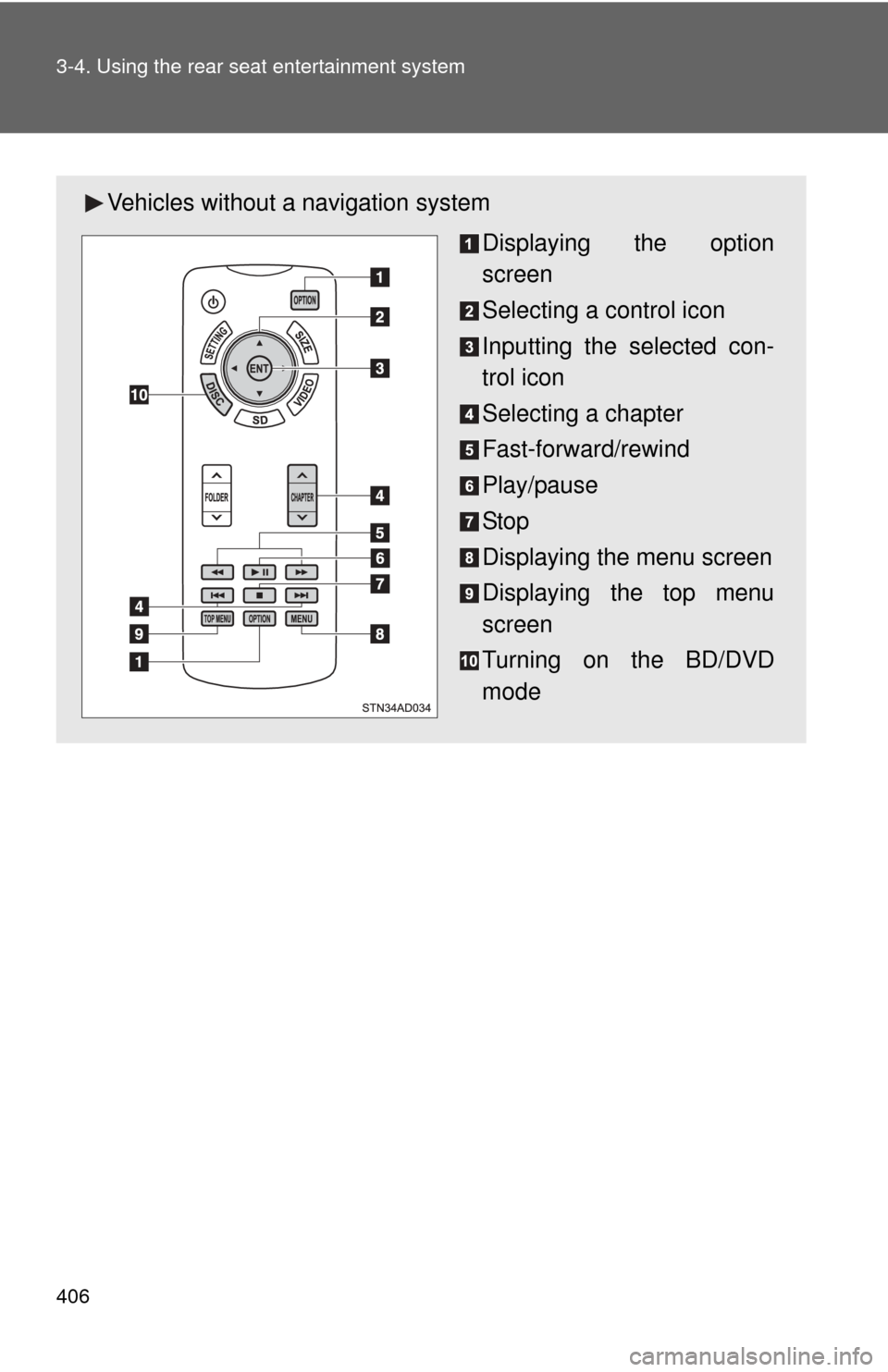
Vehicles without a navigation system
Displaying the option
screen
Selecting a control icon
Inputting the selected con-
trol icon
Selecting a chapter
Fast-forward/rewind
Play/pause
Stop
Displaying the menu screen
Displaying the top menu
screen
Turning on the BD/DVD
mode
Page 407 of 740
407
3-4. Using the rear seat entertainment system
3
Interior features
■
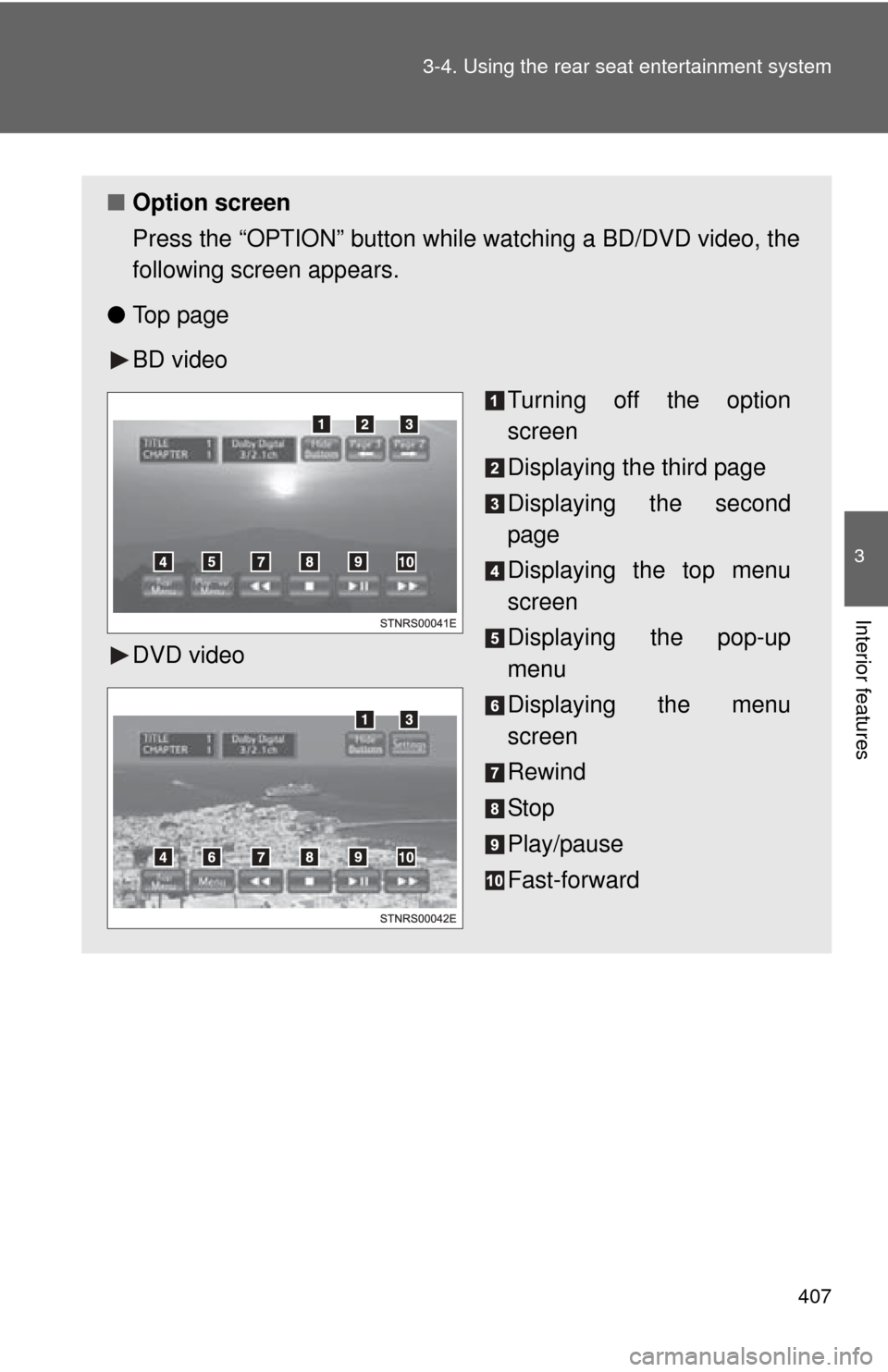
Option screen
Press the “OPTION” button while watching a BD/DVD video, the
following screen appears.
● To p p a g e
BD video
DVD video Turning off the option
screen
Displaying the third page
Displaying the second
page
Displaying the top menu
screen
Displaying the pop-up
menu
Displaying the menu
screen
Rewind
Stop
Play/pause
Fast-forward
Page 409 of 740
409
3-4. Using the rear seat entertainment system
3
Interior features
●
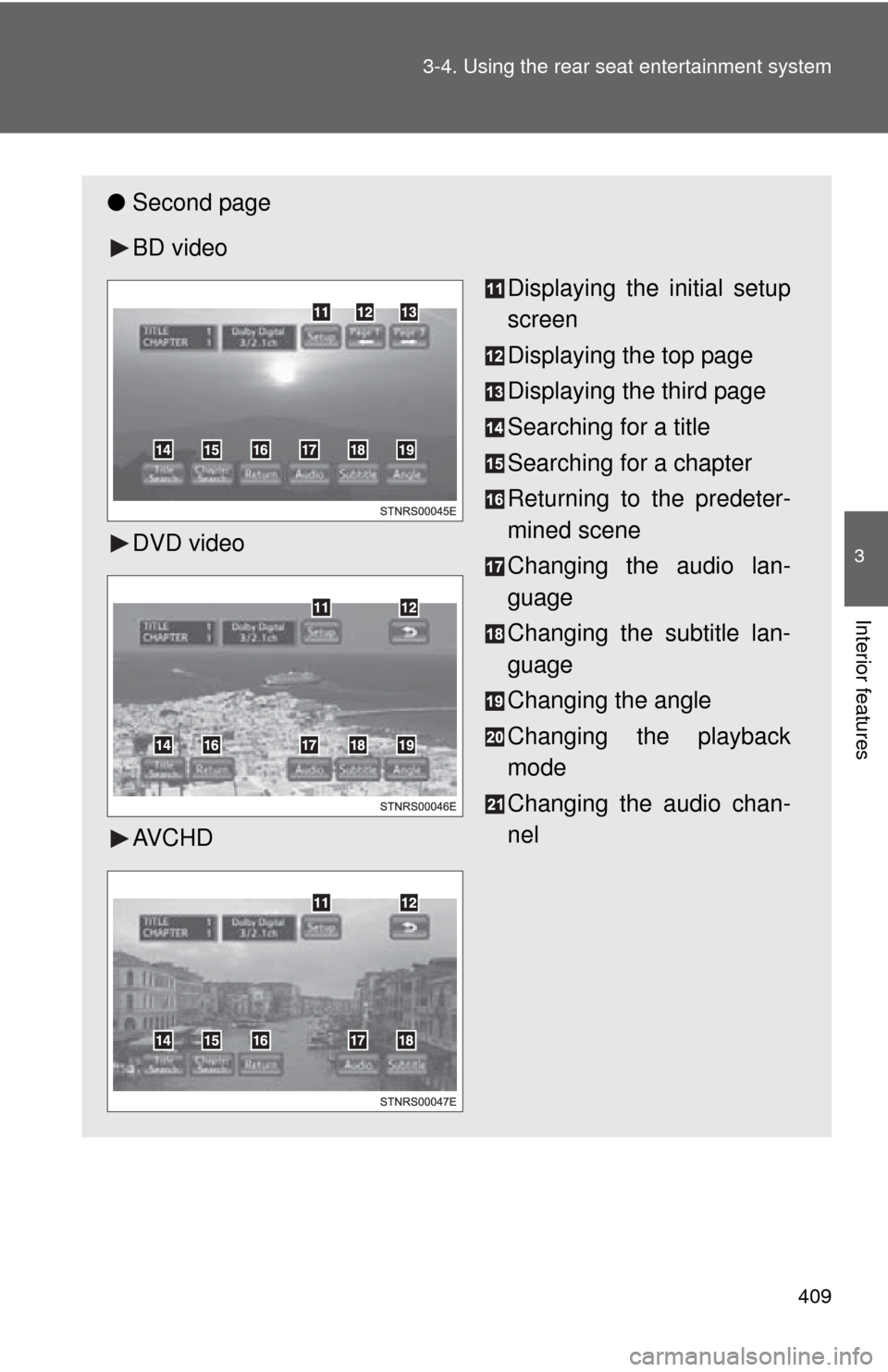
Second page
BD video
DVD video
AV C H D Displaying the initial setup
screen
Displaying the top page
Displaying the third page
Searching for a title
Searching for a chapter
Returning to the predeter-
mined scene
Changing the audio lan-
guage
Changing the subtitle lan-
guage
Changing the angle
Changing the playback
mode
Changing the audio chan-
nel
Page 410 of 740
410 3-4. Using the rear seat entertainment system
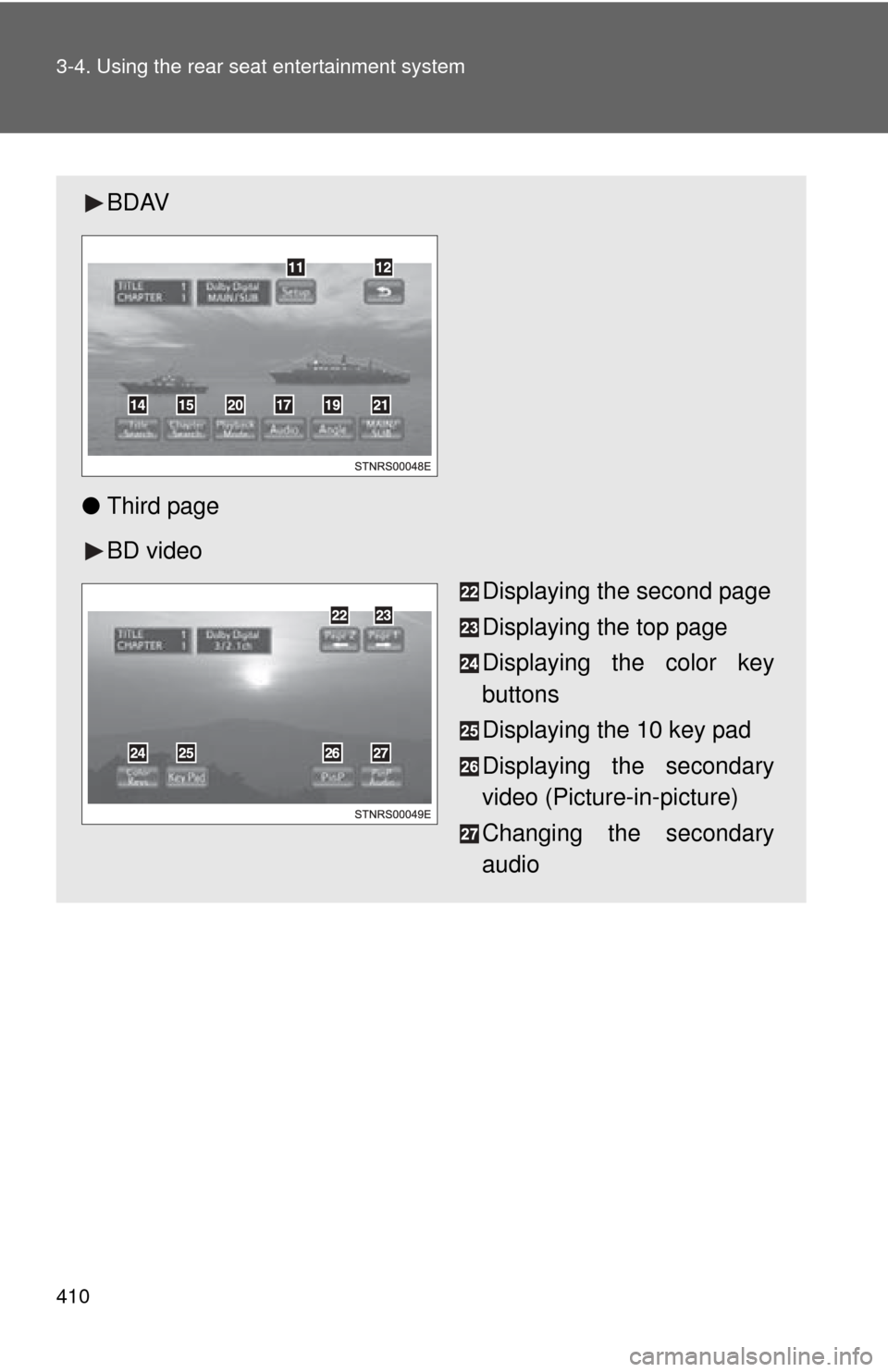
BDAV
● Third page
BD video
Displaying the second page
Displaying the top page
Displaying the color key
buttons
Displaying the 10 key pad
Displaying the secondary
video (Picture-in-picture)
Changing the secondary
audio
Page 412 of 740
412 3-4. Using the rear seat entertainment system
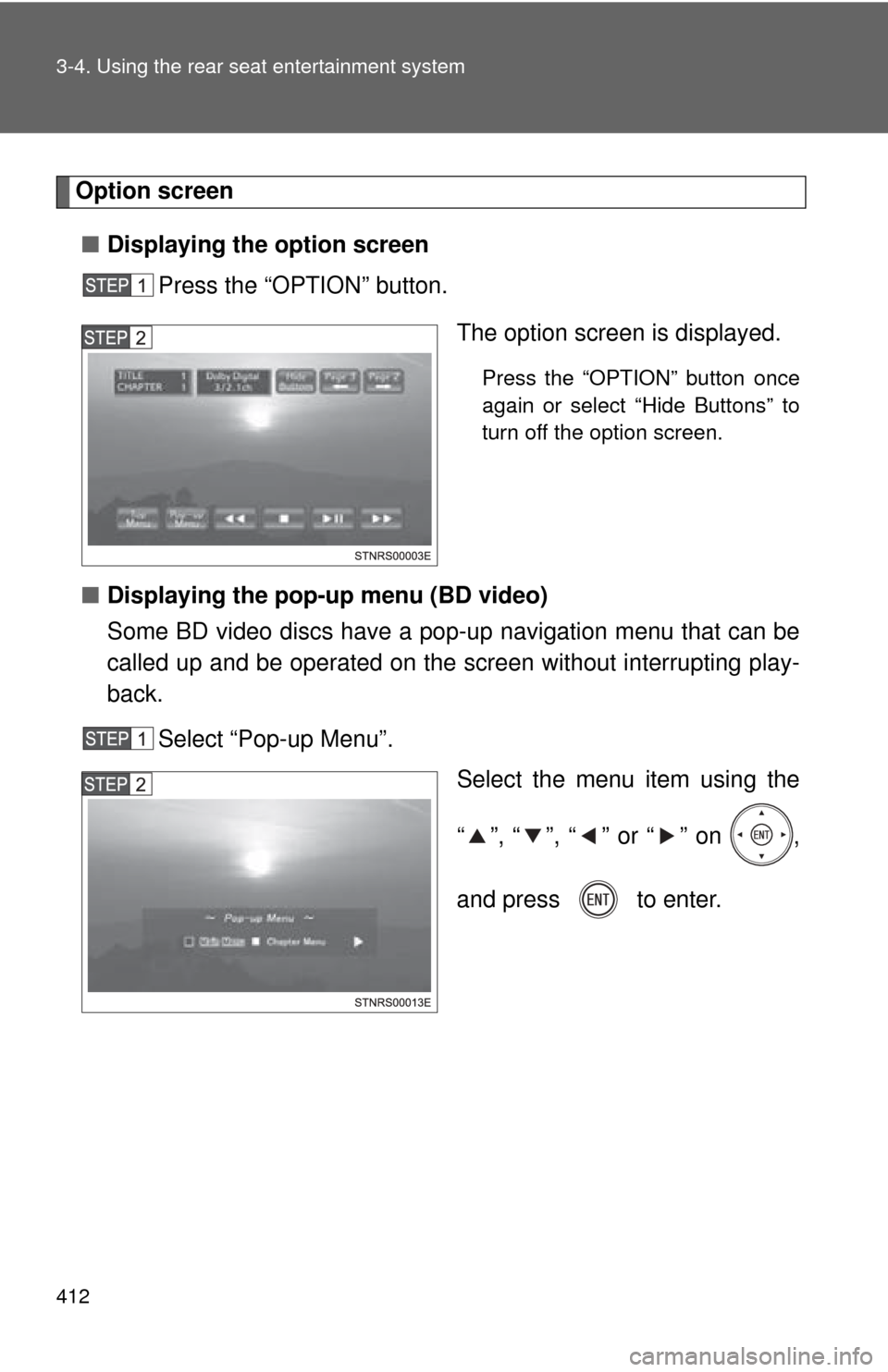
Option screen■ Displaying the option screen
Press the “OPTION” button.
The option screen is displayed.
Press the “OPTION” button once
again or select “Hide Buttons” to
turn off the option screen.
■ Displaying the pop-up menu (BD video)
Some BD video discs have a pop-up navigation menu that can be
called up and be operated on the screen without interrupting play-
back.
Select “Pop-up Menu”. Select the menu item using the
“ ”, “ ”, “ ” or “ ” on ,
and press to enter.