boot TOYOTA SUPRA 2019 User Guide
[x] Cancel search | Manufacturer: TOYOTA, Model Year: 2019, Model line: SUPRA, Model: TOYOTA SUPRA 2019Pages: 456, PDF Size: 88.65 MB
Page 85 of 456
85
3
Supra Owner's Manual3-1. CONTROLS
CONTROLS
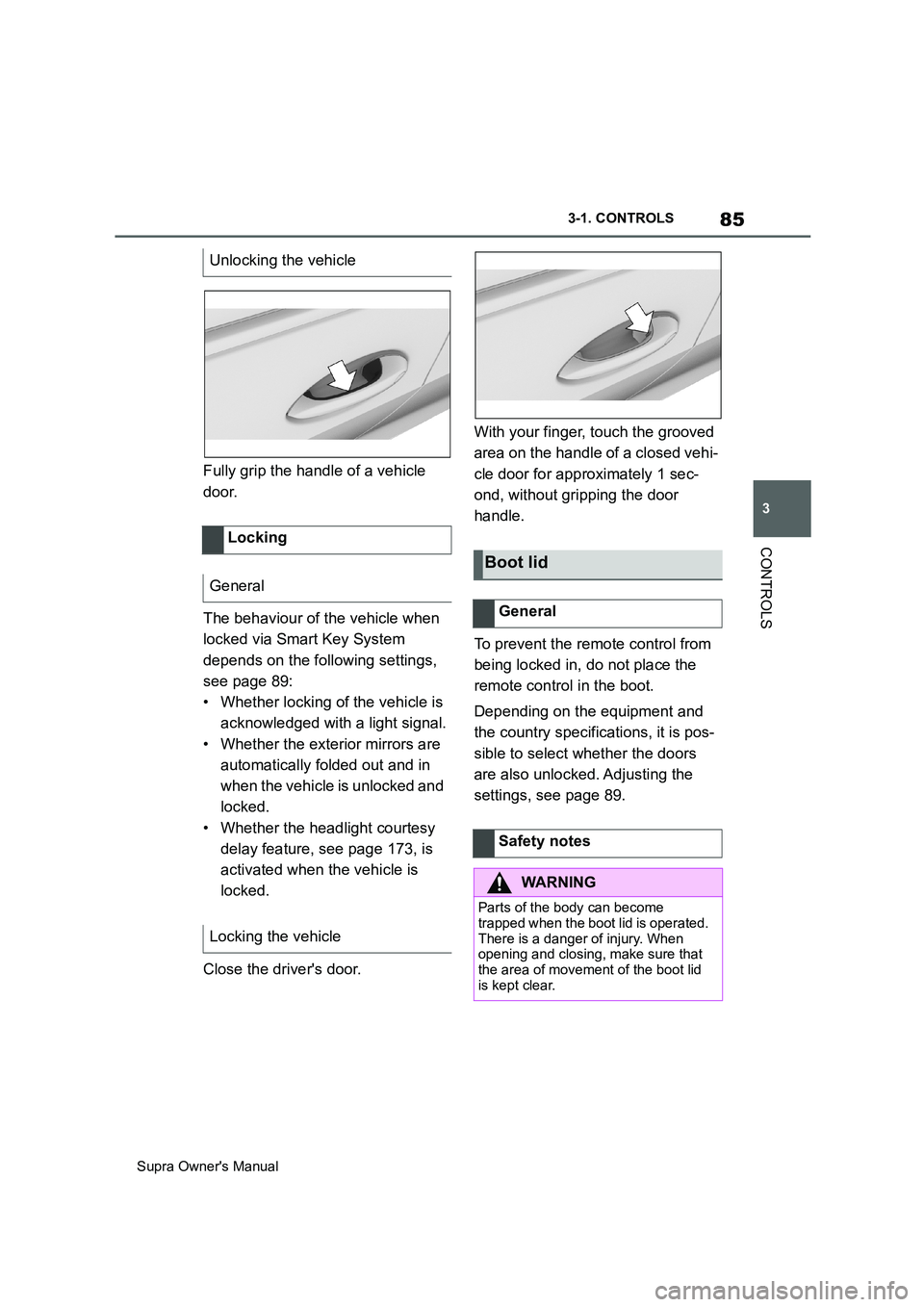
Fully grip the handle of a vehicle
door.
The behaviour of the vehicle when
locked via Smart Key System
depends on the following settings,
see page 89:
• Whether locking of the vehicle is
acknowledged with a light signal.
• Whether the exterior mirrors are
automatically folded out and in
when the vehicle is unlocked and
locked.
• Whether the headlight courtesy
delay feature, see page 173, is
activated when the vehicle is
locked.
Close the driver's door.With your finger, touch the grooved
area on the handle of a closed vehi-
cle door for approximately 1 sec-
ond, without gripping the door
handle.
To prevent the remote control from
being locked in, do not place the
remote control in the boot.
Depending on the equipment and
the country specifications, it is pos-
sible to select whether the doors
are also unlocked. Adjusting the
settings, see page 89. Unlocking the vehicle
Locking
General
Locking the vehicle
Boot lid
General
Safety notes
WARNING
Parts of the body can become
trapped when the boot lid is operated.
There is a danger of injury. When
opening and closing, make sure that
the area of movement of the boot lid
is kept clear.
Page 86 of 456
86
Supra Owner's Manual3-1. CONTROLS
• Press and hold the button
on the remote control for approx-
imately 1 second.
If applicable, the doors are also
unlocked. Opening with remote control,
see page 77.
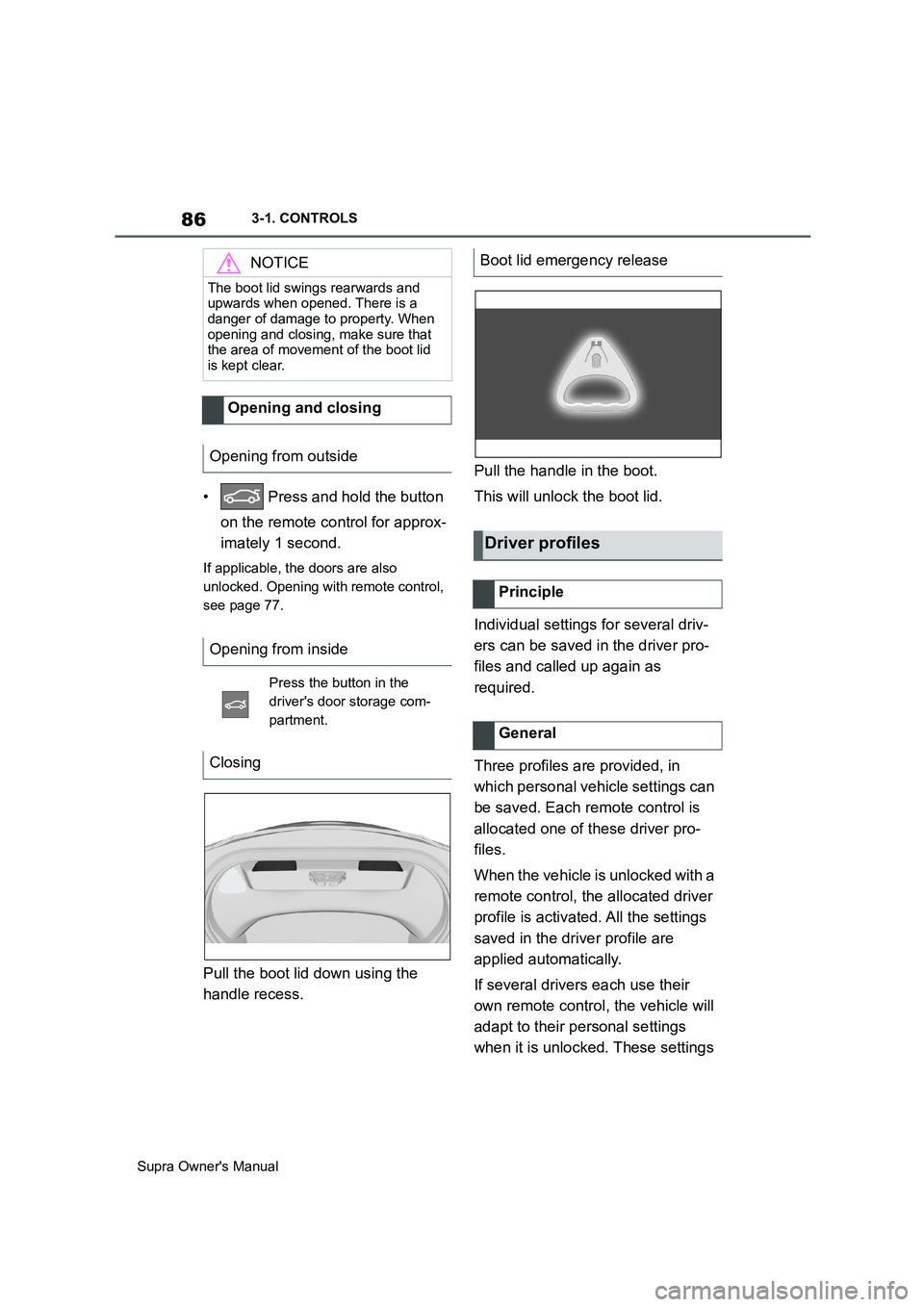
Pull the boot lid down using the
handle recess.Pull the handle in the boot.
This will unlock the boot lid.
Individual settings for several driv-
ers can be saved in the driver pro-
files and called up again as
required.
Three profiles are provided, in
which personal vehicle settings can
be saved. Each remote control is
allocated one of these driver pro-
files.
When the vehicle is unlocked with a
remote control, the allocated driver
profile is activated. All the settings
saved in the driver profile are
applied automatically.
If several drivers each use their
own remote control, the vehicle will
adapt to their personal settings
when it is unlocked. These settings
NOTICE
The boot lid swings rearwards and
upwards when opened. There is a
danger of damage to property. When
opening and closing, make sure that
the area of movement of the boot lid
is kept clear.
Opening and closing
Opening from outside
Opening from inside
Press the button in the
driver's door storage com-
partment.
Closing
Boot lid emergency release
Driver profiles
Principle
General
Page 90 of 456
90
Supra Owner's Manual3-1. CONTROLS
Via Toyota Supra Command:
1"My Vehicle"
2"Vehicle settings"
3"Doors/Key"
4"Driver's door" or "All
doors"
5Select the desired setting:
• "Driver's door only"
Only the driver's door and fuel filler flap
are unlocked. Pressing again unlocks
the entire vehicle.
• "All doors"
The entire vehicle is unlocked.
Depending on the equipment and
the country specifications, these
settings may not be available.
Via Toyota Supra Command:
1"My Vehicle"
2"Vehicle settings"
3"Doors/Key"
4 "Tailgate" or "Tailgate
and door(s)"
5Select the desired setting:
•"Tailgate"
Boot lid is opened.
• "Tailgate and door(s)"
Boot lid is opened and the doors are
unlocked.
Via Toyota Supra Command:
1"My Vehicle"
2"Driver profiles"
3Select a driver profile.
The setting can be made for the
driver profile marked with this symbol.
4"Last seat position automatic"
When the vehicle is unlocked, the
driver's seat and exterior mirrors
are adjusted to their last set posi-
tions.
The last position setting is inde-
pendent of the positions saved via
the seat memory.
Via Toyota Supra Command:
1"My Vehicle"
2"Vehicle settings"
3"Doors/Key"
4"Flash for lock/unlock"
Unlocking is acknowledged by flashing
twice, locking by flashing once.
Via Toyota Supra Command:
1"My Vehicle"
2"Vehicle settings"
3"Doors/Key"
4Select the desired setting:
• "Relock automatically" Unlocking
Doors
Boot lid
Setting the last seat and mirror
position
Acknowledgement signals of
the vehicle
Automatic locking
Page 91 of 456
91
3
Supra Owner's Manual3-1. CONTROLS
CONTROLS
The vehicle is automatically locked
again after a short while if no door is
opened after unlocking.
• "Lock after pulling away"
On driving off, the vehicle is locked
automatically.
Via Toyota Supra Command:
1"My Vehicle"
2"Vehicle settings"
3"Doors/Key"
4"Unlock at end of journey"
After the drive-ready state has been
switched off by pressing the start/stop
button, the locked vehicle is automati-
cally unlocked.
Via Toyota Supra Command:
1"My Vehicle"
2"Vehicle settings"
3"Doors/Key"
4"Fold mirrors in when locked"
When locking, the exterior mirrors are
automatically folded in, and when
unlocking they are automatically folded
out.
Via Toyota Supra Command:
1"My Vehicle"
2"Vehicle settings"
3"Doors/Key"4"Switch off after door opening"
Idle state, see page 44, is established
when the front doors are opened.
The alarm system responds to the
following changes when the vehicle
is locked:
• A door, the bonnet or the boot lid
is opened.
• Movements in the interior.
• The vehicle's incline changes, for
instance if an attempt is made to
jack it up and steal the wheels or
to raise it prior to towing away.
• There is an interruption in the
power supply from the battery.
• Improper use of the socket for
on-board diagnosis OBD.
The alarm system indicates the fol-
lowing changes visually and audi-
bly:
• Audible alarm: Depending on
local regulations, the acoustic
alarm may be suppressed.
• Visual alarm: By flashing the
exterior lights.
The alarm system is switched on
and off at the same time as the
vehicle is unlocked and locked via
the remote control or Smart Key
System. Automatic unlocking
Folding the mirrors automati-
cally
Establishing idle state after
opening the front doors
Alarm system
General
Switching on/off
Page 92 of 456
92
Supra Owner's Manual3-1. CONTROLS
The alarm system is triggered on
opening a door if the door has been
unlocked using the integrated key
in the door lock.
Stopping the alarm, see page 93.
The boot lid can be opened even
with the alarm system switched on.
On closing the boot lid, it is locked
again and monitored, as long as the
doors are locked. The hazard warn-
ing lights flash once.
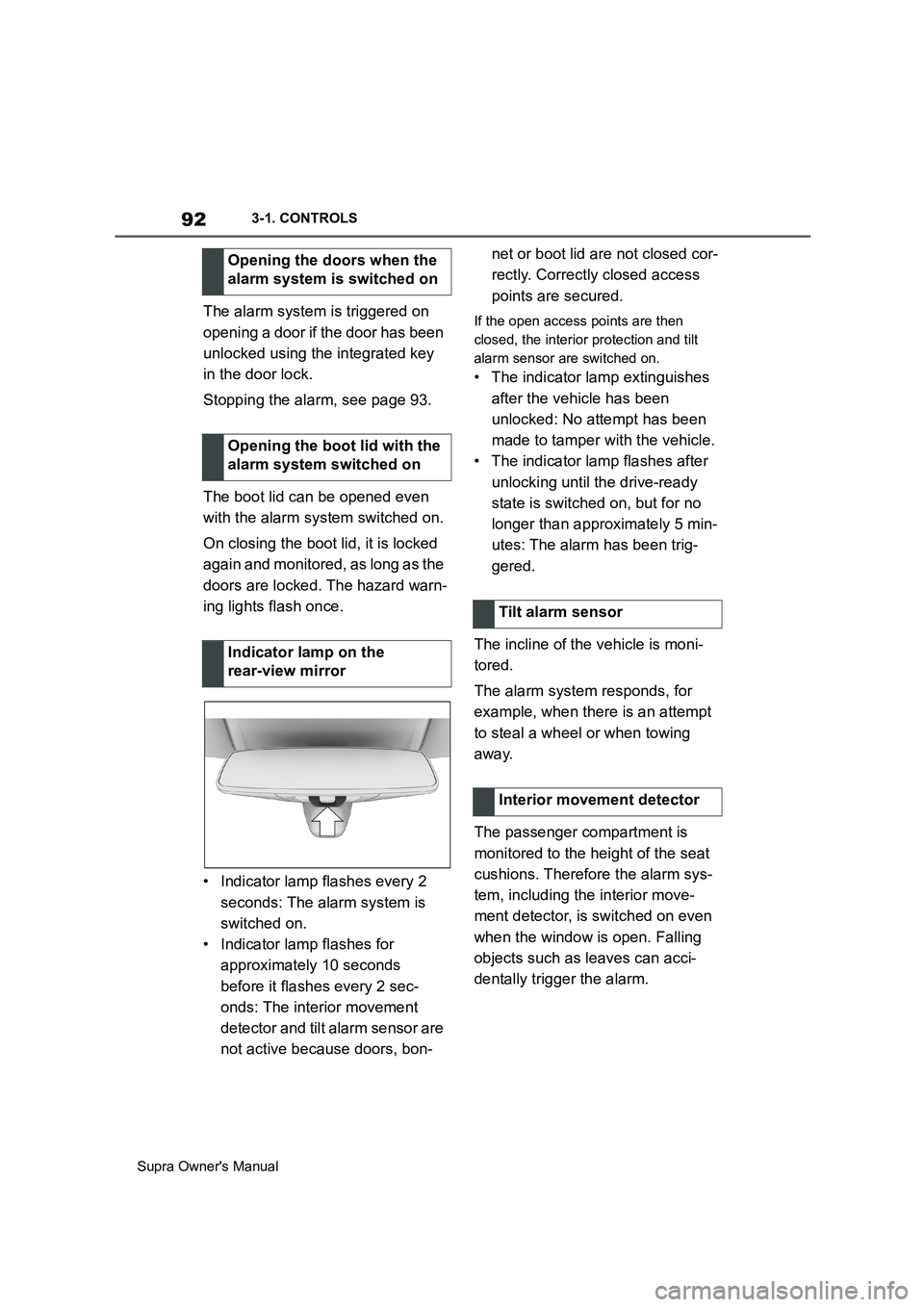
• Indicator lamp flashes every 2
seconds: The alarm system is
switched on.
• Indicator lamp flashes for
approximately 10 seconds
before it flashes every 2 sec-
onds: The interior movement
detector and tilt alarm sensor are
not active because doors, bon-net or boot lid are not closed cor-
rectly. Correctly closed access
points are secured.If the open access points are then
closed, the interior protection and tilt
alarm sensor are switched on.
• The indicator lamp extinguishes
after the vehicle has been
unlocked: No attempt has been
made to tamper with the vehicle.
• The indicator lamp flashes after
unlocking until the drive-ready
state is switched on, but for no
longer than approximately 5 min-
utes: The alarm has been trig-
gered.
The incline of the vehicle is moni-
tored.
The alarm system responds, for
example, when there is an attempt
to steal a wheel or when towing
away.
The passenger compartment is
monitored to the height of the seat
cushions. Therefore the alarm sys-
tem, including the interior move-
ment detector, is switched on even
when the window is open. Falling
objects such as leaves can acci-
dentally trigger the alarm. Opening the doors when the
alarm system is switched on
Opening the boot lid with the
alarm system switched on
Indicator lamp on the
rear-view mirror
Tilt alarm sensor
Interior movement detector
Page 243 of 456
243
3
Supra Owner's Manual3-1. CONTROLS
CONTROLS
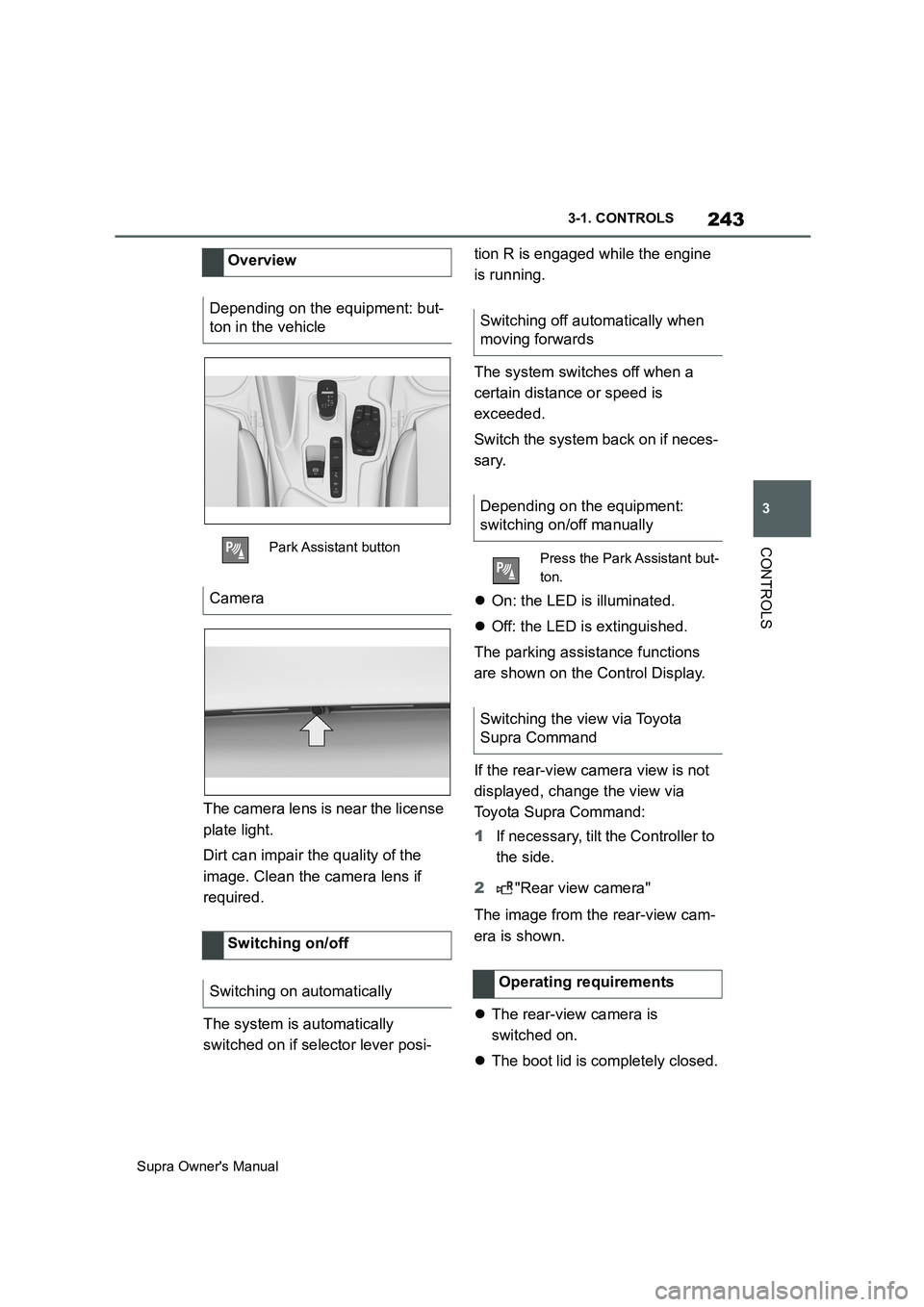
The camera lens is near the license
plate light.
Dirt can impair the quality of the
image. Clean the camera lens if
required.
The system is automatically
switched on if selector lever posi-tion R is engaged while the engine
is running.
The system switches off when a
certain distance or speed is
exceeded.
Switch the system back on if neces-
sary.
On: the LED is illuminated.
Off: the LED is extinguished.
The parking assistance functions
are shown on the Control Display.
If the rear-view camera view is not
displayed, change the view via
Toyota Supra Command:
1If necessary, tilt the Controller to
the side.
2"Rear view camera"
The image from the rear-view cam-
era is shown.
The rear-view camera is
switched on.
The boot lid is completely closed. Overview
Depending on the equipment: but-
ton in the vehicle
Park Assistant button
Camera
Switching on/off
Switching on automatically
Switching off automatically when
moving forwards
Depending on the equipment:
switching on/off manually
Press the Park Assistant but-
ton.
Switching the view via Toyota
Supra Command
Operating requirements
Page 245 of 456
245
3
Supra Owner's Manual3-1. CONTROLS
CONTROLS
one turning circle line is displayed.
■Parking with the help of driv-
ing path and turning circle
lines
1Position the vehicle so that the
red turning circle line is within
the boundaries of the parking
space.
2Turn the steering wheel so that
the green driving path line cov-
ers the corresponding turning
circle line.
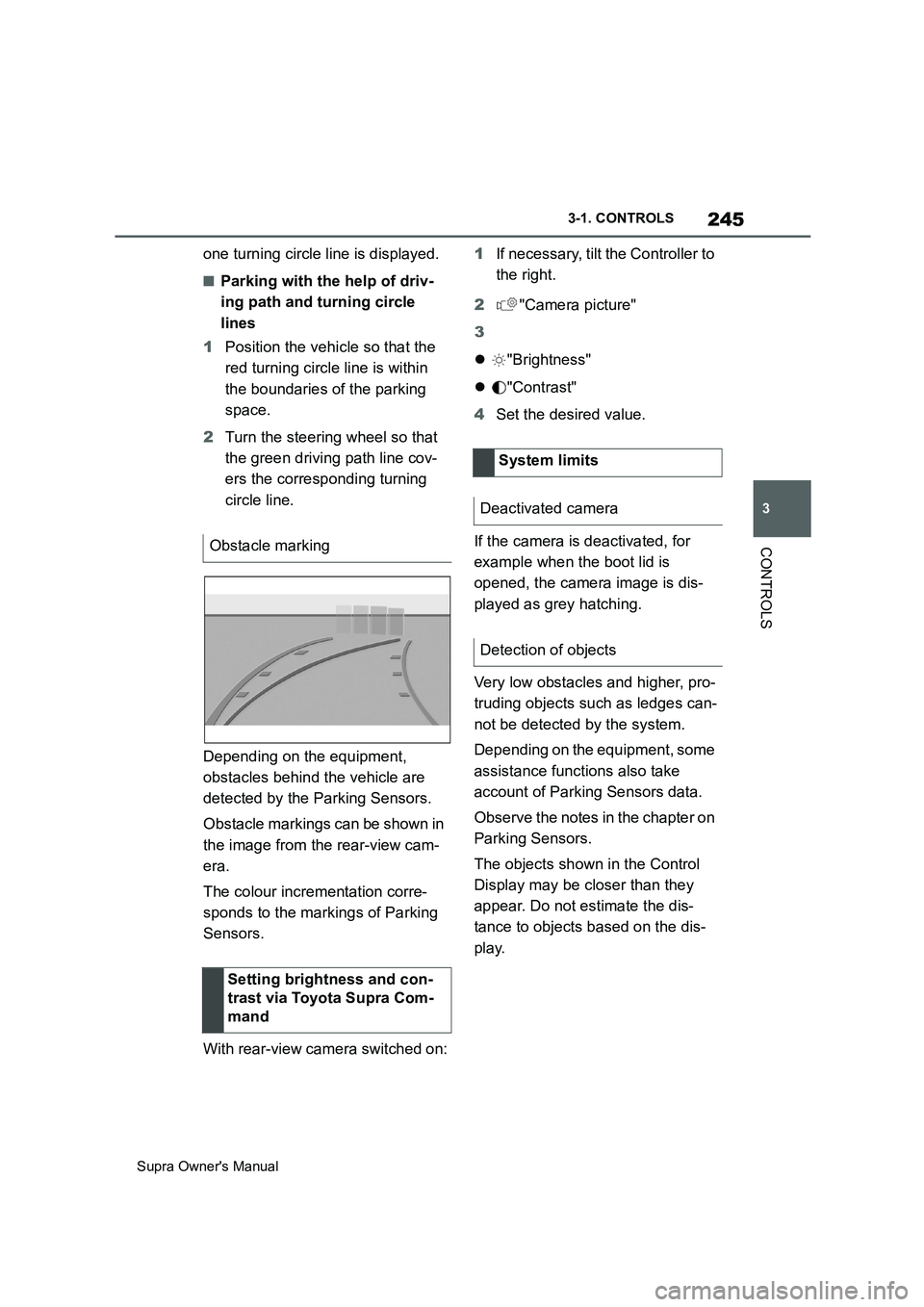
Depending on the equipment,
obstacles behind the vehicle are
detected by the Parking Sensors.
Obstacle markings can be shown in
the image from the rear-view cam-
era.
The colour incrementation corre-
sponds to the markings of Parking
Sensors.
With rear-view camera switched on:1If necessary, tilt the Controller to
the right.
2"Camera picture"
3
"Brightness"
"Contrast"
4Set the desired value.
If the camera is deactivated, for
example when the boot lid is
opened, the camera image is dis-
played as grey hatching.
Very low obstacles and higher, pro-
truding objects such as ledges can-
not be detected by the system.
Depending on the equipment, some
assistance functions also take
account of Parking Sensors data.
Observe the notes in the chapter on
Parking Sensors.
The objects shown in the Control
Display may be closer than they
appear. Do not estimate the dis-
tance to objects based on the dis-
play. Obstacle marking
Setting brightness and con-
trast via Toyota Supra Com-
mand
System limits
Deactivated camera
Detection of objects
Page 258 of 456
258
Supra Owner's Manual3-1. CONTROLS
cal devices when standby state or
drive-ready state is switched on.
The total load of all sockets must
not exceed 140 watt at 12 volts.
To avoid damage to the socket, do
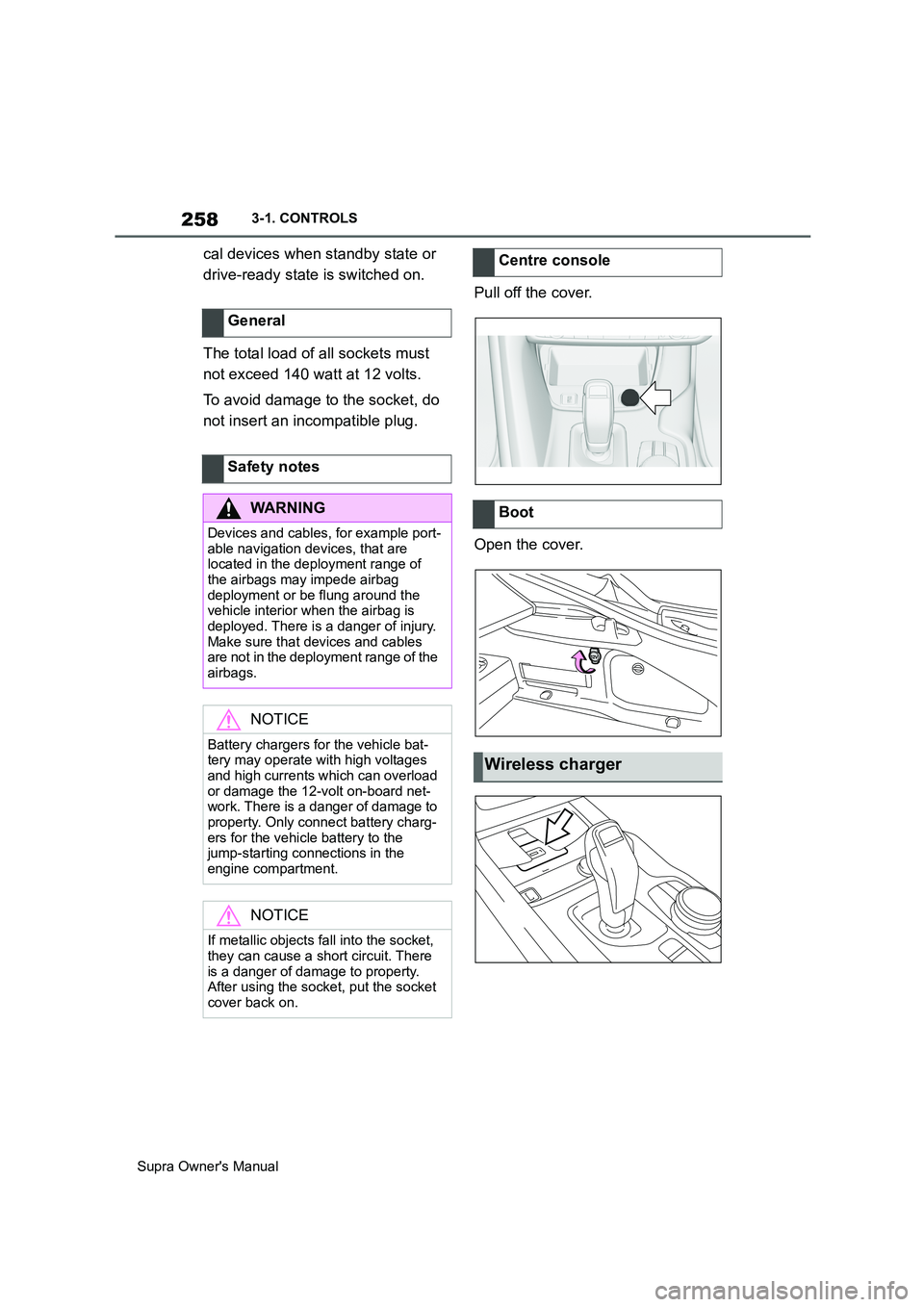
not insert an incompatible plug.Pull off the cover.
Open the cover. General
Safety notes
WARNING
Devices and cables, for example port-
able navigation devices, that are
located in the deployment range of
the airbags may impede airbag
deployment or be flung around the
vehicle interior when the airbag is
deployed. There is a danger of injury.
Make sure that devices and cables
are not in the deployment range of the
airbags.
NOTICE
Battery chargers for the vehicle bat-
tery may operate with high voltages
and high currents which can overload
or damage the 12-volt on-board net-
work. There is a danger of damage to
property. Only connect battery charg-
ers for the vehicle battery to the
jump-starting connections in the
engine compartment.
NOTICE
If metallic objects fall into the socket,
they can cause a short circuit. There
is a danger of damage to property.
After using the socket, put the socket
cover back on.
Centre console
Boot
Wireless charger
Page 261 of 456
261
3
Supra Owner's Manual3-1. CONTROLS
CONTROLS
This chapter describes all standard,
country-specific and special equip-
ment available for the model series.
It may therefore describe equip-
ment and functions which are not
installed in your vehicle, for exam-
ple on account of the optional
equipment selected or the country
specification. This also applies to
safety-relevant functions and sys-
tems. Please comply with the rele-
vant laws and regulations when
using the corresponding functions
and systems. Safety note
WARNING
Fragile objects, for example glass
bottles or glasses, can break in the
event of an accident. Shards may
scatter throughout the interior. There
is a danger of injury or damage to
property. Do not use any fragile
objects while driving. Only stow fragile
objects in closed storage compart-
ments.
Cupholder
Safety note
WARNING
Unsuitable containers placed in the
cupholders may damage the cuphold-
ers or be flung into the interior, for
example in the event of an accident or
during braking or evasive manoeu-
vres. Spilt liquids can distract the
driver from the road and lead to an
accident. Hot beverages may damage
the cupholders or cause scalding.
There is a danger of injury or damage
to property. Do not force objects into
the cupholder. Use lightweight, seala-
ble containers that are shatterproof.
Do not transport hot drinks.
Boot
Vehicle equipment
Loads
Safety notes
WARNING
A high gross vehicle weight can make
the tyres to overheat, causing internal
damage and a sudden loss of tyre
inflation pressure. Handling charac-
teristics can be negatively influenced,
for example reduced directional sta-
bility, longer braking distance and
modified steering characteristics.
There is a danger of accidents.
Please comply with the permitted load
index of the tyre, and do not exceed
the permitted gross vehicle weight.
Page 262 of 456
262
Supra Owner's Manual3-1. CONTROLS
Wrap protective material around
any sharp corners and edges on
the load.
Heavy transported loads: stow
as far forward and as low down as possible, ideally directly
behind the boot partition.
Small and lightweight trans-
ported loads: can be secured
with retaining straps, a luggage
net or other suitable straps.
Large and heavy transported
loads: secure with lashing straps.
Equipment for securing the trans-
ported load, for example lashing
straps, tensioning straps or luggage
nets, must be secured to the lash-
ing eyes in the boot.
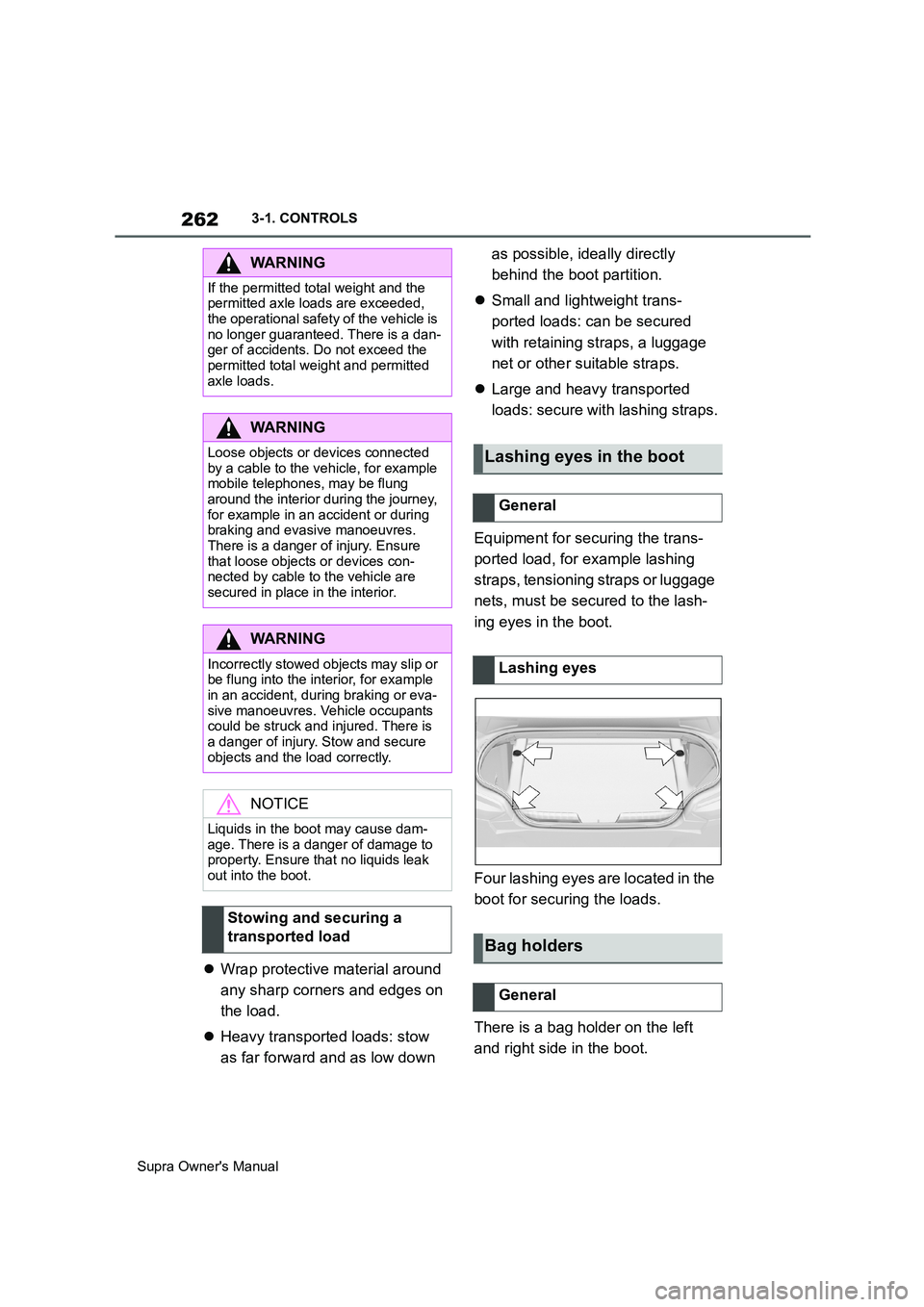
Four lashing eyes are located in the
boot for securing the loads.
There is a bag holder on the left
and right side in the boot.
WARNING
If the permitted total weight and the
permitted axle loads are exceeded,
the operational safety of the vehicle is
no longer guaranteed. There is a dan-
ger of accidents. Do not exceed the
permitted total weight and permitted
axle loads.
WARNING
Loose objects or devices connected
by a cable to the vehicle, for example
mobile telephones, may be flung
around the interior during the journey,
for example in an accident or during
braking and evasive manoeuvres.
There is a danger of injury. Ensure
that loose objects or devices con-
nected by cable to the vehicle are
secured in place in the interior.
WARNING
Incorrectly stowed objects may slip or
be flung into the interior, for example
in an accident, during braking or eva-
sive manoeuvres. Vehicle occupants
could be struck and injured. There is
a danger of injury. Stow and secure
objects and the load correctly.
NOTICE
Liquids in the boot may cause dam-
age. There is a danger of damage to
property. Ensure that no liquids leak
out into the boot.
Stowing and securing a
transported load
Lashing eyes in the boot
General
Lashing eyes
Bag holders
General