brakes TOYOTA SUPRA 2019 User Guide
[x] Cancel search | Manufacturer: TOYOTA, Model Year: 2019, Model line: SUPRA, Model: TOYOTA SUPRA 2019Pages: 456, PDF Size: 88.65 MB
Page 215 of 456
215
3
Supra Owner's Manual3-1. CONTROLS
CONTROLS
mph.
If a sporty driving style is
adopted, for example sharp
acceleration or fast cornering.
In active driving situations, for
example frequent lane changes.
In poor road conditions.
In strong crosswinds.
The system is reset approximately
45 minutes after the vehicle is
stopped, for example when taking a
break during a long motorway jour-
ney.This chapter describes all standard,
country-specific and special equip-
ment available for the model series.
It may therefore describe equip-
ment and functions which are not
installed in your vehicle, for exam-
ple on account of the optional
equipment selected or the country
specification. This also applies to
safety-relevant functions and sys-
tems. Please comply with the rele-
vant laws and regulations when
using the corresponding functions
and systems.
ABS prevents the wheels from lock-
ing when the brakes are applied.
Steering control is retained even in
the event of full braking, thereby
enhancing active road safety.
ABS is ready to operate each time
the engine is started.
Situations which the ABS cannot
operate sufficiently:
When entering a curve at an
excessively high rate of speedDriving Stability Control
Systems
Vehicle equipment
Anti-lock Brake System ABS
Page 216 of 456
216
Supra Owner's Manual3-1. CONTROLS
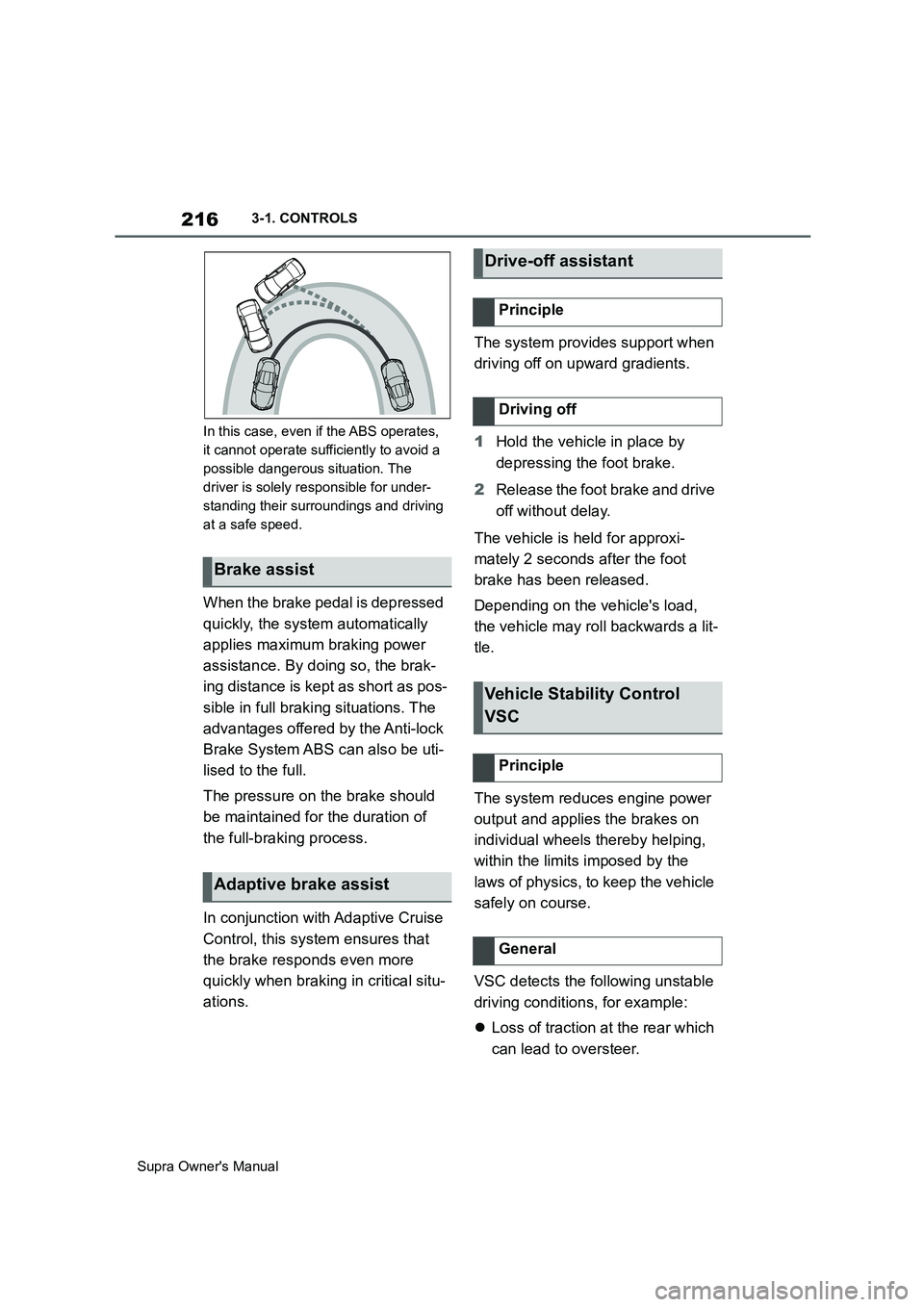
In this case, even if the ABS operates,
it cannot operate sufficiently to avoid a
possible dangerous situation. The
driver is solely responsible for under-
standing their surroundings and driving
at a safe speed.
When the brake pedal is depressed
quickly, the system automatically
applies maximum braking power
assistance. By doing so, the brak-
ing distance is kept as short as pos-
sible in full braking situations. The
advantages offered by the Anti-lock
Brake System ABS can also be uti-
lised to the full.
The pressure on the brake should
be maintained for the duration of
the full-braking process.
In conjunction with Adaptive Cruise
Control, this system ensures that
the brake responds even more
quickly when braking in critical situ-
ations.The system provides support when
driving off on upward gradients.
1Hold the vehicle in place by
depressing the foot brake.
2Release the foot brake and drive
off without delay.
The vehicle is held for approxi-
mately 2 seconds after the foot
brake has been released.
Depending on the vehicle's load,
the vehicle may roll backwards a lit-
tle.
The system reduces engine power
output and applies the brakes on
individual wheels thereby helping,
within the limits imposed by the
laws of physics, to keep the vehicle
safely on course.
VSC detects the following unstable
driving conditions, for example:
Loss of traction at the rear which
can lead to oversteer.
Brake assist
Adaptive brake assist
Drive-off assistant
Principle
Driving off
Vehicle Stability Control
VSC
Principle
General
Page 222 of 456
222
Supra Owner's Manual3-1. CONTROLS
Depending on the vehicle specifica-
tions, the set speed limit will be dis-
played.
This system allows a desired speed
to be set using the buttons on the
steering wheel. The desired speed
is then maintained by the system.
To do this, the system automatically
accelerates and brakes the vehicle as necessary.
Depending on the vehicle settings,
the characteristics of the Cruise
Control may change. Warning when the speed limit
is exceeded
Visual warning
If the speed limit is exceeded:
the indicator lamp in the
instrument cluster flashes for
as long as you exceed the set
speed limit.
Displays in the instrument
cluster
Indicator lamp
If the indicator lamp is illu-
minated: the system is
switched on.
If the indicator lamp is
flashing: set speed limit is
exceeded.
Grey indicator lamp: the
system is interrupted.
Status display
Cruise Control
Principle
General
Safety notes
WARNING
The system does not relieve you of
your personal responsibility to assess
the traffic situation correctly. Due to
system limitations, it cannot respond
independently and appropriately in all
traffic conditions. There is a danger of
accidents. Adapt your driving style to
the traffic conditions. Observe the
traffic situation and intervene actively
if the situation warrants it.
WARNING
Using the system in the following situ-
ations may increase the risk of an
accident, for example:
●On stretches of road with many cor-
ners and bends.
●In heavy traffic.
●If the road is icy, if there is fog or
snow, if conditions are wet or on a
loose road surface.
There is a danger of accidents or
damage to property. Only use the sys-
tem if it is possible to drive at a con-
stant speed.
Page 223 of 456
223
3
Supra Owner's Manual3-1. CONTROLS
CONTROLS
The indicator will come on.
Cruise Control is active. The driven speed is maintained and stored as
the desired speed.
Vehicle Stability Control VSC is
switched on, if necessary.
The displays turn off. The desired
speed saved is deleted.
The system interrupts automatically
in the following situations:
If the driver brakes.
Automatic transmission: if the
selector lever is moved out of
selector lever position D.
If Traction mode is activated or
Vehicle Stability Control VSC
deactivated.
If Vehicle Stability Control VSC
intervenes.
WARNING
The desired speed may be acciden-
tally set incorrectly or called up by
mistake. There is a danger of acci-
dents. Adjust the desired speed to the
traffic conditions. Observe the traffic
situation and intervene actively if the
situation warrants it.
Overview
Buttons on the steering wheel
ButtonFunction
Cruise Control on/off, see
page 223.
To resume Cruise Control
with last setting, see page
224.
To interrupt Cruise Con-
trol, see page 223.
Store current speed.
Speed Limit Assist, see
page 234: adopt the sug-
gested speed manually.
Rocker switch:
Setting the speed, see
page 224.
Switching Cruise Control
on/off
Switching on
Press the button on the steer-
ing wheel.
Switching off
Press the button on the steer-
ing wheel.
Interrupts Cruise Control
Interrupting manually
Press the button while the
system is activated.
Interrupting automatically
Page 226 of 456
226
Supra Owner's Manual3-1. CONTROLS
cles driving in front.
Depending on the vehicle settings,
the characteristics of the Cruise
Control may change.
The distance can be set in several
stages, and is dependent on the
individual speed for reasons of
safety.
If the vehicle ahead brakes to a
standstill and sets off again shortly
afterwards, the system can recog-
nise this within the given context.
Safety notes
WARNING
The system does not relieve you of
your personal responsibility to assess
the traffic situation correctly. Due to
system limitations, it cannot respond
independently and appropriately in all
traffic conditions. There is a danger of
accidents. Adapt your driving style to
the traffic conditions. Observe the
traffic situation and intervene actively
if the situation warrants it.
WARNING
An unsecured vehicle can start mov-
ing and rolling away. There is a dan-
ger of accidents. Before leaving the
vehicle, secure it to prevent it from
rolling away.
Observe the following to ensure that
the vehicle is secured against rolling
away:
●Apply the parking brake.
●Turn the front wheels towards the
kerb on upward or downward gradi-
ents.
●Additionally secure the vehicle on
upward or downward gradients, for
example with a chock.
WARNING
The desired speed may be acciden-
tally set incorrectly or called up by
mistake. There is a danger of acci-
dents. Adjust the desired speed to the
traffic conditions. Observe the traffic
situation and intervene actively if the
situation warrants it.
WARNING
There is a danger of accidents if the
difference in speed relative to other
vehicles is excessively high. This may
occur, for example, in the following
situations:
●When quickly approaching a slowly
moving vehicle.
●If another vehicle suddenly veers
into the vehicle's own lane.
●When quickly approaching station-
ary vehicles.
There is a danger of injury or even
death. Observe the traffic situation
and intervene actively if the situation
warrants it.
Page 228 of 456
228
Supra Owner's Manual3-1. CONTROLS
The indicator will come on.
Cruise Control is active. The driven
speed is maintained and stored as
the desired speed.
Vehicle Stability Control VSC is
switched on, if necessary.
When switching off with the vehicle
at a standstill, depress the brake
pedal at the same time.
Press the following button on the
steering wheel again:
The displays turn off. The desired
speed saved is deleted.
When the system is activated,
press the following button on the
steering wheel:
If interrupting the system when the
vehicle is at a standstill, depress
the brake pedal at the same time.The system interrupts automatically
in the following situations:
If the driver brakes.
If the selector lever is moved out
of selector lever position D.
If Traction mode is activated or
Vehicle Stability Control VSC
deactivated.
If Vehicle Stability Control VSC
intervenes.
If the vehicle is stationary and
the seat belt is unfastened and
the driver's door is opened.
If the system has not detected
any objects for an extended
period of time, for example on
roads with little traffic and without
defined boundaries.
If the detection zone of the radar
is disrupted, for example, due to
contamination or heavy rainfall.
After an extended stationary
period, if the vehicle was decel-
erated to a standstill by the sys-
tem. Switching Cruise Control
on/off and interrupting
Switching on
Press the button on the steer-
ing wheel.
Switching off
Button on the steering wheel.
Interrupting manually
Button on the steering wheel.
Interrupting automatically
Page 270 of 456
270
Supra Owner's Manual4-1. DRIVING HINTS
This situation, known as aquaplan-
ing, means that the tyre can actu-
ally lose contact completely with
the road surface and the vehicle
can neither be steered, nor the
brakes properly applied.
Please comply with the following
when driving through water:
Only drive through still water.
Only drive through water up to a
max. depth of 25 cm, 9.8 in.
Drive through water at a walking
speed of no more than 5 km/h, 3
mph.
The vehicle is equipped with the
Anti-lock Brake System ABS as
standard.
Perform full braking in situations that require it.
The vehicle remains steerable. Any
obstacles can be avoided by per-
forming steering movements as
smoothly as possible.
A pulsing of the brake pedal and
hydraulic regulating sounds indi-
cate that the Anti-lock Brake Sys-
tem ABS is regulating.
In certain braking situations, the
perforated brake discs can cause
functional noise. However, func-
tional noises have no effect on the
efficiency and operational safety of
the brakes.
In damp weather, on gritted roads
and in heavy rain, apply the brakes
lightly every few kilometres/miles. Driving through water
General
Safety note
NOTICE
Driving through excessively deep
water too fast can result in water
entering the engine compartment,
electrical system or transmission.
There is a danger of damage to prop-
erty. When driving through water, do
not exceed the maximum water depth
and speed specified above.
Safe braking
General
Objects in the range of movement
of the pedals
WARNING
Objects in the driver's footwell can
restrict the pedal travel or block a
pedal that has been pressed. There is
a danger of accidents. Stow items in
the vehicle so that they are secure
and cannot get into the driver's
footwell. Only use floor mats that are
suitable for the vehicle and can be
securely fastened to the floor. Do not
use loose floor mats, and do not place
several floor mats on top of one
another. Make sure that there is suffi-
cient space for the pedals. Ensure
that floor mats are securely reat-
tached after having been removed, for
example for cleaning.
Wet roads
Page 271 of 456
271
4
Supra Owner's Manual4-1. DRIVING HINTS
DRIVING HINTS
Ensure that you do not obstruct
other road users when doing so.
The heat generated by braking
dries the brake discs and brake
pads and protects them against
corrosion.
This way, brake power is available
immediately, whenever it is needed.
■General
When driving on long or steep
downhill stretches, use the gear in
which the least braking is required.
Otherwise the brake system can
overheat and the braking effect is
reduced.
Engine braking effect can be addi-
tionally increased by manually shift-
ing down, even into first gear, if
applicable.
■Safety notesCorrosion of the brake discs and
contamination of the brake pads
increase in the following circum-
stances:
Low mileage.
Extended periods when the vehi-
cle is not used.
Infrequent use of the brakes.
Aggressive, acidic or alkaline
cleaning agents.
Should corrosion form on the brake
discs, the brakes will tend to
respond with a judder effect that
generally cannot be eliminated.
When the automatic air condition-
ing is in operation, condensation
develops and exits underneath the
vehicle.
The higher mechanical and thermal
loads involved in driving on racing Downhill gradients
WARNING
Even slight continuous pressure on
the brake pedal can cause overheat-
ing, brake pad wear or even brake
system failure. There is a danger of
accidents. Avoid excessive loads on
the brake.
WARNING
When idling or with the engine
switched off, safety-relevant func-
tions are restricted or no longer avail-
able, for example the braking effect of
the engine or power assistance for
the braking force and steering. There
is a danger of accidents. Do not drive
at idle speed or with the engine
switched off.
Corrosion of the brake discs
Condensation when vehicle
is parked
Driving on a racing track
Page 334 of 456
334
Supra Owner's Manual5-1. MOBILITY
WARNING
If a warning light illuminates or
flashes, or a warning message is dis-
played, immediately stop the vehicle
in a safe place. Do not open the hood
to inspect the engine, as doing so
may lead to serious injury, such as
steam burns. If a warning message is
displayed, perform the necessary pro-
cedures according to the displayed
message or explanation in the
owner’s manual.
These warning messages indicate
that a malfunction has occurred in a
system or function of the vehicle. If
you continue to drive the vehicle, the
engine may stop suddenly, possibly
leading to an accident. Also, even if
no warning lights are illuminated or
messages are displayed, if any
abnormal sounds, smells or vibrations
are detected, or of the engine stops
suddenly, refrain from opening the
hood to inspect the engine and con-
sult an authorized Toyota retailer or
Toyota authorized repairer, or any reli-
able repairer.
WARNING
If you hear a loud noise or feel some-
thing impact the underside of the
vehicle while driving, immediately
stop the vehicle in a safe place.
After stopping the vehicle in a safe
place, check the underside of the
vehicle for any leaking brake fluid, oil
or fuel. If any fluid is leaking, stop
driving immediately and have the
vehicle inspected by an authorized
Toyota retailer or Toyota authorized
repairer, or any reliable repairer.
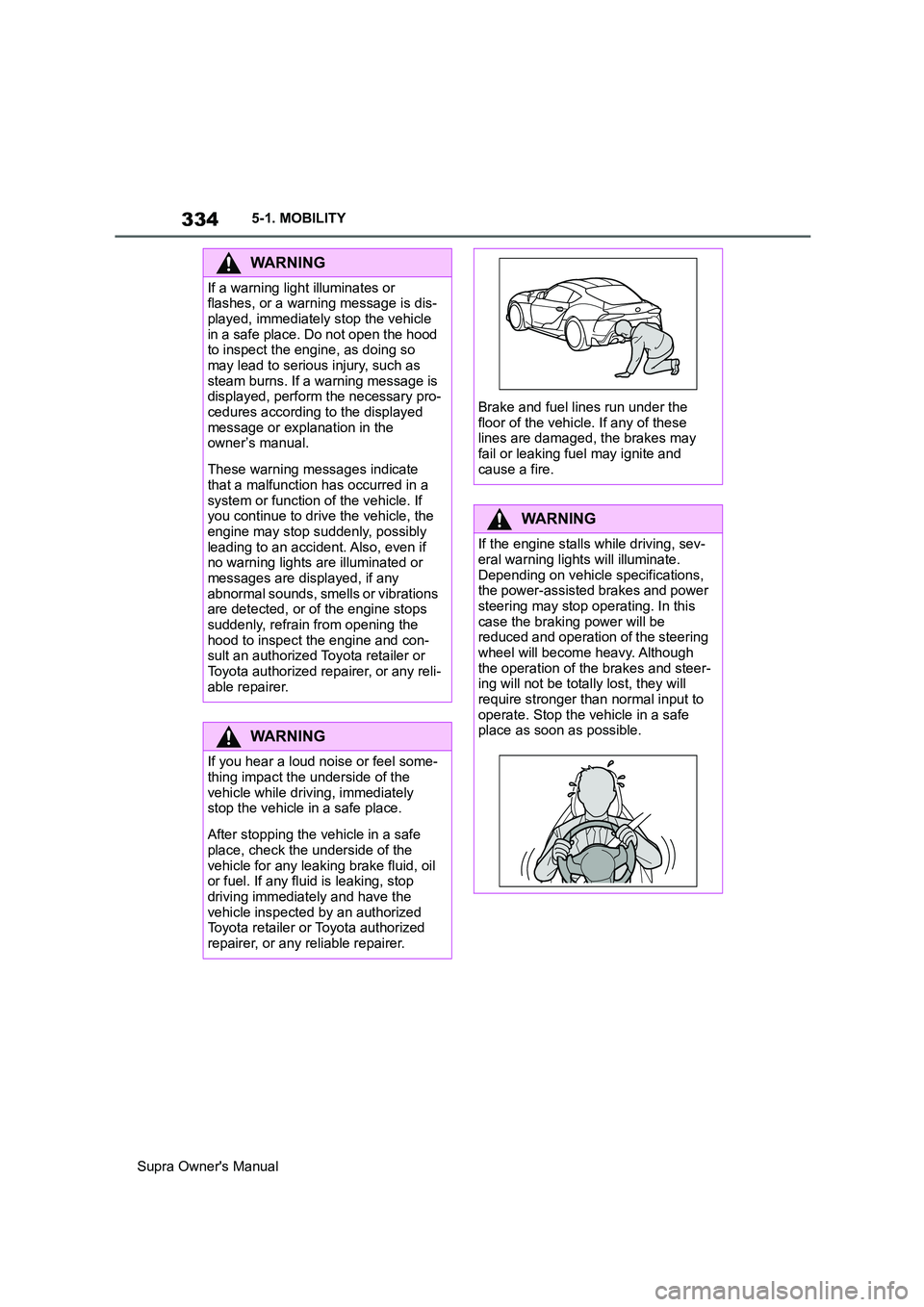
Brake and fuel lines run under the
floor of the vehicle. If any of these
lines are damaged, the brakes may
fail or leaking fuel may ignite and
cause a fire.
WARNING
If the engine stalls while driving, sev-
eral warning lights will illuminate.
Depending on vehicle specifications,
the power-assisted brakes and power
steering may stop operating. In this
case the braking power will be
reduced and operation of the steering
wheel will become heavy. Although
the operation of the brakes and steer-
ing will not be totally lost, they will
require stronger than normal input to
operate. Stop the vehicle in a safe
place as soon as possible.
Page 349 of 456
349
5
Supra Owner's Manual5-1. MOBILITY
MOBILITY
■Safety note
■General
In a car wash, the vehicle must be
able to roll freely.
Roll or push the vehicle, see page
145.
Some car washes require you to
get out of the vehicle. It is not possi-
ble to lock the vehicle from the out-
side in selector lever position N. If an attempt is made to lock the vehi-
cle, a signal sounds.
Ensure that the remote control is
located in the vehicle.
Switch on drive-ready state, see
page 45.
Do not rub wet headlights dry and
do not use abrasive or corrosive
cleaning agents.
Soak impurities such as insect resi-
dues with shampoo and wash off
with water.
Remove ice with a de-icer spray; do
not use an ice scraper.
After the vehicle has been washed,
briefly apply the brakes to dry them
otherwise braking effectiveness
may be temporarily reduced. The
heat generated by braking dries the
brake discs and brake pads and
protects them against corrosion.
Completely remove residues on the
windscreens to avoid affecting visi-
bility due to smearing, and to
reduce wiping noise and wiper
blade wear.
NOTICE
The vehicle can be damaged if auto-
matic washing bays or car washes
are used incorrectly. There is a dan-
ger of damage to property. Observe
the following notes:
●Textile car washes or systems
using soft brushes are preferable,
to avoid damage to the paintwork.
●Avoid washing bays or car washes
with guide rails higher than 10 cm,
4 in, to avoid damage to the body.
●Note the maximum tyre width of the
guide rail to avoid damage to tyres
and rims.
●Fold in the exterior mirrors to avoid
damaging them.
●Deactivate the wipers and the rain
sensor (if fitted) to avoid damage to
the wiper system.
Entering a car wash with a auto-
matic transmission
NOTICE
Selector lever position P is automati-
cally engaged when standby state is
switched off. There is a danger of
damage to property. Do not switch off
standby state in car washes.
Exiting from a car wash
Headlights
After washing the vehicle