instrument cluster TOYOTA SUPRA 2019 User Guide
[x] Cancel search | Manufacturer: TOYOTA, Model Year: 2019, Model line: SUPRA, Model: TOYOTA SUPRA 2019Pages: 456, PDF Size: 88.65 MB
Page 147 of 456
147
3
Supra Owner's Manual3-1. CONTROLS
CONTROLS
■Gearshift
Gear shifting is only carried out at
the appropriate engine RPM and
vehicle speed.
■Short-term manual operation
In selector lever position D, operat-
ing a shift paddle causes the sys-
tem to switch to manual operation
temporarily.
The gearbox reverts to automatic
operation from manual operation
after a certain period of time of
moderate driving without accelera-
tion or gear shifts using the shift
paddles.
Changing to automatic operation is
possible as follows:
Pull and hold right shift paddle.
In addition to briefly pulling right
shift paddle, briefly pull left shift
paddle.
■Permanent manual operation
In selector lever position M, operat-
ing a shift paddle causes the sys-
tem to switch permanently to
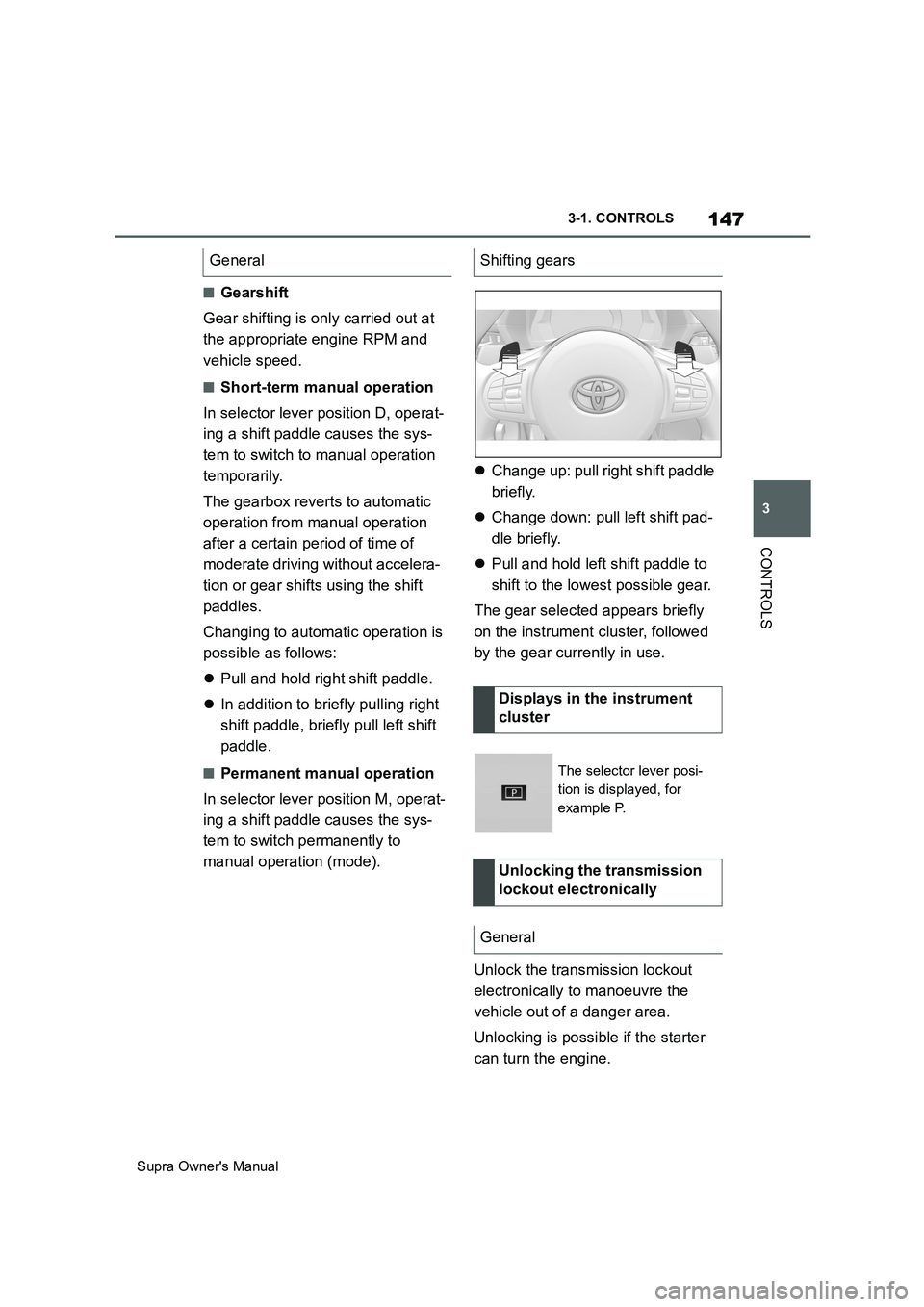
manual operation (mode).Change up: pull right shift paddle
briefly.
Change down: pull left shift pad-
dle briefly.
Pull and hold left shift paddle to
shift to the lowest possible gear.
The gear selected appears briefly
on the instrument cluster, followed
by the gear currently in use.
Unlock the transmission lockout
electronically to manoeuvre the
vehicle out of a danger area.
Unlocking is possible if the starter
can turn the engine. General
Shifting gears
Displays in the instrument
cluster
The selector lever posi-
tion is displayed, for
example P.
Unlocking the transmission
lockout electronically
General
Page 148 of 456
148
Supra Owner's Manual3-1. CONTROLS
Before the transmission lockout is
released, apply the parking brake
to prevent the vehicle from rolling
away.
1Apply the brakes and keep them
applied.
2Press the start/stop button. The
starter must be heard to start
turning. Press and hold the
start/stop button.
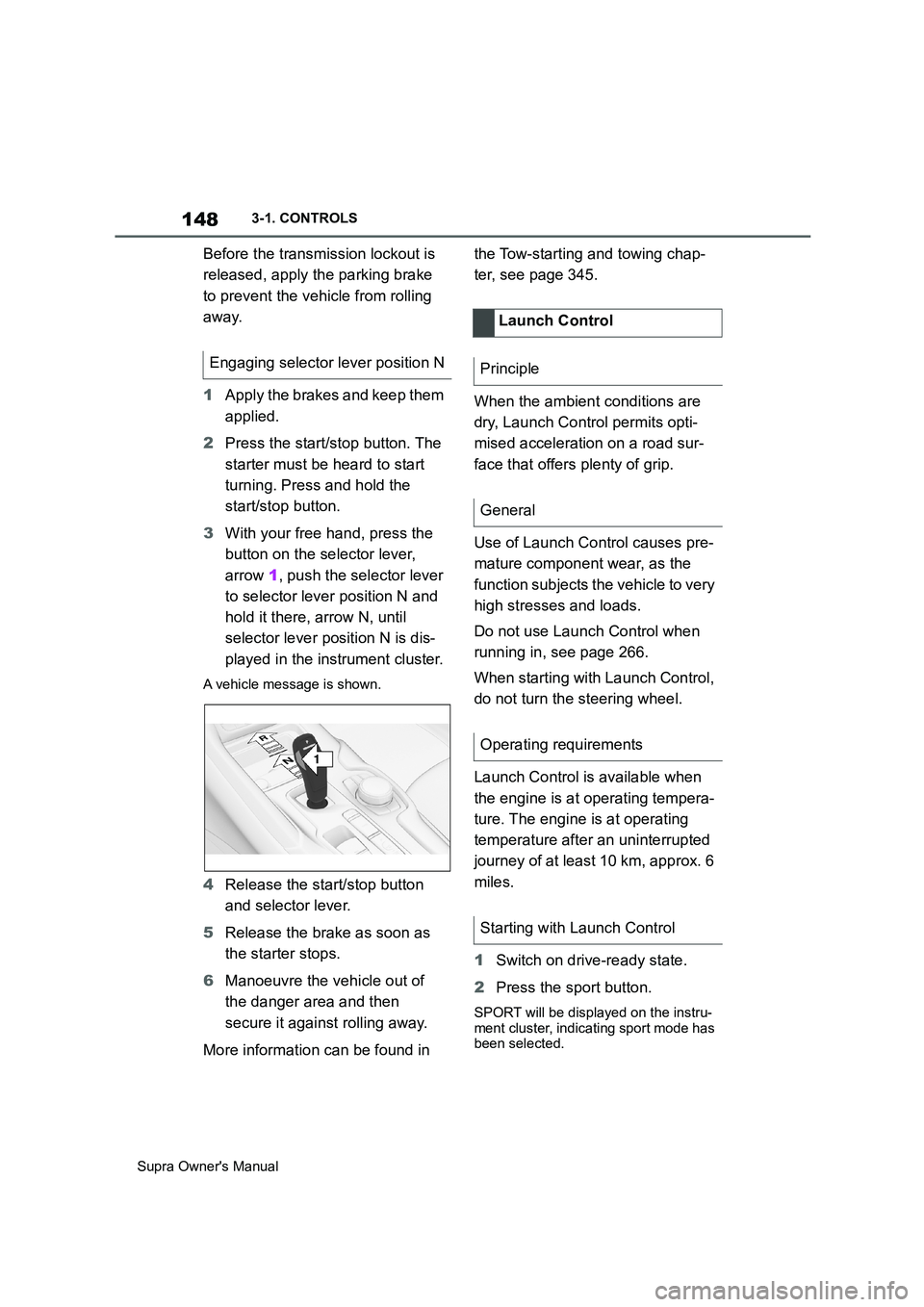
3With your free hand, press the
button on the selector lever,
arrow 1, push the selector lever
to selector lever position N and
hold it there, arrow N, until
selector lever position N is dis-
played in the instrument cluster.
A vehicle message is shown.
4Release the start/stop button
and selector lever.
5Release the brake as soon as
the starter stops.
6Manoeuvre the vehicle out of
the danger area and then
secure it against rolling away.
More information can be found in the Tow-starting and towing chap-
ter, see page 345.
When the ambient conditions are
dry, Launch Control permits opti-
mised acceleration on a road sur-
face that offers plenty of grip.
Use of Launch Control causes pre-
mature component wear, as the
function subjects the vehicle to very
high stresses and loads.
Do not use Launch Control when
running in, see page 266.
When starting with Launch Control,
do not turn the steering wheel.
Launch Control is available when
the engine is at operating tempera-
ture. The engine is at operating
temperature after an uninterrupted
journey of at least 10 km, approx. 6
miles.
1Switch on drive-ready state.
2Press the sport button.
SPORT will be displayed on the instru-
ment cluster, indicating sport mode has
been selected.
Engaging selector lever position N
1
R
N
Launch Control
Principle
General
Operating requirements
Starting with Launch Control
Page 149 of 456
149
3
Supra Owner's Manual3-1. CONTROLS
CONTROLS
3 Press the button.
TRACTION will be displayed on the
instrument cluster and the VSC OFF
indicator lamp will illuminate.
4Select the D selector lever posi-
tion.
5Firmly depress the brake pedal
with your left foot.
6Fully depress and hold the
accelerator pedal at the kick-
down position.
A flag symbol will be shown in the
instrument cluster.
7The engine speed will be
adjusted for launching. Release
the brake pedal within 3 sec-
onds.
Once Launch Control has been
used, the transmission requires
approximately 5 minutes to cool
down before Launch Control can be
used again. Launch Control adapts
to the ambient conditions when
used again.
To support driving stability, re-acti-
vate Vehicle Stability Control, VSC
as soon as possible.
An experienced driver may be able
to achieve better acceleration val-
ues in VSC OFF mode.The sport mode switch influences
the driving dynamics characteristics
of the vehicle.
The following systems are influ-
enced, for example:
Engine characteristics.
Automatic transmission.
Adaptive variable suspension.
Steering.
Display in the instrument cluster.
Cruise Control.
Using again during a journey
After using Launch Control
System limits
Sport mode switch
Principle
General
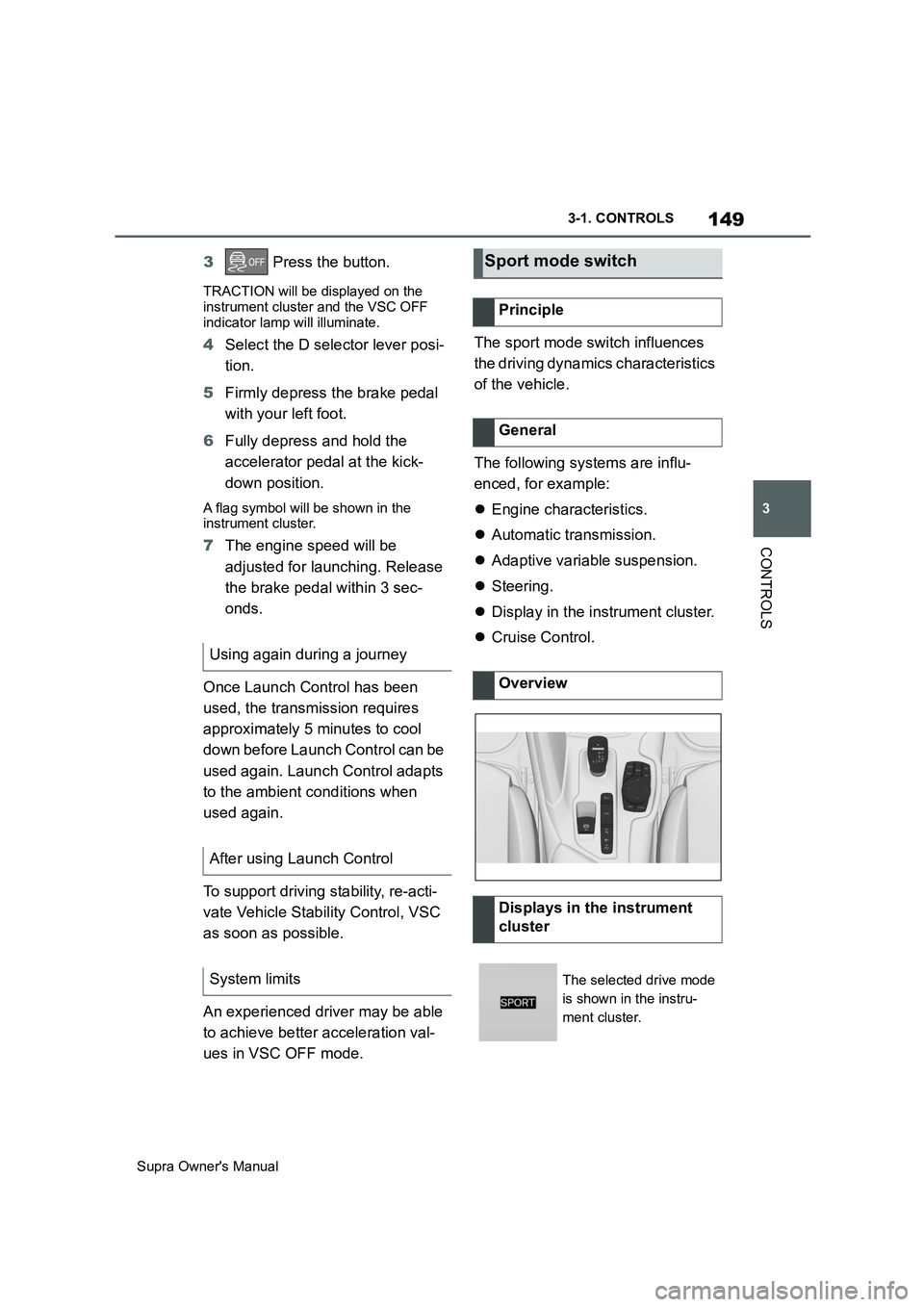
Overview
Displays in the instrument
cluster
The selected drive mode
is shown in the instru-
ment cluster.
Page 151 of 456
151
3
Supra Owner's Manual3-1. CONTROLS
CONTROLS
This chapter describes all standard,
country-specific and special equip-
ment available for the model series.
It may therefore describe equip-
ment and functions which are not
installed in your vehicle, for exam-
ple on account of the optional
equipment selected or the country
specification. This also applies to
safety-relevant functions and sys-
tems. Please comply with the rele-
vant laws and regulations when
using the corresponding functions
and systems.
The instrument cluster is a variable
display. When the sport mode
switch is used to change the driving
mode, the instrument cluster dis-
plays change to match the driving
mode.
Changes to the displays in the
instrument cluster can be deacti-
vated via Toyota Supra Command.
The displays in the instrument clus-
ter can sometimes differ from the
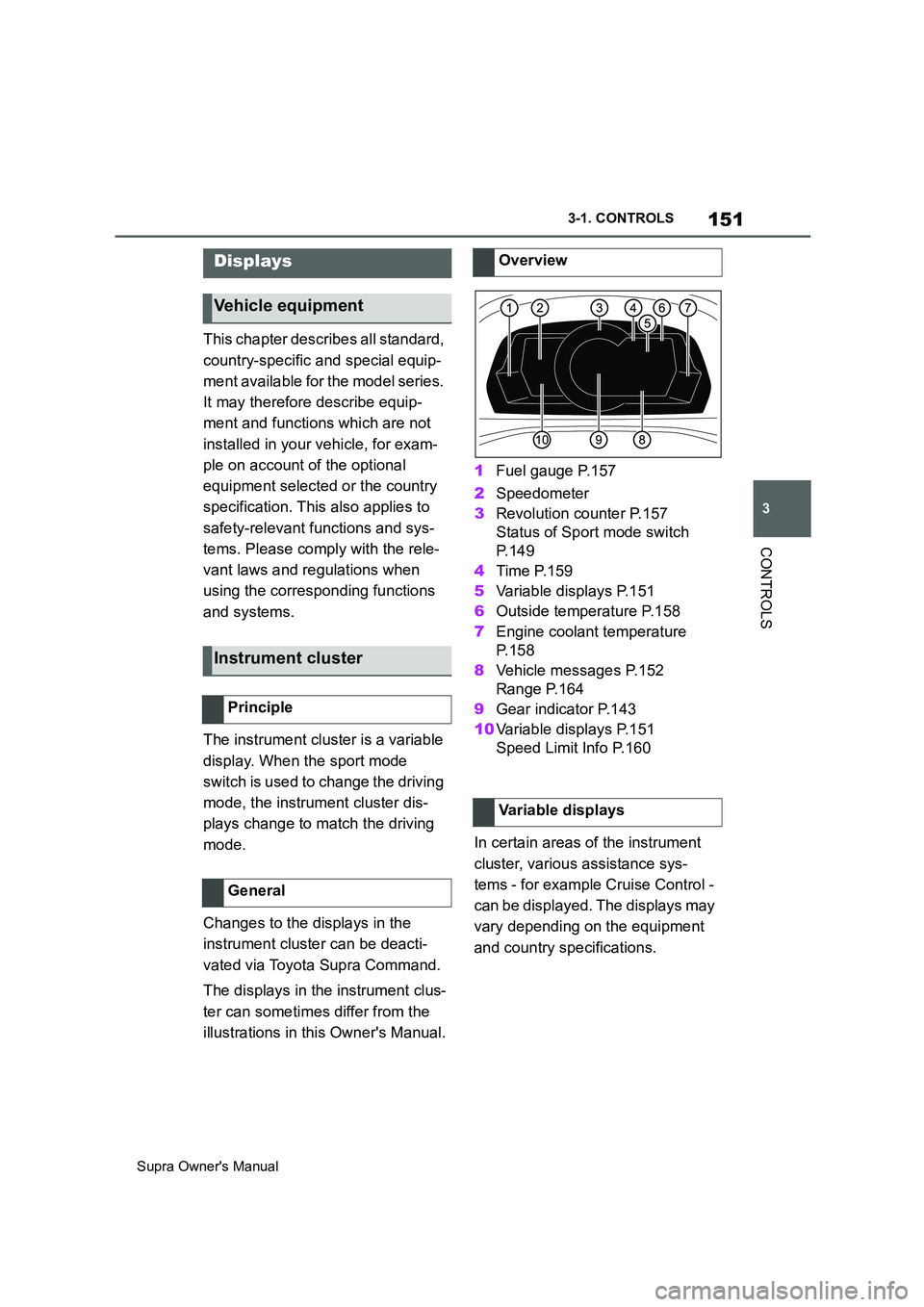
illustrations in this Owner's Manual.1Fuel gauge P.157
2Speedometer
3Revolution counter P.157
Status of Sport mode switch
P. 1 4 9
4Time P.159
5Variable displays P.151
6Outside temperature P.158
7Engine coolant temperature
P. 1 5 8
8Vehicle messages P.152
Range P.164
9Gear indicator P.143
10Variable displays P.151
Speed Limit Info P.160
In certain areas of the instrument
cluster, various assistance sys-
tems - for example Cruise Control -
can be displayed. The displays may
vary depending on the equipment
and country specifications.
Displays
Vehicle equipment
Instrument cluster
Principle
General
Overview
Variable displays
Page 152 of 456
152
Supra Owner's Manual3-1. CONTROLS
The display can be changed for
sport mode.
The driving mode will change to
sport mode.
The vehicle messages monitors
vehicle functions and alerts you to
any faults in the monitored sys-
tems.
A vehicle message is displayed as
a combination of indicator or warn-
ing lamps and text messages in the
instrument cluster and, if applica-
ble, in the Head-Up Display.
If applicable, the text message
shown in the Control Display is
accompanied by an additional
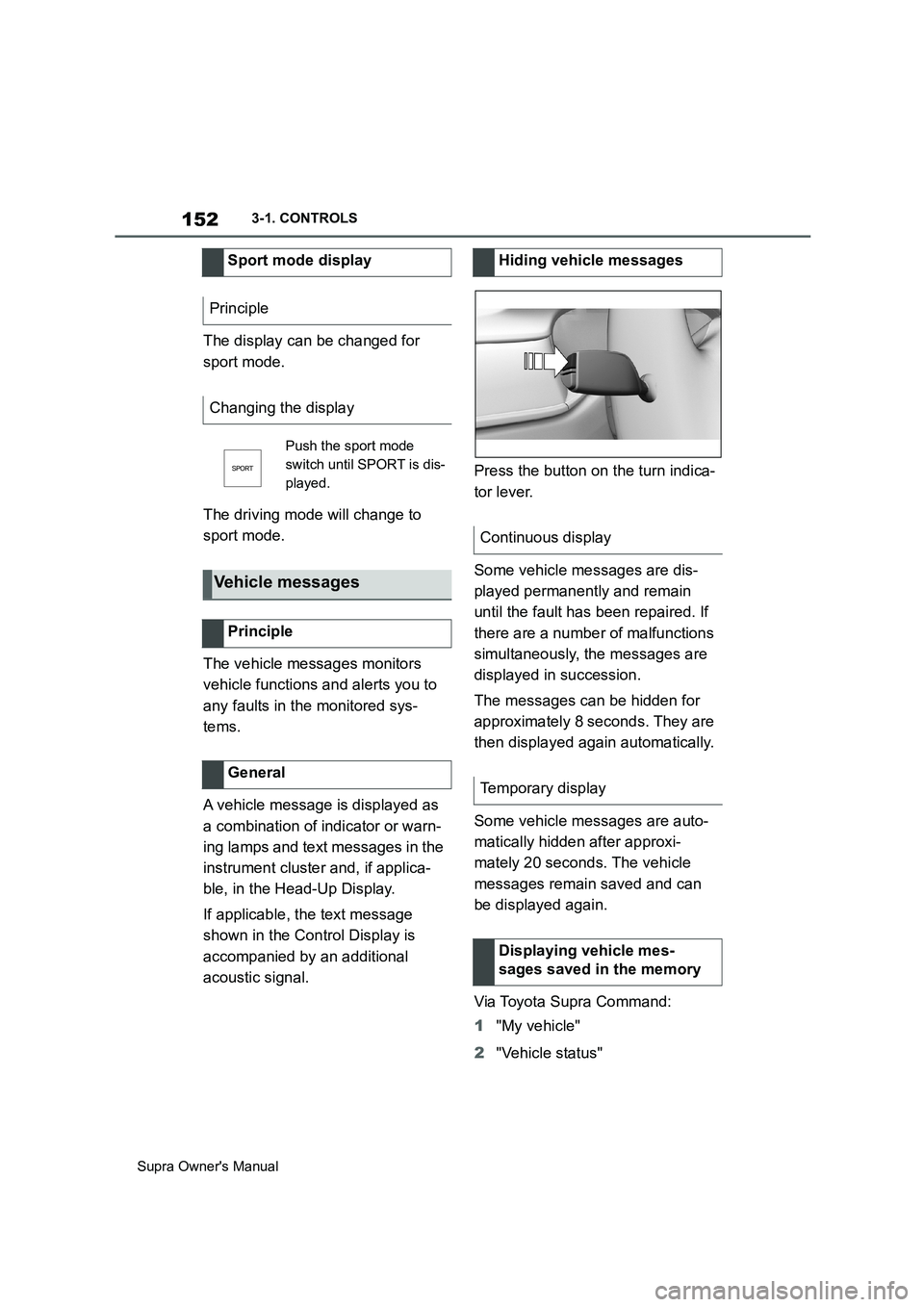
acoustic signal.Press the button on the turn indica-
tor lever.
Some vehicle messages are dis-
played permanently and remain
until the fault has been repaired. If
there are a number of malfunctions
simultaneously, the messages are
displayed in succession.
The messages can be hidden for
approximately 8 seconds. They are
then displayed again automatically.
Some vehicle messages are auto-
matically hidden after approxi-
mately 20 seconds. The vehicle
messages remain saved and can
be displayed again.
Via Toyota Supra Command:
1"My vehicle"
2"Vehicle status" Sport mode display
Principle
Changing the display
Push the sport mode
switch until SPORT is dis-
played.
Vehicle messages
Principle
General
Hiding vehicle messages
Continuous display
Temporary display
Displaying vehicle mes-
sages saved in the memory
Page 153 of 456
153
3
Supra Owner's Manual3-1. CONTROLS
CONTROLS
3"Vehicle messages"
4Select a text message.
Text messages and symbols in the
instrument cluster explain the
meaning of a vehicle message and
the indicator and warning lamps.
You can call up additional informa-
tion via vehicle messages, for
example the cause of the fault and
any action required.
The supplementary text is automat-
ically shown in the Control Display
for urgent messages.
It is possible to select additional
assistance depending on the vehi-
cle message.
Via Toyota Supra Command:
1"My vehicle"
2"Vehicle status"
3"Vehicle messages"
4Select the required text mes-
sage.
5Select the desired settingCertain messages displayed when
driving are displayed again when
drive-ready state is switched off.
Indicator and warning lamps in the
instrument cluster show the status
of some functions in the vehicle and
indicate when there is a malfunc-
tion in monitored systems.
Indicator and warning lamps can
illuminate in a variety of combina-
tions and colours.
When drive-ready state is switched
on, the functionality of some lights
is checked and they illuminate
briefly. Display
Vehicle messages
At least one vehicle mes-
sage is displayed or
saved.
Text messages
Supplementary text messages
Messages displayed at the end of
a journey
Indicator and warning lamps
Principle
General
Page 159 of 456
159
3
Supra Owner's Manual3-1. CONTROLS
CONTROLS
The time is shown in the instrument
cluster. Setting the time and time
format, see page 62.
The function shows the current ser-
vice requirements and related
maintenance jobs.
The distance or time remaining until
the next service is displayed briefly
in the instrument cluster after the
ignition is switched on.
More detailed information on the
scope of maintenance can be dis-
played on the Control Display.Via Toyota Supra Command:
1"My vehicle"
2"Vehicle status"
3"Service requirements"
Essential maintenance routines and
any statutory inspections required are
displayed.
4Select an entry to display more
detailed information.
Enter deadlines for statutory vehi-
cle inspections.
Ensure that the date and time are
set correctly in the vehicle.
Via Toyota Supra Command:
1"My vehicle"
2"Vehicle status"
3"Service requirements"
4"Date:"
5Select the desired setting. Safety note
WARNING
Even at temperatures above
+3°C/+37 °F there may be an
increased risk of black ice, for exam-
ple on bridges or on shaded road
selection. There is a danger of acci-
dents. At low temperatures, adjust the
driving style to the weather condi-
tions.
Time
Service requirements
Principle
General
Display
Detailed information on service
requirements
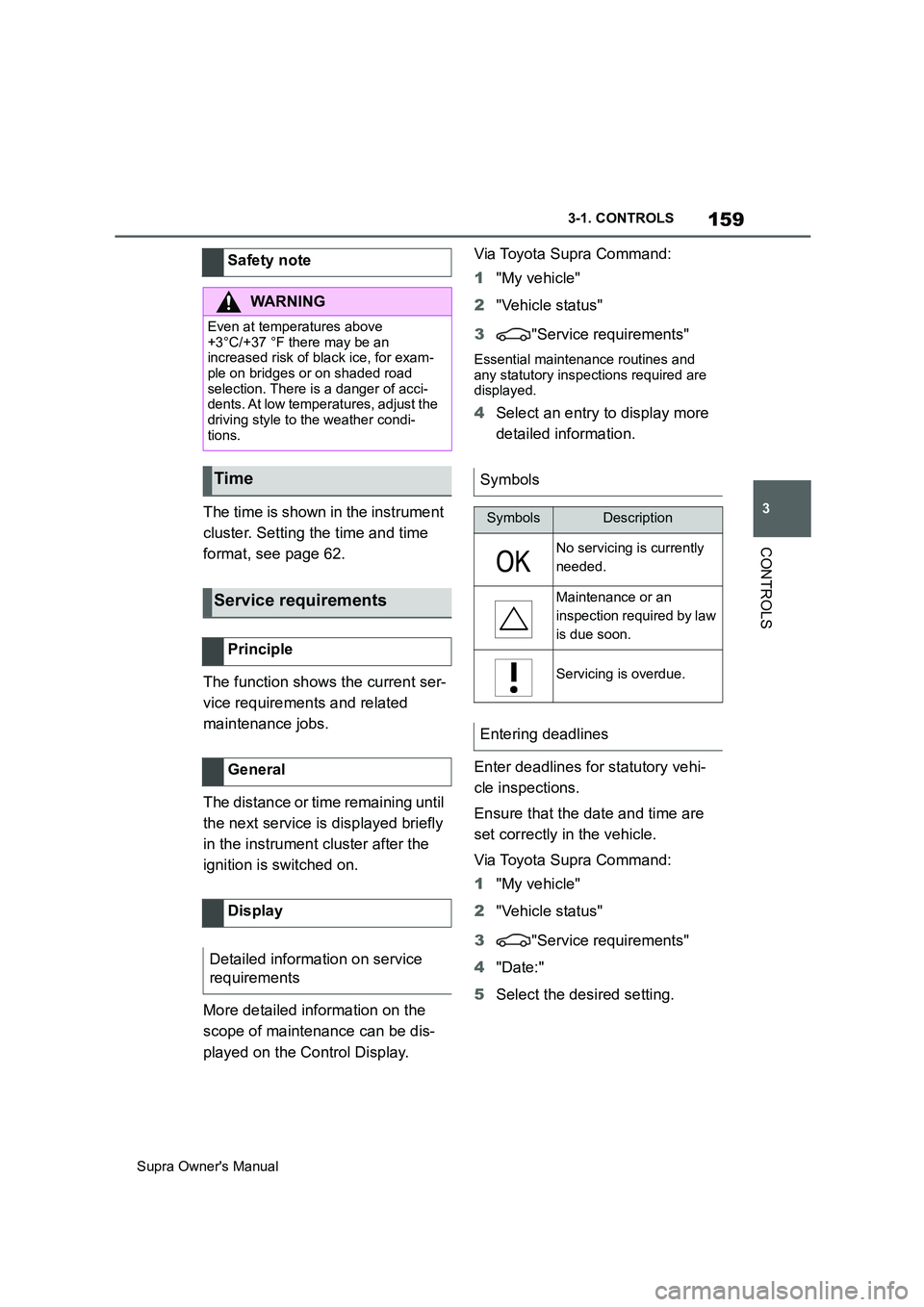
Symbols
SymbolsDescription
No servicing is currently
needed.
Maintenance or an
inspection required by law
is due soon.
Servicing is overdue.
Entering deadlines
Page 160 of 456
160
Supra Owner's Manual3-1. CONTROLS
The system recommends the most
efficient gear for the current driving
situation.
Depending on the design and the
country specifications, the shift
point indicator is active in manual
mode of the automatic transmis-
sion.
Information on up or down shifting
are displayed in the instrument
cluster.
Speed Limit Info shows the cur-
rently applicable speed limit in the instrument cluster and the Head-Up
Display, as well as additional signs
where applicable, for example in
wet conditions.
The camera in the area of the inte-
rior rear-view mirror detects traffic
signs at the edge of the road as
well as variable overhead signs.
Road signs with additional instruc-
tions, for example restrictions appli-
cable in wet weather, are taken into
account and correlated with infor-
mation in the vehicle, such as the
windscreen wiper signal. The road
sign and corresponding additional
signs are then displayed in the
instrument cluster and the Head-Up
Display, if applicable, or ignored,
depending on the situation. Some
additional signs are taken into
account in the evaluation of the
speed limit, but are not displayed in
the instrument cluster.
The system considers the informa-
tion saved in the navigation system
as applicable and also displays the
speed limits present on unmarked
sections of road.
Overtaking restriction signs and
end of restriction signs that are
Shift point indicator
Principle
General
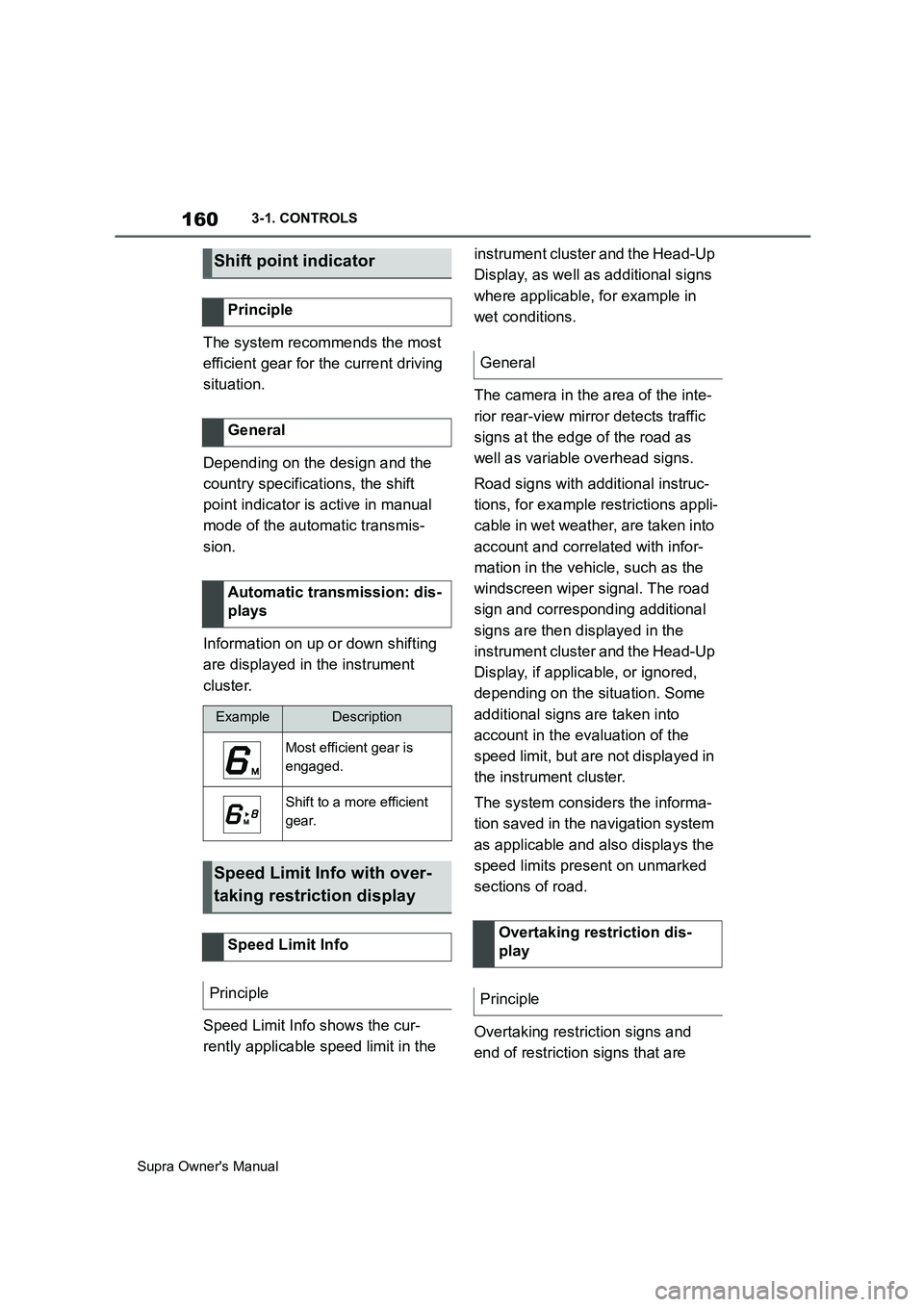
Automatic transmission: dis-
plays
ExampleDescription
Most efficient gear is
engaged.
Shift to a more efficient
gear.
Speed Limit Info with over-
taking restriction display
Speed Limit Info
Principle
General
Overtaking restriction dis-
play
Principle
Page 161 of 456
161
3
Supra Owner's Manual3-1. CONTROLS
CONTROLS
detected by the camera are indi-
cated by corresponding symbols in
the instrument cluster and, if appli-
cable, the Head-Up Display.
The system considers overtaking
restrictions and ends of restrictions
that are indicated by means of
signs.
Nothing will be displayed in the fol-
lowing situations:
In countries in which no overtak-
ing is primarily shown by road
markings.
On routes without signs.
In the case of railway crossings,
lane markings and other situa-
tions which indicate an overtak-
ing restriction but which are not
signposted to this effect.
Depending on the equipment ver-
sion, an additional symbol with dis-
tance information may also be
displayed to indicate the end of the
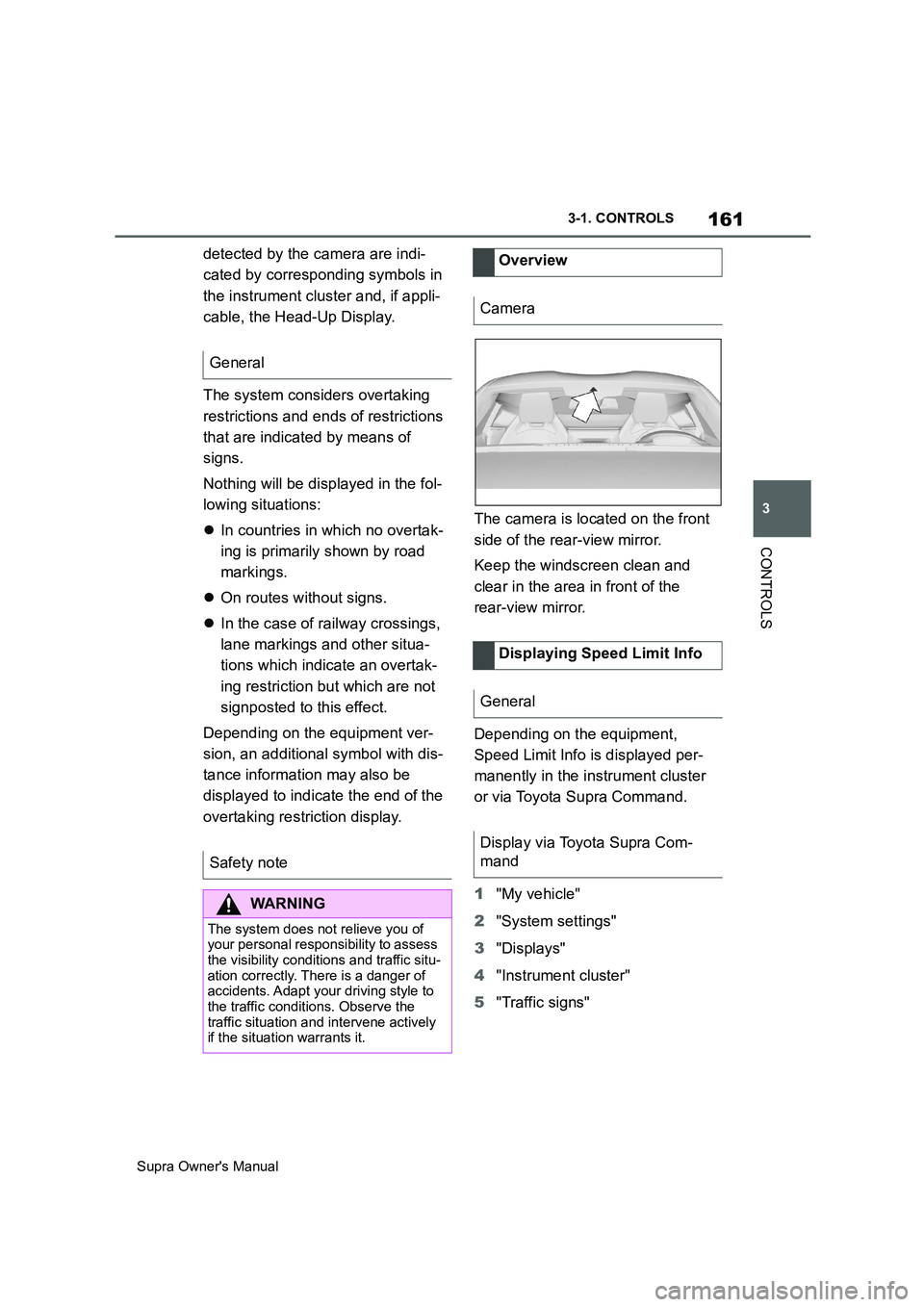
overtaking restriction display.The camera is located on the front
side of the rear-view mirror.
Keep the windscreen clean and
clear in the area in front of the
rear-view mirror.
Depending on the equipment,
Speed Limit Info is displayed per-
manently in the instrument cluster
or via Toyota Supra Command.
1"My vehicle"
2"System settings"
3"Displays"
4"Instrument cluster"
5"Traffic signs" General
Safety note
WARNING
The system does not relieve you of
your personal responsibility to assess
the visibility conditions and traffic situ-
ation correctly. There is a danger of
accidents. Adapt your driving style to
the traffic conditions. Observe the
traffic situation and intervene actively
if the situation warrants it.
Overview
Camera
Displaying Speed Limit Info
General
Display via Toyota Supra Com-
mand
Page 162 of 456
162
Supra Owner's Manual3-1. CONTROLS
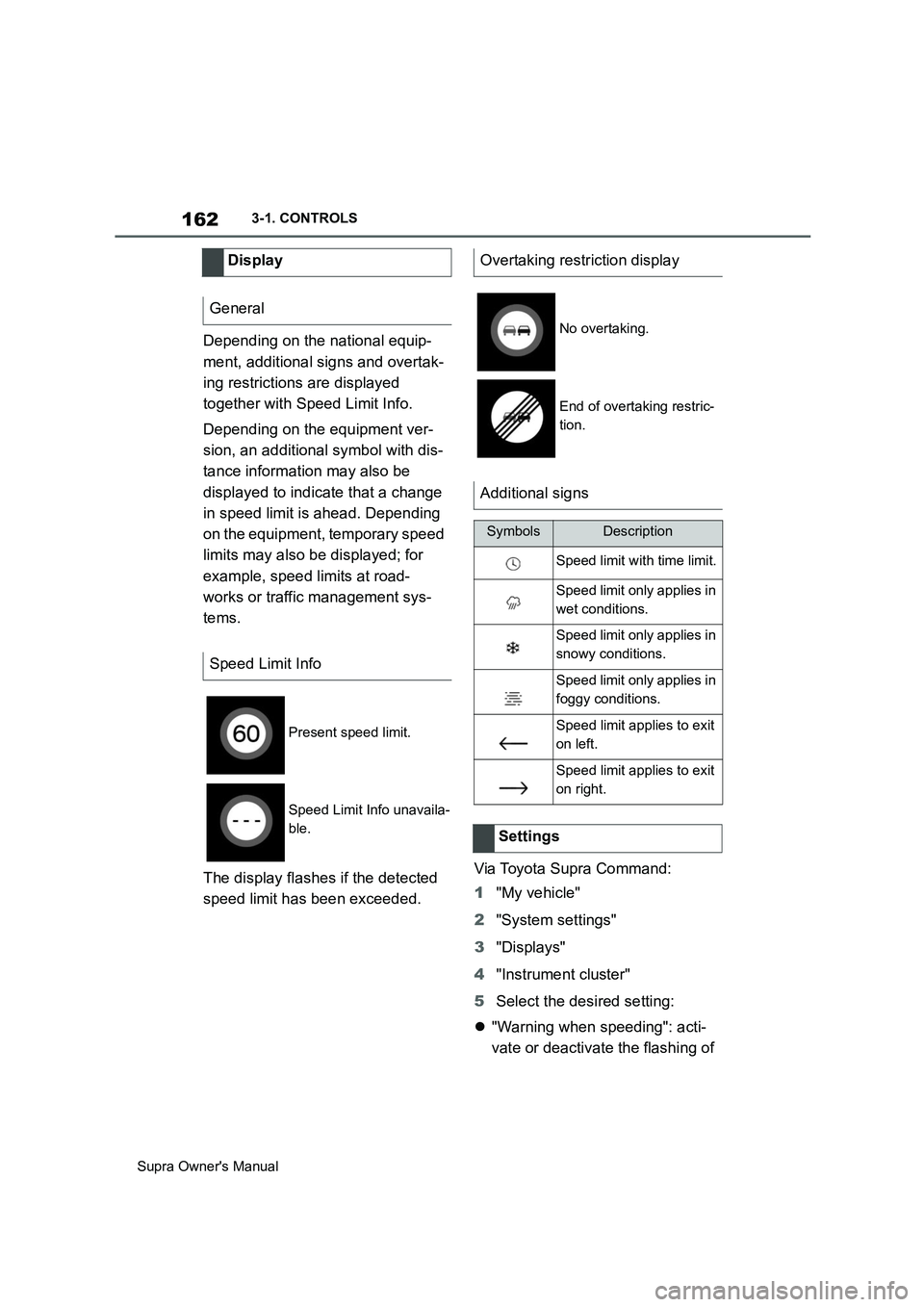
Depending on the national equip-
ment, additional signs and overtak-
ing restrictions are displayed
together with Speed Limit Info.
Depending on the equipment ver-
sion, an additional symbol with dis-
tance information may also be
displayed to indicate that a change
in speed limit is ahead. Depending
on the equipment, temporary speed
limits may also be displayed; for
example, speed limits at road-
works or traffic management sys-
tems.
The display flashes if the detected
speed limit has been exceeded.Via Toyota Supra Command:
1"My vehicle"
2"System settings"
3"Displays"
4"Instrument cluster"
5Select the desired setting:
"Warning when speeding": acti-
vate or deactivate the flashing of Display
General
Speed Limit Info
Present speed limit.
Speed Limit Info unavaila-
ble.
Overtaking restriction display
No overtaking.
End of overtaking restric-
tion.
Additional signs
SymbolsDescription
Speed limit with time limit.
Speed limit only applies in
wet conditions.
Speed limit only applies in
snowy conditions.
Speed limit only applies in
foggy conditions.
Speed limit applies to exit
on left.
Speed limit applies to exit
on right.
Settings