lock TOYOTA SUPRA 2019 Service Manual
[x] Cancel search | Manufacturer: TOYOTA, Model Year: 2019, Model line: SUPRA, Model: TOYOTA SUPRA 2019Pages: 456, PDF Size: 88.65 MB
Page 144 of 456
144
Supra Owner's Manual3-1. CONTROLS
Selector lever position for all nor-
mal driving. All gears for forward
driving are selected automatically.
Only engage selector lever posi-
tion R when the vehicle is station-
ary.
In selector lever position N, the
vehicle can be pushed or can roll
without power from the engine, for
example in car washes, see page
145.
Selector lever position for parking
the vehicle, for example. In selector
lever position P, the transmission
blocks the drive wheels.
Only engage selector lever posi-
tion P when the vehicle is station-
ary.
■P is engaged automatically
Selector lever position P is auto-
matically engaged in the following
situations, for example:
After switching off drive-ready
state if selector lever position R,
D or M is engaged.
After switching off standby state
if selector lever position N is
engaged.
If, while the vehicle is at a stand-
still and selector lever position D,
M or R is engaged, the driver's
seat belt is unfastened, the
driver's door is opened and the
brake pedal is not depressed.
Apply the brakes until you are
ready to drive off, otherwise the
vehicle will move when a drive posi-
tion is selected.
The selector lever will only move
from position P to another selector
lever position if drive-ready state is
switched on and the brake pedal is
depressed.
Where applicable, selector lever
position P can only be changed
once all technical requirements are
fulfilled. Safety note
WARNING
An unsecured vehicle can start mov-
ing and rolling away. There is a dan-
ger of accidents. Before leaving the
vehicle, secure it to prevent it from
rolling away, for example by applying
the parking brake.
Selector lever positions
D drive position
R Reverse
N neutral
P Park
Engaging selector lever posi-
tions
General
Operating requirements
Page 145 of 456

145
3
Supra Owner's Manual3-1. CONTROLS
CONTROLS
A selector lever lock prevents the
following incorrect operation:
Inadvertent shifting to selector
lever position R.
Inadvertent change from selector
lever position P to another selec-
tor lever position.
1Fasten the driver's seat belt.
2Press and hold the button to
cancel the selector lever lock.
3Briefly press the selector lever in
the desired direction, possibly
overcoming a resistance point.
The selector lever returns to the
middle position when released.Press button P.
In some situations, the vehicle may
need to be rolled a short distance
without power, for example in a car
wash, or be pushed.
1Switch on drive-ready state
while pressing the brake.
2If necessary, release the parking
brake.
3Depress the brake pedal.
4Touch the selector lever lock
and engage selector lever posi-
tion N.
5Switch off drive-ready state.
Standby state then remains switched
on and a vehicle message is shown.
The vehicle can now roll.
Engaging selector lever positions
D, N, REngaging selector lever position P
Rolling or pushing the vehi-
cle
General
Engaging selector lever position N
Page 146 of 456
146
Supra Owner's Manual3-1. CONTROLS
Irrespective of standby state, selec-
tor lever position P is engaged
automatically after approximately
35 minutes.
If there is a fault, it may not be pos-
sible to change the selector lever
position.
Unlock the transmission lockout
electronically if necessary, see
page 147.
Kick-down enables you to achieve
maximum performance.
Press the accelerator pedal down
beyond the regular full-throttle posi-
tion; resistance will be felt.
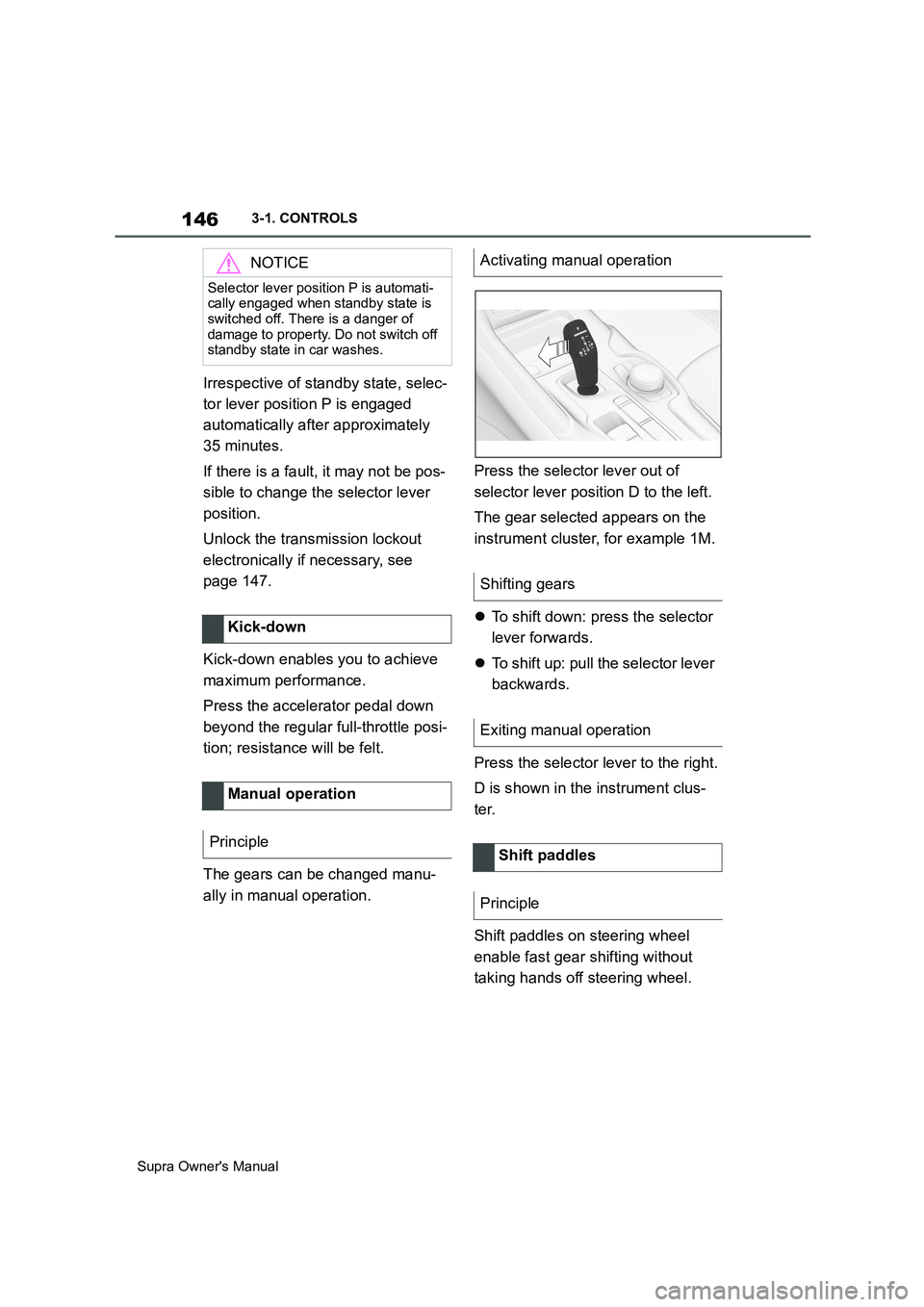
The gears can be changed manu-
ally in manual operation.Press the selector lever out of
selector lever position D to the left.
The gear selected appears on the
instrument cluster, for example 1M.
To shift down: press the selector
lever forwards.
To shift up: pull the selector lever
backwards.
Press the selector lever to the right.
D is shown in the instrument clus-
ter.
Shift paddles on steering wheel
enable fast gear shifting without
taking hands off steering wheel.
NOTICE
Selector lever position P is automati-
cally engaged when standby state is
switched off. There is a danger of
damage to property. Do not switch off
standby state in car washes.
Kick-down
Manual operation
Principle
Activating manual operation
Shifting gears
Exiting manual operation
Shift paddles
Principle
Page 147 of 456
147
3
Supra Owner's Manual3-1. CONTROLS
CONTROLS
■Gearshift
Gear shifting is only carried out at
the appropriate engine RPM and
vehicle speed.
■Short-term manual operation
In selector lever position D, operat-
ing a shift paddle causes the sys-
tem to switch to manual operation
temporarily.
The gearbox reverts to automatic
operation from manual operation
after a certain period of time of
moderate driving without accelera-
tion or gear shifts using the shift
paddles.
Changing to automatic operation is
possible as follows:
Pull and hold right shift paddle.
In addition to briefly pulling right
shift paddle, briefly pull left shift
paddle.
■Permanent manual operation
In selector lever position M, operat-
ing a shift paddle causes the sys-
tem to switch permanently to
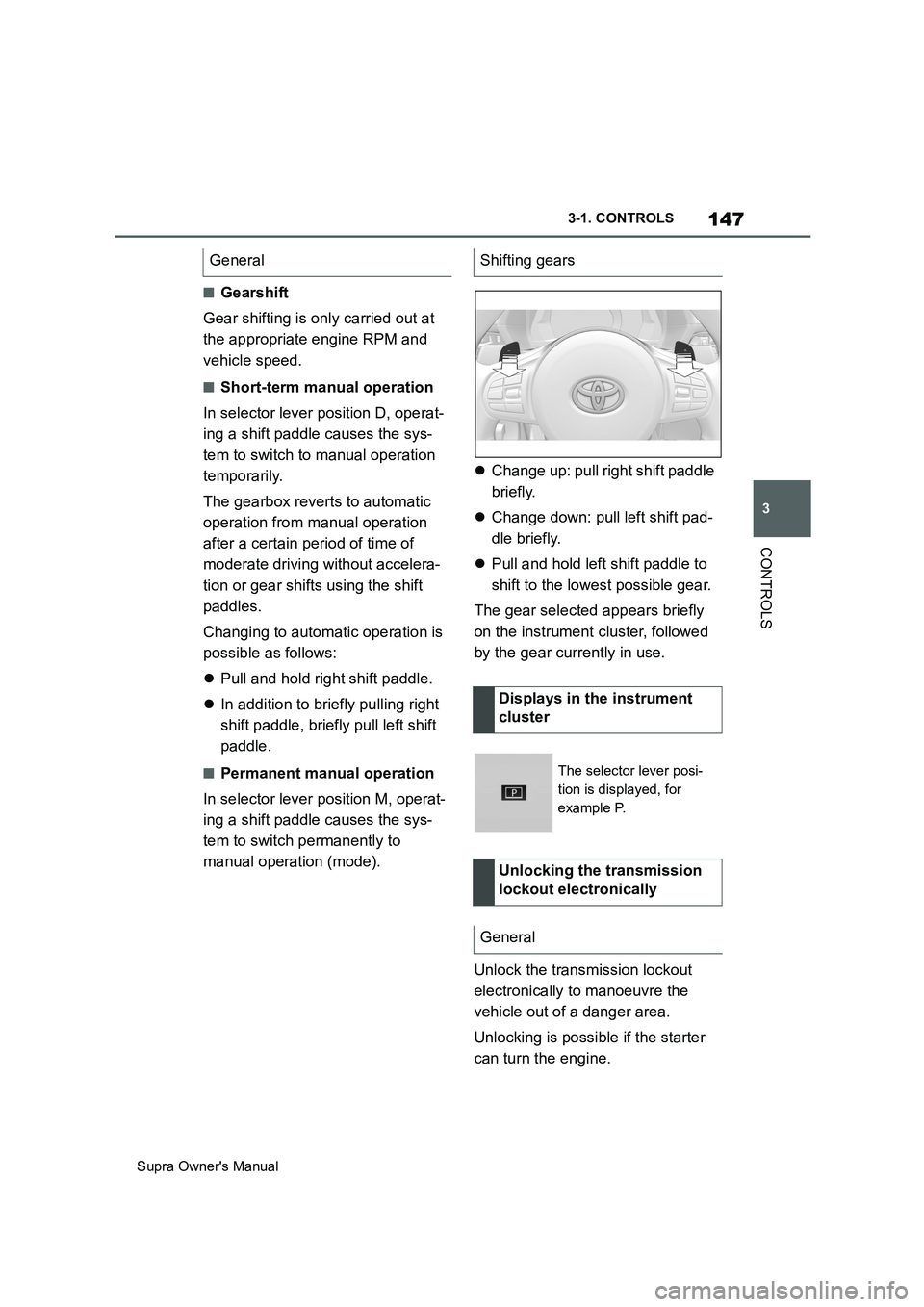
manual operation (mode).Change up: pull right shift paddle
briefly.
Change down: pull left shift pad-
dle briefly.
Pull and hold left shift paddle to
shift to the lowest possible gear.
The gear selected appears briefly
on the instrument cluster, followed
by the gear currently in use.
Unlock the transmission lockout
electronically to manoeuvre the
vehicle out of a danger area.
Unlocking is possible if the starter
can turn the engine. General
Shifting gears
Displays in the instrument
cluster
The selector lever posi-
tion is displayed, for
example P.
Unlocking the transmission
lockout electronically
General
Page 148 of 456
148
Supra Owner's Manual3-1. CONTROLS
Before the transmission lockout is
released, apply the parking brake
to prevent the vehicle from rolling
away.
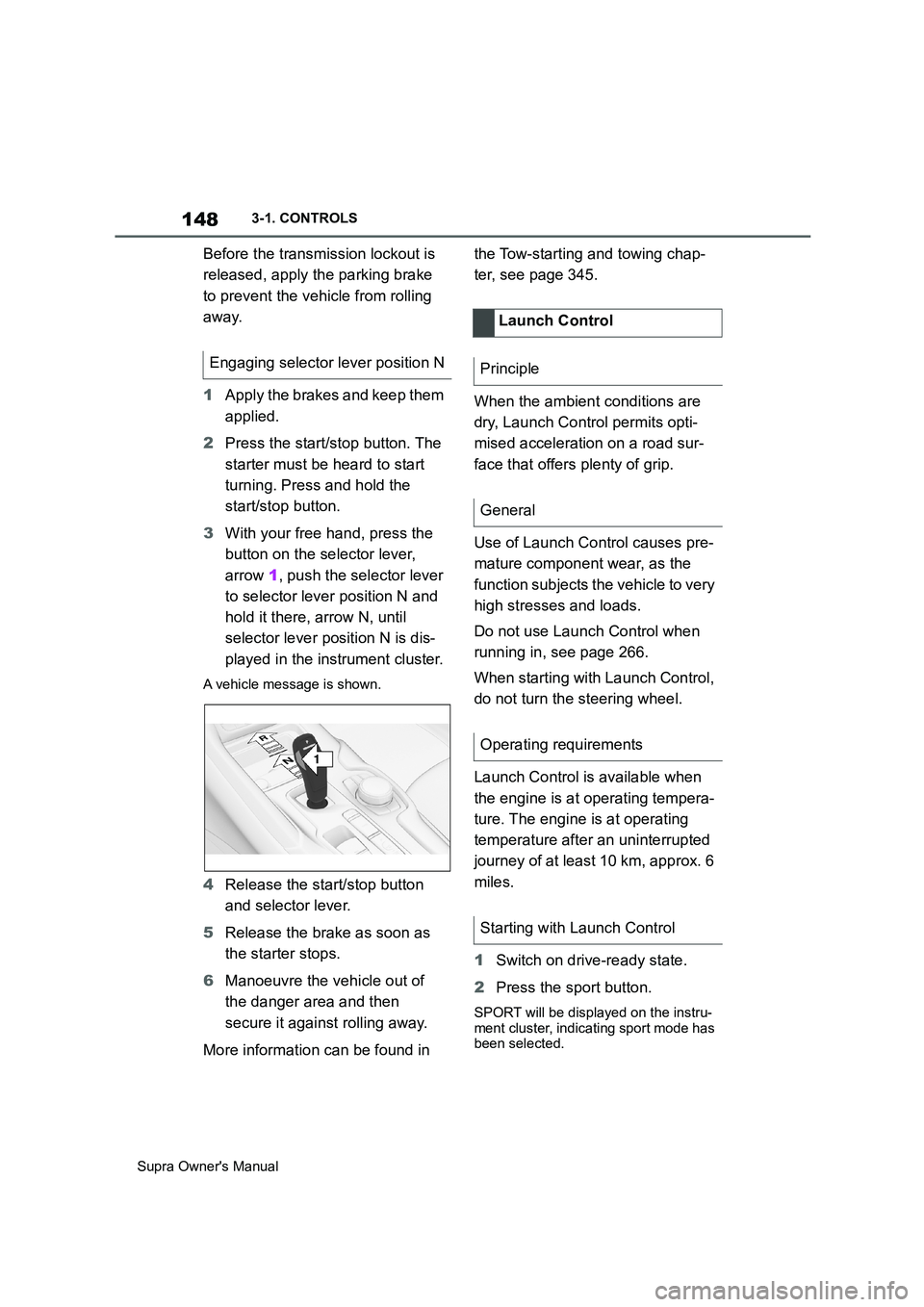
1Apply the brakes and keep them
applied.
2Press the start/stop button. The
starter must be heard to start
turning. Press and hold the
start/stop button.
3With your free hand, press the
button on the selector lever,
arrow 1, push the selector lever
to selector lever position N and
hold it there, arrow N, until
selector lever position N is dis-
played in the instrument cluster.
A vehicle message is shown.
4Release the start/stop button
and selector lever.
5Release the brake as soon as
the starter stops.
6Manoeuvre the vehicle out of
the danger area and then
secure it against rolling away.
More information can be found in the Tow-starting and towing chap-
ter, see page 345.
When the ambient conditions are
dry, Launch Control permits opti-
mised acceleration on a road sur-
face that offers plenty of grip.
Use of Launch Control causes pre-
mature component wear, as the
function subjects the vehicle to very
high stresses and loads.
Do not use Launch Control when
running in, see page 266.
When starting with Launch Control,
do not turn the steering wheel.
Launch Control is available when
the engine is at operating tempera-
ture. The engine is at operating
temperature after an uninterrupted
journey of at least 10 km, approx. 6
miles.
1Switch on drive-ready state.
2Press the sport button.
SPORT will be displayed on the instru-
ment cluster, indicating sport mode has
been selected.
Engaging selector lever position N
1
R
N
Launch Control
Principle
General
Operating requirements
Starting with Launch Control
Page 154 of 456
154
Supra Owner's Manual3-1. CONTROLS
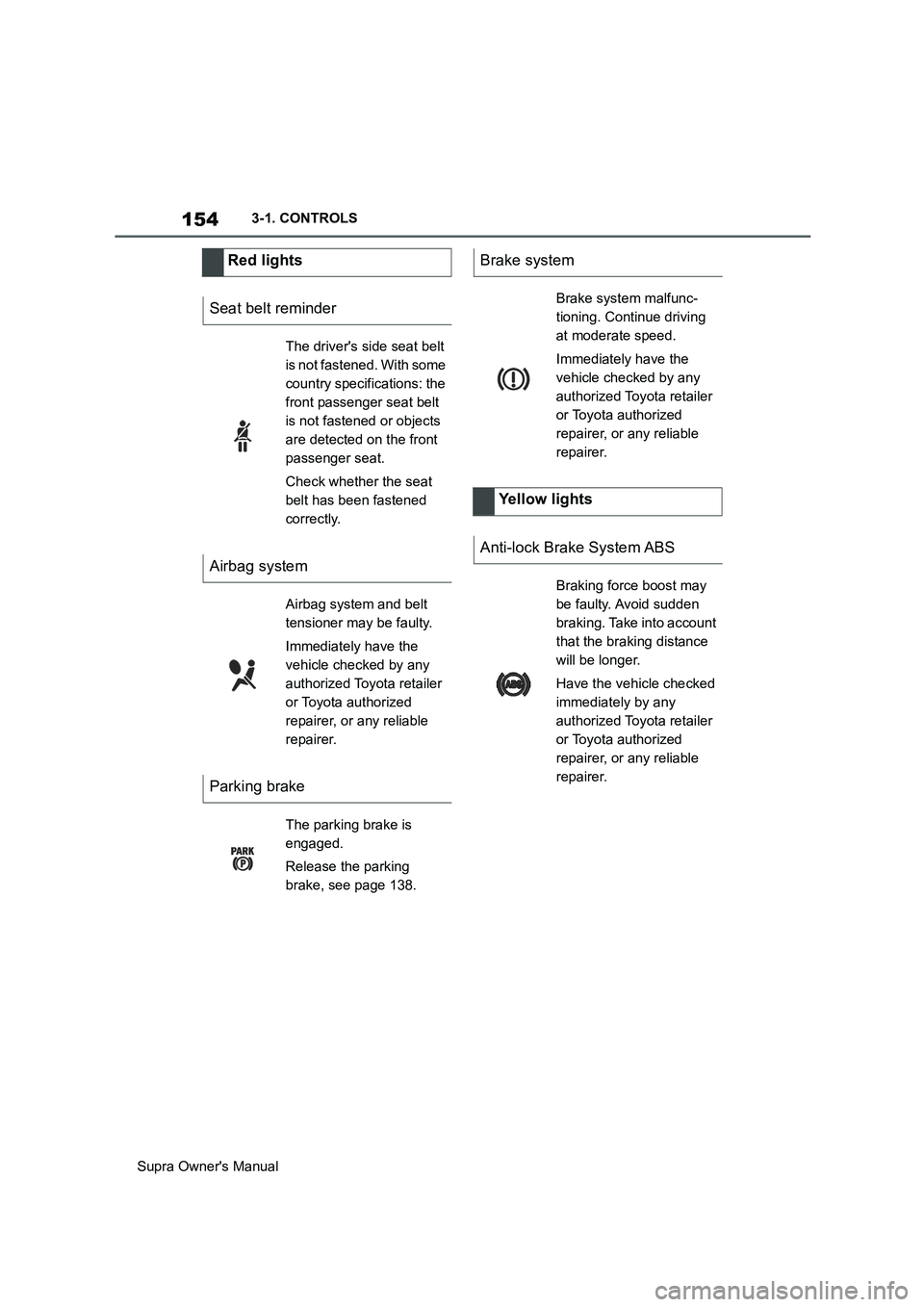
Red lights
Seat belt reminder
The driver's side seat belt
is not fastened. With some
country specifications: the
front passenger seat belt
is not fastened or objects
are detected on the front
passenger seat.
Check whether the seat
belt has been fastened
correctly.
Airbag system
Airbag system and belt
tensioner may be faulty.
Immediately have the
vehicle checked by any
authorized Toyota retailer
or Toyota authorized
repairer, or any reliable
repairer.
Parking brake
The parking brake is
engaged.
Release the parking
brake, see page 138.
Brake system
Brake system malfunc-
tioning. Continue driving
at moderate speed.
Immediately have the
vehicle checked by any
authorized Toyota retailer
or Toyota authorized
repairer, or any reliable
repairer.
Yellow lights
Anti-lock Brake System ABS
Braking force boost may
be faulty. Avoid sudden
braking. Take into account
that the braking distance
will be longer.
Have the vehicle checked
immediately by any
authorized Toyota retailer
or Toyota authorized
repairer, or any reliable
repairer.
Page 173 of 456
173
3
Supra Owner's Manual3-1. CONTROLS
CONTROLS
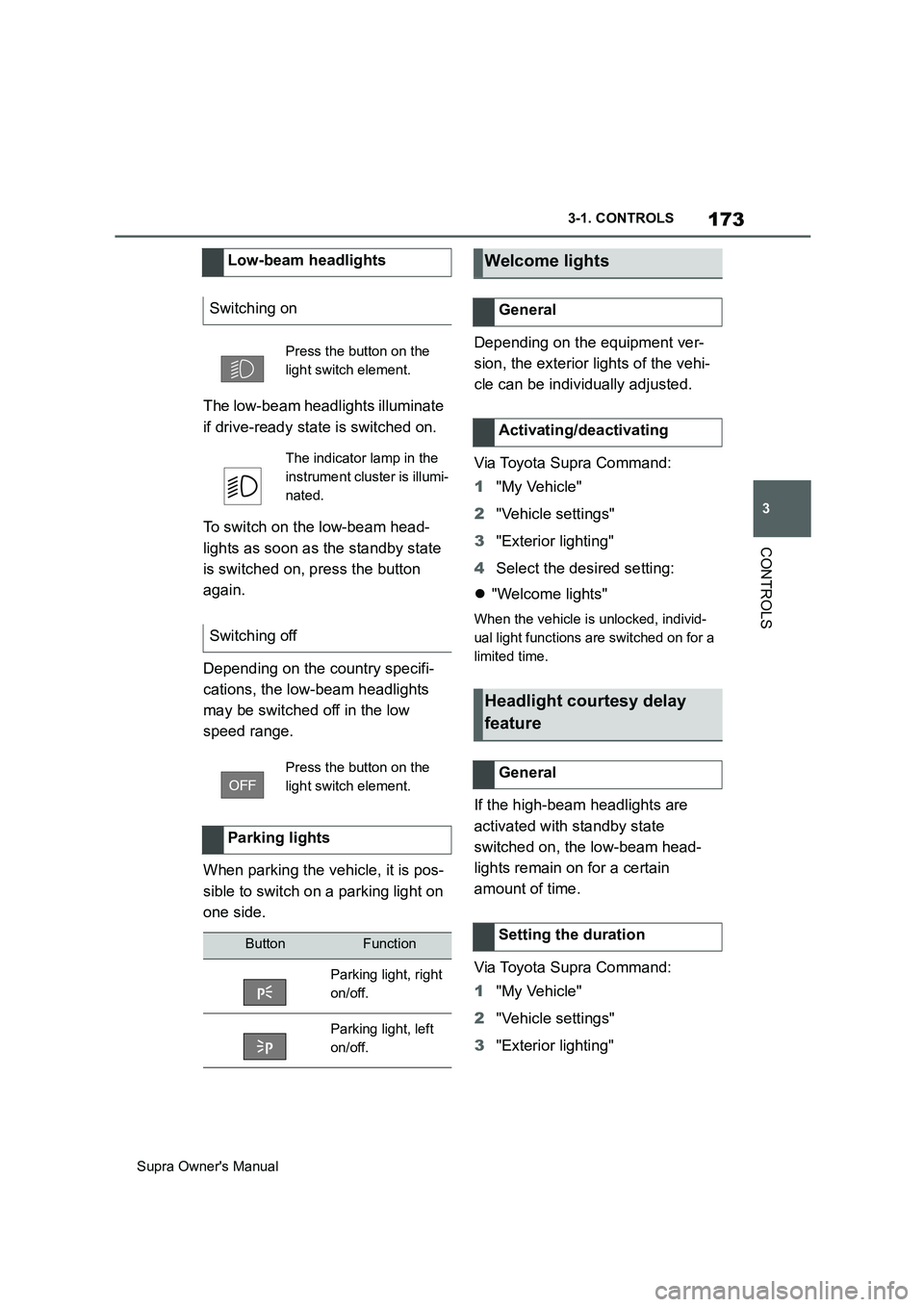
The low-beam headlights illuminate
if drive-ready state is switched on.
To switch on the low-beam head-
lights as soon as the standby state
is switched on, press the button
again.
Depending on the country specifi-
cations, the low-beam headlights
may be switched off in the low
speed range.
When parking the vehicle, it is pos-
sible to switch on a parking light on
one side.Depending on the equipment ver-
sion, the exterior lights of the vehi-
cle can be individually adjusted.
Via Toyota Supra Command:
1"My Vehicle"
2"Vehicle settings"
3"Exterior lighting"
4Select the desired setting:
"Welcome lights"
When the vehicle is unlocked, individ-
ual light functions are switched on for a
limited time.
If the high-beam headlights are
activated with standby state
switched on, the low-beam head-
lights remain on for a certain
amount of time.
Via Toyota Supra Command:
1"My Vehicle"
2"Vehicle settings"
3"Exterior lighting" Low-beam headlights
Switching on
Press the button on the
light switch element.
The indicator lamp in the
instrument cluster is illumi-
nated.
Switching off
Press the button on the
light switch element.
Parking lights
ButtonFunction
Parking light, right
on/off.
Parking light, left
on/off.
Welcome lights
General
Activating/deactivating
Headlight courtesy delay
feature
General
Setting the duration
Page 180 of 456
180
Supra Owner's Manual3-1. CONTROLS
no longer be sufficient.
In a side-on crash, the side airbag
supports the body from the side in
the chest, pelvic and head area.
The knee airbag supports the legs
in the event of a head-on collision.
The curtain shield airbag supports
the head in the event of a side-on
crash.
Airbags are not activated in every
collision, for example in minor acci-
dents and rear-end collisions.
Keep your distance from the
airbags.Always grip the steering wheel
on the steering wheel rim. Place
your hands in the 3 o'clock and 9
o'clock positions to minimise the
risk of injury to hands or arms
when the airbag deploys.
Make sure that the front-seat
passenger is sitting correctly, in
other words with feet or legs in
the footwell, not resting on the
dashboard.
Make sure that vehicle occu-
pants keep their head away from
the side airbag.
Do not position any other per-
sons, pets or objects between
the airbags and persons.
Keep the dashboard and wind-
screen in the area of the passen-
ger's side free, for example do
not attach adhesive foil or covers
and do not fit brackets for navi-
gation devices or mobile tele-
phones.
Do not attach anything to the
airbag covers with adhesive;
never cover them or modify them
in any way.
Do not use the front airbag cover
on the front passenger's side as
a tray.
Covers, seat covers, cushions or
other objects not specifically suit-
able for seats with integral side
airbags must not be fitted to the
front seats.
Do not hang items of clothing for Side airbag
Knee airbag
Curtain shield airbag
Protective effect
General
Notes on achieving optimum
airbag effectiveness
WARNING
If the seat position is wrong or the
deployment area of the airbag is
restricted, the airbag system cannot
provide the intended protection or
may cause additional injuries when it
deploys. There is a danger of injury or
even death. Observe the following to
achieve optimum protective effect.
Page 190 of 456
190
Supra Owner's Manual3-1. CONTROLS
3Make sure that the key switch is
in the end position so that the
airbags are activated.
The front passenger airbags are
reactivated and can deploy cor-
rectly if the need arises.
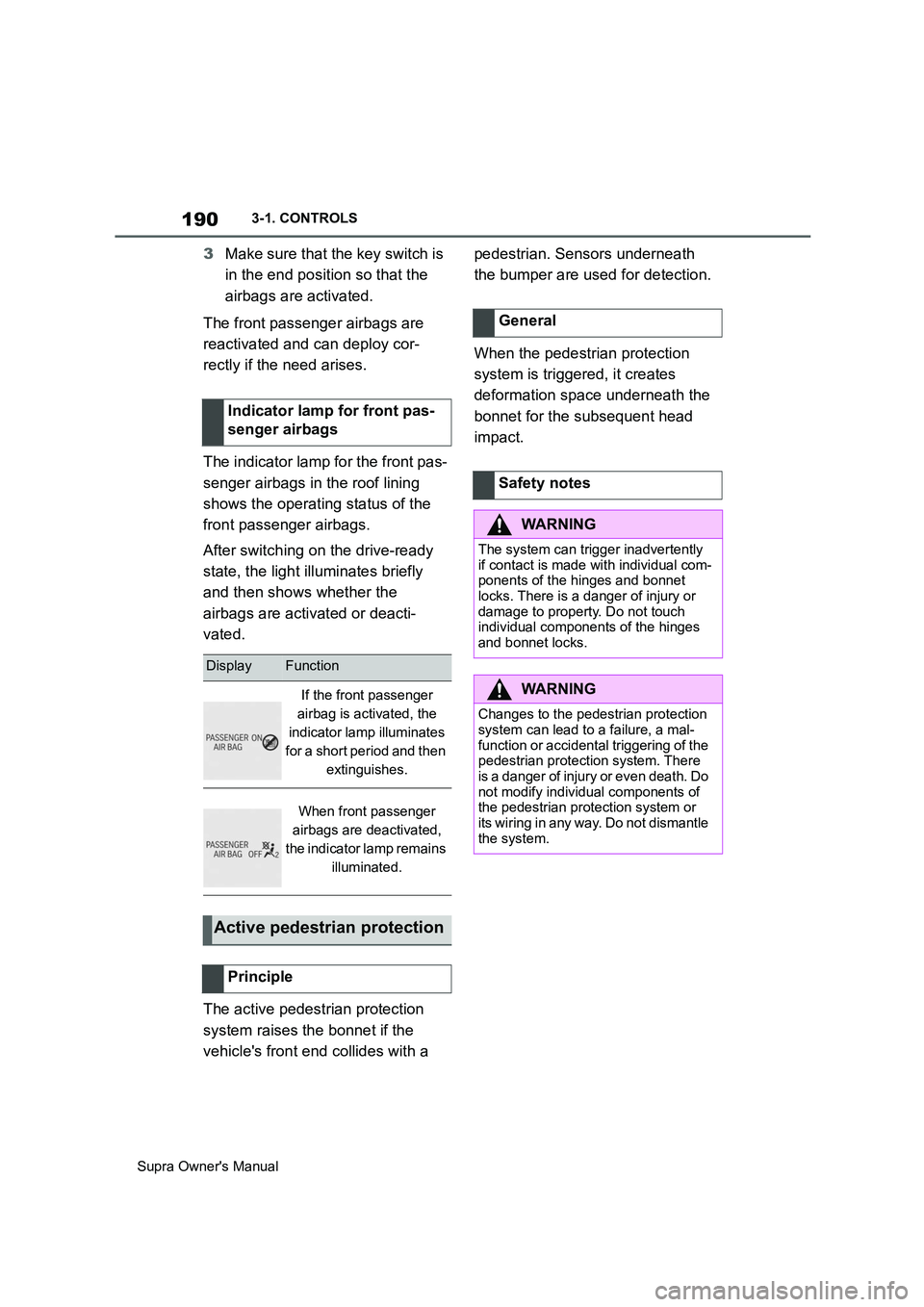
The indicator lamp for the front pas-
senger airbags in the roof lining
shows the operating status of the
front passenger airbags.
After switching on the drive-ready
state, the light illuminates briefly
and then shows whether the
airbags are activated or deacti-
vated.
The active pedestrian protection
system raises the bonnet if the
vehicle's front end collides with a pedestrian. Sensors underneath
the bumper are used for detection.
When the pedestrian protection
system is triggered, it creates
deformation space underneath the
bonnet for the subsequent head
impact. Indicator lamp for front pas-
senger airbags
DisplayFunction
If the front passenger
airbag is activated, the
indicator lamp illuminates
for a short period and then
extinguishes.
When front passenger
airbags are deactivated,
the indicator lamp remains
illuminated.
Active pedestrian protection
Principle
General
Safety notes
WARNING
The system can trigger inadvertently
if contact is made with individual com-
ponents of the hinges and bonnet
locks. There is a danger of injury or
damage to property. Do not touch
individual components of the hinges
and bonnet locks.
WARNING
Changes to the pedestrian protection
system can lead to a failure, a mal-
function or accidental triggering of the
pedestrian protection system. There
is a danger of injury or even death. Do
not modify individual components of
the pedestrian protection system or
its wiring in any way. Do not dismantle
the system.
Page 210 of 456
210
Supra Owner's Manual3-1. CONTROLS
4"Blind spot monitor"
5Select the desired setting.
"Off": no warning is output for this set-
ting.
The setting is saved for the cur-
rently used driver profile.
Via Toyota Supra Command:
1"My Vehicle"
2"Vehicle settings"
3"Steering wheel vibration"
4Select the desired setting.
The setting is accepted for all
Toyota Supra Safety Systems and
saved for the currently used driver
profile.
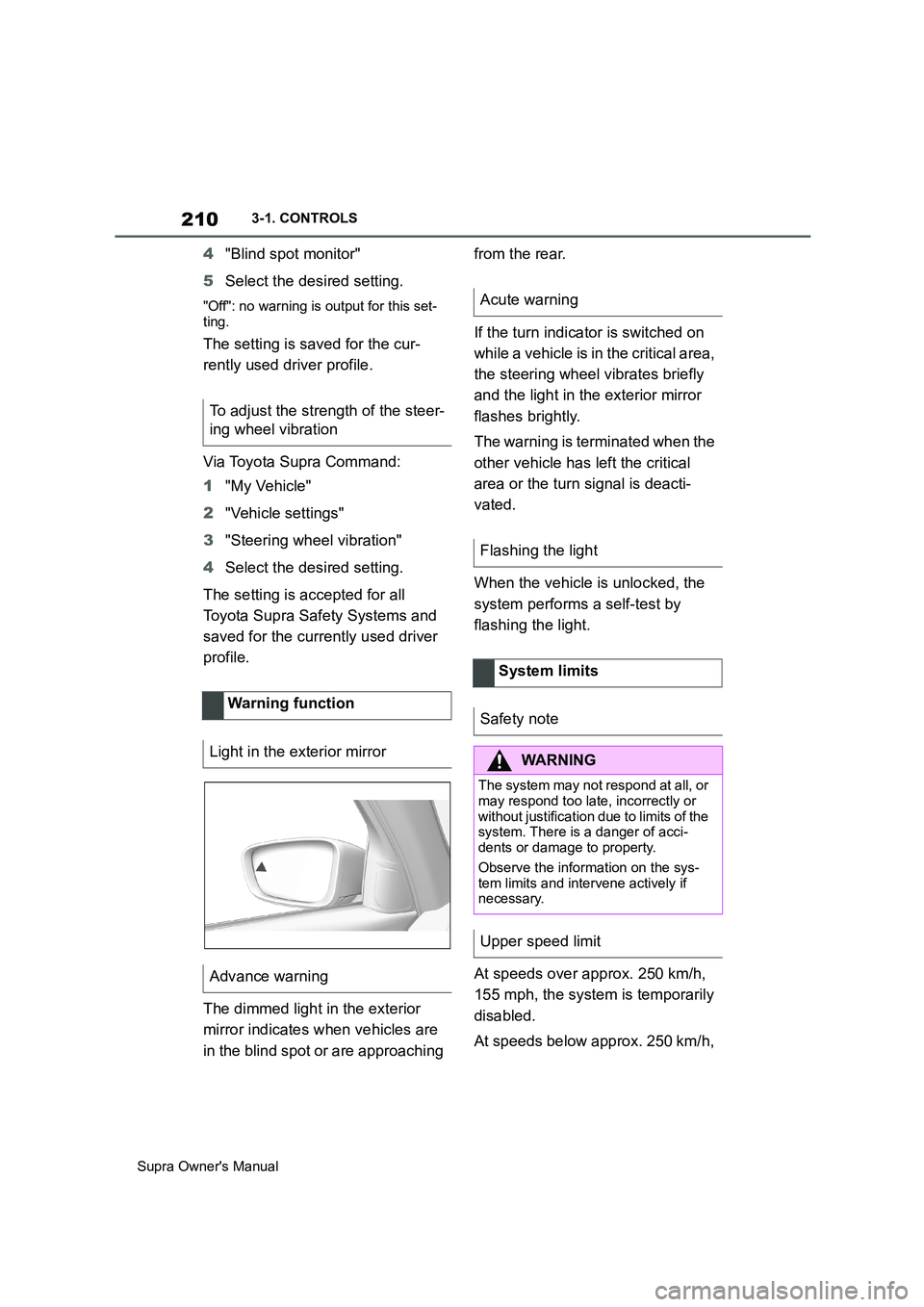
The dimmed light in the exterior
mirror indicates when vehicles are
in the blind spot or are approaching from the rear.
If the turn indicator is switched on
while a vehicle is in the critical area,
the steering wheel vibrates briefly
and the light in the exterior mirror
flashes brightly.
The warning is terminated when the
other vehicle has left the critical
area or the turn signal is deacti-
vated.
When the vehicle is unlocked, the
system performs a self-test by
flashing the light.
At speeds over approx. 250 km/h,
155 mph, the system is temporarily
disabled.
At speeds below approx. 250 km/h, To adjust the strength of the steer-
ing wheel vibration
Warning function
Light in the exterior mirror
Advance warning
Acute warning
Flashing the light
System limits
Safety note
WARNING
The system may not respond at all, or
may respond too late, incorrectly or
without justification due to limits of the
system. There is a danger of acci-
dents or damage to property.
Observe the information on the sys-
tem limits and intervene actively if
necessary.
Upper speed limit