lights TOYOTA SUPRA 2021 Owners Manual (in English)
[x] Cancel search | Manufacturer: TOYOTA, Model Year: 2021, Model line: SUPRA, Model: TOYOTA SUPRA 2021Pages: 364, PDF Size: 10.43 MB
Page 2 of 364
2
Supra Owner’s Manual_U (from Mar. ’20
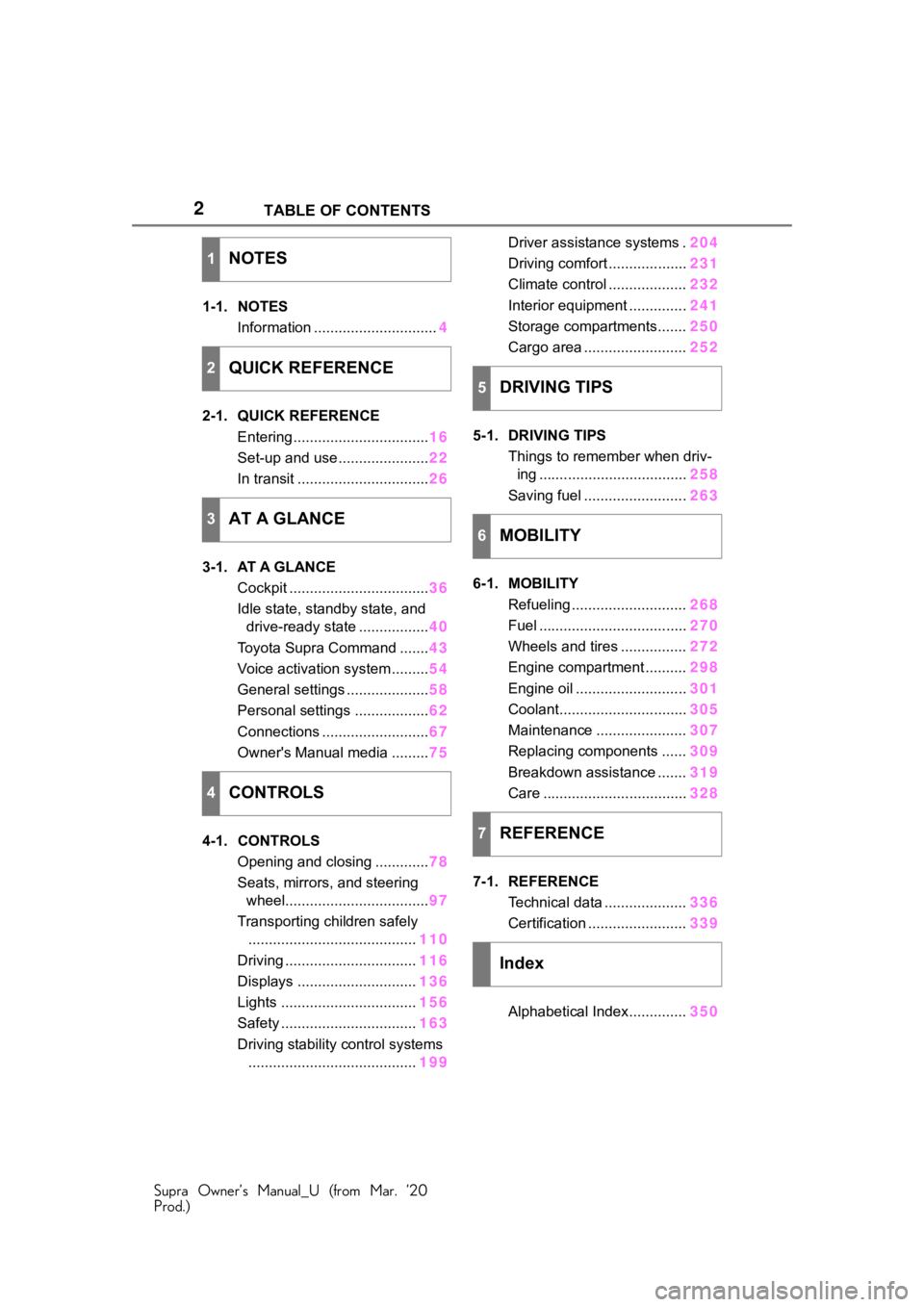
Prod.)TABLE OF CONTENTS
1-1. NOTES
Information .............................. 4
2-1. QUICK REFERENCE Entering ................................. 16
Set-up and use ...................... 22
In transit ................................ 26
3-1. AT A GLANCE Cockpit .................................. 36
Idle state, standby state, and drive-ready state ................. 40
Toyota Supra Command ....... 43
Voice activation system ......... 54
General settings .................... 58
Personal settings .................. 62
Connections .......................... 67
Owner's Manual media ......... 75
4-1. CONTROLS Opening and closing ............. 78
Seats, mirrors, and steering wheel................................... 97
Transporting children safely ......................................... 110
Driving ................................ 116
Displays ............................. 136
Lights ................................. 156
Safety ................................. 163
Driving stability control systems ......................................... 199Driver assistance systems .
204
Driving comfort ................... 231
Climate control ................... 232
Interior equipment .............. 241
Storage compartments....... 250
Cargo area ......................... 252
5-1. DRIVING TIPS Things to remember when driv-ing .................................... 258
Saving fuel ......................... 263
6-1. MOBILITY Refueling ............................ 268
Fuel .................................... 270
Wheels and tires ................ 272
Engine compartment .......... 298
Engine oil ........................... 301
Coolant............................... 305
Maintenance ...................... 307
Replacing components ...... 309
Breakdown assistance ....... 319
Care ................................... 328
7-1. REFERENCE Technical data .................... 336
Certification ........................ 339
Alphabetical Index.............. 350
1NOTES
2QUICK REFERENCE
3AT A GLANCE
4CONTROLS
5DRIVING TIPS
6MOBILITY
7REFERENCE
Index
Page 9 of 364
91-1. NOTES
Supra Owner’s Manual_U (from Mar. ’20
Prod.)
1
NOTES
This information generally
records the state of a compo-
nent, a module, a system, or the
environment, for instance:
• Operating states of system components, e.g., fill levels,
tire inflation pressure, battery
status.
• Malfunctions and faults in important system compo-
nents, for instance lights and
brakes.
• Responses by the vehicle to special situations such as air-
bag deployment or engage-
ment of the driving stability
control systems.
• Information on vehicle-dam- aging events.
The data is required to perform
the control unit functions. Fur-
thermore, it also serves to rec-
ognize and correct malfunctions,
and helps the vehicle manufac-
turer to optimize vehicle func-
tions.
The majority of this data is vola-
tile and is only processed within
the vehicle itself. Only a small
share of data is stored in event
or fault memories based on an
event.
When servicing, for instance
during repairs, service pro-
cesses, warranty cases, and
quality assurance measures,
this technical information can be
read out from the vehicle
together with the vehicle identifi- cation number.
Your Toyota dealer can read out
the information. The socket for
OBD Onboard Diagnosis
required by law in the vehicle is
used to read out the data.
The data is collected, pro-
cessed, and used by the rele-
vant organizations in the service
network. The data documents
technical conditions of the vehi-
cle, helps with the identification
of the fault, compliance with
warranty obligations and quality
improvement.
Furthermore, the manufacturer
has product monitoring duties to
meet in line with product liability
law. To fulfill these duties, the
vehicle manufacturer needs
technical data from the vehicle.
The data from the vehicle can
also be used to check customer
claims for warranty and guar-
anty.
Fault and event memories in the
vehicle can be reset when your
Toyota dealer performs repair or
servicing work.
Depending on the vehicle equip-
ment, comfort and Customize
settings can be stored in the
vehicle and modified or reset at
Data entry and data trans-
fer into the vehicle
General information
Page 20 of 364
202-1. QUICK REFERENCE
Supra Owner’s Manual_U (from Mar. ’20
Prod.)
Touch the grooved surface on
the handle of a closed vehicle
door with your finger for approx.
1 second without grasping the
door handle.
Depending on the setting, the
doors may also be unlocked.
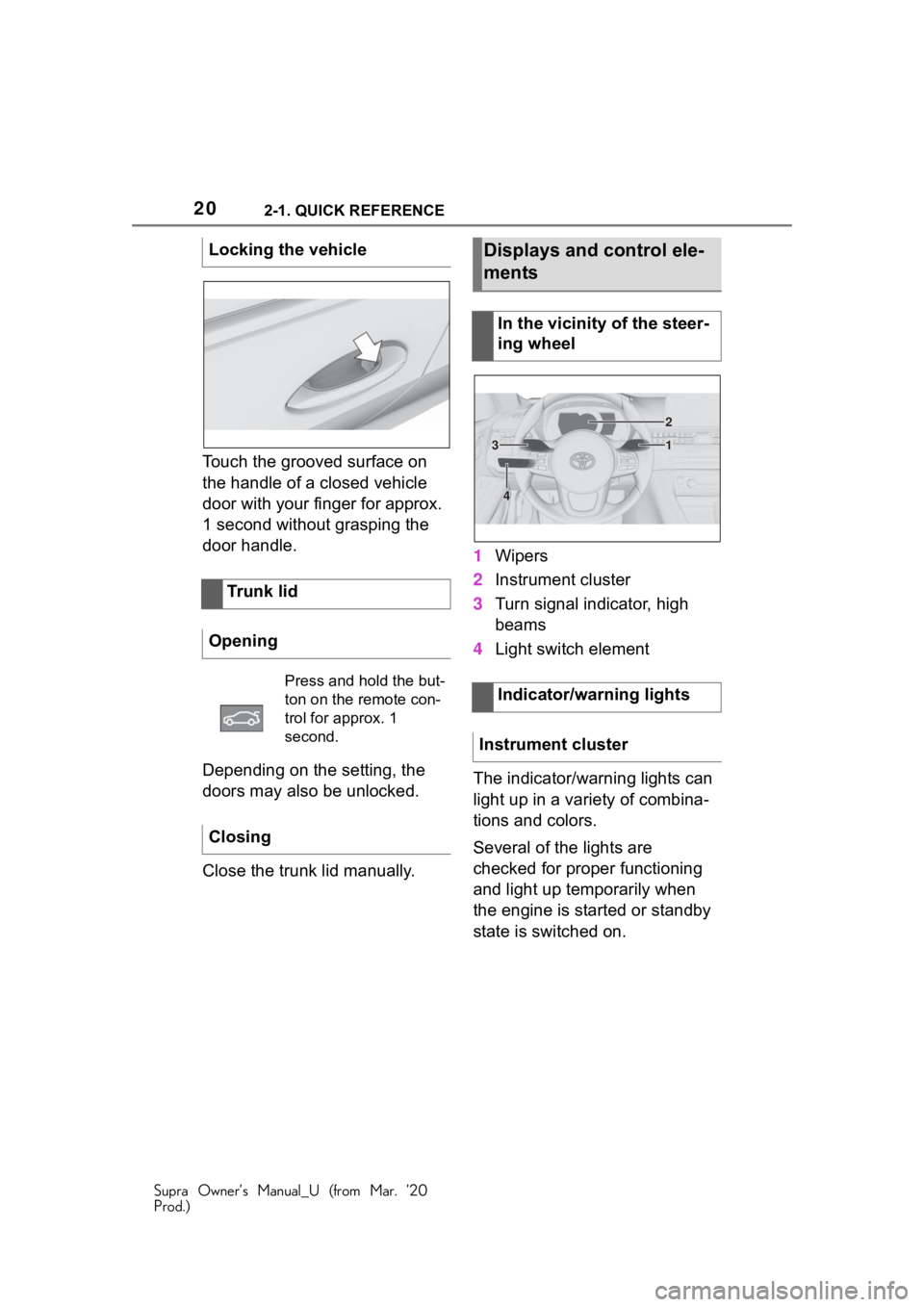
Close the trunk lid manually.1
Wipers
2 Instrument cluster
3 Turn signal indicator, high
beams
4 Light switch element
The indicator/warning lights can
light up in a variety of combina-
tions and colors.
Several of the lights are
checked for proper functioning
and light up temporarily when
the engine is started or standby
state is switched on.
Locking the vehicle
Trunk lid
Opening
Press and hold the but-
ton on the remote con-
trol for approx. 1
second.
Closing
Displays and control ele-
ments
In the vicinity of the steer-
ing wheel
Indicator/warning lights
Instrument cluster
1
2
3
4
Page 23 of 364
232-1. QUICK REFERENCE
Supra Owner’s Manual_U (from Mar. ’20
Prod.)
2
QUICK REFERENCE
4 Backrest width
5 Lumbar support
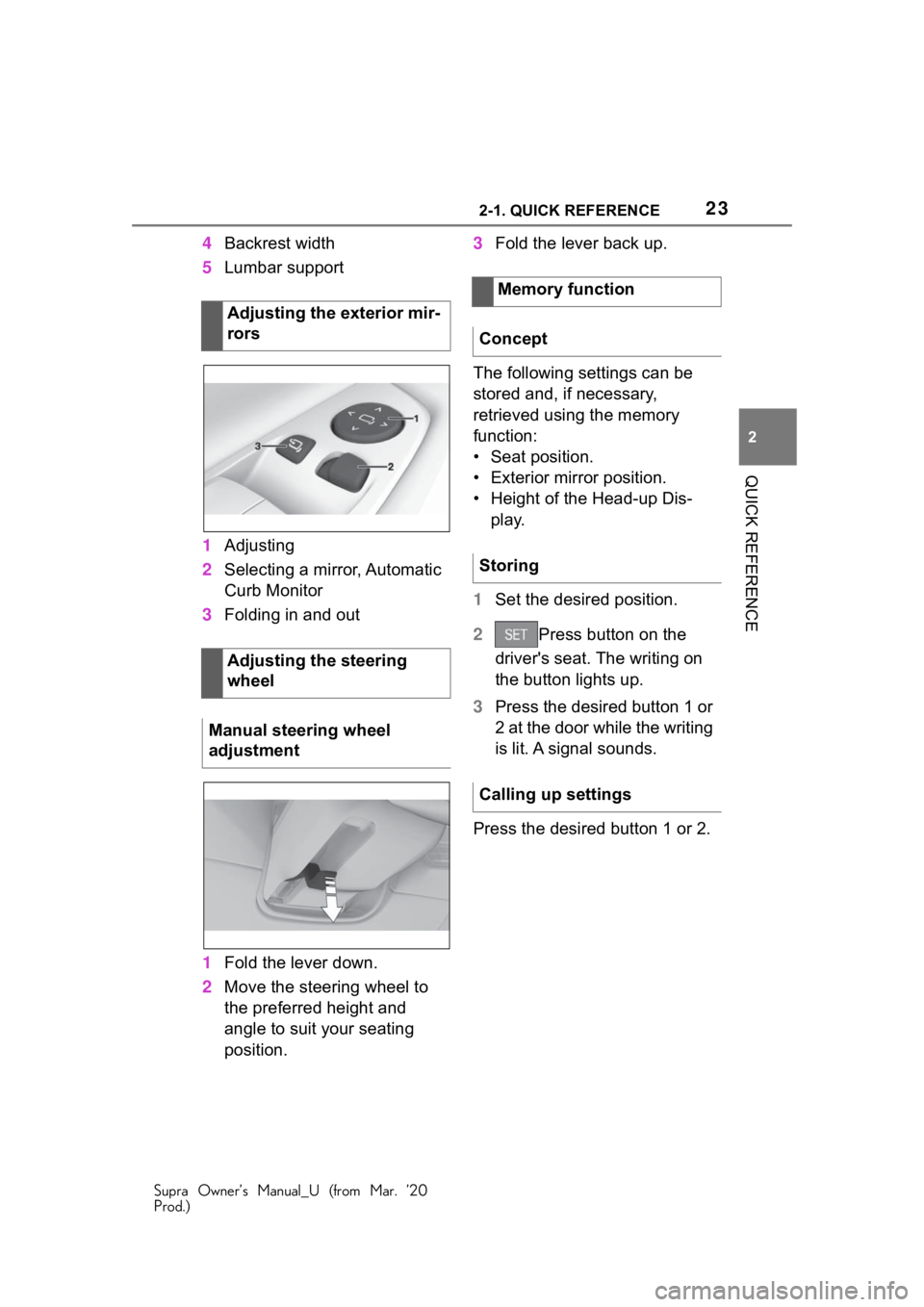
1 Adjusting
2 Selecting a mirror, Automatic
Curb Monitor
3 Folding in and out
1 Fold the lever down.
2 Move the steering wheel to
the preferred height and
angle to suit your seating
position. 3
Fold the lever back up.
The following settings can be
stored and, if necessary,
retrieved using the memory
function:
• Seat position.
• Exterior mirror position.
• Height of the Head-up Dis- play.
1 Set the desired position.
2 Press button on the
driver's seat. The writing on
the button lights up.
3 Press the desired button 1 or
2 at the door while the writing
is lit. A signal sounds.
Press the desired button 1 or 2.
Adjusting the exterior mir-
rors
Adjusting the steering
wheel
Manual steering wheel
adjustment
Memory function
Concept
Storing
Calling up settings
Page 28 of 364
282-1. QUICK REFERENCE
Supra Owner’s Manual_U (from Mar. ’20
Prod.)
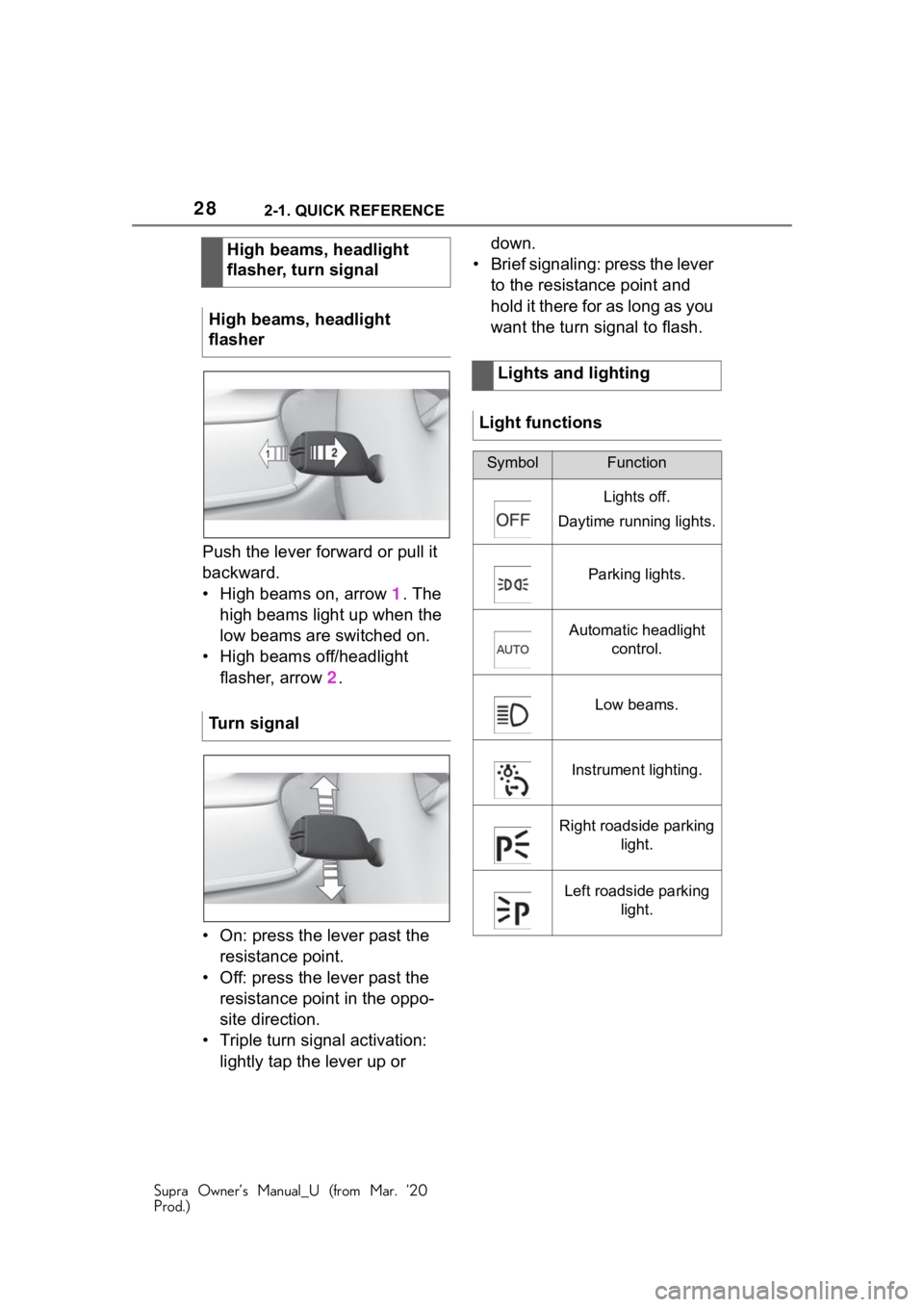
Push the lever forward or pull it
backward.
• High beams on, arrow 1. The
high beams light up when the
low beams are switched on.
• High beams off/headlight flasher, arrow 2 .
• On: press the lever past the resistance point.
• Off: press the lever past the resistance point in the oppo-
site direction.
• Triple turn signal activation: lightly tap the lever up or down.
• Brief signaling: press the lever to the resistance point and
hold it there for as long as you
want the turn signal to flash.
High beams, headlight
flasher, turn signal
High beams, headlight
flasher
Turn signal
Lights and lighting
Light functions
SymbolFunction
Lights off.
Daytime running lights.
Parking lights.
Automatic headlight control.
Low beams.
Instrument lighting.
Right roadside parking light.
Left roadside parking light.
Page 36 of 364
363-1. AT A GLANCE
Supra Owner’s Manual_U (from Mar. ’20
Prod.)
3-1.AT A GLANCE
This chapter describes all standard, country-specific and optional
features offered with the series . It also describes features and func-
tions that are not necessarily available in your vehicle, e.g., due to
the selected options or country versions. This also applies to
safety-related functions and systems. When using these functions
and systems, the applicable laws and regulations must be observ ed.
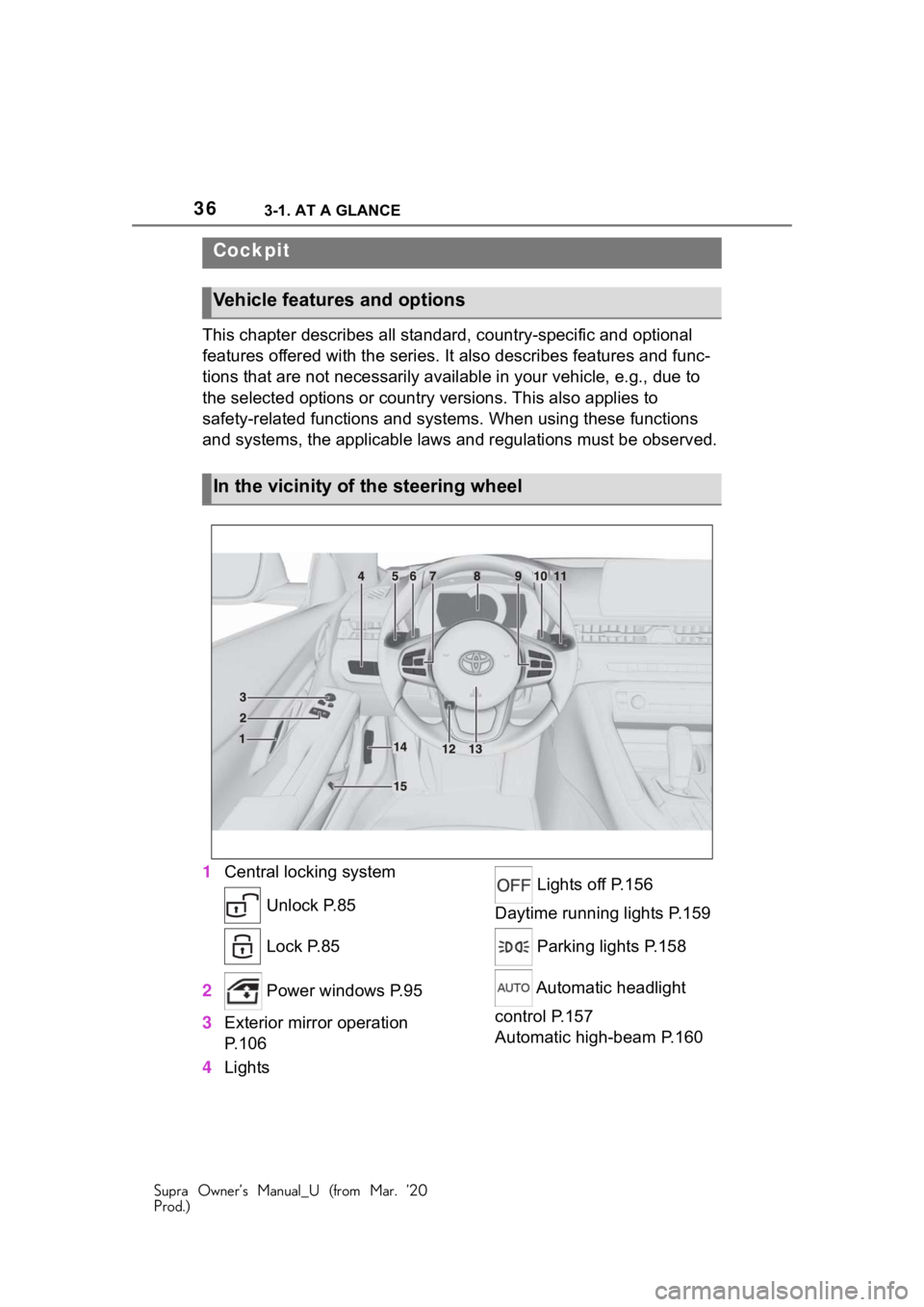
1 Central locking system
Unlock P.85
Lock P.85
2 Power windows P.95
3 Exterior mirror operation
P.106
4 Lights Lights off P.156
Daytime running lights P.159
Parking lights P.158
Automatic headlight
control P.157
Automatic high-beam P.160
Cockpit
Vehicle features and options
In the vicinity of the steering wheel
Page 39 of 364
393-1. AT A GLANCE
Supra Owner’s Manual_U (from Mar. ’20
Prod.)
3
AT A GLANCE
9 Parking brake P.121
10 Automatic transmission
selector lever P.129 11
Switch drive-ready
state on/off P.116
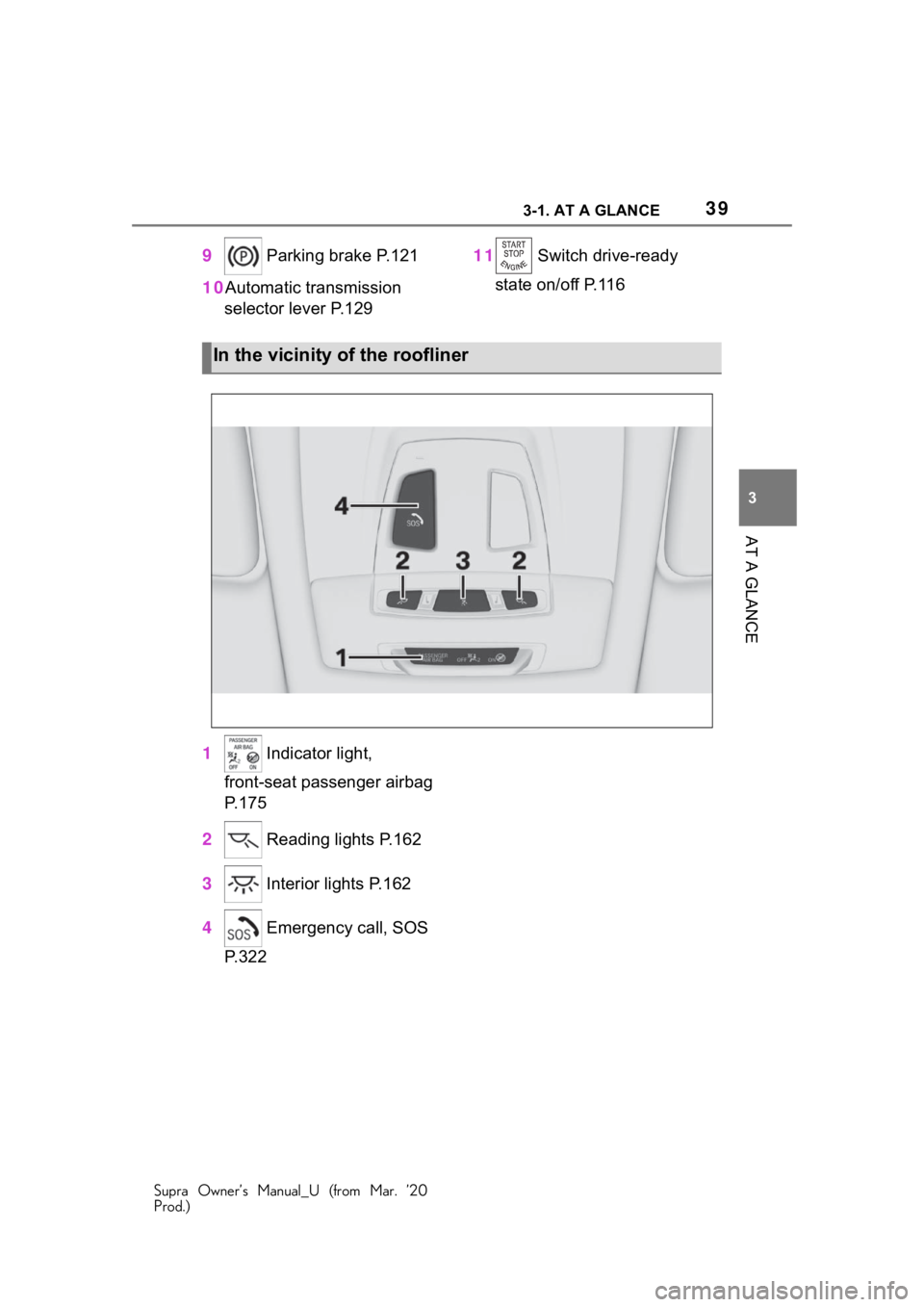
1 Indicator light,
front-seat passenger airbag
P.175
2 Reading lights P.162
3 Interior lights P.162
4 Emergency call, SOS
P.322
In the vicinity of the roofliner
Page 64 of 364
643-1. AT A GLANCE
Supra Owner’s Manual_U (from Mar. ’20
Prod.)
is currently in use.
There is an additional guest pro-
file available that is not assigned
to any vehicle key. It can be
used to apply settings in the
vehicle without changing the
personal driver profiles.
For the system to be able to
identify the driver profile associ-
ated to a particular driver, the
detected remote control must be
clearly allocated to the driver.
This is the case when:
• The driver is only carrying his or her own remote control.
• The driver unlocks the vehi- cle.
• The driver gets into the vehi- cle through the driver's door.
After switching on the Control
Display, the name of the active
driver profile is displayed.
Select driver profile, refer to
page 64.
As soon as the engine is started
or any key is pressed, the last
selected display is shown on the
Control Display.
To exit the welcome screen via
Toyota Supra Command: "OK" The settings for the following
systems and functions are
stored in the active driver profile.
The scope of storable settings
depends on country and equip-
ment.
• Unlocking and locking.
•Lights.
• Climate control.
• Radio.
• Instrument cluster.
• Programmable memory but-
tons.
• Volumes, tone.
• Control Display.
•TV.
• Parking Sensors.
• Rearview camera.
• Head-up Display.
• Sport mode switch.
• Seat position, exterior mirror position.
Both the positions saved via the
seat memory and th e last position
set are saved.
• Toyota Supra Safety.
Regardless of the remote con-
trol in use, a different driver pro-
file may be activated. This
allows you to call up personal
vehicle settings, even if you did
not unlock the vehicle with your
own remote control.
Functional requirements
Active driver profile
Adjusting
Profile management
Selecting a driver profile
Page 77 of 364
77
Supra Owner’s Manual_U (from Mar. ’20
Prod.)
4
4
CONTROLS
CONTROLS
.4-1. CONTROLSOpening and closing ...... 78
Seats, mirrors, and steering wheel ............................ 97
Transporting children safely .................................. 110
Driving ......................... 116
Displays ...................... 136
Lights .......................... 156
Safety .......................... 163
Driving stabilit y control sys-
tems .......................... 199
Driver assistance systems .................................. 204
Driving comfort ............ 231
Climate control ............ 232
Interior equipment ....... 241
Storage compartments .................................. 250
Cargo area .................. 252
Page 79 of 364
794-1. CONTROLS
Supra Owner’s Manual_U (from Mar. ’20
Prod.)
4
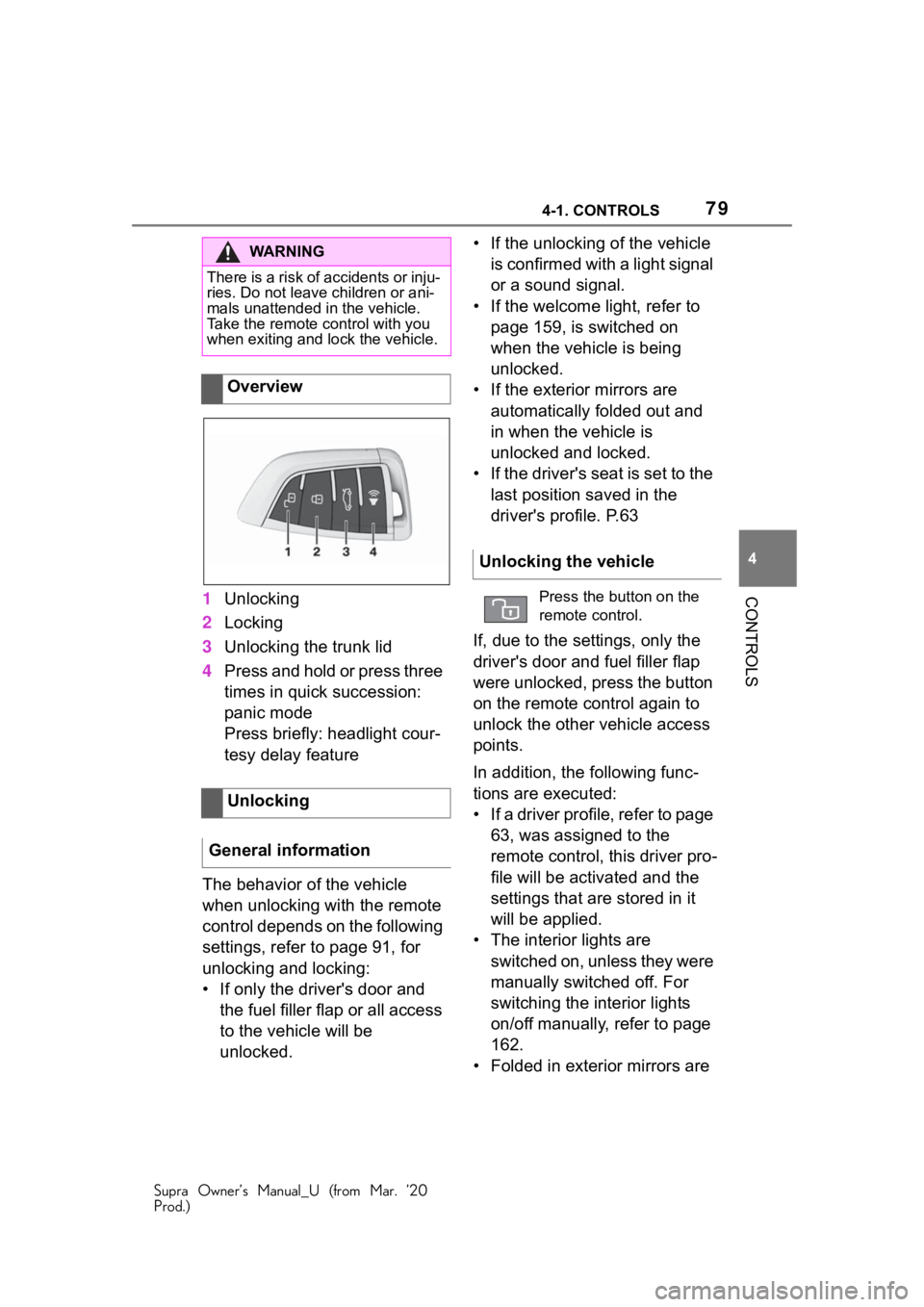
CONTROLS1 Unlocking
2 Locking
3 Unlocking the trunk lid
4 Press and hold or press three
times in quick succession:
panic mode
Press briefly: headlight cour-
tesy delay feature
The behavior of the vehicle
when unlocking with the remote
control depends on the following
settings, refer to page 91, for
unlocking and locking:
• If only the driver's door and the fuel filler flap or all access
to the vehicle will be
unlocked. • If the unlocking of the vehicle
is confirmed with a light signal
or a sound signal.
• If the welcome light, refer to page 159, is switched on
when the vehicle is being
unlocked.
• If the exterior mirrors are automatically folded out and
in when the vehicle is
unlocked and locked.
• If the driver's seat is set to the last position saved in the
driver's profile. P.63
If, due to the settings, only the
driver's door and fuel filler flap
were unlocked, press the button
on the remote control again to
unlock the other vehicle access
points.
In addition, the following func-
tions are executed:
• If a driver profile, refer to page 63, was assigned to the
remote control, this driver pro-
file will be activated and the
settings that are stored in it
will be applied.
• The interior lights are switched on, unless they were
manually switched off. For
switching the interior lights
on/off manually, refer to page
162.
• Folded in exterior mirrors are
WA R N I N G
There is a risk of accidents or inju-
ries. Do not leave children or ani-
mals unattended in the vehicle.
Take the remote control with you
when exiting and lock the vehicle.
Overview
Unlocking
General information
Unlocking the vehicle
Press the button on the
remote control.