Power on TOYOTA VERSO 2014 Owner's Manual
[x] Cancel search | Manufacturer: TOYOTA, Model Year: 2014, Model line: VERSO, Model: TOYOTA VERSO 2014Pages: 650, PDF Size: 36.61 MB
Page 192 of 650
192 2-1. Driving procedures
CAUTION
When braking the vehicle
When the brakes are wet, drive more cautiously.
Braking distance increases when the brakes are wet, and may cause one
side of the vehicle to brake differently than the other side. Also, the parking
brake may not securely hold the vehicle.
If the power brake assist function does not operate, do not follow other
vehicles closely and avoid hills or sharp turns that require braking.
In this case, braking is still possible, but the brake pedal should be
depressed more firmly than usual. Also, the braking distance will increase.
Have your brakes fixed immediately.
Do not pump the brake pedal if the engine stalls.
Each push on the brake pedal uses up the reserve for the power-assisted
brakes.
The brake system consists of 2 individual hydraulic systems: If one of the
systems fails, the other will still operate. In this case, the brake pedal
should be depressed more firmly than usual and the braking distance will
increase.
Have your brakes fixed immediately.
VERSO_WE.book Page 192 Thursday, June 19, 2014 11:31 AM
Page 194 of 650

194 2-1. Driving procedures
NOTICE
Avoiding damage to vehicle parts
Do not turn the steering wheel fully in either direction and hold it there for
an extended period of time.
Doing so may damage the power steering motor.
When driving over bumps in the road, drive as slowly as possible to avoid
damaging the wheels, underside of the vehicle, etc.
Diesel engine only: Make sure to idle the engine immediately after high-
speed driving or hill climbing. Stop the engine only after the turbocharger
has cooled down.
Failure to do so may cause damage to the turbocharger.
If you hear a squealing or scraping noise (brake pad wear indicators)
Have the brake pads checked and replaced by any authorized Toyota dealer
or repairer, or another duly qualified and equipped professional, as soon as
possible.
The rotor damage can result if the pads are not replaced when needed.
It is dangerous to drive the vehicle when the wear limits of the brake pads
and/or that of the brake discs are exceeded.
If you get a flat tire while driving
A flat or damaged tire may cause the following situations. Hold the steering
wheel firmly and gradually press the brake pedal to slow down the vehicle.
It may be difficult to control your vehicle.
The vehicle will make abnormal sounds.
The vehicle will behave abnormally.
Information on what to do in case of a flat tire. (P. 536, 552)
VERSO_WE.book Page 194 Thursday, June 19, 2014 11:31 AM
Page 204 of 650
204 2-1. Driving procedures
Auto power off function
Vehicles with a Multidrive or an automatic transmission
If the vehicle is left in ACCESSORY mode for more than 20 minutes with
the shift lever in “P”, the “ENGINE START STOP” switch will automatically
turn off.
Vehicles with a manual transmission
If the vehicle is left in ACCESSORY mode for more than 20 minutes, the
“ENGINE START STOP” switch will automatically turn off.
“ENGINE START STOP” switch operation
When operating the “ENGINE START STOP” switch, push it quickly and
firmly. If the switch is not pushed firmly, the mode may not change or the
engine may not start. Furthermore, if the switch is pushed quickly and firmly,
there is no need to hold it down.
Electronic key battery depletion
P. 47
When the electronic key battery is discharged
P. 582
Conditions affecting operation
P. 63
Note for the smart entry & start system
P. 47
CAUTION
When starting the engine
Always start the engine while sitting in the driver’s seat. Do not depress the
accelerator pedal while starting the engine under any circumstances.
Doing so may cause an accident resulting in death or serious injury.
VERSO_WE.book Page 204 Thursday, June 19, 2014 11:31 AM
Page 205 of 650
205 2-1. Driving procedures
2
When driving
CAUTION
Caution while driving
If the vehicle is coasting without engine power, for example if the engine
stalls, do not open a door or operate the locks until the vehicle is completely
stopped in a safe condition. Driving with the steering locked may cause an
accident, resulting in death or serious injury.
Stopping the engine in an emergency
If you want to stop the engine in an emergency while driving the vehicle,
press and hold the “ENGINE START STOP” switch for more than 2 seconds,
or press it briefly 3 times or more in succession. (P. 595)
However, do not touch the “ENGINE START STOP” switch while driving
except in an emergency. Turning the engine off while driving will not cause
loss of steering or braking control, but the power assist to these systems will
be lost. This will make it more difficult to steer and brake, so you should pull
over and stop the vehicle as soon as it is safe to do so.
NOTICE
To prevent battery discharge
Do not leave the “ENGINE START STOP” switch in ACCESSORY or IGNI-
TION ON mode for long periods without the engine running.
When starting the engine
Do not race a cold engine.
If the engine becomes difficult to start or stalls frequently, have your vehi-
cle checked by any authorized Toyota dealer or repairer, or another duly
qualified and equipped professional immediately.
“ENGINE START STOP” switch operation
If you feel something catching or sense irregular resistance when operating
the “ENGINE START STOP” switch, then there may be a malfunction. Imme-
diately contact any authorized Toyota dealer or repairer, or another duly
qualified and equipped professional.
VERSO_WE.book Page 205 Thursday, June 19, 2014 11:31 AM
Page 207 of 650
207 2-1. Driving procedures
2
When driving
Selecting a shift position
*1: To improve fuel consumption and reduce noises, set the shift lever in
the “D” position for normal driving.
*2: If equipped, by selecting gear step using paddle shift switches, you can
control engine braking forces.
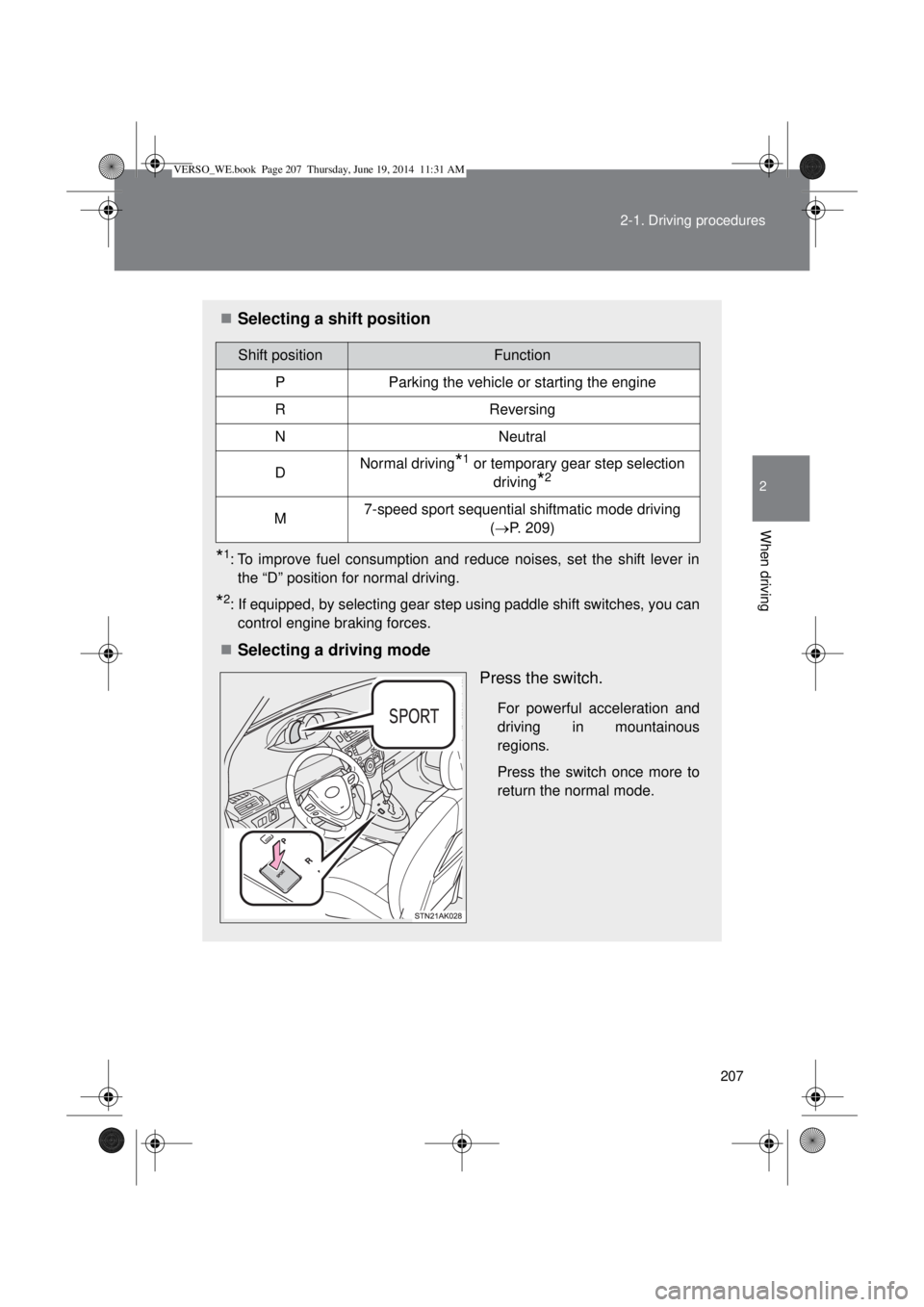
Selecting a driving mode
Press the switch.
For powerful acceleration and
driving in mountainous
regions.
Press the switch once more to
return the normal mode.
Shift positionFunction
PParking the vehicle or starting the engine
RReversing
NNeutral
DNormal driving*1 or temporary gear step selection
driving
*2
M7-speed sport sequential shiftmatic mode driving
(P. 209)
VERSO_WE.book Page 207 Thursday, June 19, 2014 11:31 AM
Page 213 of 650
213 2-1. Driving procedures
2
When driving
Selecting a shift position
*1: Shifting to the “D” position allows the system to select a gear suitable
for the driving conditions.
Setting the shift lever to the “D” position is recommended for normal
driving.
*2: If equipped, by selecting shift ranges using paddle shift switches, you
can control engine braking forces.
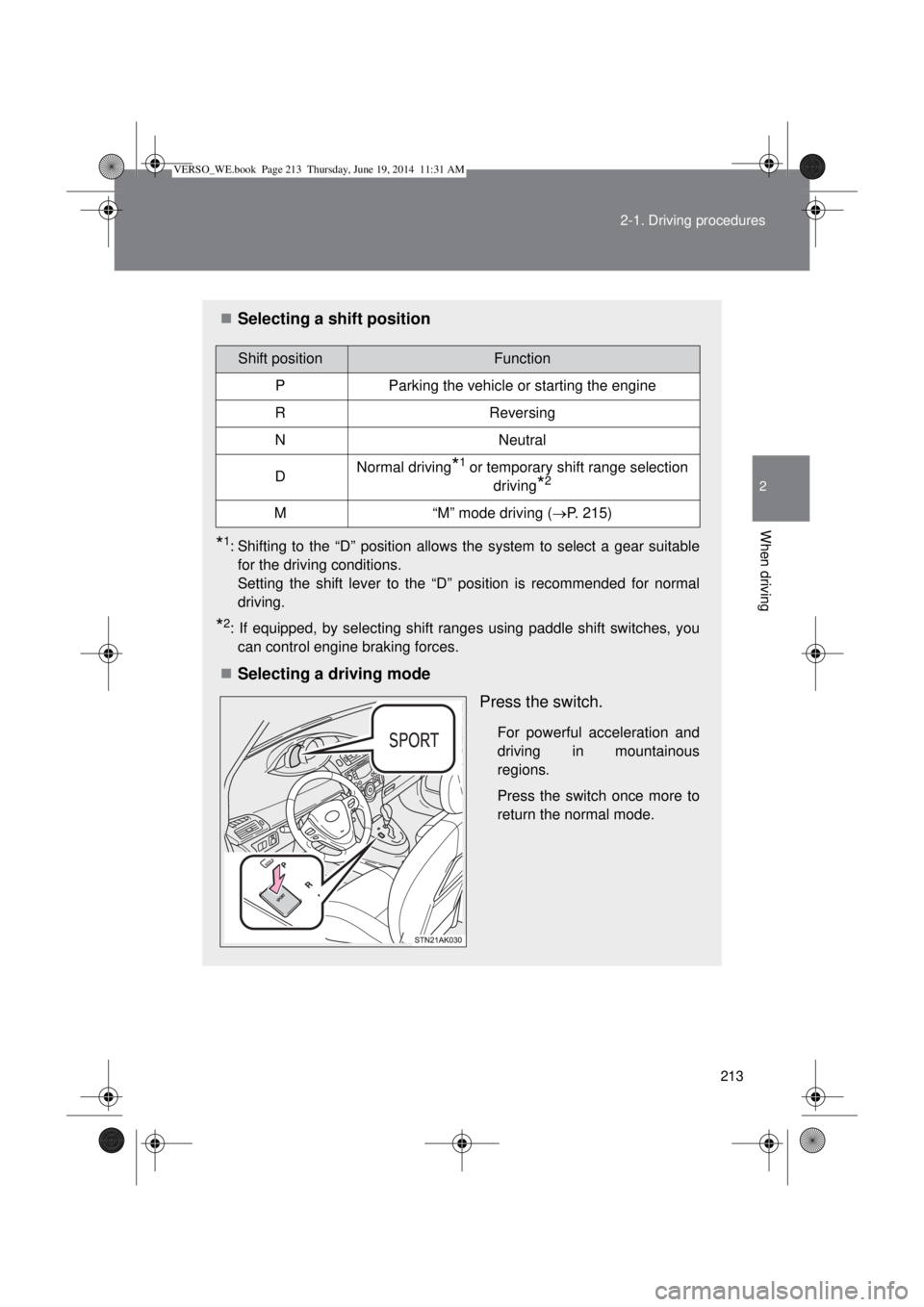
Selecting a driving mode
Press the switch.
For powerful acceleration and
driving in mountainous
regions.
Press the switch once more to
return the normal mode.
Shift positionFunction
PParking the vehicle or starting the engine
RReversing
NNeutral
DNormal driving*1 or temporary shift range selection
driving
*2
M“M” mode driving (P. 215)
VERSO_WE.book Page 213 Thursday, June 19, 2014 11:31 AM
Page 282 of 650

282 2-4. Using other driving systems
Operating conditions
The Stop & Start system is operational when all of the following condi-
tions are met:
• The engine is adequately warmed up.
• The battery is sufficiently charged.
• The driver’s door is closed.
• The driver’s seat belt is fastened.
• The hood is closed.
• The clutch pedal is not being depressed.
• The shift lever is in “N”.
• The steering wheel is not in use.
In the following circumstances the engine may not be stopped by the
Stop & Start system. This is not a malfunction of the Stop & Start system.
• Engine coolant temperature is too low or too high.
• The outside temperature is too low.
• Vehicles with an automatic air conditioning system: The air condition-
ing system is being used when the vehicle interior temperature is
extremely high such as after the vehicle was parked under the hot sun.
• Vehicles with an automatic air conditioning system: The windshield
defogger is being used.
• Vehicles with a power heater: The power heater is being used.
• The battery is not sufficiently charged, or is undergoing a periodic
recharge.
• Due to traffic or other circumstances the vehicle is stopped repeatedly,
resulting in the amount of time the engine is stopped by the Stop &
Start system to become excessively high.
• The brake booster vacuum is low.
• A large amount of electricity is being used.
• At high altitude.
When the above conditions improve, the Stop & Start system will stop and
restart the engine from the next time the vehicle is stopped.
In the following situations, it may take longer than normal for the Stop &
Start system to activate.
• The battery is discharged.
• After the battery terminals have been disconnected and reconnected
after a battery replacement, etc.
• The engine coolant temperature is low.
VERSO_WE.book Page 282 Thursday, June 19, 2014 11:31 AM
Page 283 of 650
283 2-4. Using other driving systems
2
When driving
Automatic engine start function
In the following situations, the engine may start even without the clutch pedal
being depressed.
• The brake pedal is pumped or strongly depressed.
• Vehicles with an automatic air conditioning system: The air conditioning
system is being used or turned on.
• Vehicles with an automatic air conditioning system: The windshield
defogger is turned on.
• The battery is not sufficiently charged.
• The vehicle starts to roll on an incline.
• A large amount of electricity is being used.
• The driver’s door is opened.
• The driver’s seat belt is unfastened.
• The steering wheel is turned.
Automatic reactivation of the Stop & Start system
Vehicles without smart entry & start system
Even if the Stop & Start system is disabled by the Stop & Start cancel switch,
it will be automatically re-enabled once the engine switch is turned to the
“LOCK” position then to the “START” position.
Vehicles with smart entry & start system
Even if the Stop & Start system is disabled by the Stop & Start cancel switch,
it will be automatically re-enabled once the engine switch is turned off then
the engine is started.
The Stop & Start system protection feature
Vehicles without smart entry & start system
When an excessively loud sound is being projected by the audio system, the
audio system may be automatically cut off in order to maintain power for the
Stop & Start system function.
If this occurs, turning the engine switch to the “LOCK” position then to the
“ACC” or “ON” position re-enables the audio system.
Vehicles with smart entry & start system
When an excessively loud sound is being projected by the audio system, the
audio system may be automatically cut off in order to maintain power for the
Stop & Start system function.
If this occurs, turning the “ENGINE START STOP” switch off then to ACCES-
SORY mode or IGNITION ON mode re-enables the audio system.
VERSO_WE.book Page 283 Thursday, June 19, 2014 11:31 AM
Page 287 of 650
287
2-4. Using other driving systems
2
When driving
Driving assist systems
To help enhance driving safety and performance, the following sys-
tems operate automatically in response to various driving situations.
Be aware, however, that these systems are supplementary and
should not be relied upon too heavily when operating the vehicle.
ABS (Anti-lock Brake System)
Helps to prevent wheel lock when the brakes are applied suddenly, or if
the brakes are applied while driving on a slippery road surface.
Brake assist
Generates an increased level of braking force after the brake pedal is
depressed, when the system detects a panic stop situation.
VSC+ (Vehicle Stability Control +)
Provides cooperative control of the ABS, TRC, VSC and EPS.
Helps to maintain directional stability when swerving on slippery road
surfaces by controlling steering performance.
TRC (Traction Control)
Helps to maintains drive power and prevents the front wheels from
spinning when starting the vehicle or accelerating on slippery roads.
EPS (Electric Power Steering)
Employs an electric motor to reduce the amount of effort needed to turn
the steering wheel.
Hill-start assist control
P. 293
VERSO_WE.book Page 287 Thursday, June 19, 2014 11:31 AM
Page 288 of 650
288 2-4. Using other driving systems
When the TRC and VSC+ are operating
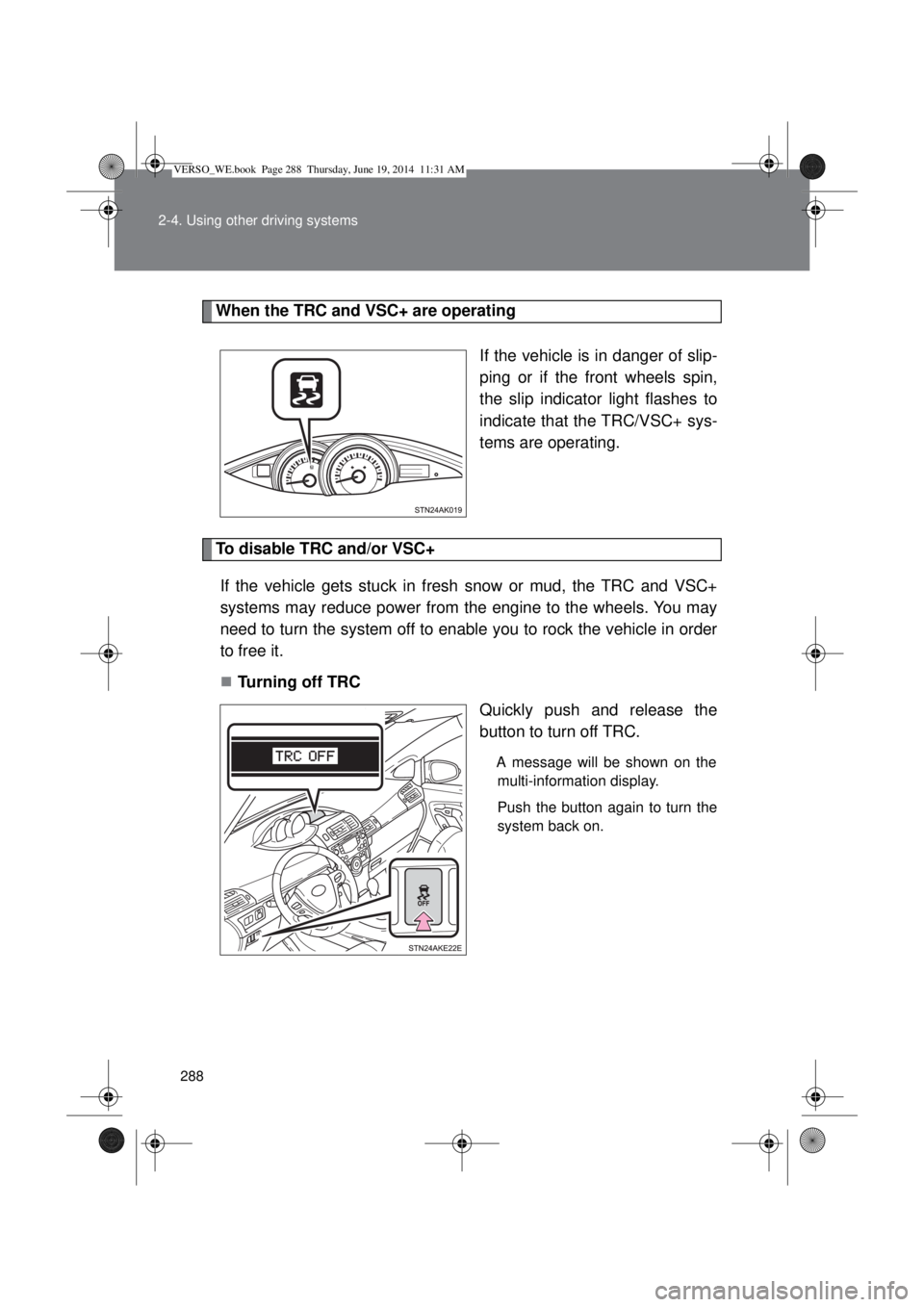
If the vehicle is in danger of slip-
ping or if the front wheels spin,
the slip indicator light flashes to
indicate that the TRC/VSC+ sys-
tems are operating.
To disable TRC and/or VSC+
If the vehicle gets stuck in fresh snow or mud, the TRC and VSC+
systems may reduce power from the engine to the wheels. You may
need to turn the system off to enable you to rock the vehicle in order
to free it.
Turning off TRC
Quickly push and release the
button to turn off TRC.
A message will be shown on the
multi-information display.
Push the button again to turn the
system back on.
VERSO_WE.book Page 288 Thursday, June 19, 2014 11:31 AM