Power on TOYOTA VERSO 2014 Owner's Guide
[x] Cancel search | Manufacturer: TOYOTA, Model Year: 2014, Model line: VERSO, Model: TOYOTA VERSO 2014Pages: 650, PDF Size: 36.61 MB
Page 291 of 650
291 2-4. Using other driving systems
2
When driving
CAUTION
Any of the following conditions may result in an accident which could cause
death or serious injury:
The ABS does not operate effectively when
The limits of tire gripping performance have been exceeded (such as
excessively worn tires on a snow covered road).
The vehicle hydroplanes while driving at high speed on the wet or slick
road.
Stopping distance when the ABS is operating may exceed that of nor-
mal conditions
The ABS is not designed to shorten the vehicle’s stopping distance. Always
maintain a safe distance from the vehicle in front of you, especially in the fol-
lowing situations:
When driving on dirt, gravel or snow-covered roads
When driving with tire chains
When driving over bumps in the road
When driving over roads with potholes or uneven roads
TRC may not operate effectively when
Directional control and power may not be achievable while driving on slip-
pery road surfaces, even if the TRC is operating.
Do not drive the vehicle in conditions where stability and power may be lost.
When the VSC+ is activated
The slip indicator light flashes. Always drive carefully. Reckless driving may
cause an accident. Exercise particular care when the indicator light flashes.
When the TRC and VSC+ are off
Be especially careful and drive at a speed appropriate to the road condi-
tions. As these are systems to ensure vehicle stability and driving force, do
not turn off TRC and VSC+ unless necessary.
VERSO_WE.book Page 291 Thursday, June 19, 2014 11:31 AM
Page 307 of 650
307 2-5. Driving information
2
When driving
Break-in schedule
Toyota recommends that vehicles fitted with new power train components
should not be used for towing trailers for the first 800 km (500 miles).
Maintenance
Maintenance must be performed more frequently when using the vehicle
for towing due to the greater weight burden placed on the vehicle com-
pared to normal driving.
Retighten all bolts securing the hitching ball and bracket after towing for
approximately 1000 km (600 miles).
Safety checks before towing
Check that the maximum load limit for the towing hitch/bracket and hitch
ball is not exceeded. Bear in mind that the coupling weight of the trailer
will add to the load exerted on the vehicle. Also make sure that the total
load exerted on the vehicle is within the range of the weight limits.
(P. 303)
Ensure that the trailer load is secure.
Supplementary outside rear view mirrors should be added to the vehicle
if the traffic behind cannot be clearly seen with standard mirrors. Adjust
the extending arms of these mirrors on both sides of the vehicle so that
they always provide maximum visibility of the road behind.
NOTICE
When the rear bumper strengthening material is aluminum
Ensure the steel bracket part does not come directly in contact with that
area.
When steel and aluminum come into contact, there is a reaction similar to
corrosion, which will weaken the section concerned which may result in
damage. Apply a rust inhibitor to parts that will come in contact when attach-
ing a steel bracket.
VERSO_WE.book Page 307 Thursday, June 19, 2014 11:31 AM
Page 311 of 650
3Interior features
311
3-1. Using the air conditioning
system and defogger
Manual air conditioning
system ............................ 312
Automatic air conditioning
system ............................ 317
Power heater .................... 324
Rear window and outside
rear view mirror
defoggers........................ 326
3-2. Using the audio system
Audio system types .......... 328
Using the radio ................. 330
Using the CD player ......... 334
Playing back MP3 and
WMA discs...................... 339
Operating an iPod............. 345
Operating a USB
memory........................... 352
Optimal use of the audio
system ............................ 359
Using the AUX port ........... 361
Using the steering wheel
audio switches ................ 362
3-3. Using the interior lights
Interior lights list ................ 365
• Personal/interior lights
main switch ..................... 366
• Personal/interior lights .... 3673-4. Using the storage features
List of storage features ..... 369
• Glove box ....................... 370
• Console box.................... 371
• Overhead console .......... 372
• Cup holders .................... 373
• Bottle holders.................. 374
• Auxiliary boxes ............... 375
3-5. Other interior features
Sun visors ......................... 378
Vanity mirrors.................... 379
Conversation mirror .......... 380
Power outlets .................... 381
Seat heaters ..................... 383
Armrests ........................... 385
Front seatback tables ....... 386
Rear side sunshades ........ 388
Assist grips ....................... 389
Floor mat........................... 390
Luggage compartment
features........................... 392
VERSO_WE.book Page 311 Thursday, June 19, 2014 11:31 AM
Page 324 of 650
324
3-1. Using the air conditioning system and defogger
Power heater
: If equipped
Power heater can be operated when
The engine is running.
The engine coolant temperature is low.
Normal characteristics of power heater operation
The following cases do not indicate a malfunction.
When the power heater is turned on or off, some white smoke and a
slight odor may be emitted from the power heater exhaust that is located
under the floor.
When the power heater is used under extremely cold conditions, vapor
may be visible from its exhaust.
When the power heater is turned off, you may hear a sound in the engine
compartment for about 2 minutes until the power heater turns off com-
pletely.
After the heater is turned off
We recommend not restarting the heater for 10 minutes after you turn it off.
Otherwise, a noise may be heard as the heater ignites.
When refueling your vehicle
The engine must be turned off. Turning the engine off turns the power heater
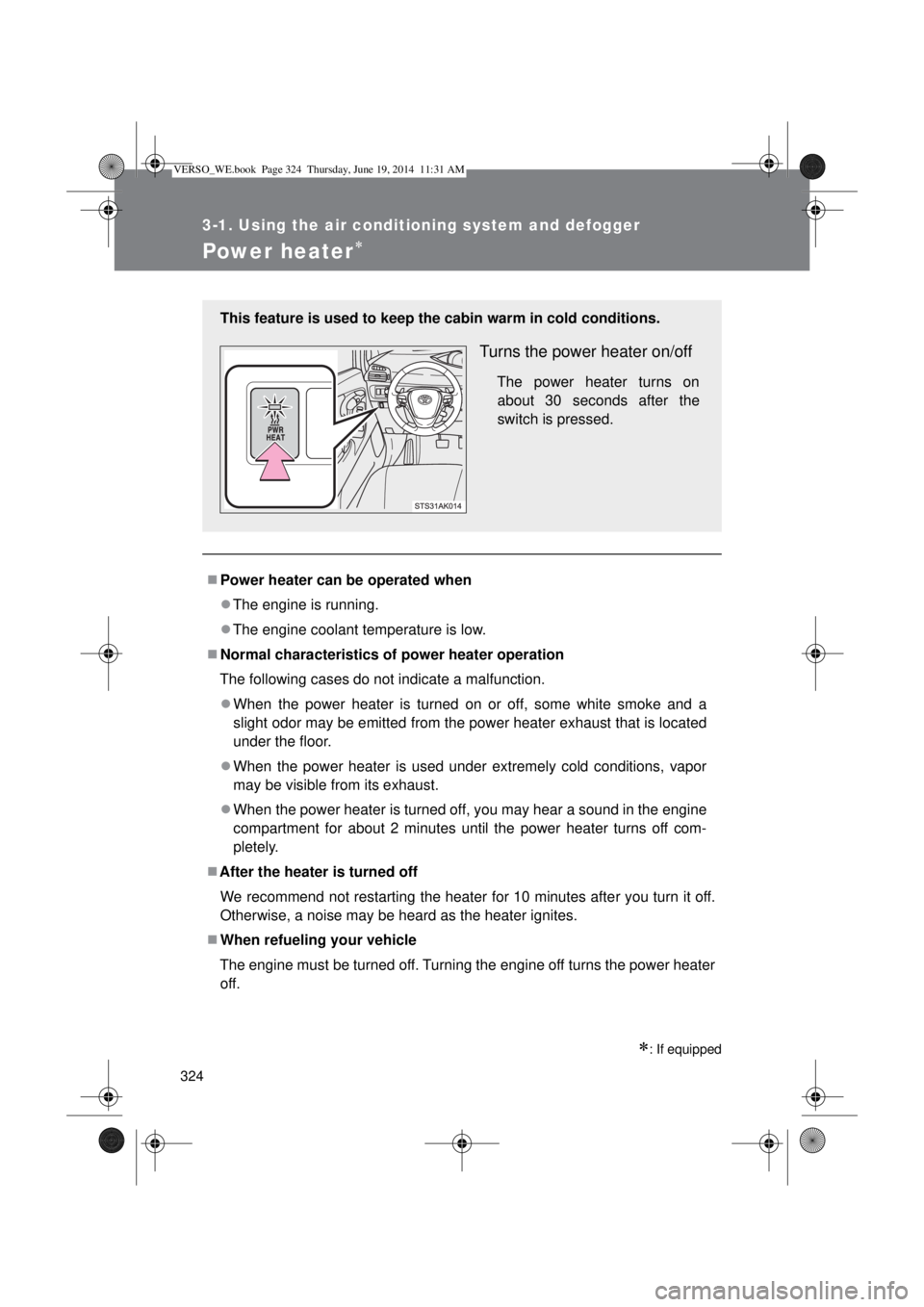
off. This feature is used to keep the cabin warm in cold conditions.
Turns the power heater on/off
The power heater turns on
about 30 seconds after the
switch is pressed.
VERSO_WE.book Page 324 Thursday, June 19, 2014 11:31 AM
Page 330 of 650
330
3-2. Using the audio system
Using the radio
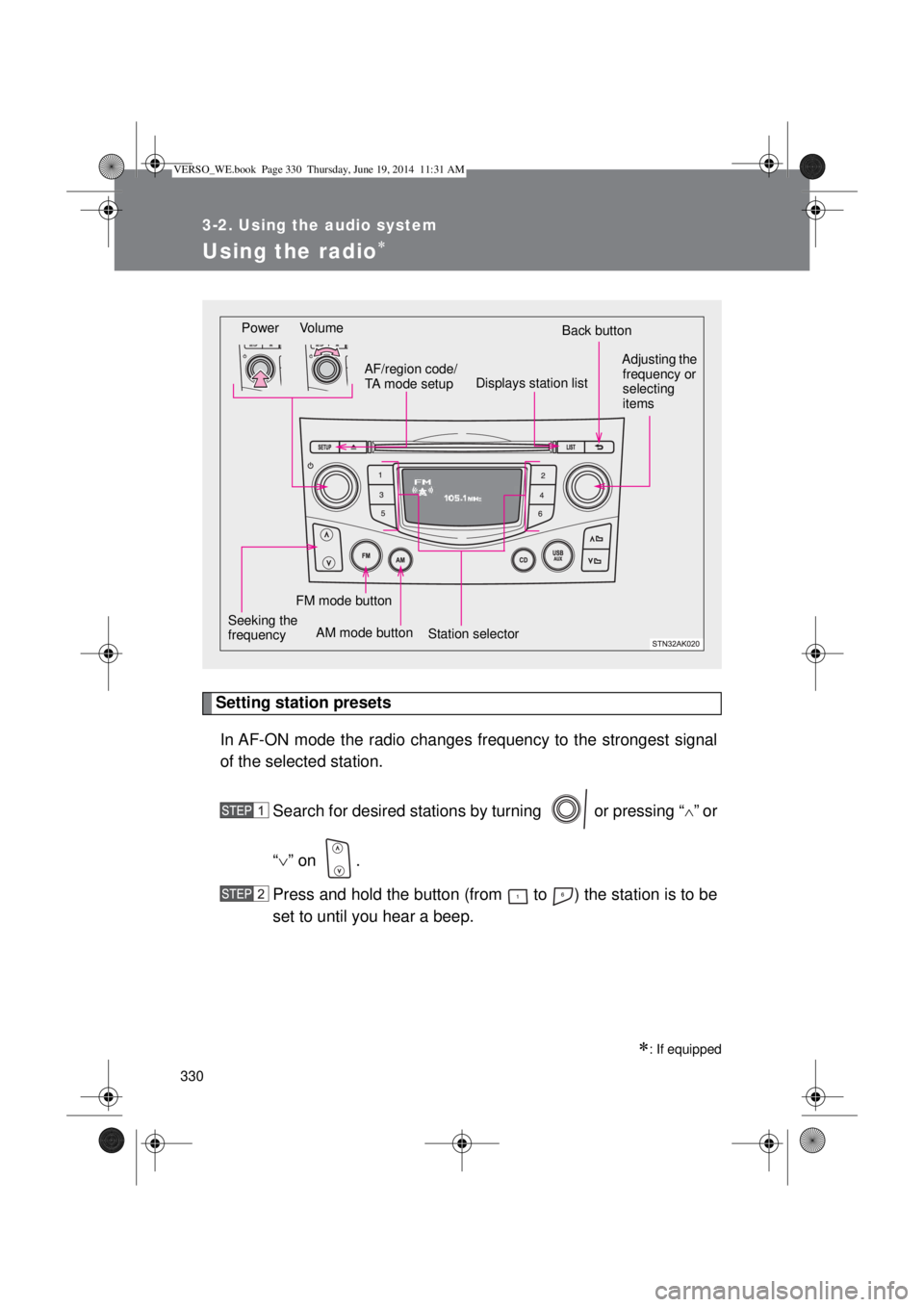
Setting station presets
In AF-ON mode the radio changes frequency to the strongest signal
of the selected station.
Search for desired stations by turning or pressing “
”or
“” on .
Press and hold the button (from to ) the station is to be
set to until you hear a beep.
: If equipped
Power Volume
Station selectorBack button
Adjusting the
frequency or
selecting
items
AM mode buttonAF/region code/
TA mode setup
Seeking the
frequency
Displays station list
FM mode button
VERSO_WE.book Page 330 Thursday, June 19, 2014 11:31 AM
Page 334 of 650
334
3-2. Using the audio system
Using the CD player
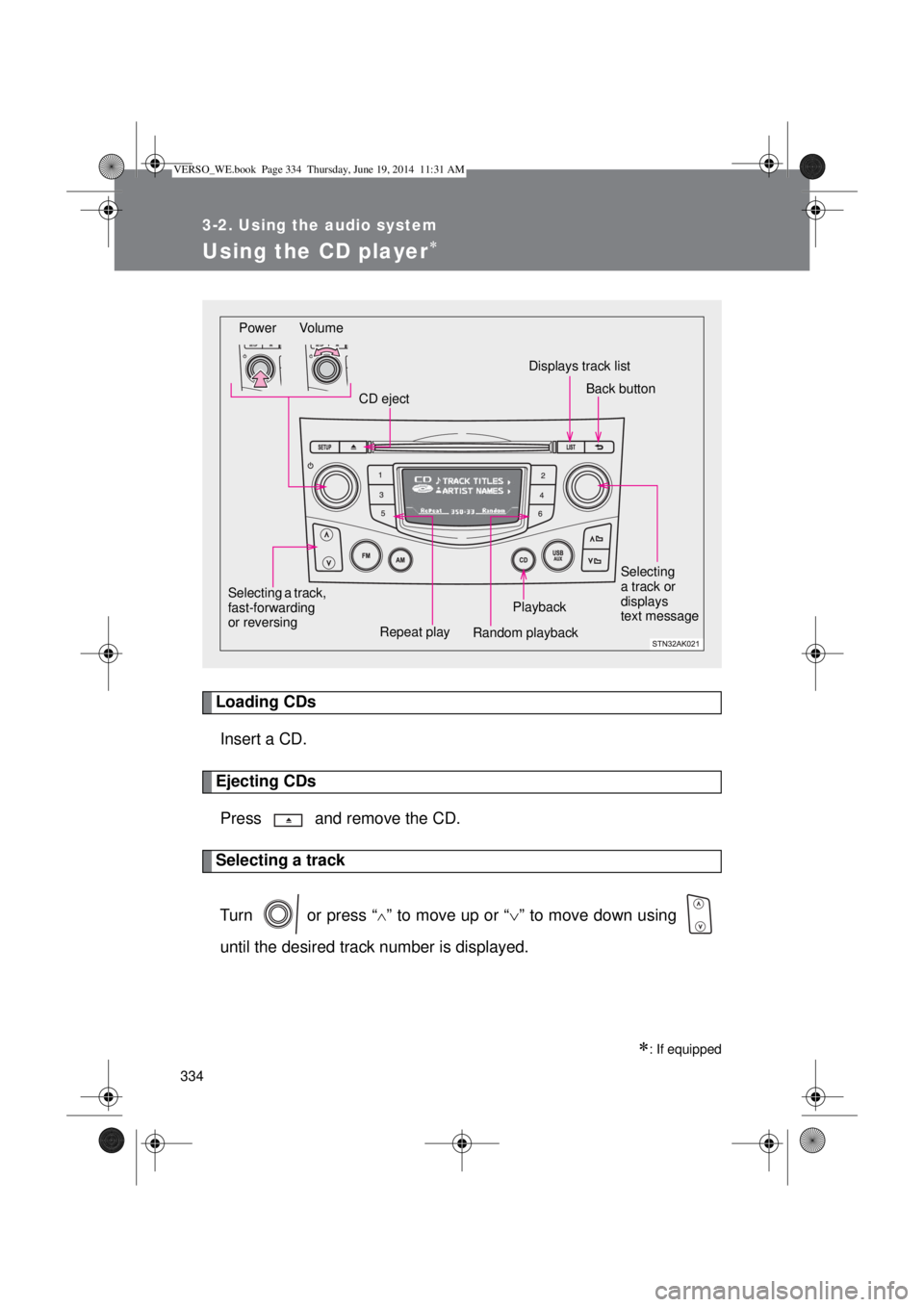
Loading CDs
Insert a CD.
Ejecting CDs
Press and remove the CD.
Selecting a track
Turn or press “
” to move up or “” to move down using
until the desired track number is displayed.
: If equipped
Power Volume
CD ejectDisplays track list
Playback
Repeat play
Random playback Selecting a track,
fast-forwarding
or reversing
Selecting
a track or
displays
text message
Back button
VERSO_WE.book Page 334 Thursday, June 19, 2014 11:31 AM
Page 337 of 650
337 3-2. Using the audio system
3
Interior features
CAUTION
Certification for the CD player
This product is a class I laser product.
Do not open the cover of the player or attempt to repair the unit yourself.
Refer servicing to qualified personnel.
Laser power: No hazardous
NOTICE
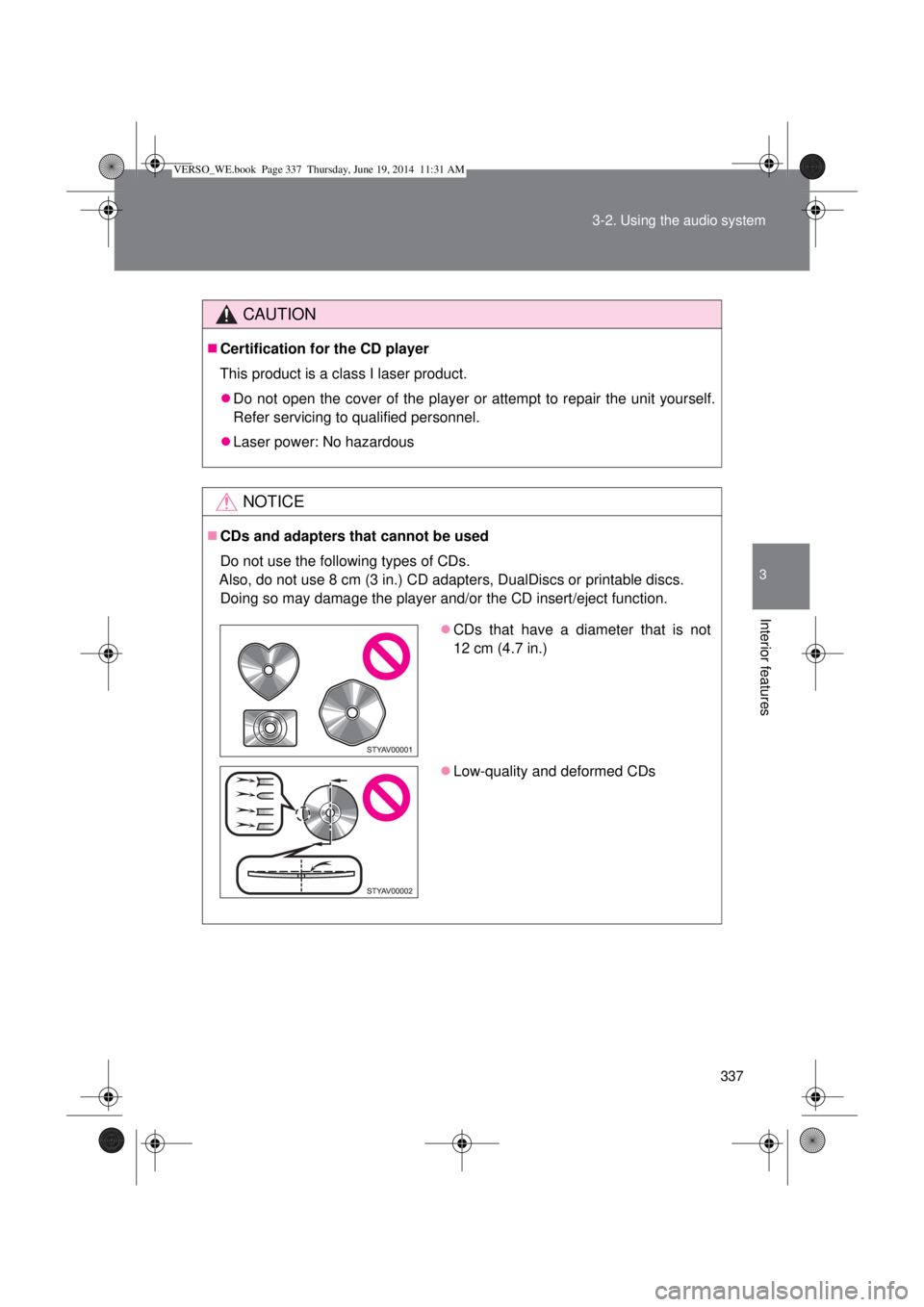
CDs and adapters that cannot be used
Do not use the following types of CDs.
Also, do not use 8 cm (3 in.) CD adapters, DualDiscs or printable discs.
Doing so may damage the player and/or the CD insert/eject function.
CDs that have a diameter that is not
12 cm (4.7 in.)
Low-quality and deformed CDs
VERSO_WE.book Page 337 Thursday, June 19, 2014 11:31 AM
Page 339 of 650
339
3-2. Using the audio system
3
Interior features
Playing back MP3 and WMA discs
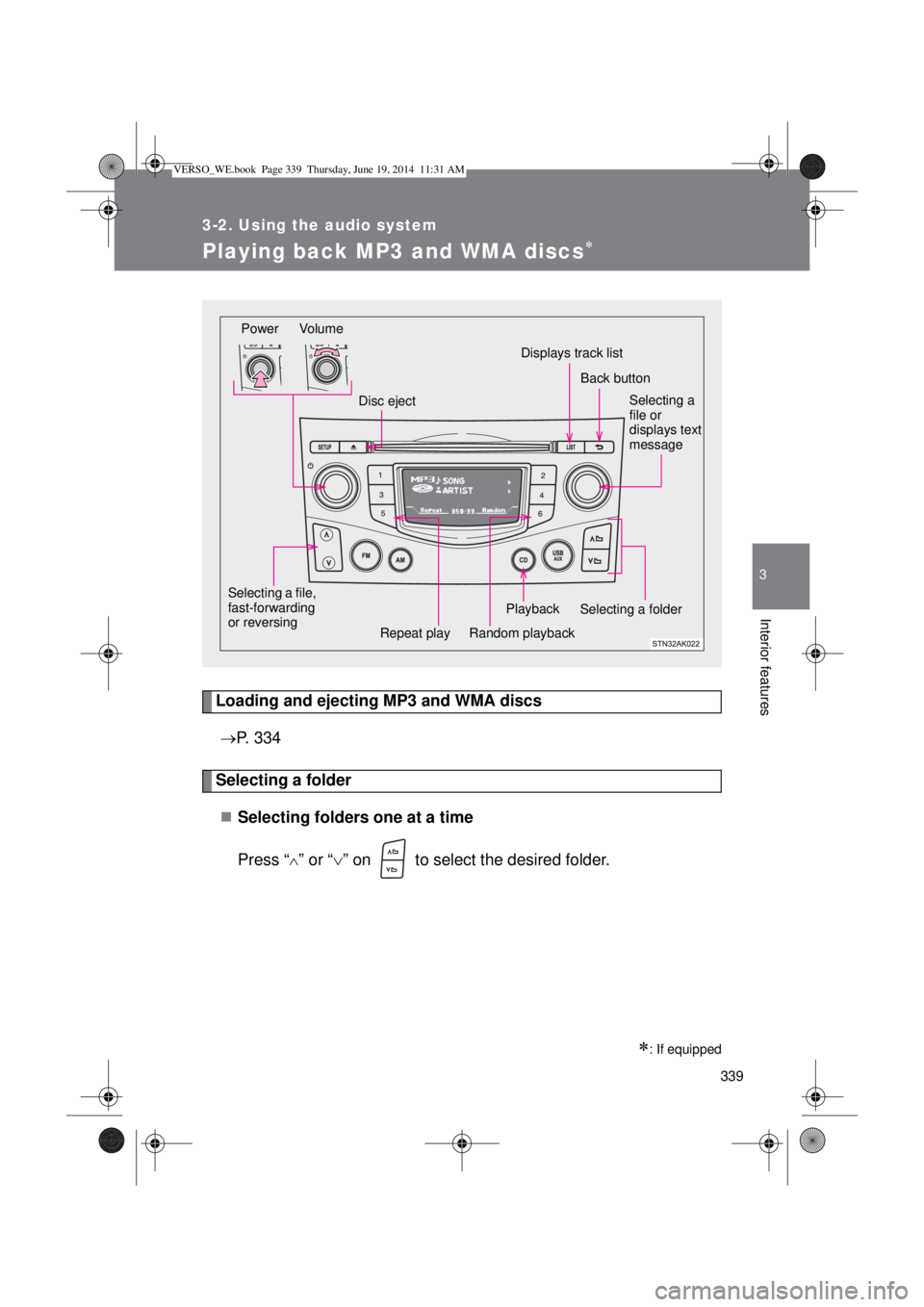
Loading and ejecting MP3 and WMA discs
P. 334
Selecting a folder
Selecting folders one at a time
Press “
” or “” on to select the desired folder.
: If equipped
Power Volume
Disc ejectDisplays track list
Playback
Repeat playRandom playback Selecting a file,
fast-forwarding
or reversing
Selecting a
file or
displays text
message
Selecting a folder
Back button
VERSO_WE.book Page 339 Thursday, June 19, 2014 11:31 AM
Page 345 of 650
345
3-2. Using the audio system
3
Interior features
Operating an iPod
: If equipped
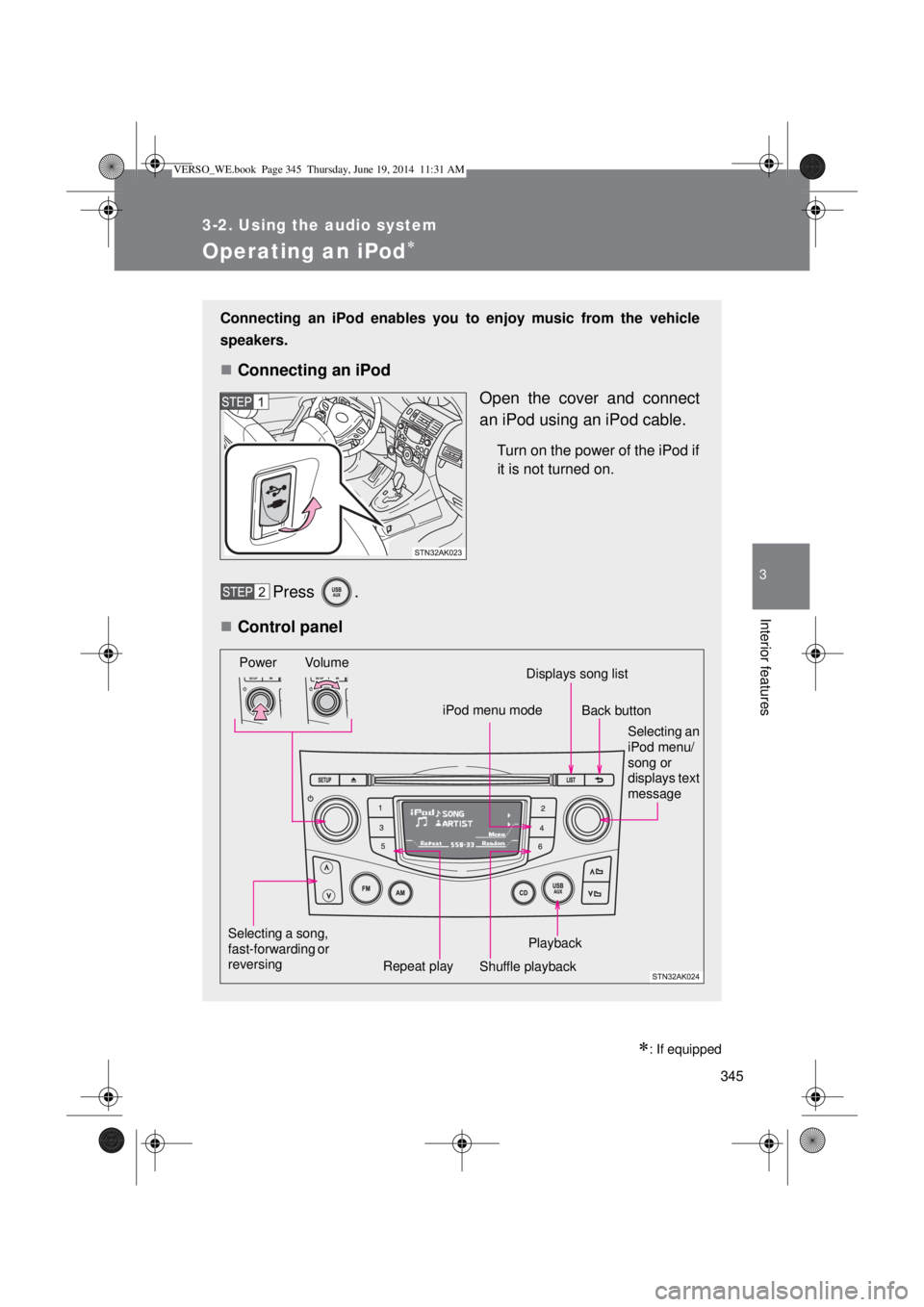
Connecting an iPod enables you to enjoy music from the vehicle
speakers.
Connecting an iPod
Open the cover and connect
an iPod using an iPod cable.
Turn on the power of the iPod if
it is not turned on.
Press .
Control panel
Selecting a song,
fast-forwarding or
reversingPower Volume
Shuffle playback Repeat playPlaybackSelecting an
iPod menu/
song or
displays text
message
iPod menu modeDisplays song list
Back button
VERSO_WE.book Page 345 Thursday, June 19, 2014 11:31 AM
Page 352 of 650
352
3-2. Using the audio system
Operating a USB memor y
: If equipped
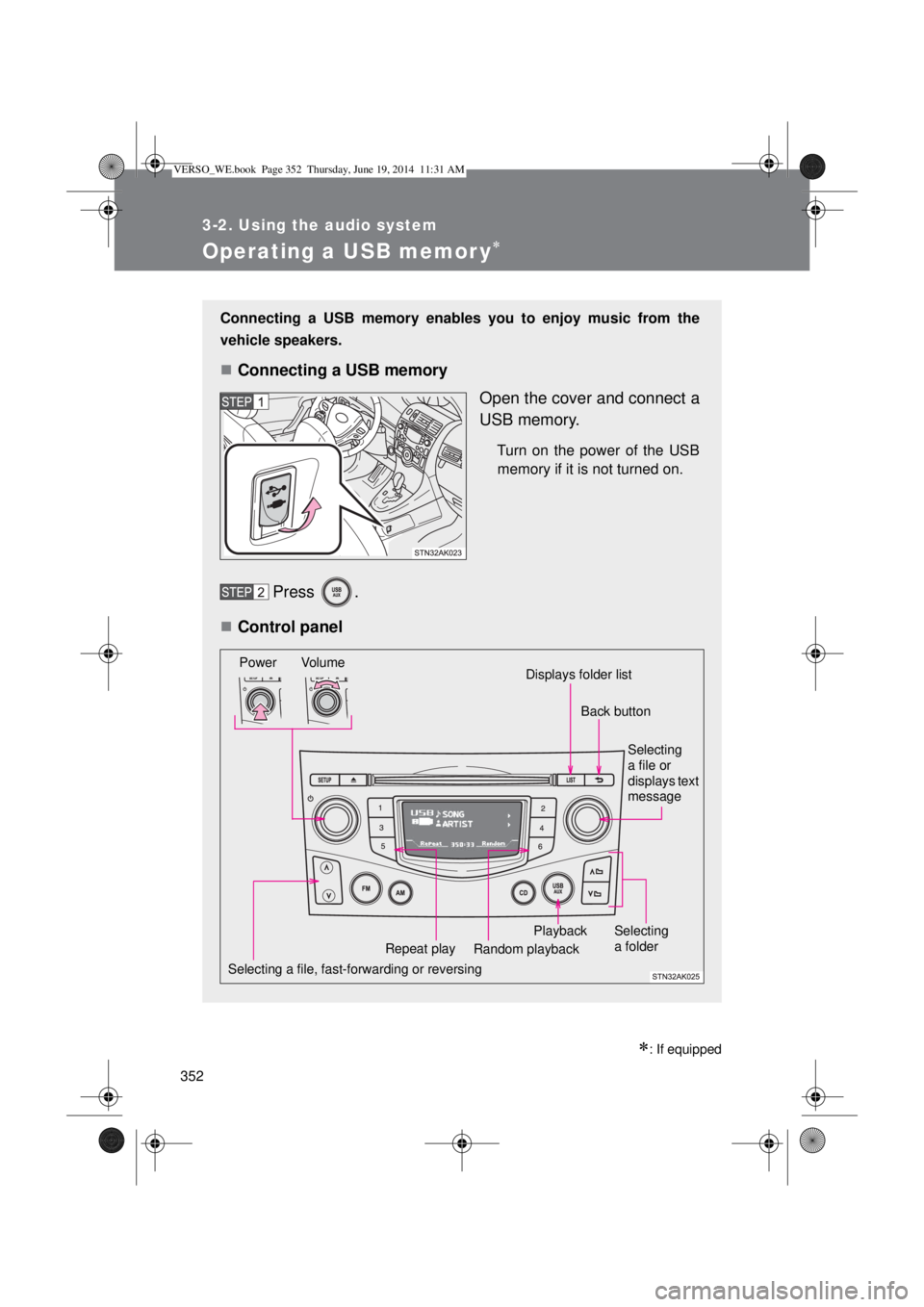
Connecting a USB memory enables you to enjoy music from the
vehicle speakers.
Connecting a USB memory
Open the cover and connect a
USB memory.
Turn on the power of the USB
memory if it is not turned on.
Press .
Control panel
Selecting a file, fast-forwarding or reversingPower Volume
Random playback Repeat playPlaybackSelecting
a file or
displays text
message
Selecting
a folder
Displays folder list
Back button
VERSO_WE.book Page 352 Thursday, June 19, 2014 11:31 AM