audio TOYOTA YARIS 2018 Workshop Manual
[x] Cancel search | Manufacturer: TOYOTA, Model Year: 2018, Model line: YARIS, Model: TOYOTA YARIS 2018Pages: 632, PDF Size: 44.1 MB
Page 361 of 632
3615-6. Using Bluetooth® devices
5
Audio system
YARIS_HV_OM_Europe_OM52J66E
Registering a Bluetooth® device
Press the tune/scroll knob and select “Bluetooth*” using the knob.
Press the knob and select “Pairing” using the knob.
A passkey will be displayed.
SSP (Secure Simple Pairing) incompatible Bluetooth® devices:
Input the passkey into the device.
SSP (Secure Simple Pairing) compatible Bluetooth® devices:
Select “Yes” to register the device. Depending on the type of
device, it may register automatically.
If a Bluetooth® device has both music player and cellular phone func-
tions, both functions will be registered at the same time. When delet-
ing the device, both functions will be deleted at the same time.
If the off-hook switch is pressed and the “Phone” mode is entered
when no phones have been registered, the registration screen will be
automatically displayed.
*: Bluetooth is a registered trademark of Bluetooth SIG, Inc.
: If equipped
Before using the Bluetooth® audio/phone, it is necessary to reg-
ister a Bluetooth® device in the system. You can register up to 5
Bluetooth® devices.
How to register a Bluetooth® device
1
2
3
Page 362 of 632
3625-7. “SETUP” menu
YARIS_HV_OM_Europe_OM52J66E
Using the “SETUP” menu (“Bluetooth*”
menu)
Select “Pairing” using the tune/scroll knob ( P. 358), and perform the
procedure for registering a portable player. ( P. 361)
Select “List phone” using the tune/scroll knob. ( P. 358) The list of
registered cellular phones will be displayed.
● Connecting the registered cellular phone to the audio system
Select the name of the cellular phone to be connected using the
tune/scroll knob.
Select “Select” using the knob.
● Deleting a registered cellular phone
Select the name of the cellular phone to be deleted using the
tune/scroll knob.
Select “Delete” using the knob.
Press (“Yes”).
*: Bluetooth is a registered trademark of Bluetooth SIG, Inc.
: If equipped
Registering a Bluetooth® device in the system allows the system
to function. The following functions can be used for registered
devices:
Registering a portable player
Listing the registered cellular phones
1
2
1
2
3
Page 363 of 632
3635-7. “SETUP” menu
5
Audio system
YARIS_HV_OM_Europe_OM52J66E
●Disconnecting the registered cellular phone from the audio system
Select the name of the cellular phone to be disconnected using
the tune/scroll knob.
Select “Disconnect” using the knob.
Press (“Yes”).
Select “List audio” using the tune/scroll knob. ( P. 358) The list of
registered portable players will be displayed.
● Connecting the registered portable player to the audio system
Select the name of the portable player to be connected using the
tune/scroll knob.
Select “Select” using the knob.
● Deleting the registered portable player
Select the name of the portable player to be deleted using the
tune/scroll knob.
Select “Delete” using the knob.
Press (“Yes”).
Listing the registered portable players
1
2
3
1
2
1
2
3
Page 364 of 632
3645-7. “SETUP” menu
YARIS_HV_OM_Europe_OM52J66E
●Disconnecting the registered portable player from the audio system
Select the name of the portable player to be disconnected using
the tune/scroll knob.
Select “Disconnect” using the knob.
Press (“Yes”).
● Selecting the connection method
Select the name of the desired portable player using the tune/
scroll knob.
Select “Connection method” using the knob.
Select “From vehicle” or “From audio” using the knob.
Select “Passkey” using the tune/scroll knob. ( P. 358)
Select a 4 to 8-digit passkey using the knob.
Input the number 1 digit at a time.
When the entire number to be registered as a passkey has been
input, press the knob again, or press (“Enter”).
If the passkey to be registered has 8 digits, pressing the knob again, or
pressing (“Enter”) is not necessary.
Changing the passkey
1
2
3
1
2
3
1
2
3
Page 365 of 632
3655-7. “SETUP” menu
5
Audio system
YARIS_HV_OM_Europe_OM52J66E
If “BT power” is set to on, the registered device will be connected
automatically when the power switch is turned to the “ACC” position
(vehicles without a smart entry & start system) or ACCESSORY mode
(vehicles with a smart entry & start system).
Select “BT power” using the tune/scroll knob. ( P. 358)
Select “On” or “Off” using the knob.
Select “Bluetooth* info” using the tune/scroll knob. ( P. 358)
● Displaying the device name
Select “Device name” using the tune/scroll knob.
● Displaying the device address
Select “Device address” using the tune/scroll knob.
*: Bluetooth is a registered trademark of Bluetooth SIG, Inc.
If the “Display setting” is set to on, the Bluetooth phone/portable
player connection status will be displayed when the power switch is
turned to the “ACC” or “ON” position (vehicles without a smart entry &
start system), or ACCESSORY or ON mode (vehicles with a smart
entry & start system).
Select “Display setting” using the tune/scroll knob. ( P. 358)
Select “On” or “Off” using the knob.
Setting automatic connection of the device on or off
Displaying the device status
Setting the automatic connection confirmation display to on or off
1
2
1
2
Page 367 of 632
3675-7. “SETUP” menu
5
Audio system
YARIS_HV_OM_Europe_OM52J66E
Using the “SETUP” menu (“Phone” menu)
Select “Add contacts” using the tune/scroll knob. (P. 358)
● Transferring all contacts from the cellular phone
Select “Overwrite all” using the knob and press (“Yes”).
● Transferring one contact from the cellular phone
Select “Add contact” using the knob and press (“Yes”).
Select “Add SD” using the tune/scroll knob. ( P. 358)
Select the desired data using the knob.
Press the desired preset button (from [1] to [5]).
For details about setting speed dials from the call history: P. 375
For details about deleting speed dials: P. 374
: If equipped
Adding a new phone number
Setting speed dials
1
2
3
Page 369 of 632
3695-7. “SETUP” menu
5
Audio system
YARIS_HV_OM_Europe_OM52J66E
Select “Delete contacts” using the tune/scroll knob. (P. 358)
Select the desired phone number using the knob and press
(“Yes”).
To delete all the registered phone numbers, select “All delete” using
the knob and press (“Yes”).
Press (“A-Z”) to display the registered names in alphabetical
order of the initial.
Select “Delete other PB” using the tune/scroll knob. ( P. 358)
Select the desired phonebook using the knob and press
(“Yes”).
Select “Call volume” using the tune/scroll knob. ( P. 358)
Change the call volume.
To decrease the volume: Turn the knob counterclockwise.
To increase the volume: Turn the knob clockwise.
To set the volume, press (“Back”).
Deleting a registered phone number
Deleting another cellular phone’s phonebook
Setting call volume
1
2
1
2
1
2
Page 371 of 632
3715-8. Bluetooth® Audio
5
Audio system
YARIS_HV_OM_Europe_OM52J66E
Operating a Bluetooth® enabled portable
player
: If equipped
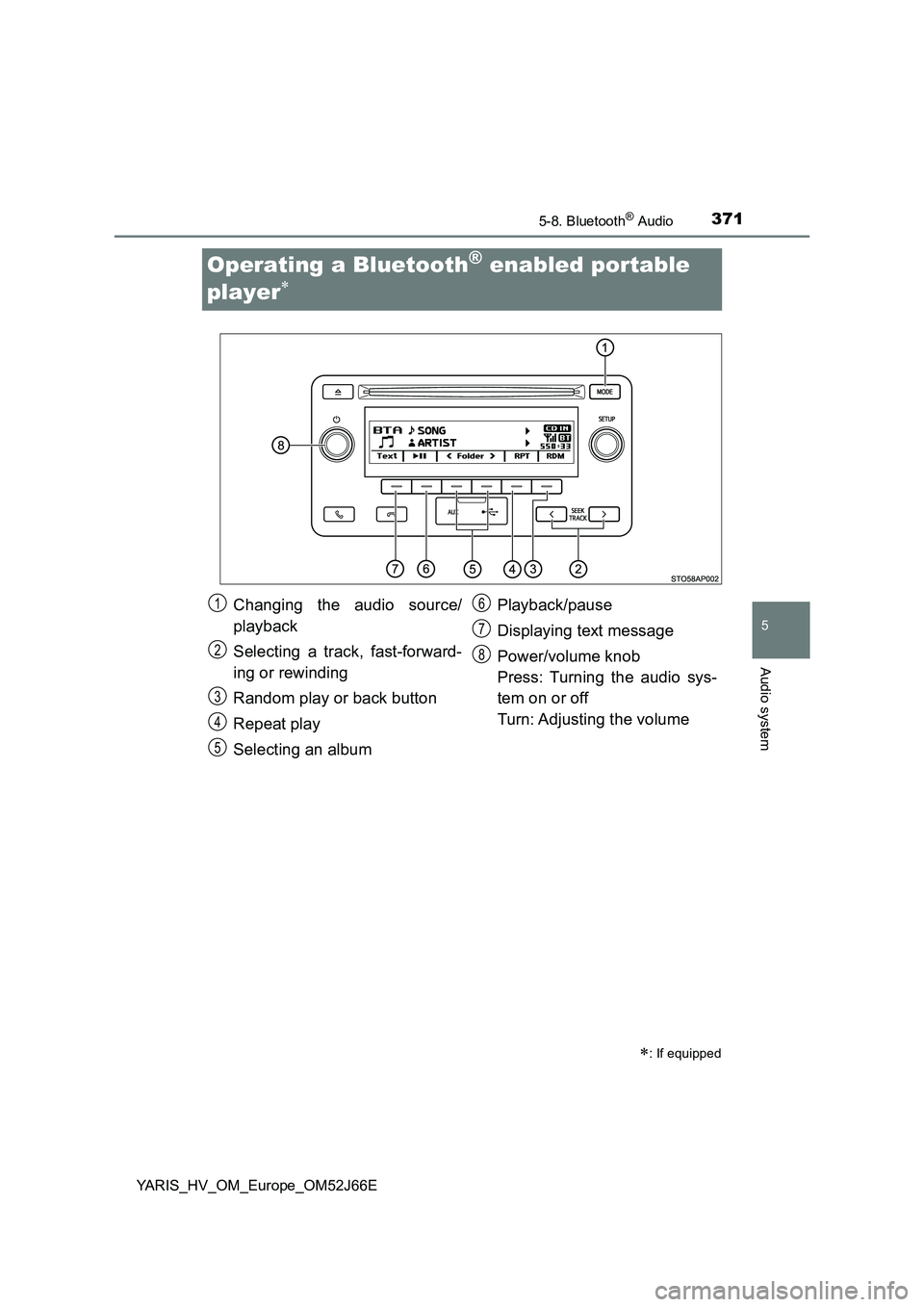
Changing the audio source/
playback
Selecting a track, fast-forward-
ing or rewinding
Random play or back button
Repeat play
Selecting an album
Playback/pause
Displaying text message
Power/volume knob
Press: Turning the audio sys-
tem on or off
Turn: Adjusting the volume
1
2
3
4
5
6
7
8
Page 372 of 632
3725-8. Bluetooth® Audio
YARIS_HV_OM_Europe_OM52J66E
Press (“
album.
Press the “ ” or “” button of “SEEK TRACK” to select the desired
track.
Press and hold the “ ” or “” button of “SEEK TRACK”.
Pressing (“RDM”) changes modes in the following order:
Album random All track randomOff.
Pressing (“RPT”) changes modes in the following order:
Track repeat Album repeatOff.
Selecting an album
Selecting a tracks
Fast-forwarding and rewinding tracks
Random play
Repeat play
Page 373 of 632
3735-8. Bluetooth® Audio
5
Audio system
YARIS_HV_OM_Europe_OM52J66E
Press ( ).
Press (“Text”) to display or hide the album title.
If there are continuing texts, is displayed.
Press and hold the button to display the remaining texts.
■ Bluetooth® audio system functions
Depending on the portable player that is connected to the system, certain
functions may not be available.
■ Display
P. 333
Playing and pausing tracks
Switching the display