air condition TOYOTA YARIS 2021 User Guide
[x] Cancel search | Manufacturer: TOYOTA, Model Year: 2021, Model line: YARIS, Model: TOYOTA YARIS 2021Pages: 568, PDF Size: 110.34 MB
Page 150 of 568
150
YARIS(HB) Owner's Manual_Europe_MK0001_en
4-1. Before driving
NOTICE
• Do not use the clutch pedal to adjust vehicle speed. When stop-
ping the vehicle with the shift lever in a position other then N, make sure to fully depress the clutch
pedal and stop the vehicle using the brake.Doing so may damage the clutch.
• When stopping the vehicle with the shift lever in a position other than N,
make sure to fully depress the clutch pedal and stop the vehicle using the brakes.
●Do not shift the shift lever to R with-out the vehicle completely stopped.
Doing so may damage the clutch, transmission and gears.
■When parking the vehicle (vehi-cles with a Multidrive)
Always set the parking brake and shift
the shift lever to P. Failure to do so may cause the vehicle to move or the vehicle may accelerate suddenly if
the accelerator pedal is accidentally depressed.
■Avoiding damage to vehicle parts
●Do not turn the steering wheel fully in either direction and hold it there
for an extended period of time. Doing so may damage the power steering motor.
●When driving over bumps in the road, drive as slowly as possible to
avoid damaging the wheels, under- side of the vehicle, etc.
■If you get a flat tire while driving
A flat or damaged tire may cause the following situations. Hold the steering
wheel firmly and gradually depress the brake pedal to slow down the vehicle.
●It may be difficult to control your vehicle.
●The vehicle will make abnormal sounds or vibrations.
●The vehicle will lean abnormally.
Information on what to do in case of a
flat tire ( →P.379, 389)
■When encountering flooded
roads
Do not drive on a road that has flooded after heavy rain, etc. Doing so
may cause the following serious dam- age to the vehicle:
●Engine stalling
●Short in electrical components
●Engine damage caused by water immersion
In the event that you drive on a flooded road and the vehicle becomes flooded or stuck in mud or
sand, be sure to have any authorized Toyota retailer or Toyota authorized repairer, or any reliable repairer check
the following:
●Brake function
●Changes in the quantity and quality of the engine oil, transmission fluid,
clutch fluid, differential oil, etc.
●Lubricant condition for the bearings
and suspension joints (where possi- ble), and the function of all joints, bearings, etc.
Page 152 of 568
152
YARIS(HB) Owner's Manual_Europe_MK0001_en
4-1. Before driving
Check the allowable towing capac-
ity, GVM (Gross Vehicle Mass),
MPAC (Maximum Permissible Axle
Trailer towing (vehicles
without towing pack-
ages - including
Reunion)
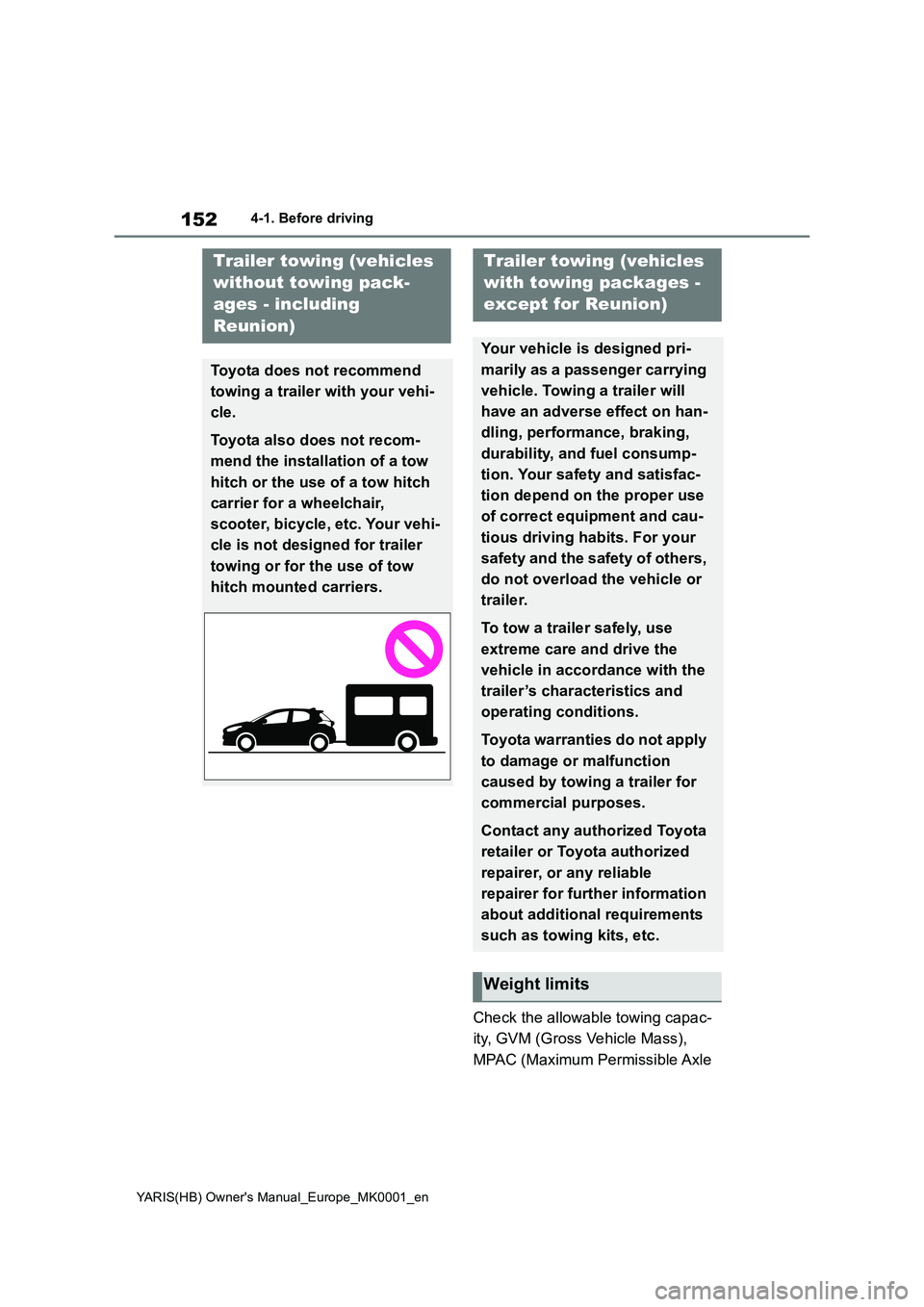
Toyota does not recommend
towing a trailer with your vehi-
cle.
Toyota also does not recom-
mend the installation of a tow
hitch or the use of a tow hitch
carrier for a wheelchair,
scooter, bicycle, etc. Your vehi-
cle is not designed for trailer
towing or for the use of tow
hitch mounted carriers.
Trailer towing (vehicles
with towing packages -
except for Reunion)
Your vehicle is designed pri-
marily as a passenger carrying
vehicle. Towing a trailer will
have an adverse effect on han-
dling, performance, braking,
durability, and fuel consump-
tion. Your safety and satisfac-
tion depend on the proper use
of correct equipment and cau-
tious driving habits. For your
safety and the safety of others,
do not overload the vehicle or
trailer.
To tow a trailer safely, use
extreme care and drive the
vehicle in accordance with the
trailer’s characteristics and
operating conditions.
Toyota warranties do not apply
to damage or malfunction
caused by towing a trailer for
commercial purposes.
Contact any authorized Toyota
retailer or Toyota authorized
repairer, or any reliable
repairer for further information
about additional requirements
such as towing kits, etc.
Weight limits
Page 157 of 568
157
4
YARIS(HB) Owner's Manual_Europe_MK0001_en
4-1. Before driving
Driving
■Transmission information
Multidrive
To maintain engine braking effi-
ciency and charging system perfor-
mance when using engine braking,
do not use the transmission in D,
must be in M and select gear step 4
or lower. ( →P.164)
Manual transmission
Refrain from driving in 6th gear to
maintain the effectiveness of
engine braking and to maintain
charging system performance.
■If the engine overheats
Towing a loaded trailer up a long,
steep incline in temperatures
exceeding 30°C (85°F) may result
in the engine overheating. If the
engine coolant temperature gauge
indicates that the engine is over-
heating, turn the air conditioning off
immediately, leave the road and
stop the vehicle in a safe place.
( →P.405)
■When parking the vehicle
Always place wheel chocks under
the wheels of both the vehicle and
trailer. Firmly set the parking brake
and shift the shift lever to P (Multid-
rive) and 1 or R (manual transmis-
sion).
WARNING
Follow all the instructions described in
this section. Failure to do so could cause an accident resulting in death or serious injury.
■Trailer towing precautions
When towing, make sure that none of the weight limits are exceeded.
( →P.153)
■Vehicle speed in towing
Observe the legal maximum speeds for trailer towing.
■Before descending hills or long declines
Reduce speed and downshift. How-
ever, never downshift suddenly while descending steep or long downhill grades.
■Operation of the brake pedal
Do not hold the brake pedal
depressed often or for long periods of time. Doing so may result in the brake overheating or reduce braking effects.
■To avoid accident or injury
●Vehicles with a compact spare tire:
Do not tow a trailer when the com- pact spare tire is installed on your vehicle.
●Vehicles with the emergency tire puncture repair kit: Do not tow a
trailer when the tire installed is repaired with the emergency tire puncture repair kit.
●Vehicles with a Dynamic radar cruise control: Do not use dynamic
radar cruise control when you are towing.
NOTICE
■Do not directly splice trailer
lights
Directly splicing trailer lights may damage your vehicle’s electrical sys-
tem and cause a malfunction.
Page 160 of 568
160
YARIS(HB) Owner's Manual_Europe_MK0001_en
4-2. Driving procedures
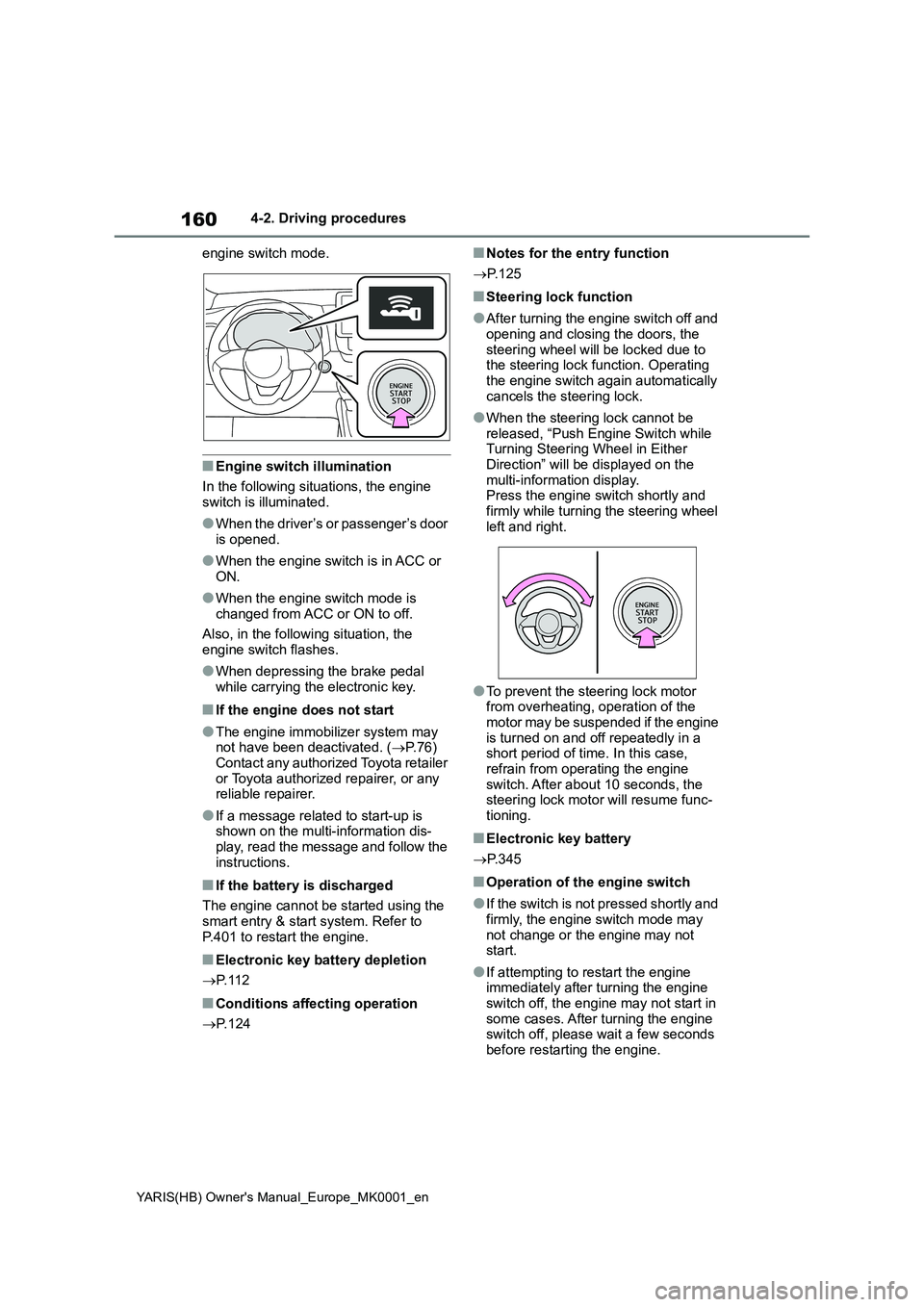
engine switch mode.
■Engine switch illumination
In the following situations, the engine
switch is illuminated.
●When the driver’s or passenger’s door
is opened.
●When the engine switch is in ACC or
ON.
●When the engine switch mode is
changed from ACC or ON to off.
Also, in the following situation, the
engine switch flashes.
●When depressing the brake pedal
while carrying the electronic key.
■If the engine does not start
●The engine immobilizer system may
not have been deactivated. (→P.76)
Contact any authorized Toyota retailer
or Toyota authorized repairer, or any
reliable repairer.
●If a message related to start-up is
shown on the multi-information dis-
play, read the message and follow the
instructions.
■If the battery is discharged
The engine cannot be started using the
smart entry & start system. Refer to
P.401 to restart the engine.
■Electronic key battery depletion
→P. 1 1 2
■Conditions affecting operation
→P. 1 2 4
■Notes for the entry function
→P. 1 2 5
■Steering lock function
●After turning the engine switch off and
opening and closing the doors, the
steering wheel will be locked due to
the steering lock function. Operating
the engine switch again automatically
cancels the steering lock.
●When the steering lock cannot be
released, “Push Engine Switch while
Turning Steering Wheel in Either
Direction” will be displayed on the
multi-information display.
Press the engine switch shortly and
firmly while turning the steering wheel
left and right.
●To prevent the steering lock motor
from overheating, operation of the
motor may be suspended if the engine
is turned on and off repeatedly in a
short period of time. In this case,
refrain from operating the engine
switch. After about 10 seconds, the
steering lock motor will resume func-
tioning.
■Electronic key battery
→P. 3 4 5
■Operation of the engine switch
●If the switch is not pressed shortly and
firmly, the engine switch mode may
not change or the engine may not
start.
●If attempting to restart the engine
immediately after turning the engine
switch off, the engine may not start in
some cases. After turning the engine
switch off, please wait a few seconds
before restarting the engine.
Page 164 of 568
164
YARIS(HB) Owner's Manual_Europe_MK0001_en
4-2. Driving procedures
*: If equipped
*: To improve fuel efficiency and reduce
noise, shift the shift lever to D for nor-
mal driving.
■To protect the Multidrive
If the Multidrive fluid temperature is
high, “Transmission Oil Temp. High Stop
in a safe place and See owner’s man-
ual” will be displayed on the multi-infor-
mation display and the vehicle will go
into transmission protection mode auto-
matically. Have the vehicle inspected by
any authorized Toyota retailer or Toyota
authorized repairer, or any reliable
repairer.
■Multidrive fail-safe control
The system detects malfunctioning parts
targeted (all of the solenoids that per-form the shifting function) by the On-
Board Diagnostics, and performs fail-
safe mechanisms, such as restricting
the shifting function or transmission ratio
control. In this event, the malfunction
indicator lamp turns on.
■When driving with dynamic radar
cruise control activated (if
equipped)
Even when switching the driving mode
to power mode with the intent of
enabling engine braking, engine braking
will not occur because dynamic radar
cruise control will not be canceled.
(→P.266)
■Restraining sudden start (Drive-
Start Control)
→P. 1 4 5
■AI-SHIFT
AI-SHIFT automatically selects the suit-
able gear step according to driver per-
formance and driving conditions. AI-
SHIFT automatically operates when the
driving mode is set to Normal mode with
the shift lever in D. (Shifting the shift
lever to M cancels the function.)
■G AI-SHIFT
G AI-SHIFT automatically selects a suit-
able gear for sporty driving according to
driver’s input and driving conditions. G
AI-SHIFT operates automatically when
the shift lever is in D and power mode is
selected for the driving mode. (Selecting
other than power mode or shifting the
shift lever to the other position cancels
this function)
■After recharging/reconnecting the
battery
→P. 4 0 3
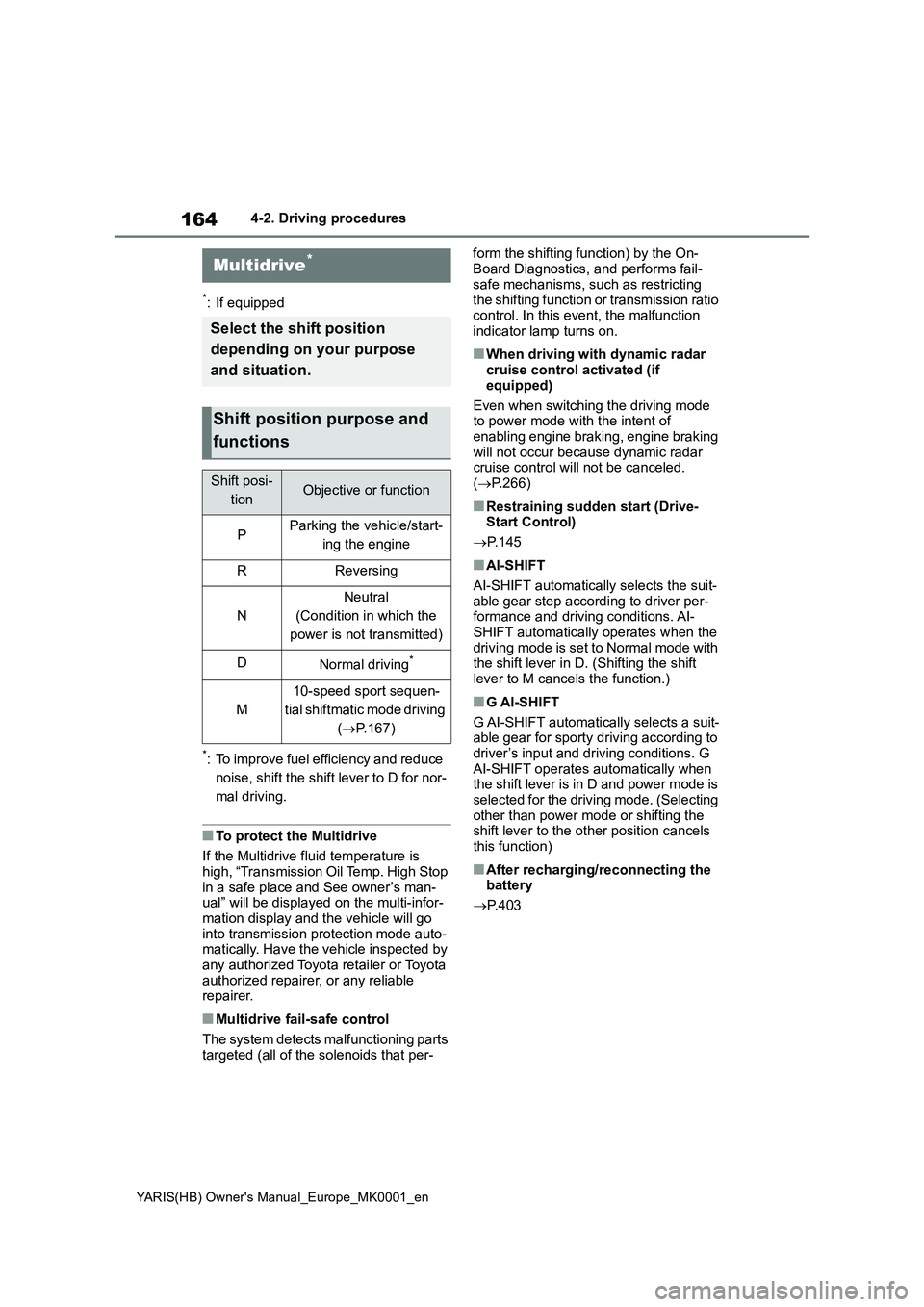
Multidrive*
Select the shift position
depending on your purpose
and situation.
Shift position purpose and
functions
Shift posi-
tionObjective or function
PParking the vehicle/start-
ing the engine
RReversing
N
Neutral
(Condition in which the
power is not transmitted)
DNormal driving*
M
10-speed sport sequen-
tial shiftmatic mode driving
(→P.167)
Page 191 of 568
191
4
YARIS(HB) Owner's Manual_Europe_MK0001_en
4-5. Using the driving support systems
Driving
■Certifications for the Toyota Safety Sense
→P. 5 2 0
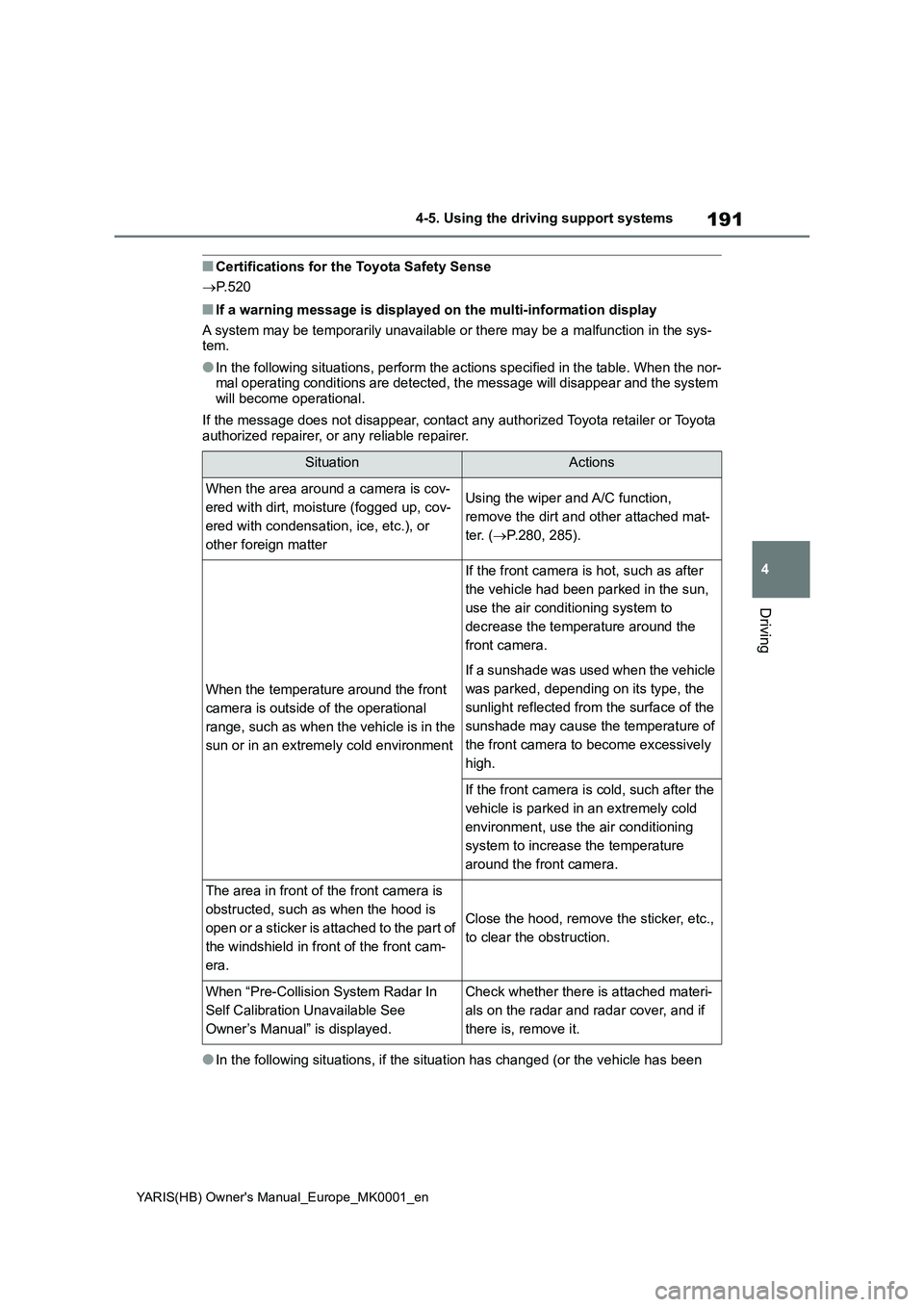
■If a warning message is displayed on the multi-information display
A system may be temporarily unavailable or there may be a malfunction in the sys-
tem.
●In the following situations, perform the actions specified in the table. When the nor-
mal operating conditions are detected, the message will disappear and the system
will become operational.
If the message does not disappear, contact any authorized Toyota retailer or Toyota
authorized repairer, or any reliable repairer.
●In the following situations, if the situation has changed (or the vehicle has been
SituationActions
When the area around a camera is cov-
ered with dirt, moisture (fogged up, cov-
ered with condensation, ice, etc.), or
other foreign matterUsing the wiper and A/C function,
remove the dirt and other attached mat-
ter. (→P.280, 285).
When the temperature around the front
camera is outside of the operational
range, such as when the vehicle is in the
sun or in an extremely cold environment
If the front camera is hot, such as after
the vehicle had been parked in the sun,
use the air conditioning system to
decrease the temperature around the
front camera.
If a sunshade was used when the vehicle
was parked, depending on its type, the
sunlight reflected from the surface of the
sunshade may cause the temperature of
the front camera to become excessively
high.
If the front camera is cold, such after the
vehicle is parked in an extremely cold
environment, use the air conditioning
system to increase the temperature
around the front camera.
The area in front of the front camera is
obstructed, such as when the hood is
open or a sticker is attached to the part of
the windshield in front of the front cam-
era.
Close the hood, remove the sticker, etc.,
to clear the obstruction.
When “Pre-Collision System Radar In
Self Calibration Unavailable See
Owner’s Manual” is displayed.Check whether there is attached materi-
als on the radar and radar cover, and if
there is, remove it.
Page 192 of 568
192
YARIS(HB) Owner's Manual_Europe_MK0001_en
4-5. Using the driving support systems
driven for some time) and the normal operating conditions are detected, the mes-
sage will disappear and the system will become operational.
If the message does not disappear, contact any authorized Toyota retailer or Toyota
authorized repairer, or any reliable repairer.
• When the temperature around the radar sensor is outside of the operational range,
such as when the vehicle is in the sun or in an extremely cold environment
• When the front camera cannot detect objects in front of the vehicle, such as when
driving in the dark, snow, or fog, or when bright lights are shining into the front
camera
• Depending on the conditions in the vicinity of the vehicle, the radar may judge the
surrounding environment can not be properly recognized. In that case, “Pre-Colli-
sion System Unavailable See Owner’s Manual” is displayed.
Page 204 of 568
204
YARIS(HB) Owner's Manual_Europe_MK0001_en
4-5. Using the driving support systems
WARNING
■Before using LTA system
●Do not rely solely upon the LTA sys-
tem. The LTA system does not automatically drive the vehicle or reduce the amount of attention that
must be paid to the area in front of the vehicle. The driver must always assume full responsibility for driving
safely by paying careful attention to the surrounding conditions and operating the steering wheel to cor-
rect the path of the vehicle. Also, the driver must take adequate breaks when fatigued, such as from
driving for a long period of time.
●Failure to perform appropriate driv-
ing operations and pay careful attention may lead to an accident, resulting in death or serious injury.
●When not using the LTA system, use the LTA switch to turn the sys-
tem off.
■Situations unsuitable for LTA
system
In the following situations, use the LTA switch to turn the system off. Fail-
ure to do so may lead to an accident, resulting in death or serious injury.
●Vehicle is driven on a road surface which is slippery due to rainy weather, fallen snow, freezing, etc.
●Vehicle is driven on a snow-cov-ered road.
●White (yellow) lines are difficult to see due to rain, snow, fog, dust,
etc.
●Vehicle is driven in a temporary
lane or restricted lane due to con- struction work.
●Vehicle is driven in a construction zone.
●A spare tire, tire chains, etc., are equipped.
●When the tires have been exces-sively worn, or when the tire infla-tion pressure is low.
●When tires of a size other than specified are installed.
●Vehicle is driven in traffic lanes other than that highways and free-
ways.
●When your vehicle is towing a
trailer or during emergency towing
■Preventing LTA system malfunc-
tions and operations performed by mistake
●Do not modify the headlights or
place stickers, etc., on the surface of the lights.
●Do not modify the suspension, etc. If the suspension, etc., needs to be replaced, contact any authorized
Toyota retailer or Toyota authorized repairer, or any reliable repairer.
●Do not install or place anything on the hood or grille. Also, do not install a grille guard (bull bars, kan-
garoo bar, etc.).
●If your windshield needs repairs,
contact any authorized Toyota retailer or Toyota authorized repairer, or any reliable repairer.
■Conditions in which functions may not operate properly
In the following situations, the func- tions may not operate properly and the vehicle may depart from its lane.
Drive safely by always paying careful attention to your surroundings and operate the steering wheel to correct
the path of the vehicle without relying solely on the functions.
Page 212 of 568
212
YARIS(HB) Owner's Manual_Europe_MK0001_en
4-5. Using the driving support systems
or a curb
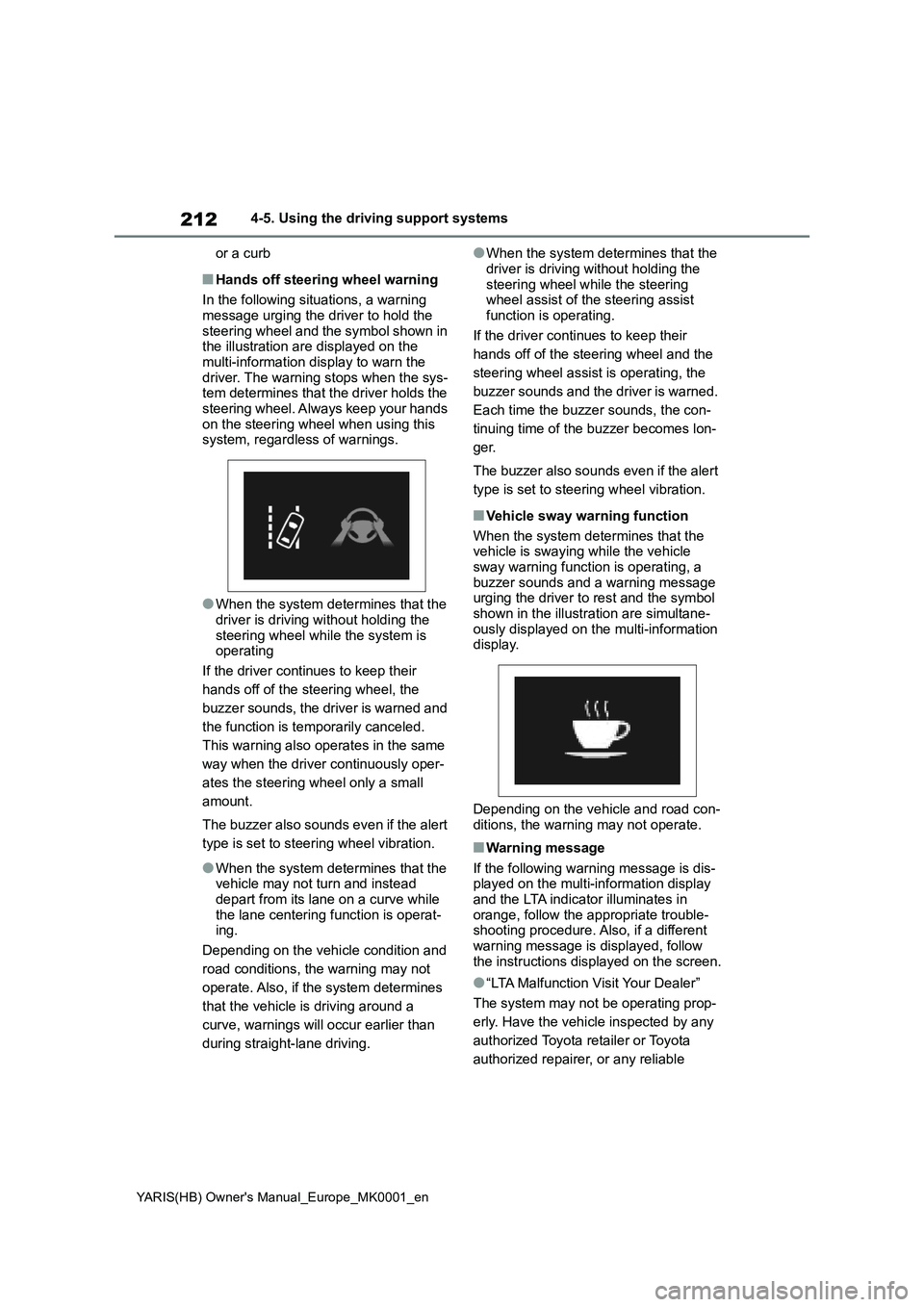
■Hands off steering wheel warning
In the following situations, a warning
message urging the driver to hold the
steering wheel and the symbol shown in
the illustration are displayed on the
multi-information display to warn the
driver. The warning stops when the sys-
tem determines that the driver holds the
steering wheel. Always keep your hands
on the steering wheel when using this
system, regardless of warnings.
●When the system determines that the
driver is driving without holding the
steering wheel while the system is
operating
If the driver continues to keep their
hands off of the steering wheel, the
buzzer sounds, the driver is warned and
the function is temporarily canceled.
This warning also operates in the same
way when the driver continuously oper-
ates the steering wheel only a small
amount.
The buzzer also sounds even if the alert
type is set to steering wheel vibration.
●When the system determines that the
vehicle may not turn and instead
depart from its lane on a curve while
the lane centering function is operat-
ing.
Depending on the vehicle condition and
road conditions, the warning may not
operate. Also, if the system determines
that the vehicle is driving around a
curve, warnings will occur earlier than
during straight-lane driving.
●When the system determines that the
driver is driving without holding the
steering wheel while the steering
wheel assist of the steering assist
function is operating.
If the driver continues to keep their
hands off of the steering wheel and the
steering wheel assist is operating, the
buzzer sounds and the driver is warned.
Each time the buzzer sounds, the con-
tinuing time of the buzzer becomes lon-
ger.
The buzzer also sounds even if the alert
type is set to steering wheel vibration.
■Vehicle sway warning function
When the system determines that the
vehicle is swaying while the vehicle
sway warning function is operating, a
buzzer sounds and a warning message
urging the driver to rest and the symbol
shown in the illustration are simultane-
ously displayed on the multi-information
display.
Depending on the vehicle and road con-
ditions, the warning may not operate.
■Warning message
If the following warning message is dis-
played on the multi-information display
and the LTA indicator illuminates in
orange, follow the appropriate trouble-
shooting procedure. Also, if a different
warning message is displayed, follow
the instructions displayed on the screen.
●“LTA Malfunction Visit Your Dealer”
The system may not be operating prop-
erly. Have the vehicle inspected by any
authorized Toyota retailer or Toyota
authorized repairer, or any reliable
Page 222 of 568
222
YARIS(HB) Owner's Manual_Europe_MK0001_en
4-5. Using the driving support systems
●The parking brake is operated.
If vehicle-to-vehicle distance control
mode is automatically canceled for any
reasons other than the above, there
may be a malfunction in the system.
Contact any authorized Toyota retailer
or Toyota authorized repairer, or any reli-
able repairer.
■Automatic cancelation of constant
speed control mode
Constant speed control mode is auto-
matically canceled in the following situa-
tions:
●Actual vehicle speed is more than
approximately 16 km/h (10 mph)
below the set vehicle speed.
●Actual vehicle speed falls below
approximately 30 km/h (20 mph).
●VSC is activated.
●TRC is activated for a period of time.
●When the VSC or TRC system is
turned off.
●Pre-collision braking is activated.
●Vehicles with manual transmission:
When the shift lever is in N or the
clutch pedal is depressed for a certain
amount of time or more.
●The parking brake is operated.
If constant speed control mode is auto-
matically canceled for any reasons other
than the above, there may be a malfunc-
tion in the system. Contact any autho-
rized Toyota retailer or Toyota
authorized repairer, or any reliable
repairer.
■The Radar Cruise Control with
Road Sign Assist may not operate
properly when
As the Radar Cruise Control with Road
Sign Assist may not operate properly in
conditions in which RSA may not oper-
ate or detect correctly (→P.229), when
using this function, make sure to check
the speed limit sign displayed.
In the following situations, the set speed
may not be changed to the recognized
speed limit by pressing and holding the “+RES”/“-SET” switch.
●If speed limit information is not avail-
able
●When the recognized speed limit is
the same as the set speed
●When the recognized speed limit is
outside of the speed range that the
dynamic radar cruise control system
can operate
■Brake operation
A brake operation sound may be heard
and the brake pedal response may
change, but these are not malfunctions.
■Warning messages and buzzers for
dynamic radar cruise control
Warning messages and buzzers are
used to indicate a system malfunction or
to inform the driver of the need for cau-
tion while driving. If a warning message
is shown on the multi-information dis-
play, read the message and follow the
instructions. (→P.191, 377)
■When the sensor may not be cor-
rectly detecting the vehicle ahead
In the case of the following and depend-
ing on the conditions, operate the brake
pedal when deceleration of the system
is insufficient or operate the accelerator
pedal when acceleration is required.
As the sensor may not be able to cor-
rectly detect these types of vehicles, the
approach warning (→P.219) may not be
activated.
●Vehicles that cut in suddenly
●Vehicles traveling at low speeds
●Vehicles that are not moving in the
same lane
●Vehicles with small rear ends (trailers
with no load on board, etc.)