Vehicle spec TOYOTA YARIS 2021 Owner's Guide
[x] Cancel search | Manufacturer: TOYOTA, Model Year: 2021, Model line: YARIS, Model: TOYOTA YARIS 2021Pages: 568, PDF Size: 110.34 MB
Page 191 of 568
191
4
YARIS(HB) Owner's Manual_Europe_MK0001_en
4-5. Using the driving support systems
Driving
■Certifications for the Toyota Safety Sense
→P. 5 2 0
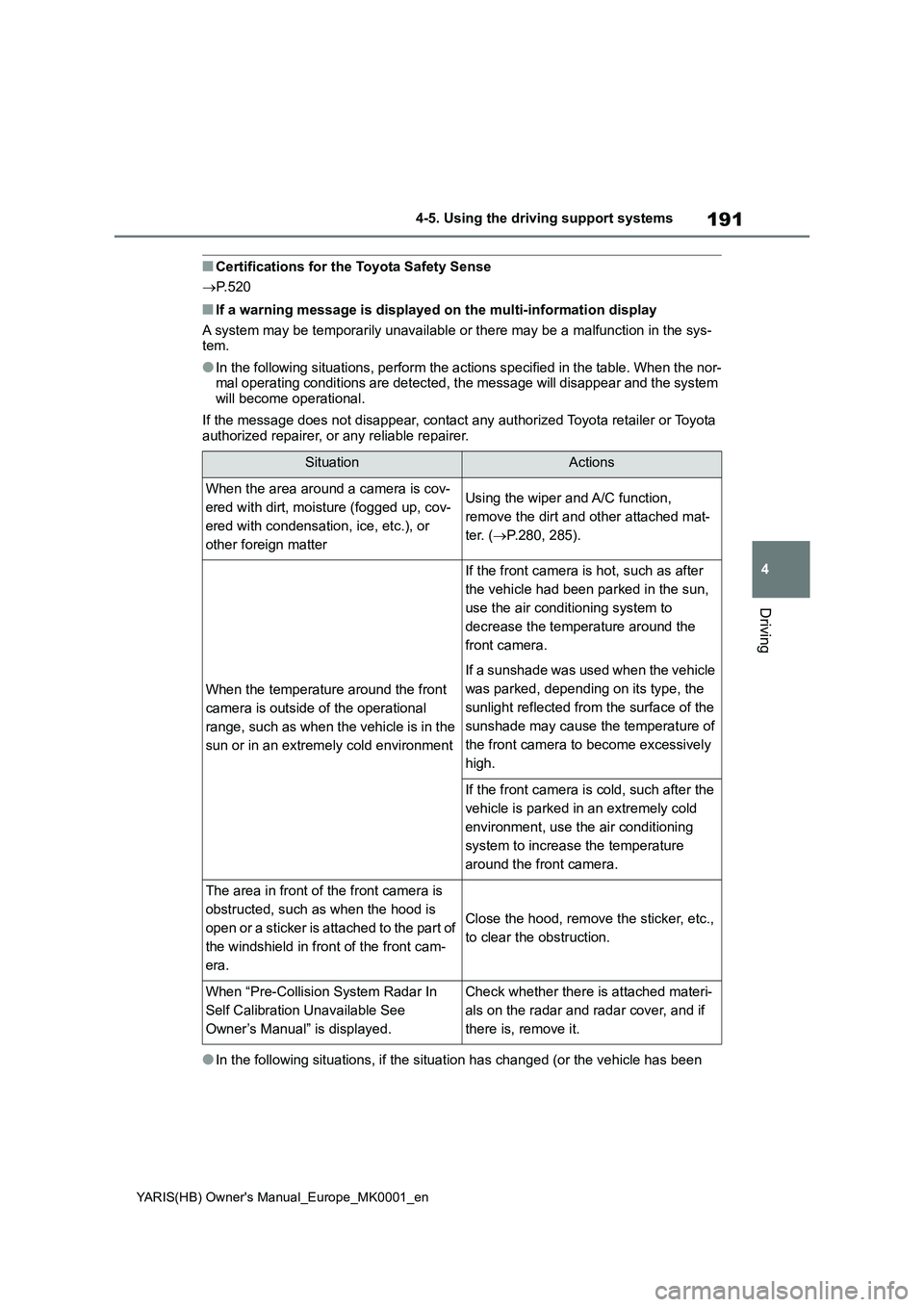
■If a warning message is displayed on the multi-information display
A system may be temporarily unavailable or there may be a malfunction in the sys-
tem.
●In the following situations, perform the actions specified in the table. When the nor-
mal operating conditions are detected, the message will disappear and the system
will become operational.
If the message does not disappear, contact any authorized Toyota retailer or Toyota
authorized repairer, or any reliable repairer.
●In the following situations, if the situation has changed (or the vehicle has been
SituationActions
When the area around a camera is cov-
ered with dirt, moisture (fogged up, cov-
ered with condensation, ice, etc.), or
other foreign matterUsing the wiper and A/C function,
remove the dirt and other attached mat-
ter. (→P.280, 285).
When the temperature around the front
camera is outside of the operational
range, such as when the vehicle is in the
sun or in an extremely cold environment
If the front camera is hot, such as after
the vehicle had been parked in the sun,
use the air conditioning system to
decrease the temperature around the
front camera.
If a sunshade was used when the vehicle
was parked, depending on its type, the
sunlight reflected from the surface of the
sunshade may cause the temperature of
the front camera to become excessively
high.
If the front camera is cold, such after the
vehicle is parked in an extremely cold
environment, use the air conditioning
system to increase the temperature
around the front camera.
The area in front of the front camera is
obstructed, such as when the hood is
open or a sticker is attached to the part of
the windshield in front of the front cam-
era.
Close the hood, remove the sticker, etc.,
to clear the obstruction.
When “Pre-Collision System Radar In
Self Calibration Unavailable See
Owner’s Manual” is displayed.Check whether there is attached materi-
als on the radar and radar cover, and if
there is, remove it.
Page 196 of 568
196
YARIS(HB) Owner's Manual_Europe_MK0001_en
4-5. Using the driving support systems
■Enabling/disabling the pre-col-
lision system
The pre-collision system can be
enabled/disabled on ( →P.422)
of the multi-information display.
The system is automatically enabled
each time the engine switch is turned to
ON.
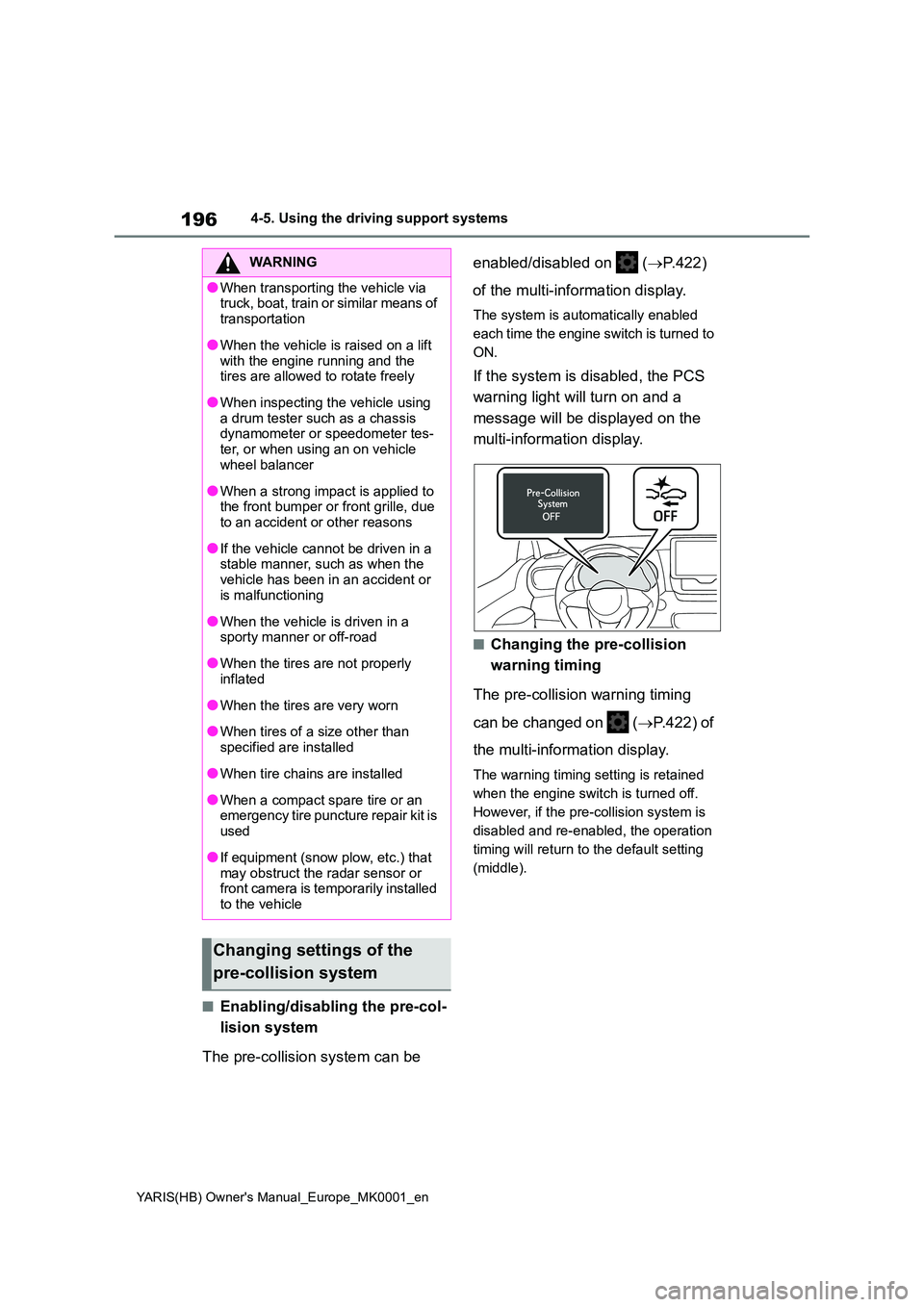
If the system is disabled, the PCS
warning light will turn on and a
message will be displayed on the
multi-information display.
■Changing the pre-collision
warning timing
The pre-collision warning timing
can be changed on ( →P.422) of
the multi-information display.
The warning timing setting is retained
when the engine switch is turned off.
However, if the pre-collision system is
disabled and re-enabled, the operation
timing will return to the default setting
(middle).
WARNING
●When transporting the vehicle via truck, boat, train or similar means of
transportation
●When the vehicle is raised on a lift
with the engine running and the tires are allowed to rotate freely
●When inspecting the vehicle using a drum tester such as a chassis dynamometer or speedometer tes-
ter, or when using an on vehicle wheel balancer
●When a strong impact is applied to the front bumper or front grille, due to an accident or other reasons
●If the vehicle cannot be driven in a stable manner, such as when the
vehicle has been in an accident or is malfunctioning
●When the vehicle is driven in a sporty manner or off-road
●When the tires are not properly inflated
●When the tires are very worn
●When tires of a size other than
specified are installed
●When tire chains are installed
●When a compact spare tire or an emergency tire puncture repair kit is
used
●If equipment (snow plow, etc.) that
may obstruct the radar sensor or front camera is temporarily installed to the vehicle
Changing settings of the
pre-collision system
Page 204 of 568
204
YARIS(HB) Owner's Manual_Europe_MK0001_en
4-5. Using the driving support systems
WARNING
■Before using LTA system
●Do not rely solely upon the LTA sys-
tem. The LTA system does not automatically drive the vehicle or reduce the amount of attention that
must be paid to the area in front of the vehicle. The driver must always assume full responsibility for driving
safely by paying careful attention to the surrounding conditions and operating the steering wheel to cor-
rect the path of the vehicle. Also, the driver must take adequate breaks when fatigued, such as from
driving for a long period of time.
●Failure to perform appropriate driv-
ing operations and pay careful attention may lead to an accident, resulting in death or serious injury.
●When not using the LTA system, use the LTA switch to turn the sys-
tem off.
■Situations unsuitable for LTA
system
In the following situations, use the LTA switch to turn the system off. Fail-
ure to do so may lead to an accident, resulting in death or serious injury.
●Vehicle is driven on a road surface which is slippery due to rainy weather, fallen snow, freezing, etc.
●Vehicle is driven on a snow-cov-ered road.
●White (yellow) lines are difficult to see due to rain, snow, fog, dust,
etc.
●Vehicle is driven in a temporary
lane or restricted lane due to con- struction work.
●Vehicle is driven in a construction zone.
●A spare tire, tire chains, etc., are equipped.
●When the tires have been exces-sively worn, or when the tire infla-tion pressure is low.
●When tires of a size other than specified are installed.
●Vehicle is driven in traffic lanes other than that highways and free-
ways.
●When your vehicle is towing a
trailer or during emergency towing
■Preventing LTA system malfunc-
tions and operations performed by mistake
●Do not modify the headlights or
place stickers, etc., on the surface of the lights.
●Do not modify the suspension, etc. If the suspension, etc., needs to be replaced, contact any authorized
Toyota retailer or Toyota authorized repairer, or any reliable repairer.
●Do not install or place anything on the hood or grille. Also, do not install a grille guard (bull bars, kan-
garoo bar, etc.).
●If your windshield needs repairs,
contact any authorized Toyota retailer or Toyota authorized repairer, or any reliable repairer.
■Conditions in which functions may not operate properly
In the following situations, the func- tions may not operate properly and the vehicle may depart from its lane.
Drive safely by always paying careful attention to your surroundings and operate the steering wheel to correct
the path of the vehicle without relying solely on the functions.
Page 212 of 568
212
YARIS(HB) Owner's Manual_Europe_MK0001_en
4-5. Using the driving support systems
or a curb
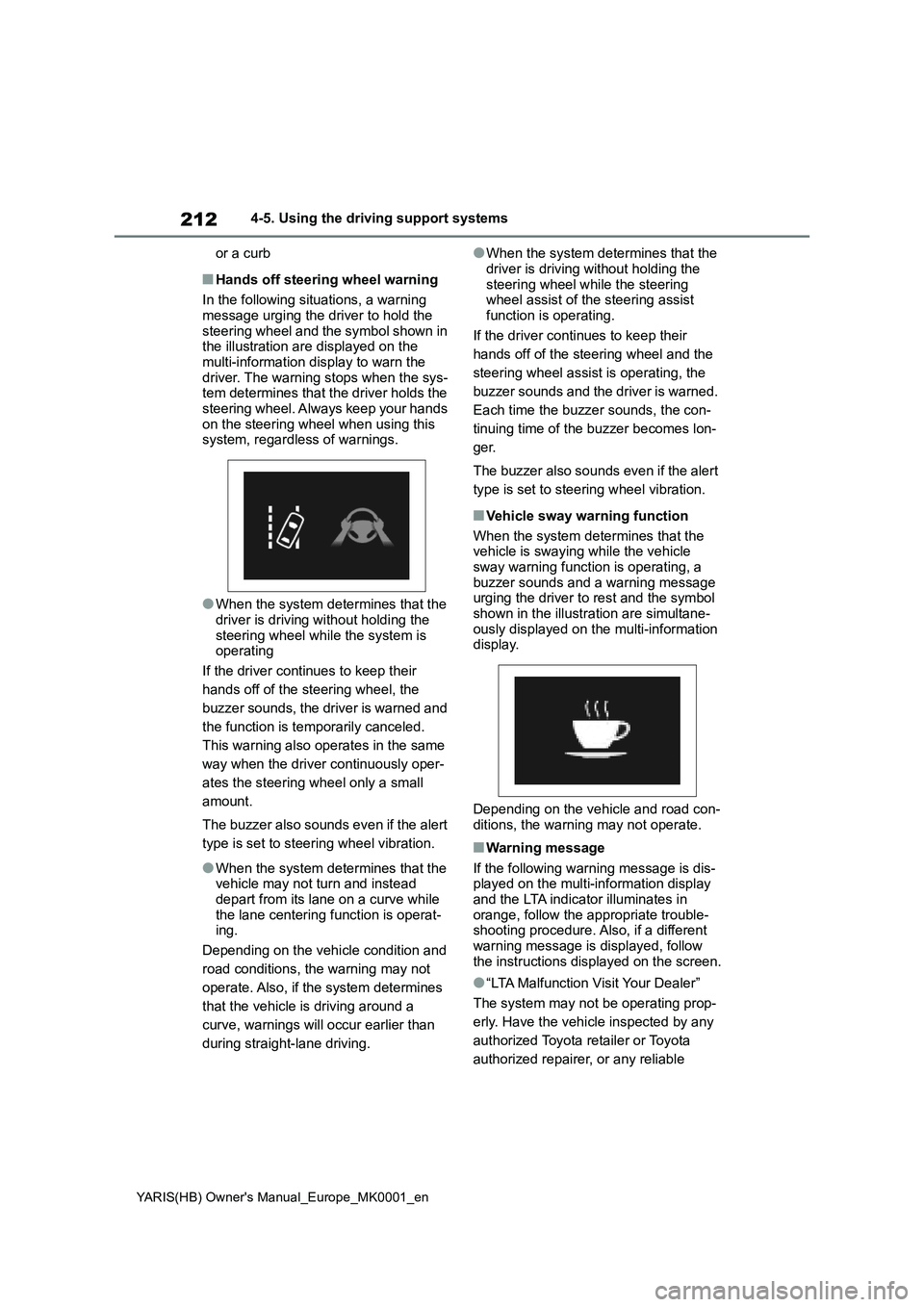
■Hands off steering wheel warning
In the following situations, a warning
message urging the driver to hold the
steering wheel and the symbol shown in
the illustration are displayed on the
multi-information display to warn the
driver. The warning stops when the sys-
tem determines that the driver holds the
steering wheel. Always keep your hands
on the steering wheel when using this
system, regardless of warnings.
●When the system determines that the
driver is driving without holding the
steering wheel while the system is
operating
If the driver continues to keep their
hands off of the steering wheel, the
buzzer sounds, the driver is warned and
the function is temporarily canceled.
This warning also operates in the same
way when the driver continuously oper-
ates the steering wheel only a small
amount.
The buzzer also sounds even if the alert
type is set to steering wheel vibration.
●When the system determines that the
vehicle may not turn and instead
depart from its lane on a curve while
the lane centering function is operat-
ing.
Depending on the vehicle condition and
road conditions, the warning may not
operate. Also, if the system determines
that the vehicle is driving around a
curve, warnings will occur earlier than
during straight-lane driving.
●When the system determines that the
driver is driving without holding the
steering wheel while the steering
wheel assist of the steering assist
function is operating.
If the driver continues to keep their
hands off of the steering wheel and the
steering wheel assist is operating, the
buzzer sounds and the driver is warned.
Each time the buzzer sounds, the con-
tinuing time of the buzzer becomes lon-
ger.
The buzzer also sounds even if the alert
type is set to steering wheel vibration.
■Vehicle sway warning function
When the system determines that the
vehicle is swaying while the vehicle
sway warning function is operating, a
buzzer sounds and a warning message
urging the driver to rest and the symbol
shown in the illustration are simultane-
ously displayed on the multi-information
display.
Depending on the vehicle and road con-
ditions, the warning may not operate.
■Warning message
If the following warning message is dis-
played on the multi-information display
and the LTA indicator illuminates in
orange, follow the appropriate trouble-
shooting procedure. Also, if a different
warning message is displayed, follow
the instructions displayed on the screen.
●“LTA Malfunction Visit Your Dealer”
The system may not be operating prop-
erly. Have the vehicle inspected by any
authorized Toyota retailer or Toyota
authorized repairer, or any reliable
Page 225 of 568
225
4
YARIS(HB) Owner's Manual_Europe_MK0001_en
4-5. Using the driving support systems
Driving
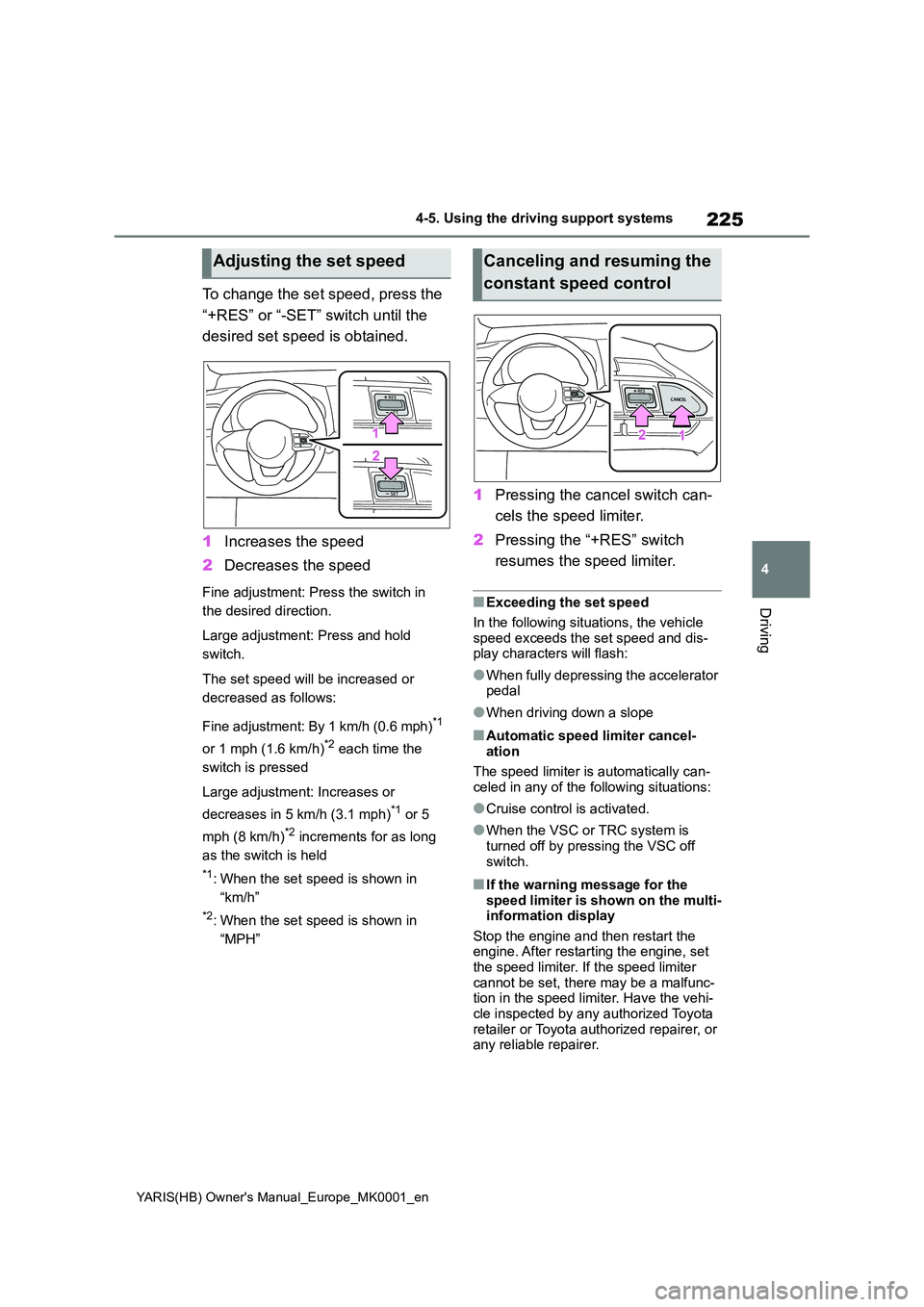
To change the set speed, press the
“+RES” or “-SET” switch until the
desired set speed is obtained.
1 Increases the speed
2 Decreases the speed
Fine adjustment: Press the switch in
the desired direction.
Large adjustment: Press and hold
switch.
The set speed will be increased or
decreased as follows:
Fine adjustment: By 1 km/h (0.6 mph)*1
or 1 mph (1.6 km/h)*2 each time the
switch is pressed
Large adjustment: Increases or
decreases in 5 km/h (3.1 mph)*1 or 5
mph (8 km/h)*2 increments for as long
as the switch is held
*1: When the set speed is shown in
“km/h”
*2: When the set speed is shown in
“MPH”
1 Pressing the cancel switch can-
cels the speed limiter.
2 Pressing the “+RES” switch
resumes the speed limiter.
■Exceeding the set speed
In the following situations, the vehicle
speed exceeds the set speed and dis- play characters will flash:
●When fully depressing the accelerator pedal
●When driving down a slope
■Automatic speed limiter cancel-ation
The speed limiter is automatically can-
celed in any of the following situations:
●Cruise control is activated.
●When the VSC or TRC system is turned off by pressing the VSC off
switch.
■If the warning message for the speed limiter is shown on the multi-information display
Stop the engine and then restart the engine. After restarting the engine, set the speed limiter. If the speed limiter
cannot be set, there may be a malfunc- tion in the speed limiter. Have the vehi-cle inspected by any authorized Toyota
retailer or Toyota authorized repairer, or any reliable repairer.
Adjusting the set speedCanceling and resuming the
constant speed control
Page 226 of 568
226
YARIS(HB) Owner's Manual_Europe_MK0001_en
4-5. Using the driving support systems
*: If equipped
WARNING
■To avoid operating the speed lim- iter by mistake
Switch the speed limiter off using the speed limiter main switch when not in use.
■Situations unsuitable for speed limiter
Do not use speed limiter in any of the following situations.Doing so may result in loss of control
and could cause an accident resulting in death or serious injury.
●On slippery roads, such as those covered with rain, ice or snow
●On steep hills
●When your vehicle is towing a
trailer or during emergency towing
RSA (Road Sign Assist)*
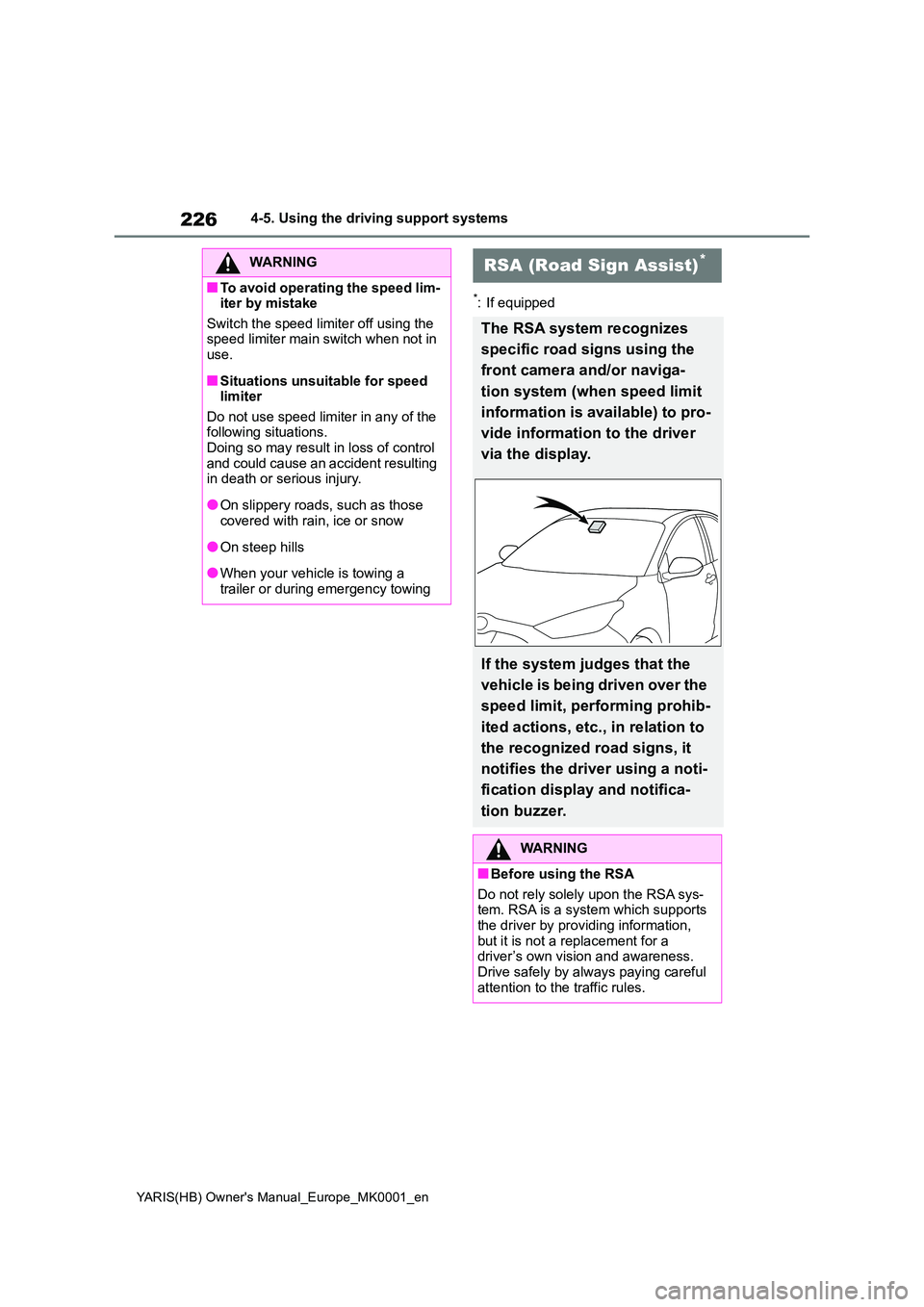
The RSA system recognizes
specific road signs using the
front camera and/or naviga-
tion system (when speed limit
information is available) to pro-
vide information to the driver
via the display.
If the system judges that the
vehicle is being driven over the
speed limit, performing prohib-
ited actions, etc., in relation to
the recognized road signs, it
notifies the driver using a noti-
fication display and notifica-
tion buzzer.
WARNING
■Before using the RSA
Do not rely solely upon the RSA sys- tem. RSA is a system which supports the driver by providing information,
but it is not a replacement for a driver’s own vision and awareness. Drive safely by always paying careful
attention to the traffic rules.
Page 230 of 568
230
YARIS(HB) Owner's Manual_Europe_MK0001_en
4-5. Using the driving support systems
ficient or changes suddenly.
●When a sign intended for trucks, etc.,
is recognized.
●The vehicle is driven in a country with
a different direction of traffic.
●The navigation system map data is
outdated.
●The navigation system is not operat-
ing.
●The speed information displayed on
the meter and that displayed on the
navigation system may be different
due to the navigation system using
map data.
■Speed limit sign display
If the engine switch was last turned off
while a speed limit sign was displayed
on the multi-information display, the
same sign displays again when the
engine switch is turned to ON.
■If “RSA Malfunction Visit Your
Dealer” is shown
The system may be malfunctioning.
Have the vehicle inspected by any
authorized Toyota retailer or Toyota
authorized repairer, or any reliable
repairer.
■Customization
Some functions can be customized.
(→P.422)
*: If equipped
■Stopping the engine
Vehicles with a Multidrive
While driving with the D shift posi-
tion selected, depress the brake
pedal and stop the vehicle. The
engine will stop automatically.
When the engine stops, the Stop &
Start indicator will illuminate.
Stop & Start system*
Multidrive: The Stop & Start
system stops and starts the
engine according to brake
pedal or shift lever operation
when the vehicle is stopped,
such as at a stoplight, inter-
section, etc., in order to
improve fuel economy and
reduce noise pollution caused
by the engine idling.
Manual transmission: The
Stop & Start system stops and
starts the engine according to
clutch pedal or shift lever
operation when the vehicle is
stopped, such as at a stop-
light, intersection, etc., in
order to improve fuel economy
and reduce noise pollution
caused by the engine idling.
Stop & Start system opera-
tion
Page 234 of 568
234
YARIS(HB) Owner's Manual_Europe_MK0001_en
4-5. Using the driving support systems
If the idling stop time setting is set to
“Extended”, change it to “Standard”. If
an odor is emitted when the idling stop
time setting is set to “Standard”, press
the Stop & Start cancel switch to deacti-
vate the Stop & Start system.
• Vehicles with an automatic air condi-
tioning system
Press the Stop & Start cancel switch to
deactivate the Stop & Start system.
■Changing the idling stop time with
the air conditioning system on
The length of time the Stop & Start sys-
tem will operate when the air condition-
ing system is on can be changed in
of the multi-information display (→P.93,
99). (The length of time the Stop & Start
system will operate when the air condi-
tioning system is off cannot be
changed.)
■Displaying the Stop & Start system
status
→P.98, 104
■Multi-information display mes-
sages
If the following situations, and a
message may be displayed on the multi-
information display.
●When the engine cannot be stopped
by the Stop & Start system
“Press Brake More to Activate”
*
• The brake pedal is not sufficiently
depressed.
→If the brake pedal is depressed fur-
ther, the system will operate.
*: Vehicles with a Multidrive
“Non-Dedicated Battery”
• A battery not designed for use with a
Stop & Start system may have been
installed.
→Have the vehicle inspected by any authorized Toyota retailer or Toyota
authorized repairer, or any reliable
repairer.
“Battery Charging”
• The battery charge may be low.
→Stopping of the engine is temporarily
prohibited to prioritize charging of the
battery. After the engine runs for a cer-
tain amount of time, the system will be
enabled.
• A refresh charge may be occurring
→After a refresh charge for up to an
hour completes, the system can be
operated.
• If displayed continuously for a long
time (more than an hour)
→The battery may be deteriorated. Con-
tact any authorized Toyota retailer or
Toyota authorized repairer, or any reli-
able repairer for details.
“Stop & Start Unavailable”
• The Stop & Start system is temporarily
disabled.
→Allow the engine to run for some time.
• The engine may have been started
with the hood open.
→Close the hood, turn the engine
switch off, wait for 30 seconds or more,
and then start the engine.
“In Preparation”
• The vehicle is being driven in a high
altitude area.
• Vehicles with a Multidrive: The brake
booster vacuum is low.
→When the brake booster vacuum
reaches a predetermined level, the sys-
tem will be enabled.
“For Climate Control”
• The air conditioning system is being
used when the ambient temperature is
high or low.
Page 235 of 568
235
4
YARIS(HB) Owner's Manual_Europe_MK0001_en
4-5. Using the driving support systems
Driving
→If the difference between the set tem-
perature and cabin temperature
becomes small, the system will be
enabled.
• The windshield defogger is on.
●When the engine automatically
restarts while stopped by the Stop &
Start system
“In Preparation”
*
• The brake pedal has been depressed
further or pumped.
→The system will be enabled after the
engine runs and the brake booster vac-
uum reaches a predetermined level.
*: Vehicles with a Multidrive
“For Climate Control”
• The air conditioning system has been
turned on or is being used.
• The windshield defogger has been
turned on.
“Battery Charging”
• The battery charge may be low.
→The engine is restarted to prioritize
battery charging. After the engine runs
for a certain amount of time, the system
will be enabled. (vehicle with a Manual
Transmission)
→The system will be enabled after the
engine runs to sufficiently charge the
battery. (vehicle with a Multidrive)
●When the engine cannot be restarted
by the Stop & Start system
“Shift to N and Press Clutch to Restart”
*
→When the engine is stopped by the
Stop & Start system, the shift lever was
moved to a position other than N without
depressing the clutch pedal.
*: Vehicles with a manual transmission
■When a buzzer sounds (vehicles
with a Multidrive)
If the driver’s door is opened when the
engine is stopped by the Stop & Start
system and the shift lever is in D, a
buzzer will sound and the Stop & Start
system indicator will flash. To stop the
buzzer, close the driver’s door.
■The Stop & Start system protection
function
●When the volume of the audio system
is excessively high, sound output from
the audio system may suddenly be cut
off in order to reduce battery con-
sumption. To prevent the audio sys-
tem from being cut off, keep the
volume of audio system at a moderate
level. If the audio system has been cut
off, turn the engine switch off, wait for
3 seconds or more and then turn it to
ACC or ON to re-enable the audio
system.
●The audio system may not be acti-
vated if the battery terminals are dis-
connected and then reconnected. If
this occurs, turn the engine switch off
and then repeat the following opera-
tion twice to activate the audio system
normally.
• Turn the engine switch to ON and
then to off.
■Replacing the battery
→P. 4 0 4
■If the Stop & Start cancel indicator
flashes continuously
The system may be malfunctioning.
Have the vehicle inspected by any
authorized Toyota retailer or Toyota
authorized repairer, or any reliable
repairer.
■If “Stop & Start System Malfunction
Visit Your Dealer” is displayed on
the multi-information display
The system may be malfunctioning.
Have the vehicle inspected by any
authorized Toyota retailer or Toyota
authorized repairer, or any reliable
repairer.
Page 236 of 568
236
YARIS(HB) Owner's Manual_Europe_MK0001_en
4-5. Using the driving support systems
WARNING
■When the Stop & Start system is operating
Make sure to disable the Stop & Start system while the vehicle is in a poorly ventilated area.
If not disabled, the engine may be automatically restarted unexpectedly, causing exhaust gases to collect and
enter the vehicle, possibly resulting in death or a serious health hazard.
●Do not leave the vehicle while the
engine is stopped by the Stop & Start system (while the Stop & Start indicator is on). An accident may
occur due to the automatic engine start function.
●Depress the brake pedal and apply the parking brake when necessary while the engine is stopped by the
Stop & Start system (while the Stop & Start indicator is on).
NOTICE
■To ensure the system operates correctly
If any of the following situations occur, the Stop & Start system may not oper-ate correctly. Have your vehicle
inspected by any authorized Toyota retailer or Toyota authorized repairer, or any reliable repairer.
●While the driver’s seat belt is fas-tened, the driver’s and front pas-senger’s seat belt reminder light
flashes.
●Even though the driver’s seat belt is
not fastened, the driver’s and front passenger’s seat belt reminder light does not illuminate.
●Even though the driver’s door is closed, the open door warning light
is illuminated or the interior light is illuminated when the interior light switch is in the door position.
●Even though the driver’s door is open, the open door warning light does not illuminate or the interior
light does not illuminate when the interior light switch is in the door position.
■If the engine stalls (vehicles with a manual transmission)
If the Stop & Start system is enabled and the clutch pedal is depressed quickly, the engine may restart.