Vehicle spec TOYOTA YARIS 2021 User Guide
[x] Cancel search | Manufacturer: TOYOTA, Model Year: 2021, Model line: YARIS, Model: TOYOTA YARIS 2021Pages: 568, PDF Size: 110.34 MB
Page 47 of 568
47
1
YARIS(HB) Owner's Manual_Europe_MK0001_en
1-2. Child safety
For safety and security
Points to remember: P.47
When using a child restraint sys-
tem: P.48
Child restraint system compatibility
for each seating position: P.51
Child restraint system installation
method: P.60
• Fixed with a seat belt: P.61
• Fixed with an ISOFIX lower
anchorage: P.63
• Using a top tether anchorage:
P. 6 4
z Prioritize and observe the warn-
ings, as well as the laws and reg-
ulations for child restraint
systems.
z Use a child restraint system until
the child becomes large enough
to properly wear the vehicle’s
seat belt.
z Choose a child restraint system
appropriate to the age and size
of the child.
z Note that not all child restraint
systems can fit in all vehicles.
Before using or purchasing a
child restraint system, check the
compatibility of the child restraint
system with seat positions.
( →P. 5 1 )
Child restraint systems
Before installing a child
restraint system in the vehicle,
there are precautions that need
to be observed, different types
of child restraint systems, as
well as installation methods,
etc., written in this manual.
z Use a child restraint system
when riding with a small child
that cannot properly use a seat
belt. For the child’s safety,
install the child restraint sys-
tem to a rear seat. Be sure to
follow the installation method
that is in the operation manual
enclosed with the restraint sys-
tem.
z The use of a Toyota genuine
child restraint system is rec-
ommended, as it is safer to
use in this vehicle. Toyota gen-
uine child restraint systems
are made specifically for
Toyota vehicles. They can be
purchased at a Toyota dealer.
Table of contents
Points to remember
WARNING
■When a child is riding
Observe the following precautions. Failure to do so may result in death or
serious injury.
Page 52 of 568
52
YARIS(HB) Owner's Manual_Europe_MK0001_en
1-2. Child safety
indicated.
UN (ECE) R129 approval
mark*3
The height range of the child
who is applicable as well as
available weights for an UN
(ECE) R129 approval mark is
indicated.
2 Checking the category of the
child restraint system.
Check the approval mark of the
child restraint system for which
of the following categories the
child restraint system is suitable.
Also, if there are any uncertain-
ties, check the user’s guide
included with the child restraint
system or contact the retailer of
the child restraint system.
•“universal”
• “semi-universal”
• “restricted”
• “vehicle specific”
*1: UN (ECE) R44 and UN (ECE) R129
are U.N. regulations for child
restraint systems.
*2: The child restraint systems men-
tioned in the table may not be avail-
able outside of the EU area.
*3: The displayed mark may differ
depending on the product.
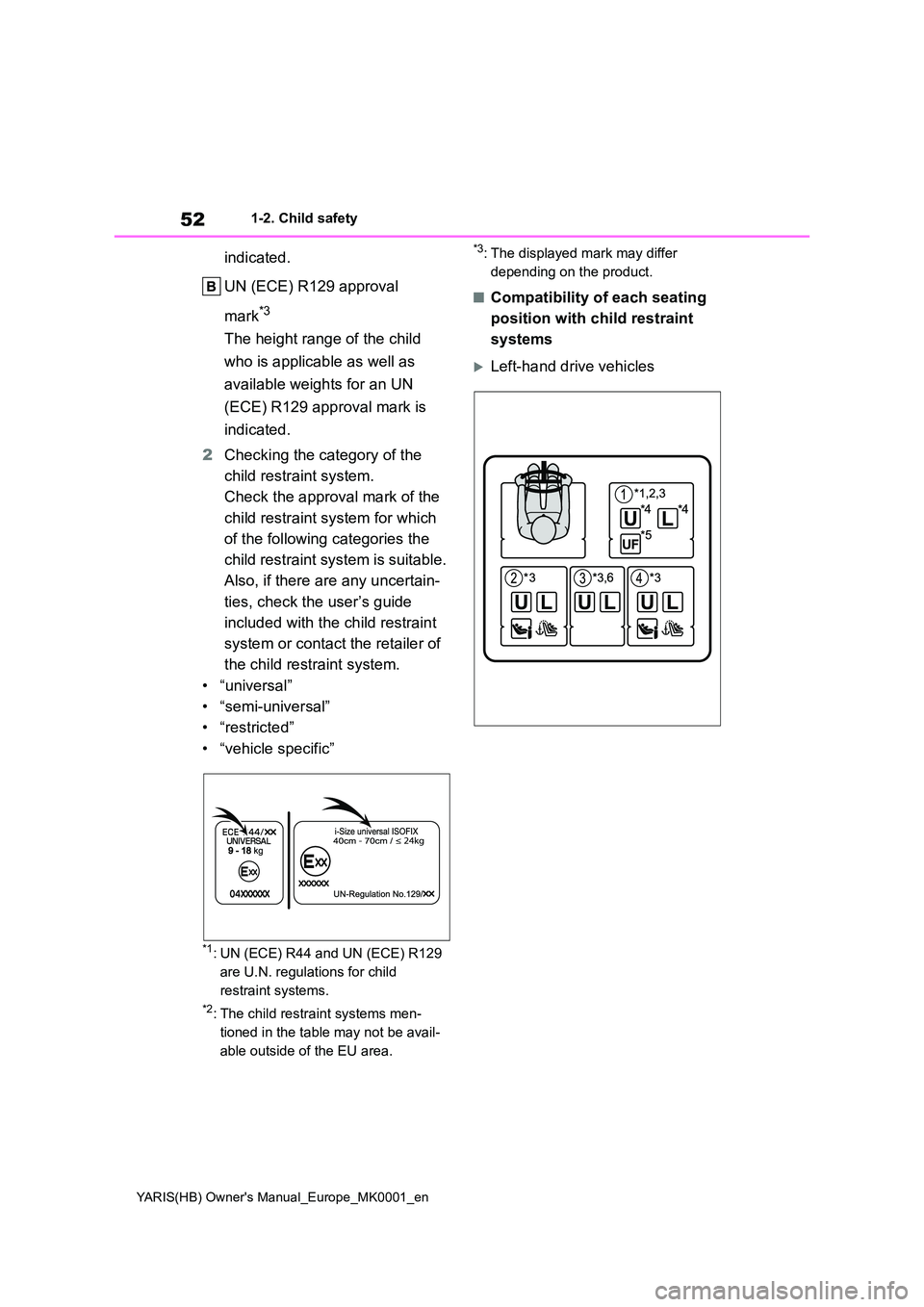
■Compatibility of each seating
position with child restraint
systems
Left-hand drive vehicles
Page 68 of 568
68
YARIS(HB) Owner's Manual_Europe_MK0001_en
1-3. Emergency assistance
WARNING
• During an Emergency Call, the sys- tem makes repeated attempts to
connect to the eCall control center. However, if it cannot connect to the eCall control center due to poor
radio wave reception, the system may not be able to connect to the cellular network and the call may
finish without connecting. The red indicator light will blink for approxi-mately 30 seconds to indicate this
disconnection.
●If the battery’s voltage decreases or
there is a disconnection, the system may not be able to connect to the eCall control center.
●The Emergency Call system might not work outside of EU area,
depending on the available infra- structure in the country.
■When the Emergency Call sys-tem is replaced with a new one
The Emergency Call system should
be registered. Contact any authorized Toyota retailer or Toyota authorized repairer, or any reliable repairer.
■For your safety
●Please drive safely.
The function of this system is to assist you in making the Emer-gency Call in case of accidents
such as traffic accidents or sudden medical emergencies, and it does not protect the driver or passengers
in any way. Please drive safely and fasten your seatbelts at all times for your safety.
●In case of an emergency, make lives the top priority.
●If you smell anything burning or other unusual smells, leave the
vehicle and evacuate to a safe area immediately.
●If the airbags deploy when the sys-tem is operating normally, the sys-tem makes emergency call. The
system also makes emergency call when the vehicle is struck from the rear or rolls over, even if the airbags
do not deploy.
●For safety, do not make the Emer-
gency Call while driving. Making calls during driving may cause mishandling of the steering
wheel, which may lead to unex- pected accidents.Stop the vehicle and confirm the
safety of your surroundings before making the Emergency Call.
●When changing fuses, please use the specified fuses. Using other fuses may cause ignition or smoke
in the circuit and lead to a fire.
●Using the system while there is
smoke or an unusual smell may cause a fire. Stop using the system immediately and consult any autho-
rized Toyota retailer or Toyota authorized repairer, or any reliable repairer.
NOTICE
■To prevent damage
Do not pour any liquids onto the “SOS” button panel, etc. and do not
impact it.
■If the “SOS” button panel,
speaker or microphone malfunc- tions during an Emergency Call or manual maintenance check
It may not be possible to make Emer- gency Calls, confirm the system sta-tus, or communicate with the eCall
control center operator. If any of the above equipment is damaged, please consult any authorized Toyota retailer
or Toyota authorized repairer, or any reliable repairer.
Page 71 of 568
71
1
YARIS(HB) Owner's Manual_Europe_MK0001_en
1-3. Emergency assistance
For safety and security
2. INFORMATION ON DATA PROCESSING
2.1.
Any processing of personal data through the 112-
based eCall in-vehicle system shall comply with
the personal data protection rules provided for in
Directives 95/46/EC and 2002/58/EC, and in par-
ticular, shall be based on the necessity to protect
the vital interests of the individuals in accordance
with Article 7(d) of Directive 95/46/EC.
O
2.2.
Processing of such data is strictly limited to the
purpose of handling the emergency eCall to the
single European emergency number 112.
O
2.3. Types of data and its recipients
2.3.1.
The 112-based eCall in-vehicle system may col-
lect and process only the following data: Vehicle
Identification Number, Vehicle type (passenger
vehicle or light commercial vehicle), Vehicle pro-
pulsion storage type (gasoline/die-
sel/CNG/LPG/electric/hydrogen), Vehicle last
three locations and direction of travel, Log file of
the automatic activation of the system and its
timestamp, Any additional data (if applicable)
O
2.3.2.
Recipients of data processed by the 112-based
eCall in-vehicle system are the relevant public
safety answering points designated by the
respective public authorities of the country on
which territory they are located, to first receive
and handle eCalls to the single European emer-
gency number 112. Additional information (if
available):
O
Implementing Regulation Annex1 PART3 User InformationConformity
Page 83 of 568
83
2
YARIS(HB) Owner's Manual_Europe_MK0001_en
2-1. Instrument cluster
Vehicle status information and indicators
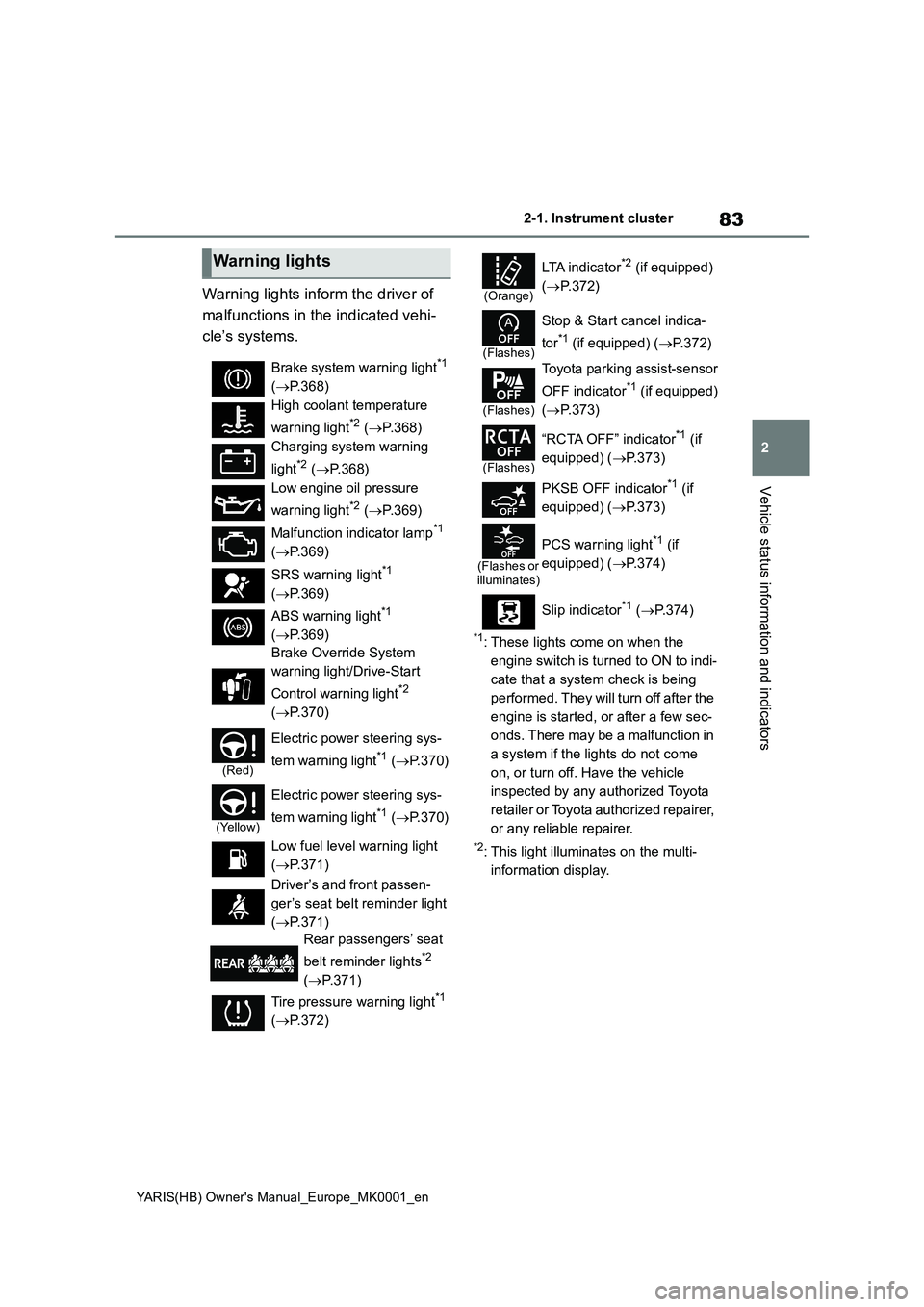
Warning lights inform the driver of
malfunctions in the indicated vehi-
cle’s systems.
*1: These lights come on when the
engine switch is turned to ON to indi-
cate that a system check is being
performed. They will turn off after the
engine is started, or after a few sec-
onds. There may be a malfunction in
a system if the lights do not come
on, or turn off. Have the vehicle
inspected by any authorized Toyota
retailer or Toyota authorized repairer,
or any reliable repairer.
*2: This light illuminates on the multi-
information display.
Warning lights
Brake system warning light*1
(→P.368)
High coolant temperature
warning light
*2 (→P.368)
Charging system warning
light
*2 (→P.368)
Low engine oil pressure
warning light
*2 (→P.369)
Malfunction indicator lamp
*1
(→P.369)
SRS warning light
*1
(→P.369)
ABS warning light
*1
(→P.369)
Brake Override System
warning light/Drive-Start
Control warning light
*2
(→P.370)
(Red)
Electric power steering sys-
tem warning light
*1 (→P.370)
(Yellow)
Electric power steering sys-
tem warning light
*1 (→P.370)
Low fuel level warning light
(→P.371)
Driver’s and front passen-
ger’s seat belt reminder light
(→P.371)
Rear passengers’ seat
belt reminder lights
*2
(→P.371)
Tire pressure warning light
*1
(→P.372)
(Orange)
LTA i n d i c a t o r*2 (if equipped)
(→P.372)
(Flashes)
Stop & Start cancel indica-
tor
*1 (if equipped) (→P.372)
(Flashes)
Toyota parking assist-sensor
OFF indicator
*1 (if equipped)
(→P.373)
(Flashes)
“RCTA OFF” indicator*1 (if
equipped) (→P.373)
PKSB OFF indicator
*1 (if
equipped) (→P.373)
(Flashes or
illuminates)
PCS warning light*1 (if
equipped) (→P.374)
Slip indicator
*1 (→P. 3 7 4 )
Page 84 of 568
84
YARIS(HB) Owner's Manual_Europe_MK0001_en
2-1. Instrument cluster
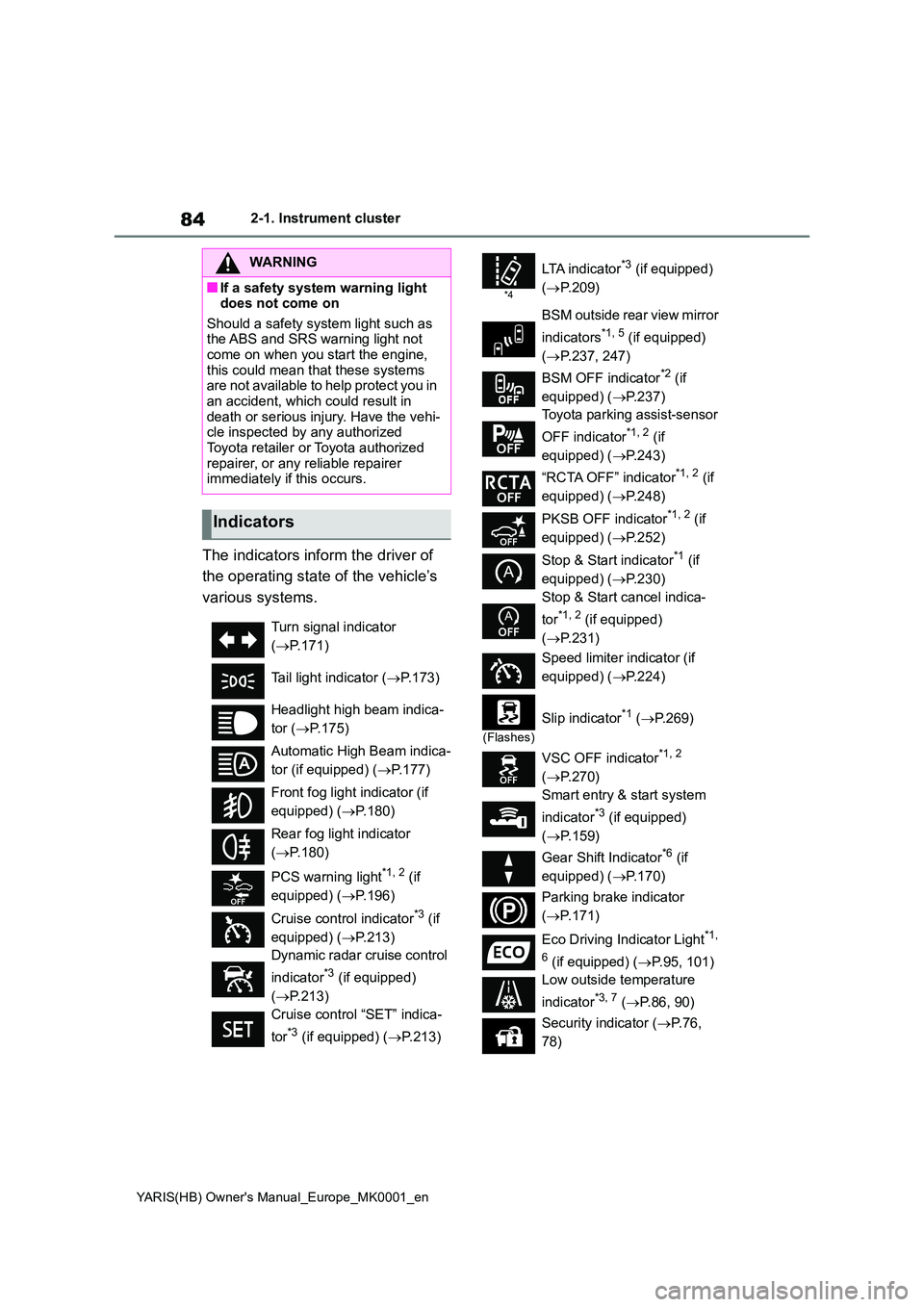
The indicators inform the driver of
the operating state of the vehicle’s
various systems.
WARNING
■If a safety system warning light does not come on
Should a safety system light such as the ABS and SRS warning light not come on when you start the engine,
this could mean that these systems are not available to help protect you in an accident, which could result in
death or serious injury. Have the vehi- cle inspected by any authorized Toyota retailer or Toyota authorized
repairer, or any reliable repairer immediately if this occurs.
Indicators
Turn signal indicator
( →P.171)
Tail light indicator ( →P.173)
Headlight high beam indica-
tor ( →P.175)
Automatic High Beam indica-
tor (if equipped) ( →P.177)
Front fog light indicator (if
equipped) ( →P.180)
Rear fog light indicator
( →P.180)
PCS warning light*1, 2 (if
equipped) ( →P.196)
Cruise control indicator*3 (if
equipped) ( →P.213)
Dynamic radar cruise control
indicator*3 (if equipped)
( →P.213)
Cruise control “SET” indica-
tor*3 (if equipped) ( →P.213)
*4
LTA i n d i c a t o r*3 (if equipped)
( →P.209)
BSM outside rear view mirror
indicators*1, 5 (if equipped)
( →P.237, 247)
BSM OFF indicator*2 (if
equipped) ( →P.237)
Toyota parking assist-sensor
OFF indicator*1, 2 (if
equipped) ( →P.243)
“RCTA OFF” indicator*1, 2 (if
equipped) ( →P.248)
PKSB OFF indicator*1, 2 (if
equipped) ( →P.252)
Stop & Start indicator*1 (if
equipped) ( →P.230)
Stop & Start cancel indica-
tor*1, 2 (if equipped)
( →P.231)
Speed limiter indicator (if
equipped) ( →P.224)
(Flashes)
Slip indicator*1 (→P. 2 6 9 )
VSC OFF indicator*1, 2
( →P.270)
Smart entry & start system
indicator*3 (if equipped)
( →P.159)
Gear Shift Indicator*6 (if
equipped) ( →P.170)
Parking brake indicator
( →P.171)
Eco Driving Indicator Light*1,
6 (if equipped) ( →P.95, 101)
Low outside temperature
indicator*3, 7 ( →P.86, 90)
Security indicator ( →P. 7 6 ,
78)
Page 85 of 568
85
2
YARIS(HB) Owner's Manual_Europe_MK0001_en
2-1. Instrument cluster
Vehicle status information and indicators
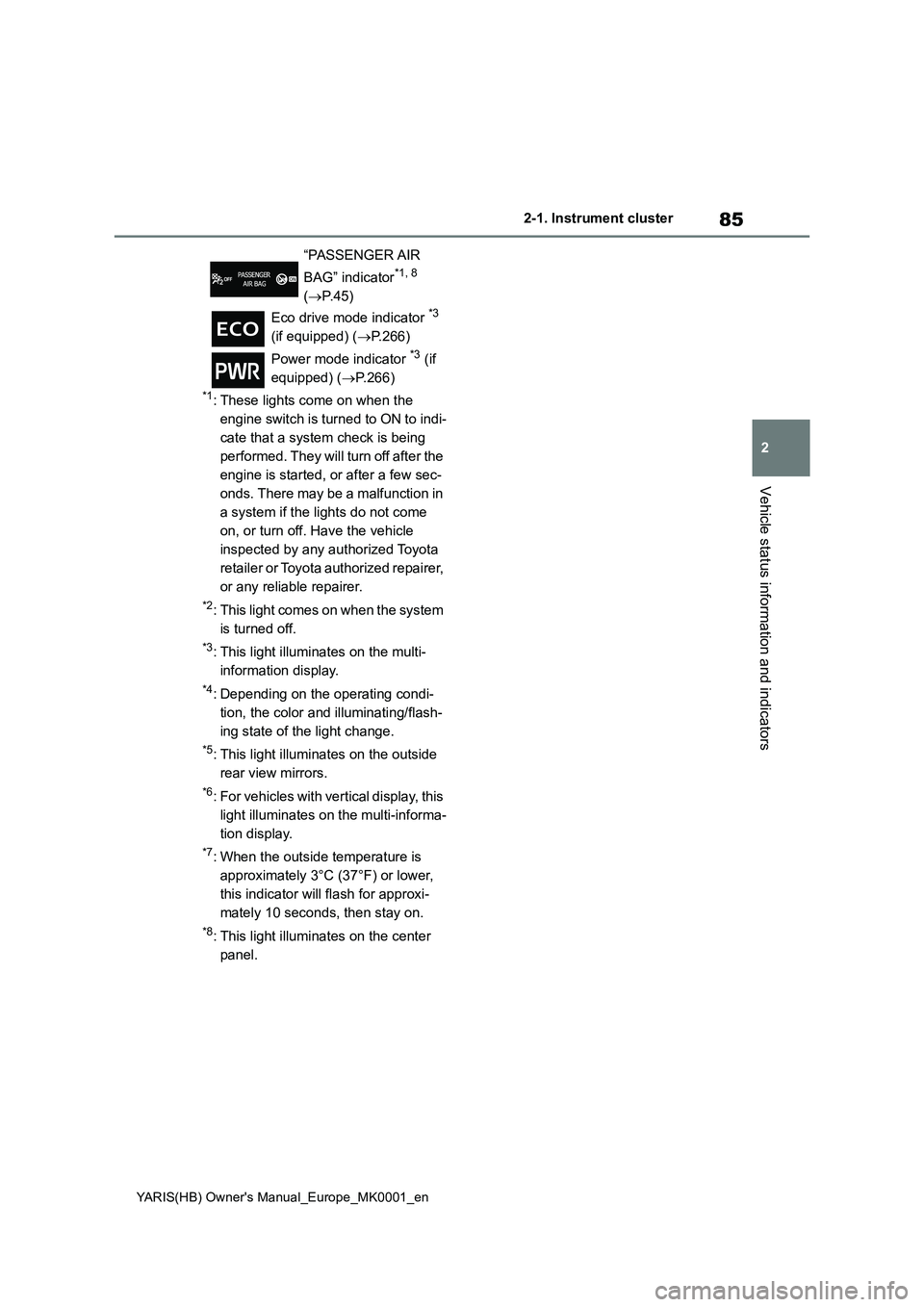
*1: These lights come on when the
engine switch is turned to ON to indi-
cate that a system check is being
performed. They will turn off after the
engine is started, or after a few sec-
onds. There may be a malfunction in
a system if the lights do not come
on, or turn off. Have the vehicle
inspected by any authorized Toyota
retailer or Toyota authorized repairer,
or any reliable repairer.
*2: This light comes on when the system
is turned off.
*3: This light illuminates on the multi-
information display.
*4: Depending on the operating condi-
tion, the color and illuminating/flash-
ing state of the light change.
*5: This light illuminates on the outside
rear view mirrors.
*6: For vehicles with vertical display, this
light illuminates on the multi-informa-
tion display.
*7: When the outside temperature is
approximately 3°C (37°F) or lower,
this indicator will flash for approxi-
mately 10 seconds, then stay on.
*8: This light illuminates on the center
panel.“PASSENGER AIR
BAG” indicator
*1, 8
(→P.45)
Eco drive mode indicator
*3
(if equipped) (→P.266)
Power mode indicator
*3 (if
equipped) (→P.266)
Page 89 of 568
89
2
YARIS(HB) Owner's Manual_Europe_MK0001_en
2-1. Instrument cluster
Vehicle status information and indicators
Have the vehicle inspected by any
authorized Toyota retailer or Toyota
authorized repairer, or any reliable
repairer.
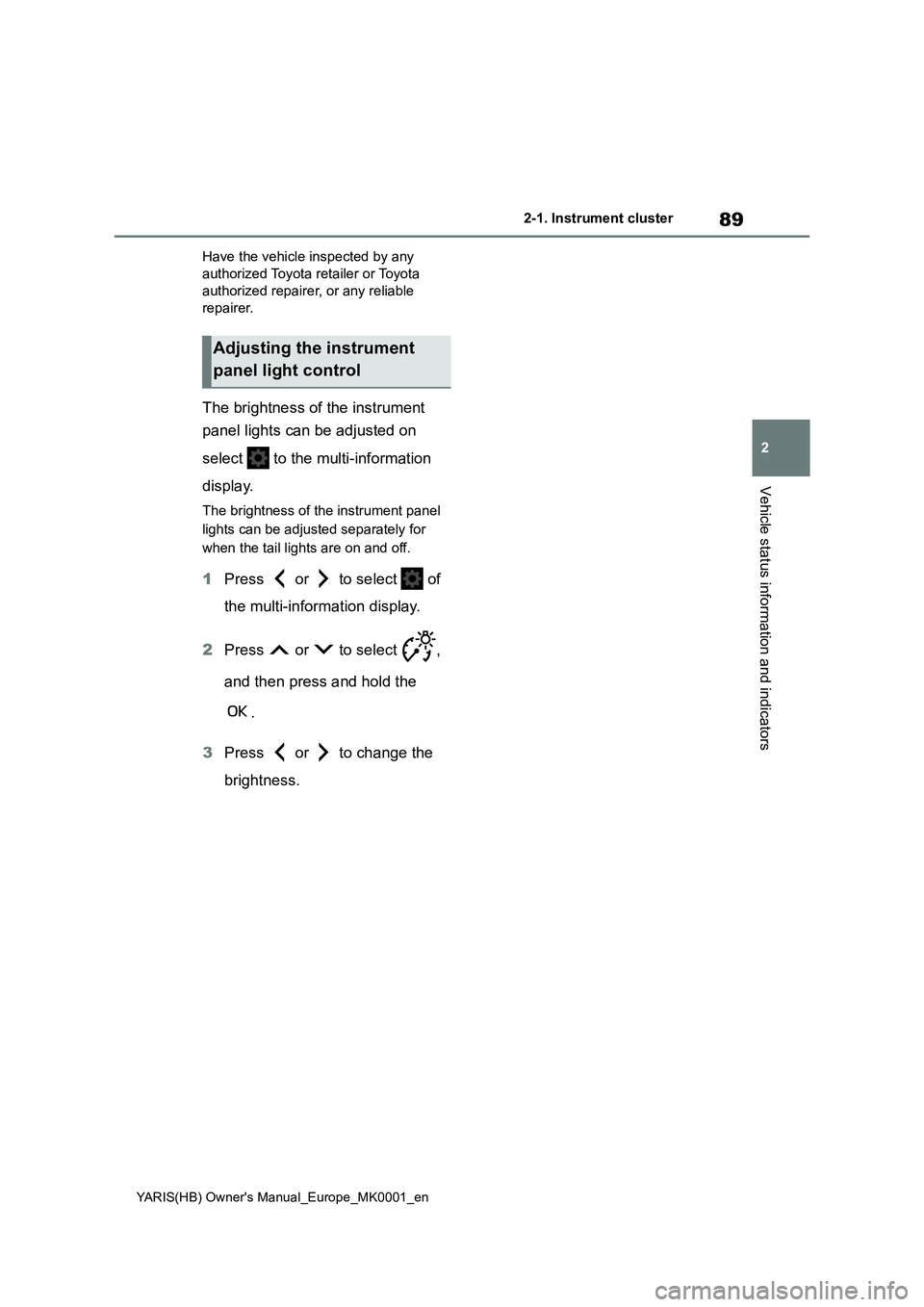
The brightness of the instrument
panel lights can be adjusted on
select to the multi-information
display.
The brightness of the instrument panel
lights can be adjusted separately for
when the tail lights are on and off.
1Press or to select of
the multi-information display.
2Press or to select ,
and then press and hold the
.
3Press or to change the
brightness.
Adjusting the instrument
panel light control
Page 93 of 568
93
2
YARIS(HB) Owner's Manual_Europe_MK0001_en
2-1. Instrument cluster
Vehicle status information and indicators
Have the vehicle inspected by any
authorized Toyota retailer or Toyota
authorized repairer, or any reliable
repairer.
The brightness of the instrument
panel lights can be adjusted on
select to the multi-information
display.
The brightness of the instrument panel
lights can be adjusted separately for
when the tail lights are on and off.
1Press or to select of
the multi-information display.
2Press or to select ,
and then press and hold the
.
3Press or to change the
brightness.
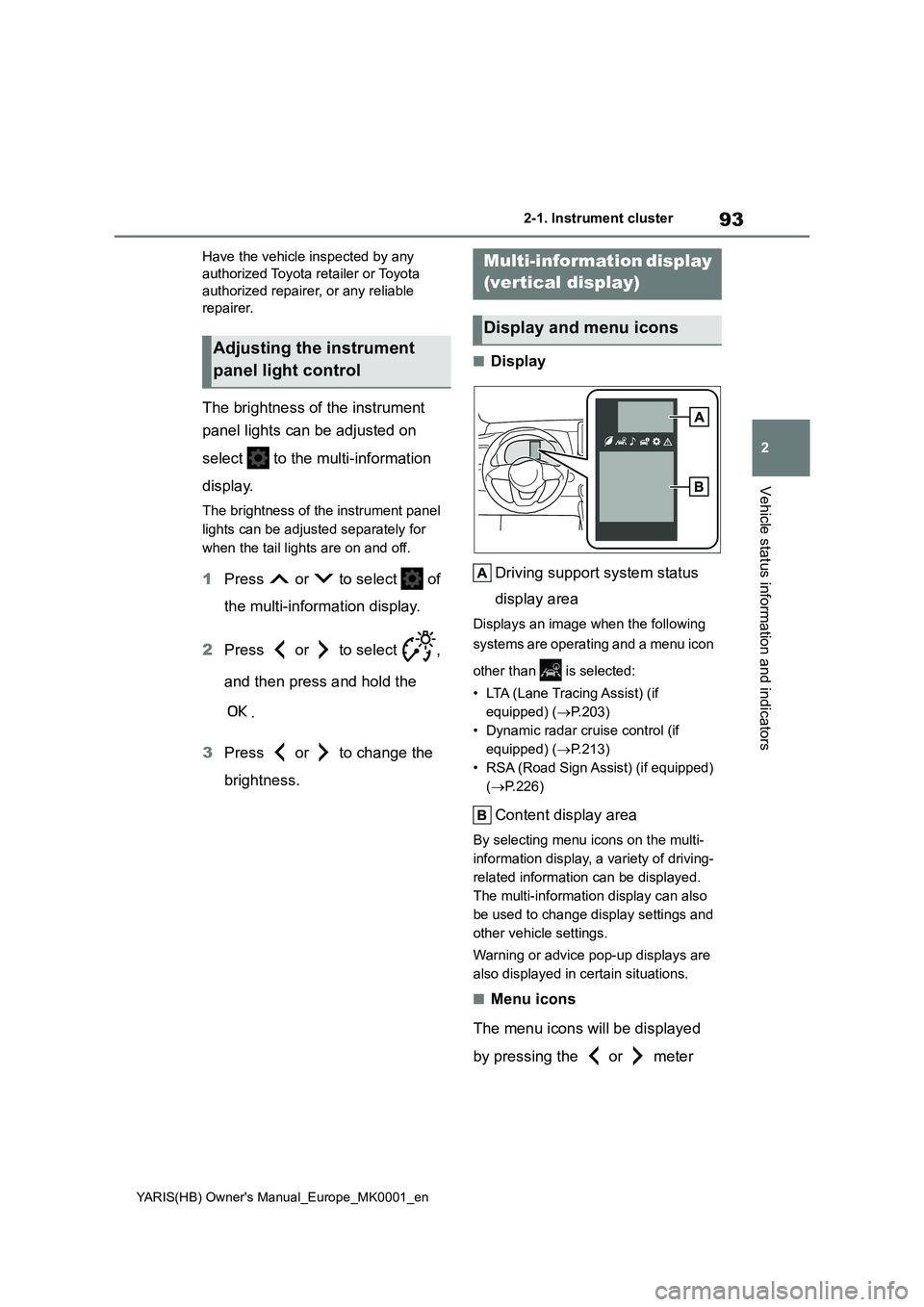
■Display
Driving support system status
display area
Displays an image when the following
systems are operating and a menu icon
other than is selected:
• LTA (Lane Tracing Assist) (if
equipped) (→P.203)
• Dynamic radar cruise control (if
equipped) (→P.213)
• RSA (Road Sign Assist) (if equipped)
(→P.226)
Content display area
By selecting menu icons on the multi-
information display, a variety of driving-
related information can be displayed.
The multi-information display can also
be used to change display settings and
other vehicle settings.
Warning or advice pop-up displays are
also displayed in certain situations.
■Menu icons
The menu icons will be displayed
by pressing the or meter
Adjusting the instrument
panel light control
Multi-information display
(vertical display)
Display and menu icons
Page 105 of 568
105
2
YARIS(HB) Owner's Manual_Europe_MK0001_en
2-1. Instrument cluster
Vehicle status information and indicators
*: If equipped
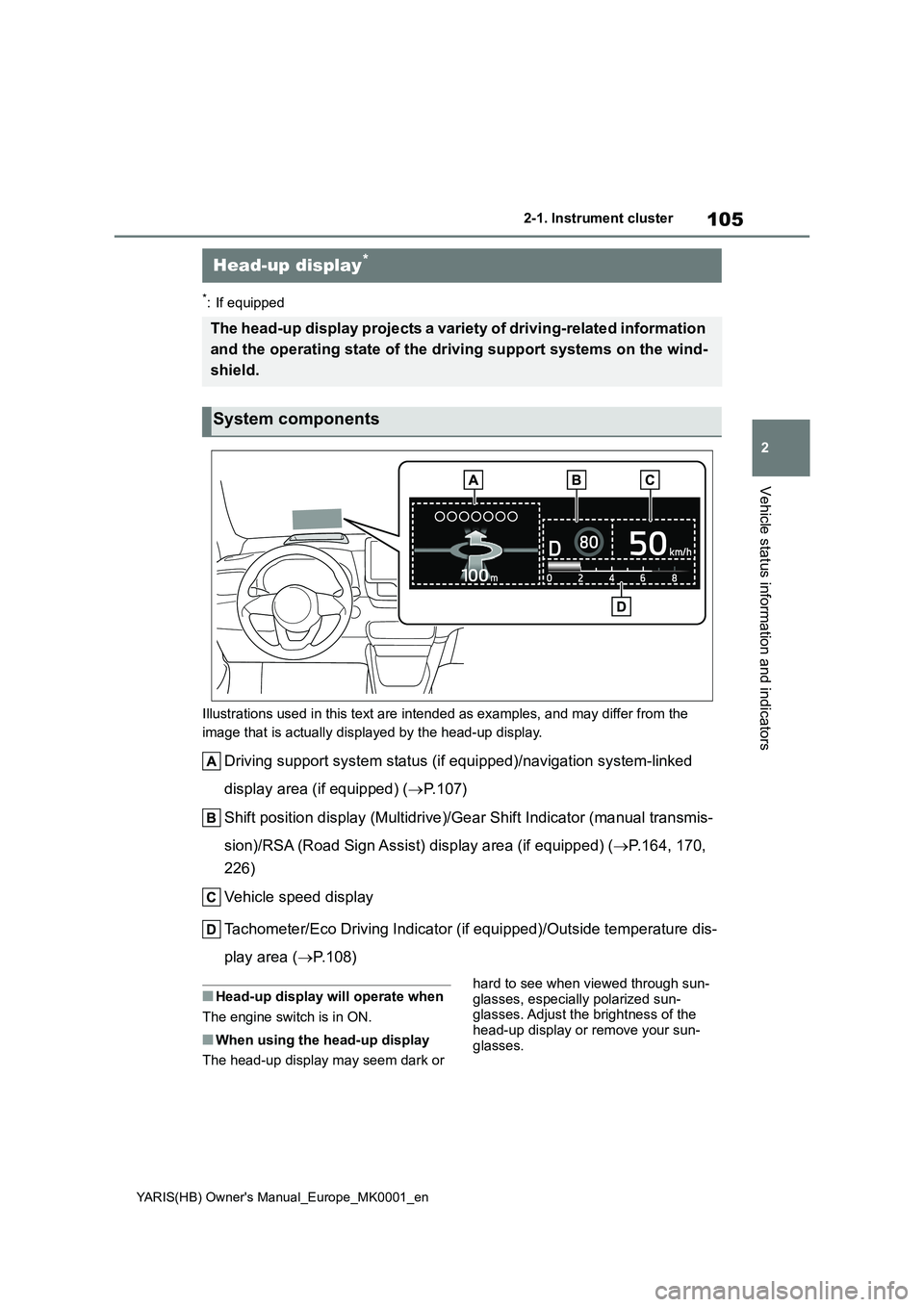
Illustrations used in this text are intended as examples, and may differ from the
image that is actually displayed by the head-up display.
Driving support system status (if equipped)/navigation system-linked
display area (if equipped) (→P. 1 0 7 )
Shift position display (Multidrive)/Gear Shift Indicator (manual transmis-
sion)/RSA (Road Sign Assist) display area (if equipped) (→P.164, 170,
226)
Vehicle speed display
Tachometer/Eco Driving Indicator (if equipped)/Outside temperature dis-
play area (→P.108)
■Head-up display will operate when
The engine switch is in ON.
■When using the head-up display
The head-up display may seem dark or hard to see when viewed through sun-
glasses, especially polarized sun-
glasses. Adjust the brightness of the
head-up display or remove your sun-
glasses.
Head-up display*
The head-up display projects a variety of driving-related information
and the operating state of the driving support systems on the wind-
shield.
System components