Vehicle spec TOYOTA YARIS 2021 Service Manual
[x] Cancel search | Manufacturer: TOYOTA, Model Year: 2021, Model line: YARIS, Model: TOYOTA YARIS 2021Pages: 568, PDF Size: 110.34 MB
Page 238 of 568
238
YARIS(HB) Owner's Manual_Europe_MK0001_en
4-5. Using the driving support systems
hot or cold environments.
■When “Blind Spot Monitor Malfunc-
tion Visit Your Dealer” is shown on the multi-information display
There may be a sensor malfunction of
misaligned. Have the vehicle inspected by any authorized Toyota retailer or Toyota authorized repairer, or any reli-
able repairer.
■Customization
Some functions can be customized. ( →P.422)
■Certifications for the Blind Spot
Monitor
→ P. 5 3 1
WARNING
■Handling the rear side radar sen-
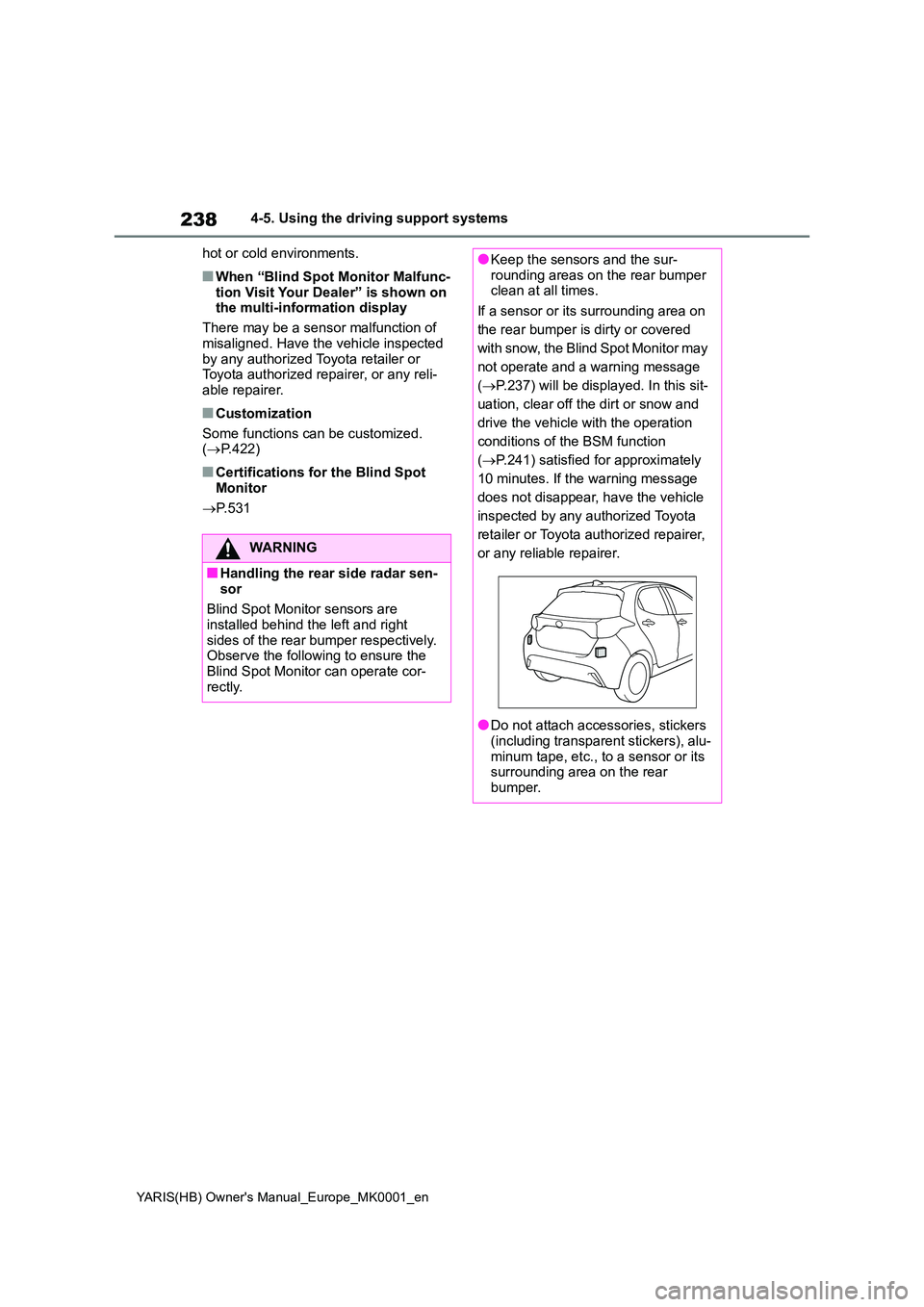
sor
Blind Spot Monitor sensors are installed behind the left and right
sides of the rear bumper respectively. Observe the following to ensure the Blind Spot Monitor can operate cor-
rectly.
●Keep the sensors and the sur- rounding areas on the rear bumper clean at all times.
If a sensor or its surrounding area on
the rear bumper is dirty or covered
with snow, the Blind Spot Monitor may
not operate and a warning message
( →P.237) will be displayed. In this sit-
uation, clear off the dirt or snow and
drive the vehicle with the operation
conditions of the BSM function
( →P.241) satisfied for approximately
10 minutes. If the warning message
does not disappear, have the vehicle
inspected by any authorized Toyota
retailer or Toyota authorized repairer,
or any reliable repairer.
●Do not attach accessories, stickers (including transparent stickers), alu-
minum tape, etc., to a sensor or its surrounding area on the rear bumper.
Page 239 of 568
239
4
YARIS(HB) Owner's Manual_Europe_MK0001_en
4-5. Using the driving support systems
Driving
Use the meter control switches to
turn on/off the function.
1 Press / (vertical display)
or / (horizontal display)
of the meter control switch to
select .
2 Press / (vertical display)
or / (horizontal display)
of the meter control switch to
select and then press .
■Vehicles that can be detected by the Blind Spot Monitor
The Blind Spot Monitor uses rear side radar sensors to detect the following
vehicles traveling in adjacent lanes and advises the driver of the presence
of such vehicles via the indicators on the outside rear view mirrors.
WARNING
●Do not subject a sensor or its sur- rounding area on the rear bumper
to a strong impact. If a sensor is moved even slightly off position, the system may mal-
function and vehicles may not be detected correctly.In the following situations, have
your vehicle inspected by any authorized Toyota retailer or Toyota authorized repairer, or any reliable
repairer.
• A sensor or its surrounding area is subject to a strong impact.
• If the surrounding area of a sensor is scratched or dented, or part of them has become disconnected.
●Do not disassemble the sensor.
●Do not modify the sensor or sur-rounding area on the rear bumper.
●If a sensor or the rear bumper needs to be removed/installed or replaced, contact any authorized
Toyota retailer or Toyota authorized repairer, or any reliable repairer.
●Do not paint the rear bumper any color other than an official Toyota color.
Turning the Blind Spot Moni-
tor on/off
Blind Spot Monitor operation
Page 243 of 568
243
4
YARIS(HB) Owner's Manual_Europe_MK0001_en
4-5. Using the driving support systems
Driving
tance to the object.
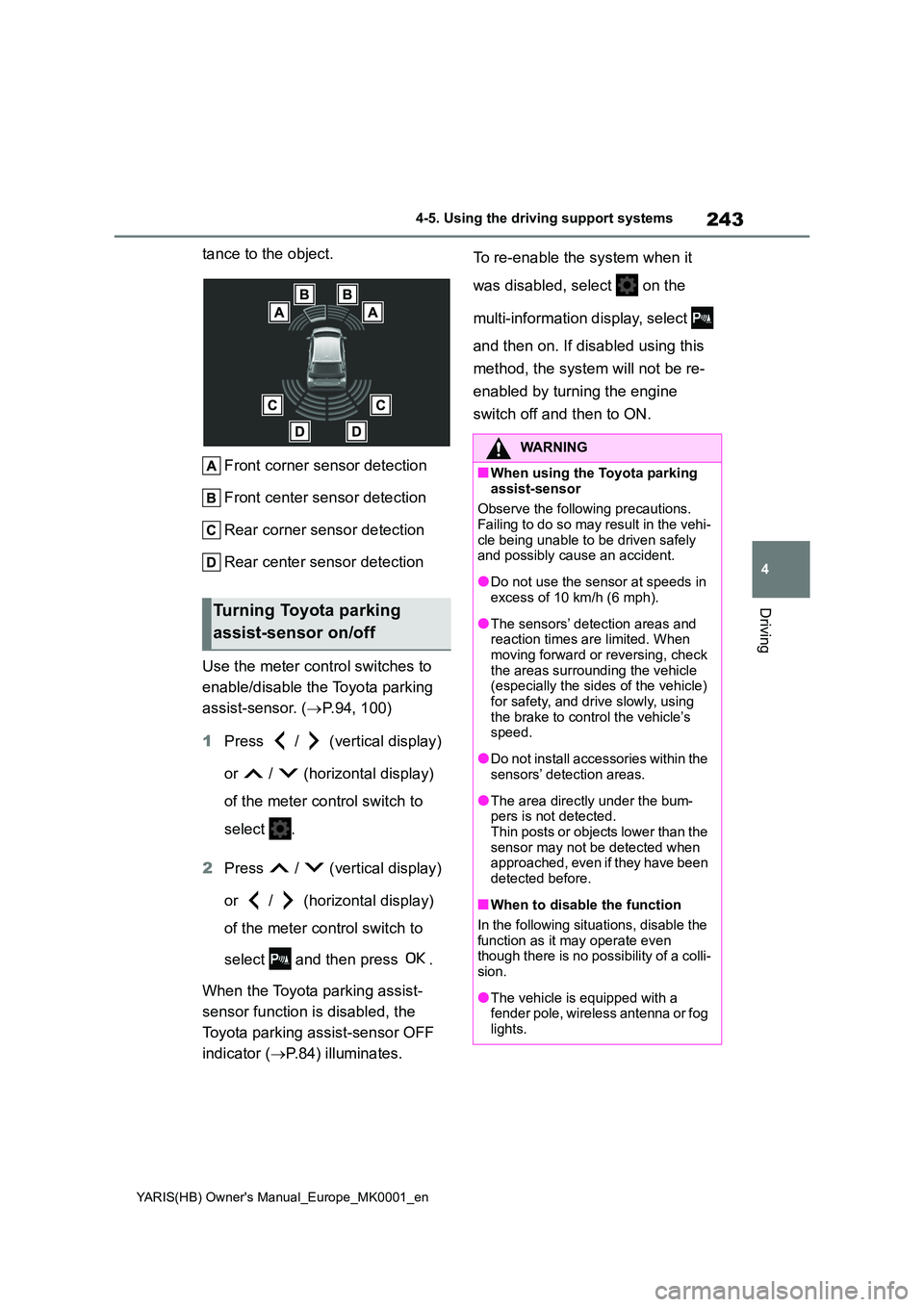
Front corner sensor detection
Front center sensor detection
Rear corner sensor detection
Rear center sensor detection
Use the meter control switches to
enable/disable the Toyota parking
assist-sensor. ( →P.94, 100)
1 Press / (vertical display)
or / (horizontal display)
of the meter control switch to
select .
2 Press / (vertical display)
or / (horizontal display)
of the meter control switch to
select and then press .
When the Toyota parking assist-
sensor function is disabled, the
Toyota parking assist-sensor OFF
indicator ( →P.84) illuminates.
To re-enable the system when it
was disabled, select on the
multi-information display, select
and then on. If disabled using this
method, the system will not be re-
enabled by turning the engine
switch off and then to ON.
Turning Toyota parking
assist-sensor on/off
WARNING
■When using the Toyota parking
assist-sensor
Observe the following precautions. Failing to do so may result in the vehi-
cle being unable to be driven safely and possibly cause an accident.
●Do not use the sensor at speeds in excess of 10 km/h (6 mph).
●The sensors’ detection areas and reaction times are limited. When moving forward or reversing, check
the areas surrounding the vehicle (especially the sides of the vehicle) for safety, and drive slowly, using
the brake to control the vehicle’s speed.
●Do not install accessories within the sensors’ detection areas.
●The area directly under the bum-pers is not detected.Thin posts or objects lower than the
sensor may not be detected when approached, even if they have been detected before.
■When to disable the function
In the following situations, disable the
function as it may operate even though there is no possibility of a colli-sion.
●The vehicle is equipped with a fender pole, wireless antenna or fog
lights.
Page 245 of 568
245
4
YARIS(HB) Owner's Manual_Europe_MK0001_en
4-5. Using the driving support systems
Driving
●There will be a short delay between
object detection and display. Even at low speeds, there is a possibility that the object will come within the sen-
sor’s detection areas before the dis- play is shown and the warning beep sounds.
●It might be difficult to hear the buzzer due to the volume of the audio system
or air flow noise of the air conditioning system.
●It may be difficult to hear the buzzer if buzzers for other systems are sound-ing.
■Conditions under which the func-
tion may not function correctly
Certain vehicle conditions and the sur- rounding environment may affect the
ability of a sensor to correctly detect objects. Particular instances where this may occur are listed below.
●There is dirt, snow, water drops or ice on a sensor. (Cleaning the sensors
will resolve this problem.)
●A sensor is frozen. (Thawing the area
will resolve this problem.) In especially cold weather, if a sensor is frozen the sensor display may be
displayed abnormally, or objects, such as a wall, may not be detected.
●A sensor is covered in any way.
●When a sensor or the area around a
sensor is extremely hot or cold.
●On an extremely bumpy road, on an
incline, on gravel, or on grass.
●The vicinity of the vehicle is noisy due
to vehicle horns, motorcycle engines, air brakes of large vehicles, or other loud noises producing ultrasonic
waves.
●There is another vehicle equipped
with parking assist sensors in the vicinity.
●A sensor is coated with a sheet of spray or heavy rain.
●If a sensor is hit by a large amount of water, such as when driving on a
flooded road.
●If the vehicle is significantly tilted.
●The vehicle is approaching a tall or curved curb.
●If objects draw too close to the sensor.
■Objects which may not be properly detected
The shape of the object may prevent the
sensor from detecting it. Pay particular attention to the following objects:
●Wires, fences, ropes, etc.
●Cotton, snow and other materials that
absorb sound waves
●Sharply-angled objects
●Low objects
●Tall objects with upper sections pro- jecting outwards in the direction of your vehicle
People may not be detected if they are wearing certain types of clothing.
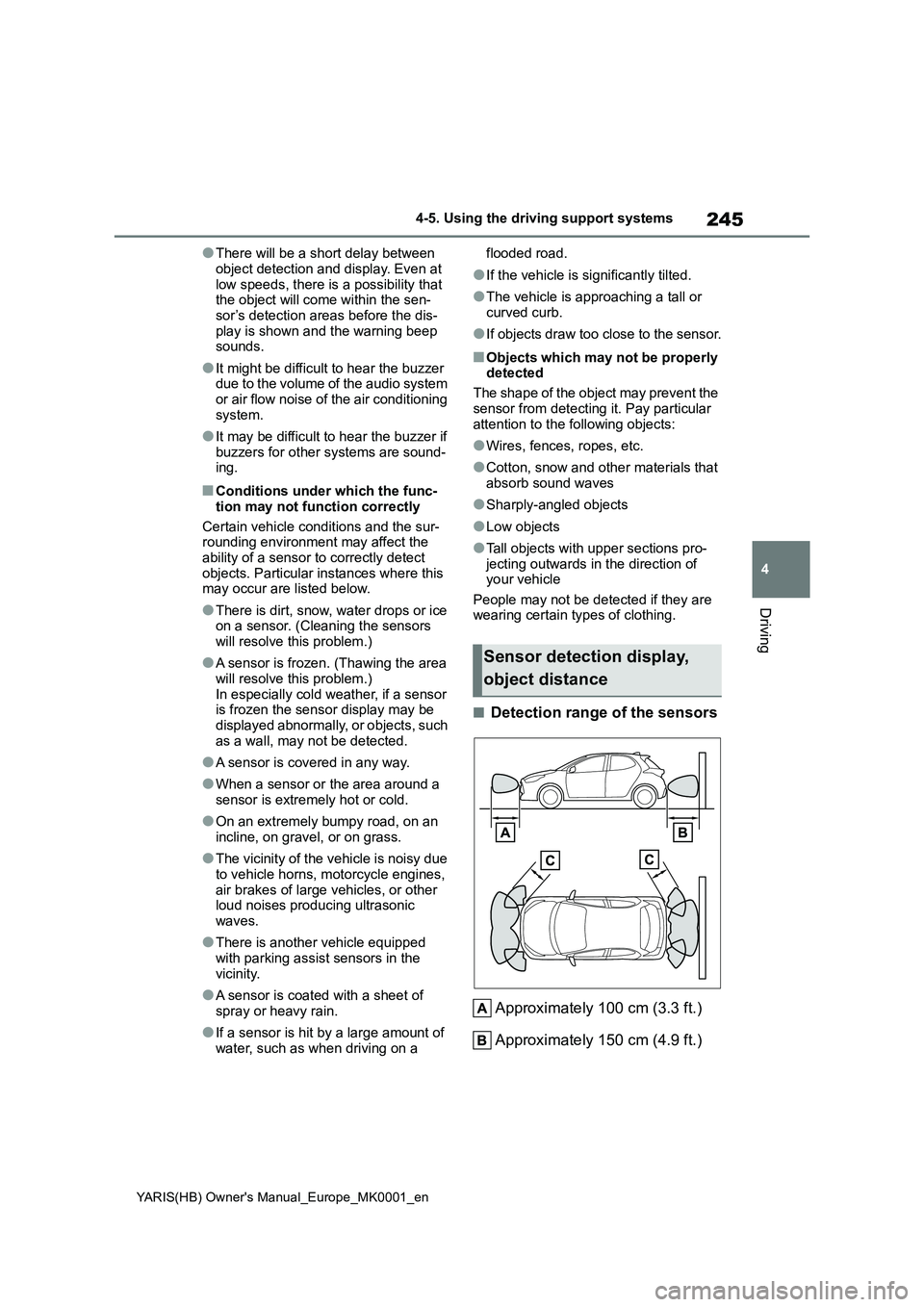
■Detection range of the sensors
Approximately 100 cm (3.3 ft.)
Approximately 150 cm (4.9 ft.)
Sensor detection display,
object distance
Page 248 of 568
248
YARIS(HB) Owner's Manual_Europe_MK0001_en
4-5. Using the driving support systems
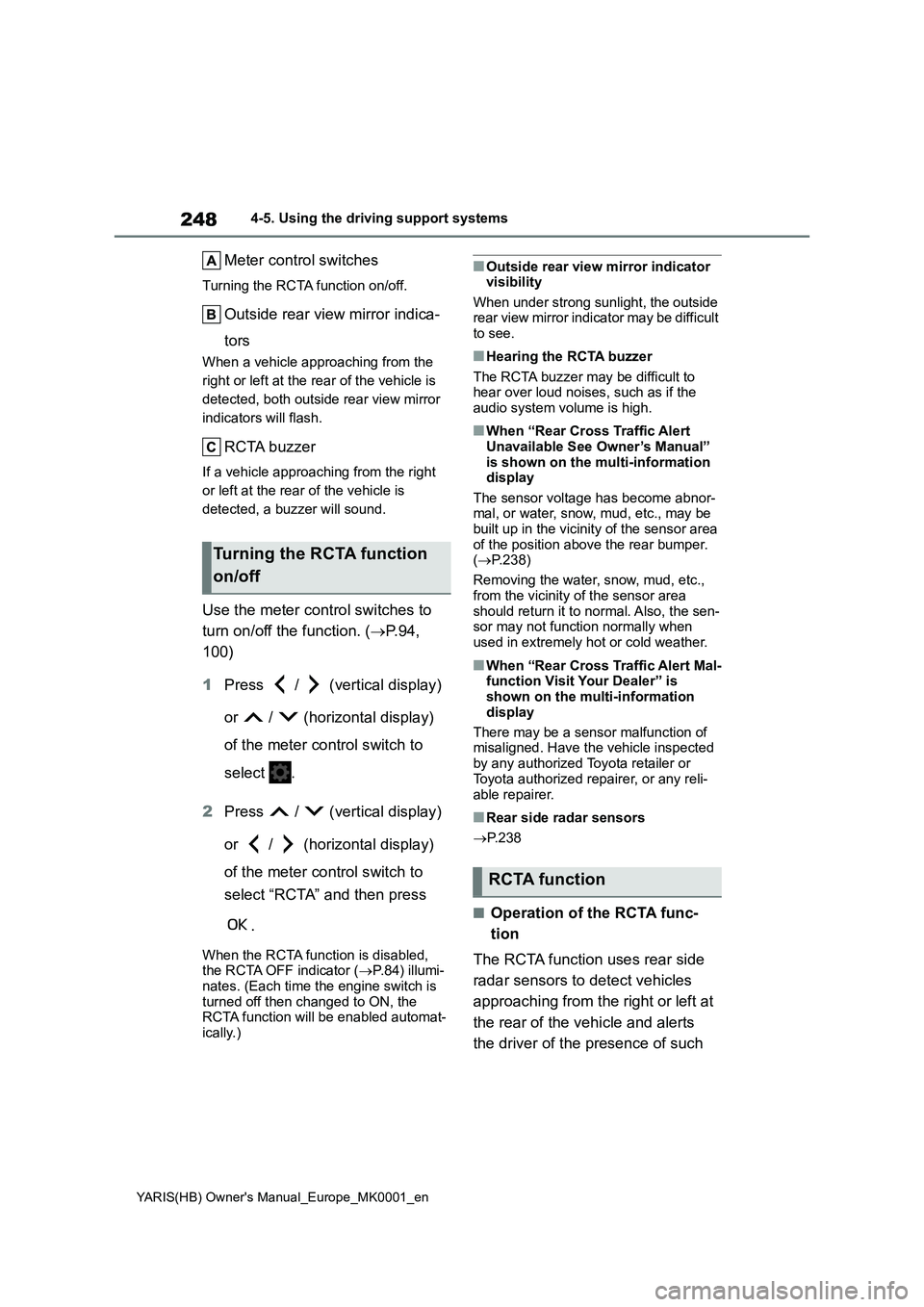
Meter control switches
Turning the RCTA function on/off.
Outside rear view mirror indica-
tors
When a vehicle approaching from the
right or left at the rear of the vehicle is
detected, both outside rear view mirror
indicators will flash.
RCTA buzzer
If a vehicle approaching from the right
or left at the rear of the vehicle is
detected, a buzzer will sound.
Use the meter control switches to
turn on/off the function. (→P.94,
100)
1Press / (vertical display)
or / (horizontal display)
of the meter control switch to
select .
2Press / (vertical display)
or / (horizontal display)
of the meter control switch to
select “RCTA” and then press
.
When the RCTA function is disabled,
the RCTA OFF indicator (→P.84) illumi-
nates. (Each time the engine switch is
turned off then changed to ON, the
RCTA function will be enabled automat-
ically.)
■Outside rear view mirror indicator
visibility
When under strong sunlight, the outside
rear view mirror indicator may be difficult
to see.
■Hearing the RCTA buzzer
The RCTA buzzer may be difficult to
hear over loud noises, such as if the
audio system volume is high.
■When “Rear Cross Traffic Alert
Unavailable See Owner’s Manual”
is shown on the multi-information
display
The sensor voltage has become abnor-
mal, or water, snow, mud, etc., may be
built up in the vicinity of the sensor area
of the position above the rear bumper.
(→P.238)
Removing the water, snow, mud, etc.,
from the vicinity of the sensor area
should return it to normal. Also, the sen-
sor may not function normally when
used in extremely hot or cold weather.
■When “Rear Cross Traffic Alert Mal-
function Visit Your Dealer” is
shown on the multi-information
display
There may be a sensor malfunction of
misaligned. Have the vehicle inspected
by any authorized Toyota retailer or
Toyota authorized repairer, or any reli-
able repairer.
■Rear side radar sensors
→P. 2 3 8
■Operation of the RCTA func-
tion
The RCTA function uses rear side
radar sensors to detect vehicles
approaching from the right or left at
the rear of the vehicle and alerts
the driver of the presence of such
Turning the RCTA function
on/off
RCTA function
Page 255 of 568
255
4
YARIS(HB) Owner's Manual_Europe_MK0001_en
4-5. Using the driving support systems
Driving
to ON. Additionally, if the object
becomes no longer in the traveling
direction of the vehicle or if the traveling
direction of the vehicle changes (such
as changing from moving forward to
backing up, or from backing up to mov-
ing forward), the system will be re-
enabled automatically.
■If “PKSB Unavailable” is displayed
on the multi-information display
and the PKSB OFF indicator is on
If the vehicle is stopped due to operation
of the Parking Support Brake, the Park-
ing Support Brake will be disabled and
the PKSB OFF indicator will illuminate.
●A sensor may be covered with water
drops, ice, snow, dirt, etc. Remove the
water drops, ice, snow, dirt, etc., from
the sensor to return the system to nor-
mal.
Also, due to ice forming on a sensor at
low temperatures, a warning message
may be displayed or the sensor may
not be able to detect an object. Once
the ice melts, the system will return to
normal.
●If this message is displayed, a sensor
on the front or rear bumper may be
dirty. Clean the sensors and their sur-
rounding area on the bumpers.
●If this message continues to be dis-
played even after cleaning the sensor,
or is displayed even though the sen-
sor is clean, have the vehicle
inspected by any authorized Toyota
retailer or Toyota authorized repairer,
or any reliable repairer.
●Initialization may not have been per-
formed after a battery terminal was
disconnected and reconnected. Initial-
ize the system. (→P.255)
If this message continues to be dis-
played even after initialization, have
the vehicle inspected by any autho-
rized Toyota retailer or Toyota autho-
rized repairer, or any reliable repairer.
■If a battery terminal has been dis-
connected and reconnected
The system needs to be initialized. To initialize the system, drive the vehicle
straight ahead for 5 seconds or more at
a speed of approximately 35 km/h (22
mph) or more.
Page 258 of 568
258
YARIS(HB) Owner's Manual_Europe_MK0001_en
4-5. Using the driving support systems
■The Parking Support Brake func- tion (static object) will operate
when
The function will operate when the PKSB OFF indicator is not illuminated or
flashing ( →P.83, 84) and all of the fol- lowing conditions are met:
●Engine output restriction control• The Parking Support Brake is enabled.
• The vehicle speed is 15 km/h (9 mph) or less.
WARNING
●Do not replace a sensor with a part other than a genuine part.
●Do not subject a sensor or its sur-rounding area to a strong impact.
●Do not damage the sensors, and always keep them clean.
●If the area around a radar sensor is subjected to an impact, the system
may not operate properly due to a sensor malfunction. Have the vehi-cle inspected by any authorized
Toyota retailer or Toyota authorized repairer, or any reliable repairer.
■Handling the suspension
Do not modify the suspension, as changes to the height or inclination of
the vehicle may prevent the sensors from detecting objects correctly or cause the system to not operate or
operate unnecessarily.
■If the Parking Support Brake
function (static objects) oper- ates unnecessarily, such as at a railroad crossing
In the event that the Parking Support Brake function (static objects) oper-ates unnecessarily, such as at a rail-
road crossing, brake control will be canceled after approximately 2 sec-onds, allowing you to proceed forward
and leave the area, brake control can also be canceled by depressing the brake pedal. Depressing the acceler-
ator pedal after brake control is can- celed will allow you to proceed forward and leave the area.
■Notes when washing the vehicle
Do not apply intensive bursts of water
or steam to the sensor area.
Doing so may result in the sensor malfunctioning.
●When using a high pressure washer to wash the vehicle, do not spray the sensors directly, as doing
so may cause a sensor to malfunc- tion.
●When using steam to clean the vehicle, do not direct steam too close to the sensors as doing so
may cause a sensor to malfunction.
■When to disable the Parking Sup-
port Brake
In the following situations, disable the Parking Support Brake as the system
may operate even though there is no possibility of a collision.
●When inspecting the vehicle using a chassis roller, chassis dynamo or free roller
●When loading the vehicle onto a boat, truck or other transport vessel
●If the suspension has been modi-fied or tires of a size other than
specified are installed
●If the front of the vehicle is raised or
lowered due to the carried load
●When equipment that may obstruct
a sensor is installed, such as a tow- ing eyelet, bumper protector (an additional trim strip, etc.), bicycle
carrier, or snow plow
●When using an automatic car wash
Page 260 of 568
260
YARIS(HB) Owner's Manual_Europe_MK0001_en
4-5. Using the driving support systems
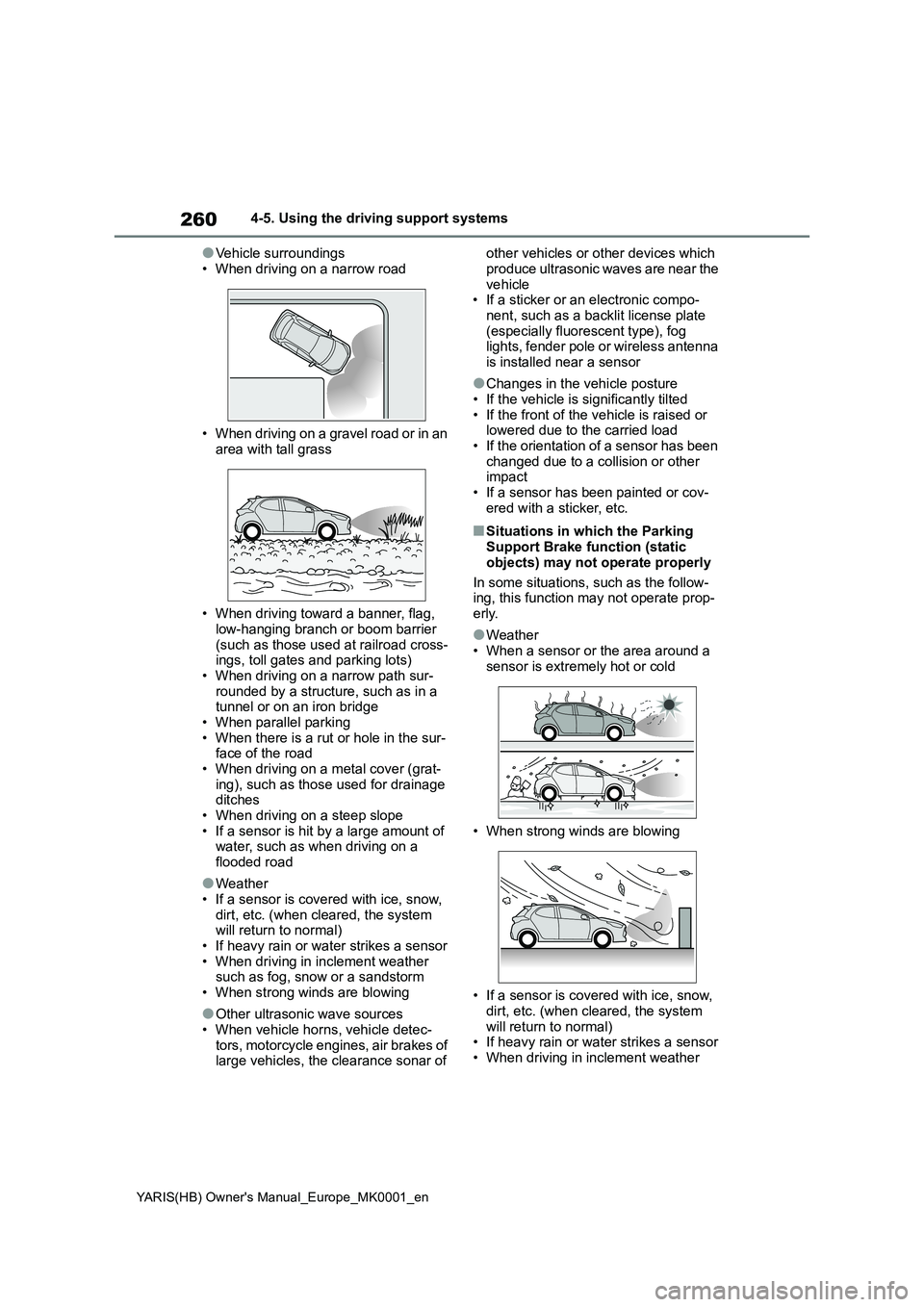
●Vehicle surroundings
• When driving on a narrow road
• When driving on a gravel road or in an
area with tall grass
• When driving toward a banner, flag,
low-hanging branch or boom barrier (such as those used at railroad cross-ings, toll gates and parking lots)
• When driving on a narrow path sur- rounded by a structure, such as in a tunnel or on an iron bridge
• When parallel parking • When there is a rut or hole in the sur-face of the road
• When driving on a metal cover (grat- ing), such as those used for drainage ditches
• When driving on a steep slope • If a sensor is hit by a large amount of water, such as when driving on a
flooded road
●Weather
• If a sensor is covered with ice, snow, dirt, etc. (when cleared, the system will return to normal)
• If heavy rain or water strikes a sensor • When driving in inclement weather such as fog, snow or a sandstorm
• When strong winds are blowing
●Other ultrasonic wave sources
• When vehicle horns, vehicle detec- tors, motorcycle engines, air brakes of large vehicles, the clearance sonar of
other vehicles or other devices which
produce ultrasonic waves are near the vehicle• If a sticker or an electronic compo-
nent, such as a backlit license plate (especially fluorescent type), fog lights, fender pole or wireless antenna
is installed near a sensor
●Changes in the vehicle posture
• If the vehicle is significantly tilted • If the front of the vehicle is raised or lowered due to the carried load
• If the orientation of a sensor has been changed due to a collision or other impact
• If a sensor has been painted or cov- ered with a sticker, etc.
■Situations in which the Parking Support Brake function (static
objects) may not operate properly
In some situations, such as the follow- ing, this function may not operate prop-
erly.
●Weather
• When a sensor or the area around a sensor is extremely hot or cold
• When strong winds are blowing
• If a sensor is covered with ice, snow,
dirt, etc. (when cleared, the system will return to normal)• If heavy rain or water strikes a sensor
• When driving in inclement weather
Page 261 of 568
261
4
YARIS(HB) Owner's Manual_Europe_MK0001_en
4-5. Using the driving support systems
Driving
such as fog, snow or a sandstorm
• When the sensor is frozen (Once the
sensor thaws, the system will return to
normal)
●Vehicle surroundings
• When an object that cannot be
detected is between the vehicle and a
detected object
• If an object such as a vehicle, motor-
cycle, bicycle or pedestrian cuts in
front of the vehicle or runs out from
the side of the vehicle
• The vehicle is approaching a tall or
curved curb.
• On an extremely bumpy road, on an
incline, on gravel, or on grass.
• If objects draw too close to the sensor.
●Other ultrasonic waves sources
• When vehicle horns, vehicle detec-
tors, motorcycle engines, air brakes of
large vehicles, the clearance sonar of
other vehicles or other devices which
produce ultrasonic waves are near the
vehicle
• If a sticker or an electronic compo-
nent, such as a backlit license plate
(especially fluorescent type), fog
lights, fender pole or wireless antenna
is installed near a sensor
●Changes in the vehicle posture
• If the vehicle is significantly tilted
• If the front of the vehicle is raised or
lowered due to the carried load
• If the orientation of a sensor has been
changed due to a collision or other
impact
• When equipment that may obstruct a
sensor is installed, such as a bumper
protector (an additional trim strip,
etc.), bicycle carrier, or snow plow
• If the suspension has been modified
or tires of a size other than specified
are installed
• If a sensor has been painted or cov-
ered with a sticker, etc.
Page 263 of 568
263
4
YARIS(HB) Owner's Manual_Europe_MK0001_en
4-5. Using the driving support systems
Driving
■The Parking Support Brake func- tion (rear-crossing vehicles) will
operate when
The function will operate when the PKSB OFF indicator is not illuminated or
flashing ( →P.83, 84) and all of the fol- lowing conditions are met:
●Engine output restriction control• The Parking Support Brake is enabled.
• The vehicle speed is 15 km/h (9 mph) or less.• Vehicles which are approaching from
the right or left at the rear of the vehi- cle at a traveling speed of less than approximately 8 km/h (5 mph)
• The shift lever is in R. • The Parking Support Brake deter-mines that a stronger than normal
brake operation is necessary to avoid a collision with an approaching vehi-cle.
●Brake control• Engine output restriction control is
operating
• The Parking Support Brake deter-
mines that an emergency brake oper- ation is necessary to avoid a collision with an approaching vehicle.
■The Parking Support Brake func-
tion (rear-crossing vehicles) will stop operating when
The function will stop operating if any of
the following conditions are met:
●Engine output restriction control
• The Parking Support Brake is dis- abled.• The collision becomes avoidable with
normal brake operation. • A vehicle is no longer approaching from the right or left at the rear of the
vehicle.
●Brake control
• The Parking Support Brake is dis- abled.• Approximately 2 seconds have
elapsed since the vehicle was stopped by brake control.• The brake pedal is depressed after
the vehicle is stopped by brake con- trol.• A vehicle is no longer approaching
from the right or left at the rear of the vehicle.
■Detection area of the Parking Sup-port Brake function (rear-crossing
vehicles)
The detection area of the Parking Sup- port Brake function (rear-crossing vehi-
cles) differs from the detection area of the RCTA function ( →P.249). Therefore, even if the RCTA function detects a
vehicle and provides an alert, the Park- ing Support Brake function (rear-cross-ing vehicles) may not start operating.
■Conditions under which the Park-
ing Support Brake function (rear- crossing vehicles) will not detect a vehicle
The Parking Support Brake function (rear-crossing vehicles) is not designed to detect the following types of vehicles
and/or objects:
●Vehicles approaching from directly
WARNING
●Do not modify, disassemble or paint the sensors.
●Do not replace a rear radar sensor with a part other than a genuine
part.
●Do not damage the rear radar sen-
sors, and always keep the radar sensors and their surrounding area on the bumper clean.
●If the area around a rear radar sen-sor is subjected to an impact, the
system may not operate properly due to a sensor malfunction. Have the vehicle inspected by any autho-
rized Toyota retailer or Toyota authorized repairer, or any reliable repairer.
●Observe the rear radar sensor han-dling precautions. ( →P.238)