Multimedia TOYOTA YARIS 2022 User Guide
[x] Cancel search | Manufacturer: TOYOTA, Model Year: 2022, Model line: YARIS, Model: TOYOTA YARIS 2022Pages: 590, PDF Size: 128.6 MB
Page 122 of 590
120
HV Owner's Manual_Europe_M52N30_en
2-1. Instrument cluster
■Outside temperature display
●When the ambient temperature is approximately 3°C (37°F) or lower, the low outside temperature indicator will
flash for approximately 10 seconds and the outside temperature display will turn off. In this case, the display
will be displayed again when the out- side temperature becomes approxi-mately 5°C (41°F) or higher.
●In the following situations, the correct outside temperature may not be dis-
played, or the display may take longer than normal to change:• When stopped, or driving at low
speeds (less than 25 km/h [16 mph]) • When the outside temperature has changed suddenly (at the
entrance/exit of a garage, tunnel, etc.)
●When “--” or “E” is displayed, the sys-
tem may be malfunctioning. Take your vehicle to any authorized Toyota retailer or Toyota authorized repairer,
or any reliable repairer.
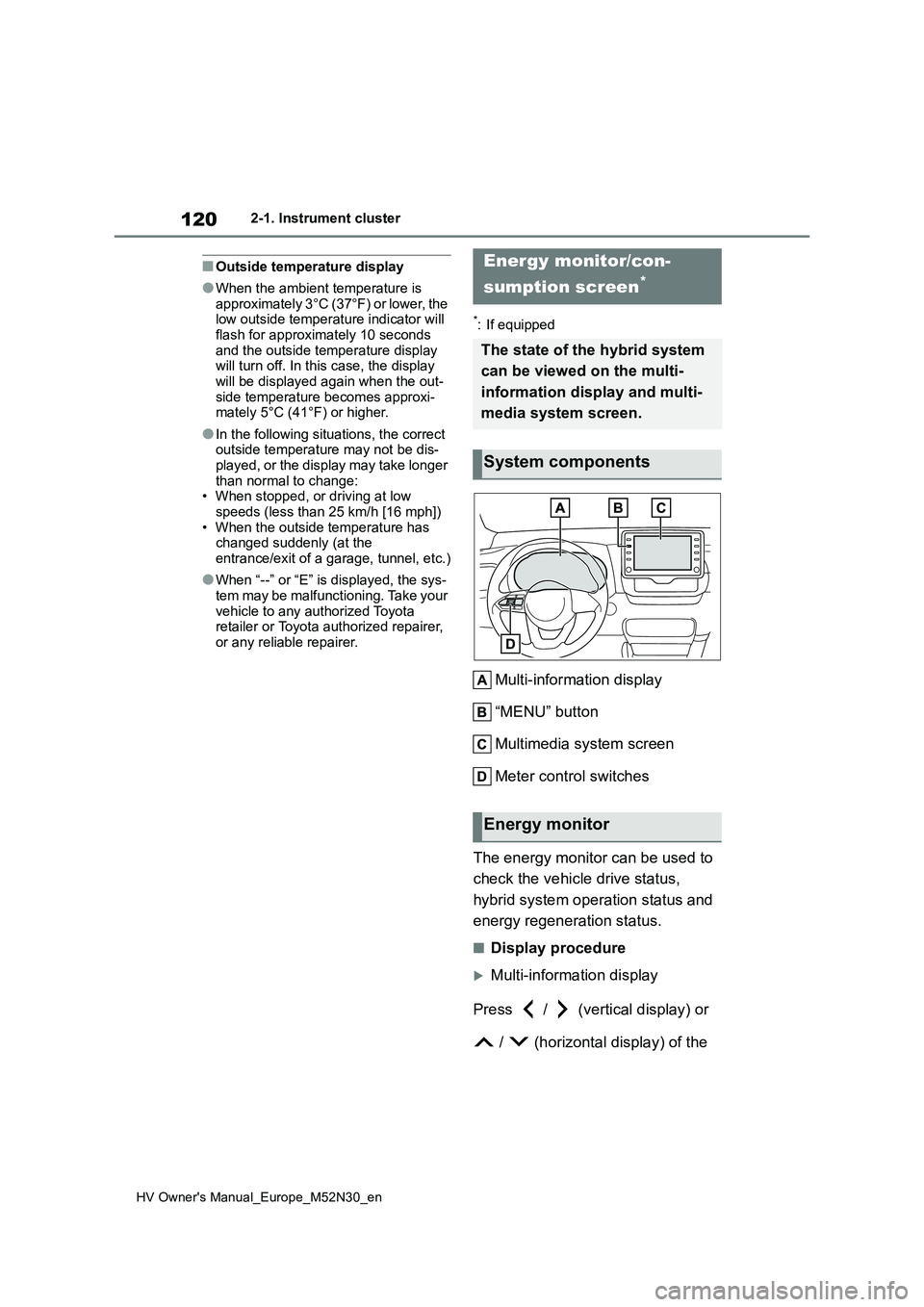
*: If equipped
Multi-information display
“MENU” button
Multimedia system screen
Meter control switches
The energy monitor can be used to
check the vehicle drive status,
hybrid system operation status and
energy regeneration status.
■Display procedure
Multi-information display
Press / (vertical display) or
/ (horizontal display) of the
Energy monitor/con-
sumption screen*
The state of the hybrid system
can be viewed on the multi-
information display and multi-
media system screen.
System components
Energy monitor
Page 123 of 590
121
2
HV Owner's Manual_Europe_M52N30_en
2-1. Instrument cluster
Vehicle status information and indicators
meter control switches on the steer-
ing wheel and select , press
/ (vertical display) or /
(horizontal display) of the meter
control switches and select the
energy monitor.
7-inch/8-inch display multimedia
system
1 Press the “MENU” button.
2 Select “Info” on the “Menu”
screen.
3 Select “ECO” on the “Informa-
tion” screen.*
*: Models with navigation function only
If a screen other than “Energy monitor” is displayed, select “Energy”.
9-inch display multimedia system
1 Press the “HOME” button.
2 Select “Vehicle” on the “Home”
screen.
If a screen other than “Energy monitor” is displayed, select “Energy flow”.
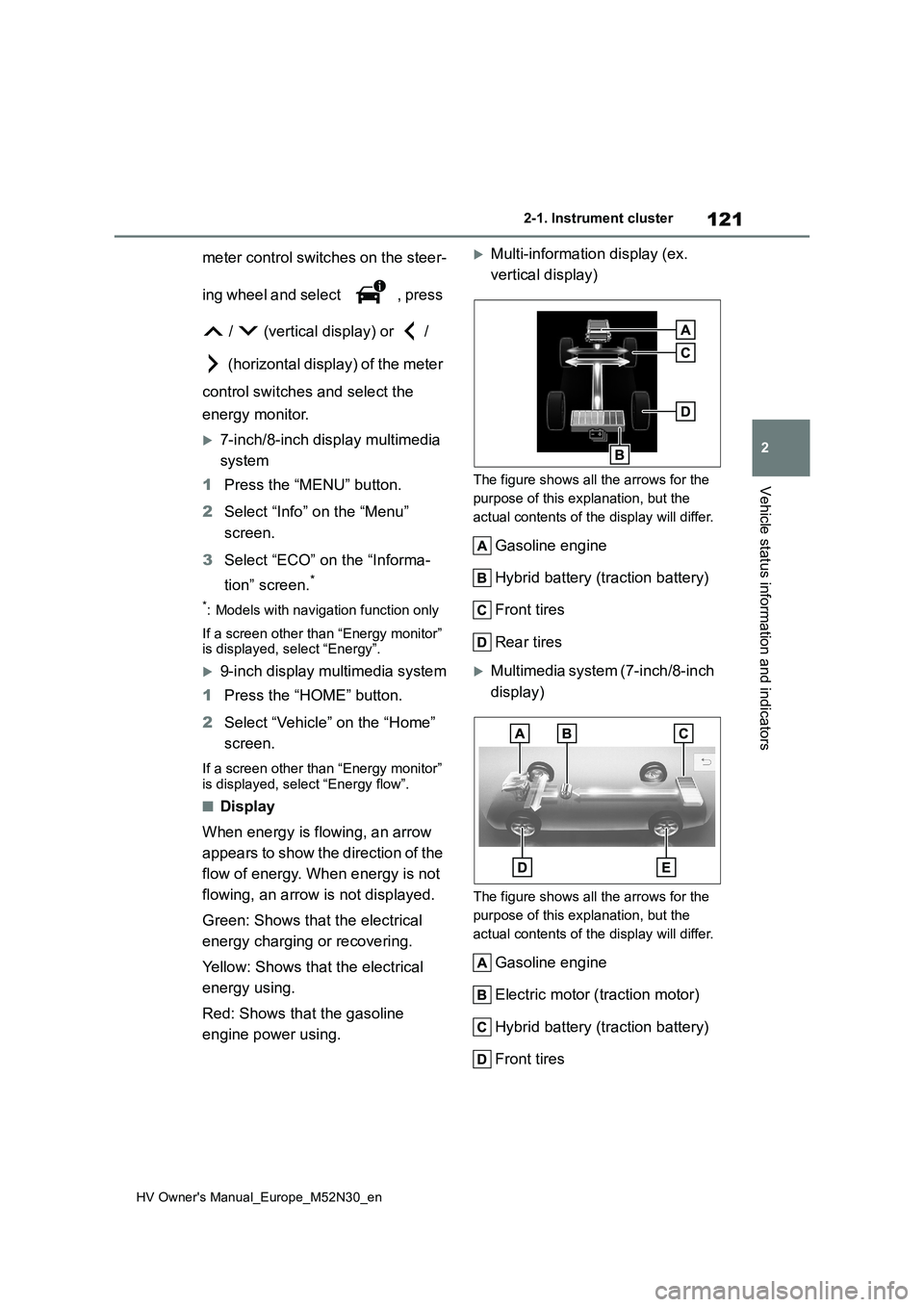
■Display
When energy is flowing, an arrow
appears to show the direction of the
flow of energy. When energy is not
flowing, an arrow is not displayed.
Green: Shows that the electrical
energy charging or recovering.
Yellow: Shows that the electrical
energy using.
Red: Shows that the gasoline
engine power using.
Multi-information display (ex.
vertical display)
The figure shows all the arrows for the
purpose of this explanation, but the
actual contents of the display will differ.
Gasoline engine
Hybrid battery (traction battery)
Front tires
Rear tires
Multimedia system (7-inch/8-inch
display)
The figure shows all the arrows for the
purpose of this explanation, but the
actual contents of the display will differ.
Gasoline engine
Electric motor ( traction motor)
Hybrid battery (traction battery)
Front tires
Page 124 of 590
122
HV Owner's Manual_Europe_M52N30_en
2-1. Instrument cluster
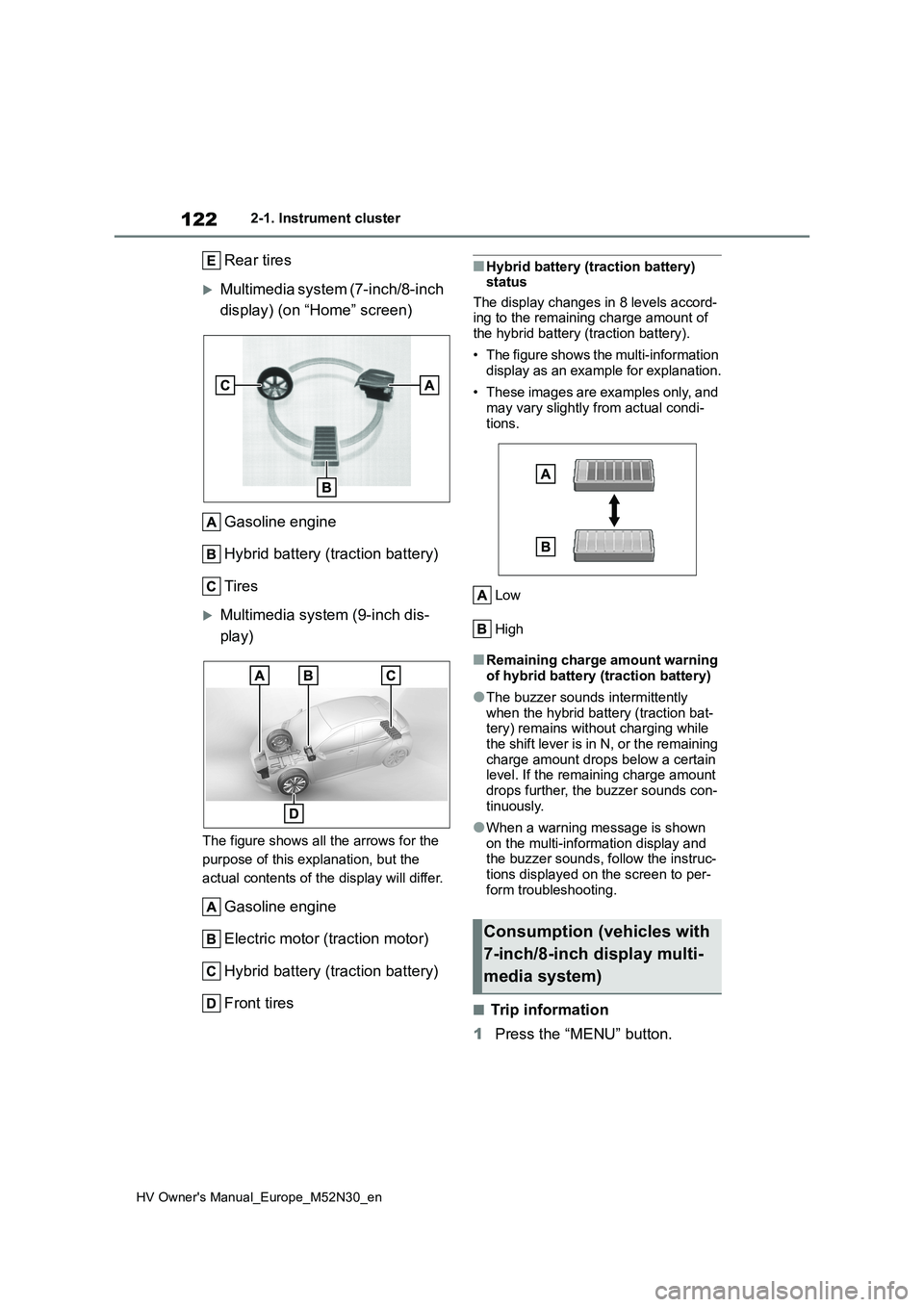
Rear tires
Multimedia system (7-inch/8-inch
display) (on “Home” screen)
Gasoline engine
Hybrid battery (traction battery)
Tires
Multimedia system (9-inch dis-
play)
The figure shows all the arrows for the
purpose of this explanation, but the
actual contents of the display will differ.
Gasoline engine
Electric motor (traction motor)
Hybrid battery (traction battery)
Front tires
■Hybrid battery (traction battery) status
The display changes in 8 levels accord- ing to the remaining charge amount of the hybrid battery (traction battery).
• The figure shows the multi-information display as an example for explanation.
• These images are examples only, and may vary slightly from actual condi-
tions.
Low
High
■Remaining charge amount warning of hybrid battery (traction battery)
●The buzzer sounds intermittently when the hybrid battery (traction bat-tery) remains without charging while
the shift lever is in N, or the remaining charge amount drops below a certain level. If the remaining charge amount
drops further, the buzzer sounds con- tinuously.
●When a warning message is shown on the multi-information display and the buzzer sounds, follow the instruc-
tions displayed on the screen to per- form troubleshooting.
■Trip information
1 Press the “MENU” button.
Consumption (vehicles with
7-inch/8-inch display multi-
media system)
Page 126 of 590
124
HV Owner's Manual_Europe_M52N30_en
2-1. Instrument cluster
deleted by selecting “Clear”.
■Cruising range
Displays the estimated maximum dis- tance that can be driven with the quan-tity of fuel remaining.
This distance is computed based on your average fuel consumption. As a result, the actual distance that can
be driven may differ from that displayed.
■“Home” screen
The average fuel consumption and dis- tance to empty can be displayed on the
“Home” screen of the multimedia dis- play.
For details of the “Home” screen, refer
to the separate “Navigation and multi- media system Owner’s manual”.
■Drive information
1 Press the “HOME” button.
2 Select “Vehicle” on the “Home”
screen.
If a screen other than “Drive informa- tion” is displayed, select “Drive info”.
Selected drive mode ( P.275)
Average speed vehicle speed
since the vehicle was started.
Elapsed time since the hybrid
system was started
Cruising range
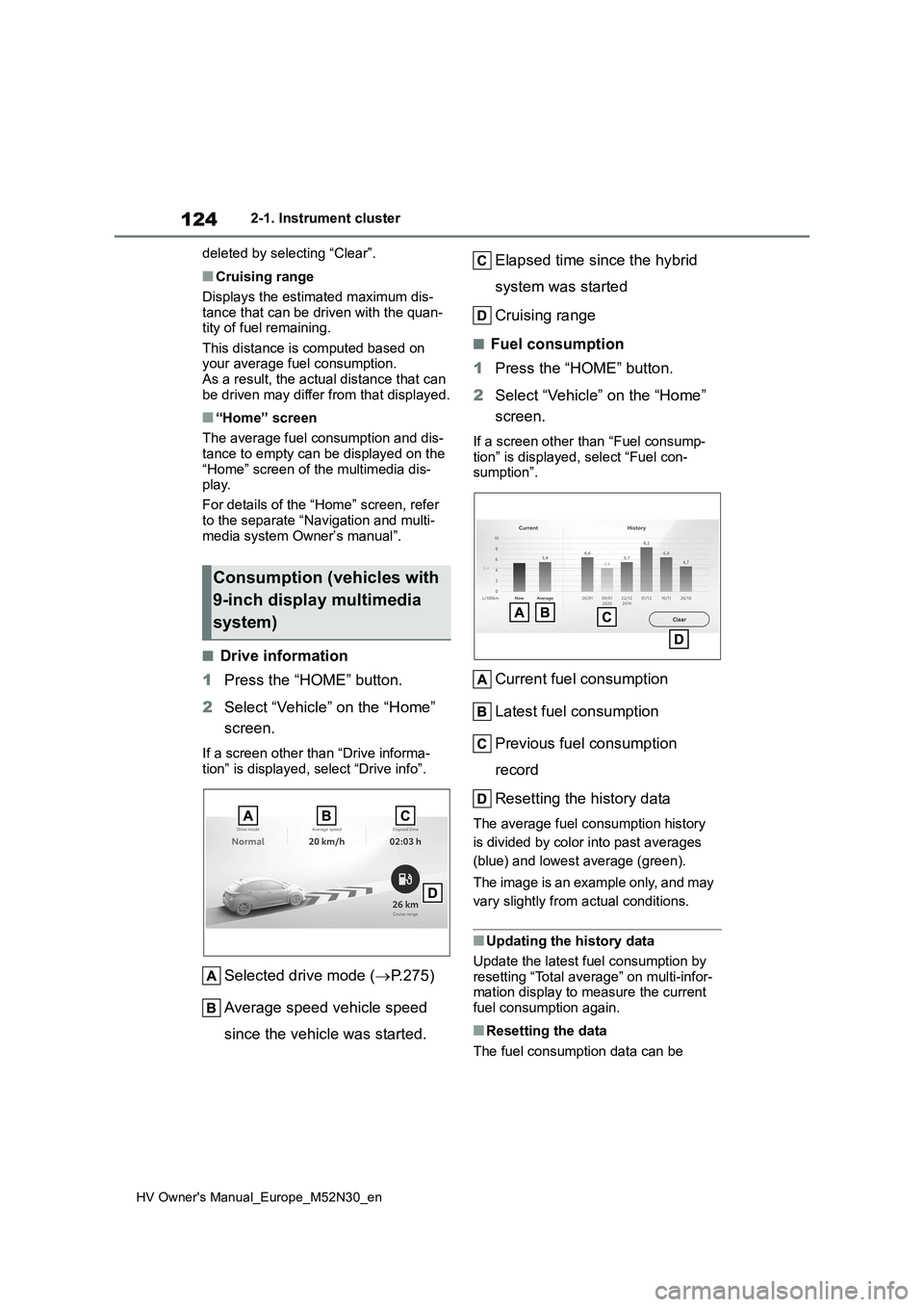
■Fuel consumption
1 Press the “HOME” button.
2 Select “Vehicle” on the “Home”
screen.
If a screen other than “Fuel consump-
tion” is displayed, select “Fuel con- sumption”.
Current fuel consumption
Latest fuel consumption
Previous fuel consumption
record
Resetting the history data
The average fuel consumption history
is divided by color into past averages
(blue) and lowest average (green).
The image is an example only, and may
vary slightly from actual conditions.
■Updating the history data
Update the latest fuel consumption by
resetting “Total average” on multi-infor- mation display to measure the current fuel consumption again.
■Resetting the data
The fuel consumption data can be
Consumption (vehicles with
9-inch display multimedia
system)
Page 337 of 590
335
6
HV Owner's Manual_Europe_M52N30_en
6-3. Do-it-yourself maintenance
Maintenance and care
sure with the appearance of the tire due
to pressure suddenly lowering. (Ways
of coping: P.386, 397)
However, the system may not be able
to detect sudden tire ruptures (bursting,
etc.).
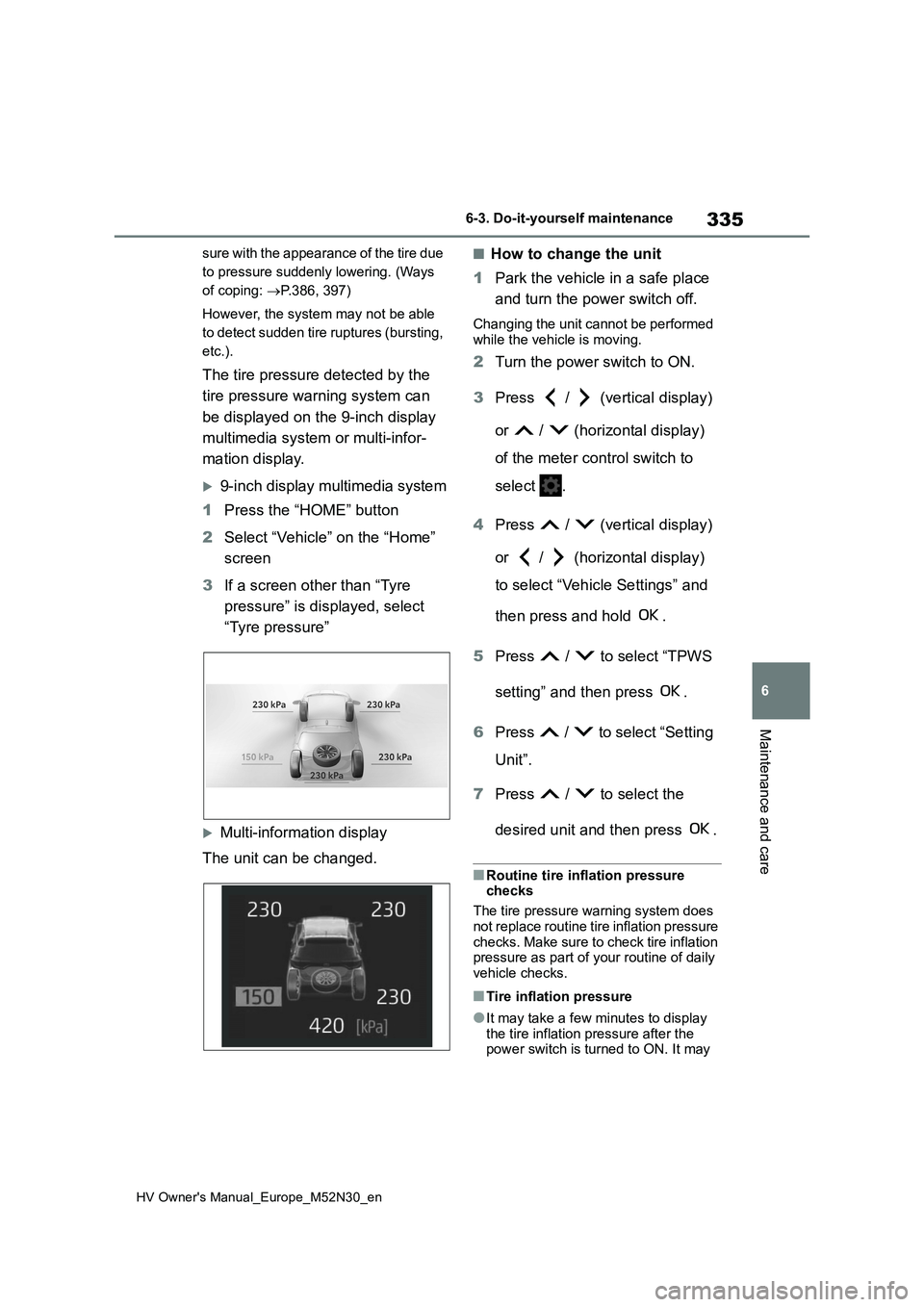
The tire pressure detected by the
tire pressure warning system can
be displayed on the 9-inch display
multimedia system or multi-infor-
mation display.
9-inch display multimedia system
1 Press the “HOME” button
2 Select “Vehicle” on the “Home”
screen
3 If a screen other than “Tyre
pressure” is displayed, select
“Tyre pressure”
Multi-information display
The unit can be changed.
■How to change the unit
1 Park the vehicle in a safe place
and turn the power switch off.
Changing the unit cannot be performed
while the vehicle is moving.
2 Turn the power switch to ON.
3 Press / (vertical display)
or / (horizontal display)
of the meter control switch to
select .
4 Press / (vertical display)
or / (horizontal display)
to select “Vehicle Settings” and
then press and hold .
5 Press / to select “TPWS
setting” and then press .
6 Press / to select “Setting
Unit”.
7 Press / to select the
desired unit and then press .
■Routine tire inflation pressure checks
The tire pressure warning system does
not replace routine tire inflation pressure checks. Make sure to check tire inflation pressure as part of your routine of daily
vehicle checks.
■Tire inflation pressure
●It may take a few minutes to display
the tire inflation pressure after the power switch is turned to ON. It may
Page 433 of 590
431
8
HV Owner's Manual_Europe_M52N30_en
8-2. Customization
Vehicle specifications
8-2.Customiz ation
■Changing by using the naviga-
tion/multimedia system screen
(vehicles with 7-inch/8-inch
display multimedia system)
1 Press the “MENU” button.
2 Select “Setup” on the “Menu”
screen.
3 Select “Vehicle” on the “Setup”
screen.
4 Select “Vehicle customization”.
Various setting can be changed. Refer
to the list of settings that can be changed for details.
■Changing by using the meter
control switches
1 Press / (vertical display)
or / (horizontal display)
of the meter control switch to
select .
2 Press / (vertical display)
or / (horizontal display)
of the meter control switch to
select the desired item to be
customized.
3 Press or press and hold .
The available settings will differ
depending on if is pressed or
pressed and held. Follow the instruc-
tions on the display.
Customizable features
Your vehicle includes a variety
of electronic features that can
be personalized to suit your
preferences. The settings of
these features can be changed
using the multi-information
display, the nav igation/multi-
media system screen or at any
authorized Toyota retailer or
Toyota authorized repairer, or
any reliable repairer.
Customizing vehicle fea-
tures
WARNING
■During customization
As the hybrid system needs to be operating during customization,
ensure that the vehicle is parked in a place with adequate ventilation. In a closed area such as a garage,
exhaust gases including harmful car- bon monoxide (CO) may collect and enter the vehicle. This may lead to
death or a serious health hazard.
NOTICE
■During customization
To prevent 12-volt battery discharge, ensure that the hybrid system is oper-
ating while customizing features.
Page 589 of 590
587
HV Owner's Manual_Europe_M52N30_en
Alphabetical Index
Low engine oil pressure ............. 375
Low fuel level ............................. 377
LTA indicator .............................. 378
Malfunction indicator lamp ......... 375
Parking brake indicator .............. 380
PKSB OFF indicator................... 379
Pre-collision system ................... 380
RCTA OFF indicator ................... 379
Seat belt reminder light .............. 377
Slip indicator .............................. 380
SRS airbag................................. 376
Tire pressure .............................. 378
Toyota parking assist-sensor OFF
indicator ................................... 379
Warning messages ....................... 383
Washer........................................... 197
Checking .................................... 329
Preparing and checking before win-
ter ............................................ 284
Switch ........................................ 197
Washing and waxing .................... 312
Weight............................................ 420
Wheels ........................................... 344
Replacing ................................... 344
Size ............................................ 427
Window lock switch ..................... 158
Windows
Power windows .......................... 156
Rear window defogger ............... 290
Washer ....................................... 197
Windshield wipers ........................ 197
Winter driving tips ........................ 284
Wireless charger........................... 303
Wireless remote control............... 130
Battery-Saving Function............. 141
Locking/Unlocking ...................... 130
Replacing the battery ................. 351
For vehicles with 7-inch/8-inch
display multimedia system,
refer to “Navigation and mul-
timedia system Owner’s
manual” for infor mation
regarding the equipment
listed below.
· Navigation system
· Audio/visual system
· Rear view monitor system
For vehicles with 9-inch dis-
play multimedia system,
refer to “TOYOTA SMART
CONNECT Owner’s manual”
for infor mation regarding the
equipment listed below.
· Navigation system
· Audio/visual system
· Rear view monitor system