Set time TOYOTA YARIS 2022 User Guide
[x] Cancel search | Manufacturer: TOYOTA, Model Year: 2022, Model line: YARIS, Model: TOYOTA YARIS 2022Pages: 590, PDF Size: 128.6 MB
Page 116 of 590
114
HV Owner's Manual_Europe_M52N30_en
2-1. Instrument cluster
Units
Select to change the units of measure
displayed.
EV indicator
Select to enable/disable the EV indica-
tor.
Select to change the displayed content
of the following:
• Hybrid System Indicator
Select to display/not display the Eco
Accelerator Guidance. ( P. 111 )
• Fuel economy display
Select to change the average fuel con-
sumption display between after
start/after reset/after refuel. ( P.110)
(if equipped)
Select to display/not display the audio
system linked display.
Select to change the displayed content
of the following:
• Display contents
Select to display/not display the energy
monitor. ( P.120)
• Drive information type
Select to change the drive information
type display between after start/after
reset.
• Drive information items
Select to set the first and second items
of the drive information display to any of
the following: average vehicle
speed/distance/elapsed time.
Current trip result display
Select to change the displayed informa-
tion about the current trip, measured
from when the hybrid system was
started until it was stopped, between
drive information/eco score. (The infor-
mation will be displayed temporarily
when the hybrid system is stopped.)
Pop-up display
Select to enable/disable pop-up dis-
plays for each relevant system.
Multi-information display off
Select to turn the multi-information dis-
play off.
To turn the multi-information display on
again, press any of the following meter
control switches
//// /.
Default setting
Select to reset the meter display set-
tings to the default setting.
■Vehicle functions and settings
that can be changed
P. 4 3 1
■Suspension of the settings display
●Some settings cannot be changed while driving. When changing set-
tings, park the vehicle in a safe place.
●If a warning message is displayed,
operation of the settings display will be suspended.
Page 125 of 590
123
2
HV Owner's Manual_Europe_M52N30_en
2-1. Instrument cluster
Vehicle status information and indicators
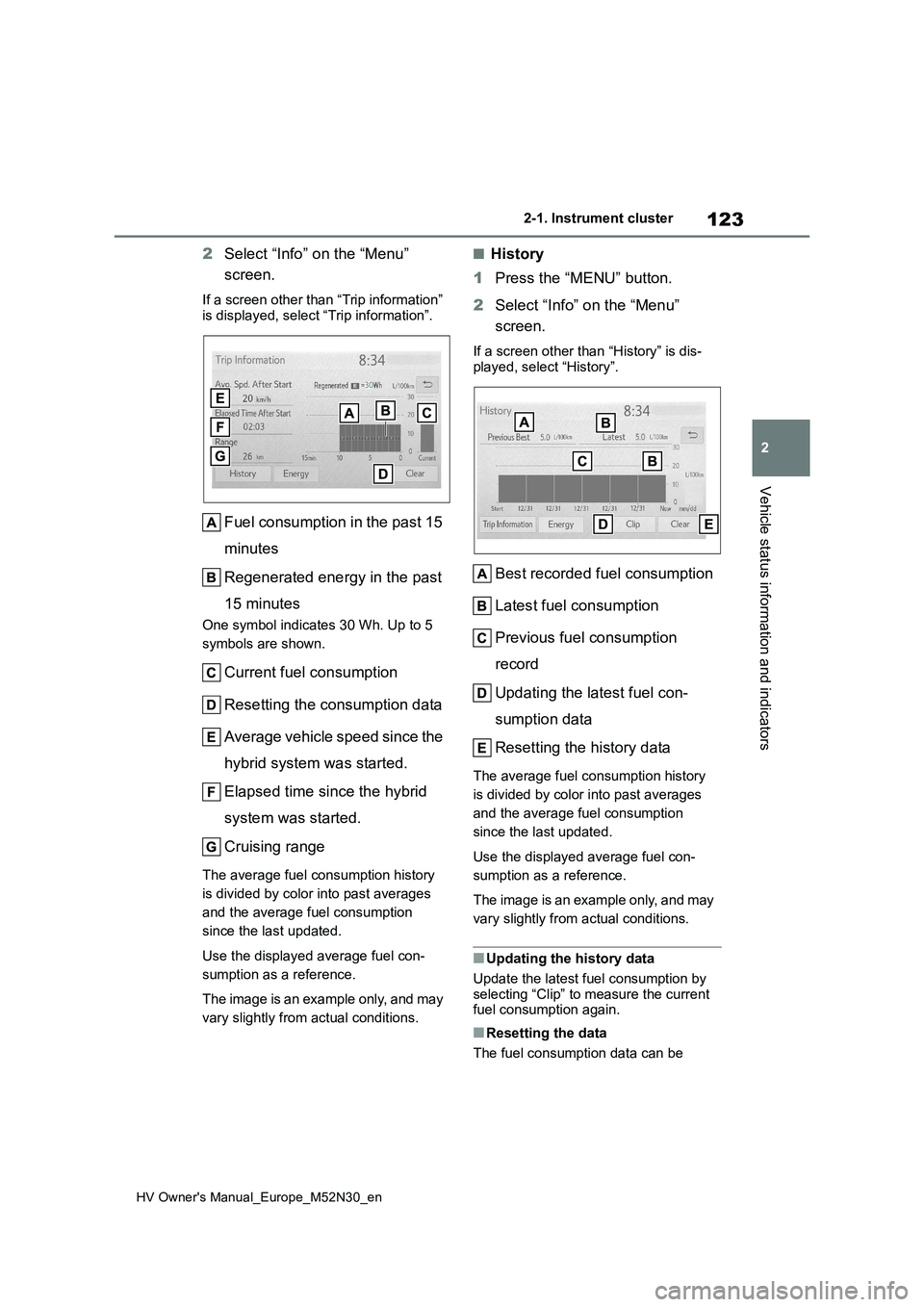
2Select “Info” on the “Menu”
screen.
If a screen other than “Trip information”
is displayed, select “Trip information”.
Fuel consumption in the past 15
minutes
Regenerated energy in the past
15 minutes
One symbol indicates 30 Wh. Up to 5
symbols are shown.
Current fuel consumption
Resetting the consumption data
Average vehicle speed since the
hybrid system was started.
Elapsed time since the hybrid
system was started.
Cruising range
The average fuel consumption history
is divided by color into past averages
and the average fuel consumption
since the last updated.
Use the displayed average fuel con-
sumption as a reference.
The image is an example only, and may
vary slightly from actual conditions.
■History
1 Press the “MENU” button.
2 Select “Info” on the “Menu”
screen.
If a screen other than “History” is dis-
played, select “History”.
Best recorded fuel consumption
Latest fuel consumption
Previous fuel consumption
record
Updating the latest fuel con-
sumption data
Resetting the history data
The average fuel consumption history
is divided by color into past averages
and the average fuel consumption
since the last updated.
Use the displayed average fuel con-
sumption as a reference.
The image is an example only, and may
vary slightly from actual conditions.
■Updating the history data
Update the latest fuel consumption by
selecting “Clip” to measure the current fuel consumption again.
■Resetting the data
The fuel consumption data can be
Page 126 of 590
124
HV Owner's Manual_Europe_M52N30_en
2-1. Instrument cluster
deleted by selecting “Clear”.
■Cruising range
Displays the estimated maximum dis- tance that can be driven with the quan-tity of fuel remaining.
This distance is computed based on your average fuel consumption. As a result, the actual distance that can
be driven may differ from that displayed.
■“Home” screen
The average fuel consumption and dis- tance to empty can be displayed on the
“Home” screen of the multimedia dis- play.
For details of the “Home” screen, refer
to the separate “Navigation and multi- media system Owner’s manual”.
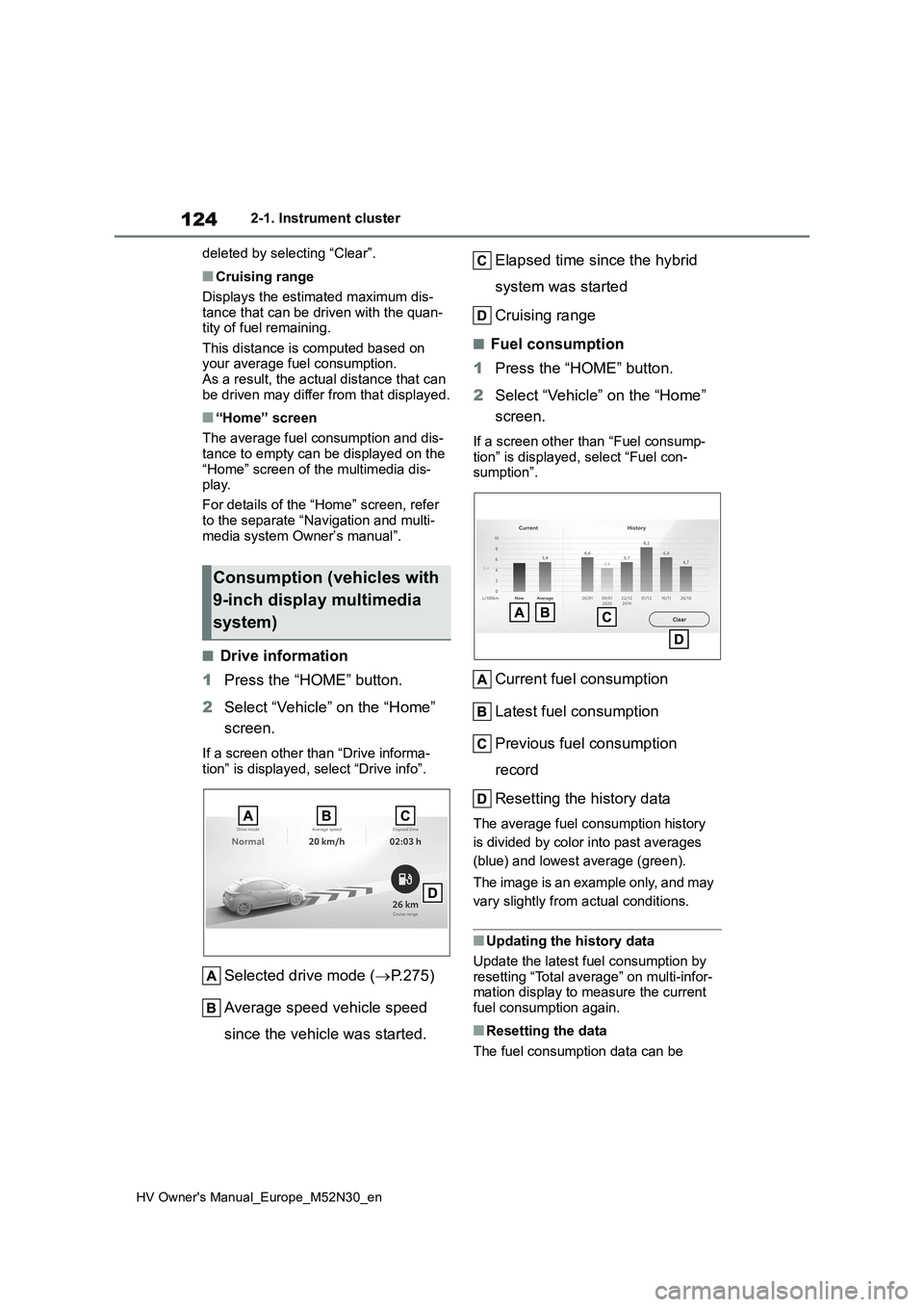
■Drive information
1 Press the “HOME” button.
2 Select “Vehicle” on the “Home”
screen.
If a screen other than “Drive informa- tion” is displayed, select “Drive info”.
Selected drive mode ( P.275)
Average speed vehicle speed
since the vehicle was started.
Elapsed time since the hybrid
system was started
Cruising range
■Fuel consumption
1 Press the “HOME” button.
2 Select “Vehicle” on the “Home”
screen.
If a screen other than “Fuel consump-
tion” is displayed, select “Fuel con- sumption”.
Current fuel consumption
Latest fuel consumption
Previous fuel consumption
record
Resetting the history data
The average fuel consumption history
is divided by color into past averages
(blue) and lowest average (green).
The image is an example only, and may
vary slightly from actual conditions.
■Updating the history data
Update the latest fuel consumption by
resetting “Total average” on multi-infor- mation display to measure the current fuel consumption again.
■Resetting the data
The fuel consumption data can be
Consumption (vehicles with
9-inch display multimedia
system)
Page 131 of 590
129
3
HV Owner's Manual_Europe_M52N30_en
3-1. Key information
Before driving
battery may be depleted. Replace the
battery when necessary. ( P.351) • The wireless remote control does not operate.
• The detection area becomes smaller.
■Key battery depletion (vehicles with a smart entry & start system)
●The standard battery life is 1 to 2 years.
●If the battery becomes low, an alarm will sound in the cabin and a message will be shown on the multi-information
display when the hybrid system is stopped.
●To reduce key battery depletion when the electronic key is to not be used for long periods of time, set the electronic
key to the battery-saving mode. ( P.141)
●As the electronic key always receives radio waves, the battery will become depleted even if the electronic key is
not used. The following symptoms indicate that the electronic key battery may be depleted. Replace the battery
when necessary. ( P.351) • The smart entry & start system or the wireless remote control does not oper-
ate. • The detection area becomes smaller.• The LED indicator on the key surface
does not turn on.
●To avoid serious deterioration, do not
leave the electronic key within 1 m (3 ft.) of the following electrical appli-ances that produce a magnetic field:
•TVs • Personal computers• Cellular phones, cordless phones and
battery chargers • Recharging cellular phones or cord-less phones
• Table lamps • Induction cookers
●If the electronic key is near the vehicle for longer than necessary, even if the smart entry & start system is not oper-
ated, the key battery may become depleted faster than normal.
■Replacing the battery
P. 3 5 1
■If “A New Key has been Registered Contact Your Dealer for Details” is shown on the multi-information
display (vehicles with a smart entry & start system)
This message will be displayed each
time the driver’s door is opened when the doors are unlocked from the outside for approximately 10 days after a new
electronic key has been registered. If this message is displayed but you have not had a new electronic key regis-
tered, ask any authorized Toyota retailer or Toyota authorized repairer, or any reli-able repairer to check if an unknown
electronic key (other than those in your possession) has been registered.
■If a wrong key is used
The key cylinder rotates freely, isolated
from the internal mechanism.
NOTICE
■To prevent key damage
●Do not drop the keys, subject them
to strong shocks, or bend them.
●Do not expose the keys to high
temperatures for long periods of time.
●Do not get the keys wet or wash them in an ultrasonic washer, etc.
●Vehicles with a smart entry & start system: Do not attach metallic or magnetic materials to the keys or
place the keys close to such materi- als.
●Do not disassemble the keys.
●Do not attach a sticker or anything
else to the surface of the key.
Page 143 of 590
141
3
HV Owner's Manual_Europe_M52N30_en
3-2. Opening, closing and locking the doors
Before driving
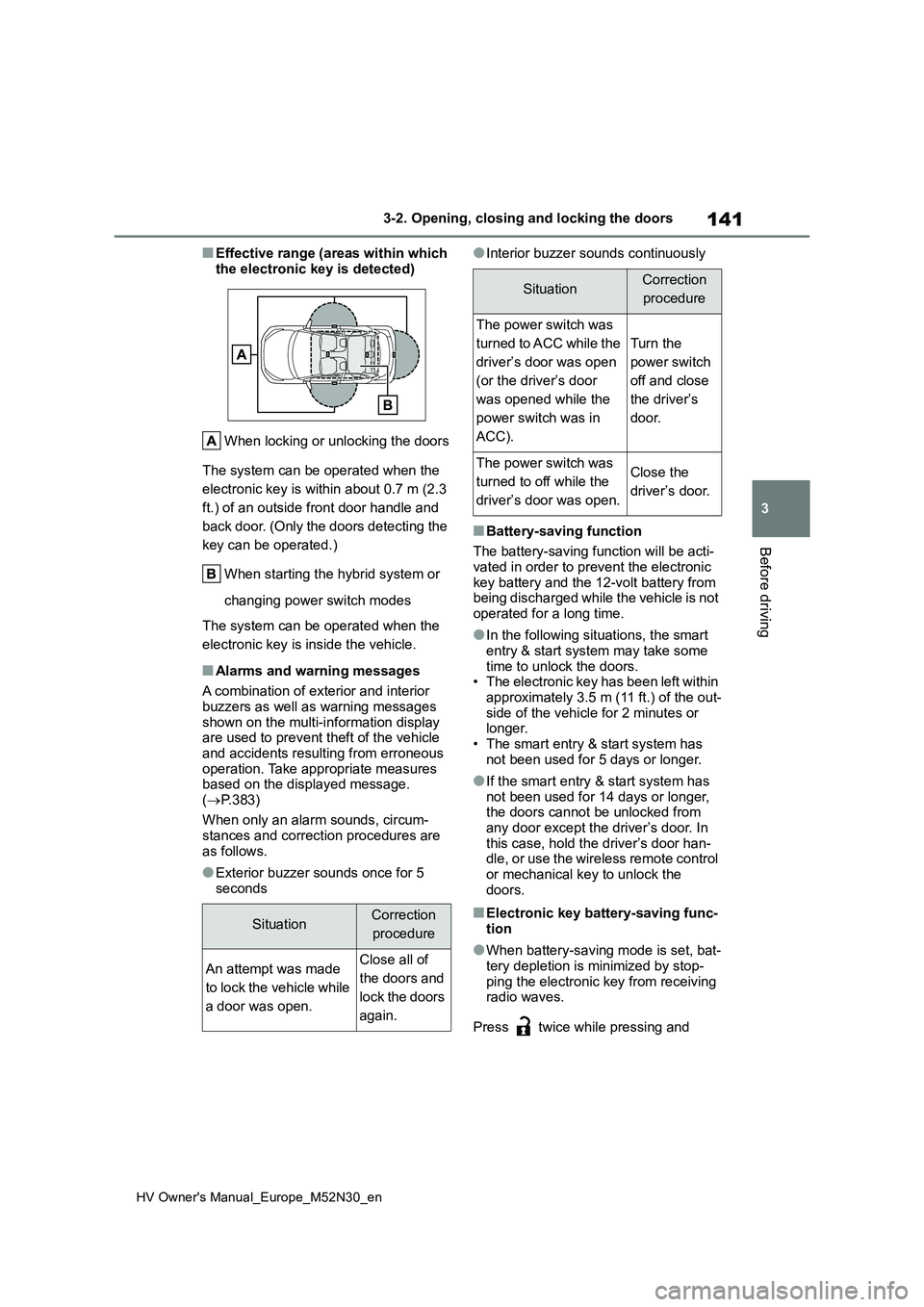
■Effective range (areas within which
the electronic key is detected)
When locking or unlocking the doors
The system can be operated when the
electronic key is within about 0.7 m (2.3
ft.) of an outside front door handle and
back door. (Only the doors detecting the
key can be operated.)
When starting the hybrid system or
changing power switch modes
The system can be operated when the
electronic key is inside the vehicle.
■Alarms and warning messages
A combination of exterior and interior
buzzers as well as warning messages shown on the multi-information display are used to prevent theft of the vehicle
and accidents resulting from erroneous operation. Take appropriate measures based on the displayed message.
( P.383)
When only an alarm sounds, circum-
stances and correction procedures are as follows.
●Exterior buzzer sounds once for 5 seconds
●Interior buzzer sounds continuously
■Battery-saving function
The battery-saving function will be acti-
vated in order to prevent the electronic key battery and the 12-volt battery from being discharged while the vehicle is not
operated for a long time.
●In the following situations, the smart
entry & start system may take some time to unlock the doors.• The electronic key has been left within
approximately 3.5 m (11 ft.) of the out- side of the vehicle for 2 minutes or longer.
• The smart entry & start system has not been used for 5 days or longer.
●If the smart entry & start system has not been used for 14 days or longer, the doors cannot be unlocked from
any door except the driver’s door. In this case, hold the driver’s door han-dle, or use the wireless remote control
or mechanical key to unlock the doors.
■Electronic key battery-saving func-tion
●When battery-saving mode is set, bat-tery depletion is minimized by stop-
ping the electronic key from receiving radio waves.
Press twice while pressing and
SituationCorrection
procedure
An attempt was made
to lock the vehicle while
a door was open.
Close all of
the doors and
lock the doors
again.
SituationCorrection
procedure
The power switch was
turned to ACC while the
driver’s door was open
(or the driver’s door
was opened while the
power switch was in
ACC).
Turn the
power switch
off and close
the driver’s
door.
The power switch was
turned to off while the
driver’s door was open.
Close the
driver’s door.
Page 144 of 590
142
HV Owner's Manual_Europe_M52N30_en
3-2. Opening, closing and locking the doors
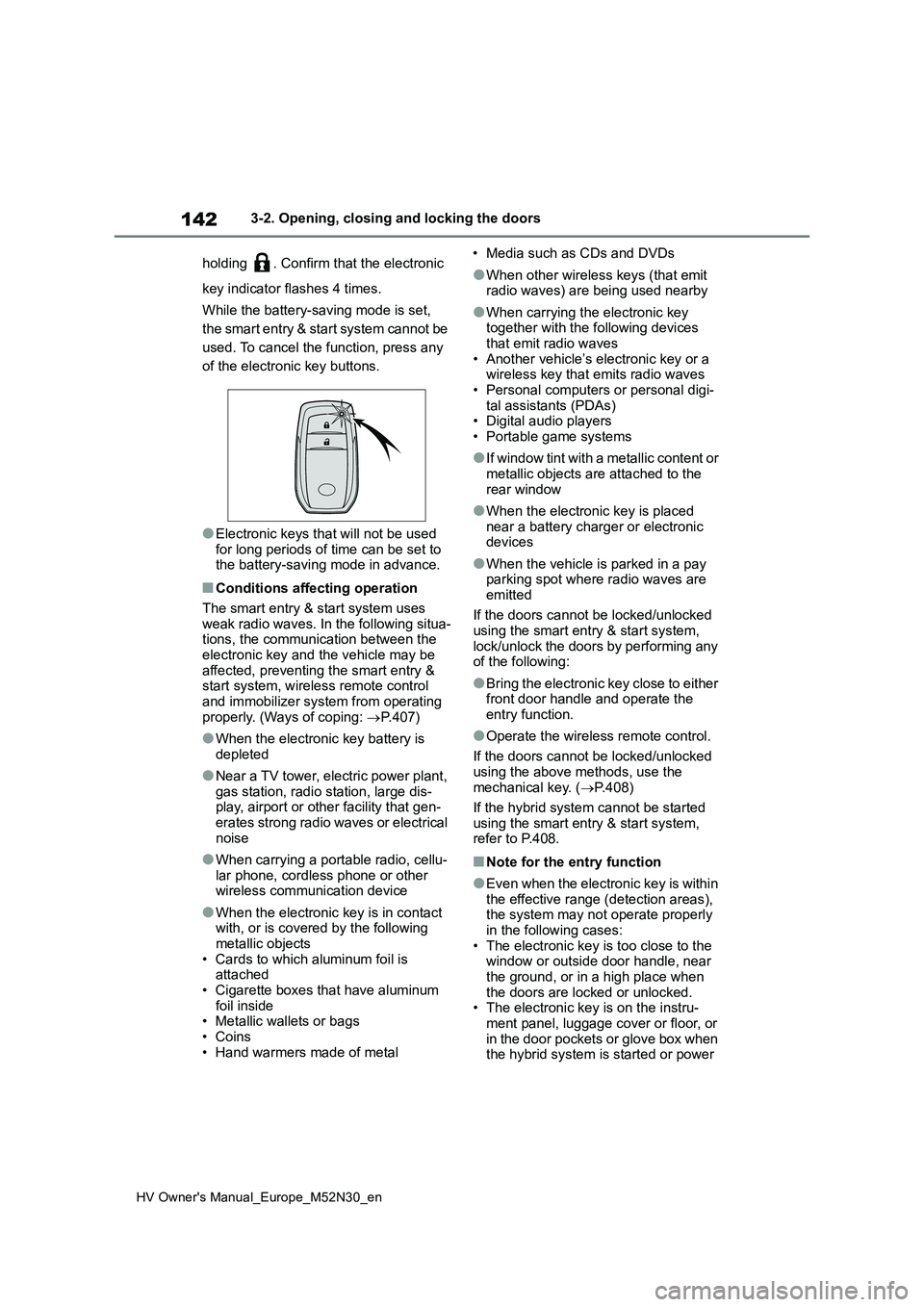
holding . Confirm that the electronic
key indicator flashes 4 times.
While the battery-saving mode is set,
the smart entry & start system cannot be
used. To cancel the function, press any
of the electronic key buttons.
●Electronic keys that will not be used for long periods of time can be set to the battery-saving mode in advance.
■Conditions affecting operation
The smart entry & start system uses weak radio waves. In the following situa-tions, the communication between the
electronic key and the vehicle may be affected, preventing the smart entry & start system, wireless remote control
and immobilizer system from operating properly. (Ways of coping: P.407)
●When the electronic key battery is depleted
●Near a TV tower, electric power plant, gas station, radio station, large dis-play, airport or other facility that gen-
erates strong radio waves or electrical noise
●When carrying a portable radio, cellu-lar phone, cordless phone or other wireless communication device
●When the electronic key is in contact with, or is covered by the following
metallic objects • Cards to which aluminum foil is attached
• Cigarette boxes that have aluminum foil inside• Metallic wallets or bags
• Coins • Hand warmers made of metal
• Media such as CDs and DVDs
●When other wireless keys (that emit radio waves) are being used nearby
●When carrying the electronic key together with the following devices
that emit radio waves • Another vehicle’s electronic key or a wireless key that emits radio waves
• Personal computers or personal digi- tal assistants (PDAs)• Digital audio players
• Portable game systems
●I f w i n d o w t i n t w i t h a m e t a l l i c c o n t e n t o r
metallic objects are attached to the rear window
●When the electronic key is placed near a battery charger or electronic devices
●When the vehicle is parked in a pay parking spot where radio waves are
emitted
If the doors cannot be locked/unlocked using the smart entry & start system,
lock/unlock the doors by performing any of the following:
●Bring the electronic key close to either front door handle and operate the entry function.
●Operate the wireless remote control.
If the doors cannot be locked/unlocked
using the above methods, use the mechanical key. ( P.408)
If the hybrid system cannot be started
using the smart entry & start system, refer to P.408.
■Note for the entry function
●Even when the electronic key is within the effective range (detection areas), the system may not operate properly
in the following cases: • The electronic key is too close to the window or outside door handle, near
the ground, or in a high place when the doors are locked or unlocked.• The electronic key is on the instru-
ment panel, luggage cover or floor, or in the door pockets or glove box when the hybrid system is started or power
Page 145 of 590
143
3
HV Owner's Manual_Europe_M52N30_en
3-2. Opening, closing and locking the doors
Before driving
switch modes are changed.
●Do not leave the electronic key on top of the instrument panel or near the
door pockets when exiting the vehicle. Depending on the radio wave recep-tion conditions, it may be detected by
the antenna outside the cabin and the door will become lockable from the outside, possibly trapping the elec-
tronic key inside the vehicle.
●As long as the electronic key is within
the effective range, the doors may be locked or unlocked by anyone. How-ever, only the doors detecting the
electronic key can be used to unlock the vehicle.
●Even if the electronic key is not inside the vehicle, it may be possible to start the hybrid system if the electronic key
is near the window.
●The doors may unlock or lock if a
large amount of water splashes on the door handle, such as in the rain or in a car wash when the electronic key is
within the effective range. (The doors will automatically be locked after approximately 30 seconds if the doors
are not opened and closed.)
●If the wireless remote control is used
to lock the doors when the electronic key is near the vehicle, there is a pos-sibility that the door may not be
unlocked by the entry function. (Use the wireless remote control to unlock the doors.)
●Touching the door lock or unlock sen-sor while wearing gloves may prevent
lock or unlock operation.
●When the lock operation is performed
using the lock sensor, recognition sig- nals will be shown up to two consecu-tive times. After this, no recognition
signals will be given.
●If the door handle becomes wet while
the electronic key is within the effec- tive range, the door may lock and unlock repeatedly. In that case, follow
the following correction procedures to wash the vehicle:
• Place the electronic key in a location 2
m (6 ft.) or more away from the vehi- cle. (Take care to ensure that the key is not stolen.)
• Set the electronic key to battery-sav- ing mode to disable the smart entry & start system. ( P.141)
●If the electronic key is inside the vehi- cle and a door handle becomes wet
during a car wash, a message may be shown on the multi-information dis-play and a buzzer will sound outside
the vehicle. To turn off the alarm, lock all the doors.
●The lock sensor may not work prop-erly if it comes into contact with ice, snow, mud, etc. Clean the lock sensor
and attempt to operate it again.
●A sudden handle operation or a han-
dle operation immediately after enter- ing the effective range may prevent the doors from being unlocked. Touch
the door unlock sensor and check that the doors are unlocked before pulling the door handle again.
●If there is another electronic key in the detection area, it may take slightly lon-
ger to unlock the doors after the door handle is gripped.
■When the vehicle is not driven for extended periods
●To prevent theft of the vehicle, do not leave the electronic key within 2 m (6
ft.) of the vehicle.
●The smart entry & start system can be
deactivated in advance. ( P.431)
●Setting the electronic key to battery-
saving mode helps to reduce key bat- tery depletion. ( P.141)
■To operate the system properly
Make sure to carry the electronic key
when operating the system. Do not get the electronic key too close to the vehi-cle when operating the system from the
outside of the vehicle. Depending on the position and holding condition of the electronic key, the key
may not be detected correctly and the system may not operate properly. (The
Page 154 of 590
152
HV Owner's Manual_Europe_M52N30_en
3-4. Adjusting the steering wheel and mirrors
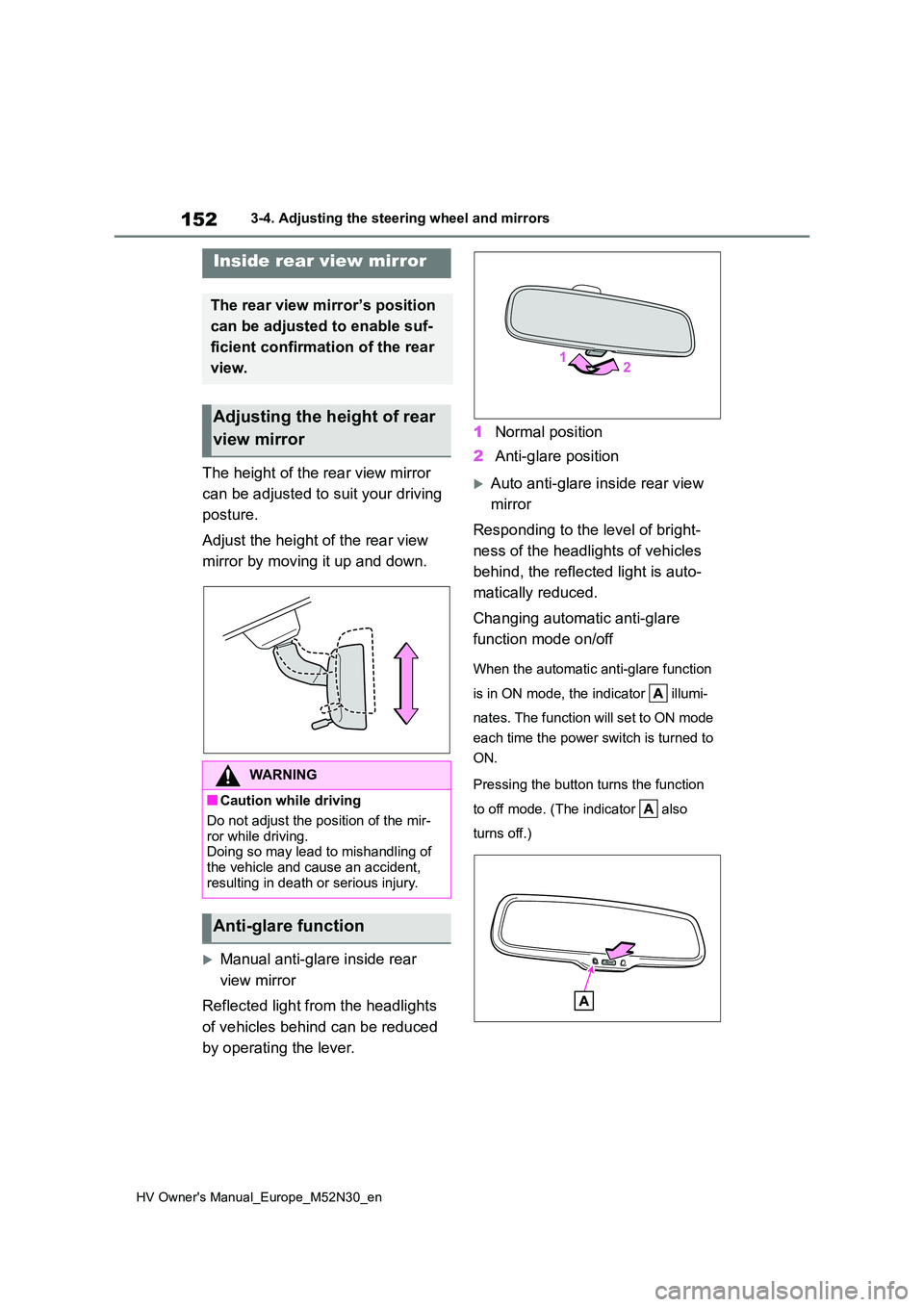
The height of the rear view mirror
can be adjusted to suit your driving
posture.
Adjust the height of the rear view
mirror by moving it up and down.
Manual anti-glare inside rear
view mirror
Reflected light from the headlights
of vehicles behind can be reduced
by operating the lever.
1 Normal position
2 Anti-glare position
Auto anti-glare inside rear view
mirror
Responding to the level of bright-
ness of the headlights of vehicles
behind, the reflected light is auto-
matically reduced.
Changing automatic anti-glare
function mode on/off
When the automatic anti-glare function
is in ON mode, the indicator illumi-
nates. The function will set to ON mode
each time the power switch is turned to
ON.
Pressing the button turns the function
to off mode. (The indicator also
turns off.)
Inside rear view mirror
The rear view mirror’s position
can be adjusted to enable suf-
ficient confirmation of the rear
view.
Adjusting the height of rear
view mirror
WARNING
■Caution while driving
Do not adjust the position of the mir-
ror while driving. Doing so may lead to mishandling of the vehicle and cause an accident,
resulting in death or serious injury.
Anti-glare function
Page 162 of 590
160
HV Owner's Manual_Europe_M52N30_en
4-1. Before driving
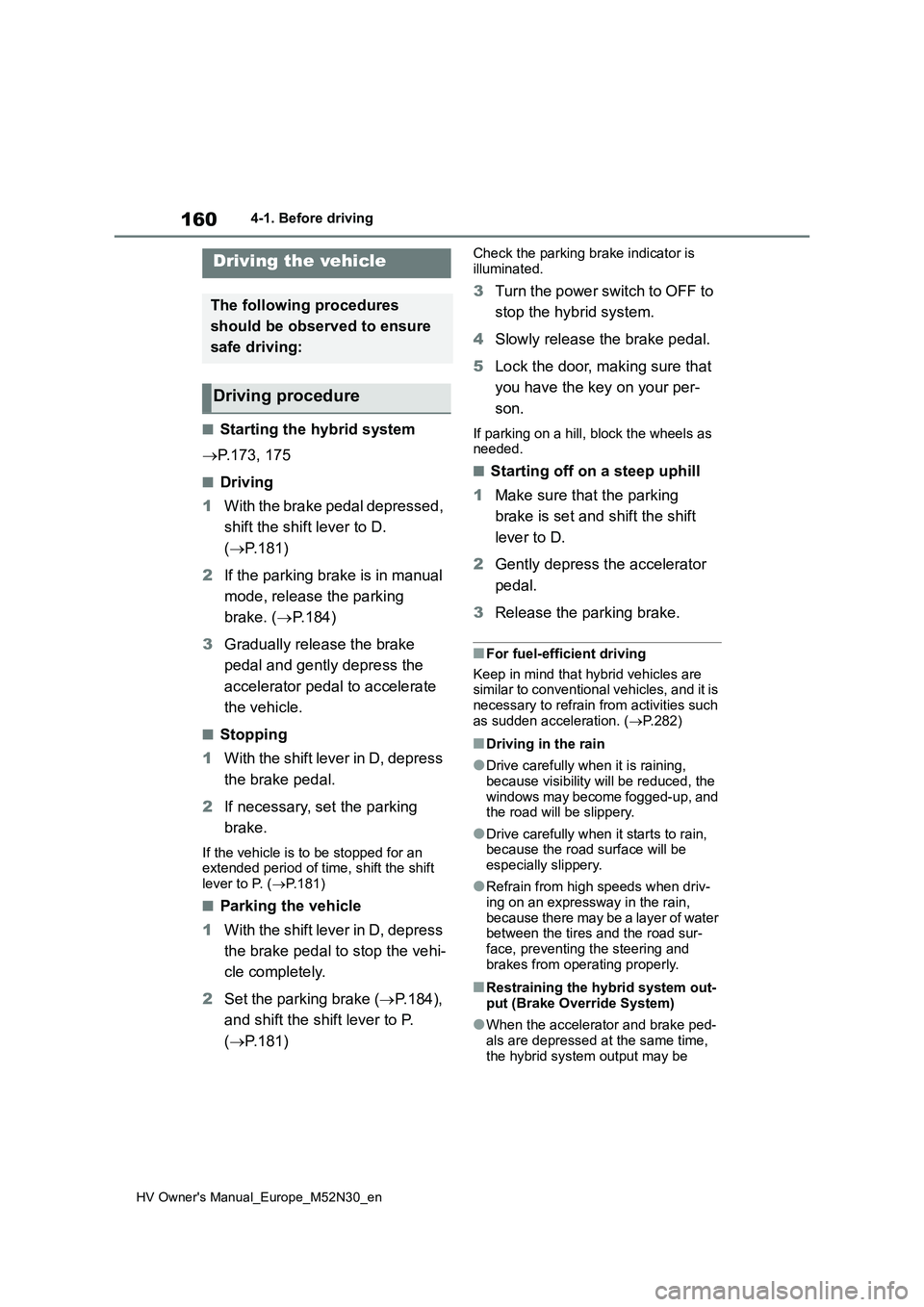
4-1.Before driv in g
■Starting the hybrid system
P.173, 175
■Driving
1 With the brake pedal depressed,
shift the shift lever to D.
( P.181)
2 If the parking brake is in manual
mode, release the parking
brake. ( P.184)
3 Gradually release the brake
pedal and gently depress the
accelerator pedal to accelerate
the vehicle.
■Stopping
1 With the shift lever in D, depress
the brake pedal.
2 If necessary, set the parking
brake.
If the vehicle is to be stopped for an extended period of time, shift the shift
lever to P. ( P.181)
■Parking the vehicle
1 With the shift lever in D, depress
the brake pedal to stop the vehi-
cle completely.
2 Set the parking brake (P.184),
and shift the shift lever to P.
( P.181)
Check the parking brake indicator is
illuminated.
3 Turn the power switch to OFF to
stop the hybrid system.
4 Slowly release the brake pedal.
5 Lock the door, making sure that
you have the key on your per-
son.
If parking on a hill, block the wheels as needed.
■Starting off on a steep uphill
1 Make sure that the parking
brake is set and shift the shift
lever to D.
2 Gently depress the accelerator
pedal.
3 Release the parking brake.
■For fuel-efficient driving
Keep in mind that hybrid vehicles are similar to conventional vehicles, and it is necessary to refrain from activities such
as sudden acceleration. ( P.282)
■Driving in the rain
●Drive carefully when it is raining,
because visibility will be reduced, the windows may become fogged-up, and the road will be slippery.
●Drive carefully when it starts to rain, because the road surface will be
especially slippery.
●Refrain from high speeds when driv-
ing on an expressway in the rain, because there may be a layer of water between the tires and the road sur-
face, preventing the steering and brakes from operating properly.
■Restraining the hybrid system out-put (Brake Override System)
●When the accelerator and brake ped-als are depressed at the same time,
the hybrid system output may be
Driving the vehicle
The following procedures
should be observed to ensure
safe driving:
Driving procedure
Page 166 of 590
164
HV Owner's Manual_Europe_M52N30_en
4-1. Before driving
WARNING
●Do not leave a door or window open if the curved glass is coated
with a metallized film such as a sil- ver-colored one. Reflected sunlight may cause the glass to act as a
lens, causing a fire.
●Always apply the parking brake,
shift the shift lever to P, stop the hybrid system and lock the vehicle.Do not leave the vehicle unat-
tended while the hybrid system is operating.If the vehicle is parked with the shift
lever in P but the parking brake is not set, the vehicle may start to move, possibly leading to an acci-
dent.
●Do not touch the exhaust pipes
while the “READY” indicator is illu- minated or immediately after turn-ing the hybrid system off.
Doing so may cause burns.
■When taking a nap in the vehicle
Always turn the hybrid system off. Otherwise, if you accidentally move the shift lever or depress the acceler-
ator pedal, this could cause an acci- dent or fire due to hybrid system overheating. Additionally, if the vehi-
cle is parked in a poorly ventilated area, exhaust gases may collect and enter the vehicle, leading to death or
a serious health hazard.
■When braking
●When the brakes are wet, drive more cautiously.Braking distance increases when
the brakes are wet, and this may cause one side of the vehicle to brake differently than the other
side. Also, the parking brake may not securely hold the vehicle.
●If the electronically controlled brake system does not operate, do not fol-low other vehicles closely and avoid
hills or sharp turns that require braking.In this case, braking is still possible,
but the brake pedal should be depressed more firmly than usual. Also, the braking distance will
increase. Have your brakes fixed immediately.
●The brake system consists of 2 or more individual hydraulic systems; if one of the systems fails, the
other(s) will still operate. In this case, the brake pedal should be depressed more firmly than usual
and the braking distance will increase. Have your brakes fixed immediately.
■If the vehicle becomes stuck
Do not spin the wheels excessively
when a driven wheel is up in the air, or the vehicle is stuck in sand, mud, etc. This may damage the driveline
components or propel the vehicle for- ward or backward, causing an acci-dent.
NOTICE
■When driving the vehicle
●Do not depress the accelerator and brake pedals at the same time
during driving, as this may restrain the hybrid system output.
●Do not use the accelerator pedal or depress the accelerator and brake pedals at the same time to hold the
vehicle on a hill.
■When parking the vehicle
Always set the parking brake and shift the shift lever to P. Failure to do so may cause the vehicle to move or the
vehicle may accelerate suddenly if the accelerator pedal is accidentally depressed.