Set time TOYOTA YARIS 2022 Service Manual
[x] Cancel search | Manufacturer: TOYOTA, Model Year: 2022, Model line: YARIS, Model: TOYOTA YARIS 2022Pages: 590, PDF Size: 128.6 MB
Page 261 of 590
259
4
HV Owner's Manual_Europe_M52N30_en
4-5. Using the driving support systems
Driving
Even when the sensors are oper-
ating, the buzzer will be muted in
some situations. (automatic
buzzer mute function)
■Adjusting the buzzer volume
The buzzer volume can be adjusted
on the multi-information display.
Use the meter control switches to
change settings. ( P.104, 110)
1 Press / (vertical display)
or / (horizontal display)
of the meter control switch to
select .
2 Press / (vertical display)
or / (horizontal display)
of the meter control switch to
select and then press and
hold .
3 Select the volume and then
press .
Each time the switch is pressed, the volume level will change between 1, 2, and 3.
■Muting a buzzer
A mute button will be displayed on
the multi-information display when
an object is detected. To mute the
buzzer, press .
The buzzers for the Toyota parking
assist-sensor and RCTA function (if
equipped) will be muted simultane-
ously.
Mute will be canceled automatically
in the following situations:
When the shift lever is changed.
When the vehicle speed exceeds
a certain speed.
When there is a malfunction in a
sensor or the system is tempo-
rarily unavailable.
When the operating function is
disabled manually.
When the power switch is turned
off.
Page 264 of 590
262
HV Owner's Manual_Europe_M52N30_en
4-5. Using the driving support systems
■The RCTA function is operational when
The RCTA function operates when all of the following conditions are met:
●The RCTA function is on.
●The shift lever is in R.
●The vehicle speed is less than approximately 8 km/h (5 mph).
●The approaching vehicle speed is between approximately 8 km/h (5
mph) and 28 km/h (17 mph).
■Adjusting the buzzer volume
The buzzer volume can be adjusted on the multi-information display.
Use the meter control switches to change settings. ( P.104, 110)
1 Press / (vertical display) or
/ (horizontal display) of the
meter control switch to select .
2 Press / (vertical display) or
/ (horizontal display) of the
meter control switch to select
“RCTA” and then press and hold
.
3 Press to select the volume.
Each time the switch is pressed, the vol- ume level will change between 1, 2, and
3.
When the buzzer volume adjustment is
completed, press to return to the
previous screen.
■Muting a buzzer temporarily
A mute button will be displayed on the
multi-information display when a vehi-
cles or an object is detected. To mute
the buzzer, press .
The buzzers for the RCTA function and
Toyota parking assist-sensor will be
muted simultaneously.
Mute will be canceled automatically in
the following situations:
●When the shift lever is changed.
●When the vehicle speed exceeds a certain speed.
●When there is a malfunction in a sen-sor or the system is temporarily
unavailable.
●When the operating function is dis-
abled manually.
●When the power switch is turned off.
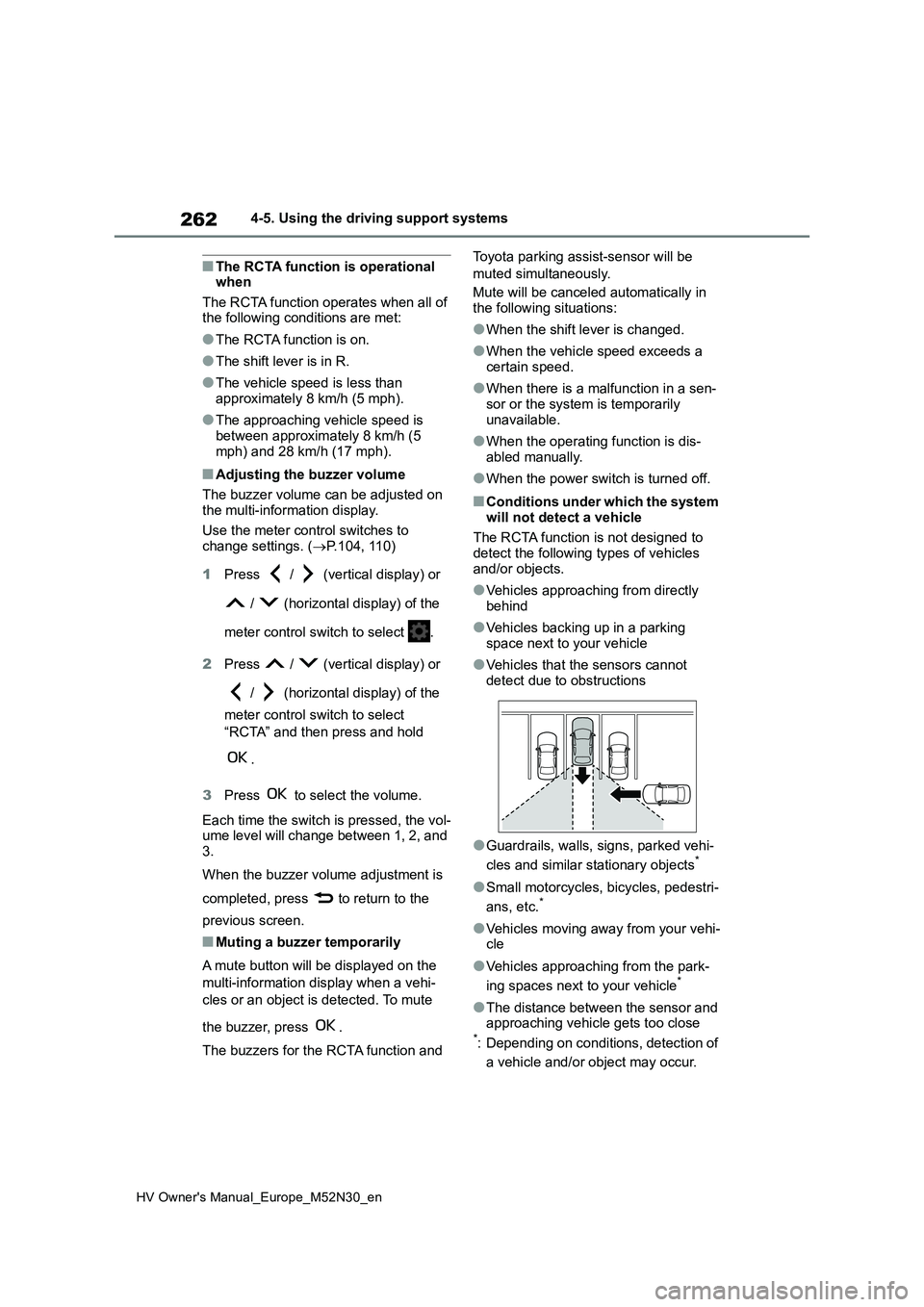
■Conditions under which the system
will not detect a vehicle
The RCTA function is not designed to detect the following types of vehicles
and/or objects.
●Vehicles approaching from directly
behind
●Vehicles backing up in a parking
space next to your vehicle
●Vehicles that the sensors cannot
detect due to obstructions
●Guardrails, walls, signs, parked vehi-
cles and similar stationary objects*
●Small motorcycles, bicycles, pedestri-
ans, etc.*
●Vehicles moving away from your vehi- cle
●Vehicles approaching from the park-
ing spaces next to your vehicle*
●The distance between the sensor and approaching vehicle gets too close*: Depending on conditions, detection of
a vehicle and/or object may occur.
Page 291 of 590
289
5
HV Owner's Manual_Europe_M52N30_en
5-1. Using the air conditioning system and defogger
Interior features
Recirculated air mode switch
Airflow mode control switch
Fan speed increases switch
Fan speed decreases switch
“FAST/ECO” switch
Rear window defogger and outside rear view mirror defoggers swi tch
Windshield defogger switch
Off switch
Automatic mode switch
Fan speed control dial
■Adjusting the temperature set-
ting
To adjust the temperature setting,
turn the temperature control dial
clockwise (warm) or counterclock-
wise (cool).
If “A/C” switch is not pressed, the sys-
tem will blow ambient temperature air
or heated air.
■Setting the fan speed
Vehicles with the DUAL mode
Operate the fan speed increases
switch to increase the fan speed
and the fan speed decreases
switch to decrease the fan speed.
Pressing the off switch to turns off the
fan.
Vehicles without the DUAL mode
To adjust the fan speed, turn the
fan speed control dial clockwise
(increase) or counterclockwise
(decrease).
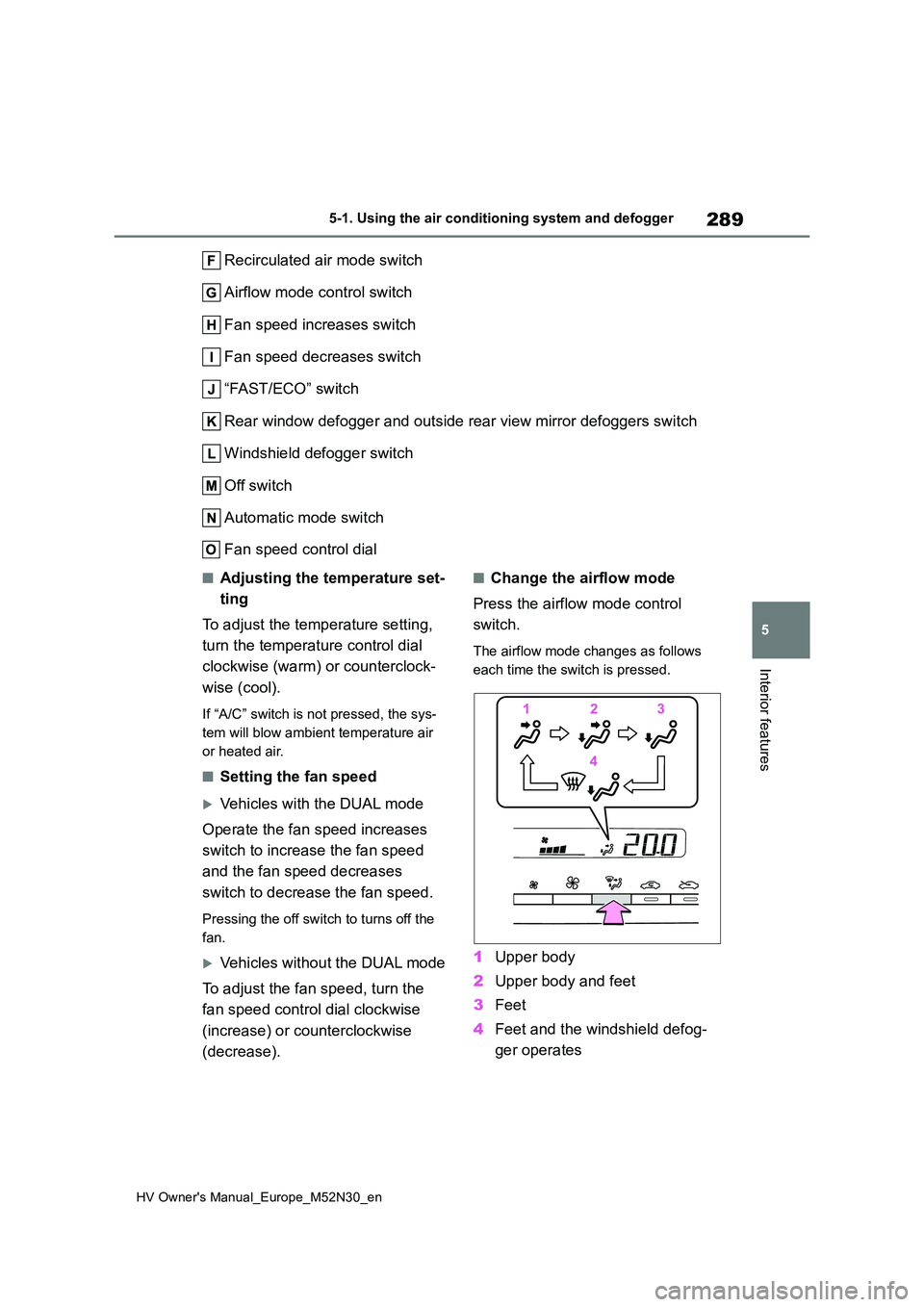
■Change the airflow mode
Press the airflow mode control
switch.
The airflow mode changes as follows
each time the switch is pressed.
1 Upper body
2 Upper body and feet
3 Feet
4 Feet and the windshield defog-
ger operates
Page 292 of 590
290
HV Owner's Manual_Europe_M52N30_en
5-1. Using the air conditioning system and defogger
■Switching between outside air
and recirculated air modes
To change to recirculated air
mode, press the recirculated air
mode switch.
The indicator illuminates on the recircu-
lated air mode switch.
To change to outside air mode,
press the outside air mode
switch.
The indicator illuminates on the outside
air mode switch.
■Set cooling and dehumidifica-
tion function
Press the “A/C” switch.
When the function is on, the indicator
illuminates on the “A/C” switch.
■Defogging the windshield
Defoggers are used to defog the
windshield and front side windows.
Press the windshield defogger
switch.
Set the outside/recirculated air mode
switch to outside air mode if the recircu-
lated air mode is used. (It may switch
automatically.)
To defog the windshield and the side
windows quickly, turn the air flow and
temperature up.
To return to the previous mode, press
the windshield defogger switch again
when the windshield is defogged.
When the windshield defogger switch is
on, the indicator illuminates on the
windshield defogger switch.
■Defogging the rear window
and outside rear view mirrors
Defoggers are used to defog the
rear window, and to remove rain-
drops, dew and frost from the out-
side rear view mirrors.
Press the rear window and outside
rear view mirror defoggers switch.
The defoggers will automatically turn off
after a while.
When the rear window and outside rear
view mirror defoggers switch is on, the
indicator illuminates on the rear window
and outside rear view mirror defoggers
switch.
■Using the Climate Preference
1 Press the automatic mode
switch.
2 Press the “FAST/ECO” switch.
Each time the “FAST/ECO” switch
is pressed, the fan speed setting
mode toggles as follows.
Normal “ECO” “FAST” Nor-
mal
When “ECO” is displayed on the air
conditioning screen, the air condi-
tioning is controlled with low fuel
consumption prioritized such as
reducing fan speed, etc.
When “FAST” is displayed on the
screen, fan speed will be
increased.
■Fogging up of the windows
●The windows will easily fog up when
the humidity in the vehicle is high. Turning “A/C” on will dehumidify the air from the outlets and defog the
Page 293 of 590
291
5
HV Owner's Manual_Europe_M52N30_en
5-1. Using the air conditioning system and defogger
Interior features
windshield effectively.
●If you turn “A/C” off, the windows may fog up more easily.
●The windows may fog up if the recir-culated air mode is used.
■When driving on dusty roads
Close all windows. If dust thrown up by the vehicle is still drawn into the vehicle after closing the windows, it is recom-
mended that the air intake mode be set to outside air mode and the fan speed to any setting except off.
■Outside/recirculated air mode
●Setting to the recirculated air mode temporarily is recommended in pre-
venting dirty air from entering the vehicle interior and helping to cool the vehicle when the outside air tempera-
ture is high.
●Outside/recirculated air mode may
automatically switch depending on the temperature setting or the inside tem-perature.
■Operation of the air conditioning
system in Eco drive mode
●In Eco drive mode, the air conditioning
system is controlled as follows to pri- oritize fuel efficiency:• Engine speed and compressor opera-
tion controlled to restrict heating/cool- ing capacity• Fan speed restricted when automatic
mode is selected
●To improve air conditioning perfor-
mance, perform the following opera- tions:• Adjust the fan speed
• Turn off Eco drive mode ( P.275)
●Even when the drive mode is set to
Eco drive mode, the air conditioning eco mode can be turned off by press-ing the “FAST/ECO” switch. ( P.290)
■When the outside temperature falls
to nearly 0°C (32°F)
The dehumidification function may not operate even when “A/C” switch is
pressed.
■Ventilation and air conditioning
odors
●To let fresh air in, set the air condition-
ing system to the outside air mode.
●During use, various odors from inside
and outside the vehicle may enter into and accumulate in the air conditioning system. This may then cause odor to
be emitted from the vents.
●To reduce potential odors from occur-
ring: • It is recommended that the air condi-tioning system be set to outside air
mode prior to turning the vehicle off. • The start timing of the blower may be delayed for a short period of time
immediately after the air conditioning system is started in automatic mode.
●When parking, the system automati-cally switches to outside air mode to encourage better air circulation
throughout the vehicle, helping to reduce odors that occur when starting the vehicle.
■Air conditioning filter
P. 3 4 6
■Customization
Some functions can be customized. ( P.431)
WARNING
■To prevent the windshield from fogging up
Do not use the windshield defogger
switch during cool air operation in extremely humid weather. The differ-ence between the temperature of the
outside air and that of the windshield can cause the outer surface of the windshield to fog up, blocking your
vision.
■When the outside rear view mir-
ror defoggers are operating
Do not touch the outside rear view mirror surfaces, as they can become
very hot and burn you.
Page 309 of 590
307
5
HV Owner's Manual_Europe_M52N30_en
5-4. Other interior features
Interior features
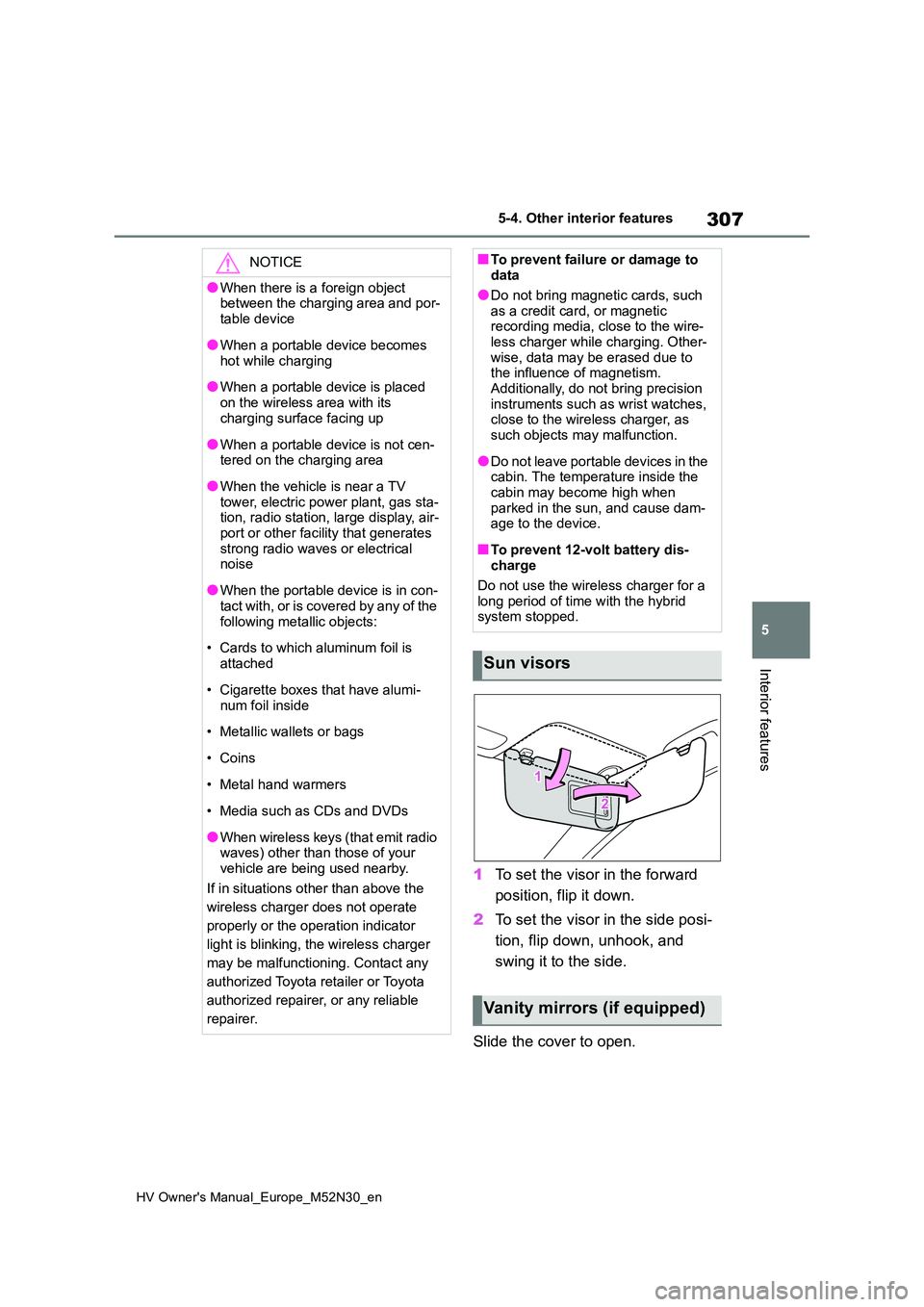
1To set the visor in the forward
position, flip it down.
2 To set the visor in the side posi-
tion, flip down, unhook, and
swing it to the side.
Slide the cover to open.
NOTICE
●When there is a foreign object between the charging area and por-
table device
●When a portable device becomes
hot while charging
●When a portable device is placed
on the wireless area with its charging surface facing up
●When a portable device is not cen-tered on the charging area
●When the vehicle is near a TV tower, electric power plant, gas sta-tion, radio station, large display, air-
port or other facility that generates strong radio waves or electrical noise
●When the portable device is in con-tact with, or is covered by any of the
following metallic objects:
• Cards to which aluminum foil is
attached
• Cigarette boxes that have alumi-
num foil inside
• Metallic wallets or bags
•Coins
• Metal hand warmers
• Media such as CDs and DVDs
●When wireless keys (that emit radio waves) other than those of your
vehicle are being used nearby.
If in situations other than above the
wireless charger does not operate
properly or the operation indicator
light is blinking, the wireless charger
may be malfunctioning. Contact any
authorized Toyota retailer or Toyota
authorized repairer, or any reliable
repairer.
■To prevent failure or damage to data
●Do not bring magnetic cards, such
as a credit card, or magnetic recording media, close to the wire-less charger while charging. Other-
wise, data may be erased due to the influence of magnetism.Additionally, do not bring precision
instruments such as wrist watches, close to the wireless charger, as such objects may malfunction.
●Do not leave portable devices in the cabin. The temperature inside the
cabin may become high when parked in the sun, and cause dam-age to the device.
■To prevent 12-volt battery dis-charge
Do not use the wireless charger for a long period of time with the hybrid system stopped.
Sun visors
Vanity mirrors (if equipped)
Page 329 of 590
327
6
HV Owner's Manual_Europe_M52N30_en
6-3. Do-it-yourself maintenance
Maintenance and care
■Engine oil consumption
A certain amount of engine oil will be
consumed while driving. In the following situations, oil consumption may increase, and engine oil may need to be
refilled in between oil maintenance inter- vals.
●When the engine is new, for example directly after purchasing the vehicle or after replacing the engine
●If low quality oil or oil of an inappropri-ate viscosity is used
●When driving at high engine speeds or with a heavy load, when towing
(vehicles with towing packages), or when driving while accelerating or decelerating frequently
●When leaving the engine idling for a long time, or when driving frequently
through heavy traffic
■After changing the engine oil
The engine oil maintenance data should be reset. Perform the following proce-
dures:
1 Press / (vertical display) or
/ (horizontal display) of the
meter control switch to select .
2 Press / (vertical display) or
/ (horizontal display) to
select “Vehicle Settings” and then
press and hold .
3 Press / to select “Oil Mainte-
nance” and then press .
4 Press / to select “Yes” and
then press .
A message will be displayed on the multi-information display when the reset
procedure has been completed.
■Engine coolant reservoir
The coolant level is satisfactory if it
is between the “F” and “L” lines on
WARNING
■Used engine oil
●Used engine oil contains poten-
tially harmful contaminants which may cause skin disorders such as inflammation and skin cancer, so
care should be taken to avoid pro- longed and repeated contact. To remove used engine oil from your
skin, wash thoroughly with soap and water.
●Dispose of used oil and filters only in a safe and acceptable manner. Do not dispose of used oil and fil-
ters in household trash, in sewers or onto the ground.Call any authorized Toyota retailer
or Toyota authorized repairer, or any reliable repairer, service station or auto parts store for information
concerning recycling or disposal.
●Do not leave used engine oil within
the reach of children.
NOTICE
■To prevent serious engine dam- age
Check the oil level on a regular basis.
■When replacing the engine oil
●Be careful not to spill engine oil on
the vehicle components.
●Avoid overfilling, or the engine
could be damaged.
●Check the oil level on the dipstick
every time you refill the vehicle.
●Be sure the engine oil filler cap is
properly tightened.
Checking the coolant
Page 337 of 590
335
6
HV Owner's Manual_Europe_M52N30_en
6-3. Do-it-yourself maintenance
Maintenance and care
sure with the appearance of the tire due
to pressure suddenly lowering. (Ways
of coping: P.386, 397)
However, the system may not be able
to detect sudden tire ruptures (bursting,
etc.).
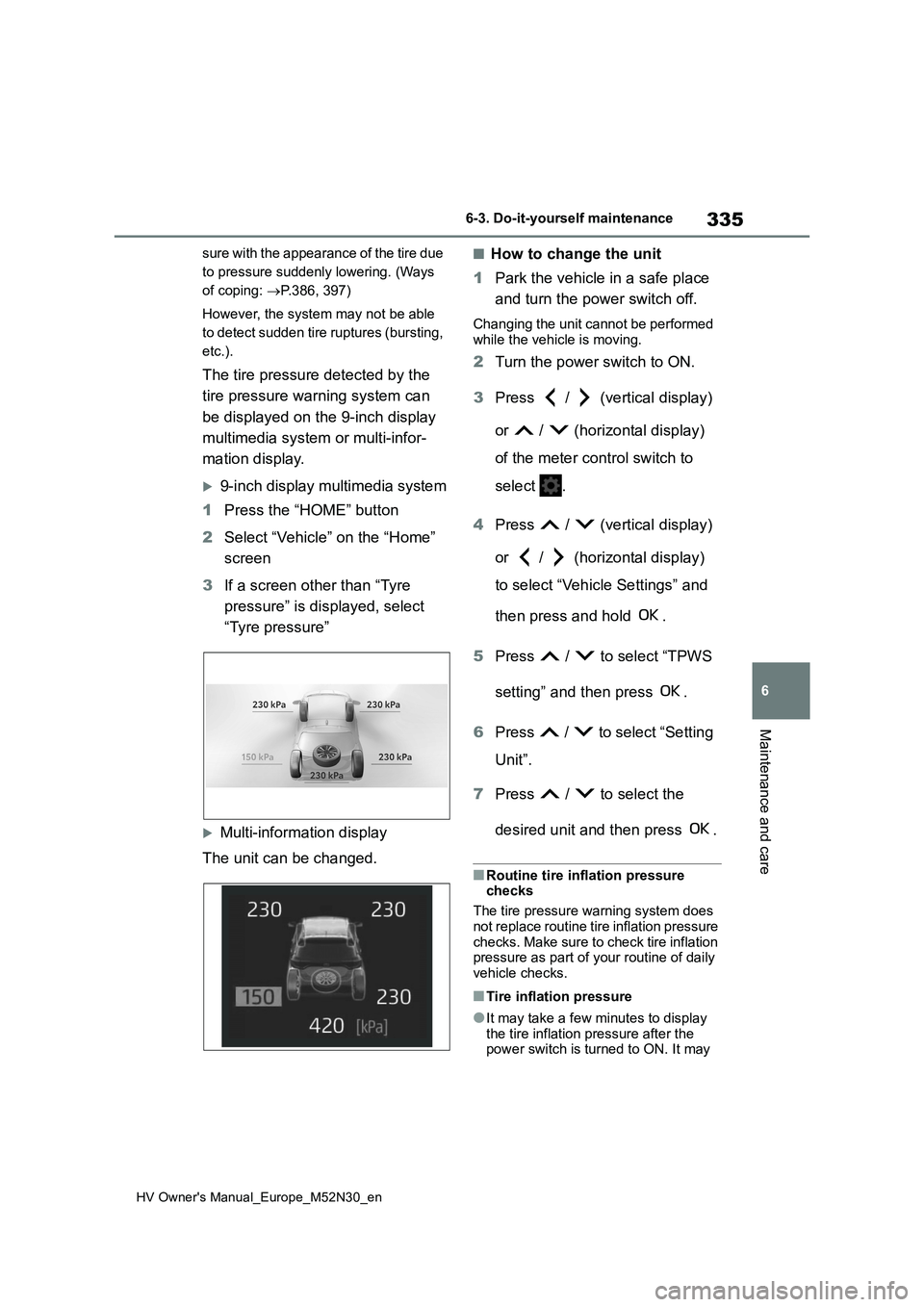
The tire pressure detected by the
tire pressure warning system can
be displayed on the 9-inch display
multimedia system or multi-infor-
mation display.
9-inch display multimedia system
1 Press the “HOME” button
2 Select “Vehicle” on the “Home”
screen
3 If a screen other than “Tyre
pressure” is displayed, select
“Tyre pressure”
Multi-information display
The unit can be changed.
■How to change the unit
1 Park the vehicle in a safe place
and turn the power switch off.
Changing the unit cannot be performed
while the vehicle is moving.
2 Turn the power switch to ON.
3 Press / (vertical display)
or / (horizontal display)
of the meter control switch to
select .
4 Press / (vertical display)
or / (horizontal display)
to select “Vehicle Settings” and
then press and hold .
5 Press / to select “TPWS
setting” and then press .
6 Press / to select “Setting
Unit”.
7 Press / to select the
desired unit and then press .
■Routine tire inflation pressure checks
The tire pressure warning system does
not replace routine tire inflation pressure checks. Make sure to check tire inflation pressure as part of your routine of daily
vehicle checks.
■Tire inflation pressure
●It may take a few minutes to display
the tire inflation pressure after the power switch is turned to ON. It may
Page 340 of 590
338
HV Owner's Manual_Europe_M52N30_en
6-3. Do-it-yourself maintenance
5Press / (vertical display)
or / (horizontal display)
to select “Vehicle Settings” and
then press and hold .
6 Press / to select “TPWS
setting” and then press .
7 Press / to select “Setting
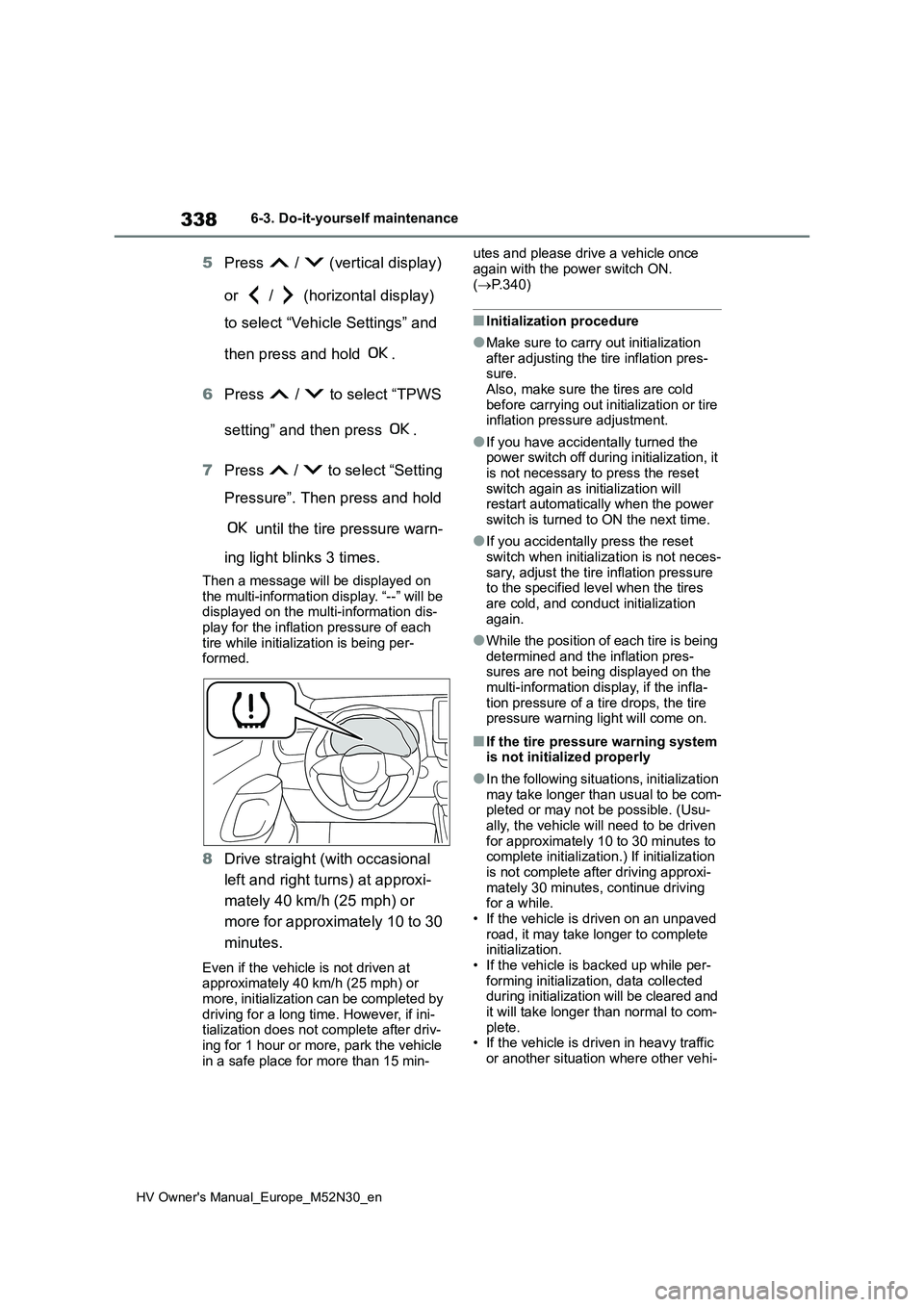
Pressure”. Then press and hold
until the tire pressure warn-
ing light blinks 3 times.
Then a message will be displayed on the multi-information display. “--” will be displayed on the multi-information dis-
play for the inflation pressure of each tire while initialization is being per-formed.
8 Drive straight (with occasional
left and right turns) at approxi-
mately 40 km/h (25 mph) or
more for approximately 10 to 30
minutes.
Even if the vehicle is not driven at approximately 40 km/h (25 mph) or more, initialization can be completed by
driving for a long time. However, if ini- tialization does not complete after driv-ing for 1 hour or more, park the vehicle
in a safe place for more than 15 min-
utes and please drive a vehicle once
again with the power switch ON. ( P.340)
■Initialization procedure
●Make sure to carry out initialization
after adjusting the tire inflation pres- sure.Also, make sure the tires are cold
before carrying out initialization or tire inflation pressure adjustment.
●If you have accidentally turned the power switch off during initialization, it is not necessary to press the reset
switch again as initialization will restart automatically when the power switch is turned to ON the next time.
●If you accidentally press the reset switch when initialization is not neces-
sary, adjust the tire inflation pressure to the specified level when the tires are cold, and conduct initialization
again.
●While the position of each tire is being
determined and the inflation pres- sures are not being displayed on the multi-information display, if the infla-
tion pressure of a tire drops, the tire pressure warning light will come on.
■If the tire pressure warning system is not initialized properly
●In the following situations, initialization
may take longer than usual to be com- pleted or may not be possible. (Usu-ally, the vehicle will need to be driven
for approximately 10 to 30 minutes to complete initialization.) If initialization is not complete after driving approxi-
mately 30 minutes, continue driving for a while.• If the vehicle is driven on an unpaved
road, it may take longer to complete initialization.• If the vehicle is backed up while per-
forming initialization, data collected during initialization will be cleared and it will take longer than normal to com-
plete. • If the vehicle is driven in heavy traffic or another situation where other vehi-
Page 341 of 590
339
6
HV Owner's Manual_Europe_M52N30_en
6-3. Do-it-yourself maintenance
Maintenance and care
cles are driven close by, it may take
time for the system to recognize the tire pressure warning valve and trans-mitters of your vehicle over those of
other vehicles.
If initialization is not complete after driv-
ing for approximately 1 hour, park the
vehicle in a safe place for approximately
20 minutes and then drive the vehicle
again.
●In the following situations, initialization
will not be started or was not com- pleted properly and the system will not operate properly. Perform the initial-
ization procedure again. • If, when attempting to start initializa-tion, the tire pressure warning light
does not blink 3 times. • If, when the vehicle has been driven for about 20 minutes after performing
initialization, the tire pressure warning light blinks for approximately 1 minute and then illuminates.
●If initialization cannot be completed after performing the above procedure,
contact any authorized Toyota retailer or Toyota authorized repairer, or any reliable repairer.
The tire pressure warning valve
and transmitter is equipped with a
unique ID code. When replacing a
tire pressure warning valve and
transmitter, it is necessary to regis-
ter the ID code.
The ID codes can be registered on
of the multi-information display.
Park the vehicle in a safe place,
wait for approximately 15 minutes
or more and perform the procedure.
1 Press / (vertical display)
or / (horizontal display)
of the meter control switch to
select .
2 Press / (vertical display)
or / (horizontal display)
to select “Vehicle Settings” and
then press .
3 Press / to select “TPWS
setting” and then press .
4 Press / to select “Identi-
fying Each Wheel & Position”.
Then press and hold until
the tire pressure warning light
blinks slowly 3 times.
Then a message will be displayed on the multi-information display.
When registration is being performed,
the tire pressure warning light will blink for approximately 1 minute then illumi-nate and “--” will be displayed for the
inflation pressure of each tire on the
WARNING
■When initializing the tire pres- sure warning system
Do not initialize the tire pressure
warning system without first adjusting the tire inflation pressure to the speci-fied level. Otherwise, the tire pressure
warning light may not come on even if the tire inflation pressure is low, or it may come on when the tire inflation
pressure is actually normal.
Registering ID codes