Set time TOYOTA YARIS 2022 Owner's Guide
[x] Cancel search | Manufacturer: TOYOTA, Model Year: 2022, Model line: YARIS, Model: TOYOTA YARIS 2022Pages: 590, PDF Size: 128.6 MB
Page 203 of 590
201
4
HV Owner's Manual_Europe_M52N30_en
4-3. Operating the lights and wipers
Driving
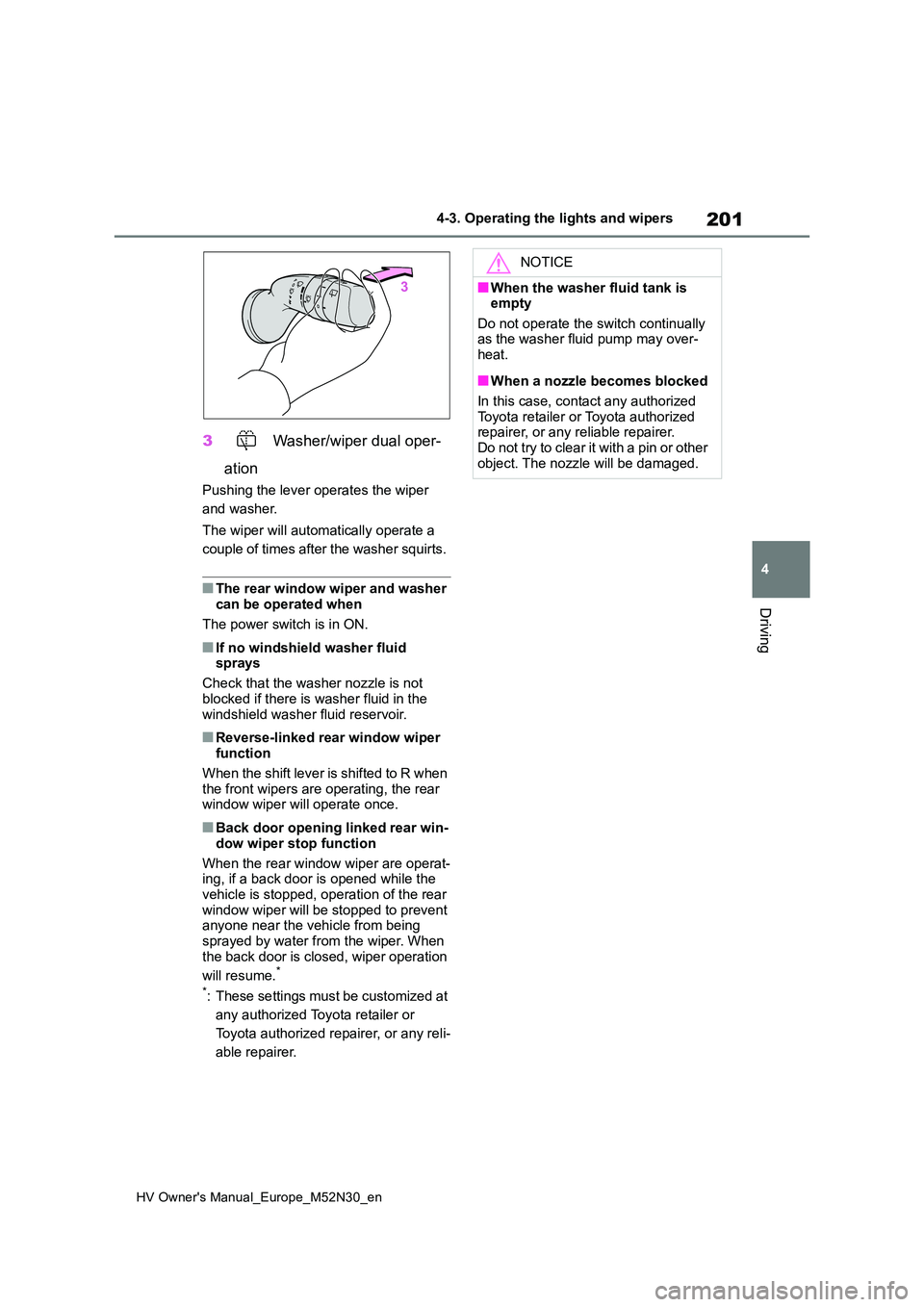
3 Washer/wiper dual oper-
ation
Pushing the lever operates the wiper
and washer.
The wiper will automatically operate a
couple of times after the washer squirts.
■The rear window wiper and washer can be operated when
The power switch is in ON.
■If no windshield washer fluid sprays
Check that the washer nozzle is not
blocked if there is washer fluid in the windshield washer fluid reservoir.
■Reverse-linked rear window wiper function
When the shift lever is shifted to R when the front wipers are operating, the rear window wiper will operate once.
■Back door opening linked rear win-
dow wiper stop function
When the rear window wiper are operat- ing, if a back door is opened while the
vehicle is stopped, operation of the rear window wiper will be stopped to prevent anyone near the vehicle from being
sprayed by water from the wiper. When the back door is closed, wiper operation
will resume.*
*: These settings must be customized at
any authorized Toyota retailer or
Toyota authorized repairer, or any reli-
able repairer.
NOTICE
■When the washer fluid tank is empty
Do not operate the switch continually as the washer fluid pump may over-heat.
■When a nozzle becomes blocked
In this case, contact any authorized
Toyota retailer or Toyota authorized repairer, or any reliable repairer.Do not try to clear it with a pin or other
object. The nozzle will be damaged.
Page 214 of 590
212
HV Owner's Manual_Europe_M52N30_en
4-5. Using the driving support systems
■Enabling/disabling the pre-col-
lision system
The pre-collision system can be
enabled/disabled on ( P.431)
of the multi-information display.
The system is automatically enabled
each time the power switch is turned to
ON.
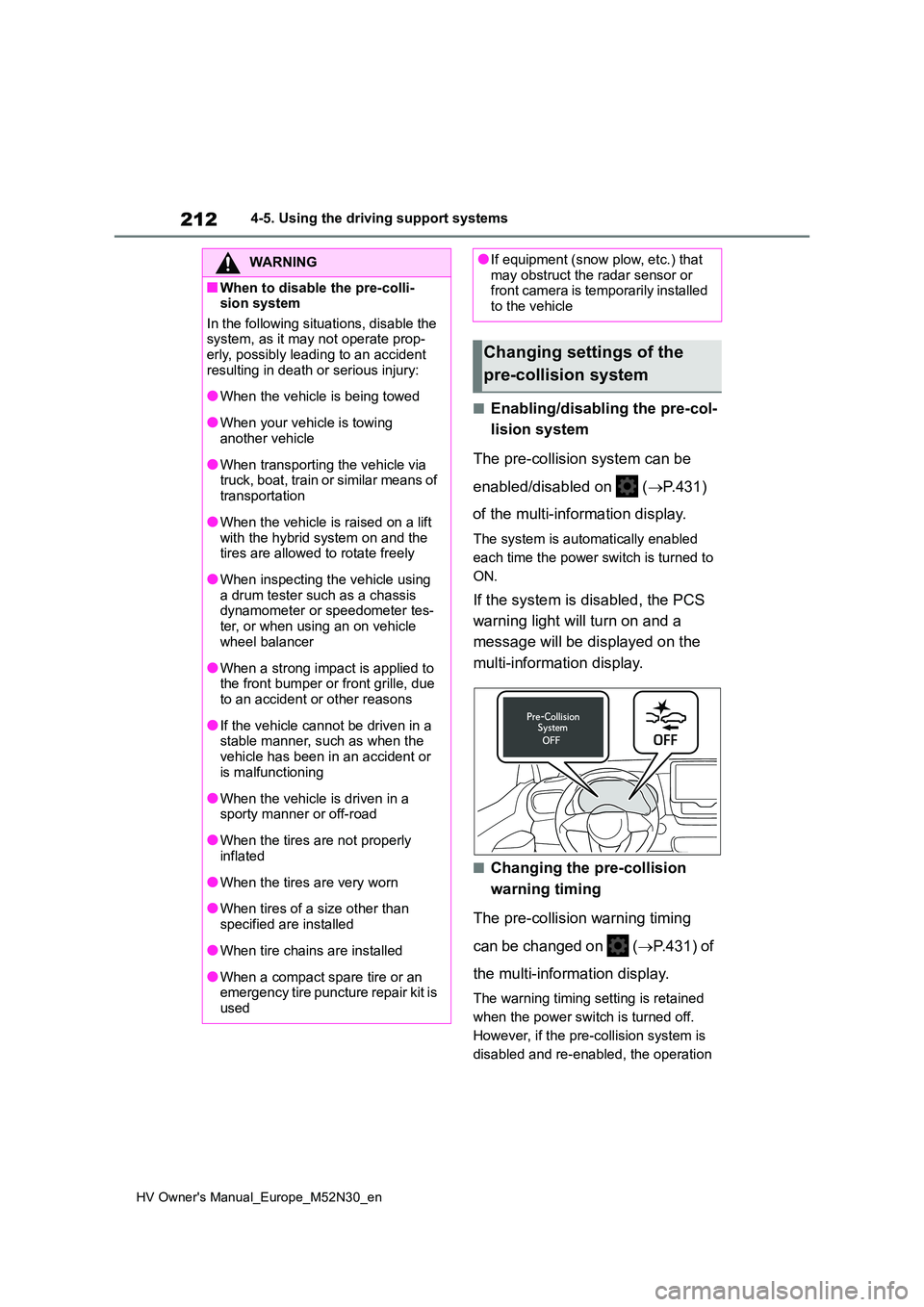
If the system is disabled, the PCS
warning light will turn on and a
message will be displayed on the
multi-information display.
■Changing the pre-collision
warning timing
The pre-collision warning timing
can be changed on ( P.431) of
the multi-information display.
The warning timing setting is retained
when the power switch is turned off.
However, if the pre-collision system is
disabled and re-enabled, the operation
WARNING
■When to disable the pre-colli- sion system
In the following situations, disable the system, as it may not operate prop-erly, possibly leading to an accident
resulting in death or serious injury:
●When the vehicle is being towed
●When your vehicle is towing another vehicle
●When transporting the vehicle via truck, boat, train or similar means of
transportation
●When the vehicle is raised on a lift
with the hybrid system on and the tires are allowed to rotate freely
●When inspecting the vehicle using a drum tester such as a chassis dynamometer or speedometer tes-
ter, or when using an on vehicle wheel balancer
●When a strong impact is applied to the front bumper or front grille, due to an accident or other reasons
●If the vehicle cannot be driven in a stable manner, such as when the
vehicle has been in an accident or is malfunctioning
●When the vehicle is driven in a sporty manner or off-road
●When the tires are not properly inflated
●When the tires are very worn
●When tires of a size other than
specified are installed
●When tire chains are installed
●When a compact spare tire or an emergency tire puncture repair kit is
used
●If equipment (snow plow, etc.) that may obstruct the radar sensor or front camera is temporarily installed
to the vehicle
Changing settings of the
pre-collision system
Page 215 of 590
213
4
HV Owner's Manual_Europe_M52N30_en
4-5. Using the driving support systems
Driving
timing will return to the default setting
(middle).
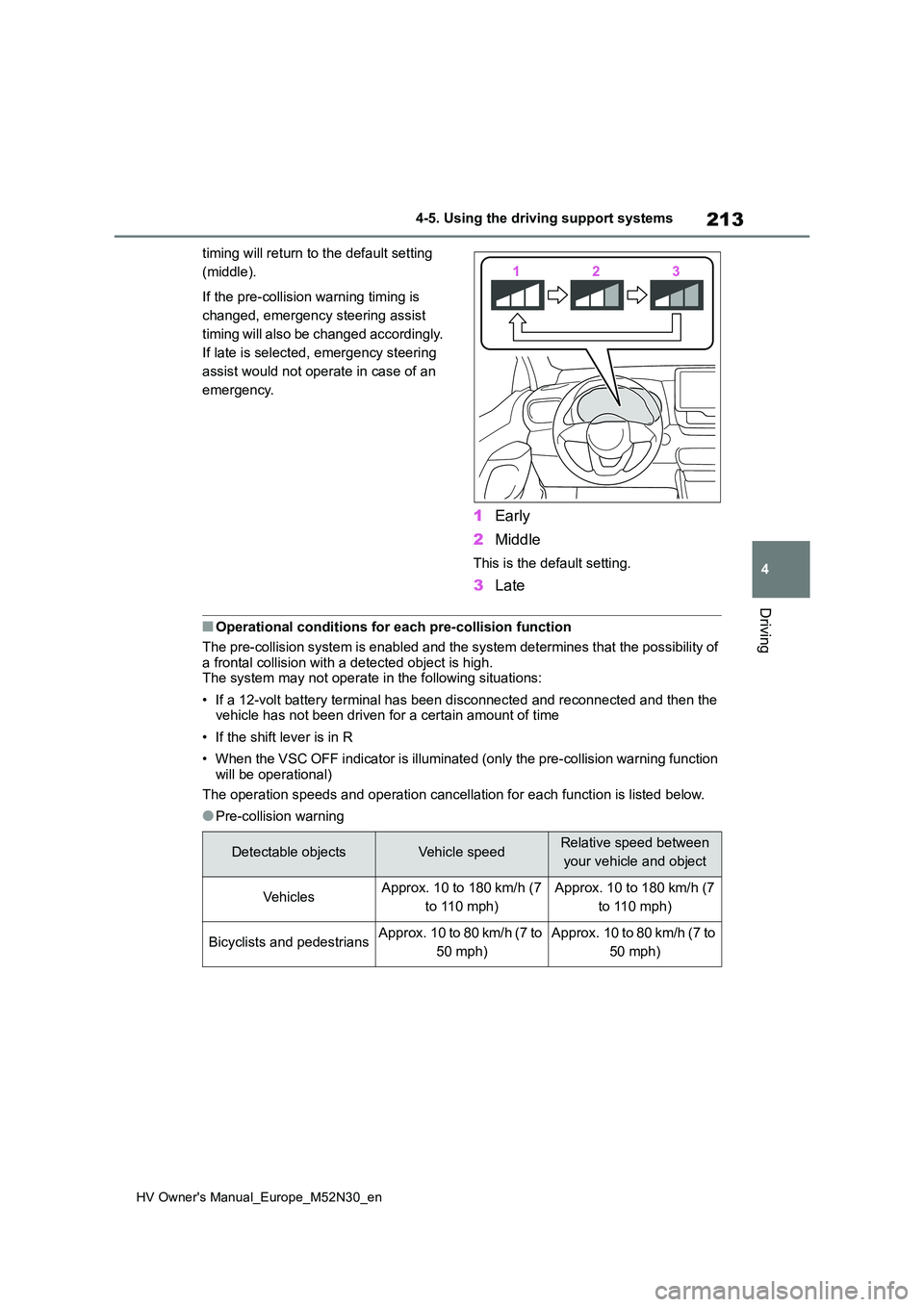
If the pre-collision warning timing is
changed, emergency steering assist
timing will also be changed accordingly.
If late is selected, emergency steering
assist would not operate in case of an
emergency.
1 Early
2 Middle
This is the default setting.
3Late
■Operational conditions for each pre-collision function
The pre-collision system is enabled and the system determines t hat the possibility of
a frontal collision with a detected object is high. The system may not operate in the following situations:
• If a 12-volt battery terminal has been disconnected and reconn ected and then the vehicle has not been driven for a certain amount of time
• If the shift lever is in R
• When the VSC OFF indicator is illuminated (only the pre-collis ion warning function
will be operational)
The operation speeds and operation cancellation for each functi on is listed below.
●Pre-collision warning
Detectable objectsVehicle speedRelative speed between
your vehicle and object
Ve hi cl e sApprox. 10 to 180 km/h (7
to 110 mph)
Approx. 10 to 180 km/h (7
to 110 mph)
Bicyclists and pedestriansApprox. 10 to 80 km/h (7 to
50 mph)
Approx. 10 to 80 km/h (7 to
50 mph)
Page 227 of 590
225
4
HV Owner's Manual_Europe_M52N30_en
4-5. Using the driving support systems
Driving
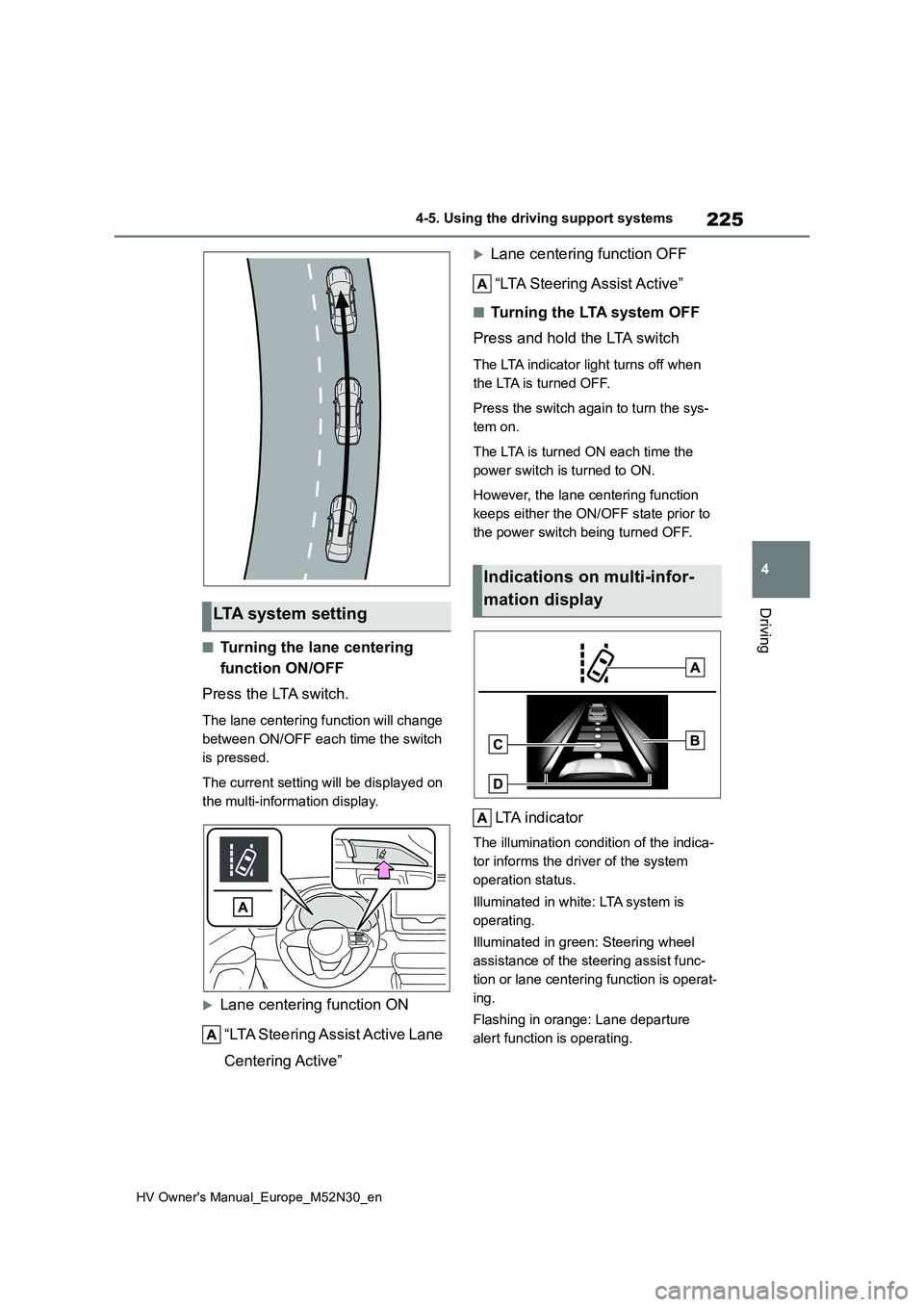
■Turning the lane centering
function ON/OFF
Press the LTA switch.
The lane centering function will change
between ON/OFF each time the switch
is pressed.
The current setting will be displayed on
the multi-information display.
Lane centering function ON
“LTA Steering Assist Active Lane
Centering Active”
Lane centering function OFF
“LTA Steering Assist Active”
■Tu r n i n g t h e LTA s y s t e m O F F
Press and hold the LTA switch
The LTA indicator light turns off when
the LTA is turned OFF.
Press the switch again to turn the sys-
tem on.
The LTA is turned ON each time the
power switch is turned to ON.
However, the lane centering function
keeps either the ON/OFF state prior to
the power switch being turned OFF.
LTA indicator
The illumination condition of the indica-
tor informs the driver of the system
operation status.
Illuminated in white: LTA system is
operating.
Illuminated in green: Steering wheel
assistance of the steering assist func-
tion or lane centering function is operat-
ing.
Flashing in orange: Lane departure
alert function is operating.
LTA system setting
Indications on multi-infor-
mation display
Page 231 of 590
229
4
HV Owner's Manual_Europe_M52N30_en
4-5. Using the driving support systems
Driving
steering wheel assist is operating, the
buzzer sounds and the driver is warned.
Each time the buzzer sounds, the con-
tinuing time of the buzzer becomes lon-
ger.
The buzzer also sounds even if the alert
type is set to steering wheel vibration.
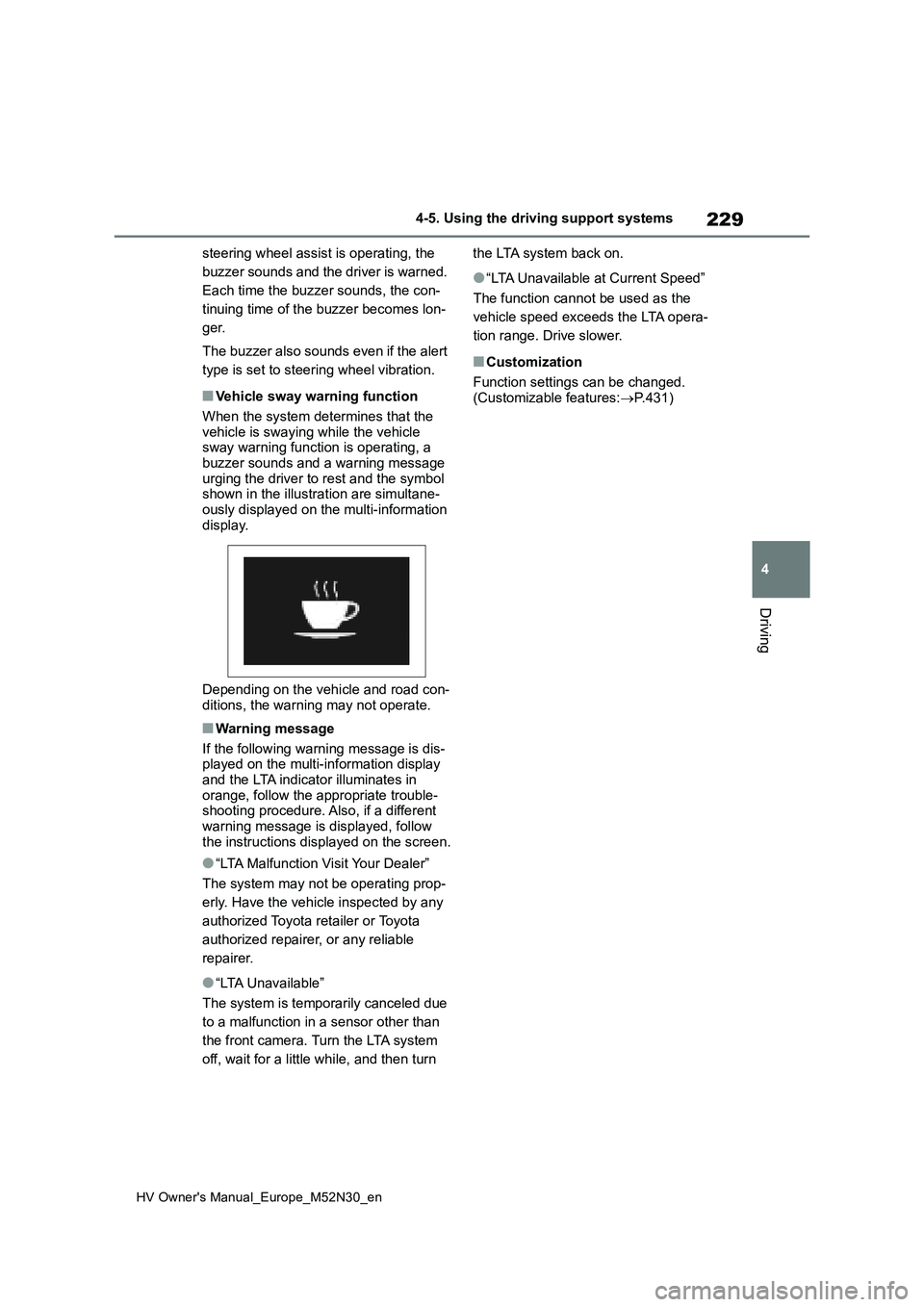
■Vehicle sway warning function
When the system determines that the
vehicle is swaying while the vehicle sway warning function is operating, a buzzer sounds and a warning message
urging the driver to rest and the symbol shown in the illustration are simultane-ously displayed on the multi-information
display.
Depending on the vehicle and road con-
ditions, the warning may not operate.
■Warning message
If the following warning message is dis- played on the multi-information display
and the LTA indicator illuminates in orange, follow the appropriate trouble-shooting procedure. Also, if a different
warning message is displayed, follow the instructions displayed on the screen.
●“LTA Malfunction Visit Your Dealer”
The system may not be operating prop-
erly. Have the vehicle inspected by any
authorized Toyota retailer or Toyota
authorized repairer, or any reliable
repairer.
●“LTA Unavailable”
The system is temporarily canceled due
to a malfunction in a sensor other than
the front camera. Turn the LTA system
off, wait for a little while, and then turn
the LTA system back on.
●“LTA Unavailable at Current Speed”
The function cannot be used as the
vehicle speed exceeds the LTA opera-
tion range. Drive slower.
■Customization
Function settings can be changed. (Customizable features: P.431)
Page 237 of 590
235
4
HV Owner's Manual_Europe_M52N30_en
4-5. Using the driving support systems
Driving
speed.
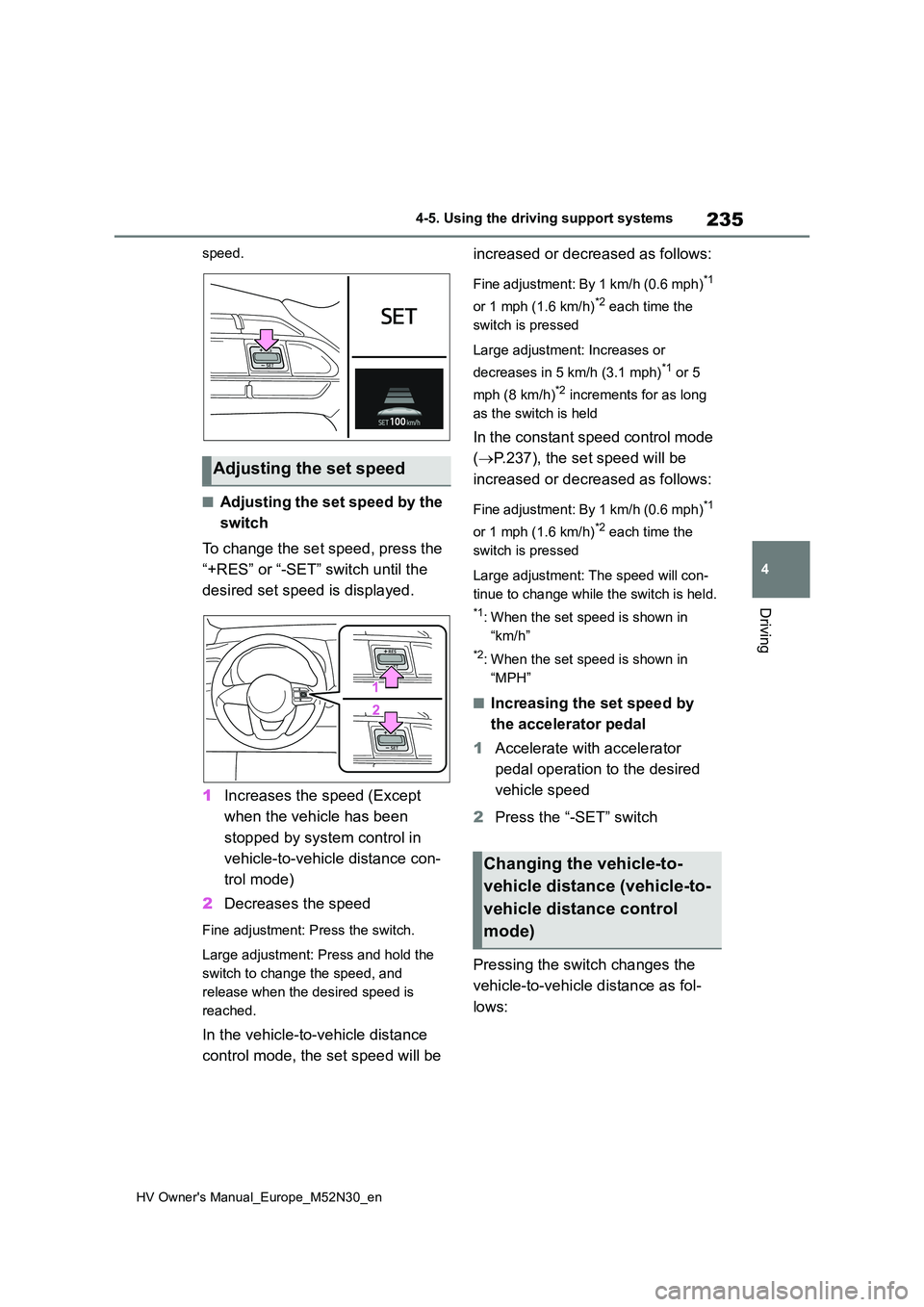
■Adjusting the set speed by the
switch
To change the set speed, press the
“+RES” or “-SET” switch until the
desired set speed is displayed.
1 Increases the speed (Except
when the vehicle has been
stopped by system control in
vehicle-to-vehicle distance con-
trol mode)
2 Decreases the speed
Fine adjustment: Press the switch.
Large adjustment: Press and hold the
switch to change the speed, and
release when the desired speed is
reached.
In the vehicle-to-vehicle distance
control mode, the set speed will be
increased or decreased as follows:
Fine adjustment: By 1 km/h (0.6 mph)*1
or 1 mph (1.6 km/h)*2 each time the
switch is pressed
Large adjustment: Increases or
decreases in 5 km/h (3.1 mph)*1 or 5
mph (8 km/h)*2 increments for as long
as the switch is held
In the constant speed control mode
( P.237), the set speed will be
increased or decreased as follows:
Fine adjustment: By 1 km/h (0.6 mph)*1
or 1 mph (1.6 km/h)*2 each time the
switch is pressed
Large adjustment: The speed will con-
tinue to change while the switch is held.
*1: When the set speed is shown in
“km/h”
*2: When the set speed is shown in
“MPH”
■Increasing the set speed by
the accelerator pedal
1 Accelerate with accelerator
pedal operation to the desired
vehicle speed
2 Press the “-SET” switch
Pressing the switch changes the
vehicle-to-vehicle distance as fol-
lows:
Adjusting the set speed
Changing the vehicle-to-
vehicle distance (vehicle-to-
vehicle distance control
mode)
Page 241 of 590
239
4
HV Owner's Manual_Europe_M52N30_en
4-5. Using the driving support systems
Driving
Press and hold the “-SET” switch.
Dynamic Radar Cruise Control with
Road Sign Assist can be
enabled/disabled in on the
multi-information display. ( P.431)
When the Dynamic Radar Cruise
Control with Road Sign Assist is
operating, while driving down a hill,
the vehicle speed may exceed the
set speed.In this case, the dis-
played set vehicle speed will be
highlighted and a buzzer will sound
to alert the driver.
■Dynamic radar cruise control with
full-speed range can be set when
●The shift lever is in D.
●The desired set speed can be set when the vehicle speed is approxi-
mately 30 km/h (20 mph) or more. (However, when the vehicle speed is set while driving at below approxi-
mately 30 km/h [20 mph], the set speed will be set to approximately 30 km/h [20 mph].)
■Accelerating after setting the vehi-
cle speed
The vehicle can accelerate by operating
the accelerator pedal. After accelerat- ing, the set speed resumes. However, during vehicle-to-vehicle distance con-
trol mode, the vehicle speed may decrease below the set speed in order to maintain the distance to the preceding
vehicle.
■When the vehicle stops while fol-
low-up cruising
●Pressing the “+RES” switch while the
vehicle ahead stops will resume fol- low-up cruising if the vehicle ahead starts off within approximately 3 sec-
onds after the switch is pressed.
●If the vehicle ahead starts off within 3
seconds after your vehicle stops, fol- low-up cruising will be resumed.
■Automatic cancelation of vehicle-to-vehicle distance control mode
Vehicle-to-vehicle distance control mode is automatically canceled in the follow-ing situations.
●VSC is activated.
●TRC is activated for a period of time.
●When the VSC or TRC system is
turned off.
●The sensor cannot detect correctly
because it is covered in some way.
●When the brake control or output
restriction control of a driving support system operates. (For example: Pre-Collision System, Drive-Start Control)
●The parking brake is operated.
●The vehicle is stopped by system con-trol on a steep incline.
●The following are detected when the vehicle has been stopped by system control:
• The driver is not wearing a seat belt. • The driver’s door is opened.• The vehicle has been stopped for
about 3 minutes
If vehicle-to-vehicle distance control mode is automatically canceled for any
reasons other than the above, there may be a malfunction in the system. Contact any authorized Toyota retailer
or Toyota authorized repairer, or any reli- able repairer.
■Automatic cancelation of constant speed control mode
Constant speed control mode is auto- matically canceled in the following situa-tions:
Enabling/Disabling the
Dynamic Radar Cruise Con-
trol with Road Sign Assist (if
equipped)
Page 242 of 590
240
HV Owner's Manual_Europe_M52N30_en
4-5. Using the driving support systems
●Actual vehicle speed is more than
approximately 16 km/h (10 mph) below the set vehicle speed.
●Actual vehicle speed falls below approximately 30 km/h (20 mph).
●VSC is activated.
●TRC is activated for a period of time.
●When the VSC or TRC system is turned off.
●When the brake control or output restriction control of a driving support
system operates.(For example: Pre- Collision System, Drive-Start Control)
●The parking brake is operated.
If constant speed control mode is auto- matically canceled for any reasons other
than the above, there may be a malfunc- tion in the system. Contact any autho-rized Toyota retailer or Toyota
authorized repairer, or any reliable repairer.
■The Dynamic Radar Cruise Control with Road Sign Assist may not
operate properly when (if equipped)
As the Dynamic Radar Cruise Control
with Road Sign Assist may not operate properly in conditions in which RSA may not operate or detect correctly
( P.247), when using this function, make sure to check the speed limit sign displayed.
In the following situations, the set speed may not be changed to the recognized speed limit by pressing and holding the
“+RES”/“-SET” switch.
●If speed limit information is not avail-
able
●When the recognized speed limit is
the same as the set speed
●When the recognized speed limit is
outside of the speed range that the dynamic radar cruise control system can operate
■Brake operation
A brake operation sound may be heard and the brake pedal response may
change, but these are not malfunctions.
■Warning messages and buzzers for
dynamic radar cruise control with full-speed range
Warning messages and buzzers are
used to indicate a system malfunction or to inform the driver of the need for cau-tion while driving. If a warning message
is shown on the multi-information dis- play, read the message and follow the instructions. ( P.207, 383)
■When the sensor may not be cor-
rectly detecting the vehicle ahead
In the case of the following and depend- ing on the conditions, operate the brake
pedal when deceleration of the system is insufficient or operate the accelerator pedal when acceleration is required.
As the sensor may not be able to cor- rectly detect these types of vehicles, the approach warning ( P.237) may not be
activated.
●Vehicles that cut in suddenly
●Vehicles traveling at low speeds
●Vehicles that are not moving in the same lane
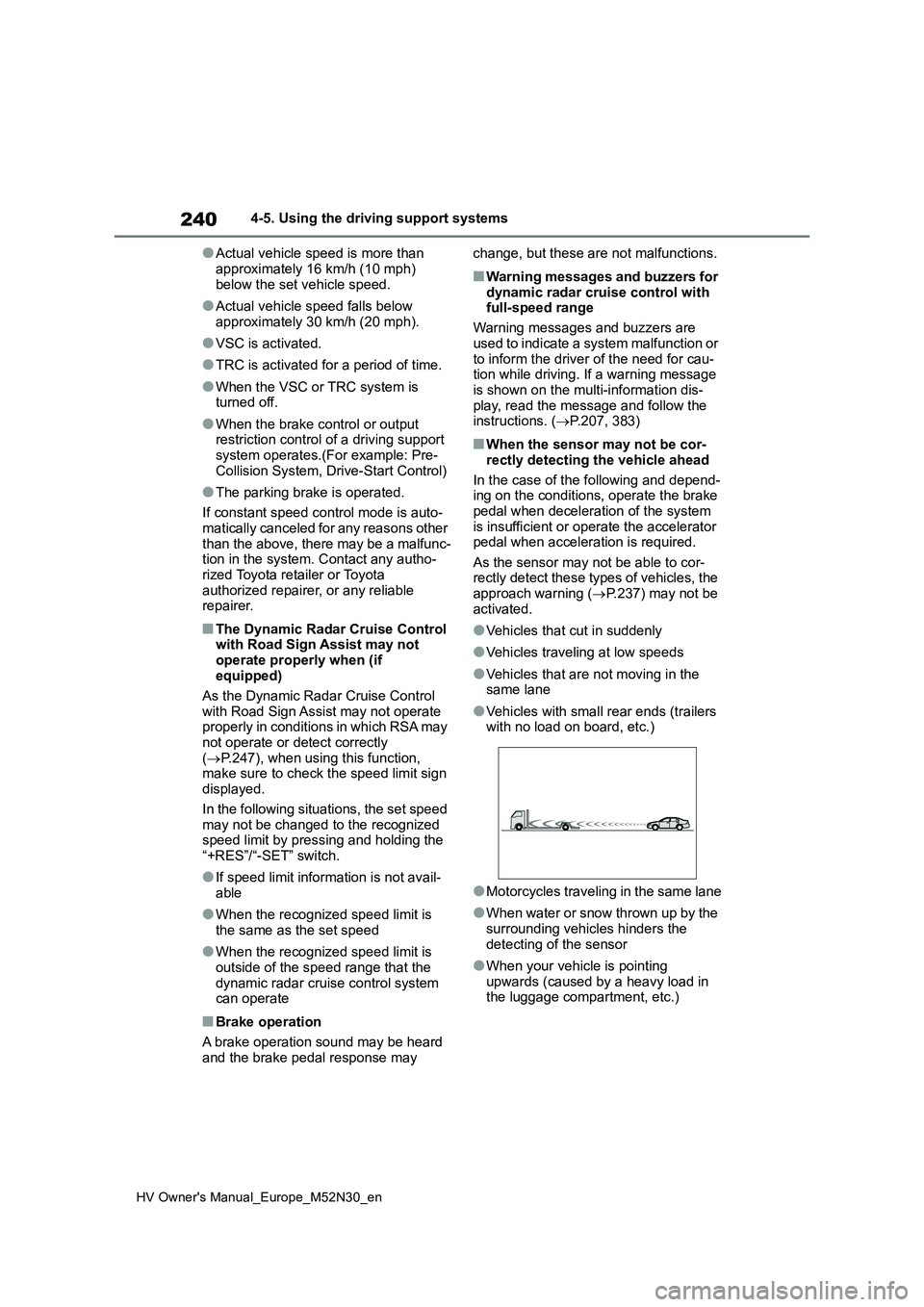
●Vehicles with small rear ends (trailers with no load on board, etc.)
●Motorcycles traveling in the same lane
●When water or snow thrown up by the
surrounding vehicles hinders the detecting of the sensor
●When your vehicle is pointing upwards (caused by a heavy load in the luggage compartment, etc.)
Page 245 of 590
243
4
HV Owner's Manual_Europe_M52N30_en
4-5. Using the driving support systems
Driving
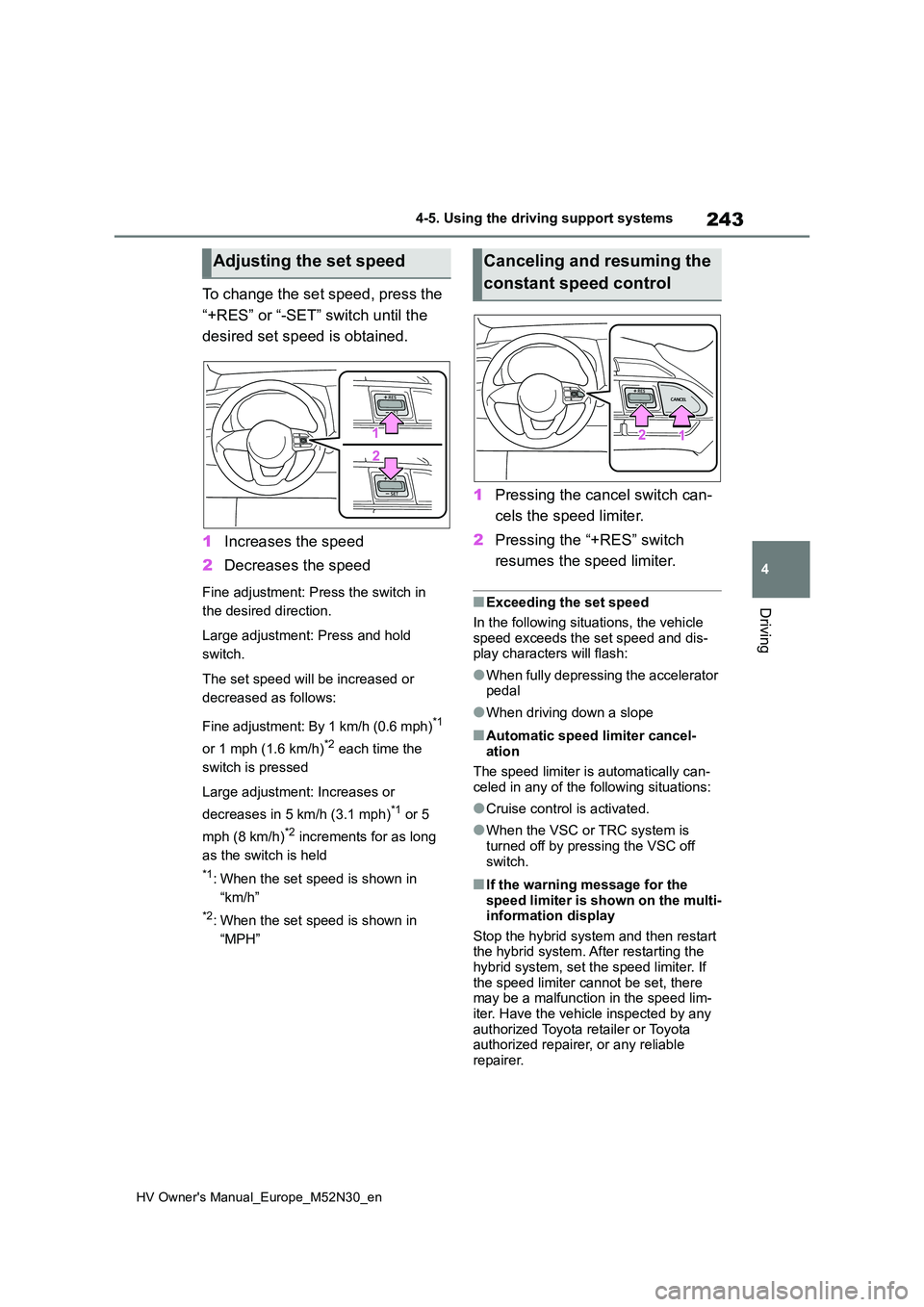
To change the set speed, press the
“+RES” or “-SET” switch until the
desired set speed is obtained.
1 Increases the speed
2 Decreases the speed
Fine adjustment: Press the switch in
the desired direction.
Large adjustment: Press and hold
switch.
The set speed will be increased or
decreased as follows:
Fine adjustment: By 1 km/h (0.6 mph)*1
or 1 mph (1.6 km/h)*2 each time the
switch is pressed
Large adjustment: Increases or
decreases in 5 km/h (3.1 mph)*1 or 5
mph (8 km/h)*2 increments for as long
as the switch is held
*1: When the set speed is shown in
“km/h”
*2: When the set speed is shown in
“MPH”
1 Pressing the cancel switch can-
cels the speed limiter.
2 Pressing the “+RES” switch
resumes the speed limiter.
■Exceeding the set speed
In the following situations, the vehicle
speed exceeds the set speed and dis- play characters will flash:
●When fully depressing the accelerator pedal
●When driving down a slope
■Automatic speed limiter cancel-ation
The speed limiter is automatically can-
celed in any of the following situations:
●Cruise control is activated.
●When the VSC or TRC system is turned off by pressing the VSC off
switch.
■If the warning message for the speed limiter is shown on the multi-information display
Stop the hybrid system and then restart the hybrid system. After restarting the hybrid system, set the speed limiter. If
the speed limiter cannot be set, there may be a malfunction in the speed lim-iter. Have the vehicle inspected by any
authorized Toyota retailer or Toyota authorized repairer, or any reliable repairer.
Adjusting the set speedCanceling and resuming the
constant speed control
Page 249 of 590
247
4
HV Owner's Manual_Europe_M52N30_en
4-5. Using the driving support systems
Driving
*3: Displayed when system detects driv-
ing on ramp way.
In the following situations, the RSA
system will notify the driver.
When the vehicle speed exceeds
the speed notification threshold
of the speed limit sign displayed,
the sign display will be empha-
sized and a buzzer will sound.
When the RSA system recog-
nizes a no-entry sign and detects
that the vehicle has entered a
no-entry area based on the map
information of the navigation sys-
tem, the no-entry sign flashes
and a buzzer will sound. (For
vehicles with 7-inch/8-inch dis-
play navigation system)
If it is detected that your vehicle
is overtaking when a no overtak-
ing sign is displayed on the multi-
information display, the dis-
played sign will flash and a
buzzer will sound.
Depending on the situation, traffic
environment (traffic direction,
speed unit) may be detected incor-
rectly and a notification function
may not operate properly.
■Setting procedure
1 Press / (vertical display) or
/ (horizontal display) of the
meter control switches and select
.
2 Press / (vertical display) or
/ (horizontal display) of the
meter control switches and select
, then press .
■Automatic turn-off of RSA sign dis-
play
One or more signs automatically turn off in the following situations.
●No sign has been recognized for a certain distance.
●The road changes due to a left or right turn, etc.
■Conditions in which the function
may not operate or detect correctly
In the following situations, RSA does not operate normally and may not recognize
signs, display the incorrect sign, etc. However, this does not indicate a mal-function.
●The front camera is misaligned due to a strong impact being applied to the
sensor, etc.
●Dirt, snow, stickers, etc., are on the
windshield near the front camera.
●In inclement weather such as heavy
rain, fog, snow or sand storms.
●Light from an oncoming vehicle, the
sun, etc., enters the front camera.
●The sign is dirty, faded, tilted or bent.
●The contrast of electronic sign is low.
●All or part of the sign is hidden by the leaves of a tree, a pole, etc.
●The sign is only visible to the front camera for a short amount of time.
●The driving scene (turning, lane change, etc.) is judged incorrectly.
●If a sign not appropriate for the cur-rently traveled lane, but the sign exists
directly after a freeway branches, or in an adjacent lane just before merging.
●S t ic ke r s a r e a t t ac he d to t he r e ar o f th e preceding vehicle.
Notification function