Set time TOYOTA YARIS 2022 Workshop Manual
[x] Cancel search | Manufacturer: TOYOTA, Model Year: 2022, Model line: YARIS, Model: TOYOTA YARIS 2022Pages: 590, PDF Size: 128.6 MB
Page 343 of 590
341
6
HV Owner's Manual_Europe_M52N30_en
6-3. Do-it-yourself maintenance
Maintenance and care
driving for approximately 1 hour, park
the vehicle in a safe place for approxi-
mately 20 minutes and then perform the
ID code registration procedure again.
●In the following situations, ID code registration will not be started or was not completed properly and the sys-
tem will not operate properly. Perform the ID code registration procedure again.
• If, when attempting to start ID code registration, the tire pressure warning light does not blink slowly 3 times.
• If, when the vehicle has been driven for about 10 minutes after performing ID code registration, the tire pressure
warning light blinks for approximately 1 minute and then illuminates.
●If ID code registration cannot be com-pleted after performing the above pro-cedure, contact any authorized Toyota
retailer or Toyota authorized repairer, or any reliable repairer.
Your vehicle is equipped with tire
pressure warning system with the
function to have ID codes regis-
tered for a second wheel set, for
example a winter set, by any autho-
rized Toyota retailer or Toyota
authorized repairer, or any reliable
repairer.
After registration of a second wheel
set, either of these two wheel sets
can be selected for usage with the
tire pressure warning system.
■Operating conditions for the
function
This function will perform the
change of wheel set only if a sec-
ond wheel set has been regis-
tered. If no second wheel set has
been registered, no change will
be made when selecting this
function in the menu.
Only a change between both
registered wheel set is possible,
mixing between these wheel sets
is not supported.
■How to change between wheel
sets
1 Have the vehicle fitted with the
preferred wheel set.
2 Press / (vertical display)
or / (horizontal display)
of the meter control switch to
select .
3 Press / (vertical display)
or / (horizontal display)
to select “Vehicle Settings” and
then press .
4 Press / to select “TPWS
setting” and then press .
5 Press / to select “Identi-
fying Each Wheel & Position”.
Then press and hold until
the tire pressure warning light
blinks slowly 3 times. Afterward,
Selecting wheel set
Page 369 of 590
367
7
HV Owner's Manual_Europe_M52N30_en
7-1. Essential information
When trouble arises
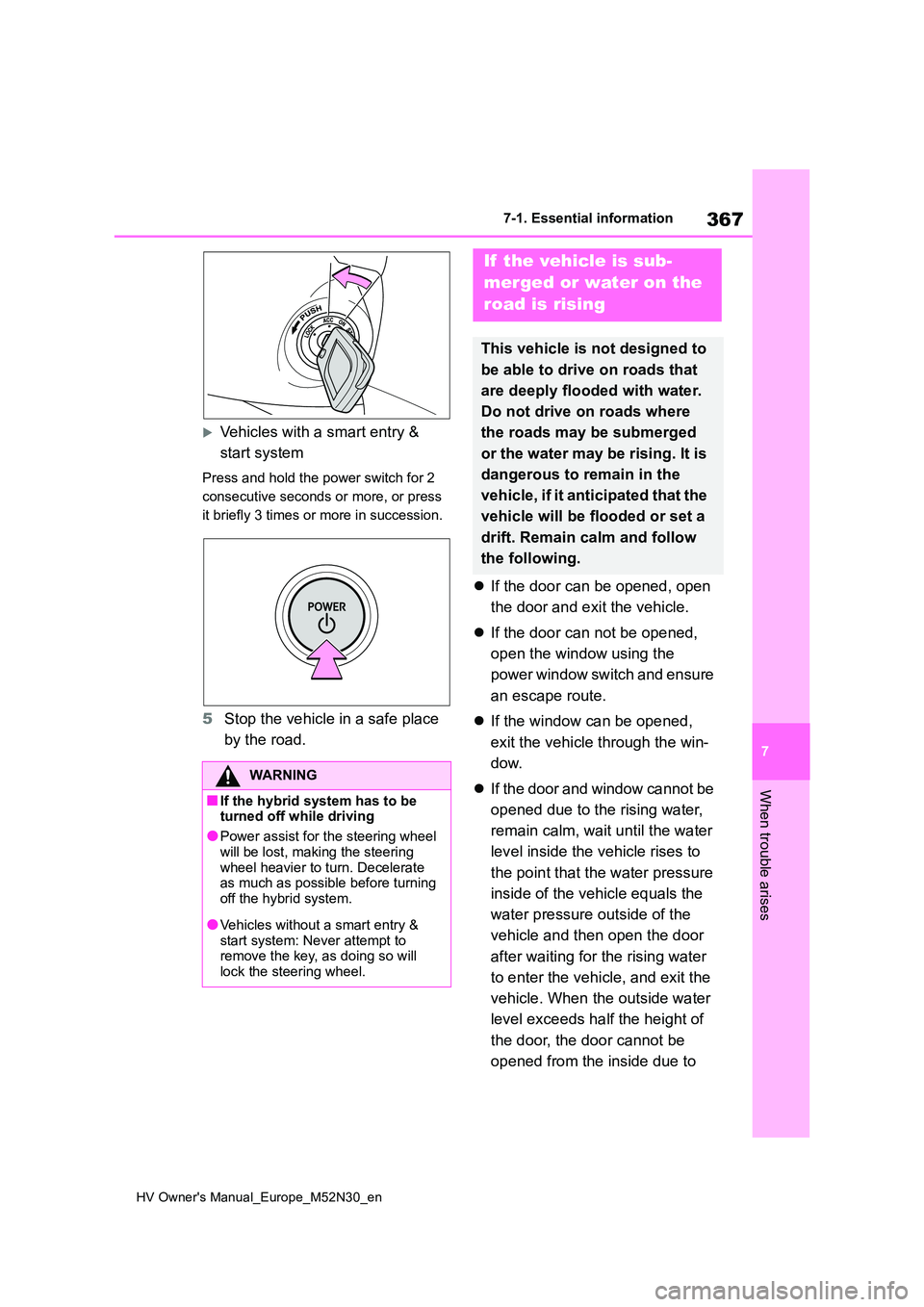
Vehicles with a smart entry &
start system
Press and hold the power switch for 2
consecutive seconds or more, or press
it briefly 3 times or more in succession.
5 Stop the vehicle in a safe place
by the road.
If the door can be opened, open
the door and exit the vehicle.
If the door can not be opened,
open the window using the
power window switch and ensure
an escape route.
If the window can be opened,
exit the vehicle through the win-
dow.
If the door and window cannot be
opened due to the rising water,
remain calm, wait until the water
level inside the vehicle rises to
the point that the water pressure
inside of the vehicle equals the
water pressure outside of the
vehicle and then open the door
after waiting for the rising water
to enter the vehicle, and exit the
vehicle. When the outside water
level exceeds half the height of
the door, the door cannot be
opened from the inside due to
WARNING
■If the hybrid system has to be turned off while driving
●Power assist for the steering wheel
will be lost, making the steering wheel heavier to turn. Decelerate as much as possible before turning
off the hybrid system.
●Vehicles without a smart entry &
start system: Never attempt to remove the key, as doing so will lock the steering wheel.
If the vehicle is sub-
merged or water on the
road is rising
This vehicle is not designed to
be able to drive on roads that
are deeply flooded with water.
Do not drive on roads where
the roads may be submerged
or the water may be rising. It is
dangerous to remain in the
vehicle, if it anticipated that the
vehicle will be flooded or set a
drift. Remain calm and follow
the following.
Page 370 of 590
368
HV Owner's Manual_Europe_M52N30_en
7-1. Essential information
water pressure.
■Water level exceeds the floor
When the water level exceeds the floor and time has passed, the electrical equipment will get damaged, the power
windows will not operate, the engine and motor stop, and the vehicle may not be able to get moving.
■Using an emergency escape ham-
mer*
Laminated glass is used in the wind- shield on this vehicle. Laminated glass
cannot be shattered with an emergency
hammer*.
Tempered glass is used in the windows
on this vehicle.*: Contact any authorized Toyota retailer
or Toyota authorized repairer, or any
reliable repairer, or aftermarket acces-
sory manufacturer for further informa-
tion about an emergency hammer.
WARNING
■Caution while driving
Do not drive on roads where the roads may be submerged or the water may be rising. Otherwise the vehicle
may be damaged and cannot move, as well as become flooded and set a drift, which may lead to death.
Page 411 of 590
409
7
HV Owner's Manual_Europe_M52N30_en
7-2. Steps to take in an emergency
When trouble arises
4Press the power switch shortly
and firmly.
In the event that the hybrid system
still cannot be started, contact any
authorized Toyota retailer or Toyota
authorized repairer, or any reliable
repairer.
■Stopping the hybrid system
Shift the shift lever to P and press the power switch as you normally do when
stopping the hybrid system.
■Electronic key battery
As the above procedure is a temporary measure, it is recommended that the
electronic key battery be replaced immediately when the battery is depleted. ( P.351)
■Alarm (if equipped)
Using the mechanical key to lock the doors will not set the alarm system.If a door is unlocked using the mechani-
cal key when the alarm system is set, the alarm may be triggered. ( P. 8 6 )
■Changing power switch modes
Release the brake pedal and press the
power switch in step 3 above. The hybrid system does not start and modes will be changed each time the
switch is pressed. ( P.177)
If you have a set of jumper (or
booster) cables and a second vehi-
cle with a 12-volt battery, you can
jump start your vehicle by following
the steps below.
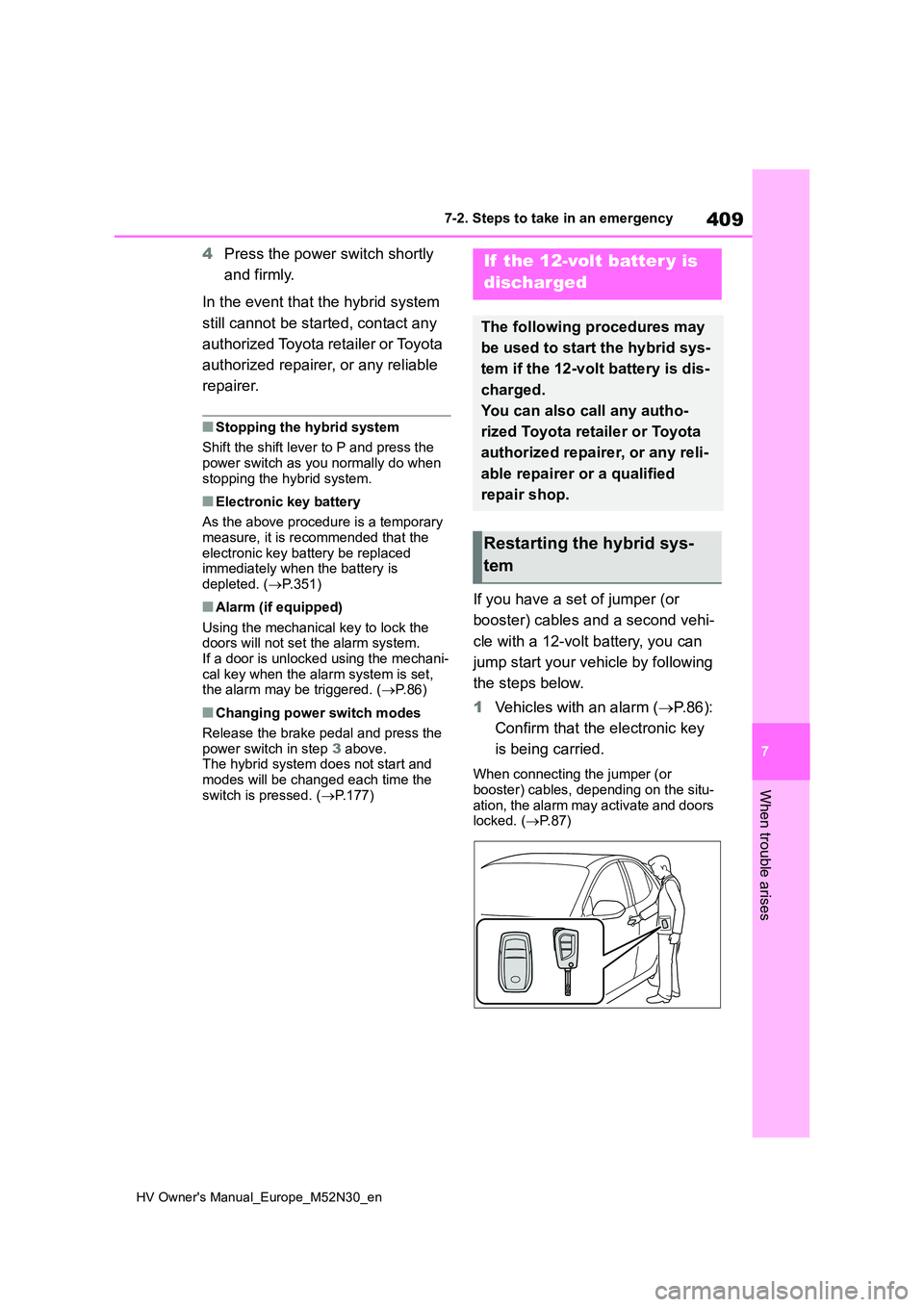
1 Vehicles with an alarm (P. 8 6 ) :
Confirm that the electronic key
is being carried.
When connecting the jumper (or booster) cables, depending on the situ-
ation, the alarm may activate and doors locked. ( P. 8 7 )
If the 12-volt batter y is
discharged
The following procedures may
be used to start the hybrid sys-
tem if the 12-volt battery is dis-
charged.
You can also call any autho-
rized Toyota retailer or Toyota
authorized repairer, or any reli-
able repairer or a qualified
repair shop.
Restarting the hybrid sys-
tem
Page 433 of 590
431
8
HV Owner's Manual_Europe_M52N30_en
8-2. Customization
Vehicle specifications
8-2.Customiz ation
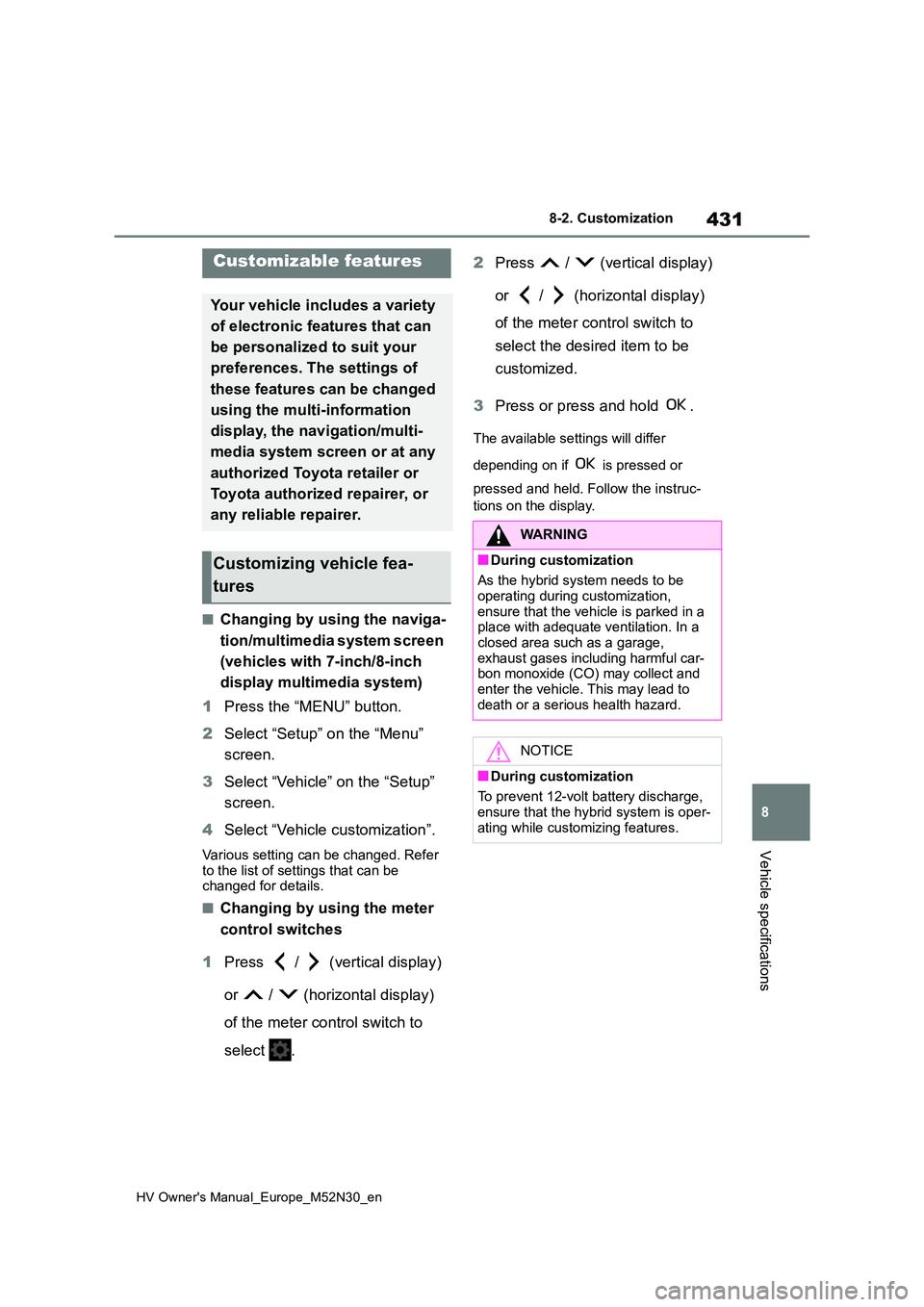
■Changing by using the naviga-
tion/multimedia system screen
(vehicles with 7-inch/8-inch
display multimedia system)
1 Press the “MENU” button.
2 Select “Setup” on the “Menu”
screen.
3 Select “Vehicle” on the “Setup”
screen.
4 Select “Vehicle customization”.
Various setting can be changed. Refer
to the list of settings that can be changed for details.
■Changing by using the meter
control switches
1 Press / (vertical display)
or / (horizontal display)
of the meter control switch to
select .
2 Press / (vertical display)
or / (horizontal display)
of the meter control switch to
select the desired item to be
customized.
3 Press or press and hold .
The available settings will differ
depending on if is pressed or
pressed and held. Follow the instruc-
tions on the display.
Customizable features
Your vehicle includes a variety
of electronic features that can
be personalized to suit your
preferences. The settings of
these features can be changed
using the multi-information
display, the nav igation/multi-
media system screen or at any
authorized Toyota retailer or
Toyota authorized repairer, or
any reliable repairer.
Customizing vehicle fea-
tures
WARNING
■During customization
As the hybrid system needs to be operating during customization,
ensure that the vehicle is parked in a place with adequate ventilation. In a closed area such as a garage,
exhaust gases including harmful car- bon monoxide (CO) may collect and enter the vehicle. This may lead to
death or a serious health hazard.
NOTICE
■During customization
To prevent 12-volt battery discharge, ensure that the hybrid system is oper-
ating while customizing features.
Page 434 of 590
432
HV Owner's Manual_Europe_M52N30_en
8-2. Customization
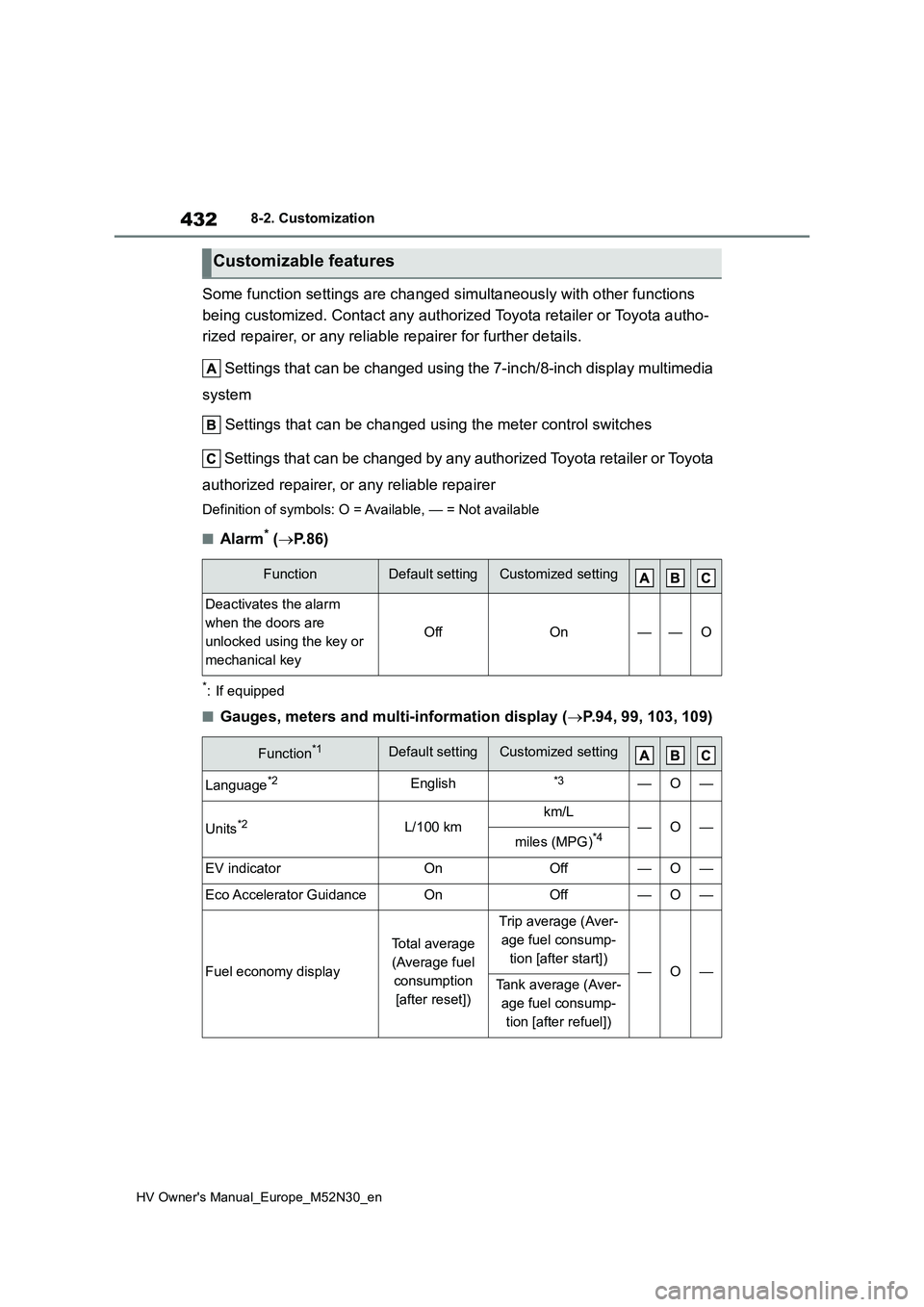
Some function settings are changed simultaneously with other functions
being customized. Contact any authorized Toyota retailer or Toy ota autho-
rized repairer, or any reliable repairer for further details.
Settings that can be changed using the 7-inch/8-inch display m ultimedia
system
Settings that can be changed using the meter control switches
Settings that can be changed by any authorized Toyota retailer or Toy ota
authorized repairer, or any reliable repairer
Definition of symbols: O = Available, — = Not available
■Alarm* ( P.86)
*: If equipped
■Gauges, meters and multi-information display (P.94, 99, 103, 109)
Customizable features
FunctionDefault settingCustomized setting
Deactivates the alarm
when the doors are
unlocked using the key or
mechanical key
OffOn——O
Function*1Default settingCustomized setting
Language*2English*3—O—
Units*2L/100 kmkm/L—O—miles (MPG)*4
EV indicatorOnOff—O—
Eco Accelerator GuidanceOnOff—O—
Fuel economy display
Total average
(Average fuel
consumption
[after reset])
Trip average (Aver-
age fuel consump-
tion [after start])—O—Tank average (Aver-
age fuel consump-
tion [after refuel])
Page 435 of 590
433
8
HV Owner's Manual_Europe_M52N30_en
8-2. Customization
Vehicle specifications
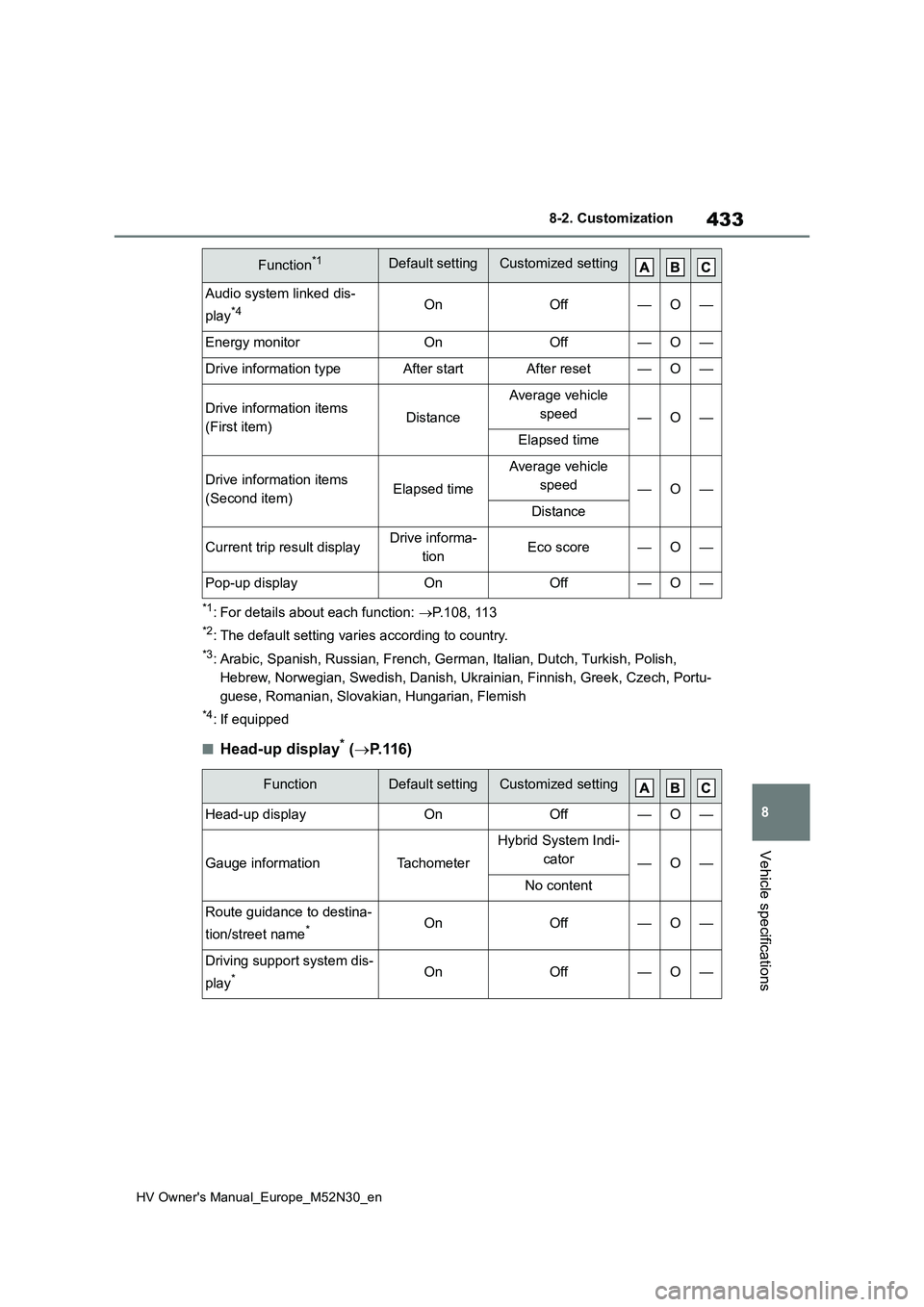
*1: For details about each function: P.108, 113
*2: The default setting varies according to country.
*3: Arabic, Spanish, Russian, French, German, Italian, Dutch, Turkish, Polish,
Hebrew, Norwegian, Swedish, Danish, Ukrainian, Finnish, Greek, Czech, Portu-
guese, Romanian, Slovakian, Hungarian, Flemish
*4: If equipped
■Head-up display* ( P.116)
Audio system linked dis-
play*4OnOff—O—
Energy monitorOnOff—O—
Drive information typeAfter startAfter reset—O—
Drive information items
(First item)Distance
Average vehicle
speed—O—
Elapsed time
Drive information items
(Second item)Elapsed time
Average vehicle
speed—O—
Distance
Current trip result displayDrive informa-
tionEco score—O—
Pop-up displayOnOff—O—
FunctionDefault settingCustomized setting
Head-up displayOnOff—O—
Gauge informationTachometer
Hybrid System Indi-
cator—O—
No content
Route guidance to destina-
tion/street name*OnOff—O—
Driving support system dis-
play*OnOff—O—
Function*1Default settingCustomized setting
Page 436 of 590
434
HV Owner's Manual_Europe_M52N30_en
8-2. Customization
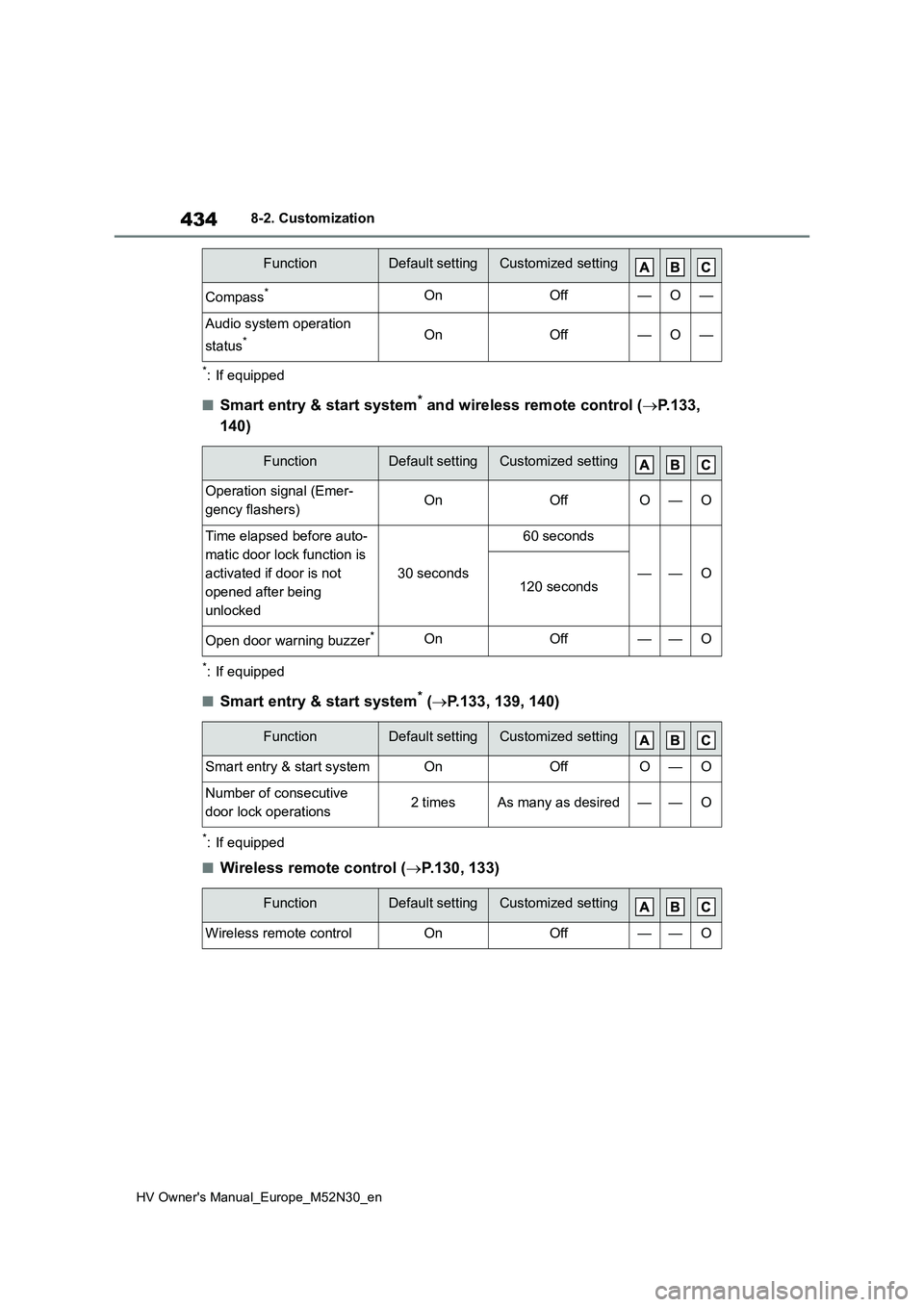
*: If equipped
■Smart entry & start system* and wireless remote control (P.133,
140)
*: If equipped
■Smart entry & start system* ( P.133, 139, 140)
*: If equipped
■Wireless remote control (P.130, 133)
Compass*OnOff—O—
Audio system operation
status*OnOff—O—
FunctionDefault settingCustomized setting
Operation signal (Emer-
gency flashers)OnOffO—O
Time elapsed before auto-
matic door lock function is
activated if door is not
opened after being
unlocked
30 seconds
60 seconds
——O120 seconds
Open door warning buzzer*OnOff——O
FunctionDefault settingCustomized setting
Smart entry & start systemOnOffO—O
Number of consecutive
door lock operations2 timesAs many as desired——O
FunctionDefault settingCustomized setting
Wireless remote controlOnOff——O
FunctionDefault settingCustomized setting
Page 437 of 590

435
8
HV Owner's Manual_Europe_M52N30_en
8-2. Customization
Vehicle specifications
■Outside rear view mirrors (P.153)
*: If equipped
■Power windows (P.156)
*: If equipped
■Automatic light control system (P.190)
■Lights (P.191)
*: If equipped
FunctionDefault settingCustomized setting
Automatic mirror folding
and extending operation*
Linked to the
locking/ unlock-
ing of the doors
Off
——OLinked to operation of
the power switch
FunctionDefault settingCustomized setting
Key (include mechanical
key*) linked operationOffOn——O
Wireless remote control
linked operationOffOn——O
Wireless remote control
linked operation signal
(buzzer)*OnOff——O
FunctionDefault settingCustomized setting
Light sensor sensitivityStandard-2 to 2O—O
Headlamp temporary light-
ing function (Time elapsed
before headlights automati-
cally turn off)
30 seconds
60 seconds
——O90 seconds
120 seconds
FunctionDefault settingCustomized setting
Welcome lamp*OnOff——O
Page 440 of 590
438
HV Owner's Manual_Europe_M52N30_en
8-2. Customization
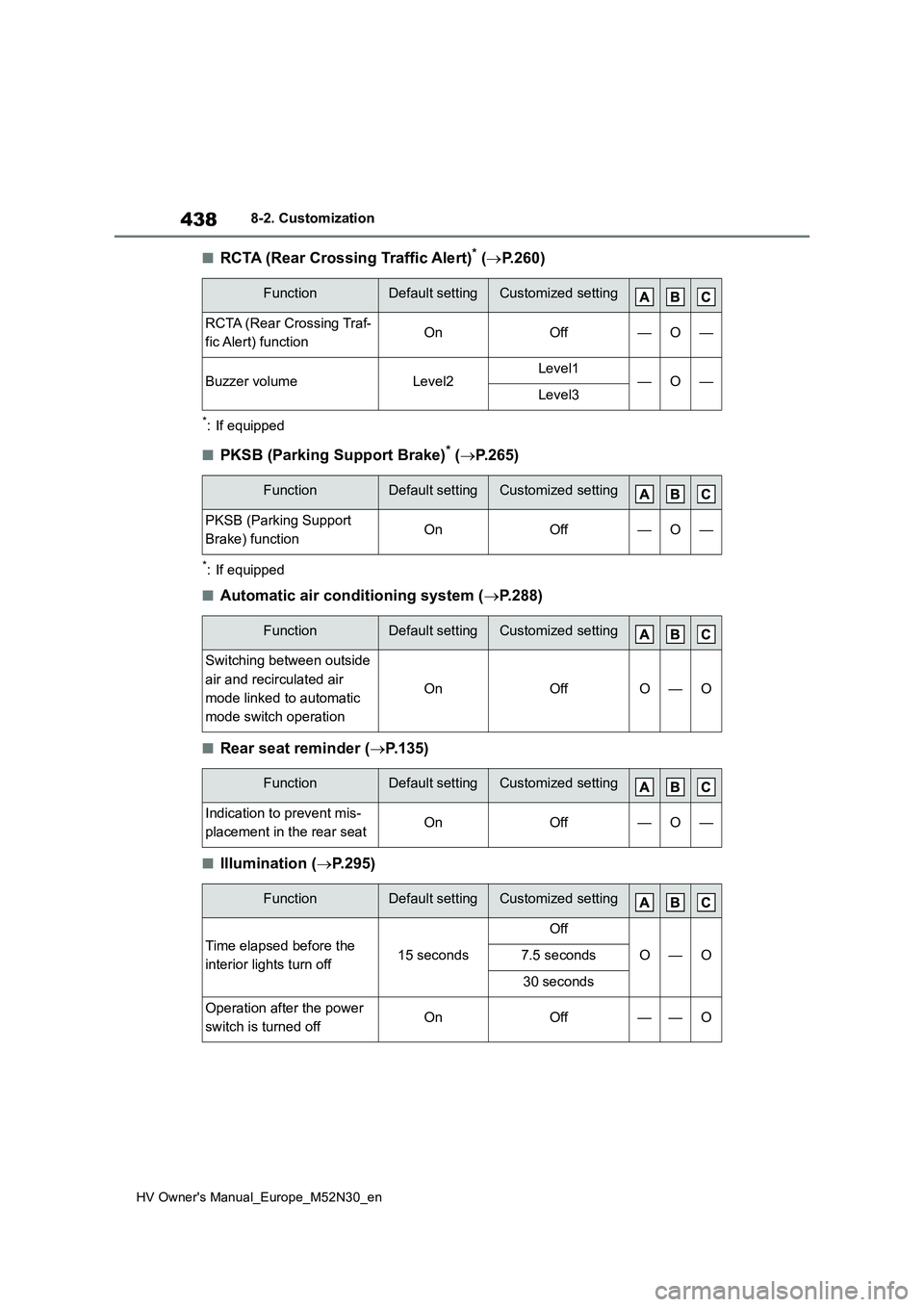
■RCTA (Rear Crossing Traffic Alert)* (P.260)
*: If equipped
■PKSB (Parking Support Brake)* (P.265)
*: If equipped
■Automatic air conditioning system (P.288)
■Rear seat reminder (P.135)
■Illumination (P.295)
FunctionDefault settingCustomized setting
RCTA (Rear Crossing Traf-
fic Alert) functionOnOff—O—
Buzzer volumeLevel2Level1—O—Level3
FunctionDefault settingCustomized setting
PKSB (Parking Support
Brake) functionOnOff—O—
FunctionDefault settingCustomized setting
Switching between outside
air and recirculated air
mode linked to automatic
mode switch operation
OnOffO—O
FunctionDefault settingCustomized setting
Indication to prevent mis-
placement in the rear seatOnOff—O—
FunctionDefault settingCustomized setting
Time elapsed before the
interior lights turn off15 seconds
Off
O—O7.5 seconds
30 seconds
Operation after the power
switch is turned offOnOff——O