ready TOYOTA YARIS 2022 User Guide
[x] Cancel search | Manufacturer: TOYOTA, Model Year: 2022, Model line: YARIS, Model: TOYOTA YARIS 2022Pages: 590, PDF Size: 128.6 MB
Page 178 of 590
176
HV Owner's Manual_Europe_M52N30_en
4-2. Driving procedures
until the “READY” indicator is steady
on, as steady means the vehicle is able to move.
●When the hybrid battery (traction bat-tery) is extremely cold (below approxi-mately -30°C [-22°F]) under the
influence of the outside temperature, it may not be possible to start the hybrid system. In this case, try to start the
hybrid system again after the tem- perature of the hybrid battery increases due to the outside tempera-
ture increase, etc.
■Sounds and vibrations specific to a hybrid vehicle
P. 7 8
■If the 12-volt battery is discharged
The hybrid system cannot be started using the smart entry & start system. Refer to P.409 to restart the hybrid sys-
tem.
■Electronic key battery depletion
P. 1 2 9
■Conditions affecting operation
P. 1 4 2
■Notes for the entry function
P. 1 4 2
■Steering lock function
●After turning the power switch off and
opening and closing the doors, the steering wheel will be locked due to the steering lock function. Operating
the power switch again automatically cancels the steering lock.
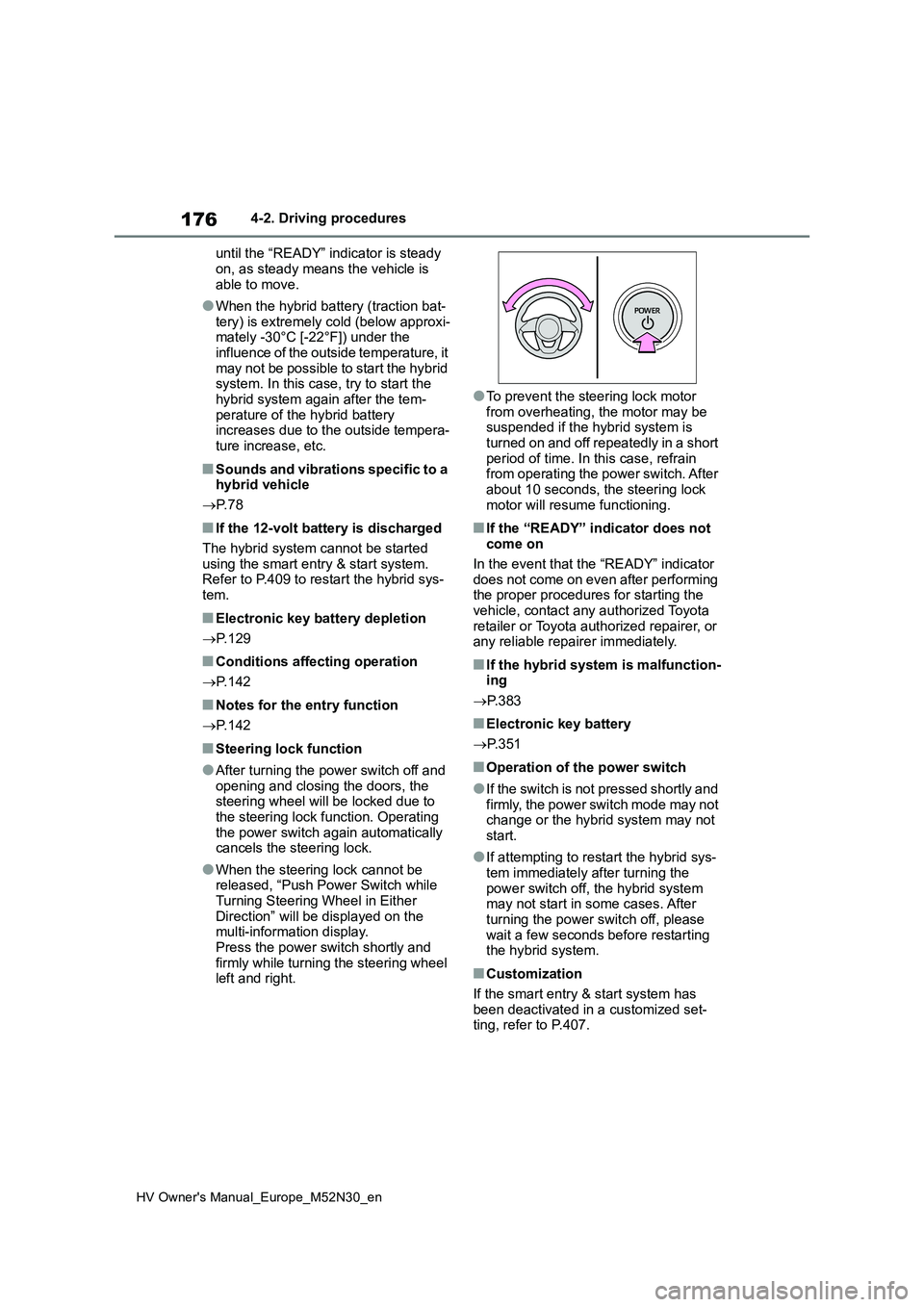
●When the steering lock cannot be released, “Push Power Switch while Turning Steering Wheel in Either
Direction” will be displayed on the multi-information display. Press the power switch shortly and
firmly while turning the steering wheel left and right.
●To prevent the steering lock motor
from overheating, the motor may be suspended if the hybrid system is turned on and off repeatedly in a short
period of time. In this case, refrain from operating the power switch. After about 10 seconds, the steering lock
motor will resume functioning.
■If the “READY” indicator does not come on
In the event that the “READY” indicator
does not come on even after performing the proper procedures for starting the vehicle, contact any authorized Toyota
retailer or Toyota authorized repairer, or any reliable repairer immediately.
■If the hybrid system is malfunction-ing
P. 3 8 3
■Electronic key battery
P. 3 5 1
■Operation of the power switch
●If the switch is not pressed shortly and firmly, the power switch mode may not change or the hybrid system may not
start.
●If attempting to restart the hybrid sys-
tem immediately after turning the power switch off, the hybrid system may not start in some cases. After
turning the power switch off, please wait a few seconds before restarting the hybrid system.
■Customization
If the smart entry & start system has been deactivated in a customized set-ting, refer to P.407.
Page 182 of 590
180
HV Owner's Manual_Europe_M52N30_en
4-2. Driving procedures
●The temperature of the hybrid system
is high. The vehicle has been left in the sun, driven on a hill, driven at high speeds,
etc.
●The temperature of the hybrid system
is low. The vehicle has been left in tempera-tures lower than about 0°C (32°F) for
a long period of time, etc.
●The gasoline engine is warming up.
●The hybrid battery (traction battery) is low.
The remaining battery level indicated in the energy monitor display is low. ( P.120)
●Vehicle speed is high.
●The accelerator pedal is depressed firmly or the vehicle is on a hill, etc.
●The windshield defogger is in use.
■Switching to EV drive mode when the gasoline engine is cold
If the hybrid system is started while the
gasoline engine is cold, the gasoline engine will start automatically after a short period of time in order to warm up.
In this case, you will become unable to switch to EV drive mode.
After the hybrid system has started and
the “READY” indicator has illuminated, press the EV drive mode switch before the gasoline engine starts to switch to
EV drive mode.
■Automatic cancelation of EV drive mode
When driving in EV drive mode, the gas-
oline engine may start automatically and the vehicle may be driven by the gaso-line engine and electric motor (traction
motor) in the following situations. When EV drive mode is canceled, a buzzer will sound, the EV drive mode indicator will
flash, and a message will be displayed on the multi-information display.
●The hybrid battery (traction battery) becomes low.The remaining battery level indicated
in the energy monitor display is low.
( P.120)
●Vehicle speed is high.
●The accelerator pedal is depressed firmly or the vehicle is on a hill, etc.
■Possible driving distance when driving in EV drive mode
EV drive mode’s possible driving dis- tance ranges from a few hundred meters to approximately 1 km (0.6 mile).
However, depending on vehicle condi- tions, there are situations when EV drive mode cannot be used.
(The distance that is possible depends on the hybrid battery [traction battery] level and driving conditions.)
■Fuel economy
The hybrid system is designed to achieve the best possible fuel economy during normal driving (using the gaso-
line engine and electric motor [traction motor]). Driving in EV drive mode more than necessary may lower fuel econ-
omy.
■If “EV Mode Unavailable” is shown on the multi-information display
The EV drive mode is not available. The
reason the EV drive mode is not avail- able (the vehicle is idling, battery charge is low, vehicle speed is higher than the
EV drive mode operating speed range or accelerator pedal is depressed too much) may be displayed. Use the EV
drive mode when it becomes available.
■If “EV Mode Deactivated” is shown on the multi-information display
The EV drive mode has been automati-
cally canceled. The reason the EV drive mode is not available (the battery charge is low, vehicle speed is higher
than the EV drive mode operating speed range or accelerator pedal is depressed too much) may be displayed. Drive the
vehicle for a while before attempting to turn on the EV drive mode again.
Page 219 of 590
217
4
HV Owner's Manual_Europe_M52N30_en
4-5. Using the driving support systems
Driving
reflects radio waves, such as a large
truck or guardrail • When driving near a TV tower, broad-casting station, electric power plant,
radar equipped vehicles, etc., or other location where strong radio waves or electrical noise may be present
• When there are many things which can reflect the radio waves of the radar in the vicinity (tunnels, truss
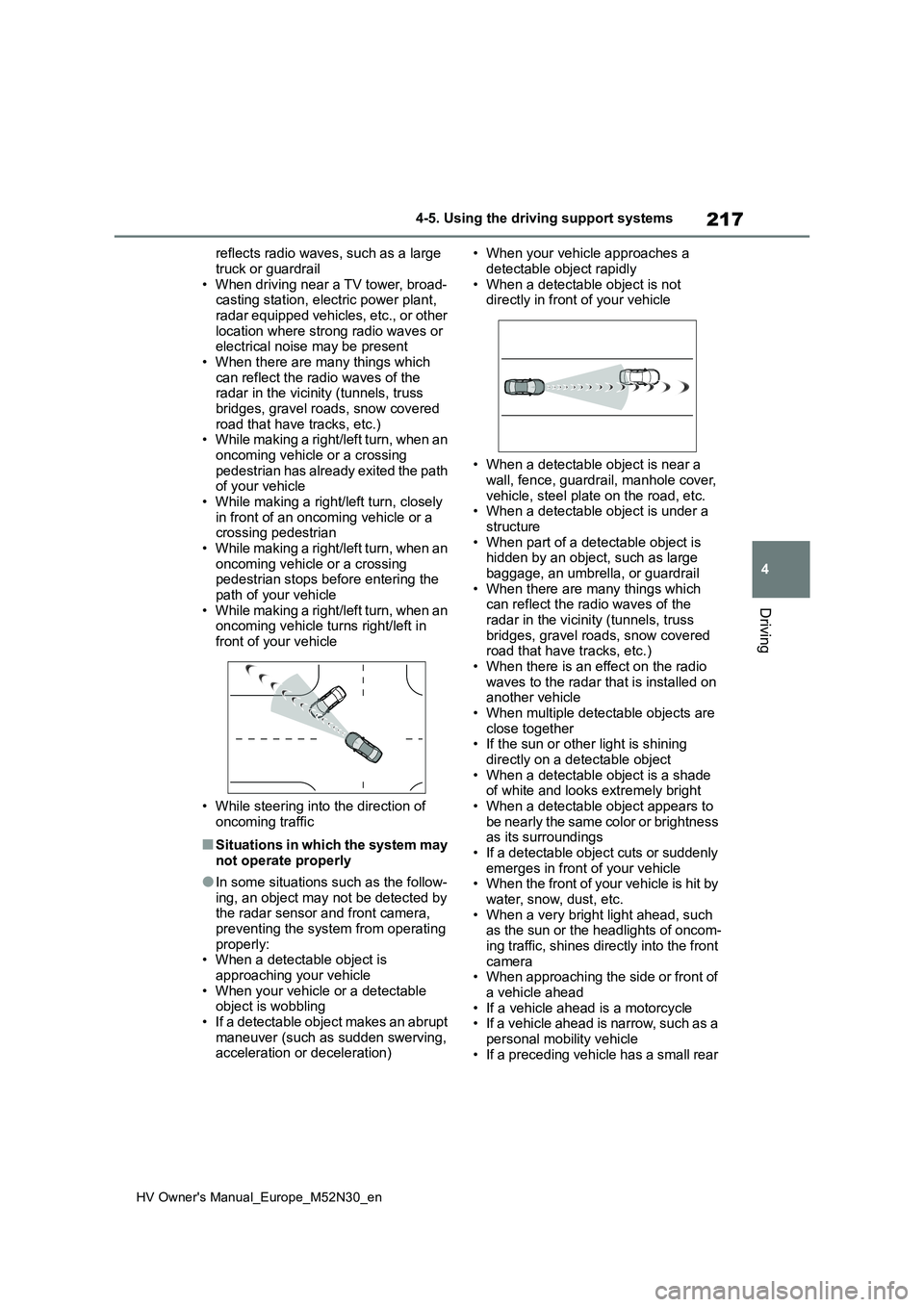
bridges, gravel roads, snow covered road that have tracks, etc.)• While making a right/left turn, when an
oncoming vehicle or a crossing pedestrian has already exited the path of your vehicle
• While making a right/left turn, closely in front of an oncoming vehicle or a crossing pedestrian
• While making a right/left turn, when an oncoming vehicle or a crossing pedestrian stops before entering the
path of your vehicle • While making a right/left turn, when an oncoming vehicle turns right/left in
front of your vehicle
• While steering into the direction of
oncoming traffic
■Situations in which the system may not operate properly
●In some situations such as the follow-ing, an object may not be detected by the radar sensor and front camera,
preventing the system from operating properly:• When a detectable object is
approaching your vehicle • When your vehicle or a detectable object is wobbling
• If a detectable object makes an abrupt maneuver (such as sudden swerving, acceleration or deceleration)
• When your vehicle approaches a
detectable object rapidly • When a detectable object is not directly in front of your vehicle
• When a detectable object is near a wall, fence, guardrail, manhole cover,
vehicle, steel plate on the road, etc. • When a detectable object is under a structure
• When part of a detectable object is hidden by an object, such as large baggage, an umbrella, or guardrail
• When there are many things which can reflect the radio waves of the radar in the vicinity (tunnels, truss
bridges, gravel roads, snow covered road that have tracks, etc.)• When there is an effect on the radio
waves to the radar that is installed on another vehicle• When multiple detectable objects are
close together • If the sun or other light is shining directly on a detectable object
• When a detectable object is a shade of white and looks extremely bright• When a detectable object appears to
be nearly the same color or brightness as its surroundings• If a detectable object cuts or suddenly
emerges in front of your vehicle • When the front of your vehicle is hit by water, snow, dust, etc.
• When a very bright light ahead, such as the sun or the headlights of oncom-ing traffic, shines directly into the front
camera • When approaching the side or front of a vehicle ahead
• If a vehicle ahead is a motorcycle • If a vehicle ahead is narrow, such as a personal mobility vehicle
• If a preceding vehicle has a small rear
Page 236 of 590
234
HV Owner's Manual_Europe_M52N30_en
4-5. Using the driving support systems
When the turn signal lever is operated and your vehicle moves t o an overtaking lane
while driving at 80 km/h (50 mph) or more, the vehicle will acc elerate to help to over-
take a passing vehicle.
The system’s identification of what is an overtaking lane may b e determined solely
based on the location of the steering wheel in the vehicle (lef t side driver position
versus right side driver position.) If the vehicle is driven to a region where the over-
taking lane is on a different side from where the vehicle is no rmally driven, the vehi-
cle may accelerate when the turn signal lever is operated in th e opposite direction to
the overtaking lane (e.g., if the driver normally operates the vehicle in a region
where the overtaking lane is to the right but then drives to a region where the over-
taking lane is to the left, the vehicle may accelerate when the right turn signal is acti-
vated).
Example of acceleration
When there are no longer any preceding vehicles driving slower than the
set speed
The system accelerates until the set speed is reached. The syst em then returns to
constant speed cruising.
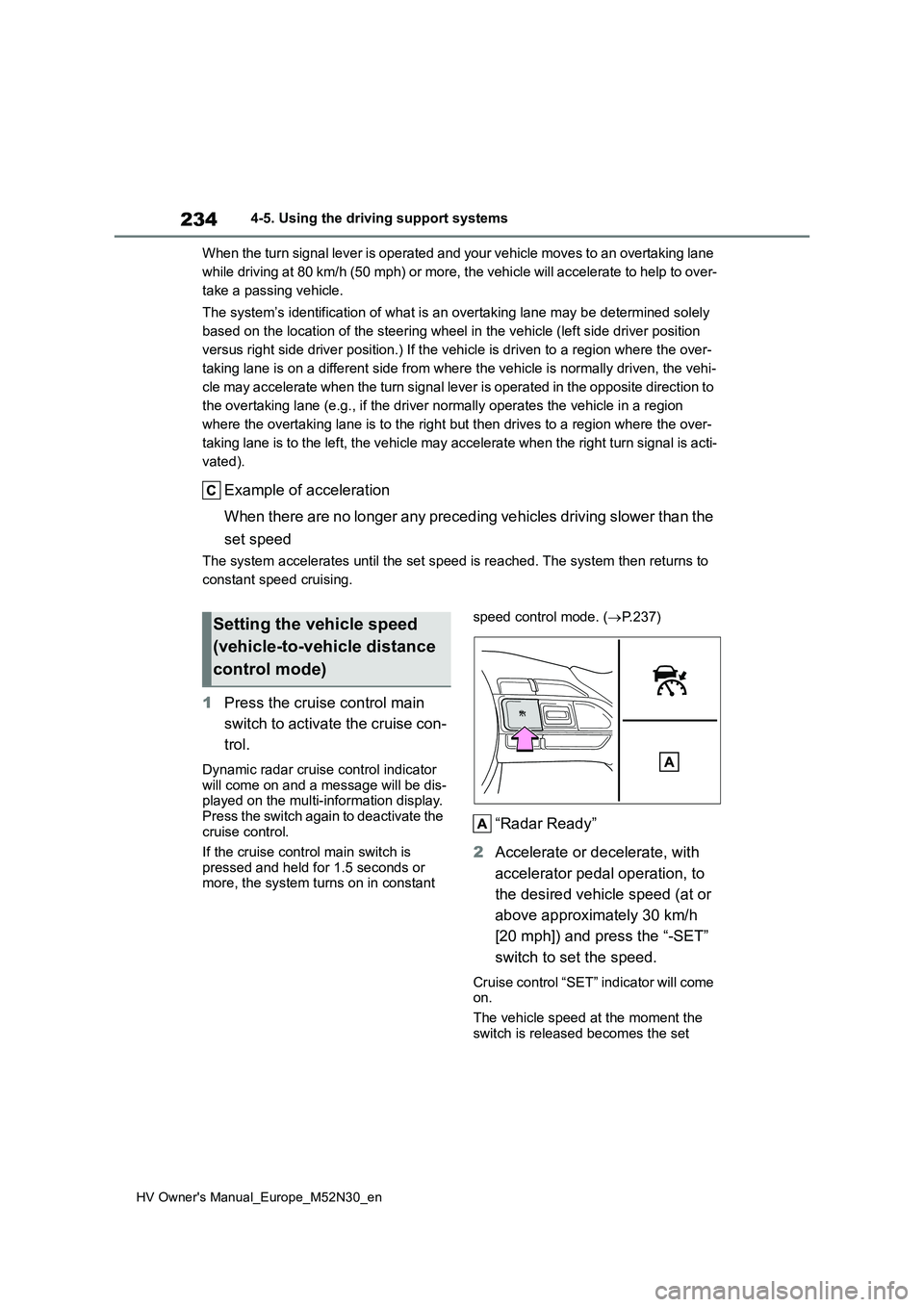
1 Press the cruise control main
switch to activate the cruise con-
trol.
Dynamic radar cruise control indicator will come on and a message will be dis-played on the multi-information display.
Press the switch again to deactivate the cruise control.
If the cruise control main switch is
pressed and held for 1.5 seconds or more, the system turns on in constant
speed control mode. ( P.237)
“Radar Ready”
2 Accelerate or decelerate, with
accelerator pedal operation, to
the desired vehicle speed (at or
above approximately 30 km/h
[20 mph]) and press the “-SET”
switch to set the speed.
Cruise control “SET” indicator will come on.
The vehicle speed at the moment the
switch is released becomes the set
Setting the vehicle speed
(vehicle-to-vehicle distance
control mode)
Page 294 of 590
292
HV Owner's Manual_Europe_M52N30_en
5-1. Using the air conditioning system and defogger
1Press the automatic mode
switch.
2 Adjust the temperature setting.
3 To stop the operation, press the
off switch.
If the fan speed setting or air flow
modes are operated, the automatic
mode indicator goes off. However,
automatic mode for functions other
than that operated is maintained.
■Using automatic mode
Fan speed is adjusted automatically according to the temperature setting and the ambient conditions.
Therefore, the fan may stop for a while until warm or cool air is ready to flow immediately after the automatic mode
switch pressed.
To turn on the “DUAL” mode, per-
form any of the following proce-
dures:
Press the “DUAL” switch.
Adjust the front passenger’s side
temperature setting.
The indicator on the “DUAL” switch
comes on when the “DUAL” mode is
on.
Pressing the “DUAL” switch when in
“DUAL” mode will disable “DUAL”
mode, and the temperature setting for
the front passenger’s side will become
linked to the driver’s side.
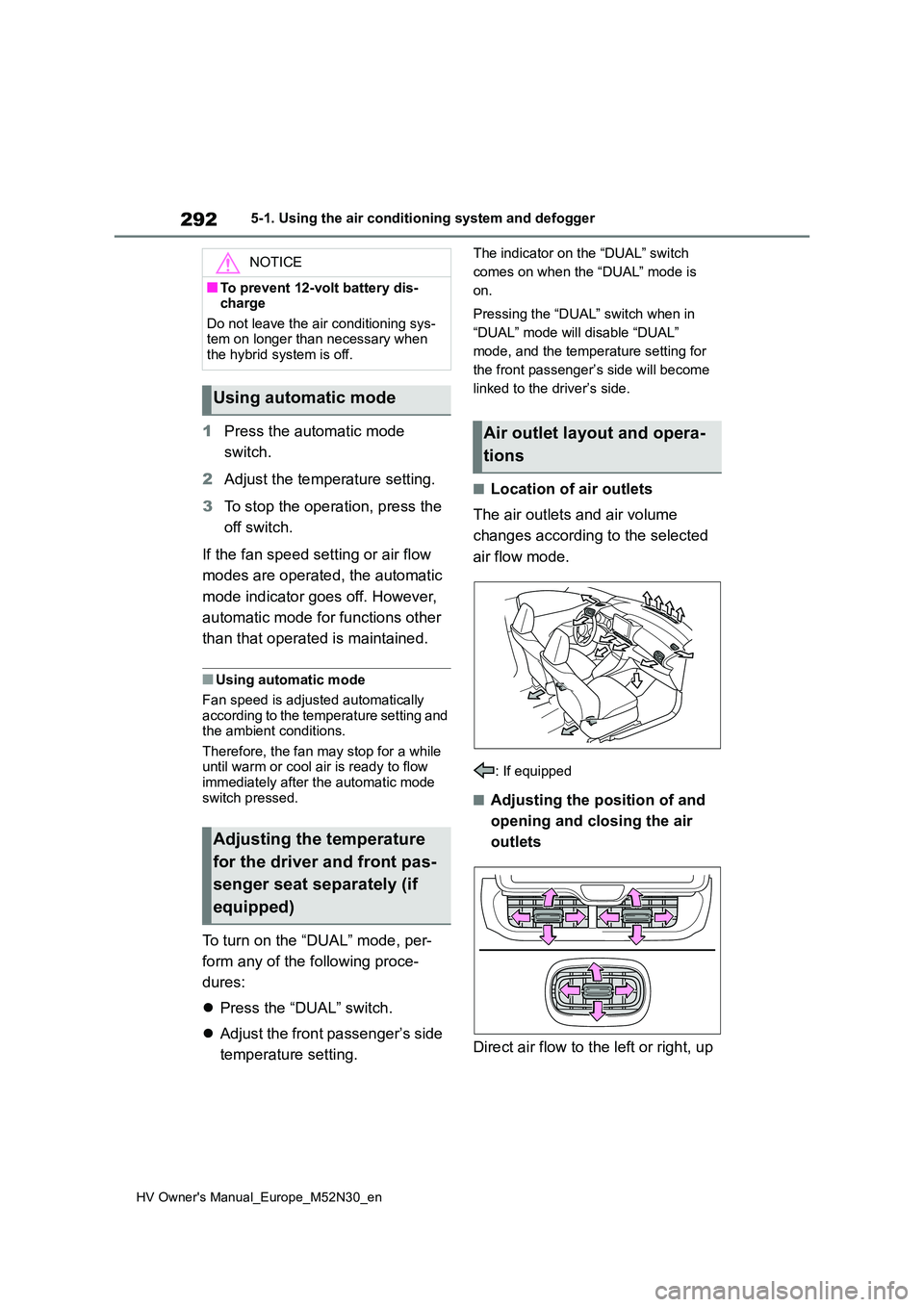
■Location of air outlets
The air outlets and air volume
changes according to the selected
air flow mode.
: If equipped
■Adjusting the position of and
opening and closing the air
outlets
Direct air flow to the left or right, up
NOTICE
■To prevent 12-volt battery dis- charge
Do not leave the air conditioning sys- tem on longer than necessary when the hybrid system is off.
Using automatic mode
Adjusting the temperature
for the driver and front pas-
senger seat separately (if
equipped)
Air outlet layout and opera-
tions
Page 322 of 590
320
HV Owner's Manual_Europe_M52N30_en
6-3. Do-it-yourself maintenance
6-3.Do-it-y ours elf main ten ance
Do-it-yourself ser vice
precautions
If you perform maintenance by
yourself, be sure to follow the
correct procedure as given in
these sections.
Maintenance
ItemsParts and tools
12-volt bat-
tery condi-
tion
( P.330)
•Warm water
• Baking soda
• Grease
• Conventional wrench
(for terminal clamp
bolts)
Engine/powe
r control unit
coolant level
( P.327)
• “Toyota Super Long
Life Coolant” or a simi-
lar high quality eth-
ylene glycol-based
non-silicate, non-
amine, non-nitrite and
non-borate coolant
with long-life hybrid
organic acid technol-
ogy.
“Toyota Super Long
Life Coolant” is pre-
mixed with 50% cool-
ant and 50% deionized
water.
• Funnel (used only for
adding coolant)
Engine oil
level
( P.325)
• “Toyota Genuine Motor
Oil” or equivalent
• Rag or paper towel
• Funnel (used only for
adding engine oil)
Fuses
( P.354)
• Fuse with same
amperage rating as
original
Hybrid bat-
tery (traction
battery) air
intake vent
( P.348)
• Vacuum cleaner, etc.
• Flathead screwdriver
Light bulbs
( P.357)
• Bulb with same num-
ber and wattage rating
as original
• Flathead screwdriver
•Wrench
Radiator and
condenser
( P.329)
Tire inflation
pressure
( P.342)
• Tire pressure gauge
• Compressed air
source
Washer fluid
( P.329)
• Water or washer fluid
containing antifreeze
(for winter use)
• Funnel (used only for
adding water or
washer fluid)
WARNING
The engine compartment contains many mechanisms and fluids that may move suddenly, become hot, or
become electrically energized. To avoid death or serious injury, observe the following precautions.
■When working on the engine compartment
●Make sure that the “ACCESSORY” or “IGNITION ON” on the multi-information display and the
“READY” indicator are both off.
ItemsParts and tools
Page 328 of 590
326
HV Owner's Manual_Europe_M52N30_en
6-3. Do-it-yourself maintenance
perature and turned off, check the
oil level on the dipstick.
■Checking the engine oil
1 Park the vehicle on level
ground. After warming up the
engine and turning off the hybrid
system, wait more than 5 min-
utes for the oil to drain back into
the bottom of the engine.
2 Holding a rag under the end,
pull the dipstick out.
3 Wipe the dipstick clean.
4 Reinsert the dipstick fully.
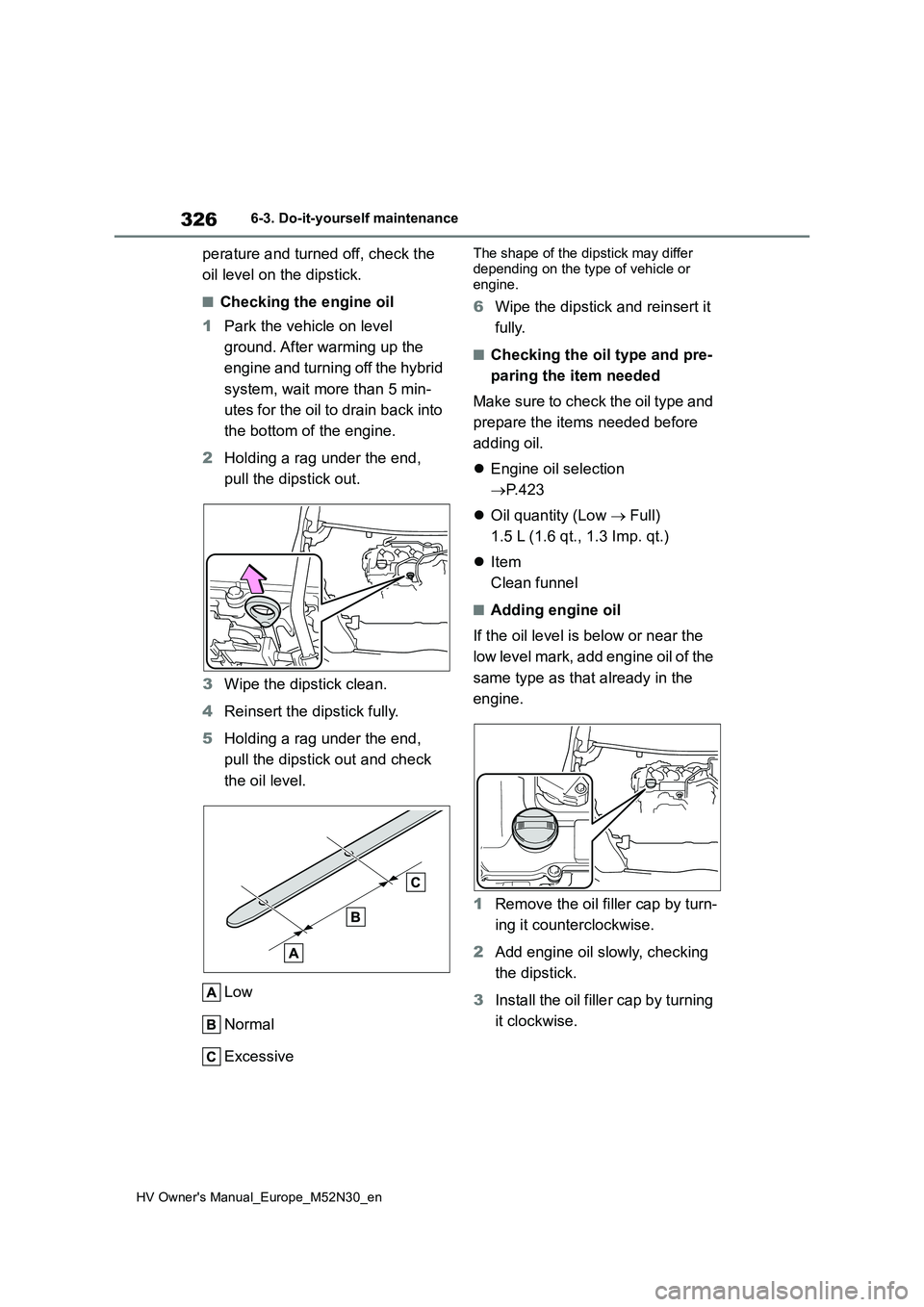
5 Holding a rag under the end,
pull the dipstick out and check
the oil level.
Low
Normal
Excessive
The shape of the dipstick may differ
depending on the type of vehicle or engine.
6 Wipe the dipstick and reinsert it
fully.
■Checking the oil type and pre-
paring the item needed
Make sure to check the oil type and
prepare the items needed before
adding oil.
Engine oil selection
P.423
Oil quantity (Low Full)
1.5 L (1.6 qt., 1.3 Imp. qt.)
Item
Clean funnel
■Adding engine oil
If the oil level is below or near the
low level mark, add engine oil of the
same type as that already in the
engine.
1 Remove the oil filler cap by turn-
ing it counterclockwise.
2 Add engine oil slowly, checking
the dipstick.
3 Install the oil filler cap by turning
it clockwise.
Page 368 of 590
366
HV Owner's Manual_Europe_M52N30_en
7-1. Essential information
7-1.Esse ntial informa tion
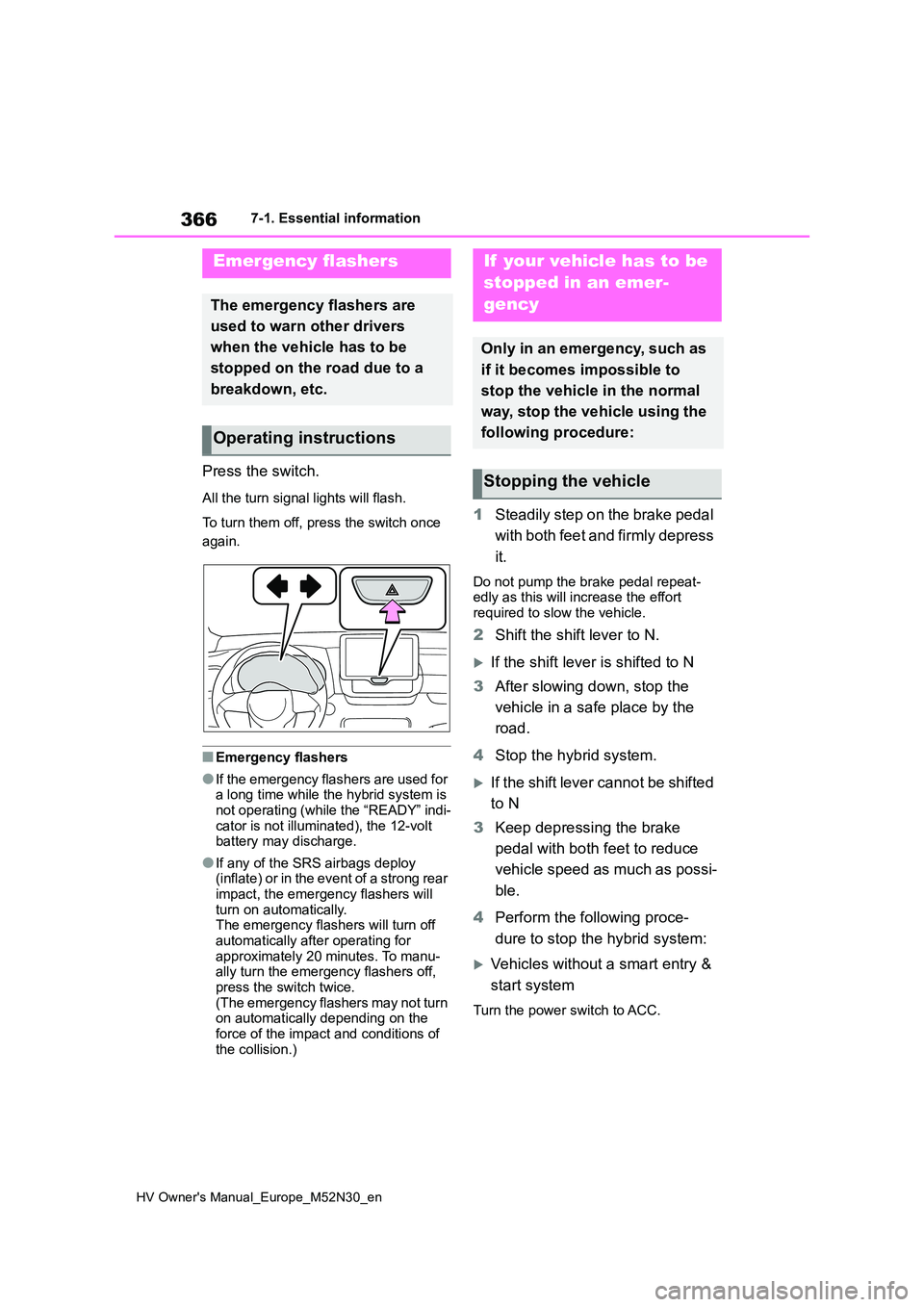
Press the switch.
All the turn signal lights will flash.
To turn them off, press the switch once
again.
■Emergency flashers
●If the emergency flashers are used for a long time while the hybrid system is
not operating (while the “READY” indi- cator is not illuminated), the 12-volt battery may discharge.
●If any of the SRS airbags deploy (inflate) or in the event of a strong rear
impact, the emergency flashers will turn on automatically. The emergency flashers will turn off
automatically after operating for approximately 20 minutes. To manu-ally turn the emergency flashers off,
press the switch twice. (The emergency flashers may not turn on automatically depending on the
force of the impact and conditions of the collision.)
1 Steadily step on the brake pedal
with both feet and firmly depress
it.
Do not pump the brake pedal repeat- edly as this will increase the effort required to slow the vehicle.
2 Shift the shift lever to N.
If the shift lever is shifted to N
3 After slowing down, stop the
vehicle in a safe place by the
road.
4 Stop the hybrid system.
If the shift lever cannot be shifted
to N
3 Keep depressing the brake
pedal with both feet to reduce
vehicle speed as much as possi-
ble.
4 Perform the following proce-
dure to stop the hybrid system:
Vehicles without a smart entry &
start system
Turn the power switch to ACC.
Emergency flashers
The emergency flashers are
used to warn other drivers
when the vehicle has to be
stopped on the road due to a
breakdown, etc.
Operating instructions
If your vehicle has to be
stopped in an emer-
gency
Only in an emergency, such as
if it becomes impossible to
stop the vehicle in the normal
way, stop the vehicle using the
following procedure:
Stopping the vehicle
Page 391 of 590
389
7
HV Owner's Manual_Europe_M52N30_en
7-2. Steps to take in an emergency
When trouble arises
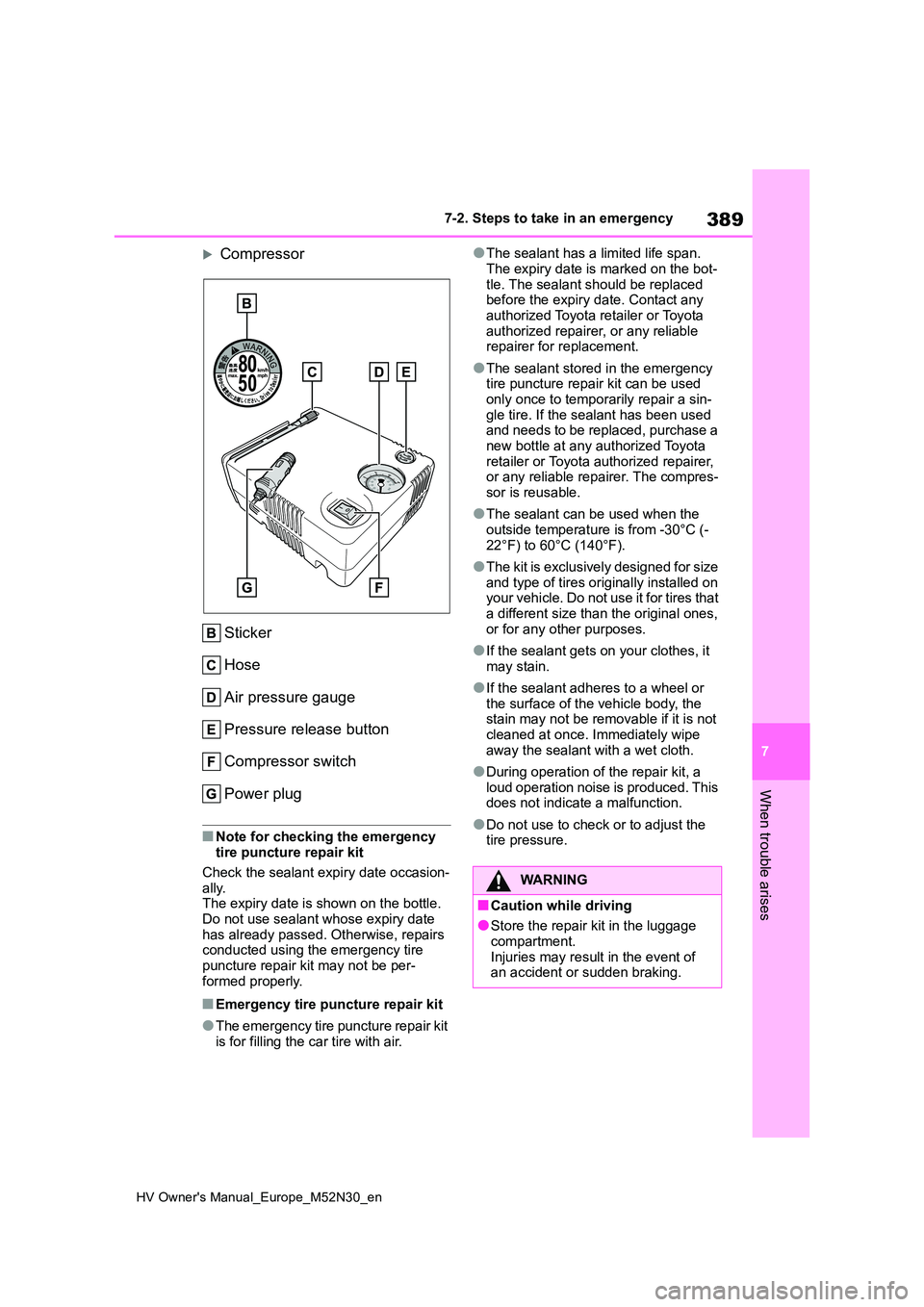
Compressor
Sticker
Hose
Air pressure gauge
Pressure release button
Compressor switch
Power plug
■Note for checking the emergency tire puncture repair kit
Check the sealant expiry date occasion-
ally. The expiry date is shown on the bottle. Do not use sealant whose expiry date
has already passed. Otherwise, repairs conducted using the emergency tire puncture repair kit may not be per-
formed properly.
■Emergency tire puncture repair kit
●The emergency tire puncture repair kit
is for filling the car tire with air.
●The sealant has a limited life span.
The expiry date is marked on the bot- tle. The sealant should be replaced before the expiry date. Contact any
authorized Toyota retailer or Toyota authorized repairer, or any reliable repairer for replacement.
●The sealant stored in the emergency tire puncture repair kit can be used
only once to temporarily repair a sin- gle tire. If the sealant has been used and needs to be replaced, purchase a
new bottle at any authorized Toyota retailer or Toyota authorized repairer, or any reliable repairer. The compres-
sor is reusable.
●The sealant can be used when the
outside temperature is from -30°C (- 22°F) to 60°C (140°F).
●The kit is exclusively designed for size and type of tires originally installed on your vehicle. Do not use it for tires that
a different size than the original ones, or for any other purposes.
●If the sealant gets on your clothes, it may stain.
●If the sealant adheres to a wheel or the surface of the vehicle body, the stain may not be removable if it is not
cleaned at once. Immediately wipe away the sealant with a wet cloth.
●During operation of the repair kit, a loud operation noise is produced. This does not indicate a malfunction.
●Do not use to check or to adjust the tire pressure.
WARNING
■Caution while driving
●Store the repair kit in the luggage compartment.
Injuries may result in the event of an accident or sudden braking.
Page 413 of 590
411
7
HV Owner's Manual_Europe_M52N30_en
7-2. Steps to take in an emergency
When trouble arises
minutes to recharge the 12-volt
battery of your vehicle.
6 Vehicles with a smart entry &
start system: Open and close
any of the doors of your vehicle
with the power switch OFF.
7 Maintain the engine speed of
the second vehicle and start the
hybrid system of your vehicle by
turning the power switch to ON.
8 Make sure the “READY” indica-
tor comes on. If the indicator
does not come on, contact any
authorized Toyota retailer or
Toyota authorized repairer, or
any reliable repairer.
9 Once the hybrid system has
started, remove the jumper
cables in the exact reverse
order from which they were con-
nected.
10 Close the exclusive jump start-
ing terminal cover and install the
fuse box cover to its original
position.
Once the hybrid system starts,
have the vehicle inspected at any
authorized Toyota retailer or Toyota
authorized repairer, or any reliable
repairer as soon as possible.
■Starting the hybrid system when the 12-volt battery is discharged
The hybrid system cannot be started by push-starting.
■To prevent 12-volt battery dis-charge
●Turn off the headlights and the audio
system while the hybrid system is off.
●Turn off any unnecessary electrical components when the vehicle is run-
ning at a low speed for an extended period, such as in heavy traffic.
■When the 12-volt battery is removed or discharged
●Information stored in the ECU is cleared. When the 12-volt battery is
depleted, have the vehicle inspected at any authorized Toyota retailer or Toyota authorized repairer, or any reli-
able repairer.
●Some systems may require initializa-
tion. ( P.440)
■When removing the 12-volt battery terminals
When the 12-volt battery terminals are
removed, the information stored in the ECU is cleared. Before removing the 12-volt battery terminals, contact any
authorized Toyota retailer or Toyota authorized repairer, or any reliable repairer.
■Charging the 12-volt battery
The electricity stored in the 12-volt bat- tery will discharge gradually even when the vehicle is not in use, due to natural
discharge and the draining effects of certain electrical appliances. If the vehi-cle is left for a long time, the 12-volt bat-
tery may discharge, and the hybrid system may be unable to start. (The 12-volt battery recharges automatically
while the hybrid system is operating.)
■When recharging or replacing the 12-volt battery (vehicles with a smart entry & start system)
●In some cases, it may not be possible to unlock the doors using the smart
entry & start system when the 12-volt battery is discharged. Use the wire-less remote control or the mechanical
key to lock or unlock the doors.
●The hybrid system may not start on
the first attempt after the 12-volt bat- tery has recharged but will start nor-mally after the second attempt. This is