warning light TOYOTA YARIS 2022 Owner's Manual
[x] Cancel search | Manufacturer: TOYOTA, Model Year: 2022, Model line: YARIS, Model: TOYOTA YARIS 2022Pages: 590, PDF Size: 128.6 MB
Page 105 of 590
103
2
HV Owner's Manual_Europe_M52N30_en
2-1. Instrument cluster
Vehicle status information and indicators
play, the system may be malfunctioning.
Have the vehicle inspected by any
authorized Toyota retailer or Toyota
authorized repairer, or any reliable
repairer.
The brightness of the instrument
panel lights can be adjusted on
select to the multi-information
display.
The brightness of the instrument panel
lights can be adjusted separately for
when the tail lights are on and off.
1 Press or to select of
the multi-information display.
2 Press or to select ,
and then press and hold the
.
3 Press or to change the
brightness.
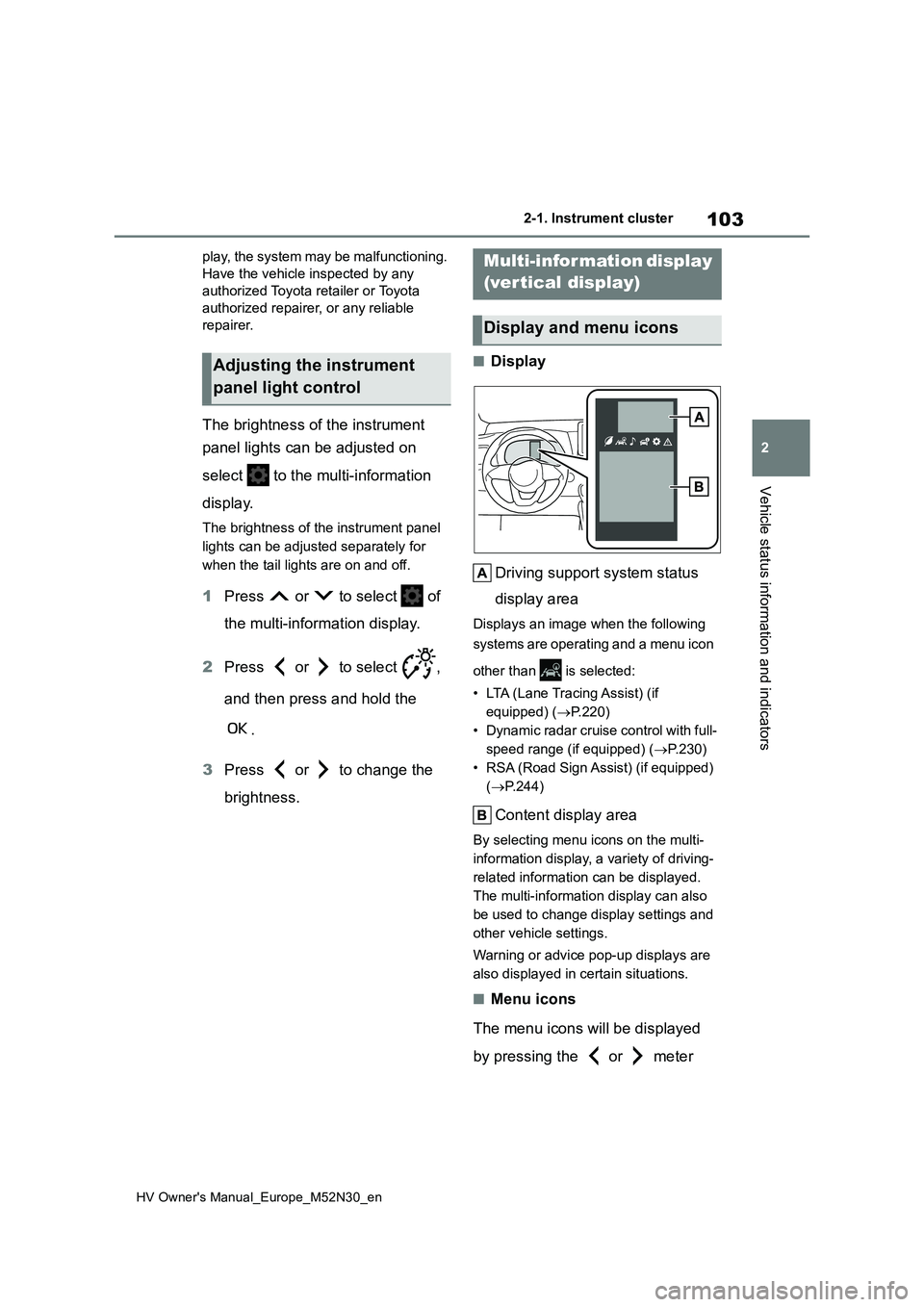
■Display
Driving support system status
display area
Displays an image when the following
systems are operating and a menu icon
other than is selected:
• LTA (Lane Tracing Assist) (if
equipped) ( P.220)
• Dynamic radar cruise control with full-
speed range (if equipped) ( P.230)
• RSA (Road Sign Assist) (if equipped)
( P.244)
Content display area
By selecting menu icons on the multi-
information display, a variety of driving-
related information can be displayed.
The multi-information display can also
be used to change display settings and
other vehicle settings.
Warning or advice pop-up displays are
also displayed in certain situations.
■Menu icons
The menu icons will be displayed
by pressing the or meter
Adjusting the instrument
panel light control
Multi-information display
(vertical display)
Display and menu icons
Page 106 of 590
104
HV Owner's Manual_Europe_M52N30_en
2-1. Instrument cluster
control switch.
■Liquid crystal display
Small spots or light spots may appear on the display. This phenomenon is
characteristic of liquid crystal displays, and there is no problem continuing to use the display.
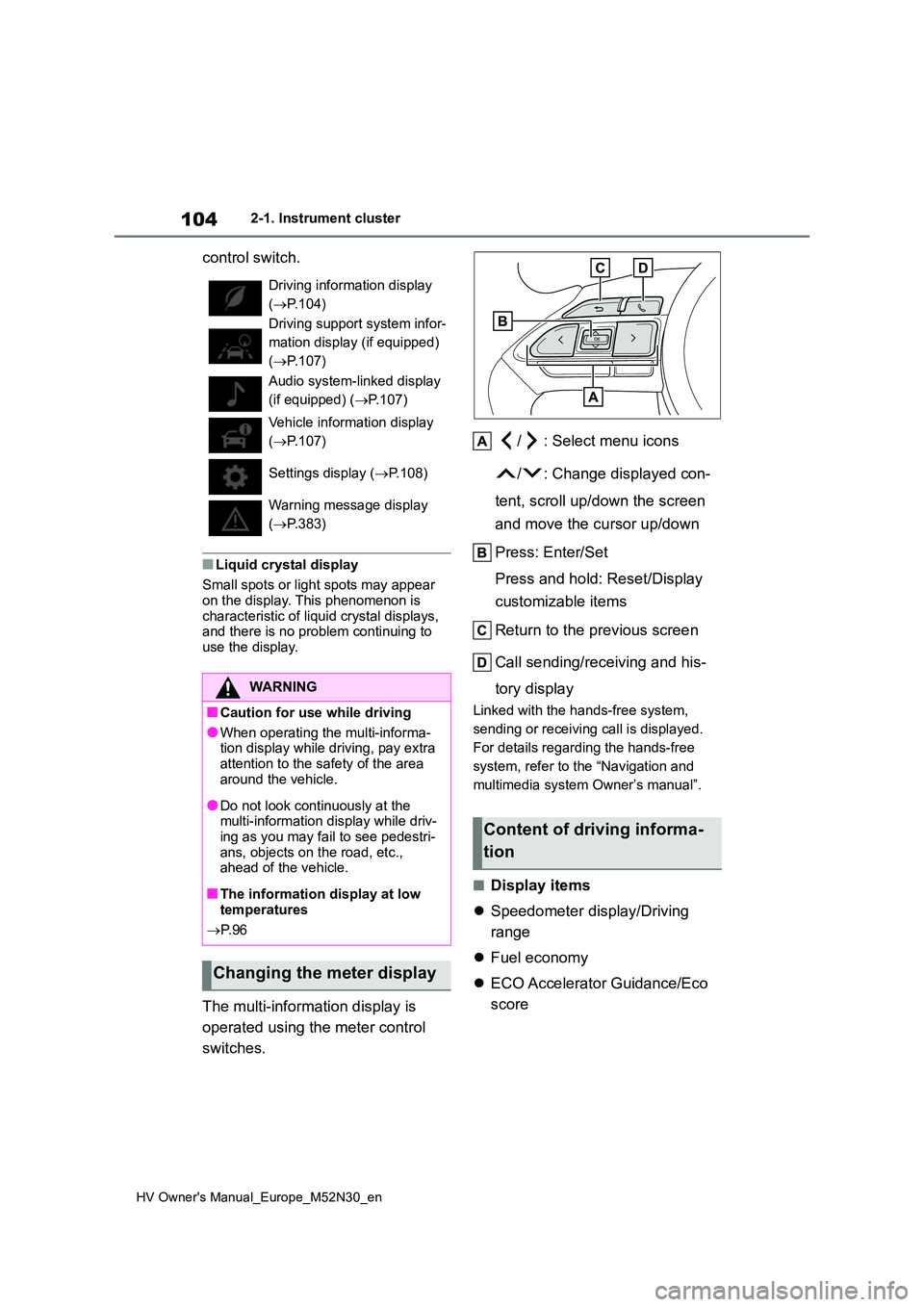
The multi-information display is
operated using the meter control
switches.
/ : Select menu icons
/ : Change displayed con-
tent, scroll up/down the screen
and move the cursor up/down
Press: Enter/Set
Press and hold: Reset/Display
customizable items
Return to the previous screen
Call sending/receiving and his-
tory display
Linked with the hands-free system,
sending or receiving call is displayed.
For details regarding the hands-free
system, refer to the “Navigation and
multimedia system Owner’s manual”.
■Display items
Speedometer display/Driving
range
Fuel economy
ECO Accelerator Guidance/Eco
score
Driving information display
( P.104)
Driving support system infor-
mation display (if equipped)
( P.107)
Audio system-linked display
(if equipped) ( P.107)
Vehicle information display
( P.107)
Settings display ( P.108)
Warning message display
( P.383)
WARNING
■Caution for use while driving
●When operating the multi-informa- tion display while driving, pay extra
attention to the safety of the area around the vehicle.
●Do not look continuously at the multi-information display while driv-ing as you may fail to see pedestri-
ans, objects on the road, etc., ahead of the vehicle.
■The information display at low temperatures
P. 9 6
Changing the meter display
Content of driving informa-
tion
Page 112 of 590
110
HV Owner's Manual_Europe_M52N30_en
2-1. Instrument cluster
control switch.
■Liquid crystal display
Small spots or light spots may appear on the display. This phenomenon is
characteristic of liquid crystal displays, and there is no problem continuing to use the display.
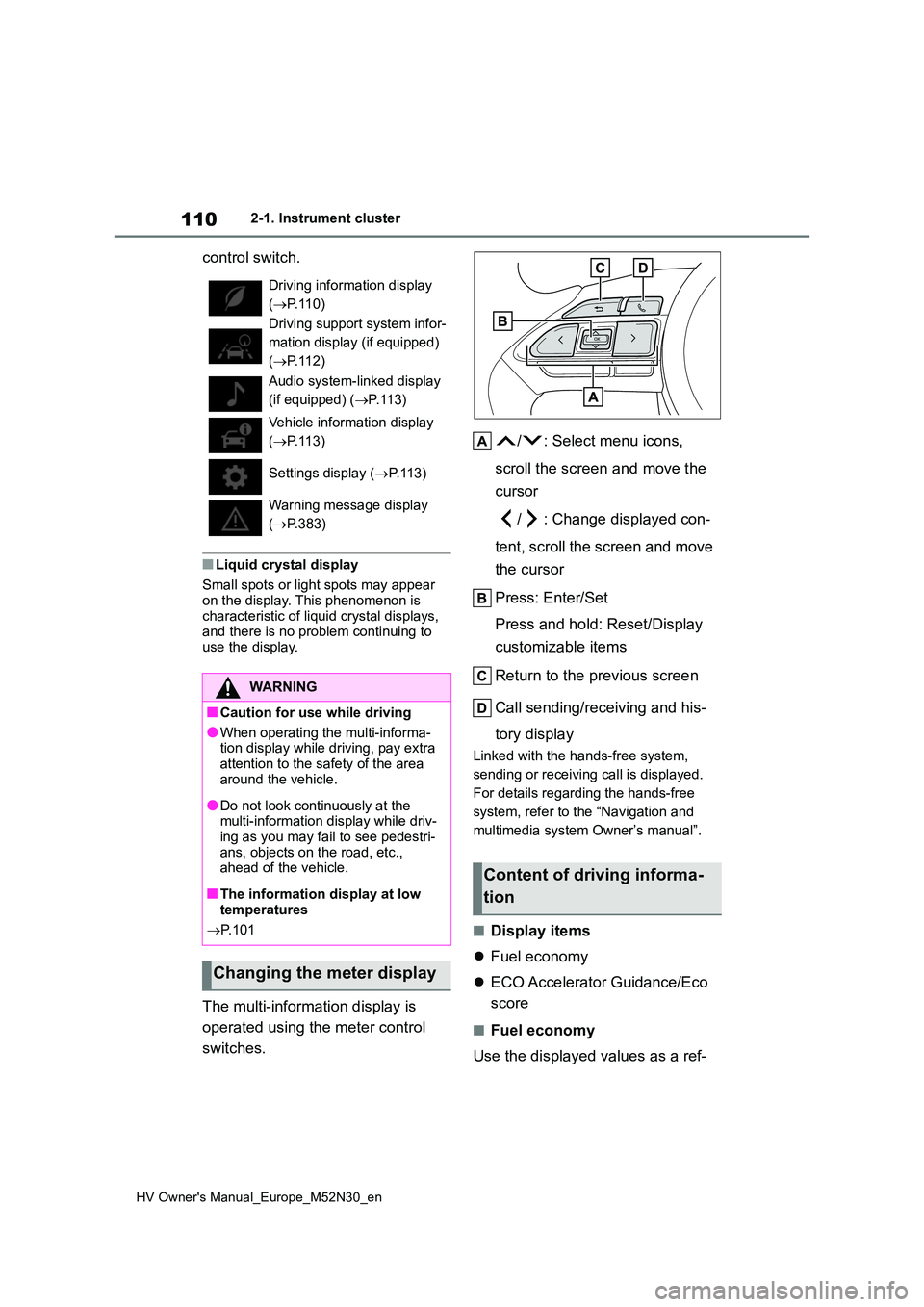
The multi-information display is
operated using the meter control
switches.
/ : Select menu icons,
scroll the screen and move the
cursor
/ : Change displayed con-
tent, scroll the screen and move
the cursor
Press: Enter/Set
Press and hold: Reset/Display
customizable items
Return to the previous screen
Call sending/receiving and his-
tory display
Linked with the hands-free system,
sending or receiving call is displayed.
For details regarding the hands-free
system, refer to the “Navigation and
multimedia system Owner’s manual”.
■Display items
Fuel economy
ECO Accelerator Guidance/Eco
score
■Fuel economy
Use the displayed values as a ref-
Driving information display
( P.110)
Driving support system infor-
mation display (if equipped)
( P.112)
Audio system-linked display
(if equipped) ( P. 1 1 3 )
Vehicle information display
( P.113)
Settings display ( P. 1 1 3 )
Warning message display
( P.383)
WARNING
■Caution for use while driving
●When operating the multi-informa- tion display while driving, pay extra
attention to the safety of the area around the vehicle.
●Do not look continuously at the multi-information display while driv-ing as you may fail to see pedestri-
ans, objects on the road, etc., ahead of the vehicle.
■The information display at low temperatures
P. 1 0 1
Changing the meter display
Content of driving informa-
tion
Page 124 of 590
122
HV Owner's Manual_Europe_M52N30_en
2-1. Instrument cluster
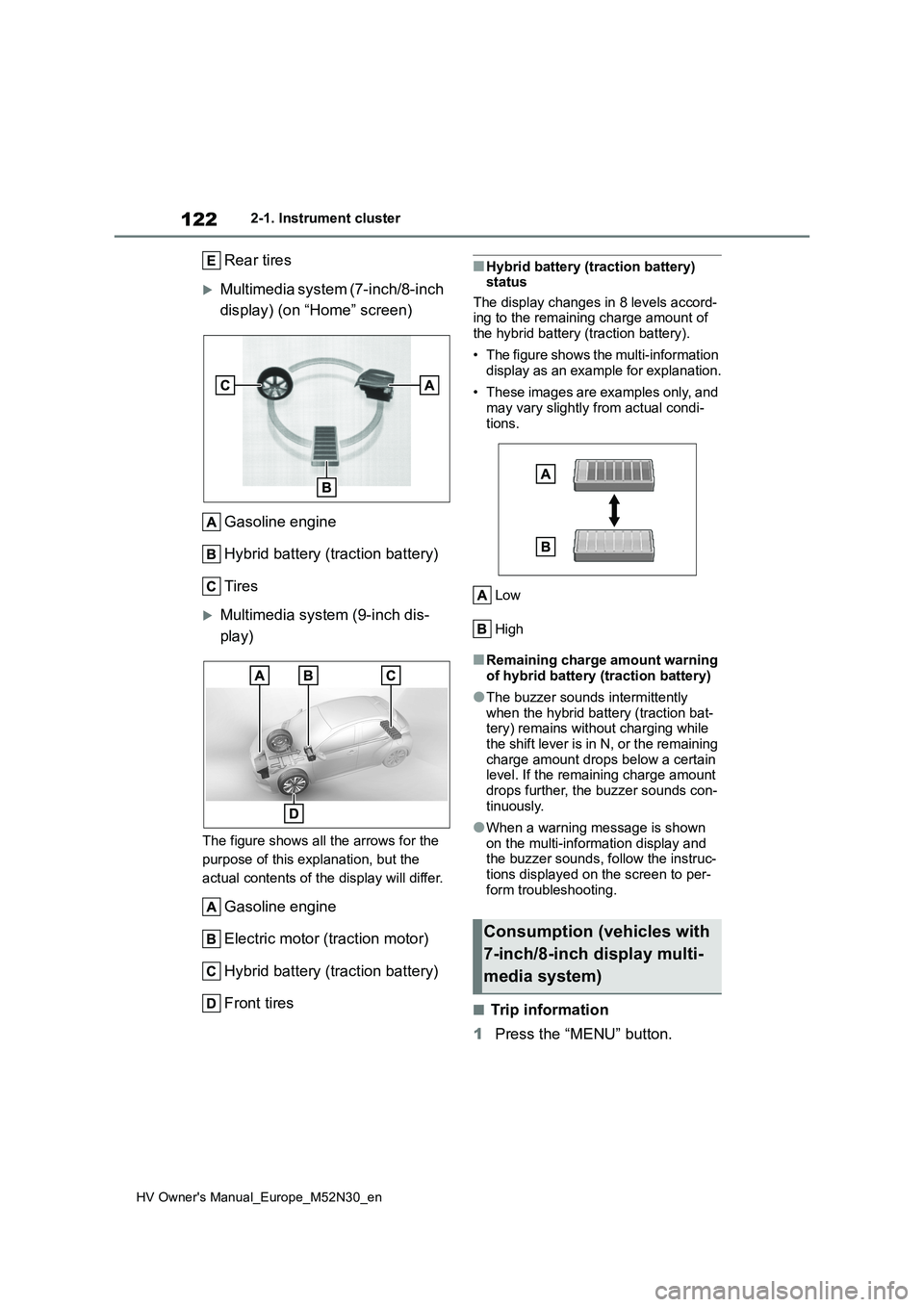
Rear tires
Multimedia system (7-inch/8-inch
display) (on “Home” screen)
Gasoline engine
Hybrid battery (traction battery)
Tires
Multimedia system (9-inch dis-
play)
The figure shows all the arrows for the
purpose of this explanation, but the
actual contents of the display will differ.
Gasoline engine
Electric motor (traction motor)
Hybrid battery (traction battery)
Front tires
■Hybrid battery (traction battery) status
The display changes in 8 levels accord- ing to the remaining charge amount of the hybrid battery (traction battery).
• The figure shows the multi-information display as an example for explanation.
• These images are examples only, and may vary slightly from actual condi-
tions.
Low
High
■Remaining charge amount warning of hybrid battery (traction battery)
●The buzzer sounds intermittently when the hybrid battery (traction bat-tery) remains without charging while
the shift lever is in N, or the remaining charge amount drops below a certain level. If the remaining charge amount
drops further, the buzzer sounds con- tinuously.
●When a warning message is shown on the multi-information display and the buzzer sounds, follow the instruc-
tions displayed on the screen to per- form troubleshooting.
■Trip information
1 Press the “MENU” button.
Consumption (vehicles with
7-inch/8-inch display multi-
media system)
Page 140 of 590
138
HV Owner's Manual_Europe_M52N30_en
3-2. Opening, closing and locking the doors
WARNING
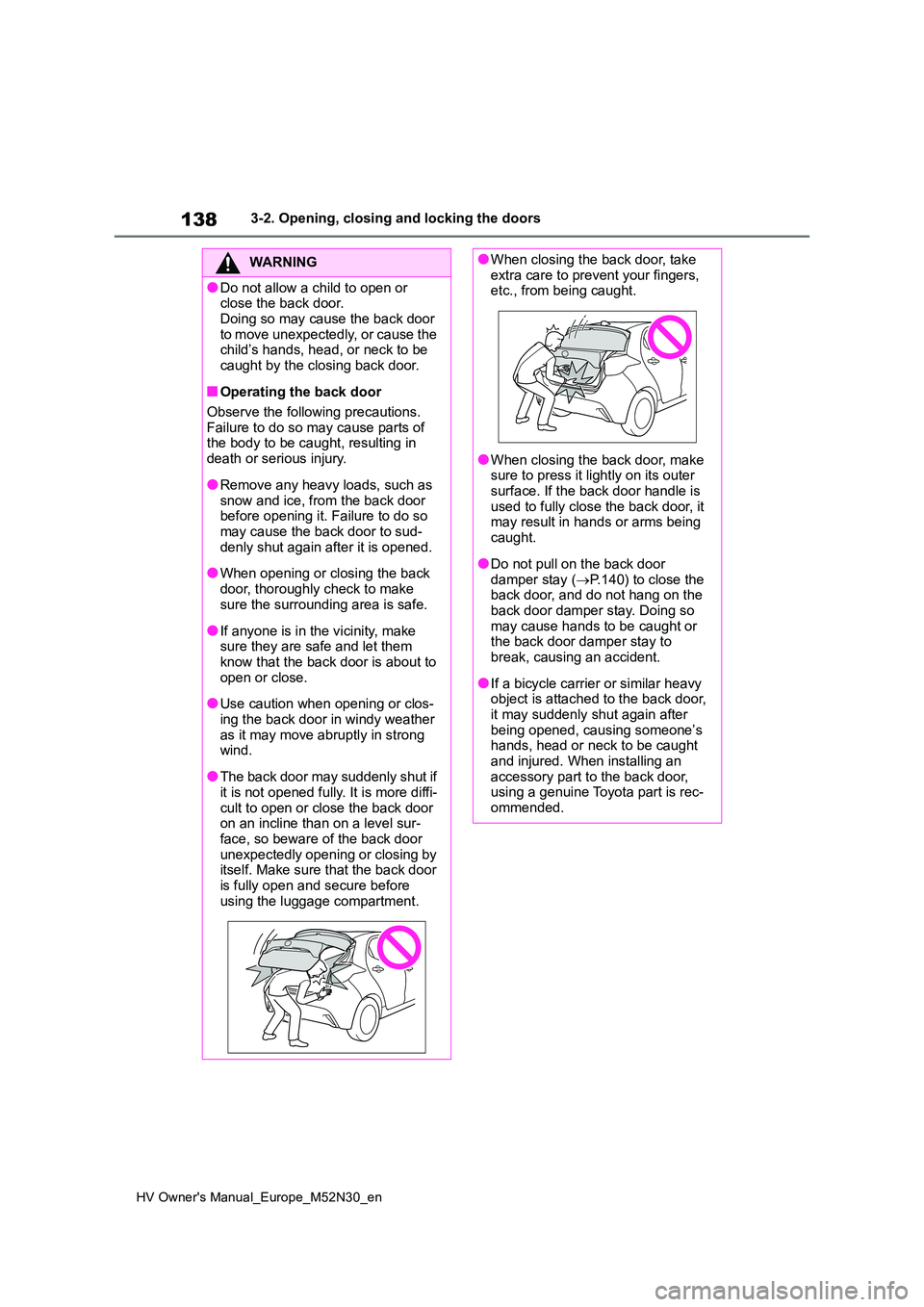
●Do not allow a child to open or close the back door.
Doing so may cause the back door to move unexpectedly, or cause the child’s hands, head, or neck to be
caught by the closing back door.
■Operating the back door
Observe the following precautions. Failure to do so may cause parts of the body to be caught, resulting in
death or serious injury.
●Remove any heavy loads, such as
snow and ice, from the back door before opening it. Failure to do so may cause the back door to sud-
denly shut again after it is opened.
●When opening or closing the back
door, thoroughly check to make sure the surrounding area is safe.
●If anyone is in the vicinity, make sure they are safe and let them know that the back door is about to
open or close.
●Use caution when opening or clos-
ing the back door in windy weather as it may move abruptly in strong wind.
●The back door may suddenly shut if it is not opened fully. It is more diffi-
cult to open or close the back door on an incline than on a level sur-face, so beware of the back door
unexpectedly opening or closing by itself. Make sure that the back door is fully open and secure before
using the luggage compartment.
●When closing the back door, take extra care to prevent your fingers, etc., from being caught.
●When closing the back door, make sure to press it lightly on its outer
surface. If the back door handle is used to fully close the back door, it may result in hands or arms being
caught.
●Do not pull on the back door
damper stay ( P.140) to close the back door, and do not hang on the back door damper stay. Doing so
may cause hands to be caught or the back door damper stay to break, causing an accident.
●If a bicycle carrier or similar heavy object is attached to the back door,
it may suddenly shut again after being opened, causing someone’s hands, head or neck to be caught
and injured. When installing an accessory part to the back door, using a genuine Toyota part is rec-
ommended.
Page 149 of 590
147
3
HV Owner's Manual_Europe_M52N30_en
3-3. Adjusting the seats
Before driving
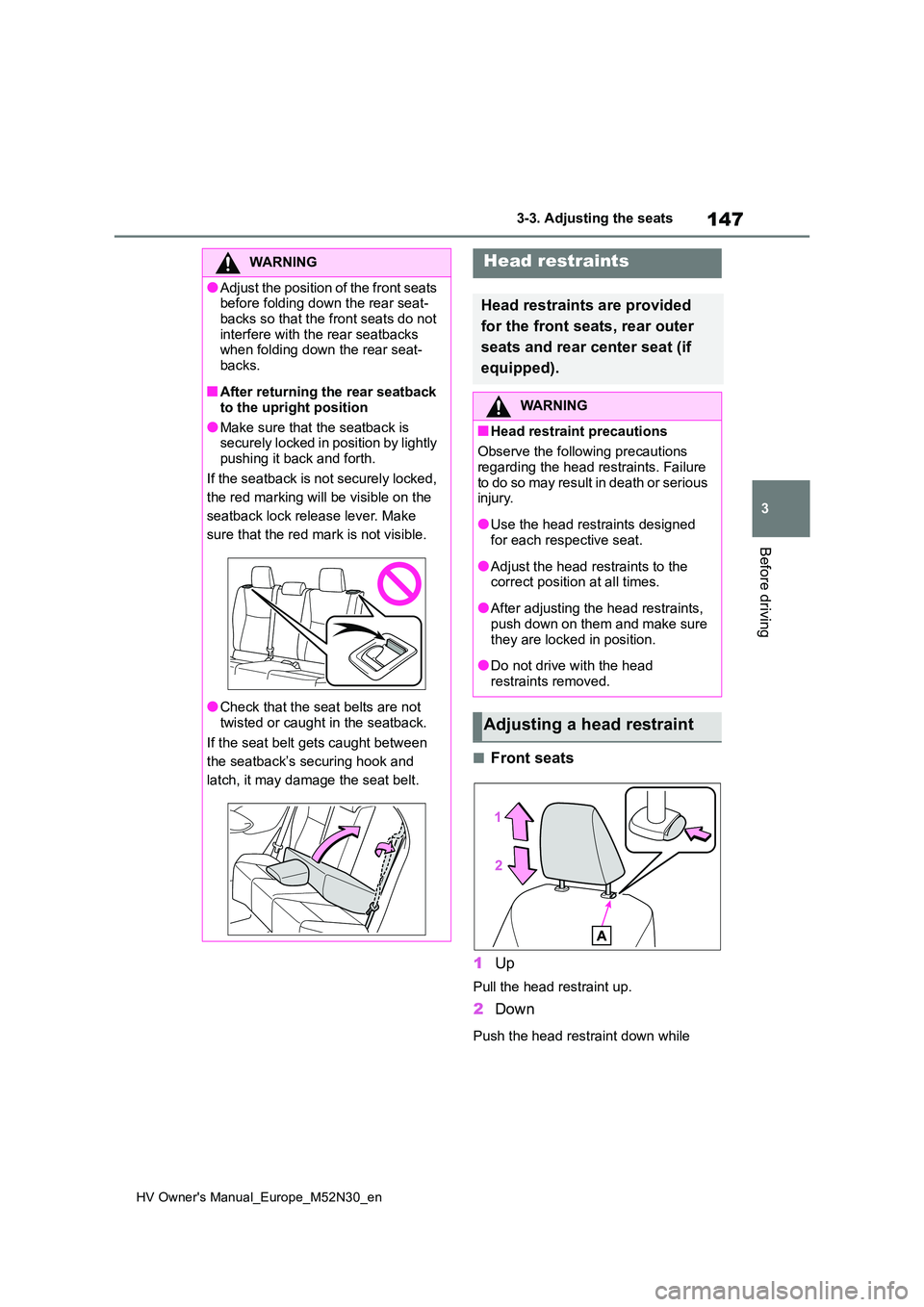
■Front seats
1 Up
Pull the head restraint up.
2Down
Push the head restraint down while
WARNING
●Adjust the position of the front seats before folding down the rear seat-
backs so that the front seats do not interfere with the rear seatbacks when folding down the rear seat-
backs.
■After returning the rear seatback
to the upright position
●Make sure that the seatback is securely locked in position by lightly
pushing it back and forth.
If the seatback is not securely locked,
the red marking will be visible on the
seatback lock release lever. Make
sure that the red mark is not visible.
●Check that the seat belts are not
twisted or caught in the seatback.
If the seat belt gets caught between
the seatback’s securing hook and
latch, it may damage the seat belt.
Head restraints
Head restraints are provided
for the front seats, rear outer
seats and rear center seat (if
equipped).
WARNING
■Head restraint precautions
Observe the following precautions
regarding the head restraints. Failure to do so may result in death or serious injury.
●Use the head restraints designed for each respective seat.
●Adjust the head restraints to the correct position at all times.
●After adjusting the head restraints, push down on them and make sure
they are locked in position.
●Do not drive with the head
restraints removed.
Adjusting a head restraint
Page 154 of 590
152
HV Owner's Manual_Europe_M52N30_en
3-4. Adjusting the steering wheel and mirrors
The height of the rear view mirror
can be adjusted to suit your driving
posture.
Adjust the height of the rear view
mirror by moving it up and down.
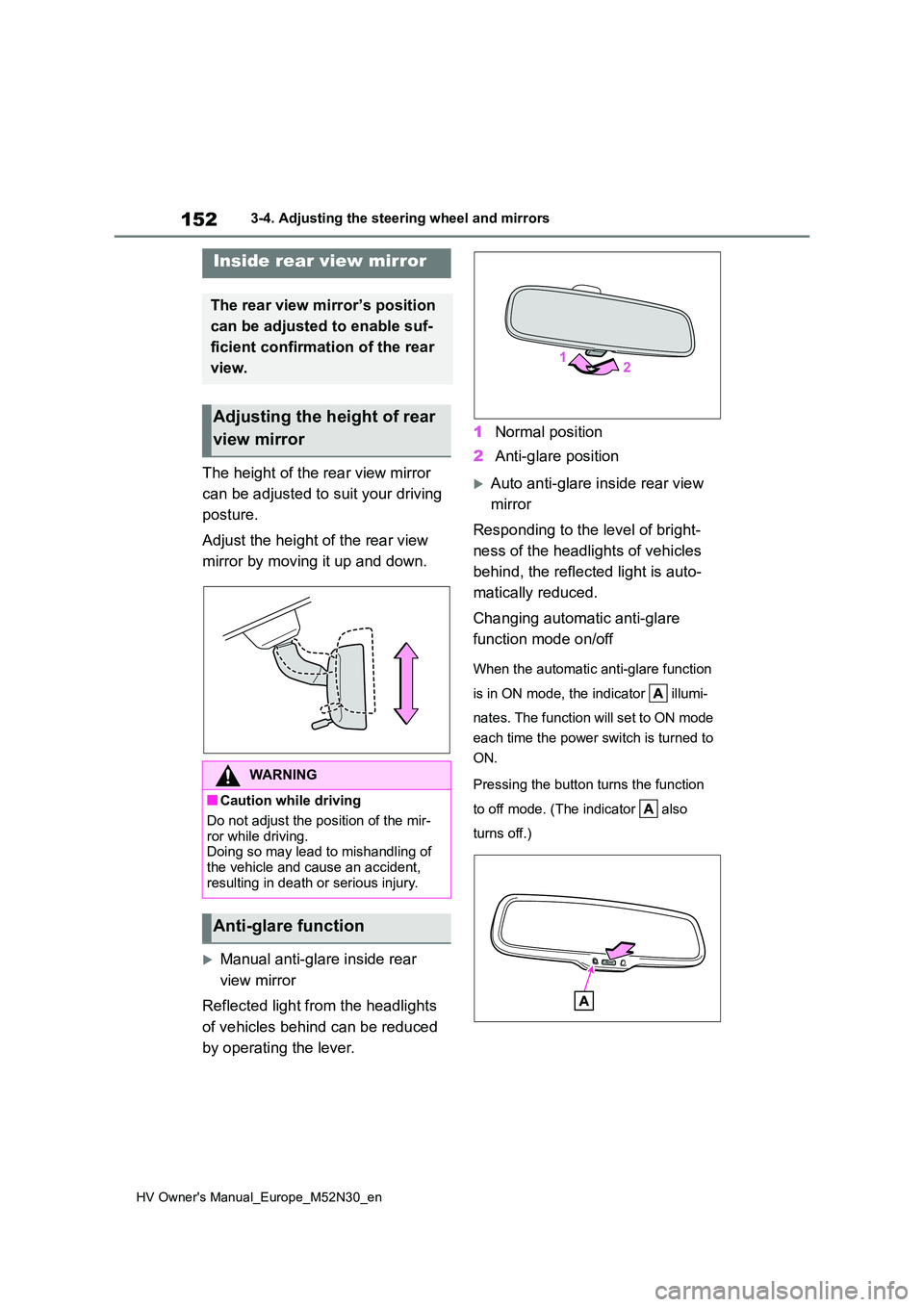
Manual anti-glare inside rear
view mirror
Reflected light from the headlights
of vehicles behind can be reduced
by operating the lever.
1 Normal position
2 Anti-glare position
Auto anti-glare inside rear view
mirror
Responding to the level of bright-
ness of the headlights of vehicles
behind, the reflected light is auto-
matically reduced.
Changing automatic anti-glare
function mode on/off
When the automatic anti-glare function
is in ON mode, the indicator illumi-
nates. The function will set to ON mode
each time the power switch is turned to
ON.
Pressing the button turns the function
to off mode. (The indicator also
turns off.)
Inside rear view mirror
The rear view mirror’s position
can be adjusted to enable suf-
ficient confirmation of the rear
view.
Adjusting the height of rear
view mirror
WARNING
■Caution while driving
Do not adjust the position of the mir-
ror while driving. Doing so may lead to mishandling of the vehicle and cause an accident,
resulting in death or serious injury.
Anti-glare function
Page 163 of 590
161
4
HV Owner's Manual_Europe_M52N30_en
4-1. Before driving
Driving
restrained.
●A warning message is displayed on the multi-information display while the
system is operating.
■ECO Accelerator Guidance ( P.105, 111)
Eco-friendly driving may be achieved
mo r e ea si l y b y s ta y in g w it h in t he zo n e o f Eco acceleration. Also, by staying within the zone of Eco acceleration, it will be
easier to obtain a good Eco score.
●When starting off:
Gradually depress the accelerator pedal
to stay within the zone of Eco accelera-
tion and accelerate to the desired
speed. By refraining from excessive
acceleration, a good eco start score will
be obtained.
●When driving:
After accelerating to the desired speed,
release the accelerator pedal and drive
at a stable speed while staying within
the zone of Eco acceleration. By staying
within the zone of Eco acceleration, a
good eco cruise score will be obtained.
●When stopping:
By starting to release the accelerator
pedal early before decelerating, a good
eco stop score will be obtained.
■Breaking in your new Toyota
To extend the life of the vehicle, observ- ing the following precautions is recom-
mended:
●For the first 300 km (186 miles):
Avoid sudden stops.
●For the first 800 km (500 miles):
Do not tow a trailer. (vehicles with tow-
ing packages only)
●For the first 1000 km (621 miles): • Do not drive at extremely high speeds.
• Avoid sudden acceleration. • Do not drive at a constant speed for
extended periods.
■Operating your vehicle in a foreign
country
Comply with the relevant vehicle regis- tration laws and confirm the availability
of the correct fuel. ( P.422)
WARNING
Observe the following precautions. Failure to do so may result in death or
serious injury.
■When starting the vehicle
Always keep your foot on the brake pedal while stopped with the “READY” indicator is illuminated. This
prevents the vehicle from creeping.
■When driving the vehicle
●Do not drive if you are unfamiliar with the location of the brake and accelerator pedals to avoid
depressing the wrong pedal.
• Accidentally depressing the accel-
erator pedal instead of the brake pedal will result in sudden accelera-tion that may lead to an accident.
• When backing up, you may twist your body around, leading to a diffi-
culty in operating the pedals. Make sure to operate the pedals properly.
• Make sure to keep a correct driving posture even when moving the vehicle only slightly. This allows you
to depress the brake and accelera- tor pedals properly.
• Depress the brake pedal using your right foot. Depressing the brake pedal using your left foot may delay
response in an emergency, result- ing in an accident.
Page 164 of 590
162
HV Owner's Manual_Europe_M52N30_en
4-1. Before driving
WARNING
●The driver should pay extra atten- tion to pedestrians when the vehicle
is powered only by the electric motor (traction motor). As there is no engine noise, the pedestrians
may misjudge the vehicle’s move- ment.
●Do not drive the vehicle over or stop the vehicle near flammable materials.
The exhaust system and exhaust gases can be extremely hot. These hot parts may cause a fire if there is
any flammable material nearby.
●During normal driving, do not turn
off the hybrid system. Turning the hybrid system off while driving will not cause loss of steering or brak-
ing control, however, power assist to the steering will be lost. This will make it more difficult to steer
smoothly, so you should pull over and stop the vehicle as soon as it is safe to do so.
In the event of an emergency, such as if it becomes impossible to stop the vehicle in the normal way:
P. 3 6 6
●Use engine braking (shift position
B) to maintain a safe speed when driving down a steep hill.Using the brakes continuously may
cause the brakes to overheat and lose effectiveness. ( P.181)
●Do not adjust the positions of the steering wheel, the seat, or the inside or outside rear view mirrors
while driving. Doing so may result in a loss of vehicle control.
●Always check that all passengers’ arms, heads or other parts of their
body are not outside the vehicle.
■When driving on slippery road surfaces
●Sudden braking, acceleration and
steering may cause tire slippage and reduce your ability to control the vehicle.
●Sudden acceleration, engine brak-ing due to shifting, or changes in
engine speed could cause the vehi- cle to skid.
●After driving through a puddle, lightly depress the brake pedal to make sure that the brakes are func-
tioning properly. Wet brake pads may prevent the brakes from func-tioning properly. If the brakes on
only one side are wet and not func- tioning properly, steering control may be affected.
■When shifting the shift lever
●Do not let the vehicle roll backward
while a forward driving position is selected, or roll forward while the shift lever is in R.
Doing so may result in an accident or damage to the vehicle.
●Do not shift the shift lever to P while the vehicle is moving.Doing so can damage the transmis-
sion and may result in a loss of vehicle control.
●Do not shift the shift lever to R while the vehicle is moving forward.Doing so can damage the transmis-
sion and may result in a loss of vehicle control.
●Do not shift the shift lever to a driv-ing position while the vehicle is moving backward.
Doing so can damage the transmis- sion and may result in a loss of vehicle control.
Page 165 of 590
163
4
HV Owner's Manual_Europe_M52N30_en
4-1. Before driving
Driving
WARNING
●Moving the shift lever to N while the vehicle is moving will disengage the
hybrid system. Engine braking is not available with the hybrid system disengaged.
●Be careful not to shift the shift lever with the accelerator pedal
depressed. Shifting the shift lever to any positions other than P or N may lead to unexpected rapid accelera-
tion of the vehicle that may cause an accident and result in death or serious injury.
■If you hear a squealing or scrap-ing noise (brake pad wear indica-
tors)
Have the brake pads checked and replaced by any authorized Toyota
retailer or Toyota authorized repairer, or any reliable repairer as soon as possible.
Rotor damage may result if the pads are not replaced when needed.
It is dangerous to drive the vehicle when the wear limits of the brake
pads and/or those of the brake discs are exceeded.
■When the vehicle is stopped
●Do not depress the accelerator pedal unnecessarily.
If the shift lever is any position other than P or N, the vehicle may accel-erate suddenly and unexpectedly,
causing an accident.
●In order to prevent accidents due to
the vehicle rolling away, always keep depressing the brake pedal while stopped with the “READY”
indicator is illuminated, and apply the parking brake as necessary.
●If the vehicle is stopped on an incline, in order to prevent acci-dents caused by the vehicle rolling
forward or backward, always depress the brake pedal and securely apply the parking brake as
needed.
●Avoid revving or racing the engine.
Running the engine at high speed while the vehicle is stopped may cause the exhaust system to over-
heat, which could result in a fire if combustible material is nearby.
■When the vehicle is parked
●Do not leave glasses, cigarette lighters, spray cans, or soft drink
cans in the vehicle when it is in the sun.Doing so may result in the follow-
ing:
• Gas may leak from a cigarette
lighter or spray can, and may lead to a fire.
• The temperature inside the vehicle may cause the plastic lenses and plastic material of glasses to
deform or crack.
• Soft drink cans may fracture, caus-
ing the contents to spray over the interior of the vehicle, and may also cause a short circuit in the vehicle’s
electrical components.
●Do not leave cigarette lighters in the
vehicle. If a cigarette lighter is in a place such as the glove box or on the floor, it may be lit accidentally
when luggage is loaded or the seat is adjusted, causing a fire.
●Do not attach adhesive discs to the windshield or windows. Do not place containers such as air fresh-
eners on the instrument panel or dashboard. Adhesive discs or con-tainers may act as lenses, causing
a fire in the vehicle.