warning light TOYOTA YARIS 2022 Workshop Manual
[x] Cancel search | Manufacturer: TOYOTA, Model Year: 2022, Model line: YARIS, Model: TOYOTA YARIS 2022Pages: 590, PDF Size: 128.6 MB
Page 235 of 590
233
4
HV Owner's Manual_Europe_M52N30_en
4-5. Using the driving support systems
Driving
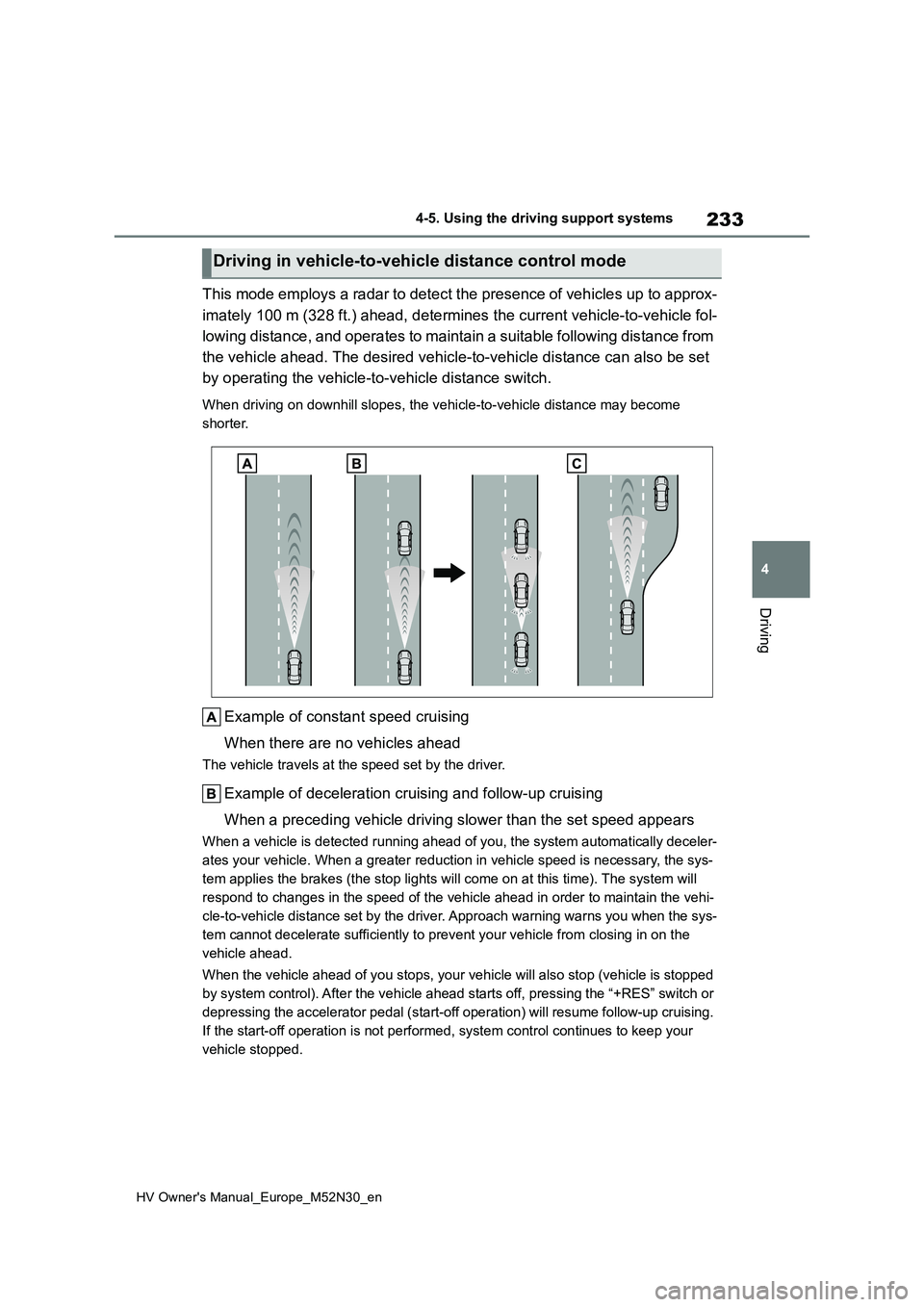
This mode employs a radar to detect the presence of vehicles up to approx-
imately 100 m (328 ft.) ahead, d etermines the current vehicle-to-vehicle fol-
lowing distance, and operates to maintain a suitable following distance from
the vehicle ahead. The desired vehicle-to-vehicle distance can also be set
by operating the vehicle-to-vehicle distance switch.
When driving on downhill slopes, the vehicle-to-vehicle distanc e may become
shorter.
Example of constant speed cruising
When there are no vehicles ahead
The vehicle travels at the speed set by the driver.
Example of deceleration cruising and follow-up cruising
When a preceding vehicle driving slower than the set speed appe ars
When a vehicle is detected running ahead of you, the system automatically deceler-
ates your vehicle. When a greater reduction in vehicle speed is necessary, the sys-
tem applies the brakes (the stop lights will come on at this ti me). The system will
respond to changes in the speed of the vehicle ahead in order t o maintain the vehi-
cle-to-vehicle distance set by the driver. Approach warning war ns you when the sys-
tem cannot decelerate sufficiently to prevent your vehicle from closing in on the
vehicle ahead.
When the vehicle ahead of you stops, your vehicle will also sto p (vehicle is stopped
by system control). After the vehicle ahead starts off, pressin g the “+RES” switch or
depressing the accelerator pedal (start-off operation) will res ume follow-up cruising.
If the start-off operation is not performed, system control con tinues to keep your
vehicle stopped.
Driving in vehicle-to-vehicle distance control mode
Page 251 of 590
249
4
HV Owner's Manual_Europe_M52N30_en
4-5. Using the driving support systems
Driving
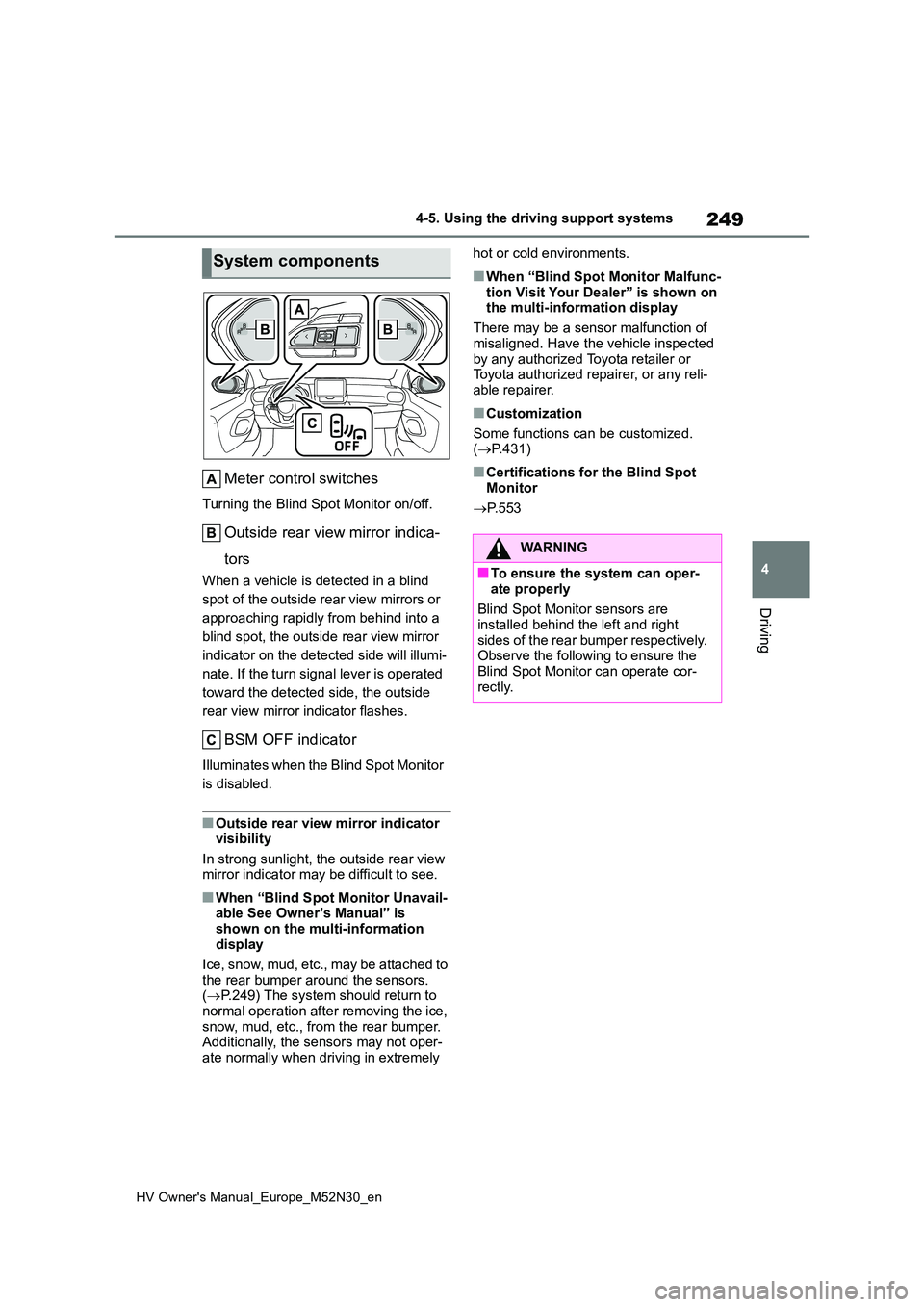
Meter control switches
Turning the Blind Spot Monitor on/off.
Outside rear view mirror indica-
tors
When a vehicle is detected in a blind
spot of the outside rear view mirrors or
approaching rapidly from behind into a
blind spot, the outside rear view mirror
indicator on the detected side will illumi-
nate. If the turn signal lever is operated
toward the detected side, the outside
rear view mirror indicator flashes.
BSM OFF indicator
Illuminates when the Blind Spot Monitor
is disabled.
■Outside rear view mirror indicator visibility
In strong sunlight, the outside rear view mirror indicator may be difficult to see.
■When “Blind Spot Monitor Unavail-able See Owner’s Manual” is
shown on the multi-information display
Ice, snow, mud, etc., may be attached to
the rear bumper around the sensors. ( P.249) The system should return to normal operation after removing the ice,
snow, mud, etc., from the rear bumper. Additionally, the sensors may not oper-ate normally when driving in extremely
hot or cold environments.
■When “Blind Spot Monitor Malfunc-
tion Visit Your Dealer” is shown on the multi-information display
There may be a sensor malfunction of
misaligned. Have the vehicle inspected by any authorized Toyota retailer or Toyota authorized repairer, or any reli-
able repairer.
■Customization
Some functions can be customized. ( P.431)
■Certifications for the Blind Spot
Monitor
P. 5 5 3
System components
WARNING
■To ensure the system can oper-
ate properly
Blind Spot Monitor sensors are installed behind the left and right
sides of the rear bumper respectively. Observe the following to ensure the Blind Spot Monitor can operate cor-
rectly.
Page 252 of 590
250
HV Owner's Manual_Europe_M52N30_en
4-5. Using the driving support systems
Use the meter control switches to
turn on/off the function.
1 Press / (vertical display)
or / (horizontal display)
of the meter control switch to
select .
2 Press / (vertical display)
or / (horizontal display)
of the meter control switch to
select and then press .
WARNING
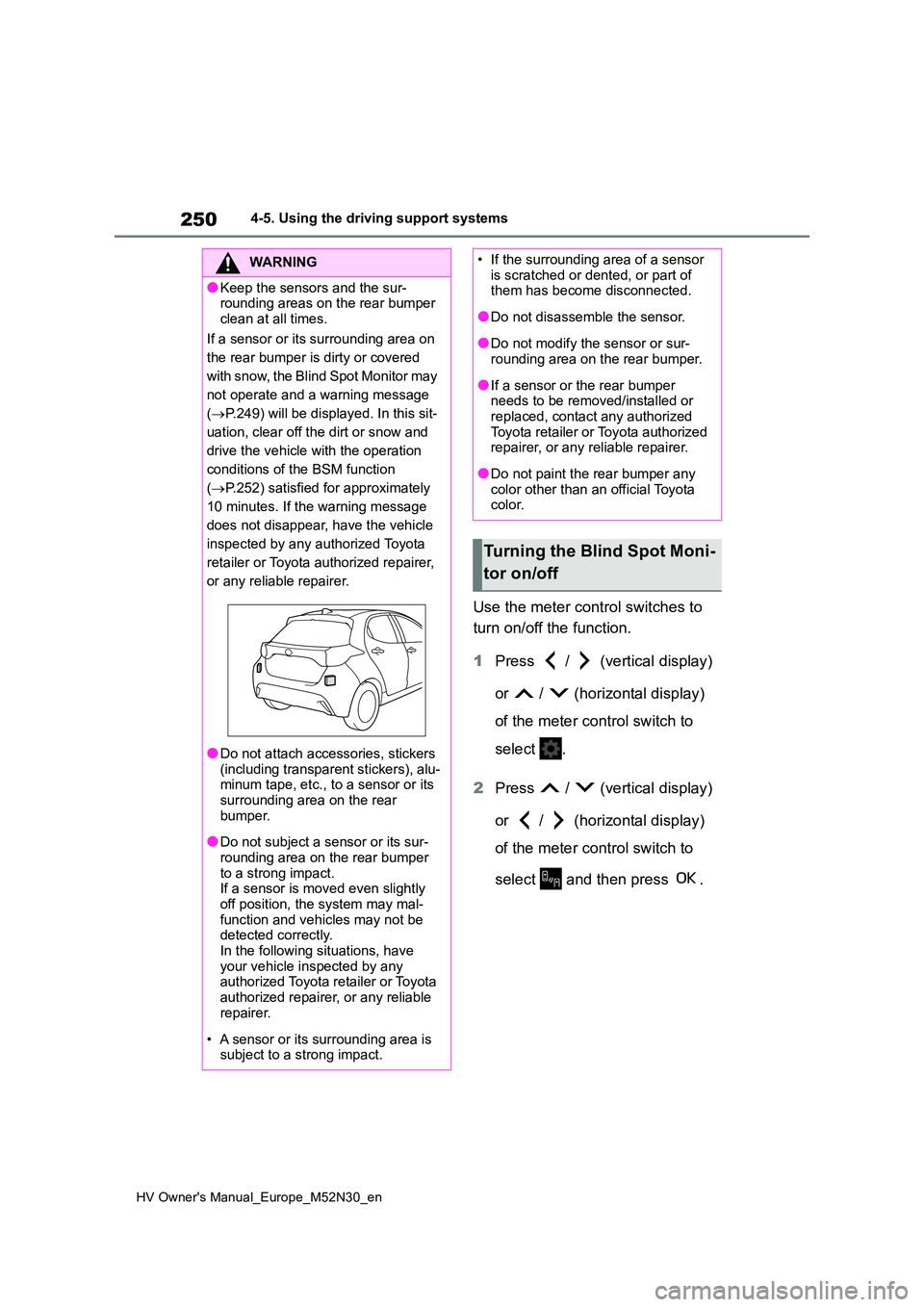
●Keep the sensors and the sur- rounding areas on the rear bumper
clean at all times.
If a sensor or its surrounding area on
the rear bumper is dirty or covered
w i t h s n o w, t h e B l i n d S p o t M o n i t o r m a y
not operate and a warning message
( P.249) will be displayed. In this sit-
uation, clear off the dirt or snow and
drive the vehicle with the operation
conditions of the BSM function
( P.252) satisfied for approximately
10 minutes. If the warning message
does not disappear, have the vehicle
inspected by any authorized Toyota
retailer or Toyota authorized repairer,
or any reliable repairer.
●Do not attach accessories, stickers
(including transparent stickers), alu- minum tape, etc., to a sensor or its surrounding area on the rear
bumper.
●Do not subject a sensor or its sur-
rounding area on the rear bumper to a strong impact.If a sensor is moved even slightly
off position, the system may mal- function and vehicles may not be detected correctly.
In the following situations, have your vehicle inspected by any authorized Toyota retailer or Toyota
authorized repairer, or any reliable repairer.
• A sensor or its surrounding area is subject to a strong impact.
• If the surrounding area of a sensor is scratched or dented, or part of them has become disconnected.
●Do not disassemble the sensor.
●Do not modify the sensor or sur-rounding area on the rear bumper.
●If a sensor or the rear bumper needs to be removed/installed or replaced, contact any authorized
Toyota retailer or Toyota authorized repairer, or any reliable repairer.
●Do not paint the rear bumper any color other than an official Toyota color.
Turning the Blind Spot Moni-
tor on/off
Page 256 of 590
254
HV Owner's Manual_Europe_M52N30_en
4-5. Using the driving support systems
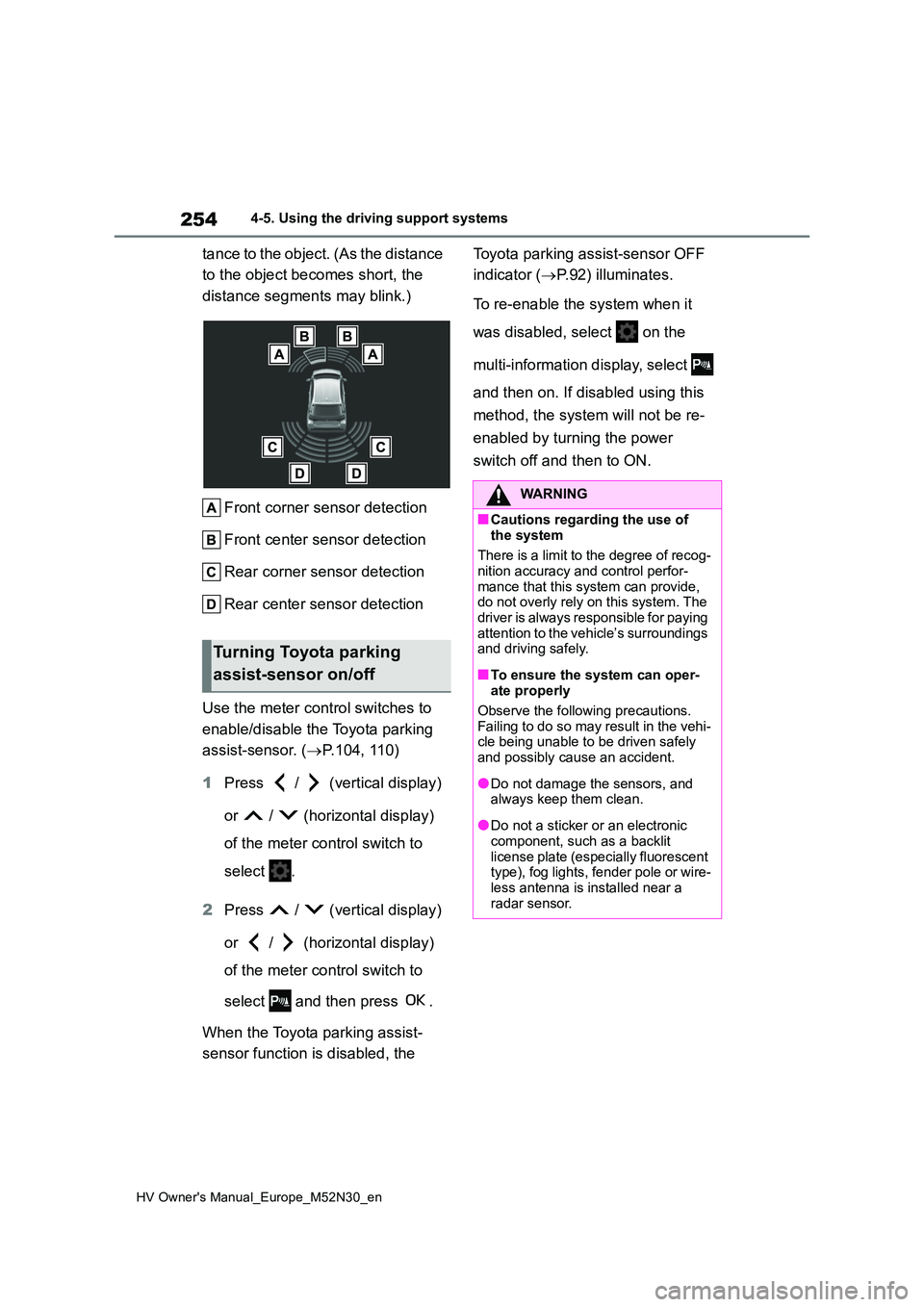
tance to the object. (As the distance
to the object becomes short, the
distance segments may blink.)
Front corner sensor detection
Front center sensor detection
Rear corner sensor detection
Rear center sensor detection
Use the meter control switches to
enable/disable the Toyota parking
assist-sensor. ( P.104, 110)
1 Press / (vertical display)
or / (horizontal display)
of the meter control switch to
select .
2 Press / (vertical display)
or / (horizontal display)
of the meter control switch to
select and then press .
When the Toyota parking assist-
sensor function is disabled, the
Toyota parking assist-sensor OFF
indicator ( P.92) illuminates.
To re-enable the system when it
was disabled, select on the
multi-information display, select
and then on. If disabled using this
method, the system will not be re-
enabled by turning the power
switch off and then to ON.
Turning Toyota parking
assist-sensor on/off
WARNING
■Cautions regarding the use of
the system
There is a limit to the degree of recog- nition accuracy and control perfor-
mance that this system can provide, do not overly rely on this system. The driver is always responsible for paying
attention to the vehicle’s surroundings and driving safely.
■To ensure the system can oper-ate properly
Observe the following precautions.
Failing to do so may result in the vehi- cle being unable to be driven safely and possibly cause an accident.
●Do not damage the sensors, and always keep them clean.
●Do not a sticker or an electronic component, such as a backlit
license plate (especially fluorescent type), fog lights, fender pole or wire-less antenna is installed near a
radar sensor.
Page 262 of 590
260
HV Owner's Manual_Europe_M52N30_en
4-5. Using the driving support systems
*: If equipped
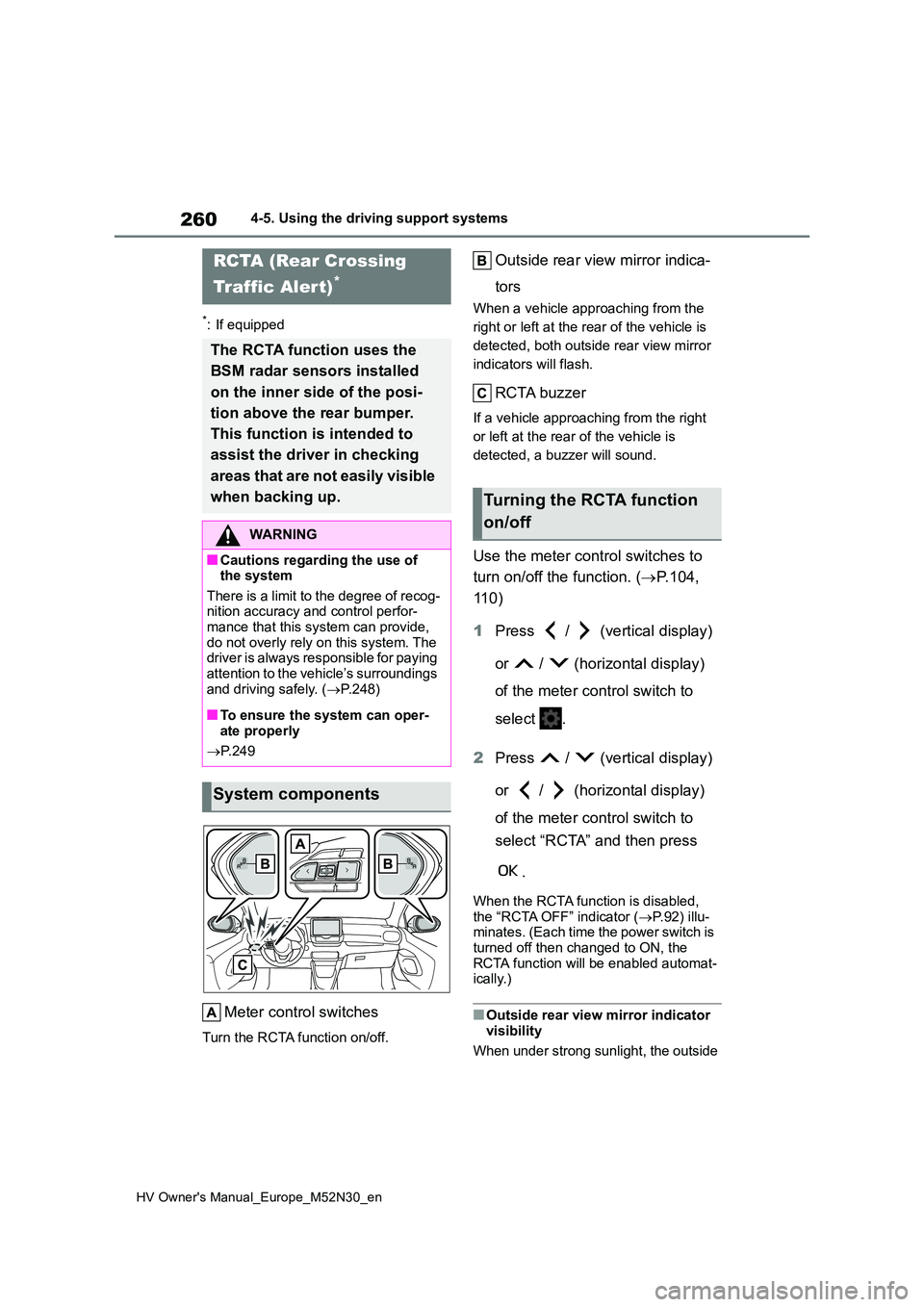
Meter control switches
Turn the RCTA function on/off.
Outside rear view mirror indica-
tors
When a vehicle approaching from the
right or left at the rear of the vehicle is
detected, both outside rear view mirror
indicators will flash.
RCTA buzzer
If a vehicle approaching from the right
or left at the rear of the vehicle is
detected, a buzzer will sound.
Use the meter control switches to
turn on/off the function. ( P.104,
11 0 )
1 Press / (vertical display)
or / (horizontal display)
of the meter control switch to
select .
2 Press / (vertical display)
or / (horizontal display)
of the meter control switch to
select “RCTA” and then press
.
When the RCTA function is disabled,
the “RCTA OFF” indicator ( P.92) illu- minates. (Each time the power switch is turned off then changed to ON, the
RCTA function will be enabled automat- ically.)
■Outside rear view mirror indicator visibility
When under strong sunlight, the outside
RCTA (Rear Crossing
Traffic Alert)*
The RCTA function uses the
BSM radar sensors installed
on the inner side of the posi-
tion above the rear bumper.
This function is intended to
assist the driver in checking
areas that are not easily visible
when backing up.
WARNING
■Cautions regarding the use of the system
There is a limit to the degree of recog- nition accuracy and control perfor-mance that this system can provide,
do not overly rely on this system. The driver is always responsible for paying attention to the vehicle’s surroundings
and driving safely. ( P.248)
■To ensure the system can oper-
ate properly
P. 2 4 9
System components
Turning the RCTA function
on/off
Page 280 of 590
278
HV Owner's Manual_Europe_M52N30_en
4-5. Using the driving support systems
lights are automatically controlled
to reduce the vehicle speed and
help reduce the possibility of further
damage due to a secondary colli-
sion.
■When the TRC/VSC/ABS systems
are operating
The slip indicator light will flash while the TRC/VSC/ABS systems are operating.
■Disabling the TRC system
If the vehicle gets stuck in mud, dirt or
snow, the TRC system may reduce
power from the hybrid system to the
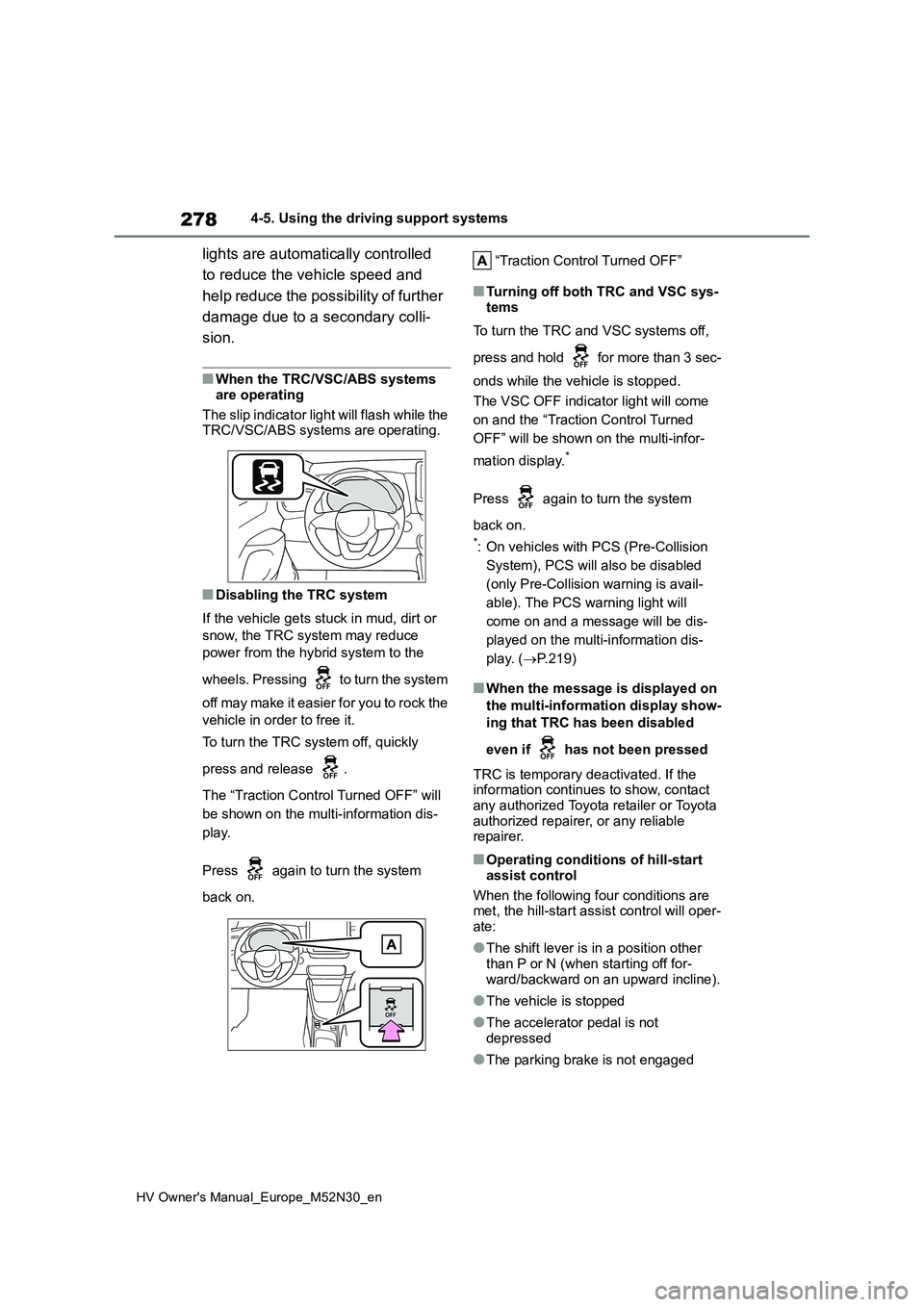
wheels. Pressing to turn the system
off may make it easier for you to rock the
vehicle in order to free it.
To turn the TRC system off, quickly
press and release .
The “Traction Control Turned OFF” will
be shown on the multi-information dis-
play.
Press again to turn the system
back on.
“Traction Control Turned OFF”
■Turning off both TRC and VSC sys-
tems
To turn the TRC and VSC systems off,
press and hold for more than 3 sec-
onds while the vehicle is stopped.
The VSC OFF indicator light will come
on and the “Traction Control Turned
OFF” will be shown on the multi-infor-
mation display.*
Press again to turn the system
back on.
*: On vehicles with PCS (Pre-Collision
System), PCS will also be disabled
(only Pre-Collision warning is avail-
able). The PCS warning light will
come on and a message will be dis-
played on the multi-information dis-
play. ( P.219)
■When the message is displayed on
the multi-information display show-
ing that TRC has been disabled
even if has not been pressed
TRC is temporary deactivated. If the information continues to show, contact
any authorized Toyota retailer or Toyota authorized repairer, or any reliable repairer.
■Operating conditions of hill-start
assist control
When the following four conditions are met, the hill-start assist control will oper-
ate:
●The shift lever is in a position other
than P or N (when starting off for- ward/backward on an upward incline).
●The vehicle is stopped
●The accelerator pedal is not
depressed
●The parking brake is not engaged
Page 283 of 590
281
4
HV Owner's Manual_Europe_M52N30_en
4-5. Using the driving support systems
Driving
WARNING
●Unlike the parking brake, hill-start assist control is not intended to hold
the vehicle stationary for an extended period of time. Do not attempt to use hill-start assist con-
trol to hold the vehicle on an incline, as doing so may lead to an acci-dent.
■When the TRC/ABS/VSC is acti-vated
The slip indicator light flashes. Always drive carefully. Reckless driving may cause an accident. Exercise particular
care when the indicator light flashes.
■When the TRC/VSC systems are
turned off
Be especially careful and drive at a speed appropriate to the road condi-
tions. As these are the systems to help ensure vehicle stability and driv-ing force, do not turn the TRC/VSC
systems off unless necessary.
■Replacing tires
Make sure that all tires are of the specified size, brand, tread pattern and total load capacity. In addition,
make sure that the tires are inflated to the recommended tire inflation pres-sure level.
The ABS, TRC and VSC systems will not function correctly if different tires are installed on the vehicle.
Contact any authorized Toyota retailer or Toyota authorized repairer, or any reliable repairer for further information
when replacing tires or wheels.
■Handling of tires and the suspen-
sion
Using tires with any kind of problem or modifying the suspension will affect
the driving assist systems, and may cause a system to malfunction.
■Secondary Collision Brake
Do not rely solely upon the Secondary Collision Brake. This system is
designed to help reduce the possibil- ity of further damage due to a second-ary collision, however, that effect
changes according to various condi- tions. Overly relying on the system may result in death or serious injury.
Page 299 of 590
297
5
HV Owner's Manual_Europe_M52N30_en
5-3. Using the storage features
Interior features
5-3.Using the s torage feature s
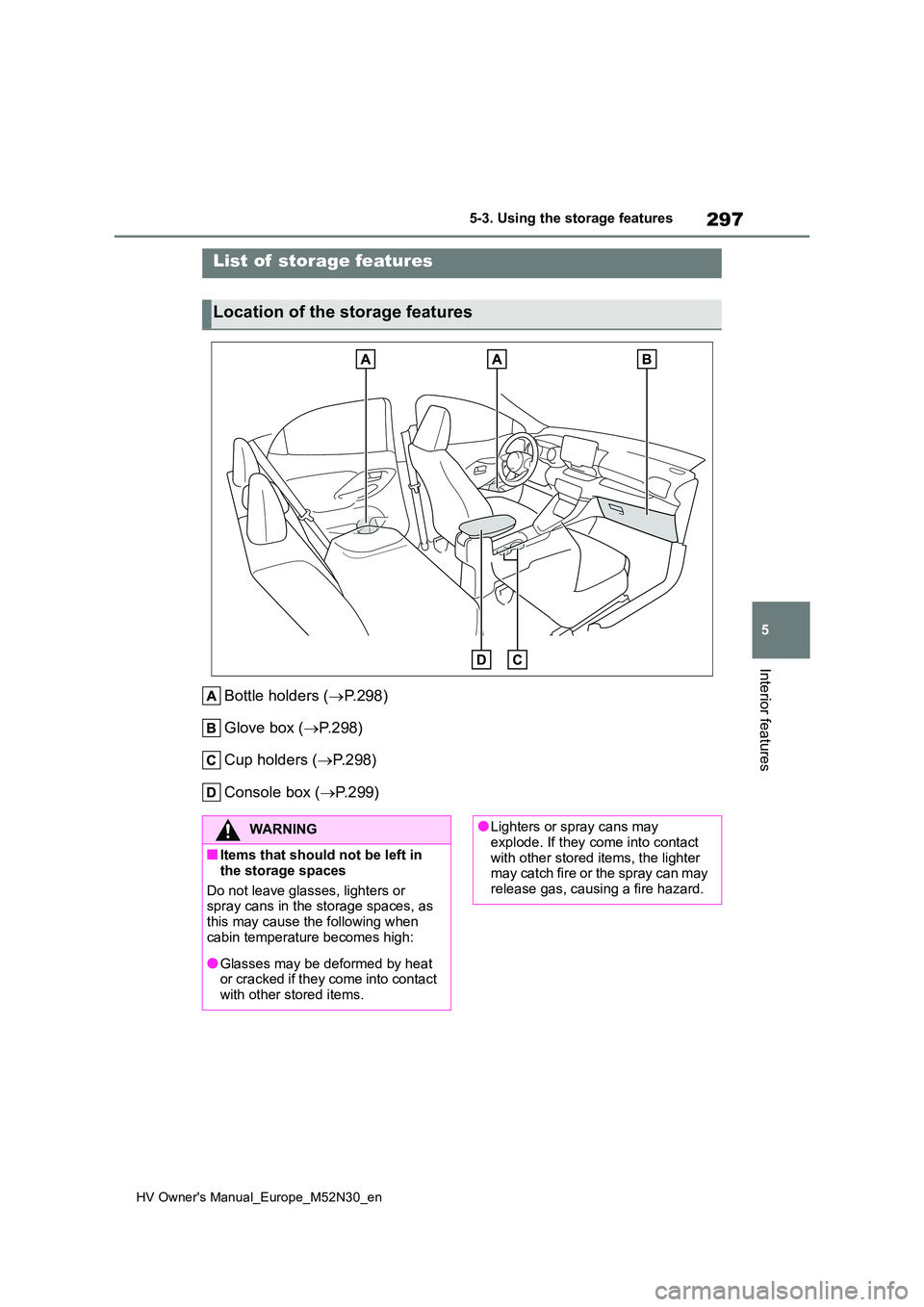
Bottle holders (P.298)
Glove box ( P.298)
Cup holders ( P.298)
Console box ( P.299)
List of storage features
Location of the storage features
WARNING
■Items that should not be left in
the storage spaces
Do not leave glasses, lighters or spray cans in the storage spaces, as
this may cause the following when cabin temperature becomes high:
●Glasses may be deformed by heat or cracked if they come into contact with other stored items.
●Lighters or spray cans may explode. If they come into contact
with other stored items, the lighter may catch fire or the spray can may release gas, causing a fire hazard.
Page 308 of 590
306
HV Owner's Manual_Europe_M52N30_en
5-4. Other interior features
type of cover and/or accessory
attached, it may not be possible to charge the portable device. If the porta-ble device is placed on the charging
area and does not charge, remove the cover and/or accessories.
■If interference is heard in AM radio broadcasts while charging
Turn off the wireless charger and check if the noise is reduced. If noise is reduced, press and hold the power sup-
ply switch of the wireless charger for 2 seconds. The frequency of the wireless charger is changed and noise may be
reduced. When the frequency is changed, the operation indicator light will blink (orange) 2 times.
■Charging precautions
●If the electronic key cannot be detected in the cabin, charging cannot
be performed. When a door is opened and closed, charging may be tempo-rarily suspended.
●While charging, the wireless charger and the portable device will become
warm. This is not a malfunction.If a portable device becomes warm while charging
and charging stops due to the protec- tion function of the portable device, wait until the portable device cools
down and charge it again.
■Sound generated during operation
When the power supply switch is turned on or while a portable device is being
identified, operation sounds may be heard. This is not a malfunction.
■Cleaning the wireless charger
P. 3 1 5
WARNING
■Caution while driving
When charging a portable device while driving, for safety reasons, the
driver should not operate the portable device.
■Caution regarding interference with electronic devices
People with implantable cardiac pace-
makers, cardiac resynchronization therapy pacemakers or implantable cardioverter defibrillators, as well as
any other electrical medical device, should consult their physician about the usage of the wireless charger.
Operations of the wireless charger may have an affect on medical devices.
■To prevent damage or burns
Observe the following precautions.
Failure to do so may result in the pos- sibility of fire, equipment failure or damage, or burns due to heat.
●Do not put any metallic objects between the charging area and the
portable device while charging.
●Do not attach metallic objects, such
as aluminum stickers, to the charging area.
●Do not cover the wireless charger with a cloth or other object while charging.
●Do not attempt to charge portable devices which are not compatible
with the Qi wireless charging stan- dard.
●Do not disassemble, modify or remove the wireless charger.
●Do not apply force or impact to the wireless charger.
NOTICE
■Conditions in which the wireless
charger may not operate cor- rectly
In the following situations, the wire-
less charger may not operate cor- rectly:
●When a portable device is fully
charged
Page 310 of 590
308
HV Owner's Manual_Europe_M52N30_en
5-4. Other interior features
The vanity light turns on. (if equipped)
■To prevent 12-volt battery dis-
charge
If the vanity lights remain on when the power switch is OFF, the lights will go off
automatically after 20 minutes.
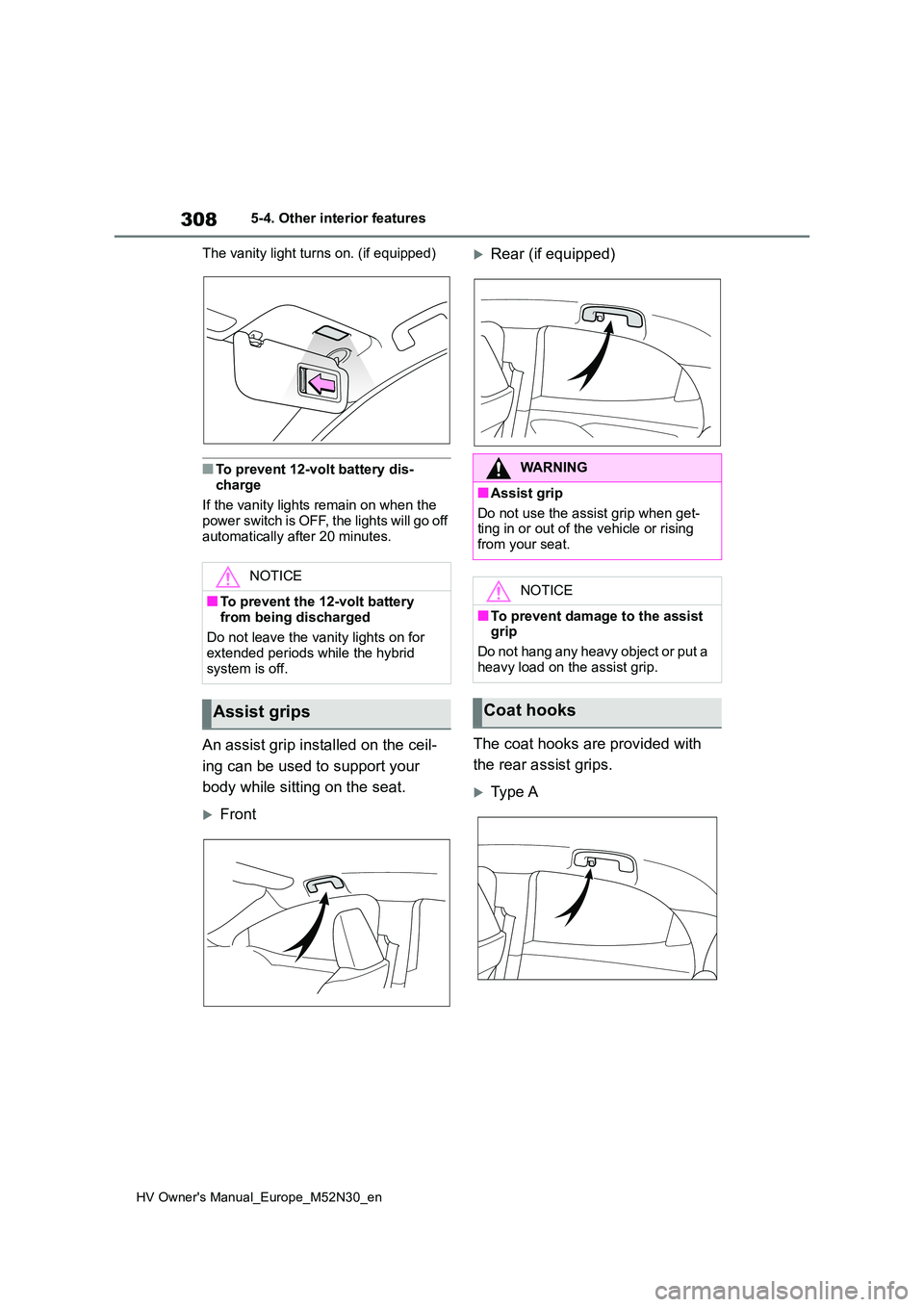
An assist grip installed on the ceil-
ing can be used to support your
body while sitting on the seat.
Front
Rear (if equipped)
The coat hooks are provided with
the rear assist grips.
Typ e A
NOTICE
■To prevent the 12-volt battery
from being discharged
Do not leave the vanity lights on for extended periods while the hybrid
system is off.
Assist grips
WARNING
■Assist grip
Do not use the assist grip when get- ting in or out of the vehicle or rising
from your seat.
NOTICE
■To prevent damage to the assist grip
Do not hang any heavy object or put a
heavy load on the assist grip.
Coat hooks