BUZZER TOYOTA YARIS CROSS 2023 Owners Manual
[x] Cancel search | Manufacturer: TOYOTA, Model Year: 2023, Model line: YARIS CROSS, Model: TOYOTA YARIS CROSS 2023Pages: 698, PDF Size: 147.65 MB
Page 7 of 698
5
Owners Manual_Europe_M52N75_en
TABLE OF CONTENTS
1
6
5
4
3
2
8
7
7-2. Steps to take in an emergency
If your vehicle needs to be towed
.......................................... 429
If you think something is wrong
.......................................... 434
If a warning light turns on or a
warning buzzer sounds..... 435
If a warning message is dis-
played ............................... 445
If you have a flat tire (vehicles
with an emergency tire punc-
ture repair kit) ................... 448
If you have a flat tire (vehicles
with a spare tire) ............... 459
If the hybrid system will not start
.......................................... 468
If you lose your keys ........... 469
If the electronic key does not
operate properly (vehicles with
a smart entry & start system)
.......................................... 470
If the 12-volt battery is dis-
charged............................. 472
If your vehicle overheats ..... 477
If the vehicle becomes stuck
.......................................... 480
8-1. Specifications
Maintenance data (fuel, oil level,
etc.)................................... 484
Fuel information .................. 493
8-2. Customization
Customizable features ........ 494
8-3. Initialization
Items to initialize ................. 505
What to do if... (Troubleshooting)
.......................................... 508
Alphabetical Index .............. 511
8Vehicle specifications
Index
Page 128 of 698
126
Owners Manual_Europe_M52N75_en
2-1. Instrument cluster
Hybrid battery (traction battery)
Front tire
Rear tire*
*: For FF vehicles, the arrows to
and are not displayed.
■Hybrid battery (traction battery) status
The display changes in 8 levels accord- ing to the remaining charge amount of the hybrid battery (traction battery).
●The figure shows the multi-information display as an example for explanation.
●These images are examples only, and may vary slightly from actual condi-
tions.
Low
High
■Remaining charge amount warning
of hybrid battery (traction battery)
●The buzzer sounds intermittently
when the hybrid battery (traction bat- tery) remains without charging while the shift lever is in N, or the remaining
charge amount drops below a certain level. If the remaining charge amount drops further, the buzzer sounds con-
tinuously.
●When a warning message is shown
on the multi-information display and the buzzer sounds, follow the instruc-
tions displayed on the screen to per-
form troubleshooting.
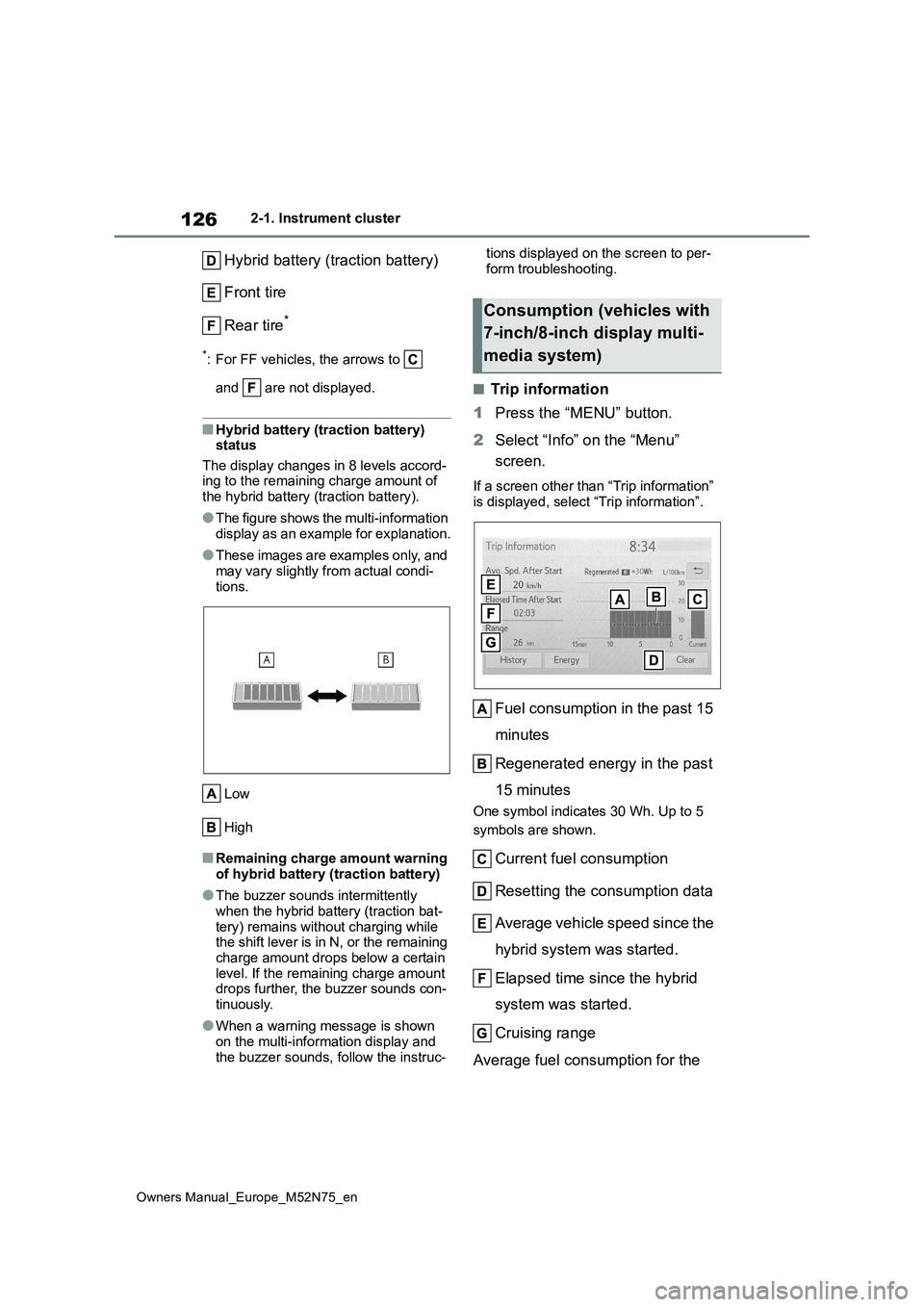
■Trip information
1 Press the “MENU” button.
2 Select “Info” on the “Menu”
screen.
If a screen other than “Trip information”
is displayed, select “Trip information”.
Fuel consumption in the past 15
minutes
Regenerated energy in the past
15 minutes
One symbol indicates 30 Wh. Up to 5
symbols are shown.
Current fuel consumption
Resetting the consumption data
Average vehicle speed since the
hybrid system was started.
Elapsed time since the hybrid
system was started.
Cruising range
Average fuel consumption for the
Consumption (vehicles with
7-inch/8-inch display multi-
media system)
Page 138 of 698
136
Owners Manual_Europe_M52N75_en
3-2. Opening, closing and locking the doors
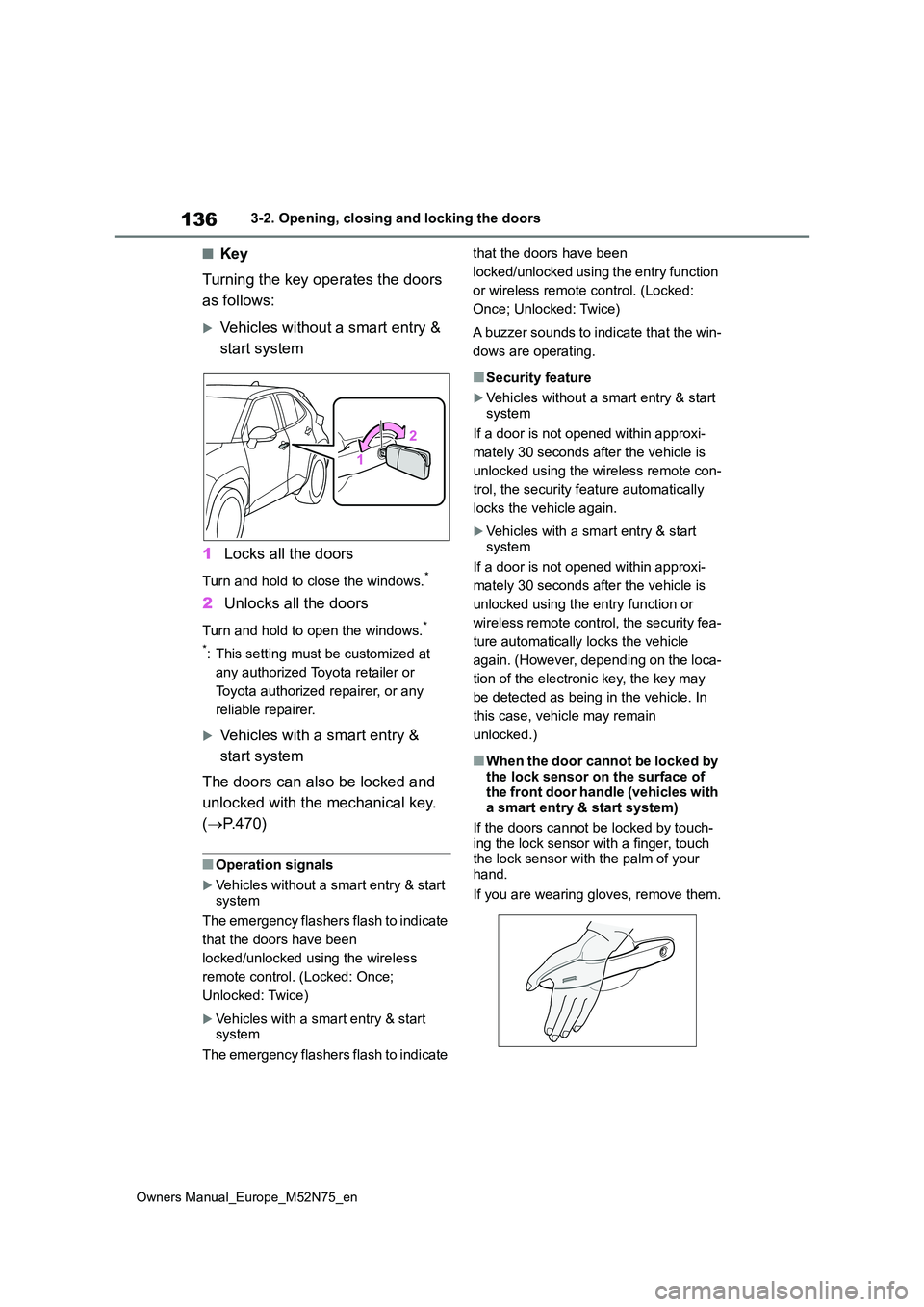
■Key
Turning the key operates the doors
as follows:
Vehicles without a smart entry &
start system
1 Locks all the doors
Turn and hold to close the windows.*
2Unlocks all the doors
Turn and hold to open the windows.*
*: This setting must be customized at
any authorized Toyota retailer or
Toyota authorized repairer, or any
reliable repairer.
Vehicles with a smart entry &
start system
The doors can also be locked and
unlocked with the mechanical key.
( P.470)
■Operation signals
Vehicles without a smart entry & start system
The emergency flashers flash to indicate
that the doors have been
locked/unlocked using the wireless
remote control. (Locked: Once;
Unlocked: Twice)
Vehicles with a smart entry & start system
The emergency flashers flash to indicate
that the doors have been
locked/unlocked using the entry function
or wireless remote control. (Locked:
Once; Unlocked: Twice)
A buzzer sounds to indicate that the win-
dows are operating.
■Security feature
Vehicles without a smart entry & start
system
If a door is not opened within approxi-
mately 30 seconds after the vehicle is
unlocked using the wireless remote con-
trol, the security feature automatically
locks the vehicle again.
Vehicles with a smart entry & start system
If a door is not opened within approxi-
mately 30 seconds after the vehicle is
unlocked using the entry function or
wireless remote control, the security fea-
ture automatically locks the vehicle
again. (However, depending on the loca-
tion of the electronic key, the key may
be detected as being in the vehicle. In
this case, vehicle may remain
unlocked.)
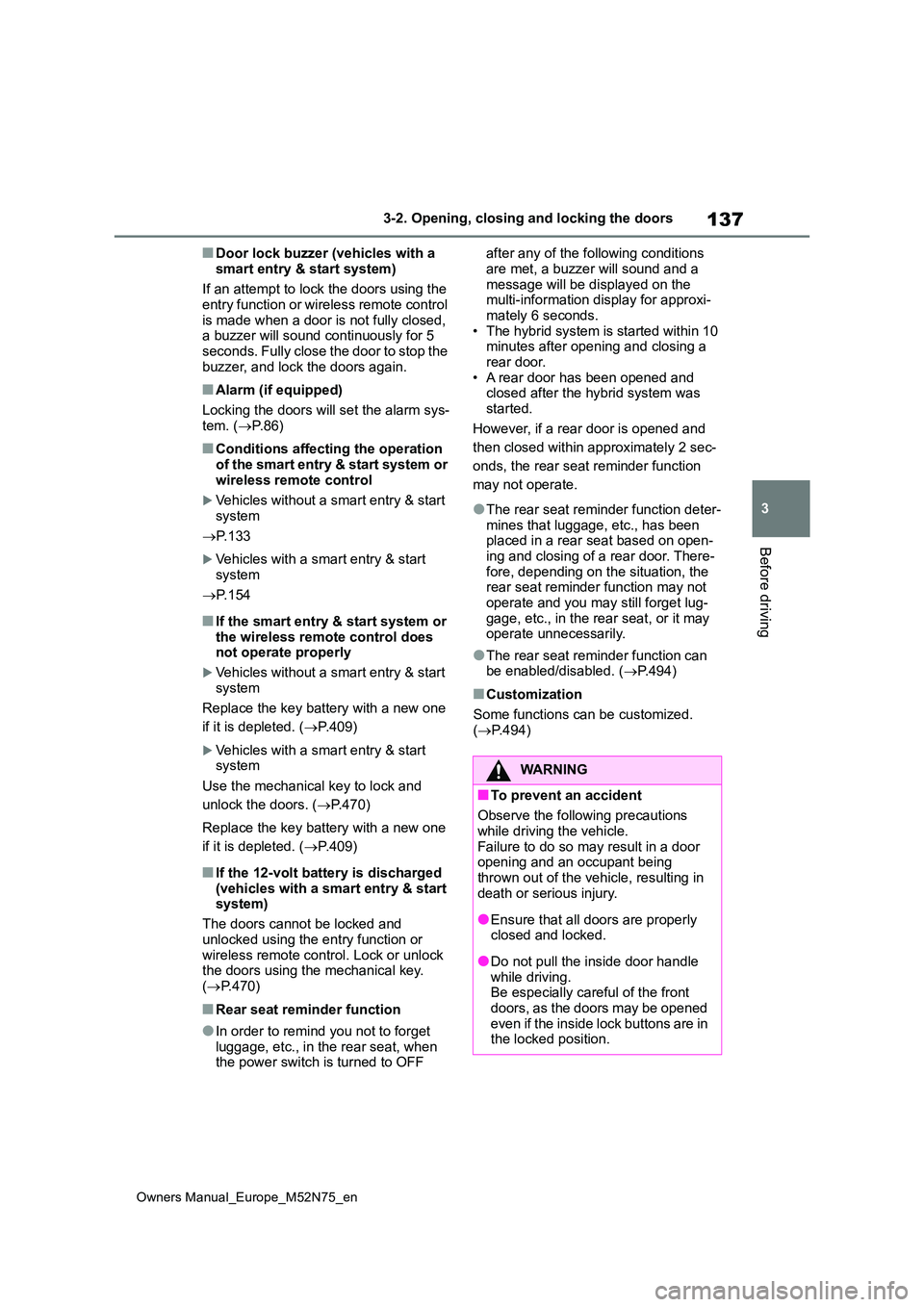
■When the door cannot be locked by
the lock sensor on the surface of the front door handle (vehicles with a smart entry & start system)
If the doors cannot be locked by touch- ing the lock sensor with a finger, touch the lock sensor with the palm of your
hand.
If you are wearing gloves, remove them.
Page 139 of 698
137
3
Owners Manual_Europe_M52N75_en
3-2. Opening, closing and locking the doors
Before driving
■Door lock buzzer (vehicles with a
smart entry & start system)
If an attempt to lock the doors using the entry function or wireless remote control
is made when a door is not fully closed, a buzzer will sound continuously for 5 seconds. Fully close the door to stop the
buzzer, and lock the doors again.
■Alarm (if equipped)
Locking the doors will set the alarm sys- tem. ( P.86)
■Conditions affecting the operation
of the smart entry & start system or wireless remote control
Vehicles without a smart entry & start
system
P. 1 3 3
Vehicles with a smart entry & start system
P. 1 5 4
■If the smart entry & start system or
the wireless remote control does not operate properly
Vehicles without a smart entry & start
system
Replace the key battery with a new one
if it is depleted. ( P.409)
Vehicles with a smart entry & start system
Use the mechanical key to lock and
unlock the doors. ( P.470)
Replace the key battery with a new one
if it is depleted. ( P.409)
■If the 12-volt battery is discharged
(vehicles with a smart entry & start system)
The doors cannot be locked and
unlocked using the entry function or wireless remote control. Lock or unlock the doors using the mechanical key.
( P.470)
■Rear seat reminder function
●In order to remind you not to forget
luggage, etc., in the rear seat, when the power switch is turned to OFF
after any of the following conditions
are met, a buzzer will sound and a message will be displayed on the multi-information display for approxi-
mately 6 seconds. • The hybrid system is started within 10 minutes after opening and closing a
rear door. • A rear door has been opened and closed after the hybrid system was
started.
However, if a rear door is opened and
then closed within approximately 2 sec-
onds, the rear seat reminder function
may not operate.
●The rear seat reminder function deter-
mines that luggage, etc., has been placed in a rear seat based on open-ing and closing of a rear door. There-
fore, depending on the situation, the rear seat reminder function may not operate and you may still forget lug-
gage, etc., in the rear seat, or it may operate unnecessarily.
●The rear seat reminder function can be enabled/disabled. ( P.494)
■Customization
Some functions can be customized.
( P.494)
WARNING
■To prevent an accident
Observe the following precautions
while driving the vehicle. Failure to do so may result in a door opening and an occupant being
thrown out of the vehicle, resulting in death or serious injury.
●Ensure that all doors are properly closed and locked.
●Do not pull the inside door handle while driving.Be especially careful of the front
doors, as the doors may be opened even if the inside lock buttons are in the locked position.
Page 140 of 698
138
Owners Manual_Europe_M52N75_en
3-2. Opening, closing and locking the doors
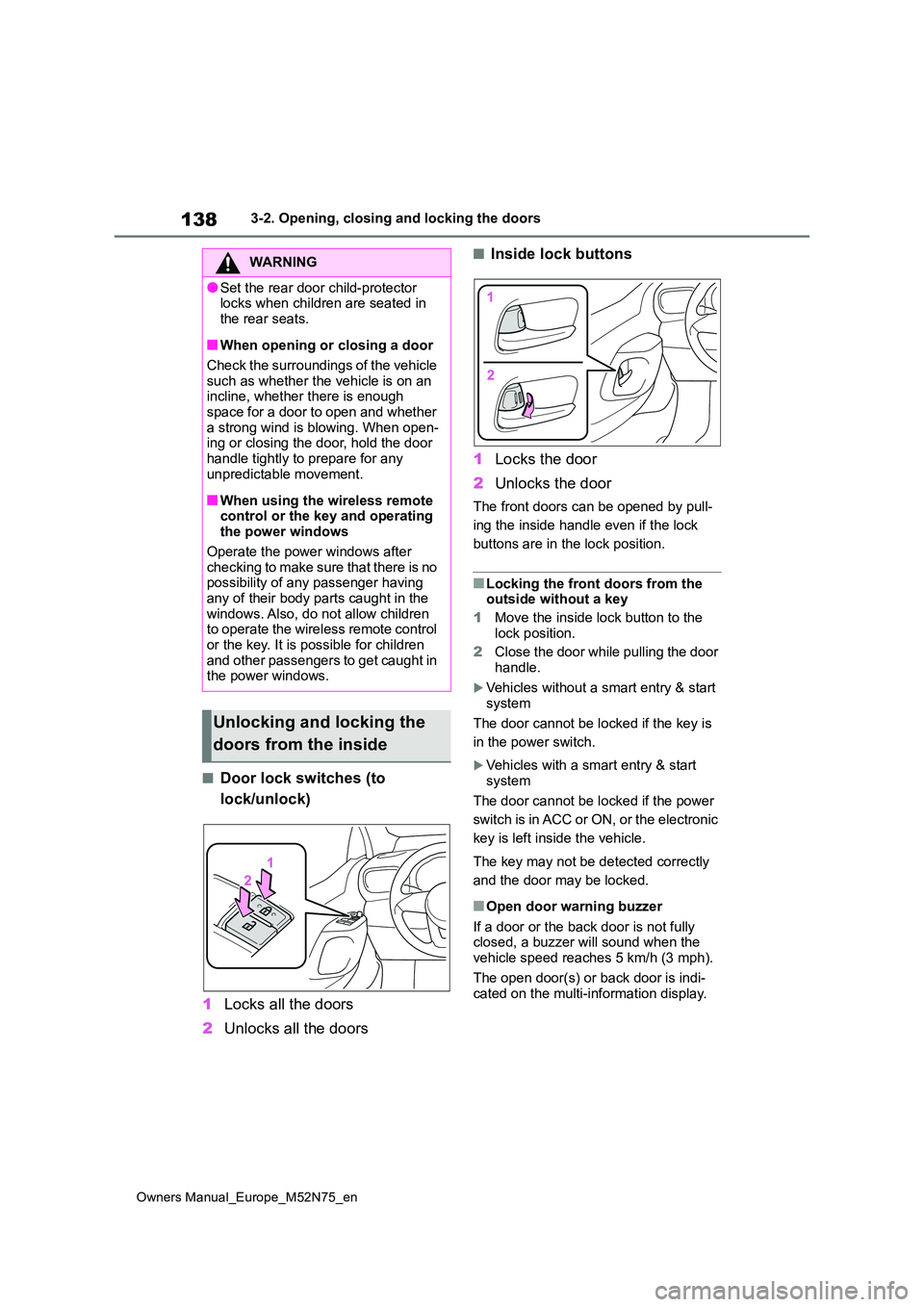
■Door lock switches (to
lock/unlock)
1 Locks all the doors
2 Unlocks all the doors
■Inside lock buttons
1 Locks the door
2 Unlocks the door
The front doors can be opened by pull-
ing the inside handle even if the lock
buttons are in the lock position.
■Locking the front doors from the outside without a key
1 Move the inside lock button to the
lock position.
2 Close the door while pulling the door handle.
Vehicles without a smart entry & start
system
The door cannot be locked if the key is
in the power switch.
Vehicles with a smart entry & start system
The door cannot be locked if the power
switch is in ACC or ON, or the electronic
key is left inside the vehicle.
The key may not be detected correctly
and the door may be locked.
■Open door warning buzzer
If a door or the back door is not fully closed, a buzzer will sound when the vehicle speed reaches 5 km/h (3 mph).
The open door(s) or back door is indi- cated on the multi-information display.
WARNING
●Set the rear door child-protector locks when children are seated in
the rear seats.
■When opening or closing a door
Check the surroundings of the vehicle such as whether the vehicle is on an incline, whether there is enough
space for a door to open and whether a strong wind is blowing. When open-ing or closing the door, hold the door
handle tightly to prepare for any unpredictable movement.
■When using the wireless remote control or the key and operating the power windows
Operate the power windows after checking to make sure that there is no possibility of any passenger having
any of their body parts caught in the windows. Also, do not allow children to operate the wireless remote control
or the key. It is possible for children and other passengers to get caught in the power windows.
Unlocking and locking the
doors from the inside
Page 144 of 698
142
Owners Manual_Europe_M52N75_en
3-2. Opening, closing and locking the doors
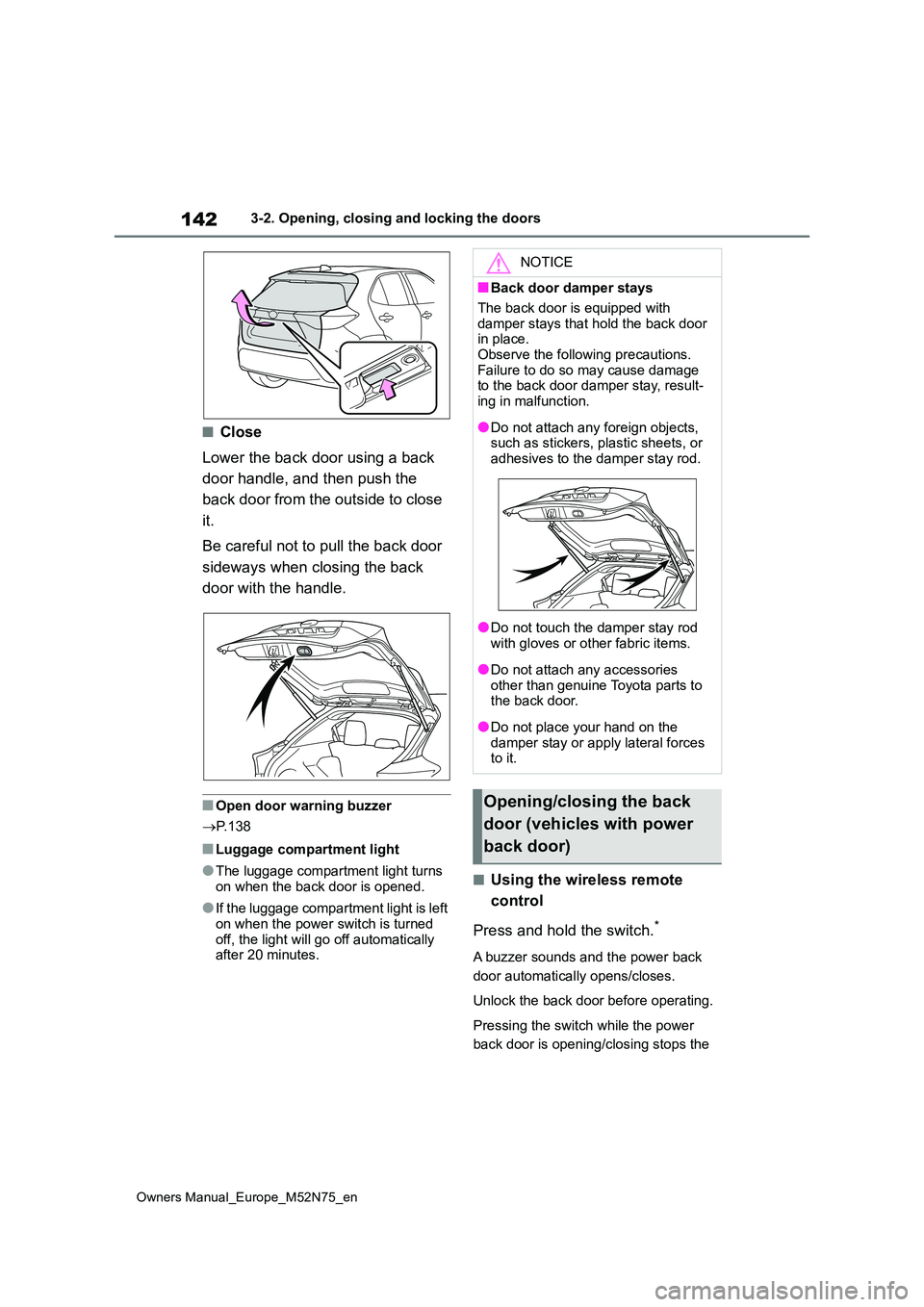
■Close
Lower the back door using a back
door handle, and then push the
back door from the outside to close
it.
Be careful not to pull the back door
sideways when closing the back
door with the handle.
■Open door warning buzzer
P. 1 3 8
■Luggage compartment light
●The luggage compartment light turns
on when the back door is opened.
●If the luggage compartment light is left
on when the power switch is turned off, the light will go off automatically after 20 minutes.
■Using the wireless remote
control
Press and hold the switch.*
A buzzer sounds and the power back
door automatically opens/closes.
Unlock the back door before operating.
Pressing the switch while the power
back door is opening/closing stops the
NOTICE
■Back door damper stays
The back door is equipped with
damper stays that hold the back door in place.Observe the following precautions.
Failure to do so may cause damage to the back door damper stay, result-ing in malfunction.
●Do not attach any foreign objects, such as stickers, plastic sheets, or
adhesives to the damper stay rod.
●Do not touch the damper stay rod
with gloves or other fabric items.
●Do not attach any accessories
other than genuine Toyota parts to the back door.
●Do not place your hand on the damper stay or apply lateral forces to it.
Opening/closing the back
door (vehicles with power
back door)
Page 145 of 698
143
3
Owners Manual_Europe_M52N75_en
3-2. Opening, closing and locking the doors
Before driving
operation. When the switch is pressed
again during the halted operation, the
back door will perform the reverse
operation.
*: This setting must be customized at
any authorized Toyota retailer or
Toyota authorized repairer, or any
reliable repairer.
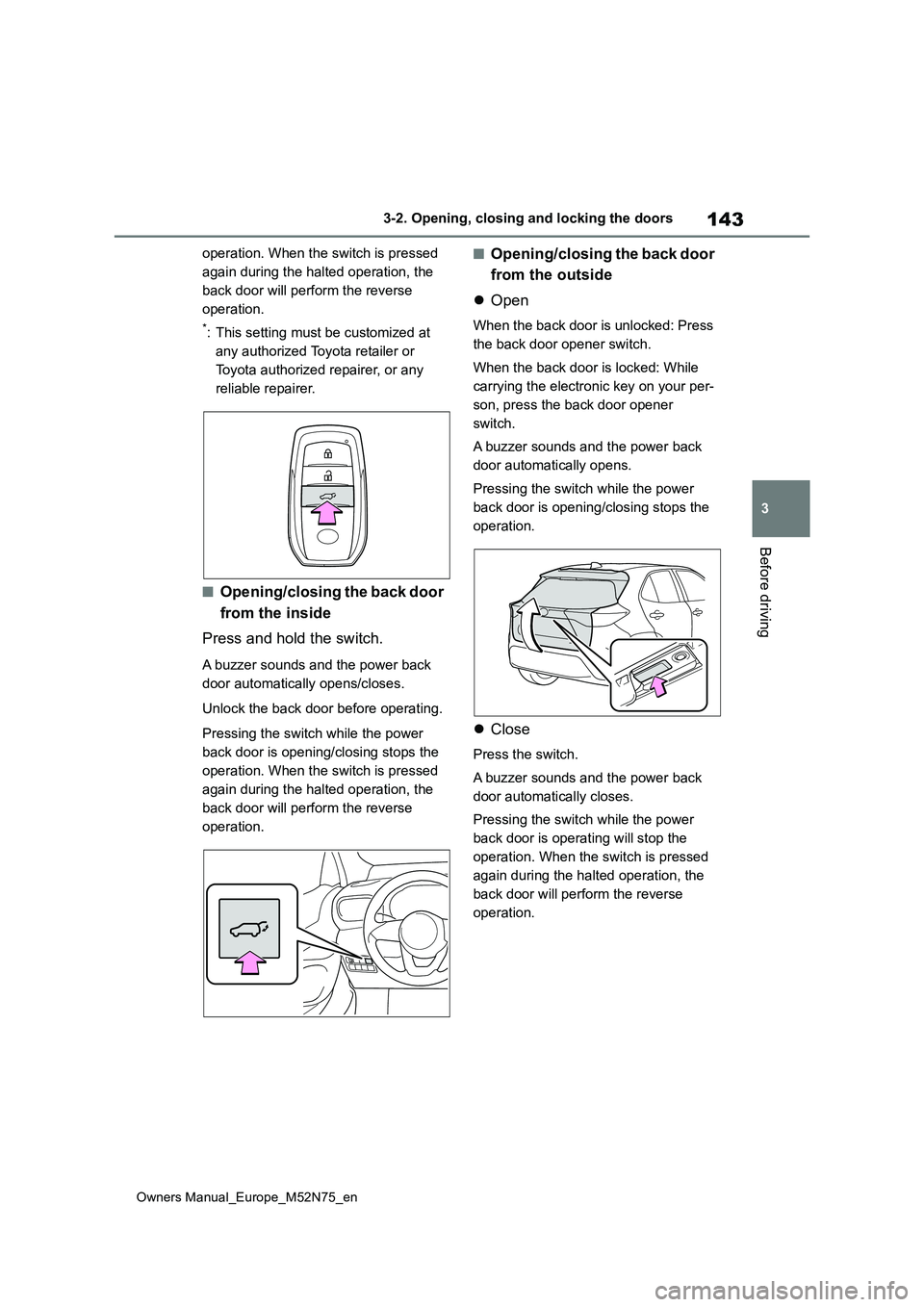
■Opening/closing the back door
from the inside
Press and hold the switch.
A buzzer sounds and the power back
door automatically opens/closes.
Unlock the back door before operating.
Pressing the switch while the power
back door is opening/closing stops the
operation. When the switch is pressed
again during the halted operation, the
back door will perform the reverse
operation.
■Opening/closing the back door
from the outside
Open
When the back door is unlocked: Press
the back door opener switch.
When the back door is locked: While
carrying the electronic key on your per-
son, press the back door opener
switch.
A buzzer sounds and the power back
door automatically opens.
Pressing the switch while the power
back door is opening/closing stops the
operation.
Close
Press the switch.
A buzzer sounds and the power back
door automatically closes.
Pressing the switch while the power
back door is operating will stop the
operation. When the switch is pressed
again during the halted operation, the
back door will perform the reverse
operation.
Page 146 of 698
144
Owners Manual_Europe_M52N75_en
3-2. Opening, closing and locking the doors
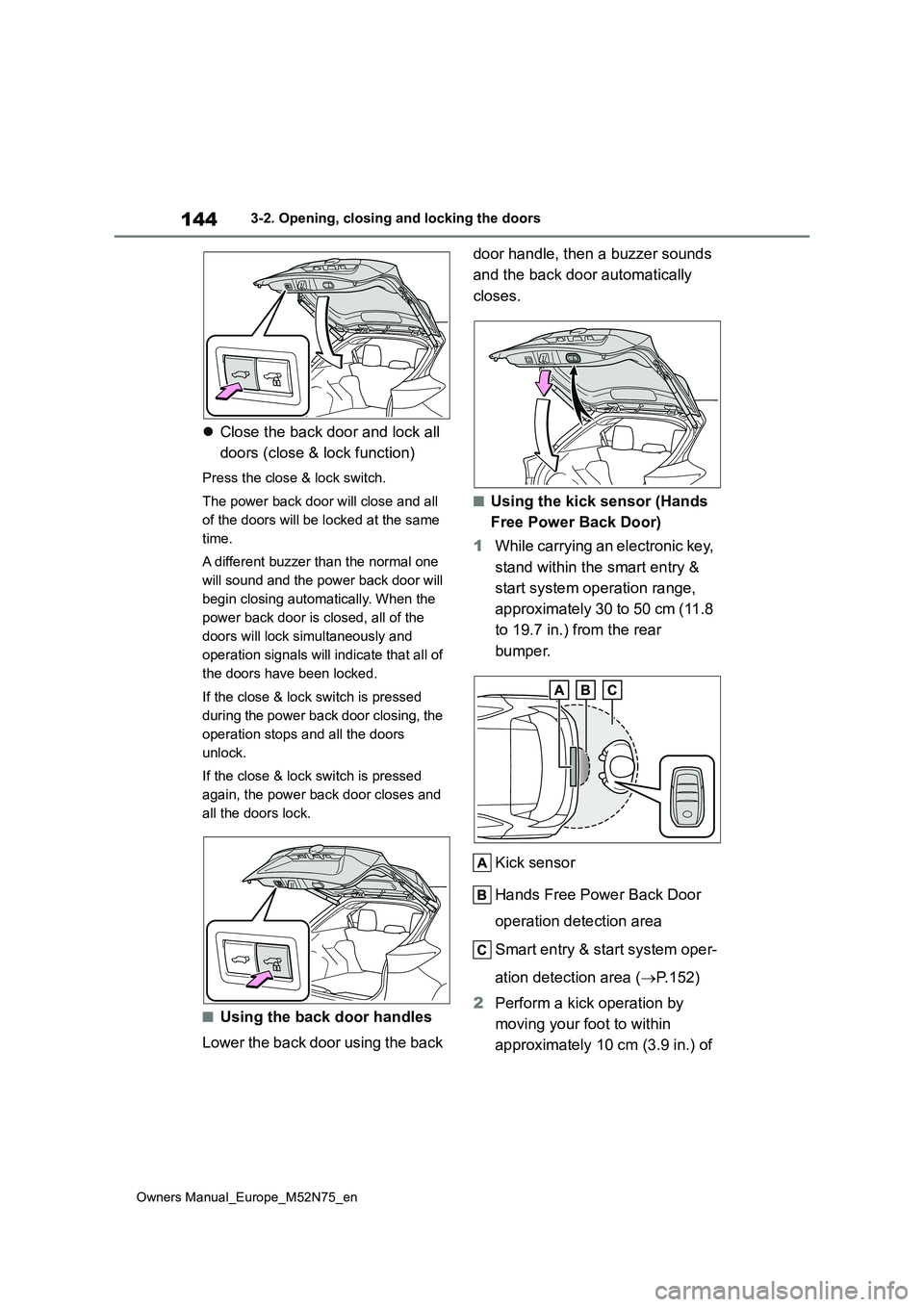
Close the back door and lock all
doors (close & lock function)
Press the close & lock switch.
The power back door will close and all
of the doors will be locked at the same
time.
A different buzzer than the normal one
will sound and the power back door will
begin closing automatically. When the
power back door is closed, all of the
doors will lock simultaneously and
operation signals will indicate that all of
the doors have been locked.
If the close & lock switch is pressed
during the power back door closing, the
operation stops and all the doors
unlock.
If the close & lock switch is pressed
again, the power back door closes and
all the doors lock.
■Using the back door handles
Lower the back door using the back
door handle, then a buzzer sounds
and the back door automatically
closes.
■Using the kick sensor (Hands
Free Power Back Door)
1 While carrying an electronic key,
stand within the smart entry &
start system operation range,
approximately 30 to 50 cm (11.8
to 19.7 in.) from the rear
bumper.
Kick sensor
Hands Free Power Back Door
operation detection area
Smart entry & start system oper-
ation detection area ( P.152)
2 Perform a kick operation by
moving your foot to within
approximately 10 cm (3.9 in.) of
Page 147 of 698
145
3
Owners Manual_Europe_M52N75_en
3-2. Opening, closing and locking the doors
Before driving
the rear bumper and then pulling
it back.
Perform the entire kick operation within
1 second.
The back door will not start operating while a foot is detected under the rear
bumper.
Operate the Hands Free Power Back Door without contacting the rear
bumper with your foot.
If another electronic key is in the cabin or luggage compartment, it may take
slightly longer than normal for the oper- ation to occur.
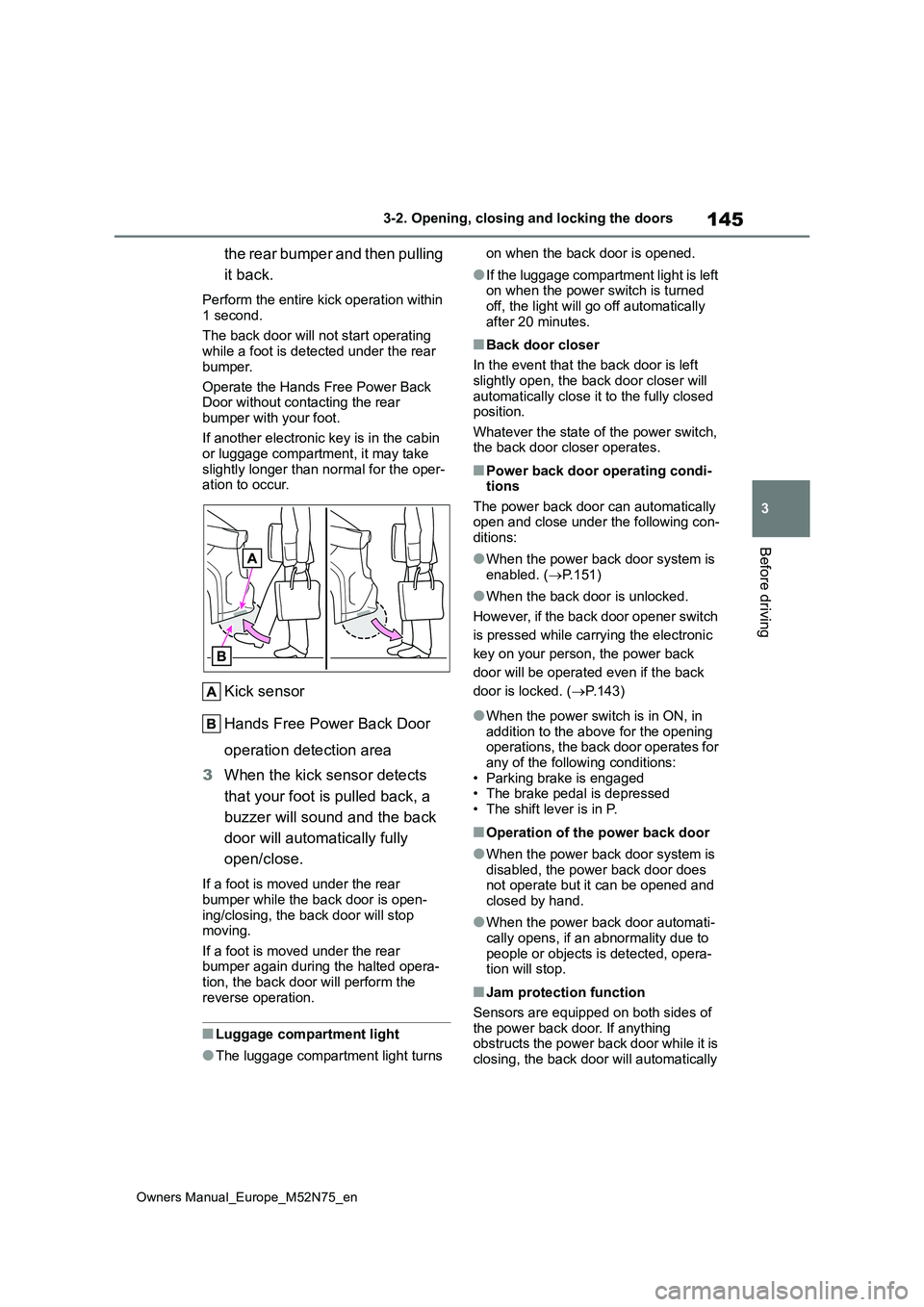
Kick sensor
Hands Free Power Back Door
operation detection area
3 When the kick sensor detects
that your foot is pulled back, a
buzzer will sound and the back
door will automatically fully
open/close.
If a foot is moved under the rear
bumper while the back door is open- ing/closing, the back door will stop moving.
If a foot is moved under the rear bumper again during the halted opera-tion, the back door will perform the
reverse operation.
■Luggage compartment light
●The luggage compartment light turns
on when the back door is opened.
●If the luggage compartment light is left on when the power switch is turned
off, the light will go off automatically after 20 minutes.
■Back door closer
In the event that the back door is left
slightly open, the back door closer will automatically close it to the fully closed position.
Whatever the state of the power switch, the back door closer operates.
■Power back door operating condi-tions
The power back door can automatically open and close under the following con-ditions:
●When the power back door system is enabled. ( P.151)
●When the back door is unlocked.
However, if the back door opener switch
is pressed while carrying the electronic
key on your person, the power back
door will be operated even if the back
door is locked. ( P.143)
●When the power switch is in ON, in addition to the above for the opening operations, the back door operates for
any of the following conditions: • Parking brake is engaged• The brake pedal is depressed
• The shift lever is in P.
■Operation of the power back door
●When the power back door system is
disabled, the power back door does not operate but it can be opened and closed by hand.
●When the power back door automati-cally opens, if an abnormality due to
people or objects is detected, opera- tion will stop.
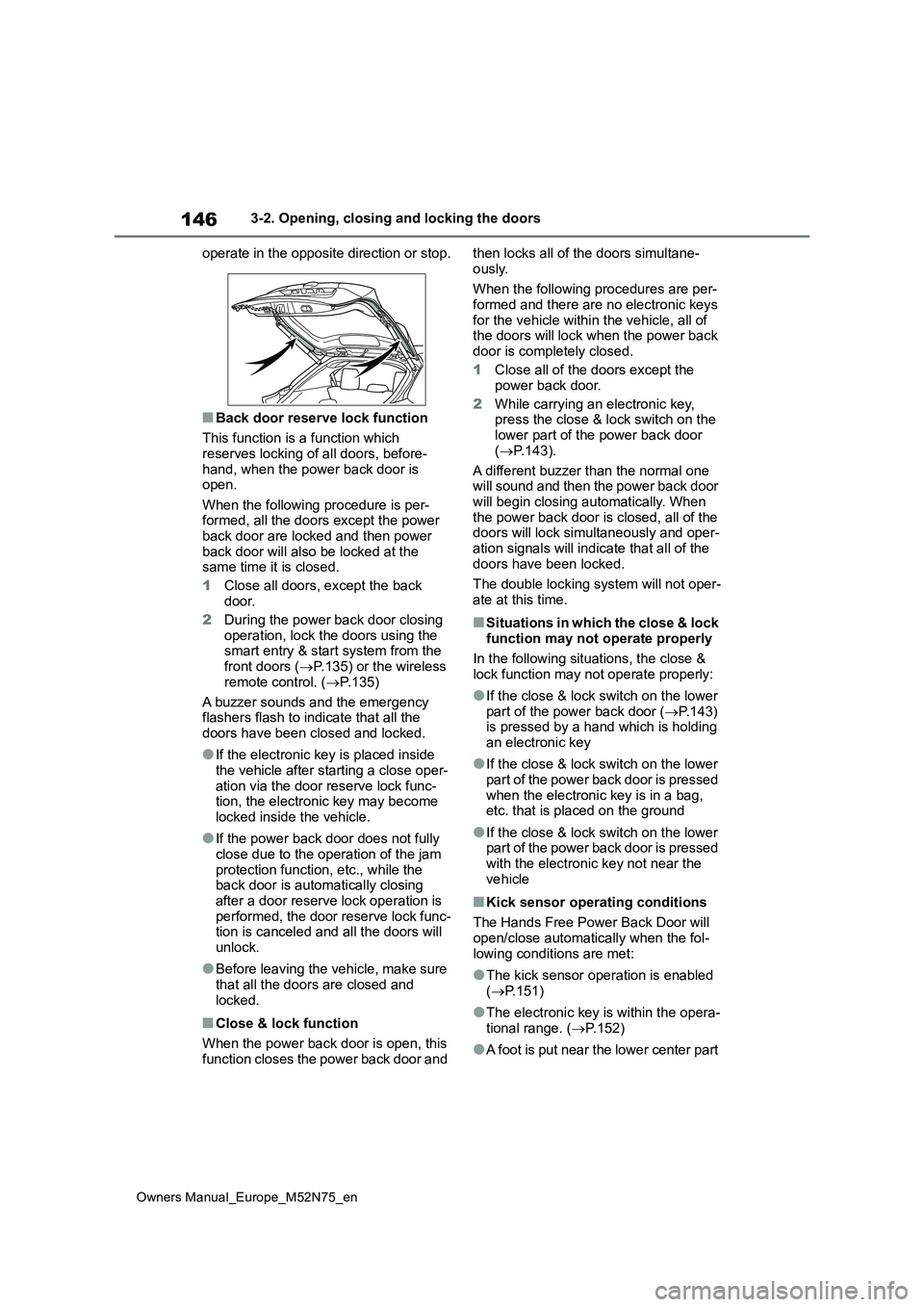
■Jam protection function
Sensors are equipped on both sides of
the power back door. If anything obstructs the power back door while it is closing, the back door will automatically
Page 148 of 698
146
Owners Manual_Europe_M52N75_en
3-2. Opening, closing and locking the doors
operate in the opposite direction or stop.
■Back door reserve lock function
This function is a function which
reserves locking of all doors, before- hand, when the power back door is open.
When the following procedure is per- formed, all the doors except the power back door are locked and then power
back door will also be locked at the same time it is closed.
1 Close all doors, except the back door.
2 During the power back door closing
operation, lock the doors using the smart entry & start system from the front doors ( P.135) or the wireless
remote control. ( P.135)
A buzzer sounds and the emergency flashers flash to indicate that all the
doors have been closed and locked.
●If the electronic key is placed inside
the vehicle after starting a close oper- ation via the door reserve lock func-tion, the electronic key may become
locked inside the vehicle.
●If the power back door does not fully
close due to the operation of the jam protection function, etc., while the back door is automatically closing
after a door reserve lock operation is performed, the door reserve lock func-tion is canceled and all the doors will
unlock.
●Before leaving the vehicle, make sure
that all the doors are closed and locked.
■Close & lock function
When the power back door is open, this
function closes the power back door and
then locks all of the doors simultane-
ously.
When the following procedures are per- formed and there are no electronic keys
for the vehicle within the vehicle, all of the doors will lock when the power back door is completely closed.
1 Close all of the doors except the
power back door.
2 While carrying an electronic key, press the close & lock switch on the lower part of the power back door
( P.143).
A different buzzer than the normal one will sound and then the power back door
will begin closing automatically. When the power back door is closed, all of the doors will lock simultaneously and oper-
ation signals will indicate that all of the doors have been locked.
The double locking system will not oper-
ate at this time.
■Situations in which the close & lock function may not operate properly
In the following situations, the close &
lock function may not operate properly:
●If the close & lock switch on the lower
part of the power back door ( P.143) is pressed by a hand which is holding an electronic key
●If the close & lock switch on the lower part of the power back door is pressed
when the electronic key is in a bag, etc. that is placed on the ground
●If the close & lock switch on the lower part of the power back door is pressed with the electronic key not near the
vehicle
■Kick sensor operating conditions
The Hands Free Power Back Door will open/close automatically when the fol-
lowing conditions are met:
●The kick sensor operation is enabled
( P.151)
●The electronic key is within the opera-
tional range. ( P.152)
●A foot is put near the lower center part