key TOYOTA YARIS GRMN 2017 Owner's Guide
[x] Cancel search | Manufacturer: TOYOTA, Model Year: 2017, Model line: YARIS GRMN, Model: TOYOTA YARIS GRMN 2017Pages: 404, PDF Size: 54.2 MB
Page 187 of 404
187
4
4-2. Driving procedures
Driving
YARIS_GRMN_OM_Europe_OM52J40E
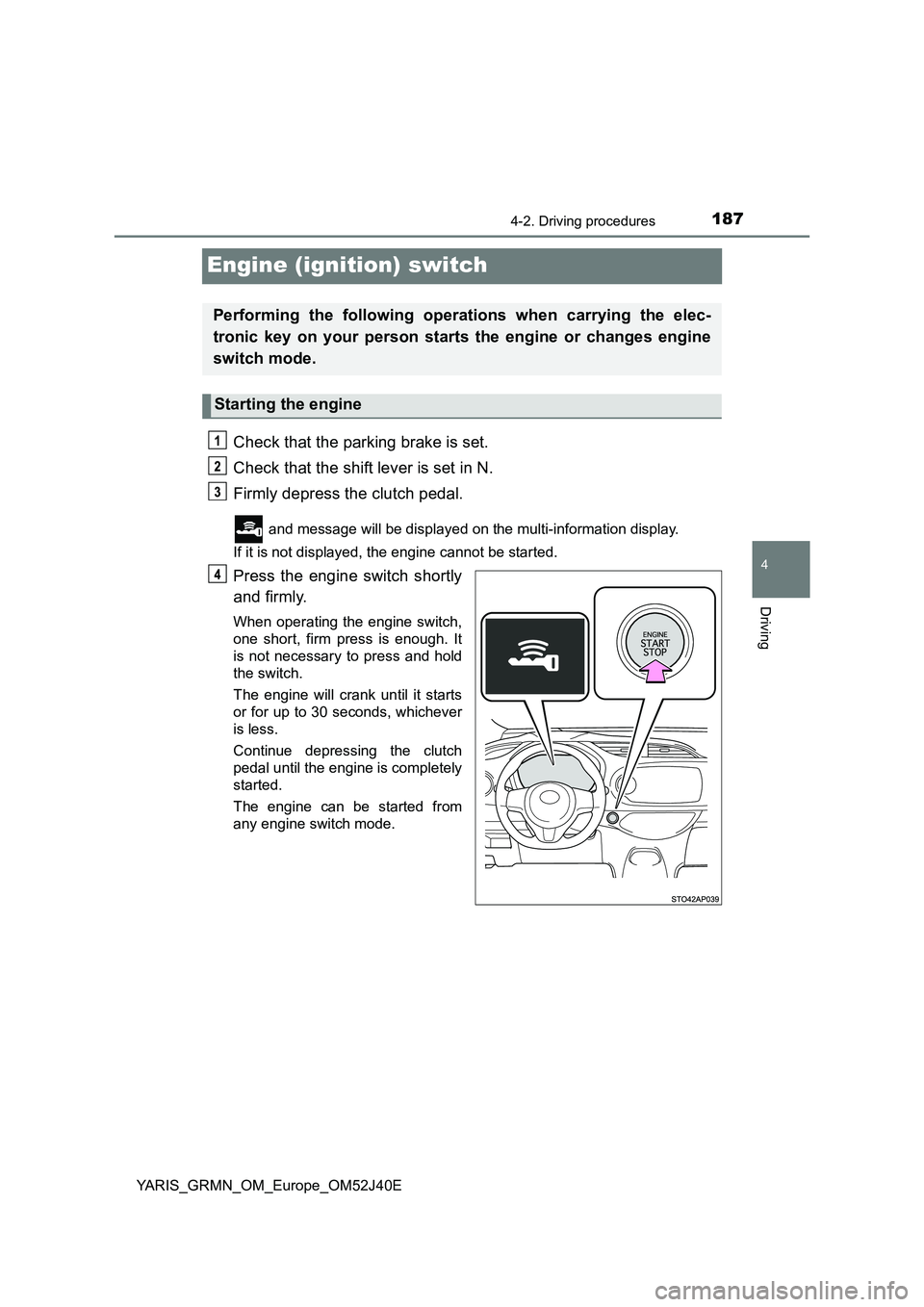
Engine (ignition) switch
Check that the parking brake is set.
Check that the shift lever is set in N.
Firmly depress the clutch pedal.
and message will be displayed on the multi-information display.
If it is not displayed, the engine cannot be started.
Press the engine switch shortly
and firmly.
When operating the engine switch,
one short, firm press is enough. It
is not necessary to press and hold
the switch.
The engine will crank until it starts
or for up to 30 seconds, whichever
is less.
Continue depressing the clutch
pedal until the engine is completely
started.
The engine can be started from
any engine switch mode.
Performing the following operations when carrying the elec-
tronic key on your person starts the engine or changes engine
switch mode.
Starting the engine
Page 189 of 404
1894-2. Driving procedures
4
Driving
YARIS_GRMN_OM_Europe_OM52J40E
■Auto power off function
If the vehicle is left in ACCESSORY or IGNITION ON mode (the engine is not
running) for more than an hour, the engine switch will automatically turn off.
However, this function cannot entirely prevent battery discharge. Do not leave
the vehicle with the engine switch in ACCESSORY or IGNITION ON mode for
long periods of time when the engine is not running.
■ Electronic key battery depletion
P. 11 4
■ Conditions affecting operation
P. 128
■ Notes for the entry function
P. 129
■ If the engine does not start
The engine immobilizer system may not have been deactivated. ( P. 78)
Contact any authorized Toyota retailer or Toyota authorized repairer, or any
reliable repairer.
■ Steering lock
After turning the engine switch off and opening and closing the doors, the
steering wheel will be locked due to the steering lock function. Operating the
engine switch again automatically cancels the steering lock.
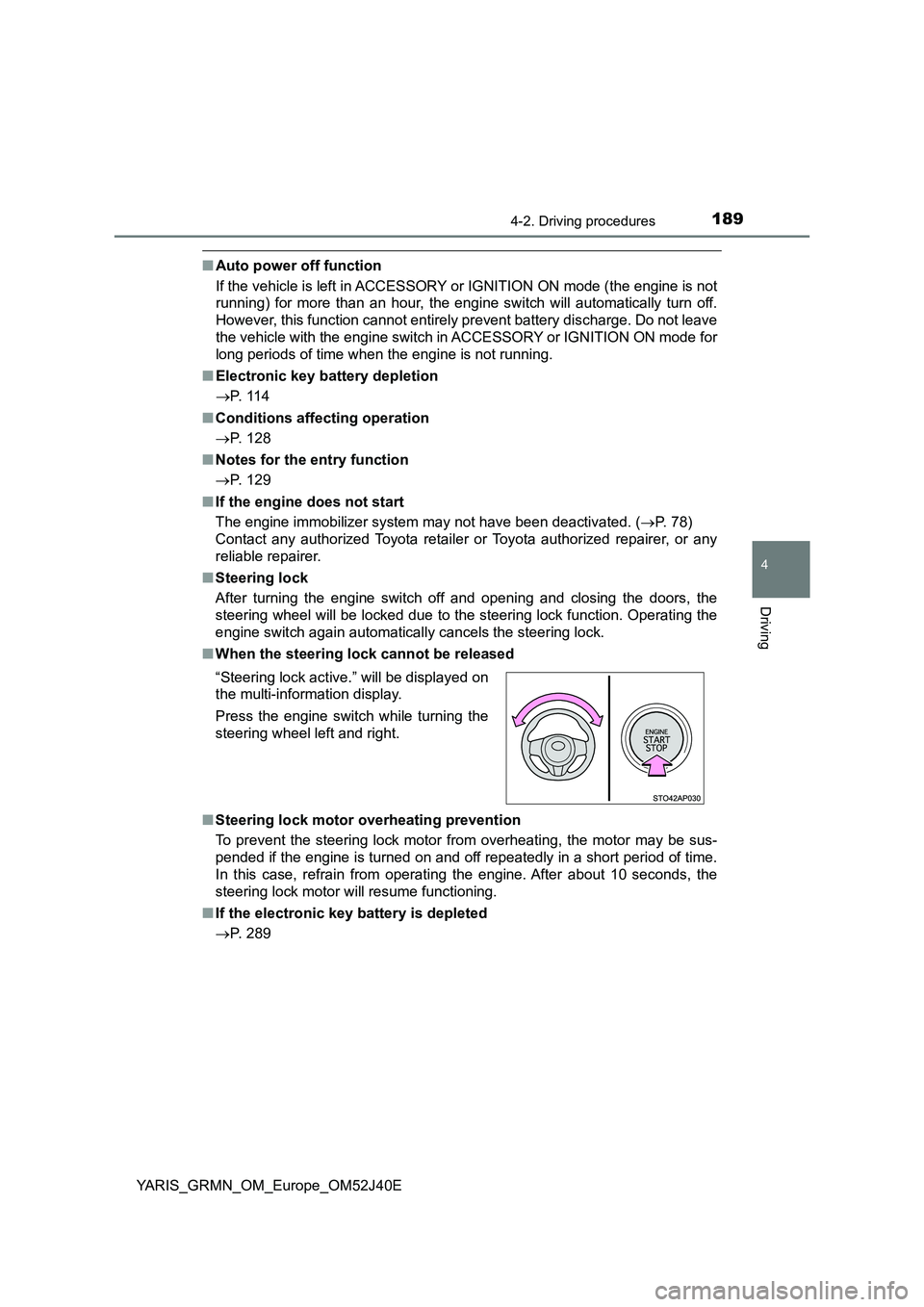
■ When the steering lock cannot be released
■ Steering lock motor overheating prevention
To prevent the steering lock motor from overheating, the motor may be sus-
pended if the engine is turned on and off repeatedly in a short period of time.
In this case, refrain from operating the engine. After about 10 seconds, the
steering lock motor will resume functioning.
■ If the electronic key battery is depleted
P. 289
“Steering lock active.” will be displayed on
the multi-information display.
Press the engine switch while turning the
steering wheel left and right.
Page 228 of 404
2285-2. Using the interior lights
YARIS_GRMN_OM_Europe_OM52J40E
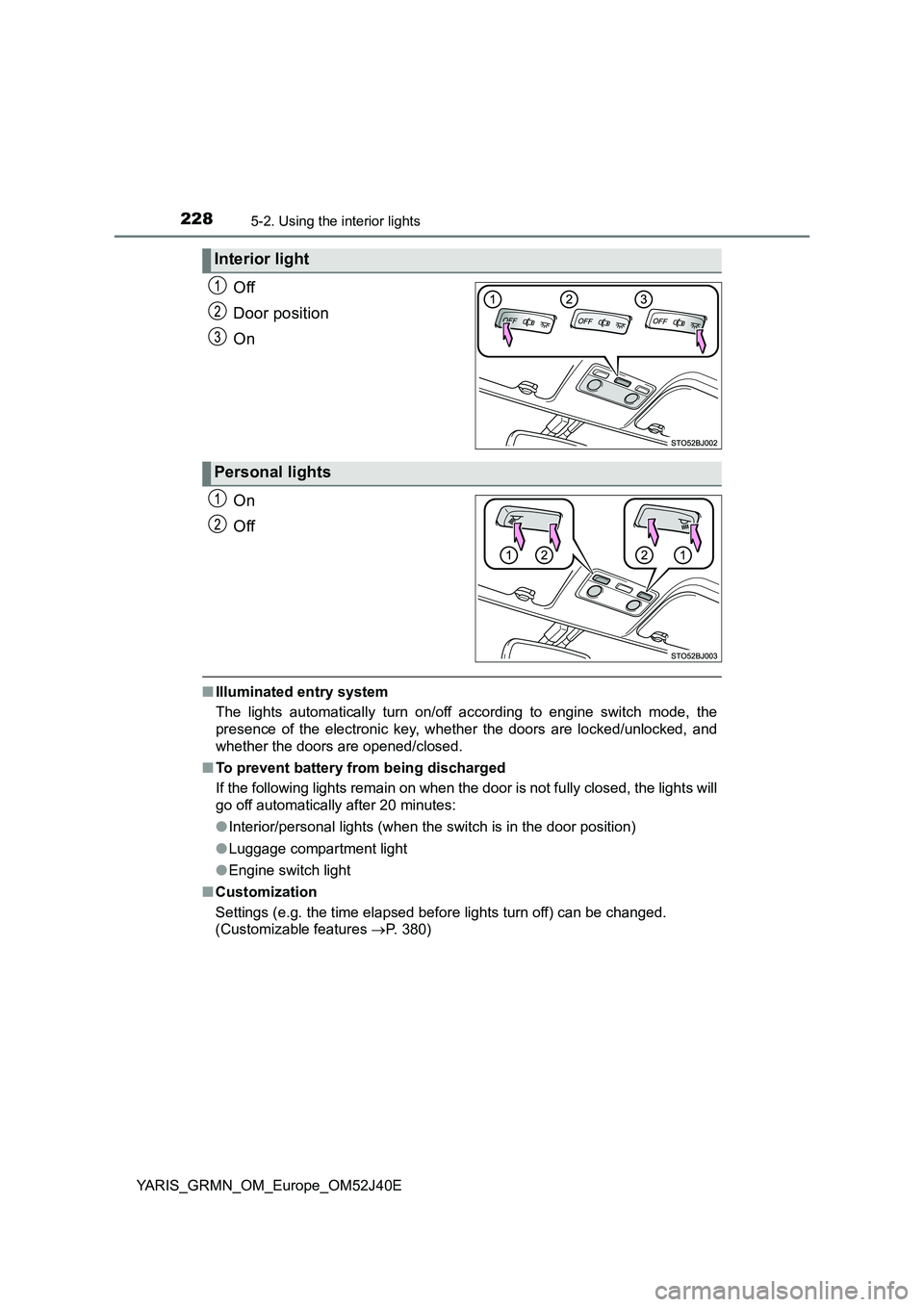
Off
Door position
On
On
Off
■ Illuminated entry system
The lights automatically turn on/off according to engine switch mode, the
presence of the electronic key, whet her the doors are locked/unlocked, and
whether the doors are opened/closed.
■ To prevent battery from being discharged
If the following lights remain on when the door is not fully closed, the lights will
go off automatically after 20 minutes:
● Interior/personal lights (when the switch is in the door position)
● Luggage compartment light
● Engine switch light
■ Customization
Settings (e.g. the time elapsed before lights turn off) can be changed.
(Customizable features P. 380)
Interior light
Personal lights
Page 241 of 404
241
6Maintenance and care
YARIS_GRMN_OM_Europe_OM52J40E
6-1. Maintenance and care
Cleaning and protecting
the vehicle exterior .......... 242
Cleaning and protecting
the vehicle interior ........... 247
6-2. Maintenance
Maintenance
requirements.................... 250
6-3. Do-it-yourself maintenance
Do-it-yourself service
precautions ...................... 253
Hood .................................. 256
Positioning a floor jack ....... 258
Engine compartment.......... 260
Tires ................................... 271
Replacing the tire ............... 274
Tire inflation pressure ........ 282
Wheels ............................... 284
Air conditioning filter .......... 286
Electronic key battery ........ 289
Checking and replacing
fuses ................................ 292
Light bulbs ......................... 298
Page 242 of 404
2426-1. Maintenance and care
YARIS_GRMN_OM_Europe_OM52J40E
Cleaning and protecting the vehicle exterior
●Working from top to bottom, liberally apply water to the vehicle
body, wheel wells and underside of the vehicle to remove any dirt
and dust.
● Wash the vehicle body using a sponge or soft cloth, such as a
chamois.
● For hard-to-remove marks, use car wash soap and rinse thoroughly
with water.
● Wipe away any water.
● Wax the vehicle when the waterproof coating deteriorates.
If water does not bead on a clean surface, apply wax when the vehicle
body is cool.
■ Automatic car washes
● Fold the mirrors and remove the antenna (pole type) before washing the
vehicle. Start washing from the front of the vehicle. Make sure to extend the
mirrors and re-install the antenna before driving.
● Brushes used in automatic car washes may scratch the vehicle surface and
harm your vehicle’s paint.
● Rear spoiler may not be washable in some automatic car washes. There
may also be an increased risk of damage to vehicle.
■ High pressure car washes
● Do not allow the nozzles of the car wash to come within close proximity of
the windows and door borders, and high mounted stoplight.
● Before using the car wash, check that the fuel filler door on your vehicle is
closed properly.
■ When using a car wash
If the door handle becomes wet while the electronic key is within the effective
range, the door may lock and unlock repeatedly. Place the key in a position
2 m (6 ft.) or more separate from the vehicle while the vehicle is being
washed. (Take care to ensure that the key is not stolen.)
Perform the following to protect the vehicle and maintain it in
prime condition:
Page 268 of 404
2686-3. Do-it-yourself maintenance
YARIS_GRMN_OM_Europe_OM52J40E
■Before recharging
When recharging, the battery produces hydrogen gas which is flammable and
explosive. Therefore, observe the following before recharging:
● If recharging with the battery installed on the vehicle, be sure to disconnect
the ground cable.
● Make sure the power switch on the charger is off when connecting and dis-
connecting the charger cables to the battery.
■ After recharging/reconnecting the battery
● Unlocking the doors using the smart entry & start system may not be possi-
ble immediately after reconnecting the battery. If this happens, use the wire-
less remote control or the mechanical key to lock/unlock the doors.
● Start the engine with the engine switch in ACCESSORY mode. The engine
may not start with the engine switch turned off. However, the engine will
operate normally from the second attempt.
● The engine switch mode is recorded by the vehicle. If the battery is recon-
nected, the vehicle will return the engine switch mode to the status it was in
before the battery was disconnected. Make sure to turn off the engine
before disconnect the battery. Take extra care when connecting the battery
if the engine switch mode prior to discharge is unknown.
If the engine will not start even after multiple attempts, contact any authorized
Toyota retailer or Toyota authorized repairer, or any reliable repairer.
WARNING
■ Chemicals in the battery
Batteries contain poisonous and corrosive sulfuric acid and may produce
hydrogen gas which is flammable and explosive. To reduce the risk of death
or serious injury, take the following precautions while working on or near the
battery:
● Do not cause sparks by touching the battery terminals with tools.
● Do not smoke or light a match near the battery.
● Avoid contact with eyes, skin and clothes.
● Never inhale or swallow electrolyte.
● Wear protective safety glasses when working near the battery.
● Keep children away from the battery.
Page 289 of 404
2896-3. Do-it-yourself maintenance
YARIS_GRMN_OM_Europe_OM52J40E
6
Maintenance and care
Electronic key battery
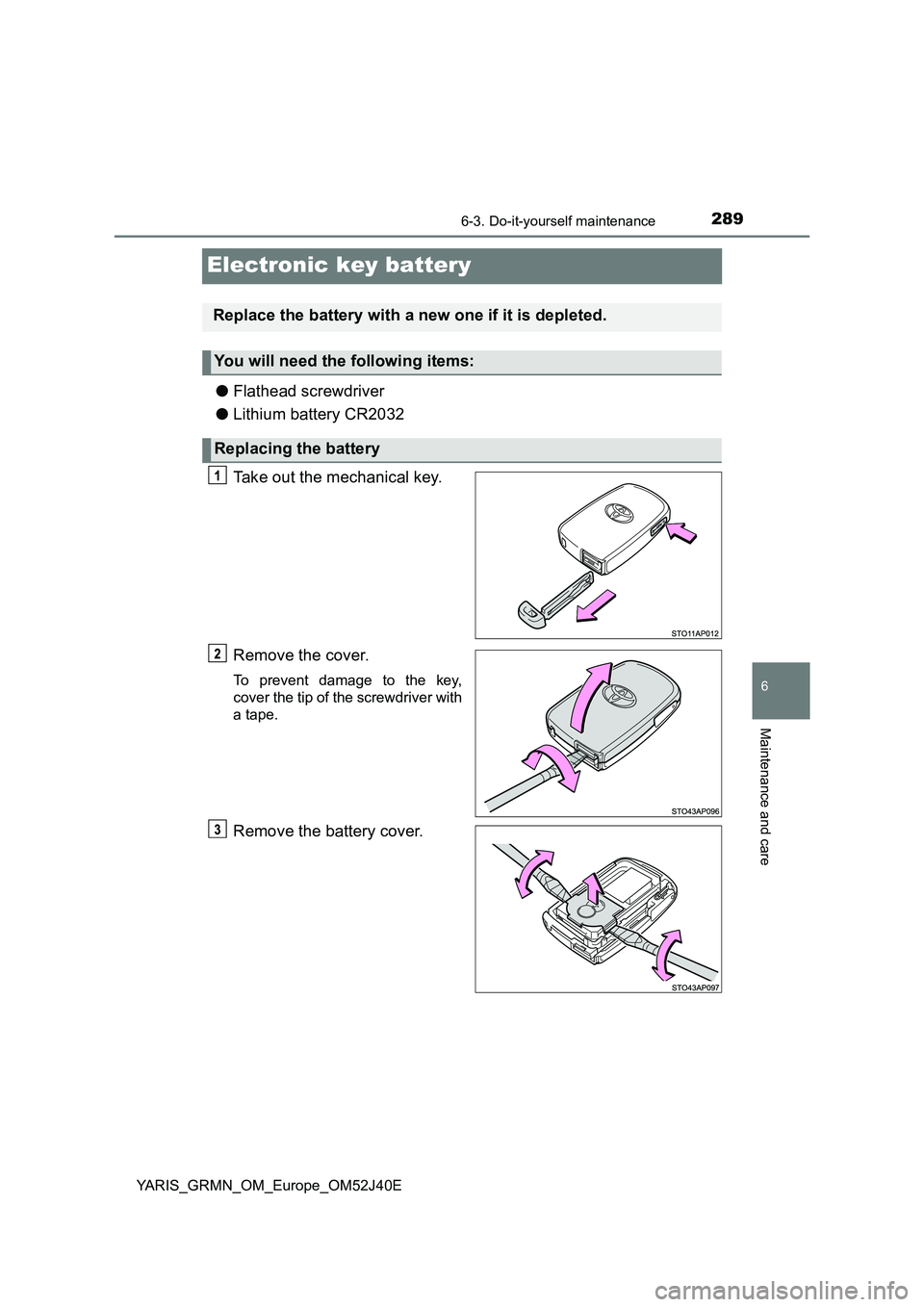
●Flathead screwdriver
● Lithium battery CR2032
Take out the mechanical key.
Remove the cover.
To prevent damage to the key,
cover the tip of the screwdriver with
a tape.
Remove the battery cover.
Replace the battery with a new one if it is depleted.
You will need the following items:
Replacing the battery
Page 290 of 404
2906-3. Do-it-yourself maintenance
YARIS_GRMN_OM_Europe_OM52J40E
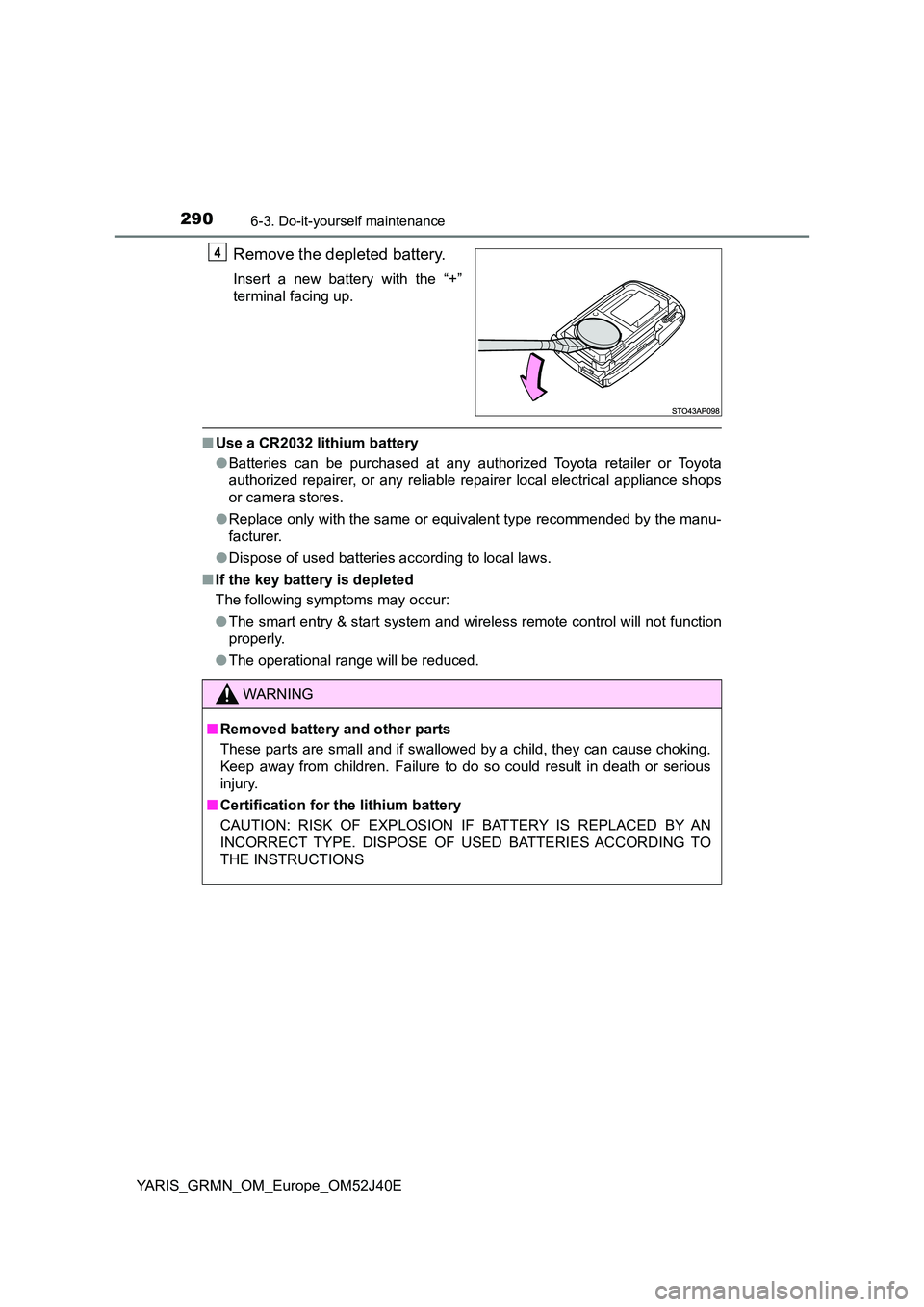
Remove the depleted battery.
Insert a new battery with the “+”
terminal facing up.
■ Use a CR2032 lithium battery
● Batteries can be purchased at any authorized Toyota retailer or Toyota
authorized repairer, or any reliable repairer local electrical appliance shops
or camera stores.
● Replace only with the same or equivalent type recommended by the manu-
facturer.
● Dispose of used batteries according to local laws.
■ If the key battery is depleted
The following symptoms may occur:
● The smart entry & start system and wireless remote control will not function
properly.
● The operational range will be reduced.
WARNING
■Removed battery and other parts
These parts are small and if swallowed by a child, they can cause choking.
Keep away from children. Failure to do so could result in death or serious
injury.
■ Certification for the lithium battery
CAUTION: RISK OF EXPLOSION IF BATTERY IS REPLACED BY AN
INCORRECT TYPE. DISPOSE OF USED BATTERIES ACCORDING TO
THE INSTRUCTIONS
Page 315 of 404
315
7When trouble arises
YARIS_GRMN_OM_Europe_OM52J40E
7-1. Essential information
Emergency flashers ........... 316
If your vehicle has to
be stopped in
an emergency .................. 317
7-2. Steps to take in
an emergency
If your vehicle needs to
be towed .......................... 319
If you think something is
wrong ............................... 325
Fuel pump shut off
system ............................. 326
If a warning light turns on
or a warning buzzer
sounds ............................. 327
If a warning message is
displayed ......................... 332
If you have a flat tire .......... 336
If the engine will not start ... 354
If the electronic key does
not operate properly ........ 356
If the vehicle battery is
discharged ....................... 359
If your vehicle overheats .... 363
If the vehicle becomes
stuck ................................ 367
Page 356 of 404
3567-2. Steps to take in an emergency
YARIS_GRMN_OM_Europe_OM52J40E
If the electronic key does not operate
properly
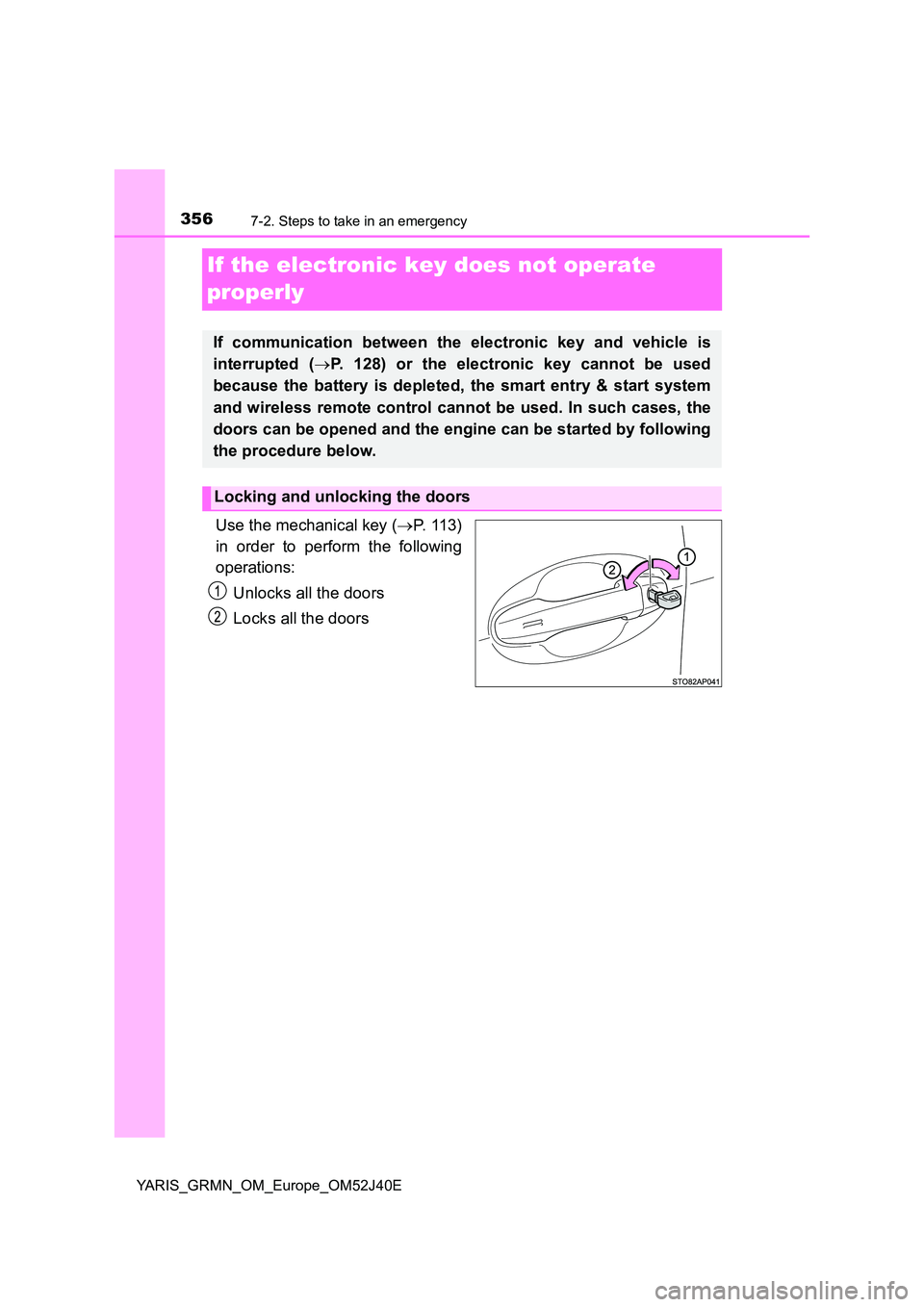
Use the mechanical key ( P. 113)
in order to perform the following
operations:
Unlocks all the doors
Locks all the doors
If communication between the electronic key and vehicle is
interrupted ( P. 128) or the electronic key cannot be used
because the battery is depleted, the smart entry & start system
and wireless remote control cannot be used. In such cases, the
doors can be opened and the engine can be started by following
the procedure below.
Locking and unlocking the doors