connect VOLKSWAGEN T-ROC 2021 Owner´s Manual
[x] Cancel search | Manufacturer: VOLKSWAGEN, Model Year: 2021, Model line: T-ROC, Model: VOLKSWAGEN T-ROC 2021Pages: 502, PDF Size: 9.42 MB
Page 271 of 502

NOTICE
Park Assist uses parked vehicles, the kerbs and other objects as guidance. Make sure that the tyres
and wheel rims are not damaged when parking the vehicle. If necessary, stop the parking procedure
in good time to prevent damage to the vehicle.
Prerequisites
First read and observe the introductoryinformation and safety warnings⇒Introduction
The following prerequisites must be met for driving into and out of parking spaces:
The traction control system (TCS) must be switched on ⇒ Brake support systems .
Distance: maintain a distance of 0.5 – 2.0 metres when driving past the parking space.
The parking space must have at least the dimensions required by Park Assist.
Speed when driving past the parking space (for parking spaces parallel to the road): not above
40 km/h (25 mph).
Speed when driving past the parking space (for parking spaces perpendicular to the road): not above
20 km/h (12 mph).
Maximum speed: 7 km/h (4 mph). An automatic braking intervention can take place when driving
into a parking space.
No trailer is connected electrically with the factory-fitted towing bracket ⇒ Notes on towing a
trailer .
The parking manoeuvre can be continued after the automatic brake intervention.
The automatic braking intervention takes place a maximum of once per parking manoeuvre. The
parking manoeuvre will be cancelled if a speed of approximately 7 km/h (4 mph) is exceeded again.
WARNING
Do not let the automatic braking intervention triggered by Park Assist tempt you to take any risks
while driving. The system is not a substitute for the full concentration of the driver.
Park Assist has system-related limitations. In some situations, automatic braking intervention may
function only in a limited way or not at all.
You should always be prepared to brake the vehicle yourself.
The automatic braking intervention is ended after approximately 1.5 seconds. Depress the brake
pedal of the vehicle yourself following the automatic braking intervention.
Looking for a parking space
Page 277 of 502

Rear Traffic Alert monitors the traffic crossing behind the vehicle when reversing out of a parking
space or manoeuvring. Rear Traffic Alert functions using radar sensors in the rear bumper.
Key to ⇒ Fig. 134 :
Critical situation. Do not drive on!Possible critical situation.
Detection of a critical situation can also take place acoustically:
A warning signal will sound and a text message will be displayed in the instrument cluster for
vehicles without Park Distance Control.
In vehicles with Park Distance Control, an acoustic signal will sound with the continuous tone of Park
Distance Control. If the Park Distance Control is deactivated, no warning can be given to the driver
and the Rear Traffic Alert system will also be switched off temporarily.
If there is a system fault in the scanned area, the indicator lamp will light up yellow on the
instrument cluster display.
Automatic braking intervention to minimise damage
If Rear Traffic Alert detects an approaching road user and the driver has not pressed the brake, the
system can brake automatically.
Automatic braking intervention is activated when reversing at speeds of between 1–12 km/h (1–
7 mph). The vehicle is held stationary for up to two seconds after vehicle standstill has been
detected.
After automatic braking intervention is activated to prevent damage to the vehicle, the system
requires approximately ten seconds before it can activate another automatic braking intervention.
Automatic braking intervention can be interrupted by pressing the accelerator or brake pedal
sharply and taking control of the vehicle.
Automatic deactivation
Rear Traffic Alert is deactivated automatically and cannot be switched on if the factory-fitted towing
bracket is electrically connected to a trailer or similar ⇒ Notes on towing a trailer . Once a trailer is
electrically connected to the vehicle and the driver pulls away, a text message appears in the
instrument cluster display to inform the driver that Rear Traffic Alert has been deactivated. Rear
Traffic Alert will be automatically activated again when the trailer has been unhitched from the
vehicle. This applies if the functions were previously activated. Rear Traffic Alert must be switched
off manually for trailer towing if a non-factory-fitted towing bracket is used.
WARNING
The intelligent Rear Traffic Alert technology cannot overcome the laws of physics, and functions only
within the limits of the system. Do not let the assistance function of Rear Traffic Alert tempt you to
take any safety risks while driving. The system is not a substitute for the full concentration of the
driver.
Page 289 of 502

Insert the cigarette lighter back into the socket.
WARNING
Improper use of the cigarette lighter can cause fires, burns and other serious injuries.
Always use the cigarette lighter properly, and only use it to light tobacco products.
Never leave children unsupervised in the vehicle. The cigarette lighter can be used when the ignition
is switched on.
The cigarette lighter socket can also be used as a 12-volt socket ⇒ Electrical sockets .
Electrical sockets
Introduction
This chapter contains information on the followingsubjects:
⇒ Electrical sockets in the vehicle
Electrical equipment can be connected to the sockets in the vehicle.
The electrical devices must be in good condition. Do not use faulty devices.
The 12-volt socket will work only when the ignition is switched on.
WARNING
Improper use of the sockets and electrical accessories can cause fires and severe injuries.
Never leave children unsupervised in the vehicle. Sockets and the devices connected to them can be
used when the ignition is switched on.
If the electrical device gets too hot, switch off the device immediately and disconnect it from the
socket.
NOTICE
In order to prevent damage to the electrical system, never connect equipment that supplies electric
power, such as solar panels or battery chargers for charging the 12-volt battery, to the 12-volt
socket.
Use only electrical devices that have been approved in accordance with current guidelines
concerning electromagnetic compatibility.
In order to avoid damage due to voltage fluctuations, always switch off any electrical devices before
switching the ignition on or off and before starting the engine. When the start/stop system
Page 290 of 502
automatically switches off and restarts the engine, it is not necessary to switch off any connected
electrical consumers.
Never connect electrical devices requiring more than the rated power to a 12-volt socket. The
vehicle's electrical system can be damaged if the maximum power consumption is exceeded.
Observe the operating instructions of the electrical devices!
Using electrical consumers with the engine switched off and the ignition switched on will drain the
12-volt battery.
Unshielded devices can cause interference in the Infotainment system and vehicle electronics.
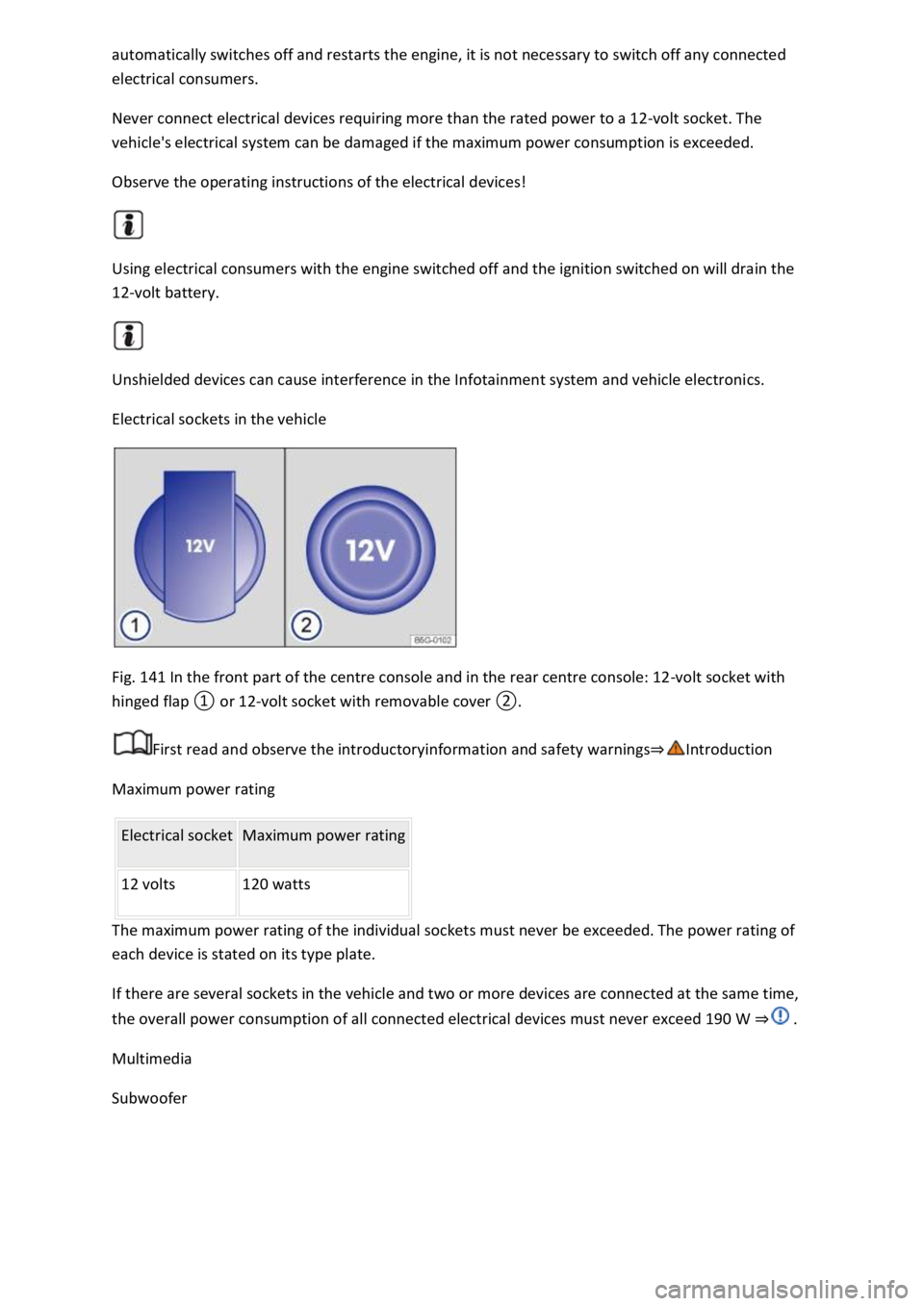
Electrical sockets in the vehicle
Fig. 141 In the front part of the centre console and in the rear centre console: 12-volt socket with
hinged flap ① or 12-volt socket with removable cover ②.
First read and observe the introductoryinformation and safety warnings⇒Introduction
Maximum power rating
Electrical socket Maximum power rating
12 volts 120 watts
The maximum power rating of the individual sockets must never be exceeded. The power rating of
each device is stated on its type plate.
If there are several sockets in the vehicle and two or more devices are connected at the same time,
the overall power consumption of all connected electrical devices must never exceed 190 W ⇒ .
Multimedia
Subwoofer
Page 291 of 502
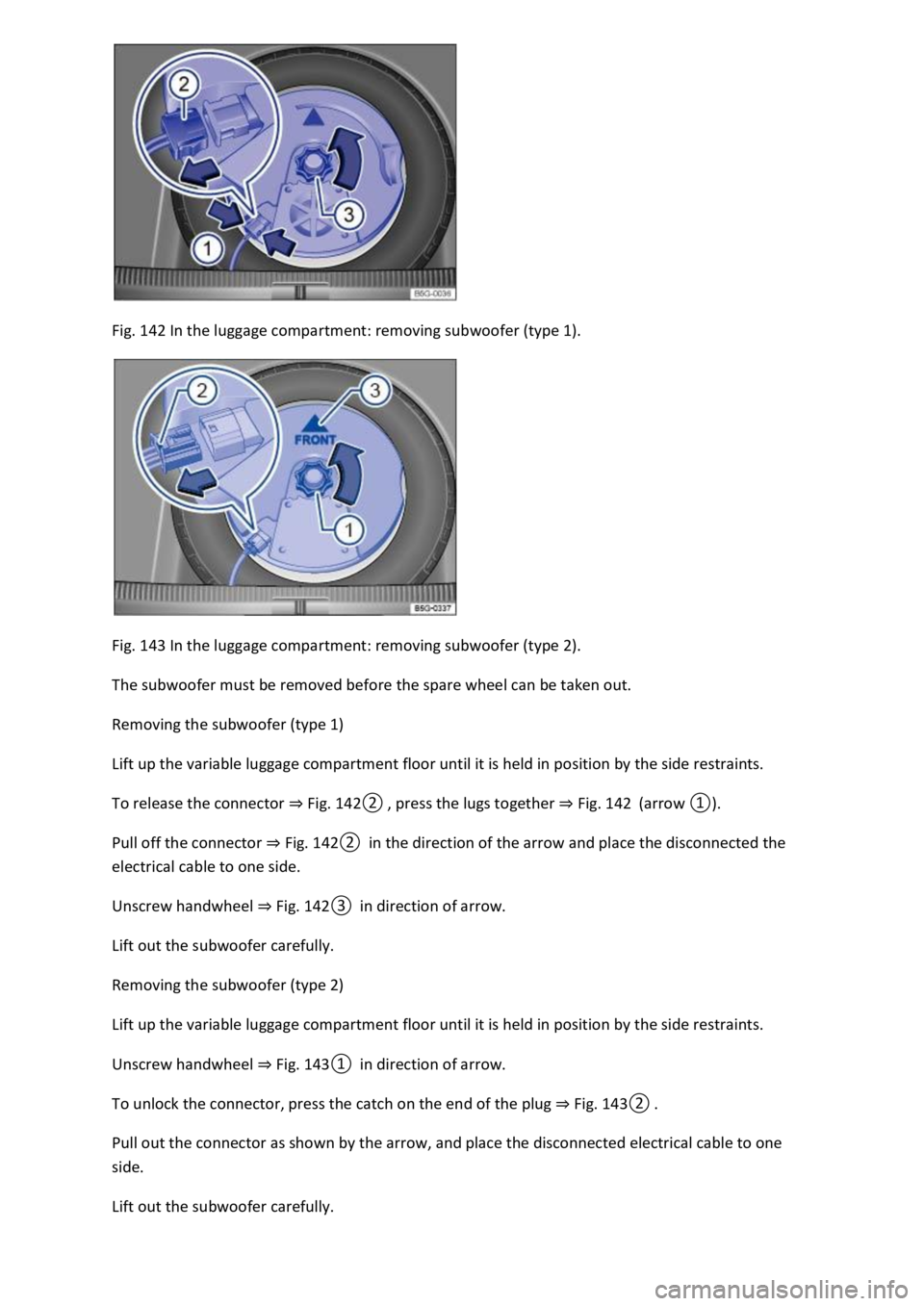
Fig. 142 In the luggage compartment: removing subwoofer (type 1).
Fig. 143 In the luggage compartment: removing subwoofer (type 2).
The subwoofer must be removed before the spare wheel can be taken out.
Removing the subwoofer (type 1)
Lift up the variable luggage compartment floor until it is held in position by the side restraints.
To release the connector ⇒ Fig. 142② , press the lugs together ⇒ Fig. 142 (arrow ①).
Pull off the connector ⇒ Fig. 142② in the direction of the arrow and place the disconnected the
electrical cable to one side.
Unscrew handwheel ⇒ Fig. 142③ in direction of arrow.
Lift out the subwoofer carefully.
Removing the subwoofer (type 2)
Lift up the variable luggage compartment floor until it is held in position by the side restraints.
Unscrew handwheel ⇒ Fig. 143① in direction of arrow.
To unlock the connector, press the catch on the end of the plug ⇒ Fig. 143② .
Pull out the connector as shown by the arrow, and place the disconnected electrical cable to one
side.
Lift out the subwoofer carefully.
Page 292 of 502

Installing the subwoofer (type 1)
Place the subwoofer carefully in the rim base. The tip of the arrow symbol FRONT on the subwoofer
must face forwards.
Plug in connector ⇒ Fig. 142② until it audibly engages.
Screw the handwheel ⇒ Fig. 142③ onto the threaded pin in the opposite direction to the arrow
until the subwoofer is properly secured.
Place the variable luggage compartment floor on the floor covering.
Installing the subwoofer (type 2)
Place the subwoofer carefully in the rim base. The tip of the arrow symbol FRONT ⇒ Fig. 143③ on
the subwoofer must face forwards.
Plug in connector ⇒ Fig. 143② until the catch audibly engages.
Screw the handwheel ⇒ Fig. 143① onto the threaded pin in the opposite direction to the arrow
until the subwoofer is properly secured.
Place the variable luggage compartment floor on the floor covering.
Mobile online services
Volkswagen Car-Net
Introduction
This chapter contains information on the followingsubjects:
⇒ Legal requirements
⇒ Deactivating Car-Net services
⇒ Service impairment or interruption
⇒ Apps
Volkswagen Car-Net is not available in all countries and is subject to country-specific limitations on
duration of use.
Volkswagen Car-Net allows you to communicate with your vehicle in order to exchange data,
request information or control functions.
In order to be able to use Volkswagen Car-Net, the vehicle has to be ordered with Car-Net and
factory-fitted with the system. Depending on the service or service portfolio, Volkswagen Car-Net
can be operated via the factory-fitted Infotainment system, via a Car-Net portal on the Internet or
using a mobile device.
Information about the Volkswagen Car-Net services, applications, availability, compatible mobile
devices and service portfolio, as well as service descriptions, are available on the Volkswagen
website:
In Europe and Japan: www.volkswagen.com/car-net
Page 295 of 502
absence of the ⇒ Fig. 144 symbol in the vehicle does not mean that the control unit is not
transmitting the current position or speed of the vehicle.
Personal data
Volkswagen collects, processes and uses the user's personal data in accordance with statutory
requirements. You can access the current data protection policy on the Volkswagen homepage.
Deactivating Car-Net services
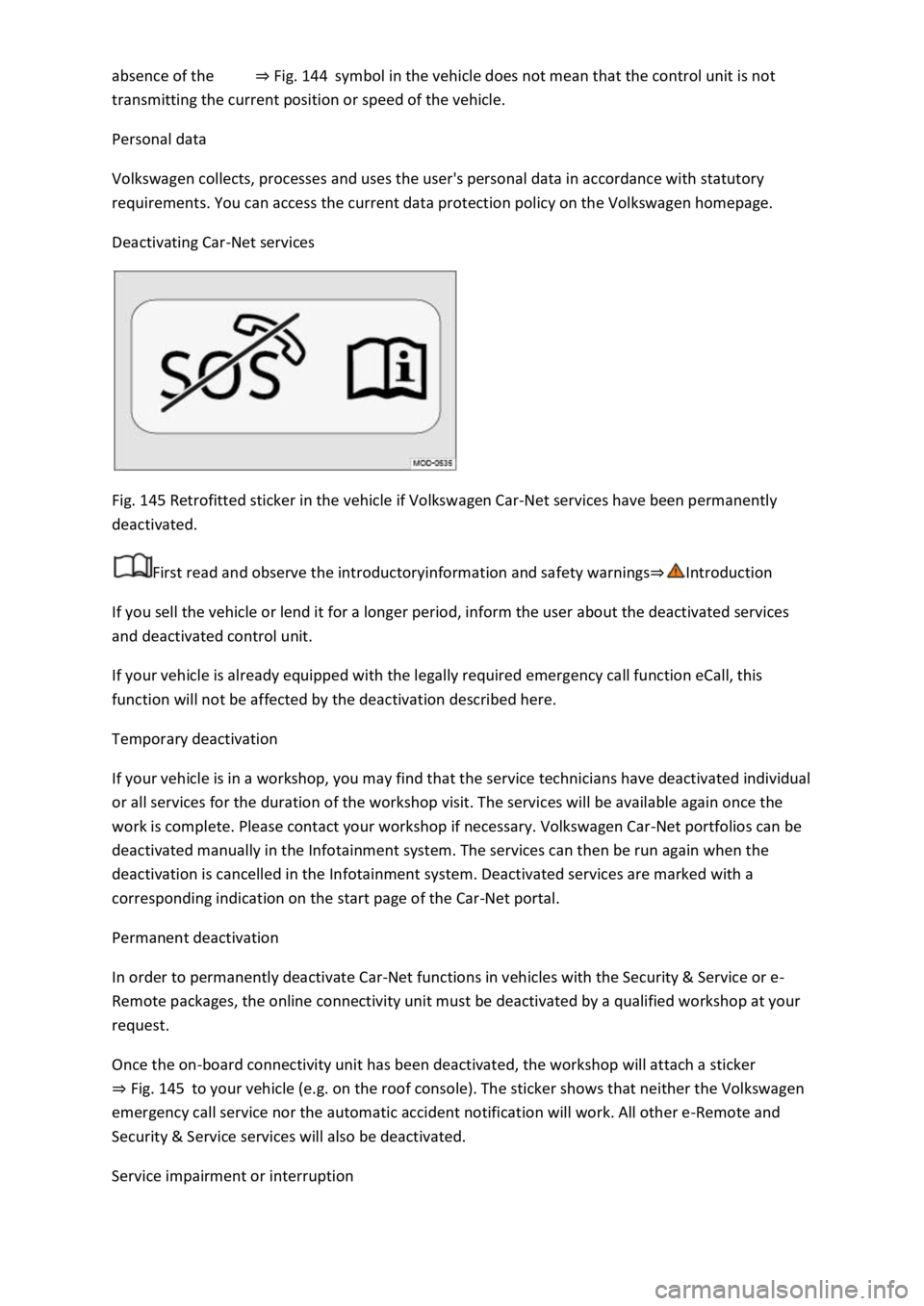
Fig. 145 Retrofitted sticker in the vehicle if Volkswagen Car-Net services have been permanently
deactivated.
First read and observe the introductoryinformation and safety warnings⇒Introduction
If you sell the vehicle or lend it for a longer period, inform the user about the deactivated services
and deactivated control unit.
If your vehicle is already equipped with the legally required emergency call function eCall, this
function will not be affected by the deactivation described here.
Temporary deactivation
If your vehicle is in a workshop, you may find that the service technicians have deactivated individual
or all services for the duration of the workshop visit. The services will be available again once the
work is complete. Please contact your workshop if necessary. Volkswagen Car-Net portfolios can be
deactivated manually in the Infotainment system. The services can then be run again when the
deactivation is cancelled in the Infotainment system. Deactivated services are marked with a
corresponding indication on the start page of the Car-Net portal.
Permanent deactivation
In order to permanently deactivate Car-Net functions in vehicles with the Security & Service or e-
Remote packages, the online connectivity unit must be deactivated by a qualified workshop at your
request.
Once the on-board connectivity unit has been deactivated, the workshop will attach a sticker
⇒ Fig. 145 to your vehicle (e.g. on the roof console). The sticker shows that neither the Volkswagen
emergency call service nor the automatic accident notification will work. All other e-Remote and
Security & Service services will also be deactivated.
Service impairment or interruption
Page 296 of 502

First read and observe the introductoryinformation and safety warnings⇒Introduction
Even when the above-mentioned requirements for using the services are met, the functionality of
the Car-Net services can be impaired or interrupted due to factors that lie outside the control of
Volkswagen AG. Such factors include in particular:
Maintenance, repairs, software updates and technical changes to your service provider’s
telecommunication systems, satellites, servers and databases.
The telecommunications provider has changed the mobile telecommunication standard for
transferring mobile data, e.g. from UMTS to EDGE or GPRS
An existing mobile telecommunications standard has been shut down by the telecommunications
provider.
Impairment or interruption to mobile and GPS reception, e.g. due to high speeds, solar storms,
weather, landscape, interfering devices or intensive use of the mobile network in the relevant cells.
Restricted availability, completeness or correctness of information provided by third parties, e.g.
maps.
Countries where Volkswagen Car-Net services are not available.
Apps
First read and observe the introductoryinformation and safety warnings⇒Introduction
The Volkswagen Car-Net app can execute Volkswagen Car-Net services in the vehicle and provide
information.
Volkswagen App-Connect allows content from Volkswagen apps and third party apps on mobile
devices to be shown on the Infotainment system screen.
There may be problems with compatibility with third party apps.
A wide range of applications may be available and they may be vehicle-specific and country-specific
⇒ . Content, range and provider of applications can vary. Some applications also depend on
availability of services offered by third parties.
We are unable to guarantee that the available apps can be run on all mobile devices and all
operating systems.
Applications offered by Volkswagen can be changed, discontinued, deactivated, reactivated and
expanded without prior notice.
Transporting items
Stowing luggage and loads
Cargo and luggage can be transported in the vehicle, on a trailer ⇒ Technical requirements and on
the roof ⇒ Roof carrier . Always observe the legal regulations.
Stowing luggage safely in the vehicle
Always distribute any loads in the vehicle as evenly as possible.
Page 305 of 502

WARNING
A roof carrier that has not been approved for the vehicle or a roof carrier that is fitted to a vehicle
that is not approved for use with a roof carrier may cause accidents or injuries.
Use only roof carriers that have been approved by Volkswagen for your vehicle type.
Never use a roof carrier on a vehicle that has not been approved for use with a roof carrier.
A roof carrier that is fitted nevertheless may become loose whilst the vehicle is in motion and fall
from the vehicle roof.
NOTICE
Securing a roof carrier of any kind to a vehicle that is not approved for use with a roof carrier may
lead to severe damage to the vehicle.
Securing roof carriers
First read and observe the introductoryinformation and safety warnings⇒Introduction
Special roof carriers must be used to transport luggage, bicycles, skis, surfboards or boats safely ⇒
. Suitable accessories are available from your Volkswagen dealership.
Attaching the roof bars and load carrier
Mount roof bars to the roof railing according to the installation instructions provided.
Once you have fitted the roof bars, you can then secure the respective carrier system on them.
WARNING
Incorrectly attaching and using the roof bars and load carrier could cause the whole roof carrier to
fall off the roof. This could cause accidents and injuries.
Only use roof bars and load carriers when they are undamaged and fitted correctly.
Always fit roof bars and load carriers correctly. Always observe the installation instructions provided
by the manufacturer.
Attach the roof bars only at the specified mounting points.
Special roof carriers for items such as bicycles, skis, surfboards etc. should always be properly
installed. Always observe the installation instructions provided by the manufacturer.
Check that the roof carrier is secured before starting your journey and tighten as necessary after
driving a short distance. During a long trip, check all screw connections and fasteners at each stop.
Do not carry out any modifications or repairs to the roof bars or the load carrier.
Page 311 of 502
The vehicle electronics system may be damaged if the trailer's power consumption is too high.
Never connect the trailer's electrical system directly to the electrical connections of the tail light
clusters or to other power sources. Use only suitable connectors to supply power to the trailer.
Towing a trailer places additional demands on the vehicle. Volkswagen recommends additional
services between the normal inspection intervals if the vehicle is used frequently for towing a trailer.
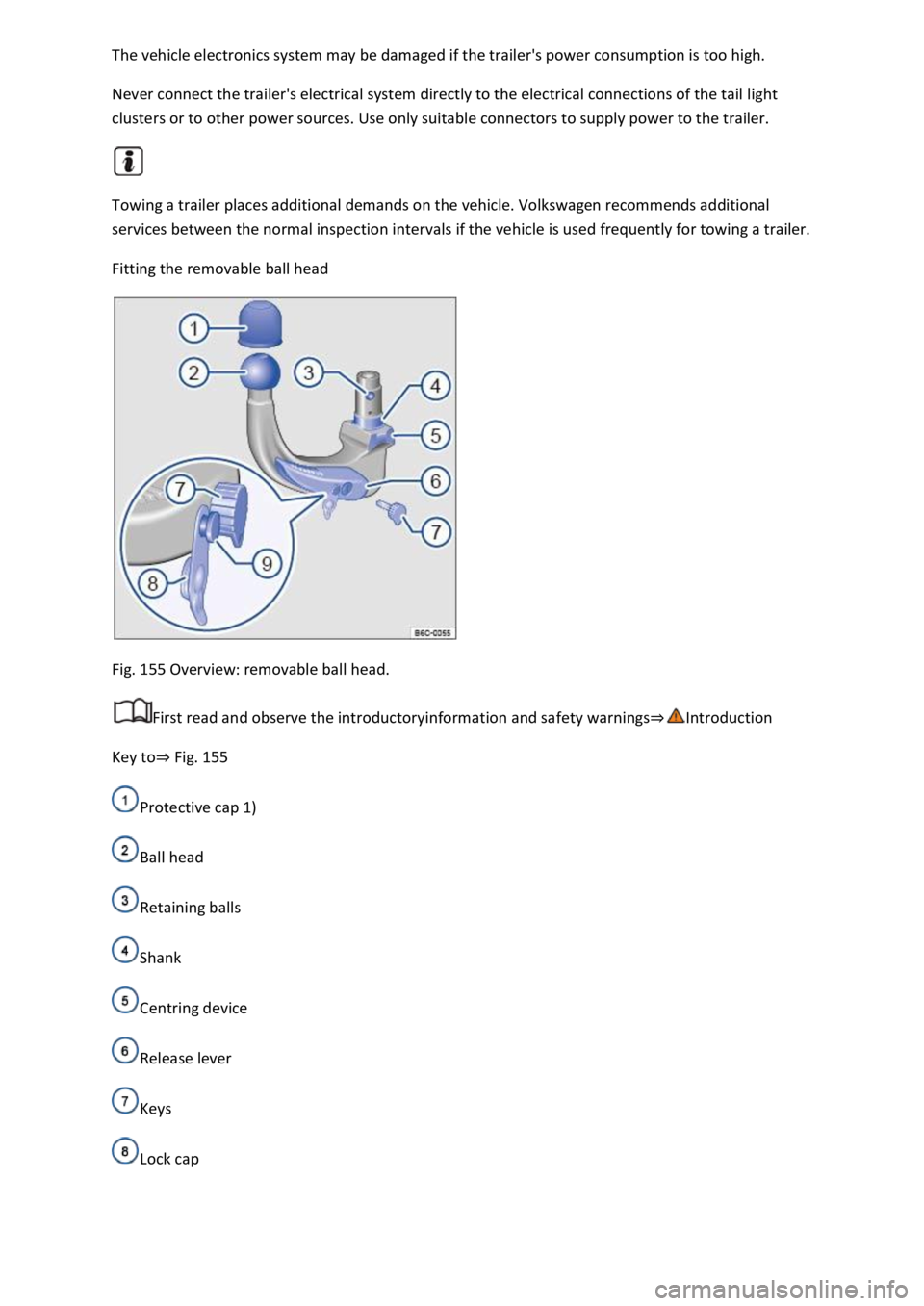
Fitting the removable ball head
Fig. 155 Overview: removable ball head.
First read and observe the introductoryinformation and safety warnings⇒Introduction
Key to⇒ Fig. 155
Protective cap 1)
Ball head
Retaining balls
Shank
Centring device
Release lever
Keys
Lock cap