connect VOLKSWAGEN T-ROC 2021 Owner´s Manual
[x] Cancel search | Manufacturer: VOLKSWAGEN, Model Year: 2021, Model line: T-ROC, Model: VOLKSWAGEN T-ROC 2021Pages: 502, PDF Size: 9.42 MB
Page 132 of 502
When reverse gear is engaged, the cornering light on both sides of the vehicle switches on to
provide better illumination of the surrounding area when manoeuvring.
Switching the fog lights on and off
Switching on the front fog lights : pull the light switch ⇒ Fig. 79 out to the first position. The
indicator lamp in the light switch lights up green.
Switching on the rear fog light : pull the light switch all the way out. The indicator lamp in the
instrument cluster lights up yellow.
To switch the fog lights off, press in the light switch or turn it to position .
When the automatic headlights are switched on and the front or rear fog lights are switched
on, the dipped beam headlights will also be switched on irrespective of the current light conditions
outside.
In vehicles with a factory-fitted towing bracket: the vehicle's rear fog light is not switched on if a
trailer with rear fog light is electrically connected to the vehicle ⇒ Trailer towing .
Light functions
Side lights
If the side lights are switched on, both headlights light up with the side lights, parts of the tail
light clusters, the number plate lighting and the buttons in the centre console and the dash panel.
The daytime running lights also switch on when the ignition is switched on.
If the vehicle is not locked from outside when the ignition is switched off, the continuous parking
light on both sides of the vehicle switches on automatically after around 10 minutes to reduce 12-
volt vehicle battery discharge ⇒ Switching the parking lights on and off .
Automatic headlights
If the automatic headlights are switched on, the vehicle lighting and the instrument and
switch lighting will switch on and off according to the light conditions. When the lights are switched
on, the indicator lamp lights up yellow.
The automatic headlights are merely an aid and will not always be able to detect all driving
situations.
In vehicles with a corresponding equipment level, the switch-on time of the automatic headlights
can be adjusted in the Infotainment system in the Vehicle settings menu ⇒ Infotainment system
controls and displays .
Cornering light
A cornering light is switched on when turning slowly or travelling around very tight bends.
Signal tones if lights are not switched off
Page 196 of 502

The indicator lamp lights up yellow.
Clutch is not transmitting the full engine torque.
If necessary, remove foot from the clutch pedal.
Clutch overheated
The indicator lamp lights up yellow.
An acoustic warning may also be given ⇒ .
The clutch can overheat, for example if the vehicle pulls off frequently, travels at a crawl for long
periods, or in stop and go traffic.
Overheating is indicated by the warning lamp and in some cases by additional warning lamps and a
text message in the instrument cluster display.
You can continue to drive.
Clutch faulty
The indicator lamp lights up yellow.
The clutch is faulty.
Drive on carefully!
Seek expert assistance. Failure to do so can cause considerable clutch damage.
DSG® dual clutch gearbox
Function of the DSG® dual clutch gearbox
Description
The vehicle is equipped with a DSG® dual clutch gearbox.
The DSG® dual clutch gearbox is a gearbox which uses dual-clutch technology to change gear
automatically. It uses a dual clutch and two gear train halves to enable very fast gear changes with
no loss of torque. The DSG® dual clutch gearbox thus combines the performance and economy of a
manual gearbox with the comfort and convenience of a conventional automatic gearbox.
Function
Engine power is transferred to the drive shaft via the gearbox. In order to change gears, the power
transmission between the engine and the gearbox has to be interrupted. This is what the clutch is
for.
With the DSG® dual clutch system with its two gear train halves, the engine power is always
connected to one gear train half when driving. Before a gear shift, the next-higher or lower gear is
already preselected in the load-free second gear train half. The clutch on the non-driven gear is then
closed, and the other is opened at the same time. This makes very fast gear changes possible.
Thanks to its design, the DSG® dual clutch gearbox is more efficient than an automatic gearbox.
Whereas in an automatic gearbox the torque converter is constantly in use, in the DSG® dual clutch
Page 204 of 502

Distance from vehicle ahead too close
The warning lamp lights up red.
Brake request by ACC ⇒ Adaptive Cruise Control (ACC) .
The brake pedal was not depressed or not fully depressed.
Brake immediately.
Gearbox overheated
The indicator lamp lights up yellow.
A signal tone may also be given. A text message may also be shown on the instrument cluster
display.
The DSG® dual clutch gearbox can become too hot, for example, if the vehicle pulls off regularly,
during long periods at crawling speed, or in stop-and-go traffic.
Do not drive on!
Allow the gearbox to cool down in selector lever position P⇒ .
Do not drive on if the indicator lamp does not go out.
Seek expert assistance. Failure to do so could result in considerable damage to the gearbox.
Releasing the selector lever lock manually
If the power fails in the vehicle (for example if the 12-volt vehicle battery is flat) and the vehicle has
to be towed, the selector lever lock must be released manually. Seek expert assistance for this.
The manual release mechanism is located under the cover of the gearshift gate.
Removing the cover of the gearshift gate:
Switch on the electronic parking brake. If the electronic parking brake cannot be switched on, the
vehicle will have to be prevented from rolling away using other means.
Switch off the ignition.
Carefully pull the cover upwards in the area around the selector lever gaiter with connected
electrical wiring ⇒ Fig. 108 .
Pull the cover up and over the selector lever ⇒ .
Depending on the vehicle equipment, there are two possible manual release mechanism variants.
Releasing the selector lever lock manually:
Using the flat blade of the screwdriver from the vehicle toolkit, carefully push the release lever in the
direction of the arrow and keep it in this position ⇒ Fig. 108 .
Press the lock button on the front of the selector lever and move the selector lever into position N.
Page 209 of 502

The indicator lamp lights up yellow.
The steering should be checked by a qualified workshop as soon as possible.
If the yellow warning lamp remains off after the engine has been restarted and you have driven a
short distance, you do not need to consult a qualified workshop.
Fault in steering
The indicator lamp lights up yellow.
The 12-volt vehicle battery was disconnected.
Drive a short distance at a speed of 15 – 20 km/h (9 – 12 mph).
If the yellow warning lamp is still lit after the engine has been restarted, have the steering checked
by a qualified workshop immediately.
Fault in steering
The indicator lamp flashes yellow.
Turn the steering wheel back and forth.
Switch the ignition off and then on again.
Observe the messages on the instrument cluster display.
Do not continue your journey if the indicator lamp still flashes when the ignition is switched on.
Seek expert assistance.
Steering column is not unlocked or locked
The indicator lamp flashes yellow.
Follow any messages that are on the instrument cluster display.
Switch the ignition off and then on again.
Do not continue your journey if the steering column remains locked when the ignition is switched
on.
Seek expert assistance.
Steering requires increased force
The warning lamp lights up red.
The electromechanical steering has failed.
Do not drive on!
Seek expert assistance.
Driving profile selection and 4MOTION Active Control
Page 222 of 502
Do not slip the clutch or rest your foot on the clutch when driving offroad. When travelling over
uneven ground, you could press the clutch by mistake and lose control of the vehicle. This also
prevents power being transferred between the engine and the gearbox. In addition, driving with the
clutch partially engaged causes premature wear to the clutch lining.
Useful accessories for offroad driving
First read and observe the introductoryinformation and safety warnings⇒Introduction
The checklist contains just a few items of equipment that can be very useful for offroad driving. If
you have an instruction manual or fitting instructions for these accessories, you should always take
them with you and observe them as necessary when driving offroad.
Checklist
Useful items when driving offroad:
Water, compass, maps and torch with spare batteries.
Winch, tow bar or rope with sufficient strength.
Mobile telephone, shovel, blankets and rubber boots.
Electrical air compressor for connection to the 12-volt sockets in the vehicle to inflate the tyres.
A wooden board approx. 4 cm thick and approx. 1 metre long or an aluminium frame of similar size:
this can be used to free a vehicle stuck in the mud and provide a platform for a vehicle jack.
Snow chains, additional spare wheels, a breakdown set, jack and box spanner.
Changing gear correctly
First read and observe the introductoryinformation and safety warnings⇒Introduction
The correct choice of gear depends on the offroad terrain.
Before attempting to drive through difficult terrain it can be helpful to stop and consider which gear
you should select. After several trips offroad, you will learn which gear to select in conjunction with
the step-down ratio and differential locks for different types of terrain.
General rules
Page 245 of 502

Objects that cannot be detected
Vehicles that are driving outside the sensor range in close proximity to your vehicle, e.g. vehicles
that are driving offset to your vehicle or motorbikes.
Vehicles that change into your lane directly in front of your vehicle.
Vehicles with bodies or attachments that project beyond the vehicle.
Oncoming vehicles or vehicles crossing your path.
Pedestrians who are stationary, moving towards the vehicle or moving in the same direction as the
vehicle.
Function limitations
In tight bends.
Driving in heavy rain, snow or heavy spray.
Driving in multi-storey car parks.
Driving on roads with embedded metal objects, e.g. railway tracks.
Reversing.
If TCS is switched off manually.
If ESC is taking corrective action.
If the radar sensor is dirty or covered.
If there is a fault in several brake lights on the vehicle or on a trailer with an electrical connection to
the vehicle ⇒ .
If the vehicle accelerates hard or the accelerator is fully depressed.
In complex driving situations, e.g. at traffic islands.
In unclear traffic situations, e.g. vehicles ahead are braking heavily or turning off.
If there is a fault in Front Assist.
Switching off Front Assist
If the vehicle is used in a capacity other than driving in normal traffic, e.g. offroad.
If the vehicle is being towed or is loaded onto another vehicle.
If the radar sensor is covered temporarily by add-on parts, e.g. auxiliary headlights.
If the radar sensor is faulty.
After external force on the radar sensor, e.g. after a frontal collision.
In the event of multiple unwanted interventions.
Page 256 of 502

Function
When switched on, the Blind Spot Monitor is active from a speed of approx. 15 km/h (9 mph).
In the following driving situations, the yellow indicator lamp will light up in the corresponding
exterior mirror: ⇒ Fig. 124
If your vehicle is being overtaken.
When overtaking another vehicle with a speed difference of up to approximately 10 km/h (6 mph).
No display will be shown if the takeover manoeuvre is much faster.
If a vehicle is detected in the blind spot and the turn signal is additionally activated in the direction
of the detected vehicle ⇒ , the yellow indicator lamp will flash.
In vehicles with the lane keeping system, the yellow indicator lamp will flash even if you do not
activate the turn signal when leaving your lane, provided that the lane keeping system is switched on
(Blind Spot Monitor Plus). The driver is warned by a corrective steering intervention when changing
lanes during a possible critical situation (information level, warning level). This also occurs when the
turn signal is activated for the corresponding direction. If the steering intervention is overridden by
the driver, the steering wheel vibrates to give an additional warning.
The quicker another vehicle approaches, the earlier there is a corresponding display in the exterior
mirror.
Automatic deactivation
The radar sensors for the Blind Spot Monitor will switch off automatically if, for example, the system
detects that a radar sensor is continuously covered. This can be caused by a layer of ice or snow in
front of the radar sensor, for example.
A text message will be shown on the instrument cluster display.
If the Blind Spot Monitor has been automatically deactivated, the system cannot be activated until
the ignition has been switched off and back on again.
The Blind Spot Monitor is automatically deactivated and cannot be activated when the factory-fitted
towing bracket is electrically connected to a trailer or similar ⇒ Trailer towing . Once a trailer is
electrically connected to the vehicle and the driver pulls away, a text message appears in the
instrument cluster display to inform the driver that the Blind Spot Monitor has been deactivated.
The Blind Spot Monitor will be automatically activated again when the trailer has been unhitched
from the vehicle. This applies if the function was previously activated. The Blind Spot Monitor must
be deactivated manually if you tow a trailer using a towing bracket that was not fitted at the factory.
Troubleshooting
First read and observe the introductoryinformation and safety warnings⇒Introduction
Blind Spot Monitor is not working
The indicator lamp lights up yellow.
Go to a qualified workshop.
Page 266 of 502
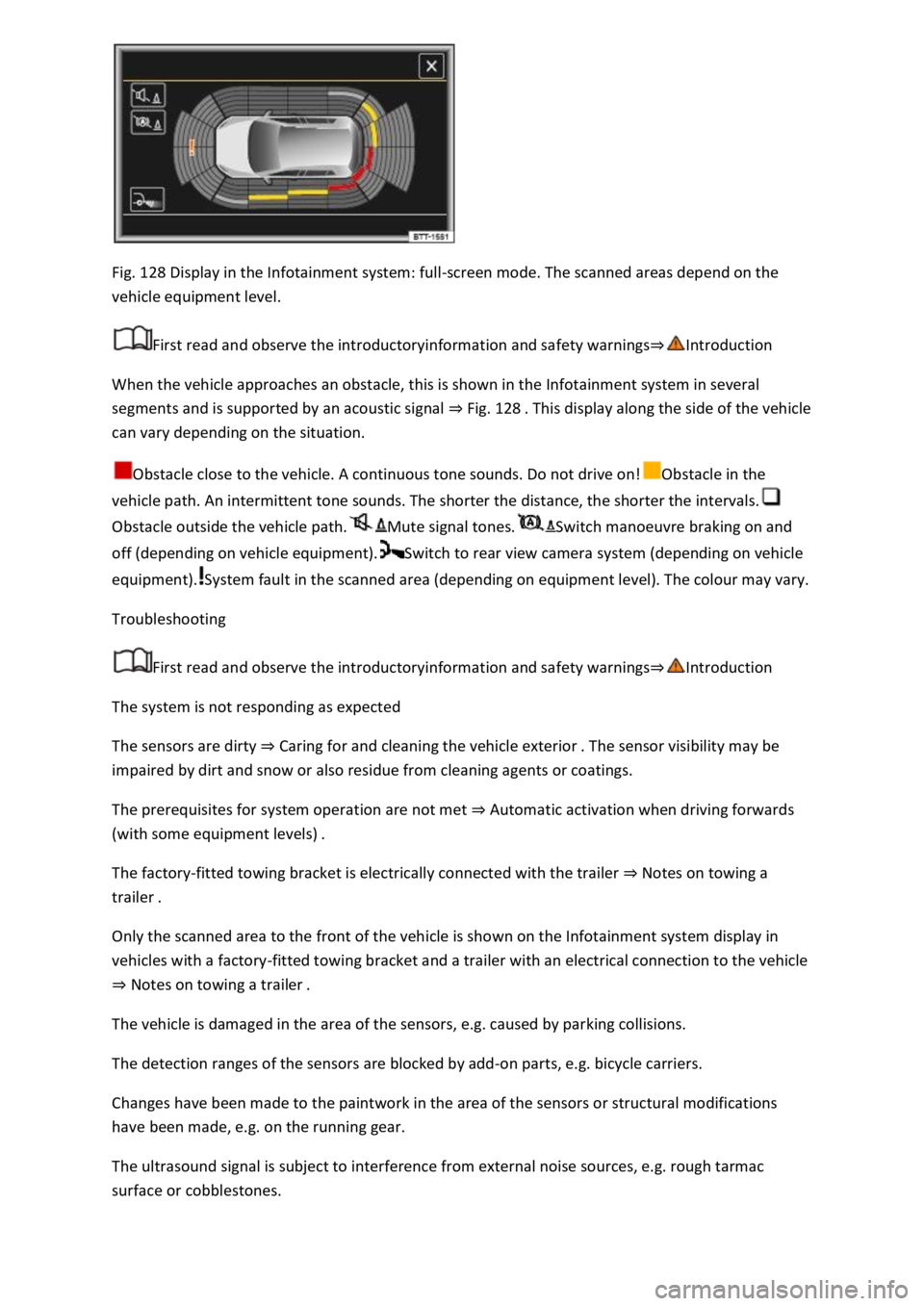
Fig. 128 Display in the Infotainment system: full-screen mode. The scanned areas depend on the
vehicle equipment level.
First read and observe the introductoryinformation and safety warnings⇒Introduction
When the vehicle approaches an obstacle, this is shown in the Infotainment system in several
segments and is supported by an acoustic signal ⇒ Fig. 128 . This display along the side of the vehicle
can vary depending on the situation.
Obstacle close to the vehicle. A continuous tone sounds. Do not drive on!Obstacle in the
vehicle path. An intermittent tone sounds. The shorter the distance, the shorter the intervals.
Obstacle outside the vehicle path.Mute signal tones.Switch manoeuvre braking on and
off (depending on vehicle equipment).Switch to rear view camera system (depending on vehicle
equipment).System fault in the scanned area (depending on equipment level). The colour may vary.
Troubleshooting
First read and observe the introductoryinformation and safety warnings⇒Introduction
The system is not responding as expected
The sensors are dirty ⇒ Caring for and cleaning the vehicle exterior . The sensor visibility may be
impaired by dirt and snow or also residue from cleaning agents or coatings.
The prerequisites for system operation are not met ⇒ Automatic activation when driving forwards
(with some equipment levels) .
The factory-fitted towing bracket is electrically connected with the trailer ⇒ Notes on towing a
trailer .
Only the scanned area to the front of the vehicle is shown on the Infotainment system display in
vehicles with a factory-fitted towing bracket and a trailer with an electrical connection to the vehicle
⇒ Notes on towing a trailer .
The vehicle is damaged in the area of the sensors, e.g. caused by parking collisions.
The detection ranges of the sensors are blocked by add-on parts, e.g. bicycle carriers.
Changes have been made to the paintwork in the area of the sensors or structural modifications
have been made, e.g. on the running gear.
The ultrasound signal is subject to interference from external noise sources, e.g. rough tarmac
surface or cobblestones.
Page 268 of 502
Switching on and off
First read and observe the introductoryinformation and safety warnings⇒Introduction
Switching on the rear view camera system
Select reverse gear.
OR: press the button.
Switching off the rear view camera system
Drive forwards at a speed of at least 10 km/h (6 mph).
Display representation
First read and observe the introductoryinformation and safety warnings⇒Introduction
The functions and displays of the rear view camera system image vary according to the equipment
level and may differ from each other.
The display of the reversing camera picture varies if the factory-fitted towing bracket is electrically
connected to the trailer ⇒ Notes on towing a trailer .
Functions and symbols of the rear view camera system
You can make settings by means of the function buttons when the rear view camera system is
switched on. Some setting options depend on the vehicle equipment.
xClose current display.Adjust display: brightness, contrast, colour.Switch to Park
Distance Control ⇒ Park Distance Control .Show Park Distance Control display.Hide Park
Distance Control display.
Orientation lines
Red line: safety distance to the rear.
Green lateral lines: extension of the vehicle.
Prerequisites
First read and observe the introductoryinformation and safety warnings⇒Introduction
The prerequisites for parking using the rear view camera system must be met.
Do not exceed a speed of approximately 15 km/h (9 mph).
Width of the parking space: vehicle width + 0.2 m.
The following conditions must be met in order to display a correct image:
The boot lid is closed.
The surrounding area has a flat surface.
Vehicle does not have a heavy load at the rear.
Page 269 of 502
Parking
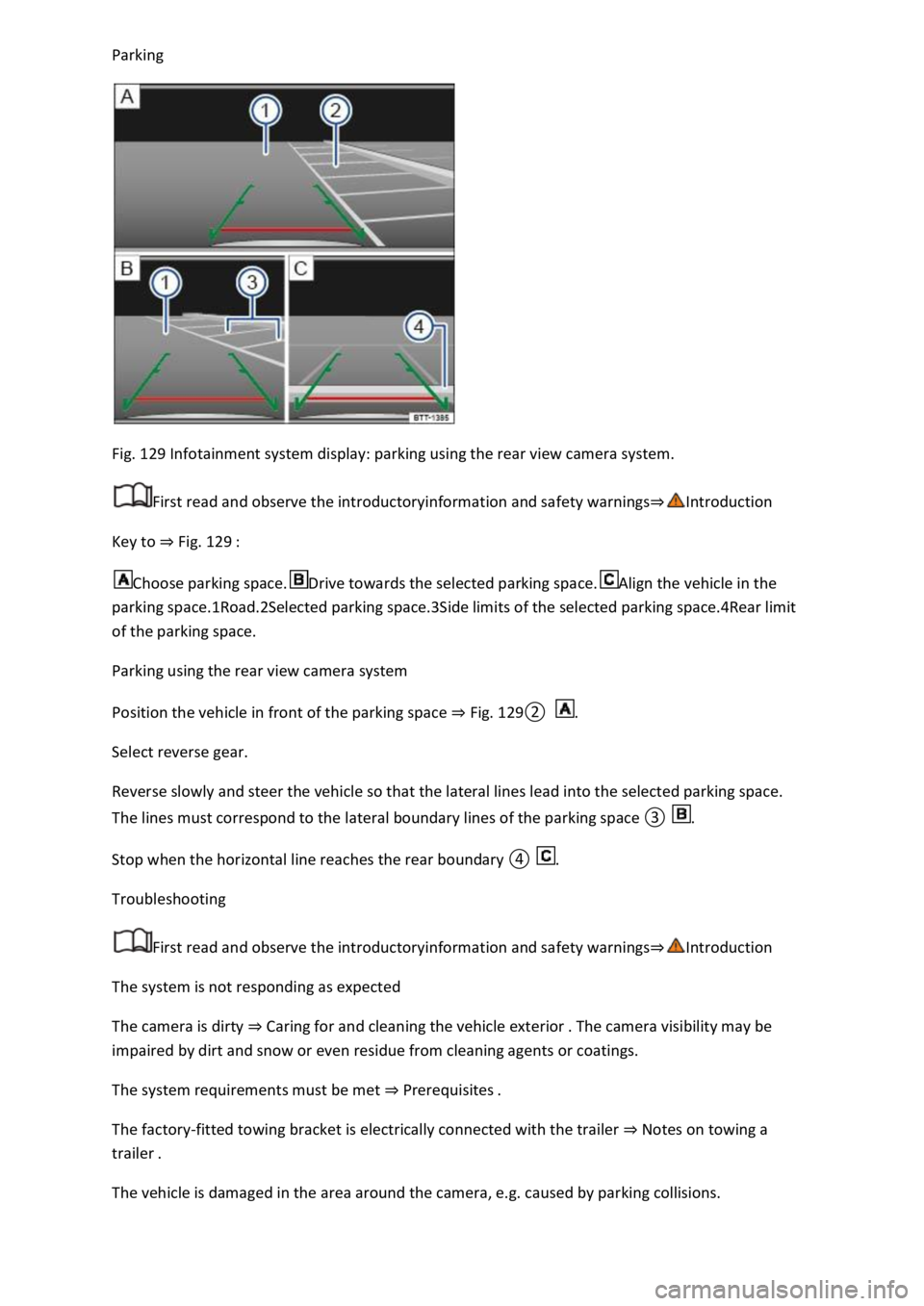
Fig. 129 Infotainment system display: parking using the rear view camera system.
First read and observe the introductoryinformation and safety warnings⇒Introduction
Key to ⇒ Fig. 129 :
Choose parking space.Drive towards the selected parking space.Align the vehicle in the
parking space.1Road.2Selected parking space.3Side limits of the selected parking space.4Rear limit
of the parking space.
Parking using the rear view camera system
Position the vehicle in front of the parking space ⇒ Fig. 129② .
Select reverse gear.
Reverse slowly and steer the vehicle so that the lateral lines lead into the selected parking space.
The lines must correspond to the lateral boundary lines of the parking space ③ .
Stop when the horizontal line reaches the rear boundary ④ .
Troubleshooting
First read and observe the introductoryinformation and safety warnings⇒Introduction
The system is not responding as expected
The camera is dirty ⇒ Caring for and cleaning the vehicle exterior . The camera visibility may be
impaired by dirt and snow or even residue from cleaning agents or coatings.
The system requirements must be met ⇒ Prerequisites .
The factory-fitted towing bracket is electrically connected with the trailer ⇒ Notes on towing a
trailer .
The vehicle is damaged in the area around the camera, e.g. caused by parking collisions.