connect VOLKSWAGEN T-ROC 2021 Owner´s Manual
[x] Cancel search | Manufacturer: VOLKSWAGEN, Model Year: 2021, Model line: T-ROC, Model: VOLKSWAGEN T-ROC 2021Pages: 502, PDF Size: 9.42 MB
Page 8 of 502

Hazard warning lights ⇒ In an emergency
Indicator lamp for the front passenger front airbag switch-off function ⇒ Airbag system
Driver assist systems ⇒ Driver assist systems
Controls for the air conditioning system, heating and fresh air system ⇒ Heating, ventilating,
cooling
Controls for the air conditioning system, heating and fresh air system ⇒ Heating, ventilating,
cooling
Key to ⇒ Fig. 9 :
Lever:
DSG® dual clutch gearbox ⇒ DSG® dual clutch gearbox
Manual gearbox ⇒ Manual gearbox: selecting a gear
Multimedia connections ⇒BookletInfotainment system,.
Cigarette lighter or 12-volt socket ⇒ Ashtray and cigarette lighter ⇒ Electrical sockets
Control for the 4MOTION Active Control ⇒ Driving profile selection and 4MOTION Active
Control
Stowage compartment with drink holder ⇒ Stowage areas
Buttons:
Electronic parking brake ⇒ Electronic parking brake
Auto Hold function ⇒ Auto Hold function
Page 28 of 502

Display of road signs
After validation and evaluation of the information from the camera, the Infotainment system and
the current vehicle data, the activated Dynamic Road Sign Display shows up to three valid road signs
⇒ Fig. 14 with the accompanying additional signs:
1st position:The road sign that currently applies for the driver is shown on the left-hand side of the
display, e.g. a speed limit of 130 km/h (80 mph) ⇒ Fig. 14 .2nd position:Road signs that do not
always apply (e.g. 100 km/h (60 mph) in wet) are shown in second place.Additional sign:if the
windscreen wiper is active while the vehicle is in motion, the now valid road sign with the additional
In wet sign, for example, will be moved left to the first position.3rd position:Further road signs that
do not always apply will be displayed in the third position, e.g. overtaking not permitted at certain
times ⇒ Fig. 14 .
Speed warning
If the Dynamic Road Sign Display detects that an applicable speed limit has been exceeded, it can
issue an acoustic warning signal and display a message on the instrument cluster display.
The speed warning can be set or completely deactivated in the vehicle settings in the Infotainment
system ⇒ Vehicle settings menu . The settings can be adjusted in increments of 5 km/h (3 mph)
within a range between 0 km/h (mph) and 15 km/h (9 mph) above the permitted maximum speed.
Trailer mode
In vehicles with a factory-fitted towing bracket and a trailer with an electrical connection to the
vehicle, the display of road signs that may apply to the vehicle when towing a trailer, e.g. applicable
speed limits and no-overtaking signs, can be activated or deactivated in the vehicle settings in the
Infotainment system ⇒ Vehicle settings menu .
In trailer mode, the speed warning function display can be adjusted to the type of trailer or to legal
requirements. The settings can be adjusted in increments of 10 km/h (5 mph) within a range
between 60 km/h (40 mph) and 130 km/h (80 mph). If a higher speed is set than is permitted for
driving with a trailer in the country in which you are currently travelling, Dynamic Road Sign Display
automatically issues a warning at the usual speed limit, e.g. at 80 km/h (50 mph) in Germany.
If the speed warning for the trailer is deactivated, Dynamic Road Sign Display issues warnings as if
the vehicle was being driven without a trailer.
Function limitations
Dynamic Road Sign Display is subject to system-related limitations. The following conditions can
restrict the function of Dynamic Road Sign Display, or prevent it from working altogether:
Poor visibility, e.g. snow, rain, fog or heavy spray.
Glare, e.g. due to oncoming traffic or sunlight.
High speeds.
Covered or dirty camera.
Road signs that are located outside of the camera's field of view.
Page 36 of 502

If the service or the inspection was not performed by a Volkswagen dealership, the display can be
reset as follows:
Vehicles with analogue instrument cluster.
Switch off the ignition.
Press and hold the button in the instrument cluster ⇒ Instrument cluster .
Switch on the ignition again.
Release the button when one of the following messages appears on the instrument cluster
display: Reset oil service? or Reset inspection?.
Press the button on the instrument cluster ⇒ Instrument cluster to confirm.
Vehicles with digital instrument cluster.
The service interval display can be reset only via the Service menu ⇒ Service menu .
Do not reset the service interval display between service intervals otherwise incorrect data will be
shown.
If the oil change service was manually reset, the service interval display then also changes to a fixed
service interval in vehicles with flexible oil change service.
The service message will disappear after a few seconds when the engine is running, or when the
button on the wiper lever or the button on the multifunction steering wheel is pressed
⇒ Operating the instrument cluster .
If the 12-volt vehicle battery was disconnected for long periods in vehicles with flexible service, the
system cannot calculate the time at which the next service is due. The information shown in the
service interval display may therefore be incorrect. In this case, please observe the maximum
permissible service intervals ⇒ Service .
Operating the instrument cluster
Introduction
This chapter contains information on the followingsubjects:
⇒ Operating using the wiper lever
⇒ Operating using the multifunction steering wheel
⇒ Button for driver assist systems
Some menu options can be accessed only when the vehicle is stationary.
Page 54 of 502

Always leave both feet in the footwell in order to maintain control over the vehicle at all times.
Additional points for the front passenger:
Move the backrest into an upright position so that your back rests fully against it.
Push the front passenger seat as far back as possible so that the airbag can provide maximum
protection if it is deployed.
Seat belts
Introduction
This chapter contains information on the followingsubjects:
⇒ Warning lamp
⇒ Frontal collisions and the laws of physics
⇒ What happens to vehicle occupants who have not fastened their seat belts
⇒ Seat belt protection
⇒ Using seat belts
⇒ Fastening and unfastening seat belts
⇒ Seat belt routing
⇒ Seat belt height adjuster
⇒ Belt retractor, belt tensioner, belt tension limiter
⇒ Service and disposal of belt tensioners
⇒ Proactive occupant protection system
Regularly check the condition of all seat belts. If the belt webbing, belt connections, belt retractor or
seat belt buckle become damaged, the seat belt in question should be replaced immediately by a
qualified workshop ⇒ . The qualified workshop must use the correct spare parts which are
compatible with the vehicle, equipment level and model year. Volkswagen recommends using a
Volkswagen dealership for this purpose.
WARNING
Incorrectly fastened or unfastened seat belts increase the risk of severe or fatal injuries. Seat belts
will only offer the optimum level of protection when they are fastened and used properly.
Seat belts are the most effective means of reducing the risk of serious and fatal injuries in the event
of an accident. Seat belts must always be fastened properly when the vehicle is in motion to protect
the driver and all vehicle occupants.
Page 81 of 502

There is a risk of injury if a front-facing child seat is on the front passenger seat.
Move the front passenger seat as far back as possible and adjust to its highest position to create the
largest possible distance between the child seat and the front passenger front airbag.
Move the backrest to the upright position.
Adjust the seat belt height adjuster to the highest position.
Use only child seats that have been approved by the child seat manufacturer for use on a front
passenger seat with front and side airbags.
WARNING
To help avoid injuries caused by inflation of a curtain airbag or side airbag:
Ensure that no children are seated within the airbag deployment zones ⇒ Airbag system .
Do not place any objects in the side airbag deployment zones.
Securing systems
First read and observe the introductoryinformation and safety warnings⇒Introduction
Different countries use different securing systems for safely fitting child seats in the vehicle.
Overview of securing systems
ISOFIX: ISOFIX is a standardised securing system for fitting child seats in the vehicle quickly and
safely. The ISOFIX attachment system creates a rigid connection between the child seat and the
vehicle body.
Compatible child seats have two rigid attachment arms that engage in ISOFIX attachment points at
the bottom of the backrest (on the outer rear seats). The ISOFIX securing system as described here is
specific to Europe ⇒ Securing a child seat with ISOFIX . An upper strap (top tether) and/or support
foot may sometimes have to be used in addition to the ISOFIX anchor points described above.
Three-point automatic seat belt. It is preferable to secure child seats using the ISOFIX system, if
available, rather than with a three-point automatic seat belt ⇒ Securing child seats with a seat belt .
Additional securing points:
Recommended child seat securing systems
Volkswagen recommends that child seats are secured as follows:
Infant carrier or rear-facing child seat: ISOFIX and support foot.
Front-facing child seat: ISOFIX and top tether and possibly also support foot.
WARNING
Page 87 of 502
Depending on the vehicle equipment, the high-visibility waistcoat may be located in a stowage
compartment in the front door trim or in the stowage compartment on the front passenger side
⇒ Driver door , ⇒ Front passenger side .
The high-visibility waistcoat must comply with legal requirements.
Fire extinguisher
Depending on the equipment, a fire extinguisher may be located in a holder in the footwell under
the front passenger seat.
The fire extinguisher must meet legal requirements, be ready for use at all times and be checked on
a regular basis (see inspection seal on the fire extinguisher).
WARNING
In the event of a sudden driving or braking manoeuvre or accident, loose objects could be flung
though the vehicle and cause severe injuries.
Always secure the first-aid kit, warning triangle and fire extinguisher safely in the holders in the
vehicle.
Stow the high-visibility waistcoat in the stowage compartments so that it can be easily accessed.
Information call, breakdown call and emergency call service
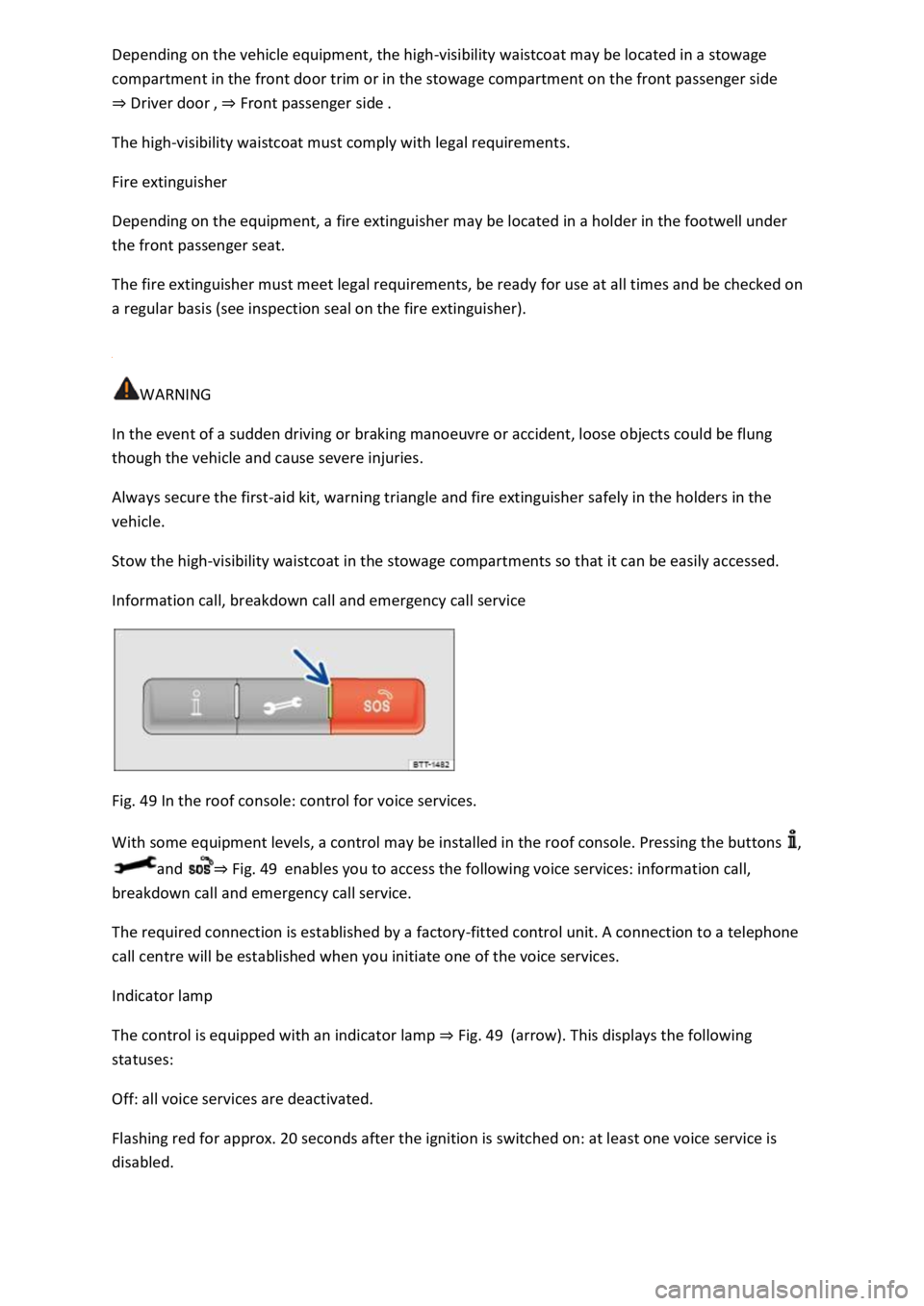
Fig. 49 In the roof console: control for voice services.
With some equipment levels, a control may be installed in the roof console. Pressing the buttons ,
and ⇒ Fig. 49 enables you to access the following voice services: information call,
breakdown call and emergency call service.
The required connection is established by a factory-fitted control unit. A connection to a telephone
call centre will be established when you initiate one of the voice services.
Indicator lamp
The control is equipped with an indicator lamp ⇒ Fig. 49 (arrow). This displays the following
statuses:
Off: all voice services are deactivated.
Flashing red for approx. 20 seconds after the ignition is switched on: at least one voice service is
disabled.
Page 88 of 502

Lit up red: system error. Voice service availability is restricted. Volkswagen recommends consulting a
specialist workshop.
Lit up green: voice services are available. System is OK.
Flashing green: active connection to a voice service.
Information call
The information call enables you to call the Volkswagen AG hotline.
The information call function is available only in some sales regions.
The telephone call centre communicates in the language registered for the vehicle in Car-Net.
Breakdown call
The breakdown call allows you to seek professional assistance should your vehicle break down.
Some vehicle data, e.g. the current location, are transmitted parallel to the voice call.
The telephone call centre communicates in the language registered for the vehicle in Car-Net.
Emergency call service
If an emergency call is placed manually, or automatically after an accident where an airbag was
triggered, data relevant for the emergency call, e.g. the current vehicle location, will be transmitted
automatically ⇒ Customer information .
The telephone call centre communicates in the language set up in the vehicle's Infotainment system.
English is used if this language is not available at the location of the emergency.
Back-up to 112 emergency number
In some cases, the emergency call service may be restricted or unavailable so the general emergency
call number 112 will be used to conduct an emergency call. In this case, only a voice-based
connection is established. No data will be transmitted, e.g. regarding the vehicle or its location.
The following circumstances may restrict access to the emergency call service and lead to the call
being forwarded to the 112 emergency number:
Your current emergency call location is in an area with no or insufficient mobile communications and
GPS reception. This can also include tunnels, streets with tall buildings, garages, underpasses,
mountains and valleys.
You are in an area with sufficient mobile communications and GPS reception but the
telecommunications provider's mobile network is not available.
The emergency call service is prohibited by law in some countries.
There is no valid licence for using the emergency call service.
The components in the vehicle required for the emergency call service are damaged or do not have a
sufficient power supply.
Page 103 of 502

Please note that the sensors in the door handles can be activated by a powerful jet of water or
steam if a valid vehicle key is simultaneously within the operating range. If at least one window is
open and sensor surfaces on the door handles are continuously activated, all windows will close. All
windows could open if the jet of water or steam is moved away from the door handle sensors briefly
and then moved back again ⇒ .
It may not be possible to lock or unlock the vehicle using the Keyless Access if the 12-volt vehicle
battery or button cell in the vehicle key is weak or discharged. The vehicle can be locked or unlocked
manually ⇒ .
If there is no valid vehicle key in the vehicle or if it is not detected, a corresponding message will be
shown on the instrument cluster display. This may occur if the vehicle key is exposed to interference
from another radio signal or is covered by another item, e.g. an aluminium case ⇒ Starting and
stopping the engine .
Anti-theft alarm
Depending on the vehicle equipment level, the vehicle may have an anti-theft alarm.
The anti-theft alarm is activated automatically when the vehicle is locked using the vehicle key.
The anti-theft alarm outputs acoustic and visual warning signals for up to five minutes.
When does the system trigger an alarm?
If a door is opened.
If the bonnet is opened.
If the boot lid is opened.
If the ignition is switched on with a valid vehicle key. (The alarm may sound briefly.)
If the 12-volt vehicle battery is disconnected.
If there is movement inside the vehicle (in vehicles with interior monitoring) ⇒ Interior monitoring
system and anti-tow alarm .
If the vehicle is lifted or towed (vehicles with anti-tow alarm) ⇒ Interior monitoring system and anti-
tow alarm .
If the vehicle is transported on a car ferry or by rail (vehicles with anti-tow alarm or interior
monitoring) ⇒ Interior monitoring system and anti-tow alarm .
If a trailer that is connected to the anti-theft alarm system is removed ⇒ Trailer towing .
Switching off the alarm
Unlock the vehicle using the unlocking button on the vehicle key.
Page 110 of 502
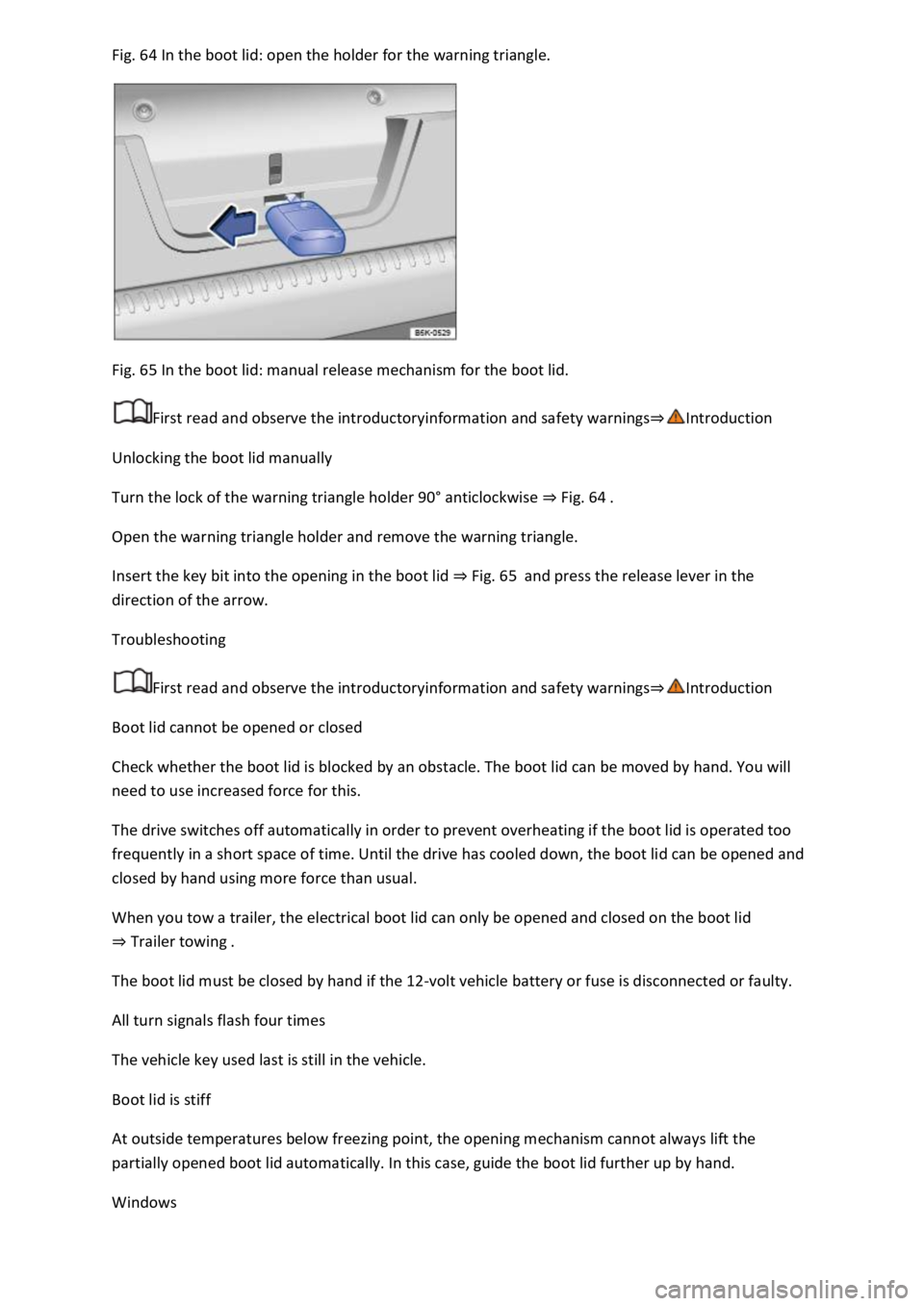
Fig. 64 In the boot lid: open the holder for the warning triangle.
Fig. 65 In the boot lid: manual release mechanism for the boot lid.
First read and observe the introductoryinformation and safety warnings⇒Introduction
Unlocking the boot lid manually
Turn the lock of the warning triangle holder 90° anticlockwise ⇒ Fig. 64 .
Open the warning triangle holder and remove the warning triangle.
Insert the key bit into the opening in the boot lid ⇒ Fig. 65 and press the release lever in the
direction of the arrow.
Troubleshooting
First read and observe the introductoryinformation and safety warnings⇒Introduction
Boot lid cannot be opened or closed
Check whether the boot lid is blocked by an obstacle. The boot lid can be moved by hand. You will
need to use increased force for this.
The drive switches off automatically in order to prevent overheating if the boot lid is operated too
frequently in a short space of time. Until the drive has cooled down, the boot lid can be opened and
closed by hand using more force than usual.
When you tow a trailer, the electrical boot lid can only be opened and closed on the boot lid
⇒ Trailer towing .
The boot lid must be closed by hand if the 12-volt vehicle battery or fuse is disconnected or faulty.
All turn signals flash four times
The vehicle key used last is still in the vehicle.
Boot lid is stiff
At outside temperatures below freezing point, the opening mechanism cannot always lift the
partially opened boot lid automatically. In this case, guide the boot lid further up by hand.
Windows
Page 113 of 502
Ensure that nobody obstructs the path of the window, especially if a window is being closed when
the roll-back function is not active.
The roll-back function does not prevent fingers or other body parts from being pressed against the
window frame and being injured.
The roll-back function is also activated if the windows are closed using the vehicle key for
convenience closing.
Troubleshooting
One-touch opening and closing does not work
One-touch opening and closing is deactivated if the 12-volt vehicle battery has been disconnected or
discharged while the windows were not fully closed. The function must then be reset:
Switch on the ignition.
Close all windows and doors.
Pull up the button for the respective window and hold it in this position for several seconds.
Release the button, then pull it up again and hold it in this position. The one-touch function is now
ready for operation again.
The one-touch function can be restored for individual windows or for several windows at the same
time.
Closing windows without roll-back function
Attempt to close the window again within a few seconds by holding the button. The roll-back
function will be deactivated for a small part of the path of the closing window.
If the closing procedure takes longer than several seconds, the roll-back function will be reactivated.
If it is still stiff or obstructed, the window will stop and open again automatically.
Please go to a qualified workshop if the window still cannot be closed.
Glass roof
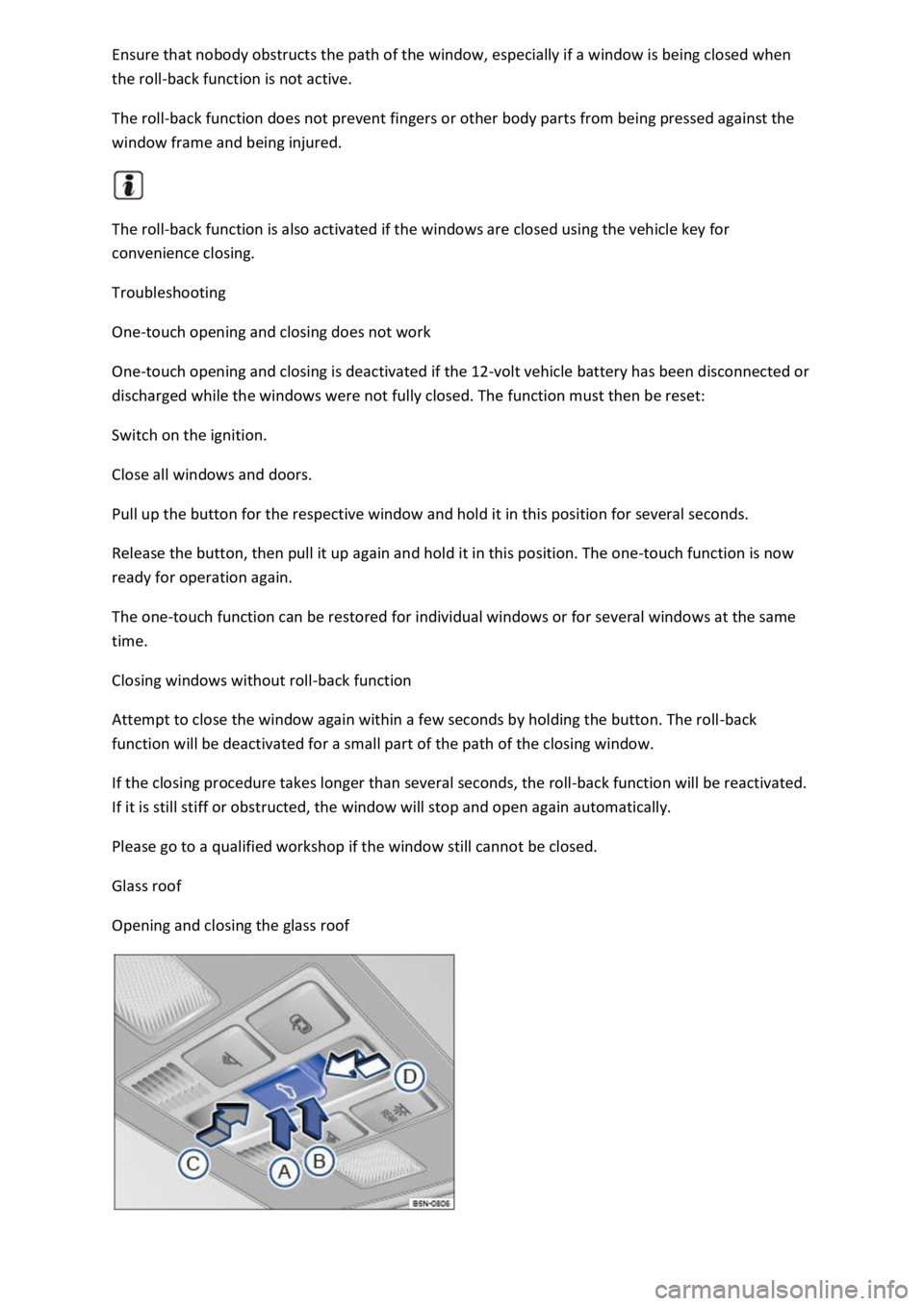
Opening and closing the glass roof