My Car VOLVO S60 2018 Owner´s Manual
[x] Cancel search | Manufacturer: VOLVO, Model Year: 2018, Model line: S60, Model: VOLVO S60 2018Pages: 396, PDF Size: 9.4 MB
Page 308 of 396
WHEELS AND TIRES
306
Snow tires/studded tires5
Owners who live in or regularly commute through areas with sustained periods of snow oricy driving conditions are strongly advised to fitsuitable winter tires to help retain the highestdegree of traction.
Tires for winter use:
• It is important to install winter tires on all four wheels to help retain traction during corner-ing, braking, and accelerating. Failure to doso could reduce traction to an unsafe level oradversely affect handling.
• Do not mix tires of different design as thiscould also negatively affect overall tire roadgrip.
• Winter tires wear more quickly on dry roadsin warm weather. They should be removedwhen the winter driving season has ended.
• Studded tires should be run-in 300 – 600 miles (500 – 1000 km) during whichthe vehicle should be driven as smoothly aspossible to give the studs the opportunity toseat properly in the tires. The tires shouldhave the same rotational direction through-out their entire lifetime.
NOTE
Please consult state or provincial regulations restricting the use of studded winter tiresbefore installing such tires.
Tire pressure monitoring - overview
Volvo provides two different systems to monitor tire pressure: Tire Pressure Monitoring System(TPMS) or Tire Monitor.
Determining which tire monitoring system is in your vehicle
To see which system is installed in your vehicle, press the MY CAR button on the center console.
Go to
SettingsCar settings.
• If your vehicle has a menu called
Tire
monitoring, see Tire Monitor - introduction
(p. 307).
• If your vehicle has a menu called
Tire
pressure, see Tire Pressure Monitoring Sys-
tem (TPMS) – general information (p. 310).
Introduction
Each tire, including the spare 6
(if provided),
should be checked monthly when cold and infla- ted to the inflation pressure recommended by thevehicle manufacturer on the vehicle placard ortire inflation pressure label. (If your vehicle hastires of a different size than the size indicated onthe vehicle placard or tire inflation pressure label,you should determine the proper tire inflationpressure for those tires.) As an added safety feature, your vehicle has been equipped with a tire pressure monitoring
5 Where permitted
6 Available as an accessory
Page 310 of 396
||
WHEELS AND TIRES
308
NOTE
The system indicates low tire pressure but does not replace normal tire maintenance. Forinformation on correct tire pressure, pleaserefer to the tire inflation decal on the driver'sdoor opening or consult your Volvo retailer.
Related information
•Tire pressure monitoring - overview (p. 306)
• Calibrating Tire Monitor (p. 308)
Calibrating Tire Monitor In order for Tire Monitor to work correctly, tire pressure reference values must be set (the sys-tem must be calibrated). This must be doneeach time wheels or tire pressures are changed.
Calibration1. Switch off the engine.
2. Inflate the tires to the desired pressure (con-
sult tire pressure placard located on the driv- er's side B-pillar (the structural member atthe side of the vehicle).
3. Start the engine but keep the vehicle at a standstill.
4. Press the MY CAR button on the center
console control panel and press OK/MENU.
5. Select
Tire monitor.
6. Select
Start calibration and press OK/
MENU .
7. Press OK/MENU again after all of the tires
have been checked and reinflated. 8. Drive away.
> The calibration process will begin whenthe vehicle reaches a speed of approxi- mately 22 mph (35 km/h). Calibration willbe interrupted if the engine is switchedoff but will resume automatically in thebackground when the vehicle is drivenagain. The system will not give any confir-mation when calibration is finished.
When driving with heavy loads or at sustainedhighway speeds, the tire pressure should beadjusted to the recommended inflation pressuresaccording to the tire inflation pressure placardlocated on the driver's side B-pillar (the structuralmember at the side of the vehicle, at the rear ofthe driver's door opening) or to the tire inflationpressure table in the owner's information. After adjusting inflation pressure, repeat steps 1-5 above.
NOTE
Always remember to calibrate Tire Monitor when the wheels have been changed or thetire pressure has been corrected according totire pressure placard or tire pressure table. Ifcorrect reference values have not been set,the system cannot issue low tire pressurealerts correctly.
Page 311 of 396
WHEELS AND TIRES
}}
309
Tire Monitor status informationThe current status of the system and the tires is indicated by color-coded graphics.
This status can be displayed by pressing the MY
CAR button on the center console and going to
SettingsCar settingsTire monitoring.
The following color-coded graphics indicate:
• All green
: the system is operational and all
tire pressures are at or above the recom- mended levels.
• One yellow wheel
: the tire indicated is
under-inflated.
• All wheels yellow
: two or more tires are
under-inflated
• All wheels gray
: the system is currently
unavailable. It might be necessary to drive ata speed of at least 20 mph (30 km/h) forseveral minutes for the system to becomeoperational.
• All wheels gray in combination with the message
Tire press. syst Service
required and the telltale in the instru-
ment panel (
) is illuminated : the sys-
tem is not functioning correctly. Have it checked by a trained and qualified Volvoservice technician.
• All wheels gray in combination with the message
Tire press. syst currently
unavailable and the telltale in the instru- ment panel (
) is illuminated
: the sys-
tem is temporarily unavailable. It should become operational again shortly.
Related information
• Tire Monitor – messages (p. 309)
Tire Monitor – messages
When low tire pressure has been detected, a message will be displayed and the tire pressure warning telltale in the instrument panel (
)
will illuminate.
MessagesIf the telltale illuminates, one of the following message will also be displayed: •
Tire pressure low/Check, adjust and
calibrate
•Tire pressure system/Service required
•Tire pressure system/Currently
unavailable
Erasing warning messagesTo erase a low tire pressure message and turn off the telltale:
1. Use a tire pressure gauge to check the infla- tion pressure of all four tires.
2. Re-inflate the tires to the correct pressure (consult the tire pressure decal on the driv- er's door opening.
3. Recalibrate Tire Monitor, see Calibrating Tire Monitor (p. 308).
Page 314 of 396
WHEELS AND TIRES
* Option/accessory.
312
Tire Pressure Monitoring System (TPMS) – recalibrating
The Tire Pressure Monitoring System (TPMS) uses a reference value in order to determine iftire pressure is too low.
Recalibrating TPMS (Canadian models
only) *
In certain cases, it may be necessary to recali- brate TPMS to conform to Volvo's recommendedtire inflation pressures (see the tire inflation decalon the driver's door opening), for example, ifhigher inflation pressure is necessary whentransporting heavy loads. Always inflate the tires to Volvo's recommended tire pressure before recalibrating TPMS. Recalibrating TPMS is done in the vehicle's menu system. To do so:
1. Switch off the engine.
2. Inflate the tires to the desired pressure and
put the ignition in mode I or II (see Ignition
modes (p. 74) for additional information).
3. Press the MY CAR key in the center console
control panel and select
SettingsCar
settings
Tire pressure.
4. Press OK/MENU , select
Calibrate tire
pressure and press OK/MENU again. 5. Drive the vehicle at a speed above 20 mph
(30 km/h) continuously for at least 10 minutes.
> Calibration is done automatically once ini-tiated by the driver and the system does not provide confirmation when calibrationis completed.
After adjusting inflation pressure, repeat steps1-5 above.
Related information
• Tire Pressure Monitoring System (TPMS) –general information (p. 310)
• Tire Pressure Monitoring System (TPMS) –messages (p. 313)
• Tire Pressure Monitoring System (TPMS) –activating/deactivating (p. 312)
• Tire Pressure Monitoring System (TPMS) –changing wheels (p. 311)
• My Car – introduction (p. 71)
Tire Pressure Monitoring System (TPMS) – activating/deactivating
Activating/deactivating TPMS
(Canadian models only)
1. Switch off the engine. 2. Put the ignition in mode I or II (see Ignition
modes (p. 74) for additional information).
3. Press the MY CAR key in the center console
control panel and select
SettingsCar
settings
Tire pressure
4. Select Tire monitoring and press OK/
MENU to turn the system on or off.
Related information
•Tire Pressure Monitoring System (TPMS) – general information (p. 310)
Page 315 of 396
WHEELS AND TIRES
313
Tire Pressure Monitoring System (TPMS) – messages
Erasing warning messagesWhen a low tire pressure warning message has been displayed and the tire pressure warning light in the instrument panell (
) has come
on:
1. Use a tire pressure gauge to check the infla- tion pressure of all four tires.
2. Re-inflate the tire(s) to the correct pressure (consult the tire pressure decal on the driv- er's door opening).
3. In certain cases, it may be necessary to drive the vehicle for several minutes at a speed of20 mph (30 km/h) or faster. This will erasethe warning text and the telltale will go out.
NOTE
• The tire monitoring systems use a tem- perature compensated pressure value.This pressure value is dependent on tiretemperature and ambient temperature,which can differ from the recommendedcold tire pressure in the tire inflation tableand on the tire pressure placard locatedon the driver's side B-pillar (the structuralmember at the side of the vehicle, at therear of the driver's door opening). Thismeans that it may sometimes be neces-sary to inflate them slightly above therecommended cold pressure value(approx. 3-4 psi or 0.2-0.3 bar) in orderto reset a low tire pressure warning.
• To help avoid incorrect tire inflation pres-sure, if possible only inflate the tireswhen they are cold. The tires are consid-ered to be cold when they have the sametemperature as the surrounding (ambi-ent) air. This temperature is normallyreached after the vehicle has beenparked for at least 3 hours. After driving adistance of approximately 1 mile (1.6 km),the tires are considered to be hot.
CAUTION
•
After inflating the tires, always reinstall the valve cap to help avoid damage to thevalve from dirt, gravel, etc.
• Use plastic valve caps only. Metal capscould corrode and become difficult toremove.
WARNING
•Incorrect inflation pressure could lead to tire failure, resulting in a loss of control ofthe vehicle.
• Tire monitoring systems cannot indicatesudden tire damage caused by externalfactors (e.g., a blowout) in advance.
Related information
•Tire Pressure Monitoring System (TPMS) –general information (p. 310)
• Tire Pressure Monitoring System (TPMS) –recalibrating (p. 312)
• Tire Pressure Monitoring System (TPMS) –activating/deactivating (p. 312)
• Tire Pressure Monitoring System (TPMS) –changing wheels (p. 311)
• Tire pressure monitoring - overview (p. 306)
Page 317 of 396
WHEELS AND TIRES
}}
* Option/accessory.315
Tire sealing system–temporarily repairing a flat tire
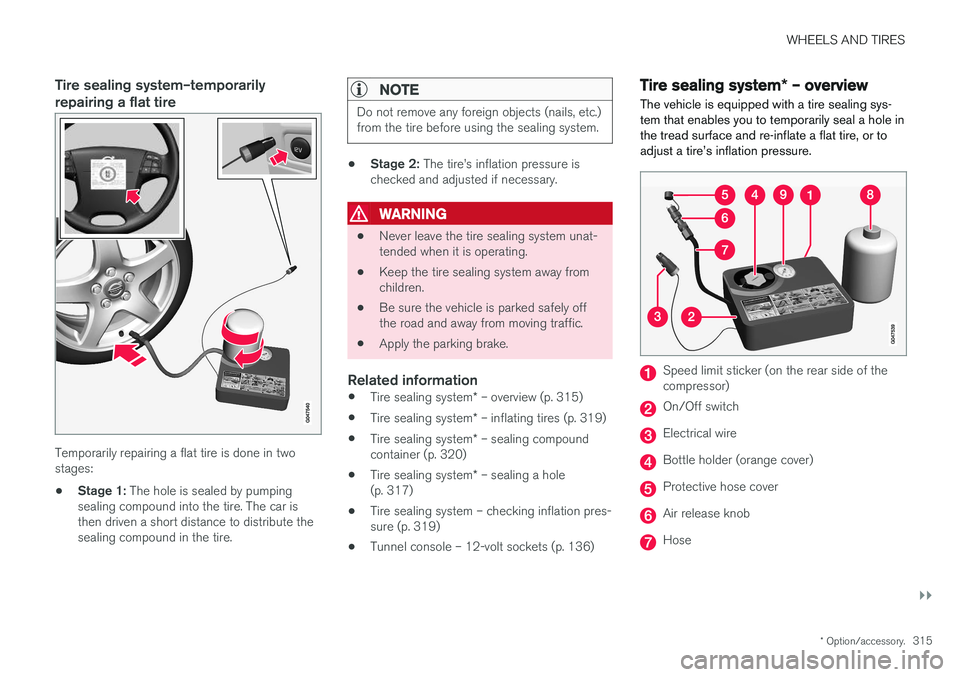
Temporarily repairing a flat tire is done in two stages:
• Stage 1:
The hole is sealed by pumping
sealing compound into the tire. The car isthen driven a short distance to distribute thesealing compound in the tire.
NOTE
Do not remove any foreign objects (nails, etc.) from the tire before using the sealing system.
• Stage 2:
The tire
Page 325 of 396
MAINTENANCE AND SERVICING
323
Maintenance – owner maintenance
Periodic maintenance requirements and intervals are described in your vehicle's Warranty andService Records Information booklet. The following points can be carried out between the normally scheduled maintenance services.
Owner maintenance
Each time the car is refueled:
• Check the engine oil level.
• Clean the windshield, windshield wipers, headlights, and taillights.
Monthly:
• Check cold tire pressure in all tires. Inspect the tires for wear.
• Check that engine coolant and other fluidlevels are between the indicated "min" and"max" markings.
• Clean interior glass surfaces with a glasscleaner and soft paper towels.
• Wipe driver information displays with a softcloth.
• Visually inspect battery terminals for corro-sion. Corrosion may indicate a loose terminalconnector, or a battery near the end of itsuseful service life. Consult your Volvo retailerfor additional information.
As needed:
Wash the car, including the undercarriage, to reduce wear that can be caused by a buildup of dirt, and corrosion that can be caused by salt res-idues. Clean leaves and twigs from air intake vents at the base of the windshield, and from other placeswhere they may collect.
NOTE
Complete service information for qualified technicians is available online for purchase orsubscription at www.volvotechinfo.com.
Related information
•
Maintenance – opening/closing hood (p. 327)
• Engine compartment – overview (p. 328)
• Engine compartment – coolant (p. 332)
• Engine compartment – engine oil (p. 329)
• Engine compartment – power steering fluid(p. 333)
• Engine compartment – washer fluid (p. 344)
• Cleaning the interior (p. 361)
• Washing the vehicle (p. 359)
• Tire inflation – checking pressure (p. 299)
• Tires – tread wear indicator (p. 292)
Page 327 of 396
MAINTENANCE AND SERVICING
}}
* Option/accessory.325
Onboard Diagnostic System OBD II is part of your vehicle's computerized engine management system. It stores diagnosticinformation about your vehicle's emission con-trols. It can light the Check Engine light (MIL) if itdetects an emission control "fault." A "fault" is acomponent or system that is not performingwithin an expected range. A fault may be perma-nent or temporary. OBD II will store a messageabout any fault.
Emission inspection readiness
How do states use OBD II for emission inspections?
Many states connect a computer directly to a vehicle's OBD II system. The inspector can thenread "faults." In some states, this type of inspec-tion has replaced the tailpipe emission test.
How can my vehicle fail OBD II emission inspection?
Your vehicle can fail OBD II emission inspection for any of the following reasons.
• If your Check Engine (MIL) light is lit, yourvehicle may fail inspection.
• If your vehicle's Check Engine light was lit,but went out without any action on your part,OBD II will still have a recorded fault. Yourvehicle may pass or fail, depending on theinspection practices in your area.
• If you had recent service that required dis-connecting the battery, OBD II diagnostic information may be incomplete and "notready" for inspection. A vehicle that is notready may fail inspection.
How can I prepare for my next OBD II
emission inspection?
• If your Check Engine (MIL) light is lit – or was lit but went out without service, have yourvehicle diagnosed and, if necessary, servicedby a qualified Volvo technician.
• If you recently had service for a lit CheckEngine light, or if you had service thatrequired disconnecting the battery, a periodof driving is necessary to bring the OBD IIsystem to "ready" for inspection. Two half-hour trips of mixed stop-and-go/highwaydriving are typically needed to allow OBD II toreach readiness. Your Volvo retailer can pro-vide you with more information on planning atrip.
• Maintain your vehicle in accordance with yourvehicle's maintenance schedule.
Booking service and repairs
Connected Service Booking (CSB) makes set- ting up a time for service, maintenance and/orrepairs directly from the vehicle quick and con-venient.
Prerequisites
• The owner (primary driver) must have a valid Volvo ID. See Volvo ID (p. 20) for additionalinformation.
• The vehicle must be connected to the Inter- net using a paired Bluetooth ®
cell phone.
See your Sensus Infotainment supplement for information on pairing a cell phone. On models equipped with Volvo On Call (VOC) *,
you can connect to the Internet using your separate VOC data plan. Refer to your sepa-rate Volvo On Call manual.
• By default, the retailer where you purchasedyour vehicle will be your preferred (primary)retailer/Volvo authorized workshop who willperform service and repairs on your vehicle.To change the preferred retailer, go to DealerLocator at volvocars.com and select aretailer, click on Service Scheduler and bookan appointment at the new preferred retailer.
• In order to be guided through the on-screen steps, the menu alternative
Display
notifications must be activated.
Page 328 of 396
||
MAINTENANCE AND SERVICING
326
CSB menu accessOnce the prerequisites have been established, all CSB-related menus can be accessed in MY CAR
by pressing OK/MENU and then selecting
Scheduled maintenance & repair.
Booking information and data from the
vehicle
If you request an appointment from your vehicle, with your consent, booking information and data about your vehicle 1
will be transmitted to your
preferred retailer.
Using the serviceOnce the prerequisites have been established, all CSB-related menus can be accessed in MY CAR
by pressing OK/MENU and then selecting
Maintenance & repair.
If the time for the next regularly scheduled serv- ice is approaching, if the vehicle requires certaintypes of repairs or if a system needs to bechecked, a message will be displayed. You willthen by guided through the steps required tobook service or repairs.
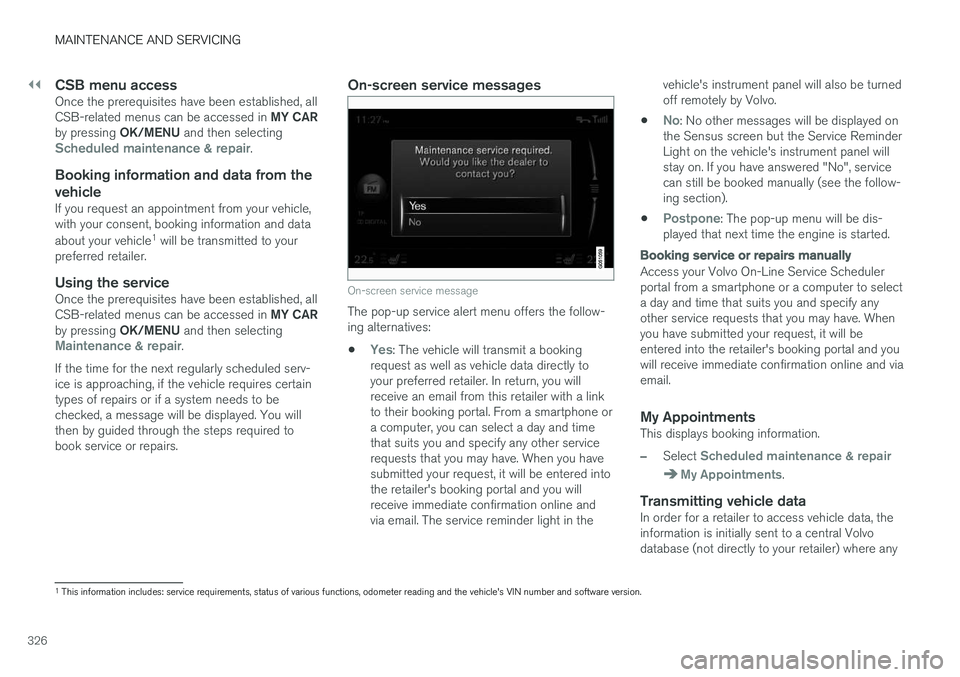
On-screen service messages
On-screen service message
The pop-up service alert menu offers the follow- ing alternatives:
•
Yes: The vehicle will transmit a booking
request as well as vehicle data directly to your preferred retailer. In return, you willreceive an email from this retailer with a linkto their booking portal. From a smartphone ora computer, you can select a day and timethat suits you and specify any other servicerequests that you may have. When you havesubmitted your request, it will be entered intothe retailer's booking portal and you willreceive immediate confirmation online andvia email. The service reminder light in the vehicle's instrument panel will also be turnedoff remotely by Volvo.
•
No: No other messages will be displayed on
the Sensus screen but the Service Reminder Light on the vehicle's instrument panel willstay on. If you have answered "No", servicecan still be booked manually (see the follow-ing section).
•
Postpone: The pop-up menu will be dis-
played that next time the engine is started.
Booking service or repairs manually
Access your Volvo On-Line Service Scheduler portal from a smartphone or a computer to selecta day and time that suits you and specify anyother service requests that you may have. Whenyou have submitted your request, it will beentered into the retailer's booking portal and youwill receive immediate confirmation online and viaemail.
My AppointmentsThis displays booking information.
–Select Scheduled maintenance & repair
My Appointments.
Transmitting vehicle dataIn order for a retailer to access vehicle data, the information is initially sent to a central Volvodatabase (not directly to your retailer) where any
1 This information includes: service requirements, status of various functions, odometer reading and the vehicle's VIN number and software version.
Page 331 of 396
MAINTENANCE AND SERVICING
}}
329
Related information
•Maintenance – opening/closing hood (p. 327)
• Maintenance – owner maintenance (p. 323)
Engine compartment – engine oil
The correct oil must be used for the stated oil change (service) intervals to apply. The oil level on 4-cylinder engines is checked electronically and is checked using a dipstick on5- and 6-cylinder engines.
Checking the engine oil (5- and 6-
cylinder engines)
The oil level should be checked at regular inter- vals, particularly during the period up to the firstscheduled maintenance service.
• See Oil specifications (p. 374) for oil specifi-cations.
• Also, refer to the Warranty and ServiceRecords information booklet for informationon oil change intervals and oil specifications.
CAUTION
•
Not checking the oil level regularly can result in serious engine damage if the oillevel becomes too low.
• Oil that is lower than the specified qualitycan damage the engine.
• Volvo does not recommend the use of oiladditives.
• Always add oil of the same type and vis-cosity as already used.
• Never fill oil above the
MAX mark. This
could cause an increase in oil consump-tion.
• Oil changes should be carried out by atrained and qualified Volvo service techni-cian.