Air VOLVO S90 2017 Owner´s Manual
[x] Cancel search | Manufacturer: VOLVO, Model Year: 2017, Model line: S90, Model: VOLVO S90 2017Pages: 548, PDF Size: 11.42 MB
Page 137 of 548
INSTRUMENTS AND CONTROLS
}}
135
CLAIM, DAMAGES OR OTHER LIABILITY, WHETHER IN AN ACTION OF CONTRACT,TORT OR OTHERWISE, ARISING FROM, OUTOF OR IN CONNECTION WITH THE SOFTWAREOR THE USE OR OTHER DEALINGS IN THESOFTWARE. Except as contained in this notice, the name of Silicon Graphics, Inc. shall not be used inadvertising or otherwise to promote the sale, useor other dealings in this Software without priorwritten authorization from Silicon Graphics, Inc.
Related information
•
Instrument panel (p. 124)
Warning symbols in the instrument panel
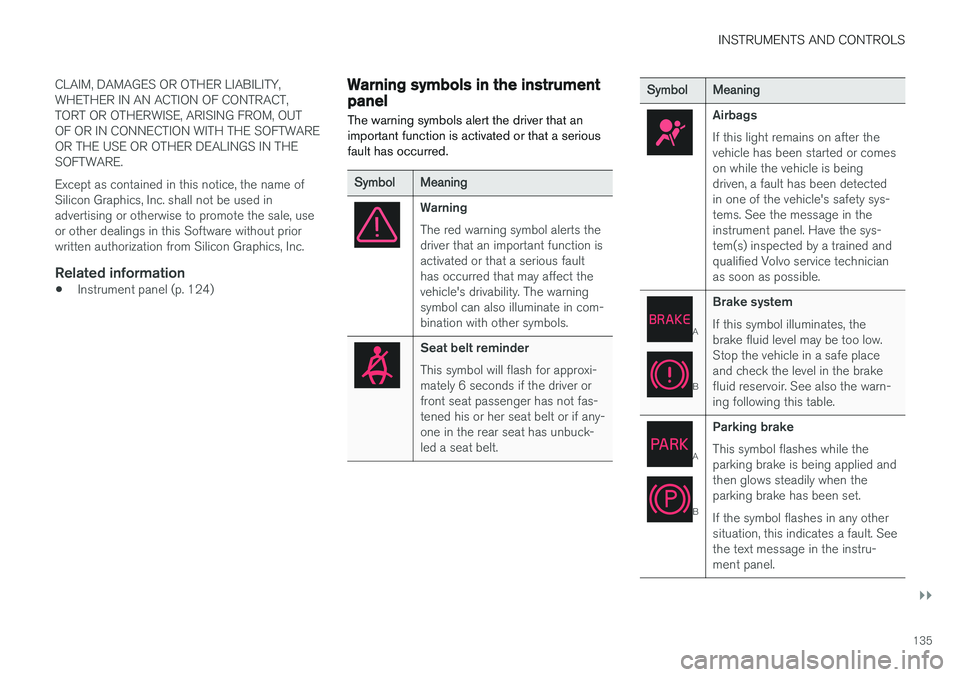
The warning symbols alert the driver that an important function is activated or that a seriousfault has occurred.
Symbol Meaning
Warning The red warning symbol alerts the driver that an important function isactivated or that a serious faulthas occurred that may affect thevehicle's drivability. The warningsymbol can also illuminate in com-bination with other symbols.
Seat belt reminder This symbol will flash for approxi- mately 6 seconds if the driver orfront seat passenger has not fas-tened his or her seat belt or if any-one in the rear seat has unbuck-led a seat belt.
Symbol Meaning
Airbags If this light remains on after the vehicle has been started or comeson while the vehicle is beingdriven, a fault has been detectedin one of the vehicle's safety sys-tems. See the message in theinstrument panel. Have the sys-tem(s) inspected by a trained andqualified Volvo service technicianas soon as possible.
A
BBrake system If this symbol illuminates, the brake fluid level may be too low.Stop the vehicle in a safe placeand check the level in the brakefluid reservoir. See also the warn-ing following this table.
A
BParking brake This symbol flashes while the parking brake is being applied andthen glows steadily when theparking brake has been set. If the symbol flashes in any other situation, this indicates a fault. Seethe text message in the instru-ment panel.
Page 156 of 548
INSTRUMENTS AND CONTROLS
154
Handling messages stored from the instrument panel and center display
Messages saved from the instrumentpanel
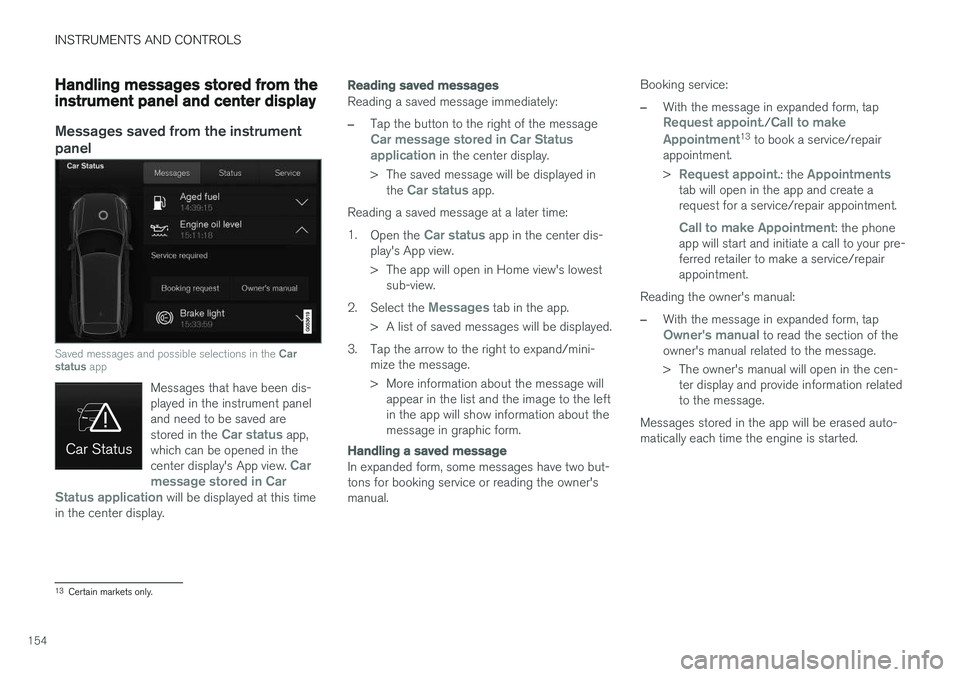
Saved messages and possible selections in the Car
status app
Messages that have been dis- played in the instrument paneland need to be saved are stored in the
Car status app,
which can be opened in the center display's App view.
Car
message stored in Car
Status application
will be displayed at this time
in the center display.
Reading saved messages
Reading a saved message immediately:
–Tap the button to the right of the messageCar message stored in Car Status application in the center display.
> The saved message will be displayed in the
Car status app.
Reading a saved message at a later time: 1. Open the
Car status app in the center dis-
play's App view.
> The app will open in Home view's lowest sub-view.
2. Select the
Messages tab in the app.
> A list of saved messages will be displayed.
3. Tap the arrow to the right to expand/mini- mize the message.
> More information about the message willappear in the list and the image to the left in the app will show information about themessage in graphic form.
Handling a saved message
In expanded form, some messages have two but- tons for booking service or reading the owner'smanual. Booking service:
–With the message in expanded form, tapRequest appoint./Call to make
Appointment13 to book a service/repair
appointment. >
Request appoint.: the Appointmentstab will open in the app and create a request for a service/repair appointment.
Call to make Appointment: the phone
app will start and initiate a call to your pre- ferred retailer to make a service/repairappointment.
Reading the owner's manual:
–With the message in expanded form, tapOwner's manual to read the section of the
owner's manual related to the message.
> The owner's manual will open in the cen- ter display and provide information related to the message.
Messages stored in the app will be erased auto-matically each time the engine is started.
13 Certain markets only.
Page 168 of 548
INSTRUMENTS AND CONTROLS
* Option/accessory.
166
Adjusting function settings in the multifunctional front seats *
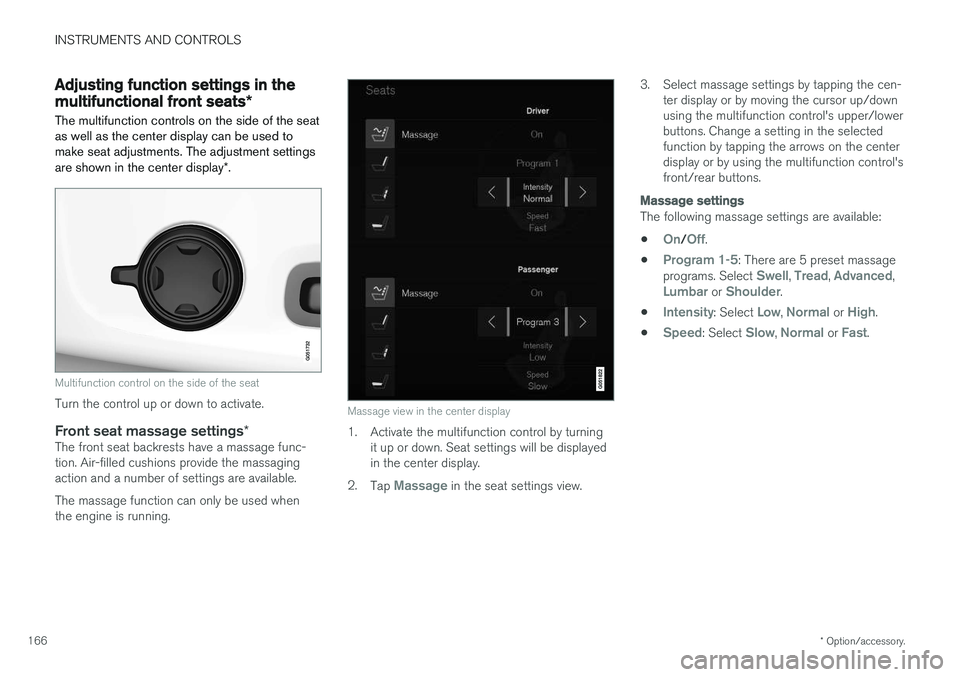
The multifunction controls on the side of the seat as well as the center display can be used tomake seat adjustments. The adjustment settings are shown in the center display *.
Multifunction control on the side of the seat
Turn the control up or down to activate.
Front seat massage settings *The front seat backrests have a massage func- tion. Air-filled cushions provide the massagingaction and a number of settings are available. The massage function can only be used when the engine is running.
Massage view in the center display
1. Activate the multifunction control by turning
it up or down. Seat settings will be displayed in the center display.
2. Tap
Massage in the seat settings view. 3. Select massage settings by tapping the cen-
ter display or by moving the cursor up/down using the multifunction control's upper/lowerbuttons. Change a setting in the selectedfunction by tapping the arrows on the centerdisplay or by using the multifunction control'sfront/rear buttons.
Massage settings
The following massage settings are available:
•
On/Off.
•
Program 1-5: There are 5 preset massage
programs. Select Swell, Tread, Advanced,Lumbar or Shoulder.
•
Intensity: Select Low, Normal or High.
•
Speed: Select Slow, Normal or Fast.
Page 180 of 548
CLIMATE
* Option/accessory.
178
Climate control system
The vehicle is equipped with Electronic Climate Control (ECC) that cools, heats, dehumidifiesand filters the air in the passenger compartment.
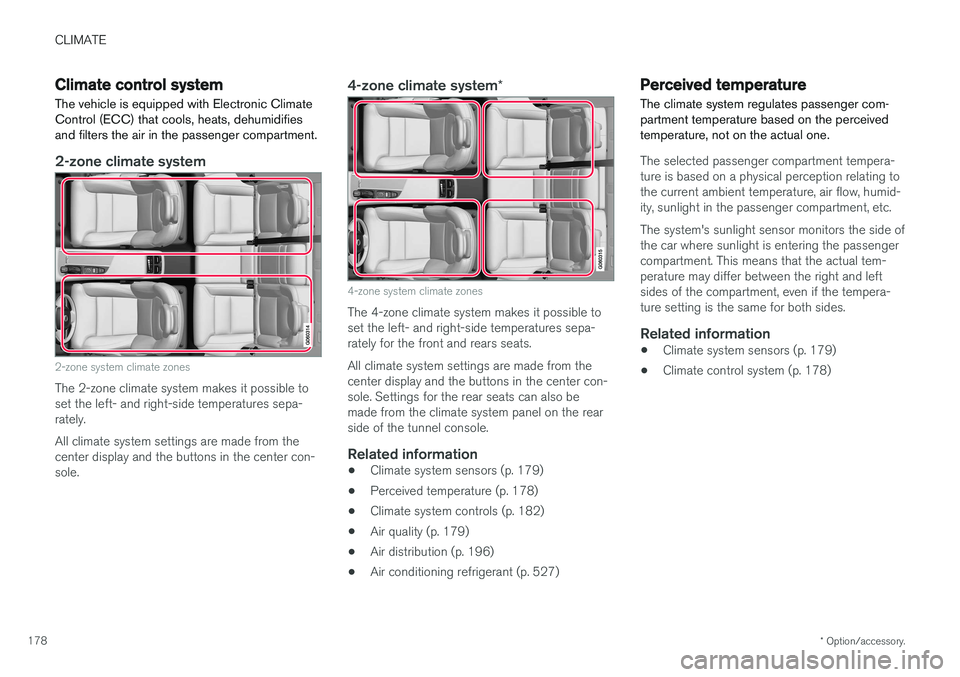
2-zone climate system
2-zone system climate zones
The 2-zone climate system makes it possible to set the left- and right-side temperatures sepa-rately. All climate system settings are made from the center display and the buttons in the center con-sole.
4-zone climate system *
4-zone system climate zones
The 4-zone climate system makes it possible to set the left- and right-side temperatures sepa-rately for the front and rears seats. All climate system settings are made from the center display and the buttons in the center con-sole. Settings for the rear seats can also bemade from the climate system panel on the rearside of the tunnel console.
Related information
•Climate system sensors (p. 179)
• Perceived temperature (p. 178)
• Climate system controls (p. 182)
• Air quality (p. 179)
• Air distribution (p. 196)
• Air conditioning refrigerant (p. 527)
Perceived temperature
The climate system regulates passenger com- partment temperature based on the perceivedtemperature, not on the actual one.
The selected passenger compartment tempera- ture is based on a physical perception relating tothe current ambient temperature, air flow, humid-ity, sunlight in the passenger compartment, etc. The system's sunlight sensor monitors the side of the car where sunlight is entering the passengercompartment. This means that the actual tem-perature may differ between the right and leftsides of the compartment, even if the tempera-ture setting is the same for both sides.
Related information
• Climate system sensors (p. 179)
• Climate control system (p. 178)
Page 181 of 548
CLIMATE
}}
* Option/accessory.179
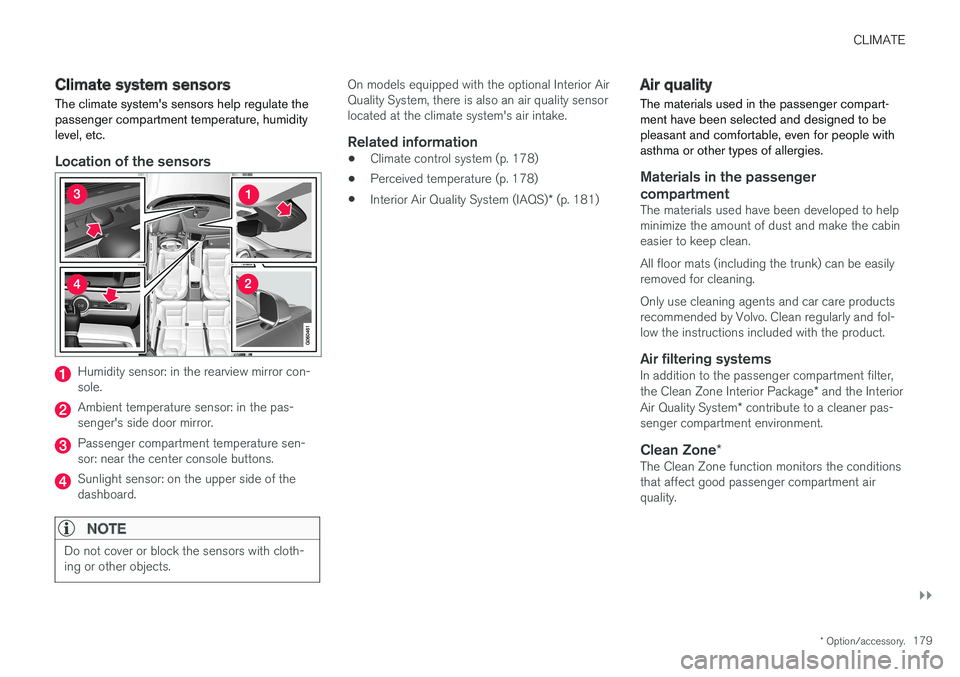
Climate system sensors The climate system's sensors help regulate the passenger compartment temperature, humiditylevel, etc.
Location of the sensors
Humidity sensor: in the rearview mirror con- sole.
Ambient temperature sensor: in the pas- senger's side door mirror.
Passenger compartment temperature sen- sor: near the center console buttons.
Sunlight sensor: on the upper side of the dashboard.
NOTE
Do not cover or block the sensors with cloth- ing or other objects.
On models equipped with the optional Interior Air Quality System, there is also an air quality sensorlocated at the climate system's air intake.
Related information
•Climate control system (p. 178)
• Perceived temperature (p. 178)
• Interior Air Quality System (IAQS)
* (p. 181)
Air quality
The materials used in the passenger compart- ment have been selected and designed to bepleasant and comfortable, even for people withasthma or other types of allergies.
Materials in the passenger compartment
The materials used have been developed to help minimize the amount of dust and make the cabineasier to keep clean. All floor mats (including the trunk) can be easily removed for cleaning. Only use cleaning agents and car care products recommended by Volvo. Clean regularly and fol-low the instructions included with the product.
Air filtering systemsIn addition to the passenger compartment filter, the Clean Zone Interior Package * and the Interior
Air Quality System * contribute to a cleaner pas-
senger compartment environment.
Clean Zone *The Clean Zone function monitors the conditions that affect good passenger compartment airquality.
Page 182 of 548
||
CLIMATE
* Option/accessory.
180
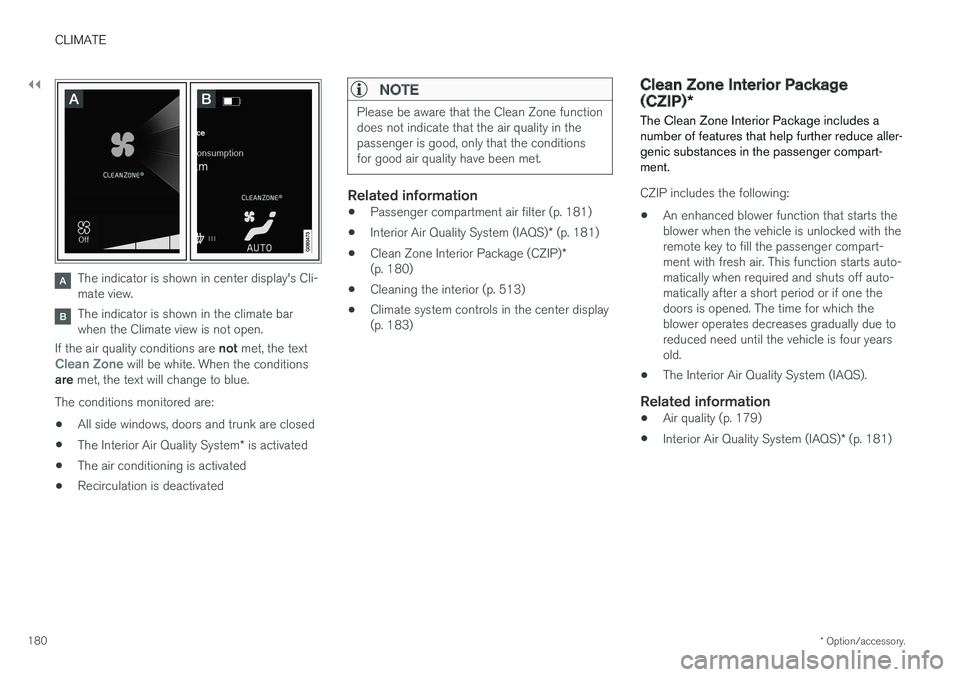
The indicator is shown in center display's Cli- mate view.
The indicator is shown in the climate bar when the Climate view is not open.
If the air quality conditions are not met, the text
Clean Zone will be white. When the conditions
are met, the text will change to blue.
The conditions monitored are:
• All side windows, doors and trunk are closed
• The Interior Air Quality System
* is activated
• The air conditioning is activated
• Recirculation is deactivated
NOTE
Please be aware that the Clean Zone function does not indicate that the air quality in thepassenger is good, only that the conditionsfor good air quality have been met.
Related information
•
Passenger compartment air filter (p. 181)
• Interior Air Quality System (IAQS)
* (p. 181)
• Clean Zone Interior Package (CZIP)
*
(p. 180)
• Cleaning the interior (p. 513)
• Climate system controls in the center display (p. 183)
Clean Zone Interior Package (CZIP)
*
The Clean Zone Interior Package includes a number of features that help further reduce aller-genic substances in the passenger compart-ment.
CZIP includes the following:
• An enhanced blower function that starts the blower when the vehicle is unlocked with theremote key to fill the passenger compart-ment with fresh air. This function starts auto-matically when required and shuts off auto-matically after a short period or if one thedoors is opened. The time for which theblower operates decreases gradually due toreduced need until the vehicle is four yearsold.
• The Interior Air Quality System (IAQS).
Related information
•
Air quality (p. 179)
• Interior Air Quality System (IAQS)
* (p. 181)
Page 183 of 548
CLIMATE
* Option/accessory.181
Interior Air Quality System (IAQS) *
The Interior Air Quality System uses a multifilter and an air quality sensor to remove gases, parti-cles and other contaminants from the air enter-ing the passenger compartment.
The IAQS air quality sensor monitors increased levels of contaminants in the outside air and ifcontaminants are detected, the air intake closesand the air inside the passenger compartment isrecirculated, i.e., no outside air enters the vehicle.The filter also cleans recirculated passengercompartment air.
NOTE
• The air quality sensor should always be engaged in order to obtain the best air inthe passenger compartment.
• Recirculation is limited in cold weather toavoid fogging.
• If the insides of the windows start fog-ging, disengage the air quality sensor.Use the defroster function to increaseairflow to the front, side, and rear win-dows.
Activating/deactivating IAQSTo change the setting for IAQS activation/deacti- vation:
1. In the center display's Settings view, go to
Climate. 2. Activate/deactivate IAQS by selecting/dese-
lecting the
Air Quality Sensor box.
Related information
• Air quality (p. 179)
• Passenger compartment air filter (p. 181)
• Clean Zone Interior Package (CZIP)
*
(p. 180)
• Turning recirculation on and off (p. 189)
Passenger compartment air filter
All air entering the passenger compartment through the climate system air intake is filtered.
Filter replacementThe filter must be replaced according to the serv- ice schedule for your vehicle. When driving in e.g.,dusty or industrial areas, the filer may need to bereplaced more often. Consult your Volvo retailer.
Related information
• Air quality (p. 179)
• Clean Zone Interior Package (CZIP)
*
(p. 180)
• Interior Air Quality System (IAQS)
* (p. 181)
• Volvo's service program (p. 468)
Page 184 of 548
CLIMATE
* Option/accessory.
182
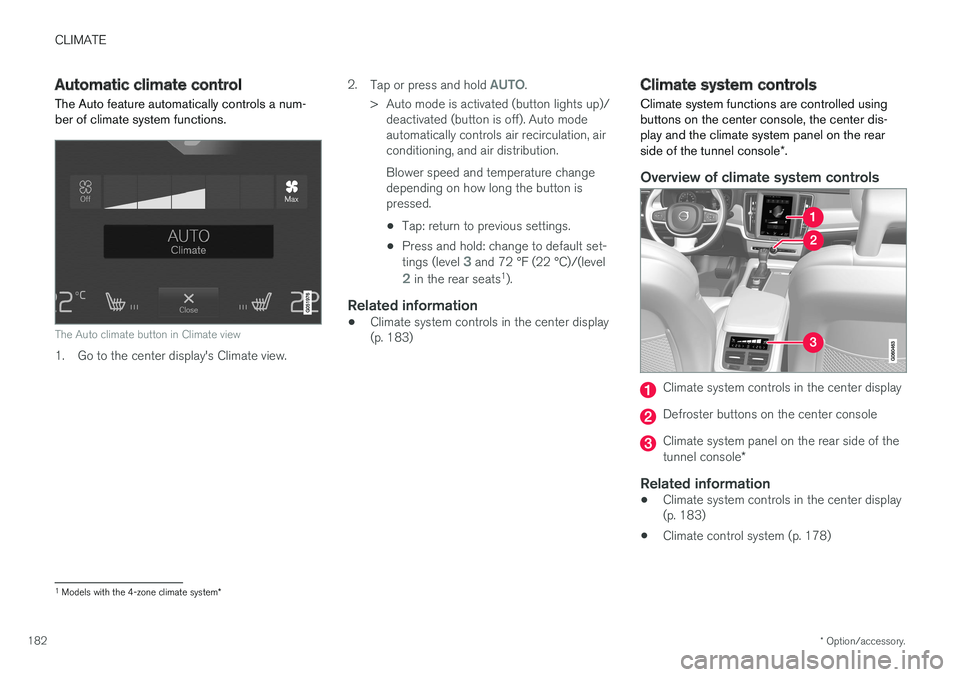
Automatic climate control The Auto feature automatically controls a num- ber of climate system functions.
The Auto climate button in Climate view
1. Go to the center display's Climate view. 2.
Tap or press and hold
AUTO.
> Auto mode is activated (button lights up)/ deactivated (button is off). Auto mode automatically controls air recirculation, airconditioning, and air distribution. Blower speed and temperature change depending on how long the button ispressed.
• Tap: return to previous settings.
• Press and hold: change to default set- tings (level
3 and 72 °F (22 °C)/(level
2 in the rear seats 1
).
Related information
• Climate system controls in the center display (p. 183)
Climate system controls
Climate system functions are controlled using buttons on the center console, the center dis-play and the climate system panel on the rear side of the tunnel console *.
Overview of climate system controls
Climate system controls in the center display
Defroster buttons on the center console
Climate system panel on the rear side of the tunnel console *
Related information
•Climate system controls in the center display (p. 183)
• Climate control system (p. 178)
1
Models with the 4-zone climate system *
Page 185 of 548
CLIMATE
}}
* Option/accessory.183
•
Rear climate system controls on the tunnel console
* (p. 185)
• Defrosting windows and mirrors (p. 190)
• Climate system voice commands (p. 122)
• Air quality (p. 179)
Climate system controls in the center display
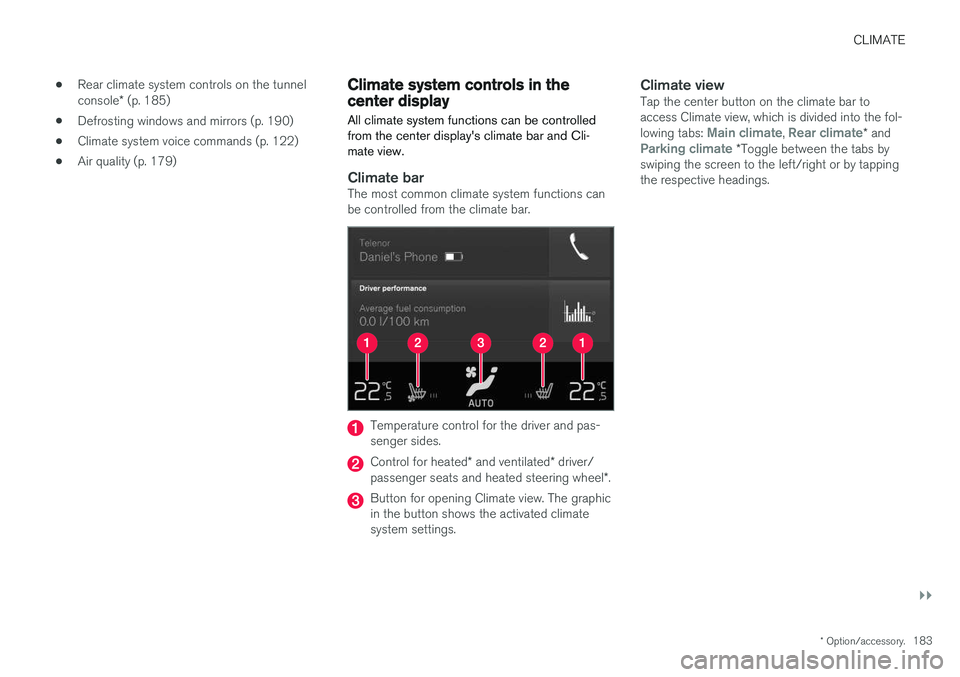
All climate system functions can be controlled from the center display's climate bar and Cli-mate view.
Climate barThe most common climate system functions can be controlled from the climate bar.
Temperature control for the driver and pas- senger sides.
Control for heated * and ventilated * driver/
passenger seats and heated steering wheel *.
Button for opening Climate view. The graphic in the button shows the activated climatesystem settings.
Climate viewTap the center button on the climate bar toaccess Climate view, which is divided into the fol- lowing tabs:
Main climate, Rear climate* andParking climate *Toggle between the tabs by
swiping the screen to the left/right or by tapping the respective headings.
Page 186 of 548
||
CLIMATE
* Option/accessory.
184
Main climate settings
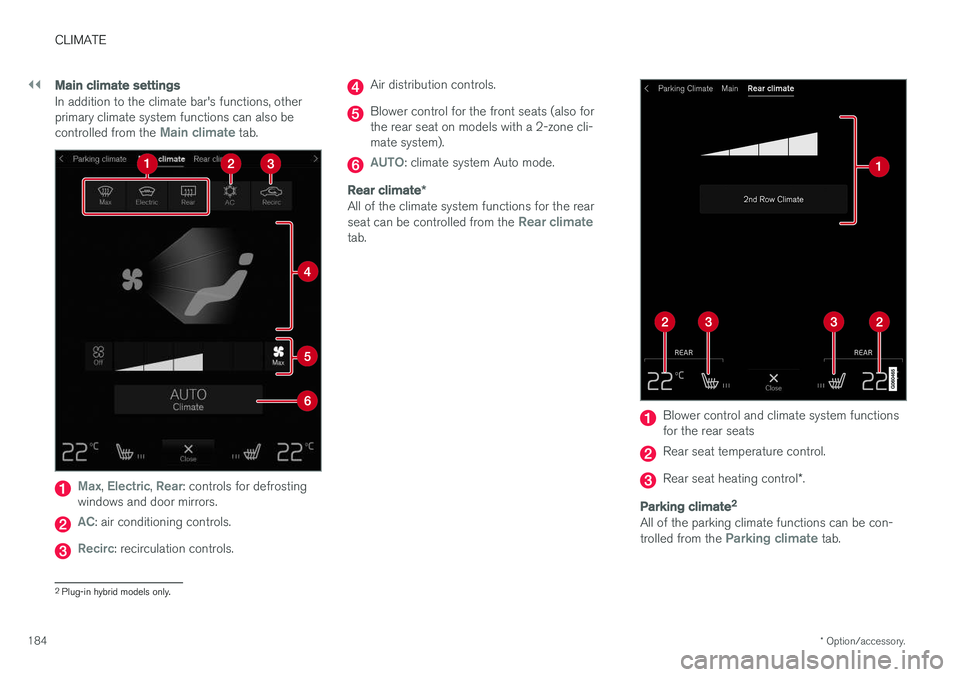
In addition to the climate bar's functions, other primary climate system functions can also be controlled from the
Main climate tab.
Max, Electric, Rear: controls for defrosting
windows and door mirrors.
AC: air conditioning controls.
Recirc: recirculation controls.
Air distribution controls.
Blower control for the front seats (also for the rear seat on models with a 2-zone cli-mate system).
AUTO: climate system Auto mode.
Rear climate *
All of the climate system functions for the rear seat can be controlled from the Rear climatetab.
Blower control and climate system functions for the rear seats
Rear seat temperature control.
Rear seat heating control *.
Parking climate 2
All of the parking climate functions can be con- trolled from the Parking climate tab.
2
Plug-in hybrid models only.