Air VOLVO S90 2017 Owner´s Manual
[x] Cancel search | Manufacturer: VOLVO, Model Year: 2017, Model line: S90, Model: VOLVO S90 2017Pages: 548, PDF Size: 11.42 MB
Page 187 of 548
CLIMATE
}}
* Option/accessory.185
Related information
•Climate system controls (p. 182)
• Defrosting windows and mirrors (p. 190)
• Air conditioning (p. 193)
• Adjusting air distribution (p. 198)
• Setting the temperature (p. 187)
• Setting the blower speed (p. 185)
• Automatic climate control (p. 182)
• Turning steering wheel heating
* on and off
(p. 192)
• Turning seat heating
* on and off (p. 194)
Rear climate system controls on the tunnel console *
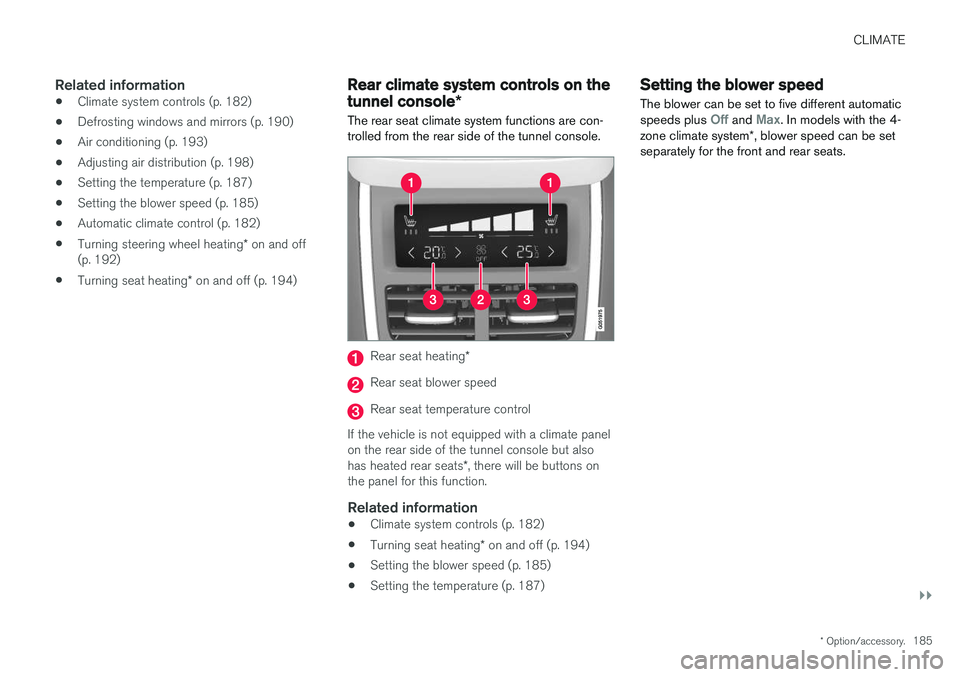
The rear seat climate system functions are con- trolled from the rear side of the tunnel console.
Rear seat heating *
Rear seat blower speed
Rear seat temperature control
If the vehicle is not equipped with a climate panel on the rear side of the tunnel console but also has heated rear seats *, there will be buttons on
the panel for this function.
Related information
• Climate system controls (p. 182)
• Turning seat heating
* on and off (p. 194)
• Setting the blower speed (p. 185)
• Setting the temperature (p. 187)
Setting the blower speed The blower can be set to five different automatic speeds plus
Off and Max. In models with the 4-
zone climate system *, blower speed can be set
separately for the front and rear seats.
Page 188 of 548
||
CLIMATE
* Option/accessory.
186
Setting blower speed for the front seats 3
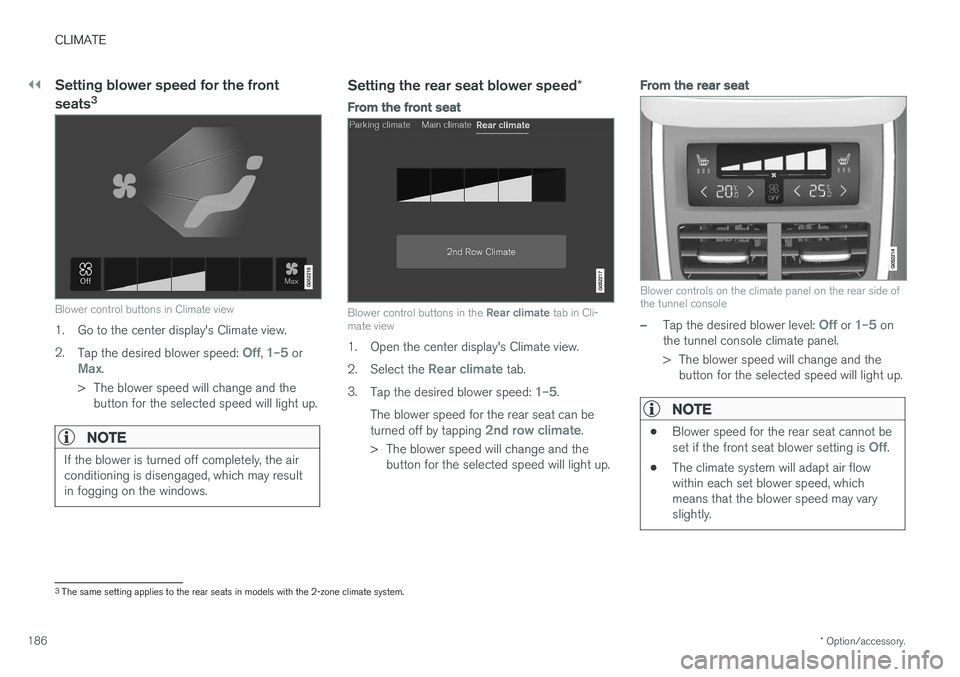
Blower control buttons in Climate view
1. Go to the center display's Climate view. 2.
Tap the desired blower speed:
Off, 1–5 orMax.
> The blower speed will change and the button for the selected speed will light up.
NOTE
If the blower is turned off completely, the air conditioning is disengaged, which may resultin fogging on the windows.
Setting the rear seat blower speed *
From the front seat
Blower control buttons in the Rear climate tab in Cli-
mate view
1. Open the center display's Climate view. 2. Select the
Rear climate tab.
3. Tap the desired blower speed:
1–5.
The blower speed for the rear seat can be turned off by tapping
2nd row climate.
> The blower speed will change and the button for the selected speed will light up.
From the rear seat
Blower controls on the climate panel on the rear side of the tunnel console
–Tap the desired blower level: Off or 1–5 on
the tunnel console climate panel.
> The blower speed will change and the button for the selected speed will light up.
NOTE
• Blower speed for the rear seat cannot be set if the front seat blower setting is Off.
• The climate system will adapt air flow within each set blower speed, whichmeans that the blower speed may varyslightly.
3
The same setting applies to the rear seats in models with the 2-zone climate system.
Page 193 of 548
CLIMATE
}}
* Option/accessory.191
From the center display's Climate view
Activate/deactivate max. defroster
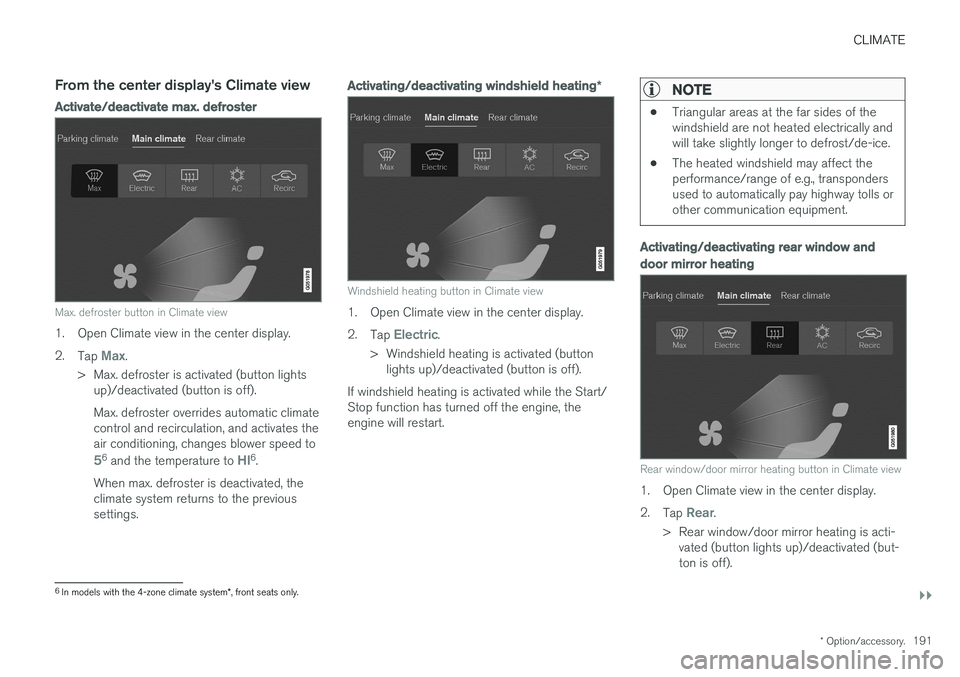
Max. defroster button in Climate view
1. Open Climate view in the center display. 2.
Tap
Max.
> Max. defroster is activated (button lights up)/deactivated (button is off). Max. defroster overrides automatic climate control and recirculation, and activates theair conditioning, changes blower speed to
56 and the temperature to HI6.
When max. defroster is deactivated, the climate system returns to the previoussettings.
Activating/deactivating windshield heating *
Windshield heating button in Climate view
1. Open Climate view in the center display. 2.
Tap
Electric.
> Windshield heating is activated (button lights up)/deactivated (button is off).
If windshield heating is activated while the Start/ Stop function has turned off the engine, theengine will restart.
NOTE
• Triangular areas at the far sides of the windshield are not heated electrically andwill take slightly longer to defrost/de-ice.
• The heated windshield may affect theperformance/range of e.g., transpondersused to automatically pay highway tolls orother communication equipment.
Activating/deactivating rear window and door mirror heating
Rear window/door mirror heating button in Climate view
1. Open Climate view in the center display. 2.
Tap
Rear.
> Rear window/door mirror heating is acti- vated (button lights up)/deactivated (but- ton is off).
6In models with the 4-zone climate system *, front seats only.
Page 194 of 548
||
CLIMATE
* Option/accessory.
192
Automatically activating/deactivating the window heating function when theengine is started
The rear window/door mirror/windshield heating *
can be set to start automatically when the engine is started. The heating function switches off auto-matically when the glass surfaces are sufficientlywarm and the condensation/ice has disappeared. 1. Tap
Settings in the center display's Top
view and select Climate.
2. Activate/deactivate the respective defroster functions when the engine is started by selecting/deselecting the boxes for
Auto
Electric Front Defroster and Auto Electric
Rear Defroster.
The heating function will switch off automatically
when the window/mirror is sufficiently warm and the ice/condensation has disappeared.
Related information
• Climate system controls (p. 182)
• Climate system controls in the center display(p. 183)
• Defrosting windows and mirrors (p. 190)
• Air conditioning (p. 193)
• Turning recirculation on and off (p. 189)
• Adjusting air distribution (p. 198)
• Setting the blower speed (p. 185)
• Automatic climate control (p. 182) •
Turning front seat ventilation
* on and off
(p. 195)
• Turning steering wheel heating
* on and off
(p. 192)
Turning steering wheel heating * on
and off
The steering wheel can be heated electrically for added comfort in cold weather.
Activating/deactivating steering wheel
heating
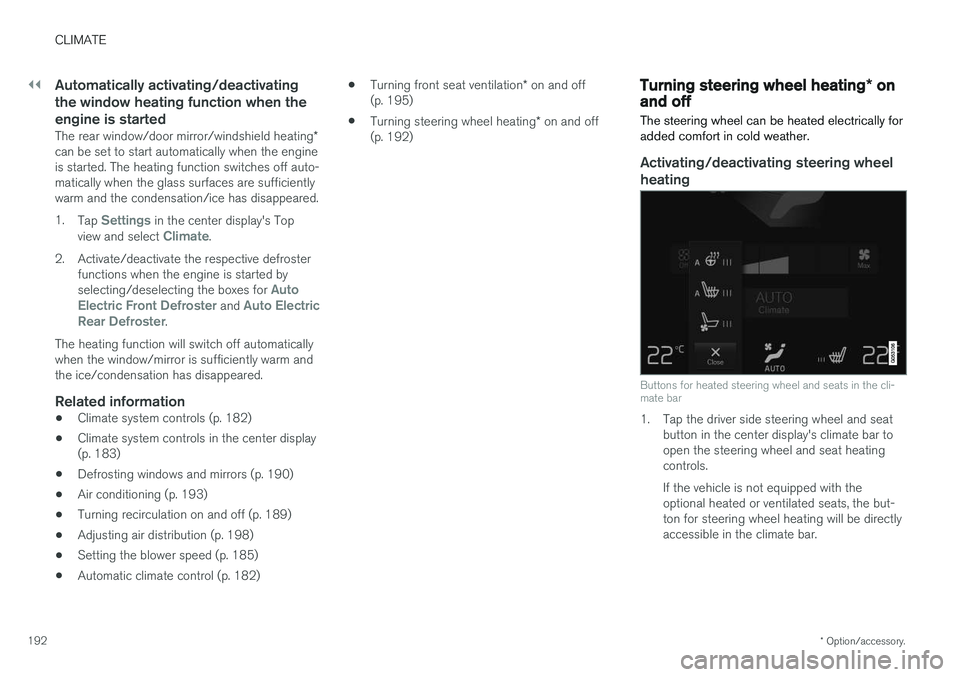
Buttons for heated steering wheel and seats in the cli- mate bar
1. Tap the driver side steering wheel and seat button in the center display's climate bar to open the steering wheel and seat heatingcontrols. If the vehicle is not equipped with the optional heated or ventilated seats, the but-ton for steering wheel heating will be directlyaccessible in the climate bar.
Page 195 of 548
CLIMATE
* Option/accessory.193
2. Tap the steering wheel heating button
repeatedly to select one of four levels:
Off,High, Middle or Low.
> The level changes and is displayed in the button.
Automatic steering wheel heatingThe automatic function starts heating the steer- ing wheel automatically when the engine isstarted if the temperature is sufficiently cold. Thisfeature can be activated/deactivated. 1. Tap
Settings in the center display's Top
view.
2. Tap
Climate.
3. Under
Auto Steering Wheel Heating
Level, select Off, Low, Middle or High to
activate/deactivate the automatic function.
Related information
• Climate system controls (p. 182)
• Climate system controls in the center display (p. 183)
• Steering wheel (p. 159)
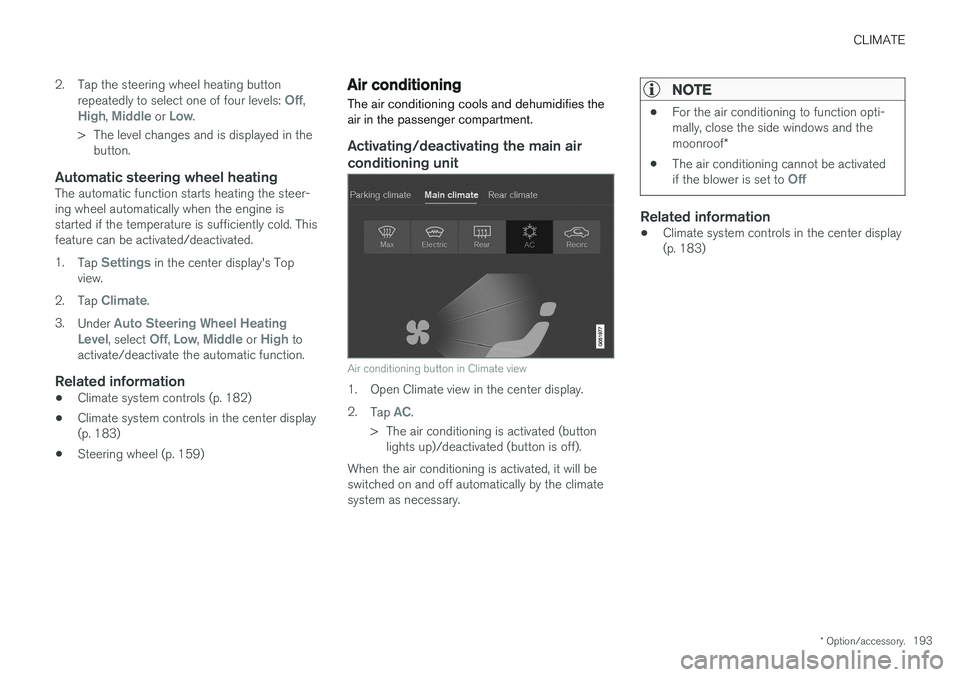
Air conditioning
The air conditioning cools and dehumidifies the air in the passenger compartment.
Activating/deactivating the main air conditioning unit
Air conditioning button in Climate view
1. Open Climate view in the center display. 2. Tap
AC.
> The air conditioning is activated (button lights up)/deactivated (button is off).
When the air conditioning is activated, it will be switched on and off automatically by the climatesystem as necessary.
NOTE
• For the air conditioning to function opti- mally, close the side windows and the moonroof
*
• The air conditioning cannot be activated if the blower is set to
Off
Related information
•Climate system controls in the center display (p. 183)
Page 197 of 548
CLIMATE
}}
* Option/accessory.195
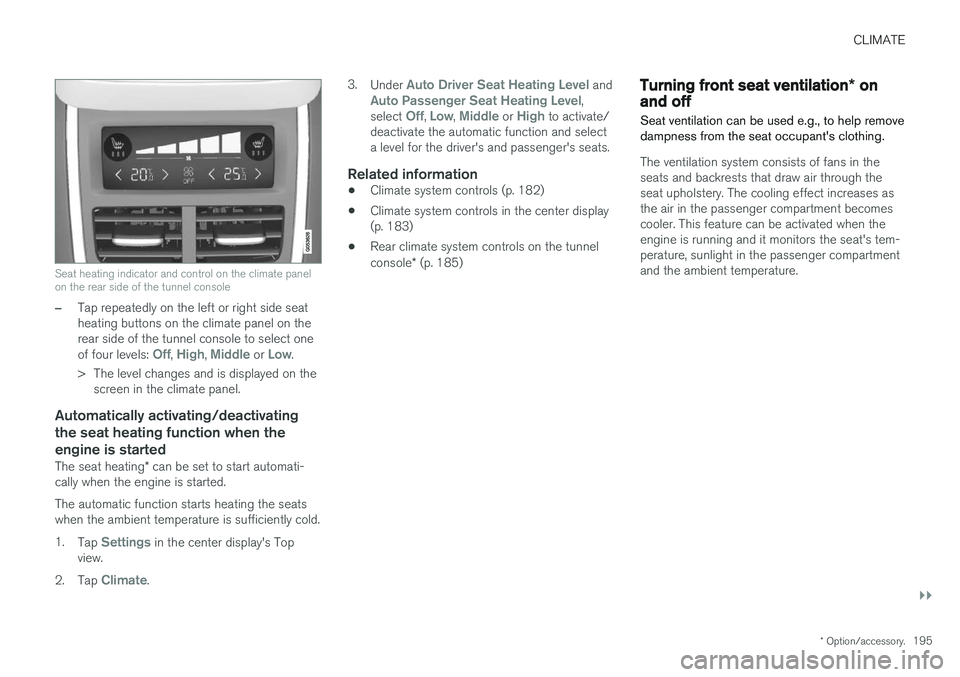
Seat heating indicator and control on the climate panel on the rear side of the tunnel console
–Tap repeatedly on the left or right side seat heating buttons on the climate panel on therear side of the tunnel console to select one of four levels:
Off, High, Middle or Low.
> The level changes and is displayed on the screen in the climate panel.
Automatically activating/deactivating the seat heating function when theengine is started
The seat heating * can be set to start automati-
cally when the engine is started. The automatic function starts heating the seats when the ambient temperature is sufficiently cold. 1. Tap
Settings in the center display's Top
view.
2. Tap
Climate. 3.
Under
Auto Driver Seat Heating Level andAuto Passenger Seat Heating Level,
select Off, Low, Middle or High to activate/
deactivate the automatic function and select a level for the driver's and passenger's seats.
Related information
• Climate system controls (p. 182)
• Climate system controls in the center display(p. 183)
• Rear climate system controls on the tunnel console
* (p. 185)
Turning front seat ventilation * on
and off
Seat ventilation can be used e.g., to help remove dampness from the seat occupant's clothing.
The ventilation system consists of fans in the seats and backrests that draw air through theseat upholstery. The cooling effect increases asthe air in the passenger compartment becomescooler. This feature can be activated when theengine is running and it monitors the seat's tem-perature, sunlight in the passenger compartmentand the ambient temperature.
Page 198 of 548
||
CLIMATE
* Option/accessory.
196
Activating/deactivating front seat ventilation
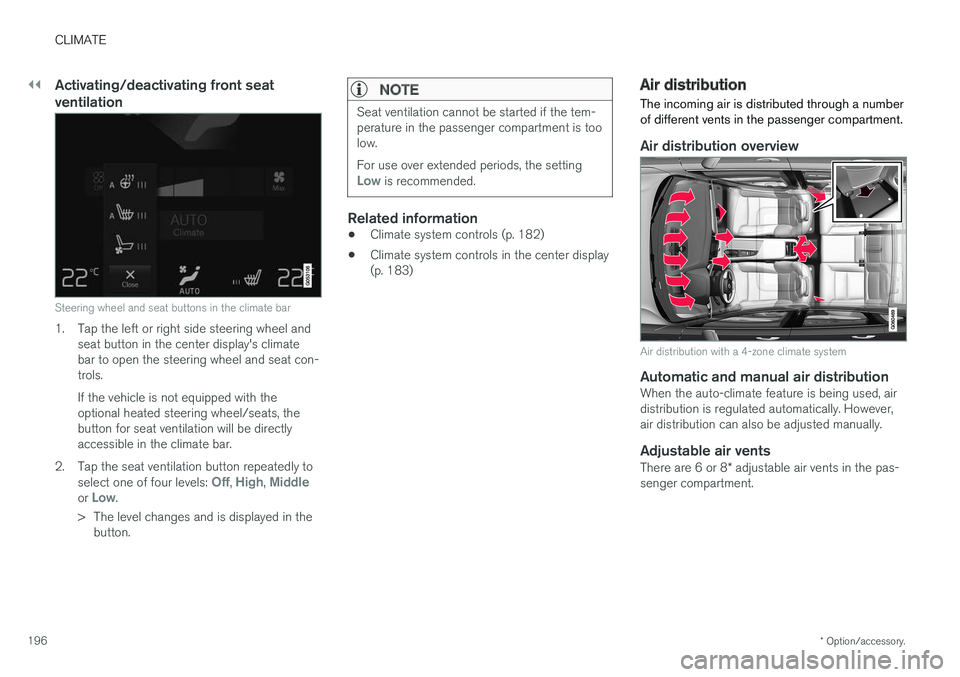
Steering wheel and seat buttons in the climate bar
1. Tap the left or right side steering wheel and
seat button in the center display's climate bar to open the steering wheel and seat con-trols. If the vehicle is not equipped with the optional heated steering wheel/seats, thebutton for seat ventilation will be directlyaccessible in the climate bar.
2. Tap the seat ventilation button repeatedly to select one of four levels:
Off, High, Middleor Low.
> The level changes and is displayed in the button.
NOTE
Seat ventilation cannot be started if the tem- perature in the passenger compartment is toolow. For use over extended periods, the setting
Low is recommended.
Related information
• Climate system controls (p. 182)
• Climate system controls in the center display (p. 183)
Air distribution
The incoming air is distributed through a number of different vents in the passenger compartment.
Air distribution overview
Air distribution with a 4-zone climate system
Automatic and manual air distributionWhen the auto-climate feature is being used, air distribution is regulated automatically. However,air distribution can also be adjusted manually.
Adjustable air vents
There are 6 or 8 * adjustable air vents in the pas-
senger compartment.
Page 199 of 548
CLIMATE
}}
* Option/accessory.197
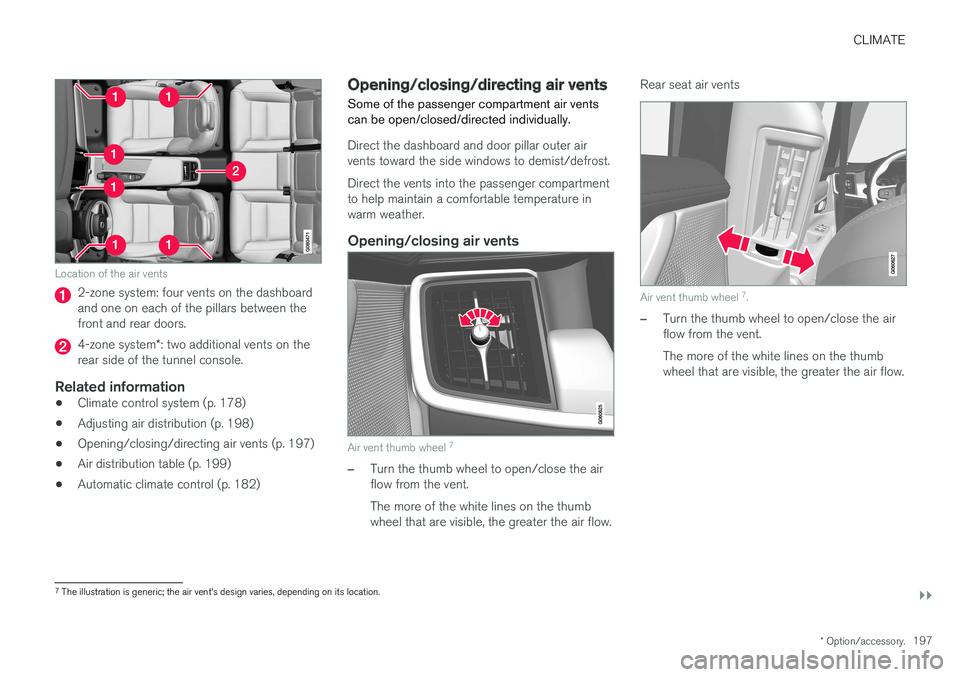
Location of the air vents
2-zone system: four vents on the dashboard and one on each of the pillars between thefront and rear doors.
4-zone system*: two additional vents on the
rear side of the tunnel console.
Related information
• Climate control system (p. 178)
• Adjusting air distribution (p. 198)
• Opening/closing/directing air vents (p. 197)
• Air distribution table (p. 199)
• Automatic climate control (p. 182)
Opening/closing/directing air vents
Some of the passenger compartment air vents can be open/closed/directed individually.
Direct the dashboard and door pillar outer air vents toward the side windows to demist/defrost. Direct the vents into the passenger compartment to help maintain a comfortable temperature inwarm weather.
Opening/closing air vents
Air vent thumb wheel 7
–Turn the thumb wheel to open/close the air flow from the vent. The more of the white lines on the thumb wheel that are visible, the greater the air flow. Rear seat air vents
Air vent thumb wheel
7
.
–Turn the thumb wheel to open/close the air flow from the vent. The more of the white lines on the thumb wheel that are visible, the greater the air flow.
7 The illustration is generic; the air vent's design varies, depending on its location.
Page 200 of 548
||
CLIMATE
198
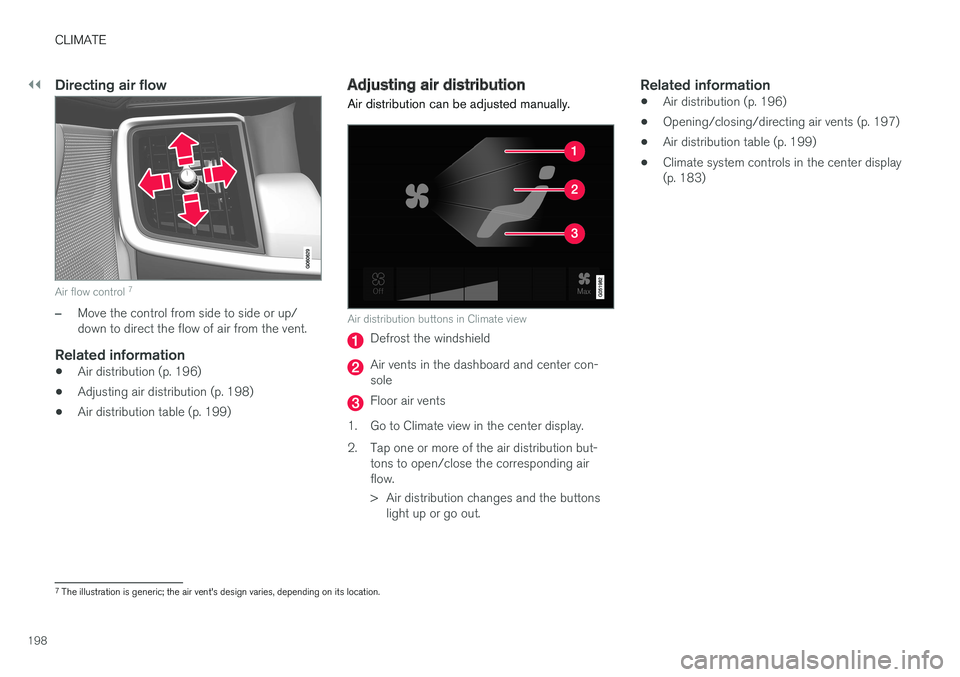
Directing air flow
Air flow control 7
–Move the control from side to side or up/ down to direct the flow of air from the vent.
Related information
•
Air distribution (p. 196)
• Adjusting air distribution (p. 198)
• Air distribution table (p. 199)
Adjusting air distribution
Air distribution can be adjusted manually.
Air distribution buttons in Climate view
Defrost the windshield
Air vents in the dashboard and center con- sole
Floor air vents
1. Go to Climate view in the center display.
2. Tap one or more of the air distribution but- tons to open/close the corresponding air flow.
> Air distribution changes and the buttonslight up or go out.
Related information
• Air distribution (p. 196)
• Opening/closing/directing air vents (p. 197)
• Air distribution table (p. 199)
• Climate system controls in the center display (p. 183)
7
The illustration is generic; the air vent's design varies, depending on its location.
Page 201 of 548
CLIMATE
}}
199
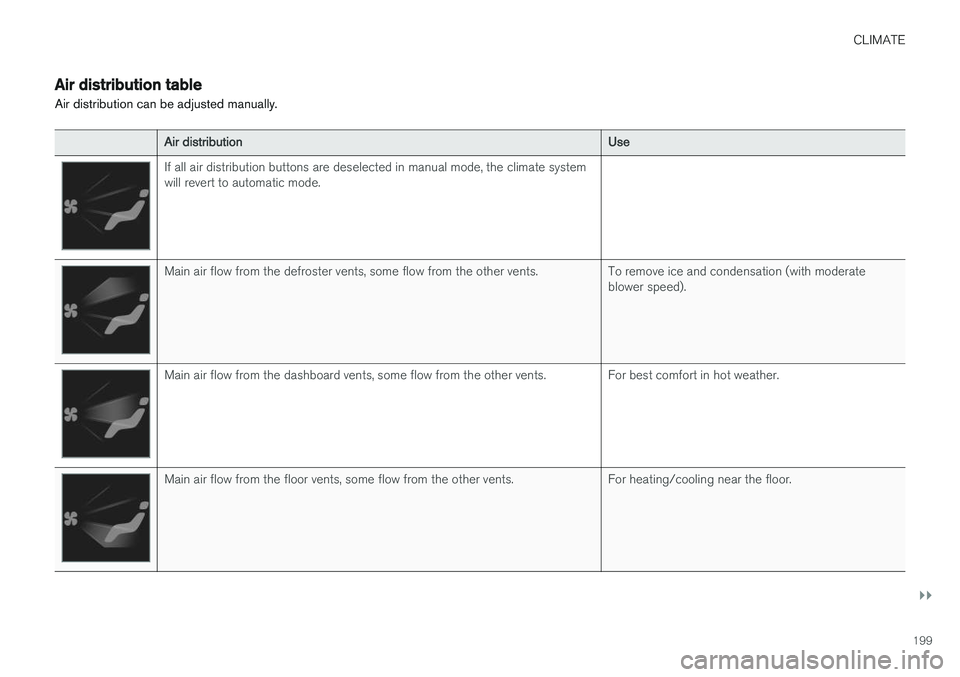
Air distribution table
Air distribution can be adjusted manually.
Air distribution Use
If all air distribution buttons are deselected in manual mode, the climate system will revert to automatic mode.
Main air flow from the defroster vents, some flow from the other vents. To remove ice and condensation (with moderate
blower speed).
Main air flow from the dashboard vents, some flow from the other vents. For best comfort in hot weather.
Main air flow from the floor vents, some flow from the other vents. For heating/cooling near the floor.