instrument panel VOLVO S90 TWIN ENGINE 2019 Manual Online
[x] Cancel search | Manufacturer: VOLVO, Model Year: 2019, Model line: S90 TWIN ENGINE, Model: VOLVO S90 TWIN ENGINE 2019Pages: 669, PDF Size: 14.33 MB
Page 353 of 669
DRIVER SUPPORT
* Option/accessory.351
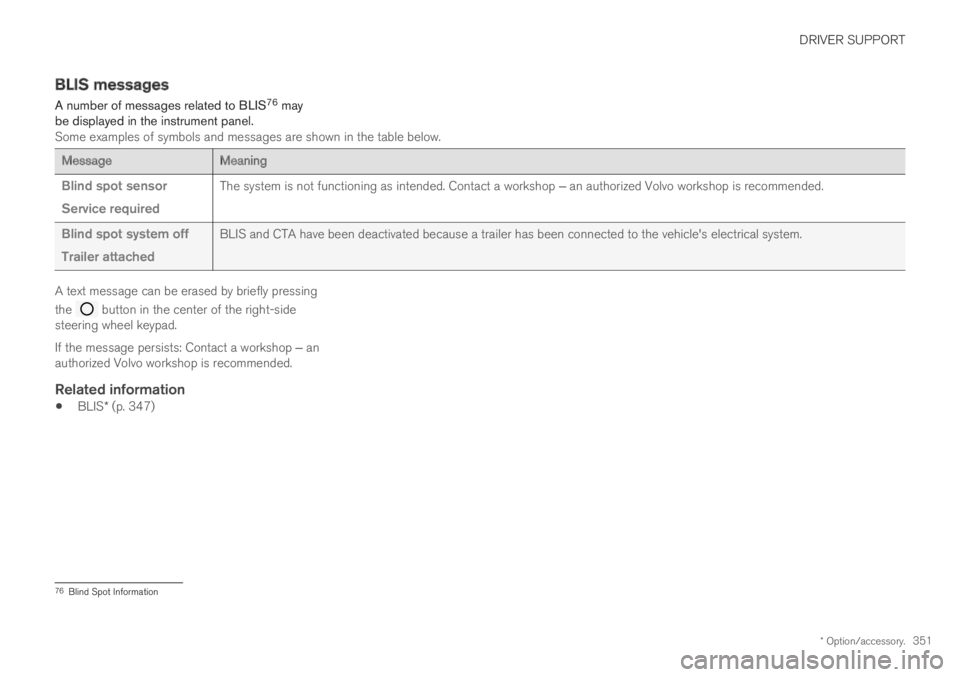
BLIS messages
A number of messages related to BLIS76 maybe displayed in the instrument panel.Some examples of symbols and messages are shown in the table below.
MessageMeaning
Blind spot sensor
Service required
The system is not functioning as intended. Contact a workshop ‒ an authorized Volvo workshop is recommended.
Blind spot system off
Trailer attached
BLIS and CTA have been deactivated because a trailer has been connected to the vehicle's electrical system.
A text message can be erased by briefly pressing
the button in the center of the right-sidesteering wheel keypad.
If the message persists: Contact a workshop ‒ anauthorized Volvo workshop is recommended.
Related information
BLIS* (p. 347)
76Blind Spot Information
Page 357 of 669
DRIVER SUPPORT
* Option/accessory.355
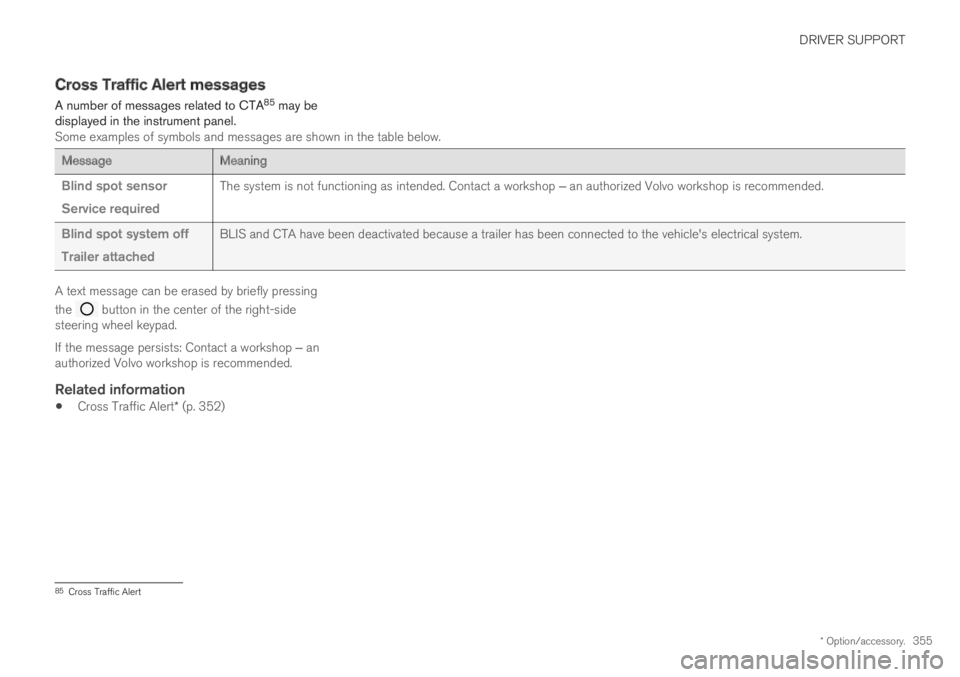
Cross Traffic Alert messages
A number of messages related to CTA85 may bedisplayed in the instrument panel.Some examples of symbols and messages are shown in the table below.
MessageMeaning
Blind spot sensor
Service required
The system is not functioning as intended. Contact a workshop ‒ an authorized Volvo workshop is recommended.
Blind spot system off
Trailer attached
BLIS and CTA have been deactivated because a trailer has been connected to the vehicle's electrical system.
A text message can be erased by briefly pressing
the button in the center of the right-sidesteering wheel keypad.
If the message persists: Contact a workshop ‒ anauthorized Volvo workshop is recommended.
Related information
Cross Traffic Alert* (p. 352)
85Cross Traffic Alert
Page 358 of 669

DRIVER SUPPORT
* Option/accessory.356
Road Sign Information*
The Road Sign Information (RSI86) function canhelp the driver observe speed-related roadsigns.
Examples of signs that can be detected87.
Example87 of registered speed information.
If the vehicle passes a speed limit sign, it will bedisplayed in the instrument panel and the head-up display*.
NOTE
In certain markets, the Road Sign Informationfunction (RSI) is only available in combinationwith Sensus Navigation*.
WARNING
The Road Sign Information function issupplementary driver support intended tofacilitate driving and help make it safer –it cannot handle all situations in all traffic,weather and road conditions.
Road Sign Information is not a substitutefor the driver's attention and judgment.The driver is always responsible forensuring the vehicle is driven in a safemanner, at the appropriate speed, with anappropriate distance to other vehicles,and in accordance with current trafficrules and regulations.
Related information
Activating/deactivating Road Sign Informa-tion (p. 357)
Road Sign Information and sign displays(p. 358)
Road Sign Information and SensusNavigation (p. 358)
Road Sign Information with Speed Warningand Settings (p. 359)
Activating/deactivating Speed Warning inRoad Sign Information (p. 360)
86Road Sign Information87Road signs differ according to market ‒ the illustrations shown here are just some examples.
Page 360 of 669

DRIVER SUPPORT
* Option/accessory.358
Road Sign Information and signdisplays
Road Sign Information (RSI89) displays roadsigns in different ways depending on the signand situation.
Example90 of registered speed information.
When RSI has registered a speed limit sign, thesign will be displayed as a symbol in the instru-ment panel and a colored marking will be shownin the speedometer's speed scale.
If the vehicle is equipped with SensusNavigation*, speed-related information will alsobe retrieved from map data, which means that theinstrument panel can display or change informa-tion about speed limits even if the vehicle has notpassed a speed-related sign.
Signs for "School" and "Children
playing"
If the warning sign90 "School"or "Children playing" isincluded in the satellite naviga-
tor's map data91, a symbol ofthis type will be displayed in theinstrument panel.
Related information
Road Sign Information* (p. 356)
Activating/deactivating Road Sign Informa-tion (p. 357)
Road Sign Information with Speed Warningand Settings (p. 359)
Road Sign Information and SensusNavigation
If the vehicle is equipped with Sensus Navigation,speed-related information will be provided in thefollowing situations:
In cases where the speed limit is given indi-rectly, e.g. signs for highways or other majorroads.
If a previously detected speed sign isdeemed to be no longer valid and no newsign has been passed.
NOTE
In certain markets, the Road Sign Informationfunction (RSI) is only available in combinationwith Sensus Navigation*.
NOTE
If a downloaded third-party app is used fornavigation, there is no support for speed-rela-ted information.
Related information
Road Sign Information* (p. 356)
89Road Sign Information90Road signs differ according to market ‒ the illustrations shown here are just examples.91Only vehicles with Sensus Navigation*.
Page 361 of 669

DRIVER SUPPORT
}}
* Option/accessory.359
Road Sign Information with SpeedWarning and Settings
The Speed Limit Warning sub-function for
RSI92 can be switched On or Off.
Speed Limit Warning warns the driver if thevehicle's speed has exceeded the applicablespeed limit or the preset Speed Limiter speed.The warning will be repeated once afterabout 1 minute in that speed limit area if thedriver does not slow down.
A new warning and message indicating that thespeed limit has been exceeded will be providedonly when the vehicle has entered a new/differ-ent speed limit area.
When Speed Warning is acti-vated, the symbol for the cur-rent speed limit in the instru-
ment panel93 will flash tempo-rarily if that speed is exceeded.
The driver can be alerted if thevehicle is exceeding a detectedspeed limit and is approachinga speed camera.
Settings
Adjusting the Speed Warning limit
The driver can adjust the settings to be alerted ata higher speed than the posted speed limit.
To adjust the Speed Warning limit:
1. Select SettingsMy CarIntelliSafe
Road Sign Information in the centerdisplay's Top view.
2.Mark Speed Limit Warning.
> The function is activated and a speed limitselector is displayed.
3.Tap the up/down arrows on the screen toadjust the speed at which the Speed Warn-ing will be given.
Please note that the set warn-ing limit will not be used whena speed camera symbol is dis-played in the instrument panel.
Audible alert On/Off
An audible alert can also be given along with theSpeed Warning.
To adjust the audible alert settings:
1. Select SettingsMy CarIntelliSafe
Road Sign Information in the centerdisplay's Top view.
2.Select/deselect Road Sign Audio Warningto activate/deactivate the audible alert.
When Road Sign Audio Warning is activated,the driver will also be alerted if the vehicle isapproaching a one-way/"no-entry" road orentrance.
Speed camera warning On/Off
If the vehicle is equipped withSensus Navigation* and mapdata contains information onspeed cameras, the driver canchoose to receive an audiblealert if the vehicle is approach-ing a speed camera.
To adjust the audible alert settings:
1. Select SettingsMy CarIntelliSafe
Road Sign Information in the centerdisplay's Top view.
2.Select/deselect Speed Camera AudioWarning to activate/deactivate the speedcamera audible alert.
92Road Sign Information93Road signs differ according to market ‒ the illustration shown here is just an example.
Page 362 of 669

||
DRIVER SUPPORT
* Option/accessory.360
Related information
Road Sign Information* (p. 356)
Road Sign Information with speed camerainformation (p. 360)
Activating/deactivating SpeedWarning in Road Sign Information
To activate the Speed Limit Warning sub-func-tion:
1. Select SettingsMy CarIntelliSafe
Road Sign Information in the centerdisplay's Top view.
2.Mark Speed Limit Warning.
> The function is activated and a speed limitselector is displayed.
(See description for “Adjusting the SpeedWarning limit” in section “Road Sign Infor-mation with Speed Warning and Set-tings.”)
Related information
Road Sign Information* (p. 356)
Road Sign Information with Speed Warningand Settings (p. 359)
Road Sign Information with speedcamera information
Vehicles equipped with RSI94 and SensusNavigation* can provide information on upcom-ing speed cameras in the instrument panel.
Speed camera information in the instrument panel95.
If the vehicle exceeds adetected speed limit with theSpeed Limit Warning func-tion activated, the driver isgiven a speed warning whenthe vehicle is approaching aspeed camera if the navigationmap for the vehicle's current location containsinformation on speed cameras.
94Road Sign Information95Note: This illustration is general and details may vary depending on model and market/region.
Page 363 of 669

DRIVER SUPPORT
}}
* Option/accessory.361
For more information on Speed Warnings in con-junction with speed cameras, also see “RoadSign Information with Speed Warning and Set-tings” and “Road Sign Information limitations”.
NOTE
For an audible alert to be provided if thespeed is exceeded, the Speed LimitWarning function must be activated andthe Road Sign Audio Warning sub-function must be On. Audible alerts areprovided if the vehicle's speed exceedsthe speed displayed by RSI in the instru-ment panel.
It is possible to receive an audible alertfor speed cameras regardless of the vehi-cle's speed, whether or not the speedlimit is exceeded, and even if the RoadSign Audio Warning function is deacti-vated: See heading "Speed camerawarning On/Off" in section "Road SignInformation with Speed Warning and set-tings" and select Speed Camera AudioWarning there.
Information about speed cameras on thenavigation map is not available for allmarkets/areas.
Related information
Road Sign Information* (p. 356)
Road Sign Information with Speed Warningand Settings (p. 359)
Road Sign Information limitations (p. 361)
Road Sign Information limitations
Road Sign Information (RSI96) functionality maybe reduced in certain situations.
RSI could have reduced functionality due to e.g.:
faded road signs
signs located in a curve in the road
twisted or damaged signs
signs positioned high above the road
fully/partially obstructed or poorly positionedsigns
signs partially or fully covered by frost, snowand/or dirt
digital road maps97 that are outdated, incor-
rect or do not contain speed information98.
NOTE
Certain types of bike carriers that are con-nected to the trailer socket may be interpre-ted as a connected trailer by the RSI function.In such cases, the instrument panel may indi-cate incorrect speed information.
96Road Sign Information97Vehicles equipped with Sensus Navigation*.98Map data and speed information is not available for all areas.
Page 364 of 669

||
DRIVER SUPPORT
* Option/accessory.362
NOTE
The function uses the vehicle's camera unit,which has some general limitations – see thesection "Camera unit limitations".
Related information
Road Sign Information* (p. 356)
Camera limitations (p. 330)
Driver Alert Control
The Driver Alert Control (DAC) function isdesigned to help capture the driver becomeaware of erratic behavior, e.g. if the driver is dis-tracted or showing signs of fatigue.
The objective of DAC is to detect slowly deterio-rating driving behavior and is primarily intended tobe used on major roads. The function is notintended for use in city traffic.
DAC is activated when the vehicle's speedexceeds 65 km/h (40 mph) and remains activeas long as speeds are above 60 km/h (37 mph).
DAC detects the vehicle's position in the traffic lane.
A camera monitors the traffic lane's marker linesand compares the direction of the road with thedriver's movements of the steering wheel.
The vehicle is moving erratically in the lane.
If driving behavior becomesconsiderably erratic, the driverwill be alerted by this symbol inthe instrument panel, an audi-ble signal and the messageTime for a break.
If the vehicle is equipped with SensusNavigation* and the Rest Stop Guidance func-tion is activated, a suitable place to take a breakwill also be suggested (see section “Selectingguidance to a rest stop if a Driver Alert Controlwarning has been given”).
The warning will be repeated after a short time ifdriving behavior does not improve.
Page 368 of 669
||
DRIVER SUPPORT
366
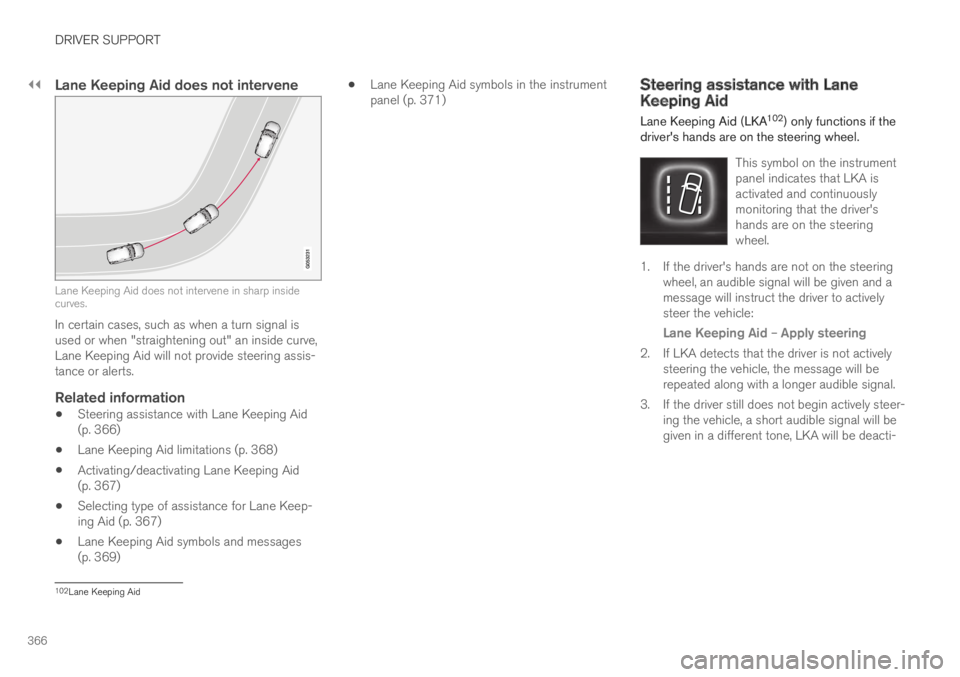
Lane Keeping Aid does not intervene
Lane Keeping Aid does not intervene in sharp insidecurves.
In certain cases, such as when a turn signal isused or when "straightening out" an inside curve,Lane Keeping Aid will not provide steering assis-tance or alerts.
Related information
Steering assistance with Lane Keeping Aid(p. 366)
Lane Keeping Aid limitations (p. 368)
Activating/deactivating Lane Keeping Aid(p. 367)
Selecting type of assistance for Lane Keep-ing Aid (p. 367)
Lane Keeping Aid symbols and messages(p. 369)
Lane Keeping Aid symbols in the instrumentpanel (p. 371)Steering assistance with LaneKeeping Aid
Lane Keeping Aid (LKA102) only functions if thedriver's hands are on the steering wheel.
This symbol on the instrumentpanel indicates that LKA isactivated and continuouslymonitoring that the driver'shands are on the steeringwheel.
1. If the driver's hands are not on the steeringwheel, an audible signal will be given and amessage will instruct the driver to activelysteer the vehicle:
Lane Keeping Aid – Apply steering
2. If LKA detects that the driver is not activelysteering the vehicle, the message will berepeated along with a longer audible signal.
3. If the driver still does not begin actively steer-ing the vehicle, a short audible signal will begiven in a different tone, LKA will be deacti-
102Lane Keeping Aid
Page 371 of 669
DRIVER SUPPORT
}}
369
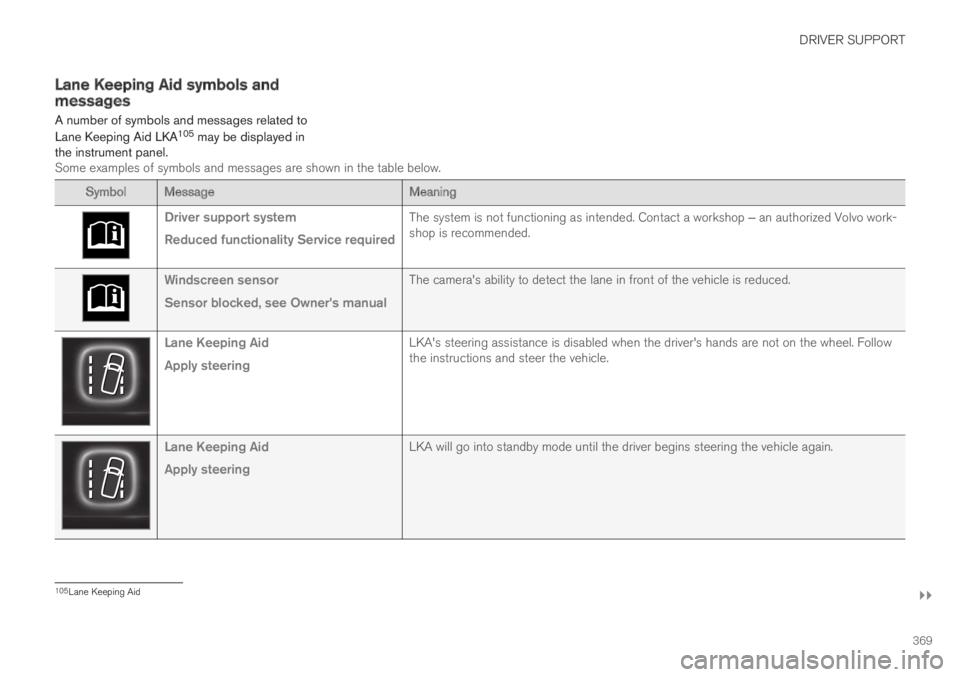
Lane Keeping Aid symbols andmessages
A number of symbols and messages related to
Lane Keeping Aid LKA105 may be displayed inthe instrument panel.Some examples of symbols and messages are shown in the table below.
Symbol MessageMeaning
Driver support system
Reduced functionality Service required
The system is not functioning as intended. Contact a workshop ‒ an authorized Volvo work-shop is recommended.
Windscreen sensor
Sensor blocked, see Owner's manual
The camera's ability to detect the lane in front of the vehicle is reduced.
Lane Keeping Aid
Apply steering
LKA's steering assistance is disabled when the driver's hands are not on the wheel. Followthe instructions and steer the vehicle.
Lane Keeping Aid
Apply steering
LKA will go into standby mode until the driver begins steering the vehicle again.
105Lane Keeping Aid