instrument panel VOLVO S90 TWIN ENGINE 2019 Repair Manual
[x] Cancel search | Manufacturer: VOLVO, Model Year: 2019, Model line: S90 TWIN ENGINE, Model: VOLVO S90 TWIN ENGINE 2019Pages: 669, PDF Size: 14.33 MB
Page 280 of 669

DRIVER SUPPORT
278
Reactivating Speed Limiter fromstandby mode
Speed Limiter (SL12) can be reactivated afterhaving been temporarily deactivated and put instandby mode.
Note: This illustration is general and details may varydepending on model.
To reactivate the Speed Limiter from standbymode:
–Press the button on the steering wheel(1).
> The speed limit markings in the instru-ment panel will change from GRAY toWHITE. The vehicle's speed will onceagain be limited to the most recently setspeed.
or
–Press the button on the steering wheel(2).
> The speed limit markings and symbols inthe instrument panel will change fromGRAY to WHITE and the vehicle's currentspeed will be set as the maximum speed.
Related information
Speed limiter (p. 275)
Turning off Cruise Control
The Speed Limiter (SL13) can be turned off.
Note: This illustration is general and details may varydepending on model.
To turn off Cruise Control:
1.Press the button on the steering wheel(2).
> The Speed Limiter will go into standbymode.
2.Press the ◀ (1) or ▶ (3) buttons on thesteering wheel to select another function.
> The Speed Limiter symbol and marking(4) in the instrument panel will go out andthe set maximum speed will be erased.
12Speed Limiter13Speed Limiter
Page 281 of 669
DRIVER SUPPORT
}}
279
3.Press the (2) button on the steeringwheel keypad again.
> Another function will be activated.
Related information
Speed limiter (p. 275)
Cruise Control limitations
On steep downgrades, the Speed limiter's brak-ing capacity may not be sufficient and the setmaximum speed may be exceeded. If this hap-pens, Speed limit exceeded will be displayed inthe instrument panel to alert the driver.
NOTE
A text message on exceeded max. speed isactivated if the speed is exceeded by at least3 km/h (ca 2 mph).
Related information
Speed limiter (p. 275)
Automatic Speed Limiter
The Automatic Speed Limiter (ASL) functionhelps the driver adapt the vehicle's maximumspeed to the posted speed limits.
The Speed Limiter (SL14) function can beswitched to Automatic Speed Limiter (ASL).
The Automatic Speed Limiter function usesspeed information from the Road Sign Informa-tion function (RSI) to automatically adapt thevehicle's maximum speed.
14Speed Limiter
Page 282 of 669
||
DRIVER SUPPORT
280
WARNING
The ASL function is supplementary driversupport intended to facilitate driving andhelp make it safer – it cannot handle allsituations in all traffic, weather and roadconditions.
Even if the driver can clearly see thespeed limit sign, the speed informationfrom the Road Sign Information (RSI)function to ASL may be incorrect. In suchcases, the driver must intervene andaccelerate or brake to an appropriatespeed.
ASL is not a substitute for the driver'sattention and judgment. The driver isalways responsible for ensuring the vehi-cle is driven in a safe manner, at theappropriate speed, with an appropriatedistance to other vehicles, and in accord-ance with current traffic rules and regula-tions.
See also the heading "Road Sign Infor-mation limitations".
Is SL or ASL active?
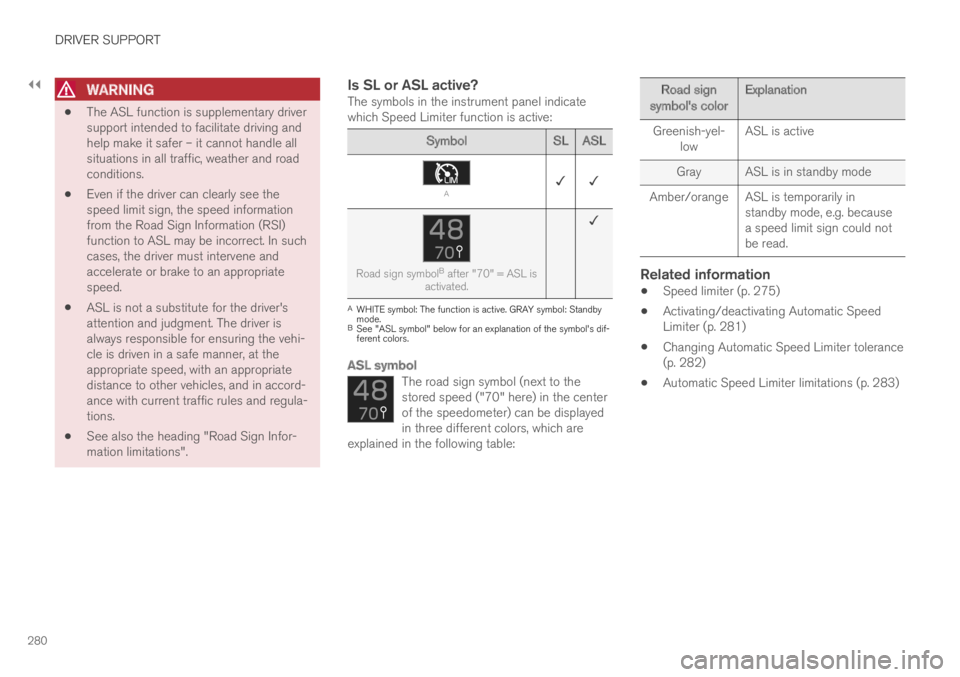
The symbols in the instrument panel indicatewhich Speed Limiter function is active:
SymbolSL ASL
A✓ ✓
Road sign symbolB after "70" = ASL isactivated.
✓
AWHITE symbol: The function is active. GRAY symbol: Standbymode.BSee "ASL symbol" below for an explanation of the symbol's dif-ferent colors.
ASL symbol
The road sign symbol (next to thestored speed ("70" here) in the centerof the speedometer) can be displayedin three different colors, which areexplained in the following table:
Road signsymbol's colorExplanation
Greenish-yel-lowASL is active
GrayASL is in standby mode
Amber/orangeASL is temporarily instandby mode, e.g. becausea speed limit sign could notbe read.
Related information
Speed limiter (p. 275)
Activating/deactivating Automatic SpeedLimiter (p. 281)
Changing Automatic Speed Limiter tolerance(p. 282)
Automatic Speed Limiter limitations (p. 283)
Page 283 of 669
DRIVER SUPPORT
281
Activating/deactivating AutomaticSpeed Limiter
The Automatic Speed Limiter (ASL) is a supple-ment to the Speed Limiter (SL) and can be acti-vated/deactivated.
Activating ASL
The Speed Sign Assist but-ton is located in the center dis-play's Function view.
To activate the Automatic Speed Limiter:
1.Tap the Speed Sign Assist button.
> ASL will go into standby mode and agreen indicator light will illuminate. A roadsign symbol will be displayed in the centerof the speedometer in the instrumentpanel.
2.Pressing the button on the steeringwheel keypad.
> ASL will be activated and set to the vehi-cle's current speed.
NOTE
If the Automatic Speed Limiter function isactivated, road sign information is shown
in the driver display even if RSI15 is notactivated.
To remove road sign information from thedriver display, you must deactivate bothAutomatic Speed Limiter and RSI.
When the Automatic Speed Limiter func-tion is activated but RSI is deactivated, nowarnings are given from RSI. RSI mustalso be activated for warnings to be pos-sible.
Deactivating ASL
To deactivate the Automatic Speed Limiter:
–Tap the Speed Sign Assist button in Func-tion view.
> ASL will be deactivated, the indicator lightin the button will be GRAY and SL will beactivated instead.
WARNING
The vehicle will no longer follow the postedmaximum speed after switching from ASL toSL – it then only follows the maximum speedstored in the memory.
Related information
Speed limiter (p. 275)
Automatic Speed Limiter (p. 279)
Activating/deactivating Road Sign Informa-tion (p. 357)
15Road Sign Information (RSI)
Page 289 of 669
DRIVER SUPPORT
287
Standby mode due to action by the driver
Cruise Control will be temporarily deactivated andput in standby mode if:
the brakes are applied
the gear selector is moved to N
the vehicle is driven faster than the setspeed for more than 1 minute
The driver must then control the vehicle's speed.
Temporarily increasing speed using the accelera-tor pedal, e.g. when passing another vehicle, willnot affect the setting. The vehicle will return tothe set speed when the accelerator pedal isreleased.
Automatic standby mode
Cruise Control will be temporarily deactivated andput in standby mode if:
the wheels lose traction
the engine speed (rpm) is too low/high
the temperature in the brake systembecomes too high
the vehicle's speed goes below 30 km/h(20 mph).
The driver must then control the vehicle's speed.
Related information
Cruise control (p. 283)
Reactivating Cruise Control fromstandby mode
Cruise Control (CC24) can be temporarily putinto standby mode and then reactivated.
Reactivating Cruise Control from
standby mode
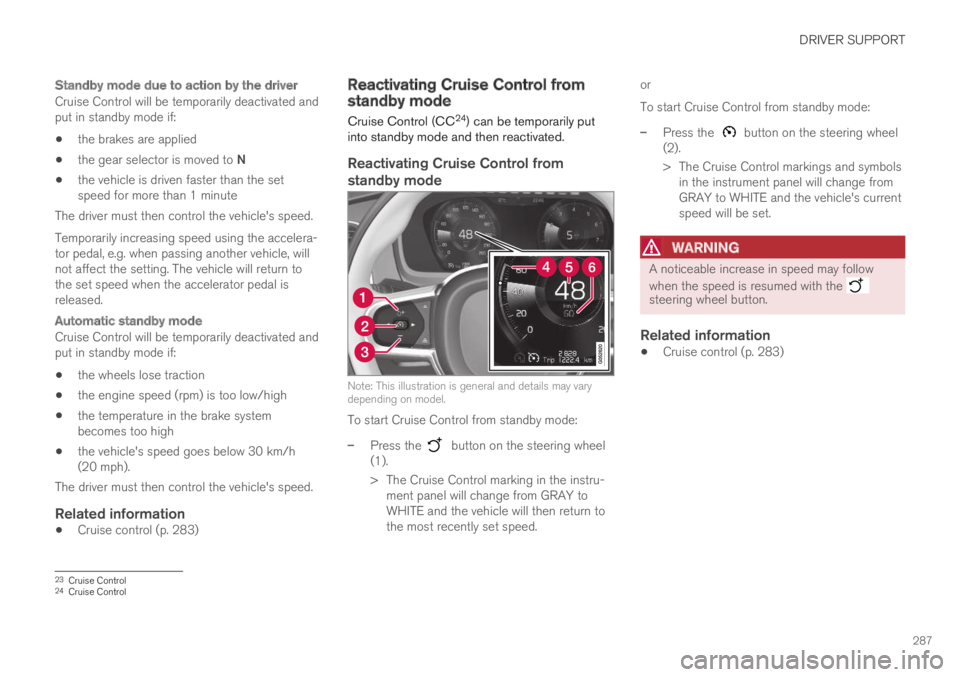
Note: This illustration is general and details may varydepending on model.
To start Cruise Control from standby mode:
–Press the button on the steering wheel(1).
> The Cruise Control marking in the instru-ment panel will change from GRAY toWHITE and the vehicle will then return tothe most recently set speed.
or
To start Cruise Control from standby mode:
–Press the button on the steering wheel(2).
> The Cruise Control markings and symbolsin the instrument panel will change fromGRAY to WHITE and the vehicle's currentspeed will be set.
WARNING
A noticeable increase in speed may follow
when the speed is resumed with the steering wheel button.
Related information
Cruise control (p. 283)
23Cruise Control24Cruise Control
Page 290 of 669
DRIVER SUPPORT
* Option/accessory.288
Switching off Cruise Control
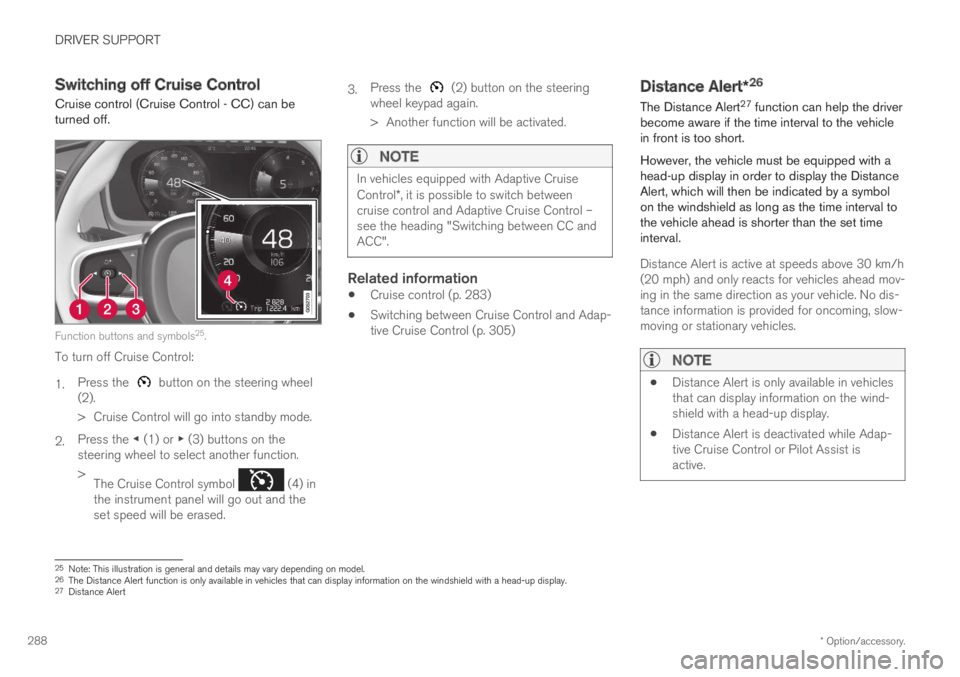
Cruise control (Cruise Control - CC) can beturned off.
Function buttons and symbols25.
To turn off Cruise Control:
1.Press the button on the steering wheel(2).
> Cruise Control will go into standby mode.
2.Press the ◀ (1) or ▶ (3) buttons on thesteering wheel to select another function.
>The Cruise Control symbol (4) inthe instrument panel will go out and theset speed will be erased.
3.Press the (2) button on the steeringwheel keypad again.
> Another function will be activated.
NOTE
In vehicles equipped with Adaptive CruiseControl*, it is possible to switch betweencruise control and Adaptive Cruise Control –see the heading "Switching between CC andACC".
Related information
Cruise control (p. 283)
Switching between Cruise Control and Adap-tive Cruise Control (p. 305)
Distance Alert*26
The Distance Alert27 function can help the driverbecome aware if the time interval to the vehiclein front is too short.
However, the vehicle must be equipped with ahead-up display in order to display the DistanceAlert, which will then be indicated by a symbolon the windshield as long as the time interval tothe vehicle ahead is shorter than the set timeinterval.
Distance Alert is active at speeds above 30 km/h(20 mph) and only reacts for vehicles ahead mov-ing in the same direction as your vehicle. No dis-tance information is provided for oncoming, slow-moving or stationary vehicles.
NOTE
Distance Alert is only available in vehiclesthat can display information on the wind-shield with a head-up display.
Distance Alert is deactivated while Adap-tive Cruise Control or Pilot Assist isactive.
25Note: This illustration is general and details may vary depending on model.26The Distance Alert function is only available in vehicles that can display information on the windshield with a head-up display.27Distance Alert
Page 296 of 669

||
DRIVER SUPPORT
* Option/accessory.294
Reduces the time interval to the vehicleahead
Target vehicle indicator: ACC has detectedand is following a target vehicle using the settime interval
Symbol for time interval to the vehicle ahead
NOTE
In vehicles equipped with Adaptive CruiseControl*, it is possible to switch betweencruise control and Adaptive Cruise Control –see the heading "Switching between CC andACC".
Instrument panel
Speed indicators34.
Set speed
Speed of the vehicle ahead.
The current speed of your vehicle.
See "Adaptive Cruise Control symbols and mes-sages" for examples of different combinations ofsymbols depending on the traffic situation.
Related information
Adaptive Cruise Control and collision warning(p. 295)
Head-up display for Adaptive Cruise Controlwith collision warning (p. 295)
Activating and starting Adaptive Cruise Con-trol (p. 296)
Managing Adaptive Cruise Control speed(p. 297)
Setting Adaptive Cruise Control time inter-vals (p. 298)
Deactivating/reactivating Adaptive CruiseControl (p. 299)
Passing assistance with Adaptive CruiseControl (p. 301)
Starting passing assistance with AdaptiveCruise Control (p. 302)
Limitations of passing assistance with Adap-tive Cruise Control (p. 302)
Switching target vehicles with AdaptiveCruise Control (p. 302)
Automatic braking with Adaptive Cruise Con-trol (p. 303)
Adaptive Cruise Control limitations (p. 304)
Switching between Cruise Control and Adap-tive Cruise Control (p. 305)
Symbols and messages for Adaptive CruiseControl (p. 306)
34Note: This illustration is general and details may vary depending on model.
Page 300 of 669

||
DRIVER SUPPORT
* Option/accessory.298
Automatic transmission
Adaptive Cruise Control can follow another vehi-cle at speeds from a standstill up to 200 km/h(125 mph).
The lowest speed that can be set for AdaptiveCruise Control is 30 km/h (20 mph). When fol-lowing another vehicle, ACC can monitor thatvehicle's speed and slow your own vehicle downto a standstill, but it is not possible to set speedslower than 30 km/h (20 mph).
The highest possible speed that can be set is200 km/h (125 mph).
Related information
Adaptive Cruise Control* (p. 292)
Setting Adaptive Cruise Controltime intervals
Adaptive Cruise Control (ACC39) can be set tovarious time intervals to the vehicle ahead.
Different time intervals to thevehicle ahead can be selectedand are shown in the instru-ment panel as 1–5 horizontalbars. The more bars, the longerthe time interval. One bar rep-resents an interval ofapprox. 1 second to the vehicle ahead. 5 barsrepresents approx. 3 seconds.
The same symbol appears when the DistanceAlert function is activated.
NOTE
When the symbol in the instrument panelshows two vehicles, ACC is following the vehi-cle ahead at a preset time interval.
When only one vehicle is shown, there is novehicle ahead within a reasonable distance.
Controls for setting a time interval40.
Reduce the time interval
Increase the time interval
Distance indicator
–Press the (1) or (2) button to decrease orincrease the time interval.
> The distance indicator (3) shows the cur-rent time interval.
In order to help your vehicle follow the vehicleahead as smoothly and comfortably as possible,Adaptive Cruise Control allows the time intervalto vary noticeably in certain situations. At lowspeeds, when the distance to the vehicle aheadis short, Adaptive Cruise Control increases thetime interval slightly.
39Adaptive Cruise Control40Note: This illustration is general and details may vary depending on model.
Page 302 of 669

||
DRIVER SUPPORT
300
To temporarily deactivate Adaptive Cruise Controland put it in standby mode:
–Press the button on the steering wheel(2).
>The symbol in the instrument panelchanges color from WHITE to GRAY andthe set speed in the center of the speed-ometer will change from BEIGE to GRAY.
WARNING
If Adaptive Cruise Control is in standbymode, the driver must intervene and regu-late both speed and distance to the vehicleahead.
If the vehicle comes too close to a vehicleahead when Adaptive Cruise Control is instandby mode, the driver is instead warnedof the short distance by the Distance Alertfunction.
Standby mode due to action by the driver
Adaptive Cruise Control will be temporarily deac-tivated and put in standby mode if:
the brakes are applied
the gear selector is moved to N
the vehicle is driven faster than the setspeed for more than 1 minute
Temporarily increasing speed using the accelera-tor pedal, e.g. when passing another vehicle, willnot affect the setting. The vehicle will return tothe set speed when the accelerator pedal isreleased.
Automatic standby mode
Adaptive Cruise Control is dependent on othersystems, such as Electronic Stability Control
(ESC42). If any of these other systems stopsworking, Adaptive Cruise Control will automati-cally switch off.
WARNING
With automatic standby mode, the driver iswarned by an acoustic signal and a messageon the instrument panel.
The driver must then regulate vehiclespeed, apply the brakes if necessary, andmaintain a safe distance to other vehicles.
Adaptive Cruise Control may go into standbymode if:
your vehicle's speed goes below 5 km/h(3 mph) and ACC cannot determine if thevehicle ahead is stationary or if it is anotherobject, e.g. a speed bump.
your vehicle's speed goes under 5 km/h(3 mph) and the vehicle ahead turns so thatACC no longer has a vehicle to follow.
the driver opens the door.
the driver unbuckles the seat belt.
the engine speed (rpm) is too low/high.
one or more of the wheels lose traction.
the brake temperature is high.
the parking brake is applied.
the camera/radar sensor is covered by snowor heavy rain (the camera lens/radar wavesare blocked)
Reactivating Adaptive Cruise Control
from standby mode
Note: This illustration is general and details may varydepending on model.
42Electronic Stability Control
Page 307 of 669

DRIVER SUPPORT
* Option/accessory.305
Switching between Cruise Controland Adaptive Cruise Control
In vehicles equipped with Adaptive Cruise Con-trol (ACC), the driver can switch between CruiseControl (CC) and ACC.
A symbol in the instrument panel indicates whichcruise control system is active
CCACC
AA
Cruise control Adaptive Cruise Control
AWHITE symbol: The function is active. GRAY symbol: Standbymode
Switching from ACC to CC
To do so:
1.Press the button on the steering wheelkeypad to put Adaptive Cruise Control instandby mode.
2.Tap the Cruise Control button in the centerdisplay's Function view. The button's indica-tor will change from GRAY to GREEN.
> The symbol in the instrument panel will
change from ACC to CC, indicating that Adaptive Cruise Con-trol is off and Cruise Control is in standbymode.
3.Pressing the button on the steeringwheel keypad.
> Cruise Control will start and the vehicle'scurrent speed will be set.
WARNING
Switching from ACC to CC means that thevehicle:
will no longer maintain a preset timeinterval to the vehicle ahead.
will only follow the stored speed and thedriver must therefore apply the brakeswhen necessary.
If CC is active when the engine is turned off, ACCwill be automatically activated the next time theengine is started.
Switching from CC to ACC
To do so:
1.Press the button on the steering wheelkeypad to put Cruise Control in standbymode.
2.Tap the Cruise Control button in Functionview. The button's indicator will change fromGREEN to GRAY.
> The symbols in the instrument panel will
switch from CC to ACCto indicate that Adaptive Cruise Control isin standby mode.
3.Pressing the button on the steeringwheel keypad.
> Adaptive Cruise Control will go into activemode and set the vehicle's current speedand the selected time interval to the vehi-cle ahead.
Related information
Adaptive Cruise Control* (p. 292)
Cruise control (p. 283)