instrument panel VOLVO S90 TWIN ENGINE 2019 Owners Manual
[x] Cancel search | Manufacturer: VOLVO, Model Year: 2019, Model line: S90 TWIN ENGINE, Model: VOLVO S90 TWIN ENGINE 2019Pages: 669, PDF Size: 14.33 MB
Page 373 of 669
DRIVER SUPPORT
371
Lane Keeping Aid symbols in theinstrument panel
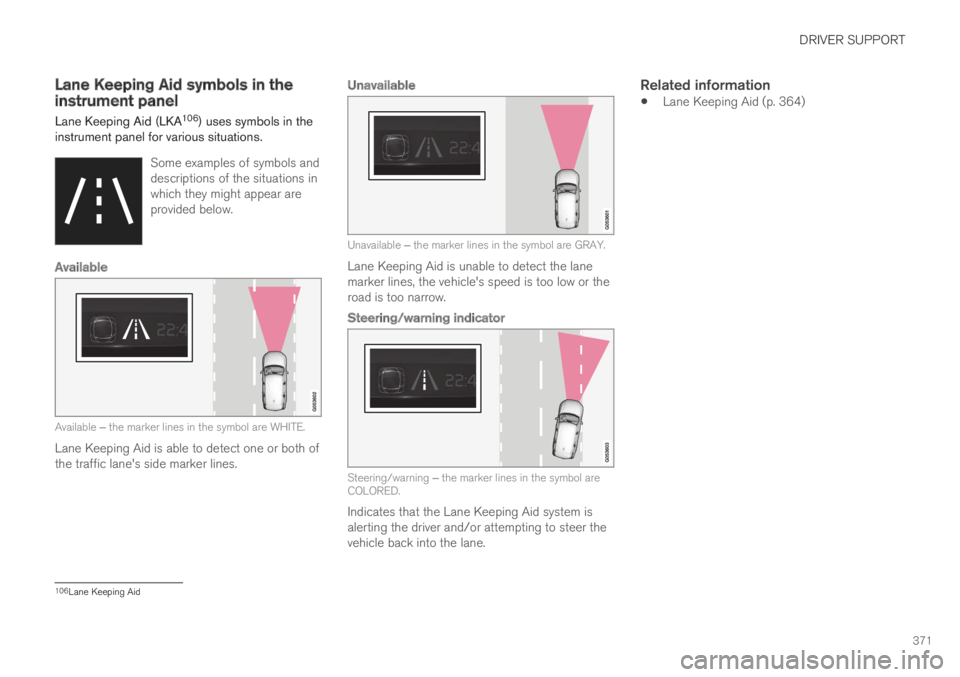
Lane Keeping Aid (LKA106) uses symbols in theinstrument panel for various situations.
Some examples of symbols anddescriptions of the situations inwhich they might appear areprovided below.
Available
Available ‒ the marker lines in the symbol are WHITE.
Lane Keeping Aid is able to detect one or both ofthe traffic lane's side marker lines.
Unavailable
Unavailable ‒ the marker lines in the symbol are GRAY.
Lane Keeping Aid is unable to detect the lanemarker lines, the vehicle's speed is too low or theroad is too narrow.
Steering/warning indicator
Steering/warning ‒ the marker lines in the symbol areCOLORED.
Indicates that the Lane Keeping Aid system isalerting the driver and/or attempting to steer thevehicle back into the lane.
Related information
Lane Keeping Aid (p. 364)
106Lane Keeping Aid
Page 374 of 669
DRIVER SUPPORT
* Option/accessory.372
Steering assistance at risk ofcollision
The Collision avoidance assistance functionis intended to help the driver reduce the risk ofthe vehicle inadvertently veering from the trafficlane and/or colliding with another vehicle orobstacle by actively steering the vehicle backinto the lane and/or swerving out of the way.
Collision avoidance assistance consists ofthree sub-functions:
Run-Off Mitigation with steering assistance
Steering assistance during collision risksfrom oncoming traffic
Steering assistance during collision risksfrom behind*
After the system has automatically intervened,this text message will appear in the instrumentpanel:
Collision avoidance assistance –Automatic intervention
NOTE
It is always the driver who must decide howmuch the vehicle should be in control – thevehicle can never take command.
Related information
Activating/deactivating steering assistanceduring collision risks (p. 372)
Symbols and messages for steering assis-tance during collision risks (p. 381)
Run-Off Mitigation with steering assistance(p. 373)
Run-Off Mitigation with steering assistancelevels (p. 373)
Activating/deactivating Run-Off Mitigationwith steering assistance (p. 374)
Limitations of Run-Off Mitigation with steer-ing assistance (p. 375)
Steering assistance during collision risksfrom oncoming traffic (p. 375)
Activating/deactivating Steering assistanceduring collision risks with oncoming vehicles(p. 376)
Limitations of steering assistance during col-lision risks from oncoming traffic (p. 377)
Steering assistance during collision risksfrom behind* (p. 378)
Activating/deactivating Steering assistanceduring collision risks from behind* (p. 379)
Limitations of steering assistance during col-lision risks from behind (p. 379)
Activating/deactivating steeringassistance during collision risks
The driver can choose to have this function Onor Off.
Use this button in the centerdisplay's Function view to turnthe function On and Off.
NOTE
When the Collision avoidance assistancefunction is deactivated, all subfunctions of thefollowing are deactivated:
Steering assistance at risk of run-off
Steering assistance at risk of head-oncollision
Steering assistance during collision risksfrom behind*
Although it is possible to deactivate the func-tion, the driver is advised to keep it activatedsince it can help improve driving safety inmost cases.
Related information
Steering assistance at risk of collision(p. 372)
Page 375 of 669
DRIVER SUPPORT
}}
373
Run-Off Mitigation with steeringassistance
This sub-function is intended to help reduce therisk of the vehicle inadvertently running off theroad by actively steering the vehicle back ontothe road.
The function is active at speeds between65-140 km/h (40-87 mph) on roads with clearlyvisible traffic lane markings/lines.
The system uses a camera to monitor the edgesof the road and the painted side marker lines. Ifthe vehicle is about to cross the edge of the road,the function will attempt to steer the vehicle backonto the road. If this is not sufficient to keep thevehicle on the road, the brakes will also beapplied.
However, the function will not provide eithersteering assistance or braking if the turn signal isused. The function will also not be activated if itdetects that the driver is actively operating thevehicle.
After the system has automatically intervened,this text message will appear in the instrumentpanel:
Collision avoidance assistance –Automatic intervention
WARNING
The "Steering assistance at risk of run-off" subfunction is supplementary driversupport intended to help improve drivingsafety – it cannot handle all situations inall traffic, weather and road conditions.
The function cannot detect barriers, railsor similar obstacles at the side of theroad.
"Steering assistance at risk of run-off" isnot a substitute for the driver's attentionand judgment. The driver is alwaysresponsible for ensuring the vehicle isdriven in a safe manner, at the appropri-ate speed, with an appropriate distance toother vehicles, and in accordance withcurrent traffic rules and regulations.
Related information
Steering assistance at risk of collision(p. 372)
Run-Off Mitigation with steeringassistance levels
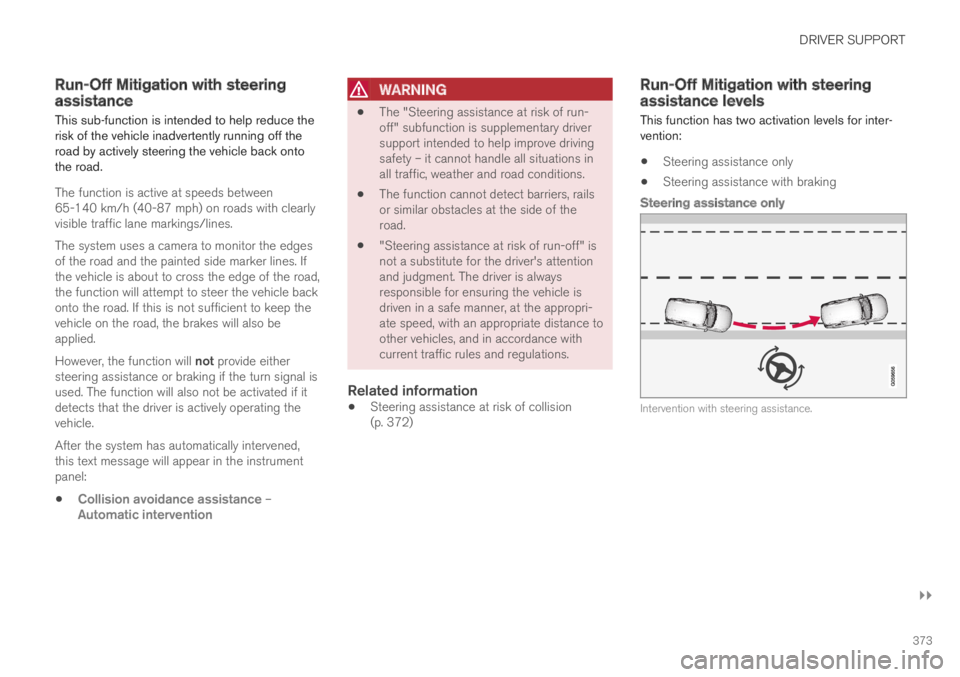
This function has two activation levels for inter-vention:
Steering assistance only
Steering assistance with braking
Steering assistance only
Intervention with steering assistance.
Page 378 of 669
||
DRIVER SUPPORT
* Option/accessory.376
However, the function will not provide steeringassistance if the turn signal is used. The functionwill also not be activated if it detects that thedriver is actively operating the vehicle.
After the system has automatically intervened,this text message will appear in the instrumentpanel:
Collision avoidance assistance –Automatic intervention
WARNING
The "Steering assistance at risk of head-on collision" subfunction is supplemen-tary driver support intended to improvedriving safety – it cannot handle all situa-tions in all traffic, weather and road condi-tions.
Pilot Assist is only activated if there is ahigh risk of collision – you must thereforenever wait for the function to intervene.
The function is not a substitute for thedriver's attention and judgment. The driveris always responsible for ensuring thevehicle is driven in a safe manner, at theappropriate speed, with an appropriatedistance to other vehicles, and in accord-ance with current traffic rules and regula-tions.
Related information
Steering assistance at risk of collision(p. 372)
Activating/deactivating Steering assistanceduring collision risks with oncoming vehicles(p. 376)
Limitations of steering assistance during col-lision risks from oncoming traffic (p. 377)
Activating/deactivating Steeringassistance during collision riskswith oncoming vehicles
The driver can choose to have this function Onor Off.
Use this button in the centerdisplay's Function view to turnthe function On and Off.
NOTE
When the Collision avoidance assistancefunction is deactivated, all subfunctions of thefollowing are deactivated:
Steering assistance at risk of run-off
Steering assistance at risk of head-oncollision
Steering assistance during collision risksfrom behind*
Although it is possible to deactivate the func-tion, the driver is advised to keep it activatedsince it can help improve driving safety inmost cases.
Page 380 of 669
DRIVER SUPPORT
* Option/accessory.378
Steering assistance during collision
risks from behind*
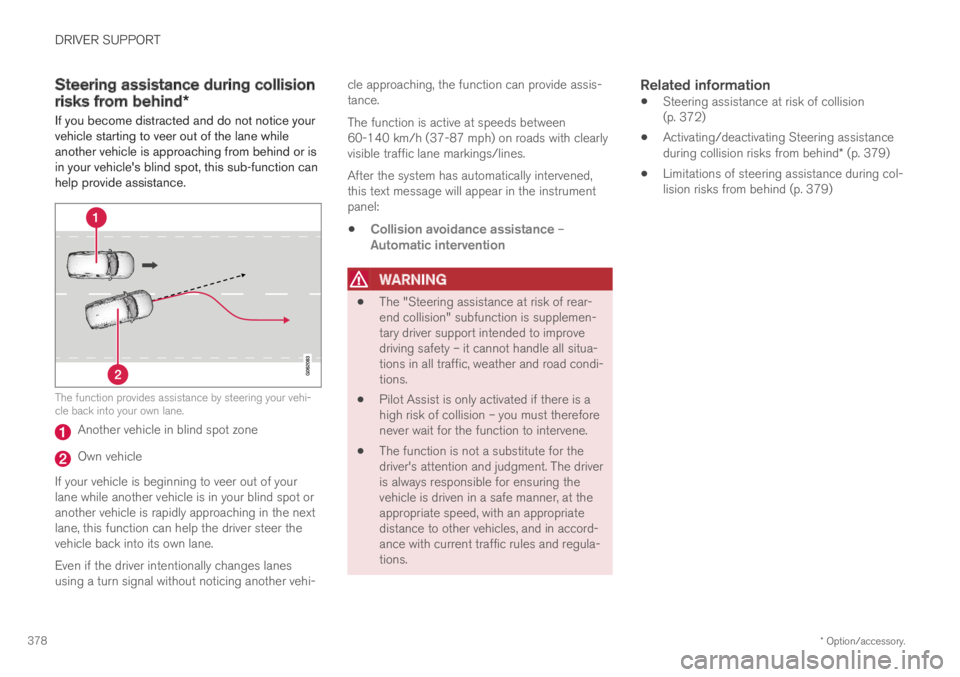
If you become distracted and do not notice yourvehicle starting to veer out of the lane whileanother vehicle is approaching from behind or isin your vehicle's blind spot, this sub-function canhelp provide assistance.
The function provides assistance by steering your vehi-cle back into your own lane.
Another vehicle in blind spot zone
Own vehicle
If your vehicle is beginning to veer out of yourlane while another vehicle is in your blind spot oranother vehicle is rapidly approaching in the nextlane, this function can help the driver steer thevehicle back into its own lane.
Even if the driver intentionally changes lanesusing a turn signal without noticing another vehi-
cle approaching, the function can provide assis-tance.
The function is active at speeds between60-140 km/h (37-87 mph) on roads with clearlyvisible traffic lane markings/lines.
After the system has automatically intervened,this text message will appear in the instrumentpanel:
Collision avoidance assistance –Automatic intervention
WARNING
The "Steering assistance at risk of rear-end collision" subfunction is supplemen-tary driver support intended to improvedriving safety – it cannot handle all situa-tions in all traffic, weather and road condi-tions.
Pilot Assist is only activated if there is ahigh risk of collision – you must thereforenever wait for the function to intervene.
The function is not a substitute for thedriver's attention and judgment. The driveris always responsible for ensuring thevehicle is driven in a safe manner, at theappropriate speed, with an appropriatedistance to other vehicles, and in accord-ance with current traffic rules and regula-tions.
Related information
Steering assistance at risk of collision(p. 372)
Activating/deactivating Steering assistanceduring collision risks from behind* (p. 379)
Limitations of steering assistance during col-lision risks from behind (p. 379)
Page 383 of 669
DRIVER SUPPORT
381
Symbols and messages for steeringassistance during collision risks
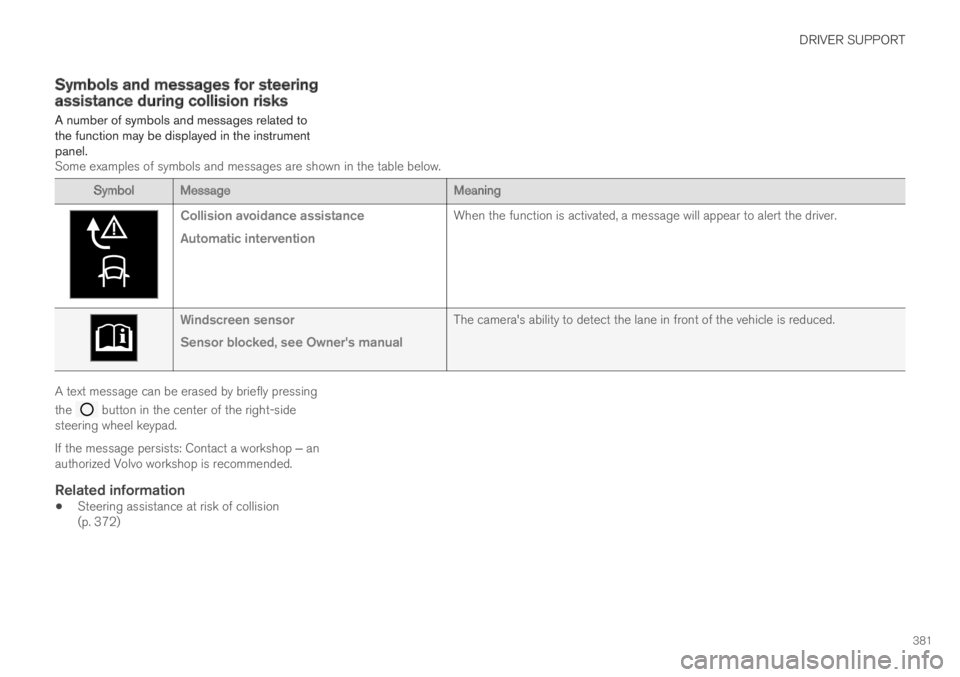
A number of symbols and messages related tothe function may be displayed in the instrumentpanel.Some examples of symbols and messages are shown in the table below.
Symbol MessageMeaning
Collision avoidance assistance
Automatic intervention
When the function is activated, a message will appear to alert the driver.
Windscreen sensor
Sensor blocked, see Owner's manual
The camera's ability to detect the lane in front of the vehicle is reduced.
A text message can be erased by briefly pressing
the button in the center of the right-sidesteering wheel keypad.
If the message persists: Contact a workshop ‒ anauthorized Volvo workshop is recommended.
Related information
Steering assistance at risk of collision(p. 372)
Page 389 of 669
DRIVER SUPPORT
* Option/accessory.387
Park Assist symbols and messages
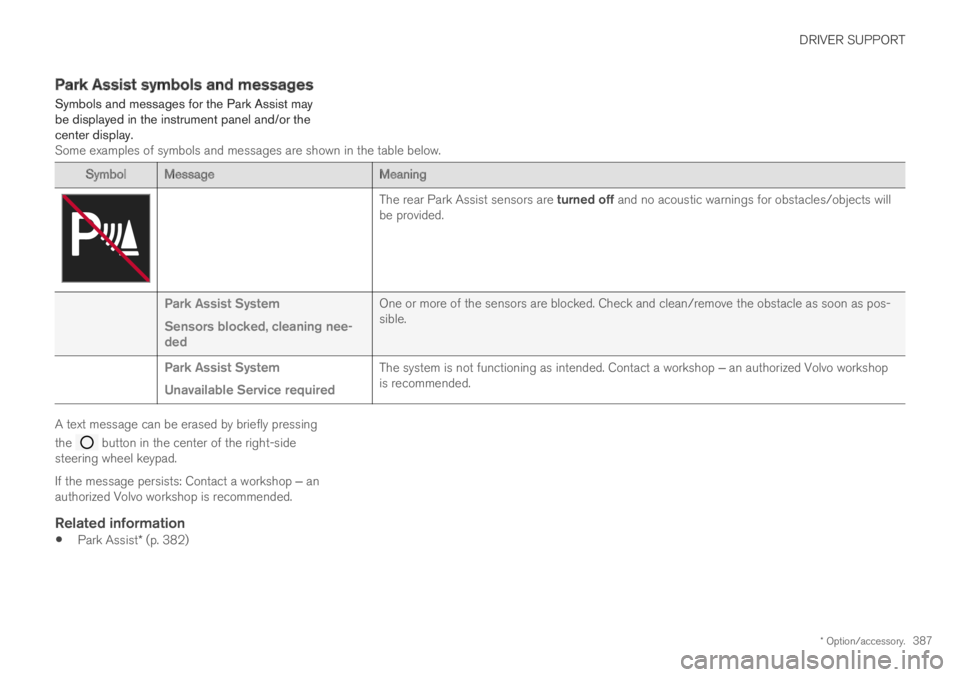
Symbols and messages for the Park Assist maybe displayed in the instrument panel and/or thecenter display.Some examples of symbols and messages are shown in the table below.
Symbol MessageMeaning
The rear Park Assist sensors are turned off and no acoustic warnings for obstacles/objects willbe provided.
Park Assist System
Sensors blocked, cleaning nee-ded
One or more of the sensors are blocked. Check and clean/remove the obstacle as soon as pos-sible.
Park Assist System
Unavailable Service required
The system is not functioning as intended. Contact a workshop ‒ an authorized Volvo workshopis recommended.
A text message can be erased by briefly pressing
the button in the center of the right-sidesteering wheel keypad.
If the message persists: Contact a workshop ‒ anauthorized Volvo workshop is recommended.
Related information
Park Assist* (p. 382)
Page 399 of 669
DRIVER SUPPORT
* Option/accessory.397
Park Assist Camera symbols andmessages
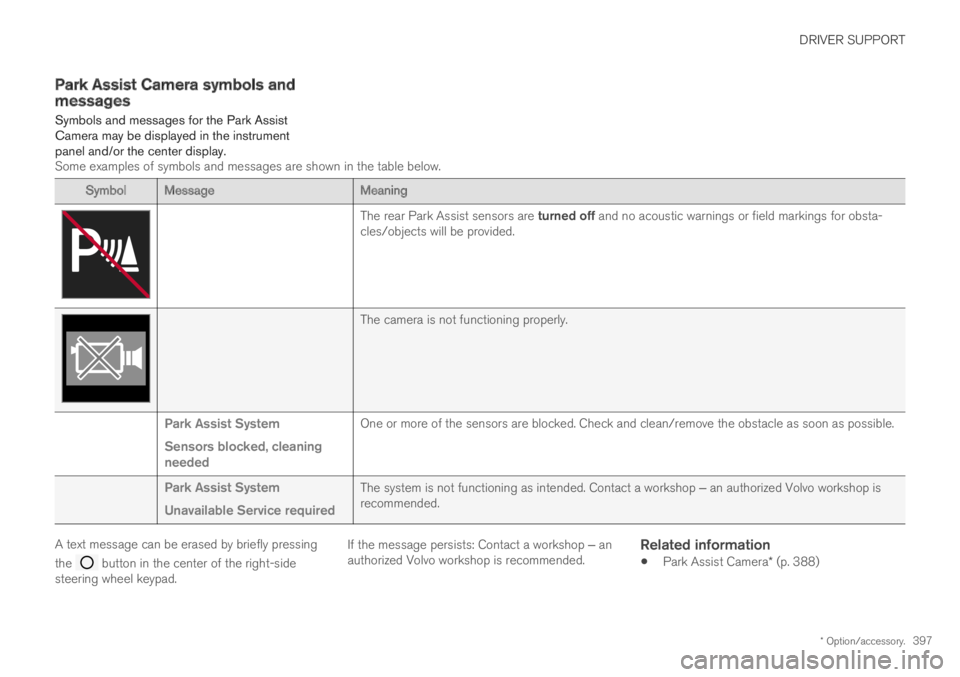
Symbols and messages for the Park AssistCamera may be displayed in the instrumentpanel and/or the center display.Some examples of symbols and messages are shown in the table below.
Symbol MessageMeaning
The rear Park Assist sensors are turned off and no acoustic warnings or field markings for obsta-cles/objects will be provided.
The camera is not functioning properly.
Park Assist System
Sensors blocked, cleaningneeded
One or more of the sensors are blocked. Check and clean/remove the obstacle as soon as possible.
Park Assist System
Unavailable Service required
The system is not functioning as intended. Contact a workshop ‒ an authorized Volvo workshop isrecommended.
A text message can be erased by briefly pressing
the button in the center of the right-sidesteering wheel keypad.
If the message persists: Contact a workshop ‒ anauthorized Volvo workshop is recommended.
Related information
Park Assist Camera* (p. 388)
Page 408 of 669
DRIVER SUPPORT
* Option/accessory.406
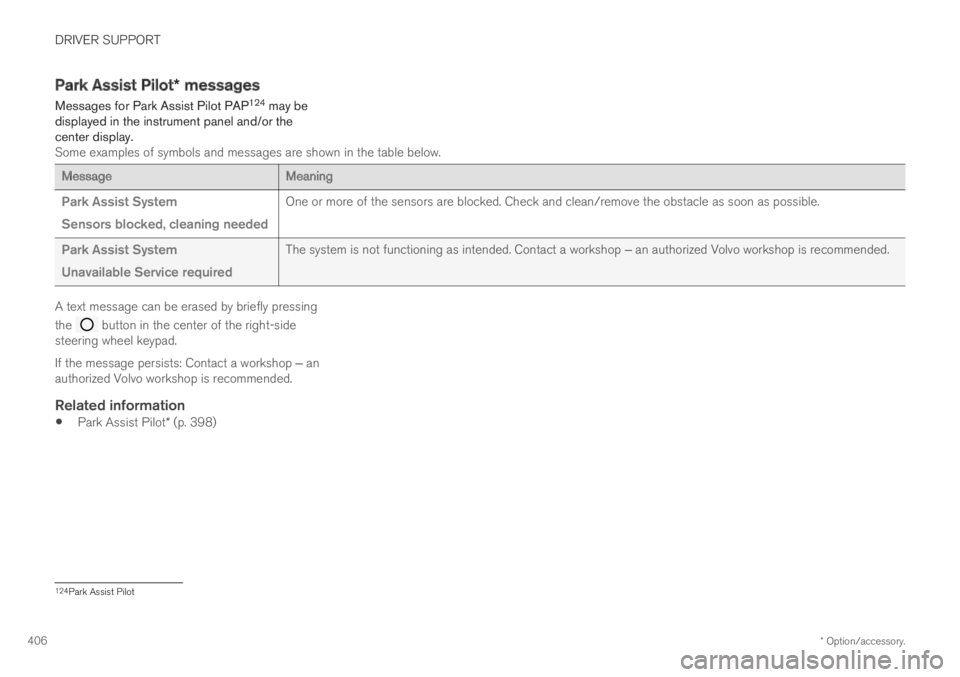
Park Assist Pilot* messages
Messages for Park Assist Pilot PAP124 may bedisplayed in the instrument panel and/or thecenter display.Some examples of symbols and messages are shown in the table below.
MessageMeaning
Park Assist System
Sensors blocked, cleaning needed
One or more of the sensors are blocked. Check and clean/remove the obstacle as soon as possible.
Park Assist System
Unavailable Service required
The system is not functioning as intended. Contact a workshop ‒ an authorized Volvo workshop is recommended.
A text message can be erased by briefly pressing
the button in the center of the right-sidesteering wheel keypad.
If the message persists: Contact a workshop ‒ anauthorized Volvo workshop is recommended.
Related information
Park Assist Pilot* (p. 398)
124Park Assist Pilot
Page 410 of 669

HYBRID INFORMATION
408
General information about TwinEngine
Twin Engine vehicles are driven just like anyother vehicle, but certain functions differ from avehicle powered exclusively by gasoline. Theelectric motor powers the vehicle primarily at lowspeeds; the gasoline engine is used at higherspeeds or during more active driving.
The instrument panel displays Twin Engine-spe-cific information - charging information, selecteddrive mode, distance to discharged battery andhybrid battery charge level.
Different drive modes can be selected while driv-ing, e.g. electric power only or, if more power isneeded, a combination of electric and gasolinepower. The vehicle calculates the optimal combi-nation of driveability, driving experience, environ-mental impact and fuel economy for the selecteddrive mode.
In order to function optimally, the hybrid battery(and its electrical drive systems) and the gasolineengine (and its drive systems) must be at thecorrect operating temperature. Battery capacitycan be considerably reduced if the battery is toocold or too hot. Preconditioning prepares thevehicle's drive systems and passenger compart-ment before driving to help reduce both wear andenergy consumption. It also helps increase thehybrid battery's range.
The hybrid battery which powers the electricmotor is recharged using the charging cable. It
can also be recharged during light braking andthrough engine braking in gear position B. Thecombustion engine can also help recharge thehybrid battery.
Important
No electrical current
Keep in mind that if there is no electrical currentto the vehicle, i.e. the ignition is switched off orthe start battery is discharged, certain functionssuch as brakes, power steering, etc. will not work.
WARNING
If the vehicle does not have electrical currentand both the electric motor and the gasolineengine are switched off, the brakes cannot beused to stop the vehicle.
Towing not permitted
Never tow a Twin Engine vehicle behind anothervehicle, as this could damage the electric motor.
Exterior engine noise
WARNING
Please be aware that there is no sound fromthe engine when the vehicle is being poweredby the electric motor and it may be difficult todetect by children, pedestrians, cyclists andanimals. This is especially true at low speeds.
High-voltage electrical current
WARNING
A number of electrical components in TwinEngine Plug-in Hybrid vehicles use high-volt-age current and can be extremely dangerousif handled incorrectly. These components andany orange wiring in the vehicle may only behandled by trained and qualified Volvo servicetechnicians.
Do not touch anything that is not clearly descri-bed in this Owner's Manual.
Related information
Charging the hybrid battery (p. 409)
Hybrid gauge (p. 83)
Drive modes (p. 446)
Starting and stopping preconditioning(p. 225)
Hybrid battery (p. 605)
Factors affecting electric motor range(p. 455)